




Restore Backitup Problem mit VIS-Instanzen
-
@gargano also das log hat schon komische Dinge drin. Aber nichts offensichtlich kaputtes. Und ist ja noch js-Controller 3.3 ;-)) von daher wäre ein restore auf nem Controller 4 interessant weil da wurden auch wieder Dinge gefixt.
Wenn für dich ok wäre auch ne idee das du mir mal Backup file schickst und ich es mal genau checken kann
@apollon77 ähh, js-controller 3.3 kann eigentlich nicht sein. da ich den auf den aktuellen 4.x gezogen habe.
Aber ich mach das ganze nochmal und meld mich dann.
-
@apollon77 ähh, js-controller 3.3 kann eigentlich nicht sein. da ich den auf den aktuellen 4.x gezogen habe.
Aber ich mach das ganze nochmal und meld mich dann.
@gargano aaaaahhhhhhhh ... ok also der Restore urde mit 3.3.22 gemacht, DANACH hast du contreolelr aktualisiert
2022-02-24 16:30:18.830 - info: host.raspberrypi iobroker.js-controller version 4.0.15 js-controller starting
Da war ja aber restore schon rum
bze dann
2022-02-24 17:17:14.508 - info: host.raspberrypi iobroker.js-controller version 4.0.15 js-controller starting
Und dann hattest Du DNS issues ... (EAGAIN)
Beitrag hat geholfen? Votet rechts unten im Beitrag :-) https://paypal.me/Apollon77 / https://github.com/sponsors/Apollon77
- Debug-Log für Instanz einschalten? Admin -> Instanzen -> Expertenmodus -> Instanz aufklappen - Loglevel ändern
- Logfiles auf Platte /opt/iobroker/log/… nutzen, Admin schneidet Zeilen ab
-
@gargano aaaaahhhhhhhh ... ok also der Restore urde mit 3.3.22 gemacht, DANACH hast du contreolelr aktualisiert
2022-02-24 16:30:18.830 - info: host.raspberrypi iobroker.js-controller version 4.0.15 js-controller starting
Da war ja aber restore schon rum
bze dann
2022-02-24 17:17:14.508 - info: host.raspberrypi iobroker.js-controller version 4.0.15 js-controller starting
Und dann hattest Du DNS issues ... (EAGAIN)
@apollon77 So, jetzt habe ich nochmal installiert und den Restore nochmal durchgeführt. Seit 13:28 keine Einträge mehr im Log, ist also fertig.
Das Ergebnis :
Z.B. Vis-Material und andere Instanzen mit VIS- im Namen Version 1.4.12 , genau die gleiche wie VIS selber.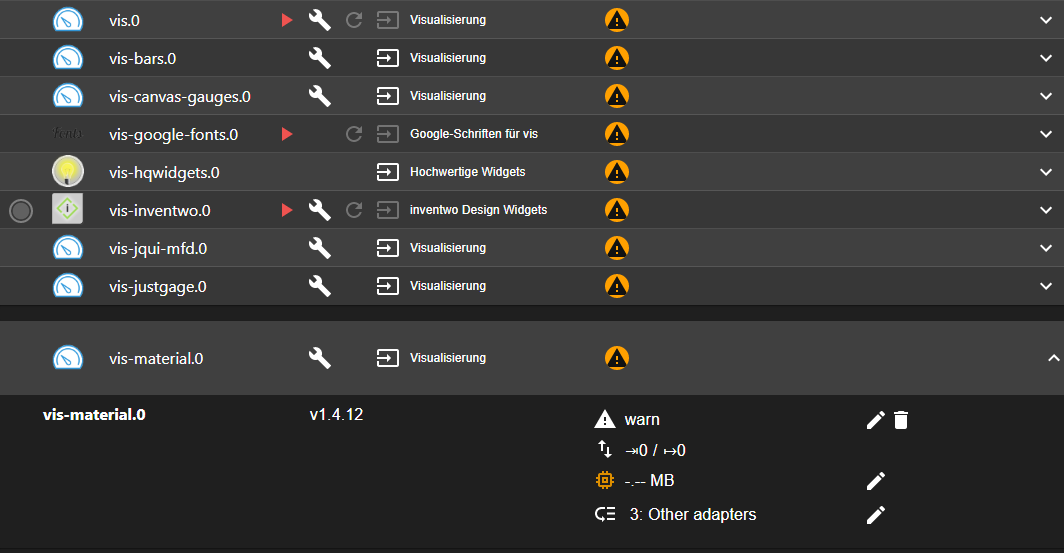
Nach dem iobroker Install mit
curl -sL https://iobroker.net/install.sh | bash -Used repository: beta Adapter "admin" : 5.3.1 , installed 5.3.1 Adapter "backitup" : 2.3.3 , installed 2.3.3 Adapter "discovery" : 2.8.0 , installed 2.7.5 [Updatable] Controller "js-controller": 4.0.15 , installed 4.0.15Also aktuellen js-controller 4.0.15
Nach dem Restore zeigt adapter list
iob list adapter
system.adapter.vis-material            : vis-material   - v0.1.3
Der Adapter zeigt es richtig, jedoch im Objekt steht 1.4.12 genauso wie im Admin Instanzen
objekt material

{
  "_id": "system.adapter.vis-material.0",
  "type": "instance",
  "common": {
    "name": "vis",
    "version": "1.4.12",
    "title": "material widgets",
    "desc": {
      "en": "Graphical user interface for iobroker",
      "de": "Grafische Benutzeroberfläche für iobroker",
      "ru": "Графический пользовательский интерфейс для iobroker",
      "pt": "Interface gráfica do usuário para iobroker",
      "fr": "Interface utilisateur graphique pour iobroker",
      "nl": "Grafische gebruikersinterface voor iobroker",
      "it": "Interfaccia utente grafica per iobroker",
      "es": "Interfaz gráfica de usuario para iobroker",
      "pl": "Graficzny interfejs użytkownika dla iobroker",
      "zh-cn": "iobroker的图形化用户界面"
    },
    "platform": "Javascript/Node.js",
    "icon": "vis.png",
    "enabled": false,
    "mode": "once",
    "extIcon": "https://raw.githubusercontent.com/iobroker/iobroker.vis/master/admin/vis.png",
    "keywords": [
      "DashUI",
      "GUI",
      "graphical",
      "scada"
    ],
    "readme": "https://github.com/iobroker/iobroker.vis/blob/master/README.md",
    "authors": [
      "bluefox <dogafox@gmail.com>"
    ],
    "localLink": "%web_protocol%://%ip%:%web_port%/vis/edit.html",
    "license": "CC-BY-NC-4.0",
    "dependencies": [
      {
        "web": ">=3.0.12"
      },
      {
        "js-controller": ">=2.0.0"
      }
    ],
    "onlyWWW": true,
    "noConfig": false,
    "singleton": true,
    "type": "visualization",
    "restartAdapters": [
      "vis"
    ],
    "installedFrom": "iobroker.vis@1.4.12",
    "installedVersion": "1.4.12",
    "host": "raspberrypi",
    "loglevel": "warn",
    "titleLang": {
      "en": "Visualisation",
      "de": "Visualisierung",
      "ru": "Визуализация",
      "pt": "Visualização",
      "nl": "Visualisatie",
      "fr": "Visualisation",
      "it": "Visualizzazione",
      "es": "Visualización",
      "pl": "Wizualizacja",
      "zh-cn": "可视化"
    },
    "localLinks": {
      "_default": "%web_protocol%://%ip%:%web_port%/vis/edit.html"
    },
    "serviceStates": "lib/states.js",
    "connectionType": "local",
    "dataSource": "push",
    "tier": 3,
    "adminUI": {
      "config": "materialize"
    },
    "compact": true,
    "materialize": true,
    "welcomeScreen": {
      "link": "vis/index.html",
      "name": "vis runtime",
      "img": "vis/img/favicon.png",
      "color": "#ffe9c8",
      "order": 0
    },
    "welcomeScreenPro": {
      "link": "vis/edit.html",
      "name": "vis editor",
      "img": "vis/img/faviconEdit.png",
      "color": "#c8ffe1",
      "order": 1
    }
  },
  "native": {
    "dependencies": [],
    "defaultFileMode": 1604,
    "license": "",
    "useLicenseManager": 0
  },
  "from": "system.host.raspberrypi.cli",
  "ts": 1645877808521,
  "acl": {
    "object": 1636,
    "owner": "system.user.admin",
    "ownerGroup": "system.group.administrator"
  },
  "user": "system.user.admin",
  "protectedNative": [],
  "encryptedNative": [],
  "notifications": [],
  "instanceObjects": [
    {
      "_id": "",
      "type": "meta",
      "common": {
        "name": "user files and images for vis",
        "type": "meta.user"
      },
      "native": {}
    },
    {
      "_id": "control",
      "type": "channel",
      "common": {
        "name": "Control vis"
      },
      "native": {}
    },
    {
      "_id": "control.instance",
      "type": "state",
      "common": {
        "name": "Control vis",
        "type": "string",
        "desc": "Write here browser instance ID to control or 'FFFFFFFF' to control all instances"
      },
      "native": {}
    },
    {
      "_id": "control.command",
      "type": "state",
      "common": {
        "name": "Command for vis",
        "type": "string",
        "desc": "Writing this variable act as the trigger. Instance and data must be preset before 'command' will be written. 'changedView' will be signalled too",
        "states": {
          "alert": "alert",
          "changeView": "changeView",
          "refresh": "refresh",
          "reload": "reload",
          "dialog": "dialog",
          "popup": "popup",
          "playSound": "playSound",
          "changedView": "changedView",
          "tts": "tts"
        }
      },
      "native": {}
    },
    {
      "_id": "control.data",
      "type": "state",
      "common": {
        "name": "Data for control vis",
        "type": "string",
        "desc": "Used for: alert, changeView, dialog, popup, playSound, changedView"
      },
      "native": {}
    }
  ],
  "objects": []
}
Hier auch noch der Log
log_nach_restore2602022.txt -
@apollon77 So, jetzt habe ich nochmal installiert und den Restore nochmal durchgeführt. Seit 13:28 keine Einträge mehr im Log, ist also fertig.
Das Ergebnis :
Z.B. Vis-Material und andere Instanzen mit VIS- im Namen Version 1.4.12 , genau die gleiche wie VIS selber.Nach dem iobroker Install mit
curl -sL https://iobroker.net/install.sh | bash -Used repository: beta Adapter "admin" : 5.3.1 , installed 5.3.1 Adapter "backitup" : 2.3.3 , installed 2.3.3 Adapter "discovery" : 2.8.0 , installed 2.7.5 [Updatable] Controller "js-controller": 4.0.15 , installed 4.0.15Also aktuellen js-controller 4.0.15
Nach dem Restore zeigt adapter list
iob list adapter
system.adapter.vis-material            : vis-material   - v0.1.3
Der Adapter zeigt es richtig, jedoch im Objekt steht 1.4.12 genauso wie im Admin Instanzen
objekt material

{
  "_id": "system.adapter.vis-material.0",
  "type": "instance",
  "common": {
    "name": "vis",
    "version": "1.4.12",
    "title": "material widgets",
    "desc": {
      "en": "Graphical user interface for iobroker",
      "de": "Grafische Benutzeroberfläche für iobroker",
      "ru": "Графический пользовательский интерфейс для iobroker",
      "pt": "Interface gráfica do usuário para iobroker",
      "fr": "Interface utilisateur graphique pour iobroker",
      "nl": "Grafische gebruikersinterface voor iobroker",
      "it": "Interfaccia utente grafica per iobroker",
      "es": "Interfaz gráfica de usuario para iobroker",
      "pl": "Graficzny interfejs użytkownika dla iobroker",
      "zh-cn": "iobroker的图形化用户界面"
    },
    "platform": "Javascript/Node.js",
    "icon": "vis.png",
    "enabled": false,
    "mode": "once",
    "extIcon": "https://raw.githubusercontent.com/iobroker/iobroker.vis/master/admin/vis.png",
    "keywords": [
      "DashUI",
      "GUI",
      "graphical",
      "scada"
    ],
    "readme": "https://github.com/iobroker/iobroker.vis/blob/master/README.md",
    "authors": [
      "bluefox <dogafox@gmail.com>"
    ],
    "localLink": "%web_protocol%://%ip%:%web_port%/vis/edit.html",
    "license": "CC-BY-NC-4.0",
    "dependencies": [
      {
        "web": ">=3.0.12"
      },
      {
        "js-controller": ">=2.0.0"
      }
    ],
    "onlyWWW": true,
    "noConfig": false,
    "singleton": true,
    "type": "visualization",
    "restartAdapters": [
      "vis"
    ],
    "installedFrom": "iobroker.vis@1.4.12",
    "installedVersion": "1.4.12",
    "host": "raspberrypi",
    "loglevel": "warn",
    "titleLang": {
      "en": "Visualisation",
      "de": "Visualisierung",
      "ru": "Визуализация",
      "pt": "Visualização",
      "nl": "Visualisatie",
      "fr": "Visualisation",
      "it": "Visualizzazione",
      "es": "Visualización",
      "pl": "Wizualizacja",
      "zh-cn": "可视化"
    },
    "localLinks": {
      "_default": "%web_protocol%://%ip%:%web_port%/vis/edit.html"
    },
    "serviceStates": "lib/states.js",
    "connectionType": "local",
    "dataSource": "push",
    "tier": 3,
    "adminUI": {
      "config": "materialize"
    },
    "compact": true,
    "materialize": true,
    "welcomeScreen": {
      "link": "vis/index.html",
      "name": "vis runtime",
      "img": "vis/img/favicon.png",
      "color": "#ffe9c8",
      "order": 0
    },
    "welcomeScreenPro": {
      "link": "vis/edit.html",
      "name": "vis editor",
      "img": "vis/img/faviconEdit.png",
      "color": "#c8ffe1",
      "order": 1
    }
  },
  "native": {
    "dependencies": [],
    "defaultFileMode": 1604,
    "license": "",
    "useLicenseManager": 0
  },
  "from": "system.host.raspberrypi.cli",
  "ts": 1645877808521,
  "acl": {
    "object": 1636,
    "owner": "system.user.admin",
    "ownerGroup": "system.group.administrator"
  },
  "user": "system.user.admin",
  "protectedNative": [],
  "encryptedNative": [],
  "notifications": [],
  "instanceObjects": [
    {
      "_id": "",
      "type": "meta",
      "common": {
        "name": "user files and images for vis",
        "type": "meta.user"
      },
      "native": {}
    },
    {
      "_id": "control",
      "type": "channel",
      "common": {
        "name": "Control vis"
      },
      "native": {}
    },
    {
      "_id": "control.instance",
      "type": "state",
      "common": {
        "name": "Control vis",
        "type": "string",
        "desc": "Write here browser instance ID to control or 'FFFFFFFF' to control all instances"
      },
      "native": {}
    },
    {
      "_id": "control.command",
      "type": "state",
      "common": {
        "name": "Command for vis",
        "type": "string",
        "desc": "Writing this variable act as the trigger. Instance and data must be preset before 'command' will be written. 'changedView' will be signalled too",
        "states": {
          "alert": "alert",
          "changeView": "changeView",
          "refresh": "refresh",
          "reload": "reload",
          "dialog": "dialog",
          "popup": "popup",
          "playSound": "playSound",
          "changedView": "changedView",
          "tts": "tts"
        }
      },
      "native": {}
    },
    {
      "_id": "control.data",
      "type": "state",
      "common": {
        "name": "Data for control vis",
        "type": "string",
        "desc": "Used for: alert, changeView, dialog, popup, playSound, changedView"
      },
      "native": {}
    }
  ],
  "objects": []
}
Hier auch noch der Log
log_nach_restore2602022.txt@gargano Ok, packst Du mir das bitte in ein GitHub Issue im js-controler Repo. Müssen wir ansehen.
Versuch mal ob ein "iob upload all" das korrigiert - und poste bitte mal das Log davon
PS: Und ja ich sehe das problem ... interessant das das bisher noch nicht gemeldet wurde
Beitrag hat geholfen? Votet rechts unten im Beitrag :-) https://paypal.me/Apollon77 / https://github.com/sponsors/Apollon77
- Debug-Log für Instanz einschalten? Admin -> Instanzen -> Expertenmodus -> Instanz aufklappen - Loglevel ändern
- Logfiles auf Platte /opt/iobroker/log/… nutzen, Admin schneidet Zeilen ab
-
@gargano Ok, packst Du mir das bitte in ein GitHub Issue im js-controler Repo. Müssen wir ansehen.
Versuch mal ob ein "iob upload all" das korrigiert - und poste bitte mal das Log davon
PS: Und ja ich sehe das problem ... interessant das das bisher noch nicht gemeldet wurde
@apollon77 Das hilft
iob upload all{ "_id": "system.adapter.vis-material.0", "type": "instance", "common": { "name": "vis-material", "version": "0.1.3", "title": "material widgets", "desc": { "en": "material Widgets for ioBroker.vis", "de": "material Widgets für ioBroker.vis", "ru": "material Widgets для ioBroker.vis", "pt": "molde de Widgets para o ioBroker.vis", "fr": "modèle de Widgets pour ioBroker.vis", "nl": "sjabloon widgets voor ioBroker.vis", "it": "Interfaccia utente grafica per iobroker", "es": "Interfaz gráfica de usuario para iobroker", "pl": "Graficzny interfejs użytkownika dla iobroker", "zh-cn": "iobroker的图形化用户界面" }, "platform": "Javascript/Node.js", "icon": "material.png", "enabled": false, "mode": "once", "extIcon": "https://raw.githubusercontent.com/nisiode/ioBroker.vis-material/master/admin/material.png", "keywords": [ "material", "vis", "GUI", "graphical", "scada" ], "readme": "https://github.com/nisiode/ioBroker.vis-material/blob/master/README.md", "authors": [ "nisiode <nisio.air@gmail.com>" ], "localLink": "%web_protocol%://%ip%:%web_port%/vis/edit.html", "license": "MIT", "dependencies": [ "vis" ], "onlyWWW": true, "noConfig": true, "singleton": true, "type": "visualization-widgets", "restartAdapters": [ "vis" ], "installedFrom": "iobroker.vis-material@0.1.3", "installedVersion": "0.1.3", "host": "raspberrypi", "loglevel": "warn", "titleLang": { "en": "Visualisation", "de": "Visualisierung", "ru": "Визуализация", "pt": "Visualização", "nl": "Visualisatie", "fr": "Visualisation", "it": "Visualizzazione", "es": "Visualización", "pl": "Wizualizacja", "zh-cn": "可视化" }, "localLinks": { "_default": "%web_protocol%://%ip%:%web_port%/vis/edit.html" }, "serviceStates": "lib/states.js", "connectionType": "local", "dataSource": "push", "tier": 3, "adminUI": { "config": "materialize" }, "materialize": true, "welcomeScreen": { "link": "vis/index.html", "name": "vis runtime", "img": "vis/img/favicon.png", "color": "#ffe9c8", "order": 0 }, "welcomeScreenPro": { "link": "vis/edit.html", "name": "vis editor", "img": "vis/img/faviconEdit.png", "color": "#c8ffe1", "order": 1 } }, "native": { "dependencies": [], "defaultFileMode": 1604, "license": "", "useLicenseManager": 0 }, "from": "system.host.raspberrypi.cli", "ts": 1645886737727, "acl": { "object": 1636, "owner": "system.user.admin", "ownerGroup": "system.group.administrator" }, "user": "system.user.admin", "protectedNative": [], "encryptedNative": [], "notifications": [], "instanceObjects": [], "objects": [] } -
@apollon77 Das hilft
iob upload all{ "_id": "system.adapter.vis-material.0", "type": "instance", "common": { "name": "vis-material", "version": "0.1.3", "title": "material widgets", "desc": { "en": "material Widgets for ioBroker.vis", "de": "material Widgets für ioBroker.vis", "ru": "material Widgets для ioBroker.vis", "pt": "molde de Widgets para o ioBroker.vis", "fr": "modèle de Widgets pour ioBroker.vis", "nl": "sjabloon widgets voor ioBroker.vis", "it": "Interfaccia utente grafica per iobroker", "es": "Interfaz gráfica de usuario para iobroker", "pl": "Graficzny interfejs użytkownika dla iobroker", "zh-cn": "iobroker的图形化用户界面" }, "platform": "Javascript/Node.js", "icon": "material.png", "enabled": false, "mode": "once", "extIcon": "https://raw.githubusercontent.com/nisiode/ioBroker.vis-material/master/admin/material.png", "keywords": [ "material", "vis", "GUI", "graphical", "scada" ], "readme": "https://github.com/nisiode/ioBroker.vis-material/blob/master/README.md", "authors": [ "nisiode <nisio.air@gmail.com>" ], "localLink": "%web_protocol%://%ip%:%web_port%/vis/edit.html", "license": "MIT", "dependencies": [ "vis" ], "onlyWWW": true, "noConfig": true, "singleton": true, "type": "visualization-widgets", "restartAdapters": [ "vis" ], "installedFrom": "iobroker.vis-material@0.1.3", "installedVersion": "0.1.3", "host": "raspberrypi", "loglevel": "warn", "titleLang": { "en": "Visualisation", "de": "Visualisierung", "ru": "Визуализация", "pt": "Visualização", "nl": "Visualisatie", "fr": "Visualisation", "it": "Visualizzazione", "es": "Visualización", "pl": "Wizualizacja", "zh-cn": "可视化" }, "localLinks": { "_default": "%web_protocol%://%ip%:%web_port%/vis/edit.html" }, "serviceStates": "lib/states.js", "connectionType": "local", "dataSource": "push", "tier": 3, "adminUI": { "config": "materialize" }, "materialize": true, "welcomeScreen": { "link": "vis/index.html", "name": "vis runtime", "img": "vis/img/favicon.png", "color": "#ffe9c8", "order": 0 }, "welcomeScreenPro": { "link": "vis/edit.html", "name": "vis editor", "img": "vis/img/faviconEdit.png", "color": "#c8ffe1", "order": 1 } }, "native": { "dependencies": [], "defaultFileMode": 1604, "license": "", "useLicenseManager": 0 }, "from": "system.host.raspberrypi.cli", "ts": 1645886737727, "acl": { "object": 1636, "owner": "system.user.admin", "ownerGroup": "system.group.administrator" }, "user": "system.user.admin", "protectedNative": [], "encryptedNative": [], "notifications": [], "instanceObjects": [], "objects": [] }@gargano haste mal noch das log von "Upload all" bzw die Ausgaben?
Beitrag hat geholfen? Votet rechts unten im Beitrag :-) https://paypal.me/Apollon77 / https://github.com/sponsors/Apollon77
- Debug-Log für Instanz einschalten? Admin -> Instanzen -> Expertenmodus -> Instanz aufklappen - Loglevel ändern
- Logfiles auf Platte /opt/iobroker/log/… nutzen, Admin schneidet Zeilen ab
-
@apollon77 Log :
2022-02-26 15:43:49.219 - info: host.raspberrypi stopInstance system.adapter.admin.0 (force=false, process=true) 2022-02-26 15:43:49.233 - info: host.raspberrypi stopInstance system.adapter.admin.0 send kill signal 2022-02-26 15:43:49.684 - info: host.raspberrypi stopInstance system.adapter.backitup.0 (force=false, process=true) 2022-02-26 15:43:49.688 - info: host.raspberrypi stopInstance system.adapter.backitup.0 send kill signal 2022-02-26 15:43:49.869 - info: host.raspberrypi instance system.adapter.admin.0 terminated with code 11 (ADAPTER_REQUESTED_TERMINATION) 2022-02-26 15:43:50.285 - info: host.raspberrypi instance system.adapter.backitup.0 terminated with code 11 (ADAPTER_REQUESTED_TERMINATION) 2022-02-26 15:43:52.335 - info: host.raspberrypi instance system.adapter.admin.0 started with pid 7071 2022-02-26 15:43:52.855 - info: host.raspberrypi instance system.adapter.backitup.0 started with pid 7078 2022-02-26 15:44:01.162 - info: host.raspberrypi Updating repository "Beta (latest)" under "http://download.iobroker.net/sources-dist-latest.json" -
@apollon77 Log :
2022-02-26 15:43:49.219 - info: host.raspberrypi stopInstance system.adapter.admin.0 (force=false, process=true) 2022-02-26 15:43:49.233 - info: host.raspberrypi stopInstance system.adapter.admin.0 send kill signal 2022-02-26 15:43:49.684 - info: host.raspberrypi stopInstance system.adapter.backitup.0 (force=false, process=true) 2022-02-26 15:43:49.688 - info: host.raspberrypi stopInstance system.adapter.backitup.0 send kill signal 2022-02-26 15:43:49.869 - info: host.raspberrypi instance system.adapter.admin.0 terminated with code 11 (ADAPTER_REQUESTED_TERMINATION) 2022-02-26 15:43:50.285 - info: host.raspberrypi instance system.adapter.backitup.0 terminated with code 11 (ADAPTER_REQUESTED_TERMINATION) 2022-02-26 15:43:52.335 - info: host.raspberrypi instance system.adapter.admin.0 started with pid 7071 2022-02-26 15:43:52.855 - info: host.raspberrypi instance system.adapter.backitup.0 started with pid 7078 2022-02-26 15:44:01.162 - info: host.raspberrypi Updating repository "Beta (latest)" under "http://download.iobroker.net/sources-dist-latest.json"@gargano Hehe, ja am Ende ist jetzt alles ok ... Er hat zwischendurch auch einige "Kaputt" geändert, aber dann danach wieder korrighiert. Also ja den kannten wir nich nicht und müssen wir ansehen
Beitrag hat geholfen? Votet rechts unten im Beitrag :-) https://paypal.me/Apollon77 / https://github.com/sponsors/Apollon77
- Debug-Log für Instanz einschalten? Admin -> Instanzen -> Expertenmodus -> Instanz aufklappen - Loglevel ändern
- Logfiles auf Platte /opt/iobroker/log/… nutzen, Admin schneidet Zeilen ab
-
@gargano Hehe, ja am Ende ist jetzt alles ok ... Er hat zwischendurch auch einige "Kaputt" geändert, aber dann danach wieder korrighiert. Also ja den kannten wir nich nicht und müssen wir ansehen
-
@apollon77 Issue ist angelegt.
@gargano Danke. Der bug ist auch im Controller 3.3. bisher keinem aufgefallen :-)) Da gabs den laut deinem Log auch schon
Beitrag hat geholfen? Votet rechts unten im Beitrag :-) https://paypal.me/Apollon77 / https://github.com/sponsors/Apollon77
- Debug-Log für Instanz einschalten? Admin -> Instanzen -> Expertenmodus -> Instanz aufklappen - Loglevel ändern
- Logfiles auf Platte /opt/iobroker/log/… nutzen, Admin schneidet Zeilen ab
-
@gargano Danke. Der bug ist auch im Controller 3.3. bisher keinem aufgefallen :-)) Da gabs den laut deinem Log auch schon
@apollon77 Bin nur drauf gekommen, weil ich gerade die Vorbereitungen für den Umzug auf 64-bit und Influx 2.x mache. Da sind mir die falschen Icons aufgefallen. Bis man dahinter kommt, wo genau jetzt das Problem ist dauert halt etwas. Aber das ist mir als Software Entwickler bekannt, da braucht man Ruhe und Geduld.
-
@apollon77 Bin nur drauf gekommen, weil ich gerade die Vorbereitungen für den Umzug auf 64-bit und Influx 2.x mache. Da sind mir die falschen Icons aufgefallen. Bis man dahinter kommt, wo genau jetzt das Problem ist dauert halt etwas. Aber das ist mir als Software Entwickler bekannt, da braucht man Ruhe und Geduld.
@gargano Kurze Frage noch: Nutzt du vllt redis als DB für Objects und States?
Beitrag hat geholfen? Votet rechts unten im Beitrag :-) https://paypal.me/Apollon77 / https://github.com/sponsors/Apollon77
- Debug-Log für Instanz einschalten? Admin -> Instanzen -> Expertenmodus -> Instanz aufklappen - Loglevel ändern
- Logfiles auf Platte /opt/iobroker/log/… nutzen, Admin schneidet Zeilen ab
-
@apollon77 ja
@gargano Sag mal bitte noch deine redis version ...
UND bitte auch mal "redis-cli" aufrufen und dort
eval 'return _VERSION' 0ausgeben lassenund bitte Ausgabe von
export|grep LANGBeitrag hat geholfen? Votet rechts unten im Beitrag :-) https://paypal.me/Apollon77 / https://github.com/sponsors/Apollon77
- Debug-Log für Instanz einschalten? Admin -> Instanzen -> Expertenmodus -> Instanz aufklappen - Loglevel ändern
- Logfiles auf Platte /opt/iobroker/log/… nutzen, Admin schneidet Zeilen ab
-
@gargano Sag mal bitte noch deine redis version ...
UND bitte auch mal "redis-cli" aufrufen und dort
eval 'return _VERSION' 0ausgeben lassenund bitte Ausgabe von
export|grep LANG -
@apollon77 ja, Ende der Woche
Wie erwähnt, ich bin dann mal weg@gargano Alles klar, kein Stress, wir glauben wir habens gefunden.
Es scheint so zu sein das die "Vergleichslogik" bei Zeichenketten in Redis abhängig ist vom eingestellen Locale des Systems. Bei allen meinen Systemen und allen testsystemen ist dort "LANG=C" gesetzt und damit passiert der Effekt nicht. Wenn aber ein System jetzt dort "de-DE.UTF-8" gesetzt ist dann sortiert der Redis scheinbar plötzlich anders und deswegen passiert dieser komische Effekt ... Wir überlegen mal was wir tun können langfristig ...
Beitrag hat geholfen? Votet rechts unten im Beitrag :-) https://paypal.me/Apollon77 / https://github.com/sponsors/Apollon77
- Debug-Log für Instanz einschalten? Admin -> Instanzen -> Expertenmodus -> Instanz aufklappen - Loglevel ändern
- Logfiles auf Platte /opt/iobroker/log/… nutzen, Admin schneidet Zeilen ab
-
https://forum.iobroker.net/topic/52976/wichtiger-hinweis-für-redis-installationen Das sollte die Lösung sein
-
@gargano Alles klar, kein Stress, wir glauben wir habens gefunden.
Es scheint so zu sein das die "Vergleichslogik" bei Zeichenketten in Redis abhängig ist vom eingestellen Locale des Systems. Bei allen meinen Systemen und allen testsystemen ist dort "LANG=C" gesetzt und damit passiert der Effekt nicht. Wenn aber ein System jetzt dort "de-DE.UTF-8" gesetzt ist dann sortiert der Redis scheinbar plötzlich anders und deswegen passiert dieser komische Effekt ... Wir überlegen mal was wir tun können langfristig ...
-
@apollon77 Also noch die Antwort zu Deiner Frage, die Lösung habt Ihr ja schon.
redis cli  eval 'return _VERSION' 0
"Lua 5.1"

export|grep LANG
declare -x LANG="en_GB.UTF-8"


Hey! Du scheinst an dieser Unterhaltung interessiert zu sein, hast aber noch kein Konto.
Hast du es satt, bei jedem Besuch durch die gleichen Beiträge zu scrollen? Wenn du dich für ein Konto anmeldest, kommst du immer genau dorthin zurück, wo du zuvor warst, und kannst dich über neue Antworten benachrichtigen lassen (entweder per E-Mail oder Push-Benachrichtigung). Du kannst auch Lesezeichen speichern und Beiträge positiv bewerten, um anderen Community-Mitgliedern deine Wertschätzung zu zeigen.
Mit deinem Input könnte dieser Beitrag noch besser werden 💗
Registrieren Anmelden457
Online33.0k
Benutzer83.6k
Themen1.3m
Beiträge