Skip to content
  • Home
  • Aktuell
  • Tags
  • 0 Ungelesen 0
  • Kategorien
  • Unreplied
  • Beliebt
  • GitHub
  • Docu
  • Hilfe
Skins
  • Light
  • Brite
  • Cerulean
  • Cosmo
  • Flatly
  • Journal
  • Litera
  • Lumen
  • Lux
  • Materia
  • Minty
  • Morph
  • Pulse
  • Sandstone
  • Simplex
  • Sketchy
  • Spacelab
  • United
  • Yeti
  • Zephyr
  • Dark
  • Cyborg
  • Darkly
  • Quartz
  • Slate
  • Solar
  • Superhero
  • Vapor

  • Standard: (Kein Skin)
  • Kein Skin
Einklappen
ioBroker Logo

Community Forum

donate donate
  1. ioBroker Community Home
  2. Deutsch
  3. ioBroker Allgemein
  4. Fehler 25 bei VIS-Adapter Installation

NEWS

  • Jahresrückblick 2025 – unser neuer Blogbeitrag ist online! ✨
    BluefoxB
    Bluefox
    17
    1
    3.5k

  • Neuer Blogbeitrag: Monatsrückblick - Dezember 2025 🎄
    BluefoxB
    Bluefox
    13
    1
    1.1k

  • Weihnachtsangebot 2025! 🎄
    BluefoxB
    Bluefox
    25
    1
    2.5k

Fehler 25 bei VIS-Adapter Installation

Geplant Angeheftet Gesperrt Verschoben ioBroker Allgemein
14 Beiträge 4 Kommentatoren 869 Aufrufe 3 Watching
  • Älteste zuerst
  • Neuste zuerst
  • Meiste Stimmen
Antworten
  • In einem neuen Thema antworten
Anmelden zum Antworten
Dieses Thema wurde gelöscht. Nur Nutzer mit entsprechenden Rechten können es sehen.
  • I IbizaGT

    Hallo Leute,

    wer kann helfen?

    ich bin mit dem ioBroker von Raspi3 auf Raspi4 umgezogen...

    jetzt hatte ich das Problem das VIS nicht funktioniert hat.
    Habe die Instanz gelöscht und wollte neu installieren.
    Jetzt kommt folgender FEHLER:

    $ ./iobroker url "https://github.com/ioBroker/ioBroker.vis/tarball/master" vis
    install ioBroker/ioBroker.vis#master
    NPM version: 6.14.15
    npm install ioBroker/ioBroker.vis#master --loglevel error --prefix "/opt/iobroker" (System call)
    npm ERR! code ELIFECYCLE
    npm ERR! errno 6
    npm ERR! iobroker.vis@1.4.7 install: node main.js --install
    npm ERR! Exit status 6npm ERR! npm ERR! Failed at the iobroker.vis@1.4.7 install script.npm ERR! This is probably not a problem with npm. There is likely additional logging output above.

    npm ERR! A complete log of this run can be found in:npm ERR! /home/iobroker/.npm/_logs/2022-01-09T14_14_17_355Z-debug.log
    ERROR: host.raspberrypi Cannot install ioBroker/ioBroker.vis#master: 6
    ERROR: process exited with code 25

    WAS KANN ICH DA MACHEN?

    GlasfaserG Offline
    GlasfaserG Offline
    Glasfaser
    schrieb am zuletzt editiert von
    #4

    @ibizagt sagte in Fehler 25 bei VIS-Adapter Installation:

    npm ERR! iobroker.vis@1.4.7 install: node main.js --install

    Zur info für dich ...

    gehe erstmal auf die 1.4.5 STABLE

    Siehe hier :
    https://forum.iobroker.net/topic/51226/wiederherstellung-nach-neuinstallation-backitup-probleme/6

    Synology 918+ 16GB - ioBroker in Docker v9 , VISO auf Trekstor Primebook C13 13,3" , Hikvision Domkameras mit Surveillance Station .. CCU RaspberryMatic in Synology VM .. Zigbee CC2538+CC2592 .. Sonoff .. KNX .. Modbus ..

    1 Antwort Letzte Antwort
    0
    • Thomas BraunT Thomas Braun

      @glasfaser
      Aus github gezogen Alpha...

      @IbizaGT

      Ordentlich installieren, dann kann man weiter sehen.
      1.4.5 ist soweit ich weiß die aktuelle stabile Version.

      I Offline
      I Offline
      IbizaGT
      schrieb am zuletzt editiert von
      #5

      @thomas-braun

      ich bekomme es aber nicht installiert....

      bekomme immer den ERROR Code 25

      Was mache ich falsch?

      $ ./iobroker add vis --host raspberrypi
      NPM version: 6.14.15
      npm install iobroker.vis@1.4.7 --loglevel error --prefix "/opt/iobroker" (System call)
      npm ERR! code ELIFECYCLEnpm ERR! errno 6
      npm ERR! iobroker.vis@1.4.7 install: node main.js --installnpm ERR! Exit status 6npm ERR! npm ERR! Failed at the iobroker.vis@1.4.7 install script.npm ERR! This is probably not a problem with npm. There is likely additional logging output above.
      npm ERR! A complete log of this run can be found in:npm ERR! /home/iobroker/.npm/_logs/2022-01-09T15_00_31_841Z-debug.log
      ERROR: host.raspberrypi Cannot install iobroker.vis@1.4.7: 6
      ERROR: process exited with code 25

      GlasfaserG Thomas BraunT 2 Antworten Letzte Antwort
      0
      • I IbizaGT

        @thomas-braun

        ich bekomme es aber nicht installiert....

        bekomme immer den ERROR Code 25

        Was mache ich falsch?

        $ ./iobroker add vis --host raspberrypi
        NPM version: 6.14.15
        npm install iobroker.vis@1.4.7 --loglevel error --prefix "/opt/iobroker" (System call)
        npm ERR! code ELIFECYCLEnpm ERR! errno 6
        npm ERR! iobroker.vis@1.4.7 install: node main.js --installnpm ERR! Exit status 6npm ERR! npm ERR! Failed at the iobroker.vis@1.4.7 install script.npm ERR! This is probably not a problem with npm. There is likely additional logging output above.
        npm ERR! A complete log of this run can be found in:npm ERR! /home/iobroker/.npm/_logs/2022-01-09T15_00_31_841Z-debug.log
        ERROR: host.raspberrypi Cannot install iobroker.vis@1.4.7: 6
        ERROR: process exited with code 25

        GlasfaserG Offline
        GlasfaserG Offline
        Glasfaser
        schrieb am zuletzt editiert von
        #6

        @ibizagt sagte in Fehler 25 bei VIS-Adapter Installation:

        ich bekomme es aber nicht installiert....

        siehe meine Antwort dazu

        Synology 918+ 16GB - ioBroker in Docker v9 , VISO auf Trekstor Primebook C13 13,3" , Hikvision Domkameras mit Surveillance Station .. CCU RaspberryMatic in Synology VM .. Zigbee CC2538+CC2592 .. Sonoff .. KNX .. Modbus ..

        1 Antwort Letzte Antwort
        0
        • I IbizaGT

          Hallo Leute,

          wer kann helfen?

          ich bin mit dem ioBroker von Raspi3 auf Raspi4 umgezogen...

          jetzt hatte ich das Problem das VIS nicht funktioniert hat.
          Habe die Instanz gelöscht und wollte neu installieren.
          Jetzt kommt folgender FEHLER:

          $ ./iobroker url "https://github.com/ioBroker/ioBroker.vis/tarball/master" vis
          install ioBroker/ioBroker.vis#master
          NPM version: 6.14.15
          npm install ioBroker/ioBroker.vis#master --loglevel error --prefix "/opt/iobroker" (System call)
          npm ERR! code ELIFECYCLE
          npm ERR! errno 6
          npm ERR! iobroker.vis@1.4.7 install: node main.js --install
          npm ERR! Exit status 6npm ERR! npm ERR! Failed at the iobroker.vis@1.4.7 install script.npm ERR! This is probably not a problem with npm. There is likely additional logging output above.

          npm ERR! A complete log of this run can be found in:npm ERR! /home/iobroker/.npm/_logs/2022-01-09T14_14_17_355Z-debug.log
          ERROR: host.raspberrypi Cannot install ioBroker/ioBroker.vis#master: 6
          ERROR: process exited with code 25

          WAS KANN ICH DA MACHEN?

          HomoranH Nicht stören
          HomoranH Nicht stören
          Homoran
          Global Moderator Administrators
          schrieb am zuletzt editiert von
          #7

          @ibizagt sagte in Fehler 25 bei VIS-Adapter Installation:

          $ ./iobroker url "https://github.com/ioBroker/ioBroker.vis/tarball/master"

          @Glasfaser
          ist das überhaupt der richtige Pfad?

          gehört das /tarball/master da rein?

          kein Support per PN! - Fragen im Forum stellen - es gibt fast nichts, was nicht auch für andere interessant ist.

          Benutzt das Voting rechts unten im Beitrag wenn er euch geholfen hat.

          der Installationsfixer: curl -fsL https://iobroker.net/fix.sh | bash -

          GlasfaserG 1 Antwort Letzte Antwort
          0
          • I IbizaGT

            @thomas-braun

            ich bekomme es aber nicht installiert....

            bekomme immer den ERROR Code 25

            Was mache ich falsch?

            $ ./iobroker add vis --host raspberrypi
            NPM version: 6.14.15
            npm install iobroker.vis@1.4.7 --loglevel error --prefix "/opt/iobroker" (System call)
            npm ERR! code ELIFECYCLEnpm ERR! errno 6
            npm ERR! iobroker.vis@1.4.7 install: node main.js --installnpm ERR! Exit status 6npm ERR! npm ERR! Failed at the iobroker.vis@1.4.7 install script.npm ERR! This is probably not a problem with npm. There is likely additional logging output above.
            npm ERR! A complete log of this run can be found in:npm ERR! /home/iobroker/.npm/_logs/2022-01-09T15_00_31_841Z-debug.log
            ERROR: host.raspberrypi Cannot install iobroker.vis@1.4.7: 6
            ERROR: process exited with code 25

            Thomas BraunT Online
            Thomas BraunT Online
            Thomas Braun
            Most Active
            schrieb am zuletzt editiert von
            #8

            @ibizagt sagte in Fehler 25 bei VIS-Adapter Installation:

            Was mache ich falsch?

            Du bist offenbar als Beta-Tester unterwegs. Installier den Adapter aus dem stable-Repo.

            Linux-Werkzeugkasten:
            https://forum.iobroker.net/topic/42952/der-kleine-iobroker-linux-werkzeugkasten
            NodeJS Fixer Skript:
            https://forum.iobroker.net/topic/68035/iob-node-fix-skript
            iob_diag: curl -sLf -o diag.sh https://iobroker.net/diag.sh && bash diag.sh

            I 1 Antwort Letzte Antwort
            0
            • Thomas BraunT Thomas Braun

              @ibizagt sagte in Fehler 25 bei VIS-Adapter Installation:

              Was mache ich falsch?

              Du bist offenbar als Beta-Tester unterwegs. Installier den Adapter aus dem stable-Repo.

              I Offline
              I Offline
              IbizaGT
              schrieb am zuletzt editiert von
              #9

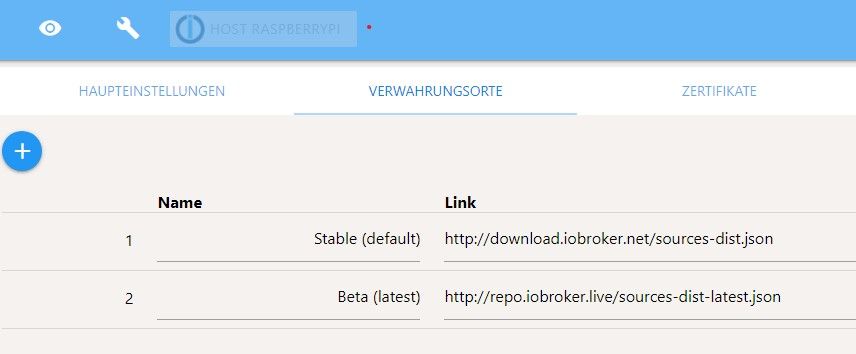
              @thomas-braun
              Screenshot 2022-01-09 161910.jpg

              ist das diese Einstellung?

              ist das denn so richtig?

              Thomas BraunT 1 Antwort Letzte Antwort
              0
              • I IbizaGT

                @thomas-braun
                Screenshot 2022-01-09 161910.jpg

                ist das diese Einstellung?

                ist das denn so richtig?

                Thomas BraunT Online
                Thomas BraunT Online
                Thomas Braun
                Most Active
                schrieb am zuletzt editiert von Thomas Braun
                #10

                @ibizagt

                In den Haupteinstellungen stellt man das Repo um.
                An deiner Stelle würde ich es gleich auf stable belassen.

                Und 'die Katze' lässt du auch in Ruhe.

                Linux-Werkzeugkasten:
                https://forum.iobroker.net/topic/42952/der-kleine-iobroker-linux-werkzeugkasten
                NodeJS Fixer Skript:
                https://forum.iobroker.net/topic/68035/iob-node-fix-skript
                iob_diag: curl -sLf -o diag.sh https://iobroker.net/diag.sh && bash diag.sh

                I 1 Antwort Letzte Antwort
                0
                • HomoranH Homoran

                  @ibizagt sagte in Fehler 25 bei VIS-Adapter Installation:

                  $ ./iobroker url "https://github.com/ioBroker/ioBroker.vis/tarball/master"

                  @Glasfaser
                  ist das überhaupt der richtige Pfad?

                  gehört das /tarball/master da rein?

                  GlasfaserG Offline
                  GlasfaserG Offline
                  Glasfaser
                  schrieb am zuletzt editiert von
                  #11

                  @homoran

                  siehe aktuell , Apollon77 ist schon dran

                  https://github.com/ioBroker/ioBroker.vis/issues/440

                  Synology 918+ 16GB - ioBroker in Docker v9 , VISO auf Trekstor Primebook C13 13,3" , Hikvision Domkameras mit Surveillance Station .. CCU RaspberryMatic in Synology VM .. Zigbee CC2538+CC2592 .. Sonoff .. KNX .. Modbus ..

                  HomoranH 1 Antwort Letzte Antwort
                  0
                  • GlasfaserG Glasfaser

                    @homoran

                    siehe aktuell , Apollon77 ist schon dran

                    https://github.com/ioBroker/ioBroker.vis/issues/440

                    HomoranH Nicht stören
                    HomoranH Nicht stören
                    Homoran
                    Global Moderator Administrators
                    schrieb am zuletzt editiert von
                    #12

                    @glasfaser sagte in Fehler 25 bei VIS-Adapter Installation:

                    @homoran

                    siehe aktuell , Apollon77 ist schon dran

                    https://github.com/ioBroker/ioBroker.vis/issues/440

                    der arme - Danke!

                    kein Support per PN! - Fragen im Forum stellen - es gibt fast nichts, was nicht auch für andere interessant ist.

                    Benutzt das Voting rechts unten im Beitrag wenn er euch geholfen hat.

                    der Installationsfixer: curl -fsL https://iobroker.net/fix.sh | bash -

                    1 Antwort Letzte Antwort
                    0
                    • Thomas BraunT Thomas Braun

                      @ibizagt

                      In den Haupteinstellungen stellt man das Repo um.
                      An deiner Stelle würde ich es gleich auf stable belassen.

                      Und 'die Katze' lässt du auch in Ruhe.

                      I Offline
                      I Offline
                      IbizaGT
                      schrieb am zuletzt editiert von
                      #13

                      DANKE

                      es läuft wieder :hugging_face:

                      Ihr seit super :+1:

                      Thomas BraunT 1 Antwort Letzte Antwort
                      0
                      • I IbizaGT

                        DANKE

                        es läuft wieder :hugging_face:

                        Ihr seit super :+1:

                        Thomas BraunT Online
                        Thomas BraunT Online
                        Thomas Braun
                        Most Active
                        schrieb am zuletzt editiert von
                        #14

                        @ibizagt

                        Die 1.4.7 wird wohl jetzt zurück gezogen.
                        Aber den ganzen Hantier kannst du dir halt sparen wenn das stable/default-Repo verwendet wird.

                        Linux-Werkzeugkasten:
                        https://forum.iobroker.net/topic/42952/der-kleine-iobroker-linux-werkzeugkasten
                        NodeJS Fixer Skript:
                        https://forum.iobroker.net/topic/68035/iob-node-fix-skript
                        iob_diag: curl -sLf -o diag.sh https://iobroker.net/diag.sh && bash diag.sh

                        1 Antwort Letzte Antwort
                        0
                        Antworten
                        • In einem neuen Thema antworten
                        Anmelden zum Antworten
                        • Älteste zuerst
                        • Neuste zuerst
                        • Meiste Stimmen


                        Support us

                        ioBroker
                        Community Adapters
                        Donate
                        FAQ Cloud / IOT
                        HowTo: Node.js-Update
                        HowTo: Backup/Restore
                        Downloads
                        BLOG

                        602

                        Online

                        32.7k

                        Benutzer

                        82.4k

                        Themen

                        1.3m

                        Beiträge
                        Community
                        Impressum | Datenschutz-Bestimmungen | Nutzungsbedingungen | Einwilligungseinstellungen
                        ioBroker Community 2014-2025
                        logo
                        • Anmelden

                        • Du hast noch kein Konto? Registrieren

                        • Anmelden oder registrieren, um zu suchen
                        • Erster Beitrag
                          Letzter Beitrag
                        0
                        • Home
                        • Aktuell
                        • Tags
                        • Ungelesen 0
                        • Kategorien
                        • Unreplied
                        • Beliebt
                        • GitHub
                        • Docu
                        • Hilfe