



Weiter zum Inhalt
  • Home
  • Aktuell
  • Tags
  • 0 Ungelesen 0
  • Kategorien
  • Unreplied
  • Beliebt
  • GitHub
  • Docu
  • Hilfe
Skins
  • Hell
  • Brite
  • Cerulean
  • Cosmo
  • Flatly
  • Journal
  • Litera
  • Lumen
  • Lux
  • Materia
  • Minty
  • Morph
  • Pulse
  • Sandstone
  • Simplex
  • Sketchy
  • Spacelab
  • United
  • Yeti
  • Zephyr
  • Dunkel
  • Cyborg
  • Darkly
  • Quartz
  • Slate
  • Solar
  • Superhero
  • Vapor

  • Standard: (Kein Skin)
  • Kein Skin
Einklappen
ioBroker Logo

Community Forum

donate donate
  1. ioBroker Community Home
  2. Deutsch
  3. Visualisierung
  4. Frage zum Adapter Time-Switch

NEWS

  • Neuer ioBroker-Blog online: Monatsrückblick März/April 2026
    BluefoxB
    Bluefox
    8
    1
    473

  • Verwendung von KI bitte immer deutlich kennzeichnen
    HomoranH
    Homoran
    10
    1
    394

  • Monatsrückblick Januar/Februar 2026 ist online!
    BluefoxB
    Bluefox
    18
    1
    979

Frage zum Adapter Time-Switch

Geplant Angeheftet Gesperrt Verschoben Visualisierung
10 Beiträge 2 Kommentatoren 309 Aufrufe 1 Beobachtet
  • Älteste zuerst
  • Neuste zuerst
  • Meiste Stimmen
Antworten
  • In einem neuen Thema antworten
Anmelden zum Antworten
Dieses Thema wurde gelöscht. Nur Nutzer mit entsprechenden Rechten können es sehen.
  • K Offline
    K Offline
    Kippe
    schrieb am zuletzt editiert von
    #1

    Wie bekomme ich das Widget vom Time Switch Adapter kleiner ?
    Und wie bekomme ich die Schieberegler da weg.
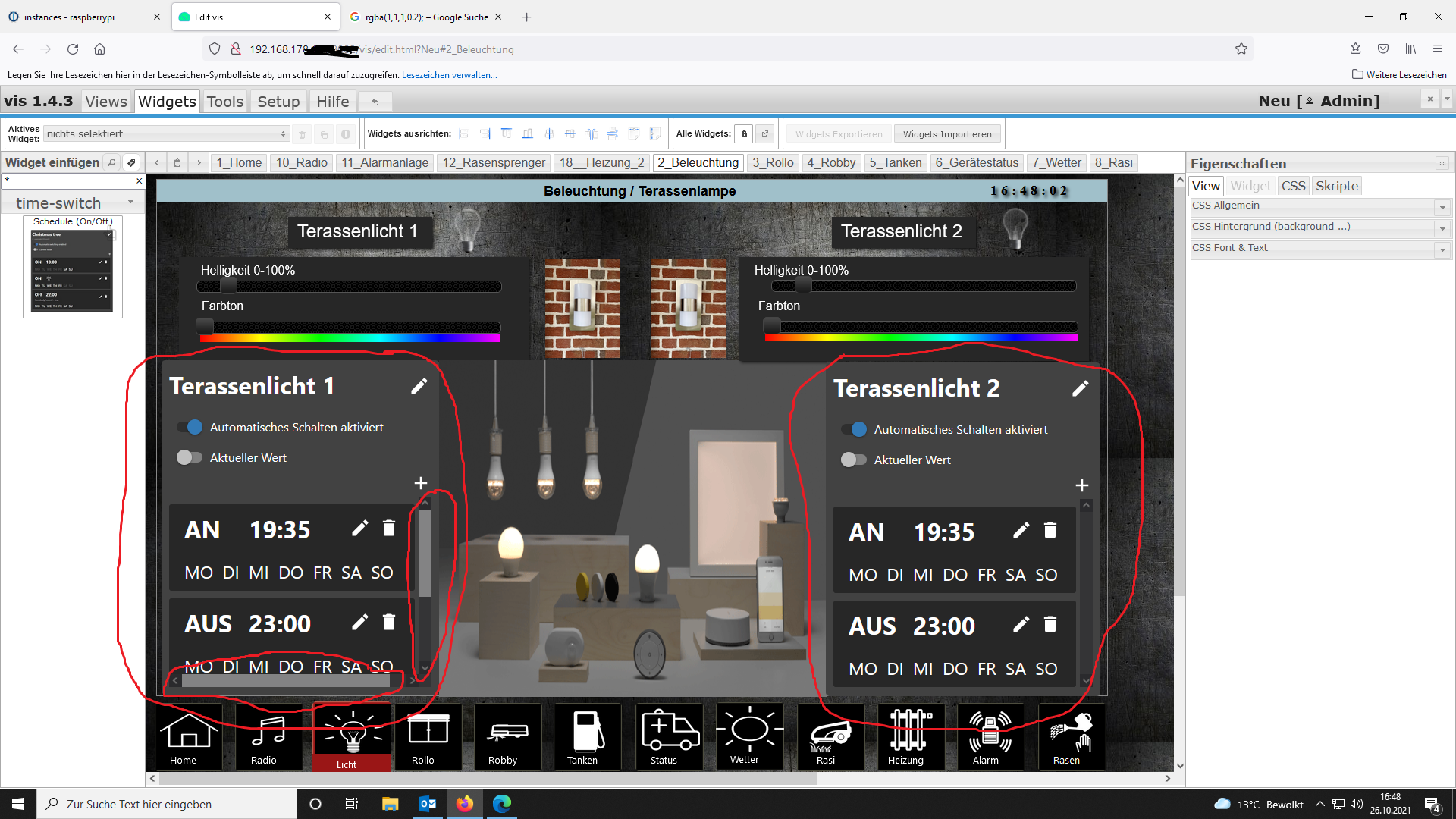
    Screenshot (322).png

    sigi234S 1 Antwort Letzte Antwort
    0
    • K Kippe

      Wie bekomme ich das Widget vom Time Switch Adapter kleiner ?
      Und wie bekomme ich die Schieberegler da weg.
      Screenshot (322).png

      sigi234S Online
      sigi234S Online
      sigi234
      Forum Testing Most Active
      schrieb am zuletzt editiert von sigi234
      #2

      @kippe

      In CSS einfügen und anpassen:

      app-on-off-schedule-widget {
          /* Primary color (button background, toggle switch color) */
          --ts-widget-primary-color: #0070bd;
      
          /* Background color of the widget */
          --ts-widget-bg-color: #transparent;
          /* Background color of the triggers */
          --ts-widget-trigger-bg-color: #272727;
      
          /* Foreground color (font color and scrollbar color) */
          --ts-widget-fg-color: white;
          /* Font color of the switched states id */
          --ts-widget-oid-fg-color: #a5a5a5;
          /* Font color in buttons */
          --ts-widget-btn-fg-color: white;
          /* Font color of a disabled weekday */
          --ts-widget-weekdays-disabled-fg-color: #5D5D5D;
          /* Font color of an enabled weekday */
          --ts-widget-weekdays-enabled-fg-color: lime;
          /* Font color of the name of the widget (defaults to --ts-widget-fg-color) */
          --ts-widget-name-fg-color: white;
          /* Font color of switched time (defaults to --ts-widget-fg-color) */
          --ts-widget-switched-time-fg-color: white;
          /* Font color of switched value (defaults to --ts-widget-fg-color)*/
          --ts-widget-switched-value-fg-color: white;
          /* Font color of the astro time (defaults to --ts-widget-fg-color) */
          --ts-widget-astro-time-fg-color: black;
          /* Font color of the astro time's shift */
          --ts-widget-astro-shift-fg-color: #5d5d5d;
          /* Font color of condition (defaults to --ts-widget-fg-color) */
          --ts-widget-condition-fg-color: white;
      
          /* Font family used in the whole widget */
          --ts-widget-font-family: 'Roboto', 'Segoe UI', BlinkMacSystemFont, system-ui, -apple-system;
          /* Font size of the name of the widget */
          --ts-widget-name-font-size: 1.1em;
          /* Font size of the switched oid */
          --ts-widget-oid-font-size: 10px;
      
          /* Display of edit name button. Use 'none' to hide the button and 'block' to show it
          --ts-widget-edit-name-button-display: block;
          /* Display of condition. Use 'none' to hide the condition and 'block' to show it
          -ts-widget-condition-display: block;
      
          /* Applies a filter to icons used in buttons (safe, edit, remove, cancel), for
             white use invert(1) and for black invert(0) */
          --ts-widget-img-btn-filter: invert(1);
          
          /* Add trigger dropdown background color */
          --ts-widget-add-trigger-dropdown-bg-color: #f1f1f1;
          /* Add trigger dropdown font color */
          --ts-widget-add-trigger-dropdown-fg-color: black;
          /* Add trigger dropdown hover background color */
          --ts-widget-add-trigger-dropdown-hover-bg-color: #ddd;
      
          /* ! Changing these may break the layout, change at your own risk */
      
          /* Font size of weekdays */
          --ts-widget-weekdays-font-size: 12px;
          /* Font size of switched value (on/off) */
          --ts-widget-switched-value-font-size: 0.8em;
          /* Font size of switched time */
          --ts-widget-switched-time-font-size: 0.8em;
          /* Font size of the astro time (e.g. Sunrise, ...) */
          --ts-widget-astro-time-font-size: 0.3em;
          /* Font size of the astro time's shift */
          --ts-widget-astro-shift-font-size: 1em;
          /* Font size of condition */
          --ts-widget-condition-font-size: 0.8em;
      }
      

      Bitte benutzt das Voting rechts unten im Beitrag wenn er euch geholfen hat.
      Immer Daten sichern!

      K 1 Antwort Letzte Antwort
      0
      • sigi234S sigi234

        @kippe

        In CSS einfügen und anpassen:

        app-on-off-schedule-widget {
            /* Primary color (button background, toggle switch color) */
            --ts-widget-primary-color: #0070bd;
        
            /* Background color of the widget */
            --ts-widget-bg-color: #transparent;
            /* Background color of the triggers */
            --ts-widget-trigger-bg-color: #272727;
        
            /* Foreground color (font color and scrollbar color) */
            --ts-widget-fg-color: white;
            /* Font color of the switched states id */
            --ts-widget-oid-fg-color: #a5a5a5;
            /* Font color in buttons */
            --ts-widget-btn-fg-color: white;
            /* Font color of a disabled weekday */
            --ts-widget-weekdays-disabled-fg-color: #5D5D5D;
            /* Font color of an enabled weekday */
            --ts-widget-weekdays-enabled-fg-color: lime;
            /* Font color of the name of the widget (defaults to --ts-widget-fg-color) */
            --ts-widget-name-fg-color: white;
            /* Font color of switched time (defaults to --ts-widget-fg-color) */
            --ts-widget-switched-time-fg-color: white;
            /* Font color of switched value (defaults to --ts-widget-fg-color)*/
            --ts-widget-switched-value-fg-color: white;
            /* Font color of the astro time (defaults to --ts-widget-fg-color) */
            --ts-widget-astro-time-fg-color: black;
            /* Font color of the astro time's shift */
            --ts-widget-astro-shift-fg-color: #5d5d5d;
            /* Font color of condition (defaults to --ts-widget-fg-color) */
            --ts-widget-condition-fg-color: white;
        
            /* Font family used in the whole widget */
            --ts-widget-font-family: 'Roboto', 'Segoe UI', BlinkMacSystemFont, system-ui, -apple-system;
            /* Font size of the name of the widget */
            --ts-widget-name-font-size: 1.1em;
            /* Font size of the switched oid */
            --ts-widget-oid-font-size: 10px;
        
            /* Display of edit name button. Use 'none' to hide the button and 'block' to show it
            --ts-widget-edit-name-button-display: block;
            /* Display of condition. Use 'none' to hide the condition and 'block' to show it
            -ts-widget-condition-display: block;
        
            /* Applies a filter to icons used in buttons (safe, edit, remove, cancel), for
               white use invert(1) and for black invert(0) */
            --ts-widget-img-btn-filter: invert(1);
            
            /* Add trigger dropdown background color */
            --ts-widget-add-trigger-dropdown-bg-color: #f1f1f1;
            /* Add trigger dropdown font color */
            --ts-widget-add-trigger-dropdown-fg-color: black;
            /* Add trigger dropdown hover background color */
            --ts-widget-add-trigger-dropdown-hover-bg-color: #ddd;
        
            /* ! Changing these may break the layout, change at your own risk */
        
            /* Font size of weekdays */
            --ts-widget-weekdays-font-size: 12px;
            /* Font size of switched value (on/off) */
            --ts-widget-switched-value-font-size: 0.8em;
            /* Font size of switched time */
            --ts-widget-switched-time-font-size: 0.8em;
            /* Font size of the astro time (e.g. Sunrise, ...) */
            --ts-widget-astro-time-font-size: 0.3em;
            /* Font size of the astro time's shift */
            --ts-widget-astro-shift-font-size: 1em;
            /* Font size of condition */
            --ts-widget-condition-font-size: 0.8em;
        }
        
        K Offline
        K Offline
        Kippe
        schrieb am zuletzt editiert von
        #3

        @sigi234

        Super das hat schon mal geklappt. Wenn ich den oberen Teil des Widget den Hintergrund auch Schwarz haben möchte, in welcher Zeile muss ich was ändern?

        DANKE sigi234👏

        sigi234S 1 Antwort Letzte Antwort
        0
        • K Kippe

          @sigi234

          Super das hat schon mal geklappt. Wenn ich den oberen Teil des Widget den Hintergrund auch Schwarz haben möchte, in welcher Zeile muss ich was ändern?

          DANKE sigi234👏

          sigi234S Online
          sigi234S Online
          sigi234
          Forum Testing Most Active
          schrieb am zuletzt editiert von sigi234
          #4

          @kippe sagte in Frage zum Adapter Time-Switch:

          Super das hat schon mal geklappt. Wenn ich den oberen Teil des Widget den Hintergrund auch Schwarz haben möchte,

          Wo? Was genau?

          Bitte benutzt das Voting rechts unten im Beitrag wenn er euch geholfen hat.
          Immer Daten sichern!

          K 1 Antwort Letzte Antwort
          0
          • sigi234S sigi234

            @kippe sagte in Frage zum Adapter Time-Switch:

            Super das hat schon mal geklappt. Wenn ich den oberen Teil des Widget den Hintergrund auch Schwarz haben möchte,

            Wo? Was genau?

            K Offline
            K Offline
            Kippe
            schrieb am zuletzt editiert von
            #5

            @sigi234

            Da wo die 2 Schieberegler sind? Da ist der Hintergrund noch Transparent, aber würde den auch gerne schwarz haben

            K 1 Antwort Letzte Antwort
            0
            • K Kippe

              @sigi234

              Da wo die 2 Schieberegler sind? Da ist der Hintergrund noch Transparent, aber würde den auch gerne schwarz haben

              K Offline
              K Offline
              Kippe
              schrieb am zuletzt editiert von
              #6

              @kippe so wie in meinem Bild oben

              sigi234S 2 Antworten Letzte Antwort
              0
              • K Kippe

                @kippe so wie in meinem Bild oben

                sigi234S Online
                sigi234S Online
                sigi234
                Forum Testing Most Active
                schrieb am zuletzt editiert von
                #7

                @kippe sagte in Frage zum Adapter Time-Switch:

                @kippe so wie in meinem Bild oben

                Screenshot bitte

                Bitte benutzt das Voting rechts unten im Beitrag wenn er euch geholfen hat.
                Immer Daten sichern!

                1 Antwort Letzte Antwort
                0
                • K Kippe

                  @kippe so wie in meinem Bild oben

                  sigi234S Online
                  sigi234S Online
                  sigi234
                  Forum Testing Most Active
                  schrieb am zuletzt editiert von
                  #8

                  @kippe sagte in Frage zum Adapter Time-Switch:

                  @kippe so wie in meinem Bild oben

                  --ts-widget-bg-color: black;

                  Bitte benutzt das Voting rechts unten im Beitrag wenn er euch geholfen hat.
                  Immer Daten sichern!

                  K 1 Antwort Letzte Antwort
                  0
                  • sigi234S sigi234

                    @kippe sagte in Frage zum Adapter Time-Switch:

                    @kippe so wie in meinem Bild oben

                    --ts-widget-bg-color: black;

                    K Offline
                    K Offline
                    Kippe
                    schrieb am zuletzt editiert von
                    #9

                    @sigi234

                    Alles Top👍
                    Hat Super geklappt und jetzt passt es auch mit der Größe 🤒

                    sigi234S 1 Antwort Letzte Antwort
                    0
                    • K Kippe

                      @sigi234

                      Alles Top👍
                      Hat Super geklappt und jetzt passt es auch mit der Größe 🤒

                      sigi234S Online
                      sigi234S Online
                      sigi234
                      Forum Testing Most Active
                      schrieb am zuletzt editiert von
                      #10

                      @kippe

                      Bitte sehr, Thema als [gelöst] setzten.

                      Bitte benutzt das Voting rechts unten im Beitrag wenn er euch geholfen hat.
                      Immer Daten sichern!

                      1 Antwort Letzte Antwort
                      0

                      Hey! Du scheinst an dieser Unterhaltung interessiert zu sein, hast aber noch kein Konto.

                      Hast du es satt, bei jedem Besuch durch die gleichen Beiträge zu scrollen? Wenn du dich für ein Konto anmeldest, kommst du immer genau dorthin zurück, wo du zuvor warst, und kannst dich über neue Antworten benachrichtigen lassen (entweder per E-Mail oder Push-Benachrichtigung). Du kannst auch Lesezeichen speichern und Beiträge positiv bewerten, um anderen Community-Mitgliedern deine Wertschätzung zu zeigen.

                      Mit deinem Input könnte dieser Beitrag noch besser werden 💗

                      Registrieren Anmelden
                      Antworten
                      • In einem neuen Thema antworten
                      Anmelden zum Antworten
                      • Älteste zuerst
                      • Neuste zuerst
                      • Meiste Stimmen


                      Support us

                      ioBroker
                      Community Adapters
                      Donate

                      521

                      Online

                      32.8k

                      Benutzer

                      82.8k

                      Themen

                      1.3m

                      Beiträge
                      Community
                      Impressum | Datenschutz-Bestimmungen | Nutzungsbedingungen | Einwilligungseinstellungen
                      ioBroker Community 2014-2025
                      logo
                      • Anmelden

                      • Du hast noch kein Konto? Registrieren

                      • Anmelden oder registrieren, um zu suchen
                      • Erster Beitrag
                        Letzter Beitrag
                      0
                      • Home
                      • Aktuell
                      • Tags
                      • Ungelesen 0
                      • Kategorien
                      • Unreplied
                      • Beliebt
                      • GitHub
                      • Docu
                      • Hilfe