




Hilfe bei Update des gesamten Systems
-
Wie mache ich jetzt weiter???
Hab gerade versucht, mal einen Adapter upzudaten. Das endet zwar korrekt, aber im Adapter-Tab wird wenig später wieder die alte Version mit dem Hinweis auf Update angezeigt. Soll ich den js-controller updaten?
@stoni sagte in Hilfe bei Update des gesamten Systems:
Wie mache ich jetzt weiter???
Jetzt müssen wir erstmal schauen ob das alles senkrecht ist
which nodejs node npm && nodejs -v && node -v && npm -v && sudo apt update && apt policy nodejsund dann schauen wir was uns beim iobroker erwartet:
Keine Ahnung ob die Befehle bei dem 2er js-controller funktionieren...iobroker update -i iobroker list adapters -
@stoni sagte in Hilfe bei Update des gesamten Systems:
Wie mache ich jetzt weiter???
Jetzt müssen wir erstmal schauen ob das alles senkrecht ist
which nodejs node npm && nodejs -v && node -v && npm -v && sudo apt update && apt policy nodejsund dann schauen wir was uns beim iobroker erwartet:
Keine Ahnung ob die Befehle bei dem 2er js-controller funktionieren...iobroker update -i iobroker list adapters@thomas-braun sieht gut aus:
which nodejs node npm && nodejs -v && node -v && npm -v && apt policy nodejs /usr/bin/nodejs /usr/bin/node /usr/bin/npm v14.18.1 v14.18.1 6.14.15 nodejs: Installiert: 14.18.1-deb-1nodesource1 Installationskandidat: 14.18.1-deb-1nodesource1 Versionstabelle: *** 14.18.1-deb-1nodesource1 500 500 https://deb.nodesource.com/node_14.x buster/main armhf Packages 100 /var/lib/dpkg/status 10.24.0~dfsg-1~deb10u1 500 500 http://raspbian.raspberrypi.org/raspbian buster/main armhf Packages -
@thomas-braun sieht gut aus:
which nodejs node npm && nodejs -v && node -v && npm -v && apt policy nodejs /usr/bin/nodejs /usr/bin/node /usr/bin/npm v14.18.1 v14.18.1 6.14.15 nodejs: Installiert: 14.18.1-deb-1nodesource1 Installationskandidat: 14.18.1-deb-1nodesource1 Versionstabelle: *** 14.18.1-deb-1nodesource1 500 500 https://deb.nodesource.com/node_14.x buster/main armhf Packages 100 /var/lib/dpkg/status 10.24.0~dfsg-1~deb10u1 500 500 http://raspbian.raspberrypi.org/raspbian buster/main armhf Packages@stoni
Ja, das passt nun.
Jetzt halt das 'dritte Zimmer' beim Aufräumen vorknöpfen. -
@stoni
Ja, das passt nun.
Jetzt halt das 'dritte Zimmer' beim Aufräumen vorknöpfen.iobroker update -i Used repository: Stable (default) hash not changed, use actual sources update done Adapter "admin" : 5.1.25 , installed 4.2.1 [Updateable] Adapter "alexa2" : 3.9.3 , installed 3.5.2 [Updateable] Adapter "backitup" : 2.1.17 , installed 1.8.5 [Updateable] Adapter "ble" : 0.12.0 , installed 0.11.0 [Updateable] Adapter "cloud" : 4.1.0 , installed 2.8.0 [Updateable] Adapter "discovery" : 2.7.0 , installed 2.7.0 Adapter "flot" : 1.10.6 , installed 1.10.6 Adapter "fritzbox" : 0.2.1 , installed 0.2.1 Adapter "history" : 1.9.13 , installed 1.9.12 [Updateable] Adapter "hm-rega" : 3.0.31 , installed 3.0.7 [Updateable] Adapter "hm-rpc" : 1.14.45 , installed 1.14.31 [Updateable] Adapter "ical" : 1.11.4 , installed 1.9.0 [Updateable] Adapter "icons-addictive-flavour-png": 0.1.0 , installed 0.1.0 Adapter "icons-material-png": 0.1.0 , installed 0.1.0 Adapter "icons-mfd-png" : 1.0.2 , installed 1.0.2 Adapter "info" : 1.9.8 , installed 1.7.15 [Updateable] Adapter "iot" : 1.8.22 , installed 1.8.9 [Updateable] Adapter "javascript" : 5.2.8 , installed 4.1.12 [Updateable] Controller "js-controller" : 3.3.18 , installed 2.1.1 [Updateable] Adapter "material" : 1.0.4 , installed 0.13.9 [Updateable] Adapter "mihome" : 1.3.7 , installed 1.3.6 [Updateable] Adapter "mihome-vacuum" : 3.3.1 , installed 2.1.1 [Updateable] Adapter "mobile" : 1.0.1 , installed 0.4.11 [Updateable] Adapter "parser" : 1.0.7 , installed 1.0.7 Adapter "pushover" : 2.0.5 , installed 2.0.3 [Updateable] Adapter "sayit" : 1.12.3 , installed 1.11.5 [Updateable] Adapter "scenes" : 2.3.6 , installed 2.1.5 [Updateable] Adapter "shelly" : 4.0.7 , installed 3.2.2 [Updateable] Adapter "simple-api" : 2.6.1 , installed 2.5.2 [Updateable] Adapter "socketio" : 3.1.4 , installed 3.1.4 Adapter "solarlog" : 2.1.4 , installed 2.0.0 [Updateable] Adapter "sonoff" : 2.4.5 , installed 2.3.3 [Updateable] Adapter "tankerkoenig" : 2.1.1 , installed 2.0.9 [Updateable] Adapter "telegram" : 1.10.0 , installed 1.5.9 [Updateable] Adapter "tvspielfilm" : 1.0.4 , installed 1.0.4 Adapter "vis" : 1.4.4 , installed 1.2.2 [Updateable] Adapter "vis-bars" : 0.1.4 , installed 0.1.4 Adapter "vis-canvas-gauges": 0.1.5 , installed 0.1.5 Adapter "vis-colorpicker": 1.2.0 , installed 1.1.1 [Updateable] Adapter "vis-fancyswitch": 1.1.0 , installed 1.1.0 Adapter "vis-google-fonts": 0.1.0 , installed 0.1.0 Adapter "vis-history" : 1.0.0 , installed 0.2.7 [Updateable] Adapter "vis-hqwidgets" : 1.1.7 , installed 1.1.3 [Updateable] Adapter "vis-jqui-mfd" : 1.0.12 , installed 1.0.9 [Updateable] Adapter "vis-justgage" : 1.0.2 , installed 0.7.1 [Updateable] Adapter "vis-lcars" : 1.0.4 , installed 1.0.4 Adapter "vis-metro" : 1.1.2 , installed 1.1.0 [Updateable] Adapter "vis-plumb" : 1.0.2 , installed 1.0.0 [Updateable] Adapter "vis-rgraph" : 0.0.2 , installed 0.0.2 Adapter "vis-timeandweather": 1.1.7 , installed 1.1.7 Adapter "vis-weather" : 2.5.3 , installed 1.2.0 [Updateable] Adapter "weatherunderground": 3.3.1 , installed 3.2.0 [Updateable] Adapter "web" : 3.4.9 , installed 3.2.3 [Updateable] Adapter "wifilight" : 1.1.0 , installed 1.1.0 Adapter "worx" : 1.5.5 , installed 1.2.7 [Updateable] Adapter "yeelight-2" : 1.0.3 , installed 1.0.3 Adapter "yr" : 3.0.5 , installed 2.0.3 [Updateable] -
@stoni sagte in Hilfe bei Update des gesamten Systems:
Wie mache ich jetzt weiter???
Jetzt müssen wir erstmal schauen ob das alles senkrecht ist
which nodejs node npm && nodejs -v && node -v && npm -v && sudo apt update && apt policy nodejsund dann schauen wir was uns beim iobroker erwartet:
Keine Ahnung ob die Befehle bei dem 2er js-controller funktionieren...iobroker update -i iobroker list adapters@thomas-braun sagte in Hilfe bei Update des gesamten Systems:
ob die Befehle bei dem 2er js-controller funktionieren...
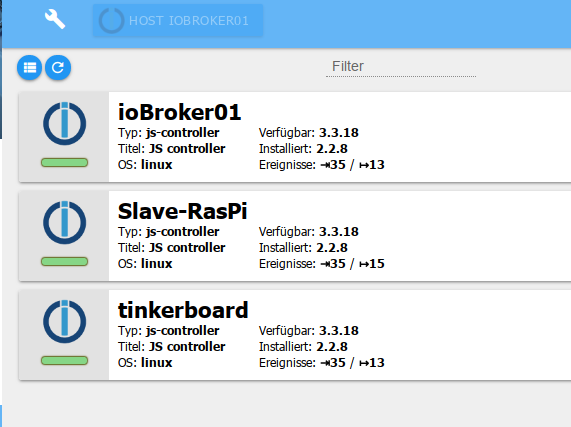
aber nicht petzen:
-
iobroker update -i Used repository: Stable (default) hash not changed, use actual sources update done Adapter "admin" : 5.1.25 , installed 4.2.1 [Updateable] Adapter "alexa2" : 3.9.3 , installed 3.5.2 [Updateable] Adapter "backitup" : 2.1.17 , installed 1.8.5 [Updateable] Adapter "ble" : 0.12.0 , installed 0.11.0 [Updateable] Adapter "cloud" : 4.1.0 , installed 2.8.0 [Updateable] Adapter "discovery" : 2.7.0 , installed 2.7.0 Adapter "flot" : 1.10.6 , installed 1.10.6 Adapter "fritzbox" : 0.2.1 , installed 0.2.1 Adapter "history" : 1.9.13 , installed 1.9.12 [Updateable] Adapter "hm-rega" : 3.0.31 , installed 3.0.7 [Updateable] Adapter "hm-rpc" : 1.14.45 , installed 1.14.31 [Updateable] Adapter "ical" : 1.11.4 , installed 1.9.0 [Updateable] Adapter "icons-addictive-flavour-png": 0.1.0 , installed 0.1.0 Adapter "icons-material-png": 0.1.0 , installed 0.1.0 Adapter "icons-mfd-png" : 1.0.2 , installed 1.0.2 Adapter "info" : 1.9.8 , installed 1.7.15 [Updateable] Adapter "iot" : 1.8.22 , installed 1.8.9 [Updateable] Adapter "javascript" : 5.2.8 , installed 4.1.12 [Updateable] Controller "js-controller" : 3.3.18 , installed 2.1.1 [Updateable] Adapter "material" : 1.0.4 , installed 0.13.9 [Updateable] Adapter "mihome" : 1.3.7 , installed 1.3.6 [Updateable] Adapter "mihome-vacuum" : 3.3.1 , installed 2.1.1 [Updateable] Adapter "mobile" : 1.0.1 , installed 0.4.11 [Updateable] Adapter "parser" : 1.0.7 , installed 1.0.7 Adapter "pushover" : 2.0.5 , installed 2.0.3 [Updateable] Adapter "sayit" : 1.12.3 , installed 1.11.5 [Updateable] Adapter "scenes" : 2.3.6 , installed 2.1.5 [Updateable] Adapter "shelly" : 4.0.7 , installed 3.2.2 [Updateable] Adapter "simple-api" : 2.6.1 , installed 2.5.2 [Updateable] Adapter "socketio" : 3.1.4 , installed 3.1.4 Adapter "solarlog" : 2.1.4 , installed 2.0.0 [Updateable] Adapter "sonoff" : 2.4.5 , installed 2.3.3 [Updateable] Adapter "tankerkoenig" : 2.1.1 , installed 2.0.9 [Updateable] Adapter "telegram" : 1.10.0 , installed 1.5.9 [Updateable] Adapter "tvspielfilm" : 1.0.4 , installed 1.0.4 Adapter "vis" : 1.4.4 , installed 1.2.2 [Updateable] Adapter "vis-bars" : 0.1.4 , installed 0.1.4 Adapter "vis-canvas-gauges": 0.1.5 , installed 0.1.5 Adapter "vis-colorpicker": 1.2.0 , installed 1.1.1 [Updateable] Adapter "vis-fancyswitch": 1.1.0 , installed 1.1.0 Adapter "vis-google-fonts": 0.1.0 , installed 0.1.0 Adapter "vis-history" : 1.0.0 , installed 0.2.7 [Updateable] Adapter "vis-hqwidgets" : 1.1.7 , installed 1.1.3 [Updateable] Adapter "vis-jqui-mfd" : 1.0.12 , installed 1.0.9 [Updateable] Adapter "vis-justgage" : 1.0.2 , installed 0.7.1 [Updateable] Adapter "vis-lcars" : 1.0.4 , installed 1.0.4 Adapter "vis-metro" : 1.1.2 , installed 1.1.0 [Updateable] Adapter "vis-plumb" : 1.0.2 , installed 1.0.0 [Updateable] Adapter "vis-rgraph" : 0.0.2 , installed 0.0.2 Adapter "vis-timeandweather": 1.1.7 , installed 1.1.7 Adapter "vis-weather" : 2.5.3 , installed 1.2.0 [Updateable] Adapter "weatherunderground": 3.3.1 , installed 3.2.0 [Updateable] Adapter "web" : 3.4.9 , installed 3.2.3 [Updateable] Adapter "wifilight" : 1.1.0 , installed 1.1.0 Adapter "worx" : 1.5.5 , installed 1.2.7 [Updateable] Adapter "yeelight-2" : 1.0.3 , installed 1.0.3 Adapter "yr" : 3.0.5 , installed 2.0.3 [Updateable]Jetzt hilft dir die Readme zum js-controller 3.3 weiter.
https://forum.iobroker.net/topic/46758/js-controller-3-3-jetzt-im-stable
Da steht auch drin, wie mit dem js-controller v2 vorzugehen ist. -
Jetzt hilft dir die Readme zum js-controller 3.3 weiter.
https://forum.iobroker.net/topic/46758/js-controller-3-3-jetzt-im-stable
Da steht auch drin, wie mit dem js-controller v2 vorzugehen ist.@thomas-braun js-controller 3.3.18 ist jetzt installiert.
Im Log kriege ich eine Reihe an Warnungen:
host.raspberrypi	2021-10-25 20:03:56.799	info	Restart adapter system.adapter.javascript.0 because enabled
host.raspberrypi	2021-10-25 20:03:56.798	error	instance system.adapter.javascript.0 terminated with code 10 (CANNOT_FIND_ADAPTER_DIR)
host.raspberrypi	2021-10-25 20:03:56.315	error	Please consider running the installation fixer when on Linux.
host.raspberrypi	2021-10-25 20:03:56.310	error	could not store process id list in /opt/iobroker/node_modules/iobroker.js-controller/pids.txt! Please check permissions and user ownership of this file. Was ioBroker started as a different user? Pleas
host.raspberrypi	2021-10-25 20:03:55.310	info	instance system.adapter.javascript.0 started with pid 22713
host.raspberrypi	2021-10-25 20:03:54.986	error	Please consider running the installation fixer when on Linux.
host.raspberrypi	2021-10-25 20:03:54.985	error	could not store process id list in /opt/iobroker/node_modules/iobroker.js-controller/pids.txt! Please check permissions and user ownership of this file. Was ioBroker started as a different user? Pleas
host.raspberrypi	2021-10-25 20:03:54.365	info	Restart adapter system.adapter.mihome-vacuum.0 because enabled
host.raspberrypi	2021-10-25 20:03:54.365	error	instance system.adapter.mihome-vacuum.0 terminated with code 10 (CANNOT_FIND_ADAPTER_DIR)
host.raspberrypi	2021-10-25 20:03:53.984	info	instance system.adapter.mihome-vacuum.0 started with pid 22700
host.raspberrypi	2021-10-25 20:03:50.980	error	Please consider running the installation fixer when on Linux.
host.raspberrypi	2021-10-25 20:03:50.979	error	could not store process id list in /opt/iobroker/node_modules/iobroker.js-controller/pids.txt! Please check permissions and user ownership of this file. Was ioBroker started as a different user? Pleas
host.raspberrypi	2021-10-25 20:03:50.334	info	Restart adapter system.adapter.fritzbox.0 because enabled
host.raspberrypi	2021-10-25 20:03:50.333	error	instance system.adapter.fritzbox.0 terminated with code 10 (CANNOT_FIND_ADAPTER_DIR)
host.raspberrypi	2021-10-25 20:03:49.978	info	instance system.adapter.fritzbox.0 started with pid 22632
host.raspberrypi	2021-10-25 20:03:49.832	error	Please consider running the installation fixer when on Linux.
host.raspberrypi	2021-10-25 20:03:49.832	error	could not store process id list in /opt/iobroker/node_modules/iobroker.js-controller/pids.txt! Please check permissions and user ownership of this file. Was ioBroker started as a different user? Pleas
host.raspberrypi	2021-10-25 20:03:49.216	info	Restart adapter system.adapter.cloud.0 because enabled
host.raspberrypi	2021-10-25 20:03:49.215	error	instance system.adapter.cloud.0 terminated with code 10 (CANNOT_FIND_ADAPTER_DIR)
host.raspberrypi	2021-10-25 20:03:48.831	info	instance system.adapter.cloud.0 started with pid 22619
host.raspberrypi	2021-10-25 20:03:46.981	error	Please consider running the installation fixer when on Linux.
host.raspberrypi	2021-10-25 20:03:46.980	error	could not store process id list in /opt/iobroker/node_modules/iobroker.js-controller/pids.txt! Please check permissions and user ownership of this file. Was ioBroker started as a different user? Pleas
host.raspberrypi	2021-10-25 20:03:46.348	error	instance system.adapter.weatherunderground.0 terminated with code 10 (CANNOT_FIND_ADAPTER_DIR)
host.raspberrypi	2021-10-25 20:03:45.979	info	instance system.adapter.weatherunderground.0 started with pid 22594
host.raspberrypi	2021-10-25 20:03:45.947	info	instance scheduled system.adapter.weatherunderground.0 16 * * * *
host.raspberrypi	2021-10-25 20:03:42.957	error	Please consider running the installation fixer when on Linux.
host.raspberrypi	2021-10-25 20:03:42.956	error	could not store process id list in /opt/iobroker/node_modules/iobroker.js-controller/pids.txt! Please check permissions and user ownership of this file. Was ioBroker started as a different user? Pleas
host.raspberrypi	2021-10-25 20:03:42.275	info	Restart adapter system.adapter.sonoff.0 because enabled
host.raspberrypi	2021-10-25 20:03:42.274	error	instance system.adapter.sonoff.0 terminated with code 10 (CANNOT_FIND_ADAPTER_DIR)
host.raspberrypi	2021-10-25 20:03:41.956	info	instance system.adapter.sonoff.0 started with pid 22568
alexa2.0	2021-10-25 20:03:39.536	info	(21644) State value to set for "alexa2.0.Echo-Devices.24e302072d034ff9b4bd81f78fb2590f.Player.mediaLength" has to be type "number" but received type "string"
alexa2.0	2021-10-25 20:03:39.394	info	(21644) State value to set for "alexa2.0.Echo-Devices.b46f8ef14a774d07ac469fe81a997fad.Player.mediaLength" has to be type "number" but received type "string"
alexa2.0	2021-10-25 20:03:39.221	info	(21644) State value to set for "alexa2.0.Echo-Devices.8554c9f4be9d4c4a8499c4d5960a22f1.Player.mediaLength" has to be type "number" but received type "string"
alexa2.0	2021-10-25 20:03:39.082	info	(21644) State value to set for "alexa2.0.Echo-Devices.8f5c4d79e7fa4fe78e9c63372dd711e9.Player.mediaLength" has to be type "number" but received type "string"
host.raspberrypi	2021-10-25 20:03:39.085	error	Please consider running the installation fixer when on Linux.
host.raspberrypi	2021-10-25 20:03:39.083	error	could not store process id list in /opt/iobroker/node_modules/iobroker.js-controller/pids.txt! Please check permissions and user ownership of this file. Was ioBroker started as a different user? Pleas
alexa2.0	2021-10-25 20:03:38.922	info	(21644) State value to set for "alexa2.0.Echo-Devices.4afcac9b45d04f63ae77b6565bc7d703.Player.mediaLength" has to be type "number" but received type "string"
alexa2.0	2021-10-25 20:03:38.766	info	(21644) State value to set for "alexa2.0.Echo-Devices.5088e9942b5e4885a0cf67e08c48d40b.Player.mediaLength" has to be type "number" but received type "string"
alexa2.0	2021-10-25 20:03:38.556	info	(21644) State value to set for "alexa2.0.Echo-Devices.98804f54b6574fc0a02b3b3d6e1e67c2.Player.mediaLength" has to be type "number" but received type "string"
alexa2.0	2021-10-25 20:03:38.424	info	(21644) State value to set for "alexa2.0.Echo-Devices.bd43e0b5604342408dab29a99c396fe5.Player.mediaLength" has to be type "number" but received type "string"
host.raspberrypi	2021-10-25 20:03:38.417	info	Restart adapter system.adapter.scenes.0 because enabled
host.raspberrypi	2021-10-25 20:03:38.416	error	instance system.adapter.scenes.0 terminated with code 10 (CANNOT_FIND_ADAPTER_DIR)
alexa2.0	2021-10-25 20:03:38.236	info	(21644) State value to set for "alexa2.0.Echo-Devices.3902a9bc988d49fb94cf67c3c28619e4.Player.mediaLength" has to be type "number" but received type "string"
host.raspberrypi	2021-10-25 20:03:38.082	info	instance system.adapter.scenes.0 started with pid 22500
alexa2.0	2021-10-25 20:03:37.433	info	(21644) State value to set for "alexa2.0.Echo-Devices.6de510ef15bd4b958d2f6e1c0a5181b8.Player.mediaLength" has to be type "number" but received type "string"
host.raspberrypi	2021-10-25 20:03:35.088	error	Please consider running the installation fixer when on Linux.
host.raspberrypi	2021-10-25 20:03:35.087	error	could not store process id list in /opt/iobroker/node_modules/iobroker.js-controller/pids.txt! Please check permissions and user ownership of this file. Was ioBroker started as a different user? Pleas
host.raspberrypi	2021-10-25 20:03:34.424	info	Restart adapter system.adapter.sayit.0 because enabled
host.raspberrypi	2021-10-25 20:03:34.423	error	instance system.adapter.sayit.0 terminated with code 10 (CANNOT_FIND_ADAPTER_DIR)
host.raspberrypi	2021-10-25 20:03:34.087	info	instance system.adapter.sayit.0 started with pid 22469
alexa2.0	2021-10-25 20:03:33.008	info	(21644) Alexa-Push-Connection disconnected - retry: Retry Connection in 25s
host.raspberrypi	2021-10-25 20:03:30.989	error	Please consider running the installation fixer when on Linux.
host.raspberrypi	2021-10-25 20:03:30.988	error	could not store process id list in /opt/iobroker/node_modules/iobroker.js-controller/pids.txt! Please check permissions and user ownership of this file. Was ioBroker started as a different user? Pleas
host.raspberrypi	2021-10-25 20:03:30.964	error	Cannot download and install adapter "mqtt@2.4.0". To retry it disable/enable the adapter or restart host. Also check the error messages in the log!
host.raspberrypi	2021-10-25 20:03:30.606	error	Cannot download and install adapter "mqtt@2.4.0". To retry it disable/enable the adapter or restart host. Also check the error messages in the log!
host.raspberrypi	2021-10-25 20:03:30.604	info	iobroker npm-install: exit 1
host.raspberrypi	2021-10-25 20:03:30.599	error	iobroker npm-install: internal/modules/cjs/loader.js:905 throw err; ^Error: Cannot find module '/opt/iobroker/node_modules/iobroker.js-controller/iobroker.js' at Function.Module._resolveFilename
host.raspberrypi	2021-10-25 20:03:30.402	info	iobroker install mqtt@2.4.0 using installedVersion
host.raspberrypi	2021-10-25 20:03:30.402	warn	startInstance cannot find adapter "mqtt@2.4.0". Try to install it... 4 attempt
host.raspberrypi	2021-10-25 20:03:30.400	info	iobroker npm-install: exit 1
host.raspberrypi	2021-10-25 20:03:30.395	error	iobroker npm-install: internal/modules/cjs/loader.js:905 throw err; ^Error: Cannot find module '/opt/iobroker/node_modules/iobroker.js-controller/iobroker.js' at Function.Module._resolveFilename
host.raspberrypi	2021-10-25 20:03:30.338	info	Restart adapter system.adapter.tankerkoenig.0 because enabled
host.raspberrypi	2021-10-25 20:03:30.337	error	instance system.adapter.tankerkoenig.0 terminated with code 10 (CANNOT_FIND_ADAPTER_DIR)
host.raspberrypi	2021-10-25 20:03:30.174	info	iobroker install mqtt@2.4.0 using installedVersion
host.raspberrypi	2021-10-25 20:03:30.174	warn	startInstance cannot find adapter "mqtt@2.4.0". Try to install it... 3 attempt
host.raspberrypi	2021-10-25 20:03:30.172	info	iobroker npm-install: exit 1
host.raspberrypi	2021-10-25 20:03:30.158	error	iobroker npm-install: internal/modules/cjs/loader.js:905 throw err; ^Error: Cannot find module '/opt/iobroker/node_modules/iobroker.js-controller/iobroker.js' at Function.Module._resolveFilename
host.raspberrypi	2021-10-25 20:03:29.988	info	instance system.adapter.tankerkoenig.0 started with pid 22381
host.raspberrypi	2021-10-25 20:03:29.944	info	iobroker install mqtt@2.4.0 using installedFrom
host.raspberrypi	2021-10-25 20:03:29.944	warn	startInstance cannot find adapter "mqtt@2.4.0". Try to install it... 2 attempt
host.raspberrypi	2021-10-25 20:03:29.940	info	iobroker npm-install: exit 1
host.raspberrypi	2021-10-25 20:03:29.938	error	iobroker npm-install: internal/modules/cjs/loader.js:905 throw err; ^Error: Cannot find module '/opt/iobroker/node_modules/iobroker.js-controller/iobroker.js' at Function.Module._resolveFilename
host.raspberrypi	2021-10-25 20:03:29.669	info	iobroker install mqtt@2.4.0 using installedFrom
host.raspberrypi	2021-10-25 20:03:29.667	warn	startInstance cannot find adapter "mqtt@2.4.0". Try to install it... 1 attempt
host.raspberrypi	2021-10-25 20:03:28.665	info	iobroker npm-install: exit 1
host.raspberrypi	2021-10-25 20:03:28.660	error	iobroker npm-install: internal/modules/cjs/loader.js:905 throw err; ^Error: Cannot find module '/opt/iobroker/node_modules/iobroker.js-controller/iobroker.js' at Function.Module._resolveFilename
host.raspberrypi	2021-10-25 20:03:28.410	info	iobroker install landroid-s@2.5.4 using installedVersion
host.raspberrypi	2021-10-25 20:03:28.409	warn	startInstance cannot find adapter "landroid-s@2.5.4". Try to install it... 1 attempt
host.raspberrypi	2021-10-25 20:03:27.409	error	Please consider running the installation fixer when on Linux.
host.raspberrypi	2021-10-25 20:03:27.409	error	Error: ENOENT: no such file or directory, open '/opt/iobroker/node_modules/iobroker.js-controller/pids.txt'
host.raspberrypi	2021-10-25 20:03:27.409	error	could not store process id list in /opt/iobroker/node_modules/iobroker.js-controller/pids.txt! Please check permissions and user ownership of this file. Was ioBroker started as a different user? Plea
host.raspberrypi	2021-10-25 20:03:27.405	info	iobroker npm-install: exit 1
host.raspberrypi	2021-10-25 20:03:27.393	error	iobroker npm-install: /opt/iobroker/node_modules/iobroker.js-controller/node_modules/jsonfile/index.js:56 throw err ^Error: /opt/iobroker/node_modules/iobroker.js-controller/lib/setup/../..
host.raspberrypi	2021-10-25 20:03:27.210	info	iobroker npm-install: upload [0] discovery.admin /opt/iobroker/node_modules/iobroker.discovery/admin/discovery.png discovery.png image/png
host.raspberrypi	2021-10-25 20:03:27.149	info	iobroker npm-install: upload [1] discovery.admin /opt/iobroker/node_modules/iobroker.discovery/admin/index.html index.html text/html
host.raspberrypi	2021-10-25 20:03:27.087	info	iobroker npm-install: upload [2] discovery.admin /opt/iobroker/node_modules/iobroker.discovery/admin/index_m.html index_m.html text/html
host.raspberrypi	2021-10-25 20:03:27.027	info	iobroker npm-install: upload [3] discovery.admin /opt/iobroker/node_modules/iobroker.discovery/admin/settings.html settings.html text/html
host.raspberrypi	2021-10-25 20:03:26.969	info	iobroker npm-install: upload [4] discovery.admin /opt/iobroker/node_modules/iobroker.discovery/admin/settings_m.html settings_m.html text/html
host.raspberrypi	2021-10-25 20:03:26.910	info	iobroker npm-install: upload [5] discovery.admin /opt/iobroker/node_modules/iobroker.discovery/admin/translateTools.js translateTools.js application/javascript
host.raspberrypi	2021-10-25 20:03:26.802	info	iobroker npm-install: upload [6] discovery.admin /opt/iobroker/node_modules/iobroker.discovery/admin/words.js words.js application/javascript
host.raspberrypi	2021-10-25 20:03:26.775	info	iobroker npm-install: host.raspberrypi install adapter discovery@2.7.0
host.raspberrypi	2021-10-25 20:03:26.735	info	iobroker npm-install: npm ERR! /home/iobroker/.npm/_logs/2021-10-25T18_03_26_703Z-debug.log
host.raspberrypi	2021-10-25 20:03:26.734	info	iobroker npm-install: npm ERR! A complete log of this run can be found in:
host.raspberrypi	2021-10-25 20:03:26.732	info	iobroker npm-install:
host.raspberrypi	2021-10-25 20:03:26.675	info	iobroker npm-install: npm ERR! This is probably not a problem with npm. There is likely additional logging output above.
host.raspberrypi	2021-10-25 20:03:26.673	info	iobroker npm-install: npm ERR! Failed at the canvas@2.6.1 install script.
host.raspberrypi	2021-10-25 20:03:26.672	info	iobroker npm-install: npm ERR!
host.raspberrypi	2021-10-25 20:03:26.670	info	iobroker npm-install: npm ERR! Exit status 1
host.raspberrypi	2021-10-25 20:03:26.669	info	iobroker npm-install: npm ERR! canvas@2.6.1 install: `node-pre-gyp install --fallback-to-build`
host.raspberrypi	2021-10-25 20:03:26.644	info	iobroker npm-install: npm ERR! errno 1
host.raspberrypi	2021-10-25 20:03:26.642	info	iobroker npm-install: npm ERR! code ELIFECYCLE
host.raspberrypi	2021-10-25 20:03:26.408	info	instance system.adapter.vis-google-fonts.0 terminated while should be started once
host.raspberrypi	2021-10-25 20:03:26.258	error	Please consider running the installation fixer when on Linux.
host.raspberrypi	2021-10-25 20:03:26.257	error	Error: ENOENT: no such file or directory, open '/opt/iobroker/node_modules/iobroker.js-controller/pids.txt'
host.raspberrypi	2021-10-25 20:03:26.257	error	could not store process id list in /opt/iobroker/node_modules/iobroker.js-controller/pids.txt! Please check permissions and user ownership of this file. Was ioBroker started as a different user? Plea
host.raspberrypi	2021-10-25 20:03:25.255	info	Restart adapter system.adapter.javascript.0 because enabled
host.raspberrypi	2021-10-25 20:03:25.254	error	instance system.adapter.javascript.0 terminated with code 6 (UNCAUGHT_EXCEPTION)
javascript.0	2021-10-25 20:03:25.037	warn	(22116) Cannot get view: Connection is closed.
Viele Instanzen sind rot.
-
@thomas-braun js-controller 3.3.18 ist jetzt installiert.
Im Log kriege ich eine Reihe an Warnungen:
host.raspberrypi	2021-10-25 20:03:56.799	info	Restart adapter system.adapter.javascript.0 because enabled
host.raspberrypi	2021-10-25 20:03:56.798	error	instance system.adapter.javascript.0 terminated with code 10 (CANNOT_FIND_ADAPTER_DIR)
host.raspberrypi	2021-10-25 20:03:56.315	error	Please consider running the installation fixer when on Linux.
host.raspberrypi	2021-10-25 20:03:56.310	error	could not store process id list in /opt/iobroker/node_modules/iobroker.js-controller/pids.txt! Please check permissions and user ownership of this file. Was ioBroker started as a different user? Pleas
host.raspberrypi	2021-10-25 20:03:55.310	info	instance system.adapter.javascript.0 started with pid 22713
host.raspberrypi	2021-10-25 20:03:54.986	error	Please consider running the installation fixer when on Linux.
host.raspberrypi	2021-10-25 20:03:54.985	error	could not store process id list in /opt/iobroker/node_modules/iobroker.js-controller/pids.txt! Please check permissions and user ownership of this file. Was ioBroker started as a different user? Pleas
host.raspberrypi	2021-10-25 20:03:54.365	info	Restart adapter system.adapter.mihome-vacuum.0 because enabled
host.raspberrypi	2021-10-25 20:03:54.365	error	instance system.adapter.mihome-vacuum.0 terminated with code 10 (CANNOT_FIND_ADAPTER_DIR)
host.raspberrypi	2021-10-25 20:03:53.984	info	instance system.adapter.mihome-vacuum.0 started with pid 22700
host.raspberrypi	2021-10-25 20:03:50.980	error	Please consider running the installation fixer when on Linux.
host.raspberrypi	2021-10-25 20:03:50.979	error	could not store process id list in /opt/iobroker/node_modules/iobroker.js-controller/pids.txt! Please check permissions and user ownership of this file. Was ioBroker started as a different user? Pleas
host.raspberrypi	2021-10-25 20:03:50.334	info	Restart adapter system.adapter.fritzbox.0 because enabled
host.raspberrypi	2021-10-25 20:03:50.333	error	instance system.adapter.fritzbox.0 terminated with code 10 (CANNOT_FIND_ADAPTER_DIR)
host.raspberrypi	2021-10-25 20:03:49.978	info	instance system.adapter.fritzbox.0 started with pid 22632
host.raspberrypi	2021-10-25 20:03:49.832	error	Please consider running the installation fixer when on Linux.
host.raspberrypi	2021-10-25 20:03:49.832	error	could not store process id list in /opt/iobroker/node_modules/iobroker.js-controller/pids.txt! Please check permissions and user ownership of this file. Was ioBroker started as a different user? Pleas
host.raspberrypi	2021-10-25 20:03:49.216	info	Restart adapter system.adapter.cloud.0 because enabled
host.raspberrypi	2021-10-25 20:03:49.215	error	instance system.adapter.cloud.0 terminated with code 10 (CANNOT_FIND_ADAPTER_DIR)
host.raspberrypi	2021-10-25 20:03:48.831	info	instance system.adapter.cloud.0 started with pid 22619
host.raspberrypi	2021-10-25 20:03:46.981	error	Please consider running the installation fixer when on Linux.
host.raspberrypi	2021-10-25 20:03:46.980	error	could not store process id list in /opt/iobroker/node_modules/iobroker.js-controller/pids.txt! Please check permissions and user ownership of this file. Was ioBroker started as a different user? Pleas
host.raspberrypi	2021-10-25 20:03:46.348	error	instance system.adapter.weatherunderground.0 terminated with code 10 (CANNOT_FIND_ADAPTER_DIR)
host.raspberrypi	2021-10-25 20:03:45.979	info	instance system.adapter.weatherunderground.0 started with pid 22594
host.raspberrypi	2021-10-25 20:03:45.947	info	instance scheduled system.adapter.weatherunderground.0 16 * * * *
host.raspberrypi	2021-10-25 20:03:42.957	error	Please consider running the installation fixer when on Linux.
host.raspberrypi	2021-10-25 20:03:42.956	error	could not store process id list in /opt/iobroker/node_modules/iobroker.js-controller/pids.txt! Please check permissions and user ownership of this file. Was ioBroker started as a different user? Pleas
host.raspberrypi	2021-10-25 20:03:42.275	info	Restart adapter system.adapter.sonoff.0 because enabled
host.raspberrypi	2021-10-25 20:03:42.274	error	instance system.adapter.sonoff.0 terminated with code 10 (CANNOT_FIND_ADAPTER_DIR)
host.raspberrypi	2021-10-25 20:03:41.956	info	instance system.adapter.sonoff.0 started with pid 22568
alexa2.0	2021-10-25 20:03:39.536	info	(21644) State value to set for "alexa2.0.Echo-Devices.24e302072d034ff9b4bd81f78fb2590f.Player.mediaLength" has to be type "number" but received type "string"
alexa2.0	2021-10-25 20:03:39.394	info	(21644) State value to set for "alexa2.0.Echo-Devices.b46f8ef14a774d07ac469fe81a997fad.Player.mediaLength" has to be type "number" but received type "string"
alexa2.0	2021-10-25 20:03:39.221	info	(21644) State value to set for "alexa2.0.Echo-Devices.8554c9f4be9d4c4a8499c4d5960a22f1.Player.mediaLength" has to be type "number" but received type "string"
alexa2.0	2021-10-25 20:03:39.082	info	(21644) State value to set for "alexa2.0.Echo-Devices.8f5c4d79e7fa4fe78e9c63372dd711e9.Player.mediaLength" has to be type "number" but received type "string"
host.raspberrypi	2021-10-25 20:03:39.085	error	Please consider running the installation fixer when on Linux.
host.raspberrypi	2021-10-25 20:03:39.083	error	could not store process id list in /opt/iobroker/node_modules/iobroker.js-controller/pids.txt! Please check permissions and user ownership of this file. Was ioBroker started as a different user? Pleas
alexa2.0	2021-10-25 20:03:38.922	info	(21644) State value to set for "alexa2.0.Echo-Devices.4afcac9b45d04f63ae77b6565bc7d703.Player.mediaLength" has to be type "number" but received type "string"
alexa2.0	2021-10-25 20:03:38.766	info	(21644) State value to set for "alexa2.0.Echo-Devices.5088e9942b5e4885a0cf67e08c48d40b.Player.mediaLength" has to be type "number" but received type "string"
alexa2.0	2021-10-25 20:03:38.556	info	(21644) State value to set for "alexa2.0.Echo-Devices.98804f54b6574fc0a02b3b3d6e1e67c2.Player.mediaLength" has to be type "number" but received type "string"
alexa2.0	2021-10-25 20:03:38.424	info	(21644) State value to set for "alexa2.0.Echo-Devices.bd43e0b5604342408dab29a99c396fe5.Player.mediaLength" has to be type "number" but received type "string"
host.raspberrypi	2021-10-25 20:03:38.417	info	Restart adapter system.adapter.scenes.0 because enabled
host.raspberrypi	2021-10-25 20:03:38.416	error	instance system.adapter.scenes.0 terminated with code 10 (CANNOT_FIND_ADAPTER_DIR)
alexa2.0	2021-10-25 20:03:38.236	info	(21644) State value to set for "alexa2.0.Echo-Devices.3902a9bc988d49fb94cf67c3c28619e4.Player.mediaLength" has to be type "number" but received type "string"
host.raspberrypi	2021-10-25 20:03:38.082	info	instance system.adapter.scenes.0 started with pid 22500
alexa2.0	2021-10-25 20:03:37.433	info	(21644) State value to set for "alexa2.0.Echo-Devices.6de510ef15bd4b958d2f6e1c0a5181b8.Player.mediaLength" has to be type "number" but received type "string"
host.raspberrypi	2021-10-25 20:03:35.088	error	Please consider running the installation fixer when on Linux.
host.raspberrypi	2021-10-25 20:03:35.087	error	could not store process id list in /opt/iobroker/node_modules/iobroker.js-controller/pids.txt! Please check permissions and user ownership of this file. Was ioBroker started as a different user? Pleas
host.raspberrypi	2021-10-25 20:03:34.424	info	Restart adapter system.adapter.sayit.0 because enabled
host.raspberrypi	2021-10-25 20:03:34.423	error	instance system.adapter.sayit.0 terminated with code 10 (CANNOT_FIND_ADAPTER_DIR)
host.raspberrypi	2021-10-25 20:03:34.087	info	instance system.adapter.sayit.0 started with pid 22469
alexa2.0	2021-10-25 20:03:33.008	info	(21644) Alexa-Push-Connection disconnected - retry: Retry Connection in 25s
host.raspberrypi	2021-10-25 20:03:30.989	error	Please consider running the installation fixer when on Linux.
host.raspberrypi	2021-10-25 20:03:30.988	error	could not store process id list in /opt/iobroker/node_modules/iobroker.js-controller/pids.txt! Please check permissions and user ownership of this file. Was ioBroker started as a different user? Pleas
host.raspberrypi	2021-10-25 20:03:30.964	error	Cannot download and install adapter "mqtt@2.4.0". To retry it disable/enable the adapter or restart host. Also check the error messages in the log!
host.raspberrypi	2021-10-25 20:03:30.606	error	Cannot download and install adapter "mqtt@2.4.0". To retry it disable/enable the adapter or restart host. Also check the error messages in the log!
host.raspberrypi	2021-10-25 20:03:30.604	info	iobroker npm-install: exit 1
host.raspberrypi	2021-10-25 20:03:30.599	error	iobroker npm-install: internal/modules/cjs/loader.js:905 throw err; ^Error: Cannot find module '/opt/iobroker/node_modules/iobroker.js-controller/iobroker.js' at Function.Module._resolveFilename
host.raspberrypi	2021-10-25 20:03:30.402	info	iobroker install mqtt@2.4.0 using installedVersion
host.raspberrypi	2021-10-25 20:03:30.402	warn	startInstance cannot find adapter "mqtt@2.4.0". Try to install it... 4 attempt
host.raspberrypi	2021-10-25 20:03:30.400	info	iobroker npm-install: exit 1
host.raspberrypi	2021-10-25 20:03:30.395	error	iobroker npm-install: internal/modules/cjs/loader.js:905 throw err; ^Error: Cannot find module '/opt/iobroker/node_modules/iobroker.js-controller/iobroker.js' at Function.Module._resolveFilename
host.raspberrypi	2021-10-25 20:03:30.338	info	Restart adapter system.adapter.tankerkoenig.0 because enabled
host.raspberrypi	2021-10-25 20:03:30.337	error	instance system.adapter.tankerkoenig.0 terminated with code 10 (CANNOT_FIND_ADAPTER_DIR)
host.raspberrypi	2021-10-25 20:03:30.174	info	iobroker install mqtt@2.4.0 using installedVersion
host.raspberrypi	2021-10-25 20:03:30.174	warn	startInstance cannot find adapter "mqtt@2.4.0". Try to install it... 3 attempt
host.raspberrypi	2021-10-25 20:03:30.172	info	iobroker npm-install: exit 1
host.raspberrypi	2021-10-25 20:03:30.158	error	iobroker npm-install: internal/modules/cjs/loader.js:905 throw err; ^Error: Cannot find module '/opt/iobroker/node_modules/iobroker.js-controller/iobroker.js' at Function.Module._resolveFilename
host.raspberrypi	2021-10-25 20:03:29.988	info	instance system.adapter.tankerkoenig.0 started with pid 22381
host.raspberrypi	2021-10-25 20:03:29.944	info	iobroker install mqtt@2.4.0 using installedFrom
host.raspberrypi	2021-10-25 20:03:29.944	warn	startInstance cannot find adapter "mqtt@2.4.0". Try to install it... 2 attempt
host.raspberrypi	2021-10-25 20:03:29.940	info	iobroker npm-install: exit 1
host.raspberrypi	2021-10-25 20:03:29.938	error	iobroker npm-install: internal/modules/cjs/loader.js:905 throw err; ^Error: Cannot find module '/opt/iobroker/node_modules/iobroker.js-controller/iobroker.js' at Function.Module._resolveFilename
host.raspberrypi	2021-10-25 20:03:29.669	info	iobroker install mqtt@2.4.0 using installedFrom
host.raspberrypi	2021-10-25 20:03:29.667	warn	startInstance cannot find adapter "mqtt@2.4.0". Try to install it... 1 attempt
host.raspberrypi	2021-10-25 20:03:28.665	info	iobroker npm-install: exit 1
host.raspberrypi	2021-10-25 20:03:28.660	error	iobroker npm-install: internal/modules/cjs/loader.js:905 throw err; ^Error: Cannot find module '/opt/iobroker/node_modules/iobroker.js-controller/iobroker.js' at Function.Module._resolveFilename
host.raspberrypi	2021-10-25 20:03:28.410	info	iobroker install landroid-s@2.5.4 using installedVersion
host.raspberrypi	2021-10-25 20:03:28.409	warn	startInstance cannot find adapter "landroid-s@2.5.4". Try to install it... 1 attempt
host.raspberrypi	2021-10-25 20:03:27.409	error	Please consider running the installation fixer when on Linux.
host.raspberrypi	2021-10-25 20:03:27.409	error	Error: ENOENT: no such file or directory, open '/opt/iobroker/node_modules/iobroker.js-controller/pids.txt'
host.raspberrypi	2021-10-25 20:03:27.409	error	could not store process id list in /opt/iobroker/node_modules/iobroker.js-controller/pids.txt! Please check permissions and user ownership of this file. Was ioBroker started as a different user? Plea
host.raspberrypi	2021-10-25 20:03:27.405	info	iobroker npm-install: exit 1
host.raspberrypi	2021-10-25 20:03:27.393	error	iobroker npm-install: /opt/iobroker/node_modules/iobroker.js-controller/node_modules/jsonfile/index.js:56 throw err ^Error: /opt/iobroker/node_modules/iobroker.js-controller/lib/setup/../..
host.raspberrypi	2021-10-25 20:03:27.210	info	iobroker npm-install: upload [0] discovery.admin /opt/iobroker/node_modules/iobroker.discovery/admin/discovery.png discovery.png image/png
host.raspberrypi	2021-10-25 20:03:27.149	info	iobroker npm-install: upload [1] discovery.admin /opt/iobroker/node_modules/iobroker.discovery/admin/index.html index.html text/html
host.raspberrypi	2021-10-25 20:03:27.087	info	iobroker npm-install: upload [2] discovery.admin /opt/iobroker/node_modules/iobroker.discovery/admin/index_m.html index_m.html text/html
host.raspberrypi	2021-10-25 20:03:27.027	info	iobroker npm-install: upload [3] discovery.admin /opt/iobroker/node_modules/iobroker.discovery/admin/settings.html settings.html text/html
host.raspberrypi	2021-10-25 20:03:26.969	info	iobroker npm-install: upload [4] discovery.admin /opt/iobroker/node_modules/iobroker.discovery/admin/settings_m.html settings_m.html text/html
host.raspberrypi	2021-10-25 20:03:26.910	info	iobroker npm-install: upload [5] discovery.admin /opt/iobroker/node_modules/iobroker.discovery/admin/translateTools.js translateTools.js application/javascript
host.raspberrypi	2021-10-25 20:03:26.802	info	iobroker npm-install: upload [6] discovery.admin /opt/iobroker/node_modules/iobroker.discovery/admin/words.js words.js application/javascript
host.raspberrypi	2021-10-25 20:03:26.775	info	iobroker npm-install: host.raspberrypi install adapter discovery@2.7.0
host.raspberrypi	2021-10-25 20:03:26.735	info	iobroker npm-install: npm ERR! /home/iobroker/.npm/_logs/2021-10-25T18_03_26_703Z-debug.log
host.raspberrypi	2021-10-25 20:03:26.734	info	iobroker npm-install: npm ERR! A complete log of this run can be found in:
host.raspberrypi	2021-10-25 20:03:26.732	info	iobroker npm-install:
host.raspberrypi	2021-10-25 20:03:26.675	info	iobroker npm-install: npm ERR! This is probably not a problem with npm. There is likely additional logging output above.
host.raspberrypi	2021-10-25 20:03:26.673	info	iobroker npm-install: npm ERR! Failed at the canvas@2.6.1 install script.
host.raspberrypi	2021-10-25 20:03:26.672	info	iobroker npm-install: npm ERR!
host.raspberrypi	2021-10-25 20:03:26.670	info	iobroker npm-install: npm ERR! Exit status 1
host.raspberrypi	2021-10-25 20:03:26.669	info	iobroker npm-install: npm ERR! canvas@2.6.1 install: `node-pre-gyp install --fallback-to-build`
host.raspberrypi	2021-10-25 20:03:26.644	info	iobroker npm-install: npm ERR! errno 1
host.raspberrypi	2021-10-25 20:03:26.642	info	iobroker npm-install: npm ERR! code ELIFECYCLE
host.raspberrypi	2021-10-25 20:03:26.408	info	instance system.adapter.vis-google-fonts.0 terminated while should be started once
host.raspberrypi	2021-10-25 20:03:26.258	error	Please consider running the installation fixer when on Linux.
host.raspberrypi	2021-10-25 20:03:26.257	error	Error: ENOENT: no such file or directory, open '/opt/iobroker/node_modules/iobroker.js-controller/pids.txt'
host.raspberrypi	2021-10-25 20:03:26.257	error	could not store process id list in /opt/iobroker/node_modules/iobroker.js-controller/pids.txt! Please check permissions and user ownership of this file. Was ioBroker started as a different user? Plea
host.raspberrypi	2021-10-25 20:03:25.255	info	Restart adapter system.adapter.javascript.0 because enabled
host.raspberrypi	2021-10-25 20:03:25.254	error	instance system.adapter.javascript.0 terminated with code 6 (UNCAUGHT_EXCEPTION)
javascript.0	2021-10-25 20:03:25.037	warn	(22116) Cannot get view: Connection is closed.
Viele Instanzen sind rot.
Das dauert und das ist bei der Masse an Updates auch schwer zu überblicken.
Please consider running the installation fixer when on Linux.ist aber kein doofer Hinweis. Würde ich auch machen, wenn das System wieder zur Ruhe gekommen ist.
-
Das dauert und das ist bei der Masse an Updates auch schwer zu überblicken.
Please consider running the installation fixer when on Linux.ist aber kein doofer Hinweis. Würde ich auch machen, wenn das System wieder zur Ruhe gekommen ist.
-
Wie mache ich das?
Wenn das log file Ruhe gibt:
iobroker stop
iobroker fix
iobroker start
Die Meldung:
Please check permissions and user ownership of this file. Was ioBroker started as a different user?deutet auch auf verbogene Rechte hin.
-
Wenn das log file Ruhe gibt:
iobroker stop
iobroker fix
iobroker start
Die Meldung:
Please check permissions and user ownership of this file. Was ioBroker started as a different user?deutet auch auf verbogene Rechte hin.
ähm...
iobroker fix library: loaded Library version=2021-08-05 ioBroker is not installed in /opt/iobroker! Cannot fix anything... -
Wenn das log file Ruhe gibt:
iobroker stop
iobroker fix
iobroker start
Die Meldung:
Please check permissions and user ownership of this file. Was ioBroker started as a different user?deutet auch auf verbogene Rechte hin.
-
kann jetzt nicht mehr auf ioBroker zugreifen...
ls -la /opt/iobroker/ -
ls -la /opt/iobroker/ls -la /opt/iobroker/ insgesamt 588 drwxrwxr-x+ 9 iobroker iobroker 4096 Jan 19 2021 . drwxr-xr-x 4 root root 4096 Nov 27 2019 .. drwxrwxr-x+ 2 pi pi 4096 Okt 24 20:51 backups drwxrwxr-x+ 2 iobroker iobroker 4096 Feb 4 2021 cache -rw-rwxr--+ 1 iobroker iobroker 1049 Nov 27 2019 CHANGELOG_FIXER_LINUX.md -rw-rwxr--+ 1 iobroker iobroker 3556 Nov 27 2019 CHANGELOG_INSTALLER_LINUX.md -rw-rwxr--+ 1 iobroker iobroker 23988 Nov 27 2019 fix_installation.sh drwxrwxr-x+ 3 iobroker iobroker 4096 Nov 27 2019 install -rwxrwxrwx+ 1 iobroker iobroker 163 Nov 27 2019 INSTALLER_INFO.txt lrwxrwxrwx 1 iobroker iobroker 22 Nov 27 2019 iob -> /opt/iobroker/iobroker -rwxrwxr-x+ 1 iobroker iobroker 303 Nov 27 2019 iobroker drwxrwxr-x+ 7 iobroker iobroker 4096 Okt 25 20:17 iobroker-data drwxrwxr-x+ 2 iobroker iobroker 4096 Nov 27 2019 lib -rw-rwxr--+ 1 iobroker iobroker 1137 Nov 27 2019 LICENSE drwxrwxr-x+ 2 iobroker iobroker 36864 Okt 25 20:03 log drwxrwxr-x+ 600 iobroker iobroker 36864 Okt 25 20:03 node_modules -rw-rwxr--+ 1 iobroker iobroker 42 Nov 27 2019 .npmrc -rw-rwxr--+ 1 iobroker iobroker 2556 Jan 19 2021 package.json -rw-rwxr--+ 1 iobroker iobroker 419598 Jan 19 2021 package-lock.json -rw-rwxr--+ 1 iobroker iobroker 6101 Nov 27 2019 README.md -rw-rwxr--+ 1 iobroker iobroker 5738 Nov 27 2019 reinstall.js -
ls -la /opt/iobroker/ insgesamt 588 drwxrwxr-x+ 9 iobroker iobroker 4096 Jan 19 2021 . drwxr-xr-x 4 root root 4096 Nov 27 2019 .. drwxrwxr-x+ 2 pi pi 4096 Okt 24 20:51 backups drwxrwxr-x+ 2 iobroker iobroker 4096 Feb 4 2021 cache -rw-rwxr--+ 1 iobroker iobroker 1049 Nov 27 2019 CHANGELOG_FIXER_LINUX.md -rw-rwxr--+ 1 iobroker iobroker 3556 Nov 27 2019 CHANGELOG_INSTALLER_LINUX.md -rw-rwxr--+ 1 iobroker iobroker 23988 Nov 27 2019 fix_installation.sh drwxrwxr-x+ 3 iobroker iobroker 4096 Nov 27 2019 install -rwxrwxrwx+ 1 iobroker iobroker 163 Nov 27 2019 INSTALLER_INFO.txt lrwxrwxrwx 1 iobroker iobroker 22 Nov 27 2019 iob -> /opt/iobroker/iobroker -rwxrwxr-x+ 1 iobroker iobroker 303 Nov 27 2019 iobroker drwxrwxr-x+ 7 iobroker iobroker 4096 Okt 25 20:17 iobroker-data drwxrwxr-x+ 2 iobroker iobroker 4096 Nov 27 2019 lib -rw-rwxr--+ 1 iobroker iobroker 1137 Nov 27 2019 LICENSE drwxrwxr-x+ 2 iobroker iobroker 36864 Okt 25 20:03 log drwxrwxr-x+ 600 iobroker iobroker 36864 Okt 25 20:03 node_modules -rw-rwxr--+ 1 iobroker iobroker 42 Nov 27 2019 .npmrc -rw-rwxr--+ 1 iobroker iobroker 2556 Jan 19 2021 package.json -rw-rwxr--+ 1 iobroker iobroker 419598 Jan 19 2021 package-lock.json -rw-rwxr--+ 1 iobroker iobroker 6101 Nov 27 2019 README.md -rw-rwxr--+ 1 iobroker iobroker 5738 Nov 27 2019 reinstall.jsiobroker status -
iobroker status@thomas-braun sagte in Hilfe bei Update des gesamten Systems:
iobroker status
internal/modules/cjs/loader.js:905 throw err; ^ Error: Cannot find module '/opt/iobroker/node_modules/iobroker.js-controller/iobroker.js' at Function.Module._resolveFilename (internal/modules/cjs/loader.js:902:15) at Function.Module._load (internal/modules/cjs/loader.js:746:27) at Function.executeUserEntryPoint [as runMain] (internal/modules/run_main.js:76:12) at internal/main/run_main_module.js:17:47 { code: 'MODULE_NOT_FOUND', requireStack: [] -
@thomas-braun sagte in Hilfe bei Update des gesamten Systems:
iobroker status
internal/modules/cjs/loader.js:905 throw err; ^ Error: Cannot find module '/opt/iobroker/node_modules/iobroker.js-controller/iobroker.js' at Function.Module._resolveFilename (internal/modules/cjs/loader.js:902:15) at Function.Module._load (internal/modules/cjs/loader.js:746:27) at Function.executeUserEntryPoint [as runMain] (internal/modules/run_main.js:76:12) at internal/main/run_main_module.js:17:47 { code: 'MODULE_NOT_FOUND', requireStack: []cd /opt/iobroker sudo -H -u iobroker npm install iobroker.js-controller -
cd /opt/iobroker sudo -H -u iobroker npm install iobroker.js-controllersudo -H -u iobroker npm install iobroker.js-controller npm WARN deprecated request@2.88.2: request has been deprecated, see https://github.com/request/request/issues/3142 > iobroker.js-controller@3.3.18 preinstall /opt/iobroker/node_modules/iobroker.js-controller > node lib/preinstallCheck.js NPM version: 6.14.15 > canvas@2.6.1 install /opt/iobroker/node_modules/canvas > node-pre-gyp install --fallback-to-build node-pre-gyp WARN Using request for node-pre-gyp https download node-pre-gyp WARN Tried to download(404): https://github.com/node-gfx/node-canvas-prebuilt/releases/download/v2.6.1/canvas-v2.6.1-node-v83-linux-glibc-arm.tar.gz node-pre-gyp WARN Pre-built binaries not found for canvas@2.6.1 and node@14.18.1 (node-v83 ABI, glibc) (falling back to source compile with node-gyp) Package pixman-1 was not found in the pkg-config search path. Perhaps you should add the directory containing `pixman-1.pc' to the PKG_CONFIG_PATH environment variable No package 'pixman-1' found gyp: Call to 'pkg-config pixman-1 --libs' returned exit status 1 while in binding.gyp. while trying to load binding.gyp gyp ERR! configure error gyp ERR! stack Error: `gyp` failed with exit code: 1 gyp ERR! stack at ChildProcess.onCpExit (/usr/lib/node_modules/npm/node_modules/node-gyp/lib/configure.js:351:16) gyp ERR! stack at ChildProcess.emit (events.js:400:28) gyp ERR! stack at Process.ChildProcess._handle.onexit (internal/child_process.js:282:12) gyp ERR! System Linux 5.10.63-v7l+ gyp ERR! command "/usr/bin/node" "/usr/lib/node_modules/npm/node_modules/node-gyp/bin/node-gyp.js" "configure" "--fallback-to-build" "--module=/opt/iobroker/node_modules/canvas/build/Release/canvas.node" "--module_name=canvas" "--module_path=/opt/iobroker/node_modules/canvas/build/Release" "--napi_version=8" "--node_abi_napi=napi" "--napi_build_version=0" "--node_napi_label=node-v83" gyp ERR! cwd /opt/iobroker/node_modules/canvas gyp ERR! node -v v14.18.1 gyp ERR! node-gyp -v v5.1.0 gyp ERR! not ok node-pre-gyp ERR! build error node-pre-gyp ERR! stack Error: Failed to execute '/usr/bin/node /usr/lib/node_modules/npm/node_modules/node-gyp/bin/node-gyp.js configure --fallback-to-build --module=/opt/iobroker/node_modules/canvas/build/Release/canvas.node --module_name=canvas --module_path=/opt/iobroker/node_modules/canvas/build/Release --napi_version=8 --node_abi_napi=napi --napi_build_version=0 --node_napi_label=node-v83' (1) node-pre-gyp ERR! stack at ChildProcess.<anonymous> (/opt/iobroker/node_modules/canvas/node_modules/node-pre-gyp/lib/util/compile.js:83:29) node-pre-gyp ERR! stack at ChildProcess.emit (events.js:400:28) node-pre-gyp ERR! stack at maybeClose (internal/child_process.js:1058:16) node-pre-gyp ERR! stack at Process.ChildProcess._handle.onexit (internal/child_process.js:293:5) node-pre-gyp ERR! System Linux 5.10.63-v7l+ node-pre-gyp ERR! command "/usr/bin/node" "/opt/iobroker/node_modules/canvas/node_modules/.bin/node-pre-gyp" "install" "--fallback-to-build" node-pre-gyp ERR! cwd /opt/iobroker/node_modules/canvas node-pre-gyp ERR! node -v v14.18.1 node-pre-gyp ERR! node-pre-gyp -v v0.11.0 node-pre-gyp ERR! not ok Failed to execute '/usr/bin/node /usr/lib/node_modules/npm/node_modules/node-gyp/bin/node-gyp.js configure --fallback-to-build --module=/opt/iobroker/node_modules/canvas/build/Release/canvas.node --module_name=canvas --module_path=/opt/iobroker/node_modules/canvas/build/Release --napi_version=8 --node_abi_napi=napi --napi_build_version=0 --node_napi_label=node-v83' (1) npm WARN optional SKIPPING OPTIONAL DEPENDENCY: fsevents@~2.3.2 (node_modules/chokidar/node_modules/fsevents): npm WARN notsup SKIPPING OPTIONAL DEPENDENCY: Unsupported platform for fsevents@2.3.2: wanted {"os":"darwin","arch":"any"} (current: {"os":"linux","arch":"arm"}) npm WARN optional SKIPPING OPTIONAL DEPENDENCY: osx-temperature-sensor@1.0.7 (node_modules/osx-temperature-sensor): npm WARN notsup SKIPPING OPTIONAL DEPENDENCY: Unsupported platform for osx-temperature-sensor@1.0.7: wanted {"os":"darwin","arch":"any"} (current: {"os":"linux","arch":"arm"}) npm ERR! code ELIFECYCLE npm ERR! errno 1 npm ERR! canvas@2.6.1 install: `node-pre-gyp install --fallback-to-build` npm ERR! Exit status 1 npm ERR! npm ERR! Failed at the canvas@2.6.1 install script. npm ERR! This is probably not a problem with npm. There is likely additional logging output above. npm ERR! A complete log of this run can be found in: npm ERR! /home/iobroker/.npm/_logs/2021-10-25T18_58_11_047Z-debug.log -
sudo -H -u iobroker npm install iobroker.js-controller npm WARN deprecated request@2.88.2: request has been deprecated, see https://github.com/request/request/issues/3142 > iobroker.js-controller@3.3.18 preinstall /opt/iobroker/node_modules/iobroker.js-controller > node lib/preinstallCheck.js NPM version: 6.14.15 > canvas@2.6.1 install /opt/iobroker/node_modules/canvas > node-pre-gyp install --fallback-to-build node-pre-gyp WARN Using request for node-pre-gyp https download node-pre-gyp WARN Tried to download(404): https://github.com/node-gfx/node-canvas-prebuilt/releases/download/v2.6.1/canvas-v2.6.1-node-v83-linux-glibc-arm.tar.gz node-pre-gyp WARN Pre-built binaries not found for canvas@2.6.1 and node@14.18.1 (node-v83 ABI, glibc) (falling back to source compile with node-gyp) Package pixman-1 was not found in the pkg-config search path. Perhaps you should add the directory containing `pixman-1.pc' to the PKG_CONFIG_PATH environment variable No package 'pixman-1' found gyp: Call to 'pkg-config pixman-1 --libs' returned exit status 1 while in binding.gyp. while trying to load binding.gyp gyp ERR! configure error gyp ERR! stack Error: `gyp` failed with exit code: 1 gyp ERR! stack at ChildProcess.onCpExit (/usr/lib/node_modules/npm/node_modules/node-gyp/lib/configure.js:351:16) gyp ERR! stack at ChildProcess.emit (events.js:400:28) gyp ERR! stack at Process.ChildProcess._handle.onexit (internal/child_process.js:282:12) gyp ERR! System Linux 5.10.63-v7l+ gyp ERR! command "/usr/bin/node" "/usr/lib/node_modules/npm/node_modules/node-gyp/bin/node-gyp.js" "configure" "--fallback-to-build" "--module=/opt/iobroker/node_modules/canvas/build/Release/canvas.node" "--module_name=canvas" "--module_path=/opt/iobroker/node_modules/canvas/build/Release" "--napi_version=8" "--node_abi_napi=napi" "--napi_build_version=0" "--node_napi_label=node-v83" gyp ERR! cwd /opt/iobroker/node_modules/canvas gyp ERR! node -v v14.18.1 gyp ERR! node-gyp -v v5.1.0 gyp ERR! not ok node-pre-gyp ERR! build error node-pre-gyp ERR! stack Error: Failed to execute '/usr/bin/node /usr/lib/node_modules/npm/node_modules/node-gyp/bin/node-gyp.js configure --fallback-to-build --module=/opt/iobroker/node_modules/canvas/build/Release/canvas.node --module_name=canvas --module_path=/opt/iobroker/node_modules/canvas/build/Release --napi_version=8 --node_abi_napi=napi --napi_build_version=0 --node_napi_label=node-v83' (1) node-pre-gyp ERR! stack at ChildProcess.<anonymous> (/opt/iobroker/node_modules/canvas/node_modules/node-pre-gyp/lib/util/compile.js:83:29) node-pre-gyp ERR! stack at ChildProcess.emit (events.js:400:28) node-pre-gyp ERR! stack at maybeClose (internal/child_process.js:1058:16) node-pre-gyp ERR! stack at Process.ChildProcess._handle.onexit (internal/child_process.js:293:5) node-pre-gyp ERR! System Linux 5.10.63-v7l+ node-pre-gyp ERR! command "/usr/bin/node" "/opt/iobroker/node_modules/canvas/node_modules/.bin/node-pre-gyp" "install" "--fallback-to-build" node-pre-gyp ERR! cwd /opt/iobroker/node_modules/canvas node-pre-gyp ERR! node -v v14.18.1 node-pre-gyp ERR! node-pre-gyp -v v0.11.0 node-pre-gyp ERR! not ok Failed to execute '/usr/bin/node /usr/lib/node_modules/npm/node_modules/node-gyp/bin/node-gyp.js configure --fallback-to-build --module=/opt/iobroker/node_modules/canvas/build/Release/canvas.node --module_name=canvas --module_path=/opt/iobroker/node_modules/canvas/build/Release --napi_version=8 --node_abi_napi=napi --napi_build_version=0 --node_napi_label=node-v83' (1) npm WARN optional SKIPPING OPTIONAL DEPENDENCY: fsevents@~2.3.2 (node_modules/chokidar/node_modules/fsevents): npm WARN notsup SKIPPING OPTIONAL DEPENDENCY: Unsupported platform for fsevents@2.3.2: wanted {"os":"darwin","arch":"any"} (current: {"os":"linux","arch":"arm"}) npm WARN optional SKIPPING OPTIONAL DEPENDENCY: osx-temperature-sensor@1.0.7 (node_modules/osx-temperature-sensor): npm WARN notsup SKIPPING OPTIONAL DEPENDENCY: Unsupported platform for osx-temperature-sensor@1.0.7: wanted {"os":"darwin","arch":"any"} (current: {"os":"linux","arch":"arm"}) npm ERR! code ELIFECYCLE npm ERR! errno 1 npm ERR! canvas@2.6.1 install: `node-pre-gyp install --fallback-to-build` npm ERR! Exit status 1 npm ERR! npm ERR! Failed at the canvas@2.6.1 install script. npm ERR! This is probably not a problem with npm. There is likely additional logging output above. npm ERR! A complete log of this run can be found in: npm ERR! /home/iobroker/.npm/_logs/2021-10-25T18_58_11_047Z-debug.log@stoni sagte in Hilfe bei Update des gesamten Systems:
pixman-1
sudo apt update sudo apt install build-essential libcairo2-dev libpango1.0-dev libjpeg-dev libgif-dev librsvg2-devDann nochmal
cd /opt/iobroker sudo -H -u iobroker npm install iobroker.js-controller -
@stoni sagte in Hilfe bei Update des gesamten Systems:
pixman-1
sudo apt update
sudo apt install build-essential libcairo2-dev libpango1.0-dev libjpeg-dev libgif-dev librsvg2-dev
Dann nochmal
cd /opt/iobroker sudo -H -u iobroker npm install iobroker.js-controllersieht aus, als wäre es ohne Fehler durchgelaufen
npm WARN deprecated request@2.88.2: request has been deprecated, see https://github.com/request/request/issues/3142

> iobroker.js-controller@3.3.18 preinstall /opt/iobroker/node_modules/iobroker.js-controller
> node lib/preinstallCheck.js

NPM version: 6.14.15

> canvas@2.6.1 install /opt/iobroker/node_modules/canvas
> node-pre-gyp install --fallback-to-build

node-pre-gyp WARN Using request for node-pre-gyp https download
node-pre-gyp WARN Tried to download(404): https://github.com/node-gfx/node-canvas-prebuilt/releases/download/v2.6.1/canvas-v2.6.1-node-v83-linux-glibc-arm.tar.gz
node-pre-gyp WARN Pre-built binaries not found for canvas@2.6.1 and node@14.18.1 (node-v83 ABI, glibc) (falling back to source compile with node-gyp)
make: Verzeichnis „/opt/iobroker/node_modules/canvas/build“ wird betreten
  SOLINK_MODULE(target) Release/obj.target/canvas-postbuild.node
  COPY Release/canvas-postbuild.node
  CXX(target) Release/obj.target/canvas/src/backend/Backend.o
In file included from ../src/backend/Backend.h:6,
                 from ../src/backend/Backend.cc:1:
../../nan/nan.h: In function ‘void Nan::AsyncQueueWorker(Nan::AsyncWorker*)’:
../../nan/nan.h:2298:62: warning: cast between incompatible function types from ‘void (*)(uv_work_t*)’ {aka ‘void (*)(uv_work_s*)’} to ‘uv_after_work_cb’ {aka ‘void (*)(uv_work_s*, int)’} [-Wcast-function-type]
     , reinterpret_cast<uv_after_work_cb>(AsyncExecuteComplete)
                                                              ^
  CXX(target) Release/obj.target/canvas/src/backend/ImageBackend.o
In file included from ../src/backend/Backend.h:6,
                 from ../src/backend/ImageBackend.h:3,
                 from ../src/backend/ImageBackend.cc:1:
../../nan/nan.h: In function ‘void Nan::AsyncQueueWorker(Nan::AsyncWorker*)’:
../../nan/nan.h:2298:62: warning: cast between incompatible function types from ‘void (*)(uv_work_t*)’ {aka ‘void (*)(uv_work_s*)’} to ‘uv_after_work_cb’ {aka ‘void (*)(uv_work_s*, int)’} [-Wcast-function-type]
     , reinterpret_cast<uv_after_work_cb>(AsyncExecuteComplete)
                                                              ^
  CXX(target) Release/obj.target/canvas/src/backend/PdfBackend.o
In file included from ../src/backend/Backend.h:6,
                 from ../src/backend/PdfBackend.h:3,
                 from ../src/backend/PdfBackend.cc:1:
../../nan/nan.h: In function ‘void Nan::AsyncQueueWorker(Nan::AsyncWorker*)’:
../../nan/nan.h:2298:62: warning: cast between incompatible function types from ‘void (*)(uv_work_t*)’ {aka ‘void (*)(uv_work_s*)’} to ‘uv_after_work_cb’ {aka ‘void (*)(uv_work_s*, int)’} [-Wcast-function-type]
     , reinterpret_cast<uv_after_work_cb>(AsyncExecuteComplete)
                                                              ^
  CXX(target) Release/obj.target/canvas/src/backend/SvgBackend.o
In file included from ../src/backend/Backend.h:6,
                 from ../src/backend/SvgBackend.h:3,
                 from ../src/backend/SvgBackend.cc:1:
../../nan/nan.h: In function ‘void Nan::AsyncQueueWorker(Nan::AsyncWorker*)’:
../../nan/nan.h:2298:62: warning: cast between incompatible function types from ‘void (*)(uv_work_t*)’ {aka ‘void (*)(uv_work_s*)’} to ‘uv_after_work_cb’ {aka ‘void (*)(uv_work_s*, int)’} [-Wcast-function-type]
     , reinterpret_cast<uv_after_work_cb>(AsyncExecuteComplete)
                                                              ^
  CXX(target) Release/obj.target/canvas/src/bmp/BMPParser.o
../src/bmp/BMPParser.cc: In member function ‘void BMPParser::Parser::parse(uint8_t*, int, uint8_t*)’:
../src/bmp/BMPParser.cc:189:16: warning: comparison of integer expressions of different signedness: ‘int’ and ‘unsigned int’ [-Wsign-compare]
   E(ptr - data > imgdOffset, "image data overlaps with another structure");
     ~~~~~~~~~~~^~~~~~~~~~~~
../src/bmp/BMPParser.cc:10:25: note: in definition of macro ‘E’
 #define E(cond, msg) if(cond) return setErr(msg)
                         ^~~~
../src/bmp/BMPParser.cc:204:27: warning: comparison of integer expressions of different signedness: ‘uint32_t’ {aka ‘unsigned int’} and ‘int’ [-Wsign-compare]
   E(ptr - data + imgdSize > len, "not enough image data");
     ~~~~~~~~~~~~~~~~~~~~~~^~~~~
../src/bmp/BMPParser.cc:10:25: note: in definition of macro ‘E’
 #define E(cond, msg) if(cond) return setErr(msg)
                         ^~~~
  CXX(target) Release/obj.target/canvas/src/Backends.o
In file included from ../src/backend/Backend.h:6,
                 from ../src/Backends.h:3,
                 from ../src/Backends.cc:1:
../../nan/nan.h: In function ‘void Nan::AsyncQueueWorker(Nan::AsyncWorker*)’:
../../nan/nan.h:2298:62: warning: cast between incompatible function types from ‘void (*)(uv_work_t*)’ {aka ‘void (*)(uv_work_s*)’} to ‘uv_after_work_cb’ {aka ‘void (*)(uv_work_s*, int)’} [-Wcast-function-type]
     , reinterpret_cast<uv_after_work_cb>(AsyncExecuteComplete)
                                                              ^
  CXX(target) Release/obj.target/canvas/src/Canvas.o
In file included from ../src/backend/Backend.h:6,
                 from ../src/Canvas.h:5,
                 from ../src/Canvas.cc:3:
../../nan/nan.h: In function ‘void Nan::AsyncQueueWorker(Nan::AsyncWorker*)’:
../../nan/nan.h:2298:62: warning: cast between incompatible function types from ‘void (*)(uv_work_t*)’ {aka ‘void (*)(uv_work_s*)’} to ‘uv_after_work_cb’ {aka ‘void (*)(uv_work_s*, int)’} [-Wcast-function-type]
     , reinterpret_cast<uv_after_work_cb>(AsyncExecuteComplete)
                                                              ^
../src/Canvas.cc: In static member function ‘static Nan::NAN_METHOD_RETURN_TYPE Canvas::ToBuffer(Nan::NAN_METHOD_ARGS_TYPE)’:
../src/Canvas.cc:415:26: warning: comparison of integer expressions of different signedness: ‘int’ and ‘size_t’ {aka ‘unsigned int’} [-Wsign-compare]
     if (canvas->nBytes() > node::Buffer::kMaxLength) {
         ~~~~~~~~~~~~~~~~~^~~~~~
../src/Canvas.cc:479:79: warning: cast between incompatible function types from ‘void (*)(uv_work_t*)’ {aka ‘void (*)(uv_work_s*)’} to ‘uv_after_work_cb’ {aka ‘void (*)(uv_work_s*, int)’} [-Wcast-function-type]
 ue_work(uv_default_loop(), req, ToPngBufferAsync, (uv_after_work_cb)ToBufferAsyncAfter);
                                                                     ^~~~~~~~~~~~~~~~~~

../src/Canvas.cc:520:80: warning: cast between incompatible function types from ‘void (*)(uv_work_t*)’ {aka ‘void (*)(uv_work_s*)’} to ‘uv_after_work_cb’ {aka ‘void (*)(uv_work_s*, int)’} [-Wcast-function-type]
 e_work(uv_default_loop(), req, ToJpegBufferAsync, (uv_after_work_cb)ToBufferAsyncAfter);
                                                                     ^~~~~~~~~~~~~~~~~~

In file included from ../../nan/nan.h:2884,
                 from ../src/backend/Backend.h:6,
                 from ../src/Canvas.h:5,
                 from ../src/Canvas.cc:3:
../../nan/nan_typedarray_contents.h: In instantiation of ‘Nan::TypedArrayContents<T>::TypedArrayContents(v8::Local<v8::Value>) [with T = unsigned char]’:
../src/Canvas.cc:274:65:   required from here
../../nan/nan_typedarray_contents.h:34:54: warning: ‘v8::ArrayBuffer::Contents v8::ArrayBuffer::GetContents()’ is deprecated: Use GetBackingStore. See http://crbug.com/v8/9908. [-Wdeprecated-declarations]
       data   = static_cast<char*>(buffer->GetContents().Data()) + byte_offset;
                                   ~~~~~~~~~~~~~~~~~~~^~
In file included from /home/iobroker/.cache/node-gyp/14.18.1/include/node/node.h:67,
                 from ../../nan/nan.h:54,
                 from ../src/backend/Backend.h:6,
                 from ../src/Canvas.h:5,
                 from ../src/Canvas.cc:3:
/home/iobroker/.cache/node-gyp/14.18.1/include/node/v8.h:5273:12: note: declared here
   Contents GetContents();
            ^~~~~~~~~~~
  CXX(target) Release/obj.target/canvas/src/CanvasGradient.o
In file included from ../src/CanvasGradient.h:5,
                 from ../src/CanvasGradient.cc:3:
../../nan/nan.h: In function ‘void Nan::AsyncQueueWorker(Nan::AsyncWorker*)’:
../../nan/nan.h:2298:62: warning: cast between incompatible function types from ‘void (*)(uv_work_t*)’ {aka ‘void (*)(uv_work_s*)’} to ‘uv_after_work_cb’ {aka ‘void (*)(uv_work_s*, int)’} [-Wcast-function-type]
     , reinterpret_cast<uv_after_work_cb>(AsyncExecuteComplete)
                                                              ^
  CXX(target) Release/obj.target/canvas/src/CanvasPattern.o
In file included from ../src/CanvasPattern.h:6,
                 from ../src/CanvasPattern.cc:3:
../../nan/nan.h: In function ‘void Nan::AsyncQueueWorker(Nan::AsyncWorker*)’:
../../nan/nan.h:2298:62: warning: cast between incompatible function types from ‘void (*)(uv_work_t*)’ {aka ‘void (*)(uv_work_s*)’} to ‘uv_after_work_cb’ {aka ‘void (*)(uv_work_s*, int)’} [-Wcast-function-type]
     , reinterpret_cast<uv_after_work_cb>(AsyncExecuteComplete)
                                                              ^
  CXX(target) Release/obj.target/canvas/src/CanvasRenderingContext2d.o
In file included from ../src/backend/Backend.h:6,
                 from ../src/Canvas.h:5,
                 from ../src/CanvasRenderingContext2d.h:6,
                 from ../src/CanvasRenderingContext2d.cc:3:
../../nan/nan.h: In function ‘void Nan::AsyncQueueWorker(Nan::AsyncWorker*)’:
../../nan/nan.h:2298:62: warning: cast between incompatible function types from ‘void (*)(uv_work_t*)’ {aka ‘void (*)(uv_work_s*)’} to ‘uv_after_work_cb’ {aka ‘void (*)(uv_work_s*, int)’} [-Wcast-function-type]
     , reinterpret_cast<uv_after_work_cb>(AsyncExecuteComplete)
                                                              ^
In file included from ../../nan/nan.h:2884,
                 from ../src/backend/Backend.h:6,
                 from ../src/Canvas.h:5,
                 from ../src/CanvasRenderingContext2d.h:6,
                 from ../src/CanvasRenderingContext2d.cc:3:
../../nan/nan_typedarray_contents.h: In instantiation of ‘Nan::TypedArrayContents<T>::TypedArrayContents(v8::Local<v8::Value>) [with T = unsigned char]’:
../src/CanvasRenderingContext2d.cc:1027:64:   required from here
../../nan/nan_typedarray_contents.h:34:54: warning: ‘v8::ArrayBuffer::Contents v8::ArrayBuffer::GetContents()’ is deprecated: Use GetBackingStore. See http://crbug.com/v8/9908. [-Wdeprecated-declarations]
       data   = static_cast<char*>(buffer->GetContents().Data()) + byte_offset;
                                   ~~~~~~~~~~~~~~~~~~~^~
In file included from /home/iobroker/.cache/node-gyp/14.18.1/include/node/node.h:67,
                 from ../../nan/nan.h:54,
                 from ../src/backend/Backend.h:6,
                 from ../src/Canvas.h:5,
                 from ../src/CanvasRenderingContext2d.h:6,
                 from ../src/CanvasRenderingContext2d.cc:3:
/home/iobroker/.cache/node-gyp/14.18.1/include/node/v8.h:5273:12: note: declared here
   Contents GetContents();
            ^~~~~~~~~~~
In file included from ../../nan/nan.h:2884,
                 from ../src/backend/Backend.h:6,
                 from ../src/Canvas.h:5,
                 from ../src/CanvasRenderingContext2d.h:6,
                 from ../src/CanvasRenderingContext2d.cc:3:
../../nan/nan_typedarray_contents.h: In instantiation of ‘Nan::TypedArrayContents<T>::TypedArrayContents(v8::Local<v8::Value>) [with T = double]’:
../src/CanvasRenderingContext2d.cc:1752:43:   required from here
../../nan/nan_typedarray_contents.h:34:54: warning: ‘v8::ArrayBuffer::Contents v8::ArrayBuffer::GetContents()’ is deprecated: Use GetBackingStore. See http://crbug.com/v8/9908. [-Wdeprecated-declarations]
       data   = static_cast<char*>(buffer->GetContents().Data()) + byte_offset;
                                   ~~~~~~~~~~~~~~~~~~~^~
In file included from /home/iobroker/.cache/node-gyp/14.18.1/include/node/node.h:67,
                 from ../../nan/nan.h:54,
                 from ../src/backend/Backend.h:6,
                 from ../src/Canvas.h:5,
                 from ../src/CanvasRenderingContext2d.h:6,
                 from ../src/CanvasRenderingContext2d.cc:3:
/home/iobroker/.cache/node-gyp/14.18.1/include/node/v8.h:5273:12: note: declared here
   Contents GetContents();
            ^~~~~~~~~~~
  CXX(target) Release/obj.target/canvas/src/closure.o
In file included from ../src/backend/Backend.h:6,
                 from ../src/Canvas.h:5,
                 from ../src/closure.h:5,
                 from ../src/closure.cc:1:
../../nan/nan.h: In function ‘void Nan::AsyncQueueWorker(Nan::AsyncWorker*)’:
../../nan/nan.h:2298:62: warning: cast between incompatible function types from ‘void (*)(uv_work_t*)’ {aka ‘void (*)(uv_work_s*)’} to ‘uv_after_work_cb’ {aka ‘void (*)(uv_work_s*, int)’} [-Wcast-function-type]
     , reinterpret_cast<uv_after_work_cb>(AsyncExecuteComplete)
                                                              ^
  CXX(target) Release/obj.target/canvas/src/color.o
  CXX(target) Release/obj.target/canvas/src/Image.o
In file included from ../src/Image.h:8,
                 from ../src/Image.cc:3:
../../nan/nan.h: In function ‘void Nan::AsyncQueueWorker(Nan::AsyncWorker*)’:
../../nan/nan.h:2298:62: warning: cast between incompatible function types from ‘void (*)(uv_work_t*)’ {aka ‘void (*)(uv_work_s*)’} to ‘uv_after_work_cb’ {aka ‘void (*)(uv_work_s*, int)’} [-Wcast-function-type]
     , reinterpret_cast<uv_after_work_cb>(AsyncExecuteComplete)
                                                              ^
  CXX(target) Release/obj.target/canvas/src/ImageData.o
In file included from ../src/ImageData.h:5,
                 from ../src/ImageData.cc:3:
../../nan/nan.h: In function ‘void Nan::AsyncQueueWorker(Nan::AsyncWorker*)’:
../../nan/nan.h:2298:62: warning: cast between incompatible function types from ‘void (*)(uv_work_t*)’ {aka ‘void (*)(uv_work_s*)’} to ‘uv_after_work_cb’ {aka ‘void (*)(uv_work_s*, int)’} [-Wcast-function-type]
     , reinterpret_cast<uv_after_work_cb>(AsyncExecuteComplete)
                                                              ^
In file included from ../../nan/nan.h:2884,
                 from ../src/ImageData.h:5,
                 from ../src/ImageData.cc:3:
../../nan/nan_typedarray_contents.h: In instantiation of ‘Nan::TypedArrayContents<T>::TypedArrayContents(v8::Local<v8::Value>) [with T = unsigned char]’:
../src/ImageData.cc:116:53:   required from here
../../nan/nan_typedarray_contents.h:34:54: warning: ‘v8::ArrayBuffer::Contents v8::ArrayBuffer::GetContents()’ is deprecated: Use GetBackingStore. See http://crbug.com/v8/9908. [-Wdeprecated-declarations]
       data   = static_cast<char*>(buffer->GetContents().Data()) + byte_offset;
                                   ~~~~~~~~~~~~~~~~~~~^~
In file included from /home/iobroker/.cache/node-gyp/14.18.1/include/node/node.h:67,
                 from ../../nan/nan.h:54,
                 from ../src/ImageData.h:5,
                 from ../src/ImageData.cc:3:
/home/iobroker/.cache/node-gyp/14.18.1/include/node/v8.h:5273:12: note: declared here
   Contents GetContents();
            ^~~~~~~~~~~
  CXX(target) Release/obj.target/canvas/src/init.o
In file included from ../src/backend/Backend.h:6,
                 from ../src/Backends.h:3,
                 from ../src/init.cc:17:
../../nan/nan.h: In function ‘void Nan::AsyncQueueWorker(Nan::AsyncWorker*)’:
../../nan/nan.h:2298:62: warning: cast between incompatible function types from ‘void (*)(uv_work_t*)’ {aka ‘void (*)(uv_work_s*)’} to ‘uv_after_work_cb’ {aka ‘void (*)(uv_work_s*, int)’} [-Wcast-function-type]
     , reinterpret_cast<uv_after_work_cb>(AsyncExecuteComplete)
                                                              ^
In file included from ../../nan/nan.h:54,
                 from ../src/backend/Backend.h:6,
                 from ../src/Backends.h:3,
                 from ../src/init.cc:17:
../src/init.cc: At global scope:
/home/iobroker/.cache/node-gyp/14.18.1/include/node/node.h:787:43: warning: cast between incompatible function types from ‘void (*)(Nan::ADDON_REGISTER_FUNCTION_ARGS_TYPE)’ {aka ‘void (*)(v8::Local<v8::Object>)’} to ‘node::addon_register_func’ {aka ‘void (*)(v8::Local<v8::Object>, v8::Local<v8::Value>, void*)’} [-Wcast-function-type]
       (node::addon_register_func) (regfunc),                          \
                                           ^
/home/iobroker/.cache/node-gyp/14.18.1/include/node/node.h:821:3: note: in expansion of macro ‘NODE_MODULE_X’
   NODE_MODULE_X(modname, regfunc, NULL, 0)  // NOLINT (readability/null_usage)
   ^~~~~~~~~~~~~
../src/init.cc:88:1: note: in expansion of macro ‘NODE_MODULE’
 NODE_MODULE(canvas, init);
 ^~~~~~~~~~~
  CXX(target) Release/obj.target/canvas/src/register_font.o
  SOLINK_MODULE(target) Release/obj.target/canvas.node
  COPY Release/canvas.node
make: Verzeichnis „/opt/iobroker/node_modules/canvas/build“ wird verlassen

> iobroker.js-controller@3.3.18 install /opt/iobroker/node_modules/iobroker.js-controller
> node iobroker.js setup first

object system.certificates updated
object _design/custom updated
object _design/system updated
ioBroker configuration updated
npm WARN optional SKIPPING OPTIONAL DEPENDENCY: fsevents@~2.3.2 (node_modules/chokidar/node_modules/fsevents):
npm WARN notsup SKIPPING OPTIONAL DEPENDENCY: Unsupported platform for fsevents@2.3.2: wanted {"os":"darwin","arch":"any"} (current: {"os":"linux","arch":"arm"})
npm WARN optional SKIPPING OPTIONAL DEPENDENCY: osx-temperature-sensor@1.0.7 (node_modules/osx-temperature-sensor):
npm WARN notsup SKIPPING OPTIONAL DEPENDENCY: Unsupported platform for osx-temperature-sensor@1.0.7: wanted {"os":"darwin","arch":"any"} (current: {"os":"linux","arch":"arm"})

+ iobroker.js-controller@3.3.18
added 10 packages from 8 contributors and updated 1 package in 94.632s

21 packages are looking for funding
  run `npm fund` for details

Hey! Du scheinst an dieser Unterhaltung interessiert zu sein, hast aber noch kein Konto.
Hast du es satt, bei jedem Besuch durch die gleichen Beiträge zu scrollen? Wenn du dich für ein Konto anmeldest, kommst du immer genau dorthin zurück, wo du zuvor warst, und kannst dich über neue Antworten benachrichtigen lassen (entweder per E-Mail oder Push-Benachrichtigung). Du kannst auch Lesezeichen speichern und Beiträge positiv bewerten, um anderen Community-Mitgliedern deine Wertschätzung zu zeigen.
Mit deinem Input könnte dieser Beitrag noch besser werden 💗
Registrieren Anmelden273
Online33.0k
Benutzer83.6k
Themen1.3m
Beiträge