




Weboberfläche admin geht nicht
-
@homoran sagte in Weboberfläche admin geht nicht:
@nashra sagte in Weboberfläche admin geht nicht:
bind: 192.168.1.14
welche IP ist das?
Von ioBroker, hatte ich jetzt zuletzt mal getestet, normarlerweise 0.0.0.0. Kann man ja wieder ändern
@nashra sagte in Weboberfläche admin geht nicht:
normarlerweise 0.0.0.0. Kann man ja wieder ändern
solltest du auch mit
cd /opt/iobroker
iobroker set admin.0 --bind 0.0.0.0
kein Support per PN! - Fragen im Forum stellen - Benutzt das Voting rechts unten im Beitrag wenn er euch geholfen hat.
Das Forum freut sich über eine Spende. Benutzt dazu den Spendenbutton oben rechts. Danke!
der Installationsfixer: curl -fsL https://iobroker.net/fix.sh | bash - -
@nashra sagte in Weboberfläche admin geht nicht:
normarlerweise 0.0.0.0. Kann man ja wieder ändern
solltest du auch mit
cd /opt/iobroker iobroker set admin.0 --bind 0.0.0.0@homoran sagte in Weboberfläche admin geht nicht:
@nashra sagte in Weboberfläche admin geht nicht:
normarlerweise 0.0.0.0. Kann man ja wieder ändern
solltest du auch mit
cd /opt/iobroker
iobroker set admin.0 --bind 0.0.0.0
hatte ich vorhin schon gemacht, aber der Fehler bleibt
Gruß Ralf
Mir egal, wer Dein Vater ist! Wenn ich hier angel, wird nicht übers Wasser gelaufen!!Benutzt das Voting rechts unten im Beitrag wenn er euch geholfen hat.
-
@homoran sagte in Weboberfläche admin geht nicht:
@nashra sagte in Weboberfläche admin geht nicht:
normarlerweise 0.0.0.0. Kann man ja wieder ändern
solltest du auch mit
cd /opt/iobroker
iobroker set admin.0 --bind 0.0.0.0
hatte ich vorhin schon gemacht, aber der Fehler bleibt
@nashra sagte in Weboberfläche admin geht nicht:
aber der Fehler bleibt
dann habe ich nicht mehr viel zu sagen, da ich mich mit Containern nicht rumplage.
Bleibt lediglich die Frage warum auf einmal nichts mehr geht.
- Ging es vorher?
- Was wurde geändert?
- Was heisst "nach einem Backup"?
- da passiert eigentlich nichts
- oder meinst du Restore?
- backup wovon?
EDITT:
vielleich doch noch was:
was sagtiobroker list adaptersoderiobroker update -idie Meldung klingt, als ob kein admin installiert sei
-
@homoran sagte in Weboberfläche admin geht nicht:
@nashra sagte in Weboberfläche admin geht nicht:
normarlerweise 0.0.0.0. Kann man ja wieder ändern
solltest du auch mit
cd /opt/iobroker
iobroker set admin.0 --bind 0.0.0.0
hatte ich vorhin schon gemacht, aber der Fehler bleibt
@nashra sagte in Weboberfläche admin geht nicht:
hatte ich vorhin schon gemacht, aber der Fehler bleibt
Welcher Fehler bleibt ?
Ausgabe von :
iobroker update -i which nodejs && nodejs -v && which node && node -v && which npm && npm -v && apt policy nodejs -
jack@ioBroker:/opt/iobroker$ iobroker update -i
Used repository: Beta (latest)
hash changed or no sources cached => force download of new sources
update done
Adapter    "admin"         : 5.1.25   , installed 5.1.25
Adapter    "alexa2"        : 3.9.3    , installed 3.9.3
Adapter    "backitup"      : 2.1.17   , installed 2.1.17
Adapter    "calendar"      : 1.2.0    , installed 1.2.0
Adapter    "coronavirus-statistics": 0.8.3   , installed 0.8.3
Adapter    "daswetter"     : 3.0.8    , installed 3.0.8
Adapter    "devices"       : 1.0.9    , installed 1.0.9
Adapter    "discovery"     : 2.7.2    , installed 2.7.2
Adapter    "dwd"           : 2.7.7    , installed 2.7.7
Adapter    "email"         : 1.0.10   , installed 1.0.10
Adapter    "feiertage"     : 1.0.23   , installed 1.0.23
Adapter    "flot"          : 1.10.7   , installed 1.10.7
Adapter    "history"       : 1.9.13   , installed 1.9.13
Adapter    "ical"          : 1.11.4   , installed 1.11.4
Adapter    "icons-addictive-flavour-png": 0.1.0   , installed 0.1.0
Adapter    "icons-icons8"  : 0.0.1    , installed 0.0.1
Adapter    "icons-material-png": 0.1.0   , installed 0.1.0
Adapter    "icons-material-svg": 0.1.0   , installed 0.1.0
Adapter    "icons-mfd-png" : 1.0.2    , installed 1.0.2
Adapter    "icons-mfd-svg" : 1.0.2    , installed 1.0.2
Adapter    "icons-open-icon-library-png": 0.1.2   , installed 0.1.2
Adapter    "influxdb"      : 2.2.0    , installed 1.9.5 [Updateable]
Adapter    "info"          : 1.9.10   , installed 1.9.10
Adapter    "iot"           : 1.8.24   , installed 1.8.24
Adapter    "javascript"    : 5.2.13   , installed 5.2.13
Controller "js-controller" : 3.3.18   , installed 3.3.18
Adapter    "lgtv"          : 1.1.10   , installed 1.1.10
Adapter    "logparser"     : 1.1.0    , installed 1.1.0
Adapter    "nina"          : 0.0.25   , installed 0.0.25
Adapter    "nut"           : 1.5.0    , installed 1.5.0
Adapter    "openweathermap": 0.1.0    , installed 0.1.0
Adapter    "pi-hole"       : 1.3.2    , installed 1.3.2
Adapter    "ping"          : 1.5.0    , installed 1.5.0
Adapter    "pollenflug"    : 1.0.6    , installed 1.0.6
Adapter    "proxmox"       : 1.3.4    , installed 1.3.4
Adapter    "shelly"        : 4.0.8    , installed 4.0.6 [Updateable]
Adapter    "simple-api"    : 2.6.1    , installed 2.6.1
Adapter    "snmp"          : 0.5.0    , installed 0.5.0
Adapter    "socketio"      : 3.1.4    , installed 3.1.4
Adapter    "tankerkoenig"  : 2.1.1    , installed 2.1.1
Adapter    "telegram"      : 1.10.0   , installed 1.10.0
Adapter    "tr-064"        : 4.2.14   , installed 4.2.14
Adapter    "trashschedule" : 1.2.0    , installed 1.2.0
Adapter    "tuya"          : 3.6.10   , installed 3.6.10
Adapter    "unifi"         : 0.5.10   , installed 0.5.10
Adapter    "unifi-protect" : 0.0.12   , installed 0.0.12
Adapter    "upnp"          : 1.0.19   , installed 1.0.19
Adapter    "vis"           : 1.4.4    , installed 1.4.4
Adapter    "vis-bars"      : 0.1.4    , installed 0.1.4
Adapter    "vis-canvas-gauges": 0.1.5   , installed 0.1.5
Adapter    "vis-fancyswitch": 1.1.0   , installed 1.1.0
Adapter    "vis-google-fonts": 0.1.0   , installed 1.0.0
Adapter    "vis-history"   : 1.0.0    , installed 1.0.0
Adapter    "vis-hqwidgets" : 1.1.7    , installed 1.1.7
Adapter    "vis-icontwo"   : 0.81.0   , installed 0.81.0
Adapter    "vis-inventwo"  : 3.2.0    , installed 3.2.0
Adapter    "vis-jqui-mfd"  : 1.0.12   , installed 1.0.12
Adapter    "vis-justgage"  : 1.0.2    , installed 1.0.2
Adapter    "vis-map"       : 1.0.4    , installed 1.0.4
Adapter    "vis-material"  : 0.1.3    , installed 0.1.5
Adapter    "vis-materialdesign": 0.5.9   , installed 0.5.9
Adapter    "vis-metro"     : 1.1.2    , installed 1.1.2
Adapter    "vis-rgraph"    : 0.0.2    , installed 0.0.2
Adapter    "vis-timeandweather": 1.1.7   , installed 1.1.7
Adapter    "weatherunderground": 3.3.1   , installed 3.3.1
Adapter    "web"           : 3.4.9    , installed 3.4.9
Adapter    "web-speedy"    : 0.2.0    , installed 0.2.0
Adapter    "yr"            : 3.0.5    , installed 3.0.5
jack@ioBroker:/opt/iobroker$ which nodejs && nodejs -v && which node && node -v && which npm && npm -v && apt policy nodejs /usr/bin/nodejs v12.22.6 /usr/bin/node v12.22.6 /usr/bin/npm [sudo] password for jack: 6.14.15 nodejs: Installed: 12.22.6-1nodesource1 Candidate: 12.22.6-1nodesource1 Version table: *** 12.22.6-1nodesource1 500 500 https://deb.nodesource.com/node_12.x stretch/main amd64 Packages 100 /var/lib/dpkg/status 4.8.2~dfsg-1 500 500 http://ftp.debian.org/debian stretch/main amd64 Packages jack@ioBroker:/opt/iobroker$Gruß Ralf
Mir egal, wer Dein Vater ist! Wenn ich hier angel, wird nicht übers Wasser gelaufen!!Benutzt das Voting rechts unten im Beitrag wenn er euch geholfen hat.
-
jack@ioBroker:/opt/iobroker$ iobroker update -i
Used repository: Beta (latest)
hash changed or no sources cached => force download of new sources
update done
Adapter    "admin"         : 5.1.25   , installed 5.1.25
Adapter    "alexa2"        : 3.9.3    , installed 3.9.3
Adapter    "backitup"      : 2.1.17   , installed 2.1.17
Adapter    "calendar"      : 1.2.0    , installed 1.2.0
Adapter    "coronavirus-statistics": 0.8.3   , installed 0.8.3
Adapter    "daswetter"     : 3.0.8    , installed 3.0.8
Adapter    "devices"       : 1.0.9    , installed 1.0.9
Adapter    "discovery"     : 2.7.2    , installed 2.7.2
Adapter    "dwd"           : 2.7.7    , installed 2.7.7
Adapter    "email"         : 1.0.10   , installed 1.0.10
Adapter    "feiertage"     : 1.0.23   , installed 1.0.23
Adapter    "flot"          : 1.10.7   , installed 1.10.7
Adapter    "history"       : 1.9.13   , installed 1.9.13
Adapter    "ical"          : 1.11.4   , installed 1.11.4
Adapter    "icons-addictive-flavour-png": 0.1.0   , installed 0.1.0
Adapter    "icons-icons8"  : 0.0.1    , installed 0.0.1
Adapter    "icons-material-png": 0.1.0   , installed 0.1.0
Adapter    "icons-material-svg": 0.1.0   , installed 0.1.0
Adapter    "icons-mfd-png" : 1.0.2    , installed 1.0.2
Adapter    "icons-mfd-svg" : 1.0.2    , installed 1.0.2
Adapter    "icons-open-icon-library-png": 0.1.2   , installed 0.1.2
Adapter    "influxdb"      : 2.2.0    , installed 1.9.5 [Updateable]
Adapter    "info"          : 1.9.10   , installed 1.9.10
Adapter    "iot"           : 1.8.24   , installed 1.8.24
Adapter    "javascript"    : 5.2.13   , installed 5.2.13
Controller "js-controller" : 3.3.18   , installed 3.3.18
Adapter    "lgtv"          : 1.1.10   , installed 1.1.10
Adapter    "logparser"     : 1.1.0    , installed 1.1.0
Adapter    "nina"          : 0.0.25   , installed 0.0.25
Adapter    "nut"           : 1.5.0    , installed 1.5.0
Adapter    "openweathermap": 0.1.0    , installed 0.1.0
Adapter    "pi-hole"       : 1.3.2    , installed 1.3.2
Adapter    "ping"          : 1.5.0    , installed 1.5.0
Adapter    "pollenflug"    : 1.0.6    , installed 1.0.6
Adapter    "proxmox"       : 1.3.4    , installed 1.3.4
Adapter    "shelly"        : 4.0.8    , installed 4.0.6 [Updateable]
Adapter    "simple-api"    : 2.6.1    , installed 2.6.1
Adapter    "snmp"          : 0.5.0    , installed 0.5.0
Adapter    "socketio"      : 3.1.4    , installed 3.1.4
Adapter    "tankerkoenig"  : 2.1.1    , installed 2.1.1
Adapter    "telegram"      : 1.10.0   , installed 1.10.0
Adapter    "tr-064"        : 4.2.14   , installed 4.2.14
Adapter    "trashschedule" : 1.2.0    , installed 1.2.0
Adapter    "tuya"          : 3.6.10   , installed 3.6.10
Adapter    "unifi"         : 0.5.10   , installed 0.5.10
Adapter    "unifi-protect" : 0.0.12   , installed 0.0.12
Adapter    "upnp"          : 1.0.19   , installed 1.0.19
Adapter    "vis"           : 1.4.4    , installed 1.4.4
Adapter    "vis-bars"      : 0.1.4    , installed 0.1.4
Adapter    "vis-canvas-gauges": 0.1.5   , installed 0.1.5
Adapter    "vis-fancyswitch": 1.1.0   , installed 1.1.0
Adapter    "vis-google-fonts": 0.1.0   , installed 1.0.0
Adapter    "vis-history"   : 1.0.0    , installed 1.0.0
Adapter    "vis-hqwidgets" : 1.1.7    , installed 1.1.7
Adapter    "vis-icontwo"   : 0.81.0   , installed 0.81.0
Adapter    "vis-inventwo"  : 3.2.0    , installed 3.2.0
Adapter    "vis-jqui-mfd"  : 1.0.12   , installed 1.0.12
Adapter    "vis-justgage"  : 1.0.2    , installed 1.0.2
Adapter    "vis-map"       : 1.0.4    , installed 1.0.4
Adapter    "vis-material"  : 0.1.3    , installed 0.1.5
Adapter    "vis-materialdesign": 0.5.9   , installed 0.5.9
Adapter    "vis-metro"     : 1.1.2    , installed 1.1.2
Adapter    "vis-rgraph"    : 0.0.2    , installed 0.0.2
Adapter    "vis-timeandweather": 1.1.7   , installed 1.1.7
Adapter    "weatherunderground": 3.3.1   , installed 3.3.1
Adapter    "web"           : 3.4.9    , installed 3.4.9
Adapter    "web-speedy"    : 0.2.0    , installed 0.2.0
Adapter    "yr"            : 3.0.5    , installed 3.0.5
jack@ioBroker:/opt/iobroker$ which nodejs && nodejs -v && which node && node -v && which npm && npm -v && apt policy nodejs /usr/bin/nodejs v12.22.6 /usr/bin/node v12.22.6 /usr/bin/npm [sudo] password for jack: 6.14.15 nodejs: Installed: 12.22.6-1nodesource1 Candidate: 12.22.6-1nodesource1 Version table: *** 12.22.6-1nodesource1 500 500 https://deb.nodesource.com/node_12.x stretch/main amd64 Packages 100 /var/lib/dpkg/status 4.8.2~dfsg-1 500 500 http://ftp.debian.org/debian stretch/main amd64 Packages jack@ioBroker:/opt/iobroker$stretch würde ich in sehr absehbarer Zeit durch was aktuelleres ersetzen.
-
jack@ioBroker:/opt/iobroker$ iobroker update -i
Used repository: Beta (latest)
hash changed or no sources cached => force download of new sources
update done
Adapter    "admin"         : 5.1.25   , installed 5.1.25
Adapter    "alexa2"        : 3.9.3    , installed 3.9.3
Adapter    "backitup"      : 2.1.17   , installed 2.1.17
Adapter    "calendar"      : 1.2.0    , installed 1.2.0
Adapter    "coronavirus-statistics": 0.8.3   , installed 0.8.3
Adapter    "daswetter"     : 3.0.8    , installed 3.0.8
Adapter    "devices"       : 1.0.9    , installed 1.0.9
Adapter    "discovery"     : 2.7.2    , installed 2.7.2
Adapter    "dwd"           : 2.7.7    , installed 2.7.7
Adapter    "email"         : 1.0.10   , installed 1.0.10
Adapter    "feiertage"     : 1.0.23   , installed 1.0.23
Adapter    "flot"          : 1.10.7   , installed 1.10.7
Adapter    "history"       : 1.9.13   , installed 1.9.13
Adapter    "ical"          : 1.11.4   , installed 1.11.4
Adapter    "icons-addictive-flavour-png": 0.1.0   , installed 0.1.0
Adapter    "icons-icons8"  : 0.0.1    , installed 0.0.1
Adapter    "icons-material-png": 0.1.0   , installed 0.1.0
Adapter    "icons-material-svg": 0.1.0   , installed 0.1.0
Adapter    "icons-mfd-png" : 1.0.2    , installed 1.0.2
Adapter    "icons-mfd-svg" : 1.0.2    , installed 1.0.2
Adapter    "icons-open-icon-library-png": 0.1.2   , installed 0.1.2
Adapter    "influxdb"      : 2.2.0    , installed 1.9.5 [Updateable]
Adapter    "info"          : 1.9.10   , installed 1.9.10
Adapter    "iot"           : 1.8.24   , installed 1.8.24
Adapter    "javascript"    : 5.2.13   , installed 5.2.13
Controller "js-controller" : 3.3.18   , installed 3.3.18
Adapter    "lgtv"          : 1.1.10   , installed 1.1.10
Adapter    "logparser"     : 1.1.0    , installed 1.1.0
Adapter    "nina"          : 0.0.25   , installed 0.0.25
Adapter    "nut"           : 1.5.0    , installed 1.5.0
Adapter    "openweathermap": 0.1.0    , installed 0.1.0
Adapter    "pi-hole"       : 1.3.2    , installed 1.3.2
Adapter    "ping"          : 1.5.0    , installed 1.5.0
Adapter    "pollenflug"    : 1.0.6    , installed 1.0.6
Adapter    "proxmox"       : 1.3.4    , installed 1.3.4
Adapter    "shelly"        : 4.0.8    , installed 4.0.6 [Updateable]
Adapter    "simple-api"    : 2.6.1    , installed 2.6.1
Adapter    "snmp"          : 0.5.0    , installed 0.5.0
Adapter    "socketio"      : 3.1.4    , installed 3.1.4
Adapter    "tankerkoenig"  : 2.1.1    , installed 2.1.1
Adapter    "telegram"      : 1.10.0   , installed 1.10.0
Adapter    "tr-064"        : 4.2.14   , installed 4.2.14
Adapter    "trashschedule" : 1.2.0    , installed 1.2.0
Adapter    "tuya"          : 3.6.10   , installed 3.6.10
Adapter    "unifi"         : 0.5.10   , installed 0.5.10
Adapter    "unifi-protect" : 0.0.12   , installed 0.0.12
Adapter    "upnp"          : 1.0.19   , installed 1.0.19
Adapter    "vis"           : 1.4.4    , installed 1.4.4
Adapter    "vis-bars"      : 0.1.4    , installed 0.1.4
Adapter    "vis-canvas-gauges": 0.1.5   , installed 0.1.5
Adapter    "vis-fancyswitch": 1.1.0   , installed 1.1.0
Adapter    "vis-google-fonts": 0.1.0   , installed 1.0.0
Adapter    "vis-history"   : 1.0.0    , installed 1.0.0
Adapter    "vis-hqwidgets" : 1.1.7    , installed 1.1.7
Adapter    "vis-icontwo"   : 0.81.0   , installed 0.81.0
Adapter    "vis-inventwo"  : 3.2.0    , installed 3.2.0
Adapter    "vis-jqui-mfd"  : 1.0.12   , installed 1.0.12
Adapter    "vis-justgage"  : 1.0.2    , installed 1.0.2
Adapter    "vis-map"       : 1.0.4    , installed 1.0.4
Adapter    "vis-material"  : 0.1.3    , installed 0.1.5
Adapter    "vis-materialdesign": 0.5.9   , installed 0.5.9
Adapter    "vis-metro"     : 1.1.2    , installed 1.1.2
Adapter    "vis-rgraph"    : 0.0.2    , installed 0.0.2
Adapter    "vis-timeandweather": 1.1.7   , installed 1.1.7
Adapter    "weatherunderground": 3.3.1   , installed 3.3.1
Adapter    "web"           : 3.4.9    , installed 3.4.9
Adapter    "web-speedy"    : 0.2.0    , installed 0.2.0
Adapter    "yr"            : 3.0.5    , installed 3.0.5
jack@ioBroker:/opt/iobroker$ which nodejs && nodejs -v && which node && node -v && which npm && npm -v && apt policy nodejs /usr/bin/nodejs v12.22.6 /usr/bin/node v12.22.6 /usr/bin/npm [sudo] password for jack: 6.14.15 nodejs: Installed: 12.22.6-1nodesource1 Candidate: 12.22.6-1nodesource1 Version table: *** 12.22.6-1nodesource1 500 500 https://deb.nodesource.com/node_12.x stretch/main amd64 Packages 100 /var/lib/dpkg/status 4.8.2~dfsg-1 500 500 http://ftp.debian.org/debian stretch/main amd64 Packages jack@ioBroker:/opt/iobroker$und welche Fehlermeldung kommt noch !?
Schmeiß mal ein ... rein
iobroker upload allund ein Neustart von deinem System
Synology 918+ 16GB - ioBroker in Docker v9 , VISO auf Trekstor Primebook C13 13,3" , Hikvision Domkameras mit Surveillance Station .. CCU RaspberryMatic in Synology VM .. Zigbee CC2538+CC2592 .. Sonoff .. KNX .. Modbus ..
-
und welche Fehlermeldung kommt noch !?
Schmeiß mal ein ... rein
iobroker upload allund ein Neustart von deinem System
@glasfaser sagte in Weboberfläche admin geht nicht:
und welche Fehlermeldung kommt noch !?
Schmeiß mal ein ... rein
iobroker upload allund ein Neustart von deinem System
Hatte ich schon alles probiert und auch einen neuen admin angelegt, aber selbst bei dem kommt die
selbe FehlermeldungThis adapter cannot be installed directly from github. You must install it from npm. Write for that "npm install iobroker.admin" in according directory.Ich werde heute Nachmittag den Container löschen, Debian 11 installieren und es dann
über die Backups neu versuchen (habe ja genug davon).Gruß Ralf
Mir egal, wer Dein Vater ist! Wenn ich hier angel, wird nicht übers Wasser gelaufen!!Benutzt das Voting rechts unten im Beitrag wenn er euch geholfen hat.
-
@glasfaser sagte in Weboberfläche admin geht nicht:
und welche Fehlermeldung kommt noch !?
Schmeiß mal ein ... rein
iobroker upload allund ein Neustart von deinem System
Hatte ich schon alles probiert und auch einen neuen admin angelegt, aber selbst bei dem kommt die
selbe FehlermeldungThis adapter cannot be installed directly from github. You must install it from npm. Write for that "npm install iobroker.admin" in according directory.Ich werde heute Nachmittag den Container löschen, Debian 11 installieren und es dann
über die Backups neu versuchen (habe ja genug davon).Diese Meldung die du da hast , ist schon sehr alt .. sehr kurios und woher sie wieder kommt . @AlCalzone
Versuche mal
iobroker upgrade adminSynology 918+ 16GB - ioBroker in Docker v9 , VISO auf Trekstor Primebook C13 13,3" , Hikvision Domkameras mit Surveillance Station .. CCU RaspberryMatic in Synology VM .. Zigbee CC2538+CC2592 .. Sonoff .. KNX .. Modbus ..
-
Diese Meldung die du da hast , ist schon sehr alt .. sehr kurios und woher sie wieder kommt . @AlCalzone
Versuche mal
iobroker upgrade admin@glasfaser sagte in Weboberfläche admin geht nicht:
Diese Meldung die du da hast , ist schon sehr alt .. sehr kurios und woher sie wieder kommt . @AlCalzone
Versuche mal
iobroker upgrade adminErgebnis
jack@ioBroker:/opt/iobroker$ iobroker upgrade admin
Adapter "admin"          is up to date.
jack@ioBroker:/opt/iobroker$
echt der Hammer, möchte echt mal wissen warum der Sack nicht will
Gruß Ralf
Mir egal, wer Dein Vater ist! Wenn ich hier angel, wird nicht übers Wasser gelaufen!!Benutzt das Voting rechts unten im Beitrag wenn er euch geholfen hat.
-
@glasfaser sagte in Weboberfläche admin geht nicht:
Diese Meldung die du da hast , ist schon sehr alt .. sehr kurios und woher sie wieder kommt . @AlCalzone
Versuche mal
iobroker upgrade adminErgebnis
jack@ioBroker:/opt/iobroker$ iobroker upgrade admin
Adapter "admin"          is up to date.
jack@ioBroker:/opt/iobroker$
echt der Hammer, möchte echt mal wissen warum der Sack nicht will
Gehe mal die anderen Befehle durch , die im Thread vorher erwähnt sind .
Synology 918+ 16GB - ioBroker in Docker v9 , VISO auf Trekstor Primebook C13 13,3" , Hikvision Domkameras mit Surveillance Station .. CCU RaspberryMatic in Synology VM .. Zigbee CC2538+CC2592 .. Sonoff .. KNX .. Modbus ..
-
@glasfaser sagte in Weboberfläche admin geht nicht:
Gehe mal die anderen Befehle durch , die im Thread vorher erwähnt sind .
Meinst Du die von dem Link im anderen Thread
Gruß Ralf
Mir egal, wer Dein Vater ist! Wenn ich hier angel, wird nicht übers Wasser gelaufen!!Benutzt das Voting rechts unten im Beitrag wenn er euch geholfen hat.
-
@glasfaser sagte in Weboberfläche admin geht nicht:
Gehe mal die anderen Befehle durch , die im Thread vorher erwähnt sind .
Meinst Du die von dem Link im anderen Thread
-
Befehle ausgeführt...
jack@ioBroker:/opt/iobroker$ npm i https://github.com/ioBroker/ioBroker.admin/tarball/master
[sudo] password for jack:
npm WARN optional SKIPPING OPTIONAL DEPENDENCY: fsevents@2.3.2 (node_modules/fsevents):
npm WARN notsup SKIPPING OPTIONAL DEPENDENCY: Unsupported platform for fsevents@2.3.2: wanted {"os":"darwin","arch":"any"} (current: {"os":"linux","arch":"x64"})
npm WARN optional SKIPPING OPTIONAL DEPENDENCY: osx-temperature-sensor@1.0.7 (node_modules/osx-temperature-sensor):
npm WARN notsup SKIPPING OPTIONAL DEPENDENCY: Unsupported platform for osx-temperature-sensor@1.0.7: wanted {"os":"darwin","arch":"any"} (current: {"os":"linux","arch":"x64"})

+ iobroker.admin@5.1.25
removed 108 packages and updated 1 package in 10.902s

126 packages are looking for funding
  run `npm fund` for details

jack@ioBroker:/opt/iobroker$
jack@ioBroker:/opt/iobroker/node_modules/iobroker.admin$ npm install
npm WARN optional SKIPPING OPTIONAL DEPENDENCY: fsevents@2.3.2 (node_modules/fsevents):
npm WARN notsup SKIPPING OPTIONAL DEPENDENCY: Unsupported platform for fsevents@2.3.2: wanted {"os":"darwin","arch":"any"} (current: {"os":"linux","arch":"x64"})
npm WARN optional SKIPPING OPTIONAL DEPENDENCY: fsevents@1.2.13 (node_modules/glob-watcher/node_modules/fsevents):
npm WARN notsup SKIPPING OPTIONAL DEPENDENCY: Unsupported platform for fsevents@1.2.13: wanted {"os":"darwin","arch":"any"} (current: {"os":"linux","arch":"x64"})

audited 819 packages in 2.864s

53 packages are looking for funding
  run `npm fund` for details

found 67 vulnerabilities (3 moderate, 64 high)
  run `npm audit fix` to fix them, or `npm audit` for details
jack@ioBroker:/opt/iobroker/node_modules/iobroker.admin$ npm run prepublish
npm ERR! missing script: prepublish
npm ERR!
npm ERR! Did you mean this?
npm ERR!     prepublishOnly

npm ERR! A complete log of this run can be found in:
npm ERR!     /home/iobroker/.npm/_logs/2021-10-04T11_42_35_720Z-debug.log
jack@ioBroker:/opt/iobroker/node_modules/iobroker.admin$
Nix
-
Moin, nach einem Backup komme ich nicht mehr auf die Weboberfläche.
Selbst ein add admin.1 bringt auch den Fehler wie bei admin.0This adapter cannot be installed directly from github. You must install it from npm. Write for that "npm install iobroker.admin" in according directory.node: 12.22.6
npm: 6.14.15Habe auch schon gestöbert und das ein oder andere probiert aber
bekomme es einfach nicht zum laufen.EDIT: IoBroker läuft und auch die VIS wird angezeigt.
@nashra sagte in Weboberfläche admin geht nicht:
Moin, nach einem Backup komme ich nicht mehr auf die Weboberfläche.
........ kommt die selbe Fehlermeldung
Eventuell reiner Zufall , bevor man noch mehr experimentiert , dann lieber das :
@nashra sagte in Weboberfläche admin geht nicht:
Ich werde heute Nachmittag den Container löschen, Debian 11 installieren und es dann
über die Backups neu versuchen (habe ja genug davon). -
Genau, werde gleich alles platt machen, Debian 11 drauf und dann iob, Backup rein (habe ich ja genug von)
und dann schauen wir mal -
So, Proxmox-Container neu mit Debian 11. ioB neu installiert, Backup eingespielt
und jetzt gibt es Probleme mit den Adaptern: javascript, Web und Alexa.host.ioBroker 2021-10-04 19:09:14.454 error startInstance system.adapter.javascript.0: required adapter "admin" has wrong version. Installed "4.2.1", required ">=5.1.9"! host.ioBroker 2021-10-04 19:10:10.731 error startInstance system.adapter.web.0: required adapter "admin" has wrong version. Installed "4.2.1", required ">=5.1.0"! alexa2.0 7467 2021-10-04 19:15:08.337 info Alexa-Push-Connection disconnected - retry: Retry Connection in 50s alexa2.0 7467 2021-10-04 19:14:22.800 info Alexa-Push-Connection disconnected - retry: Retry Connection in 45s alexa2.0 7467 2021-10-04 19:13:42.360 info Alexa-Push-Connection disconnected - retry: Retry Connection in 40s alexa2.0 7467 2021-10-04 19:13:06.918 info Alexa-Push-Connection disconnected - retry: Retry Connection in 35s alexa2.0 7467 2021-10-04 19:12:36.474 info Alexa-Push-Connection disconnected - retry: Retry Connection in 30s alexa2.0 7467 2021-10-04 19:12:11.033 info Alexa-Push-Connection disconnected - retry: Retry Connection in 25s alexa2.0 7467 2021-10-04 19:11:50.592 info Alexa-Push-Connection disconnected - retry: Retry Connection in 20s alexa2.0 7467 2021-10-04 19:11:35.153 info Alexa-Push-Connection disconnected - retry: Retry Connection in 15sWas ist denn da jetzt los

Gruß Ralf
Mir egal, wer Dein Vater ist! Wenn ich hier angel, wird nicht übers Wasser gelaufen!!Benutzt das Voting rechts unten im Beitrag wenn er euch geholfen hat.
-
So, Proxmox-Container neu mit Debian 11. ioB neu installiert, Backup eingespielt
und jetzt gibt es Probleme mit den Adaptern: javascript, Web und Alexa.host.ioBroker 2021-10-04 19:09:14.454 error startInstance system.adapter.javascript.0: required adapter "admin" has wrong version. Installed "4.2.1", required ">=5.1.9"! host.ioBroker 2021-10-04 19:10:10.731 error startInstance system.adapter.web.0: required adapter "admin" has wrong version. Installed "4.2.1", required ">=5.1.0"! alexa2.0 7467 2021-10-04 19:15:08.337 info Alexa-Push-Connection disconnected - retry: Retry Connection in 50s alexa2.0 7467 2021-10-04 19:14:22.800 info Alexa-Push-Connection disconnected - retry: Retry Connection in 45s alexa2.0 7467 2021-10-04 19:13:42.360 info Alexa-Push-Connection disconnected - retry: Retry Connection in 40s alexa2.0 7467 2021-10-04 19:13:06.918 info Alexa-Push-Connection disconnected - retry: Retry Connection in 35s alexa2.0 7467 2021-10-04 19:12:36.474 info Alexa-Push-Connection disconnected - retry: Retry Connection in 30s alexa2.0 7467 2021-10-04 19:12:11.033 info Alexa-Push-Connection disconnected - retry: Retry Connection in 25s alexa2.0 7467 2021-10-04 19:11:50.592 info Alexa-Push-Connection disconnected - retry: Retry Connection in 20s alexa2.0 7467 2021-10-04 19:11:35.153 info Alexa-Push-Connection disconnected - retry: Retry Connection in 15sWas ist denn da jetzt los
-
So, Proxmox-Container neu mit Debian 11. ioB neu installiert, Backup eingespielt
und jetzt gibt es Probleme mit den Adaptern: javascript, Web und Alexa.host.ioBroker 2021-10-04 19:09:14.454 error startInstance system.adapter.javascript.0: required adapter "admin" has wrong version. Installed "4.2.1", required ">=5.1.9"! host.ioBroker 2021-10-04 19:10:10.731 error startInstance system.adapter.web.0: required adapter "admin" has wrong version. Installed "4.2.1", required ">=5.1.0"! alexa2.0 7467 2021-10-04 19:15:08.337 info Alexa-Push-Connection disconnected - retry: Retry Connection in 50s alexa2.0 7467 2021-10-04 19:14:22.800 info Alexa-Push-Connection disconnected - retry: Retry Connection in 45s alexa2.0 7467 2021-10-04 19:13:42.360 info Alexa-Push-Connection disconnected - retry: Retry Connection in 40s alexa2.0 7467 2021-10-04 19:13:06.918 info Alexa-Push-Connection disconnected - retry: Retry Connection in 35s alexa2.0 7467 2021-10-04 19:12:36.474 info Alexa-Push-Connection disconnected - retry: Retry Connection in 30s alexa2.0 7467 2021-10-04 19:12:11.033 info Alexa-Push-Connection disconnected - retry: Retry Connection in 25s alexa2.0 7467 2021-10-04 19:11:50.592 info Alexa-Push-Connection disconnected - retry: Retry Connection in 20s alexa2.0 7467 2021-10-04 19:11:35.153 info Alexa-Push-Connection disconnected - retry: Retry Connection in 15sWas ist denn da jetzt los
@nashra sagte in Weboberfläche admin geht nicht:
required adapter "admin" has wrong version. Installed "4.2.1", required ">=5.1.9"!
@guergen sagte in Weboberfläche admin geht nicht:
Steht doch da.. admin updaten!
oder wenigstens einen upload machen, am besten
iobroker upload all -
@nashra Steht doch da.. admin updaten!
Alexa hat im Moment probleme; mal mehr, mal weniger!@guergen sagte in Weboberfläche admin geht nicht:
@nashra Steht doch da.. admin updaten!
Alexa hat im Moment probleme; mal mehr, mal weniger!ok, nur das hatte ich noch nie mit Alexa deswegen war ich etwas verwundert
@homoran sagte in Weboberfläche admin geht nicht:
@nashra sagte in Weboberfläche admin geht nicht:
required adapter "admin" has wrong version. Installed "4.2.1", required ">=5.1.9"!
@guergen sagte in Weboberfläche admin geht nicht:
Steht doch da.. admin updaten!
oder wenigstens einen upload machen, am besten
iobroker upload allhatte ich gemacht und was soll ich da noch updaten
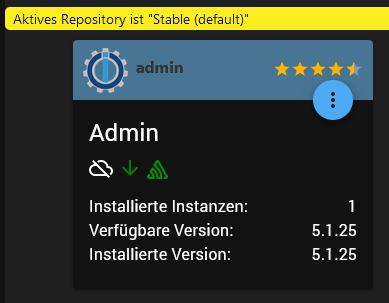
Gruß Ralf
Mir egal, wer Dein Vater ist! Wenn ich hier angel, wird nicht übers Wasser gelaufen!!Benutzt das Voting rechts unten im Beitrag wenn er euch geholfen hat.



Hey! Du scheinst an dieser Unterhaltung interessiert zu sein, hast aber noch kein Konto.
Hast du es satt, bei jedem Besuch durch die gleichen Beiträge zu scrollen? Wenn du dich für ein Konto anmeldest, kommst du immer genau dorthin zurück, wo du zuvor warst, und kannst dich über neue Antworten benachrichtigen lassen (entweder per E-Mail oder Push-Benachrichtigung). Du kannst auch Lesezeichen speichern und Beiträge positiv bewerten, um anderen Community-Mitgliedern deine Wertschätzung zu zeigen.
Mit deinem Input könnte dieser Beitrag noch besser werden 💗
Registrieren Anmelden471
Online33.0k
Benutzer83.6k
Themen1.3m
Beiträge