



Skip to content
  • Home
  • Recent
  • Tags
  • 0 Unread 0
  • Categories
  • Unreplied
  • Popular
  • GitHub
  • Docu
  • Hilfe
Skins
  • Light
  • Brite
  • Cerulean
  • Cosmo
  • Flatly
  • Journal
  • Litera
  • Lumen
  • Lux
  • Materia
  • Minty
  • Morph
  • Pulse
  • Sandstone
  • Simplex
  • Sketchy
  • Spacelab
  • United
  • Yeti
  • Zephyr
  • Dark
  • Cyborg
  • Darkly
  • Quartz
  • Slate
  • Solar
  • Superhero
  • Vapor

  • Default (No Skin)
  • No Skin
Collapse
ioBroker Logo

Community Forum

donate donate
  1. ioBroker Community Home
  2. Deutsch
  3. Off Topic
  4. Upgrade von Debian 10 'Buster' auf 11 'Bullseye'

NEWS

  • Monatsrückblick Januar/Februar 2026 ist online!
    BluefoxB
    Bluefox
    18
    1
    690

  • Jahresrückblick 2025 – unser neuer Blogbeitrag ist online! ✨
    BluefoxB
    Bluefox
    18
    1
    5.8k

  • Neuer Blogbeitrag: Monatsrückblick - Dezember 2025 🎄
    BluefoxB
    Bluefox
    13
    1
    1.5k

Upgrade von Debian 10 'Buster' auf 11 'Bullseye'

Scheduled Pinned Locked Moved Off Topic
309 Posts 43 Posters 92.1k Views 42 Watching
  • Oldest to Newest
  • Newest to Oldest
  • Most Votes
Reply
  • Reply as topic
Log in to reply
This topic has been deleted. Only users with topic management privileges can see it.
  • S Supernils

    Hallo,
    bei meinem zweiten Versuch hat das Upgrade auf Bullseye 11.7 geklappt.

    Es gibt aber noch ein Problem

    pi@raspberrypi4-iobroker:~ $ ls -l /dev/serial/by-id
    ls: cannot access '/dev/serial/by-id': No such file or directory
    

    Gibt es eine Alternative? Ich verwende das für den Zigbee Stick.

    Thomas BraunT Online
    Thomas BraunT Online
    Thomas Braun
    Most Active
    wrote on last edited by
    #283

    @supernils

    sudo apt update
    apt policy udev
    

    sagt?

    Linux-Werkzeugkasten:
    https://forum.iobroker.net/topic/42952/der-kleine-iobroker-linux-werkzeugkasten
    NodeJS Fixer Skript:
    https://forum.iobroker.net/topic/68035/iob-node-fix-skript
    iob_diag: curl -sLf -o diag.sh https://iobroker.net/diag.sh && bash diag.sh

    S 1 Reply Last reply
    0
    • Thomas BraunT Thomas Braun

      @supernils

      sudo apt update
      apt policy udev
      

      sagt?

      S Offline
      S Offline
      Supernils
      wrote on last edited by
      #284

      @thomas-braun

      pi@raspberrypi4-iobroker:~ $ sudo apt update
      Hit:1 http://archive.raspberrypi.org/debian bullseye InRelease
      Hit:2 http://raspbian.raspberrypi.org/raspbian bullseye InRelease
      Hit:3 https://deb.nodesource.com/node_18.x bullseye InRelease
      Reading package lists... Done
      Building dependency tree... Done
      Reading state information... Done
      All packages are up to date.
      pi@raspberrypi4-iobroker:~ $ apt policy udev
      udev:
        Installed: 247.3-7+rpi1+deb11u2
        Candidate: 247.3-7+rpi1+deb11u2
        Version table:
       *** 247.3-7+rpi1+deb11u2 500
              500 http://raspbian.raspberrypi.org/raspbian bullseye/main armhf Packages
              100 /var/lib/dpkg/status
      
      
      Thomas BraunT 1 Reply Last reply
      0
      • S Supernils

        @thomas-braun

        pi@raspberrypi4-iobroker:~ $ sudo apt update
        Hit:1 http://archive.raspberrypi.org/debian bullseye InRelease
        Hit:2 http://raspbian.raspberrypi.org/raspbian bullseye InRelease
        Hit:3 https://deb.nodesource.com/node_18.x bullseye InRelease
        Reading package lists... Done
        Building dependency tree... Done
        Reading state information... Done
        All packages are up to date.
        pi@raspberrypi4-iobroker:~ $ apt policy udev
        udev:
          Installed: 247.3-7+rpi1+deb11u2
          Candidate: 247.3-7+rpi1+deb11u2
          Version table:
         *** 247.3-7+rpi1+deb11u2 500
                500 http://raspbian.raspberrypi.org/raspbian bullseye/main armhf Packages
                100 /var/lib/dpkg/status
        
        
        Thomas BraunT Online
        Thomas BraunT Online
        Thomas Braun
        Most Active
        wrote on last edited by
        #285

        @supernils

        Vollständig lesen, inkl. der Ergänzungen im letzten Absatz.
        Der ist besonders wichtig für dein 32bit-RaspberryOS.

        https://forum.iobroker.net/topic/65017/zigbee-conbee2-funktioniert-nach-update-nicht-mehr-udev?_=1696419855987

        Linux-Werkzeugkasten:
        https://forum.iobroker.net/topic/42952/der-kleine-iobroker-linux-werkzeugkasten
        NodeJS Fixer Skript:
        https://forum.iobroker.net/topic/68035/iob-node-fix-skript
        iob_diag: curl -sLf -o diag.sh https://iobroker.net/diag.sh && bash diag.sh

        1 Reply Last reply
        1
        • S Offline
          S Offline
          Supernils
          wrote on last edited by
          #286
          pi@raspberrypi4-iobroker:/etc/apt/sources.list.d $ sudo apt update
          Hit:1 http://archive.raspberrypi.org/debian bullseye InRelease
          Hit:2 https://deb.nodesource.com/node_18.x bullseye InRelease
          Get:3 http://deb.debian.org/debian bullseye-proposed-updates InRelease [58.5 kB]
          Hit:4 http://raspbian.raspberrypi.org/raspbian bullseye InRelease
          Err:3 http://deb.debian.org/debian bullseye-proposed-updates InRelease
            The following signatures couldn't be verified because the public key is not available: NO_PUBKEY 0E98404D386FA1D9 NO_PUBKEY 6ED0E7B82643E131
          Reading package lists... Done
          W: GPG error: http://deb.debian.org/debian bullseye-proposed-updates InRelease: The following signatures couldn't be verified because the public key is not available: NO_PUBKEY 0E98404D386FA1D9 NO_PUBKEY 6ED0E7B82643E131
          E: The repository 'http://deb.debian.org/debian bullseye-proposed-updates InRelease' is not signed.
          N: Updating from such a repository can't be done securely, and is therefore disabled by default.
          N: See apt-secure(8) manpage for repository creation and user configuration details.


          Thomas BraunT 1 Reply Last reply
          0
          • S Supernils
            pi@raspberrypi4-iobroker:/etc/apt/sources.list.d $ sudo apt update
            Hit:1 http://archive.raspberrypi.org/debian bullseye InRelease
            Hit:2 https://deb.nodesource.com/node_18.x bullseye InRelease
            Get:3 http://deb.debian.org/debian bullseye-proposed-updates InRelease [58.5 kB]
            Hit:4 http://raspbian.raspberrypi.org/raspbian bullseye InRelease
            Err:3 http://deb.debian.org/debian bullseye-proposed-updates InRelease
              The following signatures couldn't be verified because the public key is not available: NO_PUBKEY 0E98404D386FA1D9 NO_PUBKEY 6ED0E7B82643E131
            Reading package lists... Done
            W: GPG error: http://deb.debian.org/debian bullseye-proposed-updates InRelease: The following signatures couldn't be verified because the public key is not available: NO_PUBKEY 0E98404D386FA1D9 NO_PUBKEY 6ED0E7B82643E131
            E: The repository 'http://deb.debian.org/debian bullseye-proposed-updates InRelease' is not signed.
            N: Updating from such a repository can't be done securely, and is therefore disabled by default.
            N: See apt-secure(8) manpage for repository creation and user configuration details.


            Thomas BraunT Online
            Thomas BraunT Online
            Thomas Braun
            Most Active
            wrote on last edited by
            #287

            @supernils sagte in Upgrade von Debian 10 'Buster' auf 11 'Bullseye':

            0E98404D386FA1D9

            Zieh den key rein. Steht glaube ich auch in dem HowTo drin, wie man das macht.

            Linux-Werkzeugkasten:
            https://forum.iobroker.net/topic/42952/der-kleine-iobroker-linux-werkzeugkasten
            NodeJS Fixer Skript:
            https://forum.iobroker.net/topic/68035/iob-node-fix-skript
            iob_diag: curl -sLf -o diag.sh https://iobroker.net/diag.sh && bash diag.sh

            S 1 Reply Last reply
            0
            • Thomas BraunT Thomas Braun

              @supernils sagte in Upgrade von Debian 10 'Buster' auf 11 'Bullseye':

              0E98404D386FA1D9

              Zieh den key rein. Steht glaube ich auch in dem HowTo drin, wie man das macht.

              S Offline
              S Offline
              Supernils
              wrote on last edited by
              #288

              @thomas-braun Ah verstanden. Hier stimmt doch etwas nicht oder? :)

              pi@raspberrypi4-iobroker:/etc/apt/sources.list.d $ sudo apt update
              Hit:1 http://deb.debian.org/debian bullseye-proposed-updates InRelease
              Hit:2 http://archive.raspberrypi.org/debian bullseye InRelease
              Hit:3 https://deb.nodesource.com/node_18.x bullseye InRelease
              Hit:4 http://raspbian.raspberrypi.org/raspbian bullseye InRelease
              Reading package lists... Done
              Building dependency tree... Done
              Reading state information... Done
              39 packages can be upgraded. Run 'apt list --upgradable' to see them.
              pi@raspberrypi4-iobroker:/etc/apt/sources.list.d $ sudo apt -t bullseye-proposed-updates install udev
              Reading package lists... Done
              Building dependency tree... Done
              Reading state information... Done
              udev is already the newest version (247.3-7+rpi1+deb11u2).
              0 upgraded, 0 newly installed, 0 to remove and 55 not upgraded.
              
              
              Thomas BraunT 1 Reply Last reply
              0
              • S Supernils

                @thomas-braun Ah verstanden. Hier stimmt doch etwas nicht oder? :)

                pi@raspberrypi4-iobroker:/etc/apt/sources.list.d $ sudo apt update
                Hit:1 http://deb.debian.org/debian bullseye-proposed-updates InRelease
                Hit:2 http://archive.raspberrypi.org/debian bullseye InRelease
                Hit:3 https://deb.nodesource.com/node_18.x bullseye InRelease
                Hit:4 http://raspbian.raspberrypi.org/raspbian bullseye InRelease
                Reading package lists... Done
                Building dependency tree... Done
                Reading state information... Done
                39 packages can be upgraded. Run 'apt list --upgradable' to see them.
                pi@raspberrypi4-iobroker:/etc/apt/sources.list.d $ sudo apt -t bullseye-proposed-updates install udev
                Reading package lists... Done
                Building dependency tree... Done
                Reading state information... Done
                udev is already the newest version (247.3-7+rpi1+deb11u2).
                0 upgraded, 0 newly installed, 0 to remove and 55 not upgraded.
                
                
                Thomas BraunT Online
                Thomas BraunT Online
                Thomas Braun
                Most Active
                wrote on last edited by Thomas Braun
                #289

                @supernils

                apt policy udev
                

                sagt? Der 'Trick' ist, die "niedrigere" Versionsnummer zu installieren:

                sudo apt install udev=247.3-7+deb11u4 libudev1=247.3-7+deb11u4
                

                Danach die frisch angelegte Quelle wieder löschen.

                Linux-Werkzeugkasten:
                https://forum.iobroker.net/topic/42952/der-kleine-iobroker-linux-werkzeugkasten
                NodeJS Fixer Skript:
                https://forum.iobroker.net/topic/68035/iob-node-fix-skript
                iob_diag: curl -sLf -o diag.sh https://iobroker.net/diag.sh && bash diag.sh

                S 1 Reply Last reply
                0
                • Thomas BraunT Thomas Braun

                  @supernils

                  apt policy udev
                  

                  sagt? Der 'Trick' ist, die "niedrigere" Versionsnummer zu installieren:

                  sudo apt install udev=247.3-7+deb11u4 libudev1=247.3-7+deb11u4
                  

                  Danach die frisch angelegte Quelle wieder löschen.

                  S Offline
                  S Offline
                  Supernils
                  wrote on last edited by Supernils
                  #290

                  @thomas-braun said in Upgrade von Debian 10 'Buster' auf 11 'Bullseye':

                  pi@raspberrypi4-iobroker:/etc/apt/sources.list.d $ apt policy udev
                  udev:
                    Installed: 247.3-7+rpi1+deb11u2
                    Candidate: 247.3-7+rpi1+deb11u2
                    Version table:
                   *** 247.3-7+rpi1+deb11u2 500
                          500 http://raspbian.raspberrypi.org/raspbian bullseye/main armhf Packages
                          100 /var/lib/dpkg/status
                       247.3-7+deb11u4 500
                          500 http://deb.debian.org/debian bullseye-proposed-updates/main armhf Packages
                  
                  
                  Thomas BraunT 1 Reply Last reply
                  0
                  • S Supernils

                    @thomas-braun said in Upgrade von Debian 10 'Buster' auf 11 'Bullseye':

                    pi@raspberrypi4-iobroker:/etc/apt/sources.list.d $ apt policy udev
                    udev:
                      Installed: 247.3-7+rpi1+deb11u2
                      Candidate: 247.3-7+rpi1+deb11u2
                      Version table:
                     *** 247.3-7+rpi1+deb11u2 500
                            500 http://raspbian.raspberrypi.org/raspbian bullseye/main armhf Packages
                            100 /var/lib/dpkg/status
                         247.3-7+deb11u4 500
                            500 http://deb.debian.org/debian bullseye-proposed-updates/main armhf Packages
                    
                    
                    Thomas BraunT Online
                    Thomas BraunT Online
                    Thomas Braun
                    Most Active
                    wrote on last edited by
                    #291

                    @supernils

                    Siehe vorstehende Antwort.

                    Linux-Werkzeugkasten:
                    https://forum.iobroker.net/topic/42952/der-kleine-iobroker-linux-werkzeugkasten
                    NodeJS Fixer Skript:
                    https://forum.iobroker.net/topic/68035/iob-node-fix-skript
                    iob_diag: curl -sLf -o diag.sh https://iobroker.net/diag.sh && bash diag.sh

                    S 1 Reply Last reply
                    0
                    • Thomas BraunT Thomas Braun

                      @supernils

                      Siehe vorstehende Antwort.

                      S Offline
                      S Offline
                      Supernils
                      wrote on last edited by
                      #292

                      @thomas-braun Vielen Dank

                      Thomas BraunT 1 Reply Last reply
                      0
                      • S Supernils

                        @thomas-braun Vielen Dank

                        Thomas BraunT Online
                        Thomas BraunT Online
                        Thomas Braun
                        Most Active
                        wrote on last edited by
                        #293

                        @supernils

                        udev auf hold gesetzt und die proposed-Quelle wieder gelöscht?

                        sudo apt update
                        

                        sagt nun?

                        Linux-Werkzeugkasten:
                        https://forum.iobroker.net/topic/42952/der-kleine-iobroker-linux-werkzeugkasten
                        NodeJS Fixer Skript:
                        https://forum.iobroker.net/topic/68035/iob-node-fix-skript
                        iob_diag: curl -sLf -o diag.sh https://iobroker.net/diag.sh && bash diag.sh

                        S 1 Reply Last reply
                        0
                        • Thomas BraunT Thomas Braun

                          @supernils

                          udev auf hold gesetzt und die proposed-Quelle wieder gelöscht?

                          sudo apt update
                          

                          sagt nun?

                          S Offline
                          S Offline
                          Supernils
                          wrote on last edited by
                          #294

                          @thomas-braun said in Upgrade von Debian 10 'Buster' auf 11 'Bullseye':

                          sudo apt update

                          pi@raspberrypi4-iobroker:~ $ sudo apt-mark hold udev
                          udev set on hold.
                          pi@raspberrypi4-iobroker:~ $ sudo apt update
                          Hit:1 http://archive.raspberrypi.org/debian bullseye InRelease
                          Hit:2 http://raspbian.raspberrypi.org/raspbian bullseye InRelease
                          Hit:3 https://deb.nodesource.com/node_18.x bullseye InRelease
                          Reading package lists... Done
                          Building dependency tree... Done
                          Reading state information... Done
                          2 packages can be upgraded. Run 'apt list --upgradable' to see them.
                          
                          
                          Thomas BraunT 1 Reply Last reply
                          0
                          • S Supernils

                            @thomas-braun said in Upgrade von Debian 10 'Buster' auf 11 'Bullseye':

                            sudo apt update

                            pi@raspberrypi4-iobroker:~ $ sudo apt-mark hold udev
                            udev set on hold.
                            pi@raspberrypi4-iobroker:~ $ sudo apt update
                            Hit:1 http://archive.raspberrypi.org/debian bullseye InRelease
                            Hit:2 http://raspbian.raspberrypi.org/raspbian bullseye InRelease
                            Hit:3 https://deb.nodesource.com/node_18.x bullseye InRelease
                            Reading package lists... Done
                            Building dependency tree... Done
                            Reading state information... Done
                            2 packages can be upgraded. Run 'apt list --upgradable' to see them.
                            
                            
                            Thomas BraunT Online
                            Thomas BraunT Online
                            Thomas Braun
                            Most Active
                            wrote on last edited by
                            #295

                            @supernils

                            Ja, passt.

                            Linux-Werkzeugkasten:
                            https://forum.iobroker.net/topic/42952/der-kleine-iobroker-linux-werkzeugkasten
                            NodeJS Fixer Skript:
                            https://forum.iobroker.net/topic/68035/iob-node-fix-skript
                            iob_diag: curl -sLf -o diag.sh https://iobroker.net/diag.sh && bash diag.sh

                            1 Reply Last reply
                            1
                            • B Offline
                              B Offline
                              Bibo*13
                              wrote on last edited by
                              #296

                              Hallo zusammen. Ich benötige Hilfe.
                              Anfangs lief es ganz gut aber dann:
                              nach sudo apt install gcc-8-base

                              kommt das und nach dem : bleibt es stehen
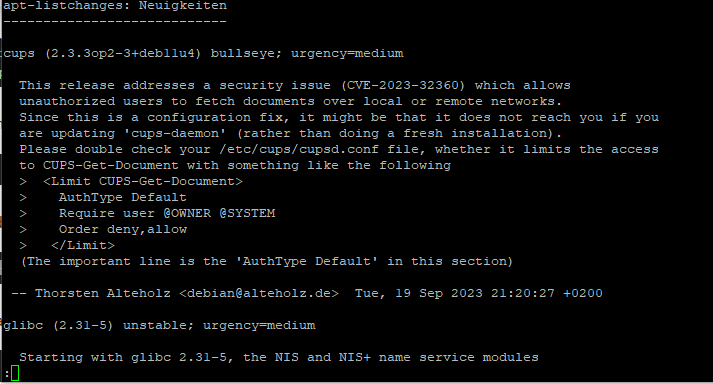
                              8dc0d003-de1c-4776-8914-4c24a6e34460-image.png

                              was kann ich tun? Der Pi läuft ohne sd-card mit ssd drive
                              Gruß Bibo

                              Thomas BraunT 1 Reply Last reply
                              0
                              • B Bibo*13

                                Hallo zusammen. Ich benötige Hilfe.
                                Anfangs lief es ganz gut aber dann:
                                nach sudo apt install gcc-8-base

                                kommt das und nach dem : bleibt es stehen
                                8dc0d003-de1c-4776-8914-4c24a6e34460-image.png

                                was kann ich tun? Der Pi läuft ohne sd-card mit ssd drive
                                Gruß Bibo

                                Thomas BraunT Online
                                Thomas BraunT Online
                                Thomas Braun
                                Most Active
                                wrote on last edited by
                                #297

                                @bibo-13 sagte in Upgrade von Debian 10 'Buster' auf 11 'Bullseye':

                                was kann ich tun?

                                Mit der Taste q die Anzeige verlassen.

                                Linux-Werkzeugkasten:
                                https://forum.iobroker.net/topic/42952/der-kleine-iobroker-linux-werkzeugkasten
                                NodeJS Fixer Skript:
                                https://forum.iobroker.net/topic/68035/iob-node-fix-skript
                                iob_diag: curl -sLf -o diag.sh https://iobroker.net/diag.sh && bash diag.sh

                                B 1 Reply Last reply
                                0
                                • Thomas BraunT Thomas Braun

                                  @bibo-13 sagte in Upgrade von Debian 10 'Buster' auf 11 'Bullseye':

                                  was kann ich tun?

                                  Mit der Taste q die Anzeige verlassen.

                                  B Offline
                                  B Offline
                                  Bibo*13
                                  wrote on last edited by
                                  #298

                                  @thomas-braun Danke. Wie geht es dann weiter?

                                  Thomas BraunT 1 Reply Last reply
                                  0
                                  • B Bibo*13

                                    @thomas-braun Danke. Wie geht es dann weiter?

                                    Thomas BraunT Online
                                    Thomas BraunT Online
                                    Thomas Braun
                                    Most Active
                                    wrote on last edited by Thomas Braun
                                    #299

                                    @bibo-13

                                    Wie in der Anleitung.

                                    Hättest du überhaupt die Meldung, die eine Installation von gcc-8-base erforderlich macht? Oder einfach mal auf Verdacht installiert?

                                    Linux-Werkzeugkasten:
                                    https://forum.iobroker.net/topic/42952/der-kleine-iobroker-linux-werkzeugkasten
                                    NodeJS Fixer Skript:
                                    https://forum.iobroker.net/topic/68035/iob-node-fix-skript
                                    iob_diag: curl -sLf -o diag.sh https://iobroker.net/diag.sh && bash diag.sh

                                    B 2 Replies Last reply
                                    0
                                    • Thomas BraunT Thomas Braun

                                      @bibo-13

                                      Wie in der Anleitung.

                                      Hättest du überhaupt die Meldung, die eine Installation von gcc-8-base erforderlich macht? Oder einfach mal auf Verdacht installiert?

                                      B Offline
                                      B Offline
                                      Bibo*13
                                      wrote on last edited by
                                      #300

                                      @thomas-braun ich hatte die Meldung. Deshalb habe ich auch den Befehl ausgeführt.
                                      Im Moment läuft die Inst nach sudo apt update und sudo apt full-upgrade

                                      1 Reply Last reply
                                      0
                                      • Thomas BraunT Thomas Braun

                                        @bibo-13

                                        Wie in der Anleitung.

                                        Hättest du überhaupt die Meldung, die eine Installation von gcc-8-base erforderlich macht? Oder einfach mal auf Verdacht installiert?

                                        B Offline
                                        B Offline
                                        Bibo*13
                                        wrote on last edited by
                                        #301

                                        @thomas-braun Ich bin durch. Das System rennt wieder.
                                        Danke für Deinen Support

                                        1 Reply Last reply
                                        0
                                        • M Offline
                                          M Offline
                                          mp3junkie
                                          wrote on last edited by
                                          #302

                                          Hallo,
                                          @thomas-braun sagte in Upgrade von Debian 10 'Buster' auf 11 'Bullseye':

                                          Vorsichtshalber schauen wir noch in den dhcpd.service rein.

                                          sudo nano /etc/systemd/system/dhcpcd.service.d/wait.conf
                                          

                                          kann es sein, dass die Konfigurationsdatei erst nach dem Upgrade vorhanden ist?

                                          Thomas BraunT 1 Reply Last reply
                                          0

                                          Hello! It looks like you're interested in this conversation, but you don't have an account yet.

                                          Getting fed up of having to scroll through the same posts each visit? When you register for an account, you'll always come back to exactly where you were before, and choose to be notified of new replies (either via email, or push notification). You'll also be able to save bookmarks and upvote posts to show your appreciation to other community members.

                                          With your input, this post could be even better 💗

                                          Register Login
                                          Reply
                                          • Reply as topic
                                          Log in to reply
                                          • Oldest to Newest
                                          • Newest to Oldest
                                          • Most Votes


                                          Support us

                                          ioBroker
                                          Community Adapters
                                          Donate

                                          254

                                          Online

                                          32.7k

                                          Users

                                          82.6k

                                          Topics

                                          1.3m

                                          Posts
                                          Community
                                          Impressum | Datenschutz-Bestimmungen | Nutzungsbedingungen | Einwilligungseinstellungen
                                          ioBroker Community 2014-2025
                                          logo
                                          • Login

                                          • Don't have an account? Register

                                          • Login or register to search.
                                          • First post
                                            Last post
                                          0
                                          • Home
                                          • Recent
                                          • Tags
                                          • Unread 0
                                          • Categories
                                          • Unreplied
                                          • Popular
                                          • GitHub
                                          • Docu
                                          • Hilfe