Weiter zum Inhalt
  • Home
  • Aktuell
  • Tags
  • 0 Ungelesen 0
  • Kategorien
  • Unreplied
  • Beliebt
  • GitHub
  • Docu
  • Hilfe
Skins
  • Hell
  • Brite
  • Cerulean
  • Cosmo
  • Flatly
  • Journal
  • Litera
  • Lumen
  • Lux
  • Materia
  • Minty
  • Morph
  • Pulse
  • Sandstone
  • Simplex
  • Sketchy
  • Spacelab
  • United
  • Yeti
  • Zephyr
  • Dunkel
  • Cyborg
  • Darkly
  • Quartz
  • Slate
  • Solar
  • Superhero
  • Vapor

  • Standard: (Kein Skin)
  • Kein Skin
Einklappen
ioBroker Logo

Community Forum

donate donate
  1. ioBroker Community Home
  2. Deutsch
  3. ioBroker Allgemein
  4. ioBroker: Fernzugriff weg - SOS

NEWS

  • Neues YouTube-Video: Visualisierung im Devices-Adapter
    BluefoxB
    Bluefox
    13
    1
    635

  • Neuer ioBroker-Blog online: Monatsrückblick März/April 2026
    BluefoxB
    Bluefox
    8
    1
    2.0k

  • Verwendung von KI bitte immer deutlich kennzeichnen
    HomoranH
    Homoran
    11
    1
    893

ioBroker: Fernzugriff weg - SOS

Geplant Angeheftet Gesperrt Verschoben ioBroker Allgemein
fernzugriff iot cloud
47 Beiträge 6 Kommentatoren 2.5k Aufrufe 5 Beobachtet
  • Älteste zuerst
  • Neuste zuerst
  • Meiste Stimmen
Antworten
  • In einem neuen Thema antworten
Anmelden zum Antworten
Dieses Thema wurde gelöscht. Nur Nutzer mit entsprechenden Rechten können es sehen.
  • qqolliQ qqolli

    Hallo zusammen,

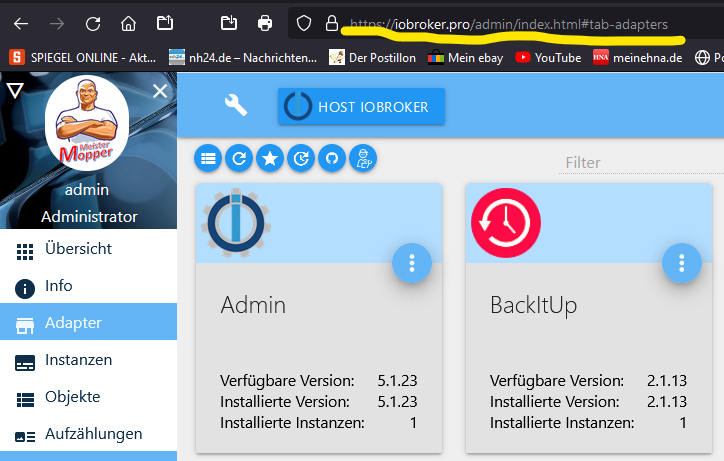
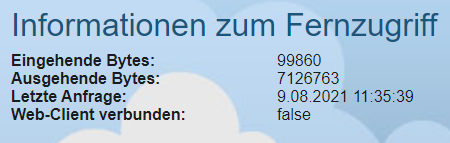
    z. Zt. kann ich nach einem Update des Admin-Apdapters auf 5.1.23 keinen Fernzugriff via iobroker.pro mehr herstellen:

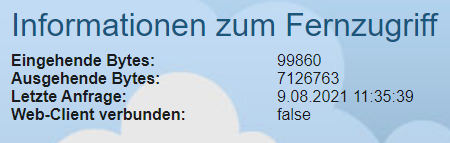
    Informationen zum Fernzugriff
    Eingehende Bytes:83563
    Ausgehende Bytes:5671360
    Letzte Anfrage:8.08.2021 12:46:58
    Web-Client verbunden:false
    

    Auch mit iobroker.vis auf Android oder iOS geht es nicht mehr:

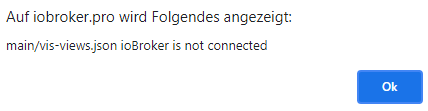
    main/vis-views.json ioBroker is not connected
    

    Nur noch, wenn ich per Web-Browser die IP:8082 aufrufe.

    Hat vielleicht jemand eine Idee, wie das zu beheben wäre?

    HomoranH Nicht stören
    HomoranH Nicht stören
    Homoran
    Global Moderator Administrators
    schrieb am zuletzt editiert von
    #8

    @qqolli sagte in ioBroker: Fernzugriff weg - SOS:

    Auch mit iobroker.vis auf Android oder iOS geht es nicht mehr:

    was heisst das?

    • Lokal im WLAN oder mobile Daten?
    • mit der App oder mit Browser?

    @qqolli sagte in ioBroker: Fernzugriff weg - SOS:

    main/vis-views.json ioBroker is not connected

    wo kommt diese Meldung her?

    Ist der cloud Adapter grün?

    kein Support per PN! - Fragen im Forum stellen -
    Benutzt das Voting rechts unten im Beitrag wenn er euch geholfen hat.
    Das Forum freut sich über eine Spende. Benutzt dazu den Spendenbutton oben rechts. Danke!
    der Installationsfixer: curl -fsL https://iobroker.net/fix.sh | bash -

    qqolliQ 1 Antwort Letzte Antwort
    0
    • HomoranH Homoran

      @qqolli sagte in ioBroker: Fernzugriff weg - SOS:

      Auch mit iobroker.vis auf Android oder iOS geht es nicht mehr:

      was heisst das?

      • Lokal im WLAN oder mobile Daten?
      • mit der App oder mit Browser?

      @qqolli sagte in ioBroker: Fernzugriff weg - SOS:

      main/vis-views.json ioBroker is not connected

      wo kommt diese Meldung her?

      Ist der cloud Adapter grün?

      qqolliQ Offline
      qqolliQ Offline
      qqolli
      schrieb am zuletzt editiert von
      #9

      @homoran sagte in ioBroker: Fernzugriff weg - SOS:

      @qqolli sagte in ioBroker: Fernzugriff weg - SOS:

      Auch mit iobroker.vis auf Android oder iOS geht es nicht mehr:

      was heisst das?

      • Lokal im WLAN oder mobile Daten?
        Lokal geht nur noch Browser, also EIngabe von IP:8082. Mobile Daten gehen ich normalerweise immer über iobroker.pro, von dort kommt auch die Fehlermeldung "main/vis-views.json ioBroker is not connected".
      • mit der App oder mit Browser?

      @qqolli sagte in ioBroker: Fernzugriff weg - SOS:

      main/vis-views.json ioBroker is not connected

      wo kommt diese Meldung her?
      von iobroker.pro, wenn ich z. B. von dort den VIS-Editor aufrufe und starten will.

      Ist der cloud Adapter grün?
      Gerade schwankt er fröhlich zwischen grün und gelb. Ich hatte weiter oben ja einen Screenshot gepostet und gefragt ob ich da noch was eintragen muss, bzw. etwas fehlt.

      qqolliQ 1 Antwort Letzte Antwort
      0
      • qqolliQ qqolli

        @homoran sagte in ioBroker: Fernzugriff weg - SOS:

        @qqolli sagte in ioBroker: Fernzugriff weg - SOS:

        Auch mit iobroker.vis auf Android oder iOS geht es nicht mehr:

        was heisst das?

        • Lokal im WLAN oder mobile Daten?
          Lokal geht nur noch Browser, also EIngabe von IP:8082. Mobile Daten gehen ich normalerweise immer über iobroker.pro, von dort kommt auch die Fehlermeldung "main/vis-views.json ioBroker is not connected".
        • mit der App oder mit Browser?

        @qqolli sagte in ioBroker: Fernzugriff weg - SOS:

        main/vis-views.json ioBroker is not connected

        wo kommt diese Meldung her?
        von iobroker.pro, wenn ich z. B. von dort den VIS-Editor aufrufe und starten will.

        Ist der cloud Adapter grün?
        Gerade schwankt er fröhlich zwischen grün und gelb. Ich hatte weiter oben ja einen Screenshot gepostet und gefragt ob ich da noch was eintragen muss, bzw. etwas fehlt.

        qqolliQ Offline
        qqolliQ Offline
        qqolli
        schrieb am zuletzt editiert von
        #10

        @qqolli

        Heute ist der cloud-Adapter stabil und grün, aber trotzdem weiterhin diese Fehlermeldung im iobroker.pro unter Diagnose:
        55dc2e16-6166-4a26-b6d5-2a19a8ff7464-image.png

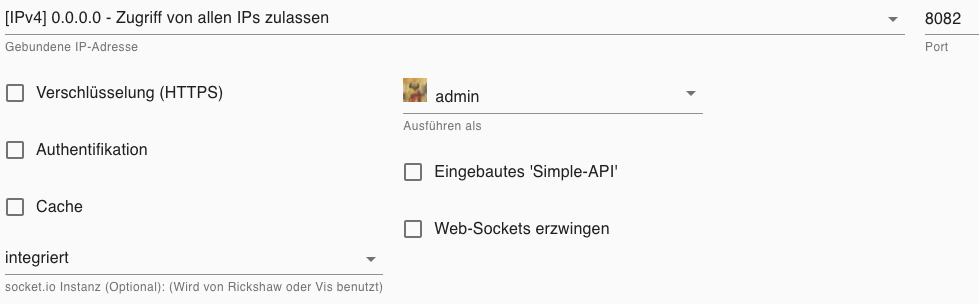
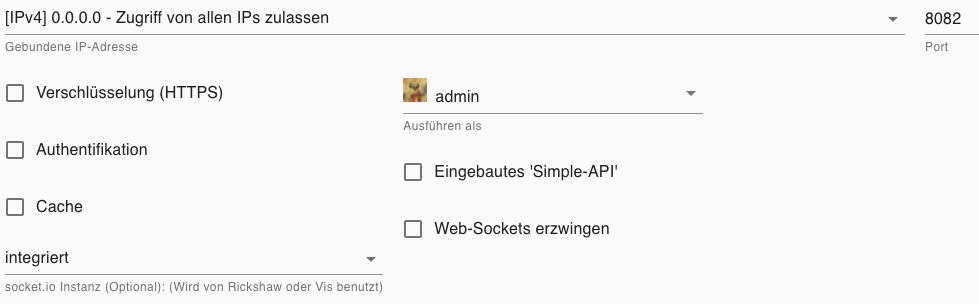
        Wie bereits gefragt, vielleicht muss ich im Web-Adapter noch etwas einstellen?:
        1b8ce8d4-9041-41ab-a318-ac3df171138f-image.png

        qqolliQ 1 Antwort Letzte Antwort
        0
        • qqolliQ qqolli

          @qqolli

          Heute ist der cloud-Adapter stabil und grün, aber trotzdem weiterhin diese Fehlermeldung im iobroker.pro unter Diagnose:

          55dc2e16-6166-4a26-b6d5-2a19a8ff7464-image.png

          Wie bereits gefragt, vielleicht muss ich im Web-Adapter noch etwas einstellen?:

          1b8ce8d4-9041-41ab-a318-ac3df171138f-image.png

          qqolliQ Offline
          qqolliQ Offline
          qqolli
          schrieb am zuletzt editiert von
          #11

          @Homoran

          @qqolli sagte in ioBroker: Fernzugriff weg - SOS:

          @qqolli

          Heute ist der cloud-Adapter stabil und grün, aber trotzdem weiterhin diese Fehlermeldung im iobroker.pro unter Diagnose:

          55dc2e16-6166-4a26-b6d5-2a19a8ff7464-image.png

          Wie bereits gefragt, vielleicht muss ich im Web-Adapter noch etwas einstellen?:

          1b8ce8d4-9041-41ab-a318-ac3df171138f-image.png

          qqolliQ 1 Antwort Letzte Antwort
          0
          • qqolliQ qqolli

            @Homoran

            @qqolli sagte in ioBroker: Fernzugriff weg - SOS:

            @qqolli

            Heute ist der cloud-Adapter stabil und grün, aber trotzdem weiterhin diese Fehlermeldung im iobroker.pro unter Diagnose:

            55dc2e16-6166-4a26-b6d5-2a19a8ff7464-image.png

            Wie bereits gefragt, vielleicht muss ich im Web-Adapter noch etwas einstellen?:

            1b8ce8d4-9041-41ab-a318-ac3df171138f-image.png

            qqolliQ Offline
            qqolliQ Offline
            qqolli
            schrieb am zuletzt editiert von
            #12

            @qqolli

            Wirklich keiner eine Idee, warum ich von aussen nicht auf iobroker zugreifen kann?

            E 1 Antwort Letzte Antwort
            0
            • qqolliQ qqolli

              @qqolli

              Wirklich keiner eine Idee, warum ich von aussen nicht auf iobroker zugreifen kann?

              E Offline
              E Offline
              ente34
              schrieb am zuletzt editiert von
              #13

              @qqolli
              Habe dasselbe Problem (stable)

              fern1.PNG

              qqolliQ 1 Antwort Letzte Antwort
              0
              • E ente34

                @qqolli
                Habe dasselbe Problem (stable)

                fern1.PNG

                qqolliQ Offline
                qqolliQ Offline
                qqolli
                schrieb am zuletzt editiert von
                #14

                @ente34

                Ja, aber es scheint das sich niemand über iobroker.pro verbindet, sonst hätten wir vielleicht schon eine Antwort bekommen :-)

                Meister MopperM ? E 3 Antworten Letzte Antwort
                0
                • qqolliQ qqolli

                  @ente34

                  Ja, aber es scheint das sich niemand über iobroker.pro verbindet, sonst hätten wir vielleicht schon eine Antwort bekommen :-)

                  Meister MopperM Online
                  Meister MopperM Online
                  Meister Mopper
                  Most Active
                  schrieb am zuletzt editiert von
                  #15

                  @qqolli

                  Also, bei mir funktioniert es:


                  1a3a6101-6364-412a-a360-a05bf182fcf8-grafik.png

                  Proxmox und HA - dank KI/AI endlich "blocklyfrei"

                  qqolliQ 1 Antwort Letzte Antwort
                  0
                  • qqolliQ qqolli

                    @ente34

                    Ja, aber es scheint das sich niemand über iobroker.pro verbindet, sonst hätten wir vielleicht schon eine Antwort bekommen :-)

                    ? Offline
                    ? Offline
                    Ein ehemaliger Benutzer
                    schrieb am zuletzt editiert von
                    #16

                    @qqolli Bin seit Monaten über .pro verbunden und das läuft einwandfrei....

                    Was steht denn in den Logfiles?

                    qqolliQ 1 Antwort Letzte Antwort
                    0
                    • qqolliQ qqolli

                      @ente34

                      Ja, aber es scheint das sich niemand über iobroker.pro verbindet, sonst hätten wir vielleicht schon eine Antwort bekommen :-)

                      E Offline
                      E Offline
                      ente34
                      schrieb am zuletzt editiert von
                      #17

                      @qqolli
                      Bei mir geht es nach Eingabe der Zugangsdaten im cloud-Adapter wieder:

                      fern2.PNG

                      qqolliQ 1 Antwort Letzte Antwort
                      0
                      • Meister MopperM Meister Mopper

                        @qqolli

                        Also, bei mir funktioniert es:


                        1a3a6101-6364-412a-a360-a05bf182fcf8-grafik.png

                        qqolliQ Offline
                        qqolliQ Offline
                        qqolli
                        schrieb am zuletzt editiert von
                        #18

                        @meister-mopper

                        Wie schön für Dich ...

                        1 Antwort Letzte Antwort
                        0
                        • E ente34

                          @qqolli
                          Bei mir geht es nach Eingabe der Zugangsdaten im cloud-Adapter wieder:

                          fern2.PNG

                          qqolliQ Offline
                          qqolliQ Offline
                          qqolli
                          schrieb am zuletzt editiert von
                          #19

                          @ente34

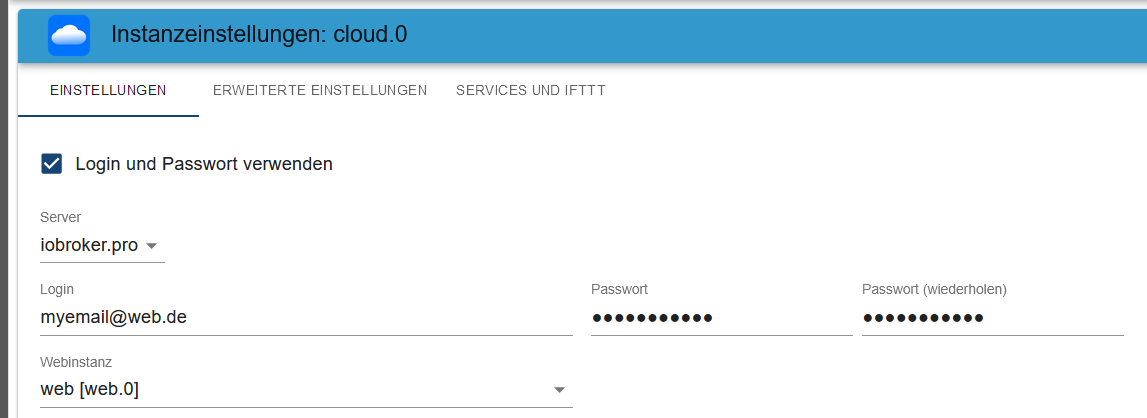
                          Habe ich auch probiert, auch ohne Zugangsdaten it App-Key. Hat beides nicht funktioniert. Wie gesagt, davor war ich auch seit Monaten verbunden.

                          Wie schon ein paar mal weiter oben gefragt, was habt ihr hier eingetragen:

                          cfbab66a-d298-48c7-a557-8f18bc74503d-image.png

                          1 Antwort Letzte Antwort
                          0
                          • ? Ein ehemaliger Benutzer

                            @qqolli Bin seit Monaten über .pro verbunden und das läuft einwandfrei....

                            Was steht denn in den Logfiles?

                            qqolliQ Offline
                            qqolliQ Offline
                            qqolli
                            schrieb am zuletzt editiert von
                            #20

                            @ilovegym

                            Obwohl cloud- und web-Adapter grün sind (wobei der cloud oft zwischen gelb und grün springt), bekomme ich immer die folgende Meldung (s. auch weiter oben):
                            3c9e7997-a586-417b-9fec-392a4f0c1858-image.png

                            Wenn ich in iobroker.pro aus dem Dashboard den VIS-Editor starte und von dort die VIS starten will:
                            4e03ce0b-e0d7-43c7-9afe-d440c4fee2d7-image.png

                            ? 1 Antwort Letzte Antwort
                            0
                            • qqolliQ qqolli

                              @ilovegym

                              Obwohl cloud- und web-Adapter grün sind (wobei der cloud oft zwischen gelb und grün springt), bekomme ich immer die folgende Meldung (s. auch weiter oben):

                              3c9e7997-a586-417b-9fec-392a4f0c1858-image.png

                              Wenn ich in iobroker.pro aus dem Dashboard den VIS-Editor starte und von dort die VIS starten will:

                              4e03ce0b-e0d7-43c7-9afe-d440c4fee2d7-image.png

                              ? Offline
                              ? Offline
                              Ein ehemaliger Benutzer
                              schrieb am zuletzt editiert von
                              #21

                              @qqolli wichtig sind die Logfiles, wenn da was zwischen grün und gelb wechselt ist es auch auch nicht ok.

                              Mit den Screenshots kann man leider in deinem Fall nichts anfangen, man muss schon ins Logfile schauen und lesen, was da steht.. dafür isses ja da.. :-)

                              qqolliQ 1 Antwort Letzte Antwort
                              0
                              • ? Ein ehemaliger Benutzer

                                @qqolli wichtig sind die Logfiles, wenn da was zwischen grün und gelb wechselt ist es auch auch nicht ok.

                                Mit den Screenshots kann man leider in deinem Fall nichts anfangen, man muss schon ins Logfile schauen und lesen, was da steht.. dafür isses ja da.. :-)

                                qqolliQ Offline
                                qqolliQ Offline
                                qqolli
                                schrieb am zuletzt editiert von qqolli
                                #22

                                @ilovegym

                                Da hast Du schon recht, aber z. Zt. ist mal alles wieder grün. Sobald ich Logfiles habe, werde ich sie hier einstellen.

                                Update: Gerade folgende Meldung bekommen, als ich die VIS in iobroker.pro vom Editor aus starten wollte:
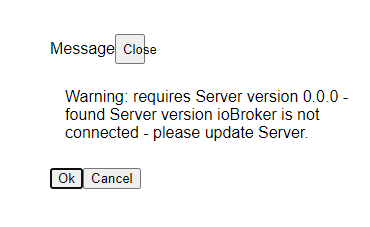
                                4b09abd6-82da-4103-be6b-21456f7ec77d-image.png

                                Vielleicht ist das ein Hinweis? Bin da leider nicht so firm.

                                Wären denn diese Einstellungen soweit ok, oder ergänzungswürdig:
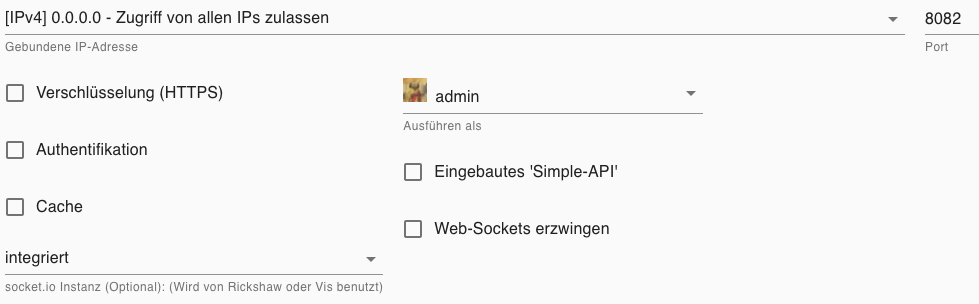
                                2fc72ca0-e2dd-485e-ae2d-da3870c55c30-image.png

                                Nach obiger Fehlermeldung ist der cloud-Adapter auf gelb gesprungen und endlich gab es ein Logfile:

                                cloud.0
                                2021-08-13 09:21:23.866	info	Adapter redirected temporally to "https://iobroker.pro:10556" in 30 seconds. Reason: command from server
                                
                                cloud.0
                                2021-08-13 09:21:23.839	info	Connection changed: connect
                                
                                cloud.0
                                2021-08-13 09:21:23.782	info	Trying to connect as system.user.admin
                                
                                cloud.0
                                2021-08-13 09:21:23.517	info	Connecting with https://iobroker.pro:10555 with "@pro_xxx"
                                
                                cloud.0
                                2021-08-13 09:21:23.114	info	starting. Version 4.1.0 in /opt/iobroker/node_modules/iobroker.cloud, node: v12.22.4, js-controller: 3.3.15
                                
                                cloud.0
                                2021-08-13 09:21:18.477	warn	Terminated (-100): Without reason
                                
                                cloud.0
                                2021-08-13 09:21:08.475	info	Restart adapter by disconnect
                                
                                cloud.0
                                2021-08-13 09:21:08.474	info	Connection lost
                                
                                cloud.0
                                2021-08-13 09:21:08.473	info	Connection changed: io client disconnect
                                
                                cloud.0
                                2021-08-13 09:21:08.468	error	Sending to many events. Account is blocked for 5 minutes. Please restart cloud adapter.
                                
                                cloud.0
                                2021-08-13 09:21:08.446	info	Connection changed: connect
                                
                                cloud.0
                                2021-08-13 09:21:08.346	info	Trying to connect as system.user.admin
                                
                                cloud.0
                                2021-08-13 09:20:38.297	info	Adapter redirected temporally to "https://iobroker.pro:10556" in 30 seconds. Reason: command from server
                                
                                cloud.0
                                2021-08-13 09:20:38.271	info	Connection changed: connect
                                
                                cloud.0
                                2021-08-13 09:20:38.159	info	Trying to connect as system.user.admin
                                
                                cloud.0
                                2021-08-13 09:20:37.978	info	Connecting with https://iobroker.pro:10555 with "@pro_xxx"
                                
                                cloud.0
                                2021-08-13 09:20:37.639	info	starting. Version 4.1.0 in /opt/iobroker/node_modules/iobroker.cloud, node: v12.22.4, js-controller: 3.3.15
                                
                                cloud.0
                                2021-08-13 09:20:31.937	warn	Terminated (-100): Without reason
                                
                                cloud.0
                                2021-08-13 09:20:21.935	info	Restart adapter by disconnect
                                
                                cloud.0
                                2021-08-13 09:20:21.934	info	Connection lost
                                
                                cloud.0
                                2021-08-13 09:20:21.933	info	Connection changed: io client disconnect
                                
                                cloud.0
                                2021-08-13 09:20:21.930	error	Sending to many events. Account is blocked for 5 minutes. Please restart cloud adapter.
                                
                                cloud.0
                                2021-08-13 09:20:21.908	info	Connection changed: connect
                                
                                cloud.0
                                2021-08-13 09:20:21.798	info	Trying to connect as system.user.admin
                                
                                ? 1 Antwort Letzte Antwort
                                0
                                • qqolliQ qqolli

                                  @ilovegym

                                  Da hast Du schon recht, aber z. Zt. ist mal alles wieder grün. Sobald ich Logfiles habe, werde ich sie hier einstellen.

                                  Update: Gerade folgende Meldung bekommen, als ich die VIS in iobroker.pro vom Editor aus starten wollte:

                                  4b09abd6-82da-4103-be6b-21456f7ec77d-image.png

                                  Vielleicht ist das ein Hinweis? Bin da leider nicht so firm.

                                  Wären denn diese Einstellungen soweit ok, oder ergänzungswürdig:

                                  2fc72ca0-e2dd-485e-ae2d-da3870c55c30-image.png

                                  Nach obiger Fehlermeldung ist der cloud-Adapter auf gelb gesprungen und endlich gab es ein Logfile:

                                  cloud.0
                                  2021-08-13 09:21:23.866	info	Adapter redirected temporally to "https://iobroker.pro:10556" in 30 seconds. Reason: command from server
                                  
                                  cloud.0
                                  2021-08-13 09:21:23.839	info	Connection changed: connect
                                  
                                  cloud.0
                                  2021-08-13 09:21:23.782	info	Trying to connect as system.user.admin
                                  
                                  cloud.0
                                  2021-08-13 09:21:23.517	info	Connecting with https://iobroker.pro:10555 with "@pro_xxx"
                                  
                                  cloud.0
                                  2021-08-13 09:21:23.114	info	starting. Version 4.1.0 in /opt/iobroker/node_modules/iobroker.cloud, node: v12.22.4, js-controller: 3.3.15
                                  
                                  cloud.0
                                  2021-08-13 09:21:18.477	warn	Terminated (-100): Without reason
                                  
                                  cloud.0
                                  2021-08-13 09:21:08.475	info	Restart adapter by disconnect
                                  
                                  cloud.0
                                  2021-08-13 09:21:08.474	info	Connection lost
                                  
                                  cloud.0
                                  2021-08-13 09:21:08.473	info	Connection changed: io client disconnect
                                  
                                  cloud.0
                                  2021-08-13 09:21:08.468	error	Sending to many events. Account is blocked for 5 minutes. Please restart cloud adapter.
                                  
                                  cloud.0
                                  2021-08-13 09:21:08.446	info	Connection changed: connect
                                  
                                  cloud.0
                                  2021-08-13 09:21:08.346	info	Trying to connect as system.user.admin
                                  
                                  cloud.0
                                  2021-08-13 09:20:38.297	info	Adapter redirected temporally to "https://iobroker.pro:10556" in 30 seconds. Reason: command from server
                                  
                                  cloud.0
                                  2021-08-13 09:20:38.271	info	Connection changed: connect
                                  
                                  cloud.0
                                  2021-08-13 09:20:38.159	info	Trying to connect as system.user.admin
                                  
                                  cloud.0
                                  2021-08-13 09:20:37.978	info	Connecting with https://iobroker.pro:10555 with "@pro_xxx"
                                  
                                  cloud.0
                                  2021-08-13 09:20:37.639	info	starting. Version 4.1.0 in /opt/iobroker/node_modules/iobroker.cloud, node: v12.22.4, js-controller: 3.3.15
                                  
                                  cloud.0
                                  2021-08-13 09:20:31.937	warn	Terminated (-100): Without reason
                                  
                                  cloud.0
                                  2021-08-13 09:20:21.935	info	Restart adapter by disconnect
                                  
                                  cloud.0
                                  2021-08-13 09:20:21.934	info	Connection lost
                                  
                                  cloud.0
                                  2021-08-13 09:20:21.933	info	Connection changed: io client disconnect
                                  
                                  cloud.0
                                  2021-08-13 09:20:21.930	error	Sending to many events. Account is blocked for 5 minutes. Please restart cloud adapter.
                                  
                                  cloud.0
                                  2021-08-13 09:20:21.908	info	Connection changed: connect
                                  
                                  cloud.0
                                  2021-08-13 09:20:21.798	info	Trying to connect as system.user.admin
                                  
                                  ? Offline
                                  ? Offline
                                  Ein ehemaliger Benutzer
                                  schrieb am zuletzt editiert von
                                  #23

                                  @qqolli

                                  da haben wir es doch, die Fehlermeldung sagt ja, was passiert und warum es nicht geht.

                                  Also schau, was da soviele Events sendet, da ist irgendwas im Argen..

                                  qqolliQ 1 Antwort Letzte Antwort
                                  0
                                  • Meister MopperM Online
                                    Meister MopperM Online
                                    Meister Mopper
                                    Most Active
                                    schrieb am zuletzt editiert von Meister Mopper
                                    #24

                                    @ilovegym Diese Fehlermeldung bekomme ich, wenn ich meine aufwändige vis über cloud.0 aufrufe.

                                    Proxmox und HA - dank KI/AI endlich "blocklyfrei"

                                    1 Antwort Letzte Antwort
                                    0
                                    • ? Ein ehemaliger Benutzer

                                      @qqolli

                                      da haben wir es doch, die Fehlermeldung sagt ja, was passiert und warum es nicht geht.

                                      Also schau, was da soviele Events sendet, da ist irgendwas im Argen..

                                      qqolliQ Offline
                                      qqolliQ Offline
                                      qqolli
                                      schrieb am zuletzt editiert von
                                      #25

                                      @ilovegym

                                      Was z. Zt. recht heftig ist, ist der upnp.0 (ein paar Mal jede Sekunde). Könnte das ein Grund sein?:

                                      upnp.0
                                      2021-08-13 10:59:33.107	info	State value to set for "upnp.0.WANDevice_-_FRITZ!Box_7490.WANDevice.WANCommonInterfaceConfig.Layer1DownstreamMaxBitRate" has to be type "number" but received type "string"
                                      
                                      upnp.0
                                      2021-08-13 10:59:33.081	info	State value to set for "upnp.0.WANDevice_-_FRITZ!Box_7490.WANDevice.WANCommonInterfaceConfig.ByteSendRate" has to be type "number" but received type "string"
                                      
                                      upnp.0
                                      2021-08-13 10:59:33.028	info	State value to set for "upnp.0.WANDevice_-_FRITZ!Box_7490.WANDevice.WANCommonInterfaceConfig.ByteReceiveRate" has to be type "number" but received type "string"
                                      
                                      upnp.0
                                      2021-08-13 10:59:33.012	info	State value to set for "upnp.0.WANDevice_-_FRITZ!Box_7490.WANDevice.WANCommonInterfaceConfig.PacketSendRate" has to be type "number" but received type "string"
                                      
                                      upnp.0
                                      2021-08-13 10:59:32.960	info	State value to set for "upnp.0.WANDevice_-_FRITZ!Box_7490.WANDevice.WANCommonInterfaceConfig.PacketReceiveRate" has to be type "number" but received type "string"
                                      
                                      upnp.0
                                      2021-08-13 10:59:32.942	info	State value to set for "upnp.0.WANDevice_-_FRITZ!Box_7490.WANDevice.WANCommonInterfaceConfig.TotalBytesSent" has to be type "number" but received type "string"
                                      
                                      upnp.0
                                      2021-08-13 10:59:32.889	info	State value to set for "upnp.0.WANDevice_-_FRITZ!Box_7490.WANDevice.WANCommonInterfaceConfig.TotalBytesReceived" has to be type "number" but received type "string"
                                      
                                      upnp.0
                                      2021-08-13 10:59:32.871	info	State value to set for "upnp.0.WANDevice_-_FRITZ!Box_7490.WANDevice.WANCommonInterfaceConfig.AutoDisconnectTime" has to be type "number" but received type "string"
                                      
                                      upnp.0
                                      2021-08-13 10:59:32.814	info	State value to set for "upnp.0.WANDevice_-_FRITZ!Box_7490.WANDevice.WANCommonInterfaceConfig.IdleDisconnectTime" has to be type "number" but received type "string"
                                      
                                      upnp.0
                                      2021-08-13 10:59:32.752	info	State value to set for "upnp.0.WANDevice_-_FRITZ!Box_7490.WANDevice.WANCommonInterfaceConfig.UpnpControlEnabled" has to be type "boolean" but received type "string"
                                      
                                      upnp.0
                                      2021-08-13 10:59:32.696	info	State value to set for "upnp.0.WANDevice_-_FRITZ!Box_7490.WANDevice.WANCommonInterfaceConfig.RoutedBridgedModeBoth" has to be type "number" but received type "string"
                                      
                                      upnp.0
                                      2021-08-13 10:59:32.212	info	State value to set for "upnp.0.WANConnectionDevice_-_FRITZ!Box_7490.WANDevice.WANConnectionDevice.WANIPConnection.Uptime" has to be type "number" but received type "string"
                                      
                                      upnp.0
                                      2021-08-13 10:59:32.172	info	State value to set for "upnp.0.WANDevice_-_FRITZ!Box_7490.WANDevice.WANCommonInterfaceConfig.Layer1UpstreamMaxBitRate" has to be type "number" but received type "string"
                                      
                                      upnp.0
                                      2021-08-13 10:59:32.119	info	State value to set for "upnp.0.WANDevice_-_FRITZ!Box_7490.WANDevice.WANCommonInterfaceConfig.Layer1DownstreamMaxBitRate" has to be type "number" but received type "string"
                                      
                                      upnp.0
                                      2021-08-13 10:59:32.092	info	State value to set for "upnp.0.WANDevice_-_FRITZ!Box_7490.WANDevice.WANCommonInterfaceConfig.ByteSendRate" has to be type "number" but received type "string"
                                      
                                      upnp.0
                                      2021-08-13 10:59:32.034	info	State value to set for "upnp.0.WANDevice_-_FRITZ!Box_7490.WANDevice.WANCommonInterfaceConfig.ByteReceiveRate" has to be type "number" but received type "string"
                                      
                                      upnp.0
                                      2021-08-13 10:59:32.021	info	State value to set for "upnp.0.WANDevice_-_FRITZ!Box_7490.WANDevice.WANCommonInterfaceConfig.PacketSendRate" has to be type "number" but received type "string"
                                      
                                      upnp.0
                                      2021-08-13 10:59:32.007	info	State value to set for "upnp.0.WANDevice_-_FRITZ!Box_7490.WANDevice.WANCommonInterfaceConfig.PacketReceiveRate" has to be type "number" but received type "string"
                                      
                                      upnp.0
                                      2021-08-13 10:59:31.994	info	State value to set for "upnp.0.WANDevice_-_FRITZ!Box_7490.WANDevice.WANCommonInterfaceConfig.TotalBytesSent" has to be type "number" but received type "string"
                                      
                                      upnp.0
                                      2021-08-13 10:59:31.936	info	State value to set for "upnp.0.WANDevice_-_FRITZ!Box_7490.WANDevice.WANCommonInterfaceConfig.TotalBytesReceived" has to be type "number" but received type "string"
                                      
                                      upnp.0
                                      2021-08-13 10:59:31.922	info	State value to set for "upnp.0.WANDevice_-_FRITZ!Box_7490.WANDevice.WANCommonInterfaceConfig.AutoDisconnectTime" has to be type "number" but received type "string"
                                      
                                      upnp.0
                                      2021-08-13 10:59:31.862	info	State value to set for "upnp.0.WANDevice_-_FRITZ!Box_7490.WANDevice.WANCommonInterfaceConfig.IdleDisconnectTime" has to be type "number" but received type "string"
                                      
                                      upnp.0
                                      2021-08-13 10:59:31.755	info	State value to set for "upnp.0.WANDevice_-_FRITZ!Box_7490.WANDevice.WANCommonInterfaceConfig.UpnpControlEnabled" has to be type "boolean" but received type "string"
                                      
                                      upnp.0
                                      2021-08-13 10:59:31.735	info	State value to set for "upnp.0.WANDevice_-_FRITZ!Box_7490.WANDevice.WANCommonInterfaceConfig.RoutedBridgedModeBoth" has to be type "number" but received type "string"
                                      
                                      upnp.0
                                      2021-08-13 10:59:29.039	info	State value to set for "upnp.0.WANConnectionDevice_-_FRITZ!Box_7490.WANDevice.WANConnectionDevice.WANIPConnection.Uptime" has to be type "number" but received type "string"
                                      
                                      upnp.0
                                      2021-08-13 10:59:28.936	info	State value to set for "upnp.0.WANDevice_-_FRITZ!Box_7490.WANDevice.WANCommonInterfaceConfig.Layer1UpstreamMaxBitRate" has to be type "number" but received type "string"
                                      
                                      upnp.0
                                      2021-08-13 10:59:28.920	info	State value to set for "upnp.0.WANDevice_-_FRITZ!Box_7490.WANDevice.WANCommonInterfaceConfig.Layer1DownstreamMaxBitRate" has to be type "number" but received type "string"
                                      
                                      upnp.0
                                      2021-08-13 10:59:28.832	info	State value to set for "upnp.0.WANDevice_-_FRITZ!Box_7490.WANDevice.WANCommonInterfaceConfig.ByteSendRate" has to be type "number" but received type "string"
                                      
                                      upnp.0
                                      2021-08-13 10:59:28.818	info	State value to set for "upnp.0.WANDevice_-_FRITZ!Box_7490.WANDevice.WANCommonInterfaceConfig.ByteReceiveRate" has to be type "number" but received type "string"
                                      
                                      upnp.0
                                      2021-08-13 10:59:28.804	info	State value to set for "upnp.0.WANDevice_-_FRITZ!Box_7490.WANDevice.WANCommonInterfaceConfig.PacketSendRate" has to be type "number" but received type "string"
                                      
                                      upnp.0
                                      2021-08-13 10:59:28.747	info	State value to set for "upnp.0.WANDevice_-_FRITZ!Box_7490.WANDevice.WANCommonInterfaceConfig.PacketReceiveRate" has to be type "number" but received type "string"
                                      
                                      ? 1 Antwort Letzte Antwort
                                      0
                                      • qqolliQ qqolli

                                        @ilovegym

                                        Was z. Zt. recht heftig ist, ist der upnp.0 (ein paar Mal jede Sekunde). Könnte das ein Grund sein?:

                                        upnp.0
                                        2021-08-13 10:59:33.107	info	State value to set for "upnp.0.WANDevice_-_FRITZ!Box_7490.WANDevice.WANCommonInterfaceConfig.Layer1DownstreamMaxBitRate" has to be type "number" but received type "string"
                                        
                                        upnp.0
                                        2021-08-13 10:59:33.081	info	State value to set for "upnp.0.WANDevice_-_FRITZ!Box_7490.WANDevice.WANCommonInterfaceConfig.ByteSendRate" has to be type "number" but received type "string"
                                        
                                        upnp.0
                                        2021-08-13 10:59:33.028	info	State value to set for "upnp.0.WANDevice_-_FRITZ!Box_7490.WANDevice.WANCommonInterfaceConfig.ByteReceiveRate" has to be type "number" but received type "string"
                                        
                                        upnp.0
                                        2021-08-13 10:59:33.012	info	State value to set for "upnp.0.WANDevice_-_FRITZ!Box_7490.WANDevice.WANCommonInterfaceConfig.PacketSendRate" has to be type "number" but received type "string"
                                        
                                        upnp.0
                                        2021-08-13 10:59:32.960	info	State value to set for "upnp.0.WANDevice_-_FRITZ!Box_7490.WANDevice.WANCommonInterfaceConfig.PacketReceiveRate" has to be type "number" but received type "string"
                                        
                                        upnp.0
                                        2021-08-13 10:59:32.942	info	State value to set for "upnp.0.WANDevice_-_FRITZ!Box_7490.WANDevice.WANCommonInterfaceConfig.TotalBytesSent" has to be type "number" but received type "string"
                                        
                                        upnp.0
                                        2021-08-13 10:59:32.889	info	State value to set for "upnp.0.WANDevice_-_FRITZ!Box_7490.WANDevice.WANCommonInterfaceConfig.TotalBytesReceived" has to be type "number" but received type "string"
                                        
                                        upnp.0
                                        2021-08-13 10:59:32.871	info	State value to set for "upnp.0.WANDevice_-_FRITZ!Box_7490.WANDevice.WANCommonInterfaceConfig.AutoDisconnectTime" has to be type "number" but received type "string"
                                        
                                        upnp.0
                                        2021-08-13 10:59:32.814	info	State value to set for "upnp.0.WANDevice_-_FRITZ!Box_7490.WANDevice.WANCommonInterfaceConfig.IdleDisconnectTime" has to be type "number" but received type "string"
                                        
                                        upnp.0
                                        2021-08-13 10:59:32.752	info	State value to set for "upnp.0.WANDevice_-_FRITZ!Box_7490.WANDevice.WANCommonInterfaceConfig.UpnpControlEnabled" has to be type "boolean" but received type "string"
                                        
                                        upnp.0
                                        2021-08-13 10:59:32.696	info	State value to set for "upnp.0.WANDevice_-_FRITZ!Box_7490.WANDevice.WANCommonInterfaceConfig.RoutedBridgedModeBoth" has to be type "number" but received type "string"
                                        
                                        upnp.0
                                        2021-08-13 10:59:32.212	info	State value to set for "upnp.0.WANConnectionDevice_-_FRITZ!Box_7490.WANDevice.WANConnectionDevice.WANIPConnection.Uptime" has to be type "number" but received type "string"
                                        
                                        upnp.0
                                        2021-08-13 10:59:32.172	info	State value to set for "upnp.0.WANDevice_-_FRITZ!Box_7490.WANDevice.WANCommonInterfaceConfig.Layer1UpstreamMaxBitRate" has to be type "number" but received type "string"
                                        
                                        upnp.0
                                        2021-08-13 10:59:32.119	info	State value to set for "upnp.0.WANDevice_-_FRITZ!Box_7490.WANDevice.WANCommonInterfaceConfig.Layer1DownstreamMaxBitRate" has to be type "number" but received type "string"
                                        
                                        upnp.0
                                        2021-08-13 10:59:32.092	info	State value to set for "upnp.0.WANDevice_-_FRITZ!Box_7490.WANDevice.WANCommonInterfaceConfig.ByteSendRate" has to be type "number" but received type "string"
                                        
                                        upnp.0
                                        2021-08-13 10:59:32.034	info	State value to set for "upnp.0.WANDevice_-_FRITZ!Box_7490.WANDevice.WANCommonInterfaceConfig.ByteReceiveRate" has to be type "number" but received type "string"
                                        
                                        upnp.0
                                        2021-08-13 10:59:32.021	info	State value to set for "upnp.0.WANDevice_-_FRITZ!Box_7490.WANDevice.WANCommonInterfaceConfig.PacketSendRate" has to be type "number" but received type "string"
                                        
                                        upnp.0
                                        2021-08-13 10:59:32.007	info	State value to set for "upnp.0.WANDevice_-_FRITZ!Box_7490.WANDevice.WANCommonInterfaceConfig.PacketReceiveRate" has to be type "number" but received type "string"
                                        
                                        upnp.0
                                        2021-08-13 10:59:31.994	info	State value to set for "upnp.0.WANDevice_-_FRITZ!Box_7490.WANDevice.WANCommonInterfaceConfig.TotalBytesSent" has to be type "number" but received type "string"
                                        
                                        upnp.0
                                        2021-08-13 10:59:31.936	info	State value to set for "upnp.0.WANDevice_-_FRITZ!Box_7490.WANDevice.WANCommonInterfaceConfig.TotalBytesReceived" has to be type "number" but received type "string"
                                        
                                        upnp.0
                                        2021-08-13 10:59:31.922	info	State value to set for "upnp.0.WANDevice_-_FRITZ!Box_7490.WANDevice.WANCommonInterfaceConfig.AutoDisconnectTime" has to be type "number" but received type "string"
                                        
                                        upnp.0
                                        2021-08-13 10:59:31.862	info	State value to set for "upnp.0.WANDevice_-_FRITZ!Box_7490.WANDevice.WANCommonInterfaceConfig.IdleDisconnectTime" has to be type "number" but received type "string"
                                        
                                        upnp.0
                                        2021-08-13 10:59:31.755	info	State value to set for "upnp.0.WANDevice_-_FRITZ!Box_7490.WANDevice.WANCommonInterfaceConfig.UpnpControlEnabled" has to be type "boolean" but received type "string"
                                        
                                        upnp.0
                                        2021-08-13 10:59:31.735	info	State value to set for "upnp.0.WANDevice_-_FRITZ!Box_7490.WANDevice.WANCommonInterfaceConfig.RoutedBridgedModeBoth" has to be type "number" but received type "string"
                                        
                                        upnp.0
                                        2021-08-13 10:59:29.039	info	State value to set for "upnp.0.WANConnectionDevice_-_FRITZ!Box_7490.WANDevice.WANConnectionDevice.WANIPConnection.Uptime" has to be type "number" but received type "string"
                                        
                                        upnp.0
                                        2021-08-13 10:59:28.936	info	State value to set for "upnp.0.WANDevice_-_FRITZ!Box_7490.WANDevice.WANCommonInterfaceConfig.Layer1UpstreamMaxBitRate" has to be type "number" but received type "string"
                                        
                                        upnp.0
                                        2021-08-13 10:59:28.920	info	State value to set for "upnp.0.WANDevice_-_FRITZ!Box_7490.WANDevice.WANCommonInterfaceConfig.Layer1DownstreamMaxBitRate" has to be type "number" but received type "string"
                                        
                                        upnp.0
                                        2021-08-13 10:59:28.832	info	State value to set for "upnp.0.WANDevice_-_FRITZ!Box_7490.WANDevice.WANCommonInterfaceConfig.ByteSendRate" has to be type "number" but received type "string"
                                        
                                        upnp.0
                                        2021-08-13 10:59:28.818	info	State value to set for "upnp.0.WANDevice_-_FRITZ!Box_7490.WANDevice.WANCommonInterfaceConfig.ByteReceiveRate" has to be type "number" but received type "string"
                                        
                                        upnp.0
                                        2021-08-13 10:59:28.804	info	State value to set for "upnp.0.WANDevice_-_FRITZ!Box_7490.WANDevice.WANCommonInterfaceConfig.PacketSendRate" has to be type "number" but received type "string"
                                        
                                        upnp.0
                                        2021-08-13 10:59:28.747	info	State value to set for "upnp.0.WANDevice_-_FRITZ!Box_7490.WANDevice.WANCommonInterfaceConfig.PacketReceiveRate" has to be type "number" but received type "string"
                                        
                                        ? Offline
                                        ? Offline
                                        Ein ehemaliger Benutzer
                                        schrieb am zuletzt editiert von
                                        #26

                                        @qqolli ja warum pollt der so oft, ist doch nicht notwendig oder normal..???
                                        schalt ihn doch mal ab, wenn es dann geht, weisst du, was los ist..

                                        qqolliQ 1 Antwort Letzte Antwort
                                        0
                                        • ? Ein ehemaliger Benutzer

                                          @qqolli ja warum pollt der so oft, ist doch nicht notwendig oder normal..???
                                          schalt ihn doch mal ab, wenn es dann geht, weisst du, was los ist..

                                          qqolliQ Offline
                                          qqolliQ Offline
                                          qqolli
                                          schrieb am zuletzt editiert von qqolli
                                          #27

                                          @ilovegym

                                          Hab den upnp.0 einfach mal angehalten, aber trotzdem immer noch:

                                          cloud.0
                                          2021-08-13 11:23:42.441	info	Adapter redirected temporally to "https://iobroker.pro:10556" in 30 seconds. Reason: command from server
                                          
                                          cloud.0
                                          2021-08-13 11:23:42.416	info	Connection changed: connect
                                          
                                          cloud.0
                                          2021-08-13 11:23:42.305	info	Trying to connect as system.user.admin
                                          
                                          cloud.0
                                          2021-08-13 11:23:42.124	info	Connecting with https://iobroker.pro:10555 with "@pro_xxx"
                                          
                                          cloud.0
                                          2021-08-13 11:23:41.747	info	starting. Version 4.1.0 in /opt/iobroker/node_modules/iobroker.cloud, node: v12.22.4, js-controller: 3.3.15
                                          
                                          cloud.0
                                          2021-08-13 11:23:37.252	warn	Terminated (-100): Without reason
                                          
                                          cloud.0
                                          2021-08-13 11:23:27.249	info	Restart adapter by disconnect
                                          
                                          cloud.0
                                          2021-08-13 11:23:27.248	info	Connection lost
                                          
                                          cloud.0
                                          2021-08-13 11:23:27.248	info	Connection changed: io client disconnect
                                          
                                          cloud.0
                                          2021-08-13 11:23:27.246	error	Sending to many events. Account is blocked for 5 minutes. Please restart cloud adapter.
                                          
                                          cloud.0
                                          2021-08-13 11:23:27.225	info	Connection changed: connect
                                          
                                          cloud.0
                                          2021-08-13 11:23:27.137	info	Trying to connect as system.user.admin
                                          
                                          cloud.0
                                          2021-08-13 11:22:57.090	info	Adapter redirected temporally to "https://iobroker.pro:10556" in 30 seconds. Reason: command from server
                                          
                                          cloud.0
                                          2021-08-13 11:22:57.064	info	Connection changed: connect
                                          
                                          cloud.0
                                          2021-08-13 11:22:56.955	info	Trying to connect as system.user.admin
                                          
                                          cloud.0
                                          2021-08-13 11:22:56.770	info	Connecting with https://iobroker.pro:10555 with "@pro_xxx"
                                          
                                          cloud.0
                                          2021-08-13 11:22:56.377	info	starting. Version 4.1.0 in /opt/iobroker/node_modules/iobroker.cloud, node: v12.22.4, js-controller: 3.3.15
                                          
                                          cloud.0
                                          2021-08-13 11:22:49.073	info	Terminated (ADAPTER_REQUESTED_TERMINATION): Without reason
                                          
                                          cloud.0
                                          2021-08-13 11:22:49.070	info	terminating
                                          
                                          cloud.0
                                          2021-08-13 11:22:49.068	info	Got terminate signal TERMINATE_YOURSELF

                                          
                                          
                                          ? HomoranH 2 Antworten Letzte Antwort
                                          0

                                          Hey! Du scheinst an dieser Unterhaltung interessiert zu sein, hast aber noch kein Konto.

                                          Hast du es satt, bei jedem Besuch durch die gleichen Beiträge zu scrollen? Wenn du dich für ein Konto anmeldest, kommst du immer genau dorthin zurück, wo du zuvor warst, und kannst dich über neue Antworten benachrichtigen lassen (entweder per E-Mail oder Push-Benachrichtigung). Du kannst auch Lesezeichen speichern und Beiträge positiv bewerten, um anderen Community-Mitgliedern deine Wertschätzung zu zeigen.

                                          Mit deinem Input könnte dieser Beitrag noch besser werden 💗

                                          Registrieren Anmelden
                                          Antworten
                                          • In einem neuen Thema antworten
                                          Anmelden zum Antworten
                                          • Älteste zuerst
                                          • Neuste zuerst
                                          • Meiste Stimmen


                                          Support us

                                          ioBroker
                                          Community Adapters
                                          Donate
                                          FAQ Cloud / IOT
                                          HowTo: Node.js-Update
                                          HowTo: Backup/Restore
                                          Downloads
                                          BLOG

                                          563

                                          Online

                                          32.9k

                                          Benutzer

                                          83.0k

                                          Themen

                                          1.3m

                                          Beiträge
                                          Community
                                          Impressum | Datenschutz-Bestimmungen | Nutzungsbedingungen | Einwilligungseinstellungen
                                          ioBroker Community 2014-2025
                                          logo
                                          • Anmelden

                                          • Du hast noch kein Konto? Registrieren

                                          • Anmelden oder registrieren, um zu suchen
                                          • Erster Beitrag
                                            Letzter Beitrag
                                          0
                                          • Home
                                          • Aktuell
                                          • Tags
                                          • Ungelesen 0
                                          • Kategorien
                                          • Unreplied
                                          • Beliebt
                                          • GitHub
                                          • Docu
                                          • Hilfe