
NEWS




fb-Checkpresence Adapter und Blockly
-
Gutne Morgen,
ich habe den Adapter installiert um die Anwesenheit abzufragen. Dazu habe ich dann ein Blockly erstellt welches mir immer mitteilen (telegramm) soll wenn jemand nicht mehr zu Hause ist.
Wenn ich jetzt aber zu Hause oder unterwegs bin, wird mir in Regelmäßigen Abständen eine Mitteilung aufs Handy geschickt, dass alle weg sind oder noch da. Immer und immer wieder. So habe ich manchmal bis zu über 1000 Nachrichten auf meinem Handy.
Kann mir hier jemad weiter helfen?on({id: 'fb-checkpresence.0.fb-devices.Galaxy-A7-PhilippHandy.active', val: false}, async function (obj) { var value = obj.state.val; var oldValue = obj.oldState.val; if (getState("fb-checkpresence.0.fb-devices.Galaxy-A7-PhilippHandy.active").val == false && getState("fb-checkpresence.0.fb-devices.Galaxy-S7-Luisa-Handy.active").val == false) { setStateDelayed("shelly.0.SHPLG-S#021788#1.Relay0.Switch"/*[object Object]*/, false, 30000, true); sendTo("telegram", "send", { text: 'Alle sind unterwegs. Ich wünsche einen schönen Tag.' }); } }); on({id: 'fb-checkpresence.0.fb-devices.Galaxy-S7-Luisa-Handy.active', val: false}, async function (obj) { var value = obj.state.val; var oldValue = obj.oldState.val; if (getState("fb-checkpresence.0.fb-devices.Galaxy-A7-PhilippHandy.active").val == false && getState("fb-checkpresence.0.fb-devices.Galaxy-S7-Luisa-Handy.active").val == false) { setStateDelayed("shelly.0.SHPLG-S#021788#1.Relay0.Switch"/*[object Object]*/, false, 30000, true); sendTo("telegram", "send", { text: 'Alle sind unterwegs. Ich wünsche einen schönen Tag.' }); } }); on({id: 'fb-checkpresence.0.fb-devices.Galaxy-A7-PhilippHandy.active', change: "ne"}, async function (obj) { var value = obj.state.val; var oldValue = obj.oldState.val; if (getState("fb-checkpresence.0.fb-devices.Galaxy-A7-PhilippHandy.active").val == true && getState("fb-checkpresence.0.fb-devices.Galaxy-S7-Luisa-Handy.active").val == true) { setStateDelayed("shelly.0.SHPLG-S#021788#1.Relay0.Switch"/*[object Object]*/, true, 30000, true); sendTo("telegram", "send", { text: 'Schön das ihr wieder da seit.' }); } }); on({id: 'fb-checkpresence.0.fb-devices.Galaxy-S7-Luisa-Handy.active', change: "ne"}, async function (obj) { var value = obj.state.val; var oldValue = obj.oldState.val; if (getState("fb-checkpresence.0.fb-devices.Galaxy-A7-PhilippHandy.active").val == true && getState("fb-checkpresence.0.fb-devices.Galaxy-A7-PhilippHandy.active").val == true) { setStateDelayed("shelly.0.SHPLG-S#021788#1.Relay0.Switch"/*[object Object]*/, true, 30000, true); sendTo("telegram", "send", { text: 'Schön das ihr wieder da seit.' }); } }); on({id: 'fb-checkpresence.0.fb-devices.Galaxy-S7-Luisa-Handy.active', val: false}, async function (obj) { var value = obj.state.val; var oldValue = obj.oldState.val; if (getState("fb-checkpresence.0.fb-devices.Galaxy-S7-Luisa-Handy.active").val == false) { sendTo("telegram", "send", { text: 'Luisa ist unterwegs' }); } }); on({id: 'fb-checkpresence.0.fb-devices.Galaxy-S7-Luisa-Handy.active', val: false}, async function (obj) { var value = obj.state.val; var oldValue = obj.oldState.val; if (getState("fb-checkpresence.0.fb-devices.Galaxy-S7-Luisa-Handy.active").val == true) { sendTo("telegram", "send", { text: 'Luisa ist wieder zu Hause.' }); } }); -
Gutne Morgen,
ich habe den Adapter installiert um die Anwesenheit abzufragen. Dazu habe ich dann ein Blockly erstellt welches mir immer mitteilen (telegramm) soll wenn jemand nicht mehr zu Hause ist.
Wenn ich jetzt aber zu Hause oder unterwegs bin, wird mir in Regelmäßigen Abständen eine Mitteilung aufs Handy geschickt, dass alle weg sind oder noch da. Immer und immer wieder. So habe ich manchmal bis zu über 1000 Nachrichten auf meinem Handy.
Kann mir hier jemad weiter helfen?on({id: 'fb-checkpresence.0.fb-devices.Galaxy-A7-PhilippHandy.active', val: false}, async function (obj) { var value = obj.state.val; var oldValue = obj.oldState.val; if (getState("fb-checkpresence.0.fb-devices.Galaxy-A7-PhilippHandy.active").val == false && getState("fb-checkpresence.0.fb-devices.Galaxy-S7-Luisa-Handy.active").val == false) { setStateDelayed("shelly.0.SHPLG-S#021788#1.Relay0.Switch"/*[object Object]*/, false, 30000, true); sendTo("telegram", "send", { text: 'Alle sind unterwegs. Ich wünsche einen schönen Tag.' }); } }); on({id: 'fb-checkpresence.0.fb-devices.Galaxy-S7-Luisa-Handy.active', val: false}, async function (obj) { var value = obj.state.val; var oldValue = obj.oldState.val; if (getState("fb-checkpresence.0.fb-devices.Galaxy-A7-PhilippHandy.active").val == false && getState("fb-checkpresence.0.fb-devices.Galaxy-S7-Luisa-Handy.active").val == false) { setStateDelayed("shelly.0.SHPLG-S#021788#1.Relay0.Switch"/*[object Object]*/, false, 30000, true); sendTo("telegram", "send", { text: 'Alle sind unterwegs. Ich wünsche einen schönen Tag.' }); } }); on({id: 'fb-checkpresence.0.fb-devices.Galaxy-A7-PhilippHandy.active', change: "ne"}, async function (obj) { var value = obj.state.val; var oldValue = obj.oldState.val; if (getState("fb-checkpresence.0.fb-devices.Galaxy-A7-PhilippHandy.active").val == true && getState("fb-checkpresence.0.fb-devices.Galaxy-S7-Luisa-Handy.active").val == true) { setStateDelayed("shelly.0.SHPLG-S#021788#1.Relay0.Switch"/*[object Object]*/, true, 30000, true); sendTo("telegram", "send", { text: 'Schön das ihr wieder da seit.' }); } }); on({id: 'fb-checkpresence.0.fb-devices.Galaxy-S7-Luisa-Handy.active', change: "ne"}, async function (obj) { var value = obj.state.val; var oldValue = obj.oldState.val; if (getState("fb-checkpresence.0.fb-devices.Galaxy-A7-PhilippHandy.active").val == true && getState("fb-checkpresence.0.fb-devices.Galaxy-A7-PhilippHandy.active").val == true) { setStateDelayed("shelly.0.SHPLG-S#021788#1.Relay0.Switch"/*[object Object]*/, true, 30000, true); sendTo("telegram", "send", { text: 'Schön das ihr wieder da seit.' }); } }); on({id: 'fb-checkpresence.0.fb-devices.Galaxy-S7-Luisa-Handy.active', val: false}, async function (obj) { var value = obj.state.val; var oldValue = obj.oldState.val; if (getState("fb-checkpresence.0.fb-devices.Galaxy-S7-Luisa-Handy.active").val == false) { sendTo("telegram", "send", { text: 'Luisa ist unterwegs' }); } }); on({id: 'fb-checkpresence.0.fb-devices.Galaxy-S7-Luisa-Handy.active', val: false}, async function (obj) { var value = obj.state.val; var oldValue = obj.oldState.val; if (getState("fb-checkpresence.0.fb-devices.Galaxy-S7-Luisa-Handy.active").val == true) { sendTo("telegram", "send", { text: 'Luisa ist wieder zu Hause.' }); } }); -
@phil87
Da es nur 2 Smartphones sind, verwende auch nur 2 Trigger mit "wurde geändert". Etwa so: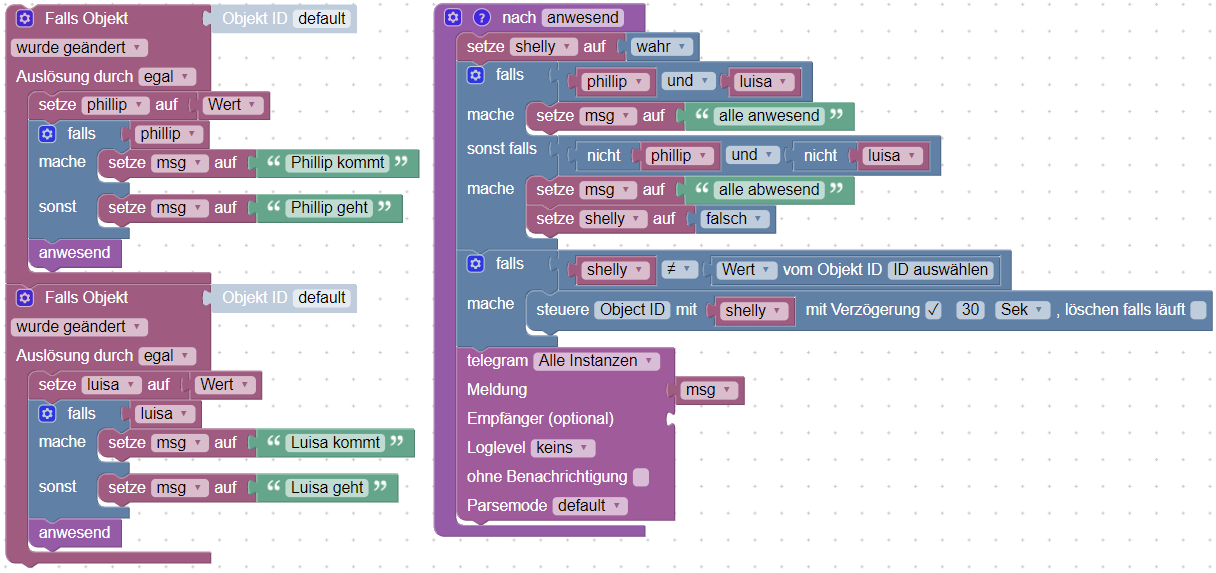
-
@paul53
Danke für die Idee. Eine Frage habe ich aber noch dazu, was meinst du mit "msg"? Damit ist bestimmt der Messenger gemeint aber warum hat er eine eigene Variable? Kann ich da nicht gleich das sendto nehmen?

Support us
341
Online32.6k
Users82.2k
Topics1.3m
Posts