



Skip to content
  • Home
  • Aktuell
  • Tags
  • 0 Ungelesen 0
  • Kategorien
  • Unreplied
  • Beliebt
  • GitHub
  • Docu
  • Hilfe
Skins
  • Light
  • Brite
  • Cerulean
  • Cosmo
  • Flatly
  • Journal
  • Litera
  • Lumen
  • Lux
  • Materia
  • Minty
  • Morph
  • Pulse
  • Sandstone
  • Simplex
  • Sketchy
  • Spacelab
  • United
  • Yeti
  • Zephyr
  • Dark
  • Cyborg
  • Darkly
  • Quartz
  • Slate
  • Solar
  • Superhero
  • Vapor

  • Standard: (Kein Skin)
  • Kein Skin
Einklappen
ioBroker Logo

Community Forum

donate donate
  1. ioBroker Community Home
  2. Deutsch
  3. Visualisierung
  4. Problem icons not showing properly

NEWS

  • Weihnachtsangebot 2025! 🎄
    BluefoxB
    Bluefox
    22
    1
    1.1k

  • UPDATE 31.10.: Amazon Alexa - ioBroker Skill läuft aus ?
    apollon77A
    apollon77
    48
    3
    9.2k

  • Monatsrückblick – September 2025
    BluefoxB
    Bluefox
    14
    1
    2.4k

Problem icons not showing properly

Geplant Angeheftet Gesperrt Verschoben Visualisierung
5 Beiträge 3 Kommentatoren 382 Aufrufe 1 Watching
  • Älteste zuerst
  • Neuste zuerst
  • Meiste Stimmen
Antworten
  • In einem neuen Thema antworten
Anmelden zum Antworten
Dieses Thema wurde gelöscht. Nur Nutzer mit entsprechenden Rechten können es sehen.
  • A Offline
    A Offline
    avhoboken
    schrieb am zuletzt editiert von
    #1

    Hi all,
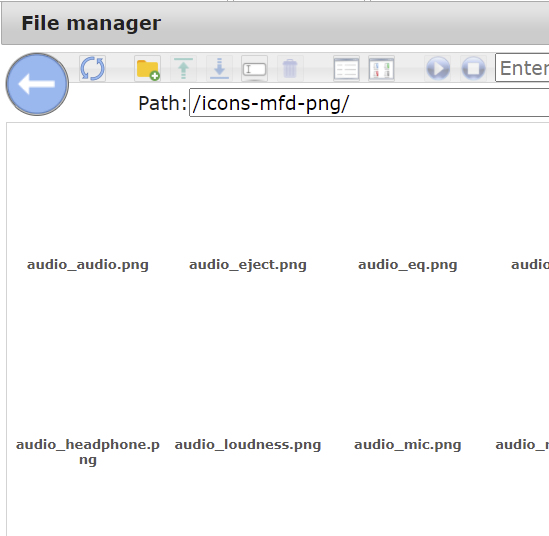
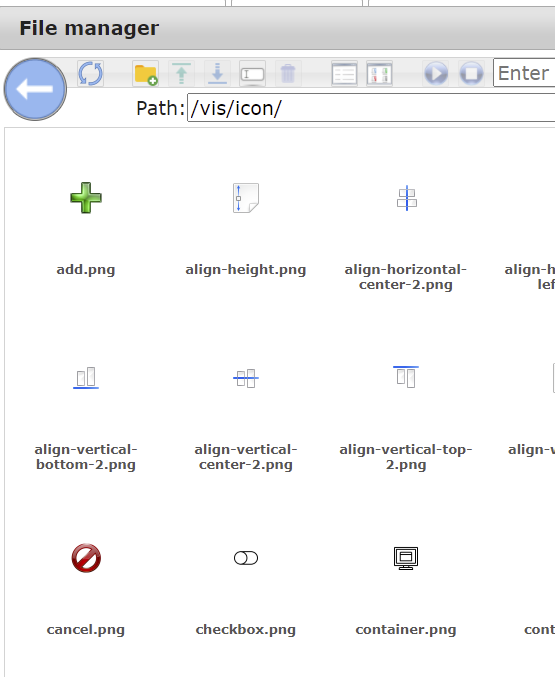
    I have the problem that when I want to select a custom icon in a widget (with the file manager) I can see the filenames of the icons, but not the icon image itself, see the picture below.
    This is only in the folders of custom installed icon adapters like mfd-icons-png. When a scroll to /vis/icon then I can see also the images itself.
    How can I fix this?
    Thanks for any help
    63b3e350-0f38-48f2-b61e-66b388ed2a79-image.png
    d66f0972-27a0-45a3-93ad-8c88ed2e4d6a-image.png

    htreckslerH 1 Antwort Letzte Antwort
    0
    • A avhoboken

      Hi all,
      I have the problem that when I want to select a custom icon in a widget (with the file manager) I can see the filenames of the icons, but not the icon image itself, see the picture below.
      This is only in the folders of custom installed icon adapters like mfd-icons-png. When a scroll to /vis/icon then I can see also the images itself.
      How can I fix this?
      Thanks for any help

      63b3e350-0f38-48f2-b61e-66b388ed2a79-image.png
      d66f0972-27a0-45a3-93ad-8c88ed2e4d6a-image.png

      htreckslerH Offline
      htreckslerH Offline
      htrecksler
      Forum Testing
      schrieb am zuletzt editiert von
      #2

      @avhoboken das wird das Problem mit dem weißen Hintergrund sein. Oben rechts im Auswahlfenster gibt es einen Button mit dem der Hintergrund auf "dunkel" geändert werden kann. Dann sollte man die Icons auch erkennen können.

      Gruss Hermann

      ioBroker auf Proxmox (Debian) auf IntelNuc als Produktivsystem

      A 1 Antwort Letzte Antwort
      0
      • htreckslerH htrecksler

        @avhoboken das wird das Problem mit dem weißen Hintergrund sein. Oben rechts im Auswahlfenster gibt es einen Button mit dem der Hintergrund auf "dunkel" geändert werden kann. Dann sollte man die Icons auch erkennen können.

        A Offline
        A Offline
        avhoboken
        schrieb am zuletzt editiert von
        #3

        @htrecksler :hushed: I feel so stupid right now, thanks for the tip as it solved my issue.
        Do you perhaps also know how I can add my own icons to IOBroker? I've uploaded my own folder with png's but then it doesn't even show the files. I can't however figure out how to do this. Probably also some button I overlooked :)

        HomoranH 1 Antwort Letzte Antwort
        0
        • A avhoboken

          @htrecksler :hushed: I feel so stupid right now, thanks for the tip as it solved my issue.
          Do you perhaps also know how I can add my own icons to IOBroker? I've uploaded my own folder with png's but then it doesn't even show the files. I can't however figure out how to do this. Probably also some button I overlooked :)

          HomoranH Nicht stören
          HomoranH Nicht stören
          Homoran
          Global Moderator Administrators
          schrieb am zuletzt editiert von Homoran
          #4

          @avhoboken sagte in Problem icons not showing properly:

          I've uploaded my own folder with png's

          how did you do that?
          You have to use the vis upload manager for this purpose, otherwise the images won't be registered to vis.

          kein Support per PN! - Fragen im Forum stellen - es gibt fast nichts, was nicht auch für andere interessant ist.

          Benutzt das Voting rechts unten im Beitrag wenn er euch geholfen hat.

          der Installationsfixer: curl -fsL https://iobroker.net/fix.sh | bash -

          A 1 Antwort Letzte Antwort
          0
          • HomoranH Homoran

            @avhoboken sagte in Problem icons not showing properly:

            I've uploaded my own folder with png's

            how did you do that?
            You have to use the vis upload manager for this purpose, otherwise the images won't be registered to vis.

            A Offline
            A Offline
            avhoboken
            schrieb am zuletzt editiert von
            #5

            @homoran Thanks!! I initially uploaded them through SSH but this works much better :)

            1 Antwort Letzte Antwort
            0
            Antworten
            • In einem neuen Thema antworten
            Anmelden zum Antworten
            • Älteste zuerst
            • Neuste zuerst
            • Meiste Stimmen


            Support us

            ioBroker
            Community Adapters
            Donate

            396

            Online

            32.5k

            Benutzer

            81.7k

            Themen

            1.3m

            Beiträge
            Community
            Impressum | Datenschutz-Bestimmungen | Nutzungsbedingungen | Einwilligungseinstellungen
            ioBroker Community 2014-2025
            logo
            • Anmelden

            • Du hast noch kein Konto? Registrieren

            • Anmelden oder registrieren, um zu suchen
            • Erster Beitrag
              Letzter Beitrag
            0
            • Home
            • Aktuell
            • Tags
            • Ungelesen 0
            • Kategorien
            • Unreplied
            • Beliebt
            • GitHub
            • Docu
            • Hilfe