Skip to content
  • Home
  • Recent
  • Tags
  • 0 Unread 0
  • Categories
  • Unreplied
  • Popular
  • GitHub
  • Docu
  • Hilfe
Skins
  • Light
  • Brite
  • Cerulean
  • Cosmo
  • Flatly
  • Journal
  • Litera
  • Lumen
  • Lux
  • Materia
  • Minty
  • Morph
  • Pulse
  • Sandstone
  • Simplex
  • Sketchy
  • Spacelab
  • United
  • Yeti
  • Zephyr
  • Dark
  • Cyborg
  • Darkly
  • Quartz
  • Slate
  • Solar
  • Superhero
  • Vapor

  • Default (No Skin)
  • No Skin
Collapse
ioBroker Logo

Community Forum

donate donate
  1. ioBroker Community Home
  2. Deutsch
  3. Visualisierung
  4. Material Design Schrift vertikal

NEWS

  • Jahresrückblick 2025 – unser neuer Blogbeitrag ist online! ✨
    BluefoxB
    Bluefox
    17
    1
    3.7k

  • Neuer Blogbeitrag: Monatsrückblick - Dezember 2025 🎄
    BluefoxB
    Bluefox
    13
    1
    1.2k

  • Weihnachtsangebot 2025! 🎄
    BluefoxB
    Bluefox
    25
    1
    2.5k

Material Design Schrift vertikal

Scheduled Pinned Locked Moved Visualisierung
vismaterial css
13 Posts 2 Posters 951 Views 2 Watching
  • Oldest to Newest
  • Newest to Oldest
  • Most Votes
Reply
  • Reply as topic
Log in to reply
This topic has been deleted. Only users with topic management privileges can see it.
  • NWHN Offline
    NWHN Offline
    NWH
    wrote on last edited by
    #1

    Hallo
    Ich würde gerne einen Button(Material Design) für eine Navigation erstellen, wobei der Text des Button vertikal geschrieben stehen soll. Grund wäre, damit ich mehrere entbeinender platzieren kann.

    Also zB_ das das CORONA vertikal nach unten geschrieben steht.
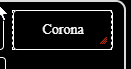
    13f25879-d03b-48be-aa99-9cf93dc522e8-image.png

    Ich verwende diese Einstellungen für den oben gezeigten Button.
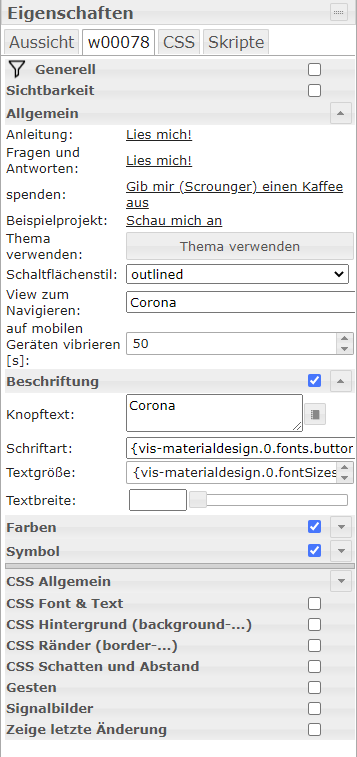
    49c0b388-0779-4689-994e-376dc3a2f7c9-image.png

    Wie kann ich das machen?

    1 Reply Last reply
    0
    • GlasfaserG Offline
      GlasfaserG Offline
      Glasfaser
      wrote on last edited by Glasfaser
      #2

      @nwh

      Versuche damit mal :

      https://forum.iobroker.net/topic/36121/rolladen-widget-gedreht-anzeigen-solved-gelöst/2

      https://forum.iobroker.net/topic/24278/via-css-gedrehter-text-android-app/1

      Synology 918+ 16GB - ioBroker in Docker v9 , VISO auf Trekstor Primebook C13 13,3" , Hikvision Domkameras mit Surveillance Station .. CCU RaspberryMatic in Synology VM .. Zigbee CC2538+CC2592 .. Sonoff .. KNX .. Modbus ..

      NWHN 1 Reply Last reply
      0
      • GlasfaserG Glasfaser

        @nwh

        Versuche damit mal :

        https://forum.iobroker.net/topic/36121/rolladen-widget-gedreht-anzeigen-solved-gelöst/2

        https://forum.iobroker.net/topic/24278/via-css-gedrehter-text-android-app/1

        NWHN Offline
        NWHN Offline
        NWH
        wrote on last edited by
        #3

        @glasfaser ...das klappt wunderbar.
        4009403c-e22a-47ed-a935-e9a341ce66f0-image.png

        Allerdings hätte ich jetzt noch gerne, dass die Schrift von oben nach unten ist.

        C
        O
        R
        O
        N
        A

        GlasfaserG 1 Reply Last reply
        0
        • NWHN NWH

          @glasfaser ...das klappt wunderbar.
          4009403c-e22a-47ed-a935-e9a341ce66f0-image.png

          Allerdings hätte ich jetzt noch gerne, dass die Schrift von oben nach unten ist.

          C
          O
          R
          O
          N
          A

          GlasfaserG Offline
          GlasfaserG Offline
          Glasfaser
          wrote on last edited by Glasfaser
          #4

          @nwh

          Nimm mal nur das :
          CSS Eintrag : vertikal

          .vertikal { 
            writing-mode: vertical-lr; 
            text-orientation: upright; 
          }
          

          1.JPG

          Synology 918+ 16GB - ioBroker in Docker v9 , VISO auf Trekstor Primebook C13 13,3" , Hikvision Domkameras mit Surveillance Station .. CCU RaspberryMatic in Synology VM .. Zigbee CC2538+CC2592 .. Sonoff .. KNX .. Modbus ..

          1 Reply Last reply
          0
          • NWHN Offline
            NWHN Offline
            NWH
            wrote on last edited by
            #5

            @glasfaser sagte in Material Design Schrift vertikal:

            Danke dir, genau so wollte ich das. Mit der Schrift muss ich mir noch was einfallen lassen.....
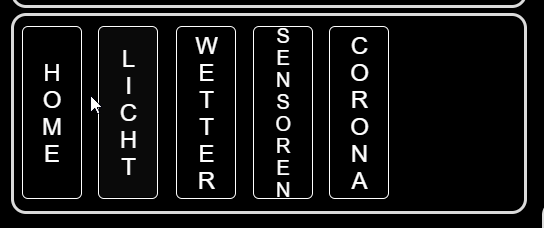
            fb5e0d79-7684-4b26-89cb-ddcae8f6f7c8-image.png

            GlasfaserG 1 Reply Last reply
            0
            • NWHN NWH

              @glasfaser sagte in Material Design Schrift vertikal:

              Danke dir, genau so wollte ich das. Mit der Schrift muss ich mir noch was einfallen lassen.....

              fb5e0d79-7684-4b26-89cb-ddcae8f6f7c8-image.png

              GlasfaserG Offline
              GlasfaserG Offline
              Glasfaser
              wrote on last edited by
              #6

              @nwh

              ist halt der Nachteil von vertikaler Schrift .

              Was wäre , anstatt der "Wörter Home , Licht , Wetter ...." dafür nur Symbole zu nehmen !?

              Synology 918+ 16GB - ioBroker in Docker v9 , VISO auf Trekstor Primebook C13 13,3" , Hikvision Domkameras mit Surveillance Station .. CCU RaspberryMatic in Synology VM .. Zigbee CC2538+CC2592 .. Sonoff .. KNX .. Modbus ..

              NWHN 1 Reply Last reply
              0
              • GlasfaserG Glasfaser

                @nwh

                ist halt der Nachteil von vertikaler Schrift .

                Was wäre , anstatt der "Wörter Home , Licht , Wetter ...." dafür nur Symbole zu nehmen !?

                NWHN Offline
                NWHN Offline
                NWH
                wrote on last edited by
                #7

                @glasfaser Ja gute Idee, aber Icons gehen wieder in die Breite. Dann komme ich wieder mit dem Platz nicht aus.

                GlasfaserG 1 Reply Last reply
                0
                • NWHN NWH

                  @glasfaser Ja gute Idee, aber Icons gehen wieder in die Breite. Dann komme ich wieder mit dem Platz nicht aus.

                  GlasfaserG Offline
                  GlasfaserG Offline
                  Glasfaser
                  wrote on last edited by
                  #8

                  @nwh

                  Wie ich oben sehe , sind das Navigations Widgets.

                  Warum nicht so , mit einem TopAppBar Widget ?
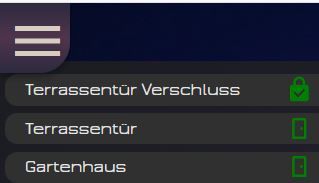
                  1.JPG

                  2.JPG

                  Synology 918+ 16GB - ioBroker in Docker v9 , VISO auf Trekstor Primebook C13 13,3" , Hikvision Domkameras mit Surveillance Station .. CCU RaspberryMatic in Synology VM .. Zigbee CC2538+CC2592 .. Sonoff .. KNX .. Modbus ..

                  NWHN 1 Reply Last reply
                  0
                  • GlasfaserG Glasfaser

                    @nwh

                    Wie ich oben sehe , sind das Navigations Widgets.

                    Warum nicht so , mit einem TopAppBar Widget ?
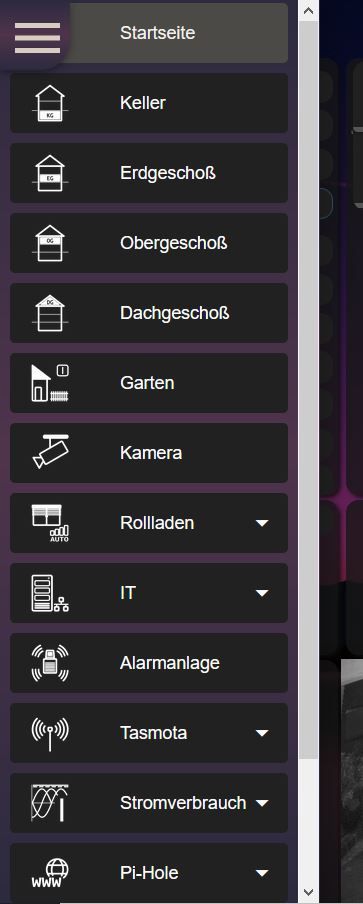
                    1.JPG

                    2.JPG

                    NWHN Offline
                    NWHN Offline
                    NWH
                    wrote on last edited by
                    #9

                    @glasfaser Hui das ist aber cool, ist es möglich diese evnt. zu kopieren und ich würde es mir auf meine Bedürfnisse anpassen?

                    GlasfaserG 1 Reply Last reply
                    0
                    • NWHN NWH

                      @glasfaser Hui das ist aber cool, ist es möglich diese evnt. zu kopieren und ich würde es mir auf meine Bedürfnisse anpassen?

                      GlasfaserG Offline
                      GlasfaserG Offline
                      Glasfaser
                      wrote on last edited by
                      #10

                      @nwh

                      Nimm dieses komplette Projekt :

                      https://forum.iobroker.net/topic/30497/vorstellung-meine-dritte-vis

                      Synology 918+ 16GB - ioBroker in Docker v9 , VISO auf Trekstor Primebook C13 13,3" , Hikvision Domkameras mit Surveillance Station .. CCU RaspberryMatic in Synology VM .. Zigbee CC2538+CC2592 .. Sonoff .. KNX .. Modbus ..

                      NWHN 1 Reply Last reply
                      0
                      • GlasfaserG Glasfaser

                        @nwh

                        Nimm dieses komplette Projekt :

                        https://forum.iobroker.net/topic/30497/vorstellung-meine-dritte-vis

                        NWHN Offline
                        NWHN Offline
                        NWH
                        wrote on last edited by
                        #11

                        @glasfaser eigentlich bräuchte ich nur das Menu. Was ich gesehen habe ist das nirgends extra zum herausnehmen, oder täusche ich mich da?

                        1 Reply Last reply
                        0
                        • GlasfaserG Offline
                          GlasfaserG Offline
                          Glasfaser
                          wrote on last edited by
                          #12

                          @nwh

                          Du kannst jedes Widget aus seinem Projekt exportieren .

                          Du mußt nur bedenken , das du eine Startview brauchst , wo du nur zwei Widget´s nutzt
                          Einmal das Material Design Widget und das view in widget 8.

                          https://forum.iobroker.net/topic/29660/material-design-widgets-top-app-bar-widget

                          Synology 918+ 16GB - ioBroker in Docker v9 , VISO auf Trekstor Primebook C13 13,3" , Hikvision Domkameras mit Surveillance Station .. CCU RaspberryMatic in Synology VM .. Zigbee CC2538+CC2592 .. Sonoff .. KNX .. Modbus ..

                          NWHN 1 Reply Last reply
                          0
                          • GlasfaserG Glasfaser

                            @nwh

                            Du kannst jedes Widget aus seinem Projekt exportieren .

                            Du mußt nur bedenken , das du eine Startview brauchst , wo du nur zwei Widget´s nutzt
                            Einmal das Material Design Widget und das view in widget 8.

                            https://forum.iobroker.net/topic/29660/material-design-widgets-top-app-bar-widget

                            NWHN Offline
                            NWHN Offline
                            NWH
                            wrote on last edited by
                            #13

                            @glasfaser puh, ob ich das schaffe bin ich mir nicht so sicher, aber ich werde es morgen mal versuchen. Aber erstmal Danke und gn8.


                            1 Reply Last reply
                            1
                            Reply
                            • Reply as topic
                            Log in to reply
                            • Oldest to Newest
                            • Newest to Oldest
                            • Most Votes


                            Support us

                            ioBroker
                            Community Adapters
                            Donate

                            682

                            Online

                            32.7k

                            Users

                            82.4k

                            Topics

                            1.3m

                            Posts
                            Community
                            Impressum | Datenschutz-Bestimmungen | Nutzungsbedingungen | Einwilligungseinstellungen
                            ioBroker Community 2014-2025
                            logo
                            • Login

                            • Don't have an account? Register

                            • Login or register to search.
                            • First post
                              Last post
                            0
                            • Home
                            • Recent
                            • Tags
                            • Unread 0
                            • Categories
                            • Unreplied
                            • Popular
                            • GitHub
                            • Docu
                            • Hilfe