
NEWS




pivccu3 und iobroker - iobroker nicht erreichbar
-
Hallo zusammen,
ich habe gestern Abend auf Grund eigener Dummheit den iobroker auf der pivccu3 neu installiert und zwar genau nach den Vorgaben hier aus dem Forum.
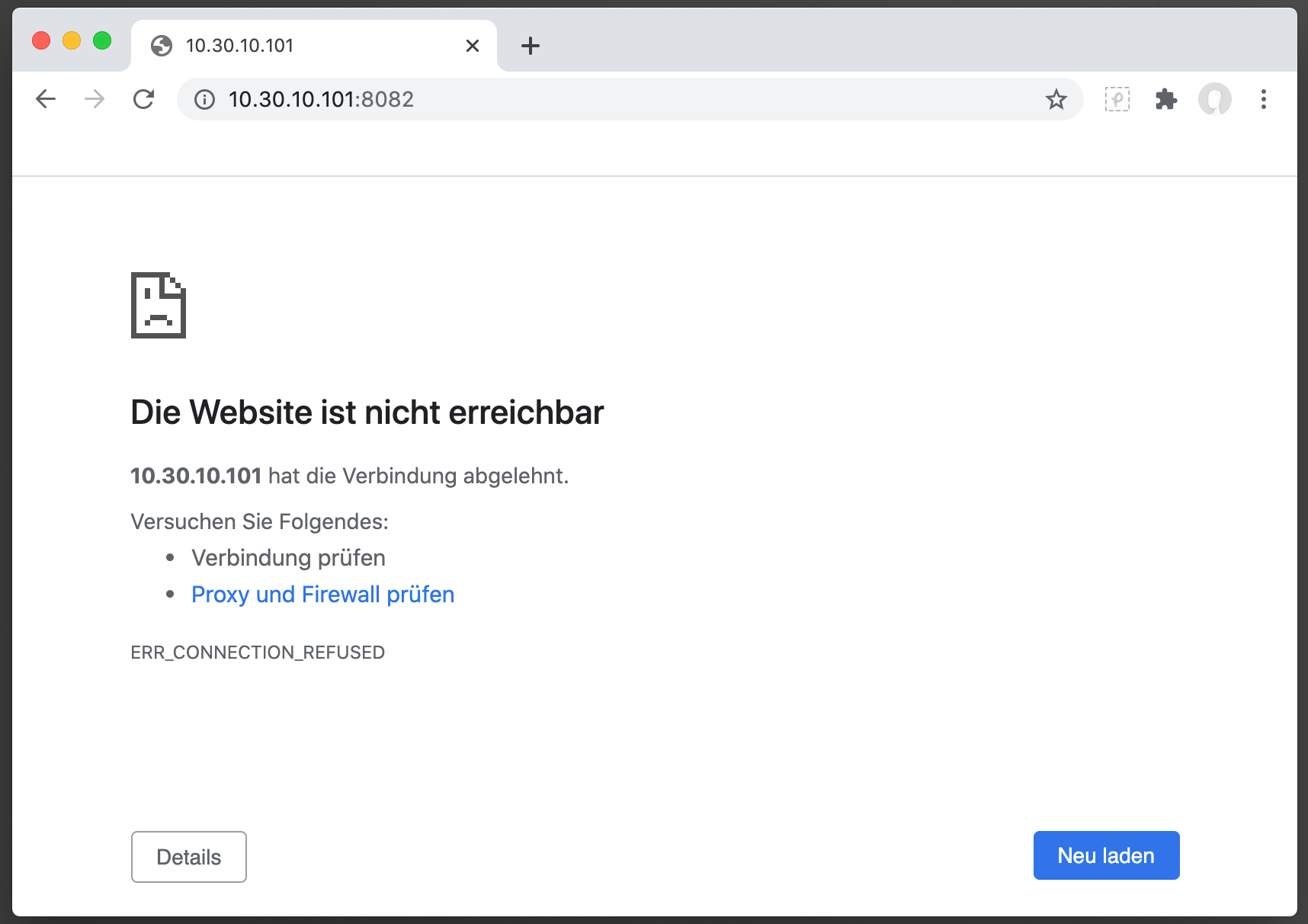
Das Ding läuft auch offensichtlich:pi@All-In-One_RasPi:/etc/network $ iobroker status iobroker is running on this host. At least one iobroker host is running. Objects type: file States type: fileaber er läßt sich nicht im Chrome aufrufen.
Soweit ich das beurteilen kann, schaut das auch richtig aus:pi@All-In-One_RasPi:/etc/network $ ps -ef | grep iobroker iobroker 886 717 0 23:25 ? 00:00:00 dbus-daemon --system iobroker 4591 1 31 23:46 ? 00:00:02 iobroker.js-controller pi 4631 1698 0 23:46 pts/1 00:00:00 grep --color=auto iobrokerAber das hier macht mir dann schon wieder Sorgen und zeigt auch klar, weshalb im Chrome nix zu sehen ist:
pi@All-In-One_RasPi:/etc/network $ netstat -an | grep LISTEN
tcp        0      0 127.0.0.1:6379          0.0.0.0:*               LISTEN
tcp        0      0 0.0.0.0:22              0.0.0.0:*               LISTEN
tcp6       0      0 :::22                   :::*                    LISTEN
Dieser Eintrag hier zeigt mir aber auch, dass br0 die richtige IP hat:
pi@All-In-One_RasPi:~ $ ifconfig
br0: flags=4163<UP,BROADCAST,RUNNING,MULTICAST>  mtu 1500
        inet 10.30.10.101  netmask 255.255.255.0  broadcast 10.30.10.255
        inet6 fe80::ba27:ebff:fe86:2bbe  prefixlen 64  scopeid 0x20<link>
        ether b8:27:eb:86:2b:be  txqueuelen 1000  (Ethernet)
        RX packets 1471  bytes 734730 (717.5 KiB)
        RX errors 0  dropped 0  overruns 0  frame 0
        TX packets 844  bytes 142893 (139.5 KiB)
        TX errors 0  dropped 0 overruns 0  carrier 0  collisions 0

eth0: flags=4163<UP,BROADCAST,RUNNING,MULTICAST>  mtu 1500
        ether b8:27:eb:86:2b:be  txqueuelen 1000  (Ethernet)
        RX packets 1601  bytes 746406 (728.9 KiB)
        RX errors 0  dropped 5  overruns 0  frame 0
        TX packets 1723  bytes 365298 (356.7 KiB)
        TX errors 0  dropped 0 overruns 0  carrier 0  collisions 0

lo: flags=73<UP,LOOPBACK,RUNNING>  mtu 65536
        inet 127.0.0.1  netmask 255.0.0.0
        inet6 ::1  prefixlen 128  scopeid 0x10<host>
        loop  txqueuelen 1000  (Lokale Schleife)
        RX packets 3  bytes 157 (157.0 B)
        RX errors 0  dropped 0  overruns 0  frame 0
        TX packets 3  bytes 157 (157.0 B)
        TX errors 0  dropped 0 overruns 0  carrier 0  collisions 0

vethpivccu: flags=4163<UP,BROADCAST,RUNNING,MULTICAST>  mtu 1500
        inet6 fe80::fc9f:e8ff:feda:1cb0  prefixlen 64  scopeid 0x20<link>
        ether fe:9f:e8:da:1c:b0  txqueuelen 1000  (Ethernet)
        RX packets 875  bytes 201733 (197.0 KiB)
        RX errors 0  dropped 0  overruns 0  frame 0
        TX packets 583  bytes 71158 (69.4 KiB)
        TX errors 0  dropped 0 overruns 0  carrier 0  collisions 0
Im Forum habe ich auch diesen Eintrag gefunden, der mir aber irgendwie nicht weiterhelfen will…
https://forum.iobroker.net/topic/9358/iobroker-raspberry-pi3-stretch-mit-pivccu-ip-von-pivccu/4denn die interfaces sagt das hier:
source-directory /etc/network/interfaces.d

auto lo
iface lo inet loopback

iface eth0 inet manual

auto br0
iface br0 inet static
  bridge_ports eth0
  address 10.30.10.101
  netmask 255.255.255.0
  gateway 10.30.10.1
  dns-nameservers 10.30.10.1 192.168.144.2
Ich weiß einfach nicht weiter… kann mir jemand helfen, bitte?
-
Hallo zusammen,
ich habe gestern Abend auf Grund eigener Dummheit den iobroker auf der pivccu3 neu installiert und zwar genau nach den Vorgaben hier aus dem Forum.
Das Ding läuft auch offensichtlich:pi@All-In-One_RasPi:/etc/network $ iobroker status iobroker is running on this host. At least one iobroker host is running. Objects type: file States type: fileaber er läßt sich nicht im Chrome aufrufen.
Soweit ich das beurteilen kann, schaut das auch richtig aus:pi@All-In-One_RasPi:/etc/network $ ps -ef | grep iobroker iobroker 886 717 0 23:25 ? 00:00:00 dbus-daemon --system iobroker 4591 1 31 23:46 ? 00:00:02 iobroker.js-controller pi 4631 1698 0 23:46 pts/1 00:00:00 grep --color=auto iobrokerAber das hier macht mir dann schon wieder Sorgen und zeigt auch klar, weshalb im Chrome nix zu sehen ist:
pi@All-In-One_RasPi:/etc/network $ netstat -an | grep LISTEN
tcp        0      0 127.0.0.1:6379          0.0.0.0:*               LISTEN
tcp        0      0 0.0.0.0:22              0.0.0.0:*               LISTEN
tcp6       0      0 :::22                   :::*                    LISTEN
Dieser Eintrag hier zeigt mir aber auch, dass br0 die richtige IP hat:
pi@All-In-One_RasPi:~ $ ifconfig
br0: flags=4163<UP,BROADCAST,RUNNING,MULTICAST>  mtu 1500
        inet 10.30.10.101  netmask 255.255.255.0  broadcast 10.30.10.255
        inet6 fe80::ba27:ebff:fe86:2bbe  prefixlen 64  scopeid 0x20<link>
        ether b8:27:eb:86:2b:be  txqueuelen 1000  (Ethernet)
        RX packets 1471  bytes 734730 (717.5 KiB)
        RX errors 0  dropped 0  overruns 0  frame 0
        TX packets 844  bytes 142893 (139.5 KiB)
        TX errors 0  dropped 0 overruns 0  carrier 0  collisions 0

eth0: flags=4163<UP,BROADCAST,RUNNING,MULTICAST>  mtu 1500
        ether b8:27:eb:86:2b:be  txqueuelen 1000  (Ethernet)
        RX packets 1601  bytes 746406 (728.9 KiB)
        RX errors 0  dropped 5  overruns 0  frame 0
        TX packets 1723  bytes 365298 (356.7 KiB)
        TX errors 0  dropped 0 overruns 0  carrier 0  collisions 0

lo: flags=73<UP,LOOPBACK,RUNNING>  mtu 65536
        inet 127.0.0.1  netmask 255.0.0.0
        inet6 ::1  prefixlen 128  scopeid 0x10<host>
        loop  txqueuelen 1000  (Lokale Schleife)
        RX packets 3  bytes 157 (157.0 B)
        RX errors 0  dropped 0  overruns 0  frame 0
        TX packets 3  bytes 157 (157.0 B)
        TX errors 0  dropped 0 overruns 0  carrier 0  collisions 0

vethpivccu: flags=4163<UP,BROADCAST,RUNNING,MULTICAST>  mtu 1500
        inet6 fe80::fc9f:e8ff:feda:1cb0  prefixlen 64  scopeid 0x20<link>
        ether fe:9f:e8:da:1c:b0  txqueuelen 1000  (Ethernet)
        RX packets 875  bytes 201733 (197.0 KiB)
        RX errors 0  dropped 0  overruns 0  frame 0
        TX packets 583  bytes 71158 (69.4 KiB)
        TX errors 0  dropped 0 overruns 0  carrier 0  collisions 0
Im Forum habe ich auch diesen Eintrag gefunden, der mir aber irgendwie nicht weiterhelfen will…
https://forum.iobroker.net/topic/9358/iobroker-raspberry-pi3-stretch-mit-pivccu-ip-von-pivccu/4denn die interfaces sagt das hier:
source-directory /etc/network/interfaces.d

auto lo
iface lo inet loopback

iface eth0 inet manual

auto br0
iface br0 inet static
  bridge_ports eth0
  address 10.30.10.101
  netmask 255.255.255.0
  gateway 10.30.10.1
  dns-nameservers 10.30.10.1 192.168.144.2
Ich weiß einfach nicht weiter… kann mir jemand helfen, bitte?
iobroker list adapters iobroker list instances -
Hallo zusammen,
ich habe gestern Abend auf Grund eigener Dummheit den iobroker auf der pivccu3 neu installiert und zwar genau nach den Vorgaben hier aus dem Forum.
Das Ding läuft auch offensichtlich:pi@All-In-One_RasPi:/etc/network $ iobroker status iobroker is running on this host. At least one iobroker host is running. Objects type: file States type: fileaber er läßt sich nicht im Chrome aufrufen.
Soweit ich das beurteilen kann, schaut das auch richtig aus:pi@All-In-One_RasPi:/etc/network $ ps -ef | grep iobroker iobroker 886 717 0 23:25 ? 00:00:00 dbus-daemon --system iobroker 4591 1 31 23:46 ? 00:00:02 iobroker.js-controller pi 4631 1698 0 23:46 pts/1 00:00:00 grep --color=auto iobrokerAber das hier macht mir dann schon wieder Sorgen und zeigt auch klar, weshalb im Chrome nix zu sehen ist:
pi@All-In-One_RasPi:/etc/network $ netstat -an | grep LISTEN
tcp        0      0 127.0.0.1:6379          0.0.0.0:*               LISTEN
tcp        0      0 0.0.0.0:22              0.0.0.0:*               LISTEN
tcp6       0      0 :::22                   :::*                    LISTEN
Dieser Eintrag hier zeigt mir aber auch, dass br0 die richtige IP hat:
pi@All-In-One_RasPi:~ $ ifconfig
br0: flags=4163<UP,BROADCAST,RUNNING,MULTICAST>  mtu 1500
        inet 10.30.10.101  netmask 255.255.255.0  broadcast 10.30.10.255
        inet6 fe80::ba27:ebff:fe86:2bbe  prefixlen 64  scopeid 0x20<link>
        ether b8:27:eb:86:2b:be  txqueuelen 1000  (Ethernet)
        RX packets 1471  bytes 734730 (717.5 KiB)
        RX errors 0  dropped 0  overruns 0  frame 0
        TX packets 844  bytes 142893 (139.5 KiB)
        TX errors 0  dropped 0 overruns 0  carrier 0  collisions 0

eth0: flags=4163<UP,BROADCAST,RUNNING,MULTICAST>  mtu 1500
        ether b8:27:eb:86:2b:be  txqueuelen 1000  (Ethernet)
        RX packets 1601  bytes 746406 (728.9 KiB)
        RX errors 0  dropped 5  overruns 0  frame 0
        TX packets 1723  bytes 365298 (356.7 KiB)
        TX errors 0  dropped 0 overruns 0  carrier 0  collisions 0

lo: flags=73<UP,LOOPBACK,RUNNING>  mtu 65536
        inet 127.0.0.1  netmask 255.0.0.0
        inet6 ::1  prefixlen 128  scopeid 0x10<host>
        loop  txqueuelen 1000  (Lokale Schleife)
        RX packets 3  bytes 157 (157.0 B)
        RX errors 0  dropped 0  overruns 0  frame 0
        TX packets 3  bytes 157 (157.0 B)
        TX errors 0  dropped 0 overruns 0  carrier 0  collisions 0

vethpivccu: flags=4163<UP,BROADCAST,RUNNING,MULTICAST>  mtu 1500
        inet6 fe80::fc9f:e8ff:feda:1cb0  prefixlen 64  scopeid 0x20<link>
        ether fe:9f:e8:da:1c:b0  txqueuelen 1000  (Ethernet)
        RX packets 875  bytes 201733 (197.0 KiB)
        RX errors 0  dropped 0  overruns 0  frame 0
        TX packets 583  bytes 71158 (69.4 KiB)
        TX errors 0  dropped 0 overruns 0  carrier 0  collisions 0
Im Forum habe ich auch diesen Eintrag gefunden, der mir aber irgendwie nicht weiterhelfen will…
https://forum.iobroker.net/topic/9358/iobroker-raspberry-pi3-stretch-mit-pivccu-ip-von-pivccu/4denn die interfaces sagt das hier:
source-directory /etc/network/interfaces.d

auto lo
iface lo inet loopback

iface eth0 inet manual

auto br0
iface br0 inet static
  bridge_ports eth0
  address 10.30.10.101
  netmask 255.255.255.0
  gateway 10.30.10.1
  dns-nameservers 10.30.10.1 192.168.144.2
Ich weiß einfach nicht weiter… kann mir jemand helfen, bitte?
-
iobroker list adapters iobroker list instances@Thomas-Braun said in pivccu3 und iobroker - iobroker nicht erreichbar:
iobroker list adapters
iobroker list instancespi@All-In-One_RasPi:/opt/iobroker $ iobroker list adapters system.adapter.admin : admin - v4.1.11 system.adapter.backitup : backitup - v1.7.0 system.adapter.discovery : discovery - v2.4.1 system.adapter.email : email - v1.0.7 system.adapter.flot : flot - v1.10.4 system.adapter.history : history - v1.9.10 system.adapter.hm-rega : hm-rega - v2.6.24 system.adapter.hm-rpc : hm-rpc - v1.14.24 system.adapter.ical : ical - v1.8.1 system.adapter.icons-icons8 : icons-icons8 - v0.0.1 system.adapter.icons-mfd-png : icons-mfd-png - v1.0.2 system.adapter.icons-mfd-svg : icons-mfd-svg - v1.0.2 system.adapter.info : info - v1.7.10 system.adapter.javascript : javascript - v4.10.5 system.adapter.lightify : lightify - v0.2.16 system.adapter.miele : miele - v0.1.5 system.adapter.mobile : mobile - v1.0.1 system.adapter.modbus : modbus - v3.1.10 system.adapter.nanoleaf-lightpanels : nanoleaf-lightpanels - v1.0.6 system.adapter.rpi2 : rpi2 - v1.2.0 system.adapter.shelly : shelly - v4.0.4 system.adapter.simple-api : simple-api - v2.4.8 system.adapter.smartmeter : smartmeter - v3.1.6 system.adapter.socketio : socketio - v3.0.13 system.adapter.sonoff : sonoff - v2.3.3 system.adapter.sql : sql - v1.15.3 system.adapter.statistics : statistics - v0.2.2 system.adapter.telegram : telegram - v1.6.0 system.adapter.tileboard : tileboard - v0.3.1 system.adapter.trashschedule : trashschedule - v1.0.3 system.adapter.vis : vis - v1.3.3 system.adapter.vis-colorpicker : vis-colorpicker - v1.2.0 system.adapter.vis-hqwidgets : vis-hqwidgets - v1.1.7 system.adapter.vis-icontwo : vis-icontwo - v0.35.0 system.adapter.vis-inventwo : vis-inventwo - v2.5.11 system.adapter.vis-metro : vis-metro - v1.1.2 system.adapter.vis-timeandweather : vis-timeandweather - v1.1.7 system.adapter.web : web - v3.0.14 system.adapter.yahka : yahka - v0.11.0 system.adapter.zigbee : zigbee - v1.3.1 pi@All-In-One_RasPi:/opt/iobroker $ iobroker list instances + system.adapter.admin.0 : admin - enabled, port: 8081, bind: 0.0.0.0, run as: admin + system.adapter.backitup.0 : backitup - enabled system.adapter.flot.0 : flot - enabled + system.adapter.history.0 : history - enabled system.adapter.ical.0 : ical - enabled system.adapter.icons-icons8.0 : icons-icons8 - enabled system.adapter.icons-mfd-png.0 : icons-mfd-png - enabled system.adapter.icons-mfd-svg.0 : icons-mfd-svg - enabled + system.adapter.info.0 : info - enabled + system.adapter.javascript.0 : javascript - enabled system.adapter.mobile.0 : mobile - enabled + system.adapter.shelly.0 : shelly - enabled, port: 1882, bind: 0.0.0.0 + system.adapter.sql.0 : sql - enabled, port: 3307 + system.adapter.statistics.0 : statistics - enabled + system.adapter.telegram.0 : telegram - enabled, port: 8443, bind: 0.0.0.0 + system.adapter.trashschedule.0 : trashschedule - enabled system.adapter.vis-colorpicker.0 : vis-colorpicker - enabled system.adapter.vis-hqwidgets.0 : vis-hqwidgets - enabled system.adapter.vis-icontwo.0 : vis-icontwo - enabled + system.adapter.vis-inventwo.0 : vis-inventwo - enabled system.adapter.vis-metro.0 : vis-metro - enabled system.adapter.vis-timeandweather.0 : vis-timeandweather - enabled system.adapter.vis.0 : vis - enabled + system.adapter.web.0 : web - enabled, port: 8082, bind: 0.0.0.0, run as: admin + instance is alive pi@All-In-One_RasPi:/opt/iobroker $ -
Hallo zusammen,
ich habe gestern Abend auf Grund eigener Dummheit den iobroker auf der pivccu3 neu installiert und zwar genau nach den Vorgaben hier aus dem Forum.
Das Ding läuft auch offensichtlich:pi@All-In-One_RasPi:/etc/network $ iobroker status iobroker is running on this host. At least one iobroker host is running. Objects type: file States type: fileaber er läßt sich nicht im Chrome aufrufen.
Soweit ich das beurteilen kann, schaut das auch richtig aus:pi@All-In-One_RasPi:/etc/network $ ps -ef | grep iobroker iobroker 886 717 0 23:25 ? 00:00:00 dbus-daemon --system iobroker 4591 1 31 23:46 ? 00:00:02 iobroker.js-controller pi 4631 1698 0 23:46 pts/1 00:00:00 grep --color=auto iobrokerAber das hier macht mir dann schon wieder Sorgen und zeigt auch klar, weshalb im Chrome nix zu sehen ist:
pi@All-In-One_RasPi:/etc/network $ netstat -an | grep LISTEN
tcp        0      0 127.0.0.1:6379          0.0.0.0:*               LISTEN
tcp        0      0 0.0.0.0:22              0.0.0.0:*               LISTEN
tcp6       0      0 :::22                   :::*                    LISTEN
Dieser Eintrag hier zeigt mir aber auch, dass br0 die richtige IP hat:
pi@All-In-One_RasPi:~ $ ifconfig
br0: flags=4163<UP,BROADCAST,RUNNING,MULTICAST>  mtu 1500
        inet 10.30.10.101  netmask 255.255.255.0  broadcast 10.30.10.255
        inet6 fe80::ba27:ebff:fe86:2bbe  prefixlen 64  scopeid 0x20<link>
        ether b8:27:eb:86:2b:be  txqueuelen 1000  (Ethernet)
        RX packets 1471  bytes 734730 (717.5 KiB)
        RX errors 0  dropped 0  overruns 0  frame 0
        TX packets 844  bytes 142893 (139.5 KiB)
        TX errors 0  dropped 0 overruns 0  carrier 0  collisions 0

eth0: flags=4163<UP,BROADCAST,RUNNING,MULTICAST>  mtu 1500
        ether b8:27:eb:86:2b:be  txqueuelen 1000  (Ethernet)
        RX packets 1601  bytes 746406 (728.9 KiB)
        RX errors 0  dropped 5  overruns 0  frame 0
        TX packets 1723  bytes 365298 (356.7 KiB)
        TX errors 0  dropped 0 overruns 0  carrier 0  collisions 0

lo: flags=73<UP,LOOPBACK,RUNNING>  mtu 65536
        inet 127.0.0.1  netmask 255.0.0.0
        inet6 ::1  prefixlen 128  scopeid 0x10<host>
        loop  txqueuelen 1000  (Lokale Schleife)
        RX packets 3  bytes 157 (157.0 B)
        RX errors 0  dropped 0  overruns 0  frame 0
        TX packets 3  bytes 157 (157.0 B)
        TX errors 0  dropped 0 overruns 0  carrier 0  collisions 0

vethpivccu: flags=4163<UP,BROADCAST,RUNNING,MULTICAST>  mtu 1500
        inet6 fe80::fc9f:e8ff:feda:1cb0  prefixlen 64  scopeid 0x20<link>
        ether fe:9f:e8:da:1c:b0  txqueuelen 1000  (Ethernet)
        RX packets 875  bytes 201733 (197.0 KiB)
        RX errors 0  dropped 0  overruns 0  frame 0
        TX packets 583  bytes 71158 (69.4 KiB)
        TX errors 0  dropped 0 overruns 0  carrier 0  collisions 0
Im Forum habe ich auch diesen Eintrag gefunden, der mir aber irgendwie nicht weiterhelfen will…
https://forum.iobroker.net/topic/9358/iobroker-raspberry-pi3-stretch-mit-pivccu-ip-von-pivccu/4denn die interfaces sagt das hier:
source-directory /etc/network/interfaces.d

auto lo
iface lo inet loopback

iface eth0 inet manual

auto br0
iface br0 inet static
  bridge_ports eth0
  address 10.30.10.101
  netmask 255.255.255.0
  gateway 10.30.10.1
  dns-nameservers 10.30.10.1 192.168.144.2
Ich weiß einfach nicht weiter… kann mir jemand helfen, bitte?
@tomte-me sagte in pivccu3 und iobroker - iobroker nicht erreichbar:
aber er läßt sich nicht im Chrome aufrufen.
Was kommt genau für eine Fehlermeldung? Kannst du mal einen Screenshot vom Browser machen?
Kannst du mal ein
ps -efmachen. Je nachdem heissen die Prozesse iobroker, io, oder node.Bitte bei Problemen mit meinen Adaptern, Issue auf GitHub erfassen: Loxone | I2C | Luxtronik2
♡-lichen Dank an meine Sponsoren -
@tomte-me sagte in pivccu3 und iobroker - iobroker nicht erreichbar:
aber er läßt sich nicht im Chrome aufrufen.
Was kommt genau für eine Fehlermeldung? Kannst du mal einen Screenshot vom Browser machen?
Kannst du mal ein
ps -efmachen. Je nachdem heissen die Prozesse iobroker, io, oder node.pi@All-In-One_RasPi:/opt/iobroker $ ps -ef UID PID PPID C STIME TTY TIME CMD root 1 0 0 Jan05 ? 00:02:31 /sbin/init root 2 0 0 Jan05 ? 00:00:00 [kthreadd] root 3 2 0 Jan05 ? 00:00:00 [rcu_gp] root 4 2 0 Jan05 ? 00:00:00 [rcu_par_gp] root 8 2 0 Jan05 ? 00:00:00 [mm_percpu_wq] root 9 2 0 Jan05 ? 00:00:02 [ksoftirqd/0] root 10 2 0 Jan05 ? 00:00:49 [rcu_sched] root 11 2 0 Jan05 ? 00:00:00 [rcu_bh] root 12 2 0 Jan05 ? 00:00:00 [migration/0] root 13 2 0 Jan05 ? 00:00:00 [cpuhp/0] root 14 2 0 Jan05 ? 00:00:00 [cpuhp/1] root 15 2 0 Jan05 ? 00:00:00 [migration/1] root 16 2 0 Jan05 ? 00:00:02 [ksoftirqd/1] root 19 2 0 Jan05 ? 00:00:00 [cpuhp/2] root 20 2 0 Jan05 ? 00:00:00 [migration/2] root 21 2 0 Jan05 ? 00:00:01 [ksoftirqd/2] root 24 2 0 Jan05 ? 00:00:00 [cpuhp/3] root 25 2 0 Jan05 ? 00:00:00 [migration/3] root 26 2 0 Jan05 ? 00:00:00 [ksoftirqd/3] root 29 2 0 Jan05 ? 00:00:00 [kdevtmpfs] root 30 2 0 Jan05 ? 00:00:00 [netns] root 34 2 0 Jan05 ? 00:00:00 [khungtaskd] root 35 2 0 Jan05 ? 00:00:00 [oom_reaper] root 36 2 0 Jan05 ? 00:00:00 [writeback] root 37 2 0 Jan05 ? 00:00:00 [kcompactd0] root 38 2 0 Jan05 ? 00:00:00 [crypto] root 39 2 0 Jan05 ? 00:00:00 [kblockd] root 40 2 0 Jan05 ? 00:00:00 [watchdogd] root 41 2 0 Jan05 ? 00:00:00 [rpciod] root 42 2 0 Jan05 ? 00:00:00 [kworker/u9:0-hc] root 43 2 0 Jan05 ? 00:00:00 [xprtiod] root 46 2 0 Jan05 ? 00:00:00 [kswapd0] root 47 2 0 Jan05 ? 00:00:00 [nfsiod] root 58 2 0 Jan05 ? 00:00:00 [kthrotld] root 60 2 0 Jan05 ? 00:00:00 [iscsi_eh] root 61 2 0 Jan05 ? 00:00:00 [dwc_otg] root 62 2 0 Jan05 ? 00:00:00 [DWC Notificatio] root 63 2 0 Jan05 ? 00:00:00 [vchiq-slot/0] root 64 2 0 Jan05 ? 00:00:00 [vchiq-recy/0] root 65 2 0 Jan05 ? 00:00:00 [vchiq-sync/0] root 66 2 0 Jan05 ? 00:00:00 [vchiq-keep/0] root 67 2 0 Jan05 ? 00:00:00 [SMIO] root 68 2 0 Jan05 ? 00:00:00 [irq/86-mmc1] root 71 2 0 Jan05 ? 00:00:00 [mmc_complete] root 72 2 0 Jan05 ? 00:00:00 [kworker/1:1H-kb] root 73 2 0 Jan05 ? 00:00:01 [kworker/0:1H-kb] root 74 2 0 Jan05 ? 00:00:01 [jbd2/mmcblk0p2-] root 75 2 0 Jan05 ? 00:00:00 [ext4-rsv-conver] root 79 2 0 Jan05 ? 00:00:00 [ipv6_addrconf] root 81 2 0 Jan05 ? 00:00:00 [kworker/3:1H-kb] root 101 1 0 Jan05 ? 00:04:15 /lib/systemd/systemd-journald root 136 1 0 Jan05 ? 00:00:18 /lib/systemd/systemd-udevd root 208 2 0 Jan05 ? 00:00:00 [SMIO] root 249 2 0 Jan05 ? 00:00:00 [mmal-vchiq] root 250 2 0 Jan05 ? 00:00:00 [mmal-vchiq] root 255 2 0 Jan05 ? 00:00:00 [mmal-vchiq] root 266 2 0 Jan05 ? 00:00:00 [cfg80211] root 272 2 0 Jan05 ? 00:00:00 [brcmf_wq/mmc1:0] root 274 2 0 Jan05 ? 00:00:00 [brcmf_wdog/mmc1] systemd+ 319 1 0 Jan05 ? 00:00:00 /lib/systemd/systemd-timesyncd message+ 390 1 0 Jan05 ? 00:00:42 /usr/bin/dbus-daemon --system --address=systemd: --nofork --nopidfile --systemd-activation root 418 1 0 Jan05 ? 00:00:56 /usr/sbin/rsyslogd -n root 420 1 0 Jan05 ? 00:00:00 /sbin/wpa_supplicant -u -s -O /run/wpa_supplicant root 422 1 0 Jan05 ? 00:00:13 /lib/systemd/systemd-logind nobody 428 1 0 Jan05 ? 00:00:00 /usr/sbin/thd --triggers /etc/triggerhappy/triggers.d/ --socket /run/thd.socket --user nobody --deviceglob /dev/input/event* root 442 1 0 Jan05 ? 00:00:00 /usr/sbin/cron -f avahi 444 1 0 Jan05 ? 00:00:04 avahi-daemon: running [All-In-OneRasPi.local] avahi 465 444 0 Jan05 ? 00:00:00 avahi-daemon: chroot helper root 490 2 0 Jan05 ? 00:00:00 [kworker/u9:2-hc] root 492 1 0 Jan05 ? 00:00:00 /usr/bin/hciattach /dev/serial1 bcm43xx 460800 noflow - b8:27:eb:2c:81:14 root 495 1 0 Jan05 ? 00:00:00 /usr/lib/bluetooth/bluetoothd root 545 1 0 Jan05 tty1 00:00:00 /sbin/agetty --noclear tty1 linux root 566 1 0 Jan05 ? 00:00:00 /usr/sbin/sshd -D redis 610 1 0 Jan05 ? 00:00:57 /usr/bin/redis-server 127.0.0.1:6379 root 707 1 0 Jan05 ? 00:00:00 /usr/bin/lxc-start --lxcpath /var/lib/piVCCU3 --name lxc --pidfile /var/run/pivccu3.pid --daemon root 717 707 0 Jan05 ? 00:00:00 init root 840 717 0 Jan05 ? 00:00:12 /bin/hss_led -l 6 iobroker 886 717 0 Jan05 ? 00:00:00 dbus-daemon --system root 1105 717 0 Jan05 ? 00:00:02 /usr/sbin/ifplugd -i eth0 -fI -u0 -d10 root 1116 717 0 Jan05 ? 00:00:04 /usr/sbin/ntpd -g 0.de.pool.ntp.org 1.de.pool.ntp.org 2.de.pool.ntp.org 3.de.pool.ntp.org root 1139 717 0 Jan05 ? 00:00:00 /bin/eq3configd root 1146 717 0 Jan05 ? 00:00:00 /usr/sbin/lighttpd-angel -f /etc/lighttpd/lighttpd.conf -D root 1149 1146 0 Jan05 ? 00:00:00 /usr/sbin/lighttpd -f /etc/lighttpd/lighttpd.conf -D root 1153 717 0 Jan05 ? 00:00:00 /bin/ssdpd root 1173 717 0 Jan05 ? 00:00:19 /usr/local/addons/cuxd/cuxd root 1187 1149 0 Jan05 ? 00:00:16 /usr/sbin/lighttpd -f /etc/lighttpd/lighttpd.conf -D root 1189 1149 0 Jan05 ? 00:00:21 /usr/sbin/lighttpd -f /etc/lighttpd/lighttpd.conf -D root 1191 1149 0 Jan05 ? 00:00:17 /usr/sbin/lighttpd -f /etc/lighttpd/lighttpd.conf -D root 1192 1149 0 Jan05 ? 00:00:20 /usr/sbin/lighttpd -f /etc/lighttpd/lighttpd.conf -D root 1220 717 0 Jan05 ? 00:00:03 /bin/multimacd -f /etc/multimacd.conf -l 4 root 1248 717 0 Jan05 ? 00:00:04 /bin/rfd -f /etc/config/rfd.conf -l 4 root 1262 717 0 Jan05 ? 00:02:38 java -Xmx128m -Dos.arch=arm -Dlog4j.configuration=file:///etc/config/log4j.xml -Dfile.encoding=ISO-8859-1 -Dgnu.io.rxtx.SerialP root 1385 717 0 Jan05 ? 00:00:00 /bin/eq3-uds-services root 1393 717 0 Jan05 ? 00:00:15 /bin/ReGaHss.community -f /etc/rega.conf -l 1 root 1463 717 0 Jan05 ? 00:00:00 /usr/sbin/crond -f -l 9 root 1664 566 0 Jan05 ? 00:00:00 sshd: pi [priv] pi 1679 1 0 Jan05 ? 00:00:00 /lib/systemd/systemd --user pi 1687 1679 0 Jan05 ? 00:00:00 (sd-pam) pi 1695 1664 0 Jan05 ? 00:00:00 sshd: pi@pts/1 pi 1698 1695 0 Jan05 pts/1 00:00:00 -bash iobroker 4591 1 0 Jan05 ? 00:01:23 iobroker.js-controller root 15631 2 0 08:07 ? 00:00:00 [kworker/2:1H-kb] root 21358 2 0 05:12 ? 00:00:00 [kworker/u8:1-ev] root 22405 2 0 12:23 ? 00:00:00 [kworker/1:0H] root 22462 2 0 12:23 ? 00:00:00 [kworker/1:2-cgr] root 23175 2 0 12:28 ? 00:00:00 [kworker/u8:0-ev] root 23472 2 0 12:30 ? 00:00:00 [kworker/3:2-cgr] root 23815 2 0 12:32 ? 00:00:00 [kworker/3:0H] root 24119 2 0 12:34 ? 00:00:00 [kworker/2:0H] root 24271 2 0 12:35 ? 00:00:00 [kworker/0:1-cgr] root 24404 2 0 12:36 ? 00:00:00 [kworker/0:2H] root 24529 2 0 12:37 ? 00:00:00 [kworker/1:1-eve] root 24540 2 0 12:37 ? 00:00:00 [kworker/2:1-cgr] root 24919 2 0 12:39 ? 00:00:00 [kworker/2:3-mm_] root 25030 2 0 12:40 ? 00:00:00 [kworker/3:0-mem] root 25053 2 0 12:40 ? 00:00:00 [kworker/0:2-eve] root 25301 2 0 12:42 ? 00:00:00 [kworker/1:0-eve] root 25722 2 0 12:44 ? 00:00:00 [kworker/2:0-mm_] root 25837 2 0 12:45 ? 00:00:00 [kworker/0:0-eve] root 25858 2 0 12:45 ? 00:00:00 [kworker/3:1-eve] pi 26047 1698 0 12:47 pts/1 00:00:00 ps -ef root 30655 717 0 09:46 ? 00:00:00 /sbin/syslogd -n -m 0 -R 192.168.144.16 -L root 30658 717 0 09:46 ? 00:00:00 /sbin/klogd -n pi@All-In-One_RasPi:/opt/iobroker $ -
pi@All-In-One_RasPi:/opt/iobroker $ ps -ef UID PID PPID C STIME TTY TIME CMD root 1 0 0 Jan05 ? 00:02:31 /sbin/init root 2 0 0 Jan05 ? 00:00:00 [kthreadd] root 3 2 0 Jan05 ? 00:00:00 [rcu_gp] root 4 2 0 Jan05 ? 00:00:00 [rcu_par_gp] root 8 2 0 Jan05 ? 00:00:00 [mm_percpu_wq] root 9 2 0 Jan05 ? 00:00:02 [ksoftirqd/0] root 10 2 0 Jan05 ? 00:00:49 [rcu_sched] root 11 2 0 Jan05 ? 00:00:00 [rcu_bh] root 12 2 0 Jan05 ? 00:00:00 [migration/0] root 13 2 0 Jan05 ? 00:00:00 [cpuhp/0] root 14 2 0 Jan05 ? 00:00:00 [cpuhp/1] root 15 2 0 Jan05 ? 00:00:00 [migration/1] root 16 2 0 Jan05 ? 00:00:02 [ksoftirqd/1] root 19 2 0 Jan05 ? 00:00:00 [cpuhp/2] root 20 2 0 Jan05 ? 00:00:00 [migration/2] root 21 2 0 Jan05 ? 00:00:01 [ksoftirqd/2] root 24 2 0 Jan05 ? 00:00:00 [cpuhp/3] root 25 2 0 Jan05 ? 00:00:00 [migration/3] root 26 2 0 Jan05 ? 00:00:00 [ksoftirqd/3] root 29 2 0 Jan05 ? 00:00:00 [kdevtmpfs] root 30 2 0 Jan05 ? 00:00:00 [netns] root 34 2 0 Jan05 ? 00:00:00 [khungtaskd] root 35 2 0 Jan05 ? 00:00:00 [oom_reaper] root 36 2 0 Jan05 ? 00:00:00 [writeback] root 37 2 0 Jan05 ? 00:00:00 [kcompactd0] root 38 2 0 Jan05 ? 00:00:00 [crypto] root 39 2 0 Jan05 ? 00:00:00 [kblockd] root 40 2 0 Jan05 ? 00:00:00 [watchdogd] root 41 2 0 Jan05 ? 00:00:00 [rpciod] root 42 2 0 Jan05 ? 00:00:00 [kworker/u9:0-hc] root 43 2 0 Jan05 ? 00:00:00 [xprtiod] root 46 2 0 Jan05 ? 00:00:00 [kswapd0] root 47 2 0 Jan05 ? 00:00:00 [nfsiod] root 58 2 0 Jan05 ? 00:00:00 [kthrotld] root 60 2 0 Jan05 ? 00:00:00 [iscsi_eh] root 61 2 0 Jan05 ? 00:00:00 [dwc_otg] root 62 2 0 Jan05 ? 00:00:00 [DWC Notificatio] root 63 2 0 Jan05 ? 00:00:00 [vchiq-slot/0] root 64 2 0 Jan05 ? 00:00:00 [vchiq-recy/0] root 65 2 0 Jan05 ? 00:00:00 [vchiq-sync/0] root 66 2 0 Jan05 ? 00:00:00 [vchiq-keep/0] root 67 2 0 Jan05 ? 00:00:00 [SMIO] root 68 2 0 Jan05 ? 00:00:00 [irq/86-mmc1] root 71 2 0 Jan05 ? 00:00:00 [mmc_complete] root 72 2 0 Jan05 ? 00:00:00 [kworker/1:1H-kb] root 73 2 0 Jan05 ? 00:00:01 [kworker/0:1H-kb] root 74 2 0 Jan05 ? 00:00:01 [jbd2/mmcblk0p2-] root 75 2 0 Jan05 ? 00:00:00 [ext4-rsv-conver] root 79 2 0 Jan05 ? 00:00:00 [ipv6_addrconf] root 81 2 0 Jan05 ? 00:00:00 [kworker/3:1H-kb] root 101 1 0 Jan05 ? 00:04:15 /lib/systemd/systemd-journald root 136 1 0 Jan05 ? 00:00:18 /lib/systemd/systemd-udevd root 208 2 0 Jan05 ? 00:00:00 [SMIO] root 249 2 0 Jan05 ? 00:00:00 [mmal-vchiq] root 250 2 0 Jan05 ? 00:00:00 [mmal-vchiq] root 255 2 0 Jan05 ? 00:00:00 [mmal-vchiq] root 266 2 0 Jan05 ? 00:00:00 [cfg80211] root 272 2 0 Jan05 ? 00:00:00 [brcmf_wq/mmc1:0] root 274 2 0 Jan05 ? 00:00:00 [brcmf_wdog/mmc1] systemd+ 319 1 0 Jan05 ? 00:00:00 /lib/systemd/systemd-timesyncd message+ 390 1 0 Jan05 ? 00:00:42 /usr/bin/dbus-daemon --system --address=systemd: --nofork --nopidfile --systemd-activation root 418 1 0 Jan05 ? 00:00:56 /usr/sbin/rsyslogd -n root 420 1 0 Jan05 ? 00:00:00 /sbin/wpa_supplicant -u -s -O /run/wpa_supplicant root 422 1 0 Jan05 ? 00:00:13 /lib/systemd/systemd-logind nobody 428 1 0 Jan05 ? 00:00:00 /usr/sbin/thd --triggers /etc/triggerhappy/triggers.d/ --socket /run/thd.socket --user nobody --deviceglob /dev/input/event* root 442 1 0 Jan05 ? 00:00:00 /usr/sbin/cron -f avahi 444 1 0 Jan05 ? 00:00:04 avahi-daemon: running [All-In-OneRasPi.local] avahi 465 444 0 Jan05 ? 00:00:00 avahi-daemon: chroot helper root 490 2 0 Jan05 ? 00:00:00 [kworker/u9:2-hc] root 492 1 0 Jan05 ? 00:00:00 /usr/bin/hciattach /dev/serial1 bcm43xx 460800 noflow - b8:27:eb:2c:81:14 root 495 1 0 Jan05 ? 00:00:00 /usr/lib/bluetooth/bluetoothd root 545 1 0 Jan05 tty1 00:00:00 /sbin/agetty --noclear tty1 linux root 566 1 0 Jan05 ? 00:00:00 /usr/sbin/sshd -D redis 610 1 0 Jan05 ? 00:00:57 /usr/bin/redis-server 127.0.0.1:6379 root 707 1 0 Jan05 ? 00:00:00 /usr/bin/lxc-start --lxcpath /var/lib/piVCCU3 --name lxc --pidfile /var/run/pivccu3.pid --daemon root 717 707 0 Jan05 ? 00:00:00 init root 840 717 0 Jan05 ? 00:00:12 /bin/hss_led -l 6 iobroker 886 717 0 Jan05 ? 00:00:00 dbus-daemon --system root 1105 717 0 Jan05 ? 00:00:02 /usr/sbin/ifplugd -i eth0 -fI -u0 -d10 root 1116 717 0 Jan05 ? 00:00:04 /usr/sbin/ntpd -g 0.de.pool.ntp.org 1.de.pool.ntp.org 2.de.pool.ntp.org 3.de.pool.ntp.org root 1139 717 0 Jan05 ? 00:00:00 /bin/eq3configd root 1146 717 0 Jan05 ? 00:00:00 /usr/sbin/lighttpd-angel -f /etc/lighttpd/lighttpd.conf -D root 1149 1146 0 Jan05 ? 00:00:00 /usr/sbin/lighttpd -f /etc/lighttpd/lighttpd.conf -D root 1153 717 0 Jan05 ? 00:00:00 /bin/ssdpd root 1173 717 0 Jan05 ? 00:00:19 /usr/local/addons/cuxd/cuxd root 1187 1149 0 Jan05 ? 00:00:16 /usr/sbin/lighttpd -f /etc/lighttpd/lighttpd.conf -D root 1189 1149 0 Jan05 ? 00:00:21 /usr/sbin/lighttpd -f /etc/lighttpd/lighttpd.conf -D root 1191 1149 0 Jan05 ? 00:00:17 /usr/sbin/lighttpd -f /etc/lighttpd/lighttpd.conf -D root 1192 1149 0 Jan05 ? 00:00:20 /usr/sbin/lighttpd -f /etc/lighttpd/lighttpd.conf -D root 1220 717 0 Jan05 ? 00:00:03 /bin/multimacd -f /etc/multimacd.conf -l 4 root 1248 717 0 Jan05 ? 00:00:04 /bin/rfd -f /etc/config/rfd.conf -l 4 root 1262 717 0 Jan05 ? 00:02:38 java -Xmx128m -Dos.arch=arm -Dlog4j.configuration=file:///etc/config/log4j.xml -Dfile.encoding=ISO-8859-1 -Dgnu.io.rxtx.SerialP root 1385 717 0 Jan05 ? 00:00:00 /bin/eq3-uds-services root 1393 717 0 Jan05 ? 00:00:15 /bin/ReGaHss.community -f /etc/rega.conf -l 1 root 1463 717 0 Jan05 ? 00:00:00 /usr/sbin/crond -f -l 9 root 1664 566 0 Jan05 ? 00:00:00 sshd: pi [priv] pi 1679 1 0 Jan05 ? 00:00:00 /lib/systemd/systemd --user pi 1687 1679 0 Jan05 ? 00:00:00 (sd-pam) pi 1695 1664 0 Jan05 ? 00:00:00 sshd: pi@pts/1 pi 1698 1695 0 Jan05 pts/1 00:00:00 -bash iobroker 4591 1 0 Jan05 ? 00:01:23 iobroker.js-controller root 15631 2 0 08:07 ? 00:00:00 [kworker/2:1H-kb] root 21358 2 0 05:12 ? 00:00:00 [kworker/u8:1-ev] root 22405 2 0 12:23 ? 00:00:00 [kworker/1:0H] root 22462 2 0 12:23 ? 00:00:00 [kworker/1:2-cgr] root 23175 2 0 12:28 ? 00:00:00 [kworker/u8:0-ev] root 23472 2 0 12:30 ? 00:00:00 [kworker/3:2-cgr] root 23815 2 0 12:32 ? 00:00:00 [kworker/3:0H] root 24119 2 0 12:34 ? 00:00:00 [kworker/2:0H] root 24271 2 0 12:35 ? 00:00:00 [kworker/0:1-cgr] root 24404 2 0 12:36 ? 00:00:00 [kworker/0:2H] root 24529 2 0 12:37 ? 00:00:00 [kworker/1:1-eve] root 24540 2 0 12:37 ? 00:00:00 [kworker/2:1-cgr] root 24919 2 0 12:39 ? 00:00:00 [kworker/2:3-mm_] root 25030 2 0 12:40 ? 00:00:00 [kworker/3:0-mem] root 25053 2 0 12:40 ? 00:00:00 [kworker/0:2-eve] root 25301 2 0 12:42 ? 00:00:00 [kworker/1:0-eve] root 25722 2 0 12:44 ? 00:00:00 [kworker/2:0-mm_] root 25837 2 0 12:45 ? 00:00:00 [kworker/0:0-eve] root 25858 2 0 12:45 ? 00:00:00 [kworker/3:1-eve] pi 26047 1698 0 12:47 pts/1 00:00:00 ps -ef root 30655 717 0 09:46 ? 00:00:00 /sbin/syslogd -n -m 0 -R 192.168.144.16 -L root 30658 717 0 09:46 ? 00:00:00 /sbin/klogd -n pi@All-In-One_RasPi:/opt/iobroker $@tomte-me Es läuft scheinbar kein einziger Adapter. Verwendest du Compact Mode?
Versuche mal noch Port 8081, das wäre dann Admin; 8082 ist ja web.
Bitte bei Problemen mit meinen Adaptern, Issue auf GitHub erfassen: Loxone | I2C | Luxtronik2
♡-lichen Dank an meine Sponsoren -
@tomte-me Es läuft scheinbar kein einziger Adapter. Verwendest du Compact Mode?
Versuche mal noch Port 8081, das wäre dann Admin; 8082 ist ja web.
@UncleSam
Ne, Compact mode nicht. Ich hatte mal mit Multihist rumgespielt aber da läuft auch nix mehr...pi@All-In-One_RasPi:/opt/iobroker $ iobroker multihost status No configuration change needed. Multihost discovery server: disabled Discovery authentication: enabled Objects: file on 10.30.10.102 States: file on 10.30.10.102aber mich leuchtet da die IP des alten Masters an (*.102)... Das ändere ich mal schnell.
Ach und unter 8081 läuft auch nix... konnte man ja auch beim "netstat" sehen... -
@UncleSam
Ne, Compact mode nicht. Ich hatte mal mit Multihist rumgespielt aber da läuft auch nix mehr...pi@All-In-One_RasPi:/opt/iobroker $ iobroker multihost status No configuration change needed. Multihost discovery server: disabled Discovery authentication: enabled Objects: file on 10.30.10.102 States: file on 10.30.10.102aber mich leuchtet da die IP des alten Masters an (*.102)... Das ändere ich mal schnell.
Ach und unter 8081 läuft auch nix... konnte man ja auch beim "netstat" sehen...@tomte-me sagte in pivccu3 und iobroker - iobroker nicht erreichbar:
aber mich leuchtet da die IP des alten Masters an (*.102)... Das ändere ich mal schnell.
Ja, dann wird er weder Datenpunkte noch Objekte finden. Damit läuft auch nichts. Einfach nochmals neu konfigurieren
iobroker setup custom.Bitte bei Problemen mit meinen Adaptern, Issue auf GitHub erfassen: Loxone | I2C | Luxtronik2
♡-lichen Dank an meine Sponsoren -
@tomte-me sagte in pivccu3 und iobroker - iobroker nicht erreichbar:
aber mich leuchtet da die IP des alten Masters an (*.102)... Das ändere ich mal schnell.
Ja, dann wird er weder Datenpunkte noch Objekte finden. Damit läuft auch nichts. Einfach nochmals neu konfigurieren
iobroker setup custom.@UncleSam
Jawoll... das wars dann wohl... die multihost Einstellungen haben dazu geführt, dass nichts zu sehen war, denn der netstat schaut jetzt so aus:pi@All-In-One_RasPi:~ $ netstat -an | grep LISTEN tcp 0 0 0.0.0.0:9000 0.0.0.0:* LISTEN tcp 0 0 0.0.0.0:9001 0.0.0.0:* LISTEN tcp 0 0 127.0.0.1:6379 0.0.0.0:* LISTEN tcp 0 0 10.30.10.101:2001 0.0.0.0:* LISTEN tcp 0 0 0.0.0.0:22 0.0.0.0:* LISTEN tcp 0 0 10.30.10.101:2010 0.0.0.0:* LISTEN tcp6 0 0 :::8081 :::* LISTEN tcp6 0 0 :::8082 :::* LISTEN tcp6 0 0 :::22 :::* LISTENUnd schon klappst auch wieder mit dem System...
Danke auf jeden Fall mal fürs mit draufschauen und Tip geben...



631
Online32.4k
Users81.5k
Topics1.3m
Posts