Skip to content
  • Home
  • Recent
  • Tags
  • 0 Unread 0
  • Categories
  • Unreplied
  • Popular
  • GitHub
  • Docu
  • Hilfe
Skins
  • Light
  • Brite
  • Cerulean
  • Cosmo
  • Flatly
  • Journal
  • Litera
  • Lumen
  • Lux
  • Materia
  • Minty
  • Morph
  • Pulse
  • Sandstone
  • Simplex
  • Sketchy
  • Spacelab
  • United
  • Yeti
  • Zephyr
  • Dark
  • Cyborg
  • Darkly
  • Quartz
  • Slate
  • Solar
  • Superhero
  • Vapor

  • Default (No Skin)
  • No Skin
Collapse
ioBroker Logo

Community Forum

donate donate
  1. ioBroker Community Home
  2. Deutsch
  3. ioBroker Allgemein
  4. Admin-Oberfläche nicht zu erreichen, Prozess läuft nicht

NEWS

  • Monatsrückblick Januar/Februar 2026 ist online!
    BluefoxB
    Bluefox
    17
    1
    512

  • Jahresrückblick 2025 – unser neuer Blogbeitrag ist online! ✨
    BluefoxB
    Bluefox
    17
    1
    5.3k

  • Neuer Blogbeitrag: Monatsrückblick - Dezember 2025 🎄
    BluefoxB
    Bluefox
    13
    1
    1.4k

Admin-Oberfläche nicht zu erreichen, Prozess läuft nicht

Scheduled Pinned Locked Moved ioBroker Allgemein
admin weboberflächeiobroker installationsynology
78 Posts 4 Posters 6.6k Views 2 Watching
  • Oldest to Newest
  • Newest to Oldest
  • Most Votes
Reply
  • Reply as topic
Log in to reply
This topic has been deleted. Only users with topic management privileges can see it.
  • entavioE entavio

    @Glasfaser

    ok ich sitze hier an einem mac, also per terminal dann

    GlasfaserG Offline
    GlasfaserG Offline
    Glasfaser
    wrote on last edited by
    #43

    @entavio

    OK ... MAC kenne ich nicht .

    Ich denke mal das ist das gleiche !

    Synology 918+ 16GB - ioBroker in Docker v9 , VISO auf Trekstor Primebook C13 13,3" , Hikvision Domkameras mit Surveillance Station .. CCU RaspberryMatic in Synology VM .. Zigbee CC2538+CC2592 .. Sonoff .. KNX .. Modbus ..

    entavioE 1 Reply Last reply
    0
    • GlasfaserG Glasfaser

      @entavio

      OK ... MAC kenne ich nicht .

      Ich denke mal das ist das gleiche !

      entavioE Offline
      entavioE Offline
      entavio
      wrote on last edited by entavio
      #44

      @Glasfaser

      bekomme ich ein permission denied, sollte der Befehl korrekt adaptiert sein
      glaube das wird heute nichts mehr

      bleibt vielleicht doch nur die Möglichkeit den beschäftigten container übers terminal wieder zum laufen zu bekommen ?!

      GlasfaserG 1 Reply Last reply
      0
      • entavioE entavio

        @Glasfaser

        bekomme ich ein permission denied, sollte der Befehl korrekt adaptiert sein
        glaube das wird heute nichts mehr

        bleibt vielleicht doch nur die Möglichkeit den beschäftigten container übers terminal wieder zum laufen zu bekommen ?!

        GlasfaserG Offline
        GlasfaserG Offline
        Glasfaser
        wrote on last edited by Glasfaser
        #45

        @entavio

        dann ein sudo vor dem Befehl

        sudo docker cp iobrokerv4:/opt/iobroker /volume1/web
        

        Synology 918+ 16GB - ioBroker in Docker v9 , VISO auf Trekstor Primebook C13 13,3" , Hikvision Domkameras mit Surveillance Station .. CCU RaspberryMatic in Synology VM .. Zigbee CC2538+CC2592 .. Sonoff .. KNX .. Modbus ..

        entavioE 1 Reply Last reply
        0
        • GlasfaserG Glasfaser

          @entavio

          dann ein sudo vor dem Befehl

          sudo docker cp iobrokerv4:/opt/iobroker /volume1/web
          
          entavioE Offline
          entavioE Offline
          entavio
          wrote on last edited by
          #46

          @Glasfaser

          strange

          sudo docker cp buanet-iobroker1:/opt/iobroker /Users/admin/downloads/backup/
          stat /Users/admin/downloads: no such file or directory
          
          GlasfaserG 2 Replies Last reply
          0
          • entavioE entavio

            @Glasfaser

            strange

            sudo docker cp buanet-iobroker1:/opt/iobroker /Users/admin/downloads/backup/
            stat /Users/admin/downloads: no such file or directory
            
            GlasfaserG Offline
            GlasfaserG Offline
            Glasfaser
            wrote on last edited by Glasfaser
            #47

            @entavio sagte in Admin-Oberfläche nicht zu erreichen, Prozess läuft nicht:

            /Users/admin/downloads/backup/

            Ich kenne dein File System gerade nicht

            fängt aber an mit

            /volume1/
            

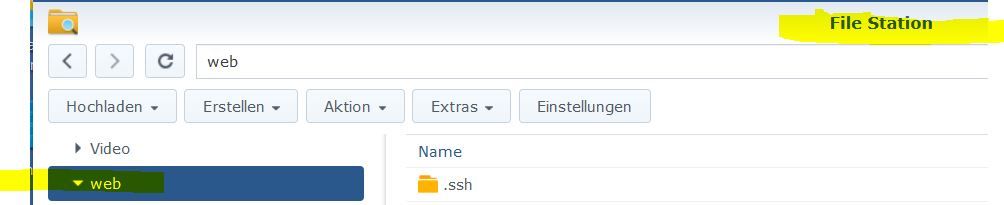
            hast du keinen freigegeben Ordner im Netzwerk !??

            wie bei mir ist es halt der

            /volume1/web
            

            1.JPG

            Synology 918+ 16GB - ioBroker in Docker v9 , VISO auf Trekstor Primebook C13 13,3" , Hikvision Domkameras mit Surveillance Station .. CCU RaspberryMatic in Synology VM .. Zigbee CC2538+CC2592 .. Sonoff .. KNX .. Modbus ..

            1 Reply Last reply
            0
            • entavioE entavio

              @Glasfaser

              strange

              sudo docker cp buanet-iobroker1:/opt/iobroker /Users/admin/downloads/backup/
              stat /Users/admin/downloads: no such file or directory
              
              GlasfaserG Offline
              GlasfaserG Offline
              Glasfaser
              wrote on last edited by
              #48

              @entavio
              Nachtrag :

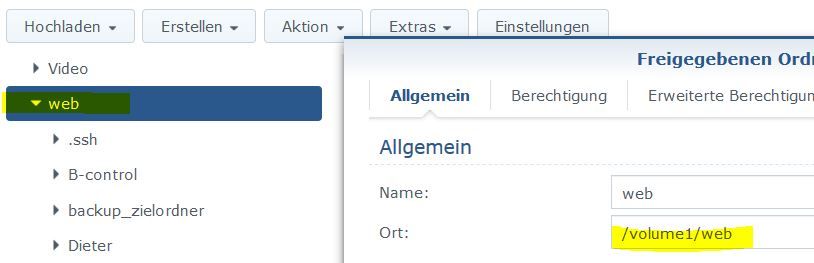
              unter Eigenschaften kannst du den Pfad sehen

              1.JPG

              Synology 918+ 16GB - ioBroker in Docker v9 , VISO auf Trekstor Primebook C13 13,3" , Hikvision Domkameras mit Surveillance Station .. CCU RaspberryMatic in Synology VM .. Zigbee CC2538+CC2592 .. Sonoff .. KNX .. Modbus ..

              entavioE 1 Reply Last reply
              0
              • GlasfaserG Glasfaser

                @entavio
                Nachtrag :

                unter Eigenschaften kannst du den Pfad sehen

                1.JPG

                entavioE Offline
                entavioE Offline
                entavio
                wrote on last edited by entavio
                #49

                @Glasfaser

                hab einen neuen Ordner angelegt, den cp Befehl neu abgesetzt.... läuft im moment

                fertig. :+1:

                GlasfaserG 1 Reply Last reply
                0
                • entavioE entavio

                  @Glasfaser

                  hab einen neuen Ordner angelegt, den cp Befehl neu abgesetzt.... läuft im moment

                  fertig. :+1:

                  GlasfaserG Offline
                  GlasfaserG Offline
                  Glasfaser
                  wrote on last edited by
                  #50

                  @entavio

                  Puhhh .....

                  Ich denke mal du machst es besser dann per Restore , ich hoffe dein Backup ist frisch !?

                  Neuen Container anlegen ... im Auswahlmenue den Ordner neu erstellen , dort dein Backup rein und den Container starten .

                  Synology 918+ 16GB - ioBroker in Docker v9 , VISO auf Trekstor Primebook C13 13,3" , Hikvision Domkameras mit Surveillance Station .. CCU RaspberryMatic in Synology VM .. Zigbee CC2538+CC2592 .. Sonoff .. KNX .. Modbus ..

                  entavioE 1 Reply Last reply
                  0
                  • GlasfaserG Glasfaser

                    @entavio

                    Puhhh .....

                    Ich denke mal du machst es besser dann per Restore , ich hoffe dein Backup ist frisch !?

                    Neuen Container anlegen ... im Auswahlmenue den Ordner neu erstellen , dort dein Backup rein und den Container starten .

                    entavioE Offline
                    entavioE Offline
                    entavio
                    wrote on last edited by
                    #51

                    @Glasfaser

                    das backup hatte ich gestern in einem der Zwischenschritte gemacht, hoffe noch einem verwendbaren zustand

                    in etwa so dann:

                    Sicherungsdatei .tar.gz in das Verzeichnis backups kopieren
                    ioBroker stoppen
                    sudo iobroker stop
                    Backup zurück spielen
                    sudo iobroker restore 0
                    ioBroker starten
                    sudo iobroker start all
                    sudo iobroker start
                    sudo iobroker upload all

                    GlasfaserG 2 Replies Last reply
                    0
                    • entavioE entavio

                      @Glasfaser

                      das backup hatte ich gestern in einem der Zwischenschritte gemacht, hoffe noch einem verwendbaren zustand

                      in etwa so dann:

                      Sicherungsdatei .tar.gz in das Verzeichnis backups kopieren
                      ioBroker stoppen
                      sudo iobroker stop
                      Backup zurück spielen
                      sudo iobroker restore 0
                      ioBroker starten
                      sudo iobroker start all
                      sudo iobroker start
                      sudo iobroker upload all

                      GlasfaserG Offline
                      GlasfaserG Offline
                      Glasfaser
                      wrote on last edited by Glasfaser
                      #52

                      @entavio

                      Nix mit Befehle ...

                      siehe oben .... der neue Container erkennt das Backup selber ......

                      so sieht das dann aus :

                      2020-10-11 16:06:16	stdout	-----         Step 1 of 5: Preparing container         -----
                      2020-10-11 16:06:16	stdout	------------------------------------------------------------
                      2020-10-11 16:06:16	stdout	 
                      2020-10-11 16:06:16	stdout	------------------------------------------------------------
                      2020-10-11 16:06:16	stdout	-----               SETUID:    1000                    -----
                      2020-10-11 16:06:16	stdout	-----               SETGID:    1000                    -----
                      2020-10-11 16:06:16	stdout	-----                       ENV                        -----
                      2020-10-11 16:06:16	stdout	-----                                                  -----
                      2020-10-11 16:06:16	stdout	-----               npm:       6.14.6                  -----
                      2020-10-11 16:06:15	stdout	-----               node:      v12.18.3                -----
                      2020-10-11 16:06:15	stdout	-----               image:     v5.0.0                  -----
                      2020-10-11 16:06:15	stdout	-----                     Versions                     -----
                      2020-10-11 16:06:15	stdout	-----                                                  -----
                      2020-10-11 16:06:15	stdout	-----               arch:      x86_64                  -----
                      2020-10-11 16:06:15	stdout	-----                      System                      -----
                      2020-10-11 16:06:15	stdout	-----                                                  -----
                      2020-10-11 16:06:15	stdout	-----              Debugging information               ----- 
                      
                      
                      ...
                      2020-10-11 16:06:19	stdout	ioBroker backup file detected in /opt/iobroker. Restoring ioBroker...
                      .
                      .
                      usw...
                      

                      Synology 918+ 16GB - ioBroker in Docker v9 , VISO auf Trekstor Primebook C13 13,3" , Hikvision Domkameras mit Surveillance Station .. CCU RaspberryMatic in Synology VM .. Zigbee CC2538+CC2592 .. Sonoff .. KNX .. Modbus ..

                      entavioE 1 Reply Last reply
                      0
                      • GlasfaserG Glasfaser

                        @entavio

                        Nix mit Befehle ...

                        siehe oben .... der neue Container erkennt das Backup selber ......

                        so sieht das dann aus :

                        2020-10-11 16:06:16	stdout	-----         Step 1 of 5: Preparing container         -----
                        2020-10-11 16:06:16	stdout	------------------------------------------------------------
                        2020-10-11 16:06:16	stdout	 
                        2020-10-11 16:06:16	stdout	------------------------------------------------------------
                        2020-10-11 16:06:16	stdout	-----               SETUID:    1000                    -----
                        2020-10-11 16:06:16	stdout	-----               SETGID:    1000                    -----
                        2020-10-11 16:06:16	stdout	-----                       ENV                        -----
                        2020-10-11 16:06:16	stdout	-----                                                  -----
                        2020-10-11 16:06:16	stdout	-----               npm:       6.14.6                  -----
                        2020-10-11 16:06:15	stdout	-----               node:      v12.18.3                -----
                        2020-10-11 16:06:15	stdout	-----               image:     v5.0.0                  -----
                        2020-10-11 16:06:15	stdout	-----                     Versions                     -----
                        2020-10-11 16:06:15	stdout	-----                                                  -----
                        2020-10-11 16:06:15	stdout	-----               arch:      x86_64                  -----
                        2020-10-11 16:06:15	stdout	-----                      System                      -----
                        2020-10-11 16:06:15	stdout	-----                                                  -----
                        2020-10-11 16:06:15	stdout	-----              Debugging information               ----- 
                        
                        
                        ...
                        2020-10-11 16:06:19	stdout	ioBroker backup file detected in /opt/iobroker. Restoring ioBroker...
                        .
                        .
                        usw...
                        
                        entavioE Offline
                        entavioE Offline
                        entavio
                        wrote on last edited by
                        #53

                        @Glasfaser

                        ok dann leg ich mal einen container an, als host und dann welches ausahlmenü meinst du? dort greif ich dann das backup file vom soeben erfolgten copy

                        GlasfaserG 1 Reply Last reply
                        0
                        • entavioE entavio

                          @Glasfaser

                          das backup hatte ich gestern in einem der Zwischenschritte gemacht, hoffe noch einem verwendbaren zustand

                          in etwa so dann:

                          Sicherungsdatei .tar.gz in das Verzeichnis backups kopieren
                          ioBroker stoppen
                          sudo iobroker stop
                          Backup zurück spielen
                          sudo iobroker restore 0
                          ioBroker starten
                          sudo iobroker start all
                          sudo iobroker start
                          sudo iobroker upload all

                          GlasfaserG Offline
                          GlasfaserG Offline
                          Glasfaser
                          wrote on last edited by
                          #54

                          @entavio sagte in Admin-Oberfläche nicht zu erreichen, Prozess läuft nicht:

                          sudo iobroker stop
                          Backup zurück spielen
                          sudo iobroker restore 0

                          Hinweis :

                          wenn du mal später was mit iobroker Befehlen machst ,dann kein sudo vor dem iobroker Befehl

                          Synology 918+ 16GB - ioBroker in Docker v9 , VISO auf Trekstor Primebook C13 13,3" , Hikvision Domkameras mit Surveillance Station .. CCU RaspberryMatic in Synology VM .. Zigbee CC2538+CC2592 .. Sonoff .. KNX .. Modbus ..

                          1 Reply Last reply
                          0
                          • entavioE entavio

                            @Glasfaser

                            ok dann leg ich mal einen container an, als host und dann welches ausahlmenü meinst du? dort greif ich dann das backup file vom soeben erfolgten copy

                            GlasfaserG Offline
                            GlasfaserG Offline
                            Glasfaser
                            wrote on last edited by Glasfaser
                            #55

                            @entavio

                            Das meine ich :

                            1.JPG

                            Neuen Odner erstellen und dann auch per Filestation dort die Backupdatei reinschieben ,

                            Synology 918+ 16GB - ioBroker in Docker v9 , VISO auf Trekstor Primebook C13 13,3" , Hikvision Domkameras mit Surveillance Station .. CCU RaspberryMatic in Synology VM .. Zigbee CC2538+CC2592 .. Sonoff .. KNX .. Modbus ..

                            entavioE 1 Reply Last reply
                            0
                            • GlasfaserG Glasfaser

                              @entavio

                              Das meine ich :

                              1.JPG

                              Neuen Odner erstellen und dann auch per Filestation dort die Backupdatei reinschieben ,

                              entavioE Offline
                              entavioE Offline
                              entavio
                              wrote on last edited by
                              #56

                              @Glasfaser

                              ok sollte das backup im Eimer sein könnte ich aber auch den Ordner iobroker_data in teilen kopieren
                              dort sehe ich nämlich die ganzen Ordner der adapter

                              GlasfaserG 1 Reply Last reply
                              0
                              • entavioE entavio

                                @Glasfaser

                                ok sollte das backup im Eimer sein könnte ich aber auch den Ordner iobroker_data in teilen kopieren
                                dort sehe ich nämlich die ganzen Ordner der adapter

                                GlasfaserG Offline
                                GlasfaserG Offline
                                Glasfaser
                                wrote on last edited by
                                #57

                                @entavio sagte in Admin-Oberfläche nicht zu erreichen, Prozess läuft nicht:

                                dort sehe ich nämlich die ganzen Ordner der adapter

                                Aber wie schon erwähnt .... ich vermute sehr stark das es ein Schuss wegbekommen hat und so würdest du auch wenn es funktioniert immer die Fehler weiter mitschleppen !

                                Synology 918+ 16GB - ioBroker in Docker v9 , VISO auf Trekstor Primebook C13 13,3" , Hikvision Domkameras mit Surveillance Station .. CCU RaspberryMatic in Synology VM .. Zigbee CC2538+CC2592 .. Sonoff .. KNX .. Modbus ..

                                entavioE 1 Reply Last reply
                                0
                                • GlasfaserG Glasfaser

                                  @entavio sagte in Admin-Oberfläche nicht zu erreichen, Prozess läuft nicht:

                                  dort sehe ich nämlich die ganzen Ordner der adapter

                                  Aber wie schon erwähnt .... ich vermute sehr stark das es ein Schuss wegbekommen hat und so würdest du auch wenn es funktioniert immer die Fehler weiter mitschleppen !

                                  entavioE Offline
                                  entavioE Offline
                                  entavio
                                  wrote on last edited by
                                  #58

                                  @Glasfaser

                                  also neuen container angelegt, als host, bei der Dateiauswahl das backupfile ausgewählt....
                                  admin Oberfläche ist zwar da aber von den Adaptern keine spur, zumal im log er das nicht erkannt zu haben scheint

                                  GlasfaserG 1 Reply Last reply
                                  0
                                  • entavioE entavio

                                    @Glasfaser

                                    also neuen container angelegt, als host, bei der Dateiauswahl das backupfile ausgewählt....
                                    admin Oberfläche ist zwar da aber von den Adaptern keine spur, zumal im log er das nicht erkannt zu haben scheint

                                    GlasfaserG Offline
                                    GlasfaserG Offline
                                    Glasfaser
                                    wrote on last edited by
                                    #59

                                    @entavio sagte in Admin-Oberfläche nicht zu erreichen, Prozess läuft nicht:

                                    bei der Dateiauswahl das backupfile ausgewählt....

                                    Du solltest doch das Backup in den neu erstellten Mountordner reinkopieren !?

                                    Zeige mal das Log !

                                    Synology 918+ 16GB - ioBroker in Docker v9 , VISO auf Trekstor Primebook C13 13,3" , Hikvision Domkameras mit Surveillance Station .. CCU RaspberryMatic in Synology VM .. Zigbee CC2538+CC2592 .. Sonoff .. KNX .. Modbus ..

                                    entavioE 1 Reply Last reply
                                    0
                                    • GlasfaserG Glasfaser

                                      @entavio sagte in Admin-Oberfläche nicht zu erreichen, Prozess läuft nicht:

                                      bei der Dateiauswahl das backupfile ausgewählt....

                                      Du solltest doch das Backup in den neu erstellten Mountordner reinkopieren !?

                                      Zeige mal das Log !

                                      entavioE Offline
                                      entavioE Offline
                                      entavio
                                      wrote on last edited by entavio
                                      #60

                                      @Glasfaser

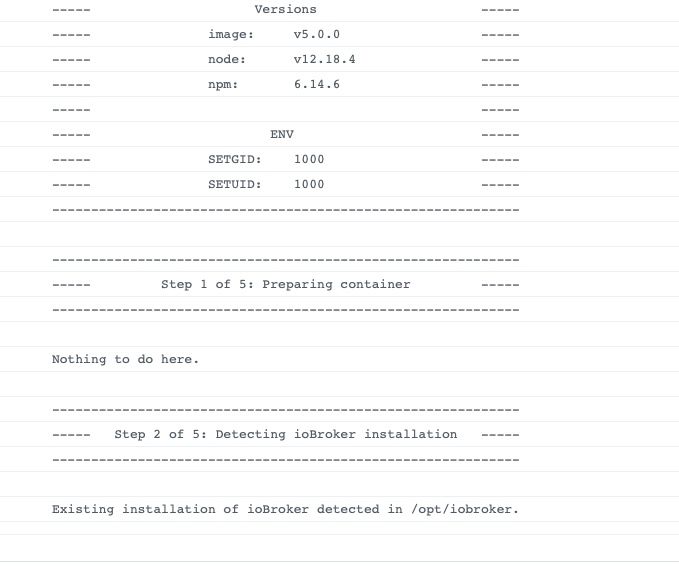
                                      habe auch einen mountordner hinterlegt, dort das Verzeichnis backups angelegt und das file upgeloadet
                                      Bildschirmfoto 2020-10-11 um 21.13.13.jpg

                                      GlasfaserG 1 Reply Last reply
                                      0
                                      • entavioE entavio

                                        @Glasfaser

                                        habe auch einen mountordner hinterlegt, dort das Verzeichnis backups angelegt und das file upgeloadet

                                        Bildschirmfoto 2020-10-11 um 21.13.13.jpg

                                        GlasfaserG Offline
                                        GlasfaserG Offline
                                        Glasfaser
                                        wrote on last edited by
                                        #61

                                        @entavio

                                        so das heißt .... der iobroker läuft ... halt ohne dem Backup !?

                                        Synology 918+ 16GB - ioBroker in Docker v9 , VISO auf Trekstor Primebook C13 13,3" , Hikvision Domkameras mit Surveillance Station .. CCU RaspberryMatic in Synology VM .. Zigbee CC2538+CC2592 .. Sonoff .. KNX .. Modbus ..


                                        entavioE 1 Reply Last reply
                                        0
                                        • GlasfaserG Glasfaser

                                          @entavio

                                          so das heißt .... der iobroker läuft ... halt ohne dem Backup !?

                                          entavioE Offline
                                          entavioE Offline
                                          entavio
                                          wrote on last edited by entavio
                                          #62

                                          @Glasfaser

                                          genau, admin Oberfläche erreichbar, discovery adapter und info adapter laufen

                                          GlasfaserG 1 Reply Last reply
                                          0
                                          Reply
                                          • Reply as topic
                                          Log in to reply
                                          • Oldest to Newest
                                          • Newest to Oldest
                                          • Most Votes


                                          Support us

                                          ioBroker
                                          Community Adapters
                                          Donate
                                          FAQ Cloud / IOT
                                          HowTo: Node.js-Update
                                          HowTo: Backup/Restore
                                          Downloads
                                          BLOG

                                          673

                                          Online

                                          32.7k

                                          Users

                                          82.5k

                                          Topics

                                          1.3m

                                          Posts
                                          Community
                                          Impressum | Datenschutz-Bestimmungen | Nutzungsbedingungen | Einwilligungseinstellungen
                                          ioBroker Community 2014-2025
                                          logo
                                          • Login

                                          • Don't have an account? Register

                                          • Login or register to search.
                                          • First post
                                            Last post
                                          0
                                          • Home
                                          • Recent
                                          • Tags
                                          • Unread 0
                                          • Categories
                                          • Unreplied
                                          • Popular
                                          • GitHub
                                          • Docu
                                          • Hilfe