Skip to content
  • Home
  • Recent
  • Tags
  • 0 Unread 0
  • Categories
  • Unreplied
  • Popular
  • GitHub
  • Docu
  • Hilfe
Skins
  • Light
  • Brite
  • Cerulean
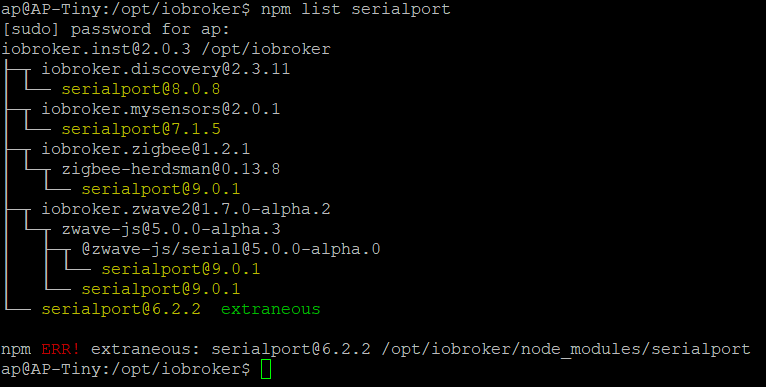
  • Cosmo
  • Flatly
  • Journal
  • Litera
  • Lumen
  • Lux
  • Materia
  • Minty
  • Morph
  • Pulse
  • Sandstone
  • Simplex
  • Sketchy
  • Spacelab
  • United
  • Yeti
  • Zephyr
  • Dark
  • Cyborg
  • Darkly
  • Quartz
  • Slate
  • Solar
  • Superhero
  • Vapor

  • Default (No Skin)
  • No Skin
Collapse
ioBroker Logo

Community Forum

donate donate
  1. ioBroker Community Home
  2. English
  3. ioBroker general
  4. Zigbee adapter stopped working FIXED

NEWS

  • Jahresrückblick 2025 – unser neuer Blogbeitrag ist online! ✨
    BluefoxB
    Bluefox
    15
    1
    839

  • Neuer Blogbeitrag: Monatsrückblick - Dezember 2025 🎄
    BluefoxB
    Bluefox
    13
    1
    681

  • Weihnachtsangebot 2025! 🎄
    BluefoxB
    Bluefox
    25
    1
    1.9k

Zigbee adapter stopped working FIXED

Scheduled Pinned Locked Moved ioBroker general
zigbee
41 Posts 4 Posters 7.9k Views 4 Watching
  • Oldest to Newest
  • Newest to Oldest
  • Most Votes
Reply
  • Reply as topic
Log in to reply
This topic has been deleted. Only users with topic management privileges can see it.
  • A Offline
    A Offline
    ap2017
    wrote on last edited by ap2017
    #1

    After yesterday update of PING, SIMPLE-API and JAVASCRIPT adapters (not sure if failure is related to updates), my Zigbee adapter stopped working. In attempt to configure adapter, message "Error. You need save and run adapter before pairing! appears." Confirming proper communication port /dev/ttyACM1 does not help, same port as I was using for Zigbee for long time. Running

    sudo ldconfig
    or
    sudo ldconfig /usr/local
    or
    sudo ldconfig /usr/local/lib64

    did not help.
    See attached log.
    9-18-20 Zigbee.txt

    AsgothianA mickymM 2 Replies Last reply
    0
    • A ap2017

      After yesterday update of PING, SIMPLE-API and JAVASCRIPT adapters (not sure if failure is related to updates), my Zigbee adapter stopped working. In attempt to configure adapter, message "Error. You need save and run adapter before pairing! appears." Confirming proper communication port /dev/ttyACM1 does not help, same port as I was using for Zigbee for long time. Running

      sudo ldconfig
      or
      sudo ldconfig /usr/local
      or
      sudo ldconfig /usr/local/lib64

      did not help.
      See attached log.
      9-18-20 Zigbee.txt

      AsgothianA Offline
      AsgothianA Offline
      Asgothian
      Developer
      wrote on last edited by
      #2

      @ap2017 please Restart the System. It seems that something is blocking the serial port.

      A.

      ioBroker auf RPi4 - Hardware soweit wie möglich via Zigbee.
      "Shit don't work" ist keine Fehlermeldung, sondern ein Fluch.

      A 1 Reply Last reply
      0
      • AsgothianA Asgothian

        @ap2017 please Restart the System. It seems that something is blocking the serial port.

        A.

        A Offline
        A Offline
        ap2017
        wrote on last edited by ap2017
        #3

        @Asgothian Tried it several times - no changes. Proper port seems to be assigned as expected.

        9-18-20 Zigbee Port.jpg

        AsgothianA 1 Reply Last reply
        0
        • A ap2017

          @Asgothian Tried it several times - no changes. Proper port seems to be assigned as expected.
          9-18-20 Zigbee Port.jpg

          AsgothianA Offline
          AsgothianA Offline
          Asgothian
          Developer
          wrote on last edited by
          #4

          @ap2017

          • did you update anything else ?
          • can you post a log of a startup attempt with the Adapter in debug Mode ?

          A.

          ioBroker auf RPi4 - Hardware soweit wie möglich via Zigbee.
          "Shit don't work" ist keine Fehlermeldung, sondern ein Fluch.

          A 1 Reply Last reply
          0
          • AsgothianA Asgothian

            @ap2017

            • did you update anything else ?
            • can you post a log of a startup attempt with the Adapter in debug Mode ?

            A.

            A Offline
            A Offline
            ap2017
            wrote on last edited by
            #5

            @Asgothian After Zigbee failed, after usual troubleshooting, restarting, etc., I updated Linux with "sudo apt-get update && sudo apt-get upgrade -y", which, I believe updated my Node.js to 12.8.4. Just in case, I run "npm rebuild" after. I am not sure all of this was necessary, I am totally not an expert. It is interesting that Zwave adapter works fine with ACM0 and ACM1 ports, but Zigbee stopped working with any port selected. Here my log file. Thank you for your help.
            9-19-2020 Zigbee.txt

            AsgothianA 1 Reply Last reply
            0
            • A ap2017

              @Asgothian After Zigbee failed, after usual troubleshooting, restarting, etc., I updated Linux with "sudo apt-get update && sudo apt-get upgrade -y", which, I believe updated my Node.js to 12.8.4. Just in case, I run "npm rebuild" after. I am not sure all of this was necessary, I am totally not an expert. It is interesting that Zwave adapter works fine with ACM0 and ACM1 ports, but Zigbee stopped working with any port selected. Here my log file. Thank you for your help.
              9-19-2020 Zigbee.txt

              AsgothianA Offline
              AsgothianA Offline
              Asgothian
              Developer
              wrote on last edited by
              #6

              @ap2017 The node update may be the reason.
              The log mentions that the port does not exist. I would suggest that you follow the steps below:

              • back up your zigbee database (/opt/iobroker/iobroker-data/zigbee_0/shepherd.db)
              • delete the zigbee instance
              • remove the zigbee adapter
              • reinstall the zigbee adapter (it seems you installed it from Github, so you should do that again)
              • configure the adapter
              • if your zigbee-components are missing, stop the adapter, restore the shepherd.db, then restart the adapter.

              A.

              ioBroker auf RPi4 - Hardware soweit wie möglich via Zigbee.
              "Shit don't work" ist keine Fehlermeldung, sondern ein Fluch.

              A 1 Reply Last reply
              0
              • AsgothianA Asgothian

                @ap2017 The node update may be the reason.
                The log mentions that the port does not exist. I would suggest that you follow the steps below:

                • back up your zigbee database (/opt/iobroker/iobroker-data/zigbee_0/shepherd.db)
                • delete the zigbee instance
                • remove the zigbee adapter
                • reinstall the zigbee adapter (it seems you installed it from Github, so you should do that again)
                • configure the adapter
                • if your zigbee-components are missing, stop the adapter, restore the shepherd.db, then restart the adapter.

                A.

                A Offline
                A Offline
                ap2017
                wrote on last edited by ap2017
                #7

                @Asgothian I did what you recommended. Same results "Error: Device or resource busy, cannot open /dev/ttyACM1' at Znp.<anonymous> (/opt/iobroker/node_modules/iobroker.zigbee/node_modules/zigbee-he
                zigbe" and "Error: Failed to connect to the adapter (Error: Cannot request when znp has not been initialized yet)"

                AsgothianA 1 Reply Last reply
                0
                • A ap2017

                  @Asgothian I did what you recommended. Same results "Error: Device or resource busy, cannot open /dev/ttyACM1' at Znp.<anonymous> (/opt/iobroker/node_modules/iobroker.zigbee/node_modules/zigbee-he
                  zigbe" and "Error: Failed to connect to the adapter (Error: Cannot request when znp has not been initialized yet)"

                  AsgothianA Offline
                  AsgothianA Offline
                  Asgothian
                  Developer
                  wrote on last edited by
                  #8

                  @ap2017 are you sure you do not have something else using that serial port ?
                  The message "cannot open /dev/ttyACM1" is an indicator that the port either in use or blocked by the system (not read/write for the given user)

                  ioBroker auf RPi4 - Hardware soweit wie möglich via Zigbee.
                  "Shit don't work" ist keine Fehlermeldung, sondern ein Fluch.

                  A 1 Reply Last reply
                  0
                  • AsgothianA Asgothian

                    @ap2017 are you sure you do not have something else using that serial port ?
                    The message "cannot open /dev/ttyACM1" is an indicator that the port either in use or blocked by the system (not read/write for the given user)

                    A Offline
                    A Offline
                    ap2017
                    wrote on last edited by
                    #9

                    @Asgothian It looks like ACM1 is reserved for zigbee adapter.

                    8a0a55b5-680a-47a9-951b-cdc6197741e2-image.png

                    AsgothianA 1 Reply Last reply
                    0
                    • A ap2017

                      @Asgothian It looks like ACM1 is reserved for zigbee adapter.

                      8a0a55b5-680a-47a9-951b-cdc6197741e2-image.png

                      AsgothianA Offline
                      AsgothianA Offline
                      Asgothian
                      Developer
                      wrote on last edited by
                      #10

                      @ap2017 No. this only means that the /dev/ttyACM1 is actually the adapter of the stick. The question is if any other process is using it.

                      A.

                      ioBroker auf RPi4 - Hardware soweit wie möglich via Zigbee.
                      "Shit don't work" ist keine Fehlermeldung, sondern ein Fluch.

                      A 4 Replies Last reply
                      0
                      • AsgothianA Asgothian

                        @ap2017 No. this only means that the /dev/ttyACM1 is actually the adapter of the stick. The question is if any other process is using it.

                        A.

                        A Offline
                        A Offline
                        ap2017
                        wrote on last edited by
                        #11

                        @Asgothian Not sure how to check it. I only have three hardware related adapters: zWave which is on ACM0, mySensors on USB0 and zigbee on ACM1. As I mention before, if I disable zigbee, zWave runs fine on ACM1.

                        1 Reply Last reply
                        0
                        • AsgothianA Asgothian

                          @ap2017 No. this only means that the /dev/ttyACM1 is actually the adapter of the stick. The question is if any other process is using it.

                          A.

                          A Offline
                          A Offline
                          ap2017
                          wrote on last edited by
                          #12

                          @Asgothian Interesting that if I try to use other port like S1, getting different error message

                          "Error: Error while opening serialport 'Error: Error: Input/output error setting custom baud rate of 115200' at Znp.<anonymous> (/opt/iobroker/node_modules/iobroker.zigbee/node_modules/zigbe"

                          1 Reply Last reply
                          0
                          • AsgothianA Asgothian

                            @ap2017 No. this only means that the /dev/ttyACM1 is actually the adapter of the stick. The question is if any other process is using it.

                            A.

                            A Offline
                            A Offline
                            ap2017
                            wrote on last edited by
                            #13

                            @Asgothian Running ioBroker fixer did not help:

                            sudo iobroker stop
                            curl -sL https://iobroker.net/fix.sh | bash -
                            sudo iobroker start

                            1 Reply Last reply
                            0
                            • AsgothianA Asgothian

                              @ap2017 No. this only means that the /dev/ttyACM1 is actually the adapter of the stick. The question is if any other process is using it.

                              A.

                              A Offline
                              A Offline
                              ap2017
                              wrote on last edited by ap2017
                              #14

                              @Asgothian During npm rebuild received bunch of errors associated with serial port, see log. Could it be related to my problem?
                              2020-09-23T02_39_28_639Z-debug.log

                              AsgothianA 1 Reply Last reply
                              0
                              • A ap2017

                                @Asgothian During npm rebuild received bunch of errors associated with serial port, see log. Could it be related to my problem?
                                2020-09-23T02_39_28_639Z-debug.log

                                AsgothianA Offline
                                AsgothianA Offline
                                Asgothian
                                Developer
                                wrote on last edited by
                                #15

                                @ap2017
                                It should not. You have an old version of the serial port library (6.2.2) still installed. The zigbee-adapter should use serial port 9.x
                                Can you check NPM List if it is still present ?
                                You might see a large number of "extraneous" packages listed.
                                I would suggest to run "npm prune --dry-run" to see what is removed if you prune, and - unless packages are removed you consider needed - follow it up with an "npm prune"

                                A.

                                ioBroker auf RPi4 - Hardware soweit wie möglich via Zigbee.
                                "Shit don't work" ist keine Fehlermeldung, sondern ein Fluch.

                                A 1 Reply Last reply
                                1
                                • AsgothianA Asgothian

                                  @ap2017
                                  It should not. You have an old version of the serial port library (6.2.2) still installed. The zigbee-adapter should use serial port 9.x
                                  Can you check NPM List if it is still present ?
                                  You might see a large number of "extraneous" packages listed.
                                  I would suggest to run "npm prune --dry-run" to see what is removed if you prune, and - unless packages are removed you consider needed - follow it up with an "npm prune"

                                  A.

                                  A Offline
                                  A Offline
                                  ap2017
                                  wrote on last edited by
                                  #16

                                  @Asgothian Pardon my ignorance, how do I check NPM list? In terms of pruning, I have no idea what do I needs. I have very rudimentary knowledge of command line controls, I am one of those users who appreciate very much object level system configuration. That is why I like ioBroker, it seems to me well though through for this purpose. As always, thank you for your time and help.

                                  Thomas BraunT AsgothianA 2 Replies Last reply
                                  0
                                  • A ap2017

                                    @Asgothian Pardon my ignorance, how do I check NPM list? In terms of pruning, I have no idea what do I needs. I have very rudimentary knowledge of command line controls, I am one of those users who appreciate very much object level system configuration. That is why I like ioBroker, it seems to me well though through for this purpose. As always, thank you for your time and help.

                                    Thomas BraunT Online
                                    Thomas BraunT Online
                                    Thomas Braun
                                    Most Active
                                    wrote on last edited by
                                    #17

                                    @ap2017

                                    cd /opt/iobroker
                                    npm list serialport
                                    

                                    Should look similar to

                                    pi@raspberrypi:/opt/iobroker $ npm list serialport
                                    iobroker.inst@2.0.3 /opt/iobroker
                                    └─┬ iobroker.zigbee@1.2.1
                                      └─┬ zigbee-herdsman@0.12.117
                                        └── serialport@9.0.1
                                    

                                    Linux-Werkzeugkasten:
                                    https://forum.iobroker.net/topic/42952/der-kleine-iobroker-linux-werkzeugkasten
                                    NodeJS Fixer Skript:
                                    https://forum.iobroker.net/topic/68035/iob-node-fix-skript
                                    iob_diag: curl -sLf -o diag.sh https://iobroker.net/diag.sh && bash diag.sh

                                    A 1 Reply Last reply
                                    0
                                    • Thomas BraunT Thomas Braun

                                      @ap2017

                                      cd /opt/iobroker
                                      npm list serialport
                                      

                                      Should look similar to

                                      pi@raspberrypi:/opt/iobroker $ npm list serialport
                                      iobroker.inst@2.0.3 /opt/iobroker
                                      └─┬ iobroker.zigbee@1.2.1
                                        └─┬ zigbee-herdsman@0.12.117
                                          └── serialport@9.0.1
                                      
                                      A Offline
                                      A Offline
                                      ap2017
                                      wrote on last edited by
                                      #18

                                      @Thomas-Braun said in Zigbee adapter stopped working:

                                      npm list serialport

                                      Here we go:

                                      c4d5d82b-44c4-43ad-b489-5d9a5d94fad6-image.png

                                      1 Reply Last reply
                                      0
                                      • A ap2017

                                        @Asgothian Pardon my ignorance, how do I check NPM list? In terms of pruning, I have no idea what do I needs. I have very rudimentary knowledge of command line controls, I am one of those users who appreciate very much object level system configuration. That is why I like ioBroker, it seems to me well though through for this purpose. As always, thank you for your time and help.

                                        AsgothianA Offline
                                        AsgothianA Offline
                                        Asgothian
                                        Developer
                                        wrote on last edited by
                                        #19

                                        @ap2017 I apologise. I should have put quotes around the "npm list", as that was the command i wanted you to check.

                                        As you can see, there is an extra serialport library installed, but each adapter has (should have) a usable version, so you should be able to remove the extra one.

                                        npm prune should get rid of it.

                                        A.

                                        ioBroker auf RPi4 - Hardware soweit wie möglich via Zigbee.
                                        "Shit don't work" ist keine Fehlermeldung, sondern ein Fluch.

                                        A 2 Replies Last reply
                                        0
                                        • AsgothianA Asgothian

                                          @ap2017 I apologise. I should have put quotes around the "npm list", as that was the command i wanted you to check.

                                          As you can see, there is an extra serialport library installed, but each adapter has (should have) a usable version, so you should be able to remove the extra one.

                                          npm prune should get rid of it.

                                          A.

                                          A Offline
                                          A Offline
                                          ap2017
                                          wrote on last edited by
                                          #20

                                          @Asgothian No problem. I run the following, but still have same extraneous serial library 6..2.2 when run "npm list serialport"

                                          cd /opt/iobroker
                                          npm prune --dry-run
                                          sudo reboot

                                          AsgothianA 1 Reply Last reply
                                          0
                                          Reply
                                          • Reply as topic
                                          Log in to reply
                                          • Oldest to Newest
                                          • Newest to Oldest
                                          • Most Votes


                                          Support us

                                          ioBroker
                                          Community Adapters
                                          Donate

                                          880

                                          Online

                                          32.6k

                                          Users

                                          82.0k

                                          Topics

                                          1.3m

                                          Posts
                                          Community
                                          Impressum | Datenschutz-Bestimmungen | Nutzungsbedingungen | Einwilligungseinstellungen
                                          ioBroker Community 2014-2025
                                          logo
                                          • Login

                                          • Don't have an account? Register

                                          • Login or register to search.
                                          • First post
                                            Last post
                                          0
                                          • Home
                                          • Recent
                                          • Tags
                                          • Unread 0
                                          • Categories
                                          • Unreplied
                                          • Popular
                                          • GitHub
                                          • Docu
                                          • Hilfe