




Bug bei Update usw..
-
@Homoran sagte in Bug bei Update usw..:
bei der du irgendwo in einer Datei Stretch mit Buster ersetzt hattest
Das war die sources.list
Nur ich mach das immer zu Fuß und nicht über sed.
Ist natürlich eleganter, ich kann mir aber die Syntax von sed nie merken...@Thomas-Braun Danke!
Also müsste das jetzt auch klappen ;-)
-
@Homoran sagte in Bug bei Update usw..:
bei der du irgendwo in einer Datei Stretch mit Buster ersetzt hattest
Das war die sources.list
Nur ich mach das immer zu Fuß und nicht über sed.
Ist natürlich eleganter, ich kann mir aber die Syntax von sed nie merken...@Thomas-Braun So es hat wahrscheinlich geklappt, obwohl...
Nach der apt update usw-Orgie und erneutem Reboot sah es gut aus:
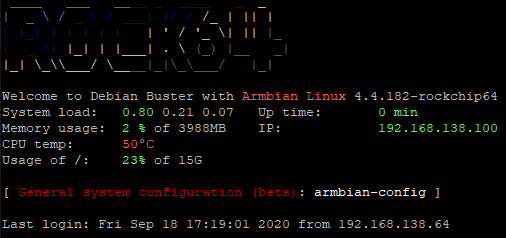
aber der Kernel ist noch 4.4 :-(
In Armbian-config kann man einen Kernel ändern, aber man droht!Auch nodejs war natürlich noch 10x.
Nach deiner Anleitung in den sources-list die Daten für 12 und 14 eingetragen und sicherheitshalber die 10er und 14er auskommentiert.Beim anschließenden Update schleicht sich dann doch noch ein stretch repo rein:
pi@rock64:~$ sudo apt update
Hit:1 http://httpredir.debian.org/debian buster InRelease
Hit:2 http://httpredir.debian.org/debian buster-updates InRelease
Hit:3 http://httpredir.debian.org/debian buster-backports InRelease
Hit:4 http://security.debian.org buster/updates InRelease
Hit:5 https://deb.nodesource.com/node_12.x buster InRelease
Hit:6 https://mirrors.netix.net/armbian/apt stretch InRelease
Reading package lists... Done
ich habe nicht gefunden wo das jetzt herkommt :-(
deine which Schlange bringt:
pi@rock64:~$ which nodejs && nodejs -v && which node && node -v && which npm && npm -v && apt policy nodejs
/usr/bin/nodejs
v12.18.4
/usr/bin/node
v12.18.4
/usr/bin/npm
6.14.6
nodejs:
  Installed: 12.18.4-1nodesource1
  Candidate: 12.18.4-1nodesource1
  Version table:
 *** 12.18.4-1nodesource1 500
        500 https://deb.nodesource.com/node_12.x buster/main arm64 Packages
        100 /var/lib/dpkg/status
     10.21.0~dfsg-1~deb10u1 500
        500 http://httpredir.debian.org/debian buster/main arm64 Packages
        500 http://security.debian.org buster/updates/main arm64 Packages
Wat nu?
EDIT:
natürlich klappt der install von sharp auch nicht:pi@rock64:/opt/iobroker$ npm install sharp > sharp@0.26.0 install /opt/iobroker/node_modules/sharp > (node install/libvips && node install/dll-copy && prebuild-install) || (node-gyp rebuild && node install/dll-copy) ERR! sharp Use with glibc 2.28 requires manual installation of libvips >= 8.10.0 info sharp Attempting to build from source via node-gyp but this may fail due to the above error info sharp Please see https://sharp.pixelplumbing.com/install for required dependencies make: Entering directory '/opt/iobroker/node_modules/sharp/build' CC(target) Release/obj.target/nothing/../node-addon-api/nothing.o AR(target) Release/obj.target/../node-addon-api/nothing.a COPY Release/nothing.a TOUCH Release/obj.target/libvips-cpp.stamp CXX(target) Release/obj.target/sharp/src/common.o ../src/common.cc:24:10: fatal error: vips/vips8: No such file or directory #include <vips/vips8> ^~~~~~~~~~~~ compilation terminated. make: *** [sharp.target.mk:139: Release/obj.target/sharp/src/common.o] Error 1 make: Leaving directory '/opt/iobroker/node_modules/sharp/build' gyp ERR! build error gyp ERR! stack Error: `make` failed with exit code: 2 gyp ERR! stack at ChildProcess.onExit (/usr/lib/node_modules/npm/node_modules/node-gyp/lib/build.js:194:23) gyp ERR! stack at ChildProcess.emit (events.js:315:20) gyp ERR! stack at Process.ChildProcess._handle.onexit (internal/child_process.js:275:12) gyp ERR! System Linux 4.4.182-rockchip64 gyp ERR! command "/usr/bin/node" "/usr/lib/node_modules/npm/node_modules/node-gyp/bin/node-gyp.js" "rebuild" gyp ERR! cwd /opt/iobroker/node_modules/sharp gyp ERR! node -v v12.18.4 gyp ERR! node-gyp -v v5.1.0 gyp ERR! not ok npm WARN optional SKIPPING OPTIONAL DEPENDENCY: osx-temperature-sensor@^1.0.3 (node_modules/iobroker.info/node_modules/osx-temperature-sensor): npm WARN notsup SKIPPING OPTIONAL DEPENDENCY: Unsupported platform for osx-temperature-sensor@1.0.7: wanted {"os":"darwin","arch":"any"} (current: {"os":"linux","arch":"arm64"}) npm ERR! code ELIFECYCLE npm ERR! errno 1 npm ERR! sharp@0.26.0 install: `(node install/libvips && node install/dll-copy && prebuild-install) || (node-gyp rebuild && node install/dll-copy)` npm ERR! Exit status 1 npm ERR! npm ERR! Failed at the sharp@0.26.0 install script. npm ERR! This is probably not a problem with npm. There is likely additional logging output above. npm ERR! A complete log of this run can be found in: npm ERR! /home/pi/.npm/_logs/2020-09-18T16_44_13_676Z-debug.logEDIT2
der Build von libvips 8.10.1 lief ohne Probleme durch, der nachfolgende Versuch sharp zu installieren schlug weider fehlpi@rock64:/opt/iobroker$ npm install sharp > sharp@0.26.0 install /opt/iobroker/node_modules/sharp > (node install/libvips && node install/dll-copy && prebuild-install) || (node-gyp rebuild && node install/dll-copy) ERR! sharp Use with glibc 2.28 requires manual installation of libvips >= 8.10.0 info sharp Attempting to build from source via node-gyp but this may fail due to the above error info sharp Please see https://sharp.pixelplumbing.com/install for required dependencies make: Entering directory '/opt/iobroker/node_modules/sharp/build' CC(target) Release/obj.target/nothing/../node-addon-api/nothing.o AR(target) Release/obj.target/../node-addon-api/nothing.a COPY Release/nothing.a TOUCH Release/obj.target/libvips-cpp.stamp CXX(target) Release/obj.target/sharp/src/common.o ../src/common.cc:24:10: fatal error: vips/vips8: No such file or directory #include <vips/vips8> ^~~~~~~~~~~~ compilation terminated. make: *** [sharp.target.mk:139: Release/obj.target/sharp/src/common.o] Error 1 make: Leaving directory '/opt/iobroker/node_modules/sharp/build' gyp ERR! build error gyp ERR! stack Error: `make` failed with exit code: 2 gyp ERR! stack at ChildProcess.onExit (/usr/lib/node_modules/npm/node_modules/node-gyp/lib/build.js:194:23) gyp ERR! stack at ChildProcess.emit (events.js:315:20) gyp ERR! stack at Process.ChildProcess._handle.onexit (internal/child_process.js:275:12) gyp ERR! System Linux 4.4.182-rockchip64 gyp ERR! command "/usr/bin/node" "/usr/lib/node_modules/npm/node_modules/node-gyp/bin/node-gyp.js" "rebuild" gyp ERR! cwd /opt/iobroker/node_modules/sharp gyp ERR! node -v v12.18.4 gyp ERR! node-gyp -v v5.1.0 gyp ERR! not ok npm WARN optional SKIPPING OPTIONAL DEPENDENCY: osx-temperature-sensor@^1.0.3 (node_modules/iobroker.info/node_modules/osx-temperature-sensor): npm WARN notsup SKIPPING OPTIONAL DEPENDENCY: Unsupported platform for osx-temperature-sensor@1.0.7: wanted {"os":"darwin","arch":"any"} (current: {"os":"linux","arch":"arm64"}) npm ERR! code ELIFECYCLE npm ERR! errno 1 npm ERR! sharp@0.26.0 install: `(node install/libvips && node install/dll-copy && prebuild-install) || (node-gyp rebuild && node install/dll-copy)` npm ERR! Exit status 1 npm ERR! npm ERR! Failed at the sharp@0.26.0 install script. npm ERR! This is probably not a problem with npm. There is likely additional logging output above. npm ERR! A complete log of this run can be found in: npm ERR! /home/pi/.npm/_logs/2020-09-18T16_54_36_024Z-debug.logkein Support per PN! - Fragen im Forum stellen - Benutzt das Voting rechts unten im Beitrag wenn er euch geholfen hat.
Das Forum freut sich über eine Spende. Benutzt dazu den Spendenbutton oben rechts. Danke!
der Installationsfixer: curl -fsL https://iobroker.net/fix.sh | bash - -
@Thomas-Braun So es hat wahrscheinlich geklappt, obwohl...
Nach der apt update usw-Orgie und erneutem Reboot sah es gut aus:
aber der Kernel ist noch 4.4 :-(
In Armbian-config kann man einen Kernel ändern, aber man droht!Auch nodejs war natürlich noch 10x.
Nach deiner Anleitung in den sources-list die Daten für 12 und 14 eingetragen und sicherheitshalber die 10er und 14er auskommentiert.Beim anschließenden Update schleicht sich dann doch noch ein stretch repo rein:
pi@rock64:~$ sudo apt update
Hit:1 http://httpredir.debian.org/debian buster InRelease
Hit:2 http://httpredir.debian.org/debian buster-updates InRelease
Hit:3 http://httpredir.debian.org/debian buster-backports InRelease
Hit:4 http://security.debian.org buster/updates InRelease
Hit:5 https://deb.nodesource.com/node_12.x buster InRelease
Hit:6 https://mirrors.netix.net/armbian/apt stretch InRelease
Reading package lists... Done
ich habe nicht gefunden wo das jetzt herkommt :-(
deine which Schlange bringt:
pi@rock64:~$ which nodejs && nodejs -v && which node && node -v && which npm && npm -v && apt policy nodejs
/usr/bin/nodejs
v12.18.4
/usr/bin/node
v12.18.4
/usr/bin/npm
6.14.6
nodejs:
  Installed: 12.18.4-1nodesource1
  Candidate: 12.18.4-1nodesource1
  Version table:
 *** 12.18.4-1nodesource1 500
        500 https://deb.nodesource.com/node_12.x buster/main arm64 Packages
        100 /var/lib/dpkg/status
     10.21.0~dfsg-1~deb10u1 500
        500 http://httpredir.debian.org/debian buster/main arm64 Packages
        500 http://security.debian.org buster/updates/main arm64 Packages
Wat nu?
EDIT:
natürlich klappt der install von sharp auch nicht:pi@rock64:/opt/iobroker$ npm install sharp > sharp@0.26.0 install /opt/iobroker/node_modules/sharp > (node install/libvips && node install/dll-copy && prebuild-install) || (node-gyp rebuild && node install/dll-copy) ERR! sharp Use with glibc 2.28 requires manual installation of libvips >= 8.10.0 info sharp Attempting to build from source via node-gyp but this may fail due to the above error info sharp Please see https://sharp.pixelplumbing.com/install for required dependencies make: Entering directory '/opt/iobroker/node_modules/sharp/build' CC(target) Release/obj.target/nothing/../node-addon-api/nothing.o AR(target) Release/obj.target/../node-addon-api/nothing.a COPY Release/nothing.a TOUCH Release/obj.target/libvips-cpp.stamp CXX(target) Release/obj.target/sharp/src/common.o ../src/common.cc:24:10: fatal error: vips/vips8: No such file or directory #include <vips/vips8> ^~~~~~~~~~~~ compilation terminated. make: *** [sharp.target.mk:139: Release/obj.target/sharp/src/common.o] Error 1 make: Leaving directory '/opt/iobroker/node_modules/sharp/build' gyp ERR! build error gyp ERR! stack Error: `make` failed with exit code: 2 gyp ERR! stack at ChildProcess.onExit (/usr/lib/node_modules/npm/node_modules/node-gyp/lib/build.js:194:23) gyp ERR! stack at ChildProcess.emit (events.js:315:20) gyp ERR! stack at Process.ChildProcess._handle.onexit (internal/child_process.js:275:12) gyp ERR! System Linux 4.4.182-rockchip64 gyp ERR! command "/usr/bin/node" "/usr/lib/node_modules/npm/node_modules/node-gyp/bin/node-gyp.js" "rebuild" gyp ERR! cwd /opt/iobroker/node_modules/sharp gyp ERR! node -v v12.18.4 gyp ERR! node-gyp -v v5.1.0 gyp ERR! not ok npm WARN optional SKIPPING OPTIONAL DEPENDENCY: osx-temperature-sensor@^1.0.3 (node_modules/iobroker.info/node_modules/osx-temperature-sensor): npm WARN notsup SKIPPING OPTIONAL DEPENDENCY: Unsupported platform for osx-temperature-sensor@1.0.7: wanted {"os":"darwin","arch":"any"} (current: {"os":"linux","arch":"arm64"}) npm ERR! code ELIFECYCLE npm ERR! errno 1 npm ERR! sharp@0.26.0 install: `(node install/libvips && node install/dll-copy && prebuild-install) || (node-gyp rebuild && node install/dll-copy)` npm ERR! Exit status 1 npm ERR! npm ERR! Failed at the sharp@0.26.0 install script. npm ERR! This is probably not a problem with npm. There is likely additional logging output above. npm ERR! A complete log of this run can be found in: npm ERR! /home/pi/.npm/_logs/2020-09-18T16_44_13_676Z-debug.logEDIT2
der Build von libvips 8.10.1 lief ohne Probleme durch, der nachfolgende Versuch sharp zu installieren schlug weider fehlpi@rock64:/opt/iobroker$ npm install sharp > sharp@0.26.0 install /opt/iobroker/node_modules/sharp > (node install/libvips && node install/dll-copy && prebuild-install) || (node-gyp rebuild && node install/dll-copy) ERR! sharp Use with glibc 2.28 requires manual installation of libvips >= 8.10.0 info sharp Attempting to build from source via node-gyp but this may fail due to the above error info sharp Please see https://sharp.pixelplumbing.com/install for required dependencies make: Entering directory '/opt/iobroker/node_modules/sharp/build' CC(target) Release/obj.target/nothing/../node-addon-api/nothing.o AR(target) Release/obj.target/../node-addon-api/nothing.a COPY Release/nothing.a TOUCH Release/obj.target/libvips-cpp.stamp CXX(target) Release/obj.target/sharp/src/common.o ../src/common.cc:24:10: fatal error: vips/vips8: No such file or directory #include <vips/vips8> ^~~~~~~~~~~~ compilation terminated. make: *** [sharp.target.mk:139: Release/obj.target/sharp/src/common.o] Error 1 make: Leaving directory '/opt/iobroker/node_modules/sharp/build' gyp ERR! build error gyp ERR! stack Error: `make` failed with exit code: 2 gyp ERR! stack at ChildProcess.onExit (/usr/lib/node_modules/npm/node_modules/node-gyp/lib/build.js:194:23) gyp ERR! stack at ChildProcess.emit (events.js:315:20) gyp ERR! stack at Process.ChildProcess._handle.onexit (internal/child_process.js:275:12) gyp ERR! System Linux 4.4.182-rockchip64 gyp ERR! command "/usr/bin/node" "/usr/lib/node_modules/npm/node_modules/node-gyp/bin/node-gyp.js" "rebuild" gyp ERR! cwd /opt/iobroker/node_modules/sharp gyp ERR! node -v v12.18.4 gyp ERR! node-gyp -v v5.1.0 gyp ERR! not ok npm WARN optional SKIPPING OPTIONAL DEPENDENCY: osx-temperature-sensor@^1.0.3 (node_modules/iobroker.info/node_modules/osx-temperature-sensor): npm WARN notsup SKIPPING OPTIONAL DEPENDENCY: Unsupported platform for osx-temperature-sensor@1.0.7: wanted {"os":"darwin","arch":"any"} (current: {"os":"linux","arch":"arm64"}) npm ERR! code ELIFECYCLE npm ERR! errno 1 npm ERR! sharp@0.26.0 install: `(node install/libvips && node install/dll-copy && prebuild-install) || (node-gyp rebuild && node install/dll-copy)` npm ERR! Exit status 1 npm ERR! npm ERR! Failed at the sharp@0.26.0 install script. npm ERR! This is probably not a problem with npm. There is likely additional logging output above. npm ERR! A complete log of this run can be found in: npm ERR! /home/pi/.npm/_logs/2020-09-18T16_54_36_024Z-debug.log@Homoran Schau mal in /etc/apt/sources.list.d
ob da eine Datei zu finden ist, diehttps://mirrors.netix.net/armbian/apt stretchenthält. Da dann auch stretch durch buster ersetzen.
-
@Homoran Schau mal in /etc/apt/sources.list.d
ob da eine Datei zu finden ist, diehttps://mirrors.netix.net/armbian/apt stretchenthält. Da dann auch stretch durch buster ersetzen.
@Thomas-Braun mach ich morgen.
Danke!kein Support per PN! - Fragen im Forum stellen - Benutzt das Voting rechts unten im Beitrag wenn er euch geholfen hat.
Das Forum freut sich über eine Spende. Benutzt dazu den Spendenbutton oben rechts. Danke!
der Installationsfixer: curl -fsL https://iobroker.net/fix.sh | bash - -
@Thomas-Braun mach ich morgen.
Danke!@Homoran
Oder mal schauen, ob es die Datei
/etc/apt/sources.list
gibt, die entsprechendes beinhaltet. -
@Homoran
Oder mal schauen, ob es die Datei
/etc/apt/sources.list
gibt, die entsprechendes beinhaltet.@Thomas-Braun da war dazu nix drin. da hatte ich nachgesehen.
-
@Homoran Schau mal in /etc/apt/sources.list.d
ob da eine Datei zu finden ist, diehttps://mirrors.netix.net/armbian/apt stretchenthält. Da dann auch stretch durch buster ersetzen.
@Thomas-Braun sagte in Bug bei Update usw..:
ob da eine Datei zu finden ist, die
https://mirrors.netix.net/armbian/apt stretchenthält.
das nicht, aber eine
armbian.listmitdeb http://apt.armbian.com stretch main stretch-utils stretch-desktopdas habe ich jetzt mal todesmutig geändert in
deb http://apt.armbian.com buster main buster-utils buster-desktopsudo apt update läuft
ich habe auf die Schnelle kein stretch mehr gesehenEDIT:
jetzt stelle ich auf den neuesten Kernel um:
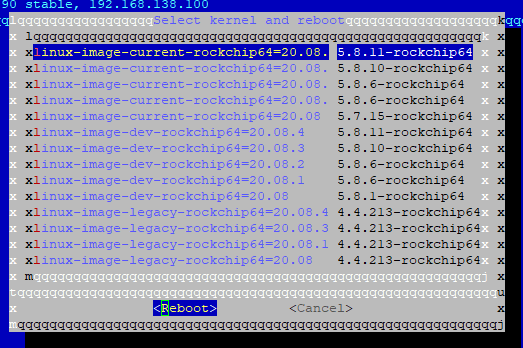
wenn schon, denn schon.
Auch wenn das aktuelle Armbian Image nur 5.8.6 enthältEDIT2:
5.8.11 ging nicht, dann doch 5.8.6 genommen
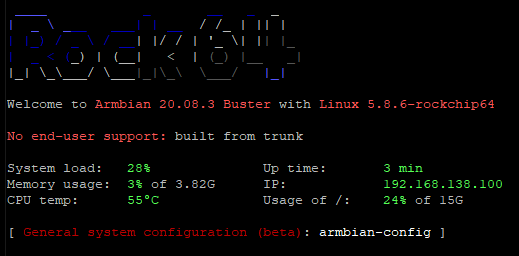
war wohl das falsche, die Bezeichnungen wurden abgeschnitten, hätte 20.08.1 und nicht 20.08.3 sein müssen

Hey! Du scheinst an dieser Unterhaltung interessiert zu sein, hast aber noch kein Konto.
Hast du es satt, bei jedem Besuch durch die gleichen Beiträge zu scrollen? Wenn du dich für ein Konto anmeldest, kommst du immer genau dorthin zurück, wo du zuvor warst, und kannst dich über neue Antworten benachrichtigen lassen (entweder per E-Mail oder Push-Benachrichtigung). Du kannst auch Lesezeichen speichern und Beiträge positiv bewerten, um anderen Community-Mitgliedern deine Wertschätzung zu zeigen.
Mit deinem Input könnte dieser Beitrag noch besser werden 💗
Registrieren AnmeldenSupport us
430
Online33.0k
Benutzer83.6k
Themen1.3m
Beiträge