




gelöst - Was bedeudet diese Fehlermeldung?
-
In letzter Zeit erhalte ich folgende Fehlermeldungen in den Update Prozessen. Der Updateprozess funktioniert allerdings . Nur macht mich die Meldung nervös. Kann mir bitte jemand sagen, wass die ERR Meldungen in der Zeile mit: "Package pixman-1 was not found in the pkg-config search path." bedeuten?
$ ./iobroker upgrade iot
Update iot from @1.4.2 to @1.4.4
host.iobrokerP4 Adapter "system.adapter.iot.0" is stopped.
NPM version: 6.14.2npm install iobroker.iot@1.4.4 --loglevel error --prefix "/opt/iobroker" (System call)
Package pixman-1 was not found in the pkg-config search path.Perhaps you should add the directory containing `pixman-1.pc'to the PKG_CONFIG_PATH environment variableNo package 'pixman-1' foundgyp: Call to 'pkg-config pixman-1 --libs' returned exit status 1 while in binding.gyp. while trying to load binding.gypgyp ERR! configure error gyp ERR! stack Error: `gyp` failed with exit code: 1gyp ERR! stack     at ChildProcess.onCpExit (/usr/lib/node_modules/npm/node_modules/node-gyp/lib/configure.js:351:16)gyp ERR! stack     at ChildProcess.emit (events.js:198:13)gyp ERR! stack     at Process.ChildProcess._handle.onexit (internal/child_process.js:248:12)gyp ERR! System Linux 4.19.93-v7l+gyp ERR! command "/usr/bin/node" "/usr/lib/node_modules/npm/node_modules/node-gyp/bin/node-gyp.js" "configure" "--fallback-to-build" "--module=/opt/iobroker/node_modules/canvas/build/Release/canvas.node" "--module_name=canvas" "--module_path=/opt/iobroker/node_modules/canvas/build/Release" "--napi_version=5" "--node_abi_napi=napi" "--napi_build_version=0" "--node_napi_label=node-v64"gyp ERR! cwd /opt/iobroker/node_modules/canvasgyp ERR! node -v v10.19.0gyp ERR! node-gyp -v v5.1.0gyp ERR! not ok node-pre-gyp ERR! build error node-pre-gyp ERR! stack Error: Failed to execute '/usr/bin/node /usr/lib/node_modules/npm/node_modules/node-gyp/bin/node-gyp.js configure --fallback-to-build --module=/opt/iobroker/node_modules/canvas/build/Release/canvas.node --module_name=canvas --module_path=/opt/iobroker/node_modules/canvas/build/Release --napi_version=5 --node_abi_napi=napi --napi_build_version=0 --node_napi_label=node-v64' (1)node-pre-gyp ERR! stack     at ChildProcess.<anonymous> (/opt/iobroker/node_modules/canvas/node_modules/node-pre-gyp/lib/util/compile.js:83:29)node-pre-gyp ERR! stack     at ChildProcess.emit (events.js:198:13)node-pre-gyp ERR! stack     at maybeClose (internal/child_process.js:982:16)node-pre-gyp ERR! stack     at Process.ChildProcess._handle.onexit (internal/child_process.js:259:5)node-pre-gyp ERR! System Linux 4.19.93-v7l+node-pre-gyp ERR! command "/usr/bin/node" "/opt/iobroker/node_modules/canvas/node_modules/.bin/node-pre-gyp" "install" "--fallback-to-build"node-pre-gyp ERR! cwd /opt/iobroker/node_modules/canvasnode-pre-gyp ERR! node -v v10.19.0node-pre-gyp ERR! node-pre-gyp -v v0.11.0node-pre-gyp ERR! not ok info sharp Downloading https://github.com/lovell/sharp-libvips/releases/download/v8.9.1/libvips-8.9.1-linux-armv7.tar.gz
Update "system.adapter.iot.0"
upload [20] iot.admin /opt/iobroker/node_modules/iobroker.iot/admin/static/js/runtime-main.8b3eca34.js.map static/js/runtime-main.8b3eca34.js.map application/json
upload [19] iot.admin /opt/iobroker/node_modules/iobroker.iot/admin/static/js/runtime-main.8b3eca34.js static/js/runtime-main.8b3eca34.js application/javascript
upload [18] iot.admin /opt/iobroker/node_modules/iobroker.iot/admin/static/js/main.721d1c42.chunk.js.map static/js/main.721d1c42.chunk.js.map application/json
upload [17] iot.admin /opt/iobroker/node_modules/iobroker.iot/admin/static/js/main.721d1c42.chunk.js static/js/main.721d1c42.chunk.js application/javascript
upload [16] iot.admin /opt/iobroker/node_modules/iobroker.iot/admin/static/js/2.faa62e98.chunk.js.map static/js/2.faa62e98.chunk.js.map application/json
upload [15] iot.admin /opt/iobroker/node_modules/iobroker.iot/admin/static/js/2.faa62e98.chunk.js.LICENSE.txt static/js/2.faa62e98.chunk.js.LICENSE.txt text/plain
upload [14] iot.admin /opt/iobroker/node_modules/iobroker.iot/admin/static/js/2.faa62e98.chunk.js static/js/2.faa62e98.chunk.js application/javascript
upload [13] iot.admin /opt/iobroker/node_modules/iobroker.iot/admin/static/css/main.d4bed9c6.chunk.css.map static/css/main.d4bed9c6.chunk.css.map application/json
upload [12] iot.admin /opt/iobroker/node_modules/iobroker.iot/admin/static/css/main.d4bed9c6.chunk.css static/css/main.d4bed9c6.chunk.css text/css
upload [11] iot.admin /opt/iobroker/node_modules/iobroker.iot/admin/static/css/2.b1b16afe.chunk.css.map static/css/2.b1b16afe.chunk.css.map application/json
upload [10] iot.admin /opt/iobroker/node_modules/iobroker.iot/admin/static/css/2.b1b16afe.chunk.css static/css/2.b1b16afe.chunk.css text/css
upload [9] iot.admin /opt/iobroker/node_modules/iobroker.iot/admin/service-worker.js service-worker.js application/javascript
upload [8] iot.admin /opt/iobroker/node_modules/iobroker.iot/admin/precache-manifest.b5249c907f3acd0903d8c4d182d1dce1.js precache-manifest.b5249c907f3acd0903d8c4d182d1dce1.js application/javascript
upload [7] iot.admin /opt/iobroker/node_modules/iobroker.iot/admin/manifest.json manifest.json application/json
upload [6] iot.admin /opt/iobroker/node_modules/iobroker.iot/admin/iot.png iot.png image/png
upload [5] iot.admin /opt/iobroker/node_modules/iobroker.iot/admin/index_m.html index_m.html text/html
upload [4] iot.admin /opt/iobroker/node_modules/iobroker.iot/admin/favicon.ico favicon.ico image/vnd.microsoft.icon
upload [3] iot.admin /opt/iobroker/node_modules/iobroker.iot/admin/blockly.js blockly.js application/javascript
upload [2] iot.admin /opt/iobroker/node_modules/iobroker.iot/admin/asset-manifest.json asset-manifest.json application/json
upload [1] iot.admin /opt/iobroker/node_modules/iobroker.iot/admin/alexalogo.png alexalogo.png image/png
upload [0] iot.admin /opt/iobroker/node_modules/iobroker.iot/admin/actions.js actions.js application/javascript
Adapter "iot" updatedhost.iobrokerP4 Adapter "system.adapter.iot.0" is started
process exited with code 0
RaspberryPi 4 4 GB - Raspbian light Buster - ARMv7 Processor rev 3 (v7l) - Node.js v12.18.0 - NPM 6.14.4 - Aktive Instanzen 18 (admin, alexa2, backitup, broadlink2, ham-wemo, harmony, history, hs100, hue, info, iot, javascript, radar2, scenes, tr-064, web [2x], wifilight) all latest and updated
-
In letzter Zeit erhalte ich folgende Fehlermeldungen in den Update Prozessen. Der Updateprozess funktioniert allerdings . Nur macht mich die Meldung nervös. Kann mir bitte jemand sagen, wass die ERR Meldungen in der Zeile mit: "Package pixman-1 was not found in the pkg-config search path." bedeuten?
$ ./iobroker upgrade iot Update iot from @1.4.2 to @1.4.4 host.iobrokerP4 Adapter "system.adapter.iot.0" is stopped. NPM version: 6.14.2npm install iobroker.iot@1.4.4 --loglevel error --prefix "/opt/iobroker" (System call) Package pixman-1 was not found in the pkg-config search path.Perhaps you should add the directory containing `pixman-1.pc'to the PKG_CONFIG_PATH environment variableNo package 'pixman-1' foundgyp: Call to 'pkg-config pixman-1 --libs' returned exit status 1 while in binding.gyp. while trying to load binding.gypgyp ERR! configure error gyp ERR! stack Error: `gyp` failed with exit code: 1gyp ERR! stack at ChildProcess.onCpExit (/usr/lib/node_modules/npm/node_modules/node-gyp/lib/configure.js:351:16)gyp ERR! stack at ChildProcess.emit (events.js:198:13)gyp ERR! stack at Process.ChildProcess._handle.onexit (internal/child_process.js:248:12)gyp ERR! System Linux 4.19.93-v7l+gyp ERR! command "/usr/bin/node" "/usr/lib/node_modules/npm/node_modules/node-gyp/bin/node-gyp.js" "configure" "--fallback-to-build" "--module=/opt/iobroker/node_modules/canvas/build/Release/canvas.node" "--module_name=canvas" "--module_path=/opt/iobroker/node_modules/canvas/build/Release" "--napi_version=5" "--node_abi_napi=napi" "--napi_build_version=0" "--node_napi_label=node-v64"gyp ERR! cwd /opt/iobroker/node_modules/canvasgyp ERR! node -v v10.19.0gyp ERR! node-gyp -v v5.1.0gyp ERR! not ok node-pre-gyp ERR! build error node-pre-gyp ERR! stack Error: Failed to execute '/usr/bin/node /usr/lib/node_modules/npm/node_modules/node-gyp/bin/node-gyp.js configure --fallback-to-build --module=/opt/iobroker/node_modules/canvas/build/Release/canvas.node --module_name=canvas --module_path=/opt/iobroker/node_modules/canvas/build/Release --napi_version=5 --node_abi_napi=napi --napi_build_version=0 --node_napi_label=node-v64' (1)node-pre-gyp ERR! stack at ChildProcess.<anonymous> (/opt/iobroker/node_modules/canvas/node_modules/node-pre-gyp/lib/util/compile.js:83:29)node-pre-gyp ERR! stack at ChildProcess.emit (events.js:198:13)node-pre-gyp ERR! stack at maybeClose (internal/child_process.js:982:16)node-pre-gyp ERR! stack at Process.ChildProcess._handle.onexit (internal/child_process.js:259:5)node-pre-gyp ERR! System Linux 4.19.93-v7l+node-pre-gyp ERR! command "/usr/bin/node" "/opt/iobroker/node_modules/canvas/node_modules/.bin/node-pre-gyp" "install" "--fallback-to-build"node-pre-gyp ERR! cwd /opt/iobroker/node_modules/canvasnode-pre-gyp ERR! node -v v10.19.0node-pre-gyp ERR! node-pre-gyp -v v0.11.0node-pre-gyp ERR! not ok info sharp Downloading https://github.com/lovell/sharp-libvips/releases/download/v8.9.1/libvips-8.9.1-linux-armv7.tar.gz Update "system.adapter.iot.0" upload [20] iot.admin /opt/iobroker/node_modules/iobroker.iot/admin/static/js/runtime-main.8b3eca34.js.map static/js/runtime-main.8b3eca34.js.map application/json upload [19] iot.admin /opt/iobroker/node_modules/iobroker.iot/admin/static/js/runtime-main.8b3eca34.js static/js/runtime-main.8b3eca34.js application/javascript upload [18] iot.admin /opt/iobroker/node_modules/iobroker.iot/admin/static/js/main.721d1c42.chunk.js.map static/js/main.721d1c42.chunk.js.map application/json upload [17] iot.admin /opt/iobroker/node_modules/iobroker.iot/admin/static/js/main.721d1c42.chunk.js static/js/main.721d1c42.chunk.js application/javascript upload [16] iot.admin /opt/iobroker/node_modules/iobroker.iot/admin/static/js/2.faa62e98.chunk.js.map static/js/2.faa62e98.chunk.js.map application/json upload [15] iot.admin /opt/iobroker/node_modules/iobroker.iot/admin/static/js/2.faa62e98.chunk.js.LICENSE.txt static/js/2.faa62e98.chunk.js.LICENSE.txt text/plain upload [14] iot.admin /opt/iobroker/node_modules/iobroker.iot/admin/static/js/2.faa62e98.chunk.js static/js/2.faa62e98.chunk.js application/javascript upload [13] iot.admin /opt/iobroker/node_modules/iobroker.iot/admin/static/css/main.d4bed9c6.chunk.css.map static/css/main.d4bed9c6.chunk.css.map application/json upload [12] iot.admin /opt/iobroker/node_modules/iobroker.iot/admin/static/css/main.d4bed9c6.chunk.css static/css/main.d4bed9c6.chunk.css text/css upload [11] iot.admin /opt/iobroker/node_modules/iobroker.iot/admin/static/css/2.b1b16afe.chunk.css.map static/css/2.b1b16afe.chunk.css.map application/json upload [10] iot.admin /opt/iobroker/node_modules/iobroker.iot/admin/static/css/2.b1b16afe.chunk.css static/css/2.b1b16afe.chunk.css text/css upload [9] iot.admin /opt/iobroker/node_modules/iobroker.iot/admin/service-worker.js service-worker.js application/javascript upload [8] iot.admin /opt/iobroker/node_modules/iobroker.iot/admin/precache-manifest.b5249c907f3acd0903d8c4d182d1dce1.js precache-manifest.b5249c907f3acd0903d8c4d182d1dce1.js application/javascript upload [7] iot.admin /opt/iobroker/node_modules/iobroker.iot/admin/manifest.json manifest.json application/json upload [6] iot.admin /opt/iobroker/node_modules/iobroker.iot/admin/iot.png iot.png image/png upload [5] iot.admin /opt/iobroker/node_modules/iobroker.iot/admin/index_m.html index_m.html text/html upload [4] iot.admin /opt/iobroker/node_modules/iobroker.iot/admin/favicon.ico favicon.ico image/vnd.microsoft.icon upload [3] iot.admin /opt/iobroker/node_modules/iobroker.iot/admin/blockly.js blockly.js application/javascript upload [2] iot.admin /opt/iobroker/node_modules/iobroker.iot/admin/asset-manifest.json asset-manifest.json application/json upload [1] iot.admin /opt/iobroker/node_modules/iobroker.iot/admin/alexalogo.png alexalogo.png image/png upload [0] iot.admin /opt/iobroker/node_modules/iobroker.iot/admin/actions.js actions.js application/javascript Adapter "iot" updatedhost.iobrokerP4 Adapter "system.adapter.iot.0" is started process exited with code 0@Mauflo sagte in Was bedeudet diese Fehlermeldung?:
Package pixman-1 was not found
Z.B.
https://forum.iobroker.net/topic/26900/hinzufuegen-von-roomba-adapter-wirft-fehler
Oder hier noch mehr
https://forum.iobroker.net/search?term=Package pixman-1 was not found&in=titlesposts
-
Danke, aber das hat leider nicht geholfen. Die Installation ist schiefgegangen. Ich bekomme beim installieren am RaspberryPi4 jetzt folgendes:
sudo npm install canvas --unsafe-perm=true

> canvas@2.6.1 install /home/pi/node_modules/canvas
> node-pre-gyp install --fallback-to-build

node-pre-gyp WARN Using needle for node-pre-gyp https download
node-pre-gyp WARN Tried to download(404): https://github.com/node-gfx/node-canvas-prebuilt/releases/download/v2.6.1/canvas-v2.6.1-node-v64-linux-glibc-arm.tar.gz
node-pre-gyp WARN Pre-built binaries not found for canvas@2.6.1 and node@10.20.1 (node-v64 ABI, glibc) (falling back to source compile with node-gyp)
Package pixman-1 was not found in the pkg-config search path.
Perhaps you should add the directory containing `pixman-1.pc'
to the PKG_CONFIG_PATH environment variable
No package 'pixman-1' found
gyp: Call to 'pkg-config pixman-1 --libs' returned exit status 1 while in binding.gyp. while trying to load binding.gyp
gyp ERR! configure error
gyp ERR! stack Error: `gyp` failed with exit code: 1
gyp ERR! stack     at ChildProcess.onCpExit (/usr/lib/node_modules/npm/node_modules/node-gyp/lib/configure.js:351:16)
gyp ERR! stack     at ChildProcess.emit (events.js:198:13)
gyp ERR! stack     at Process.ChildProcess._handle.onexit (internal/child_process.js:248:12)
gyp ERR! System Linux 4.19.93-v7l+
gyp ERR! command "/usr/bin/node" "/usr/lib/node_modules/npm/node_modules/node-gyp/bin/node-gyp.js" "configure" "--fallback-to-build" "--module=/home/pi/node_modules/canvas/build/Release/canvas.n                                           ode" "--module_name=canvas" "--module_path=/home/pi/node_modules/canvas/build/Release" "--napi_version=6" "--node_abi_napi=napi" "--napi_build_version=0" "--node_napi_label=node-v64"
gyp ERR! cwd /home/pi/node_modules/canvas
gyp ERR! node -v v10.20.1
gyp ERR! node-gyp -v v5.1.0
gyp ERR! not ok
node-pre-gyp ERR! build error
node-pre-gyp ERR! stack Error: Failed to execute '/usr/bin/node /usr/lib/node_modules/npm/node_modules/node-gyp/bin/node-gyp.js configure --fallback-to-build --module=/home/pi/node_modules/canva                                           s/build/Release/canvas.node --module_name=canvas --module_path=/home/pi/node_modules/canvas/build/Release --napi_version=6 --node_abi_napi=napi --napi_build_version=0 --node_napi_label=node-v64'                                            (1)
node-pre-gyp ERR! stack     at ChildProcess.<anonymous> (/home/pi/node_modules/node-pre-gyp/lib/util/compile.js:83:29)
node-pre-gyp ERR! stack     at ChildProcess.emit (events.js:198:13)
node-pre-gyp ERR! stack     at maybeClose (internal/child_process.js:982:16)
node-pre-gyp ERR! stack     at Process.ChildProcess._handle.onexit (internal/child_process.js:259:5)
node-pre-gyp ERR! System Linux 4.19.93-v7l+
node-pre-gyp ERR! command "/usr/bin/node" "/home/pi/node_modules/.bin/node-pre-gyp" "install" "--fallback-to-build"
node-pre-gyp ERR! cwd /home/pi/node_modules/canvas
node-pre-gyp ERR! node -v v10.20.1
node-pre-gyp ERR! node-pre-gyp -v v0.11.0
node-pre-gyp ERR! not ok
Failed to execute '/usr/bin/node /usr/lib/node_modules/npm/node_modules/node-gyp/bin/node-gyp.js configure --fallback-to-build --module=/home/pi/node_modules/canvas/build/Release/canvas.node --m                                           odule_name=canvas --module_path=/home/pi/node_modules/canvas/build/Release --napi_version=6 --node_abi_napi=napi --napi_build_version=0 --node_napi_label=node-v64' (1)
npm WARN enoent ENOENT: no such file or directory, open '/home/pi/package.json'
npm WARN pi No description
npm WARN pi No repository field.
npm WARN pi No README data
npm WARN pi No license field.

npm ERR! code ELIFECYCLE
npm ERR! errno 1
npm ERR! canvas@2.6.1 install: `node-pre-gyp install --fallback-to-build`
npm ERR! Exit status 1
npm ERR!
npm ERR! Failed at the canvas@2.6.1 install script.
npm ERR! This is probably not a problem with npm. There is likely additional logging output above.

npm ERR! A complete log of this run can be found in:
npm ERR!     /root/.npm/_logs/2020-04-16T19_06_29_983Z-debug.log
RaspberryPi 4 4 GB - Raspbian light Buster - ARMv7 Processor rev 3 (v7l) - Node.js v12.18.0 - NPM 6.14.4 - Aktive Instanzen 18 (admin, alexa2, backitup, broadlink2, ham-wemo, harmony, history, hs100, hue, info, iot, javascript, radar2, scenes, tr-064, web [2x], wifilight) all latest and updated
-
Danke, aber das hat leider nicht geholfen. Die Installation ist schiefgegangen. Ich bekomme beim installieren am RaspberryPi4 jetzt folgendes:
sudo npm install canvas --unsafe-perm=true > canvas@2.6.1 install /home/pi/node_modules/canvas > node-pre-gyp install --fallback-to-build node-pre-gyp WARN Using needle for node-pre-gyp https download node-pre-gyp WARN Tried to download(404): https://github.com/node-gfx/node-canvas-prebuilt/releases/download/v2.6.1/canvas-v2.6.1-node-v64-linux-glibc-arm.tar.gz node-pre-gyp WARN Pre-built binaries not found for canvas@2.6.1 and node@10.20.1 (node-v64 ABI, glibc) (falling back to source compile with node-gyp) Package pixman-1 was not found in the pkg-config search path. Perhaps you should add the directory containing `pixman-1.pc' to the PKG_CONFIG_PATH environment variable No package 'pixman-1' found gyp: Call to 'pkg-config pixman-1 --libs' returned exit status 1 while in binding.gyp. while trying to load binding.gyp gyp ERR! configure error gyp ERR! stack Error: `gyp` failed with exit code: 1 gyp ERR! stack at ChildProcess.onCpExit (/usr/lib/node_modules/npm/node_modules/node-gyp/lib/configure.js:351:16) gyp ERR! stack at ChildProcess.emit (events.js:198:13) gyp ERR! stack at Process.ChildProcess._handle.onexit (internal/child_process.js:248:12) gyp ERR! System Linux 4.19.93-v7l+ gyp ERR! command "/usr/bin/node" "/usr/lib/node_modules/npm/node_modules/node-gyp/bin/node-gyp.js" "configure" "--fallback-to-build" "--module=/home/pi/node_modules/canvas/build/Release/canvas.n ode" "--module_name=canvas" "--module_path=/home/pi/node_modules/canvas/build/Release" "--napi_version=6" "--node_abi_napi=napi" "--napi_build_version=0" "--node_napi_label=node-v64" gyp ERR! cwd /home/pi/node_modules/canvas gyp ERR! node -v v10.20.1 gyp ERR! node-gyp -v v5.1.0 gyp ERR! not ok node-pre-gyp ERR! build error node-pre-gyp ERR! stack Error: Failed to execute '/usr/bin/node /usr/lib/node_modules/npm/node_modules/node-gyp/bin/node-gyp.js configure --fallback-to-build --module=/home/pi/node_modules/canva s/build/Release/canvas.node --module_name=canvas --module_path=/home/pi/node_modules/canvas/build/Release --napi_version=6 --node_abi_napi=napi --napi_build_version=0 --node_napi_label=node-v64' (1) node-pre-gyp ERR! stack at ChildProcess.<anonymous> (/home/pi/node_modules/node-pre-gyp/lib/util/compile.js:83:29) node-pre-gyp ERR! stack at ChildProcess.emit (events.js:198:13) node-pre-gyp ERR! stack at maybeClose (internal/child_process.js:982:16) node-pre-gyp ERR! stack at Process.ChildProcess._handle.onexit (internal/child_process.js:259:5) node-pre-gyp ERR! System Linux 4.19.93-v7l+ node-pre-gyp ERR! command "/usr/bin/node" "/home/pi/node_modules/.bin/node-pre-gyp" "install" "--fallback-to-build" node-pre-gyp ERR! cwd /home/pi/node_modules/canvas node-pre-gyp ERR! node -v v10.20.1 node-pre-gyp ERR! node-pre-gyp -v v0.11.0 node-pre-gyp ERR! not ok Failed to execute '/usr/bin/node /usr/lib/node_modules/npm/node_modules/node-gyp/bin/node-gyp.js configure --fallback-to-build --module=/home/pi/node_modules/canvas/build/Release/canvas.node --m odule_name=canvas --module_path=/home/pi/node_modules/canvas/build/Release --napi_version=6 --node_abi_napi=napi --napi_build_version=0 --node_napi_label=node-v64' (1) npm WARN enoent ENOENT: no such file or directory, open '/home/pi/package.json' npm WARN pi No description npm WARN pi No repository field. npm WARN pi No README data npm WARN pi No license field. npm ERR! code ELIFECYCLE npm ERR! errno 1 npm ERR! canvas@2.6.1 install: `node-pre-gyp install --fallback-to-build` npm ERR! Exit status 1 npm ERR! npm ERR! Failed at the canvas@2.6.1 install script. npm ERR! This is probably not a problem with npm. There is likely additional logging output above. npm ERR! A complete log of this run can be found in: npm ERR! /root/.npm/_logs/2020-04-16T19_06_29_983Z-debug.log@Mauflo sagte in Was bedeudet diese Fehlermeldung?:
Ich bekomme beim installieren am RaspberryPi4 jetzt folgendes:
Kannst du kurz erklären was genau du gerade von wo gemacht hast und versuchst?
Bitte keine Fragen per PN, die gehören ins Forum!
Benutzt das Voting rechts unten im Beitrag wenn er euch geholfen hat.
-
@Mauflo sagte in Was bedeudet diese Fehlermeldung?:
Ich bekomme beim installieren am RaspberryPi4 jetzt folgendes:
Kannst du kurz erklären was genau du gerade von wo gemacht hast und versuchst?
@wendy2702 ich habe versucht via npm folgendes zu installieren:
sudo apt-get install build-essential libcairo2-dev libpango1.0-dev libjpeg-dev libgif-dev librsvg2-dev sudo npm install canvas --unsafe-perm=true -
Es war das buster image. Ich habe aber gestern ein update und upgrade gefahren. trotzdem noch immer der Fehler. Wie lasse ich den fixer drüber laufen?
Interessanterweise installiert er mir trotzdem die Adapter ohne Fehler. nur diesen canvas Fehler bringe ich nicht weg! -
Hm,
ist das ein fertiges Image gewesen oder manuell installiert?
Hast du mal den Fixer laufen lassen?
@wendy2702 Ich erhalte ja auch diese Zeile:
Perhaps you should add the directory containing `pixman-1.pc'Nur weiß ich nicht wie ich das mache und in welchem Verzeichnis oder in welchem Config File bzw. wo das liegt?
-
@wendy2702 Seit den heutigen Updates tritt diese Fehlermeldung nicht mehr auf! Offensichtlich wurde im Updateprozess der Adapter dieser Fehler behoben! Wer immer es war - Ihr macht einen tollen Job! Danke dafür!
-
$ ./iobroker upgrade backitup
Update backitup from @1.4.2 to @1.4.5
host.iobroker Adapter "system.adapter.backitup.0" is stopped.
NPM version: 6.14.4
npm install iobroker.backitup@1.4.5 --loglevel error --prefix "/opt/iobroker" (System call)
Package pixman-1 was not found in the pkg-config search path.Perhaps you should add the directory containing `pixman-1.pc'to the PKG_CONFIG_PATH environment variableNo package 'pixman-1' found
gyp: Call to 'pkg-config pixman-1 --libs' returned exit status 1 while in binding.gyp. while trying to load binding.gyp
gyp
 ERR! configure error
gyp ERR! stack Error: `gyp` failed with exit code: 1gyp ERR! stack     at ChildProcess.onCpExit (/usr/lib/node_modules/npm/node_modules/node-gyp/lib/configure.js:351:16)gyp ERR! stack     at ChildProcess.emit (events.js:198:13)gyp ERR! stack     at Process.ChildProcess._handle.onexit (internal/child_process.js:248:12)
gyp ERR! System Linux 4.19.97-v7l+gyp ERR! command "/usr/bin/node" "/usr/lib/node_modules/npm/node_modules/node-gyp/bin/node-gyp.js" "configure" "--fallback-to-build" "--module=/opt/iobroker/node_modules/canvas/build/Release/canvas.node" "--module_name=canvas" "--module_path=/opt/iobroker/node_modules/canvas/build/Release" "--napi_version=6" "--node_abi_napi=napi" "--napi_build_version=0" "--node_napi_label=node-v64"gyp ERR! cwd /opt/iobroker/node_modules/canvasgyp ERR! node -v v10.20.1gyp ERR! node-gyp -v v5.1.0gyp ERR! not ok
node-pre-gyp ERR! build error
node-pre-gyp ERR! stack Error: Failed to execute '/usr/bin/node /usr/lib/node_modules/npm/node_modules/node-gyp/bin/node-gyp.js configure --fallback-to-build --module=/opt/iobroker/node_modules/canvas/build/Release/canvas.node --module_name=canvas --module_path=/opt/iobroker/node_modules/canvas/build/Release --napi_version=6 --node_abi_napi=napi --napi_build_version=0 --node_napi_label=node-v64' (1)node-pre-gyp ERR! stack     at ChildProcess.<anonymous> (/opt/iobroker/node_modules/node-pre-gyp/lib/util/compile.js:83:29)node-pre-gyp ERR! stack     at ChildProcess.emit (events.js:198:13)node-pre-gyp ERR! stack     at maybeClose (internal/child_process.js:982:16)node-pre-gyp ERR! stack     at Process.ChildProcess._handle.onexit (internal/child_process.js:259:5)
node-pre-gyp ERR! System Linux 4.19.97-v7l+node-pre-gyp ERR! command "/usr/bin/node" "/opt/iobroker/node_modules/.bin/node-pre-gyp" "install" "--fallback-to-build"node-pre-gyp ERR! cwd /opt/iobroker/node_modules/canvasnode-pre-gyp ERR! node -v v10.20.1node-pre-gyp ERR! node-pre-gyp -v v0.11.0node-pre-gyp ERR! not ok
upload [3] backitup.admin /opt/iobroker/node_modules/iobroker.backitup/admin/words.js words.js application/javascript
Update "system.adapter.backitup.0"
upload [2] backitup.admin /opt/iobroker/node_modules/iobroker.backitup/admin/index_m.html index_m.html text/html
upload [1] backitup.admin /opt/iobroker/node_modules/iobroker.backitup/admin/index.html index.html text/html
upload [0] backitup.admin /opt/iobroker/node_modules/iobroker.backitup/admin/backitup.png backitup.png image/png
Adapter "backitup" updated
host.iobroker Adapter "system.adapter.backitup.0" is started
process exited with code 0
Also ich hab auch immer noch den Fehler mit Package pixman-1. Wofür wird dieses denn benötigt?
-
Das kann sehr gut sein. Ich hab letztens den Node geupdated.
EDIT: Also laut Infoseite habe ich schon nicht mehr die aktuellste Version. Laut Apt gibt es aber auch keine neuere.
Node.js
v10.19.0 (Es gibt eine neuere Version: v10.20.1) -
Kann es sein das dieses pixman Problem nach einem Update von Node zum ersten mal aufgetreten ist?
@wendy2702 sagte in gelöst - Was bedeudet diese Fehlermeldung?:
Kann es sein das dieses pixman Problem nach einem Update von Node zum ersten mal aufgetreten ist?
Ja, würde ich auch sagen - bei meinem Raspberry funktioniert es ohne Fehlermelderung. Auf meinem Tinkerboard kommt die Meldung. Node Version ist 10.20.1 - der Fehler bleibt aber.
-
Ich habe eine Lösung gefunden

Nachdem ich den Fehler weiter gegoogelt habe,
wurde mir auf Github folgende info angezeigt:
sudo apt-get install build-essential libcairo2-dev libpango1.0-dev libjpeg-dev libgif-dev librsvg2-dev
Es hat aber nicht geholfen, es hat sogar alles schlimmer gemacht, also habe ich wieder alles gelöscht
sudo apt-get remove build-essential libcairo2-dev libpango1.0-dev libjpeg-dev libgif-dev librsvg2-dev
danach war es weg und meine Updates funktionieren wieder ohne Fehler!
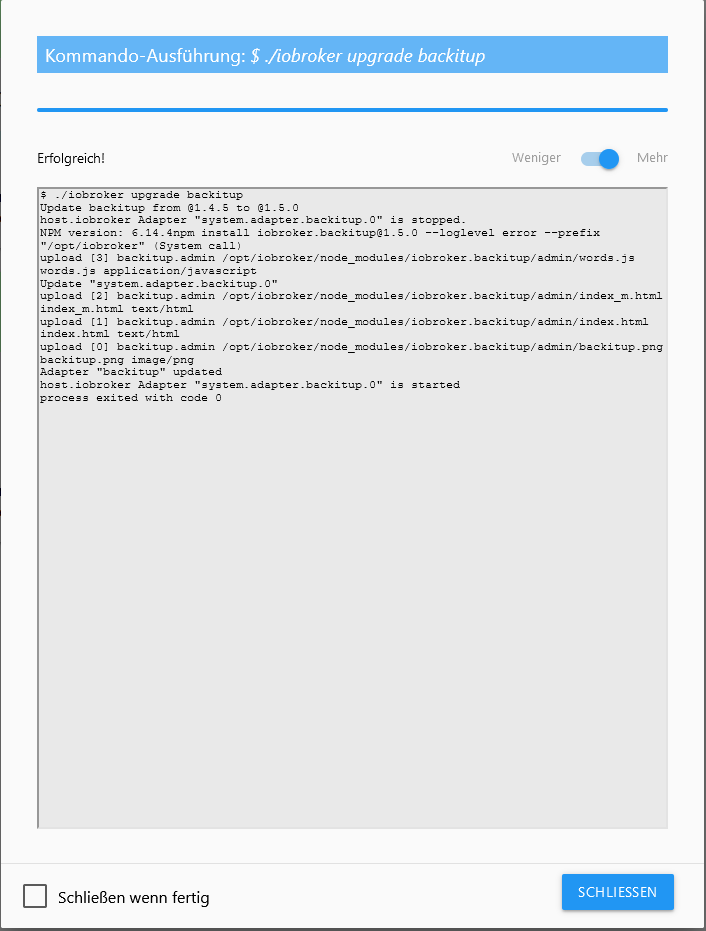
-
mit dieser Vorgehensweise hatte ich auch Erfolg. Pixman Error ist abgetaucht




Hey! Du scheinst an dieser Unterhaltung interessiert zu sein, hast aber noch kein Konto.
Hast du es satt, bei jedem Besuch durch die gleichen Beiträge zu scrollen? Wenn du dich für ein Konto anmeldest, kommst du immer genau dorthin zurück, wo du zuvor warst, und kannst dich über neue Antworten benachrichtigen lassen (entweder per E-Mail oder Push-Benachrichtigung). Du kannst auch Lesezeichen speichern und Beiträge positiv bewerten, um anderen Community-Mitgliedern deine Wertschätzung zu zeigen.
Mit deinem Input könnte dieser Beitrag noch besser werden 💗
Registrieren AnmeldenSupport us
297
Online33.0k
Benutzer83.6k
Themen1.3m
Beiträge