Skip to content
  • Home
  • Aktuell
  • Tags
  • 0 Ungelesen 0
  • Kategorien
  • Unreplied
  • Beliebt
  • GitHub
  • Docu
  • Hilfe
Skins
  • Light
  • Brite
  • Cerulean
  • Cosmo
  • Flatly
  • Journal
  • Litera
  • Lumen
  • Lux
  • Materia
  • Minty
  • Morph
  • Pulse
  • Sandstone
  • Simplex
  • Sketchy
  • Spacelab
  • United
  • Yeti
  • Zephyr
  • Dark
  • Cyborg
  • Darkly
  • Quartz
  • Slate
  • Solar
  • Superhero
  • Vapor

  • Standard: (Kein Skin)
  • Kein Skin
Einklappen
ioBroker Logo

Community Forum

donate donate
  1. ioBroker Community Home
  2. Deutsch
  3. Tester
  4. Test Widget json template

NEWS

  • Jahresrückblick 2025 – unser neuer Blogbeitrag ist online! ✨
    BluefoxB
    Bluefox
    16
    1
    1.6k

  • Neuer Blogbeitrag: Monatsrückblick - Dezember 2025 🎄
    BluefoxB
    Bluefox
    13
    1
    860

  • Weihnachtsangebot 2025! 🎄
    BluefoxB
    Bluefox
    25
    1
    2.1k

Test Widget json template

Geplant Angeheftet Gesperrt Verschoben Tester
adapterjson widgetrssfeedviswidget
42 Beiträge 5 Kommentatoren 5.4k Aufrufe 11 Watching
  • Älteste zuerst
  • Neuste zuerst
  • Meiste Stimmen
Antworten
  • In einem neuen Thema antworten
Anmelden zum Antworten
Dieses Thema wurde gelöscht. Nur Nutzer mit entsprechenden Rechten können es sehen.
  • OliverIOO Offline
    OliverIOO Offline
    OliverIO
    schrieb am zuletzt editiert von OliverIO
    #32

    Neue Version 4.1.3

    • Eine Race-Condition wurde behoben, die sich bei der gleichzeitigen Verwendung des selben Datenpunktes in 2 jsontemplate widgets ergeibt.

    https://forum.iobroker.net/topic/81472/neuer-adapter-pi-hole2-für-pihole-v6/35?_=1762181697804

    Meine Adapter und Widgets
    TVProgram, SqueezeboxRPC, OpenLiga, RSSFeed, MyTime,, pi-hole2, vis-json-template, skiinfo, vis-mapwidgets, vis-2-widgets-rssfeed
    Links im Profil

    1 Antwort Letzte Antwort
    0
    • OliverIOO Offline
      OliverIOO Offline
      OliverIO
      schrieb am zuletzt editiert von OliverIO
      #33

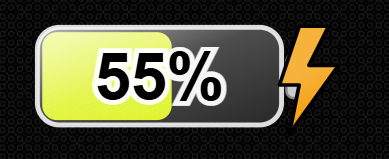
      Ich habe mal das Battery-skript für jsontemplate umgesetzt, so das man ohne zusätzlichen Datenpunkt das Ergebnis direkt im Browser einbinden kann

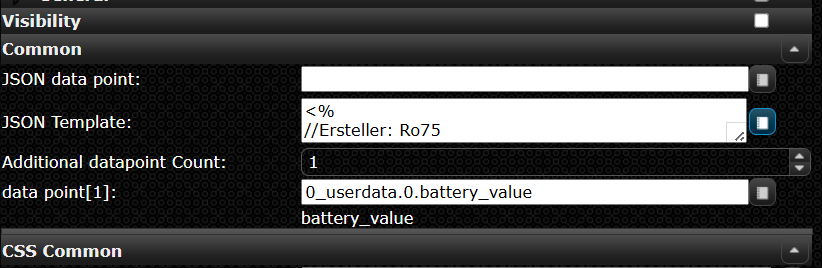
      Das Template hier im widget einfach einfügen.
      Der Datenpunkt aus dem der Wert kommt ist als
      datapoint[1] einzutragen
      4398c0af-52fb-4920-a92f-6628eea0b476-image.png

      5ce0641d-f613-41a8-abb1-c8e30d0dd23f-image.png

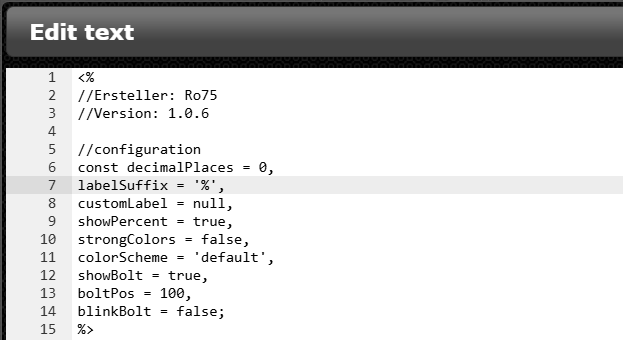
      Die im folgenden thread beschriebenen Konfigurationsmöglichkeiten sind direkt zum Beginn des Template verfügbar:

      3276d915-f870-4974-b656-a2aa36f1abca-image.png
      https://forum.iobroker.net/topic/82868/skript-zur-dynamischen-generierung-batterie-akku-symbol?page=1

      <%
      //Ersteller: Ro75
      //Version: 1.0.6
      
      //configuration
      const decimalPlaces = 0,
      labelSuffix = '%',
      customLabel = null,
      showPercent = true,
      strongColors = false,
      colorScheme = 'default',
      showBolt = true,
      boltPos = 100,
      blinkBolt = false;
      %>
      
      <%
      const percent = dp[Object.keys(dp)[0]];
      
      // -------------------------------------------------------
      // Hilfsfunktionen
      // -------------------------------------------------------
      function clamp(v, a, b) {
         return Math.max(a, Math.min(b, v));
      }
      function uid(prefix = 'id') {
         return prefix + "-" + Math.random().toString(36).slice(2, 9);
      }
      function hslToRgb(h, s, l) {
         s /= 100;
         l /= 100;
         const k = n => (n + h / 30) % 12;
         const a = s * Math.min(l, 1 - l);
         const f = n => l - a * Math.max(-1, Math.min(k(n) - 3, Math.min(9 - k(n), 1)));
         return [Math.round(255 * f(0)), Math.round(255 * f(8)), Math.round(255 * f(4))];
      }
      
      function luminance(r, g, b) {
         const srgb = [r, g, b].map(c => {
             c /= 255;
             return (c <= 0.04045) ? c / 12.92 : Math.pow((c + 0.055) / 1.055, 2.4);
         });
         return 0.2126 * srgb[0] + 0.7152 * srgb[1] + 0.0722 * srgb[2];
      }
      const SAMPLE_POINTS = [{
             p: 0,
             w: 2
         }, {
             p: 5,
             w: 10
         }, {
             p: 10,
             w: 19
         }, {
             p: 15,
             w: 29
         }, {
             p: 20,
             w: 38
         }, {
             p: 25,
             w: 48
         }, {
             p: 30,
             w: 58
         }, {
             p: 35,
             w: 67
         }, {
             p: 40,
             w: 77
         }, {
             p: 45,
             w: 86
         }, {
             p: 50,
             w: 96
         }, {
             p: 55,
             w: 106
         }, {
             p: 60,
             w: 115
         }, {
             p: 65,
             w: 125
         }, {
             p: 70,
             w: 134
         }, {
             p: 75,
             w: 144
         }, {
             p: 80,
             w: 154
         }, {
             p: 85,
             w: 163
         }, {
             p: 90,
             w: 173
         }, {
             p: 95,
             w: 182
         }, {
             p: 100,
             w: 192
         }
      ];
      
      function interpolatedWidth(percent) {
         const p = clamp(percent, 0, 100);
         for (const s of SAMPLE_POINTS)
             if (s.p === p)
                 return s.w;
         let lower = SAMPLE_POINTS[0],
         upper = SAMPLE_POINTS[SAMPLE_POINTS.length - 1];
         for (let i = 0; i < SAMPLE_POINTS.length - 1; i++) {
             const a = SAMPLE_POINTS[i],
             b = SAMPLE_POINTS[i + 1];
             if (p > a.p && p < b.p) {
                 lower = a;
                 upper = b;
                 break;
             }
             if (p === b.p)
                 return b.w;
         }
         const t = (p - lower.p) / (upper.p - lower.p);
         return Math.round(lower.w + t * (upper.w - lower.w));
      }
      
      // -------------------------------------------------------
      // Farb-Schemata mit strongColors-Effekt
      // -------------------------------------------------------
      function getFillColor(p, strongColors, colorScheme) {
         let hue;
         let saturation;
         let lightness;
      
         switch ((colorScheme || 'default').toLowerCase()) {
         case 'green':
             hue = 120;
             saturation = strongColors ? 100 : 80;
             lightness = strongColors ? 25 + (p / 100) * 25 : 35 + (p / 100) * 30;
             break;
         case 'yellow':
             hue = 50;
             saturation = strongColors ? 100 : 85;
             lightness = strongColors ? 25 + (p / 100) * 30 : 35 + (p / 100) * 30;
             break;
         case 'blue':
             hue = 210;
             saturation = strongColors ? 100 : 75;
             lightness = strongColors ? 20 + (p / 100) * 25 : 35 + (p / 100) * 30;
             break;
         case 'red':
             hue = 0;
             saturation = strongColors ? 100 : 75;
             lightness = strongColors ? 20 + (p / 100) * 25 : 35 + (p / 100) * 30;
             break;
         case 'orange':
             hue = 30;
             saturation = strongColors ? 100 : 80;
             lightness = strongColors ? 20 + (p / 100) * 25 : 35 + (p / 100) * 30;
             break;
         case 'brown':
             hue = 25;
             saturation = strongColors ? 85 : 65;
             lightness = strongColors ? 20 + (p / 100) * 20 : 25 + (p / 100) * 25;
             break;
         case 'grey':
             hue = 0;
             saturation = strongColors ? 15 : 0;
             lightness = strongColors ? 20 + (p / 100) * 40 : 25 + (p / 100) * 40;
             break;
         case 'purple':
             hue = 275;
             saturation = strongColors ? 95 : 75;
             lightness = strongColors ? 25 + (p / 100) * 25 : 35 + (p / 100) * 30;
             break;
         case 'black':
             hue = 0;
             saturation = strongColors ? 10 : 0;
             lightness = strongColors ? 1 + (p / 100) * 27 : 3 + (p / 100) * 20;
             break;
         default: // Standard: grün → rot Verlauf
             hue = Math.round((p / 100) * 120);
             saturation = strongColors ? 100 : 90;
             lightness = strongColors ? 35 : 50;
             break;
         }
      
         return "hsl(" + hue + "," + saturation + "%," + lightness + "%)";
      }
      
      // -------------------------------------------------------
      // Hauptfunktion:
      // -------------------------------------------------------
      const raw = Number(percent);
      const p = clamp(Number.isFinite(raw) ? raw : 0, 0, 100);
      
      const viewBoxW = 264, viewBoxH = 129;
      const outer = {
         x: 20,
         y: 24,
         w: 200,
         h: 80,
         rx: 18
      };
      const inner = {
         x: 24,
         y: 28,
         h: 72,
         rx: 12
      };
      const maxInnerWidth = 192;
      
      const fillW = interpolatedWidth(p);
      const fillColor = getFillColor(p, strongColors, colorScheme);
      const nums = (fillColor.match(/-?\d+(\.\d+)?/g) || []).map(Number);
      const [hVal = 0, sVal = 0, lVal = 50] = nums;
      const [r, g, b] = hslToRgb(hVal, sVal, lVal);
      const lum = luminance(r, g, b);
      const textFill = lum > 0.55 ? '#000' : '#fff';
      const outlineColor = (textFill === '#fff') ? 'rgba(0,0,0,0.85)' : 'rgba(255,255,255,0.95)';
      
      const formattedValue = Number(p).toFixed(decimalPlaces);
      
      const formattedTrimmed = (decimalPlaces === 0) ? String(Math.round(Number(formattedValue))) : formattedValue;
      
      const displayText = customLabel ?? formattedTrimmed + labelSuffix;
      
      const fontSize = Math.max(12, Math.round(inner.h * 0.33 * 2.25));
      const textCenterX = inner.x + maxInnerWidth / 2;
      const textCenterY = inner.y + inner.h / 2;
      const TEXT_DY_EM = 0.35;
      
      const contact = {
         x: 224,
         y: 46,
         w: 20,
         h: 36
      };
      const contactCenterX = contact.x + contact.w / 2;
      const contactCenterY = contact.y + contact.h / 2;
      
      const boltViewBox = {
         w: 102.7,
         h: 186.8
      };
      const boltTargetH = outer.h * 1.7;
      const boltScale = boltTargetH / boltViewBox.h;
      const boltOffsetY = contactCenterY + 26;
      
      const clampedBoltPos = clamp(boltPos, 0, 100);
      const leftEdge = 0;
      const rightEdge = contactCenterX - 50;
      const baseX = leftEdge + ((rightEdge - leftEdge) * (clampedBoltPos / 100));
      let extraOffset = -30;
      if (clampedBoltPos === 0)
         extraOffset = -15;
      else if (clampedBoltPos === 100)
         extraOffset = 0;
      const boltX = baseX + extraOffset;
      const id = uid('b');
      %>
      <svg xmlns="http://www.w3.org/2000/svg" viewBox="0 0 <%= viewBoxW %> <%= viewBoxH %>" width="100%" height="100%" preserveAspectRatio="xMidYMid meet">
      <% if (blinkBolt) { %>
         <style>
           @keyframes blinkBolt-<%= id %> {
             0%, 100% { 
               opacity: 1;
             }
             50% { 
               opacity: 0.6; 
             }
           }
           .blinking-bolt-<%= id %> {
             animation: blinkBolt-<%= id %> 1.8s ease-in-out infinite;
           }
         </style>
      <% } %>
         <defs>
         	<linearGradient id="glass-<%= id %>" x1="0" y1="0" x2="0" y2="1">
         		<stop offset="0%" stop-color="#ffffff" stop-opacity="0.80"/>
         		<stop offset="100%" stop-color="#ffffff" stop-opacity="0.10"/>
         	</linearGradient>
         	<linearGradient id="diagGlass-<%= id %>" x1="0" y1="0" x2="1" y2="1">
         		<stop offset="0%" stop-color="#ffffff" stop-opacity="0.75"/>
         		<stop offset="45%" stop-color="#ffffff" stop-opacity="0.22"/>
         		<stop offset="100%" stop-color="#ffffff" stop-opacity="0.03"/>
         	</linearGradient>
         	<pattern id="stripes-<%= id %>" width="8" height="8" patternUnits="userSpaceOnUse">
         		<rect width="8" height="8" fill="transparent"/>
         		<path d="M-1,6 l8,-6 M-1,10 l8,-6" stroke="#fff" stroke-opacity="0.08" stroke-width="1"/>
         	</pattern>
         	<clipPath id="clip-fill-<%= id %>">
         		<rect x="<%= inner.x %>" y="<%= inner.y %>" width="<%= fillW %>" height="<%= inner.h %>" rx="<%= inner.rx %>" ry="<%= inner.rx %>"/>
         	</clipPath>
         	<linearGradient id="boltGradient-<%= id %>" x1="8.7" x2="80.9" y1="17.1" y2="142.1" gradientUnits="userSpaceOnUse">
         		<stop offset="0" stop-color="#f7b23b"/>
         		<stop offset=".5" stop-color="#f7b23b"/>
         		<stop offset="1" stop-color="#f59e0b"/>
         	</linearGradient>
         	<symbol id="boltSymbol-<%= id %>" viewBox="0 0 102.7 186.8">
         		<path fill="url(#boltGradient-<%= id %>)" stroke="#000" stroke-width="6" stroke-linejoin="round" d="m34.8 2-32 96h32l-16 80 80-112h-48l32-64h-48z"/>
         	</symbol>
         </defs>
         <rect x="<%= outer.x %>" y="<%= outer.y %>" width="<%= outer.w %>" height="<%= outer.h %>" rx="<%= outer.rx %>" fill="#222" stroke="#ddd" stroke-width="4"/>
         <rect x="<%= inner.x %>" y="<%= inner.y %>" width="<%= fillW %>" height="<%= inner.h %>" rx="<%= inner.rx %>" ry="<%= inner.rx %>" fill="<%= fillColor %>"/>
         <g clip-path="url(#clip-fill-<%= id %>)">
         	<rect x="<%= inner.x %>" y="<%= inner.y %>" width="<%= fillW %>" height="<%= inner.h %>" rx="<%= inner.rx %>" fill="url(#stripes-<%= id %>)" opacity="0.95"/>
         	<rect x="<%= inner.x %>" y="<%= inner.y %>" width="<%= fillW %>" height="<%= inner.h %>" rx="<%= inner.rx %>" fill="url(#glass-<%= id %>)" opacity="0.25"/>
         </g>
         <rect x="<%= outer.x %>" y="<%= outer.y %>" width="<%= outer.w %>" height="<%= outer.h %>" rx="<%= outer.rx %>" fill="url(#diagGlass-<%= id %>)" opacity="0.9"/>
         <rect x="224" y="46" width="20" height="36" rx="6" fill="#ccc" stroke="#888" stroke-width="2"/>
         <% if (showBolt) { %>
         <use xlink:href="#boltSymbol-<%= id %>" class="blinking-bolt-<%= id %>" transform="translate(184, 90) scale(0.728051391862955) translate(-51.35, -93.4)"/>
         <% } %>
         <g transform="translate(<%= textCenterX %>, <%= textCenterY %>)">
         	<text text-anchor="middle" font-family="Arial, Helvetica, sans-serif" font-size="<%= fontSize %>" font-weight="700" fill="<%= textFill %>" stroke="<%= outlineColor %>" stroke-width="<%= Math.max(2, Math.round(fontSize * 0.15)) %>" paint-order="stroke" dy="<%= TEXT_DY_EM %>em">
               <%= displayText %>
         	</text>
         </g>
      </svg>
      

      Die Objektnotationen aus dem Skript mussten umformatiert werden, da diese durch vis ansonsten als bindings erkannt werden.

      Meine Adapter und Widgets
      TVProgram, SqueezeboxRPC, OpenLiga, RSSFeed, MyTime,, pi-hole2, vis-json-template, skiinfo, vis-mapwidgets, vis-2-widgets-rssfeed
      Links im Profil

      Ro75R 1 Antwort Letzte Antwort
      0
      • OliverIOO OliverIO

        Ich habe mal das Battery-skript für jsontemplate umgesetzt, so das man ohne zusätzlichen Datenpunkt das Ergebnis direkt im Browser einbinden kann

        Das Template hier im widget einfach einfügen.
        Der Datenpunkt aus dem der Wert kommt ist als
        datapoint[1] einzutragen

        4398c0af-52fb-4920-a92f-6628eea0b476-image.png

        5ce0641d-f613-41a8-abb1-c8e30d0dd23f-image.png

        Die im folgenden thread beschriebenen Konfigurationsmöglichkeiten sind direkt zum Beginn des Template verfügbar:

        3276d915-f870-4974-b656-a2aa36f1abca-image.png
        https://forum.iobroker.net/topic/82868/skript-zur-dynamischen-generierung-batterie-akku-symbol?page=1

        <%
        //Ersteller: Ro75
        //Version: 1.0.6
        
        //configuration
        const decimalPlaces = 0,
        labelSuffix = '%',
        customLabel = null,
        showPercent = true,
        strongColors = false,
        colorScheme = 'default',
        showBolt = true,
        boltPos = 100,
        blinkBolt = false;
        %>
        
        <%
        const percent = dp[Object.keys(dp)[0]];
        
        // -------------------------------------------------------
        // Hilfsfunktionen
        // -------------------------------------------------------
        function clamp(v, a, b) {
           return Math.max(a, Math.min(b, v));
        }
        function uid(prefix = 'id') {
           return prefix + "-" + Math.random().toString(36).slice(2, 9);
        }
        function hslToRgb(h, s, l) {
           s /= 100;
           l /= 100;
           const k = n => (n + h / 30) % 12;
           const a = s * Math.min(l, 1 - l);
           const f = n => l - a * Math.max(-1, Math.min(k(n) - 3, Math.min(9 - k(n), 1)));
           return [Math.round(255 * f(0)), Math.round(255 * f(8)), Math.round(255 * f(4))];
        }
        
        function luminance(r, g, b) {
           const srgb = [r, g, b].map(c => {
               c /= 255;
               return (c <= 0.04045) ? c / 12.92 : Math.pow((c + 0.055) / 1.055, 2.4);
           });
           return 0.2126 * srgb[0] + 0.7152 * srgb[1] + 0.0722 * srgb[2];
        }
        const SAMPLE_POINTS = [{
               p: 0,
               w: 2
           }, {
               p: 5,
               w: 10
           }, {
               p: 10,
               w: 19
           }, {
               p: 15,
               w: 29
           }, {
               p: 20,
               w: 38
           }, {
               p: 25,
               w: 48
           }, {
               p: 30,
               w: 58
           }, {
               p: 35,
               w: 67
           }, {
               p: 40,
               w: 77
           }, {
               p: 45,
               w: 86
           }, {
               p: 50,
               w: 96
           }, {
               p: 55,
               w: 106
           }, {
               p: 60,
               w: 115
           }, {
               p: 65,
               w: 125
           }, {
               p: 70,
               w: 134
           }, {
               p: 75,
               w: 144
           }, {
               p: 80,
               w: 154
           }, {
               p: 85,
               w: 163
           }, {
               p: 90,
               w: 173
           }, {
               p: 95,
               w: 182
           }, {
               p: 100,
               w: 192
           }
        ];
        
        function interpolatedWidth(percent) {
           const p = clamp(percent, 0, 100);
           for (const s of SAMPLE_POINTS)
               if (s.p === p)
                   return s.w;
           let lower = SAMPLE_POINTS[0],
           upper = SAMPLE_POINTS[SAMPLE_POINTS.length - 1];
           for (let i = 0; i < SAMPLE_POINTS.length - 1; i++) {
               const a = SAMPLE_POINTS[i],
               b = SAMPLE_POINTS[i + 1];
               if (p > a.p && p < b.p) {
                   lower = a;
                   upper = b;
                   break;
               }
               if (p === b.p)
                   return b.w;
           }
           const t = (p - lower.p) / (upper.p - lower.p);
           return Math.round(lower.w + t * (upper.w - lower.w));
        }
        
        // -------------------------------------------------------
        // Farb-Schemata mit strongColors-Effekt
        // -------------------------------------------------------
        function getFillColor(p, strongColors, colorScheme) {
           let hue;
           let saturation;
           let lightness;
        
           switch ((colorScheme || 'default').toLowerCase()) {
           case 'green':
               hue = 120;
               saturation = strongColors ? 100 : 80;
               lightness = strongColors ? 25 + (p / 100) * 25 : 35 + (p / 100) * 30;
               break;
           case 'yellow':
               hue = 50;
               saturation = strongColors ? 100 : 85;
               lightness = strongColors ? 25 + (p / 100) * 30 : 35 + (p / 100) * 30;
               break;
           case 'blue':
               hue = 210;
               saturation = strongColors ? 100 : 75;
               lightness = strongColors ? 20 + (p / 100) * 25 : 35 + (p / 100) * 30;
               break;
           case 'red':
               hue = 0;
               saturation = strongColors ? 100 : 75;
               lightness = strongColors ? 20 + (p / 100) * 25 : 35 + (p / 100) * 30;
               break;
           case 'orange':
               hue = 30;
               saturation = strongColors ? 100 : 80;
               lightness = strongColors ? 20 + (p / 100) * 25 : 35 + (p / 100) * 30;
               break;
           case 'brown':
               hue = 25;
               saturation = strongColors ? 85 : 65;
               lightness = strongColors ? 20 + (p / 100) * 20 : 25 + (p / 100) * 25;
               break;
           case 'grey':
               hue = 0;
               saturation = strongColors ? 15 : 0;
               lightness = strongColors ? 20 + (p / 100) * 40 : 25 + (p / 100) * 40;
               break;
           case 'purple':
               hue = 275;
               saturation = strongColors ? 95 : 75;
               lightness = strongColors ? 25 + (p / 100) * 25 : 35 + (p / 100) * 30;
               break;
           case 'black':
               hue = 0;
               saturation = strongColors ? 10 : 0;
               lightness = strongColors ? 1 + (p / 100) * 27 : 3 + (p / 100) * 20;
               break;
           default: // Standard: grün → rot Verlauf
               hue = Math.round((p / 100) * 120);
               saturation = strongColors ? 100 : 90;
               lightness = strongColors ? 35 : 50;
               break;
           }
        
           return "hsl(" + hue + "," + saturation + "%," + lightness + "%)";
        }
        
        // -------------------------------------------------------
        // Hauptfunktion:
        // -------------------------------------------------------
        const raw = Number(percent);
        const p = clamp(Number.isFinite(raw) ? raw : 0, 0, 100);
        
        const viewBoxW = 264, viewBoxH = 129;
        const outer = {
           x: 20,
           y: 24,
           w: 200,
           h: 80,
           rx: 18
        };
        const inner = {
           x: 24,
           y: 28,
           h: 72,
           rx: 12
        };
        const maxInnerWidth = 192;
        
        const fillW = interpolatedWidth(p);
        const fillColor = getFillColor(p, strongColors, colorScheme);
        const nums = (fillColor.match(/-?\d+(\.\d+)?/g) || []).map(Number);
        const [hVal = 0, sVal = 0, lVal = 50] = nums;
        const [r, g, b] = hslToRgb(hVal, sVal, lVal);
        const lum = luminance(r, g, b);
        const textFill = lum > 0.55 ? '#000' : '#fff';
        const outlineColor = (textFill === '#fff') ? 'rgba(0,0,0,0.85)' : 'rgba(255,255,255,0.95)';
        
        const formattedValue = Number(p).toFixed(decimalPlaces);
        
        const formattedTrimmed = (decimalPlaces === 0) ? String(Math.round(Number(formattedValue))) : formattedValue;
        
        const displayText = customLabel ?? formattedTrimmed + labelSuffix;
        
        const fontSize = Math.max(12, Math.round(inner.h * 0.33 * 2.25));
        const textCenterX = inner.x + maxInnerWidth / 2;
        const textCenterY = inner.y + inner.h / 2;
        const TEXT_DY_EM = 0.35;
        
        const contact = {
           x: 224,
           y: 46,
           w: 20,
           h: 36
        };
        const contactCenterX = contact.x + contact.w / 2;
        const contactCenterY = contact.y + contact.h / 2;
        
        const boltViewBox = {
           w: 102.7,
           h: 186.8
        };
        const boltTargetH = outer.h * 1.7;
        const boltScale = boltTargetH / boltViewBox.h;
        const boltOffsetY = contactCenterY + 26;
        
        const clampedBoltPos = clamp(boltPos, 0, 100);
        const leftEdge = 0;
        const rightEdge = contactCenterX - 50;
        const baseX = leftEdge + ((rightEdge - leftEdge) * (clampedBoltPos / 100));
        let extraOffset = -30;
        if (clampedBoltPos === 0)
           extraOffset = -15;
        else if (clampedBoltPos === 100)
           extraOffset = 0;
        const boltX = baseX + extraOffset;
        const id = uid('b');
        %>
        <svg xmlns="http://www.w3.org/2000/svg" viewBox="0 0 <%= viewBoxW %> <%= viewBoxH %>" width="100%" height="100%" preserveAspectRatio="xMidYMid meet">
        <% if (blinkBolt) { %>
           <style>
             @keyframes blinkBolt-<%= id %> {
               0%, 100% { 
                 opacity: 1;
               }
               50% { 
                 opacity: 0.6; 
               }
             }
             .blinking-bolt-<%= id %> {
               animation: blinkBolt-<%= id %> 1.8s ease-in-out infinite;
             }
           </style>
        <% } %>
           <defs>
           	<linearGradient id="glass-<%= id %>" x1="0" y1="0" x2="0" y2="1">
           		<stop offset="0%" stop-color="#ffffff" stop-opacity="0.80"/>
           		<stop offset="100%" stop-color="#ffffff" stop-opacity="0.10"/>
           	</linearGradient>
           	<linearGradient id="diagGlass-<%= id %>" x1="0" y1="0" x2="1" y2="1">
           		<stop offset="0%" stop-color="#ffffff" stop-opacity="0.75"/>
           		<stop offset="45%" stop-color="#ffffff" stop-opacity="0.22"/>
           		<stop offset="100%" stop-color="#ffffff" stop-opacity="0.03"/>
           	</linearGradient>
           	<pattern id="stripes-<%= id %>" width="8" height="8" patternUnits="userSpaceOnUse">
           		<rect width="8" height="8" fill="transparent"/>
           		<path d="M-1,6 l8,-6 M-1,10 l8,-6" stroke="#fff" stroke-opacity="0.08" stroke-width="1"/>
           	</pattern>
           	<clipPath id="clip-fill-<%= id %>">
           		<rect x="<%= inner.x %>" y="<%= inner.y %>" width="<%= fillW %>" height="<%= inner.h %>" rx="<%= inner.rx %>" ry="<%= inner.rx %>"/>
           	</clipPath>
           	<linearGradient id="boltGradient-<%= id %>" x1="8.7" x2="80.9" y1="17.1" y2="142.1" gradientUnits="userSpaceOnUse">
           		<stop offset="0" stop-color="#f7b23b"/>
           		<stop offset=".5" stop-color="#f7b23b"/>
           		<stop offset="1" stop-color="#f59e0b"/>
           	</linearGradient>
           	<symbol id="boltSymbol-<%= id %>" viewBox="0 0 102.7 186.8">
           		<path fill="url(#boltGradient-<%= id %>)" stroke="#000" stroke-width="6" stroke-linejoin="round" d="m34.8 2-32 96h32l-16 80 80-112h-48l32-64h-48z"/>
           	</symbol>
           </defs>
           <rect x="<%= outer.x %>" y="<%= outer.y %>" width="<%= outer.w %>" height="<%= outer.h %>" rx="<%= outer.rx %>" fill="#222" stroke="#ddd" stroke-width="4"/>
           <rect x="<%= inner.x %>" y="<%= inner.y %>" width="<%= fillW %>" height="<%= inner.h %>" rx="<%= inner.rx %>" ry="<%= inner.rx %>" fill="<%= fillColor %>"/>
           <g clip-path="url(#clip-fill-<%= id %>)">
           	<rect x="<%= inner.x %>" y="<%= inner.y %>" width="<%= fillW %>" height="<%= inner.h %>" rx="<%= inner.rx %>" fill="url(#stripes-<%= id %>)" opacity="0.95"/>
           	<rect x="<%= inner.x %>" y="<%= inner.y %>" width="<%= fillW %>" height="<%= inner.h %>" rx="<%= inner.rx %>" fill="url(#glass-<%= id %>)" opacity="0.25"/>
           </g>
           <rect x="<%= outer.x %>" y="<%= outer.y %>" width="<%= outer.w %>" height="<%= outer.h %>" rx="<%= outer.rx %>" fill="url(#diagGlass-<%= id %>)" opacity="0.9"/>
           <rect x="224" y="46" width="20" height="36" rx="6" fill="#ccc" stroke="#888" stroke-width="2"/>
           <% if (showBolt) { %>
           <use xlink:href="#boltSymbol-<%= id %>" class="blinking-bolt-<%= id %>" transform="translate(184, 90) scale(0.728051391862955) translate(-51.35, -93.4)"/>
           <% } %>
           <g transform="translate(<%= textCenterX %>, <%= textCenterY %>)">
           	<text text-anchor="middle" font-family="Arial, Helvetica, sans-serif" font-size="<%= fontSize %>" font-weight="700" fill="<%= textFill %>" stroke="<%= outlineColor %>" stroke-width="<%= Math.max(2, Math.round(fontSize * 0.15)) %>" paint-order="stroke" dy="<%= TEXT_DY_EM %>em">
                 <%= displayText %>
           	</text>
           </g>
        </svg>
        

        Die Objektnotationen aus dem Skript mussten umformatiert werden, da diese durch vis ansonsten als bindings erkannt werden.

        Ro75R Offline
        Ro75R Offline
        Ro75
        schrieb am zuletzt editiert von
        #34

        @oliverio super. Frage. Kann auch individuell das Ladesymbol zugeschalten werden, wenn Ladevorgang erkannt wird?

        Ro75.

        SERVER = Beelink U59 16GB DDR4 RAM 512GB SSD, FB 7490, FritzDect 200+301+440, ConBee II, Zigbee Aqara Sensoren + NOUS A1Z, NOUS A1T, Philips Hue ** ioBroker, REDIS, influxdb2, Grafana, PiHole, Plex-Mediaserver, paperless-ngx (Docker), MariaDB + phpmyadmin *** VIS-Runtime = Intel NUC 8GB RAM 128GB SSD + 24" Touchscreen

        OliverIOO 1 Antwort Letzte Antwort
        0
        • Ro75R Ro75

          @oliverio super. Frage. Kann auch individuell das Ladesymbol zugeschalten werden, wenn Ladevorgang erkannt wird?

          Ro75.

          OliverIOO Offline
          OliverIOO Offline
          OliverIO
          schrieb am zuletzt editiert von OliverIO
          #35

          @ro75

          Ja man kann beliebig viele datenpunkte eintragen und die dann wie bei percent in eine variable übernehmen.
          Wenn man da dann True/false drin steht oder man das mit JavaScript Logic auswertet ist egal.

          Das holt den Wert des ersten datenpunktes

          const percent = dp[Object.keys(dp)[0]];
          

          Meine Adapter und Widgets
          TVProgram, SqueezeboxRPC, OpenLiga, RSSFeed, MyTime,, pi-hole2, vis-json-template, skiinfo, vis-mapwidgets, vis-2-widgets-rssfeed
          Links im Profil

          1 Antwort Letzte Antwort
          1
          • OliverIOO Offline
            OliverIOO Offline
            OliverIO
            schrieb am zuletzt editiert von
            #36

            Neue Version 4.2.0

            • Einige Übersetzungen korrigieren
            • vis2-Attributnamen an vis1 anpassen (Achtung ggfs sind templates anzupassen)
            • Widget-Daten zu den verfügbaren Vorlagenobjekten in vis2 hinzugefügt
            • style- und Widget-Objekte zu den verfügbaren Vorlagenobjekten in vis1 hinzugefügt
            • Dokumentation verbessert

            Meine Adapter und Widgets
            TVProgram, SqueezeboxRPC, OpenLiga, RSSFeed, MyTime,, pi-hole2, vis-json-template, skiinfo, vis-mapwidgets, vis-2-widgets-rssfeed
            Links im Profil

            1 Antwort Letzte Antwort
            0
            • OliverIOO Offline
              OliverIOO Offline
              OliverIO
              schrieb am zuletzt editiert von
              #37

              Ich habe mal eine Umfrage.
              Der Adapter wurde mittlerweile über 180 mal installiert.
              Dazu kommen noch die 580 Installationen mit dem deprecated Adapter ioBroker.vis-2-widgets-ovarious, die eigentlich alle noch wechseln sollten.

              Was habt ihr den so umgesetzt?
              Evtl können wir hier ein paar weitere UseCases mit anderen teilen und ich bekomme Input in wie weit ich den Adapter noch weiter verbessern könnte.

              Meine Adapter und Widgets
              TVProgram, SqueezeboxRPC, OpenLiga, RSSFeed, MyTime,, pi-hole2, vis-json-template, skiinfo, vis-mapwidgets, vis-2-widgets-rssfeed
              Links im Profil

              O 1 Antwort Letzte Antwort
              1
              • OliverIOO OliverIO

                Ich habe mal eine Umfrage.
                Der Adapter wurde mittlerweile über 180 mal installiert.
                Dazu kommen noch die 580 Installationen mit dem deprecated Adapter ioBroker.vis-2-widgets-ovarious, die eigentlich alle noch wechseln sollten.

                Was habt ihr den so umgesetzt?
                Evtl können wir hier ein paar weitere UseCases mit anderen teilen und ich bekomme Input in wie weit ich den Adapter noch weiter verbessern könnte.

                O Online
                O Online
                Oli
                schrieb am zuletzt editiert von
                #38

                @OliverIO

                ist mit dem Widget auch eine Darstellung von Charts möglich?

                Hier mal lein Beispiel aus einem Adapter, dessen Widgets in der VIS 2 nicht mehr funktionieren, ich aber absolut genial finde.
                https://github.com/Scrounger/ioBroker.vis-materialdesign?tab=readme-ov-file#json-chart

                Gruß
                Oliver

                OliverIOO 1 Antwort Letzte Antwort
                0
                • O Oli

                  @OliverIO

                  ist mit dem Widget auch eine Darstellung von Charts möglich?

                  Hier mal lein Beispiel aus einem Adapter, dessen Widgets in der VIS 2 nicht mehr funktionieren, ich aber absolut genial finde.
                  https://github.com/Scrounger/ioBroker.vis-materialdesign?tab=readme-ov-file#json-chart

                  OliverIOO Offline
                  OliverIOO Offline
                  OliverIO
                  schrieb am zuletzt editiert von OliverIO
                  #39

                  @Oli

                  Eigentlich sollte doch das Widget funktionieren. Ansonsten dort issue aufmachen, damit man es repariert.

                  Problem ist meistens, dass man die Bibliothek mit reinbekommen muss. Das kann das Jason Template Widget aktuell noch nicht.
                  Werde mir aber mal überlegen, was man da machen kann.

                  Aber auf jeden Fall bei dem anderen Widget, ein issue aufmachen, dass das repariert wird

                  Meine Adapter und Widgets
                  TVProgram, SqueezeboxRPC, OpenLiga, RSSFeed, MyTime,, pi-hole2, vis-json-template, skiinfo, vis-mapwidgets, vis-2-widgets-rssfeed
                  Links im Profil

                  O 1 Antwort Letzte Antwort
                  0
                  • OliverIOO OliverIO

                    @Oli

                    Eigentlich sollte doch das Widget funktionieren. Ansonsten dort issue aufmachen, damit man es repariert.

                    Problem ist meistens, dass man die Bibliothek mit reinbekommen muss. Das kann das Jason Template Widget aktuell noch nicht.
                    Werde mir aber mal überlegen, was man da machen kann.

                    Aber auf jeden Fall bei dem anderen Widget, ein issue aufmachen, dass das repariert wird

                    O Online
                    O Online
                    Oli
                    schrieb am zuletzt editiert von
                    #40

                    @OliverIO
                    Danke für deine Info, der Adapter wird nicht in VIS2 überführt, daher suche ich ja eine Alternative

                    Gruß
                    Oliver

                    OliverIOO 1 Antwort Letzte Antwort
                    0
                    • O Oli

                      @OliverIO
                      Danke für deine Info, der Adapter wird nicht in VIS2 überführt, daher suche ich ja eine Alternative

                      OliverIOO Offline
                      OliverIOO Offline
                      OliverIO
                      schrieb zuletzt editiert von
                      #41

                      @Oli sagte in Test Widget json template:

                      @OliverIO
                      Danke für deine Info, der Adapter wird nicht in VIS2 überführt, daher suche ich ja eine Alternative

                      hast du schon mal den probiert?
                      https://github.com/ioBroker/ioBroker.echarts

                      der kann die daten ebenfalls aus json ziehen.
                      verwende ihn selbst aber nicht

                      Meine Adapter und Widgets
                      TVProgram, SqueezeboxRPC, OpenLiga, RSSFeed, MyTime,, pi-hole2, vis-json-template, skiinfo, vis-mapwidgets, vis-2-widgets-rssfeed
                      Links im Profil

                      1 Antwort Letzte Antwort
                      0
                      • OliverIOO Offline
                        OliverIOO Offline
                        OliverIO
                        schrieb zuletzt editiert von OliverIO
                        #42

                        Neue Version 4.3.10

                        • Es ist nun möglich javascript Bibliotheken und css Dateien per url zu laden

                        Diese Funktion steht aktuell nur für das vis1 widget zur Verfügung um dies ersteinmal zu testen.

                        Einen Beispiel Usecase mit chartjs kann in der readme nachgelesen werden
                        https://github.com/oweitman/ioBroker.vis-jsontemplate/tree/main?tab=readme-ov-file#use-case-for-loading-additional-scripts

                        hier mal ein Screenshot des Beispiels wie man mit JSON-Daten aus einem Datenpunkt ein chart mittels der chartJS-Bibliothek erstellen kann
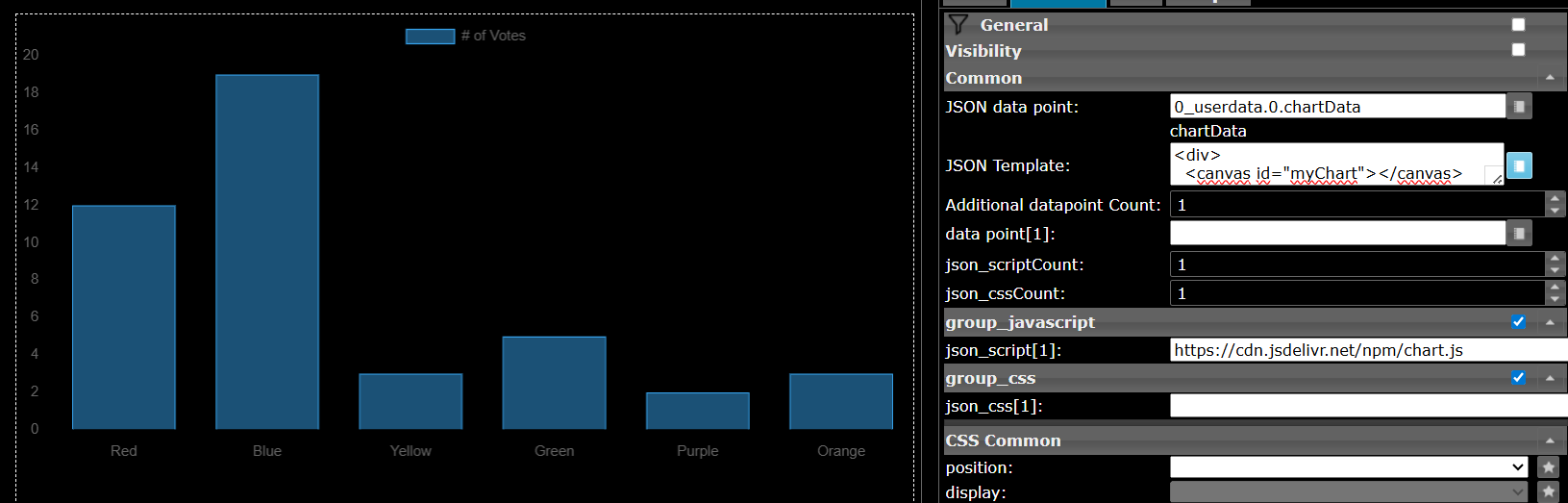
                        66ccdf29-bea7-4679-9f94-4dd473d95587-image.png
                        https://www.chartjs.org/docs/latest/getting-started/

                        Das ist jetzt keine Super-Komfort Lösung die sehr einfach ist, aber eine bei der man sehr detailliert die Möglichkeiten so einer Bibliothek nutzen kann.

                        Meine Adapter und Widgets
                        TVProgram, SqueezeboxRPC, OpenLiga, RSSFeed, MyTime,, pi-hole2, vis-json-template, skiinfo, vis-mapwidgets, vis-2-widgets-rssfeed
                        Links im Profil

                        1 Antwort Letzte Antwort
                        0
                        Antworten
                        • In einem neuen Thema antworten
                        Anmelden zum Antworten
                        • Älteste zuerst
                        • Neuste zuerst
                        • Meiste Stimmen


                        Support us

                        ioBroker
                        Community Adapters
                        Donate

                        857

                        Online

                        32.6k

                        Benutzer

                        82.1k

                        Themen

                        1.3m

                        Beiträge
                        Community
                        Impressum | Datenschutz-Bestimmungen | Nutzungsbedingungen | Einwilligungseinstellungen
                        ioBroker Community 2014-2025
                        logo
                        • Anmelden

                        • Du hast noch kein Konto? Registrieren

                        • Anmelden oder registrieren, um zu suchen
                        • Erster Beitrag
                          Letzter Beitrag
                        0
                        • Home
                        • Aktuell
                        • Tags
                        • Ungelesen 0
                        • Kategorien
                        • Unreplied
                        • Beliebt
                        • GitHub
                        • Docu
                        • Hilfe