
NEWS




Test Adapter time-switch v2.0.x GitHub/Latest
-
@theloh sagte in Test Adapter time-switch v2.0.x GitHub/Latest:
Hallo Zusammen,
ich habe eben die aktuelle Version auf meinem PI4 aus dem github Link installiert und wo
normal das Widget erscheint fehlt das Bild. Es sieht also nicht so aus wie unten gezeigt.
Ziehe ich das Widgeht dann in die Vis, ist kein Widget zusehen. Ea ist jedoch da, weil ich es mit STR+A
selektieren kann.
Kenn jemand eine Lösung, dass es wie unten aussieht?Ich habe den Adapter bereits einmal deinstalliert und neu installiert.
Ich habe genau das gleiche Problem, jedoch nur wenn ich per Remote (Pro) damit arbeiten will.
Local oder Vis auf Android funktioniert einwandfrei.
Basiert das Widget evtl. auf Material-CSS? Damit hatte ich bis jetzt immer Probleme und nutze es deshalb nicht mehr.
VG
Axel@axel-koeneke : Hat sonst niemand Probleme mit der Darstellung per Remote?
Habe folgendes im Log wenn ich das Widget einfüge:cloud.0 2021-09-27 08:13:42.309 error (1028) Addon vis 10 - at Object.reRenderWidgetEdit (https://iobroker.pro/vis/js/visEdit.js:4237:14) cloud.0 2021-09-27 08:13:42.308 error (1028) Addon vis 9 - at Object.reRenderWidget (https://iobroker.pro/vis/js/vis.js:1088:14) cloud.0 2021-09-27 08:13:42.307 error (1028) Addon vis 8 - at Object.renderWidget (https://iobroker.pro/vis/js/vis.js:1660:33) cloud.0 2021-09-27 08:13:42.306 error (1028) Addon vis 7 - at Object.e.view.e.template (https://iobroker.pro/vis/lib/js/can.custom.min.js:58:1267) cloud.0 2021-09-27 08:13:42.302 error (1028) Addon vis 6 - at Function.renderAs (https://iobroker.pro/vis/lib/js/can.custom.min.js:58:3631) cloud.0 2021-09-27 08:13:42.301 error (1028) Addon vis 5 - at Function.renderTo (https://iobroker.pro/vis/lib/js/can.custom.min.js:58:2982) cloud.0 2021-09-27 08:13:42.301 error (1028) Addon vis 4 - at r (https://iobroker.pro/vis/lib/js/can.custom.min.js:58:138) cloud.0 2021-09-27 08:13:42.300 error (1028) Addon vis 3 - at t.template.fn (https://iobroker.pro/vis/lib/js/can.custom.min.js:76:256) cloud.0 2021-09-27 08:13:42.298 error (1028) Addon vis 2 - at n.render (https://iobroker.pro/vis/lib/js/can.custom.min.js:76:475) cloud.0 2021-09-27 08:13:42.295 error (1028) Addon vis 1 - at Object.eval (tplTime-switchDevicePlan.js:2:35) cloud.0 2021-09-27 08:13:42.294 error (1028) Addon vis 0 - TypeError: Cannot read property 'createOnOffWidget' of undefinedTypeError: Cannot read property 'createOnOffWidget' of undefined cloud.0 2021-09-27 08:13:42.225 error (1028) Addon vis can't render tplTime-switchDevicePlan w00089 on "Wetter_Detail": cloud.0 2021-09-27 08:13:42.224 error (1028) Addon vis 10 - at Object.reRenderWidgetEdit (https://iobroker.pro/vis/js/visEdit.js:4237:14) cloud.0 2021-09-27 08:13:42.221 error (1028) Addon vis 9 - at Object.reRenderWidget (https://iobroker.pro/vis/js/vis.js:1088:14) cloud.0 2021-09-27 08:13:42.220 error (1028) Addon vis 8 - at Object.renderWidget (https://iobroker.pro/vis/js/vis.js:1660:33) cloud.0 2021-09-27 08:13:42.219 error (1028) Addon vis 7 - at Object.e.view.e.template (https://iobroker.pro/vis/lib/js/can.custom.min.js:58:1267) cloud.0 2021-09-27 08:13:42.217 error (1028) Addon vis 6 - at Function.renderAs (https://iobroker.pro/vis/lib/js/can.custom.min.js:58:3631) cloud.0 2021-09-27 08:13:42.215 error (1028) Addon vis 5 - at Function.renderTo (https://iobroker.pro/vis/lib/js/can.custom.min.js:58:2982) cloud.0 2021-09-27 08:13:42.214 error (1028) Addon vis 4 - at r (https://iobroker.pro/vis/lib/js/can.custom.min.js:58:138) cloud.0 2021-09-27 08:13:42.210 error (1028) Addon vis 3 - at t.template.fn (https://iobroker.pro/vis/lib/js/can.custom.min.js:76:256) cloud.0 2021-09-27 08:13:42.209 error (1028) Addon vis 2 - at n.render (https://iobroker.pro/vis/lib/js/can.custom.min.js:76:475) cloud.0 2021-09-27 08:13:42.207 error (1028) Addon vis 1 - at Object.eval (tplTime-switchDevicePlan.js:2:35) cloud.0 2021-09-27 08:13:42.205 error (1028) Addon vis 0 - TypeError: Cannot read property 'createOnOffWidget' of undefinedTypeError: Cannot read property 'createOnOffWidget' of undefined cloud.0 2021-09-27 08:13:42.097 error (1028) Addon vis can't render tplTime-switchDevicePlan w00089 on "Wetter_Detail":Wie gesagt, lokal funktioniert es prima.
VG
Axel -
@axel-koeneke : Hat sonst niemand Probleme mit der Darstellung per Remote?
Habe folgendes im Log wenn ich das Widget einfüge:cloud.0 2021-09-27 08:13:42.309 error (1028) Addon vis 10 - at Object.reRenderWidgetEdit (https://iobroker.pro/vis/js/visEdit.js:4237:14) cloud.0 2021-09-27 08:13:42.308 error (1028) Addon vis 9 - at Object.reRenderWidget (https://iobroker.pro/vis/js/vis.js:1088:14) cloud.0 2021-09-27 08:13:42.307 error (1028) Addon vis 8 - at Object.renderWidget (https://iobroker.pro/vis/js/vis.js:1660:33) cloud.0 2021-09-27 08:13:42.306 error (1028) Addon vis 7 - at Object.e.view.e.template (https://iobroker.pro/vis/lib/js/can.custom.min.js:58:1267) cloud.0 2021-09-27 08:13:42.302 error (1028) Addon vis 6 - at Function.renderAs (https://iobroker.pro/vis/lib/js/can.custom.min.js:58:3631) cloud.0 2021-09-27 08:13:42.301 error (1028) Addon vis 5 - at Function.renderTo (https://iobroker.pro/vis/lib/js/can.custom.min.js:58:2982) cloud.0 2021-09-27 08:13:42.301 error (1028) Addon vis 4 - at r (https://iobroker.pro/vis/lib/js/can.custom.min.js:58:138) cloud.0 2021-09-27 08:13:42.300 error (1028) Addon vis 3 - at t.template.fn (https://iobroker.pro/vis/lib/js/can.custom.min.js:76:256) cloud.0 2021-09-27 08:13:42.298 error (1028) Addon vis 2 - at n.render (https://iobroker.pro/vis/lib/js/can.custom.min.js:76:475) cloud.0 2021-09-27 08:13:42.295 error (1028) Addon vis 1 - at Object.eval (tplTime-switchDevicePlan.js:2:35) cloud.0 2021-09-27 08:13:42.294 error (1028) Addon vis 0 - TypeError: Cannot read property 'createOnOffWidget' of undefinedTypeError: Cannot read property 'createOnOffWidget' of undefined cloud.0 2021-09-27 08:13:42.225 error (1028) Addon vis can't render tplTime-switchDevicePlan w00089 on "Wetter_Detail": cloud.0 2021-09-27 08:13:42.224 error (1028) Addon vis 10 - at Object.reRenderWidgetEdit (https://iobroker.pro/vis/js/visEdit.js:4237:14) cloud.0 2021-09-27 08:13:42.221 error (1028) Addon vis 9 - at Object.reRenderWidget (https://iobroker.pro/vis/js/vis.js:1088:14) cloud.0 2021-09-27 08:13:42.220 error (1028) Addon vis 8 - at Object.renderWidget (https://iobroker.pro/vis/js/vis.js:1660:33) cloud.0 2021-09-27 08:13:42.219 error (1028) Addon vis 7 - at Object.e.view.e.template (https://iobroker.pro/vis/lib/js/can.custom.min.js:58:1267) cloud.0 2021-09-27 08:13:42.217 error (1028) Addon vis 6 - at Function.renderAs (https://iobroker.pro/vis/lib/js/can.custom.min.js:58:3631) cloud.0 2021-09-27 08:13:42.215 error (1028) Addon vis 5 - at Function.renderTo (https://iobroker.pro/vis/lib/js/can.custom.min.js:58:2982) cloud.0 2021-09-27 08:13:42.214 error (1028) Addon vis 4 - at r (https://iobroker.pro/vis/lib/js/can.custom.min.js:58:138) cloud.0 2021-09-27 08:13:42.210 error (1028) Addon vis 3 - at t.template.fn (https://iobroker.pro/vis/lib/js/can.custom.min.js:76:256) cloud.0 2021-09-27 08:13:42.209 error (1028) Addon vis 2 - at n.render (https://iobroker.pro/vis/lib/js/can.custom.min.js:76:475) cloud.0 2021-09-27 08:13:42.207 error (1028) Addon vis 1 - at Object.eval (tplTime-switchDevicePlan.js:2:35) cloud.0 2021-09-27 08:13:42.205 error (1028) Addon vis 0 - TypeError: Cannot read property 'createOnOffWidget' of undefinedTypeError: Cannot read property 'createOnOffWidget' of undefined cloud.0 2021-09-27 08:13:42.097 error (1028) Addon vis can't render tplTime-switchDevicePlan w00089 on "Wetter_Detail":Wie gesagt, lokal funktioniert es prima.
VG
AxelHallo zusammen,
ich hab aktuell zeitlich viel um die Ohren, da ich gerade an meiner Bachelorarbeit arbeite. Ich habe mir aber jetzt mal die Zeit genommen und die Einmal/Countdown Trigger fertig eingebaut. Außerdem habe ich die Kompatibilität mit Admin 5 und js-controller 3.3 überprüft, soweit konnte ich keine Probleme feststellen.Über https://github.com/walli545/ioBroker.time-switch/tarball/dev könnt ihr die neue Version
2.3.0-pre.1testen.@axel-koeneke Zum Thema ioBroker.pro: Das besitze und nutze ich nicht von daher tue ich mich schwer den Fehler zu reproduzieren. Evtl. könntest du mir noch weitere Logs z.B. aus dem Browser zur Verfügung stellen?
-
Hallo zusammen,
ich hab aktuell zeitlich viel um die Ohren, da ich gerade an meiner Bachelorarbeit arbeite. Ich habe mir aber jetzt mal die Zeit genommen und die Einmal/Countdown Trigger fertig eingebaut. Außerdem habe ich die Kompatibilität mit Admin 5 und js-controller 3.3 überprüft, soweit konnte ich keine Probleme feststellen.Über https://github.com/walli545/ioBroker.time-switch/tarball/dev könnt ihr die neue Version
2.3.0-pre.1testen.@axel-koeneke Zum Thema ioBroker.pro: Das besitze und nutze ich nicht von daher tue ich mich schwer den Fehler zu reproduzieren. Evtl. könntest du mir noch weitere Logs z.B. aus dem Browser zur Verfügung stellen?
@walli545 Wennich das Widget in eine leere View ziehe kommt folgendes im Chrome:
Error: can't render tplTime-switchDevicePlan w00735 on "Test":
conn.js:1256 Error: 0 - TypeError: Cannot read property 'createOnOffWidget' of undefinedTypeError: Cannot read property 'createOnOffWidget' of undefined
conn.js:1256 Error: 1 -     at Object.eval (tplTime-switchDevicePlan.js:2:35)
conn.js:1256 Error: 2 -     at n.render (https://iobroker.pro/vis/lib/js/can.custom.min.js:76:475)
conn.js:1256 Error: 3 -     at t.template.fn (https://iobroker.pro/vis/lib/js/can.custom.min.js:76:256)
conn.js:1256 Error: 4 -     at r (https://iobroker.pro/vis/lib/js/can.custom.min.js:58:138)
conn.js:1256 Error: 5 -     at Function.renderTo (https://iobroker.pro/vis/lib/js/can.custom.min.js:58:2982)
conn.js:1256 Error: 6 -     at Function.renderAs (https://iobroker.pro/vis/lib/js/can.custom.min.js:58:3631)
conn.js:1256 Error: 7 -     at Object.e.view.e.template (https://iobroker.pro/vis/lib/js/can.custom.min.js:58:1267)
conn.js:1256 Error: 8 -     at Object.renderWidget (https://iobroker.pro/vis/js/vis.js:1660:33)
conn.js:1256 Error: 9 -     at Object.reRenderWidget (https://iobroker.pro/vis/js/vis.js:1088:14)
conn.js:1256 Error: 10 -     at Object.reRenderWidgetEdit (https://iobroker.pro/vis/js/visEdit.js:4237:14)
visEdit.js:4397 Cannot find in DOM w00735
translate.js:20 "boolean": {"en": "boolean", "de": "boolean", "ru": "boolean"},
translate.js:20 "string": {"en": "string", "de": "string", "ru": "string"},
conn.js:1256 Error: can't render tplTime-switchDevicePlan w00735 on "Test":
conn.js:1256 Error: 0 - TypeError: Cannot read property 'createOnOffWidget' of undefinedTypeError: Cannot read property 'createOnOffWidget' of undefined
conn.js:1256 Error: 1 -     at Object.eval (tplTime-switchDevicePlan.js:2:35)
conn.js:1256 Error: 2 -     at n.render (https://iobroker.pro/vis/lib/js/can.custom.min.js:76:475)
conn.js:1256 Error: 3 -     at t.template.fn (https://iobroker.pro/vis/lib/js/can.custom.min.js:76:256)
conn.js:1256 Error: 4 -     at r (https://iobroker.pro/vis/lib/js/can.custom.min.js:58:138)
conn.js:1256 Error: 5 -     at Function.renderTo (https://iobroker.pro/vis/lib/js/can.custom.min.js:58:2982)
conn.js:1256 Error: 6 -     at Function.renderAs (https://iobroker.pro/vis/lib/js/can.custom.min.js:58:3631)
conn.js:1256 Error: 7 -     at Object.e.view.e.template (https://iobroker.pro/vis/lib/js/can.custom.min.js:58:1267)
conn.js:1256 Error: 8 -     at Object.renderWidget (https://iobroker.pro/vis/js/vis.js:1660:33)
conn.js:1256 Error: 9 -     at Object.reRenderWidget (https://iobroker.pro/vis/js/vis.js:1088:14)
conn.js:1256 Error: 10 -     at Object.reRenderWidgetEdit (https://iobroker.pro/vis/js/visEdit.js:4237:14)
translate.js:20 "dataId": {"en": "dataId", "de": "dataId", "ru": "dataId"},
translate.js:20 "showId": {"en": "showId", "de": "showId", "ru": "showId"},
translate.js:20 "showManualSwitch": {"en": "showManualSwitch", "de": "showManualSwitch", "ru": "showManualSwitch"},
translate.js:20 "useAstroIcons": {"en": "useAstroIcons", "de": "useAstroIcons", "ru": "useAstroIcons"},
translate.js:20 "valueType": {"en": "valueType", "de": "valueType", "ru": "valueType"},
translate.js:20 "offValue": {"en": "offValue", "de": "offValue", "ru": "offValue"},
translate.js:20 "onValue": {"en": "onValue", "de": "onValue", "ru": "onValue"},
translate.js:20 "statesCount": {"en": "statesCount", "de": "statesCount", "ru": "statesCount"},
translate.js:20 "stateId": {"en": "stateId", "de": "stateId", "ru": "stateId"},
translate.js:20 "showConditionIds": {"en": "showConditionIds", "de": "showConditionIds", "ru": "showConditionIds"},
translate.js:20 "conditionStatesCount": {"en": "conditionStatesCount", "de": "conditionStatesCount", "ru": "conditionStatesCount"},
translate.js:20 "conditionStateId": {"en": "conditionStateId", "de": "conditionStateId", "ru": "conditionStateId"},
translate.js:20 "conditionStateAlias": {"en": "conditionStateAlias", "de": "conditionStateAlias", "ru": "conditionStateAlias"},
Hoffentlich kannst du damit etwas anfangen.
VG
Axel -
@walli545 @Axel-Koeneke
Ich habe heute das upgrade auf 3.3.18 vorgenommen, seit da sind die Schedule-VIS-Widgets im Browser nicht mehr sichtbar, bzw. als ob sie weg sind.
In der VIS-App per Android sind diese aber noch ersichtlich.
Ich installiere nun mal 2.3.0-pre und melde mich wieder. -
@walli545 @Axel-Koeneke
Ich habe heute das upgrade auf 3.3.18 vorgenommen, seit da sind die Schedule-VIS-Widgets im Browser nicht mehr sichtbar, bzw. als ob sie weg sind.
In der VIS-App per Android sind diese aber noch ersichtlich.
Ich installiere nun mal 2.3.0-pre und melde mich wieder.@walli545 @Axel-Koeneke
Hm, bin immer noch auf 2.1.0, Anzeige läuft aber wider. Ich vermute, ein Neustart des VIS-Adapters hats gerichtet, kann es aber nicht mit Sicherheit sagen. -
Hallo zusammen,
ich hab aktuell zeitlich viel um die Ohren, da ich gerade an meiner Bachelorarbeit arbeite. Ich habe mir aber jetzt mal die Zeit genommen und die Einmal/Countdown Trigger fertig eingebaut. Außerdem habe ich die Kompatibilität mit Admin 5 und js-controller 3.3 überprüft, soweit konnte ich keine Probleme feststellen.Über https://github.com/walli545/ioBroker.time-switch/tarball/dev könnt ihr die neue Version
2.3.0-pre.1testen.@axel-koeneke Zum Thema ioBroker.pro: Das besitze und nutze ich nicht von daher tue ich mich schwer den Fehler zu reproduzieren. Evtl. könntest du mir noch weitere Logs z.B. aus dem Browser zur Verfügung stellen?
@walli545
Hallo habe mal den Einmaltimer (Countdown) getestet und folgendes festgestellt.
2.3.0-pre.1
Man erstellt einen einmal Trigger mit einer bestimmten Zeit beim Speichern läuft dieser sofort los und verschwindet nach Ablauf komplett.- Der Einmal Timer darf nach Ablauf nicht einfach verschwinden, sondern muss bestehen bleiben.
- Es sollte eine Start Stopp Taste geben. (also nicht beim Speicher loslaufen)
-
Der Start und Stop solle über ein iobroker-Gerät Trigger bar sein - Nach Ablauf der Zeit und schalt-Vorgang sollte wieder die ursprünglich gespeicherte Zeit für einen erneuten Start angezeigt werden.
Gruß und Danke
Wolfgang -
@walli545 Wennich das Widget in eine leere View ziehe kommt folgendes im Chrome:
Error: can't render tplTime-switchDevicePlan w00735 on "Test":
conn.js:1256 Error: 0 - TypeError: Cannot read property 'createOnOffWidget' of undefinedTypeError: Cannot read property 'createOnOffWidget' of undefined
conn.js:1256 Error: 1 -     at Object.eval (tplTime-switchDevicePlan.js:2:35)
conn.js:1256 Error: 2 -     at n.render (https://iobroker.pro/vis/lib/js/can.custom.min.js:76:475)
conn.js:1256 Error: 3 -     at t.template.fn (https://iobroker.pro/vis/lib/js/can.custom.min.js:76:256)
conn.js:1256 Error: 4 -     at r (https://iobroker.pro/vis/lib/js/can.custom.min.js:58:138)
conn.js:1256 Error: 5 -     at Function.renderTo (https://iobroker.pro/vis/lib/js/can.custom.min.js:58:2982)
conn.js:1256 Error: 6 -     at Function.renderAs (https://iobroker.pro/vis/lib/js/can.custom.min.js:58:3631)
conn.js:1256 Error: 7 -     at Object.e.view.e.template (https://iobroker.pro/vis/lib/js/can.custom.min.js:58:1267)
conn.js:1256 Error: 8 -     at Object.renderWidget (https://iobroker.pro/vis/js/vis.js:1660:33)
conn.js:1256 Error: 9 -     at Object.reRenderWidget (https://iobroker.pro/vis/js/vis.js:1088:14)
conn.js:1256 Error: 10 -     at Object.reRenderWidgetEdit (https://iobroker.pro/vis/js/visEdit.js:4237:14)
visEdit.js:4397 Cannot find in DOM w00735
translate.js:20 "boolean": {"en": "boolean", "de": "boolean", "ru": "boolean"},
translate.js:20 "string": {"en": "string", "de": "string", "ru": "string"},
conn.js:1256 Error: can't render tplTime-switchDevicePlan w00735 on "Test":
conn.js:1256 Error: 0 - TypeError: Cannot read property 'createOnOffWidget' of undefinedTypeError: Cannot read property 'createOnOffWidget' of undefined
conn.js:1256 Error: 1 -     at Object.eval (tplTime-switchDevicePlan.js:2:35)
conn.js:1256 Error: 2 -     at n.render (https://iobroker.pro/vis/lib/js/can.custom.min.js:76:475)
conn.js:1256 Error: 3 -     at t.template.fn (https://iobroker.pro/vis/lib/js/can.custom.min.js:76:256)
conn.js:1256 Error: 4 -     at r (https://iobroker.pro/vis/lib/js/can.custom.min.js:58:138)
conn.js:1256 Error: 5 -     at Function.renderTo (https://iobroker.pro/vis/lib/js/can.custom.min.js:58:2982)
conn.js:1256 Error: 6 -     at Function.renderAs (https://iobroker.pro/vis/lib/js/can.custom.min.js:58:3631)
conn.js:1256 Error: 7 -     at Object.e.view.e.template (https://iobroker.pro/vis/lib/js/can.custom.min.js:58:1267)
conn.js:1256 Error: 8 -     at Object.renderWidget (https://iobroker.pro/vis/js/vis.js:1660:33)
conn.js:1256 Error: 9 -     at Object.reRenderWidget (https://iobroker.pro/vis/js/vis.js:1088:14)
conn.js:1256 Error: 10 -     at Object.reRenderWidgetEdit (https://iobroker.pro/vis/js/visEdit.js:4237:14)
translate.js:20 "dataId": {"en": "dataId", "de": "dataId", "ru": "dataId"},
translate.js:20 "showId": {"en": "showId", "de": "showId", "ru": "showId"},
translate.js:20 "showManualSwitch": {"en": "showManualSwitch", "de": "showManualSwitch", "ru": "showManualSwitch"},
translate.js:20 "useAstroIcons": {"en": "useAstroIcons", "de": "useAstroIcons", "ru": "useAstroIcons"},
translate.js:20 "valueType": {"en": "valueType", "de": "valueType", "ru": "valueType"},
translate.js:20 "offValue": {"en": "offValue", "de": "offValue", "ru": "offValue"},
translate.js:20 "onValue": {"en": "onValue", "de": "onValue", "ru": "onValue"},
translate.js:20 "statesCount": {"en": "statesCount", "de": "statesCount", "ru": "statesCount"},
translate.js:20 "stateId": {"en": "stateId", "de": "stateId", "ru": "stateId"},
translate.js:20 "showConditionIds": {"en": "showConditionIds", "de": "showConditionIds", "ru": "showConditionIds"},
translate.js:20 "conditionStatesCount": {"en": "conditionStatesCount", "de": "conditionStatesCount", "ru": "conditionStatesCount"},
translate.js:20 "conditionStateId": {"en": "conditionStateId", "de": "conditionStateId", "ru": "conditionStateId"},
translate.js:20 "conditionStateAlias": {"en": "conditionStateAlias", "de": "conditionStateAlias", "ru": "conditionStateAlias"},
Hoffentlich kannst du damit etwas anfangen.
VG
Axel@axel-koeneke sagte in Test Adapter time-switch v2.0.x GitHub/Latest:
@walli545 Wennich das Widget in eine leere View ziehe kommt folgendes im Chrome:
Error: can't render tplTime-switchDevicePlan w00735 on "Test":
conn.js:1256 Error: 0 - TypeError: Cannot read property 'createOnOffWidget' of undefinedTypeError: Cannot read property 'createOnOffWidget' of undefined
conn.js:1256 Error: 1 -     at Object.eval (tplTime-switchDevicePlan.js:2:35)
conn.js:1256 Error: 2 -     at n.render (https://iobroker.pro/vis/lib/js/can.custom.min.js:76:475)
conn.js:1256 Error: 3 -     at t.template.fn (https://iobroker.pro/vis/lib/js/can.custom.min.js:76:256)
conn.js:1256 Error: 4 -     at r (https://iobroker.pro/vis/lib/js/can.custom.min.js:58:138)
conn.js:1256 Error: 5 -     at Function.renderTo (https://iobroker.pro/vis/lib/js/can.custom.min.js:58:2982)
conn.js:1256 Error: 6 -     at Function.renderAs (https://iobroker.pro/vis/lib/js/can.custom.min.js:58:3631)
conn.js:1256 Error: 7 -     at Object.e.view.e.template (https://iobroker.pro/vis/lib/js/can.custom.min.js:58:1267)
conn.js:1256 Error: 8 -     at Object.renderWidget (https://iobroker.pro/vis/js/vis.js:1660:33)
conn.js:1256 Error: 9 -     at Object.reRenderWidget (https://iobroker.pro/vis/js/vis.js:1088:14)
conn.js:1256 Error: 10 -     at Object.reRenderWidgetEdit (https://iobroker.pro/vis/js/visEdit.js:4237:14)
visEdit.js:4397 Cannot find in DOM w00735
translate.js:20 "boolean": {"en": "boolean", "de": "boolean", "ru": "boolean"},
translate.js:20 "string": {"en": "string", "de": "string", "ru": "string"},
conn.js:1256 Error: can't render tplTime-switchDevicePlan w00735 on "Test":
conn.js:1256 Error: 0 - TypeError: Cannot read property 'createOnOffWidget' of undefinedTypeError: Cannot read property 'createOnOffWidget' of undefined
conn.js:1256 Error: 1 -     at Object.eval (tplTime-switchDevicePlan.js:2:35)
conn.js:1256 Error: 2 -     at n.render (https://iobroker.pro/vis/lib/js/can.custom.min.js:76:475)
conn.js:1256 Error: 3 -     at t.template.fn (https://iobroker.pro/vis/lib/js/can.custom.min.js:76:256)
conn.js:1256 Error: 4 -     at r (https://iobroker.pro/vis/lib/js/can.custom.min.js:58:138)
conn.js:1256 Error: 5 -     at Function.renderTo (https://iobroker.pro/vis/lib/js/can.custom.min.js:58:2982)
conn.js:1256 Error: 6 -     at Function.renderAs (https://iobroker.pro/vis/lib/js/can.custom.min.js:58:3631)
conn.js:1256 Error: 7 -     at Object.e.view.e.template (https://iobroker.pro/vis/lib/js/can.custom.min.js:58:1267)
conn.js:1256 Error: 8 -     at Object.renderWidget (https://iobroker.pro/vis/js/vis.js:1660:33)
conn.js:1256 Error: 9 -     at Object.reRenderWidget (https://iobroker.pro/vis/js/vis.js:1088:14)
conn.js:1256 Error: 10 -     at Object.reRenderWidgetEdit (https://iobroker.pro/vis/js/visEdit.js:4237:14)
translate.js:20 "dataId": {"en": "dataId", "de": "dataId", "ru": "dataId"},
translate.js:20 "showId": {"en": "showId", "de": "showId", "ru": "showId"},
translate.js:20 "showManualSwitch": {"en": "showManualSwitch", "de": "showManualSwitch", "ru": "showManualSwitch"},
translate.js:20 "useAstroIcons": {"en": "useAstroIcons", "de": "useAstroIcons", "ru": "useAstroIcons"},
translate.js:20 "valueType": {"en": "valueType", "de": "valueType", "ru": "valueType"},
translate.js:20 "offValue": {"en": "offValue", "de": "offValue", "ru": "offValue"},
translate.js:20 "onValue": {"en": "onValue", "de": "onValue", "ru": "onValue"},
translate.js:20 "statesCount": {"en": "statesCount", "de": "statesCount", "ru": "statesCount"},
translate.js:20 "stateId": {"en": "stateId", "de": "stateId", "ru": "stateId"},
translate.js:20 "showConditionIds": {"en": "showConditionIds", "de": "showConditionIds", "ru": "showConditionIds"},
translate.js:20 "conditionStatesCount": {"en": "conditionStatesCount", "de": "conditionStatesCount", "ru": "conditionStatesCount"},
translate.js:20 "conditionStateId": {"en": "conditionStateId", "de": "conditionStateId", "ru": "conditionStateId"},
translate.js:20 "conditionStateAlias": {"en": "conditionStateAlias", "de": "conditionStateAlias", "ru": "conditionStateAlias"},
Hoffentlich kannst du damit etwas anfangen.
VG
AxelGibt es hier etwas neues?
-
Hi,
Ich verwende Adapter Version 2.2.2.
Das Schalten eines Schalters über mehrere Zeiträume funktionert.
Allerdings funktioniert die Schaltung über Astro-Zeiten nicht, keine Reaktion, weder bei Sonnenaufgang noch bei Sonnen-Untergang. Die System-Einstellungen sind korrekt, es funktioniert bei einem eigenen Blockly.In der V 2.2.1 ist das schon gewesen, wurde aber in der V 2.2.2 gefixt.
Einträge im Log habe ich keine gefunden.
Was kann da falsch (eingestellt) sein, bzw. wie kann ich danach suchen? -
@diwoma Das hatte ich auch zwischendurch. Die Lösung war das ich im JavaScript-Adapter auch noch mal explizit die Astro-Einstellungen vorgenommen habe.
Also in allen JavaScript Instanzen falls du mehrere hast und in den globalen Einstellungen auch noch nachsehen -
@diwoma Das hatte ich auch zwischendurch. Die Lösung war das ich im JavaScript-Adapter auch noch mal explizit die Astro-Einstellungen vorgenommen habe.
Also in allen JavaScript Instanzen falls du mehrere hast und in den globalen Einstellungen auch noch nachsehen@bananajoe
Danke, ich habe mich auf die System-Einstellungen verlassen, die einmal nach Mitternacht die Astrozeit refreshed.
Allerdings hat mich überrascht, dass heute in der Früh das Nachtlicht als ausgeschaltet gemeldet wurde. Eventuell hat die Änderung in der Astro-Zeit den time-Trigger neu aufgesetzt.Blöd ist nur die lange Feedback-Zeit, ich kann erst heute Abend feststellen ob das Nachtlicht eingeschaltet wird und ob es doch mit dem Update in der Nacht zusammenhängt.
-
@diwoma Das hatte ich auch zwischendurch. Die Lösung war das ich im JavaScript-Adapter auch noch mal explizit die Astro-Einstellungen vorgenommen habe.
Also in allen JavaScript Instanzen falls du mehrere hast und in den globalen Einstellungen auch noch nachsehen@bananajoe
Also jetzt funktioniert es (die letzten Tage), auch mit den Systemeinstellungen.
Eventuell sollte man den Adapter mal neu starten, wenn man einen Switch auf Astrozeit einstellt/ändert. Vielleicht verliert es den Zeitpunkt im Trigger.-- diwoma
ioBroker in LX-Container in Proxmox
Zigbee-Coordinator: CC2652P2-TCP FW: 20230507 -
@bananajoe
Also jetzt funktioniert es (die letzten Tage), auch mit den Systemeinstellungen.
Eventuell sollte man den Adapter mal neu starten, wenn man einen Switch auf Astrozeit einstellt/ändert. Vielleicht verliert es den Zeitpunkt im Trigger. -
@diwoma Seit dem gab es eine Menge Updates, auch von anderen Komponenten - kann sein das es jetzt anders ist.
@bananajoe Auch das ist natürlich möglich. Der Adapter selbst ist zwar auf der neuen Version aber andere können sicher,ich auch Einflüsse gehabt haben.
Hauptsächlich es funktioniert -
@uncleb sagte in Test Adapter time-switch v2.0.x GitHub/Latest:
Kann man den Adapter auch in Jarvis integrieren?
Ich habe ihn in der Vis hinzugefügt und per iframe in Jarvis eingebunden. Finde ich auch nicht ideal, funktioniert aber zumindest ganz gut.
-
@walli545 : Kannst du die Buttons bei mehreren States entsprechend dem Zustand auch noch einfärben?
@mconno sagte in Test Adapter time-switch v2.0.x GitHub/Latest:
@walli545 : Kannst du die Buttons bei mehreren States entsprechend dem Zustand auch noch einfärben?
Definiere das mal genauer ... ich habe bei mir nur 2 Buttons pro Zeitplan, nämlich ob der Zeitplan aktiv ist und ob der Datenpunkt den der Zeitplan steuert gerade auf
WahroderFalschsteht ... Und die haben dann 2 Farben, je nach Zustand.Nachtrag: Ok, ok, ich habe gerade bemerkt das man inzwischen mehr als einen Datenpunkt pro Zeitplan aktivieren kann - und verschiedene Typen, nicht nur True/False bzw. Wahr/Falsch
-
@mconno sagte in Test Adapter time-switch v2.0.x GitHub/Latest:
@walli545 : Kannst du die Buttons bei mehreren States entsprechend dem Zustand auch noch einfärben?
Definiere das mal genauer ... ich habe bei mir nur 2 Buttons pro Zeitplan, nämlich ob der Zeitplan aktiv ist und ob der Datenpunkt den der Zeitplan steuert gerade auf
WahroderFalschsteht ... Und die haben dann 2 Farben, je nach Zustand.Nachtrag: Ok, ok, ich habe gerade bemerkt das man inzwischen mehr als einen Datenpunkt pro Zeitplan aktivieren kann - und verschiedene Typen, nicht nur True/False bzw. Wahr/Falsch
@bananajoe ich habe mal 2 pics gemacht, wo man den Unterschied sehen kann...
Bild 1: alles aus
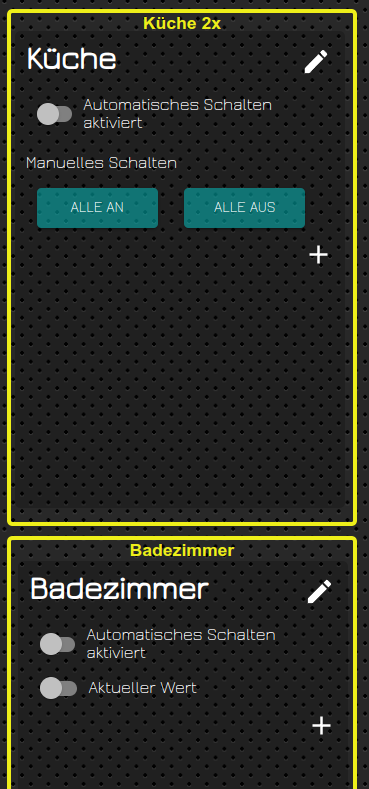
Bild 2: Badezimmer & Küche an.
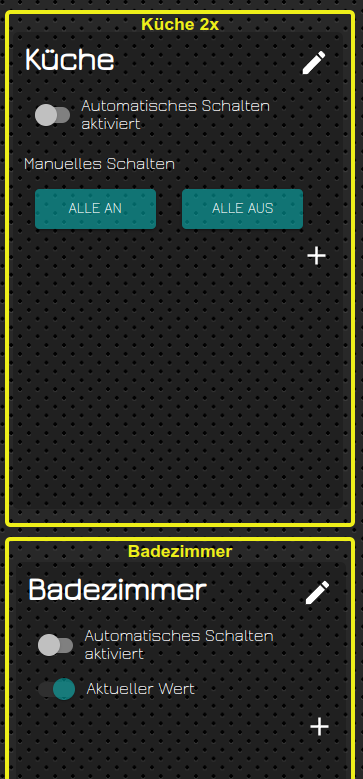
Beim Bad sehe ich direkt, dass es "An" ist, bei "Küche nicht! Da sollte bei dem Button "Alle an" eine andere Farbe sein!




Support us
432
Online32.6k
Users82.1k
Topics1.3m
Posts