
NEWS




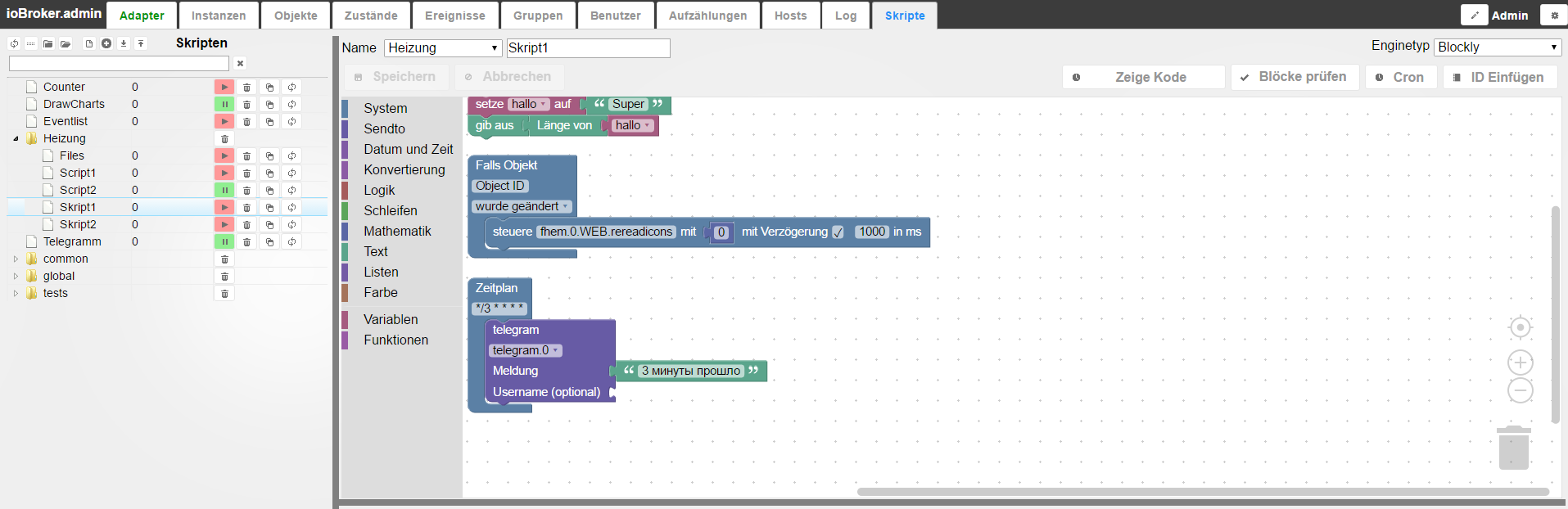
-
Hi Bluefox
Danke, dass Du mir helfen willst.
Hier mein Test-Blockly
Grüße `
Was für ein Wert z.B. hat deine Variable "hm-rega.0.13863"?"20:00"?
-
Fixed. Aber
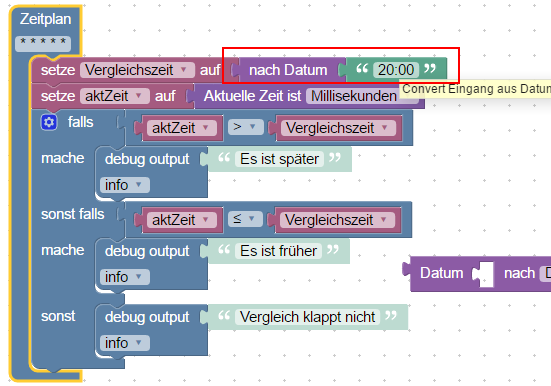
Datum () nach "Millisekunden" gibt zurück nur Millisekunden in einer Sekunde.
Das was du willst, heißt "Datum-Objekt".
Aber es geht jetzt einfacher:
48_2016-08-29_19_42_52-iobroker.admin.png -
Es geht aber auch so
filename="2016-08-29 18_16_18-ioBroker.admin.png" index="0">~~ `Das ist ja sehr interssant!
Jetzt kann ich mit den Bausteinen auch was anfangen.
Und ca. 10 Blocklys umschreiben und vereinfachen ;)
Geht das auch script übergreifend?
Grüße
-
-
Fixed. Aber
Datum () nach "Millisekunden" gibt zurück nur Millisekunden in einer Sekunde.
Das was du willst, heißt "Datum-Objekt".
Aber es geht jetzt einfacher: `
Kann man das "nach Datum" noch umbenennen in "nach Datum/Zeit"? Ich denke für Anfänger oder Jemand der von anderen Programmiersprachen kommt ist es nicht so leicht ersichtlich, dass man dort auch eine Zeit eingeben kann. -
Fixed. Aber
Datum () nach "Millisekunden" gibt zurück nur Millisekunden in einer Sekunde.
Das was du willst, heißt "Datum-Objekt".
Aber es geht jetzt einfacher: `
Funktioniert!
Herzlichen Dank!
Grüße
-
Fixed. Aber
Datum () nach "Millisekunden" gibt zurück nur Millisekunden in einer Sekunde.
Das was du willst, heißt "Datum-Objekt".
Aber es geht jetzt einfacher: `
Kurze Frage hierzu:Wird folgendes so funktionieren, oder muss ich den Weg über lokale Variablen gehen?
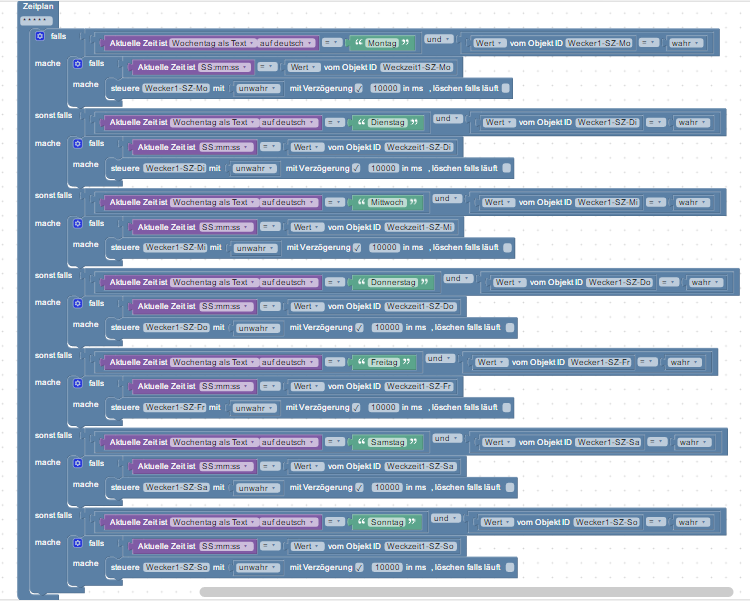
-
Hallo pustekuchen
Bei solchen Sachen vermisst man schmerzlich die Simulation von ScriptGUI mit "Force" oder wenigstens einen Debug-Baustein mit dem man Werte ausgeben kann.
Wenn Deine Var auch "SS:mm:ss" beinhaltet könnte es klappen.
Sicherheitshalber würde ich aber noch nach "SS:mm:ss" konvertieren.
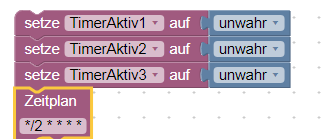
Zudem würde ich den Vergleich auf "größer/gleich" machen.
Das das Script immer zur richtigen Sekunde abläuft, möchte ich bezweifeln.
Bei mir würde eine Weckzeit mit Stunden und Minuten (SS:mm) ausreichen.
Aber auch da würde ich mit >= vergleichen.
Grüße
-
Danke, bin schon weiter. Ich stelle die Werte mit dem "Datetime-Ctrl"-Widget ein. Von da her ist ja immer der richtige Wert in der Variablen.
264_wecker-ui.png -
Hallo Zusammen
Ich habe etwas mit den Funktion-Bausteinen gespielt.
Klappt super!
Ich habe mal eine Rollosteuerung an Türen gebastelt, bei der mehrere Dinge zu beachten sind, damit niemand ausgesperrt wird.
Die Listen-Bausteine hätte ich auch gerne benutzt, habe aber keine Idee wie die eingesetzt werden.
Ich poste das Script mal.
Vielleicht bekommt jemand eine Idee für sein eigenes Projekt.
(Verbesserungsvorschläge sind auch willkommen :) )
So sieht das Blockly aus:
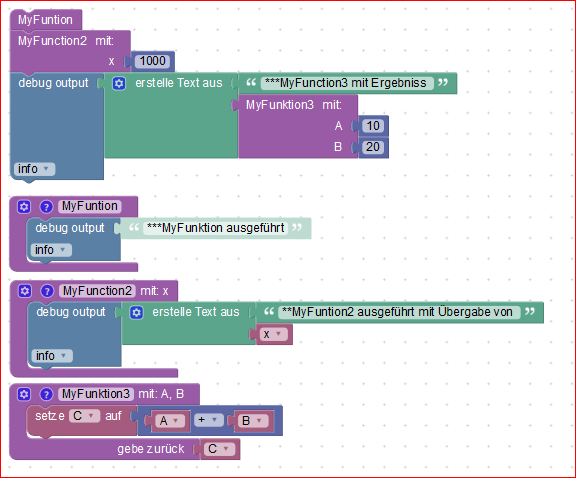
Und das ist der Export:
! <xml 1999/xmlns="<URL url=" http:/www.w3.org/xhtml"="">http://www.w3.org/1999/xhtml">
! <block type="on" id="|j4gh5|xdz{lMOhRY%-" x="-912" y="-438"><field name="OID">hm-rega.0.14372</field>
! <field name="CONDITION">ne</field>
! <statement name="STATEMENT"><block type="comment" id="L;hkpfh#7=D4-JeC4rAr"><field name="COMMENT">Beim verlassen des Hauses werden einige Rollos geschlossen</field>
! <next><block type="controls_if" id="g~l0T+pQrJ2hrtKD7[PC"><mutation else="1"></mutation>
! <value name="IF0"><block type="logic_compare" id="G,sHy|Q+PjC576h8}%h"><field name="OP">EQ</field>
! <value name="A"><block type="get_value" id="xA%)1ok1HW,d.1o0-i_t"><field name="ATTR">val</field>
! <field name="OID">hm-rega.0.14372</field></block></value>
! <value name="B"><block type="logic_boolean" id=";{~xzk/,F27.Hf3)xmG3"><field name="BOOL">FALSE</field></block></value></block></value>
! <statement name="DO0"><block type="comment" id="tdF?=Idf;o^UF6#8oUqA"><field name="COMMENT">Schutz beenden und Rollos öffnen</field>
! <next><block type="variables_set" id="{]iXfmwnMxEPKaxYXJWR"><field name="VAR">RolloLevel</field>
! <value name="VALUE"><block type="math_number" id="b=(FV8594iOVE~dfbqu"><field name="NUM">100</field></block></value>
! <next><block type="procedures_callnoreturn" id="njJlzY75dM#iWrq~xr_4"><mutation name="Funktion_Rollos"></mutation>
! <next><block type="debug" id="+/_Q72zLPepC#F2K:f1]"><field name="Severity">log</field>
! <value name="TEXT"><shadow type="text" id="a|yo8G};1bANj_AJo]aB"><field name="TEXT">Alle Rollos hoch</field></shadow></value></block></next></block></next></block></next></block></statement>
! <statement name="ELSE"><block type="comment" id="t?;xlS8QDYrM?1.Jq[S"><field name="COMMENT">Schutz starten und Rollos schließen</field> ! <next><block type="comment" id="hLkB,aLqHJ_Xzq03lCv0"><field name="COMMENT">Prüfen ob noch eine Tür geöfnet ist</field> ! <next><block type="variables_set" id="3-r(Pm.Y@8CqUzwn=hG]"><field name="VAR">Sz_OK</field> ! <value name="VALUE"><block type="logic_ternary" id="tfSm+7]v8TVbJHXH50st"><value name="IF"><block type="procedures_callreturn" id="PSvr/}q=0ehB/KG*4xBW"><mutation name="chkTuerSZ"></mutation></block></value> ! <value name="THEN"><block type="logic_boolean" id="38d/Qrarvr?ZTrL8#@::"><field name="BOOL">TRUE</field></block></value> ! <value name="ELSE"><block type="logic_boolean" id="uyrGP)YiEw}3xQ)fCPzn"><field name="BOOL">FALSE</field></block></value></block></value> ! <next><block type="variables_set" id="cs)x^P_qvd#9J.H-h~)"><field name="VAR">Bad_OK</field>
! <value name="VALUE"><block type="logic_ternary" id="1_9{_b{}T[3I:/LOi{AW"><value name="IF"><block type="procedures_callreturn" id="}Xm._qkbHUpOQscoG9Q"><mutation name="chkTuerBad"></mutation></block></value> ! <value name="THEN"><block type="logic_boolean" id="rYF9*/U!@^?@g79T=n?h"><field name="BOOL">TRUE</field></block></value> ! <value name="ELSE"><block type="logic_boolean" id="VRk[5i169dMgr#+bo_Zi"><field name="BOOL">FALSE</field></block></value></block></value> ! <next><block type="variables_set" id="}L*f)cV2dhnzLlRV2=;]"><field name="VAR">GZ_Ok</field> ! <value name="VALUE"><block type="logic_ternary" id="G4}E1q7fz]sZdmo%M;F="><value name="IF"><block type="procedures_callreturn" id="AyIXw-xX,-]49p9*hRVF"><mutation name="chkTuerGz"></mutation></block></value> ! <value name="THEN"><block type="logic_boolean" id="#loWs0rdv@](Ja#;15oO"><field name="BOOL">TRUE</field></block></value> ! <value name="ELSE"><block type="logic_boolean" id="9E-^vvzchJ{WB9t!q8v"><field name="BOOL">FALSE</field></block></value></block></value>
! <next><block type="controls_if" id="DycfL?9ak1lul}m*,t"><mutation else="1"></mutation>
! <value name="IF0"><block type="logic_operation" id="#}M.u8F6rPpvS+c4hq"><field name="OP">AND</field> ! <value name="A"><block type="logic_compare" id="Wu60sLKisD+:V8JY{clf"><field name="OP">EQ</field> ! <value name="A"><block type="variables_get" id="5czwvfk%d{cMguxP[ou-"><field name="VAR">Sz_OK</field></block></value> ! <value name="B"><block type="logic_boolean" id="o_w]5O^C4!H]a4:+i!3."><field name="BOOL">TRUE</field></block></value></block></value> ! <value name="B"><block type="logic_operation" id="d,5:W=Y.WKs1pn9KF3yt"><field name="OP">AND</field> ! <value name="A"><block type="logic_compare" id="K}(4+o-S4r@U*KR#1~cA"><field name="OP">EQ</field> ! <value name="A"><block type="variables_get" id="5Y,gH0^NDk%O4p%Lj0,{"><field name="VAR">GZ_Ok</field></block></value> ! <value name="B"><block type="logic_boolean" id="X6m;68PlYHZwL#.aG.,j"><field name="BOOL">TRUE</field></block></value></block></value> ! <value name="B"><block type="logic_compare" id="oHmVOISVTaD7sz0Uf~l*"><field name="OP">EQ</field> ! <value name="A"><block type="variables_get" id="45P3rcqv_H9f*K7TyNu:"><field name="VAR">GZ_Ok</field></block></value> ! <value name="B"><block type="logic_boolean" id="Ua{14|)Im;rhn3%z*Eda"><field name="BOOL">TRUE</field></block></value></block></value></block></value></block></value> ! <statement name="DO0"><block type="variables_set" id="=R4={vt3K4P/H@T:S3oF"><field name="VAR">RolloLevel</field> ! <value name="VALUE"><block type="math_number" id="FcaqQ9NJnqFjp*gcPSi"><field name="NUM">0</field></block></value>
! <next><block type="procedures_callnoreturn" id="=Aa9U-j47|L53^6Vj~~L"><mutation name="Funktion_Rollos"></mutation>
! <next><block type="debug" id="U-S/)Ig0Au4F!h?MNH=k"><field name="Severity">log</field>
! <value name="TEXT"><shadow type="text" id="W:dF@VjeM@waYZckev1"><field name="TEXT">Alle Rollos runter</field></shadow></value></block></next></block></next></block></statement> ! <statement name="ELSE"><block type="comment" id="Z85)qZKuc}/C7}o{KS-8"><field name="COMMENT">Var wieder zurücksetzten und Meldung</field> ! <next><block type="control" id="gQ}5#,t(w~B(L(T+/oJV"><mutation delay_input="false"></mutation> ! <field name="OID">hm-rega.0.14372</field> ! <field name="WITH_DELAY">FALSE</field> ! <value name="VALUE"><block type="logic_boolean" id="h:(}:#tn54y~AR~35VTf"><field name="BOOL">FALSE</field></block></value> ! <next><block type="pushover" id="yP;yv2~Uv)1e%pFHA,tz"><field name="INSTANCE">.0</field> ! <field name="PRIORITY">0</field> ! <value name="MESSAGE"><shadow type="text" id="/)%Hr040e5AxZS!qWG]0"><field name="TEXT">Mindestens eine Tür ist noch offen</field></shadow></value> ! <value name="TITLE"><block type="text" id="*khkRw3n3^,Aqkl]wB0O"><field name="TEXT">Status RolloSchutz</field></block></value></block></next></block></next></block></statement></block></next></block></next></block></next></block></next></block></next></block></statement></block></next></block></statement></block> ! <block type="procedures_defreturn" id="xKb-8ldS(R3Gp6RYoj" x="-188" y="-313"><field name="NAME">chkTuerBad</field> ! <comment pinned="false" h="80" w="160">Beschreibe diese Funktion …</comment> ! <statement name="STACK"><block type="procedures_ifreturn" id="O|PouJCW+3x|m[awz#@z"><mutation value="1"></mutation> ! <value name="CONDITION"><block type="logic_compare" id="ip=X.@s_!R9{ZN,mvX4S"><field name="OP">EQ</field> ! <value name="A"><block type="get_value" id="h+;K1Wr?_HO;|Q,4EyC"><field name="ATTR">val</field>
! <field name="OID">hm-rpc.0.KEQ0550126.1.STATE</field></block></value>
! <value name="B"><block type="math_number" id="uftciJ4fIq1;~YKt#K?s"><field name="NUM">2</field></block></value></block></value>
! <value name="VALUE"><block type="logic_boolean" id="hr8Ns*)Cq27]KoYq}W:."><field name="BOOL">FALSE</field></block></value></block></statement>
! <value name="RETURN"><block type="logic_boolean" id="{!3W84QK9/QGVY8ItIJi"><field name="BOOL">TRUE</field></block></value></block>
! <block type="procedures_defreturn" id="peucBGik~(/rkY2|U%~" x="-188" y="-188"><field name="NAME">chkTuerGz</field> ! <comment pinned="false" h="80" w="160">Beschreibe diese Funktion …</comment> ! <statement name="STACK"><block type="procedures_ifreturn" id="3zbCg^Ol{G}@Rs1;/d}"><mutation value="1"></mutation>
! <value name="CONDITION"><block type="logic_compare" id="s6c(V(uH_N8Qy!!4XbGi"><field name="OP">EQ</field>
! <value name="A"><block type="get_value" id="@lOI-!:vEKdqlIU^Q1@S"><field name="ATTR">val</field>
! <field name="OID">hm-rpc.0.LEQ0890092.1.STATE</field></block></value>
! <value name="B"><block type="math_number" id="R,#QW+7aZZ*XoHAapJ;"><field name="NUM">2</field></block></value></block></value> ! <value name="VALUE"><block type="logic_boolean" id="]!6z4L30qs,xKFL^9Vzi"><field name="BOOL">FALSE</field></block></value></block></statement> ! <value name="RETURN"><block type="logic_boolean" id="yP}_5U.T~Mg]Lvm=Z-z"><field name="BOOL">TRUE</field></block></value></block>
! <block type="procedures_defreturn" id="l(LxXK3;0N;wxT?9A=" x="-187" y="-62"><field name="NAME">chkTuerSZ</field>
! <comment pinned="false" h="80" w="160">Beschreibe diese Funktion …</comment>
! <statement name="STACK"><block type="procedures_ifreturn" id="?,cdNbS/IT[/f:N{C?=K"><mutation value="1"></mutation>
! <value name="CONDITION"><block type="logic_compare" id="cIEN:RNj%eETDyvsTQ!2"><field name="OP">EQ</field>
! <value name="A"><block type="get_value" id="G^mLr1DDOW|kP=?8j}jT"><field name="ATTR">val</field>
! <field name="OID">hm-rpc.0.KEQ0549878.1.STATE</field></block></value>
! <value name="B"><block type="math_number" id="o#yb:L(mK@xQdzBKXlNq"><field name="NUM">2</field></block></value></block></value>
! <value name="VALUE"><block type="logic_boolean" id="5Dm38+Qv=IUjtA=^T/A"><field name="BOOL">FALSE</field></block></value></block></statement>
! <value name="RETURN"><block type="logic_boolean" id="ml#cwx1|q1nq:7Vx3tFQ"><field name="BOOL">TRUE</field></block></value></block>
! <block type="procedures_defnoreturn" id="xKC+vIq|)X,94OR.P_0" x="-162" y="187"><field name="NAME">Funktion_Rollos</field> ! <comment pinned="false" h="80" w="160">Beschreibe diese Funktion …</comment> ! <statement name="STACK"><block type="comment" id="7pB-*NM05_Jh;=b-BfPJ"><field name="COMMENT">Dieser erste Block kann weg, nur Debug</field> ! <next><block type="controls_if" id="}KMmZ!tN7lw@n)|z5}Xz"><mutation elseif="1"></mutation> ! <value name="IF0"><block type="logic_compare" id="D_V7.fWHu(R2HBoBrHFF"><field name="OP">EQ</field> ! <value name="A"><block type="variables_get" id="4KnyclbOSU~inQrif[or"><field name="VAR">RolloLevel</field></block></value> ! <value name="B"><block type="math_number" id="fX;(6tbY8r#@o~Bn~~v("><field name="NUM">0</field></block></value></block></value> ! <statement name="DO0"><block type="debug" id="[AmK#O9OYw,k)L=!?ADJ"><field name="Severity">log</field> ! <value name="TEXT"><shadow type="text" id="K?W^aKp0ub]~K;!:o8@W"><field name="TEXT">Schließe Rollos</field></shadow></value></block></statement> ! <value name="IF1"><block type="logic_compare" id="J[GoamA*?eoKeA~wA63"><field name="OP">EQ</field>
! <value name="A"><block type="variables_get" id="M~C0HiRpLCfm)Zug~+.7"><field name="VAR">RolloLevel</field></block></value>
! <value name="B"><block type="math_number" id="ftaRZO10p,gpsq0oaOY"><field name="NUM">100</field></block></value></block></value>
! <statement name="DO1"><block type="debug" id="+TRh:)/6hWUiyMe}9J("><field name="Severity">log</field>
! <value name="TEXT"><shadow type="text" id="OEbB|D1)yBSc~2H7td("><field name="TEXT">Öffne Rollos</field></shadow></value></block></statement>
! <next><block type="comment" id="qw(H=TAX{-[c%5=PW8lj"><field name="COMMENT">Hier wird gearbeitet</field>
! <next><block type="controls_if" id="Rm95(~EQrG8+6!5?=2|2"><value name="IF0"><block type="logic_compare" id="4iOLB{n,J,GPg],v-l05"><field name="OP">NEQ</field>
! <value name="A"><block type="get_value" id="9DOJ2s2,o%|Qc4SlG1|X"><field name="ATTR">val</field>
! <field name="OID">hm-rpc.0.LEQ0072019.1.LEVEL</field></block></value>
! <value name="B"><block type="variables_get" id="r!G4C5WeJ||Jt|[ll:%"><field name="VAR">RolloLevel</field></block></value></block></value> ! <statement name="DO0"><block type="control" id="+}Ama)GTVEMd.P(eSMCu"><mutation delay_input="true"></mutation> ! <field name="OID">hm-rpc.0.LEQ0072019.1.LEVEL</field> ! <field name="WITH_DELAY">TRUE</field> ! <field name="DELAY_MS">1000</field> ! <field name="CLEAR_RUNNING">FALSE</field> ! <value name="VALUE"><block type="variables_get" id="dOS)M)_jO;}SHn7Pt)4+"><field name="VAR">RolloLevel</field></block></value></block></statement> ! <next><block type="controls_if" id="b-%f-MdVeHx*P-99td~u"><value name="IF0"><block type="logic_compare" id="}ZghTZ:NSMb/yw4]Sj8|"><field name="OP">NEQ</field> ! <value name="A"><block type="get_value" id="#9}=,=-rJE;~sxSI%*tD"><field name="ATTR">val</field> ! <field name="OID">hm-rpc.0.LEQ0072025.1.LEVEL</field></block></value> ! <value name="B"><block type="variables_get" id="}6j,E]qizRMl[lP`Ari"><field name="VAR">RolloLevel</field></block></value></block></value>
! <statement name="DO0"><block type="control" id="(d,FVVa|/A=X}?o?7?,9"><mutation delay_input="true"></mutation>
! <field name="OID">hm-rpc.0.LEQ0072025.1.LEVEL</field>
! <field name="WITH_DELAY">TRUE</field>
! <field name="DELAY_MS">1000</field>
! <field name="CLEAR_RUNNING">FALSE</field>
! <value name="VALUE"><block type="variables_get" id="L4b0-r#Myg{`)am2mY"><field name="VAR">RolloLevel</field></block></value></block></statement>
! <next><block type="controls_if" id="2Zc^Xnkl4}3PznD_ZH{)"><value name="IF0"><block type="logic_compare" id="9fQ#F}vj0{vNc}*_c25h"><field name="OP">NEQ</field>
! <value name="A"><block type="get_value" id="55r)r~CsX%sU00n!RO%M"><field name="ATTR">val</field>
! <field name="OID">hm-rpc.0.LEQ0072039.1.LEVEL</field></block></value>
! <value name="B"><block type="variables_get" id="I,Bd{Nt(r2V{gBw[k4!J"><field name="VAR">RolloLevel</field></block></value></block></value>
! <statement name="DO0"><block type="control" id="V/5rIh3JY3I.9Bi]O3}L"><mutation delay_input="true"></mutation>
! <field name="OID">hm-rpc.0.LEQ0072039.1.LEVEL</field>
! <field name="WITH_DELAY">TRUE</field>
! <field name="DELAY_MS">1000</field>
! <field name="CLEAR_RUNNING">FALSE</field>
! <value name="VALUE"><block type="variables_get" id="`9e:7p^gzLI}SJ}+Atn+"><field name="VAR">RolloLevel</field></block></value></block></statement></block></next></block></next></block></next></block></next></block></next></block></statement></block></xml>Grüße
-
Edit: war alles Käse ;)
-
Bin als alter Script-Gui Fan gerade erst auf Blocky aufmerksam geworden: Installation unter FreeBSD lief direkt und erste einfache "Programme" konnte ich schon fertig machen. Die Logik kenne ich allerdings auch schon aus dem Google-Projekt App-Inventor.
-
Hallo,
ich bin jetzt auch seit 2 Tagen am testen, irgendwie scheine ich etwas grundsätzliches nicht zu verstehen.
Möchte zunächst einfach nur ganz einfache Dinge steuern, vielleicht kann jemand mal ein Beispiel posten, im Netz finde ich nur komplizierte Sachen.
Möchte die Anzahl der CCU Programme verringern und auf Dauer die Logik komplett nach hier auslagern.
1. Und Verknüpfung ( Wenn Licht A + B ein ist, dann Licht C Ein )
2. Wenn Variable Tageszeit + Jalousie >=50 dann Licht aus.
Versuche dieser Art sind alle gescheitert, vermute nur ein grundsetzliches Denk Problem bei mir.
Für Tipps bin ich sehr dankbar.
Lg Mike
-
Hallo!
Wie kann man in einem Text ein "Enter" einfügen? `
Hallo RitterProbiere es mal mit \n
1.Zeile\n2.Zeile
Grüße
-
Hallo,
ich bin jetzt auch seit 2 Tagen am testen, irgendwie scheine ich etwas grundsätzliches nicht zu verstehen.
Möchte zunächst einfach nur ganz einfache Dinge steuern, vielleicht kann jemand mal ein Beispiel posten, im Netz finde ich nur komplizierte Sachen.
Möchte die Anzahl der CCU Programme verringern und auf Dauer die Logik komplett nach hier auslagern.
1. Und Verknüpfung ( Wenn Licht A + B ein ist, dann Licht C Ein ) `
Hallo mike2712
Hier ein Vorschlag.
Reagieren auf Statuswechsel "Lampe A"
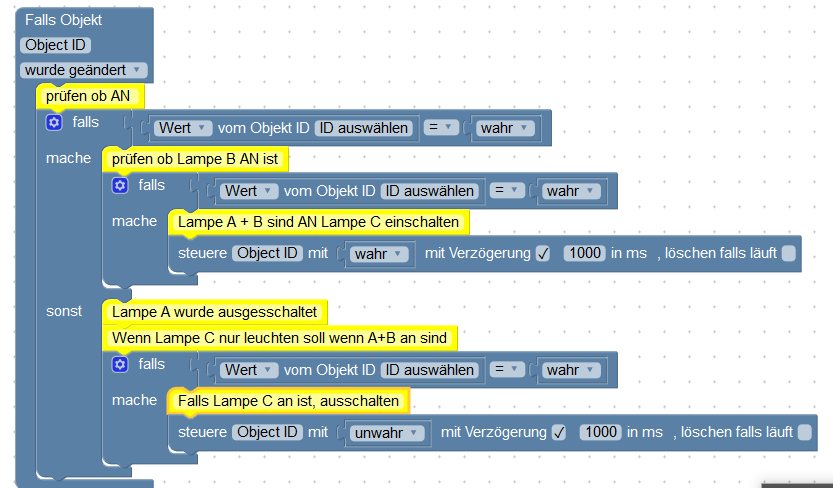
Dann ein zweites "Blockly" für Lampe B.
Kann im gleichen Script sein.
Komplettes Blockly kopieren (den Trigger "Falls Object" anklichen, dann linke Maustaste und kopieren auswählen) und Werte auf Lampe B anpassen.
Das "sonst" im "falls" bekommst Du wenn Du das Zahnrädchen im "Falls-Baustein anklickst.
Einfach, mit der Maus, das "sonst" von links nach recht unter das "falls" heften.
2. Wenn Variable Tageszeit + Jalousie >=50 dann Licht aus. `
Da verstehe ich nicht was Du willst.
Welcher Wert soll den mit einer Tageszeit addiert werden und >= 50 sein :?: :?:
15:30 + x >=50 :?:
Grüße
-
Hallo,
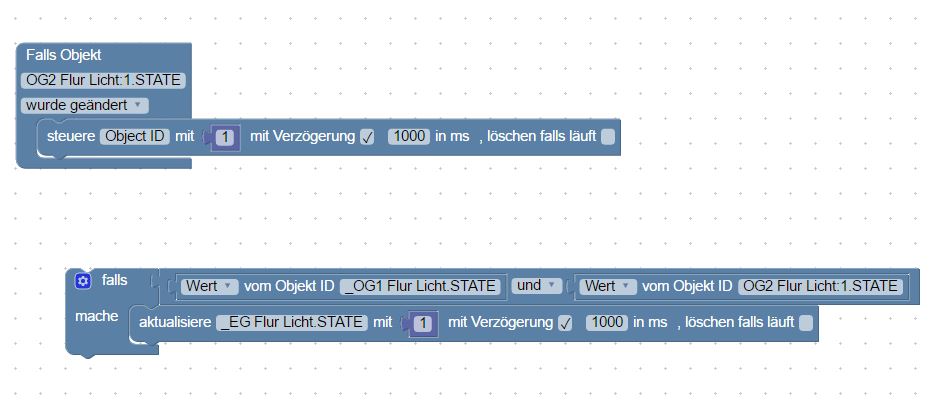
ich will nur ein paar IO-Broker States in Homematic-Systemvariablen abspeichern (damit ich in Mediola darauf zugreifen kann). Aber aus irgend einem Grund wird mein Wert nicht in die Homematic-Variable geschrieben. Ich habe überprüft dass beide Variablentypen Zahlen sind und dass auch der Broker die Werte schreiben darf. Trotzdem klappt es nicht. Irgend einen Tipp?
Vielen Dank
1136_blocky.png -
Hallo
Nimm nicht "aktualisiere" sondern "steuere".
(Bin ich auch am Anfang drauf reingefallen)
Grüße
-
Hallo
Nimm nicht "aktualisiere" sondern "steuere".
(Bin ich auch am Anfang drauf reingefallen) `
Mhm. Hilft leider nicht. Auch wenn ich mal testweise nur einfach eine Zahl in die Variable schreiben lasse (jetzt mit "steuere" kommt nichts bei homematic an. Steht immer noch auf dem Vorgegebenen minimalen extrem.



Support us
726
Online32.7k
Users82.3k
Topics1.3m
Posts