




jarvis v2.2.0 - just another remarkable vis

-
@schuetzeschulz Hilft mir leider nicht, aber die Dokumentenprüfung hat einen Fehler ergeben:
text-align=center war falsch (lt. Prüfung) -> text-align: center
Bringt das was, vielleicht kam er da durcheinander?
Kann mir auch gut vorstellen, das der onclick-Event auf den Kameraseite von denen evtl gesperrt ist?
Trotzdem probiere mal beide Varainten.<!DOCTYPE HTML><html> <head> <title> </title> <script> function onKlick(elem){ elem.requestFullscreen();} </script> </head><body style = "text-align: center;" id = "video1body"><div><iFrame width="320px" height="150px" src="<URL_ZUR_KAMERA>" onclick="onKlick(this);" frameborder = "2" allow="accelerometer; autoplay; clipboard-write; encrypted-media; gyroscope; picture-in-picture" allowfullscreen="true"></iFrame></div> </body></html>Die Variante mit der FullScrrenAPI und dem Button für FullScreen
<!DOCTYPE HTML>
<html>

<head>
    <title> </title>
    <script>
        var button = document.querySelector('#container .button');
        button.addEventListener('click', fullscreen);
        document.addEventListener('webkitfullscreenchange', fullscreenChange);
        document.addEventListener('mozfullscreenchange', fullscreenChange);
        document.addEventListener('fullscreenchange', fullscreenChange);
        document.addEventListener('MSFullscreenChange', fullscreenChange);

        function fullscreen() {
            // check if fullscreen mode is available
            if (document.fullscreenEnabled ||
                document.webkitFullscreenEnabled ||
                document.mozFullScreenEnabled ||
                document.msFullscreenEnabled) {

                // which element will be fullscreen
                var iframe = document.querySelector('#container iframe');
                // Do fullscreen
                if (iframe.requestFullscreen) {
                    iframe.requestFullscreen();
                } else if (iframe.webkitRequestFullscreen) {
                    iframe.webkitRequestFullscreen();
                } else if (iframe.mozRequestFullScreen) {
                    iframe.mozRequestFullScreen();
                } else if (iframe.msRequestFullscreen) {
                    iframe.msRequestFullscreen();
                }
            }
            else {
                document.querySelector('.error').innerHTML = 'Your browser is not supported';
            }
        }

        function fullscreenChange() {
            if (document.fullscreenEnabled ||
                document.webkitIsFullScreen ||
                document.mozFullScreen ||
                document.msFullscreenElement) {
                    console.log('enter fullscreen');
                }
            else {
                console.log('exit fullscreen');
            }
            // force to reload iframe once to prevent the iframe source didn't care about trying to resize the window
            // comment this line and you will see
            var iframe = document.querySelector('iframe');
            iframe.src = iframe.src;
        }

        function onKlick(elem) { elem.requestFullscreen(); }
    </script>
</head>

<body style="text-align: center;" id="video1body">
    <div id="container">
        <iFrame width="320px" height="150px" src="URL" onclick="onKlick(this);" frameborder="2"
            allow="accelerometer; autoplay; clipboard-write; encrypted-media; gyroscope; picture-in-picture"
            allowfullscreen webkitallowfullscreen mozallowfullscreen oallowfullscreen msallowfullscreen>
        </iFrame>
        <div>
            <button class="button">FullScreen</button>
        </div>
        <div class="error"></div>
    </div>
</body>

</html>
Erst als Datei so testen und dann im Objekt für jarvis.
Variante 1 hat nicht funktioniert, Variante 2 leider auch nicht. Bei Variante 2 kommt folgender Fehler in der Browser-Konsole:
test.html:8 Uncaught TypeError: Cannot read properties of null (reading 'addEventListener') at test.html:8 -
Variante 1 hat nicht funktioniert, Variante 2 leider auch nicht. Bei Variante 2 kommt folgender Fehler in der Browser-Konsole:
test.html:8 Uncaught TypeError: Cannot read properties of null (reading 'addEventListener') at test.html:8@schuetzeschulz
Next one:<!DOCTYPE HTML> <html> <head> <title> </title> <style> #container {text-align: center; height: 100%;} .button { color: #333; background-color: #fff; border-color: #ccc; font-size: 14px; font-weight: 400; border: 1px solid black; border-radius: 4px; cursor: pointer; line-height: 1.42857143; text-align: center; white-space: nowrap; vertical-align: middle; padding: 6px 12px;} </style> <script> setTimeout(function(){ var button = document.querySelector('#container .button'); button.addEventListener('click', fullscreen); document.addEventListener('webkitfullscreenchange', fullscreenChange); document.addEventListener('mozfullscreenchange', fullscreenChange); document.addEventListener('fullscreenchange', fullscreenChange); document.addEventListener('MSFullscreenChange', fullscreenChange); },1000); function fullscreen() { // check if fullscreen mode is available if (document.fullscreenEnabled || document.webkitFullscreenEnabled || document.mozFullScreenEnabled || document.msFullscreenEnabled) { // which element will be fullscreen var iframe = document.querySelector('#container iframe'); // Do fullscreen if (iframe.requestFullscreen) { iframe.requestFullscreen(); } else if (iframe.webkitRequestFullscreen) { iframe.webkitRequestFullscreen(); } else if (iframe.mozRequestFullScreen) { iframe.mozRequestFullScreen(); } else if (iframe.msRequestFullscreen) { iframe.msRequestFullscreen(); } } else { document.querySelector('.error').innerHTML = 'Your browser is not supported'; } } function fullscreenChange() { if (document.fullscreenEnabled || document.webkitIsFullScreen || document.mozFullScreen || document.msFullscreenElement) { console.log('enter fullscreen'); } else { console.log('exit fullscreen'); } // force to reload iframe once to prevent the iframe source didn't care about trying to resize the window // comment this line and you will see var iframe = document.querySelector('iframe'); iframe.src = iframe.src; } function onKlick(elem) { elem.requestFullscreen(); } </script> </head> <body style="text-align: center;" id="video1body"> <div id="container"> <iFrame width="320px" height="150px" src="URL" onclick="onKlick(this);" frameborder="2" allow="accelerometer; autoplay; clipboard-write; encrypted-media; gyroscope; picture-in-picture" allowfullscreen webkitallowfullscreen mozallowfullscreen oallowfullscreen msallowfullscreen> </iFrame> <div> <button class="button">FullScreen</button> </div> <div class="error"></div> </div> </body> </html> -
Variante 1 hat nicht funktioniert, Variante 2 leider auch nicht. Bei Variante 2 kommt folgender Fehler in der Browser-Konsole:
test.html:8 Uncaught TypeError: Cannot read properties of null (reading 'addEventListener') at test.html:8Ich glaub ich bin zu dämlich.
Hab das Script laufen lassen und die IP´s eingetragen:
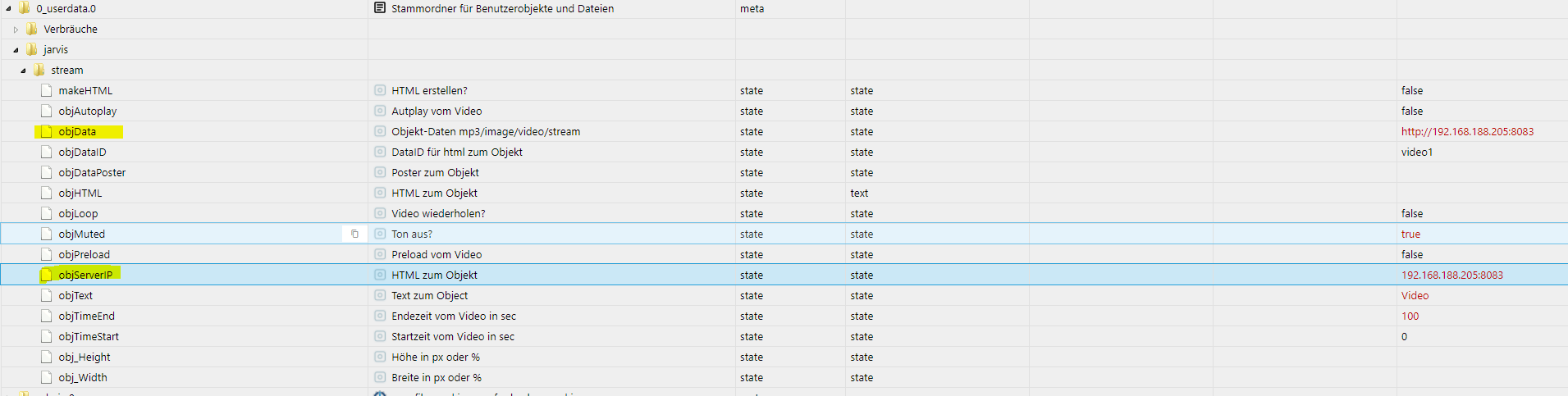
In Jarvis folgendes:
Geräte:
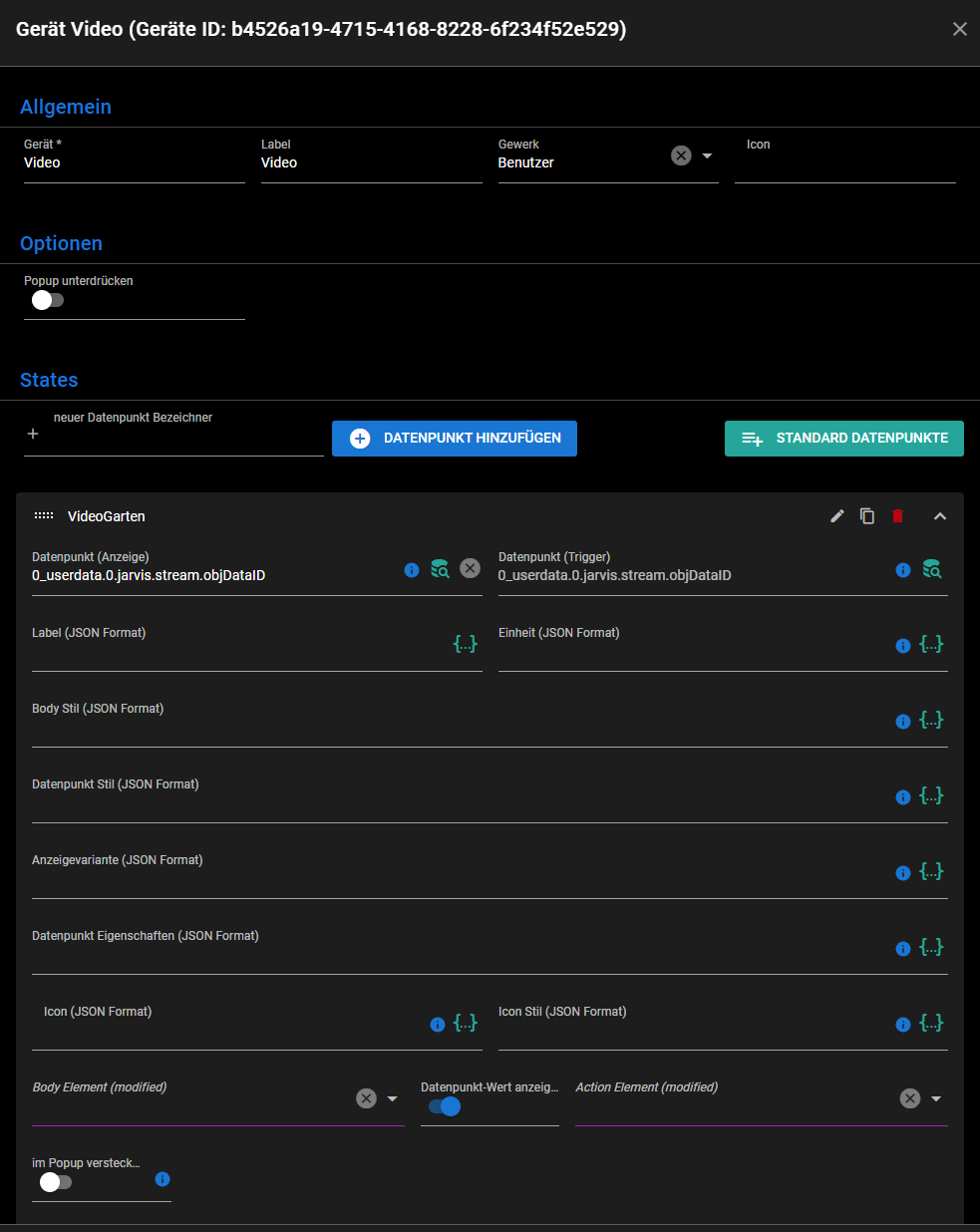
Widget:
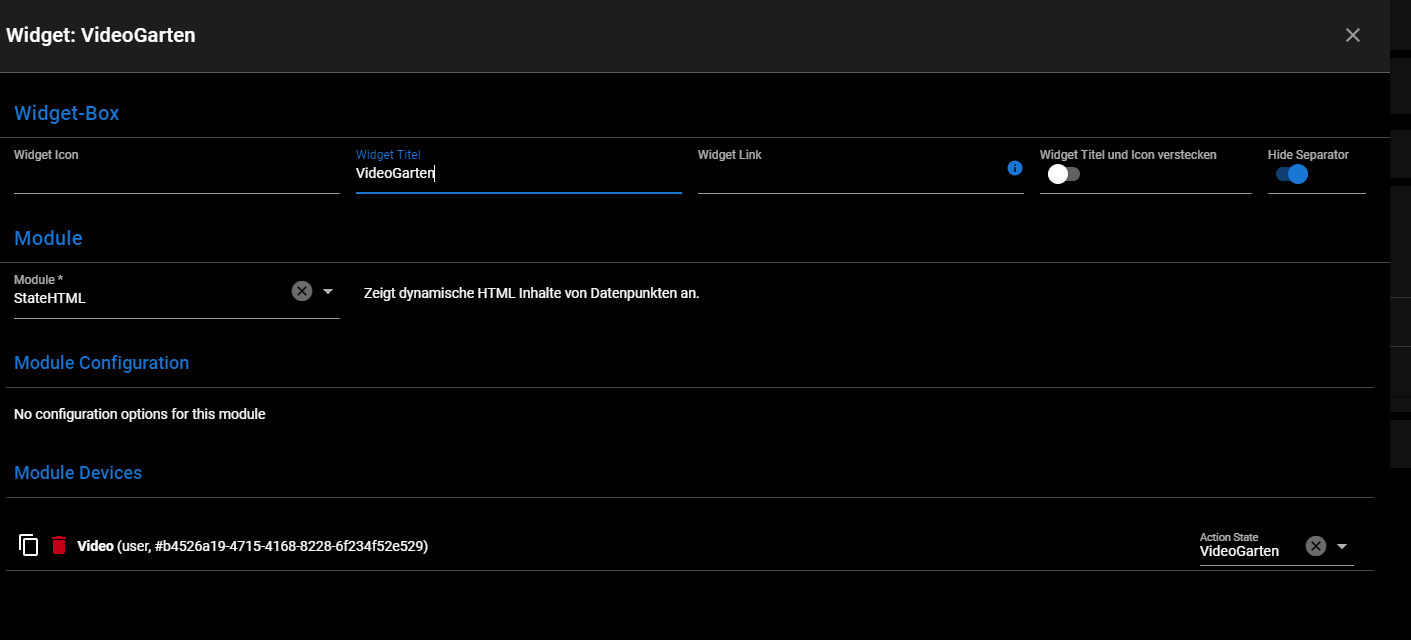
Was mach ich falsch?
-
Ich glaub ich bin zu dämlich.
Hab das Script laufen lassen und die IP´s eingetragen:
In Jarvis folgendes:
Geräte:
Widget:
Was mach ich falsch?
@johannes-bauerstatter Wie lautet denn der Link zur Kamera?

In die Server-Ip kommt nur die IP 192.168.188.205, aber nur dann, wenn man die vis.0 in objData hat. Dann würde automatisch der Link erstellt mit http://SERVER-IP:8082/ + objData.NUC i7 64GB mit Proxmox ---- Jarvis Infos Aktualisierungen der Doku auf Instagram verfolgen -> mcuiobroker Instagram
Wenn Euch mein Vorschlag geholfen hat, bitte rechts "^" klicken. -
@johannes-bauerstatter Wie lautet denn der Link zur Kamera?
In die Server-Ip kommt nur die IP 192.168.188.205, aber nur dann, wenn man die vis.0 in objData hat. Dann würde automatisch der Link erstellt mit http://SERVER-IP:8082/ + objData.@mcu Ja genau. Wenn ich das in den Browser eingebe, läuft der Stream.
-
@mcu Ja genau. Wenn ich das in den Browser eingebe, läuft der Stream.
@johannes-bauerstatter Stell mal bitte die objHTML rein.
Du musst schon einmal makeHTML auf true setzen, damit eine objHTML erstellt wird.
Und in jarvis müsste man auch die objHTML nutzen und nicht die objDataID.NUC i7 64GB mit Proxmox ---- Jarvis Infos Aktualisierungen der Doku auf Instagram verfolgen -> mcuiobroker Instagram
Wenn Euch mein Vorschlag geholfen hat, bitte rechts "^" klicken. -
@johannes-bauerstatter Stell mal bitte die objHTML rein.
Du musst schon einmal makeHTML auf true setzen, damit eine objHTML erstellt wird.
Und in jarvis müsste man auch die objHTML nutzen und nicht die objDataID.@mcu Muss das Script immer laufen oder nur 1x malig? Hab den Datenpunkt auf true gestellt und auch das Script wieder gestartet. Keine Änderung:
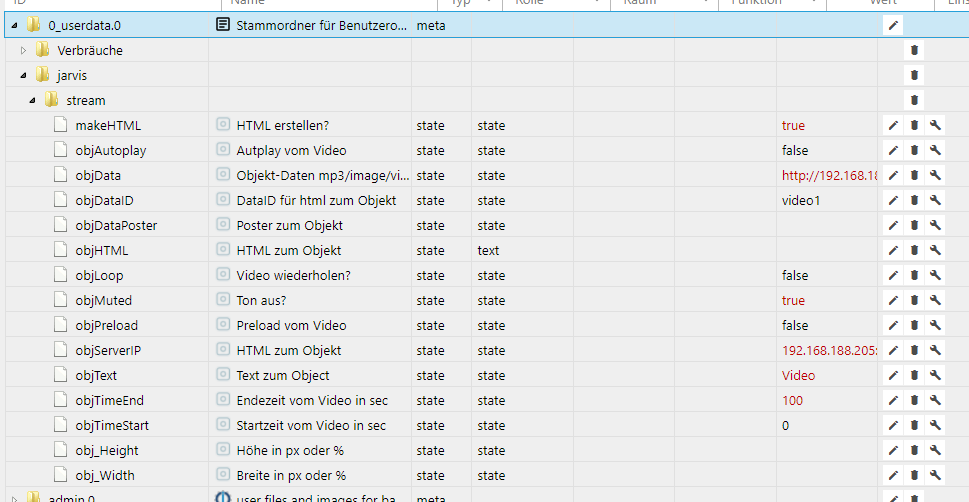
{ "common": { "read": true, "write": true, "name": "HTML zum Objekt", "type": "string", "role": "text", "def": "" }, "native": {}, "type": "state", "from": "system.adapter.javascript.0", "user": "system.user.admin", "ts": 1636524251378, "_id": "0_userdata.0.jarvis.stream.objHTML", "acl": { "object": 1636, "state": 1636, "owner": "system.user.admin", "ownerGroup": "system.group.administrator" } } -
@mcu Muss das Script immer laufen oder nur 1x malig? Hab den Datenpunkt auf true gestellt und auch das Script wieder gestartet. Keine Änderung:
{ "common": { "read": true, "write": true, "name": "HTML zum Objekt", "type": "string", "role": "text", "def": "" }, "native": {}, "type": "state", "from": "system.adapter.javascript.0", "user": "system.user.admin", "ts": 1636524251378, "_id": "0_userdata.0.jarvis.stream.objHTML", "acl": { "object": 1636, "state": 1636, "owner": "system.user.admin", "ownerGroup": "system.group.administrator" } }@johannes-bauerstatter
Das Script nutzt man um die objHTML zu erstellen.
Das Programm muss laufen, bevor man den Schalter auf true setzt. Du musst jetzt einmal wieder auf false setzen und dann auf true.
Benötigt man nur einmalig, ausser man hat verändernde Inhalte, dann müsste das Programm sowieso angepasst werden.NUC i7 64GB mit Proxmox ---- Jarvis Infos Aktualisierungen der Doku auf Instagram verfolgen -> mcuiobroker Instagram
Wenn Euch mein Vorschlag geholfen hat, bitte rechts "^" klicken. -
@johannes-bauerstatter
Das Script nutzt man um die objHTML zu erstellen.
Das Programm muss laufen, bevor man den Schalter auf true setzt. Du musst jetzt einmal wieder auf false setzen und dann auf true.
Benötigt man nur einmalig, ausser man hat verändernde Inhalte, dann müsste das Programm sowieso angepasst werden.@mcu Danke. Funktioniert jetzt
-
@mcu Danke. Funktioniert jetzt
@johannes-bauerstatter

Hält der Videostream dann nach 100 Sekunden an?NUC i7 64GB mit Proxmox ---- Jarvis Infos Aktualisierungen der Doku auf Instagram verfolgen -> mcuiobroker Instagram
Wenn Euch mein Vorschlag geholfen hat, bitte rechts "^" klicken. -
@schuetzeschulz
Next one:<!DOCTYPE HTML> <html> <head> <title> </title> <style> #container {text-align: center; height: 100%;} .button { color: #333; background-color: #fff; border-color: #ccc; font-size: 14px; font-weight: 400; border: 1px solid black; border-radius: 4px; cursor: pointer; line-height: 1.42857143; text-align: center; white-space: nowrap; vertical-align: middle; padding: 6px 12px;} </style> <script> setTimeout(function(){ var button = document.querySelector('#container .button'); button.addEventListener('click', fullscreen); document.addEventListener('webkitfullscreenchange', fullscreenChange); document.addEventListener('mozfullscreenchange', fullscreenChange); document.addEventListener('fullscreenchange', fullscreenChange); document.addEventListener('MSFullscreenChange', fullscreenChange); },1000); function fullscreen() { // check if fullscreen mode is available if (document.fullscreenEnabled || document.webkitFullscreenEnabled || document.mozFullScreenEnabled || document.msFullscreenEnabled) { // which element will be fullscreen var iframe = document.querySelector('#container iframe'); // Do fullscreen if (iframe.requestFullscreen) { iframe.requestFullscreen(); } else if (iframe.webkitRequestFullscreen) { iframe.webkitRequestFullscreen(); } else if (iframe.mozRequestFullScreen) { iframe.mozRequestFullScreen(); } else if (iframe.msRequestFullscreen) { iframe.msRequestFullscreen(); } } else { document.querySelector('.error').innerHTML = 'Your browser is not supported'; } } function fullscreenChange() { if (document.fullscreenEnabled || document.webkitIsFullScreen || document.mozFullScreen || document.msFullscreenElement) { console.log('enter fullscreen'); } else { console.log('exit fullscreen'); } // force to reload iframe once to prevent the iframe source didn't care about trying to resize the window // comment this line and you will see var iframe = document.querySelector('iframe'); iframe.src = iframe.src; } function onKlick(elem) { elem.requestFullscreen(); } </script> </head> <body style="text-align: center;" id="video1body"> <div id="container"> <iFrame width="320px" height="150px" src="URL" onclick="onKlick(this);" frameborder="2" allow="accelerometer; autoplay; clipboard-write; encrypted-media; gyroscope; picture-in-picture" allowfullscreen webkitallowfullscreen mozallowfullscreen oallowfullscreen msallowfullscreen> </iFrame> <div> <button class="button">FullScreen</button> </div> <div class="error"></div> </div> </body> </html>@mcu sagte in jarvis v2.2.0 - just another remarkable vis:
<!DOCTYPE HTML>
<html>

<head>
    <title> </title>
    <style> #container {text-align: center; height: 100%;} .button { color: #333; background-color: #fff; border-color: #ccc;  font-size: 14px; font-weight: 400; border: 1px solid black; border-radius: 4px;  cursor: pointer;  line-height: 1.42857143; text-align: center; white-space: nowrap; vertical-align: middle; padding: 6px 12px;}
    </style>
    <script>
	setTimeout(function(){
	        var button = document.querySelector('#container .button');
        	button.addEventListener('click', fullscreen);
        	document.addEventListener('webkitfullscreenchange', fullscreenChange);
        	document.addEventListener('mozfullscreenchange', fullscreenChange);
        	document.addEventListener('fullscreenchange', fullscreenChange);
        	document.addEventListener('MSFullscreenChange', fullscreenChange);
	},1000);
        function fullscreen() {
            // check if fullscreen mode is available
            if (document.fullscreenEnabled ||
                document.webkitFullscreenEnabled ||
                document.mozFullScreenEnabled ||
                document.msFullscreenEnabled) {

                // which element will be fullscreen
                var iframe = document.querySelector('#container iframe');
                // Do fullscreen
                if (iframe.requestFullscreen) {
                    iframe.requestFullscreen();
                } else if (iframe.webkitRequestFullscreen) {
                    iframe.webkitRequestFullscreen();
                } else if (iframe.mozRequestFullScreen) {
                    iframe.mozRequestFullScreen();
                } else if (iframe.msRequestFullscreen) {
                    iframe.msRequestFullscreen();
                }
            }
            else {
                document.querySelector('.error').innerHTML = 'Your browser is not supported';
            }
        }

        function fullscreenChange() {
            if (document.fullscreenEnabled ||
                document.webkitIsFullScreen ||
                document.mozFullScreen ||
                document.msFullscreenElement) {
                    console.log('enter fullscreen');
                }
            else {
                console.log('exit fullscreen');
            }
            // force to reload iframe once to prevent the iframe source didn't care about trying to resize the window
            // comment this line and you will see
            var iframe = document.querySelector('iframe');
            iframe.src = iframe.src;
        }

        function onKlick(elem) { elem.requestFullscreen(); }
    </script>
</head>

<body style="text-align: center;" id="video1body">
    <div id="container">
        <iFrame width="320px" height="150px" src="URL" onclick="onKlick(this);" frameborder="2"
            allow="accelerometer; autoplay; clipboard-write; encrypted-media; gyroscope; picture-in-picture"
            allowfullscreen webkitallowfullscreen mozallowfullscreen oallowfullscreen msallowfullscreen>
        </iFrame>
        <div>
            <button class="button">FullScreen</button>
        </div>
        <div class="error"></div>
    </div>
</body>

</html>
Damit funktioniert das mit dem Button. Also klicke ich auf den Button kommt Vollbild.
-
@mcu sagte in jarvis v2.2.0 - just another remarkable vis:
<!DOCTYPE HTML>
<html>

<head>
    <title> </title>
    <style> #container {text-align: center; height: 100%;} .button { color: #333; background-color: #fff; border-color: #ccc;  font-size: 14px; font-weight: 400; border: 1px solid black; border-radius: 4px;  cursor: pointer;  line-height: 1.42857143; text-align: center; white-space: nowrap; vertical-align: middle; padding: 6px 12px;}
    </style>
    <script>
	setTimeout(function(){
	        var button = document.querySelector('#container .button');
        	button.addEventListener('click', fullscreen);
        	document.addEventListener('webkitfullscreenchange', fullscreenChange);
        	document.addEventListener('mozfullscreenchange', fullscreenChange);
        	document.addEventListener('fullscreenchange', fullscreenChange);
        	document.addEventListener('MSFullscreenChange', fullscreenChange);
	},1000);
        function fullscreen() {
            // check if fullscreen mode is available
            if (document.fullscreenEnabled ||
                document.webkitFullscreenEnabled ||
                document.mozFullScreenEnabled ||
                document.msFullscreenEnabled) {

                // which element will be fullscreen
                var iframe = document.querySelector('#container iframe');
                // Do fullscreen
                if (iframe.requestFullscreen) {
                    iframe.requestFullscreen();
                } else if (iframe.webkitRequestFullscreen) {
                    iframe.webkitRequestFullscreen();
                } else if (iframe.mozRequestFullScreen) {
                    iframe.mozRequestFullScreen();
                } else if (iframe.msRequestFullscreen) {
                    iframe.msRequestFullscreen();
                }
            }
            else {
                document.querySelector('.error').innerHTML = 'Your browser is not supported';
            }
        }

        function fullscreenChange() {
            if (document.fullscreenEnabled ||
                document.webkitIsFullScreen ||
                document.mozFullScreen ||
                document.msFullscreenElement) {
                    console.log('enter fullscreen');
                }
            else {
                console.log('exit fullscreen');
            }
            // force to reload iframe once to prevent the iframe source didn't care about trying to resize the window
            // comment this line and you will see
            var iframe = document.querySelector('iframe');
            iframe.src = iframe.src;
        }

        function onKlick(elem) { elem.requestFullscreen(); }
    </script>
</head>

<body style="text-align: center;" id="video1body">
    <div id="container">
        <iFrame width="320px" height="150px" src="URL" onclick="onKlick(this);" frameborder="2"
            allow="accelerometer; autoplay; clipboard-write; encrypted-media; gyroscope; picture-in-picture"
            allowfullscreen webkitallowfullscreen mozallowfullscreen oallowfullscreen msallowfullscreen>
        </iFrame>
        <div>
            <button class="button">FullScreen</button>
        </div>
        <div class="error"></div>
    </div>
</body>

</html>
Damit funktioniert das mit dem Button. Also klicke ich auf den Button kommt Vollbild.
@schuetzeschulz Zufrieden, oder muss ich noch weiterschauen?
-
@schuetzeschulz Zufrieden, oder muss ich noch weiterschauen?
@mcu Naja, ich würde es "besser" finden, wenn das Vollbild kommt wenn ich auf das Kamerabild drücke/klicke. Also quasi ohne den Button...
-
@mcu Naja, ich würde es "besser" finden, wenn das Vollbild kommt wenn ich auf das Kamerabild drücke/klicke. Also quasi ohne den Button...
@schuetzeschulz Dafür habe ich keinen Ansatz mehr. Das scheint an der Software für die Anzeige der Kamera zu liegen. Welche Kamera ist das?
-
@johannes-bauerstatter
Hält der Videostream dann nach 100 Sekunden an?@mcu Ja, funktioniert auch. War gewollt zum Testen.
-
@schuetzeschulz Dafür habe ich keinen Ansatz mehr. Das scheint an der Software für die Anzeige der Kamera zu liegen. Welche Kamera ist das?
@mcu Habe 3 Wansview W3 Kameras im Einsatz.
-
Kenn jemand die CSS um die "Headings" (Überschriften) der Widgets anzupassen? Also Symbolgröße, Transparenz, sowie Schriftgröße? Vielen Dank!
-
-
@mcu Für
.q-item__section--main .q-item__label.text-h6gibt es (noch) keinjarvis-wasAuchImmerEigenesCss?!@rkccorian Nein. Es gibt jarvis-header, hat aber die Überschrift nicht mit drin? Bin mir grade nicht sicher.
.jarvis-widget-header

Support us
575
Online32.7k
Users82.4k
Topics1.3m
Posts