Skip to content
  • Home
  • Recent
  • Tags
  • 0 Unread 0
  • Categories
  • Unreplied
  • Popular
  • GitHub
  • Docu
  • Hilfe
Skins
  • Light
  • Brite
  • Cerulean
  • Cosmo
  • Flatly
  • Journal
  • Litera
  • Lumen
  • Lux
  • Materia
  • Minty
  • Morph
  • Pulse
  • Sandstone
  • Simplex
  • Sketchy
  • Spacelab
  • United
  • Yeti
  • Zephyr
  • Dark
  • Cyborg
  • Darkly
  • Quartz
  • Slate
  • Solar
  • Superhero
  • Vapor

  • Default (No Skin)
  • No Skin
Collapse
ioBroker Logo

Community Forum

donate donate
  1. ioBroker Community Home
  2. Deutsch
  3. Tester
  4. jarvis v2.2.0 - just another remarkable vis
NEWS

  • Jahresrückblick 2025 – unser neuer Blogbeitrag ist online! ✨
    BluefoxB
    Bluefox
    17
    1
    3.2k

  • Neuer Blogbeitrag: Monatsrückblick - Dezember 2025 🎄
    BluefoxB
    Bluefox
    13
    1
    1.1k

  • Weihnachtsangebot 2025! 🎄
    BluefoxB
    Bluefox
    25
    1
    2.4k

jarvis v2.2.0 - just another remarkable vis
Scheduled Pinned Locked Moved Tester
jarvismaterialmaterial uimaterialdesignvisvisualisierungvisualization
6.1k Posts 316 Posters 4.3m Views 273 Watching
  • Oldest to Newest
  • Newest to Oldest
  • Most Votes
Reply
  • Reply as topic
Log in to reply
This topic has been deleted. Only users with topic management privileges can see it.
  • S SchuetzeSchulz

    @diginix OK, also 3 Scripts und die Namen je Script halt anpassen.

    Als Browser habe ich es mit Chrome sowohl Desktop als auch auf dem Handy und mit dem Edge sowie Firefox probiert. Bei keinem passiert was bei Klick/Draufdrücken.

    Ist es auch möglich das Schließen des Vollbilds durch Klicken/Drücken auf das Vollbild selbst zu machen?
    Ich nutze beim Tablet an der Wand einen Rahmen bei dem es keinen Zugriff auf den Zurück-Button des Tablets gibt.

    DiginixD Offline
    DiginixD Offline
    Diginix
    wrote on last edited by Diginix
    #5718

    @schuetzeschulz Nein, das Skript nur einmal.
    Dann in das Objekt 0_userdata.0.jarvis.stream.objData dein Kram kopieren. Dadurch wird das komplette HTML in 0_userdata.0.jarvis.stream.objHTML geschrieben.
    Diesen Inhalt (Objektwert) kopierst du dir in dein eigentliches Objekt wo auch immer.
    Danach nimmst du dir dein zweiten Stream und fügst den Inhalt wieder in objData ein. Dadurch wird direkt wieder objHTML neu geschrieben mit dem kompletten HTML für den zweiten Stream.
    Das jarvis Skript und die Objekte sind nur zum Erzeugen des HTML welches du dann in deine eigenen Objekte, die es ja schon gab kopierst.

    Ja, auch das Beenden des Vollbildes kann man mit Klick und Javascript machen. Da bei dir aber jetzt schon Probleme bestehen, würde ich das nicht parallel auch noch angehen. Erstmal sollte es richtig funktionieren. Damit man sich das ansehen kann, müsstest du mal die Werte aus 0_userdata.0.jarvis.stream.objData und 0_userdata.0.jarvis.stream.objHTML hier posten.
    Aber schau das du Logindaten entfernst falls die in der StreamURL enthalten sind.

    ..:: So long! Tom ::..

    NUC7i3 (Ubuntu Proxmox VM) | Echo Dots 2+3. Gen | Xiaomi Sensoren | Mi Robot 1S | Yeelight | Sonoff | Shelly | H801 RGB | Gosund SP1 | NodeMCU+ESP32 | Kostal Plenticore PV+BYD | openWB

    S 1 Reply Last reply
    0
    • DiginixD Diginix

      @mcu Danke, funktioniert perfekt!
      Am Ende hab ich nur

      function onKlick(elem) { elem.requestFullscreen(); }
      

      und den Funktionsaufruf selbst in meinem bisherigen html Objekt ergänzt. Ich kannte "elem.requestFullscreen" noch nicht.

      M Online
      M Online
      MCU
      wrote on last edited by
      #5719

      @diginix Stellst du bitte Dein Script zur Verfügung. Danke.

      NUC i7 64GB mit Proxmox ---- Jarvis Infos Aktualisierungen der Doku auf Instagram verfolgen -> mcuiobroker Instagram
      Wenn Euch mein Vorschlag geholfen hat, bitte rechts "^" klicken.

      1 Reply Last reply
      0
      • DiginixD Diginix

        @schuetzeschulz Nein, das Skript nur einmal.
        Dann in das Objekt 0_userdata.0.jarvis.stream.objData dein Kram kopieren. Dadurch wird das komplette HTML in 0_userdata.0.jarvis.stream.objHTML geschrieben.
        Diesen Inhalt (Objektwert) kopierst du dir in dein eigentliches Objekt wo auch immer.
        Danach nimmst du dir dein zweiten Stream und fügst den Inhalt wieder in objData ein. Dadurch wird direkt wieder objHTML neu geschrieben mit dem kompletten HTML für den zweiten Stream.
        Das jarvis Skript und die Objekte sind nur zum Erzeugen des HTML welches du dann in deine eigenen Objekte, die es ja schon gab kopierst.

        Ja, auch das Beenden des Vollbildes kann man mit Klick und Javascript machen. Da bei dir aber jetzt schon Probleme bestehen, würde ich das nicht parallel auch noch angehen. Erstmal sollte es richtig funktionieren. Damit man sich das ansehen kann, müsstest du mal die Werte aus 0_userdata.0.jarvis.stream.objData und 0_userdata.0.jarvis.stream.objHTML hier posten.
        Aber schau das du Logindaten entfernst falls die in der StreamURL enthalten sind.

        S Offline
        S Offline
        SchuetzeSchulz
        wrote on last edited by
        #5720

        @diginix Hier mal der Inhalt aus objHTML:

        <!DOCTYPE HTML><html> <head>  <title>  </title> <script> function onKlick(elem){ elem.requestFullscreen();} </script> </head><body style = "text-align= center;" id = "video1body"><div><iFrame width="320px" height="150px" src="<URL_ZUR_KAMERA>" onclick="onKlick(this);"  frameborder = "2" allow="accelerometer; autoplay; clipboard-write; encrypted-media; gyroscope; picture-in-picture" allowfullscreen></iFrame></div> </body></html>
        
        M 1 Reply Last reply
        0
        • S SchuetzeSchulz

          @diginix Hier mal der Inhalt aus objHTML:

          <!DOCTYPE HTML><html> <head>  <title>  </title> <script> function onKlick(elem){ elem.requestFullscreen();} </script> </head><body style = "text-align= center;" id = "video1body"><div><iFrame width="320px" height="150px" src="<URL_ZUR_KAMERA>" onclick="onKlick(this);"  frameborder = "2" allow="accelerometer; autoplay; clipboard-write; encrypted-media; gyroscope; picture-in-picture" allowfullscreen></iFrame></div> </body></html>
          
          M Online
          M Online
          MCU
          wrote on last edited by MCU
          #5721

          @schuetzeschulz Wenn du den Inhalt mit der richtigen URL als Datei speicherst unter Test.html und dann im Browser startest, funktioniert es dann?

          NUC i7 64GB mit Proxmox ---- Jarvis Infos Aktualisierungen der Doku auf Instagram verfolgen -> mcuiobroker Instagram
          Wenn Euch mein Vorschlag geholfen hat, bitte rechts "^" klicken.

          S 1 Reply Last reply
          0
          • M MCU

            @schuetzeschulz Wenn du den Inhalt mit der richtigen URL als Datei speicherst unter Test.html und dann im Browser startest, funktioniert es dann?

            S Offline
            S Offline
            SchuetzeSchulz
            wrote on last edited by
            #5722

            @mcu Leider nein. Auch hier egal, welcher Browser. Bild etc. wird alles super angezeigt, nur der Klick funktioniert nicht.

            M 1 Reply Last reply
            0
            • S SchuetzeSchulz

              @mcu Leider nein. Auch hier egal, welcher Browser. Bild etc. wird alles super angezeigt, nur der Klick funktioniert nicht.

              M Online
              M Online
              MCU
              wrote on last edited by
              #5723

              @schuetzeschulz Ersetz mal bitte in der Datei iFrame durch video und/iFrame durch /video.

              NUC i7 64GB mit Proxmox ---- Jarvis Infos Aktualisierungen der Doku auf Instagram verfolgen -> mcuiobroker Instagram
              Wenn Euch mein Vorschlag geholfen hat, bitte rechts "^" klicken.

              S 1 Reply Last reply
              0
              • M MCU

                @schuetzeschulz Ersetz mal bitte in der Datei iFrame durch video und/iFrame durch /video.

                S Offline
                S Offline
                SchuetzeSchulz
                wrote on last edited by SchuetzeSchulz
                #5724

                @mcu Dann wird mir kein Bild mehr angezeigt (weiße Seite). Wenn ich dann dort hinklicke wo vorher immer das Video war, öffnet sich was im Vollbild aber halt keine Anzeige mehr.

                In der Browser Konsole erscheint das hier:

                Cross-Origin Read Blocking (CORB) blocked cross-origin response https://meinmotionserver/picture/3/frame/ with MIME type text/html. See https://www.chromestatus.com/feature/5629709824032768 for more details.
                
                M 1 Reply Last reply
                0
                • S SchuetzeSchulz

                  @mcu Dann wird mir kein Bild mehr angezeigt (weiße Seite). Wenn ich dann dort hinklicke wo vorher immer das Video war, öffnet sich was im Vollbild aber halt keine Anzeige mehr.

                  In der Browser Konsole erscheint das hier:

                  Cross-Origin Read Blocking (CORB) blocked cross-origin response https://meinmotionserver/picture/3/frame/ with MIME type text/html. See https://www.chromestatus.com/feature/5629709824032768 for more details.
                  
                  M Online
                  M Online
                  MCU
                  wrote on last edited by
                  #5725

                  @schuetzeschulz Dann stell mal bitte den Aufbau vom objData rein ohne echte Werte. Dann geh ich auf Ideensuche.

                  NUC i7 64GB mit Proxmox ---- Jarvis Infos Aktualisierungen der Doku auf Instagram verfolgen -> mcuiobroker Instagram
                  Wenn Euch mein Vorschlag geholfen hat, bitte rechts "^" klicken.

                  S 2 Replies Last reply
                  0
                  • M MCU

                    @schuetzeschulz Dann stell mal bitte den Aufbau vom objData rein ohne echte Werte. Dann geh ich auf Ideensuche.

                    S Offline
                    S Offline
                    SchuetzeSchulz
                    wrote on last edited by
                    #5726

                    @mcu Hatte ich oben schon:

                    <!DOCTYPE HTML><html> <head> <title> </title> <script> function onKlick(elem){ elem.requestFullscreen();} </script> </head><body style = "text-align= center;" id = "video1body"><div><iFrame width="320px" height="150px" src="<URL_ZUR_KAMERA>" onclick="onKlick(this);" frameborder = "2" allow="accelerometer; autoplay; clipboard-write; encrypted-media; gyroscope; picture-in-picture" allowfullscreen></iFrame></div> </body></html>
                    
                    M 1 Reply Last reply
                    0
                    • S SchuetzeSchulz

                      @mcu Hatte ich oben schon:

                      <!DOCTYPE HTML><html> <head> <title> </title> <script> function onKlick(elem){ elem.requestFullscreen();} </script> </head><body style = "text-align= center;" id = "video1body"><div><iFrame width="320px" height="150px" src="<URL_ZUR_KAMERA>" onclick="onKlick(this);" frameborder = "2" allow="accelerometer; autoplay; clipboard-write; encrypted-media; gyroscope; picture-in-picture" allowfullscreen></iFrame></div> </body></html>
                      
                      M Online
                      M Online
                      MCU
                      wrote on last edited by
                      #5727

                      @schuetzeschulz Nein die src

                      NUC i7 64GB mit Proxmox ---- Jarvis Infos Aktualisierungen der Doku auf Instagram verfolgen -> mcuiobroker Instagram
                      Wenn Euch mein Vorschlag geholfen hat, bitte rechts "^" klicken.

                      S 1 Reply Last reply
                      0
                      • M MCU

                        @schuetzeschulz Nein die src

                        S Offline
                        S Offline
                        SchuetzeSchulz
                        wrote on last edited by
                        #5728

                        @mcu Achso, Du meinst die URL?

                        https://<meinmotionserver>/picture/3/frame/
                        
                        1 Reply Last reply
                        0
                        • M MCU

                          @schuetzeschulz Dann stell mal bitte den Aufbau vom objData rein ohne echte Werte. Dann geh ich auf Ideensuche.

                          S Offline
                          S Offline
                          SchuetzeSchulz
                          wrote on last edited by
                          #5729

                          @mcu Eventuell hilft Dir das: https://codepen.io/ssk7833/pen/mVOXXp

                          Da wird es allerdings mit nem Button gemacht.

                          M 1 Reply Last reply
                          0
                          • S SchuetzeSchulz

                            @mcu Eventuell hilft Dir das: https://codepen.io/ssk7833/pen/mVOXXp

                            Da wird es allerdings mit nem Button gemacht.

                            M Online
                            M Online
                            MCU
                            wrote on last edited by MCU
                            #5730

                            @schuetzeschulz

                            <!DOCTYPE HTML><html> <head> <title> </title> <script> function onKlick(elem){ elem.requestFullscreen();} </script> </head><body style = "text-align= center;" id = "video1body"><div><iFrame width="320px" height="150px" src="<URL_ZUR_KAMERA>" onclick="onKlick(this);" frameborder = "2" allow="accelerometer; autoplay; clipboard-write; encrypted-media; gyroscope; picture-in-picture" allowfullscreen="true"></iFrame></div> </body></html>
                            

                            Hab da mal ="true" ergänzt
                            Weitere Versuche wären:
                            allowfullscreen="allowfullscreen" mozallowfullscreen="mozallowfullscreen" msallowfullscreen="msallowfullscreen" oallowfullscreen="oallowfullscreen" webkitallowfullscreen="webkitallowfullscreen"

                            Nächster Versuch Anstatt allowfullscreen:
                            allowfullscreen webkitallowfullscreen mozallowfullscreen oallowfullscreen msallowfullscreen

                            NUC i7 64GB mit Proxmox ---- Jarvis Infos Aktualisierungen der Doku auf Instagram verfolgen -> mcuiobroker Instagram
                            Wenn Euch mein Vorschlag geholfen hat, bitte rechts "^" klicken.

                            S 1 Reply Last reply
                            0
                            • M MCU

                              @schuetzeschulz

                              <!DOCTYPE HTML><html> <head> <title> </title> <script> function onKlick(elem){ elem.requestFullscreen();} </script> </head><body style = "text-align= center;" id = "video1body"><div><iFrame width="320px" height="150px" src="<URL_ZUR_KAMERA>" onclick="onKlick(this);" frameborder = "2" allow="accelerometer; autoplay; clipboard-write; encrypted-media; gyroscope; picture-in-picture" allowfullscreen="true"></iFrame></div> </body></html>
                              

                              Hab da mal ="true" ergänzt
                              Weitere Versuche wären:
                              allowfullscreen="allowfullscreen" mozallowfullscreen="mozallowfullscreen" msallowfullscreen="msallowfullscreen" oallowfullscreen="oallowfullscreen" webkitallowfullscreen="webkitallowfullscreen"

                              Nächster Versuch Anstatt allowfullscreen:
                              allowfullscreen webkitallowfullscreen mozallowfullscreen oallowfullscreen msallowfullscreen

                              S Offline
                              S Offline
                              SchuetzeSchulz
                              wrote on last edited by SchuetzeSchulz
                              #5731

                              @mcu sagte in jarvis v2.2.0 - just another remarkable vis:

                              allowfullscreen webkitallowfullscreen mozallowfullscreen oallowfullscreen msallowfullscreen

                              <!DOCTYPE HTML><html> <head> <title> </title> <script> function onKlick(elem){ elem.requestFullscreen();} </script> </head><body style = "text-align= center;" id = "video1body"><div><iFrame width="320px" height="150px" src="URL" onclick="onKlick(this);" frameborder = "2" allow="accelerometer; autoplay; clipboard-write; encrypted-media; gyroscope; picture-in-picture" allowfullscreen="allowfullscreen" mozallowfullscreen="mozallowfullscreen" msallowfullscreen="msallowfullscreen" oallowfullscreen="oallowfullscreen" webkitallowfullscreen="webkitallowfullscreen"></iFrame></div> </body></html>
                              

                              hat leider nicht geklappt

                              <!DOCTYPE HTML><html> <head> <title> </title> <script> function onKlick(elem){ elem.requestFullscreen();} </script> </head><body style = "text-align= center;" id = "video1body"><div><iFrame width="320px" height="150px" src="URL" onclick="onKlick(this);" frameborder = "2" allow="accelerometer; autoplay; clipboard-write; encrypted-media; gyroscope; picture-in-picture" allowfullscreen webkitallowfullscreen mozallowfullscreen oallowfullscreen msallowfullscreen></iFrame></div> </body></html>
                              

                              hat leider auch nicht geklappt :(

                              M 1 Reply Last reply
                              0
                              • S SchuetzeSchulz

                                @mcu sagte in jarvis v2.2.0 - just another remarkable vis:

                                allowfullscreen webkitallowfullscreen mozallowfullscreen oallowfullscreen msallowfullscreen

                                <!DOCTYPE HTML><html> <head> <title> </title> <script> function onKlick(elem){ elem.requestFullscreen();} </script> </head><body style = "text-align= center;" id = "video1body"><div><iFrame width="320px" height="150px" src="URL" onclick="onKlick(this);" frameborder = "2" allow="accelerometer; autoplay; clipboard-write; encrypted-media; gyroscope; picture-in-picture" allowfullscreen="allowfullscreen" mozallowfullscreen="mozallowfullscreen" msallowfullscreen="msallowfullscreen" oallowfullscreen="oallowfullscreen" webkitallowfullscreen="webkitallowfullscreen"></iFrame></div> </body></html>
                                

                                hat leider nicht geklappt

                                <!DOCTYPE HTML><html> <head> <title> </title> <script> function onKlick(elem){ elem.requestFullscreen();} </script> </head><body style = "text-align= center;" id = "video1body"><div><iFrame width="320px" height="150px" src="URL" onclick="onKlick(this);" frameborder = "2" allow="accelerometer; autoplay; clipboard-write; encrypted-media; gyroscope; picture-in-picture" allowfullscreen webkitallowfullscreen mozallowfullscreen oallowfullscreen msallowfullscreen></iFrame></div> </body></html>
                                

                                hat leider auch nicht geklappt :(

                                M Online
                                M Online
                                MCU
                                wrote on last edited by
                                #5732

                                @schuetzeschulz Und mit dem true?

                                NUC i7 64GB mit Proxmox ---- Jarvis Infos Aktualisierungen der Doku auf Instagram verfolgen -> mcuiobroker Instagram
                                Wenn Euch mein Vorschlag geholfen hat, bitte rechts "^" klicken.

                                S 1 Reply Last reply
                                0
                                • M MCU

                                  @schuetzeschulz Und mit dem true?

                                  S Offline
                                  S Offline
                                  SchuetzeSchulz
                                  wrote on last edited by
                                  #5733

                                  @mcu Leider auch nicht.
                                  Ich weiß nicht, ob Dir das weiterhilft, aber hier mal der Seitenquelltext aus dem Browser, wenn ich die Motion Kamera URL direkt aufrufe:

                                  
                                  <!DOCTYPE html>
                                  <html>
                                      <head>
                                          
                                              <meta http-equiv="Content-Type" content="text/html; charset=UTF-8">
                                              <meta http-equiv="X-UA-Compatible" content="IE=Edge">
                                              <meta name="viewport" content="width=device-width, initial-scale=1.0, maximum-scale=1.0, user-scalable=no">
                                              <meta name="mobile-web-app-capable" content="yes">
                                              <meta name="apple-mobile-web-app-capable" content="yes">
                                              <meta name="theme-color" content="#414141">
                                              <meta name="apple-mobile-web-app-status-bar-style" content="#414141">
                                          
                                          <title>Haustuer</title>
                                          
                                      
                                              <link rel="stylesheet" type="text/css" href="../../../static/css/jquery.timepicker.css?v=0.42.1" />
                                              <link rel="shortcut icon" href="../../../static/favicon.ico?v=0.42.1" />
                                              <link rel="apple-touch-icon" href="../../../static/favicon.ico?v=0.42.1" />
                                              <link rel="manifest" href="../../../static/../manifest.json?v=0.42.1" />
                                          
                                      <link rel="stylesheet" type="text/css" href="../../../static/css/ui.css?v=0.42.1" />
                                      <link rel="stylesheet" type="text/css" href="../../../static/css/main.css?v=0.42.1" />
                                      
                                          <link rel="stylesheet" type="text/css" href="../../../static/css/frame.css?v=0.42.1" />


                                              <script type="text/javascript" src="../../../static/js/css-browser-selector.js?v=0.42.1"></script>
                                              <script type="text/javascript" src="../../../static/js/jquery.min.js?v=0.42.1"></script>
                                              <script type="text/javascript" src="../../../static/js/jquery.timepicker.min.js?v=0.42.1"></script>
                                              <script type="text/javascript" src="../../../static/js/jquery.mousewheel.js?v=0.42.1"></script>
                                  
                                              <script type="text/javascript">
                                                  var staticPath = '../../../static/';
                                              </script>
                                          
                                      <script type="text/javascript" src="../../../static/js/ui.js?v=0.42.1"></script>
                                      <script type="text/javascript" src="../../../static/js/main.js?v=0.42.1"></script>
                                      
                                          <script type="text/javascript" src="../../../static/js/frame.js?v=0.42.1"></script>
                                      
                                      <script type="text/javascript">
                                          var adminUsername = 'GEHEIM';
                                          var frame = true;
                                          var hasLocalCamSupport = false;
                                          var hasNetCamSupport = false;
                                          
                                      </script>
                                  
                                      </head>
                                      
                                      <body>


                                          <div class="camera-frame" id="camera3"
                                                  streaming_framerate="30" streaming_server_resize="false"
                                                  proto="" url="">
                                  
                                              <div class="camera-container">
                                                  <div class="camera-placeholder"><img class="no-camera" src="../../../static/img/no-camera.svg"></div><img
                                                      class="camera"><div class="camera-progress"><img class="camera-progress"></div>
                                              </div>
                                          </div>
                                      
                                      <div class="modal-glass"></div>
                                      <div class="modal-container"></div>
                                      <div class="popup-message-container"></div>
                                  
                                      </body>
                                  </html>
                                  
                                  M 1 Reply Last reply
                                  0
                                  • S SchuetzeSchulz

                                    @mcu Leider auch nicht.
                                    Ich weiß nicht, ob Dir das weiterhilft, aber hier mal der Seitenquelltext aus dem Browser, wenn ich die Motion Kamera URL direkt aufrufe:

                                    
                                    <!DOCTYPE html>
                                    <html>
                                        <head>
                                            
                                                <meta http-equiv="Content-Type" content="text/html; charset=UTF-8">
                                                <meta http-equiv="X-UA-Compatible" content="IE=Edge">
                                                <meta name="viewport" content="width=device-width, initial-scale=1.0, maximum-scale=1.0, user-scalable=no">
                                                <meta name="mobile-web-app-capable" content="yes">
                                                <meta name="apple-mobile-web-app-capable" content="yes">
                                                <meta name="theme-color" content="#414141">
                                                <meta name="apple-mobile-web-app-status-bar-style" content="#414141">
                                            
                                            <title>Haustuer</title>
                                            
                                        
                                                <link rel="stylesheet" type="text/css" href="../../../static/css/jquery.timepicker.css?v=0.42.1" />
                                                <link rel="shortcut icon" href="../../../static/favicon.ico?v=0.42.1" />
                                                <link rel="apple-touch-icon" href="../../../static/favicon.ico?v=0.42.1" />
                                                <link rel="manifest" href="../../../static/../manifest.json?v=0.42.1" />
                                            
                                        <link rel="stylesheet" type="text/css" href="../../../static/css/ui.css?v=0.42.1" />
                                        <link rel="stylesheet" type="text/css" href="../../../static/css/main.css?v=0.42.1" />
                                        
                                            <link rel="stylesheet" type="text/css" href="../../../static/css/frame.css?v=0.42.1" />


                                                <script type="text/javascript" src="../../../static/js/css-browser-selector.js?v=0.42.1"></script>
                                                <script type="text/javascript" src="../../../static/js/jquery.min.js?v=0.42.1"></script>
                                                <script type="text/javascript" src="../../../static/js/jquery.timepicker.min.js?v=0.42.1"></script>
                                                <script type="text/javascript" src="../../../static/js/jquery.mousewheel.js?v=0.42.1"></script>
                                    
                                                <script type="text/javascript">
                                                    var staticPath = '../../../static/';
                                                </script>
                                            
                                        <script type="text/javascript" src="../../../static/js/ui.js?v=0.42.1"></script>
                                        <script type="text/javascript" src="../../../static/js/main.js?v=0.42.1"></script>
                                        
                                            <script type="text/javascript" src="../../../static/js/frame.js?v=0.42.1"></script>
                                        
                                        <script type="text/javascript">
                                            var adminUsername = 'GEHEIM';
                                            var frame = true;
                                            var hasLocalCamSupport = false;
                                            var hasNetCamSupport = false;
                                            
                                        </script>
                                    
                                        </head>
                                        
                                        <body>


                                            <div class="camera-frame" id="camera3"
                                                    streaming_framerate="30" streaming_server_resize="false"
                                                    proto="" url="">
                                    
                                                <div class="camera-container">
                                                    <div class="camera-placeholder"><img class="no-camera" src="../../../static/img/no-camera.svg"></div><img
                                                        class="camera"><div class="camera-progress"><img class="camera-progress"></div>
                                                </div>
                                            </div>
                                        
                                        <div class="modal-glass"></div>
                                        <div class="modal-container"></div>
                                        <div class="popup-message-container"></div>
                                    
                                        </body>
                                    </html>
                                    
                                    M Online
                                    M Online
                                    MCU
                                    wrote on last edited by MCU
                                    #5734

                                    @schuetzeschulz Hilft mir leider nicht, aber die Dokumentenprüfung hat einen Fehler ergeben:
                                    text-align=center war falsch (lt. Prüfung) -> text-align: center
                                    Bringt das was, vielleicht kam er da durcheinander?
                                    Kann mir auch gut vorstellen, das der onclick-Event auf den Kameraseite von denen evtl gesperrt ist?
                                    Trotzdem probiere mal beide Varainten.

                                    <!DOCTYPE HTML><html> <head> <title> </title> <script> function onKlick(elem){ elem.requestFullscreen();} </script> </head><body style = "text-align: center;" id = "video1body"><div><iFrame width="320px" height="150px" src="<URL_ZUR_KAMERA>" onclick="onKlick(this);" frameborder = "2" allow="accelerometer; autoplay; clipboard-write; encrypted-media; gyroscope; picture-in-picture" allowfullscreen="true"></iFrame></div> </body></html>
                                    

                                    Die Variante mit der FullScrrenAPI und dem Button für FullScreen

                                    <!DOCTYPE HTML>
                                    <html>
                                    
                                    <head>
                                        <title> </title>
                                        <script> 
                                            var button = document.querySelector('#container .button');
                                            button.addEventListener('click', fullscreen);
                                            document.addEventListener('webkitfullscreenchange', fullscreenChange);
                                            document.addEventListener('mozfullscreenchange', fullscreenChange);
                                            document.addEventListener('fullscreenchange', fullscreenChange);
                                            document.addEventListener('MSFullscreenChange', fullscreenChange);
                                    
                                            function fullscreen() {
                                                // check if fullscreen mode is available
                                                if (document.fullscreenEnabled || 
                                                    document.webkitFullscreenEnabled || 
                                                    document.mozFullScreenEnabled ||
                                                    document.msFullscreenEnabled) {
                                        
                                                    // which element will be fullscreen
                                                    var iframe = document.querySelector('#container iframe');
                                                    // Do fullscreen
                                                    if (iframe.requestFullscreen) {
                                                        iframe.requestFullscreen();
                                                    } else if (iframe.webkitRequestFullscreen) {
                                                        iframe.webkitRequestFullscreen();
                                                    } else if (iframe.mozRequestFullScreen) {
                                                        iframe.mozRequestFullScreen();
                                                    } else if (iframe.msRequestFullscreen) {
                                                        iframe.msRequestFullscreen();
                                                    }
                                                }
                                                else {
                                                    document.querySelector('.error').innerHTML = 'Your browser is not supported';
                                                }
                                            }
                                    
                                            function fullscreenChange() {
                                                if (document.fullscreenEnabled ||
                                                    document.webkitIsFullScreen || 
                                                    document.mozFullScreen ||
                                                    document.msFullscreenElement) {
                                                        console.log('enter fullscreen');
                                                    }
                                                else {
                                                    console.log('exit fullscreen');
                                                }
                                                // force to reload iframe once to prevent the iframe source didn't care about trying to resize the window
                                                // comment this line and you will see
                                                var iframe = document.querySelector('iframe');
                                                iframe.src = iframe.src;
                                            }
                                            
                                            function onKlick(elem) { elem.requestFullscreen(); }
                                        </script>
                                    </head>
                                    
                                    <body style="text-align: center;" id="video1body">
                                        <div id="container">
                                            <iFrame width="320px" height="150px" src="URL" onclick="onKlick(this);" frameborder="2"
                                                allow="accelerometer; autoplay; clipboard-write; encrypted-media; gyroscope; picture-in-picture"
                                                allowfullscreen webkitallowfullscreen mozallowfullscreen oallowfullscreen msallowfullscreen>
                                            </iFrame>
                                            <div>
                                                <button class="button">FullScreen</button>
                                            </div>
                                            <div class="error"></div>
                                        </div>
                                    </body>
                                    
                                    </html>
                                    

                                    Erst als Datei so testen und dann im Objekt für jarvis.

                                    NUC i7 64GB mit Proxmox ---- Jarvis Infos Aktualisierungen der Doku auf Instagram verfolgen -> mcuiobroker Instagram
                                    Wenn Euch mein Vorschlag geholfen hat, bitte rechts "^" klicken.

                                    S 1 Reply Last reply
                                    0
                                    • M MCU

                                      @schuetzeschulz Hilft mir leider nicht, aber die Dokumentenprüfung hat einen Fehler ergeben:
                                      text-align=center war falsch (lt. Prüfung) -> text-align: center
                                      Bringt das was, vielleicht kam er da durcheinander?
                                      Kann mir auch gut vorstellen, das der onclick-Event auf den Kameraseite von denen evtl gesperrt ist?
                                      Trotzdem probiere mal beide Varainten.

                                      <!DOCTYPE HTML><html> <head> <title> </title> <script> function onKlick(elem){ elem.requestFullscreen();} </script> </head><body style = "text-align: center;" id = "video1body"><div><iFrame width="320px" height="150px" src="<URL_ZUR_KAMERA>" onclick="onKlick(this);" frameborder = "2" allow="accelerometer; autoplay; clipboard-write; encrypted-media; gyroscope; picture-in-picture" allowfullscreen="true"></iFrame></div> </body></html>
                                      

                                      Die Variante mit der FullScrrenAPI und dem Button für FullScreen

                                      <!DOCTYPE HTML>
                                      <html>
                                      
                                      <head>
                                          <title> </title>
                                          <script> 
                                              var button = document.querySelector('#container .button');
                                              button.addEventListener('click', fullscreen);
                                              document.addEventListener('webkitfullscreenchange', fullscreenChange);
                                              document.addEventListener('mozfullscreenchange', fullscreenChange);
                                              document.addEventListener('fullscreenchange', fullscreenChange);
                                              document.addEventListener('MSFullscreenChange', fullscreenChange);
                                      
                                              function fullscreen() {
                                                  // check if fullscreen mode is available
                                                  if (document.fullscreenEnabled || 
                                                      document.webkitFullscreenEnabled || 
                                                      document.mozFullScreenEnabled ||
                                                      document.msFullscreenEnabled) {
                                          
                                                      // which element will be fullscreen
                                                      var iframe = document.querySelector('#container iframe');
                                                      // Do fullscreen
                                                      if (iframe.requestFullscreen) {
                                                          iframe.requestFullscreen();
                                                      } else if (iframe.webkitRequestFullscreen) {
                                                          iframe.webkitRequestFullscreen();
                                                      } else if (iframe.mozRequestFullScreen) {
                                                          iframe.mozRequestFullScreen();
                                                      } else if (iframe.msRequestFullscreen) {
                                                          iframe.msRequestFullscreen();
                                                      }
                                                  }
                                                  else {
                                                      document.querySelector('.error').innerHTML = 'Your browser is not supported';
                                                  }
                                              }
                                      
                                              function fullscreenChange() {
                                                  if (document.fullscreenEnabled ||
                                                      document.webkitIsFullScreen || 
                                                      document.mozFullScreen ||
                                                      document.msFullscreenElement) {
                                                          console.log('enter fullscreen');
                                                      }
                                                  else {
                                                      console.log('exit fullscreen');
                                                  }
                                                  // force to reload iframe once to prevent the iframe source didn't care about trying to resize the window
                                                  // comment this line and you will see
                                                  var iframe = document.querySelector('iframe');
                                                  iframe.src = iframe.src;
                                              }
                                              
                                              function onKlick(elem) { elem.requestFullscreen(); }
                                          </script>
                                      </head>
                                      
                                      <body style="text-align: center;" id="video1body">
                                          <div id="container">
                                              <iFrame width="320px" height="150px" src="URL" onclick="onKlick(this);" frameborder="2"
                                                  allow="accelerometer; autoplay; clipboard-write; encrypted-media; gyroscope; picture-in-picture"
                                                  allowfullscreen webkitallowfullscreen mozallowfullscreen oallowfullscreen msallowfullscreen>
                                              </iFrame>
                                              <div>
                                                  <button class="button">FullScreen</button>
                                              </div>
                                              <div class="error"></div>
                                          </div>
                                      </body>
                                      
                                      </html>
                                      

                                      Erst als Datei so testen und dann im Objekt für jarvis.

                                      S Offline
                                      S Offline
                                      SchuetzeSchulz
                                      wrote on last edited by
                                      #5735

                                      @mcu

                                      Variante 1 hat nicht funktioniert, Variante 2 leider auch nicht. Bei Variante 2 kommt folgender Fehler in der Browser-Konsole:

                                      test.html:8 Uncaught TypeError: Cannot read properties of null (reading 'addEventListener')
                                          at test.html:8
                                      
                                      M Johannes BauerstatterJ 2 Replies Last reply
                                      0
                                      • S SchuetzeSchulz

                                        @mcu

                                        Variante 1 hat nicht funktioniert, Variante 2 leider auch nicht. Bei Variante 2 kommt folgender Fehler in der Browser-Konsole:

                                        test.html:8 Uncaught TypeError: Cannot read properties of null (reading 'addEventListener')
                                            at test.html:8
                                        
                                        M Online
                                        M Online
                                        MCU
                                        wrote on last edited by
                                        #5736

                                        @schuetzeschulz
                                        Next one:

                                        <!DOCTYPE HTML>
                                        <html>
                                         
                                        <head>
                                            <title> </title>
                                            <style> #container {text-align: center; height: 100%;} .button { color: #333; background-color: #fff; border-color: #ccc;  font-size: 14px; font-weight: 400; border: 1px solid black; border-radius: 4px;  cursor: pointer;  line-height: 1.42857143; text-align: center; white-space: nowrap; vertical-align: middle; padding: 6px 12px;}
                                            </style>
                                            <script> 
                                        	setTimeout(function(){
                                        	        var button = document.querySelector('#container .button');
                                                	button.addEventListener('click', fullscreen);
                                                	document.addEventListener('webkitfullscreenchange', fullscreenChange);
                                                	document.addEventListener('mozfullscreenchange', fullscreenChange);
                                                	document.addEventListener('fullscreenchange', fullscreenChange);
                                                	document.addEventListener('MSFullscreenChange', fullscreenChange);
                                        	},1000); 
                                                function fullscreen() {
                                                    // check if fullscreen mode is available
                                                    if (document.fullscreenEnabled || 
                                                        document.webkitFullscreenEnabled || 
                                                        document.mozFullScreenEnabled ||
                                                        document.msFullscreenEnabled) {
                                            
                                                        // which element will be fullscreen
                                                        var iframe = document.querySelector('#container iframe');
                                                        // Do fullscreen
                                                        if (iframe.requestFullscreen) {
                                                            iframe.requestFullscreen();
                                                        } else if (iframe.webkitRequestFullscreen) {
                                                            iframe.webkitRequestFullscreen();
                                                        } else if (iframe.mozRequestFullScreen) {
                                                            iframe.mozRequestFullScreen();
                                                        } else if (iframe.msRequestFullscreen) {
                                                            iframe.msRequestFullscreen();
                                                        }
                                                    }
                                                    else {
                                                        document.querySelector('.error').innerHTML = 'Your browser is not supported';
                                                    }
                                                }
                                         
                                                function fullscreenChange() {
                                                    if (document.fullscreenEnabled ||
                                                        document.webkitIsFullScreen || 
                                                        document.mozFullScreen ||
                                                        document.msFullscreenElement) {
                                                            console.log('enter fullscreen');
                                                        }
                                                    else {
                                                        console.log('exit fullscreen');
                                                    }
                                                    // force to reload iframe once to prevent the iframe source didn't care about trying to resize the window
                                                    // comment this line and you will see
                                                    var iframe = document.querySelector('iframe');
                                                    iframe.src = iframe.src;
                                                }
                                                
                                                function onKlick(elem) { elem.requestFullscreen(); }
                                            </script>
                                        </head>
                                         
                                        <body style="text-align: center;" id="video1body">
                                            <div id="container">
                                                <iFrame width="320px" height="150px" src="URL" onclick="onKlick(this);" frameborder="2"
                                                    allow="accelerometer; autoplay; clipboard-write; encrypted-media; gyroscope; picture-in-picture"
                                                    allowfullscreen webkitallowfullscreen mozallowfullscreen oallowfullscreen msallowfullscreen>
                                                </iFrame>
                                                <div>
                                                    <button class="button">FullScreen</button>
                                                </div>
                                                <div class="error"></div>
                                            </div>
                                        </body>
                                         
                                        </html>


                                        NUC i7 64GB mit Proxmox ---- Jarvis Infos Aktualisierungen der Doku auf Instagram verfolgen -> mcuiobroker Instagram
                                        Wenn Euch mein Vorschlag geholfen hat, bitte rechts "^" klicken.

                                        S 1 Reply Last reply
                                        0
                                        • S SchuetzeSchulz

                                          @mcu

                                          Variante 1 hat nicht funktioniert, Variante 2 leider auch nicht. Bei Variante 2 kommt folgender Fehler in der Browser-Konsole:

                                          test.html:8 Uncaught TypeError: Cannot read properties of null (reading 'addEventListener')
                                              at test.html:8
                                          
                                          Johannes BauerstatterJ Offline
                                          Johannes BauerstatterJ Offline
                                          Johannes Bauerstatter
                                          wrote on last edited by
                                          #5737

                                          Ich glaub ich bin zu dämlich.

                                          Hab das Script laufen lassen und die IP´s eingetragen:
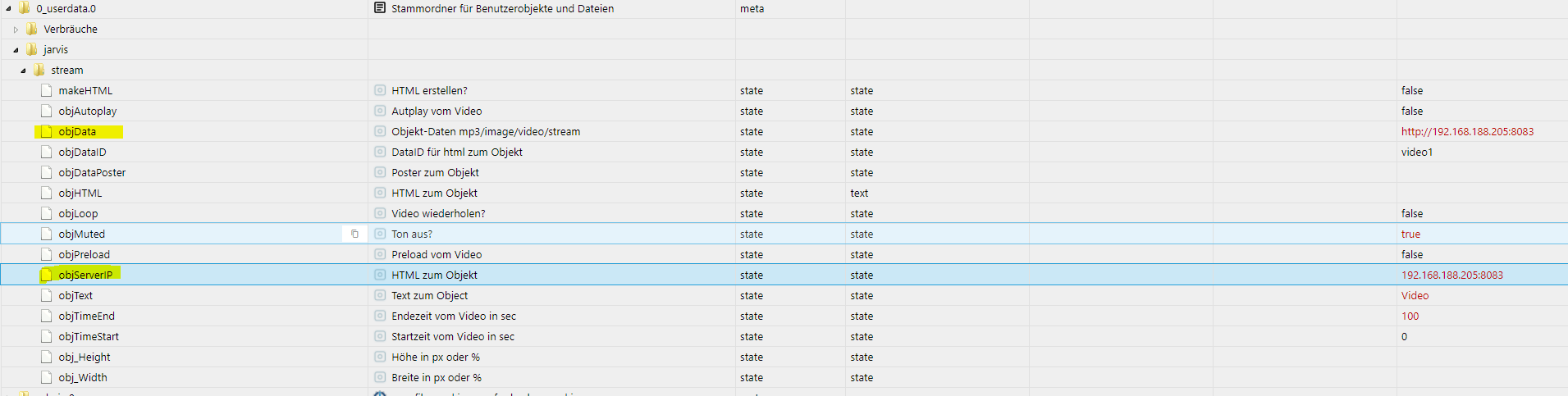
                                          a6d7cad9-feaf-47b1-ad14-83612eb23b04-image.png

                                          In Jarvis folgendes:
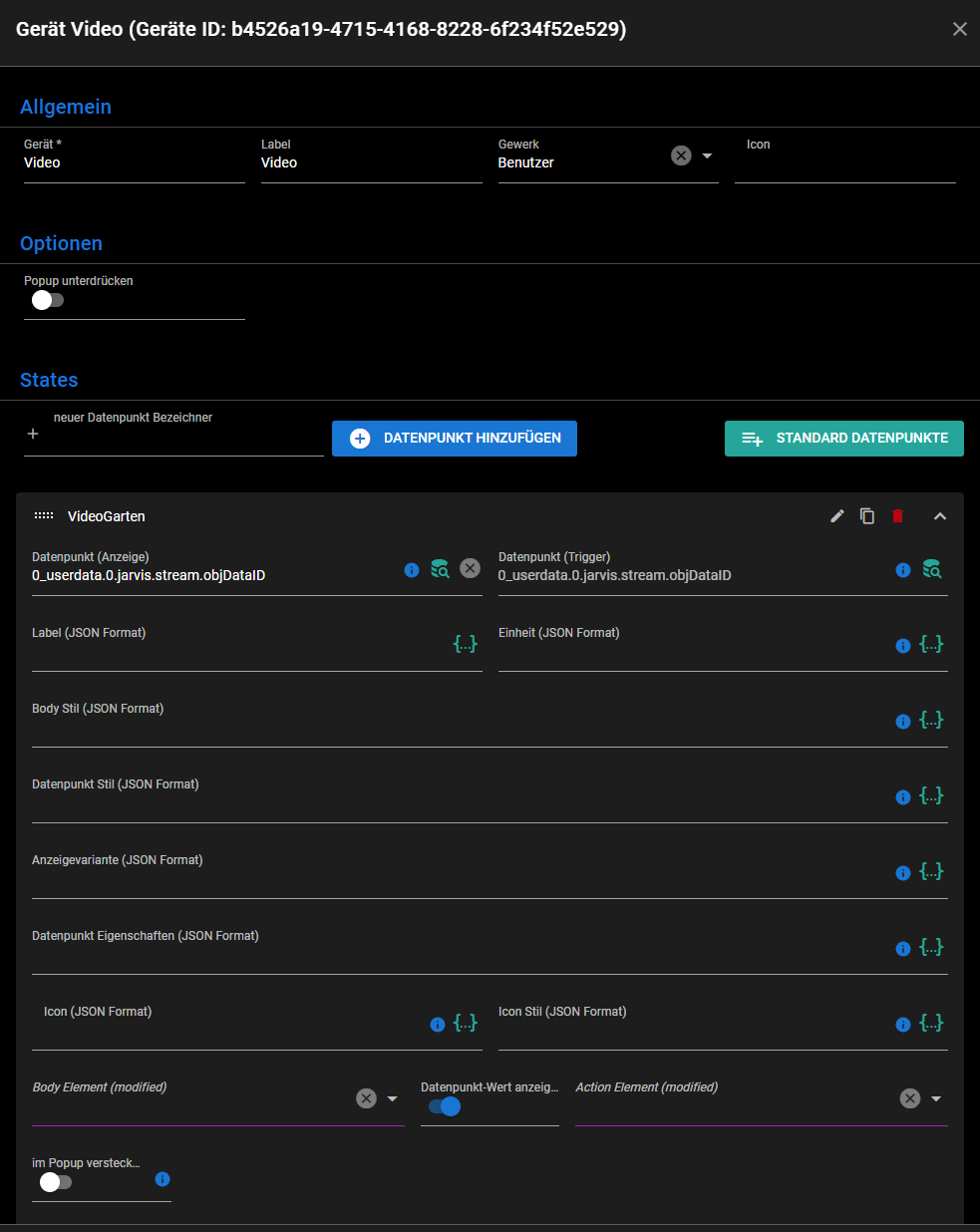
                                          Geräte:
                                          c10a2974-2997-4460-a471-53ae0477f9ca-image.png

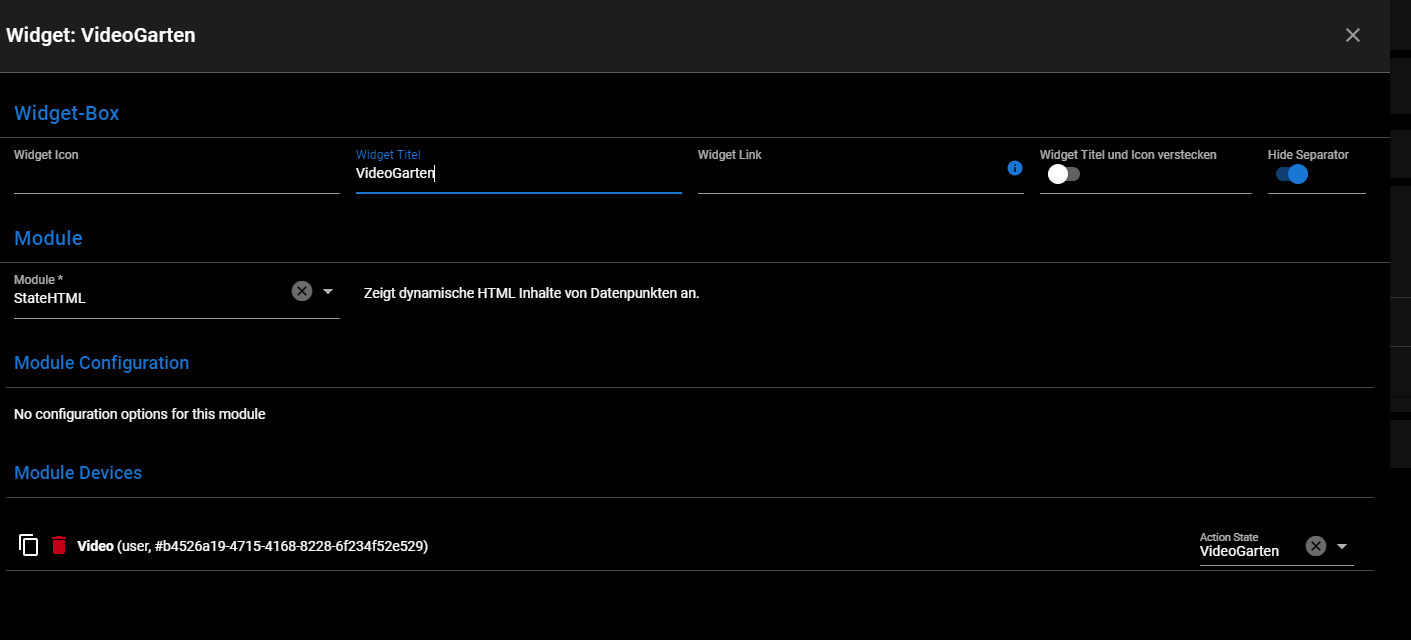
                                          Widget:
                                          4b893aa6-3459-4b67-811b-31aa2a048265-image.png

                                          Was mach ich falsch?

                                          M 1 Reply Last reply
                                          0
                                          Reply
                                          • Reply as topic
                                          Log in to reply
                                          • Oldest to Newest
                                          • Newest to Oldest
                                          • Most Votes


                                          Support us

                                          ioBroker
                                          Community Adapters
                                          Donate

                                          294

                                          Online

                                          32.7k

                                          Users

                                          82.3k

                                          Topics

                                          1.3m

                                          Posts
                                          Community
                                          Impressum | Datenschutz-Bestimmungen | Nutzungsbedingungen | Einwilligungseinstellungen
                                          ioBroker Community 2014-2025
                                          logo
                                          • Login

                                          • Don't have an account? Register

                                          • Login or register to search.
                                          • First post
                                            Last post
                                          0
                                          • Home
                                          • Recent
                                          • Tags
                                          • Unread 0
                                          • Categories
                                          • Unreplied
                                          • Popular
                                          • GitHub
                                          • Docu
                                          • Hilfe