




IP Devices im Netzwerk - HTML Tabelle vis, Iqontrol

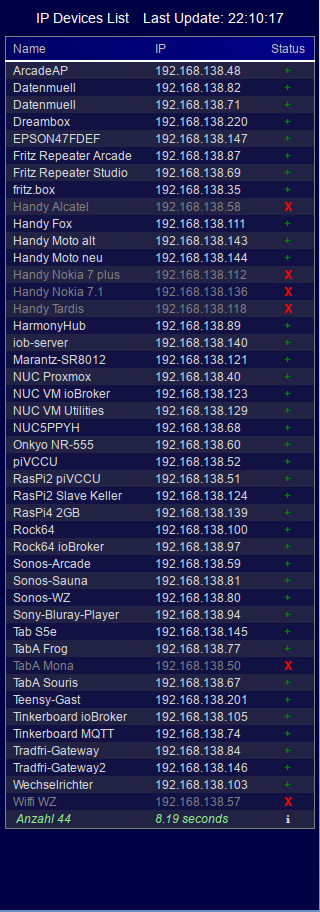
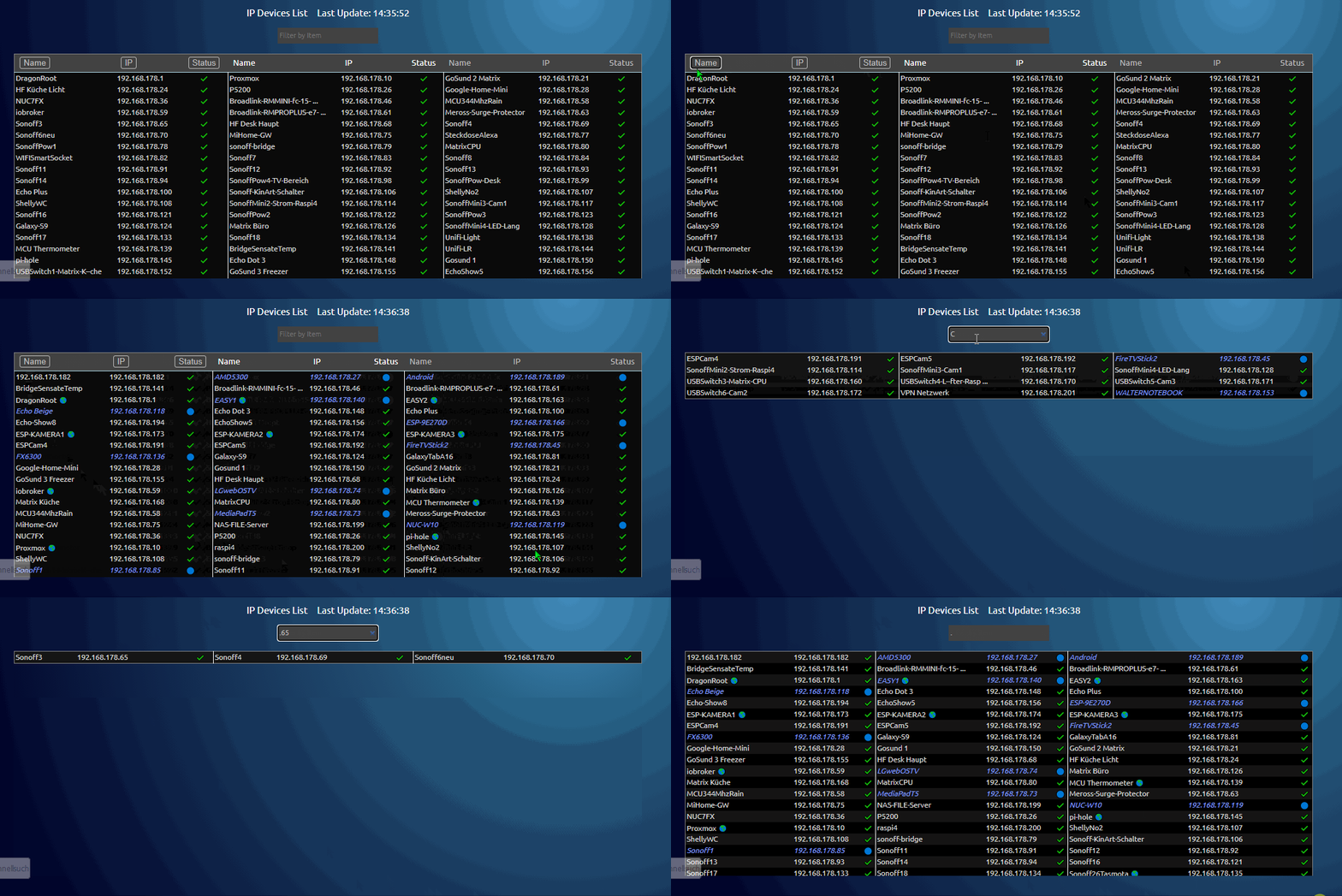
-
@hausbaer ist so nicht gedacht
wenn du die farben im setting über datenpunkte haben willst, musst du das script ändern - dh. du musst den datenpunkt lesen und ihn in die variable schreiben, die dafür zuständig ist - alle farben und eistellungen werden im script gemacht - also musst du das script ändern
Hallo zusammen,
Ich versuche mir etwas zu basteln um in Jarvis zu Visualisieren welche Netzwerkteilnehmer online/offline sind.
Ich habe im Forum diverse Beispiele gefunden.
Da ich einen Asus Router und keine FritzBox habe schränkt das die Auswahl aber ein.
Jetzt bin ich hier gelandet.
Der Befehl Nmap in der Konsole gibt mir 20 Teilnehmer aus.
Das mit meinen IP's geänderte Skript aber nur 7.
Kann mir vielleicht helfen woran das liegt?
Über Putty:nmap -sP --dns-servers 192.168.1.1 192.168.1.0/24über das Skript:
const domainName="192.168.1.1";                  // domainname in der fritzbox definiert
 const ipbereich="192.168.1.1/24";           //  gilt nicht für windows
 const dnsServer="192.168.1.1"               // gilt nicht für windows
 let mysortiereClient=2;                     //1 nach client 2 nach ip
 const waitTime=5000;                        // falls längere zeit keine daten kommen - diesen wert erhöhn um 5000 (ms)
if(mitDatenGet) { if(oerationSystemchange == false){ exec("nmap -sP --dns-servers "+dnsServer+" "+ipbereich , async function (error, result, stderr) { myData=result // setState("0_userdata.0.Tabellen.IPDeviceERROR", result) // console.log(result); resolve() });} else {MfG
PatrickRaspberry Pi 4 8GB, Debian 11, js-controller: 5.0.12, Nodejs: v18.18.2, NPM: 9.8.1 (Multihost),
Wago PFC200 mit Dali Lichtsteuerung. -
Hallo zusammen,
Ich versuche mir etwas zu basteln um in Jarvis zu Visualisieren welche Netzwerkteilnehmer online/offline sind.
Ich habe im Forum diverse Beispiele gefunden.
Da ich einen Asus Router und keine FritzBox habe schränkt das die Auswahl aber ein.
Jetzt bin ich hier gelandet.
Der Befehl Nmap in der Konsole gibt mir 20 Teilnehmer aus.
Das mit meinen IP's geänderte Skript aber nur 7.
Kann mir vielleicht helfen woran das liegt?
Über Putty:nmap -sP --dns-servers 192.168.1.1 192.168.1.0/24über das Skript:
const domainName="192.168.1.1";                  // domainname in der fritzbox definiert
 const ipbereich="192.168.1.1/24";           //  gilt nicht für windows
 const dnsServer="192.168.1.1"               // gilt nicht für windows
 let mysortiereClient=2;                     //1 nach client 2 nach ip
 const waitTime=5000;                        // falls längere zeit keine daten kommen - diesen wert erhöhn um 5000 (ms)
if(mitDatenGet) { if(oerationSystemchange == false){ exec("nmap -sP --dns-servers "+dnsServer+" "+ipbereich , async function (error, result, stderr) { myData=result // setState("0_userdata.0.Tabellen.IPDeviceERROR", result) // console.log(result); resolve() });} else {MfG
Patrick@marsmännchen sagte in IP Devices im Netzwerk - HTML Tabelle vis, Iqontrol:
const domainName="192.168.1.1";
liegt evtl daran (bin mir aber nichtt sicher):
const domainName="192.168.1.1";das ist kein domain name: z.b fritz.box wäre so ein d-name
hast du da was im router definiert ?
ansonsten müßtest du mal den output aus der console posten und auch den output des logs vom script (in deinem post . im letzten code siehst du in zeile 6 : console.log(result); - du mußt die beiden schrägstriche entfernen
-
@marsmännchen sagte in IP Devices im Netzwerk - HTML Tabelle vis, Iqontrol:
const domainName="192.168.1.1";
liegt evtl daran (bin mir aber nichtt sicher):
const domainName="192.168.1.1";das ist kein domain name: z.b fritz.box wäre so ein d-name
hast du da was im router definiert ?
ansonsten müßtest du mal den output aus der console posten und auch den output des logs vom script (in deinem post . im letzten code siehst du in zeile 6 : console.log(result); - du mußt die beiden schrägstriche entfernen
@liv-in-sky
danke für das geniale Script, bin gerade erst darauf gestoßen und es funktioniert wie es soll.Allerdings habe ich meinen ioBroker über Docker installiert und habe das Problem, dass nicht alle Geräte über das Skript angezeigt werden und die MAC Adressen fehlen.
@Glasfaser werden bei dir mittlerweile alle Geräte angezeigt und wenn ja, wie hast du das hinbekommen?
Ausgabe aus dem Skript:
javascript.0 (235) script.js.common.System.Skript_1: Starting Nmap 7.80 ( https://nmap.org ) at 2023-10-09 13:57 CEST Nmap scan report for speedport.ip (192.168.2.1) Host is up (0.0042s latency). Nmap scan report for 192.168.2.101 Host is up (0.00064s latency). Nmap scan report for 192.168.2.103 Host is up (0.00054s latency). Nmap scan report for 192.168.2.106 Host is up (0.0024s latency). Nmap scan report for 192.168.2.107 Host is up (0.025s latency). Nmap scan report for 192.168.2.108 Host is up (0.0031s latency). Nmap scan report for 192.168.2.112 Host is up (0.0029s latency). Nmap scan report for 192.168.2.115 Host is up (0.0026s latency). Nmap scan report for ioBroker (192.168.2.120) Host is up (0.00019s latency). Nmap scan report for 192.168.2.126 Host is up (0.033s latency). Nmap scan report for 192.168.2.140 Host is up (0.0044s latency). Nmap scan report for 192.168.2.150 Host is up (0.085s latency). Nmap scan report for 192.168.2.155 Host is up (0.0057s latency). Nmap scan report for 192.168.2.176 Host is up (0.070s latency). Nmap done: 256 IP addresses (14 hosts up) scanned in 16.03 secondsAusgabe über die Konsole im Docker:
root@ioBroker:/opt/iobroker# nmap -sPR --dns-servers 192.168.2.1 192.168.2.0/24
WARNING: -sR is now an alias for -sV and activates version detection as well as RPC scan.
Starting Nmap 7.80 ( https://nmap.org ) at 2023-10-09 13:25 CEST
Nmap scan report for speedport.ip (192.168.2.1)
Host is up (0.0040s latency).
MAC Address: 64:CC:22:39:A1:98 (Arcadyan)
Nmap scan report for 192.168.2.101
Host is up (0.00032s latency).
MAC Address: 00:08:9B:EA:9B:3A (ICP Electronics)
Nmap scan report for 192.168.2.103
Host is up (0.00019s latency).
MAC Address: F4:06:8D:38:61:92 (devolo AG)
Nmap scan report for 192.168.2.106
Host is up (0.0011s latency).
MAC Address: 60:6D:3C:10:49:B1 (Luxshare Precision Industry Company Limited)
Nmap scan report for 192.168.2.107
Host is up (0.015s latency).
MAC Address: 88:87:17:96:28:12 (Canon)
Nmap scan report for 192.168.2.110
Host is up (0.0025s latency).
MAC Address: 94:C6:91:59:C1:3C (EliteGroup Computer Systems)
Nmap scan report for 192.168.2.112
Host is up (0.0023s latency).
MAC Address: 00:05:CD:94:48:C9 (D&M Holdings)
Nmap scan report for 192.168.2.115
Host is up (0.000035s latency).
MAC Address: 00:08:9B:EA:9B:39 (ICP Electronics)
Nmap scan report for 192.168.2.126
Host is up (0.094s latency).
MAC Address: 00:05:51:10:A3:06 (F & S Elektronik Systeme GmbH)
Nmap scan report for 192.168.2.139
Host is up (0.11s latency).
MAC Address: 70:EE:50:6B:5F:4E (Netatmo)
Nmap scan report for 192.168.2.140
Host is up (0.11s latency).
MAC Address: C8:DB:26:0A:8D:15 (Logitech)
Nmap scan report for 192.168.2.145
Host is up (0.023s latency).
MAC Address: 94:3A:91:81:88:66 (Unknown)
Nmap scan report for 192.168.2.150
Host is up (1.4s latency).
MAC Address: A6:BF:DC:19:1C:41 (Unknown)
Nmap scan report for 192.168.2.155
Host is up (0.010s latency).
MAC Address: 00:0B:3B:9C:96:CD (devolo AG)
Nmap scan report for 192.168.2.176
Host is up (0.13s latency).
MAC Address: EC:2B:EB:23:7E:22 (Unknown)
Nmap scan report for 192.168.2.186
Host is up (0.0045s latency).
MAC Address: 6C:A9:36:FD:1B:7F (DisplayLink (UK))
Nmap scan report for 192.168.2.211
Host is up (0.014s latency).
MAC Address: 50:D4:5C:9B:AA:1E (Unknown)
Nmap scan report for ioBroker (192.168.2.120)
Host is up.
Nmap done: 256 IP addresses (18 hosts up) scanned in 7.34 seconds
Gruß
Oliver -
@liv-in-sky
danke für das geniale Script, bin gerade erst darauf gestoßen und es funktioniert wie es soll.Allerdings habe ich meinen ioBroker über Docker installiert und habe das Problem, dass nicht alle Geräte über das Skript angezeigt werden und die MAC Adressen fehlen.
@Glasfaser werden bei dir mittlerweile alle Geräte angezeigt und wenn ja, wie hast du das hinbekommen?
Ausgabe aus dem Skript:
javascript.0 (235) script.js.common.System.Skript_1: Starting Nmap 7.80 ( https://nmap.org ) at 2023-10-09 13:57 CEST Nmap scan report for speedport.ip (192.168.2.1) Host is up (0.0042s latency). Nmap scan report for 192.168.2.101 Host is up (0.00064s latency). Nmap scan report for 192.168.2.103 Host is up (0.00054s latency). Nmap scan report for 192.168.2.106 Host is up (0.0024s latency). Nmap scan report for 192.168.2.107 Host is up (0.025s latency). Nmap scan report for 192.168.2.108 Host is up (0.0031s latency). Nmap scan report for 192.168.2.112 Host is up (0.0029s latency). Nmap scan report for 192.168.2.115 Host is up (0.0026s latency). Nmap scan report for ioBroker (192.168.2.120) Host is up (0.00019s latency). Nmap scan report for 192.168.2.126 Host is up (0.033s latency). Nmap scan report for 192.168.2.140 Host is up (0.0044s latency). Nmap scan report for 192.168.2.150 Host is up (0.085s latency). Nmap scan report for 192.168.2.155 Host is up (0.0057s latency). Nmap scan report for 192.168.2.176 Host is up (0.070s latency). Nmap done: 256 IP addresses (14 hosts up) scanned in 16.03 secondsAusgabe über die Konsole im Docker:
root@ioBroker:/opt/iobroker# nmap -sPR --dns-servers 192.168.2.1 192.168.2.0/24 WARNING: -sR is now an alias for -sV and activates version detection as well as RPC scan. Starting Nmap 7.80 ( https://nmap.org ) at 2023-10-09 13:25 CEST Nmap scan report for speedport.ip (192.168.2.1) Host is up (0.0040s latency). MAC Address: 64:CC:22:39:A1:98 (Arcadyan) Nmap scan report for 192.168.2.101 Host is up (0.00032s latency). MAC Address: 00:08:9B:EA:9B:3A (ICP Electronics) Nmap scan report for 192.168.2.103 Host is up (0.00019s latency). MAC Address: F4:06:8D:38:61:92 (devolo AG) Nmap scan report for 192.168.2.106 Host is up (0.0011s latency). MAC Address: 60:6D:3C:10:49:B1 (Luxshare Precision Industry Company Limited) Nmap scan report for 192.168.2.107 Host is up (0.015s latency). MAC Address: 88:87:17:96:28:12 (Canon) Nmap scan report for 192.168.2.110 Host is up (0.0025s latency). MAC Address: 94:C6:91:59:C1:3C (EliteGroup Computer Systems) Nmap scan report for 192.168.2.112 Host is up (0.0023s latency). MAC Address: 00:05:CD:94:48:C9 (D&M Holdings) Nmap scan report for 192.168.2.115 Host is up (0.000035s latency). MAC Address: 00:08:9B:EA:9B:39 (ICP Electronics) Nmap scan report for 192.168.2.126 Host is up (0.094s latency). MAC Address: 00:05:51:10:A3:06 (F & S Elektronik Systeme GmbH) Nmap scan report for 192.168.2.139 Host is up (0.11s latency). MAC Address: 70:EE:50:6B:5F:4E (Netatmo) Nmap scan report for 192.168.2.140 Host is up (0.11s latency). MAC Address: C8:DB:26:0A:8D:15 (Logitech) Nmap scan report for 192.168.2.145 Host is up (0.023s latency). MAC Address: 94:3A:91:81:88:66 (Unknown) Nmap scan report for 192.168.2.150 Host is up (1.4s latency). MAC Address: A6:BF:DC:19:1C:41 (Unknown) Nmap scan report for 192.168.2.155 Host is up (0.010s latency). MAC Address: 00:0B:3B:9C:96:CD (devolo AG) Nmap scan report for 192.168.2.176 Host is up (0.13s latency). MAC Address: EC:2B:EB:23:7E:22 (Unknown) Nmap scan report for 192.168.2.186 Host is up (0.0045s latency). MAC Address: 6C:A9:36:FD:1B:7F (DisplayLink (UK)) Nmap scan report for 192.168.2.211 Host is up (0.014s latency). MAC Address: 50:D4:5C:9B:AA:1E (Unknown) Nmap scan report for ioBroker (192.168.2.120) Host is up. Nmap done: 256 IP addresses (18 hosts up) scanned in 7.34 secondsprobiere mal ein blockly mit exec block - kopiere dort denn befehl und aktiviere das log bzw. den return wert z.b. https://forum.iobroker.net/post/761180 nutzt anderen befehl
evtl kannst du einen syntax für den befehl finden, indem der befehl mit mac angezeigt wird - habe leider keine docker erfahrung
-
@liv-in-sky
danke für das geniale Script, bin gerade erst darauf gestoßen und es funktioniert wie es soll.Allerdings habe ich meinen ioBroker über Docker installiert und habe das Problem, dass nicht alle Geräte über das Skript angezeigt werden und die MAC Adressen fehlen.
@Glasfaser werden bei dir mittlerweile alle Geräte angezeigt und wenn ja, wie hast du das hinbekommen?
Ausgabe aus dem Skript:
javascript.0 (235) script.js.common.System.Skript_1: Starting Nmap 7.80 ( https://nmap.org ) at 2023-10-09 13:57 CEST Nmap scan report for speedport.ip (192.168.2.1) Host is up (0.0042s latency). Nmap scan report for 192.168.2.101 Host is up (0.00064s latency). Nmap scan report for 192.168.2.103 Host is up (0.00054s latency). Nmap scan report for 192.168.2.106 Host is up (0.0024s latency). Nmap scan report for 192.168.2.107 Host is up (0.025s latency). Nmap scan report for 192.168.2.108 Host is up (0.0031s latency). Nmap scan report for 192.168.2.112 Host is up (0.0029s latency). Nmap scan report for 192.168.2.115 Host is up (0.0026s latency). Nmap scan report for ioBroker (192.168.2.120) Host is up (0.00019s latency). Nmap scan report for 192.168.2.126 Host is up (0.033s latency). Nmap scan report for 192.168.2.140 Host is up (0.0044s latency). Nmap scan report for 192.168.2.150 Host is up (0.085s latency). Nmap scan report for 192.168.2.155 Host is up (0.0057s latency). Nmap scan report for 192.168.2.176 Host is up (0.070s latency). Nmap done: 256 IP addresses (14 hosts up) scanned in 16.03 secondsAusgabe über die Konsole im Docker:
root@ioBroker:/opt/iobroker# nmap -sPR --dns-servers 192.168.2.1 192.168.2.0/24 WARNING: -sR is now an alias for -sV and activates version detection as well as RPC scan. Starting Nmap 7.80 ( https://nmap.org ) at 2023-10-09 13:25 CEST Nmap scan report for speedport.ip (192.168.2.1) Host is up (0.0040s latency). MAC Address: 64:CC:22:39:A1:98 (Arcadyan) Nmap scan report for 192.168.2.101 Host is up (0.00032s latency). MAC Address: 00:08:9B:EA:9B:3A (ICP Electronics) Nmap scan report for 192.168.2.103 Host is up (0.00019s latency). MAC Address: F4:06:8D:38:61:92 (devolo AG) Nmap scan report for 192.168.2.106 Host is up (0.0011s latency). MAC Address: 60:6D:3C:10:49:B1 (Luxshare Precision Industry Company Limited) Nmap scan report for 192.168.2.107 Host is up (0.015s latency). MAC Address: 88:87:17:96:28:12 (Canon) Nmap scan report for 192.168.2.110 Host is up (0.0025s latency). MAC Address: 94:C6:91:59:C1:3C (EliteGroup Computer Systems) Nmap scan report for 192.168.2.112 Host is up (0.0023s latency). MAC Address: 00:05:CD:94:48:C9 (D&M Holdings) Nmap scan report for 192.168.2.115 Host is up (0.000035s latency). MAC Address: 00:08:9B:EA:9B:39 (ICP Electronics) Nmap scan report for 192.168.2.126 Host is up (0.094s latency). MAC Address: 00:05:51:10:A3:06 (F & S Elektronik Systeme GmbH) Nmap scan report for 192.168.2.139 Host is up (0.11s latency). MAC Address: 70:EE:50:6B:5F:4E (Netatmo) Nmap scan report for 192.168.2.140 Host is up (0.11s latency). MAC Address: C8:DB:26:0A:8D:15 (Logitech) Nmap scan report for 192.168.2.145 Host is up (0.023s latency). MAC Address: 94:3A:91:81:88:66 (Unknown) Nmap scan report for 192.168.2.150 Host is up (1.4s latency). MAC Address: A6:BF:DC:19:1C:41 (Unknown) Nmap scan report for 192.168.2.155 Host is up (0.010s latency). MAC Address: 00:0B:3B:9C:96:CD (devolo AG) Nmap scan report for 192.168.2.176 Host is up (0.13s latency). MAC Address: EC:2B:EB:23:7E:22 (Unknown) Nmap scan report for 192.168.2.186 Host is up (0.0045s latency). MAC Address: 6C:A9:36:FD:1B:7F (DisplayLink (UK)) Nmap scan report for 192.168.2.211 Host is up (0.014s latency). MAC Address: 50:D4:5C:9B:AA:1E (Unknown) Nmap scan report for ioBroker (192.168.2.120) Host is up. Nmap done: 256 IP addresses (18 hosts up) scanned in 7.34 seconds@oli
nebenbei
bei mir war es wichtig, dass der root user die abfrage macht - sonst macht das linux netwerk device probleme -
@oli
nebenbei
bei mir war es wichtig, dass der root user die abfrage macht - sonst macht das linux netwerk device probleme@liv-in-sky
Also mit folgendem Befehl bekomme ich die reduzierten Geräte ohne MACnmap -sPR --dns-servers 192.168.2.1 192.168.2.0/24Bei folgenden Befehl kommt gar nichts zurück
sudo -u root /usr/bin/nmap -sPR --dns-servers 192.168.2.1 192.168.2.0/24Ich dachte eigentlich, dass man bei Docker immer mit 'root' unterwegs ist
Gruß
Oliver -
@liv-in-sky
Also mit folgendem Befehl bekomme ich die reduzierten Geräte ohne MACnmap -sPR --dns-servers 192.168.2.1 192.168.2.0/24Bei folgenden Befehl kommt gar nichts zurück
sudo -u root /usr/bin/nmap -sPR --dns-servers 192.168.2.1 192.168.2.0/24Ich dachte eigentlich, dass man bei Docker immer mit 'root' unterwegs ist
hat docker einen root oder evtl einen admin user ?
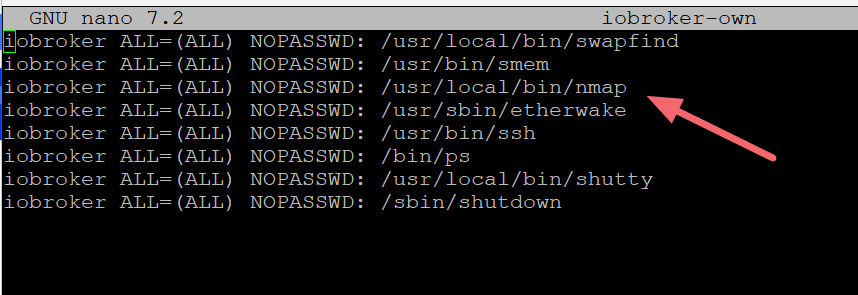
hast du die sueders datei im server angeglichen ?
beispiel von mir:
-
@liv-in-sky
Also mit folgendem Befehl bekomme ich die reduzierten Geräte ohne MACnmap -sPR --dns-servers 192.168.2.1 192.168.2.0/24Bei folgenden Befehl kommt gar nichts zurück
sudo -u root /usr/bin/nmap -sPR --dns-servers 192.168.2.1 192.168.2.0/24Ich dachte eigentlich, dass man bei Docker immer mit 'root' unterwegs ist
wenn ich das lese, sieht es noicht so toll aus:
https://stackoverflow.com/questions/71997736/docker-why-sudo-doesnt-work-as-expected
-
@liv-in-sky
Also mit folgendem Befehl bekomme ich die reduzierten Geräte ohne MACnmap -sPR --dns-servers 192.168.2.1 192.168.2.0/24Bei folgenden Befehl kommt gar nichts zurück
sudo -u root /usr/bin/nmap -sPR --dns-servers 192.168.2.1 192.168.2.0/24Ich dachte eigentlich, dass man bei Docker immer mit 'root' unterwegs ist
hier kam mal eine lösung https://forum.iobroker.net/post/600999 - fang ein wenig weiter oben an zu lesen - viel glück
-
hier kam mal eine lösung https://forum.iobroker.net/post/600999 - fang ein wenig weiter oben an zu lesen - viel glück
-
@liv-in-sky
Erstmal danke für deine Mühe, werde es mal testendas problem findest du auch des öfteren bei einer google suche - ohne iobroker
"nmap root docker" suche
-
das problem findest du auch des öfteren bei einer google suche - ohne iobroker
"nmap root docker" suche
@liv-in-sky
Ja, aber leider ohne Lösung -
das problem findest du auch des öfteren bei einer google suche - ohne iobroker
"nmap root docker" suche
-
@liv-in-sky
leider finde ich keine Lösung, dass es im Docker richtig läuft und gebe jetzt auf.Kannst du mir sagen, wie ich NMAP wieder deinstallieren kann?
@oli leider nein - ich nutze kein docker und habe daher keine ahnung davon :-(
-
@oli leider nein - ich nutze kein docker und habe daher keine ahnung davon :-(
-
@liv-in-sky
Wie ist den der Befehl unter Linux zum deinstallieren? -
@liv-in-sky
Super, danke dir

Support us
249
Online32.7k
Users82.5k
Topics1.3m
Posts