
NEWS




Test Adapter Shelly v3.1.x
-
@harrym ,
die logs die ich gepostet habe, wurden aus dem debug modus erzeugt.
Die COAP Einstellungen im Adapter sehen wie folgt aus:
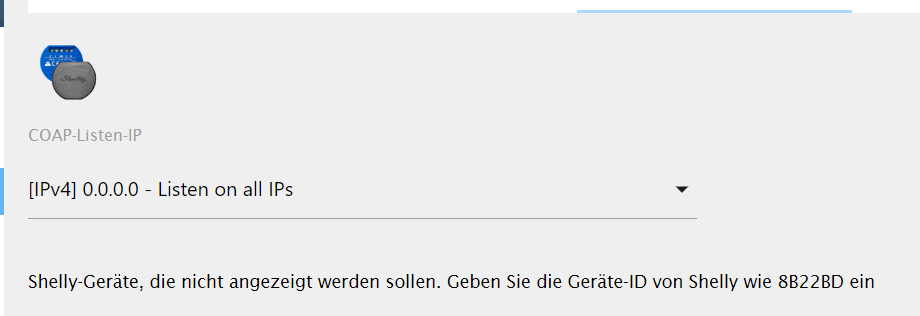
Und der Shelly GAS ist nicht im mqtt Modus
@K_o_bold , ich benötige immer folgende Infos mit jeweils kurzem Hinweis woher die Infos kommen wie z.B. (status, settings, CoAP oder MQTT). Bei neuen Geräten wird immer CoAP und MQTT implementiert und nicht einmal nur MQTT oder CoAP!
Ab der Version 3.3.2 wird die CoAP Messages bei unbekannten Shelly Geräten im Logfile ohne in den Debug Modus zu wechseln angezeigt.CoAP Meldungen
Shelly Gerät muss sich CoAP Modus befinden nun im Logfile nach folgender Info suchen:1. Send developer following Info: SHRGBW2#XX2090#1 : {"blk":[{"I":0,"D":"RGBW2"}],"sen":[{"I":118,"T":"S","D":"Input","R":"0/1","L":0},{"I":111,"T":"S","D":"Brightness_0","R":"0/100","L":0},{"I":121,"T":"S","D":"Brightness_1","R":"0/100","L":0},{"I":131,"T":"S","D":"Brightness_2","R":"0/100","L":0},{"I":141,"T":"S","D":"Brightness_3","R":"0/100","L":0},{"I":151,"T":"S","D":"VSwitch_0","R":"0/1","L":0},{"I":161,"T":"S","D":"VSwitch_1","R":"0/1","L":0},{"I":171,"T":"S","D":"VSwitch_2","R":"0/1","L":0},{"I":181,"T":"S","D":"VSwitch_3","R":"0/1","L":0},{"I":211,"T":"P","D":"Power_0","R":"0/288","L":0},{"I":221,"T":"P","D":"Power_1","R":"0/288","L":0},{"I":231,"T":"P","D":"Power_2","R":"0/288","L":0},{"I":241,"T":"P","D":"Power_3","R":"0/288","L":0}]} 2 .Send developer following Info: SHRGBW2#XX2090#1 : {"G":[[0,111,50],[0,121,50],[0,131,50],[0,141,50],[0,151,0],[0,161,0],[0,171,0],[0,181,0],[0,211,0],[0,221,0],[0,231,0],[0,241,0],[0,118,0]]}MQTT
Prüfe ob das neue Shelly Gerät in der API Dokumentation von Shelly steht https://shelly-api-docs.shelly.cloud . Sollte das Gerät in der Shelly API Dokumentation nicht stehen. Dann ist der ioBroker "MQTT Broker/Client" Adapter zu installieren. Der neue Shelly ist per MQTT mit dem MQTT Broker/Client" Adapter zu verbinden. Ich benötige dann alle Objekte für den neuen Shelly unter "mqtt.0".Status (http)
Output http://ip-shelly/status . Passwort falls vorhanden anonymisieren, IP-Adresse, Hostname, SSID sind nicht zu anoymisieren. Das ist überflüssigSettings (http)
Output http://ip-shelly/settings . Passwort falls vorhanden anonymisieren, IP-Adresse, Hostname, SSID sind nicht zu anoymisieren. Das ist überflüssigVG
Stübi -
Hi,
darf ich mal fragen warum der Adapter Shelly's mit FW <1.7.0 nicht mehr unterstüztz?
Der Shelly 4Pro hat die 1.5.7 und da gibt es keine 1.7.0
Kann ich den dann nicht mehr über ioBroker steuern? -
Use only version with Shelly firmware greater equal v1.7.0 . Shelly firmware less v1.7.0 will not be supported by this Shelly adapter version anymore
kann man aus dieser Aussage aber nicht ersehen, ich hoffe mal du hast da recht.
-
Wer kann von Euch einmal die Adapter Version 3.3.3 folgende Geräte testen?
- Shelly RGBW2 White und Color im CoAP Modus
- Shelly RGBW2 White und Color im MQTT Modus
- Shelly Button im MQTT Modus
- Shelly Gas im CoAP Modus
- Shelly Gas im MQTT Modus
Leider hat die Shelly Button 1 Firmware 1.7.0 und auch die aktuelle Beta einen Syntaxfehler in den CoAP Nachrichten. Daher funtioniert der Shelly Button nicht im CoAP Modus
Die Version 3.3.3 muss noch über GitHub installiert werden. Wie das geht, steht hier
VG
Stübi -
@harrym sagte in Test Adapter Shelly v3.1.x:
@MiB ich habe recht .... weil sich eben mit der FW 1.7 beim RGBW2 etliches geändert hat.
der Adapter ist doch aber nicht nur für den RGBW2?
@Stuebi was ist mit dem Satz gemeint?
"Use only version with Shelly firmware greater equal v1.7.0 . Shelly firmware less v1.7.0 will not be supported by this Shelly adapter version anymore"Grüße Micha
-
@harrym sagte in Test Adapter Shelly v3.1.x:
@MiB ich habe recht .... weil sich eben mit der FW 1.7 beim RGBW2 etliches geändert hat.
der Adapter ist doch aber nicht nur für den RGBW2?
@Stuebi was ist mit dem Satz gemeint?
"Use only version with Shelly firmware greater equal v1.7.0 . Shelly firmware less v1.7.0 will not be supported by this Shelly adapter version anymore"Grüße Micha
Moin @MiB
genau das was @harrym richtig gesagt hat, es betrifft momentan nur den Shelly RGBW2. Dieser wird nicht umbedingt mit einer FW < 1.7.0 laufen. Ich habe es nicht getestet und kann nicht mit Gewissheit sagen, dass der Adapter mit der alten Firmware läuft.
Ich kann leider den Shelly Adapter nicht für jede FW supporten. Daher habe ich nun festgelegt, dass FW 1.7.0 für alle Shelly Geräte Voraussetzung ist. Alles andere ist eben auf eigene Gefahr.VG
Thorsten -
Wer kann von Euch einmal die Adapter Version 3.3.3 folgende Geräte testen?
- Shelly RGBW2 White und Color im CoAP Modus
- Shelly RGBW2 White und Color im MQTT Modus
- Shelly Button im MQTT Modus
- Shelly Gas im CoAP Modus
- Shelly Gas im MQTT Modus
Leider hat die Shelly Button 1 Firmware 1.7.0 und auch die aktuelle Beta einen Syntaxfehler in den CoAP Nachrichten. Daher funtioniert der Shelly Button nicht im CoAP Modus
Die Version 3.3.3 muss noch über GitHub installiert werden. Wie das geht, steht hier
VG
Stübi@Stuebi ,
ich habe den Shelly Gas im mqtt Modus mit folgendem Ergebnis getestet:
Der Shelly Gas lässt sich über mqtt nicht einbinden.
mqtt Einstellungen auf der Benutzeroberfläche sind die selben wie bei meinen anderen ShellysCoAP geht bei mir gar nicht. Wenn ich mqtt deaktiviere, befindet sich der Shelly Gas in der "Status json" immer noch im mqtt Modus.
log mqtt Modus:
shelly.0	2020-06-21 15:52:21.219	info	(32414) Destroy 192.168.178.99 (shellygas / shellygas-50029178B567 / undefined#50029178B567#1)
shelly.0	2020-06-21 15:52:21.218	info	(32414) Close Client: 192.168.178.99 (shellygas / shellygas-50029178B567 / undefined#50029178B567#1) (false)
shelly.0	2020-06-21 15:52:21.212	error	(32414) Shelly Device unknown, configuratin for Shelly device 192.168.178.99 (shellygas / shellygas-50029178B567 / undefined#50029178B567#1) for MQTT does not exist!
shelly.0	2020-06-21 15:51:22.463	info	(32414) Destroy 192.168.178.99 (shellygas / shellygas-50029178B567 / undefined#50029178B567#1)
shelly.0	2020-06-21 15:51:22.462	info	(32414) Close Client: 192.168.178.99 (shellygas / shellygas-50029178B567 / undefined#50029178B567#1) (false)
shelly.0	2020-06-21 15:51:22.456	error	(32414) Shelly Device unknown, configuratin for Shelly device 192.168.178.99 (shellygas / shellygas-50029178B567 / undefined#50029178B567#1) for MQTT does not exist!
shelly.0	2020-06-21 15:50:26.426	info	(32414) Destroy 192.168.178.99 (shellygas / shellygas-50029178B567 / undefined#50029178B567#1)
shelly.0	2020-06-21 15:50:26.426	info	(32414) Close Client: 192.168.178.99 (shellygas / shellygas-50029178B567 / undefined#50029178B567#1) (false)
shelly.0	2020-06-21 15:50:26.420	error	(32414) Shelly Device unknown, configuratin for Shelly device 192.168.178.99 (shellygas / shellygas-50029178B567 / undefined#50029178B567#1) for MQTT does not exist!
shelly.0	2020-06-21 15:50:26.057	info	(32414) Shelly device 192.168.178.46 (shelly1 / shelly1-C426FE / SHSW-1#C426FE#1) with MQTT connected!
shelly.0	2020-06-21 15:50:26.036	info	(32414) Shelly device 192.168.178.47 (shelly1 / shelly1-B8F8D6 / SHSW-1#B8F8D6#1) with MQTT connected!
shelly.0	2020-06-21 15:50:25.879	info	(32414) Shelly device 192.168.178.78 (shelly1 / shelly1-689E9C / SHSW-1#689E9C#1) with MQTT connected!
shelly.0	2020-06-21 15:50:25.847	info	(32414) Shelly device 192.168.178.55 (shellyplug-s / shellyplug-s-7AEDDC / SHPLG-S#7AEDDC#1) with MQTT connected!
shelly.0	2020-06-21 15:50:25.694	info	(32414) Shelly device 192.168.178.42 (shelly1 / shelly1-C495C7 / SHSW-1#C495C7#1) with MQTT connected!
shelly.0	2020-06-21 15:50:25.658	info	(32414) Shelly device 192.168.178.61 (shellyplug-s / shellyplug-s-7AE316 / SHPLG-S#7AE316#1) with MQTT connected!
shelly.0	2020-06-21 15:50:25.564	info	(32414) Shelly device 192.168.178.73 (shelly1 / shelly1-BA0265 / SHSW-1#BA0265#1) with MQTT connected!
shelly.0	2020-06-21 15:50:25.500	info	(32414) Shelly device 192.168.178.79 (shelly1 / shelly1-68B4C7 / SHSW-1#68B4C7#1) with MQTT connected!
shelly.0	2020-06-21 15:50:25.425	info	(32414) Shelly device 192.168.178.80 (shelly1 / shelly1-769FE7 / SHSW-1#769FE7#1) with MQTT connected!
shelly.0	2020-06-21 15:50:25.397	info	(32414) Shelly device 192.168.178.72 (shelly1 / shelly1-BA026A / SHSW-1#BA026A#1) with MQTT connected!
shelly.0	2020-06-21 15:50:25.343	info	(32414) Shelly device 192.168.178.66 (shelly1 / shelly1-22F4DE / SHSW-1#22F4DE#1) with MQTT connected!
shelly.0	2020-06-21 15:50:25.321	info	(32414) Shelly device 192.168.178.71 (shellyplug-s / shellyplug-s-7AE1DC / SHPLG-S#7AE1DC#1) with MQTT connected!
shelly.0	2020-06-21 15:50:25.249	info	(32414) Shelly device 192.168.178.82 (shelly1 / shelly1-76A264 / SHSW-1#76A264#1) with MQTT connected!
shelly.0	2020-06-21 15:50:25.094	info	(32414) Shelly device 192.168.178.81 (shelly1 / shelly1-771516 / SHSW-1#771516#1) with MQTT connected!
shelly.0	2020-06-21 15:50:23.132	info	(32414) Starting Shelly adapter in MQTT modus. Listening on 192.168.178.11:1882
shelly.0	2020-06-21 15:50:23.114	info	(32414) Polltime of the shelly devices: 10 sec.
shelly.0	2020-06-21 15:50:23.114	info	(32414) Starting Adapter shelly.0 in version 3.3.3
Shelly Gas Status json mqtt:
{"wifi_sta": {"verbunden": true, "ssid": "xxx", "ip": "192.168.178.99", "rssi": - 60}, "cloud": {"enabled": false, " verbunden ": false}," mqtt ": {" verbunden ": false}," Zeit ":" 15:55 "," unixtime ": 1592754937," serial ": 1," has_update ": false," mac ": "50029178B567", "gas_sensor": {"sensor_state": "normal", "self_test_state": "not_completed", "alarm_state": "none"}, "Konzentration": {"ppm": 0, "is_valid": true }, "update": {"status": "idle", "has_update": false, "new_version": "20200601-123447/v1.7.0@d7961837", "old_version": "20200601-123447/v1.7.0@d7961837 "}," ram_total ": 50528," ram_free ": 39228," ram_lwm ": 33840," fs_size ": 233681," fs_free ": 134787," uptime ": 363}Shelly Gas settings json mqtt:
{"device":{"type":"SHGS-1","mac":"50029178B567","hostname":"shellygas-50029178B567","num_inputs":0, "num_outputs":0},"wifi_ap":{"enabled":false,"ssid":"shellygas-50029178B567","key":""},"wifi_sta":{"enabled":true,"ssid":"xxx","ipv4_method":"dhcp","ip":null,"gw":null,"mask":null,"dns":null},"wifi_sta1":{"enabled":false,"ssid":null,"ipv4_method":"dhcp","ip":null,"gw":null,"mask":null,"dns":null},"mqtt": {"enable":true,"server":"192.168.178.11:1882","user":"mqttadmin","id":"shellygas-50029178B567","reconnect_timeout_max":60.000000,"reconnect_timeout_min":2.000000,"clean_session":true,"keep_alive":60,"max_qos":0,"retain":false,"update_period":30},"coiot": {"update_period":15},"sntp":{"server":"time.google.com","enabled":true},"login":{"enabled":false,"unprotected":false,"username":"admin"},"pin_code":"","name":"","fw":"20200601-123447/v1.7.0@d7961837","discoverable":true,"build_info":{"build_id":"20200601-123447/v1.7.0@d7961837","build_timestamp":"2020-06-01T12:34:47Z","build_version":"1.0"},"cloud":{"enabled":false,"connected":false},"timezone":"Europe/Berlin","lat":49.120998,"lng":9.209170,"tzautodetect":true,"tz_utc_offset":7200,"tz_dst":true,"tz_dst_auto":true,"time":"15:57","unixtime":1592755024,"hwinfo":{"hw_revision":"prod-2020-04-09", "batch_id":1},"set_volume":11,"alarm_off_url":null,"alarm_mild_url":null,"alarm_heavy_url":null} -
@Stuebi ,
ich habe den Shelly Gas im mqtt Modus mit folgendem Ergebnis getestet:
Der Shelly Gas lässt sich über mqtt nicht einbinden.
mqtt Einstellungen auf der Benutzeroberfläche sind die selben wie bei meinen anderen ShellysCoAP geht bei mir gar nicht. Wenn ich mqtt deaktiviere, befindet sich der Shelly Gas in der "Status json" immer noch im mqtt Modus.
log mqtt Modus:
shelly.0	2020-06-21 15:52:21.219	info	(32414) Destroy 192.168.178.99 (shellygas / shellygas-50029178B567 / undefined#50029178B567#1)
shelly.0	2020-06-21 15:52:21.218	info	(32414) Close Client: 192.168.178.99 (shellygas / shellygas-50029178B567 / undefined#50029178B567#1) (false)
shelly.0	2020-06-21 15:52:21.212	error	(32414) Shelly Device unknown, configuratin for Shelly device 192.168.178.99 (shellygas / shellygas-50029178B567 / undefined#50029178B567#1) for MQTT does not exist!
shelly.0	2020-06-21 15:51:22.463	info	(32414) Destroy 192.168.178.99 (shellygas / shellygas-50029178B567 / undefined#50029178B567#1)
shelly.0	2020-06-21 15:51:22.462	info	(32414) Close Client: 192.168.178.99 (shellygas / shellygas-50029178B567 / undefined#50029178B567#1) (false)
shelly.0	2020-06-21 15:51:22.456	error	(32414) Shelly Device unknown, configuratin for Shelly device 192.168.178.99 (shellygas / shellygas-50029178B567 / undefined#50029178B567#1) for MQTT does not exist!
shelly.0	2020-06-21 15:50:26.426	info	(32414) Destroy 192.168.178.99 (shellygas / shellygas-50029178B567 / undefined#50029178B567#1)
shelly.0	2020-06-21 15:50:26.426	info	(32414) Close Client: 192.168.178.99 (shellygas / shellygas-50029178B567 / undefined#50029178B567#1) (false)
shelly.0	2020-06-21 15:50:26.420	error	(32414) Shelly Device unknown, configuratin for Shelly device 192.168.178.99 (shellygas / shellygas-50029178B567 / undefined#50029178B567#1) for MQTT does not exist!
shelly.0	2020-06-21 15:50:26.057	info	(32414) Shelly device 192.168.178.46 (shelly1 / shelly1-C426FE / SHSW-1#C426FE#1) with MQTT connected!
shelly.0	2020-06-21 15:50:26.036	info	(32414) Shelly device 192.168.178.47 (shelly1 / shelly1-B8F8D6 / SHSW-1#B8F8D6#1) with MQTT connected!
shelly.0	2020-06-21 15:50:25.879	info	(32414) Shelly device 192.168.178.78 (shelly1 / shelly1-689E9C / SHSW-1#689E9C#1) with MQTT connected!
shelly.0	2020-06-21 15:50:25.847	info	(32414) Shelly device 192.168.178.55 (shellyplug-s / shellyplug-s-7AEDDC / SHPLG-S#7AEDDC#1) with MQTT connected!
shelly.0	2020-06-21 15:50:25.694	info	(32414) Shelly device 192.168.178.42 (shelly1 / shelly1-C495C7 / SHSW-1#C495C7#1) with MQTT connected!
shelly.0	2020-06-21 15:50:25.658	info	(32414) Shelly device 192.168.178.61 (shellyplug-s / shellyplug-s-7AE316 / SHPLG-S#7AE316#1) with MQTT connected!
shelly.0	2020-06-21 15:50:25.564	info	(32414) Shelly device 192.168.178.73 (shelly1 / shelly1-BA0265 / SHSW-1#BA0265#1) with MQTT connected!
shelly.0	2020-06-21 15:50:25.500	info	(32414) Shelly device 192.168.178.79 (shelly1 / shelly1-68B4C7 / SHSW-1#68B4C7#1) with MQTT connected!
shelly.0	2020-06-21 15:50:25.425	info	(32414) Shelly device 192.168.178.80 (shelly1 / shelly1-769FE7 / SHSW-1#769FE7#1) with MQTT connected!
shelly.0	2020-06-21 15:50:25.397	info	(32414) Shelly device 192.168.178.72 (shelly1 / shelly1-BA026A / SHSW-1#BA026A#1) with MQTT connected!
shelly.0	2020-06-21 15:50:25.343	info	(32414) Shelly device 192.168.178.66 (shelly1 / shelly1-22F4DE / SHSW-1#22F4DE#1) with MQTT connected!
shelly.0	2020-06-21 15:50:25.321	info	(32414) Shelly device 192.168.178.71 (shellyplug-s / shellyplug-s-7AE1DC / SHPLG-S#7AE1DC#1) with MQTT connected!
shelly.0	2020-06-21 15:50:25.249	info	(32414) Shelly device 192.168.178.82 (shelly1 / shelly1-76A264 / SHSW-1#76A264#1) with MQTT connected!
shelly.0	2020-06-21 15:50:25.094	info	(32414) Shelly device 192.168.178.81 (shelly1 / shelly1-771516 / SHSW-1#771516#1) with MQTT connected!
shelly.0	2020-06-21 15:50:23.132	info	(32414) Starting Shelly adapter in MQTT modus. Listening on 192.168.178.11:1882
shelly.0	2020-06-21 15:50:23.114	info	(32414) Polltime of the shelly devices: 10 sec.
shelly.0	2020-06-21 15:50:23.114	info	(32414) Starting Adapter shelly.0 in version 3.3.3
Shelly Gas Status json mqtt:
{"wifi_sta": {"verbunden": true, "ssid": "xxx", "ip": "192.168.178.99", "rssi": - 60}, "cloud": {"enabled": false, " verbunden ": false}," mqtt ": {" verbunden ": false}," Zeit ":" 15:55 "," unixtime ": 1592754937," serial ": 1," has_update ": false," mac ": "50029178B567", "gas_sensor": {"sensor_state": "normal", "self_test_state": "not_completed", "alarm_state": "none"}, "Konzentration": {"ppm": 0, "is_valid": true }, "update": {"status": "idle", "has_update": false, "new_version": "20200601-123447/v1.7.0@d7961837", "old_version": "20200601-123447/v1.7.0@d7961837 "}," ram_total ": 50528," ram_free ": 39228," ram_lwm ": 33840," fs_size ": 233681," fs_free ": 134787," uptime ": 363}Shelly Gas settings json mqtt:
{"device":{"type":"SHGS-1","mac":"50029178B567","hostname":"shellygas-50029178B567","num_inputs":0, "num_outputs":0},"wifi_ap":{"enabled":false,"ssid":"shellygas-50029178B567","key":""},"wifi_sta":{"enabled":true,"ssid":"xxx","ipv4_method":"dhcp","ip":null,"gw":null,"mask":null,"dns":null},"wifi_sta1":{"enabled":false,"ssid":null,"ipv4_method":"dhcp","ip":null,"gw":null,"mask":null,"dns":null},"mqtt": {"enable":true,"server":"192.168.178.11:1882","user":"mqttadmin","id":"shellygas-50029178B567","reconnect_timeout_max":60.000000,"reconnect_timeout_min":2.000000,"clean_session":true,"keep_alive":60,"max_qos":0,"retain":false,"update_period":30},"coiot": {"update_period":15},"sntp":{"server":"time.google.com","enabled":true},"login":{"enabled":false,"unprotected":false,"username":"admin"},"pin_code":"","name":"","fw":"20200601-123447/v1.7.0@d7961837","discoverable":true,"build_info":{"build_id":"20200601-123447/v1.7.0@d7961837","build_timestamp":"2020-06-01T12:34:47Z","build_version":"1.0"},"cloud":{"enabled":false,"connected":false},"timezone":"Europe/Berlin","lat":49.120998,"lng":9.209170,"tzautodetect":true,"tz_utc_offset":7200,"tz_dst":true,"tz_dst_auto":true,"time":"15:57","unixtime":1592755024,"hwinfo":{"hw_revision":"prod-2020-04-09", "batch_id":1},"set_volume":11,"alarm_off_url":null,"alarm_mild_url":null,"alarm_heavy_url":null} -
@K_o_bold , hast du auch die Version 3.3.3 gestern über GitHub installiert? Lautet Log, sieht es nicht danach aus
-
@K_o_bold , hast du auch die Version 3.3.3 gestern über GitHub installiert? Lautet Log, sieht es nicht danach aus
-
@Stuebi
Starting Adapter shelly.0 in version 3.3.3hat er ... ich verstehs gerade auch nicht.
-
@Stuebi ,
Gestern nicht. Das war vorgestern.
Hast du gestern noch was unter gleicher Versionsnummer geändert? -
@harrym , vielleicht eine alte 3.3.3? Am besten nochmals installieren. Ich habe den Gas auch seit gestern zu Hause rumliegen . Bei mir gehts super mit MQTT und CoAP
-
@Stuebi ,
ok...dann jetzt mit aktuellster frisch gezogener Version von "github".
mqtt --> sofort gefunden, super geil ;-)
CoAP --> weiterhin Probleme. Im log erscheint kein Eintrag..
Kurze Zwischenfrage:
Im CoAP Modus bin ich automatisch, wenn mqtt deaktiviert wird, oder?--> Selbst ein Neustart des Shelly Gas hat nichts gebracht... laut status bin ich noch im mqtt Modus ???
Status im CoAP Modus:
{"wifi_sta":{"connected":true,"ssid":"xxx","ip":"192.168.178.99","rssi":-61},"cloud":{"enabled":false,"connected":false},"mqtt":{"connected":false},"time":"17:13","unixtime":1592759605,"serial":1,"has_update":false,"mac":"50029178B567","gas_sensor":{"sensor_state":"normal","self_test_state":"not_completed","alarm_state":"none"},"concentration":{"ppm":0,"is_valid":true},"update":{"status":"idle","has_update":false,"new_version":"20200601-123447/v1.7.0@d7961837","old_version":"20200601-123447/v1.7.0@d7961837"},"ram_total":50528,"ram_free":39576,"ram_lwm":35472,"fs_size":233681,"fs_free":134787,"uptime":81}Edit: Ja, ich habe den adapter auf CoAP umgestellt...
-
@Stuebi ,
ok...dann jetzt mit aktuellster frisch gezogener Version von "github".
mqtt --> sofort gefunden, super geil ;-)
CoAP --> weiterhin Probleme. Im log erscheint kein Eintrag..
Kurze Zwischenfrage:
Im CoAP Modus bin ich automatisch, wenn mqtt deaktiviert wird, oder?--> Selbst ein Neustart des Shelly Gas hat nichts gebracht... laut status bin ich noch im mqtt Modus ???
Status im CoAP Modus:
{"wifi_sta":{"connected":true,"ssid":"xxx","ip":"192.168.178.99","rssi":-61},"cloud":{"enabled":false,"connected":false},"mqtt":{"connected":false},"time":"17:13","unixtime":1592759605,"serial":1,"has_update":false,"mac":"50029178B567","gas_sensor":{"sensor_state":"normal","self_test_state":"not_completed","alarm_state":"none"},"concentration":{"ppm":0,"is_valid":true},"update":{"status":"idle","has_update":false,"new_version":"20200601-123447/v1.7.0@d7961837","old_version":"20200601-123447/v1.7.0@d7961837"},"ram_total":50528,"ram_free":39576,"ram_lwm":35472,"fs_size":233681,"fs_free":134787,"uptime":81}Edit: Ja, ich habe den adapter auf CoAP umgestellt...
-
Seit, wann der Fehler ist, weiß ich nicht. Bekomme immer diese Fehlermeldung:
shelly.0	2020-08-12 17:49:31.218	error	(28717) Error in function httpIoBrokerState for state SHSW-PM#00598C#2.Relay0.Energy and request{"url":"http://192.168.2.109/settings","timeout":5000} for 192.168.2.109 (shelly1pm / shelly1pm-00598C /
shelly.0	2020-08-12 17:49:31.205	error	(28717) Error in function httpIoBrokerState for state SHSW-PM#E64888#2.Relay0.Energy and request{"url":"http://192.168.2.108/settings","timeout":5000} for 192.168.2.108 (shelly1pm / shelly1pm-E64888 /
shelly.0	2020-08-12 17:49:31.040	info	(28717) Shelly device 192.168.2.109 (shelly1pm / shelly1pm-00598C / SHSW-PM#00598C#2) with CoAP connected!
shelly.0	2020-08-12 17:49:31.029	info	(28717) Shelly device 192.168.2.108 (shelly1pm / shelly1pm-E64888 / SHSW-PM#E64888#2) with CoAP connected!
shelly.0	2020-08-12 17:49:30.960	info	(28717) Shelly device 192.168.2.104 (shelly1 / shelly1-BA07C9 / SHSW-1#BA07C9#2) with CoAP connected!
shelly.0	2020-08-12 17:49:30.933	error	(28717) Error in function httpIoBrokerState for state SHSW-PM#E6491D#2.Relay0.Energy and request{"url":"http://192.168.2.105/settings","timeout":5000} for 192.168.2.105 (shelly1pm / shelly1pm-E6491D /
shelly.0	2020-08-12 17:49:30.801	error	(28717) Error in function httpIoBrokerState for state SHPLG-S#F8C02D#2.Relay0.Energy and request{"url":"http://192.168.2.111/settings","timeout":5000} for 192.168.2.111 (shellyplug-s / shellyplug-s-F8
shelly.0	2020-08-12 17:49:30.755	info	(28717) Shelly device 192.168.2.105 (shelly1pm / shelly1pm-E6491D / SHSW-PM#E6491D#2) with CoAP connected!
shelly.0	2020-08-12 17:49:30.740	error	(28717) Error in function httpIoBrokerState for state SHPLG-S#F8C1C4#2.Relay0.Energy and request{"url":"http://192.168.2.110/settings","timeout":5000} for 192.168.2.110 (shellyplug-s / shellyplug-s-F8
shelly.0	2020-08-12 17:49:30.668	info	(28717) Shelly device 192.168.2.111 (shellyplug-s / shellyplug-s-F8C02D / SHPLG-S#F8C02D#2) with CoAP connected!
shelly.0	2020-08-12 17:49:30.600	info	(28717) Shelly device 192.168.2.110 (shellyplug-s / shellyplug-s-F8C1C4 / SHPLG-S#F8C1C4#2) with CoAP connected!
shelly.0	2020-08-12 17:49:28.260	info	(28717) Shelly device 192.168.2.106 (shelly1 / shelly1-2271D5 / SHSW-1#2271D5#2) with CoAP connected!
shelly.0	2020-08-12 17:49:25.542	info	(28717) Shelly device 192.168.2.103 (shelly1 / shelly1-B9F6D8 / SHSW-1#B9F6D8#2) with CoAP connected!
shelly.0	2020-08-12 17:49:24.608	info	(28717) Shelly device 192.168.2.102 (shelly1 / shelly1-B9FD25 / SHSW-1#B9FD25#2) with CoAP connected!
shelly.0	2020-08-12 17:49:23.093	info	(28717) Shelly device 192.168.2.101 (shelly1 / shelly1-B9F815 / SHSW-1#B9F815#2) with CoAP connected!
shelly.0	2020-08-12 17:49:18.929	info	(28717) Listening for Shelly packets in the network
shelly.0	2020-08-12 17:49:18.895	info	(28717) Starting Shelly adapter in CoAP modus.
shelly.0	2020-08-12 17:49:18.871	info	(28717) Polltime of the shelly devices: 10 sec.
shelly.0	2020-08-12 17:49:18.870	info	(28717) Starting Adapter shelly.0 in version 3.3.4
shelly.0	2020-08-12 17:49:18.851	info	(28717) starting. Version 3.3.4 in /opt/iobroker/node_modules/iobroker.shelly, node: v12.18.2, js-controller: 3.1.6
Neustarten des Adapter bzw. auf Version 3.32 brachte kein Erfolg. Shellys sind alle mit der aktuellen Firmware v1.8.0
Danke für einen Tipp
-
Seit, wann der Fehler ist, weiß ich nicht. Bekomme immer diese Fehlermeldung:
shelly.0	2020-08-12 17:49:31.218	error	(28717) Error in function httpIoBrokerState for state SHSW-PM#00598C#2.Relay0.Energy and request{"url":"http://192.168.2.109/settings","timeout":5000} for 192.168.2.109 (shelly1pm / shelly1pm-00598C /
shelly.0	2020-08-12 17:49:31.205	error	(28717) Error in function httpIoBrokerState for state SHSW-PM#E64888#2.Relay0.Energy and request{"url":"http://192.168.2.108/settings","timeout":5000} for 192.168.2.108 (shelly1pm / shelly1pm-E64888 /
shelly.0	2020-08-12 17:49:31.040	info	(28717) Shelly device 192.168.2.109 (shelly1pm / shelly1pm-00598C / SHSW-PM#00598C#2) with CoAP connected!
shelly.0	2020-08-12 17:49:31.029	info	(28717) Shelly device 192.168.2.108 (shelly1pm / shelly1pm-E64888 / SHSW-PM#E64888#2) with CoAP connected!
shelly.0	2020-08-12 17:49:30.960	info	(28717) Shelly device 192.168.2.104 (shelly1 / shelly1-BA07C9 / SHSW-1#BA07C9#2) with CoAP connected!
shelly.0	2020-08-12 17:49:30.933	error	(28717) Error in function httpIoBrokerState for state SHSW-PM#E6491D#2.Relay0.Energy and request{"url":"http://192.168.2.105/settings","timeout":5000} for 192.168.2.105 (shelly1pm / shelly1pm-E6491D /
shelly.0	2020-08-12 17:49:30.801	error	(28717) Error in function httpIoBrokerState for state SHPLG-S#F8C02D#2.Relay0.Energy and request{"url":"http://192.168.2.111/settings","timeout":5000} for 192.168.2.111 (shellyplug-s / shellyplug-s-F8
shelly.0	2020-08-12 17:49:30.755	info	(28717) Shelly device 192.168.2.105 (shelly1pm / shelly1pm-E6491D / SHSW-PM#E6491D#2) with CoAP connected!
shelly.0	2020-08-12 17:49:30.740	error	(28717) Error in function httpIoBrokerState for state SHPLG-S#F8C1C4#2.Relay0.Energy and request{"url":"http://192.168.2.110/settings","timeout":5000} for 192.168.2.110 (shellyplug-s / shellyplug-s-F8
shelly.0	2020-08-12 17:49:30.668	info	(28717) Shelly device 192.168.2.111 (shellyplug-s / shellyplug-s-F8C02D / SHPLG-S#F8C02D#2) with CoAP connected!
shelly.0	2020-08-12 17:49:30.600	info	(28717) Shelly device 192.168.2.110 (shellyplug-s / shellyplug-s-F8C1C4 / SHPLG-S#F8C1C4#2) with CoAP connected!
shelly.0	2020-08-12 17:49:28.260	info	(28717) Shelly device 192.168.2.106 (shelly1 / shelly1-2271D5 / SHSW-1#2271D5#2) with CoAP connected!
shelly.0	2020-08-12 17:49:25.542	info	(28717) Shelly device 192.168.2.103 (shelly1 / shelly1-B9F6D8 / SHSW-1#B9F6D8#2) with CoAP connected!
shelly.0	2020-08-12 17:49:24.608	info	(28717) Shelly device 192.168.2.102 (shelly1 / shelly1-B9FD25 / SHSW-1#B9FD25#2) with CoAP connected!
shelly.0	2020-08-12 17:49:23.093	info	(28717) Shelly device 192.168.2.101 (shelly1 / shelly1-B9F815 / SHSW-1#B9F815#2) with CoAP connected!
shelly.0	2020-08-12 17:49:18.929	info	(28717) Listening for Shelly packets in the network
shelly.0	2020-08-12 17:49:18.895	info	(28717) Starting Shelly adapter in CoAP modus.
shelly.0	2020-08-12 17:49:18.871	info	(28717) Polltime of the shelly devices: 10 sec.
shelly.0	2020-08-12 17:49:18.870	info	(28717) Starting Adapter shelly.0 in version 3.3.4
shelly.0	2020-08-12 17:49:18.851	info	(28717) starting. Version 3.3.4 in /opt/iobroker/node_modules/iobroker.shelly, node: v12.18.2, js-controller: 3.1.6
Neustarten des Adapter bzw. auf Version 3.32 brachte kein Erfolg. Shellys sind alle mit der aktuellen Firmware v1.8.0
Danke für einen Tipp
-
Seit, wann der Fehler ist, weiß ich nicht. Bekomme immer diese Fehlermeldung:
shelly.0	2020-08-12 17:49:31.218	error	(28717) Error in function httpIoBrokerState for state SHSW-PM#00598C#2.Relay0.Energy and request{"url":"http://192.168.2.109/settings","timeout":5000} for 192.168.2.109 (shelly1pm / shelly1pm-00598C /
shelly.0	2020-08-12 17:49:31.205	error	(28717) Error in function httpIoBrokerState for state SHSW-PM#E64888#2.Relay0.Energy and request{"url":"http://192.168.2.108/settings","timeout":5000} for 192.168.2.108 (shelly1pm / shelly1pm-E64888 /
shelly.0	2020-08-12 17:49:31.040	info	(28717) Shelly device 192.168.2.109 (shelly1pm / shelly1pm-00598C / SHSW-PM#00598C#2) with CoAP connected!
shelly.0	2020-08-12 17:49:31.029	info	(28717) Shelly device 192.168.2.108 (shelly1pm / shelly1pm-E64888 / SHSW-PM#E64888#2) with CoAP connected!
shelly.0	2020-08-12 17:49:30.960	info	(28717) Shelly device 192.168.2.104 (shelly1 / shelly1-BA07C9 / SHSW-1#BA07C9#2) with CoAP connected!
shelly.0	2020-08-12 17:49:30.933	error	(28717) Error in function httpIoBrokerState for state SHSW-PM#E6491D#2.Relay0.Energy and request{"url":"http://192.168.2.105/settings","timeout":5000} for 192.168.2.105 (shelly1pm / shelly1pm-E6491D /
shelly.0	2020-08-12 17:49:30.801	error	(28717) Error in function httpIoBrokerState for state SHPLG-S#F8C02D#2.Relay0.Energy and request{"url":"http://192.168.2.111/settings","timeout":5000} for 192.168.2.111 (shellyplug-s / shellyplug-s-F8
shelly.0	2020-08-12 17:49:30.755	info	(28717) Shelly device 192.168.2.105 (shelly1pm / shelly1pm-E6491D / SHSW-PM#E6491D#2) with CoAP connected!
shelly.0	2020-08-12 17:49:30.740	error	(28717) Error in function httpIoBrokerState for state SHPLG-S#F8C1C4#2.Relay0.Energy and request{"url":"http://192.168.2.110/settings","timeout":5000} for 192.168.2.110 (shellyplug-s / shellyplug-s-F8
shelly.0	2020-08-12 17:49:30.668	info	(28717) Shelly device 192.168.2.111 (shellyplug-s / shellyplug-s-F8C02D / SHPLG-S#F8C02D#2) with CoAP connected!
shelly.0	2020-08-12 17:49:30.600	info	(28717) Shelly device 192.168.2.110 (shellyplug-s / shellyplug-s-F8C1C4 / SHPLG-S#F8C1C4#2) with CoAP connected!
shelly.0	2020-08-12 17:49:28.260	info	(28717) Shelly device 192.168.2.106 (shelly1 / shelly1-2271D5 / SHSW-1#2271D5#2) with CoAP connected!
shelly.0	2020-08-12 17:49:25.542	info	(28717) Shelly device 192.168.2.103 (shelly1 / shelly1-B9F6D8 / SHSW-1#B9F6D8#2) with CoAP connected!
shelly.0	2020-08-12 17:49:24.608	info	(28717) Shelly device 192.168.2.102 (shelly1 / shelly1-B9FD25 / SHSW-1#B9FD25#2) with CoAP connected!
shelly.0	2020-08-12 17:49:23.093	info	(28717) Shelly device 192.168.2.101 (shelly1 / shelly1-B9F815 / SHSW-1#B9F815#2) with CoAP connected!
shelly.0	2020-08-12 17:49:18.929	info	(28717) Listening for Shelly packets in the network
shelly.0	2020-08-12 17:49:18.895	info	(28717) Starting Shelly adapter in CoAP modus.
shelly.0	2020-08-12 17:49:18.871	info	(28717) Polltime of the shelly devices: 10 sec.
shelly.0	2020-08-12 17:49:18.870	info	(28717) Starting Adapter shelly.0 in version 3.3.4
shelly.0	2020-08-12 17:49:18.851	info	(28717) starting. Version 3.3.4 in /opt/iobroker/node_modules/iobroker.shelly, node: v12.18.2, js-controller: 3.1.6
Neustarten des Adapter bzw. auf Version 3.32 brachte kein Erfolg. Shellys sind alle mit der aktuellen Firmware v1.8.0
Danke für einen Tipp
@Slowman ,
Kurze Ergänzung, ab Firmware 1.8.0 ändert Shelly massiv etwas an ihrer CoAP Implementierung. Der Shelly Adapter 3.x.y wird im CoAP Modus und Shelly Firmware 1.8.0 oder größer nicht mehr funktionieren.
Aus diesem Grund werden @harrym und ich in der Version 4.0.0 des Shelly Adapters die neue CoAP Implementierung umsetzen.
Mit der Shelly Adapter Version 4.0.0 oder höher, wird kein Shelly Gerät mit einer Firmware kleiner als 1.8.0 mehr funktionierenioBroker auf Synology DS216+II im Docker Container



Support us
831
Online32.5k
Users81.6k
Topics1.3m
Posts