



Skip to content
  • Home
  • Recent
  • Tags
  • 0 Unread 0
  • Categories
  • Unreplied
  • Popular
  • GitHub
  • Docu
  • Hilfe
Skins
  • Light
  • Brite
  • Cerulean
  • Cosmo
  • Flatly
  • Journal
  • Litera
  • Lumen
  • Lux
  • Materia
  • Minty
  • Morph
  • Pulse
  • Sandstone
  • Simplex
  • Sketchy
  • Spacelab
  • United
  • Yeti
  • Zephyr
  • Dark
  • Cyborg
  • Darkly
  • Quartz
  • Slate
  • Solar
  • Superhero
  • Vapor

  • Default (No Skin)
  • No Skin
Collapse
ioBroker Logo

Community Forum

donate donate
  1. ioBroker Community Home
  2. Deutsch
  3. Error/Bug
  4. BLE adapter startet nicht mehr
NEWS

  • Jahresrückblick 2025 – unser neuer Blogbeitrag ist online! ✨
    BluefoxB
    Bluefox
    17
    1
    3.3k

  • Neuer Blogbeitrag: Monatsrückblick - Dezember 2025 🎄
    BluefoxB
    Bluefox
    13
    1
    1.1k

  • Weihnachtsangebot 2025! 🎄
    BluefoxB
    Bluefox
    25
    1
    2.4k

BLE adapter startet nicht mehr

Scheduled Pinned Locked Moved Solved Error/Bug
ble adapterstartet nicht
69 Posts 11 Posters 7.4k Views 5 Watching
  • Oldest to Newest
  • Newest to Oldest
  • Most Votes
Reply
  • Reply as topic
Log in to reply
This topic has been deleted. Only users with topic management privileges can see it.
  • 4Josh4 Offline
    4Josh4 Offline
    4Josh
    wrote on last edited by
    #5

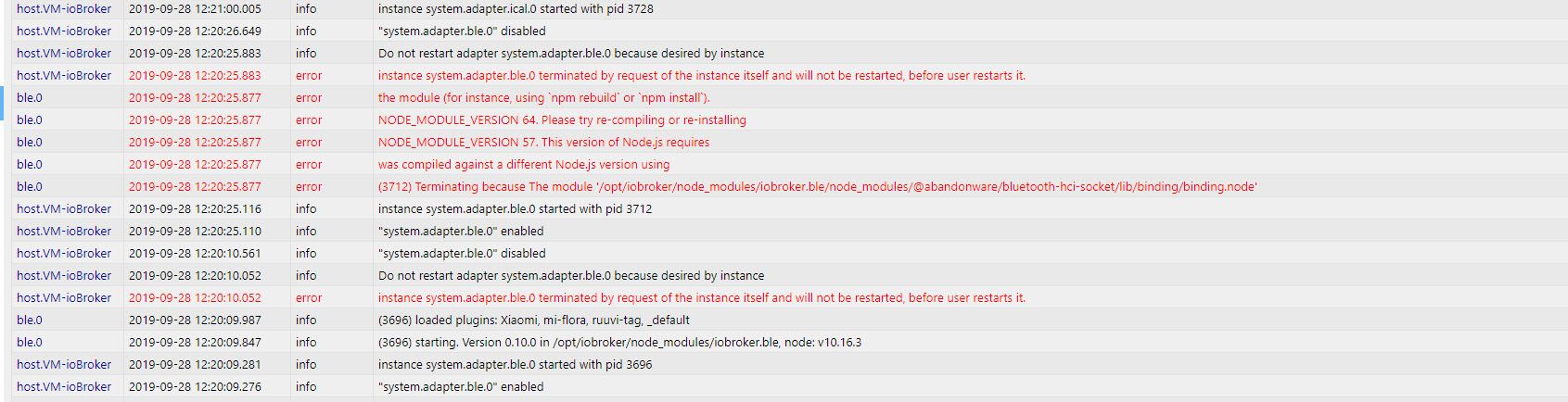
    @Yetiberg sagte in BLE adapter startet nicht mehr:

    npm rebuild.

    Folgendes hat geholfen:

    npm install
    npm rebuild
    sudo apt-get install bluetooth bluez libbluetooth-dev libudev-dev libcap2-bin
    sudo setcap cap_net_raw+eip $(eval readlink -f `which node`)
    

    Danke

    Intel NUC8i3 / Samsung 960 Evo M.2, Proxmox 6.1.5 --> Debian 9 in VM

    J M 2 Replies Last reply
    0
    • 4Josh4 4Josh

      @Yetiberg sagte in BLE adapter startet nicht mehr:

      npm rebuild.

      Folgendes hat geholfen:

      npm install
      npm rebuild
      sudo apt-get install bluetooth bluez libbluetooth-dev libudev-dev libcap2-bin
      sudo setcap cap_net_raw+eip $(eval readlink -f `which node`)
      

      Danke

      J Offline
      J Offline
      Jan1
      wrote on last edited by
      #6

      @4Josh
      NPM rebuild nicht?

      1 Reply Last reply
      0
      • 4Josh4 4Josh

        @Yetiberg sagte in BLE adapter startet nicht mehr:

        npm rebuild.

        Folgendes hat geholfen:

        npm install
        npm rebuild
        sudo apt-get install bluetooth bluez libbluetooth-dev libudev-dev libcap2-bin
        sudo setcap cap_net_raw+eip $(eval readlink -f `which node`)
        

        Danke

        M Offline
        M Offline
        M477h145
        wrote on last edited by
        #7

        @4Josh

        Vielleicht eine doofe Frage, aber was muss ich bei "which node" eingeben

        Danke :)

        haselchenH 1 Reply Last reply
        0
        • M M477h145

          @4Josh

          Vielleicht eine doofe Frage, aber was muss ich bei "which node" eingeben

          Danke :)

          haselchenH Offline
          haselchenH Offline
          haselchen
          Most Active
          wrote on last edited by haselchen
          #8

          @M477h145

          Doofe Antwort : nichts :)
          Den Befehl so lassen

          Synology DS218+ & 2 x Fujitsu Esprimo (VM/Container) + FritzBox7590 + 2 AVM 3000 Repeater & Homematic & HUE & Osram & Xiaomi, NPM 10.9.4, Nodejs 22.21.0 ,JS Controller 7.0.7 ,Admin 7.7.19

          1 Reply Last reply
          0
          • J Offline
            J Offline
            Joker971
            wrote on last edited by
            #9

            Hallo, ich stehe vor exakt dem gleichen Problem aber wenn ich npm install an meinem PI3 (abgesetzter Client) eingebe kommt das hier :

            pi@ioBroker-Pi:~ $ npm install
            npm WARN saveError ENOENT: no such file or directory, open '/home/pi/package.json'
            npm WARN enoent ENOENT: no such file or directory, open '/home/pi/package.json'
            npm WARN pi No description
            npm WARN pi No repository field.
            npm WARN pi No README data
            npm WARN pi No license field.
            
            up to date in 0.856s
            found 0 vulnerabilities
            

            weiß jemand Rat ?

            haselchenH AlCalzoneA 2 Replies Last reply
            0
            • J Joker971

              Hallo, ich stehe vor exakt dem gleichen Problem aber wenn ich npm install an meinem PI3 (abgesetzter Client) eingebe kommt das hier :

              pi@ioBroker-Pi:~ $ npm install
              npm WARN saveError ENOENT: no such file or directory, open '/home/pi/package.json'
              npm WARN enoent ENOENT: no such file or directory, open '/home/pi/package.json'
              npm WARN pi No description
              npm WARN pi No repository field.
              npm WARN pi No README data
              npm WARN pi No license field.
              
              up to date in 0.856s
              found 0 vulnerabilities
              

              weiß jemand Rat ?

              haselchenH Offline
              haselchenH Offline
              haselchen
              Most Active
              wrote on last edited by haselchen
              #10

              @Joker971
              vielleicht sudo davor

              Ich gehe immer nach try&error vor :)
              no risk no fun

              Synology DS218+ & 2 x Fujitsu Esprimo (VM/Container) + FritzBox7590 + 2 AVM 3000 Repeater & Homematic & HUE & Osram & Xiaomi, NPM 10.9.4, Nodejs 22.21.0 ,JS Controller 7.0.7 ,Admin 7.7.19

              J 1 Reply Last reply
              0
              • haselchenH haselchen

                @Joker971
                vielleicht sudo davor

                Ich gehe immer nach try&error vor :)
                no risk no fun

                J Offline
                J Offline
                Jan1
                wrote on last edited by
                #11

                @haselchen
                sudo npm sollte man nicht machen

                haselchenH 1 Reply Last reply
                0
                • J Jan1

                  @haselchen
                  sudo npm sollte man nicht machen

                  haselchenH Offline
                  haselchenH Offline
                  haselchen
                  Most Active
                  wrote on last edited by
                  #12

                  @Jan1

                  Wenn das der einzige Befehl ist, der für mich zum Erfolg führt, führe ich ihn aus :grin:
                  Da bin ich (unwissend) hartnäckig ;)

                  Synology DS218+ & 2 x Fujitsu Esprimo (VM/Container) + FritzBox7590 + 2 AVM 3000 Repeater & Homematic & HUE & Osram & Xiaomi, NPM 10.9.4, Nodejs 22.21.0 ,JS Controller 7.0.7 ,Admin 7.7.19

                  J 1 Reply Last reply
                  0
                  • J Joker971

                    Hallo, ich stehe vor exakt dem gleichen Problem aber wenn ich npm install an meinem PI3 (abgesetzter Client) eingebe kommt das hier :

                    pi@ioBroker-Pi:~ $ npm install
                    npm WARN saveError ENOENT: no such file or directory, open '/home/pi/package.json'
                    npm WARN enoent ENOENT: no such file or directory, open '/home/pi/package.json'
                    npm WARN pi No description
                    npm WARN pi No repository field.
                    npm WARN pi No README data
                    npm WARN pi No license field.
                    
                    up to date in 0.856s
                    found 0 vulnerabilities
                    

                    weiß jemand Rat ?

                    AlCalzoneA Offline
                    AlCalzoneA Offline
                    AlCalzone
                    Developer
                    wrote on last edited by
                    #13

                    @Joker971 sagte in BLE adapter startet nicht mehr:

                    npm install

                    Was soll das bringen? Du bist im Home-Verzeichnis deines Users. Probiere es in /opt/iobroker/node_modules/iobroker.ble

                    Warum `sudo` böse ist: https://forum.iobroker.net/post/17109

                    1 Reply Last reply
                    0
                    • J Offline
                      J Offline
                      Joker971
                      wrote on last edited by
                      #14

                      Danke, das war schonmal ein guter Ansatz :-) So läuft NPM Install und Rebuild. Ich probiere mal weiter :-)

                      1 Reply Last reply
                      0
                      • haselchenH haselchen

                        @Jan1

                        Wenn das der einzige Befehl ist, der für mich zum Erfolg führt, führe ich ihn aus :grin:
                        Da bin ich (unwissend) hartnäckig ;)

                        J Offline
                        J Offline
                        Jan1
                        wrote on last edited by
                        #15

                        @haselchen
                        Der wird nicht zum Erfolg führen, eher dazu, dass danach nichts mehr geht, aber aus Fehlern wird man ja klüger:blush:

                        1 Reply Last reply
                        0
                        • J Offline
                          J Offline
                          Joker971
                          wrote on last edited by
                          #16

                          Sodele, mein BLE Adapter steht wieder auf grün :-) AAAAbbbber im Driverstate steht "poweredOff" obwohl Bluetooth auf dem PI läuft, hier von Putty:

                          pi@ioBroker-Pi:~ $ sudo systemctl status bluetooth
                          â bluetooth.service - Bluetooth service
                             Loaded: loaded (/lib/systemd/system/bluetooth.service; enabled; vendor preset
                             Active: active (running) since Mon 2020-01-06 21:06:10 CET; 7min ago
                               Docs: man:bluetoothd(8)
                           Main PID: 2250 (bluetoothd)
                             Status: "Running"
                              Tasks: 1 (limit: 4915)
                             CGroup: /system.slice/bluetooth.service
                                     ââ2250 /usr/lib/bluetooth/bluetoothd
                          

                          Restart vom ioBroker auf dem Pi bringt keine Lösung, Reload vom Adapter auch nicht.
                          Was nun ???

                          haselchenH AlCalzoneA 2 Replies Last reply
                          0
                          • J Joker971

                            Sodele, mein BLE Adapter steht wieder auf grün :-) AAAAbbbber im Driverstate steht "poweredOff" obwohl Bluetooth auf dem PI läuft, hier von Putty:

                            pi@ioBroker-Pi:~ $ sudo systemctl status bluetooth
                            â bluetooth.service - Bluetooth service
                               Loaded: loaded (/lib/systemd/system/bluetooth.service; enabled; vendor preset
                               Active: active (running) since Mon 2020-01-06 21:06:10 CET; 7min ago
                                 Docs: man:bluetoothd(8)
                             Main PID: 2250 (bluetoothd)
                               Status: "Running"
                                Tasks: 1 (limit: 4915)
                               CGroup: /system.slice/bluetooth.service
                                       ââ2250 /usr/lib/bluetooth/bluetoothd
                            

                            Restart vom ioBroker auf dem Pi bringt keine Lösung, Reload vom Adapter auch nicht.
                            Was nun ???

                            haselchenH Offline
                            haselchenH Offline
                            haselchen
                            Most Active
                            wrote on last edited by
                            #17

                            @Joker971

                            Bin da nicht so der Nerd.
                            Ich hab Bluez installiert. Versuch das mal nach der Anleitung.

                            https://scribles.net/updating-bluez-on-raspberry-pi-from-5-43-to-5-50/

                            Damit läuft mein BLE.

                            Synology DS218+ & 2 x Fujitsu Esprimo (VM/Container) + FritzBox7590 + 2 AVM 3000 Repeater & Homematic & HUE & Osram & Xiaomi, NPM 10.9.4, Nodejs 22.21.0 ,JS Controller 7.0.7 ,Admin 7.7.19

                            J 1 Reply Last reply
                            0
                            • J Joker971

                              Sodele, mein BLE Adapter steht wieder auf grün :-) AAAAbbbber im Driverstate steht "poweredOff" obwohl Bluetooth auf dem PI läuft, hier von Putty:

                              pi@ioBroker-Pi:~ $ sudo systemctl status bluetooth
                              â bluetooth.service - Bluetooth service
                                 Loaded: loaded (/lib/systemd/system/bluetooth.service; enabled; vendor preset
                                 Active: active (running) since Mon 2020-01-06 21:06:10 CET; 7min ago
                                   Docs: man:bluetoothd(8)
                               Main PID: 2250 (bluetoothd)
                                 Status: "Running"
                                  Tasks: 1 (limit: 4915)
                                 CGroup: /system.slice/bluetooth.service
                                         ââ2250 /usr/lib/bluetooth/bluetoothd
                              

                              Restart vom ioBroker auf dem Pi bringt keine Lösung, Reload vom Adapter auch nicht.
                              Was nun ???

                              AlCalzoneA Offline
                              AlCalzoneA Offline
                              AlCalzone
                              Developer
                              wrote on last edited by
                              #18

                              @Joker971 sagte in BLE adapter startet nicht mehr:

                              Driverstate steht "poweredOff"

                              Geht es nach sudo hcitool hci0 up?

                              Warum `sudo` böse ist: https://forum.iobroker.net/post/17109

                              1 Reply Last reply
                              0
                              • haselchenH haselchen

                                @Joker971

                                Bin da nicht so der Nerd.
                                Ich hab Bluez installiert. Versuch das mal nach der Anleitung.

                                https://scribles.net/updating-bluez-on-raspberry-pi-from-5-43-to-5-50/

                                Damit läuft mein BLE.

                                J Offline
                                J Offline
                                Joker971
                                wrote on last edited by
                                #19

                                @haselchen sagte in BLE adapter startet nicht mehr:

                                @Joker971

                                Bin da nicht so der Nerd.
                                Ich hab Bluez installiert. Versuch das mal nach der Anleitung.

                                https://scribles.net/updating-bluez-on-raspberry-pi-from-5-43-to-5-50/

                                Damit läuft mein BLE.

                                Hab ich durchgezogen, hab jetzt auch die neue Version aber Driverstate ist immer noch "poweredOff"

                                @AlCalzone sagte in BLE adapter startet nicht mehr:

                                @Joker971 sagte in BLE adapter startet nicht mehr:

                                Driverstate steht "poweredOff"

                                Geht es nach sudo hcitool hci0 up?

                                da steht dann "unknown command hci0"

                                haselchenH 1 Reply Last reply
                                0
                                • J Joker971

                                  @haselchen sagte in BLE adapter startet nicht mehr:

                                  @Joker971

                                  Bin da nicht so der Nerd.
                                  Ich hab Bluez installiert. Versuch das mal nach der Anleitung.

                                  https://scribles.net/updating-bluez-on-raspberry-pi-from-5-43-to-5-50/

                                  Damit läuft mein BLE.

                                  Hab ich durchgezogen, hab jetzt auch die neue Version aber Driverstate ist immer noch "poweredOff"

                                  @AlCalzone sagte in BLE adapter startet nicht mehr:

                                  @Joker971 sagte in BLE adapter startet nicht mehr:

                                  Driverstate steht "poweredOff"

                                  Geht es nach sudo hcitool hci0 up?

                                  da steht dann "unknown command hci0"

                                  haselchenH Offline
                                  haselchenH Offline
                                  haselchen
                                  Most Active
                                  wrote on last edited by
                                  #20

                                  @Joker971

                                  sudo rfkill list

                                  gib das mal ein und poste das Ergebnis

                                  Synology DS218+ & 2 x Fujitsu Esprimo (VM/Container) + FritzBox7590 + 2 AVM 3000 Repeater & Homematic & HUE & Osram & Xiaomi, NPM 10.9.4, Nodejs 22.21.0 ,JS Controller 7.0.7 ,Admin 7.7.19

                                  J 1 Reply Last reply
                                  0
                                  • haselchenH haselchen

                                    @Joker971

                                    sudo rfkill list

                                    gib das mal ein und poste das Ergebnis

                                    J Offline
                                    J Offline
                                    Joker971
                                    wrote on last edited by
                                    #21

                                    @haselchen

                                    pi@ioBroker-Pi:/ $ sudo rfkill list
                                    0: phy0: Wireless LAN
                                            Soft blocked: no
                                            Hard blocked: no
                                    
                                    haselchenH 1 Reply Last reply
                                    0
                                    • J Joker971

                                      @haselchen

                                      pi@ioBroker-Pi:/ $ sudo rfkill list
                                      0: phy0: Wireless LAN
                                              Soft blocked: no
                                              Hard blocked: no
                                      
                                      haselchenH Offline
                                      haselchenH Offline
                                      haselchen
                                      Most Active
                                      wrote on last edited by
                                      #22

                                      @Joker971

                                      sudo hciconfig hci0 up

                                      Synology DS218+ & 2 x Fujitsu Esprimo (VM/Container) + FritzBox7590 + 2 AVM 3000 Repeater & Homematic & HUE & Osram & Xiaomi, NPM 10.9.4, Nodejs 22.21.0 ,JS Controller 7.0.7 ,Admin 7.7.19

                                      J 1 Reply Last reply
                                      0
                                      • haselchenH haselchen

                                        @Joker971

                                        sudo hciconfig hci0 up

                                        J Offline
                                        J Offline
                                        Joker971
                                        wrote on last edited by
                                        #23

                                        @haselchen

                                        pi@ioBroker-Pi:/ $ sudo hciconfig hci0 up
                                        Can't get device info: No such device

                                        
                                        haselchenH 1 Reply Last reply
                                        0
                                        • J Joker971

                                          @haselchen

                                          pi@ioBroker-Pi:/ $ sudo hciconfig hci0 up
                                          Can't get device info: No such device

                                          
                                          haselchenH Offline
                                          haselchenH Offline
                                          haselchen
                                          Most Active
                                          wrote on last edited by haselchen
                                          #24

                                          @Joker971
                                          Okay...weiter gehts

                                          sudo bluetoothctl

                                          dann

                                          scan on

                                          Discovery started müsste dann kommen

                                          Synology DS218+ & 2 x Fujitsu Esprimo (VM/Container) + FritzBox7590 + 2 AVM 3000 Repeater & Homematic & HUE & Osram & Xiaomi, NPM 10.9.4, Nodejs 22.21.0 ,JS Controller 7.0.7 ,Admin 7.7.19

                                          J 1 Reply Last reply
                                          0
                                          Reply
                                          • Reply as topic
                                          Log in to reply
                                          • Oldest to Newest
                                          • Newest to Oldest
                                          • Most Votes


                                          Support us

                                          ioBroker
                                          Community Adapters
                                          Donate

                                          632

                                          Online

                                          32.7k

                                          Users

                                          82.3k

                                          Topics

                                          1.3m

                                          Posts
                                          Community
                                          Impressum | Datenschutz-Bestimmungen | Nutzungsbedingungen | Einwilligungseinstellungen
                                          ioBroker Community 2014-2025
                                          logo
                                          • Login

                                          • Don't have an account? Register

                                          • Login or register to search.
                                          • First post
                                            Last post
                                          0
                                          • Home
                                          • Recent
                                          • Tags
                                          • Unread 0
                                          • Categories
                                          • Unreplied
                                          • Popular
                                          • GitHub
                                          • Docu
                                          • Hilfe
