




[How-to] Node.js für ioBroker richtig updaten
-
Das war aber ein älteres Node.js, da Du noch npm 6.4.1 verwendest, oder? Also <=8.16 oder < 10.15.x.
@Stabilostick ja npm6.4.1
Nodejs 8.16 -
@Diginix sagte in [How-to] Node.js für ioBroker richtig updaten:
iobroker ALL=(ALL) NOPASSWD: ALL
Dann ist irgendwas manuell oder von nem "Uralten" Installer/Fixer :-) inzwischen bei weitem nicht mehr so.
Zu bluethooth-hci-socket ist meine Vermutung (recht eindeutig) das irgendeine Adapterversion installiert ist die noch ein altes Modul nutzt und daher per se nicht nodejs 10 kompatibel ost. Also Kompatible Adapterversion installieren. Welche das ist wäre rauszufinden. Du kannst versuchen "npm install @abandonware/bluetooth-hci-socket" im ioBroker Verzeichnis auszuühren, das sollte eine kompatible version installieren ... Auswirkungen weiter bei Adaptern: unklar. sollte aber nichts ändern ausser das der betroffenene Adapter nicht mehr tut. Den dann ggf updaten und sollte wieder tun.
Zu dem anderen Fehler bei npm audit: ioBroker schaltet standard,äßiog die package-lock aus, daher kann die nicht aktuell sein. Und damit ist audit "blödsinn" und wird Dein Problem auch nicht lösen.
Und das hier schon @abandonware/noble geladen werden will zeigt an sich das radar vllt was damit zu tun hat, Du könntest auch versuchen die Versionen von radar2 und ble neu "drüber" zu installieren um zu sehen ob es danach besser ist.
Also irgendwie hat es scheinbar bei dir einen komischen mix und Du könntest mit etwas Zeit die Option c oder d von oben wählen. Danach hast Du in jedem Fall eine klare struktur.
Dazu empfehle ich aber js-controller 1.5.11 weil bei der 1.4 hier bei dem version alle Adapter mit seinen "latest" versionen neu installiert werden und nicht die eigentlich aktuell eingerichteten Versionen respektiert werden.@apollon77 Die Zeile in der sudoers.d habe ich doch selbst eingefügt damit der iobroker user in Blockly per exec Dinge ohne Passwort ausführen darf.
npm audit hatte ich gemacht weil radar2 bei der Installation folgendes sagt:
+ iobroker.radar2@1.2.0updated 1 package and audited 6249 packages in 43.664s
found 90 vulnerabilities (58 low, 11 moderate, 21 high)  run `npm audit fix` to fix them, or `npm audit` for details
Ich nutze schon die neuste radar2 Version von @frankjoke. Meist sogar direkt von GIT installiert.
Wahrscheinlich werde ich wirklich mal mittels minimal Backup ein Restore machen und somit alles neu.
-
Herzlichen Dank für die gute Anleitung.
Bei mir hat das Update auf NPM 10.16.0 gut geklappt.
Einzig der Dash Adapter funktioniert nicht mehr.
Ich habe den dann deinstalliert und versucht neu zu installieren und dabei diese Fehlermeldung bekommen:iobroker 2019-06-03 21:15:45.138 info exit 13 iobroker 2019-06-03 21:15:45.121 error host.haus Cannot install amazon-dash iobroker 2019-06-03 21:15:45.120 info host.haus install adapter amazon-dash iobroker 2019-06-03 21:15:45.088 info npm ERR! /root/.npm/_logs/2019-06-03T19_15_45_070Z-debug.log iobroker 2019-06-03 21:15:45.088 info npm ERR! A complete log of this run can be found in: iobroker 2019-06-03 21:15:45.064 info npm ERR! iobroker 2019-06-03 21:15:45.064 info npm ERR! Command failed: git clone --mirror -q https://github.com/bytzdev/node-socketwatcher.git /root/.npm/_cacache/tmp/git-clone-68e13554/.gitnpm ERR! fatal: could not create leading directories of iobroker 2019-06-03 21:15:45.062 info ERR! code 128 iobroker 2019-06-03 21:15:45.060 info npm iobroker 2019-06-03 21:15:00.496 info npm install iobroker.amazon-dash@0.3.1 --unsafe-perm --production --save --prefix "/opt/iobroker" (System call) iobroker 2019-06-03 21:15:00.495 info NPM version: 6.9.0 iobroker 2019-06-03 21:14:59.600 info host.haus install adapter amazon-dash iobroker 2019-06-03 21:14:59.570 info npm ERR! /root/.npm/_logs/2019-06-03T19_14_59_555Z-debug.log iobroker 2019-06-03 21:14:59.570 info npm ERR! A complete log of this run can be found in: iobroker 2019-06-03 21:14:59.549 info npm ERR! iobroker 2019-06-03 21:14:59.549 info npm ERR! Command failed: git clone --mirror -q https://github.com/bytzdev/node-socketwatcher.git /root/.npm/_cacache/tmp/git-clone-1045b9d0/.gitnpm ERR! fatal: could not create leading directories of iobroker 2019-06-03 21:14:59.546 info ERR! code 128 iobroker 2019-06-03 21:14:59.544 info npm iobroker 2019-06-03 21:14:15.399 info npm install iobroker.amazon-dash@0.3.1 --unsafe-perm --production --save --prefix "/opt/iobroker" (System call) iobroker 2019-06-03 21:14:15.398 info NPM version: 6.9.0 iobroker 2019-06-03 21:14:14.489 info host.haus install adapter amazon-dash iobroker 2019-06-03 21:14:14.442 info npm ERR! /root/.npm/_logs/2019-06-03T19_14_14_426Z-debug.log iobroker 2019-06-03 21:14:14.442 info npm ERR! A complete log of this run can be found in: iobroker 2019-06-03 21:14:14.420 info fatal: could not create leading directories of '/root/.npm/_cacache/tmp/git-clone-baa2d6d5/.git'npm ERR! iobroker 2019-06-03 21:14:14.418 info ERR! Command failed: git clone --mirror -q https://github.com/bytzdev/node-socketwatcher.git /root/.npm/_cacache/tmp/git-clone-baa2d6d5/.gitnpm ERR! iobroker 2019-06-03 21:14:14.416 info npm iobroker 2019-06-03 21:14:14.415 info ERR! code 128 iobroker 2019-06-03 21:14:14.413 info npm iobroker 2019-06-03 21:13:27.356 info npm install iobroker.amazon-dash@0.3.1 --unsafe-perm --production --save --prefix "/opt/iobroker" (System call) iobroker 2019-06-03 21:13:26.750 info NPM version: 6.9.0 iobroker 2019-06-03 21:13:24.986 info add amazon-dash --host hausFür mich jetzt an sich nicht so wichtig, da der Dash im Laufe des Jahres sowieso rausfliegt und dann der Adapter hinfällig ist.
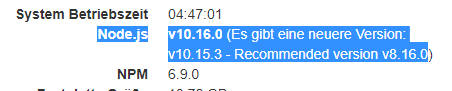
Auf der Info Seite wird mir das hier angezeigt:
Node.js
    v10.16.0 (Recommended version v8.16.0)
Nur als Hinweis der eventuell noch in der Anleitung verarbeitet werden sollte.
ioBroker auf NUC unter Proxmox; VIS: 12" Touchscreen und 17" Touch; Lichtsteuerung, Thermometer und Sensoren: Tasmota (39); Ambiente Beleuchtung: WLED (9); Heizung: DECT Thermostate (9) an Fritz 6690; EMS-ESP; 1 Echo V2; 3 Echo DOT; 1 Echo Connect; 2 Echo Show 5; Unifi Ap-Ac Lite.
-
Herzlichen Dank für die gute Anleitung.
Bei mir hat das Update auf NPM 10.16.0 gut geklappt.
Einzig der Dash Adapter funktioniert nicht mehr.
Ich habe den dann deinstalliert und versucht neu zu installieren und dabei diese Fehlermeldung bekommen:iobroker 2019-06-03 21:15:45.138 info exit 13 iobroker 2019-06-03 21:15:45.121 error host.haus Cannot install amazon-dash iobroker 2019-06-03 21:15:45.120 info host.haus install adapter amazon-dash iobroker 2019-06-03 21:15:45.088 info npm ERR! /root/.npm/_logs/2019-06-03T19_15_45_070Z-debug.log iobroker 2019-06-03 21:15:45.088 info npm ERR! A complete log of this run can be found in: iobroker 2019-06-03 21:15:45.064 info npm ERR! iobroker 2019-06-03 21:15:45.064 info npm ERR! Command failed: git clone --mirror -q https://github.com/bytzdev/node-socketwatcher.git /root/.npm/_cacache/tmp/git-clone-68e13554/.gitnpm ERR! fatal: could not create leading directories of iobroker 2019-06-03 21:15:45.062 info ERR! code 128 iobroker 2019-06-03 21:15:45.060 info npm iobroker 2019-06-03 21:15:00.496 info npm install iobroker.amazon-dash@0.3.1 --unsafe-perm --production --save --prefix "/opt/iobroker" (System call) iobroker 2019-06-03 21:15:00.495 info NPM version: 6.9.0 iobroker 2019-06-03 21:14:59.600 info host.haus install adapter amazon-dash iobroker 2019-06-03 21:14:59.570 info npm ERR! /root/.npm/_logs/2019-06-03T19_14_59_555Z-debug.log iobroker 2019-06-03 21:14:59.570 info npm ERR! A complete log of this run can be found in: iobroker 2019-06-03 21:14:59.549 info npm ERR! iobroker 2019-06-03 21:14:59.549 info npm ERR! Command failed: git clone --mirror -q https://github.com/bytzdev/node-socketwatcher.git /root/.npm/_cacache/tmp/git-clone-1045b9d0/.gitnpm ERR! fatal: could not create leading directories of iobroker 2019-06-03 21:14:59.546 info ERR! code 128 iobroker 2019-06-03 21:14:59.544 info npm iobroker 2019-06-03 21:14:15.399 info npm install iobroker.amazon-dash@0.3.1 --unsafe-perm --production --save --prefix "/opt/iobroker" (System call) iobroker 2019-06-03 21:14:15.398 info NPM version: 6.9.0 iobroker 2019-06-03 21:14:14.489 info host.haus install adapter amazon-dash iobroker 2019-06-03 21:14:14.442 info npm ERR! /root/.npm/_logs/2019-06-03T19_14_14_426Z-debug.log iobroker 2019-06-03 21:14:14.442 info npm ERR! A complete log of this run can be found in: iobroker 2019-06-03 21:14:14.420 info fatal: could not create leading directories of '/root/.npm/_cacache/tmp/git-clone-baa2d6d5/.git'npm ERR! iobroker 2019-06-03 21:14:14.418 info ERR! Command failed: git clone --mirror -q https://github.com/bytzdev/node-socketwatcher.git /root/.npm/_cacache/tmp/git-clone-baa2d6d5/.gitnpm ERR! iobroker 2019-06-03 21:14:14.416 info npm iobroker 2019-06-03 21:14:14.415 info ERR! code 128 iobroker 2019-06-03 21:14:14.413 info npm iobroker 2019-06-03 21:13:27.356 info npm install iobroker.amazon-dash@0.3.1 --unsafe-perm --production --save --prefix "/opt/iobroker" (System call) iobroker 2019-06-03 21:13:26.750 info NPM version: 6.9.0 iobroker 2019-06-03 21:13:24.986 info add amazon-dash --host hausFür mich jetzt an sich nicht so wichtig, da der Dash im Laufe des Jahres sowieso rausfliegt und dann der Adapter hinfällig ist.
Auf der Info Seite wird mir das hier angezeigt:
Node.js
    v10.16.0 (Recommended version v8.16.0)
Nur als Hinweis der eventuell noch in der Anleitung verarbeitet werden sollte.
@Chaot ich brauch den noch, sonst ist Sohnemann tot unglücklich:joy: :joy:
umgestiegen von Proxmox auf Unraid
-
@crunchip Ok, dann solltest du vorerst beim NPM 8.16 bleiben. Damit hat das ja funktioniert.
Bei mir hat der letzte Button nur noch die Heizung gesteuert weil ich darüber das Badezimmer für 1 Stunde auf "Boost" gestellt habe. Aber derzeit wird das nicht mehr benötigt und bis Herbst habe ich dort einen schönen WLan Taster der dann das übernimmt.ioBroker auf NUC unter Proxmox; VIS: 12" Touchscreen und 17" Touch; Lichtsteuerung, Thermometer und Sensoren: Tasmota (39); Ambiente Beleuchtung: WLED (9); Heizung: DECT Thermostate (9) an Fritz 6690; EMS-ESP; 1 Echo V2; 3 Echo DOT; 1 Echo Connect; 2 Echo Show 5; Unifi Ap-Ac Lite.
-
@crunchip Ok, dann solltest du vorerst beim NPM 8.16 bleiben. Damit hat das ja funktioniert.
Bei mir hat der letzte Button nur noch die Heizung gesteuert weil ich darüber das Badezimmer für 1 Stunde auf "Boost" gestellt habe. Aber derzeit wird das nicht mehr benötigt und bis Herbst habe ich dort einen schönen WLan Taster der dann das übernimmt.@Chaot tztztz...system is wichtiger...er wirds überleben
auf Dauer sind die buttons eh nichts, da sie zu träge reagieren.
Wird verwendet für sein Nachtlicht. Den Kompromiss geht er mit sicherheit ein, wenn der zukünftige Schalter sofort reagiert. -
Herzlichen Dank für die gute Anleitung.
Bei mir hat das Update auf NPM 10.16.0 gut geklappt.
Einzig der Dash Adapter funktioniert nicht mehr.
Ich habe den dann deinstalliert und versucht neu zu installieren und dabei diese Fehlermeldung bekommen:iobroker 2019-06-03 21:15:45.138 info exit 13 iobroker 2019-06-03 21:15:45.121 error host.haus Cannot install amazon-dash iobroker 2019-06-03 21:15:45.120 info host.haus install adapter amazon-dash iobroker 2019-06-03 21:15:45.088 info npm ERR! /root/.npm/_logs/2019-06-03T19_15_45_070Z-debug.log iobroker 2019-06-03 21:15:45.088 info npm ERR! A complete log of this run can be found in: iobroker 2019-06-03 21:15:45.064 info npm ERR! iobroker 2019-06-03 21:15:45.064 info npm ERR! Command failed: git clone --mirror -q https://github.com/bytzdev/node-socketwatcher.git /root/.npm/_cacache/tmp/git-clone-68e13554/.gitnpm ERR! fatal: could not create leading directories of iobroker 2019-06-03 21:15:45.062 info ERR! code 128 iobroker 2019-06-03 21:15:45.060 info npm iobroker 2019-06-03 21:15:00.496 info npm install iobroker.amazon-dash@0.3.1 --unsafe-perm --production --save --prefix "/opt/iobroker" (System call) iobroker 2019-06-03 21:15:00.495 info NPM version: 6.9.0 iobroker 2019-06-03 21:14:59.600 info host.haus install adapter amazon-dash iobroker 2019-06-03 21:14:59.570 info npm ERR! /root/.npm/_logs/2019-06-03T19_14_59_555Z-debug.log iobroker 2019-06-03 21:14:59.570 info npm ERR! A complete log of this run can be found in: iobroker 2019-06-03 21:14:59.549 info npm ERR! iobroker 2019-06-03 21:14:59.549 info npm ERR! Command failed: git clone --mirror -q https://github.com/bytzdev/node-socketwatcher.git /root/.npm/_cacache/tmp/git-clone-1045b9d0/.gitnpm ERR! fatal: could not create leading directories of iobroker 2019-06-03 21:14:59.546 info ERR! code 128 iobroker 2019-06-03 21:14:59.544 info npm iobroker 2019-06-03 21:14:15.399 info npm install iobroker.amazon-dash@0.3.1 --unsafe-perm --production --save --prefix "/opt/iobroker" (System call) iobroker 2019-06-03 21:14:15.398 info NPM version: 6.9.0 iobroker 2019-06-03 21:14:14.489 info host.haus install adapter amazon-dash iobroker 2019-06-03 21:14:14.442 info npm ERR! /root/.npm/_logs/2019-06-03T19_14_14_426Z-debug.log iobroker 2019-06-03 21:14:14.442 info npm ERR! A complete log of this run can be found in: iobroker 2019-06-03 21:14:14.420 info fatal: could not create leading directories of '/root/.npm/_cacache/tmp/git-clone-baa2d6d5/.git'npm ERR! iobroker 2019-06-03 21:14:14.418 info ERR! Command failed: git clone --mirror -q https://github.com/bytzdev/node-socketwatcher.git /root/.npm/_cacache/tmp/git-clone-baa2d6d5/.gitnpm ERR! iobroker 2019-06-03 21:14:14.416 info npm iobroker 2019-06-03 21:14:14.415 info ERR! code 128 iobroker 2019-06-03 21:14:14.413 info npm iobroker 2019-06-03 21:13:27.356 info npm install iobroker.amazon-dash@0.3.1 --unsafe-perm --production --save --prefix "/opt/iobroker" (System call) iobroker 2019-06-03 21:13:26.750 info NPM version: 6.9.0 iobroker 2019-06-03 21:13:24.986 info add amazon-dash --host hausFür mich jetzt an sich nicht so wichtig, da der Dash im Laufe des Jahres sowieso rausfliegt und dann der Adapter hinfällig ist.
Auf der Info Seite wird mir das hier angezeigt:
Node.js
    v10.16.0 (Recommended version v8.16.0)
Nur als Hinweis der eventuell noch in der Anleitung verarbeitet werden sollte.
@Chaot sagte in [How-to] Node.js für ioBroker richtig updaten:
Auf der Info Seite wird mir das hier angezeigt:
Danke für den Hinweis. Wird voraussichtlich morgen angepasst.
https://github.com/iobroker-community-adapters/ioBroker.info/pull/42
-
@Stabilostick habe beim neuladen bemerkt, das der ein oder andere Adapter Fehler aufweist.
hier ein Auszug aus dem log2019-06-03 16:11:18.283 - warn: host.IoBroker startInstance cannot find adapter "radar2@1.2.0". Try to install it... 1 attempt 2019-06-03 16:11:18.284 - info: iobroker install radar2@1.2.0 2019-06-03 16:11:19.918 - info: iobroker NPM version: 6.4.1 2019-06-03 16:11:20.406 - info: iobroker npm install iobroker.radar2@1.2.0 --unsafe-perm --production --save --prefix "/opt/iobroker" (System call) 2019-06-03 16:11:31.867 - info: iobroker npm ERR! 2019-06-03 16:11:31.868 - info: iobroker code ETARGET 2019-06-03 16:11:31.869 - info: iobroker npm ERR! notarget No matching version found for iobroker.radar2@1.2.0npm ERR! notarget In most cases you or one of your dependencies are requesting npm 2019-06-03 16:11:31.870 - info: iobroker ERR! notarget a package version that doesn't exist. 2019-06-03 16:11:31.882 - info: iobroker 2019-06-03 16:11:31.882 - info: iobroker npm ERR! A complete log of this run can be found in:npm ERR! /root/.npm/_logs/2019-06-03T14_11_31_872Z-debug.log 2019-06-03 16:11:31.905 - error: iobroker host.IoBroker Adapter directory "null" does not exists 2019-06-03 16:11:31.941 - error: iobroker Cannot parse null/io-package.json:Error: ENOENT: no such file or directory, open 'null/io-package.json' 2019-06-03 16:11:31.951 - info: iobroker exit 0 2019-06-03 16:11:32.953 - warn: host.IoBroker startInstance cannot find adapter "sayit@1.8.1". Try to install it... 1 attempt 2019-06-03 16:11:32.953 - info: iobroker install sayit@1.8.1 2019-06-03 16:11:34.342 - info: iobroker host.IoBroker Adapter "system.adapter.sayit.0" is stopped. 2019-06-03 16:11:34.369 - info: host.IoBroker object change system.adapter.sayit.0 2019-06-03 16:11:34.369 - info: host.IoBroker "system.adapter.sayit.0" disabled 2019-06-03 16:11:34.846 - info: iobroker NPM version: 6.4.1 2019-06-03 16:11:35.330 - info: iobroker npm install iobroker.sayit@1.8.1 --unsafe-perm --production --save --prefix "/opt/iobroker" (System call) 2019-06-03 16:11:47.135 - info: iobroker npm ERR! 2019-06-03 16:11:47.135 - info: iobroker code ETARGET 2019-06-03 16:11:47.137 - info: iobroker npm ERR! notarget No matching version found for iobroker.sayit@1.8.1 2019-06-03 16:11:47.137 - info: iobroker npm ERR! notarget In most cases you or one of your dependencies are requestingnpm ERR! 2019-06-03 16:11:47.138 - info: iobroker notarget a package version that doesn't exist. 2019-06-03 16:11:47.152 - info: iobroker 2019-06-03 16:11:47.153 - info: iobroker npm ERR! A complete log of this run can be found in:npm ERR! /root/.npm/_logs/2019-06-03T14_11_47_140Z-debug.log 2019-06-03 16:11:47.175 - info: iobroker host.IoBroker Adapter "system.adapter.sayit.0" is started 2019-06-03 16:11:47.192 - info: host.IoBroker object change system.adapter.sayit.0 2019-06-03 16:11:47.193 - info: host.IoBroker "system.adapter.sayit.0" enabled 2019-06-03 16:11:47.207 - error: iobroker host.IoBroker Adapter directory "null" does not exists 2019-06-03 16:11:47.234 - error: iobroker Cannot parse null/io-package.json:Error: ENOENT: no such file or directory, open 'null/io-package.json' 2019-06-03 16:11:47.244 - info: iobroker exit 0 2019-06-03 16:11:48.246 - info: host.IoBroker instance system.adapter.iqontrol.0 started with pid 13631 2019-06-03 16:11:48.247 - error: host.IoBroker Cannot download adapter "milight@0.4.0". To restart it disable/enable it or restart host. 2019-06-03 16:11:48.750 - error: host.IoBroker Cannot download adapter "milight@0.4.0". To restart it disable/enable it or restart host. 2019-06-03 16:11:48.945 - error: host.IoBroker instance system.adapter.iqontrol.0 terminated with code 7 (Adapter already running) 2019-06-03 16:11:48.946 - info: host.IoBroker Restart adapter system.adapter.iqontrol.0 because enabled 2019-06-03 16:11:49.252 - warn: host.IoBroker startInstance cannot find adapter "radar2@1.2.0". Try to install it... 2 attempt 2019-06-03 16:11:49.252 - info: iobroker install radar2@1.2.0 2019-06-03 16:11:50.927 - info: iobroker NPM version: 6.4.1 2019-06-03 16:11:51.410 - info: iobroker npm install iobroker.radar2@1.2.0 --unsafe-perm --production --save --prefix "/opt/iobroker" (System call) 2019-06-03 16:12:03.186 - info: iobroker npm ERR! 2019-06-03 16:12:03.187 - info: iobroker code ETARGET 2019-06-03 16:12:03.188 - info: iobroker npm ERR! notarget No matching version found for iobroker.radar2@1.2.0 2019-06-03 16:12:03.189 - info: iobroker npm ERR! notarget 2019-06-03 16:12:03.189 - info: iobroker In most cases you or one of your dependencies are requestingnpm ERR! 2019-06-03 16:12:03.189 - info: iobroker notarget a package version that doesn't exist. 2019-06-03 16:12:03.201 - info: iobroker 2019-06-03 16:12:03.202 - info: iobroker npm ERR! A complete log of this run can be found in:npm ERR! /root/.npm/_logs/2019-06-03T14_12_03_192Z-debug.log 2019-06-03 16:12:03.225 - error: iobroker host.IoBroker Adapter directory "null" does not exists 2019-06-03 16:12:03.260 - error: iobroker Cannot parse null/io-package.json:Error: ENOENT: no such file or directory, open 'null/io-package.json' 2019-06-03 16:12:03.271 - info: iobroker exit 0 2019-06-03 16:12:04.273 - warn: host.IoBroker startInstance cannot find adapter "sayit@1.8.1". Try to install it... 2 attempt 2019-06-03 16:12:04.273 - info: iobroker install sayit@1.8.1 2019-06-03 16:12:05.505 - info: iobroker host.IoBroker Adapter "system.adapter.sayit.0" is stopped. 2019-06-03 16:12:05.531 - info: host.IoBroker object change system.adapter.sayit.0 2019-06-03 16:12:05.531 - info: host.IoBroker "system.adapter.sayit.0" disabled 2019-06-03 16:12:06.012 - info: iobroker NPM version: 6.4.1 2019-06-03 16:12:06.555 - info: iobroker npm install iobroker.sayit@1.8.1 --unsafe-perm --production --save --prefix "/opt/iobroker" (System call) 2019-06-03 16:12:18.282 - info: iobroker npm ERR! code ETARGET 2019-06-03 16:12:18.286 - info: iobroker npm ERR! notarget No matching version found for iobroker.sayit@1.8.1npm ERR! notarget In most cases you or one of your dependencies are requesting npm ERR! notarget a package version that doesn't exist. 2019-06-03 16:12:18.296 - info: iobroker npm ERR! 2019-06-03 16:12:18.297 - info: iobroker A complete log of this run can be found in:npm ERR! /root/.npm/_logs/2019-06-03T14_12_18_286Z-debug.log 2019-06-03 16:12:18.322 - info: iobroker host.IoBroker Adapter "system.adapter.sayit.0" is started 2019-06-03 16:12:18.339 - info: host.IoBroker object change system.adapter.sayit.0 2019-06-03 16:12:18.339 - info: host.IoBroker "system.adapter.sayit.0" enabled 2019-06-03 16:12:18.356 - error: iobroker host.IoBroker Adapter directory "null" does not exists 2019-06-03 16:12:18.382 - error: iobroker Cannot parse null/io-package.json:Error: ENOENT: no such file or directory, open 'null/io-package.json' 2019-06-03 16:12:18.394 - info: iobroker exit 0 2019-06-03 16:12:18.967 - info: host.IoBroker instance system.adapter.iqontrol.0 started with pid 13714 2019-06-03 16:12:19.493 - warn: host.IoBroker startInstance cannot find adapter "sayit@1.8.1". Try to install it... 3 attempt 2019-06-03 16:12:19.493 - info: iobroker install sayit@1.8.1 2019-06-03 16:12:19.664 - error: host.IoBroker instance system.adapter.iqontrol.0 terminated with code 7 (Adapter already running) 2019-06-03 16:12:19.665 - info: host.IoBroker Restart adapter system.adapter.iqontrol.0 because enabled 2019-06-03 16:12:21.032 - info: iobroker host.IoBroker Adapter "system.adapter.sayit.0" is stopped. 2019-06-03 16:12:21.055 - info: host.IoBroker object change system.adapter.sayit.0 2019-06-03 16:12:21.056 - info: host.IoBroker "system.adapter.sayit.0" disabled 2019-06-03 16:12:21.558 - info: iobroker NPM version: 6.4.1 2019-06-03 16:12:22.133 - info: iobroker npm install iobroker.sayit@1.8.1 --unsafe-perm --production --save --prefix "/opt/iobroker" (System call) 2019-06-03 16:12:33.484 - info: iobroker npm ERR! 2019-06-03 16:12:33.485 - info: iobroker code ETARGET 2019-06-03 16:12:33.486 - info: iobroker npm ERR! notarget No matching version found for iobroker.sayit@1.8.1npm ERR! notarget 2019-06-03 16:12:33.487 - info: iobroker In most cases you or one of your dependencies are requestingnpm ERR! notarget a package version that doesn't exist. 2019-06-03 16:12:33.502 - info: iobroker npm ERR! A complete log of this run can be found in: npm ERR! /root/.npm/_logs/2019-06-03T14_12_33_489Z-debug.log 2019-06-03 16:12:33.523 - info: iobroker host.IoBroker Adapter "system.adapter.sayit.0" is started 2019-06-03 16:12:33.545 - info: host.IoBroker object change system.adapter.sayit.0 2019-06-03 16:12:33.545 - info: host.IoBroker "system.adapter.sayit.0" enabled 2019-06-03 16:12:33.562 - error: iobroker host.IoBroker Adapter directory "null" does not exists 2019-06-03 16:12:33.588 - error: iobroker Cannot parse null/io-package.json:Error: ENOENT: no such file or directory, open 'null/io-package.json' 2019-06-03 16:12:33.600 - info: iobroker exit 0 2019-06-03 16:12:34.602 - warn: host.IoBroker startInstance cannot find adapter "radar2@1.2.0". Try to install it... 3 attempt 2019-06-03 16:12:34.602 - info: iobroker install radar2@1.2.0 2019-06-03 16:12:36.247 - info: iobroker NPM version: 6.4.1 2019-06-03 16:12:36.759 - info: iobroker npm install iobroker.radar2@1.2.0 --unsafe-perm --production --save --prefix "/opt/iobroker" (System call) 2019-06-03 16:12:48.518 - info: iobroker npm 2019-06-03 16:12:48.518 - info: iobroker ERR! code ETARGET 2019-06-03 16:12:48.520 - info: iobroker npm ERR! notarget No matching version found for iobroker.radar2@1.2.0npm ERR! notarget In most cases you or one of your dependencies are requesting npm ERR! notarget 2019-06-03 16:12:48.521 - info: iobroker a package version that doesn't exist. 2019-06-03 16:12:48.538 - info: iobroker 2019-06-03 16:12:48.538 - info: iobroker npm ERR! A complete log of this run can be found in:npm ERR! /root/.npm/_logs/2019-06-03T14_12_48_523Z-debug.log 2019-06-03 16:12:48.562 - error: iobroker host.IoBroker Adapter directory "null" does not exists 2019-06-03 16:12:48.606 - error: iobroker Cannot parse null/io-package.json:Error: ENOENT: no such file or directory, open 'null/io-package.json' 2019-06-03 16:12:48.616 - info: iobroker exit 0 2019-06-03 16:12:49.618 - error: host.IoBroker Cannot download adapter "sayit@1.8.1". To restart it disable/enable it or restart host. 2019-06-03 16:12:49.683 - info: host.IoBroker instance system.adapter.iqontrol.0 started with pid 13838 2019-06-03 16:12:50.119 - error: host.IoBroker Cannot download adapter "sayit@1.8.1". To restart it disable/enable it or restart host. 2019-06-03 16:12:50.340 - error: host.IoBroker instance system.adapter.iqontrol.0 terminated with code 7 (Adapter already running) 2019-06-03 16:12:50.340 - info: host.IoBroker Restart adapter system.adapter.iqontrol.0 because enabled 2019-06-03 16:12:50.620 - error: host.IoBroker Cannot download adapter "sayit@1.8.1". To restart it disable/enable it or restart host. 2019-06-03 16:12:51.121 - error: host.IoBroker Cannot download adapter "sayit@1.8.1". To restart it disable/enable it or restart host. 2019-06-03 16:12:51.622 - error: host.IoBroker Cannot download adapter "radar2@1.2.0". To restart it disable/enable it or restart host. 2019-06-03 16:13:20.362 - info: host.IoBroker instance system.adapter.iqontrol.0 started with pid 13860geht überwiegend um diese Meldung
bei den Adaptern
Fritzbox
broadlink
sayit
simple api
milight
radar2
iqontrol2019-06-03 15:06:01.211 - error: iobroker host.IoBroker Adapter directory "null" does not exists 2019-06-03 15:06:01.249 - error: iobroker Cannot parse null/io-package.json:Error: ENOENT: no such file or directory, open 'null/io-package.json'bluetooth
> bluetooth-hci-socket@0.5.1 install /opt/iobroker/node_modules/iobroker.javascript/node_modules/bluetooth-hci-socket > node-gyp rebuild 2019-06-03 14:58:43.886 - info: javascript.0 make: Verzeichnis „/opt/iobroker/node_modules/iobroker.javascript/node_modules/bluetooth-hci-socket/build“ wird betreten 2019-06-03 14:58:43.888 - info: javascript.0 CXX(target) Release/obj.target/binding/src/BluetoothHciSocket.o 2019-06-03 14:58:45.611 - error: javascript.0 ../src/BluetoothHciSocket.cpp: In member function ‘void BluetoothHciSocket::poll()’: ../src/BluetoothHciSocket.cpp:251:95: warning: ‘v8::Local Nan::MakeCallback(v8::Local, v8::Local, int, v8::Local*)’ is deprecated [-Wdeprecated-declarations] Nan::MakeCallback(Nan::New(this->This), Nan::New("emit").ToLocalChecked(), 2, argv); ^ In file included from ../src/BluetoothHciSocket.cpp:8:0: ../../nan/nan.h:1045:46: note: declared here NAN_DEPRECATED inline v8::Local MakeCallback( ^~~~~~~~~~~~ 2019-06-03 14:58:45.614 - error: javascript.0 ../src/BluetoothHciSocket.cpp: In member function ‘void BluetoothHciSocket::emitErrnoError()’: ../src/BluetoothHciSocket.cpp:275:72: warning: ‘v8::Local v8::Function::NewInstance(int, v8::Local*) const’ is deprecated: Use maybe version [-Wdeprecated-declarations] Local error = errorConstructor->NewInstance(1, constructorArgs); ^ In file included from /root/.node-gyp/8.16.0/include/node/v8.h:26:0, from /root/.node-gyp/8.16.0/include/node/node.h:63, from /root/.node-gyp/8.16.0/include/node/node_buffer.h:25, from ../src/BluetoothHciSocket.cpp:7: /root/.node-gyp/8.16.0/include/node/v8.h:3897:31: note: declared here Local NewInstance(int argc, Local argv[]) const); ^ /root/.node-gyp/8.16.0/include/node/v8config.h:318:3: note: in definition of macro ‘V8_DEPRECATED’ declarator __attribute__((deprecated(message))) ^~~~~~~~~~ 2019-06-03 14:58:45.617 - error: javascript.0 ../src/BluetoothHciSocket.cpp:282:93: warning: ‘v8::Local Nan::MakeCallback(v8::Local, v8::Local, int, v8::Local*)’ is deprecated [-Wdeprecated-declarations] Nan::MakeCallback(Nan::New(this->This), Nan::New("emit").ToLocalChecked(), 2, argv); ^ In file included from ../src/BluetoothHciSocket.cpp:8:0: ../../nan/nan.h:1045:46: note: declared here NAN_DEPRECATED inline v8::Local MakeCallback( ^~~~~~~~~~~~ 2019-06-03 14:58:46.999 - info: javascript.0 SOLINK_MODULE(target) Release/obj.target/binding.node 2019-06-03 14:58:47.243 - info: javascript.0 COPY Release/binding.node 2019-06-03 14:58:47.258 - info: javascript.0 make: Verzeichnis „/opt/iobroker/node_modules/iobroker.javascript/node_modules/bluetooth-hci-socket/build“ wird verlassen 2019-06-03 14:58:47.626 - error: javascript.0 npm 2019-06-03 14:58:47.626 - error: javascript.0 WARN optional SKIPPING OPTIONAL DEPENDENCY: xpc-connection@0.1.4 (node_modules/xpc-connection): npm WARN notsup SKIPPING OPTIONAL DEPENDENCY: Unsupported platform for xpc-connection@0.1.4: wanted {"os":"darwin","arch":"any"} (current: {"os":"linux","arch":"x64"}) 2019-06-03 14:58:47.627 - error: javascript.0 2019-06-03 14:58:47.633 - info: javascript.0 + noble@1.9.1 added 72 packages from 50 contributors and audited 132 packages in 12.31s 2019-06-03 14:58:47.635 - info: javascript.0 found 2 low severity vulnerabilities run `npm audit fix` to fix them, or `npm audit` for details 2019-06-03 14:58:47.655 - info: javascript.0 npm install node-hue-api --production --prefix "/opt/iobroker/node_modules/iobroker.javascript" (System call) 2019-06-03 14:58:53.989 - error: javascript.0 npm 2019-06-03 14:58:53.990 - error: javascript.0 WARN optional SKIPPING OPTIONAL DEPENDENCY: xpc-connection@0.1.4 (node_modules/xpc-connection): npm WARN notsup SKIPPING OPTIONAL DEPENDENCY: Unsupported platform for xpc-connection@0.1.4: wanted {"os":"darwin","arch":"any"} (current: {"os":"linux","arch":"x64"}) 2019-06-03 14:58:53.991 - error: javascript.0@crunchip meldung mit dem null ist eine buggy js-controller 1.5 Version ... Bitte unbedingt 1.5.11+ nutzen!! Da ist das behoben!
Ahhh das bluetools zeug kommt bei dir aus dem javascript Adapter? Hast Du da irgendwelche Zusatzmodule installiert? Sieht aus wie noble ... Wenn das nicht die "https://www.npmjs.com/package/@abandonware/noble" ist dann ist das nicht nodejs 10 kompatibel!! Dann kann das die Ursache sein.
-
@apollon77 Die Zeile in der sudoers.d habe ich doch selbst eingefügt damit der iobroker user in Blockly per exec Dinge ohne Passwort ausführen darf.
npm audit hatte ich gemacht weil radar2 bei der Installation folgendes sagt:
+ iobroker.radar2@1.2.0updated 1 package and audited 6249 packages in 43.664s
found 90 vulnerabilities (58 low, 11 moderate, 21 high)  run `npm audit fix` to fix them, or `npm audit` for details
Ich nutze schon die neuste radar2 Version von @frankjoke. Meist sogar direkt von GIT installiert.
Wahrscheinlich werde ich wirklich mal mittels minimal Backup ein Restore machen und somit alles neu.
-
Herzlichen Dank für die gute Anleitung.
Bei mir hat das Update auf NPM 10.16.0 gut geklappt.
Einzig der Dash Adapter funktioniert nicht mehr.
Ich habe den dann deinstalliert und versucht neu zu installieren und dabei diese Fehlermeldung bekommen:iobroker 2019-06-03 21:15:45.138 info exit 13 iobroker 2019-06-03 21:15:45.121 error host.haus Cannot install amazon-dash iobroker 2019-06-03 21:15:45.120 info host.haus install adapter amazon-dash iobroker 2019-06-03 21:15:45.088 info npm ERR! /root/.npm/_logs/2019-06-03T19_15_45_070Z-debug.log iobroker 2019-06-03 21:15:45.088 info npm ERR! A complete log of this run can be found in: iobroker 2019-06-03 21:15:45.064 info npm ERR! iobroker 2019-06-03 21:15:45.064 info npm ERR! Command failed: git clone --mirror -q https://github.com/bytzdev/node-socketwatcher.git /root/.npm/_cacache/tmp/git-clone-68e13554/.gitnpm ERR! fatal: could not create leading directories of iobroker 2019-06-03 21:15:45.062 info ERR! code 128 iobroker 2019-06-03 21:15:45.060 info npm iobroker 2019-06-03 21:15:00.496 info npm install iobroker.amazon-dash@0.3.1 --unsafe-perm --production --save --prefix "/opt/iobroker" (System call) iobroker 2019-06-03 21:15:00.495 info NPM version: 6.9.0 iobroker 2019-06-03 21:14:59.600 info host.haus install adapter amazon-dash iobroker 2019-06-03 21:14:59.570 info npm ERR! /root/.npm/_logs/2019-06-03T19_14_59_555Z-debug.log iobroker 2019-06-03 21:14:59.570 info npm ERR! A complete log of this run can be found in: iobroker 2019-06-03 21:14:59.549 info npm ERR! iobroker 2019-06-03 21:14:59.549 info npm ERR! Command failed: git clone --mirror -q https://github.com/bytzdev/node-socketwatcher.git /root/.npm/_cacache/tmp/git-clone-1045b9d0/.gitnpm ERR! fatal: could not create leading directories of iobroker 2019-06-03 21:14:59.546 info ERR! code 128 iobroker 2019-06-03 21:14:59.544 info npm iobroker 2019-06-03 21:14:15.399 info npm install iobroker.amazon-dash@0.3.1 --unsafe-perm --production --save --prefix "/opt/iobroker" (System call) iobroker 2019-06-03 21:14:15.398 info NPM version: 6.9.0 iobroker 2019-06-03 21:14:14.489 info host.haus install adapter amazon-dash iobroker 2019-06-03 21:14:14.442 info npm ERR! /root/.npm/_logs/2019-06-03T19_14_14_426Z-debug.log iobroker 2019-06-03 21:14:14.442 info npm ERR! A complete log of this run can be found in: iobroker 2019-06-03 21:14:14.420 info fatal: could not create leading directories of '/root/.npm/_cacache/tmp/git-clone-baa2d6d5/.git'npm ERR! iobroker 2019-06-03 21:14:14.418 info ERR! Command failed: git clone --mirror -q https://github.com/bytzdev/node-socketwatcher.git /root/.npm/_cacache/tmp/git-clone-baa2d6d5/.gitnpm ERR! iobroker 2019-06-03 21:14:14.416 info npm iobroker 2019-06-03 21:14:14.415 info ERR! code 128 iobroker 2019-06-03 21:14:14.413 info npm iobroker 2019-06-03 21:13:27.356 info npm install iobroker.amazon-dash@0.3.1 --unsafe-perm --production --save --prefix "/opt/iobroker" (System call) iobroker 2019-06-03 21:13:26.750 info NPM version: 6.9.0 iobroker 2019-06-03 21:13:24.986 info add amazon-dash --host hausFür mich jetzt an sich nicht so wichtig, da der Dash im Laufe des Jahres sowieso rausfliegt und dann der Adapter hinfällig ist.
Auf der Info Seite wird mir das hier angezeigt:
Node.js
    v10.16.0 (Recommended version v8.16.0)
Nur als Hinweis der eventuell noch in der Anleitung verarbeitet werden sollte.
@Chaot Siehe Anleitung oben Post 2 ... Wenn im npm cache komische Fehler kommen ... :-) Cache clean oder mal cache Dirs löschen
Beitrag hat geholfen? Votet rechts unten im Beitrag :-) https://paypal.me/Apollon77 / https://github.com/sponsors/Apollon77
- Debug-Log für Instanz einschalten? Admin -> Instanzen -> Expertenmodus -> Instanz aufklappen - Loglevel ändern
- Logfiles auf Platte /opt/iobroker/log/… nutzen, Admin schneidet Zeilen ab
-
@crunchip Ok, dann solltest du vorerst beim NPM 8.16 bleiben. Damit hat das ja funktioniert.
Bei mir hat der letzte Button nur noch die Heizung gesteuert weil ich darüber das Badezimmer für 1 Stunde auf "Boost" gestellt habe. Aber derzeit wird das nicht mehr benötigt und bis Herbst habe ich dort einen schönen WLan Taster der dann das übernimmt.@Chaot amazon-dash geht mit nodejs 10 meines Wissens nach. Das ist eher ein lokales Problem bei Dir!
Beitrag hat geholfen? Votet rechts unten im Beitrag :-) https://paypal.me/Apollon77 / https://github.com/sponsors/Apollon77
- Debug-Log für Instanz einschalten? Admin -> Instanzen -> Expertenmodus -> Instanz aufklappen - Loglevel ändern
- Logfiles auf Platte /opt/iobroker/log/… nutzen, Admin schneidet Zeilen ab
-
@Chaot amazon-dash geht mit nodejs 10 meines Wissens nach. Das ist eher ein lokales Problem bei Dir!
@apollon77 ich werd es hoffentlich heute noch herausfinden, ob es geht oder nicht.
@apollon77 sagte in [How-to] Node.js für ioBroker richtig updaten:
Hast Du da irgendwelche Zusatzmodule installiert? Sieht aus wie noble ... Wenn das nicht die "https://www.npmjs.com/package/@abandonware/noble" ist dann ist das nicht nodejs 10 kompatibel!! Dann kann das die Ursache sein.
kann ich dir ehrlich gesagt, gar nimmer sagen, wie kann ich das auslesen? -
@Chaot Siehe Anleitung oben Post 2 ... Wenn im npm cache komische Fehler kommen ... :-) Cache clean oder mal cache Dirs löschen
@apollon77 Sorry, ich bin scheinbar blind oder zu blöd das richtig zu lesen. Ich finde in Punkt 2 irgendwie nichts mit Cache löschen oder sowas.
Oder meinst du in Punkt 4 die Variante c) Reset aller Module... -
Ich meine im zweiten Post in diesem Thread. Der erste Beitrag/Post ist die Anleitung. Beitrag 2 beschreibe Fehlerfälle die bei npm rebuild kommen können und wie man Sie lösen könnte ...
Beitrag hat geholfen? Votet rechts unten im Beitrag :-) https://paypal.me/Apollon77 / https://github.com/sponsors/Apollon77
- Debug-Log für Instanz einschalten? Admin -> Instanzen -> Expertenmodus -> Instanz aufklappen - Loglevel ändern
- Logfiles auf Platte /opt/iobroker/log/… nutzen, Admin schneidet Zeilen ab
-
Ich meine im zweiten Post in diesem Thread. Der erste Beitrag/Post ist die Anleitung. Beitrag 2 beschreibe Fehlerfälle die bei npm rebuild kommen können und wie man Sie lösen könnte ...
@apollon77
Ach so!
Ok, ich habe jetzt zunächst versucht den Cache zu löschen und habe dann den Ordner entfernt. Beides hat keinen Erfolg gebracht.
Ich stolpere beim Log immer über diese Zeilen:iobroker 2019-06-03 22:57:02.198 info npm ERR! iobroker 2019-06-03 22:57:02.198 info npm ERR! Command failed: git clone --mirror -q https://github.com/bytzdev/node-socketwatcher.git /root/.npm/_cacache/tmp/git-clone-cc95e762/.gitnpm ERR! fatal: could not create leading directories of iobroker 2019-06-03 22:57:02.196 info ERR! code 128Ist das Verzeichnis "_cacache...." wirklich richtig?
-
-
@Chaot amazon-dash geht mit nodejs 10 meines Wissens nach. Das ist eher ein lokales Problem bei Dir!
@apollon77 sagte in [How-to] Node.js für ioBroker richtig updaten:
@Chaot amazon-dash geht mit nodejs 10 meines Wissens nach.
Habe ich gerade getestet. Ja, er geht. Debian Stretch.
-
@apollon77 ich werd es hoffentlich heute noch herausfinden, ob es geht oder nicht.
@apollon77 sagte in [How-to] Node.js für ioBroker richtig updaten:
Hast Du da irgendwelche Zusatzmodule installiert? Sieht aus wie noble ... Wenn das nicht die "https://www.npmjs.com/package/@abandonware/noble" ist dann ist das nicht nodejs 10 kompatibel!! Dann kann das die Ursache sein.
kann ich dir ehrlich gesagt, gar nimmer sagen, wie kann ich das auslesen?@crunchip sagte in [How-to] Node.js für ioBroker richtig updaten:
@apollon77 ich werd es hoffentlich heute noch herausfinden, ob es geht oder nicht.
So, wir haben es herausgefunden. ;-)
(Installation war 42 Adapter, weitere ca. 60 passive Module z.B. Visualierungselemente)Hier einige Hinweise:
@crunchip ud ich haben seinen ioBroker genau nach Anleitung und Variante "d) Neuinstallation mit Restore" neu aufgesetzt. Node.js-Update. ioBroker Neuinstallation mit curl und dem Shellscript. Nach dem Stoppen des leeren ioBrokers das
iobroker-data-Verzeichnis aus der alten Installation übernommen. Wie dokumentiert fängt der ioBroker an, die fehlenden Adapter nachzuinstallieren.Zu beachten ist, dass Adapter, die man manuell von GitHub installiert hat, den Fehler
Can not parse null/io-package.json:Error: ENOENT: no suche file or directory ...im ioBroker-Log erzeugen.
Diese Adapter nach Abschluss der automatischen Installationssequenz wie gehabt über das Adapterfenster manuell von GitHub nachinstallieren und nach der Installation die bestehende diesbezügliche Instanz von Hand starten.Ratsam ist es auch, im Log nach der Installation nach dem Wort
yourselfzu suchen. Hier werden ggf. npm-Module angezeigt, die nicht automatisch installiert wurden. Sie können/sollten manuell über die Kommandozeile mitnpm i <Packetname>@<version>, ausgeführt im iobroker-Ordner, nachinstalliert werden. Dazu zuerst den ioBroker stoppen, npm ausführen und dann den ioBroker wieder starten.Wenn man dabei npm als root-User per Hand in der Kommandozeile ausgeführt hat, schlage ich zur Korrektur eventueller Berechtigungsfehler vor, vor dem Start von ioBroker das Fixerscript laufen zu lassen.
cd /opt/iobroker iobroker stop npm i <Packetname>@<version> curl -sL https://iobroker.net/fix.sh | bash - iobroker start@crunchip & alle - Viel Spaß noch mit ioBroker!
-
@apollon77 sagte in [How-to] Node.js für ioBroker richtig updaten:
@Chaot amazon-dash geht mit nodejs 10 meines Wissens nach.
Habe ich gerade getestet. Ja, er geht. Debian Stretch.
@Stabilostick wollte ich auch gerade schreiben, und war ja gar nicht so schwer:joy: :joy: :joy:
nochmal Herzlichen Dank für deine Unterstützung via Teamviewer.
Hab mich nun zwar schweren Herzen von meinem Lieben RootUser getrennt, aber dafür hat mir @Stabilostick mein System wieder gerade gerückt und hoffe, das es nun auch Stabil läuft. -
@crunchip sagte in [How-to] Node.js für ioBroker richtig updaten:
@apollon77 ich werd es hoffentlich heute noch herausfinden, ob es geht oder nicht.
So, wir haben es herausgefunden. ;-)
(Installation war 42 Adapter, weitere ca. 60 passive Module z.B. Visualierungselemente)Hier einige Hinweise:
@crunchip ud ich haben seinen ioBroker genau nach Anleitung und Variante "d) Neuinstallation mit Restore" neu aufgesetzt. Node.js-Update. ioBroker Neuinstallation mit curl und dem Shellscript. Nach dem Stoppen des leeren ioBrokers das
iobroker-data-Verzeichnis aus der alten Installation übernommen. Wie dokumentiert fängt der ioBroker an, die fehlenden Adapter nachzuinstallieren.Zu beachten ist, dass Adapter, die man manuell von GitHub installiert hat, den Fehler
Can not parse null/io-package.json:Error: ENOENT: no suche file or directory ...im ioBroker-Log erzeugen.
Diese Adapter nach Abschluss der automatischen Installationssequenz wie gehabt über das Adapterfenster manuell von GitHub nachinstallieren und nach der Installation die bestehende diesbezügliche Instanz von Hand starten.Ratsam ist es auch, im Log nach der Installation nach dem Wort
yourselfzu suchen. Hier werden ggf. npm-Module angezeigt, die nicht automatisch installiert wurden. Sie können/sollten manuell über die Kommandozeile mitnpm i <Packetname>@<version>, ausgeführt im iobroker-Ordner, nachinstalliert werden. Dazu zuerst den ioBroker stoppen, npm ausführen und dann den ioBroker wieder starten.Wenn man dabei npm als root-User per Hand in der Kommandozeile ausgeführt hat, schlage ich zur Korrektur eventueller Berechtigungsfehler vor, vor dem Start von ioBroker das Fixerscript laufen zu lassen.
cd /opt/iobroker iobroker stop npm i <Packetname>@<version> curl -sL https://iobroker.net/fix.sh | bash - iobroker start@crunchip & alle - Viel Spaß noch mit ioBroker!
@Stabilostick klinkt so einfach, wie du das schreibst und doch hat es 3Stunden gedauert.:grinning:
Soviel telefonier ich sonst nicht mal in einem Jahr.:joy: :joy: :joy: :joy:aber das lag wohl eher an der Anzahl der Adapter, hehe.
die Falschmeldung des Node.js noch zu erwähnen, falls einer danach fragt
umgestiegen von Proxmox auf Unraid





406
Online32.7k
Users82.5k
Topics1.3m
Posts