



Skip to content
  • Home
  • Recent
  • Tags
  • 0 Unread 0
  • Categories
  • Unreplied
  • Popular
  • GitHub
  • Docu
  • Hilfe
Skins
  • Light
  • Brite
  • Cerulean
  • Cosmo
  • Flatly
  • Journal
  • Litera
  • Lumen
  • Lux
  • Materia
  • Minty
  • Morph
  • Pulse
  • Sandstone
  • Simplex
  • Sketchy
  • Spacelab
  • United
  • Yeti
  • Zephyr
  • Dark
  • Cyborg
  • Darkly
  • Quartz
  • Slate
  • Solar
  • Superhero
  • Vapor

  • Default (No Skin)
  • No Skin
Collapse
ioBroker Logo

Community Forum

donate donate
  1. ioBroker Community Home
  2. Deutsch
  3. Entwicklung
  4. Aqualink Pool Automation in iobroker integrieren

NEWS

  • Jahresrückblick 2025 – unser neuer Blogbeitrag ist online! ✨
    BluefoxB
    Bluefox
    17
    1
    2.1k

  • Neuer Blogbeitrag: Monatsrückblick - Dezember 2025 🎄
    BluefoxB
    Bluefox
    13
    1
    940

  • Weihnachtsangebot 2025! 🎄
    BluefoxB
    Bluefox
    25
    1
    2.2k

Aqualink Pool Automation in iobroker integrieren

Scheduled Pinned Locked Moved Entwicklung
38 Posts 9 Posters 4.8k Views 6 Watching
  • Oldest to Newest
  • Newest to Oldest
  • Most Votes
Reply
  • Reply as topic
Log in to reply
This topic has been deleted. Only users with topic management privileges can see it.
  • Q Offline
    Q Offline
    Qlink
    wrote on last edited by
    #5

    @paul53

    d.h. ich kann gcc für Windows auf meinem Windows Server installieren und danach kann ich mich an die wiki Anleitung zum installieren halten:

    Get a copy of the repo using git.
    sudo apt-get install git
    cd ~
    mkdir software
    cd software
    git clone https://github.com/sfeakes/AqualinkD.git
    There is a chance the pre-compiled binary will run,
    
    try to run it with :-
    
    sudo ~/software/AqualinkD/release/aqualinkd -d -c ~/software/AqualinkD/release/aqualinkd.conf
    If it runs but gives you errors, this is good, you can simply install and configure.
    
    sudo ~/software/AqualinkD/release/install.sh
    Go to configure section AqualinkD service configuration
    If it faild to run with some form of error on the binary file, you'll need to build a new one.
    
    cd ~/software/AqualinkD
    make clean
    make
    sudo make install
    Go to configure section AqualinkD service configuration
    
    edit /etc/aqualinkd.conf to your setup
    
    Test every works :-
    
    sudo aqualinkd -d -c /etc/aqualinkd.conf
    point a web browser to the IP of the box running aqualinkd
    If all is good enable as service
    
    sudo systemctl start aqualinkd
    

    Die Linux Befehle funktionieren dann im cmd Fenster?

    paul53P E 2 Replies Last reply
    0
    • Q Qlink

      @paul53

      d.h. ich kann gcc für Windows auf meinem Windows Server installieren und danach kann ich mich an die wiki Anleitung zum installieren halten:

      Get a copy of the repo using git.
      sudo apt-get install git
      cd ~
      mkdir software
      cd software
      git clone https://github.com/sfeakes/AqualinkD.git
      There is a chance the pre-compiled binary will run,
      
      try to run it with :-
      
      sudo ~/software/AqualinkD/release/aqualinkd -d -c ~/software/AqualinkD/release/aqualinkd.conf
      If it runs but gives you errors, this is good, you can simply install and configure.
      
      sudo ~/software/AqualinkD/release/install.sh
      Go to configure section AqualinkD service configuration
      If it faild to run with some form of error on the binary file, you'll need to build a new one.
      
      cd ~/software/AqualinkD
      make clean
      make
      sudo make install
      Go to configure section AqualinkD service configuration
      
      edit /etc/aqualinkd.conf to your setup
      
      Test every works :-
      
      sudo aqualinkd -d -c /etc/aqualinkd.conf
      point a web browser to the IP of the box running aqualinkd
      If all is good enable as service
      
      sudo systemctl start aqualinkd
      

      Die Linux Befehle funktionieren dann im cmd Fenster?

      paul53P Offline
      paul53P Offline
      paul53
      wrote on last edited by paul53
      #6

      @Qlink sagte:

      Die Linux Befehle funktionieren dann im cmd Fenster?

      Nein, Du wirst Dich schon ein wenig in die Handhabung von MinGW einlesen müssen.

      Wenn ich mir das Wiki zu AqualinkD anschaue, ist es wohl besser, dass Du Dir einen Raspberry Pi zulegst.

      Bitte verzichtet auf Chat-Nachrichten, denn die Handhabung ist grauenhaft !
      Produktiv: RPi 2 mit S.USV, HM-MOD-RPI und SLC-USB-Stick mit root fs

      1 Reply Last reply
      0
      • Q Qlink

        @paul53

        d.h. ich kann gcc für Windows auf meinem Windows Server installieren und danach kann ich mich an die wiki Anleitung zum installieren halten:

        Get a copy of the repo using git.
        sudo apt-get install git
        cd ~
        mkdir software
        cd software
        git clone https://github.com/sfeakes/AqualinkD.git
        There is a chance the pre-compiled binary will run,
        
        try to run it with :-
        
        sudo ~/software/AqualinkD/release/aqualinkd -d -c ~/software/AqualinkD/release/aqualinkd.conf
        If it runs but gives you errors, this is good, you can simply install and configure.
        
        sudo ~/software/AqualinkD/release/install.sh
        Go to configure section AqualinkD service configuration
        If it faild to run with some form of error on the binary file, you'll need to build a new one.
        
        cd ~/software/AqualinkD
        make clean
        make
        sudo make install
        Go to configure section AqualinkD service configuration
        
        edit /etc/aqualinkd.conf to your setup
        
        Test every works :-
        
        sudo aqualinkd -d -c /etc/aqualinkd.conf
        point a web browser to the IP of the box running aqualinkd
        If all is good enable as service
        
        sudo systemctl start aqualinkd
        

        Die Linux Befehle funktionieren dann im cmd Fenster?

        E Offline
        E Offline
        etzeste13
        wrote on last edited by
        #7

        @qlink Hi, hast du das projekt umgesetzt? Würde mich auch interessieren dieser Adapter zu verwenden. Wenn ja lass mich bitte wissen für welche Variante du dich entschieden hast und wie du zufrieden bist. vG Etze

        Q 1 Reply Last reply
        0
        • E etzeste13

          @qlink Hi, hast du das projekt umgesetzt? Würde mich auch interessieren dieser Adapter zu verwenden. Wenn ja lass mich bitte wissen für welche Variante du dich entschieden hast und wie du zufrieden bist. vG Etze

          Q Offline
          Q Offline
          Qlink
          wrote on last edited by
          #8

          @etzeste13

          Hab den Adapter hier herumliegen, da ich das Projekt nach hinten verschoben habe...
          Eventuell schaffe ich es ja dieses Jahr... hat aber nicht so die Priorität für mich.
          Ich tendiere aber zu der Raspberry Variante.

          Beste Grüße

          E 1 Reply Last reply
          0
          • Q Qlink

            @etzeste13

            Hab den Adapter hier herumliegen, da ich das Projekt nach hinten verschoben habe...
            Eventuell schaffe ich es ja dieses Jahr... hat aber nicht so die Priorität für mich.
            Ich tendiere aber zu der Raspberry Variante.

            Beste Grüße

            E Offline
            E Offline
            etzeste13
            wrote on last edited by
            #9

            @qlink Danke fürs Feedback. Hab mir auch den Adapter auf Github angesehen, bin mir aber nicht ganz im klaren ob die RasPi Variante geeignet ist um die "Zodiac eXO iQ LS" in den IOBroker zu integrieren... Bin grade dabei die Technik für den geplanten Pool auszusuchen, und da wäre schön zu wissen ob das auch funktioniert. Hast du das schon getestet ob es auch für die "kleinen" Steuerungen geht oder nur für die großen Schaltboxen?
            Generell wäre es per MQTT sicher relativ einfach einzubinden...

            1 Reply Last reply
            0
            • Q Qlink

              Hi Leute,

              ist es möglich Pool Automations Systeme die mit dem Aqualink Protokoll arbeiten mit iobroker zu verknüpfen ?
              Ich würde nämlich gerne die Daten/Werte aus meiner Zodiac Tri Expert Salzanlage (PH Wert, ACL Wert, Temperatur, ...) in iobroker bekommen.

              Es gibt dazu auch schon einen daemon auf github, der für mich als Laie vielversprechend aussieht für mein Vorhaben.

              https://github.com/sfeakes/AqualinkD

              Ob das Projekt aber mit iobroker verknüpfbar ist, kann ich leider nicht beurteilen ...

              Es wäre toll wenn da mal ein Profi einen Blick drauf werfen könnte, ob das möglich ist, mit welchem Aufwand und wie das grob funktionieren könnte ?

              Danke.

              Beste Grüße

              S Offline
              S Offline
              stealthdux
              wrote on last edited by
              #10

              Habe letztes Jahr ein Zodiac EXO IQ LS verbaut - hat mich einfach geärgert, das die iAquaLink App einwandfrei funktioniert aber ich die Werte nicht in meinem HomeKit habe.

              Das Projekt: https://github.com/sfeakes/AqualinkD scheint mir zu aufwendig wg. dem direkten IO Interface RS485 am Zodiac.

              Es gibt einen Web-API, deren Doku ich nicht gefunden habe, konnte aber die Server+URL tcpdumpen mit Hilfe der APP.

              Nach zwei Tagen habe ich es nun endlich geschafft, Zodiacs iAquaLink Info zu meinem EXO via HTTPS durch javascript auszulesen und im IOBrocker via Yahka in meine EVE App zu bringen.

              Leider scheint das nicht richtig zu funktionieren den PH und ORP Wert samt Einheit ins HomeKit zu bringen, das gibt es anscheindend keine passenden Templates.

              h0efermH 1 Reply Last reply
              0
              • S stealthdux

                Habe letztes Jahr ein Zodiac EXO IQ LS verbaut - hat mich einfach geärgert, das die iAquaLink App einwandfrei funktioniert aber ich die Werte nicht in meinem HomeKit habe.

                Das Projekt: https://github.com/sfeakes/AqualinkD scheint mir zu aufwendig wg. dem direkten IO Interface RS485 am Zodiac.

                Es gibt einen Web-API, deren Doku ich nicht gefunden habe, konnte aber die Server+URL tcpdumpen mit Hilfe der APP.

                Nach zwei Tagen habe ich es nun endlich geschafft, Zodiacs iAquaLink Info zu meinem EXO via HTTPS durch javascript auszulesen und im IOBrocker via Yahka in meine EVE App zu bringen.

                Leider scheint das nicht richtig zu funktionieren den PH und ORP Wert samt Einheit ins HomeKit zu bringen, das gibt es anscheindend keine passenden Templates.

                h0efermH Offline
                h0efermH Offline
                h0eferm
                wrote on last edited by
                #11

                Hi @stealthdux, danke für deine Info. Ich bin auch schon eine Weile dran, zu versuchen, die EXO zu integrieren.

                Kannst du bitte deinen JavaScript Code sharen? Das wäre genial!

                Vielen Dank und viele Grüße!

                S 1 Reply Last reply
                0
                • h0efermH h0eferm

                  Hi @stealthdux, danke für deine Info. Ich bin auch schon eine Weile dran, zu versuchen, die EXO zu integrieren.

                  Kannst du bitte deinen JavaScript Code sharen? Das wäre genial!

                  Vielen Dank und viele Grüße!

                  S Offline
                  S Offline
                  stealthdux
                  wrote on last edited by
                  #12

                  Zodiac EXO iQ Account direkt vom Hersteller HTTPS API page auslesen und via Iobroker javascript an Yahka an EVE übergeben.

                  
                  // Parameter
                  var server      = 'prod.zodiac-io.com';         // Zodiac Server
                  var id          = 'JT20xxxxxxxx';                 // S/N of Zodiac EXO IQ LS
                  var email       = 'a.b@c.de';
                  var password    = 'xxxxxxxxxx';
                  var api_key     = 'EOOEMOW4YR6QNB11'; 
                  //var api_key     = 'EOOEMOW4YR6QNB07';          // https://discourse.nodered.org/t/iaqualink-for-pool-equipment/29689
                  
                  // Global
                  createState("iAquaLink.Pool.Temperatur", {name: 'Pool Temperatur', unit: '°C'});
                  createState("iAquaLink.Pool.PH", {name: 'Pool PH', unit: ''});
                  createState("iAquaLink.Pool.ORP",{name: 'Redox ORP', unit: 'mV'});
                  createState("iAquaLink.EXO.RSSI",{name: 'EXO WiFi Signal', unit: 'db'});
                  
                  function iAquaLinkLoop () {
                      var body_sent = JSON.stringify( { 'api_key': api_key, 'email': email, 'password': password });
                      var al_headers = { 'Content-Type': 'application/json',
                                          'accept': 'application/json',
                                          'user-agent': 'okhttp/3.12.0',
                                          'Host': server,
                                          //'accept-encoding': 'gzip' 
                                      };
                  
                      // Authenticate and get IdToken
                      var request = require('request');
                      var optionspost = {
                          url: 'https://' + server + '/users/v1/login',
                          method: 'POST',
                          //minVersion: 'TLSv1',
                          //maxVersion: 'TLSv1.2',
                          headers: al_headers,
                          form: body_sent
                      };
                      //log('Start Logging Server: ' + server);
                  
                  
                      request(optionspost,function (error, response, body){
                          //log('Request Status: ' + response.statusCode);
                          var obj = JSON.parse(body);
                          var token = obj.userPoolOAuth.IdToken;
                          //log(response.statusCode + ' Token: '+ obj.userPoolOAuth.IdToken);
                  
                           // Get Values from iAquaLink
                          var getrequest = require('request');
                          var optionsget = {
                              url: 'https://' + server + '/devices/v1/' + id + '/shadow',
                              method: 'GET',
                              headers: { al_headers, 'Authorization': token }
                          };
                          getrequest(optionsget,function (error, response, body){
                              log('Code_statusCode: ' + response.statusCode);
                              const obj = JSON.parse(body);
                              var pool_temp = obj.state.reported.equipment.swc_0.sns_3.value;
                              var pool_orp  = obj.state.reported.equipment.swc_0.sns_2.value;
                              var pool_ph   = (obj.state.reported.equipment.swc_0.sns_1.value)/10;
                              var exo_rssi  = obj.state.reported.debug.RSSI;
                  
                              setState("iAquaLink.Pool.Temperatur", pool_temp);
                              setState("iAquaLink.Pool.ORP", pool_orp);
                              setState("iAquaLink.Pool.PH", pool_ph);
                              setState("iAquaLink.EXO.RSSI", exo_rssi);
                              log('PoolTemperatur common: '+ pool_temp + ' PH: ' + pool_ph + ' ORP: '+ pool_orp );
                          })
                      });
                  }
                  
                  schedule("*/5 * * * *", iAquaLinkLoop);  // CRONJob
                  
                  
                  I 1 Reply Last reply
                  0
                  • S stealthdux

                    Zodiac EXO iQ Account direkt vom Hersteller HTTPS API page auslesen und via Iobroker javascript an Yahka an EVE übergeben.

                    
                    // Parameter
                    var server      = 'prod.zodiac-io.com';         // Zodiac Server
                    var id          = 'JT20xxxxxxxx';                 // S/N of Zodiac EXO IQ LS
                    var email       = 'a.b@c.de';
                    var password    = 'xxxxxxxxxx';
                    var api_key     = 'EOOEMOW4YR6QNB11'; 
                    //var api_key     = 'EOOEMOW4YR6QNB07';          // https://discourse.nodered.org/t/iaqualink-for-pool-equipment/29689
                    
                    // Global
                    createState("iAquaLink.Pool.Temperatur", {name: 'Pool Temperatur', unit: '°C'});
                    createState("iAquaLink.Pool.PH", {name: 'Pool PH', unit: ''});
                    createState("iAquaLink.Pool.ORP",{name: 'Redox ORP', unit: 'mV'});
                    createState("iAquaLink.EXO.RSSI",{name: 'EXO WiFi Signal', unit: 'db'});
                    
                    function iAquaLinkLoop () {
                        var body_sent = JSON.stringify( { 'api_key': api_key, 'email': email, 'password': password });
                        var al_headers = { 'Content-Type': 'application/json',
                                            'accept': 'application/json',
                                            'user-agent': 'okhttp/3.12.0',
                                            'Host': server,
                                            //'accept-encoding': 'gzip' 
                                        };
                    
                        // Authenticate and get IdToken
                        var request = require('request');
                        var optionspost = {
                            url: 'https://' + server + '/users/v1/login',
                            method: 'POST',
                            //minVersion: 'TLSv1',
                            //maxVersion: 'TLSv1.2',
                            headers: al_headers,
                            form: body_sent
                        };
                        //log('Start Logging Server: ' + server);
                    
                    
                        request(optionspost,function (error, response, body){
                            //log('Request Status: ' + response.statusCode);
                            var obj = JSON.parse(body);
                            var token = obj.userPoolOAuth.IdToken;
                            //log(response.statusCode + ' Token: '+ obj.userPoolOAuth.IdToken);
                    
                             // Get Values from iAquaLink
                            var getrequest = require('request');
                            var optionsget = {
                                url: 'https://' + server + '/devices/v1/' + id + '/shadow',
                                method: 'GET',
                                headers: { al_headers, 'Authorization': token }
                            };
                            getrequest(optionsget,function (error, response, body){
                                log('Code_statusCode: ' + response.statusCode);
                                const obj = JSON.parse(body);
                                var pool_temp = obj.state.reported.equipment.swc_0.sns_3.value;
                                var pool_orp  = obj.state.reported.equipment.swc_0.sns_2.value;
                                var pool_ph   = (obj.state.reported.equipment.swc_0.sns_1.value)/10;
                                var exo_rssi  = obj.state.reported.debug.RSSI;
                    
                                setState("iAquaLink.Pool.Temperatur", pool_temp);
                                setState("iAquaLink.Pool.ORP", pool_orp);
                                setState("iAquaLink.Pool.PH", pool_ph);
                                setState("iAquaLink.EXO.RSSI", exo_rssi);
                                log('PoolTemperatur common: '+ pool_temp + ' PH: ' + pool_ph + ' ORP: '+ pool_orp );
                            })
                        });
                    }
                    
                    schedule("*/5 * * * *", iAquaLinkLoop);  // CRONJob
                    
                    
                    I Offline
                    I Offline
                    ioBrook
                    wrote on last edited by
                    #13

                    Hallo @stealthdux,
                    ich bin auch schon länger dran meine EXO abzufragen.
                    Ich hätte gerne deinen Code benutzt, bekomme aber keine Antwort.
                    Im Log steht:
                    javascript.2 2023-04-26 13:55:01.378 error Error in request callback: TypeError: Cannot read properties of undefined (reading 'IdToken')
                    javascript.2 2023-04-26 13:55:00.019 info script.js.common.z_Test.Zodiac_EXO: Start Logging Server: prod.zodiac-io.com
                    javascript.2 2023-04-26 13:54:11.162 info script.js.common.z_Test.Zodiac_EXO: registered 0 subscriptions, 1 schedule, 0 messages, 0 logs and 0 file subscriptions
                    javascript.2 2023-04-26 13:54:11.162 info script.js.common.z_Test.Zodiac_EXO: schedule(cron=*/5 * * * *)
                    javascript.2 2023-04-26 13:54:11.158 info Start javascript script.js.common.z_Test.Zodiac_EXO

                    die "var" habe ich mit meinen Daten befüllt, den "IDToken" erhalte ich doch sicherlich durch die Abfrage mit meinen Daten? Wie kann ich die Abfrage testen?
                    Vielen Dank im Voraus.

                    1 Reply Last reply
                    0
                    • arteckA arteck

                      das ding kann mqtt .. also sollte relativ einfach sein die Datenpunkte abzugreifen..

                      API hats auch..

                      kurz und knapp : sollte gehen

                      NegaleinN Offline
                      NegaleinN Offline
                      Negalein
                      Global Moderator
                      wrote on last edited by
                      #14

                      @arteck sagte in Aqualink Pool Automation in iobroker integrieren:

                      das ding kann mqtt .. also sollte relativ einfach sein die Datenpunkte abzugreifen..
                      API hats auch..
                      kurz und knapp : sollte gehen

                      Hallo Arteck!

                      Sorry, dass ich diesen doch sehr alten Thread benutze.

                      Wir haben nun auch eine Zodiac Anlage und würden gerne die Werte in ioB bringen.

                      Bei dem Script weiter unten komm ich nicht weiter, da wir keine ID (SN) nutzen können.
                      Über die App bin ich mit dem Zodiac-Server verbunden und sehe da Temperatur, pH und ORP.
                      Zusätzlich ist es noch möglich die Chlor-Produktion zu steuern (Aus/Normal/Boost).

                      Du meintest, dass es mit mqtt sehr einfach gehen sollte.

                      Könntest du mir dabei behilflich sein?
                      Wie richte ich die Anlage im mqtt-Adapter ein, usw.

                      Danke

                      ° Node.js & System Update ---> sudo apt update, iob stop, sudo apt full-upgrade
                      ° Node.js Fixer ---> iob nodejs-update
                      ° Fixer ---> iob fix

                      arteckA 1 Reply Last reply
                      0
                      • NegaleinN Negalein

                        @arteck sagte in Aqualink Pool Automation in iobroker integrieren:

                        das ding kann mqtt .. also sollte relativ einfach sein die Datenpunkte abzugreifen..
                        API hats auch..
                        kurz und knapp : sollte gehen

                        Hallo Arteck!

                        Sorry, dass ich diesen doch sehr alten Thread benutze.

                        Wir haben nun auch eine Zodiac Anlage und würden gerne die Werte in ioB bringen.

                        Bei dem Script weiter unten komm ich nicht weiter, da wir keine ID (SN) nutzen können.
                        Über die App bin ich mit dem Zodiac-Server verbunden und sehe da Temperatur, pH und ORP.
                        Zusätzlich ist es noch möglich die Chlor-Produktion zu steuern (Aus/Normal/Boost).

                        Du meintest, dass es mit mqtt sehr einfach gehen sollte.

                        Könntest du mir dabei behilflich sein?
                        Wie richte ich die Anlage im mqtt-Adapter ein, usw.

                        Danke

                        arteckA Offline
                        arteckA Offline
                        arteck
                        Developer Most Active
                        wrote on last edited by
                        #15

                        @negalein sagte in Aqualink Pool Automation in iobroker integrieren:

                        Könntest du mir dabei behilflich sein?

                        währe dann bei mir Jugend forscht..

                        zigbee hab ich, zwave auch, nuc's genauso und HA auch

                        NegaleinN 1 Reply Last reply
                        0
                        • arteckA arteck

                          @negalein sagte in Aqualink Pool Automation in iobroker integrieren:

                          Könntest du mir dabei behilflich sein?

                          währe dann bei mir Jugend forscht..

                          NegaleinN Offline
                          NegaleinN Offline
                          Negalein
                          Global Moderator
                          wrote on last edited by
                          #16

                          @arteck sagte in Aqualink Pool Automation in iobroker integrieren:

                          währe dann bei mir Jugend forscht..

                          Ah ok, ich dachte du hast auch eine Zodiac-Anlage.
                          Werde mal weitersuchen.
                          Merci

                          ° Node.js & System Update ---> sudo apt update, iob stop, sudo apt full-upgrade
                          ° Node.js Fixer ---> iob nodejs-update
                          ° Fixer ---> iob fix

                          arteckA 1 Reply Last reply
                          0
                          • NegaleinN Negalein

                            @arteck sagte in Aqualink Pool Automation in iobroker integrieren:

                            währe dann bei mir Jugend forscht..

                            Ah ok, ich dachte du hast auch eine Zodiac-Anlage.
                            Werde mal weitersuchen.
                            Merci

                            arteckA Offline
                            arteckA Offline
                            arteck
                            Developer Most Active
                            wrote on last edited by
                            #17

                            @negalein sagte in Aqualink Pool Automation in iobroker integrieren:

                            Ah ok, ich dachte du hast auch eine Zodiac-Anlage.

                            nee leider nein.. sry

                            zigbee hab ich, zwave auch, nuc's genauso und HA auch

                            1 Reply Last reply
                            0
                            • Q Offline
                              Q Offline
                              Qlink
                              wrote on last edited by Qlink
                              #18

                              @Negalein @stealthdux

                              Meine alte Zodiac TriExpert hat diese Saison das Zeitliche gesegnet.

                              Läuft bei einem von euch beiden die Integration der Zodiac Exo IQ in iobroker ?
                              Falls ja, ist das stabil und für den Dauerbetrieb/Automatisierungen verwendbar ?

                              Ihr würdet mir damit bei der Kaufentscheidung sehr helfen.

                              Danke.

                              Beste Grüße

                              1 Reply Last reply
                              0
                              • Q Offline
                                Q Offline
                                Qlink
                                wrote on last edited by Qlink
                                #19

                                Im Nodered Forum hat jemand einen Flow gepostet mit dem es anscheinend auch funktionieren sollte die Daten der Zodiac Exo IQ auszulesen:

                                Hier ist der Flow:
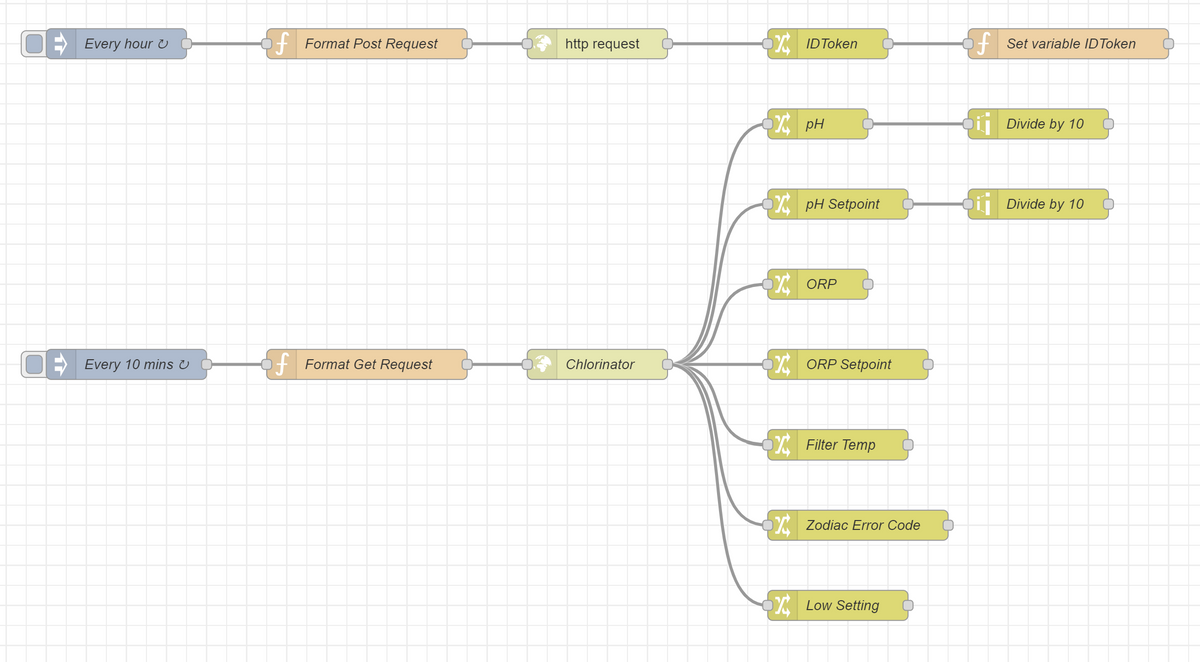
                                e49a802f-ffad-441d-a4a6-6d7ad4547cb0-image.png

                                [
                                    {
                                        "id": "6c519c18faf10a1e",
                                        "type": "tab",
                                        "label": "Zodiac Exo",
                                        "disabled": false,
                                        "info": "",
                                        "env": []
                                    },
                                    {
                                        "id": "1e47a52e3f1755e1",
                                        "type": "inject",
                                        "z": "6c519c18faf10a1e",
                                        "name": "Every hour",
                                        "repeat": "3540",
                                        "crontab": "",
                                        "once": true,
                                        "onceDelay": "60",
                                        "topic": "",
                                        "payload": "",
                                        "payloadType": "date",
                                        "x": 130,
                                        "y": 60,
                                        "wires": [
                                            [
                                                "6808aab954fc8b01"
                                            ]
                                        ]
                                    },
                                    {
                                        "id": "7849f0c750568181",
                                        "type": "http request",
                                        "z": "6c519c18faf10a1e",
                                        "name": "",
                                        "method": "use",
                                        "ret": "obj",
                                        "paytoqs": "ignore",
                                        "url": "",
                                        "tls": "",
                                        "persist": false,
                                        "proxy": "",
                                        "authType": "",
                                        "senderr": false,
                                        "x": 610,
                                        "y": 60,
                                        "wires": [
                                            [
                                                "18bf3f43ad2e6aa4"
                                            ]
                                        ]
                                    },
                                    {
                                        "id": "18bf3f43ad2e6aa4",
                                        "type": "change",
                                        "z": "6c519c18faf10a1e",
                                        "name": "IDToken",
                                        "rules": [
                                            {
                                                "t": "move",
                                                "p": "payload.userPoolOAuth.IdToken",
                                                "pt": "msg",
                                                "to": "payload",
                                                "tot": "msg"
                                            }
                                        ],
                                        "action": "",
                                        "property": "",
                                        "from": "",
                                        "to": "",
                                        "reg": false,
                                        "x": 840,
                                        "y": 60,
                                        "wires": [
                                            [
                                                "ea244732498b9412"
                                            ]
                                        ]
                                    },
                                    {
                                        "id": "6808aab954fc8b01",
                                        "type": "function",
                                        "z": "6c519c18faf10a1e",
                                        "name": "Format Post Request",
                                        "func": "msg.method = 'POST';\nmsg.headers = {};\nmsg.headers['Host'] = 'prod.zodiac-io.com';\nmsg.headers['accept'] = 'application/json';\nmsg.headers['content-type'] = 'application/json';\nmsg.headers['accept-encoding'] = '*';\nmsg.headers['user-agent'] = 'okhttp/3.12.0';\nmsg.url = 'https://prod.zodiac-io.com/users/v1/login';\nmsg.payload = '{\"api_key\":\"yourapikeyhere\", \"email\":\"youremail@address.com\", \"password\":\"youriAqualinkpassword\"}';\nreturn msg;",
                                        "outputs": 1,
                                        "timeout": "",
                                        "noerr": 0,
                                        "initialize": "",
                                        "finalize": "",
                                        "libs": [],
                                        "x": 380,
                                        "y": 60,
                                        "wires": [
                                            [
                                                "7849f0c750568181"
                                            ]
                                        ]
                                    },
                                    {
                                        "id": "ea244732498b9412",
                                        "type": "function",
                                        "z": "6c519c18faf10a1e",
                                        "name": "Set variable IDToken",
                                        "func": "global.set(\"IDToken\",msg.payload);\nreturn msg;",
                                        "outputs": 1,
                                        "noerr": 0,
                                        "initialize": "",
                                        "finalize": "",
                                        "libs": [],
                                        "x": 1080,
                                        "y": 60,
                                        "wires": [
                                            []
                                        ]
                                    },
                                    {
                                        "id": "dcd9bc84914a71f6",
                                        "type": "http request",
                                        "z": "6c519c18faf10a1e",
                                        "name": "Chlorinator",
                                        "method": "use",
                                        "ret": "obj",
                                        "paytoqs": "ignore",
                                        "url": "",
                                        "tls": "",
                                        "persist": false,
                                        "proxy": "",
                                        "authType": "",
                                        "senderr": false,
                                        "x": 610,
                                        "y": 380,
                                        "wires": [
                                            [
                                                "02b59259a14e8461",
                                                "b8075e9783a1eb4f",
                                                "f0bb9145a81ce74a",
                                                "eba07f6046f035d6",
                                                "4ac01fee0ba334b1",
                                                "018a8ddf5da0b1f2",
                                                "9c4298d655076b55"
                                            ]
                                        ]
                                    },
                                    {
                                        "id": "9df6c312e595c863",
                                        "type": "function",
                                        "z": "6c519c18faf10a1e",
                                        "name": "Format Get Request",
                                        "func": "let bearer = global.get(\"IDToken\");\nmsg.method = 'GET';\nmsg.headers = {};\nmsg.headers['Host'] = 'prod.zodiac-io.com';\nmsg.headers['accept'] = 'application/json';\nmsg.headers['authorization'] = bearer;\nmsg.headers['accept-encoding'] = '*';\nmsg.headers['user-agent'] = 'okhttp/3.12.0';\nmsg.url = 'https://prod.zodiac-io.com/devices/v1/yourDeviceIDhere/shadow';\nreturn msg;",
                                        "outputs": 1,
                                        "timeout": "",
                                        "noerr": 0,
                                        "initialize": "",
                                        "finalize": "",
                                        "libs": [],
                                        "x": 380,
                                        "y": 380,
                                        "wires": [
                                            [
                                                "dcd9bc84914a71f6"
                                            ]
                                        ]
                                    },
                                    {
                                        "id": "a56824124abf6deb",
                                        "type": "inject",
                                        "z": "6c519c18faf10a1e",
                                        "name": "Every 10 mins",
                                        "props": [
                                            {
                                                "p": "payload"
                                            },
                                            {
                                                "p": "topic",
                                                "vt": "str"
                                            }
                                        ],
                                        "repeat": "600",
                                        "crontab": "",
                                        "once": true,
                                        "onceDelay": "300",
                                        "topic": "",
                                        "payloadType": "date",
                                        "x": 140,
                                        "y": 380,
                                        "wires": [
                                            [
                                                "9df6c312e595c863"
                                            ]
                                        ]
                                    },
                                    {
                                        "id": "02b59259a14e8461",
                                        "type": "change",
                                        "z": "6c519c18faf10a1e",
                                        "name": "ORP",
                                        "rules": [
                                            {
                                                "t": "move",
                                                "p": "payload.state.reported.equipment.swc_0.sns_2.value",
                                                "pt": "msg",
                                                "to": "payload",
                                                "tot": "msg"
                                            }
                                        ],
                                        "action": "",
                                        "property": "",
                                        "from": "",
                                        "to": "",
                                        "reg": false,
                                        "x": 830,
                                        "y": 300,
                                        "wires": [
                                            []
                                        ]
                                    },
                                    {
                                        "id": "b8075e9783a1eb4f",
                                        "type": "change",
                                        "z": "6c519c18faf10a1e",
                                        "name": "pH",
                                        "rules": [
                                            {
                                                "t": "move",
                                                "p": "payload.state.reported.equipment.swc_0.sns_1.value",
                                                "pt": "msg",
                                                "to": "payload",
                                                "tot": "msg"
                                            }
                                        ],
                                        "action": "",
                                        "property": "",
                                        "from": "",
                                        "to": "",
                                        "reg": false,
                                        "x": 830,
                                        "y": 140,
                                        "wires": [
                                            [
                                                "0e3f2e3e62511c3a"
                                            ]
                                        ]
                                    },
                                    {
                                        "id": "f0bb9145a81ce74a",
                                        "type": "change",
                                        "z": "6c519c18faf10a1e",
                                        "name": "Filter Temp",
                                        "rules": [
                                            {
                                                "t": "move",
                                                "p": "payload.state.reported.equipment.swc_0.sns_3.value",
                                                "pt": "msg",
                                                "to": "payload",
                                                "tot": "msg"
                                            }
                                        ],
                                        "action": "",
                                        "property": "",
                                        "from": "",
                                        "to": "",
                                        "reg": false,
                                        "x": 850,
                                        "y": 460,
                                        "wires": [
                                            []
                                        ]
                                    },
                                    {
                                        "id": "0e3f2e3e62511c3a",
                                        "type": "range",
                                        "z": "6c519c18faf10a1e",
                                        "minin": "0",
                                        "maxin": "10",
                                        "minout": "0",
                                        "maxout": "1",
                                        "action": "scale",
                                        "round": false,
                                        "property": "payload",
                                        "name": "Divide by 10",
                                        "x": 1050,
                                        "y": 140,
                                        "wires": [
                                            []
                                        ]
                                    },
                                    {
                                        "id": "eba07f6046f035d6",
                                        "type": "change",
                                        "z": "6c519c18faf10a1e",
                                        "name": "ORP Setpoint",
                                        "rules": [
                                            {
                                                "t": "move",
                                                "p": "payload.state.reported.equipment.swc_0.orp_sp",
                                                "pt": "msg",
                                                "to": "payload",
                                                "tot": "msg"
                                            }
                                        ],
                                        "action": "",
                                        "property": "",
                                        "from": "",
                                        "to": "",
                                        "reg": false,
                                        "x": 860,
                                        "y": 380,
                                        "wires": [
                                            []
                                        ]
                                    },
                                    {
                                        "id": "4ac01fee0ba334b1",
                                        "type": "change",
                                        "z": "6c519c18faf10a1e",
                                        "name": "pH Setpoint",
                                        "rules": [
                                            {
                                                "t": "move",
                                                "p": "payload.state.reported.equipment.swc_0.ph_sp",
                                                "pt": "msg",
                                                "to": "payload",
                                                "tot": "msg"
                                            }
                                        ],
                                        "action": "",
                                        "property": "",
                                        "from": "",
                                        "to": "",
                                        "reg": false,
                                        "x": 850,
                                        "y": 220,
                                        "wires": [
                                            [
                                                "874e523fa6c7da37"
                                            ]
                                        ]
                                    },
                                    {
                                        "id": "874e523fa6c7da37",
                                        "type": "range",
                                        "z": "6c519c18faf10a1e",
                                        "minin": "0",
                                        "maxin": "10",
                                        "minout": "0",
                                        "maxout": "1",
                                        "action": "scale",
                                        "round": false,
                                        "property": "payload",
                                        "name": "Divide by 10",
                                        "x": 1050,
                                        "y": 220,
                                        "wires": [
                                            []
                                        ]
                                    },
                                    {
                                        "id": "018a8ddf5da0b1f2",
                                        "type": "change",
                                        "z": "6c519c18faf10a1e",
                                        "name": "Zodiac Error Code",
                                        "rules": [
                                            {
                                                "t": "move",
                                                "p": "payload.state.reported.equipment.swc_0.error_code",
                                                "pt": "msg",
                                                "to": "payload",
                                                "tot": "msg"
                                            }
                                        ],
                                        "action": "",
                                        "property": "",
                                        "from": "",
                                        "to": "",
                                        "reg": false,
                                        "x": 870,
                                        "y": 540,
                                        "wires": [
                                            []
                                        ]
                                    },
                                    {
                                        "id": "9c4298d655076b55",
                                        "type": "change",
                                        "z": "6c519c18faf10a1e",
                                        "name": "Low Setting",
                                        "rules": [
                                            {
                                                "t": "move",
                                                "p": "payload.state.reported.equipment.swc_0.low",
                                                "pt": "msg",
                                                "to": "payload",
                                                "tot": "msg"
                                            }
                                        ],
                                        "action": "",
                                        "property": "",
                                        "from": "",
                                        "to": "",
                                        "reg": false,
                                        "x": 850,
                                        "y": 620,
                                        "wires": [
                                            []
                                        ]
                                    }
                                ]
                                

                                und hier die Anleitung dazu:

                                Note that in the Function node (Format Post Request) preceeding the first HTTP Request , you will require three bits of info -

                                API Key (generic for all users) - EOOEMOW4YR6QNB11
                                Email
                                Password

                                In the Function node (Format Get Request) preceeding the Device, you will need 'yourDeviceIDhere' where specified. It's the serial number of the device and looks something like -

                                JT19000123
                                or
                                JX19100123

                                The post you originally linked to has the curl commands necessary to pull the DeviceID. They might also be physically printed on the device somewhere but I haven't looked.

                                PULL DEVICE ID:

                                The steps required to login to iAqualink are as follows (note the api_key is the same for all users)

                                curl  -X POST -H "Host:prod.zodiac-io.com" -H "accept:application/json" -H "content-type:application/json" -H "accept-encoding:gzip" -H "user-agent:okhttp/3.12.0" -d '{"api_key":"EOOEMOW4YR6QNB11", "email":"XXXX@XXXX", "password":"XXXXXX"}' "https://prod.zodiac-io.com/users/v1/login"
                                

                                The iAqualink server returns a page of data (X's blank out personal data) -

                                {
                                    "username": "XXXXXXXXXXXXXXXXXX",
                                    "email": "XXXXXXXXXXX@gmail.com",
                                    "first_name": "XXX",
                                    "last_name": "XXXXXX",
                                    "address": "XXX\n, XXX, XX, au, XXX",
                                    "address_1": "XXXXXXXXXXX",
                                    "address_2": null,
                                    "city": "XXXXXXXXXXX",
                                    "state": "XX",
                                    "country": "au",
                                    "postal_code": "XXXX",
                                    "id": "XXXXXX",
                                    "authentication_token": "XXXXXXXXXXXXXXXXXXXX",
                                    "session_id": "XXXXXXXXXXXXXXXXXXXX",
                                    "created_at": "2019-12-09T03:12:57.000Z",
                                    "updated_at": "2019-12-09T03:12:57.000Z",
                                    "time_zone": "Australia/XXXXXX",
                                    "phone": "XXXXXXXXXX",
                                    "opt_in_1": "1",
                                    "opt_in_2": "0",
                                    "role": "customer",
                                    "cognitoPool": {
                                        "appClientId": "XXXXXXXXXXXXXXXXXXXXX",
                                        "poolId": "us-east-1_XXXXXXXXX",
                                        "region": "us-east-1"
                                    },
                                    "credentials": {
                                        "AccessKeyId": "XXXXXXXXXXXXXXXXXXXX",
                                        "SecretKey": "XXXXXXXXXXXXXXXXXXXXXX",
                                        "SessionToken": "XXXXXX.............XXXXXXXX",
                                        "Expiration": "2020-04-26T05:24:59.000Z",
                                        "IdentityId": "us-east-1:XXXXXXXXXXXXXXXX"
                                    },
                                    "userPoolOAuth": {
                                        "AccessToken": "XXXXXXX...............XXXXXXX",
                                        "ExpiresIn": 3600,
                                        "TokenType": "Bearer",
                                        "RefreshToken": "XXXXXX..........XXXXXXXXX",
                                        "IdToken": "XXXXXXXXXX.........XXXXXXXXXXX"
                                    
                                }
                                

                                The important fields in the preceeding data block are -

                                "id": (a 6 digit number that remains the same across logins),

                                "authentication_token": (a 20 character field that remains the same across logins),

                                "IdToken": (a 1740 character field that expires in 3600 seconds).

                                Armed with this data, a second command will elicit the device serial numbers registered to the user's account (user_id = id from block above) -

                                curl 'https://support.iaqualink.com/devices.json?api_key=EOOEMOW4YR6QNB07&authentication_token=XXXXXXXXXXXXXXXXXXXX&user_id=XXXXXX' -H "Host:support.iaqualink.com" -H "accept:application/json" -H "user-agent:okhttp/3.12.0" -H "content-type:application/json"
                                

                                This is the returned data block for the two devices I have (a chlorinator and a heat pump) -

                                [
                                {
                                "id":"XXXXXX",
                                "serial_number":"XXXXXXXXXX",
                                "created_at":"2020-01-07T09:41:41.000Z",
                                "updated_at":"2020-01-07T09:41:41.000Z",
                                "name":"Z400 iQ TD7",
                                "device_type":"hpm",
                                "owner_id":null,
                                "updating":false,
                                "firmware_version":null,
                                "target_firmware_version":null,
                                "update_firmware_start_at":null,
                                "last_activity_at":null
                                },
                                {
                                "id":"XXXXXX",
                                "serial_number":"XXXXXXXXXX",
                                "created_at":"2019-12-09T03:18:18.000Z",
                                "updated_at":"2019-12-09T03:18:18.000Z",
                                "name":"eXO-Pro iQ",
                                "device_type":"exo",
                                "owner_id":null,
                                "updating":false,
                                "firmware_version":null,
                                "target_firmware_version":null,
                                "update_firmware_start_at":null,
                                "last_activity_at":null
                                }
                                ]
                                

                                INFORMATION RETRIEVAL AND CONTROL

                                With the DEVICE_SERIAL_NUMBER ("serial_number" in the block above), and ID_TOKEN ("IdToken" from the first block of data) the next GET command can be populated to retrieve the pH and ORP values for the chlorinator -

                                curl -X GET -H "Host:prod.zodiac-io.com" -H "accept:application/json" -H "authorization:ID_TOKEN" -H "accept-encoding:gzip" -H "user-agent:okhttp/3.12.0" "https://prod.zodiac-io.com/devices/v1/DEVICE_SERIAL_NUMBER/shadow"
                                

                                Control of the chlorinator production (On/Off) can done using a POST command ("production" to be set to 0 or 1) -

                                curl -X POST -H "Host:prod.zodiac-io.com" -H "accept:application/json" -H "authorization:ID_TOKEN" -H "content-type:application/json; charset=UTF-8" -H "content-length:62" -H "accept-encoding:gzip" -H "user-agent:okhttp/3.12.0" -d '{"state":{"desired":{"equipment":{"swc_0":{"production":0}}}}}' "https://prod.zodiac-io.com/devices/v1/DEVICE_SERIAL_NUMBER/shadow"
                                

                                I have the DEVICE_SERIAL_NUMBER for the components in my system (this value is fixed).
                                I now need a mechanism to record the variable ID_TOKEN and subsequently plug this into the commands above.

                                Kann das eventuell mal jemand testen, der eine Zodiac Exo im Einsatz hat ?

                                H 1 Reply Last reply
                                0
                                • Q Qlink

                                  Im Nodered Forum hat jemand einen Flow gepostet mit dem es anscheinend auch funktionieren sollte die Daten der Zodiac Exo IQ auszulesen:

                                  Hier ist der Flow:

                                  e49a802f-ffad-441d-a4a6-6d7ad4547cb0-image.png

                                  [
                                      {
                                          "id": "6c519c18faf10a1e",
                                          "type": "tab",
                                          "label": "Zodiac Exo",
                                          "disabled": false,
                                          "info": "",
                                          "env": []
                                      },
                                      {
                                          "id": "1e47a52e3f1755e1",
                                          "type": "inject",
                                          "z": "6c519c18faf10a1e",
                                          "name": "Every hour",
                                          "repeat": "3540",
                                          "crontab": "",
                                          "once": true,
                                          "onceDelay": "60",
                                          "topic": "",
                                          "payload": "",
                                          "payloadType": "date",
                                          "x": 130,
                                          "y": 60,
                                          "wires": [
                                              [
                                                  "6808aab954fc8b01"
                                              ]
                                          ]
                                      },
                                      {
                                          "id": "7849f0c750568181",
                                          "type": "http request",
                                          "z": "6c519c18faf10a1e",
                                          "name": "",
                                          "method": "use",
                                          "ret": "obj",
                                          "paytoqs": "ignore",
                                          "url": "",
                                          "tls": "",
                                          "persist": false,
                                          "proxy": "",
                                          "authType": "",
                                          "senderr": false,
                                          "x": 610,
                                          "y": 60,
                                          "wires": [
                                              [
                                                  "18bf3f43ad2e6aa4"
                                              ]
                                          ]
                                      },
                                      {
                                          "id": "18bf3f43ad2e6aa4",
                                          "type": "change",
                                          "z": "6c519c18faf10a1e",
                                          "name": "IDToken",
                                          "rules": [
                                              {
                                                  "t": "move",
                                                  "p": "payload.userPoolOAuth.IdToken",
                                                  "pt": "msg",
                                                  "to": "payload",
                                                  "tot": "msg"
                                              }
                                          ],
                                          "action": "",
                                          "property": "",
                                          "from": "",
                                          "to": "",
                                          "reg": false,
                                          "x": 840,
                                          "y": 60,
                                          "wires": [
                                              [
                                                  "ea244732498b9412"
                                              ]
                                          ]
                                      },
                                      {
                                          "id": "6808aab954fc8b01",
                                          "type": "function",
                                          "z": "6c519c18faf10a1e",
                                          "name": "Format Post Request",
                                          "func": "msg.method = 'POST';\nmsg.headers = {};\nmsg.headers['Host'] = 'prod.zodiac-io.com';\nmsg.headers['accept'] = 'application/json';\nmsg.headers['content-type'] = 'application/json';\nmsg.headers['accept-encoding'] = '*';\nmsg.headers['user-agent'] = 'okhttp/3.12.0';\nmsg.url = 'https://prod.zodiac-io.com/users/v1/login';\nmsg.payload = '{\"api_key\":\"yourapikeyhere\", \"email\":\"youremail@address.com\", \"password\":\"youriAqualinkpassword\"}';\nreturn msg;",
                                          "outputs": 1,
                                          "timeout": "",
                                          "noerr": 0,
                                          "initialize": "",
                                          "finalize": "",
                                          "libs": [],
                                          "x": 380,
                                          "y": 60,
                                          "wires": [
                                              [
                                                  "7849f0c750568181"
                                              ]
                                          ]
                                      },
                                      {
                                          "id": "ea244732498b9412",
                                          "type": "function",
                                          "z": "6c519c18faf10a1e",
                                          "name": "Set variable IDToken",
                                          "func": "global.set(\"IDToken\",msg.payload);\nreturn msg;",
                                          "outputs": 1,
                                          "noerr": 0,
                                          "initialize": "",
                                          "finalize": "",
                                          "libs": [],
                                          "x": 1080,
                                          "y": 60,
                                          "wires": [
                                              []
                                          ]
                                      },
                                      {
                                          "id": "dcd9bc84914a71f6",
                                          "type": "http request",
                                          "z": "6c519c18faf10a1e",
                                          "name": "Chlorinator",
                                          "method": "use",
                                          "ret": "obj",
                                          "paytoqs": "ignore",
                                          "url": "",
                                          "tls": "",
                                          "persist": false,
                                          "proxy": "",
                                          "authType": "",
                                          "senderr": false,
                                          "x": 610,
                                          "y": 380,
                                          "wires": [
                                              [
                                                  "02b59259a14e8461",
                                                  "b8075e9783a1eb4f",
                                                  "f0bb9145a81ce74a",
                                                  "eba07f6046f035d6",
                                                  "4ac01fee0ba334b1",
                                                  "018a8ddf5da0b1f2",
                                                  "9c4298d655076b55"
                                              ]
                                          ]
                                      },
                                      {
                                          "id": "9df6c312e595c863",
                                          "type": "function",
                                          "z": "6c519c18faf10a1e",
                                          "name": "Format Get Request",
                                          "func": "let bearer = global.get(\"IDToken\");\nmsg.method = 'GET';\nmsg.headers = {};\nmsg.headers['Host'] = 'prod.zodiac-io.com';\nmsg.headers['accept'] = 'application/json';\nmsg.headers['authorization'] = bearer;\nmsg.headers['accept-encoding'] = '*';\nmsg.headers['user-agent'] = 'okhttp/3.12.0';\nmsg.url = 'https://prod.zodiac-io.com/devices/v1/yourDeviceIDhere/shadow';\nreturn msg;",
                                          "outputs": 1,
                                          "timeout": "",
                                          "noerr": 0,
                                          "initialize": "",
                                          "finalize": "",
                                          "libs": [],
                                          "x": 380,
                                          "y": 380,
                                          "wires": [
                                              [
                                                  "dcd9bc84914a71f6"
                                              ]
                                          ]
                                      },
                                      {
                                          "id": "a56824124abf6deb",
                                          "type": "inject",
                                          "z": "6c519c18faf10a1e",
                                          "name": "Every 10 mins",
                                          "props": [
                                              {
                                                  "p": "payload"
                                              },
                                              {
                                                  "p": "topic",
                                                  "vt": "str"
                                              }
                                          ],
                                          "repeat": "600",
                                          "crontab": "",
                                          "once": true,
                                          "onceDelay": "300",
                                          "topic": "",
                                          "payloadType": "date",
                                          "x": 140,
                                          "y": 380,
                                          "wires": [
                                              [
                                                  "9df6c312e595c863"
                                              ]
                                          ]
                                      },
                                      {
                                          "id": "02b59259a14e8461",
                                          "type": "change",
                                          "z": "6c519c18faf10a1e",
                                          "name": "ORP",
                                          "rules": [
                                              {
                                                  "t": "move",
                                                  "p": "payload.state.reported.equipment.swc_0.sns_2.value",
                                                  "pt": "msg",
                                                  "to": "payload",
                                                  "tot": "msg"
                                              }
                                          ],
                                          "action": "",
                                          "property": "",
                                          "from": "",
                                          "to": "",
                                          "reg": false,
                                          "x": 830,
                                          "y": 300,
                                          "wires": [
                                              []
                                          ]
                                      },
                                      {
                                          "id": "b8075e9783a1eb4f",
                                          "type": "change",
                                          "z": "6c519c18faf10a1e",
                                          "name": "pH",
                                          "rules": [
                                              {
                                                  "t": "move",
                                                  "p": "payload.state.reported.equipment.swc_0.sns_1.value",
                                                  "pt": "msg",
                                                  "to": "payload",
                                                  "tot": "msg"
                                              }
                                          ],
                                          "action": "",
                                          "property": "",
                                          "from": "",
                                          "to": "",
                                          "reg": false,
                                          "x": 830,
                                          "y": 140,
                                          "wires": [
                                              [
                                                  "0e3f2e3e62511c3a"
                                              ]
                                          ]
                                      },
                                      {
                                          "id": "f0bb9145a81ce74a",
                                          "type": "change",
                                          "z": "6c519c18faf10a1e",
                                          "name": "Filter Temp",
                                          "rules": [
                                              {
                                                  "t": "move",
                                                  "p": "payload.state.reported.equipment.swc_0.sns_3.value",
                                                  "pt": "msg",
                                                  "to": "payload",
                                                  "tot": "msg"
                                              }
                                          ],
                                          "action": "",
                                          "property": "",
                                          "from": "",
                                          "to": "",
                                          "reg": false,
                                          "x": 850,
                                          "y": 460,
                                          "wires": [
                                              []
                                          ]
                                      },
                                      {
                                          "id": "0e3f2e3e62511c3a",
                                          "type": "range",
                                          "z": "6c519c18faf10a1e",
                                          "minin": "0",
                                          "maxin": "10",
                                          "minout": "0",
                                          "maxout": "1",
                                          "action": "scale",
                                          "round": false,
                                          "property": "payload",
                                          "name": "Divide by 10",
                                          "x": 1050,
                                          "y": 140,
                                          "wires": [
                                              []
                                          ]
                                      },
                                      {
                                          "id": "eba07f6046f035d6",
                                          "type": "change",
                                          "z": "6c519c18faf10a1e",
                                          "name": "ORP Setpoint",
                                          "rules": [
                                              {
                                                  "t": "move",
                                                  "p": "payload.state.reported.equipment.swc_0.orp_sp",
                                                  "pt": "msg",
                                                  "to": "payload",
                                                  "tot": "msg"
                                              }
                                          ],
                                          "action": "",
                                          "property": "",
                                          "from": "",
                                          "to": "",
                                          "reg": false,
                                          "x": 860,
                                          "y": 380,
                                          "wires": [
                                              []
                                          ]
                                      },
                                      {
                                          "id": "4ac01fee0ba334b1",
                                          "type": "change",
                                          "z": "6c519c18faf10a1e",
                                          "name": "pH Setpoint",
                                          "rules": [
                                              {
                                                  "t": "move",
                                                  "p": "payload.state.reported.equipment.swc_0.ph_sp",
                                                  "pt": "msg",
                                                  "to": "payload",
                                                  "tot": "msg"
                                              }
                                          ],
                                          "action": "",
                                          "property": "",
                                          "from": "",
                                          "to": "",
                                          "reg": false,
                                          "x": 850,
                                          "y": 220,
                                          "wires": [
                                              [
                                                  "874e523fa6c7da37"
                                              ]
                                          ]
                                      },
                                      {
                                          "id": "874e523fa6c7da37",
                                          "type": "range",
                                          "z": "6c519c18faf10a1e",
                                          "minin": "0",
                                          "maxin": "10",
                                          "minout": "0",
                                          "maxout": "1",
                                          "action": "scale",
                                          "round": false,
                                          "property": "payload",
                                          "name": "Divide by 10",
                                          "x": 1050,
                                          "y": 220,
                                          "wires": [
                                              []
                                          ]
                                      },
                                      {
                                          "id": "018a8ddf5da0b1f2",
                                          "type": "change",
                                          "z": "6c519c18faf10a1e",
                                          "name": "Zodiac Error Code",
                                          "rules": [
                                              {
                                                  "t": "move",
                                                  "p": "payload.state.reported.equipment.swc_0.error_code",
                                                  "pt": "msg",
                                                  "to": "payload",
                                                  "tot": "msg"
                                              }
                                          ],
                                          "action": "",
                                          "property": "",
                                          "from": "",
                                          "to": "",
                                          "reg": false,
                                          "x": 870,
                                          "y": 540,
                                          "wires": [
                                              []
                                          ]
                                      },
                                      {
                                          "id": "9c4298d655076b55",
                                          "type": "change",
                                          "z": "6c519c18faf10a1e",
                                          "name": "Low Setting",
                                          "rules": [
                                              {
                                                  "t": "move",
                                                  "p": "payload.state.reported.equipment.swc_0.low",
                                                  "pt": "msg",
                                                  "to": "payload",
                                                  "tot": "msg"
                                              }
                                          ],
                                          "action": "",
                                          "property": "",
                                          "from": "",
                                          "to": "",
                                          "reg": false,
                                          "x": 850,
                                          "y": 620,
                                          "wires": [
                                              []
                                          ]
                                      }
                                  ]
                                  

                                  und hier die Anleitung dazu:

                                  Note that in the Function node (Format Post Request) preceeding the first HTTP Request , you will require three bits of info -

                                  API Key (generic for all users) - EOOEMOW4YR6QNB11
                                  Email
                                  Password

                                  In the Function node (Format Get Request) preceeding the Device, you will need 'yourDeviceIDhere' where specified. It's the serial number of the device and looks something like -

                                  JT19000123
                                  or
                                  JX19100123

                                  The post you originally linked to has the curl commands necessary to pull the DeviceID. They might also be physically printed on the device somewhere but I haven't looked.

                                  PULL DEVICE ID:

                                  The steps required to login to iAqualink are as follows (note the api_key is the same for all users)

                                  curl  -X POST -H "Host:prod.zodiac-io.com" -H "accept:application/json" -H "content-type:application/json" -H "accept-encoding:gzip" -H "user-agent:okhttp/3.12.0" -d '{"api_key":"EOOEMOW4YR6QNB11", "email":"XXXX@XXXX", "password":"XXXXXX"}' "https://prod.zodiac-io.com/users/v1/login"
                                  

                                  The iAqualink server returns a page of data (X's blank out personal data) -

                                  {
                                      "username": "XXXXXXXXXXXXXXXXXX",
                                      "email": "XXXXXXXXXXX@gmail.com",
                                      "first_name": "XXX",
                                      "last_name": "XXXXXX",
                                      "address": "XXX\n, XXX, XX, au, XXX",
                                      "address_1": "XXXXXXXXXXX",
                                      "address_2": null,
                                      "city": "XXXXXXXXXXX",
                                      "state": "XX",
                                      "country": "au",
                                      "postal_code": "XXXX",
                                      "id": "XXXXXX",
                                      "authentication_token": "XXXXXXXXXXXXXXXXXXXX",
                                      "session_id": "XXXXXXXXXXXXXXXXXXXX",
                                      "created_at": "2019-12-09T03:12:57.000Z",
                                      "updated_at": "2019-12-09T03:12:57.000Z",
                                      "time_zone": "Australia/XXXXXX",
                                      "phone": "XXXXXXXXXX",
                                      "opt_in_1": "1",
                                      "opt_in_2": "0",
                                      "role": "customer",
                                      "cognitoPool": {
                                          "appClientId": "XXXXXXXXXXXXXXXXXXXXX",
                                          "poolId": "us-east-1_XXXXXXXXX",
                                          "region": "us-east-1"
                                      },
                                      "credentials": {
                                          "AccessKeyId": "XXXXXXXXXXXXXXXXXXXX",
                                          "SecretKey": "XXXXXXXXXXXXXXXXXXXXXX",
                                          "SessionToken": "XXXXXX.............XXXXXXXX",
                                          "Expiration": "2020-04-26T05:24:59.000Z",
                                          "IdentityId": "us-east-1:XXXXXXXXXXXXXXXX"
                                      },
                                      "userPoolOAuth": {
                                          "AccessToken": "XXXXXXX...............XXXXXXX",
                                          "ExpiresIn": 3600,
                                          "TokenType": "Bearer",
                                          "RefreshToken": "XXXXXX..........XXXXXXXXX",
                                          "IdToken": "XXXXXXXXXX.........XXXXXXXXXXX"
                                      
                                  }
                                  

                                  The important fields in the preceeding data block are -

                                  "id": (a 6 digit number that remains the same across logins),

                                  "authentication_token": (a 20 character field that remains the same across logins),

                                  "IdToken": (a 1740 character field that expires in 3600 seconds).

                                  Armed with this data, a second command will elicit the device serial numbers registered to the user's account (user_id = id from block above) -

                                  curl 'https://support.iaqualink.com/devices.json?api_key=EOOEMOW4YR6QNB07&authentication_token=XXXXXXXXXXXXXXXXXXXX&user_id=XXXXXX' -H "Host:support.iaqualink.com" -H "accept:application/json" -H "user-agent:okhttp/3.12.0" -H "content-type:application/json"
                                  

                                  This is the returned data block for the two devices I have (a chlorinator and a heat pump) -

                                  [
                                  {
                                  "id":"XXXXXX",
                                  "serial_number":"XXXXXXXXXX",
                                  "created_at":"2020-01-07T09:41:41.000Z",
                                  "updated_at":"2020-01-07T09:41:41.000Z",
                                  "name":"Z400 iQ TD7",
                                  "device_type":"hpm",
                                  "owner_id":null,
                                  "updating":false,
                                  "firmware_version":null,
                                  "target_firmware_version":null,
                                  "update_firmware_start_at":null,
                                  "last_activity_at":null
                                  },
                                  {
                                  "id":"XXXXXX",
                                  "serial_number":"XXXXXXXXXX",
                                  "created_at":"2019-12-09T03:18:18.000Z",
                                  "updated_at":"2019-12-09T03:18:18.000Z",
                                  "name":"eXO-Pro iQ",
                                  "device_type":"exo",
                                  "owner_id":null,
                                  "updating":false,
                                  "firmware_version":null,
                                  "target_firmware_version":null,
                                  "update_firmware_start_at":null,
                                  "last_activity_at":null
                                  }
                                  ]
                                  

                                  INFORMATION RETRIEVAL AND CONTROL

                                  With the DEVICE_SERIAL_NUMBER ("serial_number" in the block above), and ID_TOKEN ("IdToken" from the first block of data) the next GET command can be populated to retrieve the pH and ORP values for the chlorinator -

                                  curl -X GET -H "Host:prod.zodiac-io.com" -H "accept:application/json" -H "authorization:ID_TOKEN" -H "accept-encoding:gzip" -H "user-agent:okhttp/3.12.0" "https://prod.zodiac-io.com/devices/v1/DEVICE_SERIAL_NUMBER/shadow"
                                  

                                  Control of the chlorinator production (On/Off) can done using a POST command ("production" to be set to 0 or 1) -

                                  curl -X POST -H "Host:prod.zodiac-io.com" -H "accept:application/json" -H "authorization:ID_TOKEN" -H "content-type:application/json; charset=UTF-8" -H "content-length:62" -H "accept-encoding:gzip" -H "user-agent:okhttp/3.12.0" -d '{"state":{"desired":{"equipment":{"swc_0":{"production":0}}}}}' "https://prod.zodiac-io.com/devices/v1/DEVICE_SERIAL_NUMBER/shadow"
                                  

                                  I have the DEVICE_SERIAL_NUMBER for the components in my system (this value is fixed).
                                  I now need a mechanism to record the variable ID_TOKEN and subsequently plug this into the commands above.

                                  Kann das eventuell mal jemand testen, der eine Zodiac Exo im Einsatz hat ?

                                  H Offline
                                  H Offline
                                  Hexagon
                                  wrote on last edited by Hexagon
                                  #20

                                  @qlink

                                  Besten Dank für die Info.
                                  Anhand dieser konnte ich per Javascript die Pool-Daten auslesen und im iobroker als object ablegen. Danach habe ich mit weiteren scripts die entsprechenden Daten ausgefiltert und diese ebenfalls in ein Object abgelegt.

                                  const axios = require('axios');
                                  // Daten für die POST-Anfrage
                                  const daten = {
                                      api_key: "EOOEMOW4YR6QNB11",
                                      email: "xxxxxxxxxxxx",
                                      password: "xxxxxxxxxxxx"
                                  };
                                  // Erste Anfrage zur Authentifizierung
                                  axios.post('https://prod.zodiac-io.com/users/v1/login', daten, {
                                      headers: {
                                          'Host': 'prod.zodiac-io.com',
                                          'accept': 'application/json',
                                          'Content-Type': 'application/json',
                                          'accept-encoding': 'gzip',
                                          'user-agent': 'okhttp/3.12.0'
                                      }
                                  }).then((response) => {
                                      setState('javascript.0.iAquaLink.IdToken', JSON.stringify(response.data), true);
                                      console.log('Daten erfolgreich in ioBroker gespeichert.');
                                      // Extrahieren des idTokens
                                      let jsonObject = response.data;
                                      let idToken = jsonObject.userPoolOAuth.IdToken;
                                      if (idToken) {
                                          console.log("idToken extrahiert:", idToken);
                                          setState('javascript.0.iAquaLink.IdToken_clean', idToken, true);
                                          // Zweite Anfrage unter Verwendung des idTokens
                                          const options = {
                                              method: 'GET',
                                              url: 'https://prod.zodiac-io.com/devices/v1/serialnumberxxxxxx/shadow',
                                              headers: {
                                                  'Host': 'prod.zodiac-io.com',
                                                  'accept': 'application/json',
                                                  'authorization': idToken,
                                                  'accept-encoding': 'gzip',
                                                  'user-agent': 'okhttp/3.12.0'
                                              }
                                          };
                                          return axios.request(options);
                                      } else {
                                          throw new Error("Kein idToken gefunden!");
                                      }
                                  }).then(response => {
                                      console.log(response.data);
                                      setState('0_userdata.0.Pool.Pooldata', response.data, true);
                                  }).catch(error => {
                                      console.error('Fehler:', error);
                                  });
                                  
                                  NegaleinN 1 Reply Last reply
                                  0
                                  • H Hexagon

                                    @qlink

                                    Besten Dank für die Info.
                                    Anhand dieser konnte ich per Javascript die Pool-Daten auslesen und im iobroker als object ablegen. Danach habe ich mit weiteren scripts die entsprechenden Daten ausgefiltert und diese ebenfalls in ein Object abgelegt.

                                    const axios = require('axios');
                                    // Daten für die POST-Anfrage
                                    const daten = {
                                        api_key: "EOOEMOW4YR6QNB11",
                                        email: "xxxxxxxxxxxx",
                                        password: "xxxxxxxxxxxx"
                                    };
                                    // Erste Anfrage zur Authentifizierung
                                    axios.post('https://prod.zodiac-io.com/users/v1/login', daten, {
                                        headers: {
                                            'Host': 'prod.zodiac-io.com',
                                            'accept': 'application/json',
                                            'Content-Type': 'application/json',
                                            'accept-encoding': 'gzip',
                                            'user-agent': 'okhttp/3.12.0'
                                        }
                                    }).then((response) => {
                                        setState('javascript.0.iAquaLink.IdToken', JSON.stringify(response.data), true);
                                        console.log('Daten erfolgreich in ioBroker gespeichert.');
                                        // Extrahieren des idTokens
                                        let jsonObject = response.data;
                                        let idToken = jsonObject.userPoolOAuth.IdToken;
                                        if (idToken) {
                                            console.log("idToken extrahiert:", idToken);
                                            setState('javascript.0.iAquaLink.IdToken_clean', idToken, true);
                                            // Zweite Anfrage unter Verwendung des idTokens
                                            const options = {
                                                method: 'GET',
                                                url: 'https://prod.zodiac-io.com/devices/v1/serialnumberxxxxxx/shadow',
                                                headers: {
                                                    'Host': 'prod.zodiac-io.com',
                                                    'accept': 'application/json',
                                                    'authorization': idToken,
                                                    'accept-encoding': 'gzip',
                                                    'user-agent': 'okhttp/3.12.0'
                                                }
                                            };
                                            return axios.request(options);
                                        } else {
                                            throw new Error("Kein idToken gefunden!");
                                        }
                                    }).then(response => {
                                        console.log(response.data);
                                        setState('0_userdata.0.Pool.Pooldata', response.data, true);
                                    }).catch(error => {
                                        console.error('Fehler:', error);
                                    });
                                    
                                    NegaleinN Offline
                                    NegaleinN Offline
                                    Negalein
                                    Global Moderator
                                    wrote on last edited by
                                    #21

                                    @hexagon

                                    Hallo

                                    welchen Typ benötigen diese DP?

                                    javascript.0.iAquaLink.IdToken
                                    javascript.0.iAquaLink.IdToken_clean
                                    0_userdata.0.Pool.Pooldata

                                    ° Node.js & System Update ---> sudo apt update, iob stop, sudo apt full-upgrade
                                    ° Node.js Fixer ---> iob nodejs-update
                                    ° Fixer ---> iob fix

                                    H 1 Reply Last reply
                                    0
                                    • NegaleinN Negalein

                                      @hexagon

                                      Hallo

                                      welchen Typ benötigen diese DP?

                                      javascript.0.iAquaLink.IdToken
                                      javascript.0.iAquaLink.IdToken_clean
                                      0_userdata.0.Pool.Pooldata

                                      H Offline
                                      H Offline
                                      Hexagon
                                      wrote on last edited by
                                      #22

                                      @negalein

                                      Alle DPs => Typ: "String" und Rolle: "State"
                                      Am besten alle DP in 0_userdata.0.xxxx vorab anlegen.

                                      NegaleinN 1 Reply Last reply
                                      0
                                      • H Hexagon

                                        @negalein

                                        Alle DPs => Typ: "String" und Rolle: "State"
                                        Am besten alle DP in 0_userdata.0.xxxx vorab anlegen.

                                        NegaleinN Offline
                                        NegaleinN Offline
                                        Negalein
                                        Global Moderator
                                        wrote on last edited by
                                        #23

                                        @hexagon

                                        ich bekomm einen Fehler.
                                        Ist nicht ersichtlich woher.

                                        javascript.0	14:59:13.580	info	Start JavaScript script.js.Pool.iAqualink (Javascript/js)
                                        javascript.0	14:59:13.589	info	registered 0 subscriptions, 0 schedules, 0 messages, 0 logs and 0 file subscriptions
                                        javascript.0	14:59:14.322	error	Fehler:

                                        

                                        ° Node.js & System Update ---> sudo apt update, iob stop, sudo apt full-upgrade
                                        ° Node.js Fixer ---> iob nodejs-update
                                        ° Fixer ---> iob fix

                                        H 1 Reply Last reply
                                        0
                                        • NegaleinN Negalein

                                          @hexagon

                                          ich bekomm einen Fehler.
                                          Ist nicht ersichtlich woher.

                                          javascript.0	14:59:13.580	info	Start JavaScript script.js.Pool.iAqualink (Javascript/js)
                                          javascript.0	14:59:13.589	info	registered 0 subscriptions, 0 schedules, 0 messages, 0 logs and 0 file subscriptions
                                          javascript.0	14:59:14.322	error	Fehler:
                                          
                                          H Offline
                                          H Offline
                                          Hexagon
                                          wrote on last edited by
                                          #24

                                          @negalein

                                          Zeile 29: Richtige bzw. eigene Serien Nr. verwendet ?

                                          NegaleinN 1 Reply Last reply
                                          0
                                          Reply
                                          • Reply as topic
                                          Log in to reply
                                          • Oldest to Newest
                                          • Newest to Oldest
                                          • Most Votes


                                          Support us

                                          ioBroker
                                          Community Adapters
                                          Donate

                                          718

                                          Online

                                          32.6k

                                          Users

                                          82.2k

                                          Topics

                                          1.3m

                                          Posts
                                          Community
                                          Impressum | Datenschutz-Bestimmungen | Nutzungsbedingungen | Einwilligungseinstellungen
                                          ioBroker Community 2014-2025
                                          logo
                                          • Login

                                          • Don't have an account? Register

                                          • Login or register to search.
                                          • First post
                                            Last post
                                          0
                                          • Home
                                          • Recent
                                          • Tags
                                          • Unread 0
                                          • Categories
                                          • Unreplied
                                          • Popular
                                          • GitHub
                                          • Docu
                                          • Hilfe

