
NEWS





-
Dann bräuchten wir das vollständige log kurz VOR dem sigterm.
Du hast nur auf WARN gefiltert.
Gruß
Rainer
-
Hmh in etwa so?
[spoiler]019-02-02 01:01:58.678 - error: admin.0 setObject id missing!!
2019-02-02 01:01:58.718 - info: admin.0 starting. Version 3.6.0 in /opt/iobroker/node_modules/iobroker.admin, node: v8.15.0
2019-02-02 01:01:58.771 - info: hm-rega.0 subscribe hm-rpc.0.BidCoS-RF.50.PRESS_SHORT
2019-02-02 01:01:58.949 - info: terminal.0 http server listening on port 8088
2019-02-02 01:01:58.965 - info: admin.0 requesting all states
2019-02-02 01:01:58.972 - info: hm-rpc.2 xmlrpc -> 0 devices
2019-02-02 01:01:58.988 - info: hm-rega.0 ReGaHSS 192.168.178.188 up
2019-02-02 01:01:58.980 - info: admin.0 requesting all objects
2019-02-02 01:01:58.982 - info: admin.0 Request actual repository...
2019-02-02 01:01:58.785 - info: milight.0 starting. Version 0.4.0 in /opt/iobroker/node_modules/iobroker.milight, node: v8.15.0
2019-02-02 01:01:59.091 - info: hm-rega.0 time difference local-ccu 0s
2019-02-02 01:01:59.158 - info: hm-rega.0 added/updated 4 favorites to enum.favorites
2019-02-02 01:01:59.310 - info: hm-rega.0 added/updated functions to enum.functions
2019-02-02 01:01:59.394 - info: hm-rega.0 added/updated rooms to enum.rooms
2019-02-02 01:02:00.811 - info: hm-rpc.2 xmlrpc <- newDevices 67
2019-02-02 01:02:01.276 - info: cloud.0 starting. Version 2.6.2 in /opt/iobroker/node_modules/iobroker.cloud, node: v8.15.0
2019-02-02 01:02:01.220 - info: hm-rpc.1 starting. Version 1.9.5 in /opt/iobroker/node_modules/iobroker.hm-rpc, node: v8.15.0
2019-02-02 01:02:01.783 - info: hm-rpc.2 new HmIP devices/channels after filter: 0
2019-02-02 01:02:07.061 - info: cloud.0 Connecting with https://iobroker.pro
2019-02-02 01:02:11.611 - error: daswetter.0 force terminate, objects still in list: 406
2019-02-02 01:02:22.589 - info: alexa2.0 Alexa-Push-Connection established. Disable Polling
2019-02-02 01:02:23.212 - error: host.ioBroker-RasPi instance system.adapter.daswetter.0 terminated with code 15 ()
2019-02-02 01:02:23.315 - warn: pushover.0 Reconnection to DB.
2019-02-02 01:02:23.340 - warn: scenes.0 Reconnection to DB.
2019-02-02 01:02:23.341 - warn: info.0 Reconnection to DB.
2019-02-02 01:02:23.321 - warn: pushover.0 Reconnection to DB.
2019-02-02 01:02:23.347 - warn: web.0 Reconnection to DB.
2019-02-02 01:02:23.361 - warn: hm-rega.0 Reconnection to DB.
2019-02-02 01:02:23.368 - warn: cloud.0 Reconnection to DB.
2019-02-02 01:02:23.367 - warn: info.0 Reconnection to DB.
2019-02-02 01:02:23.354 - warn: web.0 Reconnection to DB.
2019-02-02 01:02:23.381 - warn: cloud.0 Reconnection to DB.
2019-02-02 01:02:23.397 - warn: hm-rega.0 Reconnection to DB.
2019-02-02 01:02:23.390 - warn: scenes.0 Reconnection to DB.
2019-02-02 01:02:23.318 - info: iot.0 starting. Version 0.3.1 in /opt/iobroker/node_modules/iobroker.iot, node: v8.15.0
2019-02-02 01:02:23.470 - info: iot.0 Connecting with KEY_ENTFERNT.iot.eu-west-1.amazonaws.com
2019-02-02 01:02:23.737 - warn: discovery.0 Reconnection to DB.
2019-02-02 01:02:23.750 - error: info.0 already running
2019-02-02 01:02:23.768 - warn: discovery.0 Reconnection to DB.
2019-02-02 01:02:24.705 - warn: amazon-dash.0 Reconnection to DB.
2019-02-02 01:02:24.709 - warn: amazon-dash.0 Reconnection to DB.
2019-02-02 01:02:24.713 - warn: hm-rpc.1 Reconnection to DB.
2019-02-02 01:02:24.731 - warn: yahka.0 Reconnection to DB.
2019-02-02 01:02:24.727 - warn: socketio.0 Reconnection to DB.
2019-02-02 01:02:24.731 - warn: socketio.0 Reconnection to DB.
2019-02-02 01:02:24.743 - warn: terminal.0 Reconnection to DB.
2019-02-02 01:02:24.747 - warn: terminal.0 Reconnection to DB.
2019-02-02 01:02:24.761 - error: pushover.0 already running
2019-02-02 01:02:24.746 - warn: hm-rpc.1 Reconnection to DB.
2019-02-02 01:02:24.762 - error: scenes.0 already running
2019-02-02 01:02:24.773 - error: web.0 already running
2019-02-02 01:02:24.754 - warn: yahka.0 Reconnection to DB.
2019-02-02 01:02:24.831 - error: host.ioBroker-RasPi instance system.adapter.web.0 terminated with code 7 (Adapter already running)
2019-02-02 01:02:24.832 - info: host.ioBroker-RasPi Restart adapter system.adapter.web.0 because enabled
2019-02-02 01:02:24.847 - error: host.ioBroker-RasPi instance system.adapter.scenes.0 terminated with code 7 (Adapter already running)
2019-02-02 01:02:24.847 - info: host.ioBroker-RasPi Restart adapter system.adapter.scenes.0 because enabled
2019-02-02 01:02:24.863 - error: host.ioBroker-RasPi instance system.adapter.info.0 terminated with code 7 (Adapter already running)
2019-02-02 01:02:24.863 - info: host.ioBroker-RasPi Restart adapter system.adapter.info.0 because enabled
2019-02-02 01:02:24.879 - error: host.ioBroker-RasPi instance system.adapter.pushover.0 terminated with code 7 (Adapter already running)
2019-02-02 01:02:24.879 - info: host.ioBroker-RasPi Restart adapter system.adapter.pushover.0 because enabled
2019-02-02 01:02:24.987 - error: cloud.0 already running
2019-02-02 01:02:25.012 - error: amazon-dash.0 already running
2019-02-02 01:02:25.015 - error: discovery.0 already running
2019-02-02 01:02:25.031 - warn: javascript.0 Reconnection to DB.
2019-02-02 01:02:25.034 - error: alexa2.0 already running
2019-02-02 01:02:25.094 - error: host.ioBroker-RasPi instance system.adapter.cloud.0 terminated with code 7 (Adapter already running)
2019-02-02 01:02:25.095 - info: host.ioBroker-RasPi Restart adapter system.adapter.cloud.0 because enabled
2019-02-02 01:02:25.115 - error: host.ioBroker-RasPi instance system.adapter.alexa2.0 terminated with code 7 (Adapter already running)
2019-02-02 01:02:25.115 - info: host.ioBroker-RasPi Restart adapter system.adapter.alexa2.0 because enabled
2019-02-02 01:02:25.140 - error: host.ioBroker-RasPi instance system.adapter.discovery.0 terminated with code 7 (Adapter already running)
2019-02-02 01:02:25.140 - info: host.ioBroker-RasPi Restart adapter system.adapter.discovery.0 because enabled
2019-02-02 01:02:25.175 - warn: javascript.0 Reconnection to DB.
2019-02-02 01:02:25.210 - error: host.ioBroker-RasPi instance system.adapter.amazon-dash.0 terminated with code 7 (Adapter already running)
2019-02-02 01:02:25.211 - info: host.ioBroker-RasPi Restart adapter system.adapter.amazon-dash.0 because enabled
2019-02-02 01:02:25.375 - info: fritzbox.0 starting. Version 0.2.1 in /opt/iobroker/node_modules/iobroker.fritzbox, node: v8.15.0
2019-02-02 01:02:25.398 - info: fritzbox.0 try to connect: 192.168.178.1
2019-02-02 01:02:25.422 - info: fritzbox.0 adapter connected to fritzbox: 192.168.178.1
2019-02-02 01:02:26.406 - error: javascript.0 already running
2019-02-02 01:02:26.482 - warn: admin.0 Reconnection to DB.
2019-02-02 01:02:26.486 - warn: admin.0 Reconnection to DB.
2019-02-02 01:02:26.492 - error: host.ioBroker-RasPi instance system.adapter.javascript.0 terminated with code 7 (Adapter already running)
2019-02-02 01:02:26.493 - info: host.ioBroker-RasPi Restart adapter system.adapter.javascript.0 because enabled
2019-02-02 01:02:26.546 - error: admin.0 already running
2019-02-02 01:02:26.645 - error: host.ioBroker-RasPi instance system.adapter.admin.0 terminated with code 7 (Adapter already running)
2019-02-02 01:02:26.646 - info: host.ioBroker-RasPi Restart adapter system.adapter.admin.0 because enabled
2019-02-02 01:02:34.258 - info: iot.0 Connection changed: connect
2019-02-02 01:02:54.936 - info: host.ioBroker-RasPi instance system.adapter.web.0 started with pid 11336
2019-02-02 01:02:55.035 - info: host.ioBroker-RasPi instance system.adapter.scenes.0 started with pid 11337
2019-02-02 01:02:55.104 - info: host.ioBroker-RasPi instance system.adapter.info.0 started with pid 11346
2019-02-02 01:02:55.170 - info: host.ioBroker-RasPi instance system.adapter.pushover.0 started with pid 11351
2019-02-02 01:02:55.243 - info: host.ioBroker-RasPi instance system.adapter.cloud.0 started with pid 11360
2019-02-02 01:02:55.347 - info: host.ioBroker-RasPi instance system.adapter.alexa2.0 started with pid 11366
2019-02-02 01:02:55.480 - info: host.ioBroker-RasPi instance system.adapter.discovery.0 started with pid 11372
2019-02-02 01:02:55.595 - info: host.ioBroker-RasPi instance system.adapter.amazon-dash.0 started with pid 11378
2019-02-02 01:02:56.571 - info: host.ioBroker-RasPi instance system.adapter.javascript.0 started with pid 11384
2019-02-02 01:02:56.773 - info: host.ioBroker-RasPi instance system.adapter.admin.0 started with pid 11390
2019-02-02 01:02:58.785 - info: pushover.0 starting. Version 1.0.4 in /opt/iobroker/node_modules/iobroker.pushover, node: v8.15.0
2019-02-02 01:02:58.988 - info: info.0 starting. Version 1.0.2 in /opt/iobroker/node_modules/iobroker.info, node: v8.15.0
2019-02-02 01:02:59.456 - info: scenes.0 starting. Version 1.1.0 in /opt/iobroker/node_modules/iobroker.scenes, node: v8.15.0
2019-02-02 01:02:59.487 - info: discovery.0 starting. Version 1.2.4 in /opt/iobroker/node_modules/iobroker.discovery, node: v8.15.0
2019-02-02 01:03:00.606 - info: alexa2.0 starting. Version 1.1.3 in /opt/iobroker/node_modules/iobroker.alexa2, node: v8.15.0
2019-02-02 01:03:00.827 - error: web.0 setObject id missing!!
2019-02-02 01:03:00.851 - info: web.0 starting. Version 2.4.1 in /opt/iobroker/node_modules/iobroker.web, node: v8.15.0
2019-02-02 01:03:00.564 - info: amazon-dash.0 starting. Version 0.3.1 in /opt/iobroker/node_modules/iobroker.amazon-dash, node: v8.15.0
2019-02-02 01:03:00.583 - info: amazon-dash.0 starting pcap session on default interface
2019-02-02 01:03:01.904 - info: cloud.0 starting. Version 2.6.2 in /opt/iobroker/node_modules/iobroker.cloud, node: v8.15.0
2019-02-02 01:03:02.264 - info: cloud.0 Connecting with https://iobroker.pro:10555
2019-02-02 01:03:02.925 - info: web.0 socket.io server listening on port 8082
2019-02-02 01:03:02.931 - info: web.0 http server listening on port 8082
2019-02-02 01:03:03.679 - error: admin.0 setObject id missing!!
2019-02-02 01:03:03.699 - info: admin.0 starting. Version 3.6.0 in /opt/iobroker/node_modules/iobroker.admin, node: v8.15.0
2019-02-02 01:03:03.711 - info: admin.0 requesting all states
2019-02-02 01:03:03.715 - info: admin.0 requesting all objects
2019-02-02 01:03:03.718 - info: admin.0 Request actual repository...
2019-02-02 01:03:06.565 - info: alexa2.0 Alexa-Push-Connection established. Disable Polling
2019-02-02 01:03:06.792 - info: cloud.0 Trying to connect as system.user.admin
2019-02-02 01:03:06.751 - info: javascript.0 starting. Version 4.0.12 in /opt/iobroker/node_modules/iobroker.javascript, node: v8.15.0
2019-02-02 01:03:06.783 - info: javascript.0 requesting all states
2019-02-02 01:03:06.787 - info: javascript.0 requesting all objects
2019-02-02 01:03:09.336 - info: admin.0 received all states
2019-02-02 01:03:10.504 - info: javascript.0 received all states
2019-02-02 01:09:16.303 - warn: broadlink2.0 Device RM:RMPROPLUS-43-28-d3 not reachable
2019-02-02 01:09:16.311 - info: admin.0 received all objects
2019-02-02 01:09:16.725 - info: hm-rpc.2 xmlrpc <- listDevices ["hm-rpc.2"]
2019-02-02 01:09:16.856 - info: host.ioBroker-RasPi instance system.adapter.tankerkoenig.0 started with pid 11441
2019-02-02 01:09:17.217 - warn: host.ioBroker-RasPi instance system.adapter.javascript.0 terminated due to SIGKILL
2019-02-02 01:09:17.218 - error: host.ioBroker-RasPi instance system.adapter.javascript.0 terminated with code null ()
2019-02-02 01:09:17.225 - info: host.ioBroker-RasPi Restart adapter system.adapter.javascript.0 because enabled
2019-02-02 01:09:17.369 - warn: history.0 Reconnection to DB.
2019-02-02 01:09:17.377 - warn: iot.0 Reconnection to DB.
2019-02-02 01:09:17.388 - warn: hm-rpc.1 Reconnection to DB.
2019-02-02 01:09:17.373 - warn: history.0 Reconnection to DB.
2019-02-02 01:09:17.395 - warn: milight.0 Reconnection to DB.
2019-02-02 01:09:17.393 - warn: hm-rpc.1 Reconnection to DB.
2019-02-02 01:09:17.402 - warn: milight.0 Reconnection to DB.
2019-02-02 01:09:17.403 - warn: iot.0 Reconnection to DB.
2019-02-02 01:09:17.435 - warn: hm-rpc.0 Reconnection to DB.
2019-02-02 01:09:17.449 - warn: hm-rpc.0 Reconnection to DB.
2019-02-02 01:09:17.553 - error: yahka.0 already running
2019-02-02 01:09:17.564 - error: hm-rpc.1 already running
2019-02-02 01:09:17.566 - error: broadlink2.0 already running
2019-02-02 01:09:17.585 - error: hm-rpc.0 already running
2019-02-02 01:09:17.630 - error: host.ioBroker-RasPi instance system.adapter.hm-rpc.1 terminated with code 7 (Adapter already running)
2019-02-02 01:09:17.630 - info: host.ioBroker-RasPi Restart adapter system.adapter.hm-rpc.1 because enabled
2019-02-02 01:09:17.673 - error: host.ioBroker-RasPi instance system.adapter.yahka.0 terminated with code 7 (Adapter already running)
2019-02-02 01:09:17.673 - info: host.ioBroker-RasPi Restart adapter system.adapter.yahka.0 because enabled
2019-02-02 01:09:17.802 - warn: hm-rega.0 Reconnection to DB.
2019-02-02 01:09:17.813 - warn: hm-rega.0 Reconnection to DB.
2019-02-02 01:09:17.839 - warn: fritzbox.0 Reconnection to DB.
2019-02-02 01:09:17.844 - warn: fritzbox.0 Reconnection to DB.
2019-02-02 01:09:17.870 - error: host.ioBroker-RasPi instance system.adapter.hm-rpc.0 terminated with code 7 (Adapter already running)
2019-02-02 01:09:17.871 - info: host.ioBroker-RasPi Restart adapter system.adapter.hm-rpc.0 because enabled
2019-02-02 01:09:17.897 - error: host.ioBroker-RasPi instance system.adapter.broadlink2.0 terminated with code 7 (Adapter already running)
2019-02-02 01:09:17.898 - info: host.ioBroker-RasPi Restart adapter system.adapter.broadlink2.0 because enabled
2019-02-02 01:09:17.931 - warn: terminal.0 Reconnection to DB.
2019-02-02 01:09:17.941 - warn: terminal.0 Reconnection to DB.
2019-02-02 01:09:17.961 - error: history.0 already running
2019-02-02 01:09:17.990 - warn: socketio.0 Reconnection to DB.
2019-02-02 01:09:17.994 - warn: socketio.0 Reconnection to DB.
2019-02-02 01:09:18.032 - info: hm-rega.0 starting. Version 2.2.1 in /opt/iobroker/node_modules/iobroker.hm-rega, node: v8.15.0
2019-02-02 01:09:18.374 - info: terminal.0 starting. Version 0.1.2 in /opt/iobroker/node_modules/iobroker.terminal, node: v8.15.0
2019-02-02 01:09:18.382 - info: fritzbox.0 starting. Version 0.2.1 in /opt/iobroker/node_modules/iobroker.fritzbox, node: v8.15.0
2019-02-02 01:09:18.395 - info: fritzbox.0 try to connect: 192.168.178.1
2019-02-02 01:09:18.423 - info: fritzbox.0 adapter connected to fritzbox: 192.168.178.1
2019-02-02 01:09:18.324 - info: admin.0 http server listening on port 8081
2019-02-02 01:09:18.325 - info: admin.0 Use link "http://localhost:8081" to configure.
2019-02-02 01:09:19.175 - info: hm-rega.0 starting. Version 2.2.1 in /opt/iobroker/node_modules/iobroker.hm-rega, node: v8.15.0
2019-02-02 01:09:19.189 - error: host.ioBroker-RasPi instance system.adapter.history.0 terminated with code 7 (Adapter already running)
2019-02-02 01:09:19.190 - info: host.ioBroker-RasPi Restart adapter system.adapter.history.0 because enabled
2019-02-02 01:09:19.481 - warn: cloud.0 Reconnection to DB.
2019-02-02 01:09:19.484 - warn: pushover.0 Reconnection to DB.
2019-02-02 01:09:19.488 - warn: pushover.0 Reconnection to DB.
2019-02-02 01:09:19.498 - warn: scenes.0 Reconnection to DB.
2019-02-02 01:09:19.486 - warn: cloud.0 Reconnection to DB.
2019-02-02 01:09:19.505 - warn: hm-rpc.2 Reconnection to DB.
2019-02-02 01:09:19.508 - warn: tr-064.0 Reconnection to DB.
2019-02-02 01:09:19.512 - warn: hm-rpc.2 Reconnection to DB.
2019-02-02 01:09:19.517 - warn: amazon-dash.0 Reconnection to DB.
2019-02-02 01:09:19.514 - warn: tr-064.0 Reconnection to DB.
2019-02-02 01:09:19.530 - warn: alexa2.0 Reconnection to DB.
2019-02-02 01:09:19.523 - warn: amazon-dash.0 Reconnection to DB.
2019-02-02 01:09:19.510 - warn: scenes.0 Reconnection to DB.
2019-02-02 01:09:19.548 - info: hm-rega.0 subscribe hm-rpc.0.BidCoS-RF.50.PRESS_SHORT
2019-02-02 01:09:19.537 - warn: alexa2.0 Reconnection to DB.
2019-02-02 01:09:19.554 - info: terminal.0 starting. Version 0.1.2 in /opt/iobroker/node_modules/iobroker.terminal, node: v8.15.0
2019-02-02 01:09:19.569 - info: iot.0 starting. Version 0.3.1 in /opt/iobroker/node_modules/iobroker.iot, node: v8.15.0
2019-02-02 01:09:19.601 - warn: info.0 Reconnection to DB.
2019-02-02 01:09:19.604 - warn: web.0 Reconnection to DB.
2019-02-02 01:09:19.616 - info: milight.0 starting. Version 0.4.0 in /opt/iobroker/node_modules/iobroker.milight, node: v8.15.0
2019-02-02 01:09:19.605 - warn: discovery.0 Reconnection to DB.
2019-02-02 01:09:19.589 - info: iot.0 Connecting with KEY_ENTFERNT_.iot.eu-west-1.amazonaws.com
2019-02-02 01:09:19.633 - warn: discovery.0 Reconnection to DB.
2019-02-02 01:09:19.643 - info: fritzbox.0 starting. Version 0.2.1 in /opt/iobroker/node_modules/iobroker.fritzbox, node: v8.15.0
2019-02-02 01:09:19.607 - warn: info.0 Reconnection to DB.
2019-02-02 01:09:19.609 - warn: web.0 Reconnection to DB.
2019-02-02 01:09:19.626 - info: hm-rega.0 subscribe hm-rpc.0.BidCoS-RF.50.PRESS_SHORT
2019-02-02 01:09:19.649 - info: fritzbox.0 try to connect: 192.168.178.1
2019-02-02 01:09:19.669 - info: fritzbox.0 adapter connected to fritzbox: 192.168.178.1
2019-02-02 01:09:19.921 - info: hm-rega.0 ReGaHSS 192.168.178.188 up
2019-02-02 01:09:19.924 - info: hm-rega.0 time difference local-ccu NaNs
2019-02-02 01:09:19.941 - info: hm-rega.0 ReGaHSS 192.168.178.188 up
2019-02-02 01:09:19.964 - info: hm-rega.0 time difference local-ccu 1s
2019-02-02 01:09:20.285 - info: iot.0 starting. Version 0.3.1 in /opt/iobroker/node_modules/iobroker.iot, node: v8.15.0
2019-02-02 01:09:20.296 - info: tr-064.0 starting. Version 0.4.18 in /opt/iobroker/node_modules/iobroker.tr-064, node: v8.15.0
2019-02-02 01:09:20.288 - info: iot.0 Connecting with KEY_ENTFERNT_.iot.eu-west-1.amazonaws.com
2019-02-02 01:09:21.544 - info: milight.0 starting. Version 0.4.0 in /opt/iobroker/node_modules/iobroker.milight, node: v8.15.0
2019-02-02 01:09:21.551 - info: hm-rega.0 got 48 programs
2019-02-02 01:09:21.666 - error: terminal.0 port 8088 already in use
2019-02-02 01:09:21.694 - info: hm-rega.0 added/updated 48 programs
2019-02-02 01:09:21.695 - info: hm-rega.0 deleted 0 programs
2019-02-02 01:09:22.138 - info: hm-rega.0 added/updated 1 objects
2019-02-02 01:09:22.140 - info: hm-rega.0 request state values
2019-02-02 01:09:22.823 - warn: rpi2.0 Reconnection to DB.
2019-02-02 01:09:22.827 - warn: rpi2.0 Reconnection to DB.
2019-02-02 01:09:22.839 - info: discovery.0 starting. Version 1.2.4 in /opt/iobroker/node_modules/iobroker.discovery, node: v8.15.0
2019-02-02 01:09:22.841 - info: info.0 starting. Version 1.0.2 in /opt/iobroker/node_modules/iobroker.info, node: v8.15.0
2019-02-02 01:09:22.835 - warn: admin.0 Reconnection to DB.
2019-02-02 01:09:22.845 - info: web.0 starting. Version 2.4.1 in /opt/iobroker/node_modules/iobroker.web, node: v8.15.0
2019-02-02 01:09:22.864 - info: tr-064.0 starting. Version 0.4.18 in /opt/iobroker/node_modules/iobroker.tr-064, node: v8.15.0
2019-02-02 01:09:22.884 - info: socketio.0 starting. Version 2.1.1 in /opt/iobroker/node_modules/iobroker.socketio, node: v8.15.0
2019-02-02 01:09:22.850 - warn: admin.0 Reconnection to DB.
2019-02-02 01:09:22.944 - info: hm-rega.0 got state values
2019-02-02 01:09:23.002 - error: socketio.0 port 8084 already in use
2019-02-02 01:09:24.432 - info: amazon-dash.0 starting. Version 0.3.1 in /opt/iobroker/node_modules/iobroker.amazon-dash, node: v8.15.0
2019-02-02 01:09:24.468 - error: host.ioBroker-RasPi instance system.adapter.socketio.0 terminated with code 1 ()
2019-02-02 01:09:24.468 - info: host.ioBroker-RasPi Restart adapter system.adapter.socketio.0 because enabled
2019-02-02 01:09:24.482 - error: host.ioBroker-RasPi instance system.adapter.terminal.0 terminated with code 1 ()[/spoiler]
geändert: Code in Code-Tags und Spoiler gesetzt; Homoran; Admin
geändert: KEY_ENTFERNTt; Homoran; Admin
-
Hmh in etwa so? `
Naja, nicht ganzWenn Dein SIGKILL am 02.02. um 09:17 war, bringt das Log um 01:09 bis 01:58 recht wenig.
Allerdings hast du dort auch Fehler:
@michaelxhoffmann:2019-02-02 01:09:23.002 - error: socketio.0 port 8084 already in use `
läuft bei dir noch etwas auf 8084?2019-02-02 01:09:21.666 - error: terminal.0 port 8088 already in use `
das Gleiche bei 8088sowie verschiedene:
@michaelxhoffmann:terminated with code 7 (Adapter already running) `
die darauf hindeuten, dass diese Prozesse mehrfach laufen.Bitte die entsprechenden Prozesse killen, oder ganz einfach den Raspi neu starten
Gruß
Rainer
-
Danke Homoran, nicht dass ich wüsste auf 8084 und 8088 läuft meines Wissens gar nichts. Raspi neustart habe ich ja auch schon mehrfach gemacht. Zuletzt gestern abend und heute Morgen auch BTW: Wie kille ich einen Prozess? Und welchen Prozuess soll ich killen?
-
Raspi neustart habe ich ja auch schon mehrfach gemacht. `
Wenn du wirklich den RasPi rebootet hast und nicht nur ioBroker restartet, dann dürfte es sich wirklich um ein Problem deines Netzteils handeln.Wie kille ich einen Prozess? Und welchen Prozuess soll ich killen? `
sudo kill -9 PIDWobei PID die Prozess ID ist.
Die erhältst du indem du z.B. unter top nach dem Prozess suchst, der im log mit code 7 aufgeführt ist
z.B.
top | grep io.webWenn nach dem Killen der Prozess wirklich nicht immer noch unter einer anderen PID läuft diese Instanz über den Adamin neustarten.
Gruß
Rainer
-
OK Ich mache jetzt mal einen kompletten neustart und tausche das Original Netzteil gegen ein 12w Apple Netzteil das ich noch über habe.
-
So, erst mal danke für Eure Hilfe. Neustart und neues Netzteil scheinen etwas genutzt zu haben, zumindest lief der Iobroker heute morgen und es sind keine Fehler im Log zu finden. Muss jetzt wohl mal ein paar Tage beobachten, wenn das wirklich alles war, muss ich mir viellecht doch keine Gedanken über neue Hardware machen.
-
Auch ein billiges Kabel kann zu hohen Widerstand oder Verlust haben.
Gruß
Rainer
-
OK zu früh gefreut :(
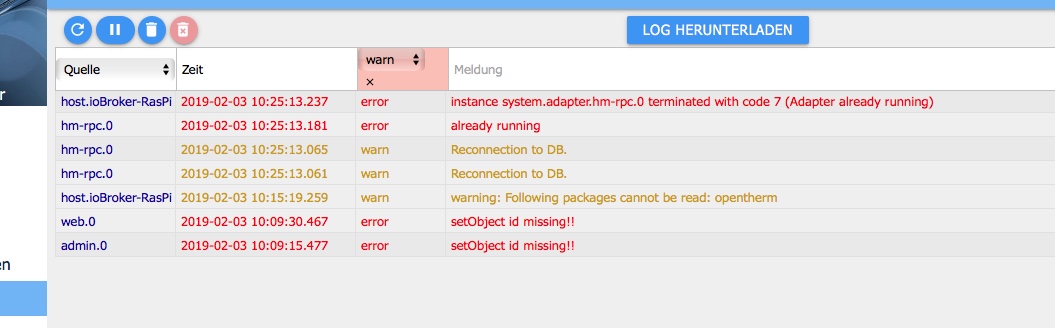
7022_fehlerlog.jpeg -
Nein die FFehler tauchen noch immer auf, entschuldigung hatte vergessen Dateianhang mitzuschicken.
total used free shared buff/cache available
Mem: 927 634 205 0 86 242
Swap: 99 17 82
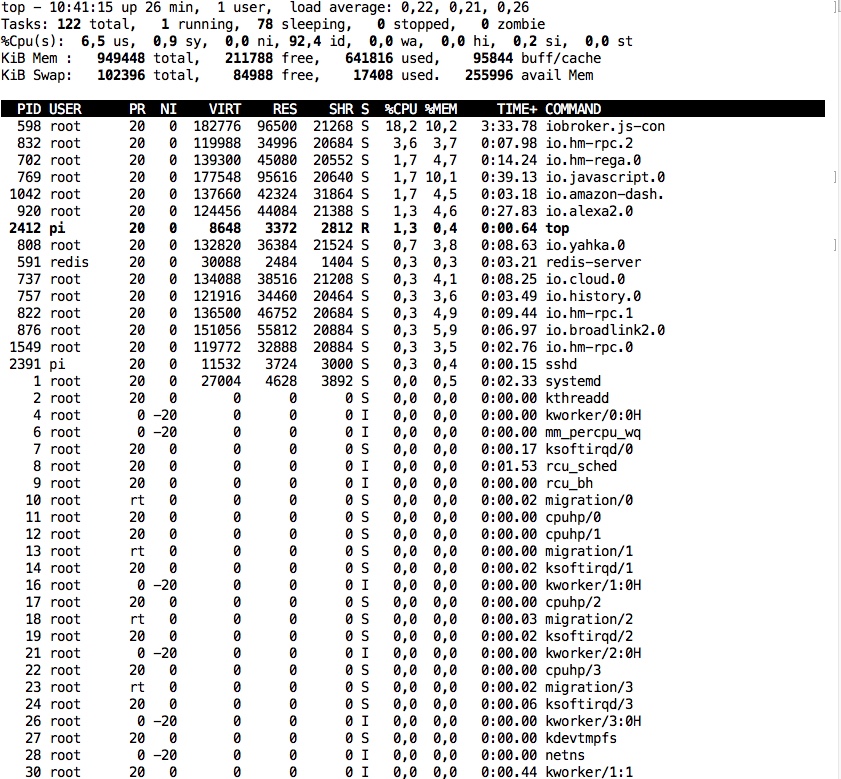
7022_laufende_prozesse_und_speicher.jpeg -
25 laufende Adapterinstanzen… Und nein der Broker ist noch nicht weg, abeer die Fehler sind wieder da. Die waren ja auch immer da wenn sich der Broker nachts verabschiedet hat. Wobei dabei vielleicht ja doch kein kausaler Zusammenhang besteht. :?:
-
Die Fehler wegen error 7 oder was?
25 Instanzen bei 1GB Sind Grenzwertig.
Grob braucht eine Instanz 30-60MB ram. Sagen wir 45 MB im Schnitt … rechne das mal hoch auf 25 ...
Aktuell sagt deine info zwar >250MB frei... dennoch kann das knapp werden recht fix.
Und backitup braucht auch ein bissl mehr wenn ein Backup erstellt wird.
Gesendet vom Handy ...
-
Dass es knapp wird sieht man auch daran, dass der Raspi swappt.
Gruß
Rainer
-
Also doch neue Hardware <emoji seq="1f914">🤔</emoji>

Support us
643
Online32.4k
Users81.6k
Topics1.3m
Posts