Skip to content
  • Home
  • Recent
  • Tags
  • 0 Unread 0
  • Categories
  • Unreplied
  • Popular
  • GitHub
  • Docu
  • Hilfe
Skins
  • Light
  • Brite
  • Cerulean
  • Cosmo
  • Flatly
  • Journal
  • Litera
  • Lumen
  • Lux
  • Materia
  • Minty
  • Morph
  • Pulse
  • Sandstone
  • Simplex
  • Sketchy
  • Spacelab
  • United
  • Yeti
  • Zephyr
  • Dark
  • Cyborg
  • Darkly
  • Quartz
  • Slate
  • Solar
  • Superhero
  • Vapor

  • Default (No Skin)
  • No Skin
Collapse
ioBroker Logo

Community Forum

donate donate
  1. ioBroker Community Home
  2. Deutsch
  3. Skripten / Logik
  4. Fensterkontakt GS-WDS07 mit Sonoff RF Bridge(Tasmota)
NEWS

  • Monatsrückblick Januar/Februar 2026 ist online!
    BluefoxB
    Bluefox
    18
    1
    705

  • Jahresrückblick 2025 – unser neuer Blogbeitrag ist online! ✨
    BluefoxB
    Bluefox
    18
    1
    5.8k

  • Neuer Blogbeitrag: Monatsrückblick - Dezember 2025 🎄
    BluefoxB
    Bluefox
    13
    1
    1.5k

Fensterkontakt GS-WDS07 mit Sonoff RF Bridge(Tasmota)

Scheduled Pinned Locked Moved Skripten / Logik
5 Posts 2 Posters 1.6k Views
  • Oldest to Newest
  • Newest to Oldest
  • Most Votes
Reply
  • Reply as topic
Log in to reply
This topic has been deleted. Only users with topic management privileges can see it.
  • G Offline
    G Offline
    gonzo1101
    wrote on last edited by
    #1

    Hallo,

    ich bastel und bastel …

    leider bin ich noch grad am Anfang & bekomme die einfachsten sachen in VIS hin.

    Mein Problem ist, Ich habe mir zuerst die Sonofs DW1 bestellt (passend für alle Fenster 😢 ) und nach den richtigen Batterien festgestellt, das sie nur ein Wert ausspucken :shock: . Dann habe ich weiter gesucht und habe mich für die GS-WDS07 entschieden & bestellt. Sie geben 2 Werte aus; sowohl beim schließen als auch beim öffnen. :D

    Meine Sonoff RV Bridge habe ich mit Tasmota geflasht und zwei Fensterkontakte angelernt.

    Sie geben auch unterschiedliche Werte aus.. für auf xxxxA für zu xxxxE. (jeder Kontackt unterschiedlich xxxxE/A)

    und werden bei Sonoff-RF-Bridge RfReceived Data angezeigt….

    Nehme ich in VIS die Widget´s Fenster & o. Türe und trage die Werte ein, funzt es mit nur einem Fenster. Nehme ich ein zweites hinzu, geht das andere mal mit auf und das andere mit zu,... sprich; nicht die Lösung.

    Das bauen von Blockly habe ich mir angeschaut und komme da noch nicht mit zurecht..

    Abschaun von anderen, brachte mich nicht weiter.

    Das suchen im Forum, nicht wirklich..

    <u>Das was ich möchte ist, das Fenster zb Wohnzimmer als geöffnet angezeigt wird wenn es auf ist & als zu wenn zu. Es soll keine Regel für´s heizen etc. enstehen.</u>

    <size size="85">(Zukunfts musik wäre für mich: "Alexa mach die Schotten dicht" das über all Licht ausgeht, Rolladen runter und angesagt wird welches Fenster auf Kipp steht & mir noch was nettes sagt; ….Wenn das Taschengeld reicht)</size>

    Vieleicht kann mich da jemand lieb an die Handnehmen und mich da in BLOCKLY einführen oder evtl hat da jemand die Gleiche Situation und spendet mir das Script.

    Dank euch für´s lesen und ggf für Antworten
    5301_blocky.jpg

    1 Reply Last reply
    0
    • Z Offline
      Z Offline
      zecki79
      wrote on last edited by
      #2

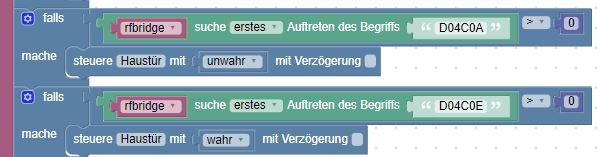
      Hallo, ich habe es bei mir so gelöst:

      5087_unbenannt.jpg 5087_unbenannt1.jpg

      und die Datenpunkt "Haustür" usw. habe ich händisch angelegt.

      lg

      1 Reply Last reply
      0
      • G Offline
        G Offline
        gonzo1101
        wrote on last edited by
        #3

        Hi,

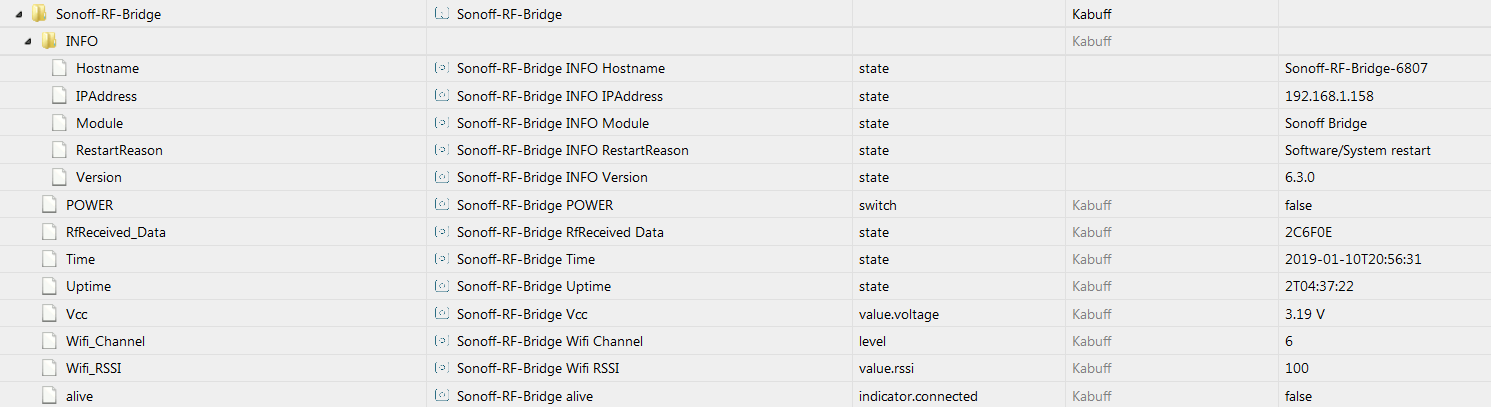
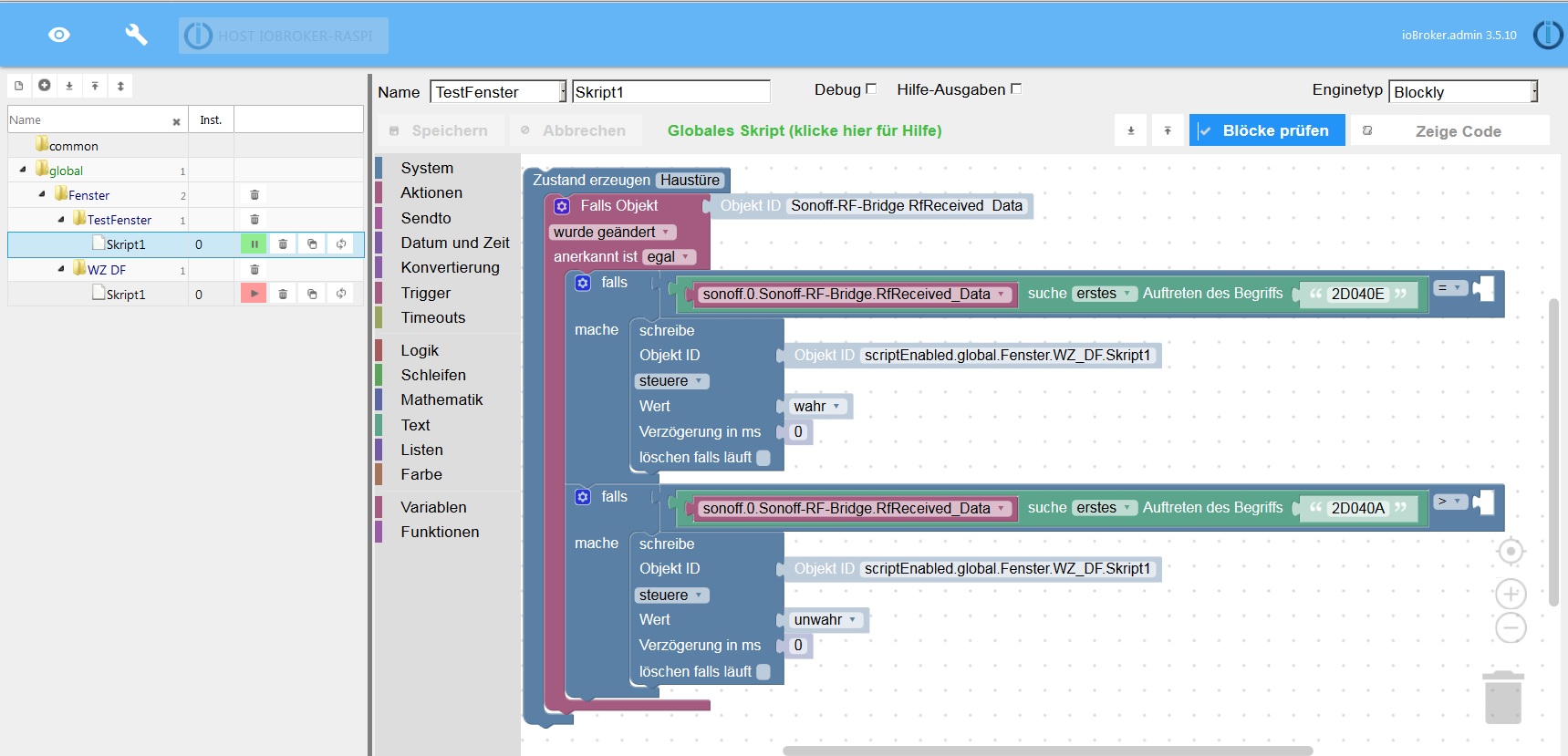
        Also habe das mal nachgebaut…

        Denke ich zumindest...

        "Haustüre" händisch angelegt als Datenpunkt...

        hab ich da was vergessen?

        Bitte um korrektur ;)
        5301_screenshot_2019-01-10_javascript_-_iobroker.png
        5301_rf_bridge.png
        5301_datenpunkt.png
        1 Reply Last reply
        0
        • Z Offline
          Z Offline
          zecki79
          wrote on last edited by
          #4

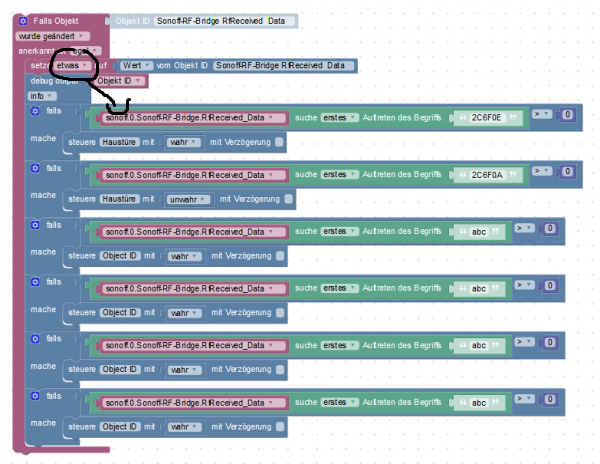
          Nimm mal als fals Bedingung die variable etwas!

          5087_screenshot_2019-01-10_javascript_-_iobroker.png

          1 Reply Last reply
          0
          • Z Offline
            Z Offline
            zecki79
            wrote on last edited by
            #5

            und dein Trigger funktioniert ich glaube so wie du es gemacht hast auch nicht!

            Versuch es mal so:

            5087_unbenannt.jpg

            1 Reply Last reply
            0

            Hello! It looks like you're interested in this conversation, but you don't have an account yet.

            Getting fed up of having to scroll through the same posts each visit? When you register for an account, you'll always come back to exactly where you were before, and choose to be notified of new replies (either via email, or push notification). You'll also be able to save bookmarks and upvote posts to show your appreciation to other community members.

            With your input, this post could be even better 💗

            Register Login
            Reply
            • Reply as topic
            Log in to reply
            • Oldest to Newest
            • Newest to Oldest
            • Most Votes


            Support us

            ioBroker
            Community Adapters
            Donate

            312

            Online

            32.7k

            Users

            82.6k

            Topics

            1.3m

            Posts
            Community
            Impressum | Datenschutz-Bestimmungen | Nutzungsbedingungen | Einwilligungseinstellungen
            ioBroker Community 2014-2025
            logo
            • Login

            • Don't have an account? Register

            • Login or register to search.
            • First post
              Last post
            0
            • Home
            • Recent
            • Tags
            • Unread 0
            • Categories
            • Unreplied
            • Popular
            • GitHub
            • Docu
            • Hilfe