Skip to content
  • Home
  • Recent
  • Tags
  • 0 Unread 0
  • Categories
  • Unreplied
  • Popular
  • GitHub
  • Docu
  • Hilfe
Skins
  • Light
  • Brite
  • Cerulean
  • Cosmo
  • Flatly
  • Journal
  • Litera
  • Lumen
  • Lux
  • Materia
  • Minty
  • Morph
  • Pulse
  • Sandstone
  • Simplex
  • Sketchy
  • Spacelab
  • United
  • Yeti
  • Zephyr
  • Dark
  • Cyborg
  • Darkly
  • Quartz
  • Slate
  • Solar
  • Superhero
  • Vapor

  • Default (No Skin)
  • No Skin
Collapse
ioBroker Logo

Community Forum

donate donate
  1. ioBroker Community Home
  2. Deutsch
  3. Skripten / Logik
  4. Bild von Kamera per Pushover senden

NEWS

  • UPDATE 31.10.: Amazon Alexa - ioBroker Skill läuft aus ?
    apollon77A
    apollon77
    48
    3
    8.8k

  • Monatsrückblick – September 2025
    BluefoxB
    Bluefox
    13
    1
    2.2k

  • Neues Video "KI im Smart Home" - ioBroker plus n8n
    BluefoxB
    Bluefox
    16
    1
    3.2k

Bild von Kamera per Pushover senden

Scheduled Pinned Locked Moved Skripten / Logik
54 Posts 18 Posters 13.3k Views 12 Watching
  • Oldest to Newest
  • Newest to Oldest
  • Most Votes
Reply
  • Reply as topic
Log in to reply
This topic has been deleted. Only users with topic management privileges can see it.
  • D Offline
    D Offline
    dan11hh
    wrote on last edited by
    #1

    Ich weiß, das Thema wurde schon öfter angesprochen, aber leider habe ich bis jetzt keine zufriedenstellende Lösung umsetzen können.

    Wie immer:

    Wird die Klingel gedrückt, soll per Pushover eine Foto einer IPCam an mein Handy gesendet werden, gleichzeitig melden noch alle DOTs im Haus, dass es klingelt.

    Alexa und Klingel habe ich mit Blockly gescripted bekommen. Auch Pushover schickt eine Nachricht, leider bekomme ich es nicht hin, einen File anzuhängen. Ich weiß, dass es im Blockly aktuell keine Möglichkeit gibt einen Anhang zu übergeben. Deshalb hab ich mir viele verschiedene Lösung in Javascript angesehen. Leider krieg ich es mit try and error nichts ans laufen.

    Vielleicht kann mir jemand helfen? Hab sonst mit Javascript nicht viel zu tun gehabt.(eigentlich nichts :D )

    on({id: "hm-rpc.3.XXX.1.STATE"/*Klingel Flur.STATE*/, change: "ne"}, function (obj) {
      var value = obj.state.val;
      var oldValue = obj.oldState.val;
      setState("alexa2.0.Echo-Devices.XXX.Commands.speak"/*speak*/, (String('DingDong') + String('')));
      sendTo("pushover.0", "send", {
         "message": 'Klingel', "attachment": '/home/pi/image.jpg'
      });
    });
    

    Das funktioniert, bis auf das Bild anhängen. Woran liegt das? Habe jetzt wirklich schon zig Varianten ausprobiert. Der nächste Schritt wäre für mich dann noch das abholen und abspeichern des Webcam Bildes auf dem PI bzw. Netzwerkspeicher.

    Es wäre toll, wenn jemand Idee hat. Danke!!!

    1 Reply Last reply
    0
    • Z Offline
      Z Offline
      zecki79
      wrote on last edited by
      #2

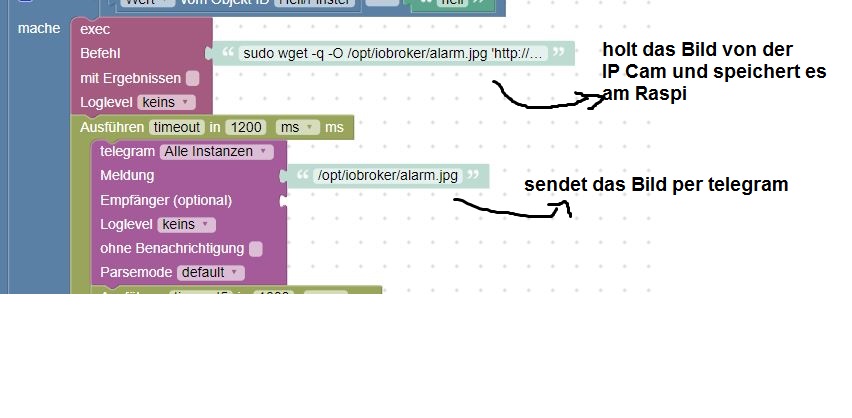
      Hi, bei mir funktioniert es so mit telegram

      5087_unbenannt.jpg

      1 Reply Last reply
      1
      • D Offline
        D Offline
        dan11hh
        wrote on last edited by
        #3

        Sorry, für die späte Antwort.

        Ja, danke. Das speichern scheint zu funktionieren? Aktuell raff ich noch nicht den Unterschied zwischen zwischen "mache" und 'steuere' aber egal. Abgespeichert wird das File jetzt. Nun muss ich sehen, wie ich das zu PushOver kriege. Noch eine Idee? 17266_bildschirmfoto_2019-01-21_um_09.43.04.png
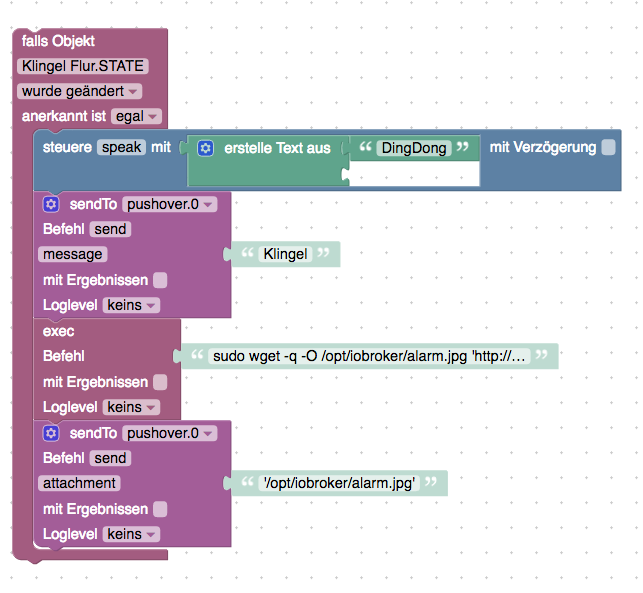
        1 Reply Last reply
        0
        • ? Offline
          ? Offline
          A Former User
          wrote on last edited by
          #4

          Pushover kann noch keine Bilder per Blockly versenden. Siehe GitHub https://github.com/ioBroker/ioBroker.pushover/issues/5

          1 Reply Last reply
          0
          • D Offline
            D Offline
            dan11hh
            wrote on last edited by
            #5

            Ich weiß. Danke. Aber ich dachte an eine Skript Lösung.

            1 Reply Last reply
            0
            • ? Offline
              ? Offline
              A Former User
              wrote on last edited by
              #6

              Hast du gesehen was dort verlinkt ist? viewtopic.php?f=21&t=13287&hilit=Pushov … 20#p198733

              1 Reply Last reply
              0
              • D Offline
                D Offline
                dan11hh
                wrote on last edited by
                #7

                Ja, Danke. Das hab ich nicht umgemodelt bekommen. Meist klappt das ja, aber so ganz ohne JScript Kenntnisse…<emoji seq="1f62c">😬</emoji>

                1 Reply Last reply
                0
                • ? Offline
                  ? Offline
                  A Former User
                  wrote on last edited by
                  #8

                  Ich hab das jetzt mal getestet. Mit dem Code aus dem Beitrag habe ich ein JS Script angelegt. file Pfad an deine gespeicherte Datei anpassen!

                  sendTo("pushover", {
                    message: 'Dies ist eine Test-Nachricht', // mandatory - your text message
                    title: 'ioBroker', // optional - your message's title, otherwise your app's name is used
                    sound: 'magic', // optional - the name of one of the sounds supported by device clients to override the user's default sound choice
                                    // pushover, bike, bugle, cashregister, classical, cosmic, falling,
                                    // gamelan, incoming, intermission, magic, mechanical, pianobar, siren,
                                    // spacealarm, tugboat, alien, climb, persistent, echo, updown, none
                    priority: 0, // optional (-2, -1, 0, 1, 2)
                                    // -2 to always send as a quiet notification,
                                    // 1 to display as high-priority and bypass the user's quiet hours, or
                                    // 2 to also require confirmation from the user
                    file: '/opt/iobroker/alarm.jpg', // optional - attachment
                    //token: 'API/KEY token', // optional - add other than configurated token to the call
                    //url: , // optional - a supplementary URL to show with your message
                    //url_title: , // optional - a title for your supplementary URL, otherwise just the URL is shown
                    //device: , // optional - your user's device name to send the message directly to that device, rather than all of the user's devices
                    //timestamp // optional - a Unix timestamp of your message's date and time to display to the user, rather than the time your message is received by our API
                  });
                  

                  Anstatt den Block pushover nimmst du dann steuere und wählst dort unter Javascript usw bis zum Objekt des Script und steuerst mit wahr. Ein paar ms später steuerst du es wieder mit false. Und vor dem versenden noch ein Timeout damit das Bild auch komplett gespeichert wird. Speichern und gleich versenden geht nicht. Und ein paar Sekunden später wird das Bild mit pushover gesendet.
                  6779_pushover.jpg

                  joggeJ N 2 Replies Last reply
                  1
                  • D Offline
                    D Offline
                    dan11hh
                    wrote on last edited by
                    #9

                    Wie cool ist DAS denn? Vielen, viele Dank. Ich probier das morgen mal aus, heute hab ich dazu leider keine Zeit. Wollte aber auf jeden Fall schon einmal DANKE! sagen. Danke ;)

                    1 Reply Last reply
                    0
                    • S Offline
                      S Offline
                      stimezo
                      Forum Testing
                      wrote on last edited by
                      #10

                      @Brainbug:

                      Ich hab das jetzt mal getestet. Mit dem Code aus dem Beitrag habe ich ein JS Script angelegt. file Pfad an deine gespeicherte Datei anpassen!

                      sendTo("pushover", {
                        message: 'Dies ist eine Test-Nachricht', // mandatory - your text message
                        title: 'ioBroker', // optional - your message's title, otherwise your app's name is used
                        sound: 'magic', // optional - the name of one of the sounds supported by device clients to override the user's default sound choice
                                        // pushover, bike, bugle, cashregister, classical, cosmic, falling,
                                        // gamelan, incoming, intermission, magic, mechanical, pianobar, siren,
                                        // spacealarm, tugboat, alien, climb, persistent, echo, updown, none
                        priority: 0, // optional (-2, -1, 0, 1, 2)
                                        // -2 to always send as a quiet notification,
                                        // 1 to display as high-priority and bypass the user's quiet hours, or
                                        // 2 to also require confirmation from the user
                        file: '/opt/iobroker/alarm.jpg', // optional - attachment
                        //token: 'API/KEY token', // optional - add other than configurated token to the call
                        //url: , // optional - a supplementary URL to show with your message
                        //url_title: , // optional - a title for your supplementary URL, otherwise just the URL is shown
                        //device: , // optional - your user's device name to send the message directly to that device, rather than all of the user's devices
                        //timestamp // optional - a Unix timestamp of your message's date and time to display to the user, rather than the time your message is received by our API
                      });
                      

                      Danke für das Script,

                      habe es ausprobiert, leider wird mein Bild nicht mitgesendet.

                      irgendeine Idee warum?

                      Viele Grüße

                      Christian `

                      1 Reply Last reply
                      0
                      • D Offline
                        D Offline
                        dan11hh
                        wrote on last edited by
                        #11

                        Bei mir klappt es! Super. @brainbug Vielen Dank dafür.

                        @stimezo

                        Wird dein Bild abgespeichert?

                        1 Reply Last reply
                        0
                        • ? Offline
                          ? Offline
                          A Former User
                          wrote on last edited by
                          #12

                          @stimezo:

                          irgendeine Idee warum? `

                          Erstmal kontrollieren ob das Bild auch lokal vorhanden ist an dem Pfad den du angibst!

                          1 Reply Last reply
                          0
                          • S Offline
                            S Offline
                            stimezo
                            Forum Testing
                            wrote on last edited by
                            #13

                            @Brainbug:

                            @stimezo:

                            irgendeine Idee warum? `

                            Erstmal kontrollieren ob das Bild auch lokal vorhanden ist an dem Pfad den du angibst! `

                            Gebe zum Testen ein bereits bestehendes Bild an, bei mir:

                            /opt/iobroker/iobroker-data/files/eigene/Wohnzimmer_0.jpg
                            

                            Mit meinem Telegram-Script funktioniert es, würde es aber lieber per Pushover machen.

                            Danke

                            Christian

                            1 Reply Last reply
                            0
                            • ? Offline
                              ? Offline
                              A Former User
                              wrote on last edited by
                              #14

                              Wenn du den Pushover Adapter eingerichtet hast und das Script bei file an deinen Pfad angepasst hast sollte ein Bild gesendet werden.

                              1 Reply Last reply
                              0
                              • D Offline
                                D Offline
                                der-eine
                                wrote on last edited by
                                #15

                                Hallo zusammen,

                                ich häng mich hier mal dran. Habe das Problem, dass mir Telegram nur den Pfad zum Bild schickt und nicht das Bild.

                                wenn ich es lösche und den wget Befehl erneut ausführe, bekomme ich nur den Link.

                                Jemand eine Idee wieso?

                                1 Reply Last reply
                                0
                                • ? Offline
                                  ? Offline
                                  A Former User
                                  wrote on last edited by
                                  #16

                                  Zeig doch mal ein Bild von deinem Blockly?

                                  Und hast du deinen Link zum Bild im Browser gestartet?

                                  1 Reply Last reply
                                  -1
                                  • D Offline
                                    D Offline
                                    der-eine
                                    wrote on last edited by
                                    #17

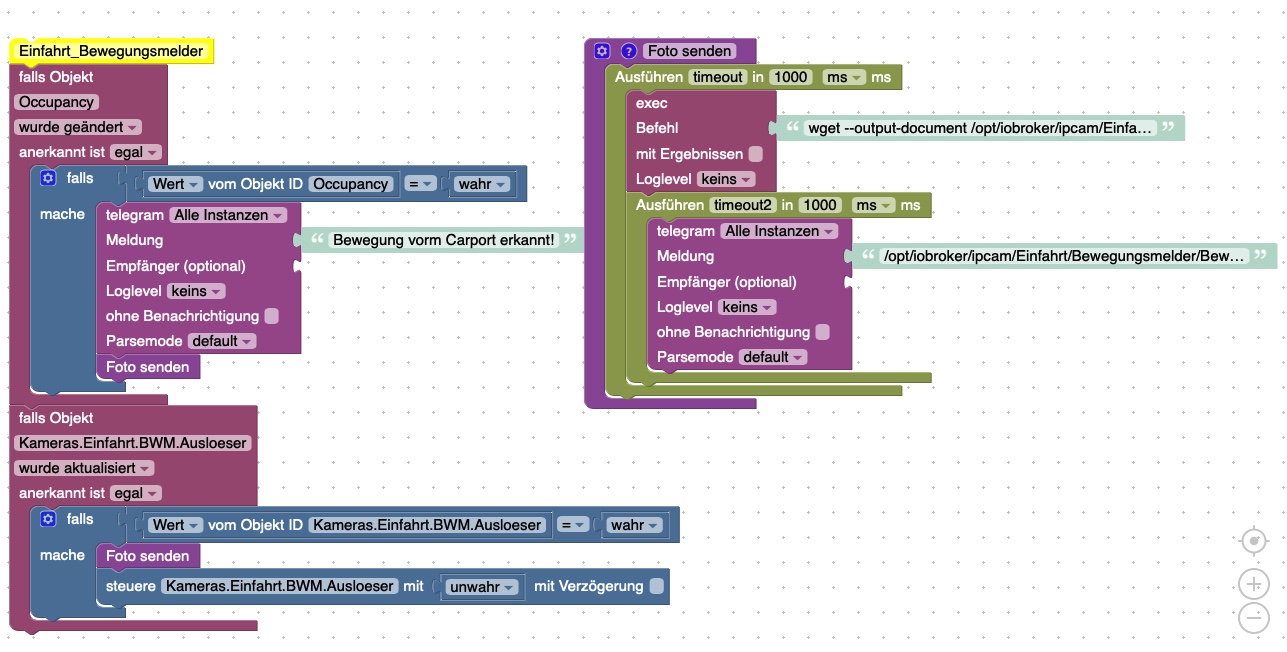
                                    Hier mal das Blockly.

                                    Das ganze hat mit 4 verschiedenen Auslösern funktioniert mit genau diesem Pfad. Hab den Pfad nochmal geprüft, im Browser kann ich das Bild aufrufen und im angegebenen Ordner wird auch ein neues Bild erstellt. Es wird nur nicht versendet.

                                    Seit der Umstellung auf den Multihost gehen diese Skripte nicht mehr. Bzw das Bilder versenden.
                                    10117_2758fa1e-fd8d-4585-aeed-9a66e879c96a.jpeg

                                    1 Reply Last reply
                                    0
                                    • ? Offline
                                      ? Offline
                                      A Former User
                                      wrote on last edited by
                                      #18

                                      Dann liegt es wohl am Multihost, dass das Bild nicht dort gespeichert wird wo es wieder versendet werden soll?

                                      1 Reply Last reply
                                      0
                                      • D Offline
                                        D Offline
                                        der-eine
                                        wrote on last edited by
                                        #19

                                        Wenn ich das Bild am Speicherort lösche und das Skript neu Anstoße legt er das Bild wieder genau da hin…

                                        1 Reply Last reply
                                        0
                                        • D Offline
                                          D Offline
                                          der-eine
                                          wrote on last edited by
                                          #20

                                          @Brainbug:

                                          Dann liegt es wohl am Multihost, dass das Bild nicht dort gespeichert wird wo es wieder versendet werden soll? `

                                          Du hast recht, dass Foto war wo anders bzw Telegram war auf dem Slave und ich dachte sie wären beide auf dem Master. Somit sucht er wohl auf dem Slave nach dem Bild das aber auf dem Master liegt. <emoji seq="1f926-1f3fb-2642">🤦🏻‍♂️</emoji>

                                          Danke Dir!

                                          1 Reply Last reply
                                          0
                                          Reply
                                          • Reply as topic
                                          Log in to reply
                                          • Oldest to Newest
                                          • Newest to Oldest
                                          • Most Votes


                                          Support us

                                          ioBroker
                                          Community Adapters
                                          Donate

                                          898

                                          Online

                                          32.4k

                                          Users

                                          81.5k

                                          Topics

                                          1.3m

                                          Posts
                                          Community
                                          Impressum | Datenschutz-Bestimmungen | Nutzungsbedingungen | Einwilligungseinstellungen
                                          ioBroker Community 2014-2025
                                          logo
                                          • Login

                                          • Don't have an account? Register

                                          • Login or register to search.
                                          • First post
                                            Last post
                                          0
                                          • Home
                                          • Recent
                                          • Tags
                                          • Unread 0
                                          • Categories
                                          • Unreplied
                                          • Popular
                                          • GitHub
                                          • Docu
                                          • Hilfe