




Bild von Kamera per Pushover senden
-
Ich weiß, das Thema wurde schon öfter angesprochen, aber leider habe ich bis jetzt keine zufriedenstellende Lösung umsetzen können.
Wie immer:
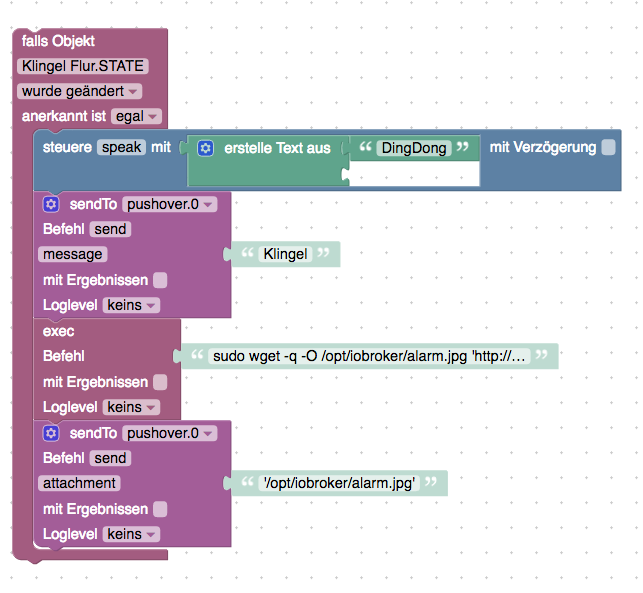
Wird die Klingel gedrückt, soll per Pushover eine Foto einer IPCam an mein Handy gesendet werden, gleichzeitig melden noch alle DOTs im Haus, dass es klingelt.
Alexa und Klingel habe ich mit Blockly gescripted bekommen. Auch Pushover schickt eine Nachricht, leider bekomme ich es nicht hin, einen File anzuhängen. Ich weiß, dass es im Blockly aktuell keine Möglichkeit gibt einen Anhang zu übergeben. Deshalb hab ich mir viele verschiedene Lösung in Javascript angesehen. Leider krieg ich es mit try and error nichts ans laufen.
Vielleicht kann mir jemand helfen? Hab sonst mit Javascript nicht viel zu tun gehabt.(eigentlich nichts :D )
on({id: "hm-rpc.3.XXX.1.STATE"/*Klingel Flur.STATE*/, change: "ne"}, function (obj) {
  var value = obj.state.val;
  var oldValue = obj.oldState.val;
  setState("alexa2.0.Echo-Devices.XXX.Commands.speak"/*speak*/, (String('DingDong') + String('')));
  sendTo("pushover.0", "send", {
     "message": 'Klingel', "attachment": '/home/pi/image.jpg'
  });
});
Das funktioniert, bis auf das Bild anhängen. Woran liegt das? Habe jetzt wirklich schon zig Varianten ausprobiert. Der nächste Schritt wäre für mich dann noch das abholen und abspeichern des Webcam Bildes auf dem PI bzw. Netzwerkspeicher.
Es wäre toll, wenn jemand Idee hat. Danke!!!
-
Sorry, für die späte Antwort.
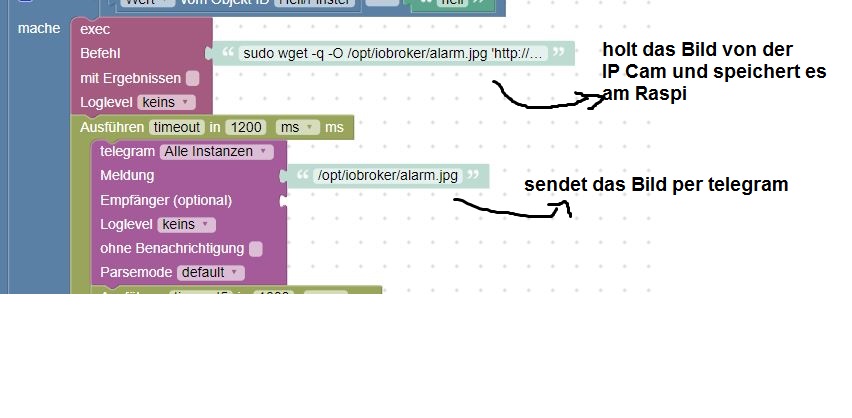
Ja, danke. Das speichern scheint zu funktionieren? Aktuell raff ich noch nicht den Unterschied zwischen zwischen "mache" und 'steuere' aber egal. Abgespeichert wird das File jetzt. Nun muss ich sehen, wie ich das zu PushOver kriege. Noch eine Idee?
-
Pushover kann noch keine Bilder per Blockly versenden. Siehe GitHub https://github.com/ioBroker/ioBroker.pushover/issues/5
-
Hast du gesehen was dort verlinkt ist? viewtopic.php?f=21&t=13287&hilit=Pushov … 20#p198733
-
Ich hab das jetzt mal getestet. Mit dem Code aus dem Beitrag habe ich ein JS Script angelegt. file Pfad an deine gespeicherte Datei anpassen!
sendTo("pushover", {
  message: 'Dies ist eine Test-Nachricht', // mandatory - your text message
  title: 'ioBroker', // optional - your message's title, otherwise your app's name is used
  sound: 'magic', // optional - the name of one of the sounds supported by device clients to override the user's default sound choice
                  // pushover, bike, bugle, cashregister, classical, cosmic, falling,
                  // gamelan, incoming, intermission, magic, mechanical, pianobar, siren,
                  // spacealarm, tugboat, alien, climb, persistent, echo, updown, none
  priority: 0, // optional (-2, -1, 0, 1, 2)
                  // -2 to always send as a quiet notification,
                  // 1 to display as high-priority and bypass the user's quiet hours, or
                  // 2 to also require confirmation from the user
  file: '/opt/iobroker/alarm.jpg', // optional - attachment
  //token: 'API/KEY token', // optional - add other than configurated token to the call
  //url: , // optional - a supplementary URL to show with your message
  //url_title: , // optional - a title for your supplementary URL, otherwise just the URL is shown
  //device: , // optional - your user's device name to send the message directly to that device, rather than all of the user's devices
  //timestamp // optional - a Unix timestamp of your message's date and time to display to the user, rather than the time your message is received by our API
});
Anstatt den Block pushover nimmst du dann steuere und wählst dort unter Javascript usw bis zum Objekt des Script und steuerst mit wahr. Ein paar ms später steuerst du es wieder mit false. Und vor dem versenden noch ein Timeout damit das Bild auch komplett gespeichert wird. Speichern und gleich versenden geht nicht. Und ein paar Sekunden später wird das Bild mit pushover gesendet.
6779_pushover.jpg -
@Brainbug:Ich hab das jetzt mal getestet. Mit dem Code aus dem Beitrag habe ich ein JS Script angelegt. file Pfad an deine gespeicherte Datei anpassen!
sendTo("pushover", {
  message: 'Dies ist eine Test-Nachricht', // mandatory - your text message
  title: 'ioBroker', // optional - your message's title, otherwise your app's name is used
  sound: 'magic', // optional - the name of one of the sounds supported by device clients to override the user's default sound choice
                  // pushover, bike, bugle, cashregister, classical, cosmic, falling,
                  // gamelan, incoming, intermission, magic, mechanical, pianobar, siren,
                  // spacealarm, tugboat, alien, climb, persistent, echo, updown, none
  priority: 0, // optional (-2, -1, 0, 1, 2)
                  // -2 to always send as a quiet notification,
                  // 1 to display as high-priority and bypass the user's quiet hours, or
                  // 2 to also require confirmation from the user
  file: '/opt/iobroker/alarm.jpg', // optional - attachment
  //token: 'API/KEY token', // optional - add other than configurated token to the call
  //url: , // optional - a supplementary URL to show with your message
  //url_title: , // optional - a title for your supplementary URL, otherwise just the URL is shown
  //device: , // optional - your user's device name to send the message directly to that device, rather than all of the user's devices
  //timestamp // optional - a Unix timestamp of your message's date and time to display to the user, rather than the time your message is received by our API
});
Danke für das Script,
habe es ausprobiert, leider wird mein Bild nicht mitgesendet.
irgendeine Idee warum?
Viele Grüße
Christian `
-
irgendeine Idee warum? `
Erstmal kontrollieren ob das Bild auch lokal vorhanden ist an dem Pfad den du angibst!
-
@Brainbug:irgendeine Idee warum? `
Erstmal kontrollieren ob das Bild auch lokal vorhanden ist an dem Pfad den du angibst! `
Gebe zum Testen ein bereits bestehendes Bild an, bei mir:
/opt/iobroker/iobroker-data/files/eigene/Wohnzimmer_0.jpgMit meinem Telegram-Script funktioniert es, würde es aber lieber per Pushover machen.
Danke
Christian
-
Wenn du den Pushover Adapter eingerichtet hast und das Script bei file an deinen Pfad angepasst hast sollte ein Bild gesendet werden.
-
-
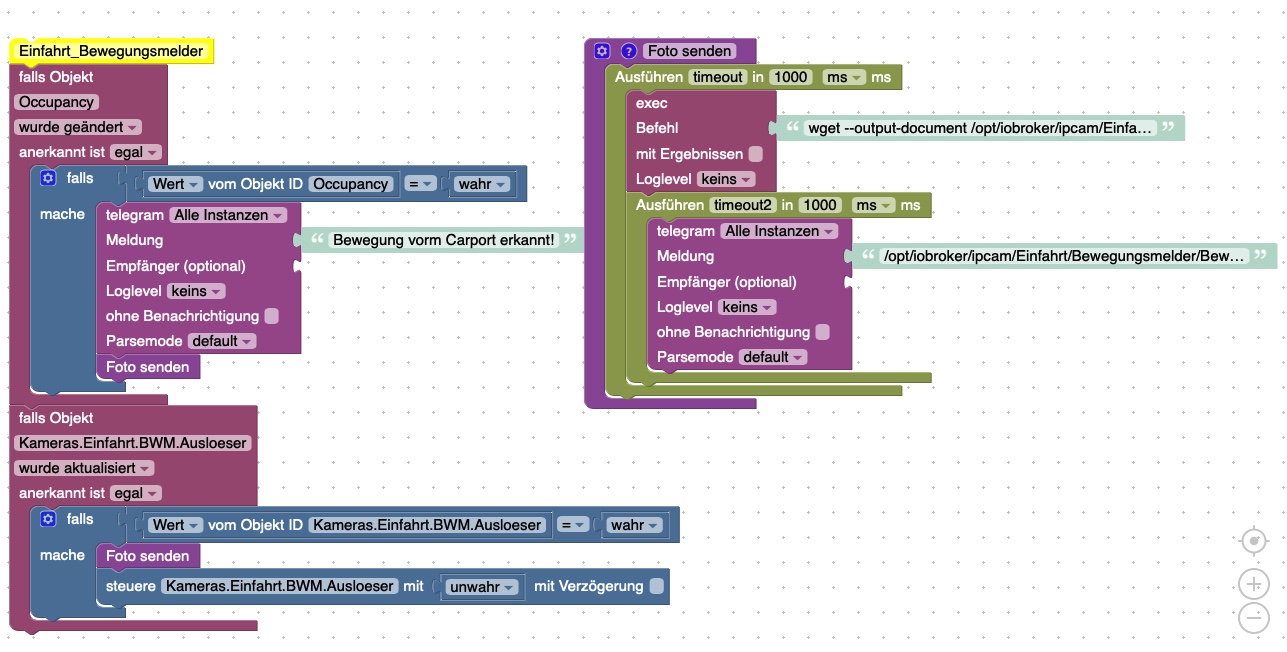
Zeig doch mal ein Bild von deinem Blockly?
Und hast du deinen Link zum Bild im Browser gestartet?
-
Hier mal das Blockly.
Das ganze hat mit 4 verschiedenen Auslösern funktioniert mit genau diesem Pfad. Hab den Pfad nochmal geprüft, im Browser kann ich das Bild aufrufen und im angegebenen Ordner wird auch ein neues Bild erstellt. Es wird nur nicht versendet.
Seit der Umstellung auf den Multihost gehen diese Skripte nicht mehr. Bzw das Bilder versenden.
10117_2758fa1e-fd8d-4585-aeed-9a66e879c96a.jpeg -
Dann liegt es wohl am Multihost, dass das Bild nicht dort gespeichert wird wo es wieder versendet werden soll?
-
@Brainbug:Dann liegt es wohl am Multihost, dass das Bild nicht dort gespeichert wird wo es wieder versendet werden soll? `
Du hast recht, dass Foto war wo anders bzw Telegram war auf dem Slave und ich dachte sie wären beide auf dem Master. Somit sucht er wohl auf dem Slave nach dem Bild das aber auf dem Master liegt. <emoji seq="1f926-1f3fb-2642">🤦🏻♂️</emoji>
Danke Dir!


Hey! Du scheinst an dieser Unterhaltung interessiert zu sein, hast aber noch kein Konto.
Hast du es satt, bei jedem Besuch durch die gleichen Beiträge zu scrollen? Wenn du dich für ein Konto anmeldest, kommst du immer genau dorthin zurück, wo du zuvor warst, und kannst dich über neue Antworten benachrichtigen lassen (entweder per E-Mail oder Push-Benachrichtigung). Du kannst auch Lesezeichen speichern und Beiträge positiv bewerten, um anderen Community-Mitgliedern deine Wertschätzung zu zeigen.
Mit deinem Input könnte dieser Beitrag noch besser werden 💗
Registrieren AnmeldenSupport us
178
Online33.0k
Benutzende83.7k
Themen1.3m
Beiträge