



Skip to content
  • Home
  • Recent
  • Tags
  • 0 Unread 0
  • Categories
  • Unreplied
  • Popular
  • GitHub
  • Docu
  • Hilfe
Skins
  • Light
  • Brite
  • Cerulean
  • Cosmo
  • Flatly
  • Journal
  • Litera
  • Lumen
  • Lux
  • Materia
  • Minty
  • Morph
  • Pulse
  • Sandstone
  • Simplex
  • Sketchy
  • Spacelab
  • United
  • Yeti
  • Zephyr
  • Dark
  • Cyborg
  • Darkly
  • Quartz
  • Slate
  • Solar
  • Superhero
  • Vapor

  • Default (No Skin)
  • No Skin
Collapse
ioBroker Logo

Community Forum

donate donate
  1. ioBroker Community Home
  2. Deutsch
  3. Skripten / Logik
  4. Bild von Kamera per Pushover senden

NEWS

  • Jahresrückblick 2025 – unser neuer Blogbeitrag ist online! ✨
    BluefoxB
    Bluefox
    17
    1
    3.2k

  • Neuer Blogbeitrag: Monatsrückblick - Dezember 2025 🎄
    BluefoxB
    Bluefox
    13
    1
    1.1k

  • Weihnachtsangebot 2025! 🎄
    BluefoxB
    Bluefox
    25
    1
    2.4k

Bild von Kamera per Pushover senden

Scheduled Pinned Locked Moved Skripten / Logik
54 Posts 18 Posters 14.0k Views 12 Watching
  • Oldest to Newest
  • Newest to Oldest
  • Most Votes
Reply
  • Reply as topic
Log in to reply
This topic has been deleted. Only users with topic management privileges can see it.
  • B Offline
    B Offline
    Blackeye
    wrote on last edited by
    #43

    Hallo zusammen,

    bei mir wird zwar ein Bild abgelegt aber nicht versendet. Es wird immer nur der LINGk an sich gesendet aber nicht das Bild.
    Wenn ich mir die JAVA Version anschaue, steht da bei euch auch etwas von File, bei mir nicht....
    Hat sich da was geändert und wie bekomme ich jetzt mein Bild auf´s Handy?

    Danke

    1 Reply Last reply
    0
    • ? A Former User

      Ich hab das jetzt mal getestet. Mit dem Code aus dem Beitrag habe ich ein JS Script angelegt. file Pfad an deine gespeicherte Datei anpassen!

      sendTo("pushover", {
        message: 'Dies ist eine Test-Nachricht', // mandatory - your text message
        title: 'ioBroker', // optional - your message's title, otherwise your app's name is used
        sound: 'magic', // optional - the name of one of the sounds supported by device clients to override the user's default sound choice
                        // pushover, bike, bugle, cashregister, classical, cosmic, falling,
                        // gamelan, incoming, intermission, magic, mechanical, pianobar, siren,
                        // spacealarm, tugboat, alien, climb, persistent, echo, updown, none
        priority: 0, // optional (-2, -1, 0, 1, 2)
                        // -2 to always send as a quiet notification,
                        // 1 to display as high-priority and bypass the user's quiet hours, or
                        // 2 to also require confirmation from the user
        file: '/opt/iobroker/alarm.jpg', // optional - attachment
        //token: 'API/KEY token', // optional - add other than configurated token to the call
        //url: , // optional - a supplementary URL to show with your message
        //url_title: , // optional - a title for your supplementary URL, otherwise just the URL is shown
        //device: , // optional - your user's device name to send the message directly to that device, rather than all of the user's devices
        //timestamp // optional - a Unix timestamp of your message's date and time to display to the user, rather than the time your message is received by our API
      });
      

      Anstatt den Block pushover nimmst du dann steuere und wählst dort unter Javascript usw bis zum Objekt des Script und steuerst mit wahr. Ein paar ms später steuerst du es wieder mit false. Und vor dem versenden noch ein Timeout damit das Bild auch komplett gespeichert wird. Speichern und gleich versenden geht nicht. Und ein paar Sekunden später wird das Bild mit pushover gesendet.
      6779_pushover.jpg

      N Offline
      N Offline
      nerg
      wrote on last edited by
      #44

      @Brainbug Ich komme hier mal ganz spät dazu ;) Ist es möglich, variablen zu nutzen , die ich dann vorher im Blockly belege? Dann wäre das Script universeller einsetzbar.

      ? 1 Reply Last reply
      0
      • N nerg

        @Brainbug Ich komme hier mal ganz spät dazu ;) Ist es möglich, variablen zu nutzen , die ich dann vorher im Blockly belege? Dann wäre das Script universeller einsetzbar.

        ? Offline
        ? Offline
        A Former User
        wrote on last edited by
        #45

        @nerg
        Könntest du mir nochmals genauer erklären was du möchtest :blush:
        Und hast du gesehen das man das Script auch als Blockly erstellen kann:
        https://github.com/ioBroker/ioBroker.pushover/issues/5#issuecomment-641392733

        N 1 Reply Last reply
        0
        • ? A Former User

          @nerg
          Könntest du mir nochmals genauer erklären was du möchtest :blush:
          Und hast du gesehen das man das Script auch als Blockly erstellen kann:
          https://github.com/ioBroker/ioBroker.pushover/issues/5#issuecomment-641392733

          N Offline
          N Offline
          nerg
          wrote on last edited by
          #46

          @Brainbug ich meine globale, scriptübergreifende Variablen. Das geht aber vermutlich nur über selbsterstellte Objekte.

          1 Reply Last reply
          0
          • smileS Offline
            smileS Offline
            smile
            wrote on last edited by
            #47

            Hallo zusammen. Ich hoffe einer von euch kann mir weiterhelfen.
            Ich bekomme es hin, dass mir per Telegram und / oder Pushover ein Bild geschickt wird.
            Allerdings wird bei neuem Klingeln das Bild nicht aktualisiert, er schickt mir immer das gleiche, alte Bild vom allerersten Mal.
            Hat jemand eine Idee?
            Hier die Blockly Scripte Kamera Foto verschicken:
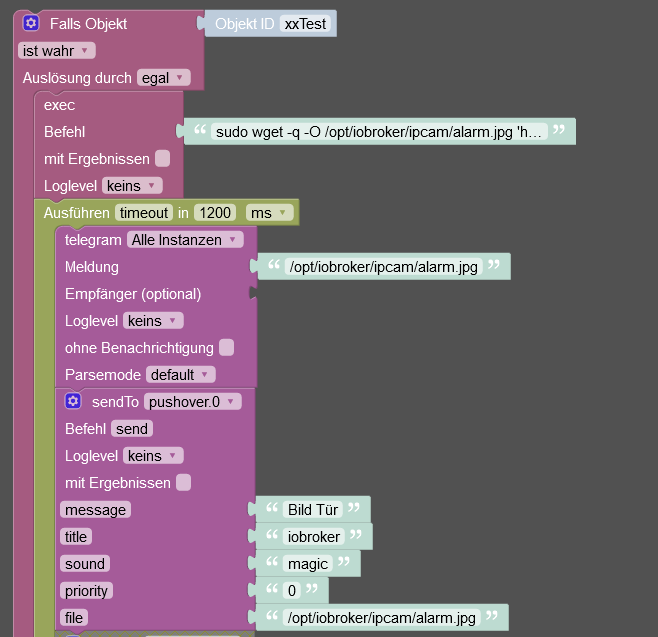
            Screenshot 2021-10-08 223052.png

            Der lange Befehl aus dem "exec" Block ist wie folgt: sudo wget -q -O /opt/iobroker/ipcam/alarm.jpg 'http://benutzername:passwort@172.16.2.210/record/current.jpg'

            DANKE für eure Hilfe.


            io.broker @ debian @ virtualbox @ Windows 10 Pro / Node 18.17.1, npm 9.6.7 / CCU3 / IR.Trans Server / Daslight 4 / Mobotix IP Cams / Qnap NAS / Sonos /

            Mein Rolladen - Blockly: https://forum.iobroker.net/topic/6442/das-ultimative-markisen-rolladen-blockly-script

            CinimodC 1 Reply Last reply
            0
            • smileS smile

              Hallo zusammen. Ich hoffe einer von euch kann mir weiterhelfen.
              Ich bekomme es hin, dass mir per Telegram und / oder Pushover ein Bild geschickt wird.
              Allerdings wird bei neuem Klingeln das Bild nicht aktualisiert, er schickt mir immer das gleiche, alte Bild vom allerersten Mal.
              Hat jemand eine Idee?
              Hier die Blockly Scripte Kamera Foto verschicken:
              Screenshot 2021-10-08 223052.png

              Der lange Befehl aus dem "exec" Block ist wie folgt: sudo wget -q -O /opt/iobroker/ipcam/alarm.jpg 'http://benutzername:passwort@172.16.2.210/record/current.jpg'

              DANKE für eure Hilfe.

              CinimodC Offline
              CinimodC Offline
              Cinimod
              Most Active
              wrote on last edited by Cinimod
              #48

              @smile

              den link von der cam mal im browser getestet, ob da alles passt ?

              dann versuch mal : wget -O /opt/iobroker/ipcam/alarm.jpg 'http://benutzername:passwort@172.16.2.210/record/current.jpg'

              UPDATE: Witzig .... jetzt geht es bei mir selbst nicht mehr :relieved:

              UPDATE vom UPDATE: mein ordner hatte offenbar keine schreibrechte ... nun geht es wieder mit dem Befehl oben

              Synology DS918+, Fritzbox 6690 Cable, #Docker #Blockly #Vis2 #Deconz #Tasmota

              1 Reply Last reply
              0
              • CinimodC Offline
                CinimodC Offline
                Cinimod
                Most Active
                wrote on last edited by
                #49

                @smile

                der Pushover Block kann offenbar keine Files versenden, hast du den Beitrag hier mal ordentlich gelesen ? Du musst dir mit einem zweiten Skript behelfen, welches du starten und wieder stoppen musst

                Synology DS918+, Fritzbox 6690 Cable, #Docker #Blockly #Vis2 #Deconz #Tasmota

                smileS 1 Reply Last reply
                0
                • CinimodC Cinimod

                  @smile

                  der Pushover Block kann offenbar keine Files versenden, hast du den Beitrag hier mal ordentlich gelesen ? Du musst dir mit einem zweiten Skript behelfen, welches du starten und wieder stoppen musst

                  smileS Offline
                  smileS Offline
                  smile
                  wrote on last edited by
                  #50

                  @cinimod Danke für deine Hilfe! Nun hat es bei mir geklappt und zwar ausschließlich mit wget --output-document [Kameralink]
                  Keine Ahnung warum, aber so geht es sogar mit beiden Adaptern, sprich Telegram als auch Pushover :grin:


                  io.broker @ debian @ virtualbox @ Windows 10 Pro / Node 18.17.1, npm 9.6.7 / CCU3 / IR.Trans Server / Daslight 4 / Mobotix IP Cams / Qnap NAS / Sonos /

                  Mein Rolladen - Blockly: https://forum.iobroker.net/topic/6442/das-ultimative-markisen-rolladen-blockly-script

                  CinimodC 1 Reply Last reply
                  0
                  • smileS smile

                    @cinimod Danke für deine Hilfe! Nun hat es bei mir geklappt und zwar ausschließlich mit wget --output-document [Kameralink]
                    Keine Ahnung warum, aber so geht es sogar mit beiden Adaptern, sprich Telegram als auch Pushover :grin:

                    CinimodC Offline
                    CinimodC Offline
                    Cinimod
                    Most Active
                    wrote on last edited by
                    #51

                    @smile

                    aber du benutzt den Pushover Block zum senden? mit "file" als Attribut ?

                    Synology DS918+, Fritzbox 6690 Cable, #Docker #Blockly #Vis2 #Deconz #Tasmota

                    smileS 1 Reply Last reply
                    0
                    • CinimodC Cinimod

                      @smile

                      aber du benutzt den Pushover Block zum senden? mit "file" als Attribut ?

                      smileS Offline
                      smileS Offline
                      smile
                      wrote on last edited by
                      #52

                      @cinimod Oben ist nur Telegram zu sehen, aber mit dem Pushover Block funktioniert es auch so:
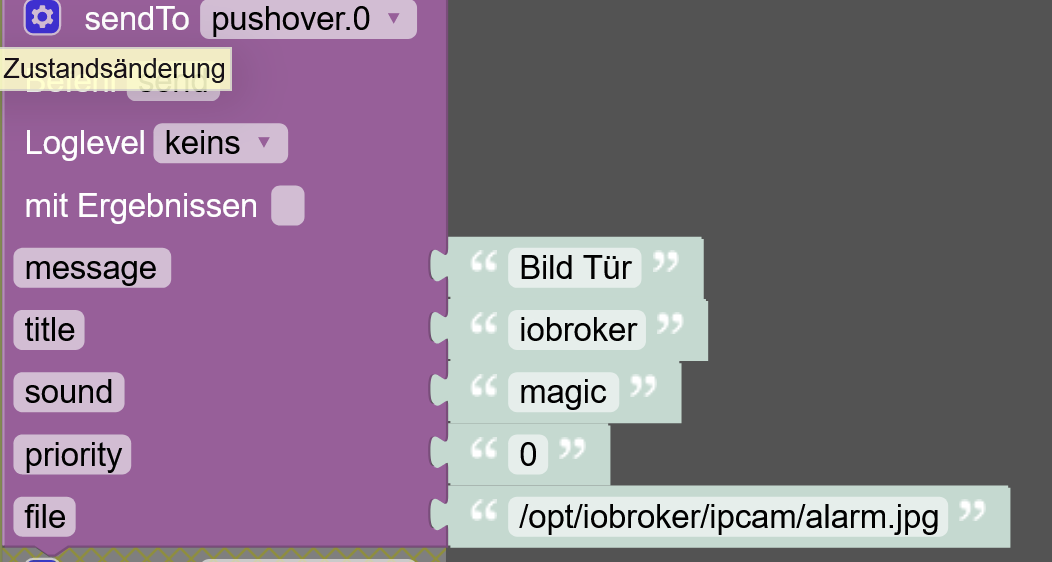
                      fa5e9ff5-1d94-4a4a-9fd4-f697bdc13637-grafik.png


                      io.broker @ debian @ virtualbox @ Windows 10 Pro / Node 18.17.1, npm 9.6.7 / CCU3 / IR.Trans Server / Daslight 4 / Mobotix IP Cams / Qnap NAS / Sonos /

                      Mein Rolladen - Blockly: https://forum.iobroker.net/topic/6442/das-ultimative-markisen-rolladen-blockly-script

                      CinimodC 1 Reply Last reply
                      0
                      • smileS smile

                        @cinimod Oben ist nur Telegram zu sehen, aber mit dem Pushover Block funktioniert es auch so:
                        fa5e9ff5-1d94-4a4a-9fd4-f697bdc13637-grafik.png

                        CinimodC Offline
                        CinimodC Offline
                        Cinimod
                        Most Active
                        wrote on last edited by Cinimod
                        #53

                        @smile

                        Das scheint bei mir nicht zu funktionieren :thinking_face:
                        Nachricht, Betreff, usw. ... alles klein Problem ... das File will er aber so nicht senden.

                        UPDATE: war mein Fehler, geht jetzt !!

                        Danke für die Info, ist viel übersichtlicher als mit nem zweiten Skript zu arbeiten

                        Synology DS918+, Fritzbox 6690 Cable, #Docker #Blockly #Vis2 #Deconz #Tasmota

                        D 1 Reply Last reply
                        1
                        • CinimodC Cinimod

                          @smile

                          Das scheint bei mir nicht zu funktionieren :thinking_face:
                          Nachricht, Betreff, usw. ... alles klein Problem ... das File will er aber so nicht senden.

                          UPDATE: war mein Fehler, geht jetzt !!

                          Danke für die Info, ist viel übersichtlicher als mit nem zweiten Skript zu arbeiten

                          D Offline
                          D Offline
                          DraycD
                          wrote on last edited by
                          #54

                          @cinimod
                          setze ein delay zwischen erstellung und senden von 200ms, dann gehts

                          1 Reply Last reply
                          0
                          Reply
                          • Reply as topic
                          Log in to reply
                          • Oldest to Newest
                          • Newest to Oldest
                          • Most Votes


                          Support us

                          ioBroker
                          Community Adapters
                          Donate

                          288

                          Online

                          32.7k

                          Users

                          82.3k

                          Topics

                          1.3m

                          Posts
                          Community
                          Impressum | Datenschutz-Bestimmungen | Nutzungsbedingungen | Einwilligungseinstellungen
                          ioBroker Community 2014-2025
                          logo
                          • Login

                          • Don't have an account? Register

                          • Login or register to search.
                          • First post
                            Last post
                          0
                          • Home
                          • Recent
                          • Tags
                          • Unread 0
                          • Categories
                          • Unreplied
                          • Popular
                          • GitHub
                          • Docu
                          • Hilfe