




-
@DKM:npm ERR! path C:\ioBroker\node_modules.iobroker.xbox.DELETE\python_modules\Python36\site-packages_cffi_backend.cp36-win_amd64.py
Will er da bei der Installation nicht löschen? Evtl. sind auch bei Dir Ordner vorhanden, die das Installationsskript nicht löschen kann. `
Welche Ordner wären das?
Kann ich die händisch löschen? `
Was gibt denn````
npm -v -
-
Führst du die cmd als Admin aus?
-
-
Hm dann möchte man fast meinen, dass da irgendwas die Datei in C:\ioBroker\node_modules.iobroker.xbox.DELETE schon nutzt und es deshalb einen Permission error gibt. Wenn du ioB stoppst und es probierst geht es dann? Bzw ist der Ordner existent: C:\ioBroker\node_modules.iobroker.xbox.DELETE weiß nicht ob Windows standardmäßig Ordner mit . Vorne dran anzeigt.
-
Hm dann möchte man fast meinen, dass da irgendwas die Datei in C:\ioBroker\node_modules.iobroker.xbox.DELETE schon nutzt und es deshalb einen Permission error gibt. Wenn du ioB stoppst und es probierst geht es dann? Bzw ist der Ordner existent: C:\ioBroker\node_modules.iobroker.xbox.DELETE weiß nicht ob Windows standardmäßig Ordner mit . Vorne dran anzeigt. ` Nein eigentlich ist das eine reine Unix Sache mit dem Punkt. Mir sind nur Sicherungen bekannt, die das auch nutzen
Gesendet von meinem SM-G960F mit Tapatalk
-
Ja, der Ordner ".iobroker.xbox.DELETE" scheint genau so auf!
Im Ordner sind dann noch:
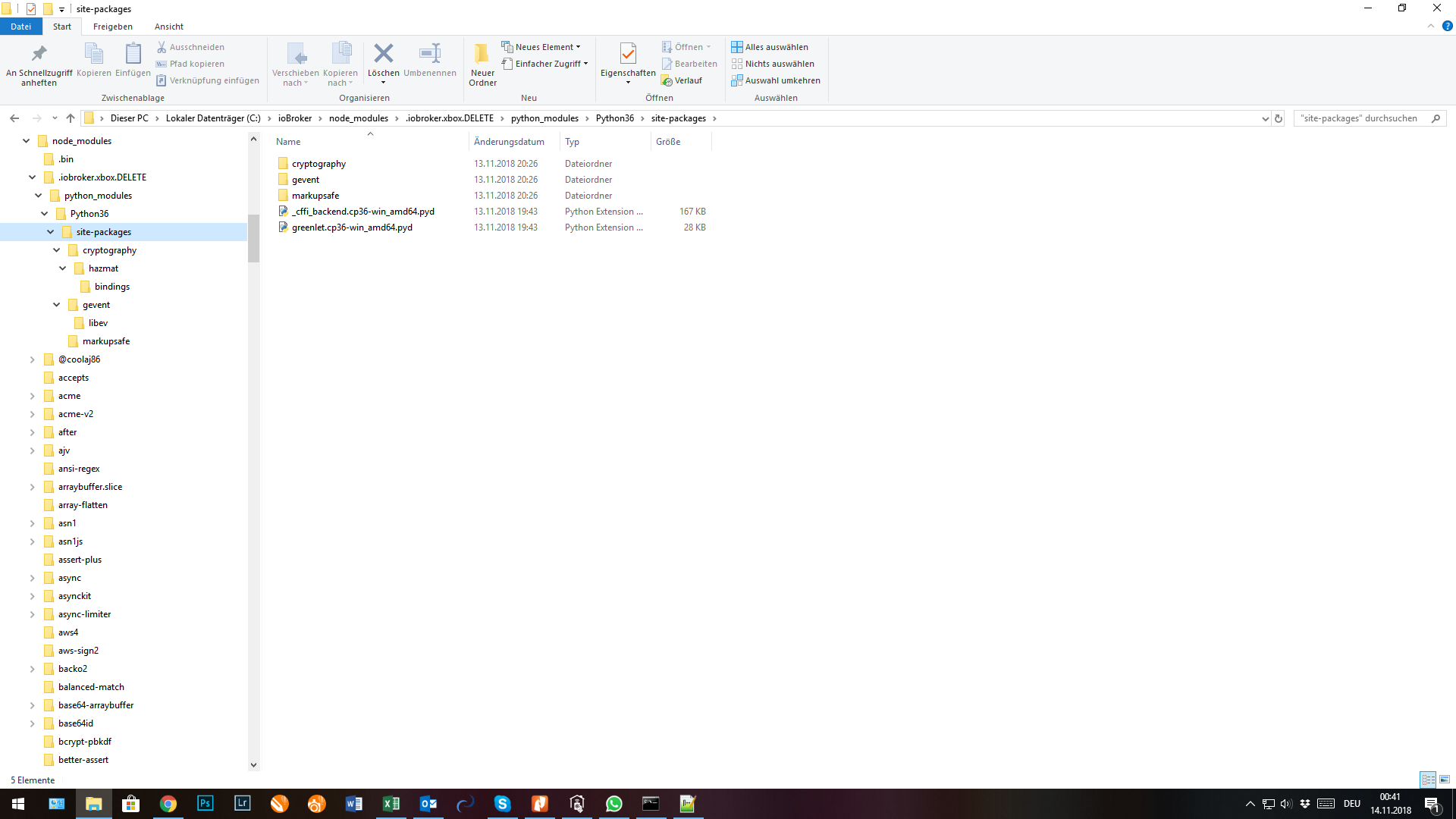
-
Dann lösch den Ordner mal bitte, dann wird er dir sagen, falls da was in Nutzung ist.
-
Dann lösch den Ordner mal bitte, dann wird er dir sagen, falls da was in Nutzung ist. `
Verzeichnis hab ich gelöscht und dann alles nochmal lt. DKM installiert.
Dürfte geklappt haben.
ABER jetzt komm ich nicht mehr in die Adminoberfläche.
Er lädt und lädt und …!
iobroker start
iobroker stop
iobroker restart
Hab ich alles schon probiert. Dienst läuft.
In den VIS-Editor komm ich ohne Probleme und kann auch die VIS starten.
-
Admin lässt sich mit````
iobroker start admin -
-
Ja die Oberfläche ist da, du bekommst jedoch nur diesen bunten Ladekreis zu sehen?
Und mal ne Frage an euch beiden Win-User. Wird bei euch das Unload Event korrekt ausgeführt, also loggt der Adapter am Ende Rest-Server stopped oder nen Error, dass er ihn nicht stoppen kann. Oder auch in anderen Adaptern wird am Ende häufig was geloggt im Unload und bei meiner Windows Installation, wird da nix ausgeführt.
-
Versuch mal in der Konsole
iobroker add admin –port 8089
Dann versuch ob du mit
http://deineIP:8089 auf die Oberfläche kommst.
@foxriver
Es kommt nur der Start, aber keine Nachricht über das beenden. Kann dir gerade kein Log schicken, da ich noch unterwegs bin.
Gesendet von meinem SM-G960F mit Tapatalk
-
Ja die Oberfläche ist da, du bekommst jedoch nur diesen bunten Ladekreis zu sehen? `
Nein, ich komm garnicht auf die Adminoberfläche.
-
@DKM:@foxriver
Es kommt nur der Start, aber keine Nachricht über das beenden. Kann dir gerade kein Log schicken, da ich noch unterwegs bin.
Gesendet von meinem SM-G960F mit Tapatalk `
Also ich habe jetzt noch was geaddet, damit sollte der Rest-Server (Python Prozess) beim stoppen des Adapters auch unter Windows erfolgreich beendet werden. Jedoch nur wenn das "Unload" Event auch korrekt getriggert wird. Das Event wird vom js-controller aus gesendet, also liegt nicht im Einflussbereich des Adapters, da ich eben unter Win auch bei anderen Adaptern kein Unload erhalte.
-
es funktioniert :D

-

In Version 0.2.0 wird die Authentifizierung mit Xbox Live Account möglich sein, eure Daten werden durch euer bei der ioBroker Installation generiertes Secret verschlüsselt. Dies ermöglicht für den aktuellen Zeitpunkt schon mal einige Vorteile:
1. Die Authentifizierung ist optional
2. Es gibt neue States im info channel die ein mal den Namen als auch ein mal die Id des aktuell im Vordergrund stehenden Titels enthalten,
der State ist nicht direkt Abhängig von der Authentifizierung, hilft jedoch dem ein oder anderen, der mit den JSON's nicht so gut umgehen kann. Das JSON bleibt weiterhin bestehen, da mehrere Titel im Bild sein können, (passiv + aktiv).
–> Wenn ihr jedoch die Authentifizierung durch führt, wird der Name in currentTitltes und activeTitle als voller Name angezeigt also im RDR2 Beispiel steht dann nun statt "RED2" wirklich "Red Dead Redemption 2". Sicherlich ganz nett für die Visualisierung
3. Indikator ob ihr derzeit aktiv authentifiziert seid hinzugefügt
4. Link zum Titelbild des aktiven Titels als State hinzugefügt, wenn authentifiziert
5. falls ja, wird noch ein State mit dem Gamertag gefüllt
6. (Wenn authentifiziert) Button hinzugefügt, mit dem die letzte Spielminute aufgenommen werden kann "settings.gameDvr" --> könnte man sich evtl ne nette Alexa Routine anlegen
Die Doku ist unter: https://github.com/foxriver76/ioBroker. ... /README.md zu finden.
Version 0.2.0 ist aktuell auf npm und ab morgen im latest
-
Hier noch mein Testbericht.
Die Installation über das Admin-Interface per GitHub ist fehlgeschlagen:
! ````
$ ./iobroker url "https://github.com/foxriver76/ioBroker.xbox"
install https://github.com/foxriver76/ioBroker.xbox/tarball/master
npm install https://github.com/foxriver76/ioBroker.xbox/tarball/master --production --save --prefix "C:/ioBroker" (System call)
npm
WARN rollback Rolling back iobroker.xbox@0.2.1 failed (this is probably harmless): EBUSY: resource busy or locked, rmdir 'C:\ioBroker\node_modules\iobroker.xbox'
npm
ERR! path C:\ioBroker\node_modules.iobroker.xbox.DELETE\python_modules\Python36\site-packages\greenlet.cp36-win_amd64.pydnpm ERR! code EPERM
! npm ERR!
errno -4048npm
ERR! syscall unlink
npm
ERR! Error: EPERM: operation not permitted, unlink 'C:\ioBroker\node_modules.iobroker.xbox.DELETE\python_modules\Python36\site-packages\greenlet.cp36-win_amd64.pyd'npm ERR! { Error: EPERM: operation not permitted, unlink 'C:\ioBroker\node_modules.iobroker.xbox.DELETE\python_modules\Python36\site-packages\greenlet.cp36-win_amd64.pyd'
npm ERR! cause:
npm ERR!
{ Error: EPERM: operation not permitted, unlink 'C:\ioBroker\node_modules.iobroker.xbox.DELETE\python_modules\Python36\site-packages\greenlet.cp36-win_amd64.pyd'npm ERR!
errno: -4048,
npm ERR!
code: 'EPERM',
npm ERR!
syscall: 'unlink',npm ERR!
path: 'C:\ioBroker\node_modules\.iobroker.xbox.DELETE\python_modules\Python36\site-packages\greenlet.cp36-win_amd64.pyd' },npm ERR! stack: 'Error: EPERM: operation not permitted, unlink 'C:\ioBroker\node_modules\.iobroker.xbox.DELETE\python_modules\Python36\site-packages\greenlet.cp36-win_amd64.pyd'',
! npm ERR! errno: -4048,npm
ERR! code: 'EPERM',
npm
ERR! syscall: 'unlink',
npm ERR! path: 'C:\ioBroker\node_modules\.iobroker.xbox.DELETE\python_modules\Python36\site-packages\greenlet.cp36-win_amd64.pyd',npm ERR! parent: 'iobroker.inst' }
npm ERR!
! npm ERR! The operation was rejected by your operating system.npm ERR! It's possible that the file was already in use (by a text editor or antivirus),
npm
ERR! or that you lack permissions to access it.
npm ERR! npm
ERR! If you believe this might be a permissions issue, please double-check thenpm
ERR! permissions of the file and its containing directories, or try runningnpm
ERR!
the command again as root/Administrator (though this is not recommended).
! npm ERR! A complete log of this run can be found in:npm ERR! C:\WINDOWS\system32\config\systemprofile\AppData\Roaming\npm-cache_logs\2018-11-16T21_50_56_229Z-debug.log
! ERROR: host.DKMHS01 Cannot install https://github.com/foxriver76/ioBroker.xbox/tarball/master: 4294963248
ERROR: process exited with code 25Über die Konsole mit ****npm install iobroker.xbox –production**** und anschließendem ****iobroker upload xbox**** hat aber funktioniert. >! ```` C:\ioBroker>npm install iobroker.xbox --production npm WARN addRemoteGit Error: not found: git npm WARN addRemoteGit at getNotFoundError (C:\Users\krist\AppData\Roaming\npm\node_modules\npm\node_modules\which\which.js:13:12) npm WARN addRemoteGit at F (C:\Users\krist\AppData\Roaming\npm\node_modules\npm\node_modules\which\which.js:68:19) npm WARN addRemoteGit at E (C:\Users\krist\AppData\Roaming\npm\node_modules\npm\node_modules\which\which.js:80:29) npm WARN addRemoteGit at C:\Users\krist\AppData\Roaming\npm\node_modules\npm\node_modules\which\which.js:89:16 npm WARN addRemoteGit at C:\Users\krist\AppData\Roaming\npm\node_modules\npm\node_modules\which\node_modules\isexe\index.js:42:5 npm WARN addRemoteGit at C:\Users\krist\AppData\Roaming\npm\node_modules\npm\node_modules\which\node_modules\isexe\windows.js:36:5 npm WARN addRemoteGit at C:\Users\krist\AppData\Roaming\npm\node_modules\npm\node_modules\graceful-fs\polyfills.js:284:29 npm WARN addRemoteGit at FSReqWrap.oncomplete (fs.js:152:21) npm WARN addRemoteGit git://github.com/noopkat/js-stk500v1.git#avrgirl resetting remote C:\Users\krist\AppData\Roaming\npm-cache\_git-remotes\git-github-com-noopkat-js-stk500v1-git-avrgirl-31bc3a47 because of error: { Error: not found: git npm WARN addRemoteGit at getNotFoundError (C:\Users\krist\AppData\Roaming\npm\node_modules\npm\node_modules\which\which.js:13:12) npm WARN addRemoteGit at F (C:\Users\krist\AppData\Roaming\npm\node_modules\npm\node_modules\which\which.js:68:19) npm WARN addRemoteGit at E (C:\Users\krist\AppData\Roaming\npm\node_modules\npm\node_modules\which\which.js:80:29) npm WARN addRemoteGit at C:\Users\krist\AppData\Roaming\npm\node_modules\npm\node_modules\which\which.js:89:16 npm WARN addRemoteGit at C:\Users\krist\AppData\Roaming\npm\node_modules\npm\node_modules\which\node_modules\isexe\index.js:42:5 npm WARN addRemoteGit at C:\Users\krist\AppData\Roaming\npm\node_modules\npm\node_modules\which\node_modules\isexe\windows.js:36:5 npm WARN addRemoteGit at C:\Users\krist\AppData\Roaming\npm\node_modules\npm\node_modules\graceful-fs\polyfills.js:284:29 npm WARN addRemoteGit at FSReqWrap.oncomplete (fs.js:152:21) code: 'ENOGIT' } npm WARN addRemoteGit Error: not found: git npm WARN addRemoteGit at getNotFoundError (C:\Users\krist\AppData\Roaming\npm\node_modules\npm\node_modules\which\which.js:13:12) npm WARN addRemoteGit at F (C:\Users\krist\AppData\Roaming\npm\node_modules\npm\node_modules\which\which.js:68:19) npm WARN addRemoteGit at E (C:\Users\krist\AppData\Roaming\npm\node_modules\npm\node_modules\which\which.js:80:29) npm WARN addRemoteGit at C:\Users\krist\AppData\Roaming\npm\node_modules\npm\node_modules\which\which.js:89:16 npm WARN addRemoteGit at C:\Users\krist\AppData\Roaming\npm\node_modules\npm\node_modules\which\node_modules\isexe\index.js:42:5 npm WARN addRemoteGit at C:\Users\krist\AppData\Roaming\npm\node_modules\npm\node_modules\which\node_modules\isexe\windows.js:36:5 npm WARN addRemoteGit at C:\Users\krist\AppData\Roaming\npm\node_modules\npm\node_modules\graceful-fs\polyfills.js:284:29 npm WARN addRemoteGit at FSReqWrap.oncomplete (fs.js:152:21) npm WARN addRemoteGit git://github.com/noopkat/browser-serialport.git#api-updates resetting remote C:\Users\krist\AppData\Roaming\npm-cache\_git-remotes\git-github-com-noopkat-browser-serialport-git-api-updates-0f82caf3 because of error: { Error: not found: git npm WARN addRemoteGit at getNotFoundError (C:\Users\krist\AppData\Roaming\npm\node_modules\npm\node_modules\which\which.js:13:12) npm WARN addRemoteGit at F (C:\Users\krist\AppData\Roaming\npm\node_modules\npm\node_modules\which\which.js:68:19) npm WARN addRemoteGit at E (C:\Users\krist\AppData\Roaming\npm\node_modules\npm\node_modules\which\which.js:80:29) npm WARN addRemoteGit at C:\Users\krist\AppData\Roaming\npm\node_modules\npm\node_modules\which\which.js:89:16 npm WARN addRemoteGit at C:\Users\krist\AppData\Roaming\npm\node_modules\npm\node_modules\which\node_modules\isexe\index.js:42:5 npm WARN addRemoteGit at C:\Users\krist\AppData\Roaming\npm\node_modules\npm\node_modules\which\node_modules\isexe\windows.js:36:5 npm WARN addRemoteGit at C:\Users\krist\AppData\Roaming\npm\node_modules\npm\node_modules\graceful-fs\polyfills.js:284:29 npm WARN addRemoteGit at FSReqWrap.oncomplete (fs.js:152:21) code: 'ENOGIT' } npm ERR! git clone --template=C:\Users\krist\AppData\Roaming\npm-cache\_git-remotes\_templates --mirror git://github.com/noopkat/js-stk500v1.git C:\Users\krist\AppData\Roaming\npm-cache\_git-remotes\git-github-com-noopkat-js-stk500v1-git-avrgirl-31bc3a47: undefined npm ERR! git clone --template=C:\Users\krist\AppData\Roaming\npm-cache\_git-remotes\_templates --mirror git://github.com/noopkat/js-stk500v1.git C:\Users\krist\AppData\Roaming\npm-cache\_git-remotes\git-github-com-noopkat-js-stk500v1-git-avrgirl-31bc3a47: undefined npm ERR! git clone --template=C:\Users\krist\AppData\Roaming\npm-cache\_git-remotes\_templates --mirror git://github.com/noopkat/browser-serialport.git C:\Users\krist\AppData\Roaming\npm-cache\_git-remotes\git-github-com-noopkat-browser-serialport-git-api-updates-0f82caf3: undefined npm ERR! git clone --template=C:\Users\krist\AppData\Roaming\npm-cache\_git-remotes\_templates --mirror git://github.com/noopkat/browser-serialport.git C:\Users\krist\AppData\Roaming\npm-cache\_git-remotes\git-github-com-noopkat-browser-serialport-git-api-updates-0f82caf3: undefined >! > iobroker.xbox@0.2.1 preinstall C:\ioBroker\node_modules\.staging\iobroker.xbox-831ff231 > apt install -y build-essential libssl-dev libffi-dev python3-dev || echo -e '[INFO] Cant install build-essential libssl-dev libffi-dev python3-dev Debian packages. If you are on a Linux system, try installing the package via: sudo npm i iobroker.xbox --unsafe-perm, otherwise you have to manage to install the packages by yourself. If you are not running on Linux, you can ignore this INFO.' >! Der Befehl "apt" ist entweder falsch geschrieben oder konnte nicht gefunden werden. -e '[INFO] Cant install build-essential libssl-dev libffi-dev python3-dev Debian packages. If you are on a Linux system, try installing the package via: sudo npm i iobroker.xbox --unsafe-perm, otherwise you have to manage to install the packages by yourself. If you are not running on Linux, you can ignore this INFO.' >! > iobroker.xbox@0.2.1 install C:\ioBroker\node_modules\iobroker.xbox > npip install >! No python_modules directory; installing pip locally if needed. Successfully completed pip check. Collecting xbox-smartglass-rest>=0.9.8 Downloading https://files.pythonhosted.org/packages/4d/4f/f035df8a2ec5742b9e772071e006ea21aae3fc3bd0963753cfc1045d6fda/xbox_smartglass_rest-0.9.8-py2.py3-none-any.whl Collecting xbox-smartglass-stump>=0.9.5 (from xbox-smartglass-rest>=0.9.8) Downloading https://files.pythonhosted.org/packages/34/f0/a75667f67ce6251b96a6989b8169eb9f2e25407ce2b0888e544b8caa98fe/xbox_smartglass_stump-0.9.5-py2.py3-none-any.whl Collecting xbox-webapi>=1.1.7 (from xbox-smartglass-rest>=0.9.8) Using cached https://files.pythonhosted.org/packages/2d/bf/aaf24cc78184393c5c2472e822c0e145b793e346a8085bee02e89a3428ba/xbox_webapi-1.1.7-py2.py3-none-any.whl Collecting xbox-smartglass-core>=1.0.12 (from xbox-smartglass-rest>=0.9.8) Downloading https://files.pythonhosted.org/packages/13/c8/2ffce1ddabe5b73422c7c46e808e4b02dbbc9362d2ecd2aee2a65e6e30a5/xbox_smartglass_core-1.0.12-py2.py3-none-any.whl (57kB) 100% |████████████████████████████████| 61kB 869kB/s Collecting Flask (from xbox-smartglass-rest>=0.9.8) Using cached https://files.pythonhosted.org/packages/7f/e7/08578774ed4536d3242b14dacb4696386634607af824ea997202cd0edb4b/Flask-1.0.2-py2.py3-none-any.whl Collecting marshmallow-objects (from xbox-smartglass-stump>=0.9.5->xbox-smartglass-rest>=0.9.8) Using cached https://files.pythonhosted.org/packages/9e/ae/c044161526096617ed2523749ae3187449910b83dae12610f30a42672fae/marshmallow_objects-1.0.17-py2.py3-none-any.whl Collecting appdirs (from xbox-webapi>=1.1.7->xbox-smartglass-rest>=0.9.8) Using cached https://files.pythonhosted.org/packages/56/eb/810e700ed1349edde4cbdc1b2a21e28cdf115f9faf263f6bbf8447c1abf3/appdirs-1.4.3-py2.py3-none-any.whl Collecting demjson (from xbox-webapi>=1.1.7->xbox-smartglass-rest>=0.9.8) Requirement already satisfied: requests in c:\program files\python36\lib\site-packages\requests-2.20.1-py3.6.egg (from xbox-webapi>=1.1.7->xbox-smartglass-rest>=0.9.8) (2.20.1) Collecting urwid (from xbox-webapi>=1.1.7->xbox-smartglass-rest>=0.9.8) Collecting dpkt==1.9.1 (from xbox-smartglass-core>=1.0.12->xbox-smartglass-rest>=0.9.8) Collecting gevent==1.3.7 (from xbox-smartglass-core>=1.0.12->xbox-smartglass-rest>=0.9.8) Downloading https://files.pythonhosted.org/packages/96/07/7175f1c519c92ea58d15c36f52421ba5456bf46a28b1c2080dfdd72a93e2/gevent-1.3.7-cp36-cp36m-win_amd64.whl (2.1MB) 100% |████████████████████████████████| 2.1MB 2.8MB/s Collecting cryptography==2.3.1 (from xbox-smartglass-core>=1.0.12->xbox-smartglass-rest>=0.9.8) Using cached https://files.pythonhosted.org/packages/f1/01/a144ec664d3f9ae5837bd72c4d11bdd2d8d403318898e4092457e8af9272/cryptography-2.3.1-cp36-cp36m-win_amd64.whl Collecting construct==2.9.41 (from xbox-smartglass-core>=1.0.12->xbox-smartglass-rest>=0.9.8) Collecting Werkzeug>=0.14 (from Flask->xbox-smartglass-rest>=0.9.8) Using cached https://files.pythonhosted.org/packages/20/c4/12e3e56473e52375aa29c4764e70d1b8f3efa6682bef8d0aae04fe335243/Werkzeug-0.14.1-py2.py3-none-any.whl Collecting itsdangerous>=0.24 (from Flask->xbox-smartglass-rest>=0.9.8) Using cached https://files.pythonhosted.org/packages/76/ae/44b03b253d6fade317f32c24d100b3b35c2239807046a4c953c7b89fa49e/itsdangerous-1.1.0-py2.py3-none-any.whl Collecting Jinja2>=2.10 (from Flask->xbox-smartglass-rest>=0.9.8) Using cached https://files.pythonhosted.org/packages/7f/ff/ae64bacdfc95f27a016a7bed8e8686763ba4d277a78ca76f32659220a731/Jinja2-2.10-py2.py3-none-any.whl Collecting click>=5.1 (from Flask->xbox-smartglass-rest>=0.9.8) Using cached https://files.pythonhosted.org/packages/fa/37/45185cb5abbc30d7257104c434fe0b07e5a195a6847506c074527aa599ec/Click-7.0-py2.py3-none-any.whl Collecting marshmallow (from marshmallow-objects->xbox-smartglass-stump>=0.9.5->xbox-smartglass-rest>=0.9.8) Using cached https://files.pythonhosted.org/packages/6e/12/2a4239760bc78564434d1daecd9a504e7b6efb4f5722d5388b74407bb3b3/marshmallow-2.16.3-py2.py3-none-any.whl Requirement already satisfied: certifi>=2017.4.17 in c:\program files\python36\lib\site-packages\certifi-2018.10.15-py3.6.egg (from requests->xbox-webapi>=1.1.7->xbox-smartglass-rest>=0.9.8) (2018.10.15) Requirement already satisfied: chardet<3.1.0,>=3.0.2 in c:\program files\python36\lib\site-packages\chardet-3.0.4-py3.6.egg (from requests->xbox-webapi>=1.1.7->xbox-smartglass-rest>=0.9.8) (3.0.4) Requirement already satisfied: idna<2.8,>=2.5 in c:\program files\python36\lib\site-packages\idna-2.7-py3.6.egg (from requests->xbox-webapi>=1.1.7->xbox-smartglass-rest>=0.9.8) (2.7) Requirement already satisfied: urllib3<1.25,>=1.21.1 in c:\program files\python36\lib\site-packages\urllib3-1.24.1-py3.6.egg (from requests->xbox-webapi>=1.1.7->xbox-smartglass-rest>=0.9.8) (1.24.1) Collecting greenlet>=0.4.14; platform_python_implementation == "CPython" (from gevent==1.3.7->xbox-smartglass-core>=1.0.12->xbox-smartglass-rest>=0.9.8) Using cached https://files.pythonhosted.org/packages/a9/a3/2a7a15c2dc23f764eaed46d41e081659aadf45570b4170156dde1c76d4f7/greenlet-0.4.15-cp36-cp36m-win_amd64.whl Collecting cffi>=1.11.5; sys_platform == "win32" and platform_python_implementation == "CPython" (from gevent==1.3.7->xbox-smartglass-core>=1.0.12->xbox-smartglass-rest>=0.9.8) Using cached https://files.pythonhosted.org/packages/2f/85/a9184548ad4261916d08a50d9e272bf6f93c54f3735878fbfc9335efd94b/cffi-1.11.5-cp36-cp36m-win_amd64.whl Collecting six>=1.4.1 (from cryptography==2.3.1->xbox-smartglass-core>=1.0.12->xbox-smartglass-rest>=0.9.8) Using cached https://files.pythonhosted.org/packages/67/4b/141a581104b1f6397bfa78ac9d43d8ad29a7ca43ea90a2d863fe3056e86a/six-1.11.0-py2.py3-none-any.whl Collecting asn1crypto>=0.21.0 (from cryptography==2.3.1->xbox-smartglass-core>=1.0.12->xbox-smartglass-rest>=0.9.8) Using cached https://files.pythonhosted.org/packages/ea/cd/35485615f45f30a510576f1a56d1e0a7ad7bd8ab5ed7cdc600ef7cd06222/asn1crypto-0.24.0-py2.py3-none-any.whl Collecting MarkupSafe>=0.23 (from Jinja2>=2.10->Flask->xbox-smartglass-rest>=0.9.8) Using cached https://files.pythonhosted.org/packages/9d/80/9a5daf3ed7b8482e72ee138cef602b538cfba5c507e24e39fb95c189b16b/MarkupSafe-1.1.0-cp36-cp36m-win_amd64.whl Collecting pycparser (from cffi>=1.11.5; sys_platform == "win32" and platform_python_implementation == "CPython"->gevent==1.3.7->xbox-smartglass-core>=1.0.12->xbox-smartglass-rest>=0.9.8) Installing collected packages: marshmallow, marshmallow-objects, appdirs, dpkt, demjson, urwid, xbox-webapi, greenlet, pycparser, cffi, gevent, six, asn1crypto, cryptography, construct, xbox-smartglass-core, xbox-smartglass-stump, Werkzeug, itsdangerous, MarkupSafe, Jinja2, click, Flask, xbox-smartglass-rest Successfully installed Flask-1.0.2 Jinja2-2.10 MarkupSafe-1.1.0 Werkzeug-0.14.1 appdirs-1.4.3 asn1crypto-0.24.0 cffi-1.11.5 click-7.0 construct-2.9.41 cryptography-2.3.1 demjson-2.2.4 dpkt-1.9.1 gevent-1.3.7 greenlet-0.4.15 itsdangerous-1.1.0 marshmallow-2.16.3 marshmallow-objects-1.0.17 pycparser-2.19 six-1.11.0 urwid-2.0.1 xbox-smartglass-core-1.0.12 xbox-smartglass-rest-0.9.8 xbox-smartglass-stump-0.9.5 xbox-webapi-1.1.7 - assert-plus@1.0.0 node_modules\iobroker.xbox\node_modules\assert-plus - asynckit@0.4.0 node_modules\iobroker.xbox\node_modules\asynckit - aws-sign2@0.7.0 node_modules\iobroker.xbox\node_modules\aws-sign2 - aws4@1.8.0 node_modules\iobroker.xbox\node_modules\aws4 - caseless@0.12.0 node_modules\iobroker.xbox\node_modules\caseless - core-util-is@1.0.2 node_modules\iobroker.xbox\node_modules\core-util-is - dashdash@1.14.1 node_modules\iobroker.xbox\node_modules\dashdash - delayed-stream@1.0.0 node_modules\iobroker.xbox\node_modules\delayed-stream - combined-stream@1.0.7 node_modules\iobroker.xbox\node_modules\combined-stream - extend@3.0.2 node_modules\iobroker.xbox\node_modules\extend - extsprintf@1.3.0 node_modules\iobroker.xbox\node_modules\extsprintf - fast-deep-equal@2.0.1 node_modules\iobroker.xbox\node_modules\fast-deep-equal - fast-json-stable-stringify@2.0.0 node_modules\iobroker.xbox\node_modules\fast-json-stable-stringify - forever-agent@0.6.1 node_modules\iobroker.xbox\node_modules\forever-agent - getpass@0.1.7 node_modules\iobroker.xbox\node_modules\getpass - har-schema@2.0.0 node_modules\iobroker.xbox\node_modules\har-schema - is-typedarray@1.0.0 node_modules\iobroker.xbox\node_modules\is-typedarray - isstream@0.1.2 node_modules\iobroker.xbox\node_modules\isstream - jsbn@0.1.1 node_modules\iobroker.xbox\node_modules\jsbn - json-schema@0.2.3 node_modules\iobroker.xbox\node_modules\json-schema - json-schema-traverse@0.4.1 node_modules\iobroker.xbox\node_modules\json-schema-traverse - json-stringify-safe@5.0.1 node_modules\iobroker.xbox\node_modules\json-stringify-safe - mime-db@1.37.0 node_modules\iobroker.xbox\node_modules\mime-db - mime-types@2.1.21 node_modules\iobroker.xbox\node_modules\mime-types - form-data@2.3.3 node_modules\iobroker.xbox\node_modules\form-data - oauth-sign@0.9.0 node_modules\iobroker.xbox\node_modules\oauth-sign - performance-now@2.1.0 node_modules\iobroker.xbox\node_modules\performance-now - psl@1.1.29 node_modules\iobroker.xbox\node_modules\psl - punycode@2.1.1 node_modules\iobroker.xbox\node_modules\punycode - q@1.5.1 node_modules\iobroker.xbox\node_modules\q - qs@6.5.2 node_modules\iobroker.xbox\node_modules\qs - safe-buffer@5.1.2 node_modules\iobroker.xbox\node_modules\safe-buffer - safer-buffer@2.1.2 node_modules\iobroker.xbox\node_modules\safer-buffer - asn1@0.2.4 node_modules\iobroker.xbox\node_modules\asn1 - ecc-jsbn@0.1.2 node_modules\iobroker.xbox\node_modules\ecc-jsbn - punycode@1.4.1 node_modules\iobroker.xbox\node_modules\tough-cookie\node_modules\punycode - tough-cookie@2.4.3 node_modules\iobroker.xbox\node_modules\tough-cookie - tunnel-agent@0.6.0 node_modules\iobroker.xbox\node_modules\tunnel-agent - tweetnacl@0.14.5 node_modules\iobroker.xbox\node_modules\tweetnacl - bcrypt-pbkdf@1.0.2 node_modules\iobroker.xbox\node_modules\bcrypt-pbkdf - sshpk@1.15.2 node_modules\iobroker.xbox\node_modules\sshpk - underscore@1.9.1 node_modules\iobroker.xbox\node_modules\underscore - uri-js@4.2.2 node_modules\iobroker.xbox\node_modules\uri-js - ajv@6.5.5 node_modules\iobroker.xbox\node_modules\ajv - har-validator@5.1.3 node_modules\iobroker.xbox\node_modules\har-validator - uuid@3.3.2 node_modules\iobroker.xbox\node_modules\uuid - verror@1.10.0 node_modules\iobroker.xbox\node_modules\verror - jsprim@1.4.1 node_modules\iobroker.xbox\node_modules\jsprim - http-signature@1.2.0 node_modules\iobroker.xbox\node_modules\http-signature - buffer-equal@0.0.1 node_modules\buffer-equal - intel-hex@0.1.1 node_modules\intel-hex - chip.avr.avr109@1.1.1 node_modules\chip.avr.avr109 - nopy@0.2.6 node_modules\iobroker.xbox\node_modules\nopy - ping@0.2.2 node_modules\iobroker.xbox\node_modules\ping - request@2.88.0 node_modules\iobroker.xbox\node_modules\request - async@0.9.2 node_modules\stk500-v2\node_modules\async - stk500-v2@1.0.3 node_modules\stk500-v2 iobroker.inst@1.1.2 C:\ioBroker +-- awty@0.1.0 extraneous `-- iobroker.xbox@0.2.1 >! npm WARN optional SKIPPING OPTIONAL DEPENDENCY: stk500@git://github.com/noopkat/js-stk500v1.git#avrgirl (node_modules\iobroker.rflink\node_modules\avrgirl-arduino\node_modules\stk500): npm WARN optional SKIPPING OPTIONAL DEPENDENCY: not found: git npm WARN optional SKIPPING OPTIONAL DEPENDENCY: browser-serialport@git://github.com/noopkat/browser-serialport.git#api-updates (node_modules\iobroker.rflink\node_modules\avrgirl-arduino\node_modules\browser-serialport): npm WARN optional SKIPPING OPTIONAL DEPENDENCY: not found: git npm WARN enoent ENOENT: no such file or directory, open 'C:\ioBroker\node_modules\avrgirl-arduino\package.json'Hier noch das Log vom Start
! ````
xbox.0
2018-11-16 22:52:37.157
info
[START] Starting REST server
xbox.0
2018-11-16 22:52:37.156
info
starting. Version 0.2.1 in C:/ioBroker/node_modules/iobroker.xbox, node: v8.12.0
host.DKMHS01
2018-11-16 22:52:36.086
info
instance system.adapter.xbox.0 started with pid 2096
host.DKMHS01
2018-11-16 22:52:33.588
info
instance system.adapter.xbox.0 terminated with code null ()
host.DKMHS01
2018-11-16 22:52:33.587
warn
instance system.adapter.xbox.0 terminated due to SIGTERM
host.DKMHS01
2018-11-16 22:52:33.558
info
stopInstance system.adapter.xbox.0 killing pid 4296Auth hat geklappt, glaube ich :D -
Top, denke auf Windows sollte derzeit auf eine Installation des Xbox Adapters über Admin verzichtet werden und die cmd herangezogen werden.
Zur Auth:
Falls es nicht klappt wird eine Warning geloggt, auf debug loggt er auch explizit, dass es klappt. Und kannst es am info.authenticated state sehen, bzw siehst du ob Spielenamen als kompletter Name drin stehen und der Link zum Cover vorhanden ist.
beste Grüße
fox


Hello! It looks like you're interested in this conversation, but you don't have an account yet.
Getting fed up of having to scroll through the same posts each visit? When you register for an account, you'll always come back to exactly where you were before, and choose to be notified of new replies (either via email, or push notification). You'll also be able to save bookmarks and upvote posts to show your appreciation to other community members.
With your input, this post could be even better 💗
Register LoginSupport us
338
Online32.7k
Users82.6k
Topics1.3m
Posts