Skip to content
  • Home
  • Recent
  • Tags
  • 0 Unread 0
  • Categories
  • Unreplied
  • Popular
  • GitHub
  • Docu
  • Hilfe
Skins
  • Light
  • Brite
  • Cerulean
  • Cosmo
  • Flatly
  • Journal
  • Litera
  • Lumen
  • Lux
  • Materia
  • Minty
  • Morph
  • Pulse
  • Sandstone
  • Simplex
  • Sketchy
  • Spacelab
  • United
  • Yeti
  • Zephyr
  • Dark
  • Cyborg
  • Darkly
  • Quartz
  • Slate
  • Solar
  • Superhero
  • Vapor

  • Default (No Skin)
  • No Skin
Collapse
ioBroker Logo

Community Forum

donate donate
  1. ioBroker Community Home
  2. Deutsch
  3. Tester
  4. [Aufruf] Neuer Adaper Google-Sharedlocations

NEWS

  • Monatsrückblick Januar/Februar 2026 ist online!
    BluefoxB
    Bluefox
    18
    1
    754

  • Jahresrückblick 2025 – unser neuer Blogbeitrag ist online! ✨
    BluefoxB
    Bluefox
    18
    1
    6.1k

  • Neuer Blogbeitrag: Monatsrückblick - Dezember 2025 🎄
    BluefoxB
    Bluefox
    13
    1
    1.5k

[Aufruf] Neuer Adaper Google-Sharedlocations

Scheduled Pinned Locked Moved Tester
google shared locations
512 Posts 52 Posters 123.0k Views 32 Watching
  • Oldest to Newest
  • Newest to Oldest
  • Most Votes
Reply
  • Reply as topic
Log in to reply
This topic has been deleted. Only users with topic management privileges can see it.
  • K Offline
    K Offline
    Krys
    wrote on last edited by
    #485

    Läuft es bei euch aktuell noch?
    Bei mir hält der Cookie vielleicht 15 Minuten seit ein paar Tagen.

    Versucht mit Firefox, Chrome, Edge in privaten Modi + Browser schließen

    David G.D B 2 Replies Last reply
    0
    • K Krys

      Läuft es bei euch aktuell noch?
      Bei mir hält der Cookie vielleicht 15 Minuten seit ein paar Tagen.

      Versucht mit Firefox, Chrome, Edge in privaten Modi + Browser schließen

      David G.D Online
      David G.D Online
      David G.
      wrote on last edited by
      #486

      @krys

      Problemlos

      Zeigt eure Lovelace-Visualisierung klick
      (Auch ideal um sich Anregungen zu holen)

      Meine Tabellen für eure Visualisierung klick

      1 Reply Last reply
      1
      • K Krys

        Läuft es bei euch aktuell noch?
        Bei mir hält der Cookie vielleicht 15 Minuten seit ein paar Tagen.

        Versucht mit Firefox, Chrome, Edge in privaten Modi + Browser schließen

        B Offline
        B Offline
        bommel_030
        wrote on last edited by
        #487

        @krys
        Hier auch problemlos. Cookie letzte Woche turnusmäßig erneut.

        1 Reply Last reply
        1
        • K Offline
          K Offline
          Krys
          wrote on last edited by
          #488

          Das freut mich schonmal zu hören. Dann keine Ahnung, wo hier der Fehler ist. Ich schaue mal weiter.
          Danke für die fixen Rückmeldungen.

          David G.D 1 Reply Last reply
          0
          • K Offline
            K Offline
            Krys
            wrote on last edited by
            #489

            @bommel_030 über welchen Browser?

            B 1 Reply Last reply
            0
            • K Krys

              Das freut mich schonmal zu hören. Dann keine Ahnung, wo hier der Fehler ist. Ich schaue mal weiter.
              Danke für die fixen Rückmeldungen.

              David G.D Online
              David G.D Online
              David G.
              wrote on last edited by
              #490

              @krys

              Evtl nochmal in einem anderen Browser frisch anmelden.
              Oder Inkocnitomodus versuchen.

              Zeigt eure Lovelace-Visualisierung klick
              (Auch ideal um sich Anregungen zu holen)

              Meine Tabellen für eure Visualisierung klick

              K 1 Reply Last reply
              0
              • K Krys

                @bommel_030 über welchen Browser?

                B Offline
                B Offline
                bommel_030
                wrote on last edited by
                #491

                @krys
                Chrome mit inkognito

                1 Reply Last reply
                0
                • David G.D David G.

                  @krys

                  Evtl nochmal in einem anderen Browser frisch anmelden.
                  Oder Inkocnitomodus versuchen.

                  K Offline
                  K Offline
                  Krys
                  wrote on last edited by
                  #492

                  @david-g alles tatsächlich versucht. die 3 genannten browser im inkognito-modus. irgendwie schmierts trotzdem nach 15-30 minuten ab. lief sonst seit Jahren reibungslos. Aber gut, dass es an "mir" liegt und nicht daran, dass Google irgendwas geändert hat.

                  David G.D BananaJoeB 2 Replies Last reply
                  0
                  • K Krys

                    @david-g alles tatsächlich versucht. die 3 genannten browser im inkognito-modus. irgendwie schmierts trotzdem nach 15-30 minuten ab. lief sonst seit Jahren reibungslos. Aber gut, dass es an "mir" liegt und nicht daran, dass Google irgendwas geändert hat.

                    David G.D Online
                    David G.D Online
                    David G.
                    wrote on last edited by
                    #493

                    @krys

                    Ich hole mir das Coockie immer mit dieser App.
                    Falls du Android nutzt.

                    https://play.google.com/store/apps/details?id=com.snc.test.webview2

                    Zeigt eure Lovelace-Visualisierung klick
                    (Auch ideal um sich Anregungen zu holen)

                    Meine Tabellen für eure Visualisierung klick

                    TbsJahT 1 Reply Last reply
                    1
                    • David G.D David G.

                      @krys

                      Ich hole mir das Coockie immer mit dieser App.
                      Falls du Android nutzt.

                      https://play.google.com/store/apps/details?id=com.snc.test.webview2

                      TbsJahT Offline
                      TbsJahT Offline
                      TbsJah
                      wrote on last edited by
                      #494

                      @david-g da Dann über die 3 dots - - view and delete cookies - - copy?
                      Den gesamten Text dann in das Feld vom Adapter einfügen?

                      David G.D 1 Reply Last reply
                      0
                      • TbsJahT TbsJah

                        @david-g da Dann über die 3 dots - - view and delete cookies - - copy?
                        Den gesamten Text dann in das Feld vom Adapter einfügen?

                        David G.D Online
                        David G.D Online
                        David G.
                        wrote on last edited by
                        #495

                        @tbsjah

                        Ja, so mache ich es.

                        Zeigt eure Lovelace-Visualisierung klick
                        (Auch ideal um sich Anregungen zu holen)

                        Meine Tabellen für eure Visualisierung klick

                        1 Reply Last reply
                        0
                        • K Krys

                          @david-g alles tatsächlich versucht. die 3 genannten browser im inkognito-modus. irgendwie schmierts trotzdem nach 15-30 minuten ab. lief sonst seit Jahren reibungslos. Aber gut, dass es an "mir" liegt und nicht daran, dass Google irgendwas geändert hat.

                          BananaJoeB Offline
                          BananaJoeB Offline
                          BananaJoe
                          Most Active
                          wrote on last edited by
                          #496

                          @krys aber du schließt das Browserfenster dann einfach, oder? Nicht abmelden, kein 2. Fenster usw., nicht ewig offen lassen wenn es läuft sondern gleich schließen? Und über maps.google.com (COM!)

                          ioBroker@Ubuntu 24.04 LTS (VMware) für: >260 Geräte, 5 Switche, 7 AP, 10 IP-Cam, 1 NAS 42TB, 1 ESXi 15TB, 4 Proxmox 1TB, 1 Hyper-V 48TB, 14 x Echo, 5x FireTV, 5 x Tablett/Handy VIS || >=160 Tasmota/Shelly || >=95 ZigBee || PV 8.1kW / Akku 14kWh || 2x USV APC 750W kaskadiert || Creality CR-10 SE 3D-Drucker

                          1 Reply Last reply
                          1
                          • K Offline
                            K Offline
                            Kuddel
                            wrote on last edited by
                            #497

                            Ich habe mich an die Github Anleitung gehalten, bekomme aber trotzdem die Meldung:

                            Could not parse location data. Probably authentication error. Please check cookie.

                            BananaJoeB David G.D 2 Replies Last reply
                            0
                            • K Kuddel

                              Ich habe mich an die Github Anleitung gehalten, bekomme aber trotzdem die Meldung:

                              Could not parse location data. Probably authentication error. Please check cookie.

                              BananaJoeB Offline
                              BananaJoeB Offline
                              BananaJoe
                              Most Active
                              wrote on last edited by
                              #498

                              @Kuddel

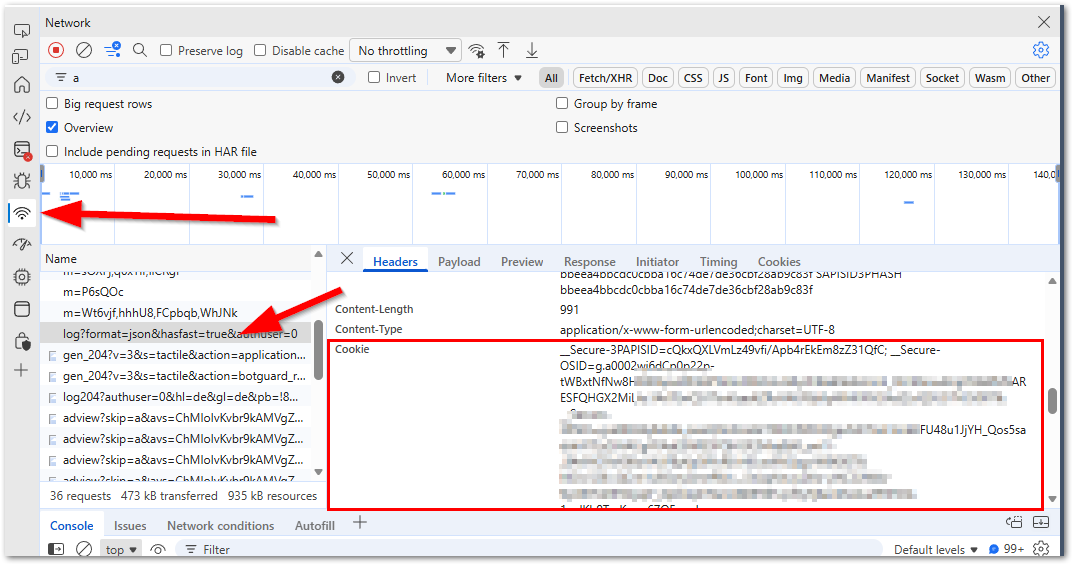
                              • Ein neues "InPrivate-Fenster" geöffnet? Vorzugsweise mit Edge oder Chrome?
                              • Auf https://maps.google.com navigiert? (COM!!!!!)
                              • Angemeldet mit dem Google-Konto was für den Abruf verwendet werden soll?
                              • F12 gedrückt und die Entwicklertools damit geöffnet?
                              • Die Ansicht der Konsole auf "Netzwerk" bzw. "Network" umgeschaltet?
                              • In der Liste die Einträge nageklickt bis du einen gefunden hast der Rechts ein Cookie hat?
                                f55c63d1-619c-42c9-9aa3-093633f2bdda-image.png
                              • Den gesamten Inhalt rechts neben Cookie herauskopiert und beim Adapter eingefügt?

                              Wie sehen die Logeinträge des Adapter genau aus? Bitte als Text, nicht als Bild

                              ioBroker@Ubuntu 24.04 LTS (VMware) für: >260 Geräte, 5 Switche, 7 AP, 10 IP-Cam, 1 NAS 42TB, 1 ESXi 15TB, 4 Proxmox 1TB, 1 Hyper-V 48TB, 14 x Echo, 5x FireTV, 5 x Tablett/Handy VIS || >=160 Tasmota/Shelly || >=95 ZigBee || PV 8.1kW / Akku 14kWh || 2x USV APC 750W kaskadiert || Creality CR-10 SE 3D-Drucker

                              1 Reply Last reply
                              0
                              • K Kuddel

                                Ich habe mich an die Github Anleitung gehalten, bekomme aber trotzdem die Meldung:

                                Could not parse location data. Probably authentication error. Please check cookie.

                                David G.D Online
                                David G.D Online
                                David G.
                                wrote on last edited by
                                #499

                                @Kuddel

                                Falls du mit Android unterwegs bist.
                                Ich hole den Coockie immer mit der App

                                WEBVIEW TEST

                                Zeigt eure Lovelace-Visualisierung klick
                                (Auch ideal um sich Anregungen zu holen)

                                Meine Tabellen für eure Visualisierung klick

                                K 1 Reply Last reply
                                0
                                • David G.D David G.

                                  @Kuddel

                                  Falls du mit Android unterwegs bist.
                                  Ich hole den Coockie immer mit der App

                                  WEBVIEW TEST

                                  K Offline
                                  K Offline
                                  Kuddel
                                  wrote on last edited by
                                  #500

                                  @David-G. ja ich bin mit Android unterwegs.

                                  Die App ist instaliiert, maps.google.com geöffnet (bin angemeldet) und habe auf den Button "view and delete coookies" gedrückt.

                                  Was genau muss ich da jetzt kopieren?

                                  K David G.D 2 Replies Last reply
                                  0
                                  • K Kuddel

                                    @David-G. ja ich bin mit Android unterwegs.

                                    Die App ist instaliiert, maps.google.com geöffnet (bin angemeldet) und habe auf den Button "view and delete coookies" gedrückt.

                                    Was genau muss ich da jetzt kopieren?

                                    K Offline
                                    K Offline
                                    Krys
                                    wrote on last edited by
                                    #501

                                    @Kuddel sagte in [Aufruf] Neuer Adaper Google-Sharedlocations:

                                    @David-G. ja ich bin mit Android unterwegs.

                                    Die App ist instaliiert, maps.google.com geöffnet (bin angemeldet) und habe auf den Button "view and delete coookies" gedrückt.

                                    Was genau muss ich da jetzt kopieren?

                                    alles. Du hast aber schon den Adapter vom Entwickler Garfonso installiert ne?

                                    K 1 Reply Last reply
                                    0
                                    • K Krys

                                      @Kuddel sagte in [Aufruf] Neuer Adaper Google-Sharedlocations:

                                      @David-G. ja ich bin mit Android unterwegs.

                                      Die App ist instaliiert, maps.google.com geöffnet (bin angemeldet) und habe auf den Button "view and delete coookies" gedrückt.

                                      Was genau muss ich da jetzt kopieren?

                                      alles. Du hast aber schon den Adapter vom Entwickler Garfonso installiert ne?

                                      K Offline
                                      K Offline
                                      Kuddel
                                      wrote on last edited by Kuddel
                                      #502

                                      @Krys ich habe den Adapter über den Link aus dem ersten Post in diesem Thread installiert.

                                      Ich habe jetzt den Cookie kopiert und in der Instanz eingefügt (per Smartphone).

                                      google-sharedlocations.0       2025-11-19 09:58:12.258	debug	New header received.
                                      google-sharedlocations.0       2025-11-19 09:58:11.977	error	Could not parse location data. Probably authentication error. Please check cookie.
                                      google-sharedlocations.0       2025-11-19 09:58:11.976	debug	New header received.
                                      google-sharedlocations.0       2025-11-19 09:58:11.976	debug	Response: 200
                                      google-sharedlocations.0       2025-11-19 09:58:11.863	debug	New header received.
                                      google-sharedlocations.0       2025-11-19 09:58:11.492	debug	Polling locations.
                                      google-sharedlocations.0       2025-11-19 09:58:11.406	debug	Need to augment cookie.
                                      google-sharedlocations.0       2025-11-19 09:58:11.394	debug	Polling location every 600s.
                                      google-sharedlocations.0       2025-11-19 09:58:11.338	info	Starting google shared locations adapter
                                      google-sharedlocations.0       2025-11-19 09:58:11.331	info	starting. Version 2.1.3 (non-npm: t4qjXH8N/ioBroker.google-sharedlocations#d5a738e822ba42066fee93246f5a1f9c6621bca1) in /opt/iobroker/node_modules/iobroker.google-sharedlocations, node: v20.19.5, js-controller: 7.0.6
                                      google-sharedlocations.0       2025-11-19 09:58:10.145	debug	States connected to redis: 127.0.0.1:9000
                                      google-sharedlocations.0       2025-11-19 09:58:10.037	debug	States create User PubSub Client
                                      google-sharedlocations.0       2025-11-19 09:58:10.036	debug	States create System PubSub Client
                                      google-sharedlocations.0       2025-11-19 09:58:09.964	debug	Redis States: Use Redis connection: 127.0.0.1:9000
                                      google-sharedlocations.0       2025-11-19 09:58:09.917	debug	Objects connected to redis: 127.0.0.1:9001
                                      google-sharedlocations.0       2025-11-19 09:58:09.912	debug	Objects client initialize lua scripts
                                      google-sharedlocations.0       2025-11-19 09:58:09.736	debug	Objects create User PubSub Client
                                      google-sharedlocations.0       2025-11-19 09:58:09.736	debug	Objects create System PubSub Client
                                      google-sharedlocations.0       2025-11-19 09:58:09.692	debug	Objects client ready ... initialize now
                                      google-sharedlocations.0       2025-11-19 09:58:09.657	debug	Redis Objects: Use Redis connection: 127.0.0.1:9001
                                      
                                      1 Reply Last reply
                                      0
                                      • BananaJoeB Offline
                                        BananaJoeB Offline
                                        BananaJoe
                                        Most Active
                                        wrote on last edited by BananaJoe
                                        #503

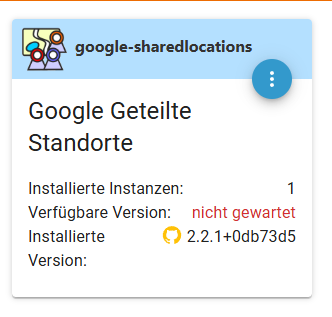
                                        Also meine Version des Adapters ist 2.2.1, nicht wie bei dir 2.1.3

                                        Ist wohl diese Version:
                                        https://github.com/Garfonso/ioBroker.google-sharedlocations

                                        Per GitHub installiert
                                        82144e37-4354-4494-9180-36b657029973-image.png

                                        ioBroker@Ubuntu 24.04 LTS (VMware) für: >260 Geräte, 5 Switche, 7 AP, 10 IP-Cam, 1 NAS 42TB, 1 ESXi 15TB, 4 Proxmox 1TB, 1 Hyper-V 48TB, 14 x Echo, 5x FireTV, 5 x Tablett/Handy VIS || >=160 Tasmota/Shelly || >=95 ZigBee || PV 8.1kW / Akku 14kWh || 2x USV APC 750W kaskadiert || Creality CR-10 SE 3D-Drucker

                                        K 1 Reply Last reply
                                        0
                                        • BananaJoeB BananaJoe

                                          Also meine Version des Adapters ist 2.2.1, nicht wie bei dir 2.1.3

                                          Ist wohl diese Version:
                                          https://github.com/Garfonso/ioBroker.google-sharedlocations

                                          Per GitHub installiert
                                          82144e37-4354-4494-9180-36b657029973-image.png

                                          K Offline
                                          K Offline
                                          Kuddel
                                          wrote on last edited by
                                          #504

                                          @BananaJoe

                                          Ich habe gerade noch einmal versucht den Adapter per github URL zu installieren:

                                          $ iobroker url https://github.com/t4qjXH8N/ioBroker.google-sharedlocations --host ioBroker-PROD --debug
                                          
                                          install t4qjXH8N/ioBroker.google-sharedlocations#d5a738e822ba42066fee93246f5a1f9c6621bca1
                                          
                                          NPM version: 10.8.2
                                          
                                          Installing t4qjXH8N/ioBroker.google-sharedlocations#d5a738e822ba42066fee93246f5a1f9c6621bca1... (System call)
                                          
                                          npm warn skipping integrity check for git dependency ssh://git@github.com/t4qjXH8N/ioBroker.google-sharedlocations.git
                                          
                                          npm warn deprecated npmlog@4.1.2: This package is no longer supported.
                                          
                                          npm warn deprecated rimraf@3.0.2: Rimraf versions prior to v4 are no longer supported
                                          
                                          npm warn deprecated are-we-there-yet@1.1.7: This package is no longer supported.npm warn deprecated glob@7.2.3: Glob versions prior to v9 are no longer supported
                                          
                                          npm warn deprecated glob@7.2.3: Glob versions prior to v9 are no longer supported
                                          
                                          npm warn deprecated gauge@2.7.4: This package is no longer supported.
                                          
                                          > usocket@0.3.0 install
                                          
                                          > node-gyp rebuild
                                          
                                          gyp info it worked if it ends with ok
                                          
                                          gyp info using node-gyp@7.1.2
                                          
                                          gyp info using node@20.19.5 | linux | x64
                                          
                                          gyp info find Python using Python version 3.10.12 found at "/usr/bin/python3"
                                          
                                          gyp ERR! UNCAUGHT EXCEPTION
                                          
                                          gyp ERR! stack TypeError: Cannot assign to read only property 'cflags' of object '#<Object>'gyp ERR! stack at createConfigFile (/opt/iobroker/node_modules/usocket/node_modules/node-gyp/lib/configure.js:117:21)gyp ERR! stack at /opt/iobroker/node_modules/usocket/node_modules/node-gyp/lib/configure.js:84:9gyp ERR! stack at FSReqCallback.oncomplete (node:fs:188:23)gyp ERR! System Linux 5.15.0-161-genericgyp ERR! command "/usr/bin/node" "/opt/iobroker/node_modules/usocket/node_modules/.bin/node-gyp" "rebuild"gyp ERR! cwd /opt/iobroker/node_modules/usocketgyp ERR! node -v v20.19.5gyp ERR! node-gyp -v v7.1.2gyp ERR! Node-gyp failed to build your package.gyp ERR! Try to update npm and/or node-gyp and if it does not help file an issue with the package author.
                                          
                                          added 2 packages in 4s
                                          
                                          run `npm fund` for details
                                          
                                          upload [3] google-sharedlocations.admin /opt/iobroker/node_modules/iobroker.google-sharedlocations/admin/google-cookie.JPG google-cookie.JPG image/jpeg
                                          
                                          upload [2] google-sharedlocations.admin /opt/iobroker/node_modules/iobroker.google-sharedlocations/admin/google-sharedlocations.png google-sharedlocations.png image/png
                                          
                                          upload [1] google-sharedlocations.admin /opt/iobroker/node_modules/iobroker.google-sharedlocations/admin/index_m.html index_m.html text/html
                                          
                                          upload [0] google-sharedlocations.admin /opt/iobroker/node_modules/iobroker.google-sharedlocations/admin/words.js words.js application/javascript
                                          
                                          Updating objects from io-package.json for adapter "google-sharedlocations" with version "2.1.3"
                                          
                                          Process exited with code 0
                                          

                                          Thomas BraunT GarfonsoG 2 Replies Last reply
                                          0

                                          Hello! It looks like you're interested in this conversation, but you don't have an account yet.

                                          Getting fed up of having to scroll through the same posts each visit? When you register for an account, you'll always come back to exactly where you were before, and choose to be notified of new replies (either via email, or push notification). You'll also be able to save bookmarks and upvote posts to show your appreciation to other community members.

                                          With your input, this post could be even better 💗

                                          Register Login
                                          Reply
                                          • Reply as topic
                                          Log in to reply
                                          • Oldest to Newest
                                          • Newest to Oldest
                                          • Most Votes


                                          Support us

                                          ioBroker
                                          Community Adapters
                                          Donate

                                          257

                                          Online

                                          32.8k

                                          Users

                                          82.7k

                                          Topics

                                          1.3m

                                          Posts
                                          Community
                                          Impressum | Datenschutz-Bestimmungen | Nutzungsbedingungen | Einwilligungseinstellungen
                                          ioBroker Community 2014-2025
                                          logo
                                          • Login

                                          • Don't have an account? Register

                                          • Login or register to search.
                                          • First post
                                            Last post
                                          0
                                          • Home
                                          • Recent
                                          • Tags
                                          • Unread 0
                                          • Categories
                                          • Unreplied
                                          • Popular
                                          • GitHub
                                          • Docu
                                          • Hilfe