Skip to content
  • Home
  • Recent
  • Tags
  • 0 Unread 0
  • Categories
  • Unreplied
  • Popular
  • GitHub
  • Docu
  • Hilfe
Skins
  • Light
  • Brite
  • Cerulean
  • Cosmo
  • Flatly
  • Journal
  • Litera
  • Lumen
  • Lux
  • Materia
  • Minty
  • Morph
  • Pulse
  • Sandstone
  • Simplex
  • Sketchy
  • Spacelab
  • United
  • Yeti
  • Zephyr
  • Dark
  • Cyborg
  • Darkly
  • Quartz
  • Slate
  • Solar
  • Superhero
  • Vapor

  • Default (No Skin)
  • No Skin
Collapse
ioBroker Logo

Community Forum

donate donate
  1. ioBroker Community Home
  2. Deutsch
  3. ioBroker Allgemein
  4. Homebridge-Adapter: Funktionierende Plugins und Beispiele

NEWS

  • Monatsrückblick Januar/Februar 2026 ist online!
    BluefoxB
    Bluefox
    13
    1
    142

  • Jahresrückblick 2025 – unser neuer Blogbeitrag ist online! ✨
    BluefoxB
    Bluefox
    17
    1
    4.3k

  • Neuer Blogbeitrag: Monatsrückblick - Dezember 2025 🎄
    BluefoxB
    Bluefox
    13
    1
    1.3k

Homebridge-Adapter: Funktionierende Plugins und Beispiele

Scheduled Pinned Locked Moved ioBroker Allgemein
238 Posts 62 Posters 66.9k Views 44 Watching
  • Oldest to Newest
  • Newest to Oldest
  • Most Votes
Reply
  • Reply as topic
Log in to reply
This topic has been deleted. Only users with topic management privileges can see it.
  • UncleSamU UncleSam

    @phoenixcr Das ist der komplette Inhalt im Tab "Konfigurationsdatei"?

    Das wäre nämlich falsch: du musst jedes Gerät einzeln in Unterobjekte eintagen.

    {
     "description": "Add configuration for your accessories or platforms according to the docs of the plugins.",
     "accessories": [
       {
         "name": "MacBook",
         "services": [
           "increase-button",
           "decrease-button",
           "speaker",
           "lightbulb"
         ],
         "switchVolumeDelta": 5,
         "switchDelay": 10,
         "accessory": "ComputerSpeakers"
       },
       {
         "accessory": "SunPosition",
         "name": "Sun",
         "location": {
           "lat": 49,
           "long": 8
         }
       }
     ],
     "platforms": [
       {
         "platform": "TadoAC",
         "username": "user@name.com",
         "password": "*************"
       },
       {
         "platform": "Ring",
         "refreshToken": "my-secret-token1"
       },
       {
         "platform": "WeatherPlus",
         "service": "openweathermap",
         "key": "YOUR_API_KEY",
         "locationId": 2950159,
         "locationCity": "Berlin, DE",
         "locationGeo": [
           52.5200066,
           13.404954
         ]
       },
       {
         "platform": "TuyaWebPlatform",
         "name": "TuyaWebPlatform",
         "options": {
           "platform": "form"
         },
         "scenes": false
       }
     ]
    }
    

    Aber sonst leer doch einfach das Feld (also einfach {} rein schreiben) und verwende für alles den Tab. Das sollte auch gehen. Dort kannst du Module hinzufügen und entfernen und konfigurieren.

    P Offline
    P Offline
    PhoenixCR
    wrote on last edited by
    #138

    @unclesam leider kriege ich nur ein gerät in Konfig rein
    bin ein Anfänger aber offen zum Lernen.

    Habe es nach deine Anleitung versucht allerdings der installiert kein Modul.
    Bleibt so hängen

    484ed778-c581-4101-9b9e-87c59a42ff42-image.png

    eed025e3-7a5f-4fe1-a0b0-0bb13f75c400-image.png

    und im LOG keine neue Eintrag

    1 Reply Last reply
    0
    • ? A Former User

      @phoenixcr
      Hi,
      bei mir funktioniert das alle so in der Configdatei:

      {
        "description": "Add configuration for your accessories or platforms according to the docs of the plugins.",
        "accessories": [],
        "platforms": [
          {
            "name": "Govee",
            "lightDevices": [
              {}
            ],
            "platform": "Govee",
            "apiKey": "blablablaapikey",
            "refreshTime": 30,
            "controlInterval": 500,
            "forceUpdates": true,
            "debug": true
          },
          {
            "name": "eWeLink",
            "mode": "auto",
            "platform": "eWeLink",
            "countryCode": "49",
            "username": "email",
            "password": "password"
          },
          {
            "platform": "yeelight",
            "name": "Yeelight"
          }
        ]
      }
      

      Wichtig war, sonst funktioniert Govee nicht, anschliessend in der HAM Config-Seite den Schraubenschlüssel aufzurufen und dort folgendes eintragen:
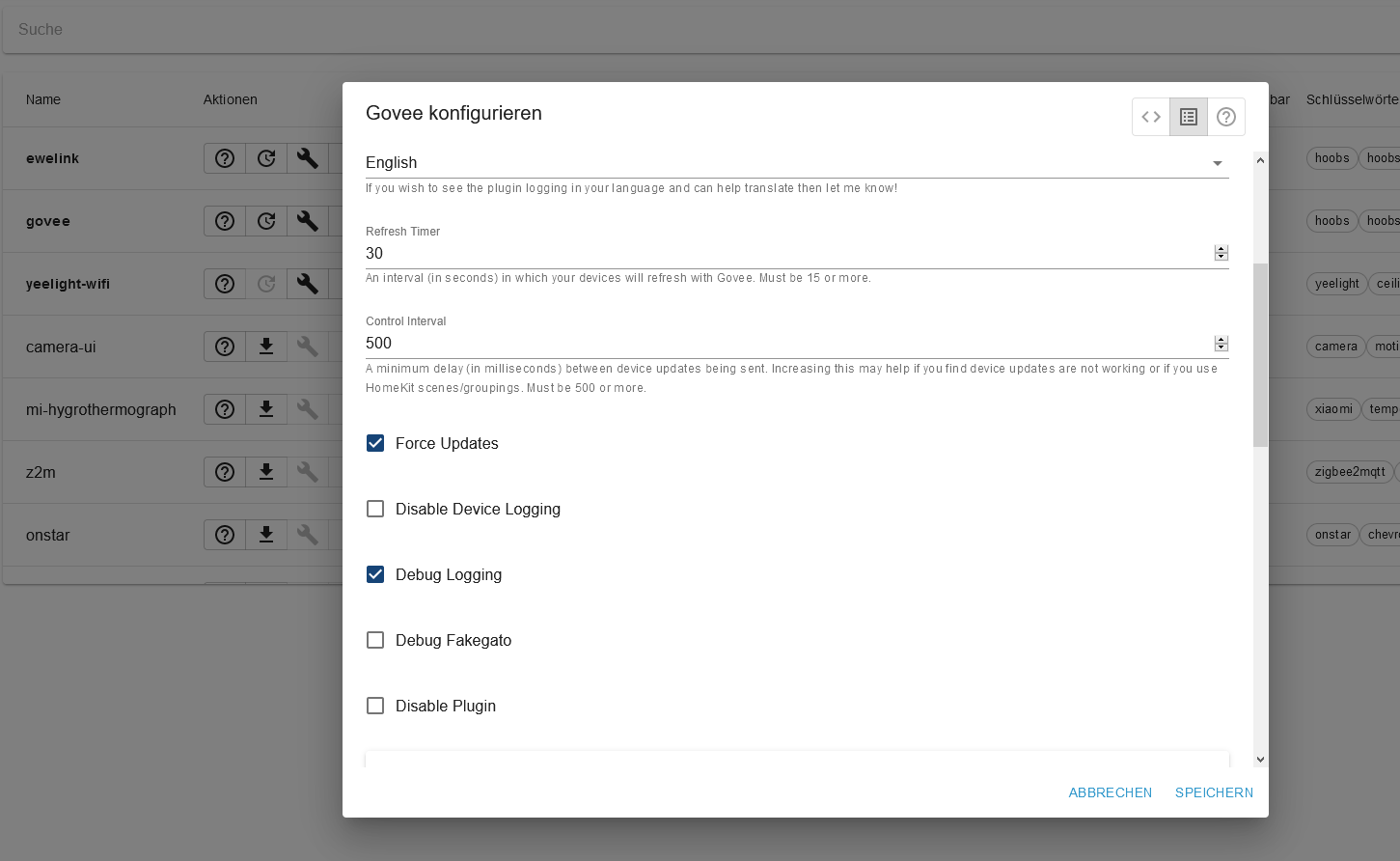
      5ef6e951-3eb6-40c1-b1e7-f7f058b2da48-grafik.png

      so funktionierts hier auf jeden Fall.. :-)

      P Offline
      P Offline
      PhoenixCR
      wrote on last edited by
      #139

      @ilovegym genau das ist mein Problem, wenn ich der Schraubenschlüssel aufrufe, bleibt der Homebridge Tab hängen ...

      ? 1 Reply Last reply
      0
      • P PhoenixCR

        @ilovegym genau das ist mein Problem, wenn ich der Schraubenschlüssel aufrufe, bleibt der Homebridge Tab hängen ...

        ? Offline
        ? Offline
        A Former User
        wrote on last edited by
        #140

        @phoenixcr dann stimmt ja irgendwas in der Konfig nicht. Logfile?

        P 1 Reply Last reply
        0
        • ? A Former User

          @phoenixcr dann stimmt ja irgendwas in der Konfig nicht. Logfile?

          P Offline
          P Offline
          PhoenixCR
          wrote on last edited by
          #141

          @ilovegym habe es nochmal versucht mit deine einstellungen ...
          anbei der Log ...

          ham.0	2021-05-12 09:45:19.362	info	(83738) All NPM Modules got reinstalled/updated ... restarting ...
          ham.0	2021-05-12 09:45:19.343	info	Run `npm audit` for details.
          ham.0	2021-05-12 09:45:19.343	info	a different dependency.
          ham.0	2021-05-12 09:45:19.343	info	Some issues need review, and may require choosing
          ham.0	2021-05-12 09:45:19.343	info	npm audit fix
          ham.0	2021-05-12 09:45:19.343	info	To address issues that do not require attention, run:
          ham.0	2021-05-12 09:45:19.343	info	5 high severity vulnerabilities
          ham.0	2021-05-12 09:45:19.343	info	(83738)
          ham.0	2021-05-12 09:45:19.301	info	run `npm fund` for details
          ham.0	2021-05-12 09:45:19.301	info	(83738) 1 package is looking for funding
          ham.0	2021-05-12 09:45:19.299	info	(83738)
          ham.0	2021-05-12 09:45:19.297	info	up to date, audited 208 packages in 8s
          ham.0	2021-05-12 09:45:19.297	info	(83738)
          javascript.0	2021-05-12 09:45:19.082	info	(23009) script.js.Schrank.Server_Kühlung_PWM: PWM AUS
          ham.0	2021-05-12 09:45:10.942	info	(83738) npm install homebridge-govee --production --loglevel error (System call)
          ham.0	2021-05-12 09:45:10.940	info	(83738) Install/Update homebridge-govee
          ham.0	2021-05-12 09:45:10.939	info	(83738) Install/Update the following Libraries: homebridge-govee
          ham.0	2021-05-12 09:45:10.904	info	(83738) starting. Version 4.0.1 in /opt/iobroker/node_modules/iobroker.ham, node: v14.16.1, js-controller: 3.2.16
          host.HomeAutomation	2021-05-12 09:45:09.695	info	instance system.adapter.ham.0 started with pid 83738
          
          1 Reply Last reply
          0
          • UncleSamU Offline
            UncleSamU Offline
            UncleSam
            Developer
            wrote on last edited by
            #142

            @PhoenixCR Jetzt gibt es glaube ich ein Durcheinander:

            • zuerst muss die Konfiguration des Adapters stimmen oder leer sein (in den Instanz-Einstellungen, nicht im Tab)
            • wenn die Konfiguration dort stimmt, sollte der Tab funktionieren

            Welche Module willst du nun installieren (unten hattest du Govee und Homesung, nun hast du homesung-tv)?

            Kannst du nochmals die gesamte Konfigurationsdatei aus der Instanz-Konfiguration zeigen (siehe unten)?
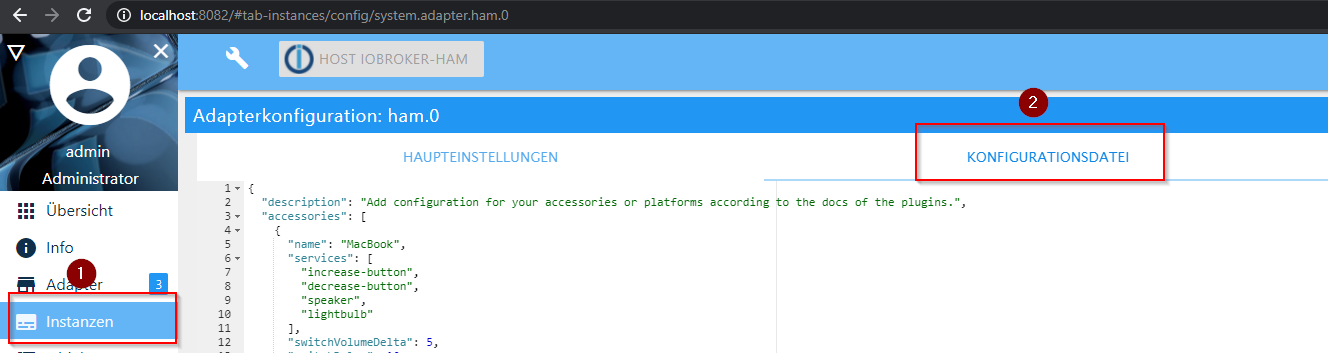
            603a8049-7616-4149-8ac2-925b2daa3395-image.png

            Bitte bei Problemen mit meinen Adaptern, Issue auf GitHub erfassen: Loxone | I2C | Luxtronik2
            ♡-lichen Dank an meine Sponsoren

            P 1 Reply Last reply
            0
            • UncleSamU UncleSam

              @PhoenixCR Jetzt gibt es glaube ich ein Durcheinander:

              • zuerst muss die Konfiguration des Adapters stimmen oder leer sein (in den Instanz-Einstellungen, nicht im Tab)
              • wenn die Konfiguration dort stimmt, sollte der Tab funktionieren

              Welche Module willst du nun installieren (unten hattest du Govee und Homesung, nun hast du homesung-tv)?

              Kannst du nochmals die gesamte Konfigurationsdatei aus der Instanz-Konfiguration zeigen (siehe unten)?
              603a8049-7616-4149-8ac2-925b2daa3395-image.png

              P Offline
              P Offline
              PhoenixCR
              wrote on last edited by
              #143

              @unclesam
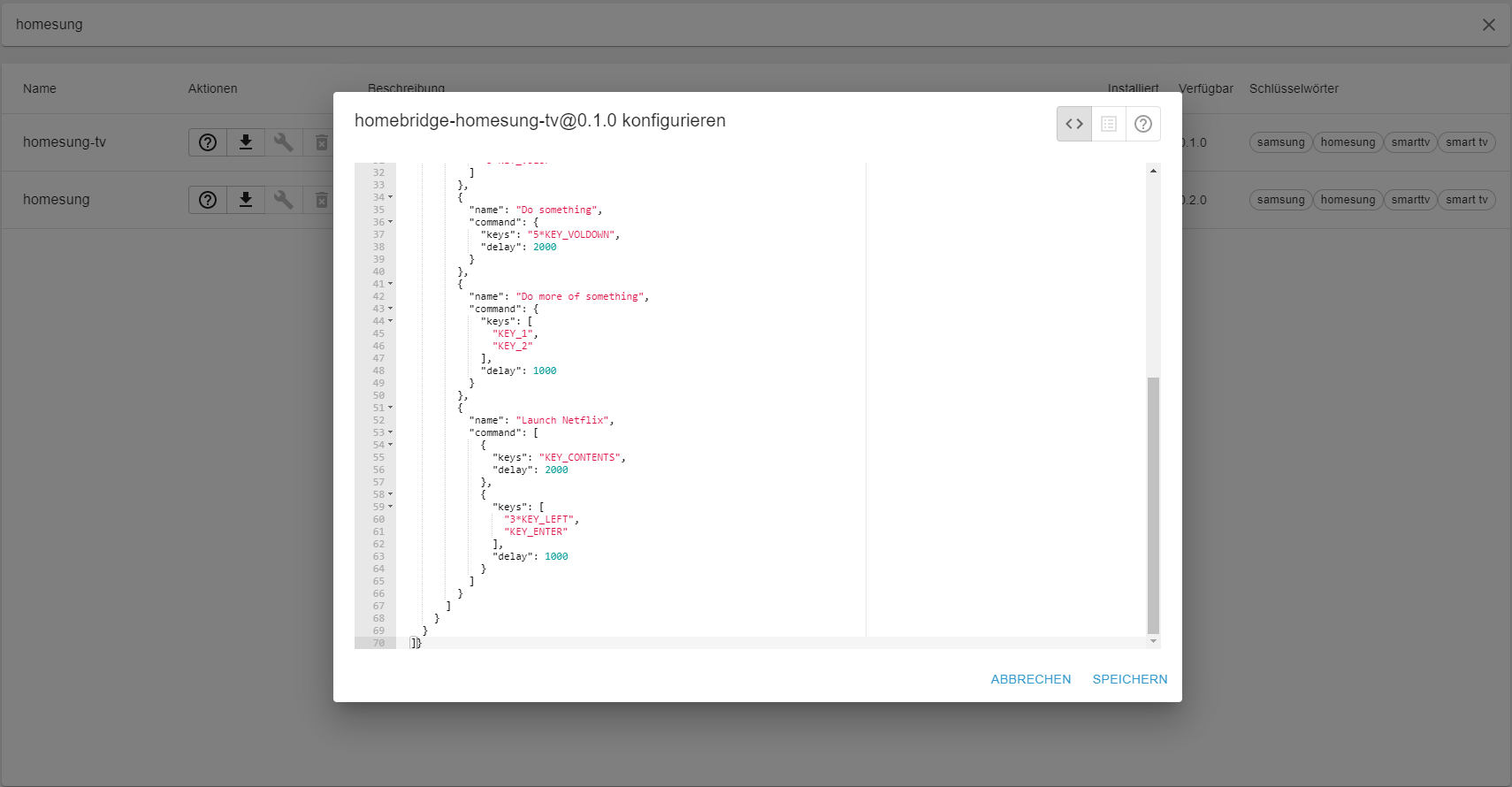
              der ist leer,
              aber über den Tab kann ich nicht der Homesung Modul installieren.
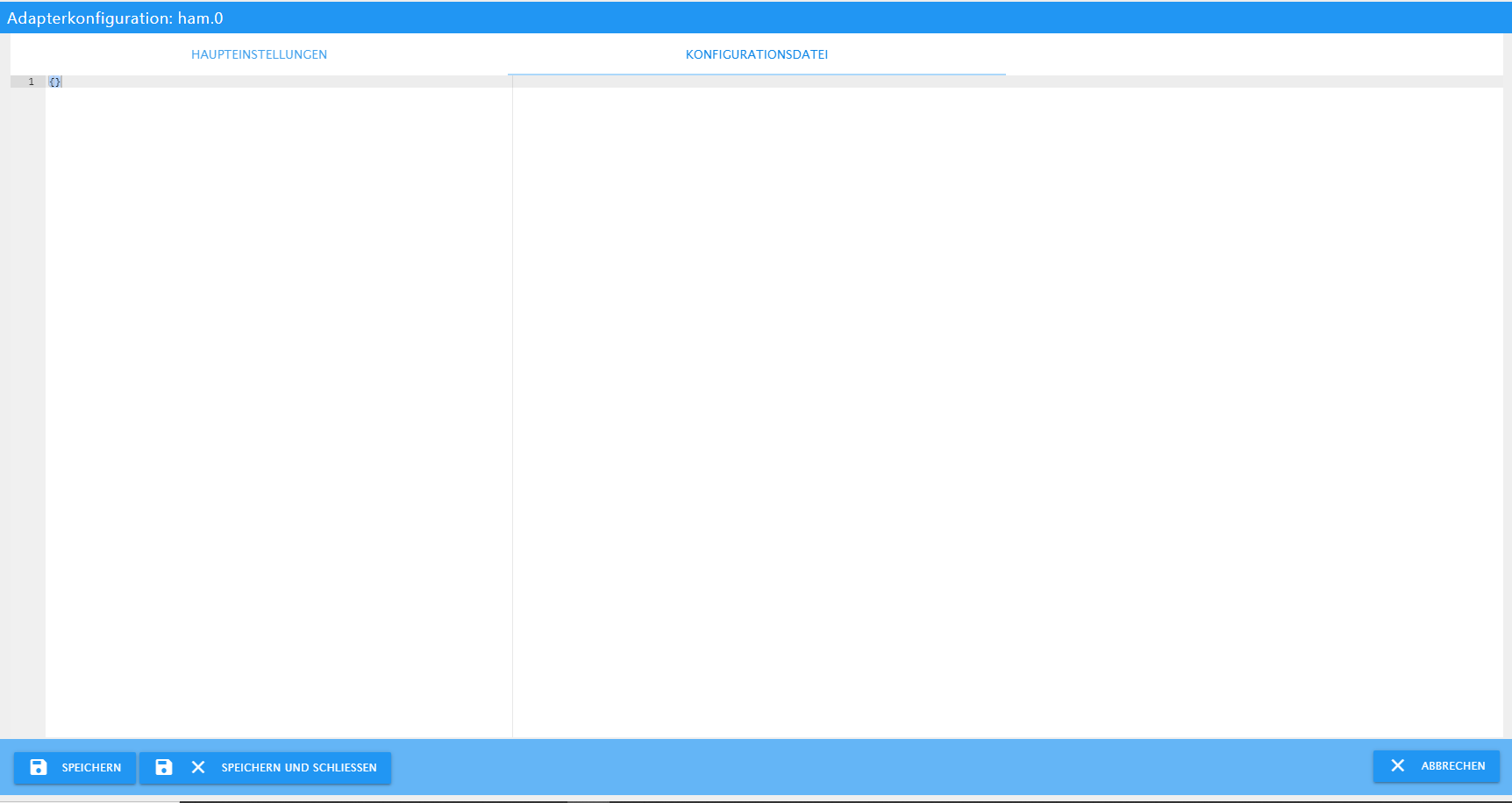
              e4c010d5-6e7e-4716-943e-f2613f98e1f1-image.png

              ? 1 Reply Last reply
              0
              • P PhoenixCR

                @unclesam
                der ist leer,
                aber über den Tab kann ich nicht der Homesung Modul installieren.

                e4c010d5-6e7e-4716-943e-f2613f98e1f1-image.png

                ? Offline
                ? Offline
                A Former User
                wrote on last edited by
                #144

                @phoenixcr sehe gerade, du verwendest V4.01, zieh dir mal die aktuelle 4.0.2 aus dem latest.. vielleicht hilft das.
                Und mach anschliessend n upload, sicher ist sicher...

                P 1 Reply Last reply
                0
                • ? A Former User

                  @phoenixcr sehe gerade, du verwendest V4.01, zieh dir mal die aktuelle 4.0.2 aus dem latest.. vielleicht hilft das.
                  Und mach anschliessend n upload, sicher ist sicher...

                  P Offline
                  P Offline
                  PhoenixCR
                  wrote on last edited by
                  #145

                  @ilovegym es gibt aber keine neuere Version ...
                  wie soll ich es updaten?

                  6af8b09d-e152-4bbb-a968-fe9a56520439-image.png

                  1 Reply Last reply
                  0
                  • P Offline
                    P Offline
                    PhoenixCR
                    wrote on last edited by
                    #146

                    Ich habe es über terminal gemacht steht aber trotzdem 4.01 ...

                    
                    ham.0	2021-05-13 05:02:46.349	info	(164338) No additional Libraries to install ...
                    ham.0	2021-05-13 05:02:46.314	info	(164338) starting. Version 4.0.2 in /opt/iobroker/node_modules/iobroker.ham, node: v14.16.1, js-controller: 3.2.16
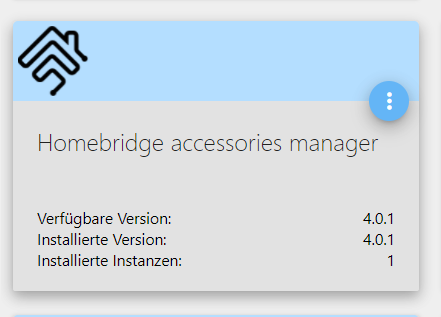
                    

                    ae10f4f0-b913-4de5-afb1-0c9d40cef14b-image.png

                    ? 1 Reply Last reply
                    0
                    • P PhoenixCR

                      Ich habe es über terminal gemacht steht aber trotzdem 4.01 ...

                      
                      ham.0	2021-05-13 05:02:46.349	info	(164338) No additional Libraries to install ...
                      ham.0	2021-05-13 05:02:46.314	info	(164338) starting. Version 4.0.2 in /opt/iobroker/node_modules/iobroker.ham, node: v14.16.1, js-controller: 3.2.16
                      

                      ae10f4f0-b913-4de5-afb1-0c9d40cef14b-image.png

                      ? Offline
                      ? Offline
                      A Former User
                      wrote on last edited by
                      #147

                      @phoenixcr Moin, hast du danach n Upload gemacht?

                      P 1 Reply Last reply
                      0
                      • ? A Former User

                        @phoenixcr Moin, hast du danach n Upload gemacht?

                        P Offline
                        P Offline
                        PhoenixCR
                        wrote on last edited by
                        #148

                        @ilovegym Moin. Nein und leider weis ich auch nicht wie ...
                        Kannst du bitte es mir erklären?
                        Danke!

                        BBTownB 1 Reply Last reply
                        0
                        • P PhoenixCR

                          @ilovegym Moin. Nein und leider weis ich auch nicht wie ...
                          Kannst du bitte es mir erklären?
                          Danke!

                          BBTownB Offline
                          BBTownB Offline
                          BBTown
                          wrote on last edited by
                          #149

                          @phoenixcr Adapter-Upload.gif

                          ioBroker auf NUC (VM debian v13 (Trixie ), node v22.21.0 npm v10.9.4, js-controller v7.1.0 jsonl/jsonl / HomeMatic CCU-2 (Wired und Funk) / Philips HUE / echo.DOT / Broadlink RM pro / SONOS

                          P 1 Reply Last reply
                          0
                          • BBTownB BBTown

                            @phoenixcr Adapter-Upload.gif

                            P Offline
                            P Offline
                            PhoenixCR
                            wrote on last edited by
                            #150

                            @bbtown Super. Danke. Hat geklappt 😉

                            BBTownB 1 Reply Last reply
                            0
                            • P PhoenixCR

                              @bbtown Super. Danke. Hat geklappt 😉

                              BBTownB Offline
                              BBTownB Offline
                              BBTown
                              wrote on last edited by BBTown
                              #151

                              @phoenixcr also hast Du nun die 4.0.2.?

                              ioBroker auf NUC (VM debian v13 (Trixie ), node v22.21.0 npm v10.9.4, js-controller v7.1.0 jsonl/jsonl / HomeMatic CCU-2 (Wired und Funk) / Philips HUE / echo.DOT / Broadlink RM pro / SONOS

                              P 1 Reply Last reply
                              0
                              • BBTownB BBTown

                                @phoenixcr also hast Du nun die 4.0.2.?

                                P Offline
                                P Offline
                                PhoenixCR
                                wrote on last edited by PhoenixCR
                                #152

                                @bbtown ja hab ich ...

                                81454bdc-4906-49bb-94e7-aa61a427dfbe-image.png

                                Allerdings funzt jetzt die Samsung (homesung) Modul nicht mehr ...
                                wenn ich es hier fragen darf, ist der Konfig richtig oder sieht ihr etwas das nicht stimmt?
                                Bin kein pro ... aber lerne gern ...

                                {
                                  "description": "Add configuration for your accessories or platforms according to the docs of the plugins.",
                                  "accessories": [],
                                  "platforms": [
                                    {
                                      "platform": "SamsungTV",
                                      "devices": [
                                        {
                                          "name": "[TV] Living room",
                                          "ip": "192.168.1.110",
                                          "identity": {
                                            "sessionId": "1",
                                            "aesKey": "0964262928ba5aecbadd51ec8e296088"
                                          },
                                          "power": {
                                            "name": "Power TV",
                                            "key": "KEY_POWEROFF",
                                            "enableCEC": "false",
                                            "switches": [
                                              {
                                                "name": "Vol Down 5",
                                                "delay": 1000,
                                                "command": "5*KEY_VOLDOWN"
                                              },
                                              {
                                                "name": "Channel 12",
                                                "command": [
                                                  "KEY_1",
                                                  "KEY_2"
                                                ]
                                              },
                                              {
                                                "name": "Play with sound",
                                                "command": [
                                                  "5*KEY_VOLDOWN",
                                                  "5*KEY_VOLUP"
                                                ]
                                              },
                                              {
                                                "name": "Do something",
                                                "command": {
                                                  "keys": "5*KEY_VOLDOWN",
                                                  "delay": 2000
                                                }
                                              },
                                              {
                                                "name": "Do more of something",
                                                "command": {
                                                  "keys": [
                                                    "KEY_1",
                                                    "KEY_2"
                                                  ],
                                                  "delay": 1000
                                                }
                                              },
                                              {
                                                "name": "Launch Netflix",
                                                "command": [
                                                  {
                                                    "keys": "KEY_CONTENTS",
                                                    "delay": 2000
                                                  },
                                                  {
                                                    "keys": [
                                                      "3*KEY_LEFT",
                                                      "KEY_ENTER"
                                                    ],
                                                    "delay": 1000
                                                  }
                                                ]
                                              }
                                            ]
                                          }
                                        }
                                      ]
                                    },
                                    {
                                      "name": "Govee",
                                      "apiKey": "apikey",
                                      "refreshTime": 30,
                                      "controlInterval": 500,
                                      "forceUpdates": true,
                                      "debug": true,
                                      "platform": "Govee"
                                    }
                                  ]
                                }
                                
                                BBTownB 1 Reply Last reply
                                0
                                • P PhoenixCR

                                  @bbtown ja hab ich ...

                                  81454bdc-4906-49bb-94e7-aa61a427dfbe-image.png

                                  Allerdings funzt jetzt die Samsung (homesung) Modul nicht mehr ...
                                  wenn ich es hier fragen darf, ist der Konfig richtig oder sieht ihr etwas das nicht stimmt?
                                  Bin kein pro ... aber lerne gern ...

                                  {
                                    "description": "Add configuration for your accessories or platforms according to the docs of the plugins.",
                                    "accessories": [],
                                    "platforms": [
                                      {
                                        "platform": "SamsungTV",
                                        "devices": [
                                          {
                                            "name": "[TV] Living room",
                                            "ip": "192.168.1.110",
                                            "identity": {
                                              "sessionId": "1",
                                              "aesKey": "0964262928ba5aecbadd51ec8e296088"
                                            },
                                            "power": {
                                              "name": "Power TV",
                                              "key": "KEY_POWEROFF",
                                              "enableCEC": "false",
                                              "switches": [
                                                {
                                                  "name": "Vol Down 5",
                                                  "delay": 1000,
                                                  "command": "5*KEY_VOLDOWN"
                                                },
                                                {
                                                  "name": "Channel 12",
                                                  "command": [
                                                    "KEY_1",
                                                    "KEY_2"
                                                  ]
                                                },
                                                {
                                                  "name": "Play with sound",
                                                  "command": [
                                                    "5*KEY_VOLDOWN",
                                                    "5*KEY_VOLUP"
                                                  ]
                                                },
                                                {
                                                  "name": "Do something",
                                                  "command": {
                                                    "keys": "5*KEY_VOLDOWN",
                                                    "delay": 2000
                                                  }
                                                },
                                                {
                                                  "name": "Do more of something",
                                                  "command": {
                                                    "keys": [
                                                      "KEY_1",
                                                      "KEY_2"
                                                    ],
                                                    "delay": 1000
                                                  }
                                                },
                                                {
                                                  "name": "Launch Netflix",
                                                  "command": [
                                                    {
                                                      "keys": "KEY_CONTENTS",
                                                      "delay": 2000
                                                    },
                                                    {
                                                      "keys": [
                                                        "3*KEY_LEFT",
                                                        "KEY_ENTER"
                                                      ],
                                                      "delay": 1000
                                                    }
                                                  ]
                                                }
                                              ]
                                            }
                                          }
                                        ]
                                      },
                                      {
                                        "name": "Govee",
                                        "apiKey": "apikey",
                                        "refreshTime": 30,
                                        "controlInterval": 500,
                                        "forceUpdates": true,
                                        "debug": true,
                                        "platform": "Govee"
                                      }
                                    ]
                                  }
                                  
                                  BBTownB Offline
                                  BBTownB Offline
                                  BBTown
                                  wrote on last edited by
                                  #153

                                  @phoenixcr
                                  Wenn sich das Gerät nicht geändert (neues Samsung Modell) und die Konfiguration zuvor funktioniert hat, dann würde ich als erstes prüfen ob denn der Fernseher auch tatsächlich immer unter der angegebenen IP erreichbar ist, oder ob der ggf. per DHCP immer wieder eine andere IP bekommt.

                                  ioBroker auf NUC (VM debian v13 (Trixie ), node v22.21.0 npm v10.9.4, js-controller v7.1.0 jsonl/jsonl / HomeMatic CCU-2 (Wired und Funk) / Philips HUE / echo.DOT / Broadlink RM pro / SONOS

                                  P 1 Reply Last reply
                                  0
                                  • BBTownB BBTown

                                    @phoenixcr
                                    Wenn sich das Gerät nicht geändert (neues Samsung Modell) und die Konfiguration zuvor funktioniert hat, dann würde ich als erstes prüfen ob denn der Fernseher auch tatsächlich immer unter der angegebenen IP erreichbar ist, oder ob der ggf. per DHCP immer wieder eine andere IP bekommt.

                                    P Offline
                                    P Offline
                                    PhoenixCR
                                    wrote on last edited by
                                    #154

                                    @bbtown der IP ist fix, eigentlich hat sich nichts geändert und es hat funktioniert ...
                                    ich werde es noch probieren.
                                    Auf jeden Fall danke für eure Hilfe!

                                    1 Reply Last reply
                                    0
                                    • ? A Former User

                                      @phoenixcr
                                      Hi,
                                      bei mir funktioniert das alle so in der Configdatei:

                                      {
                                        "description": "Add configuration for your accessories or platforms according to the docs of the plugins.",
                                        "accessories": [],
                                        "platforms": [
                                          {
                                            "name": "Govee",
                                            "lightDevices": [
                                              {}
                                            ],
                                            "platform": "Govee",
                                            "apiKey": "blablablaapikey",
                                            "refreshTime": 30,
                                            "controlInterval": 500,
                                            "forceUpdates": true,
                                            "debug": true
                                          },
                                          {
                                            "name": "eWeLink",
                                            "mode": "auto",
                                            "platform": "eWeLink",
                                            "countryCode": "49",
                                            "username": "email",
                                            "password": "password"
                                          },
                                          {
                                            "platform": "yeelight",
                                            "name": "Yeelight"
                                          }
                                        ]
                                      }
                                      

                                      Wichtig war, sonst funktioniert Govee nicht, anschliessend in der HAM Config-Seite den Schraubenschlüssel aufzurufen und dort folgendes eintragen:

                                      5ef6e951-3eb6-40c1-b1e7-f7f058b2da48-grafik.png

                                      so funktionierts hier auf jeden Fall.. :-)

                                      gelberlemmyG Offline
                                      gelberlemmyG Offline
                                      gelberlemmy
                                      wrote on last edited by
                                      #155

                                      @ilovegym sagte in Homebridge-Adapter: Funktionierende Plugins und Beispiele:

                                      "controlInterval": 500, "forceUpdates": true, "debug": true

                                      Guten Morgen, ich habe da ja wie gehabt immer noch die Problme , dass ich die Govee Geräte ein und ausschalten kann. Aber nicht die Farbe ändern, oder die Helligkeit. Hat das jemand schon geschafft ? Wie gesagt, ich kann die Änderungen sehen, wenn ich die Einstellungen über die Govee App tätige. Aber halt Ändern nicht....

                                      1 Reply Last reply
                                      0
                                      • 6 Offline
                                        6 Offline
                                        652145
                                        wrote on last edited by
                                        #156

                                        Hallo Zusammen,

                                        Es gibt ja für die Homebrige das Plugin homebridge-gsh. (Homebridge to Google Smart Home)
                                        https://www.npmjs.com/package/homebridge-gsh

                                        Nun stelle ich mir folgendes vor.

                                        Wäre es möglich, via dem Homebridge-Adapter für den iobroker, Geräte im iobroker über den Google Assistant zu steuern?

                                        Steuerungsweg wäre wie folgt:

                                        Sprachbefehl von einem Google Assistant fähigen Gerät --> Homebridge mit dem homebridge-gsh Plugin --> iobroker Geräte

                                        Danke für die Infos.

                                        apollon77A 1 Reply Last reply
                                        0
                                        • 6 652145

                                          Hallo Zusammen,

                                          Es gibt ja für die Homebrige das Plugin homebridge-gsh. (Homebridge to Google Smart Home)
                                          https://www.npmjs.com/package/homebridge-gsh

                                          Nun stelle ich mir folgendes vor.

                                          Wäre es möglich, via dem Homebridge-Adapter für den iobroker, Geräte im iobroker über den Google Assistant zu steuern?

                                          Steuerungsweg wäre wie folgt:

                                          Sprachbefehl von einem Google Assistant fähigen Gerät --> Homebridge mit dem homebridge-gsh Plugin --> iobroker Geräte

                                          Danke für die Infos.
                                          apollon77A Offline
                                          apollon77A Offline
                                          apollon77
                                          wrote on last edited by
                                          #157

                                          @652145 Ja über eigene Skripte ist das bestimmt möglich

                                          Beitrag hat geholfen? Votet rechts unten im Beitrag :-) https://paypal.me/Apollon77 / https://github.com/sponsors/Apollon77

                                          • Debug-Log für Instanz einschalten? Admin -> Instanzen -> Expertenmodus -> Instanz aufklappen - Loglevel ändern
                                          • Logfiles auf Platte /opt/iobroker/log/… nutzen, Admin schneidet Zeilen ab
                                          1 Reply Last reply
                                          0
                                          Reply
                                          • Reply as topic
                                          Log in to reply
                                          • Oldest to Newest
                                          • Newest to Oldest
                                          • Most Votes


                                          Support us

                                          ioBroker
                                          Community Adapters
                                          Donate
                                          FAQ Cloud / IOT
                                          HowTo: Node.js-Update
                                          HowTo: Backup/Restore
                                          Downloads
                                          BLOG

                                          585

                                          Online

                                          32.7k

                                          Users

                                          82.4k

                                          Topics

                                          1.3m

                                          Posts
                                          Community
                                          Impressum | Datenschutz-Bestimmungen | Nutzungsbedingungen | Einwilligungseinstellungen
                                          ioBroker Community 2014-2025
                                          logo
                                          • Login

                                          • Don't have an account? Register

                                          • Login or register to search.
                                          • First post
                                            Last post
                                          0
                                          • Home
                                          • Recent
                                          • Tags
                                          • Unread 0
                                          • Categories
                                          • Unreplied
                                          • Popular
                                          • GitHub
                                          • Docu
                                          • Hilfe