Skip to content
  • Home
  • Recent
  • Tags
  • 0 Unread 0
  • Categories
  • Unreplied
  • Popular
  • GitHub
  • Docu
  • Hilfe
Skins
  • Light
  • Brite
  • Cerulean
  • Cosmo
  • Flatly
  • Journal
  • Litera
  • Lumen
  • Lux
  • Materia
  • Minty
  • Morph
  • Pulse
  • Sandstone
  • Simplex
  • Sketchy
  • Spacelab
  • United
  • Yeti
  • Zephyr
  • Dark
  • Cyborg
  • Darkly
  • Quartz
  • Slate
  • Solar
  • Superhero
  • Vapor

  • Default (No Skin)
  • No Skin
Collapse
ioBroker Logo

Community Forum

donate donate
  1. ioBroker Community Home
  2. Deutsch
  3. Skripten / Logik
  4. [gelöst] Surveillance Station Home Mode steuern
NEWS

  • Monatsrückblick Januar/Februar 2026 ist online!
    BluefoxB
    Bluefox
    17
    1
    375

  • Jahresrückblick 2025 – unser neuer Blogbeitrag ist online! ✨
    BluefoxB
    Bluefox
    17
    1
    4.9k

  • Neuer Blogbeitrag: Monatsrückblick - Dezember 2025 🎄
    BluefoxB
    Bluefox
    13
    1
    1.3k

[gelöst] Surveillance Station Home Mode steuern

Scheduled Pinned Locked Moved Skripten / Logik
50 Posts 12 Posters 8.8k Views 7 Watching
  • Oldest to Newest
  • Newest to Oldest
  • Most Votes
Reply
  • Reply as topic
Log in to reply
This topic has been deleted. Only users with topic management privileges can see it.
  • M Offline
    M Offline
    MKaiser96
    wrote on last edited by
    #10

    Ja, das ist auch meine Vermutung. Darum wird beim Login eine SID ausgegeben, welche ich dem Befehl anfügen möchte. Aber ich weiß nicht, wie ich das auf hinbekomme.

    1 Reply Last reply
    0
    • D Offline
      D Offline
      dominik.braun82
      wrote on last edited by
      #11

      Hat jemand dazu eine Lösung.

      Bin aktuell auch an dem Thema dran…

      Wenn man einen Javascript ausführt mit dem entsprechenden Link wird es wohl auf das selbe Problem herauslaufen, oder?

      Ich teste die Woche hier auch ein wenig weiter und melde mich, falls ich was hinbekomme.

      1 Reply Last reply
      0
      • A Offline
        A Offline
        ak1
        wrote on last edited by
        #12

        An einer Lösung bin ich auch sehr interessiert!

        Wenn jemand Erfolg damit hat, bitte hier beschreiben.

        Ich habe ein Skript zum Schalten des Home Mode der Surveillance Station auf meiner CCU2 laufen, zumindest test-weise. Lieber hätte ich es aber auch auf dem ioBroker

        Gruß

        Stefan

        1 Reply Last reply
        0
        • M Offline
          M Offline
          MKaiser96
          wrote on last edited by
          #13

          Hallo,

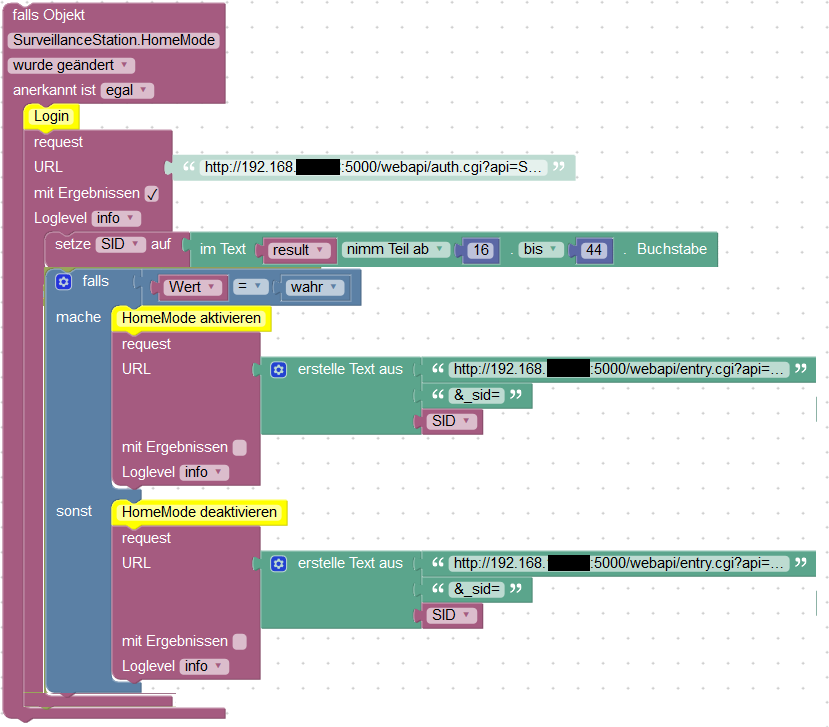
          seit langem melde ich mich wieder. Mittlerweile habe ich das Problem gelöst. Beim Anmelden Anmelden wird eine SID generiert. Diese muss jedem Befehl angefügt werden.
          7256_home_mode_steuern_blockly.png

          URL für den Login:

          http://<ip_des_nas>:5000/webapi/auth.cgi?api=SYNO.API.Auth&method=Login&version=3&account=<account>&passwd=<passwort>&session=SurveillanceStation&format=sid

          URL zum Aktivieren:

          http://<ip_des_nas>:5000/webapi/entry.cgi?api=SYNO.SurveillanceStation.HomeMode&version=1&method=Switch&on=true

          URL zum Deaktivieren:

          http://<ip_des_nas>:5000/webapi/entry.cgi?api=SYNO.SurveillanceStation.HomeMode&version=1&method=Switch&on=false

          Ich hoffe, ich konnte euch helfen.</ip_des_nas></ip_des_nas></passwort></account></ip_des_nas>

          1 Reply Last reply
          0
          • AlCalzoneA Offline
            AlCalzoneA Offline
            AlCalzone
            Developer
            wrote on last edited by
            #14

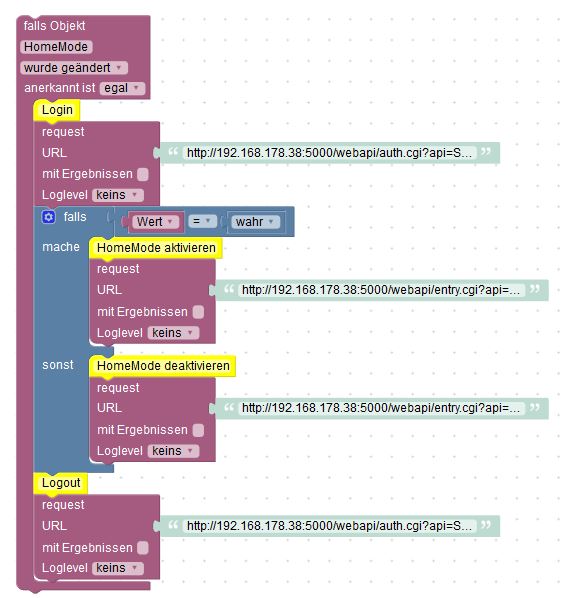
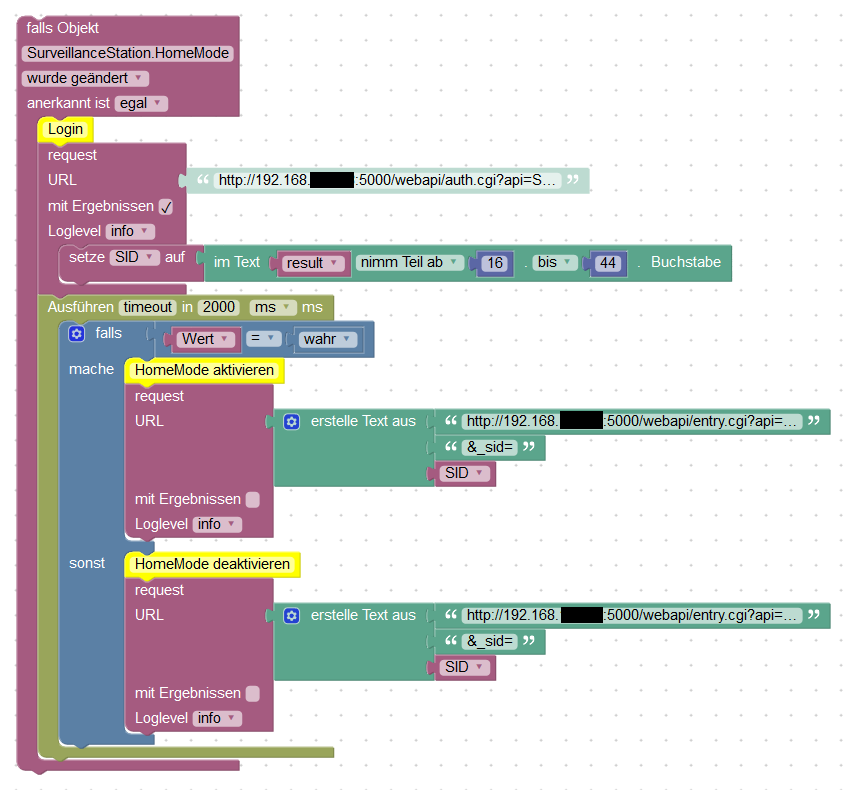
            Warum führst du die nachfolgenden Requests nicht innerhalb des Callbacks des ersten aus anstatt im Timeout? Was, wenn der erste länger dauert als 2s?

            Warum `sudo` böse ist: https://forum.iobroker.net/post/17109

            1 Reply Last reply
            0
            • M Offline
              M Offline
              MKaiser96
              wrote on last edited by
              #15

              Ich hatte da immer Probleme, dass er die SID noch nicht verarbeitet hat und so der Befehl nicht geschalten wurde.

              1 Reply Last reply
              0
              • A Offline
                A Offline
                ak1
                wrote on last edited by
                #16

                Markus, herzlichen Dank für Dein Feedback! Das ist sehr hilfreich.

                @AlCalzone: Deine Rückfrage suggeriert, dass Du an einen optimierten Programmablauf denkst. Wie würde der aussehen?

                Gruß

                Stefan

                1 Reply Last reply
                0
                • D Offline
                  D Offline
                  dominik.braun82
                  wrote on last edited by
                  #17

                  Hi.

                  Ich bekomme es nicht hin…

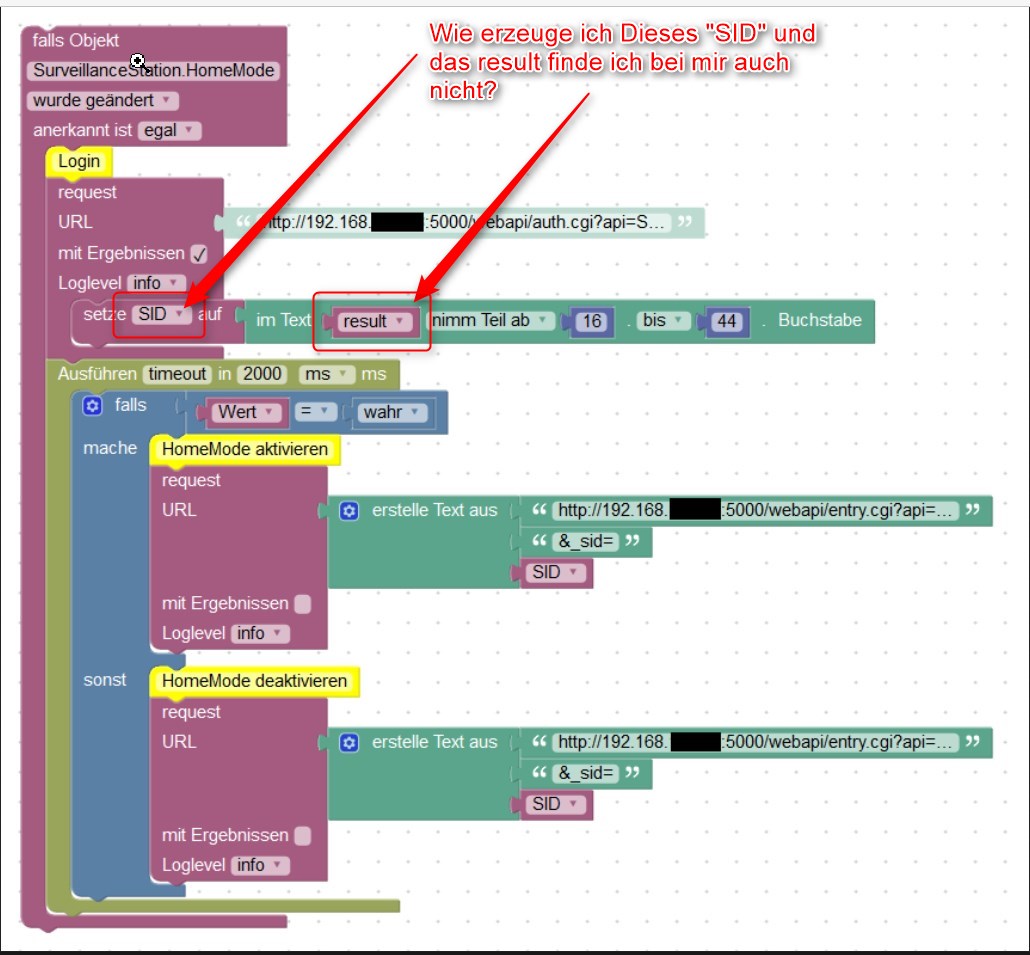
                  Siehe Bild anbei mit 2 Fragen...
                  7511_2018-08-31_12h16_27.jpg

                  Wäre echt dankbar über eine Info… :cry:

                  1 Reply Last reply
                  0
                  • AlCalzoneA Offline
                    AlCalzoneA Offline
                    AlCalzone
                    Developer
                    wrote on last edited by
                    #18

                    @ak1:

                    @AlCalzone: Deine Rückfrage suggeriert, dass Du an einen optimierten Programmablauf denkst. Wie würde der aussehen? `

                    Quick'n'dirty in Photoshop:
                    1097_home_mode_steuern_blockly.png
                    Eben den zweiten Request direkt nach Beendigung des ersten.

                    Warum `sudo` böse ist: https://forum.iobroker.net/post/17109

                    1 Reply Last reply
                    0
                    • M Offline
                      M Offline
                      MKaiser96
                      wrote on last edited by
                      #19

                      SID und result sind neu erzeugte Variablen. Zu finden im Blockly und Variablen.

                      1 Reply Last reply
                      0
                      • D Offline
                        D Offline
                        dominik.braun82
                        wrote on last edited by
                        #20

                        Hi. Danke für die Info, habe jetzt alles gefunden und so eingetippt.

                        Anbei die Fehlermeldung….

                        eine Idee was da noch falsch ist ?
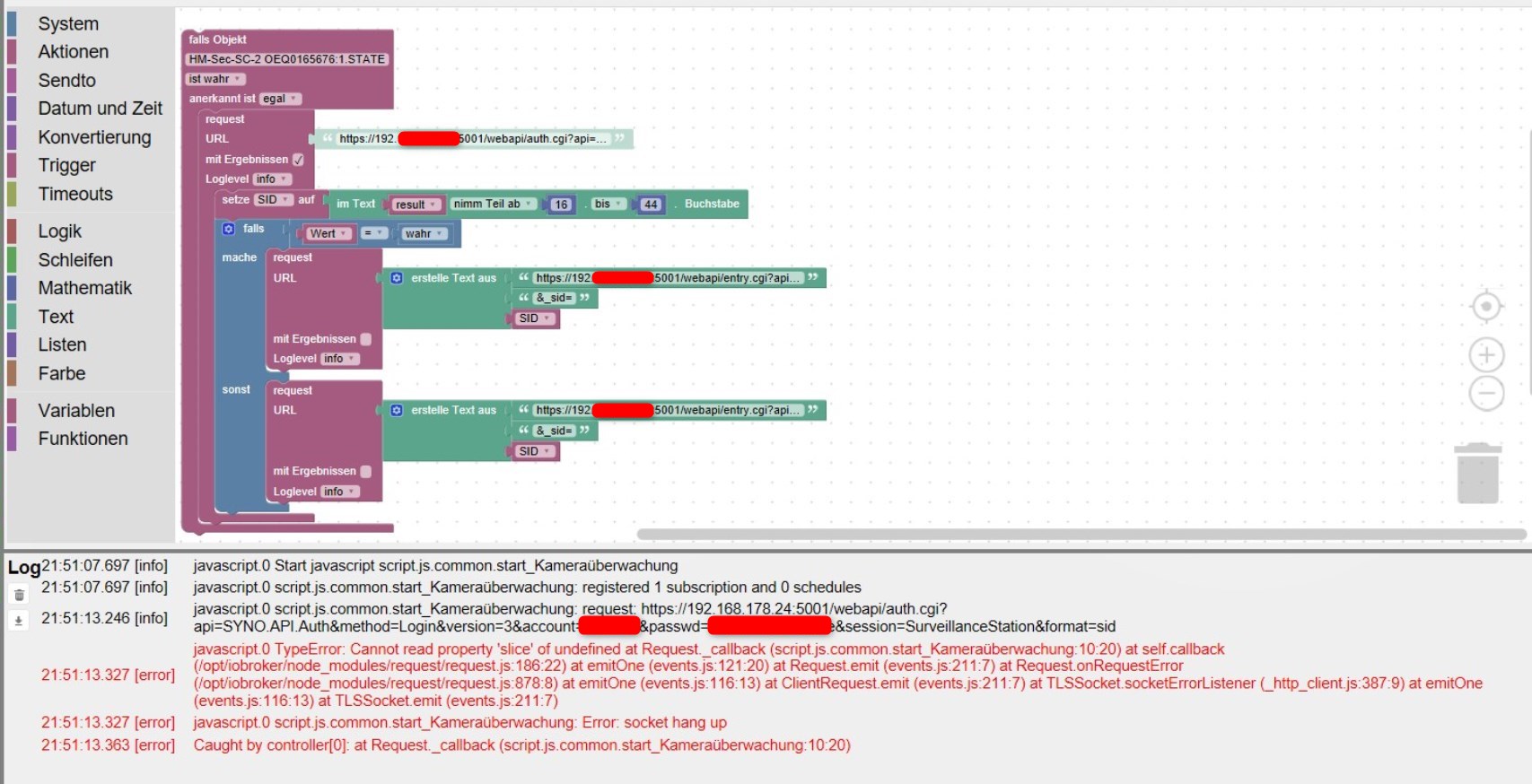
                        7511_2018-08-31_21h57_37.jpg

                        1 Reply Last reply
                        0
                        • ? Offline
                          ? Offline
                          A Former User
                          wrote on last edited by
                          #21

                          Hallo Zusammen,

                          @ dominik.braun82… kann es sein das Du mit dem ersten Http Aufruf ein Sitzungsobjekt erzeugst (SessionID, Token oder was auch immer), welches Du dann in die folgenden Aufrufe übernehmen bzw. vereerben musst, um dann dann eine gewünschten Funktionen aufzurufen um an gewünschte Informationen zu kommen?

                          Ich vermute hier mal, es handelt sich um Web Interface ob nun REST, SOAP oder was auch immer.... und Du setzt die Befehle zwar nacheinander auf, aber übernimmst die Ergebnisse oder wichtige Objekt nicht aus den vorherigen Aufrufen.....

                          Beispiel:

                          https://192.168.x.xxx/api/login?usernam ... d=12345678

                          erzeugt einen Token mit dem Inhalt "8242E644EC6387EB68A2FFA7DEC1729"

                          Dieses Objekt muss ich mir merken und im folgenden verwenden......

                          Beispiel: Nächster Befehl soll mir Endkonten liefern....

                          https://192.168.x.xxx/api/lora/packets? ... FA7DEC1729

                          Das Sitzungsobjekt lebt nicht ewig, deswegen muss es erneuert werden, doch dazu braucht es noch mehr Info zu dem Dienst welchen Du verwendest...

                          Herzliche Grüße

                          Equilora aka Harald

                          1 Reply Last reply
                          0
                          • D Offline
                            D Offline
                            dominik.braun82
                            wrote on last edited by
                            #22

                            Ich versteh leider…. ähhm… nix :lol:

                            Ich habe einfach das blocky nachgebaut und ausgeführt.

                            Beo "MKaiser96" funktioniert es und bei mir nicht.

                            Wenn ich die links in den Browser eingebe funktioniert alles.... bei Iobroker nicht.

                            Gibt es die Möglichkeit die html Befehler wo anders aufzurufen? Javascript o.ä.?

                            Danke, Gruß

                            1 Reply Last reply
                            0
                            • A Offline
                              A Offline
                              ak1
                              wrote on last edited by
                              #23

                              Kurze Rückmeldung: Bei mir funktioniert das Skript wunderbar. Vielen Dank!

                              1 Reply Last reply
                              0
                              • D Offline
                                D Offline
                                dominik.braun82
                                wrote on last edited by
                                #24

                                das is doch intressant…. was ist dann an meinem System anders?

                                Hat jemand eine Idee?

                                Evtl. soll ich mal was ausprobieren? Irgendwelche Ideen?

                                Gruß

                                1 Reply Last reply
                                0
                                • D Offline
                                  D Offline
                                  dominik.braun82
                                  wrote on last edited by
                                  #25

                                  wenn ich eine Variable erstelle, in Diesem Fall die "SSI" und "result". Muss ich da etwas beachten?

                                  Ich habe die einfach in Blockly angelegt, sonst nichts. Ist das korrekt?

                                  Wo könnte es noch dranhängen?

                                  1 Reply Last reply
                                  0
                                  • A Offline
                                    A Offline
                                    ak1
                                    wrote on last edited by
                                    #26

                                    Ich kann Dir leider nicht sagen, was bei Dir im Skript falsch ist. Allerdings gibt es ja die Möglichkeit, ein Blockly-Skript zu ex- und importieren. Außerdem kann man sich ja auch den Java Script Code anzeigen lassen. Ich poste das mal hier. Achtung, natürlich müssen URL zum Synology, User und Password passend eingetragen werden.

                                    Blockly:

                                     <xml xmlns="http://www.w3.org/1999/xhtml"><block type="comment" id="?eH]L9k:Ib4wfolmT[cy" x="87" y="-838"><field name="COMMENT">Skript ändert den HomeMode der Synology</field>
                                        <next><block type="comment" id="qwy:_@:WY|8mC9_eS9VZ"><field name="COMMENT">Surveillance Station - True oder False</field>
                                            <next><block type="comment" id="pYyx,Cg!,cdg:|,-?u]a"><field name="COMMENT">Trigger ist eine Objektänderung</field>
                                                <next><block type="on" id="bcuLKEa;9pP{IH#th[!4"><field name="OID">control.0.SurveillanceStation.HomeMode</field>
                                                    <field name="CONDITION">ne</field>
                                    
                                                    <statement name="STATEMENT"><block type="comment" id="N;:SDq:TI*zH~2%Q!USS"><field name="COMMENT">Login URL - Hardcoded</field>
                                                        <next><block type="comment" id="OA!{bdbR=I{~*en2b:)q"><field name="COMMENT">IP-Adresse, User und Password</field>
                                                            <next><block type="request" id="]5K08@Y}juiF3ry_yR,5"><mutation with_statement="true"></mutation>
                                                                <field name="WITH_STATEMENT">TRUE</field>
                                                                <field name="LOG">log</field>
                                                                <value name="URL"><shadow type="text" id="6xTZA,IEA?{.C1Vdb?Cy"><field name="TEXT">http://<ip>:<port>/webapi/auth.cgi?api=SYNO.API.Auth&method=Login&version=3&account=<user>&passwd=<password>&session=SurveillanceStation&format=sid</password></user></port></ip></field></shadow></value> 
                                                                <statement name="STATEMENT"><block type="comment" id="kfmW-jlXfUvR7zTJ~foA"><field name="COMMENT">Session Token speichern</field>
                                                                    <next><block type="variables_set" id="(p/#.2{RZ:jCLk:|fDem"><field name="VAR">SID</field>
                                                                        <value name="VALUE"><block type="text_getSubstring" id="%lkY=i]*JF@E0myBY?BW"><mutation at1="true" at2="true"></mutation>
                                                                            <field name="WHERE1">FROM_START</field>
                                                                            <field name="WHERE2">FROM_START</field>
                                                                            <value name="STRING"><block type="variables_get" id="#PF-urAJ.U[8f*`Y-zo_"><field name="VAR">result</field></block></value> 
                                                                            <value name="AT1"><block type="math_number" id="SY!!u?`fRv~OB~mV#.Xa"><field name="NUM">16</field></block></value> 
                                                                            <value name="AT2"><block type="math_number" id="w`gmrBn9Q6m~w+03E?m-"><field name="NUM">44</field></block></value></block></value> 
                                                                        <next><block type="controls_if" id="Db`]sKv_sx4,FmCL6fSw"><mutation else="1"></mutation>
                                                                            <value name="IF0"><block type="logic_compare" id="spM:Gz:Z[P.]1]ox35}{"><field name="OP">EQ</field>
                                                                                <value name="A"><block type="on_source" id="Y^d7bV_BZgTPBw;H2iSq"><field name="ATTR">state.val</field></block></value> 
                                                                                <value name="B"><block type="logic_boolean" id="-(aA^IEaKFj7wR.rFAv9"><field name="BOOL">TRUE</field></block></value></block></value> 
                                                                            <statement name="DO0"><block type="comment" id="I2{%uXwh=5QeIBDx~Ael"><field name="COMMENT">HomeMode aktivieren</field>
                                                                                <next><block type="request" id="3aL?,iT88;4Oqr8%,Ld("><mutation with_statement="false"></mutation>
                                                                                    <field name="WITH_STATEMENT">FALSE</field>
                                                                                    <field name="LOG">log</field>
                                                                                    <value name="URL"><shadow type="text" id="F[va5([*)3rV3Rg@6~wi"><field name="TEXT">text</field></shadow> 
                                                                                      <block type="text_join" id="8R*S`Q[e9i{fAL1@!k-N"><mutation items="3"></mutation>
                                                                                        <value name="ADD0"><block type="text" id="jd]vc_DXPp^Tw*ZaLRfX"><field name="TEXT">http://<ip>:<port>/webapi/entry.cgi?api=SYNO.SurveillanceStation.HomeMode&version=1&method=Switch&on=true</port></ip></field></block></value> 
                                                                                        <value name="ADD1"><block type="text" id="oZlPa`0xRseA13.]CJY{"><field name="TEXT">&_sid=</field></block></value> 
                                                                                        <value name="ADD2"><block type="variables_get" id="q*X^^TUvaA2isu8i)*I/"><field name="VAR">SID</field></block></value></block></value></block></next></block></statement> 
                                                                            <statement name="ELSE"><block type="comment" id="KHLxjEaDm@8@r)d`97%s"><field name="COMMENT">HomeMode deaktivieren</field>
                                                                                <next><block type="request" id="]93]eVKY/acmPP(XI1.2"><mutation with_statement="false"></mutation>
                                                                                    <field name="WITH_STATEMENT">FALSE</field>
                                                                                    <field name="LOG">log</field>
                                                                                    <value name="URL"><shadow type="text" id="tu@raUM{Bs7+bD51l3O{"><field name="TEXT">text</field></shadow> 
                                                                                      <block type="text_join" id="32wM[yij4H};]B.qIh?|"><mutation items="3"></mutation>
                                                                                        <value name="ADD0"><block type="text" id="t[o_dsQTIqL3Ei_uI2rD"><field name="TEXT">http:/<ip>:<port>/webapi/entry.cgi?api=SYNO.SurveillanceStation.HomeMode&version=1&method=Switch&on=false</port></ip></field></block></value> 
                                                                                        <value name="ADD1"><block type="text" id="YH`Zf[axlAw4o)A6TkU8"><field name="TEXT">&_sid=</field></block></value> 
                                                                                        <value name="ADD2"><block type="variables_get" id="h!d5UEvaUZtV~b3L8vTX"><field name="VAR">SID</field></block></value></block></value></block></next></block></statement></block></next></block></next></block></statement></block></next></block></next></block></statement></block></next></block></next></block></next></block></xml> 


                                    Skript:

                                    var SID, result;
                                    
                                    // Skript ändert den HomeMode der Synology
                                    // Surveillance Station - True oder False
                                    // Trigger ist eine Objektänderung
                                    on({id: "control.0.SurveillanceStation.HomeMode"/*HomeMode*/, change: "ne"}, function (obj) {
                                      var value = obj.state.val;
                                      var oldValue = obj.oldState.val;
                                      // Login URL - Hardcoded
                                      // IP-Adresse, User und Password
                                      try {
                                        require("request")('http://<ip>:<port>/webapi/auth.cgi?api=SYNO.API.Auth&method=Login&version=3&account=<user>&passwd=<password>&session=SurveillanceStation&format=sid', function (error, response, result) {
                                          // Session Token speichern
                                        SID = result.slice(15, 44);
                                        if ((obj.state ? obj.state.val : "") == true) {
                                          // HomeMode aktivieren
                                          try {
                                            require("request")((['http://<ip>:<port>/webapi/entry.cgi?api=SYNO.SurveillanceStation.HomeMode&version=1&method=Switch&on=true','&_sid=',SID].join(''))).on("error", function (e) {console.error(e);});
                                          } catch (e) { console.error(e); }
                                          console.log("request: " + (['http://<ip>:<port>/webapi/entry.cgi?api=SYNO.SurveillanceStation.HomeMode&version=1&method=Switch&on=true','&_sid=',SID].join('')));
                                        } else {
                                          // HomeMode deaktivieren
                                          try {
                                            require("request")((['http://<ip>:<port>/webapi/entry.cgi?api=SYNO.SurveillanceStation.HomeMode&version=1&method=Switch&on=false','&_sid=',SID].join(''))).on("error", function (e) {console.error(e);});
                                          } catch (e) { console.error(e); }
                                          console.log("request: " + (['http://<ip>:<port>/webapi/entry.cgi?api=SYNO.SurveillanceStation.HomeMode&version=1&method=Switch&on=false','&_sid=',SID].join('')));
                                        }
                                        }).on("error", function (e) {console.error(e);});
                                      } catch (e) { console.error(e); }
                                      console.log("request: " + 'http://<ip>:<port>/webapi/auth.cgi?api=SYNO.API.Auth&method=Login&version=3&account=<user>&passwd=<password>&session=SurveillanceStation&format=sid');
                                    });</password></user></port></ip></port></ip></port></ip></port></ip></port></ip></password></user></port></ip> 
                                    

                                    Vielleicht hilft Dir das ja.

                                    1 Reply Last reply
                                    0
                                    • D Offline
                                      D Offline
                                      dominik.braun82
                                      wrote on last edited by
                                      #27

                                      Danke… eine Frage noch dazu.

                                      Wo wird das script eingefügt?

                                      Blockly ist ja klar :-)

                                      1 Reply Last reply
                                      0
                                      • A Offline
                                        A Offline
                                        ak1
                                        wrote on last edited by
                                        #28

                                        Wenn Du ein Blockly im Editor geöffnet hast, dann hast Du oben rechts "Enginetyp", "Blöcke prüfen", "Zeige Code" und die Icons für Import und Export.

                                        1 Reply Last reply
                                        0
                                        • D Offline
                                          D Offline
                                          dominik.braun82
                                          wrote on last edited by
                                          #29

                                          ja das wusste ich aber die Frage ist, warum 2 scripte aufgeführt sind.

                                          einmal "blockly" und einmal "script".

                                          Muss ich beide scripte importieren?

                                          wenn ich einen script importiere ist nur ein kleines schwarzes Symbol zu sehen :roll:
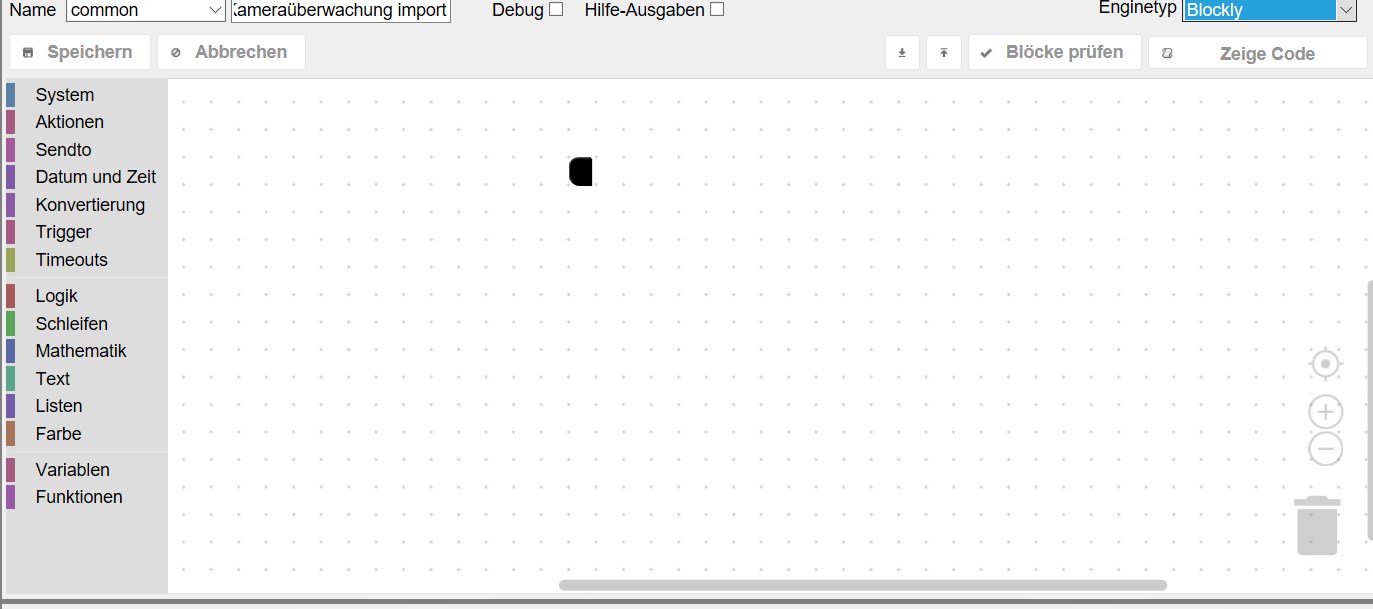
                                          7511_2018-09-02_12h17_50.jpg

                                          ist das korrekt?

                                          1 Reply Last reply
                                          0
                                          Reply
                                          • Reply as topic
                                          Log in to reply
                                          • Oldest to Newest
                                          • Newest to Oldest
                                          • Most Votes


                                          Support us

                                          ioBroker
                                          Community Adapters
                                          Donate

                                          600

                                          Online

                                          32.7k

                                          Users

                                          82.5k

                                          Topics

                                          1.3m

                                          Posts
                                          Community
                                          Impressum | Datenschutz-Bestimmungen | Nutzungsbedingungen | Einwilligungseinstellungen
                                          ioBroker Community 2014-2025
                                          logo
                                          • Login

                                          • Don't have an account? Register

                                          • Login or register to search.
                                          • First post
                                            Last post
                                          0
                                          • Home
                                          • Recent
                                          • Tags
                                          • Unread 0
                                          • Categories
                                          • Unreplied
                                          • Popular
                                          • GitHub
                                          • Docu
                                          • Hilfe