



Skip to content
  • Home
  • Recent
  • Tags
  • 0 Unread 0
  • Categories
  • Unreplied
  • Popular
  • GitHub
  • Docu
  • Hilfe
Skins
  • Light
  • Brite
  • Cerulean
  • Cosmo
  • Flatly
  • Journal
  • Litera
  • Lumen
  • Lux
  • Materia
  • Minty
  • Morph
  • Pulse
  • Sandstone
  • Simplex
  • Sketchy
  • Spacelab
  • United
  • Yeti
  • Zephyr
  • Dark
  • Cyborg
  • Darkly
  • Quartz
  • Slate
  • Solar
  • Superhero
  • Vapor

  • Default (No Skin)
  • No Skin
Collapse
ioBroker Logo

Community Forum

donate donate
  1. ioBroker Community Home
  2. Deutsch
  3. Praktische Anwendungen (Showcase)
  4. ESP Matrix Anzeige fully IoBroker steuerbar

NEWS

  • Jahresrückblick 2025 – unser neuer Blogbeitrag ist online! ✨
    BluefoxB
    Bluefox
    17
    1
    2.2k

  • Neuer Blogbeitrag: Monatsrückblick - Dezember 2025 🎄
    BluefoxB
    Bluefox
    13
    1
    950

  • Weihnachtsangebot 2025! 🎄
    BluefoxB
    Bluefox
    25
    1
    2.2k

ESP Matrix Anzeige fully IoBroker steuerbar

Scheduled Pinned Locked Moved Praktische Anwendungen (Showcase)
esp8266matrix displaymax 7219
460 Posts 31 Posters 116.3k Views 45 Watching
  • Oldest to Newest
  • Newest to Oldest
  • Most Votes
Reply
  • Reply as topic
Log in to reply
This topic has been deleted. Only users with topic management privileges can see it.
  • R Offline
    R Offline
    Rushmed
    Most Active
    wrote on last edited by
    #241

    @wolfi Siehe hier.

    liv-in-skyL 3 Replies Last reply
    0
    • R Rushmed

      @wolfi Siehe hier.

      liv-in-skyL Offline
      liv-in-skyL Offline
      liv-in-sky
      wrote on last edited by
      #242

      @rushmed
      ist das neu - kannte ich garnicht

      nach einem gelösten Thread wäre es sinnvoll dies in der Überschrift des ersten Posts einzutragen [gelöst]-... Bitte benutzt das Voting rechts unten im Beitrag wenn er euch geholfen hat. Forum-Tools: PicPick https://picpick.app/en/download/ und ScreenToGif https://www.screentogif.com/downloads.html

      1 Reply Last reply
      0
      • R Rushmed

        @wolfi Siehe hier.

        liv-in-skyL Offline
        liv-in-skyL Offline
        liv-in-sky
        wrote on last edited by liv-in-sky
        #243

        @rushmed

        habe alle die displays (TM1637, MAX7219) mit espeasy eingebunden - sind die displays in einer bestimmten bin enthalten z.b. sensor.bin

        edit: sind in display.bin - habe es gefunden

        nach einem gelösten Thread wäre es sinnvoll dies in der Überschrift des ersten Posts einzutragen [gelöst]-... Bitte benutzt das Voting rechts unten im Beitrag wenn er euch geholfen hat. Forum-Tools: PicPick https://picpick.app/en/download/ und ScreenToGif https://www.screentogif.com/downloads.html

        R 1 Reply Last reply
        0
        • R Rushmed

          @wolfi Siehe hier.

          liv-in-skyL Offline
          liv-in-skyL Offline
          liv-in-sky
          wrote on last edited by
          #244

          @wolfi

          der link ist besser: https://tasmota.github.io/docs/TM163x/#tasmota-settings

          nach einem gelösten Thread wäre es sinnvoll dies in der Überschrift des ersten Posts einzutragen [gelöst]-... Bitte benutzt das Voting rechts unten im Beitrag wenn er euch geholfen hat. Forum-Tools: PicPick https://picpick.app/en/download/ und ScreenToGif https://www.screentogif.com/downloads.html

          1 Reply Last reply
          0
          • liv-in-skyL liv-in-sky

            @rushmed

            habe alle die displays (TM1637, MAX7219) mit espeasy eingebunden - sind die displays in einer bestimmten bin enthalten z.b. sensor.bin

            edit: sind in display.bin - habe es gefunden

            R Offline
            R Offline
            Rushmed
            Most Active
            wrote on last edited by
            #245

            @liv-in-sky Tasmota muss mit:

            #define USE_DISPLAY_MAX7219_MATRIX
            

            kompiliert werden.

            Bei der Tasmota Lösung habe ich allerdings das Initialisierungsproblem bei erneutem Stromanlegen. Das gabs bei deiner Lösung nicht. :+1:

            liv-in-skyL 1 Reply Last reply
            0
            • R Rushmed

              @liv-in-sky Tasmota muss mit:

              #define USE_DISPLAY_MAX7219_MATRIX
              

              kompiliert werden.

              Bei der Tasmota Lösung habe ich allerdings das Initialisierungsproblem bei erneutem Stromanlegen. Das gabs bei deiner Lösung nicht. :+1:

              liv-in-skyL Offline
              liv-in-skyL Offline
              liv-in-sky
              wrote on last edited by
              #246

              @rushmed

              deshalb die frage nach dem bin

              mit display.bin ist das schon drin - ich mag das arduino nicht wirklich und versuche das immer zu umgehen :-)

              nach einem gelösten Thread wäre es sinnvoll dies in der Überschrift des ersten Posts einzutragen [gelöst]-... Bitte benutzt das Voting rechts unten im Beitrag wenn er euch geholfen hat. Forum-Tools: PicPick https://picpick.app/en/download/ und ScreenToGif https://www.screentogif.com/downloads.html

              1 Reply Last reply
              0
              • R Offline
                R Offline
                Rushmed
                Most Active
                wrote on last edited by
                #247

                @liv-in-sky Der im Display TAsmota enthaltene Treiber ist ein anderer "DisplayModel 15".
                Die von mir verlinkte Variante ist "DisplayModel 19".
                "DisplayModel 15" habe ich nicht getestet und weiß nicht was die Unterschiede sind.
                Kann ja mal prüfen.

                W 1 Reply Last reply
                0
                • R Rushmed

                  @liv-in-sky Der im Display TAsmota enthaltene Treiber ist ein anderer "DisplayModel 15".
                  Die von mir verlinkte Variante ist "DisplayModel 19".
                  "DisplayModel 15" habe ich nicht getestet und weiß nicht was die Unterschiede sind.
                  Kann ja mal prüfen.

                  W Offline
                  W Offline
                  Wolfi
                  wrote on last edited by
                  #248

                  @rushmed sagte in ESP Matrix Anzeige fully IoBroker steuerbar:

                  @liv-in-sky Der im Display TAsmota enthaltene Treiber ist ein anderer "DisplayModel 15".
                  Die von mir verlinkte Variante ist "DisplayModel 19".
                  "DisplayModel 15" habe ich nicht getestet und weiß nicht was die Unterschiede sind.
                  Kann ja mal prüfen.

                  Aber man muss auf alle FälleNeu compilieren ist das richtig?

                  R 1 Reply Last reply
                  0
                  • W Wolfi

                    @rushmed sagte in ESP Matrix Anzeige fully IoBroker steuerbar:

                    @liv-in-sky Der im Display TAsmota enthaltene Treiber ist ein anderer "DisplayModel 15".
                    Die von mir verlinkte Variante ist "DisplayModel 19".
                    "DisplayModel 15" habe ich nicht getestet und weiß nicht was die Unterschiede sind.
                    Kann ja mal prüfen.

                    Aber man muss auf alle FälleNeu compilieren ist das richtig?

                    R Offline
                    R Offline
                    Rushmed
                    Most Active
                    wrote on last edited by Rushmed
                    #249

                    @wolfi Tatsächlich ändert sich bei "DisplayModel 15" nichts. Ich dachte das Wäre nur für Siebensegmantanzeigen.
                    Dan sollte die vorkompillierte Display-bin gehen.

                    Edit:
                    Mit der Display.bin geht es nicht.

                    Hier hab ich mal fix eine .bin ohne meine Daten kompilliert:
                    tasmota-display.bin
                    Ist ungetestet.

                    liv-in-skyL 1 Reply Last reply
                    0
                    • R Rushmed

                      @wolfi Tatsächlich ändert sich bei "DisplayModel 15" nichts. Ich dachte das Wäre nur für Siebensegmantanzeigen.
                      Dan sollte die vorkompillierte Display-bin gehen.

                      Edit:
                      Mit der Display.bin geht es nicht.

                      Hier hab ich mal fix eine .bin ohne meine Daten kompilliert:
                      tasmota-display.bin
                      Ist ungetestet.

                      liv-in-skyL Offline
                      liv-in-skyL Offline
                      liv-in-sky
                      wrote on last edited by
                      #250

                      @rushmed ist da die max drin - wollte gerade selber machen - würdich mir gerne sparen

                      nach einem gelösten Thread wäre es sinnvoll dies in der Überschrift des ersten Posts einzutragen [gelöst]-... Bitte benutzt das Voting rechts unten im Beitrag wenn er euch geholfen hat. Forum-Tools: PicPick https://picpick.app/en/download/ und ScreenToGif https://www.screentogif.com/downloads.html

                      R 1 Reply Last reply
                      0
                      • liv-in-skyL liv-in-sky

                        @rushmed ist da die max drin - wollte gerade selber machen - würdich mir gerne sparen

                        R Offline
                        R Offline
                        Rushmed
                        Most Active
                        wrote on last edited by
                        #251

                        @liv-in-sky Ist das ne Frage?
                        Jo, die ist da drin.
                        Denk an:

                        Display Model 19
                        Display Mode 0
                        
                        liv-in-skyL 2 Replies Last reply
                        0
                        • R Rushmed

                          @liv-in-sky Ist das ne Frage?
                          Jo, die ist da drin.
                          Denk an:

                          Display Model 19
                          Display Mode 0
                          
                          liv-in-skyL Offline
                          liv-in-skyL Offline
                          liv-in-sky
                          wrote on last edited by liv-in-sky
                          #252

                          @rushmed
                          danke - war eine frage - werd deine mal flashen

                          nach einem gelösten Thread wäre es sinnvoll dies in der Überschrift des ersten Posts einzutragen [gelöst]-... Bitte benutzt das Voting rechts unten im Beitrag wenn er euch geholfen hat. Forum-Tools: PicPick https://picpick.app/en/download/ und ScreenToGif https://www.screentogif.com/downloads.html

                          1 Reply Last reply
                          0
                          • R Rushmed

                            @liv-in-sky Ist das ne Frage?
                            Jo, die ist da drin.
                            Denk an:

                            Display Model 19
                            Display Mode 0
                            
                            liv-in-skyL Offline
                            liv-in-skyL Offline
                            liv-in-sky
                            wrote on last edited by
                            #253

                            @rushmed zeigst du mir noch die einstellung für das device - welcher gpio für welchen wert

                            nach einem gelösten Thread wäre es sinnvoll dies in der Überschrift des ersten Posts einzutragen [gelöst]-... Bitte benutzt das Voting rechts unten im Beitrag wenn er euch geholfen hat. Forum-Tools: PicPick https://picpick.app/en/download/ und ScreenToGif https://www.screentogif.com/downloads.html

                            R 1 Reply Last reply
                            0
                            • liv-in-skyL liv-in-sky

                              @rushmed zeigst du mir noch die einstellung für das device - welcher gpio für welchen wert

                              R Offline
                              R Offline
                              Rushmed
                              Most Active
                              wrote on last edited by
                              #254

                              @liv-in-sky Habs genauso gemacht wie bei dir damit ich einfach umflashen kann. Der Switch ist ein Bewegungsmelder.
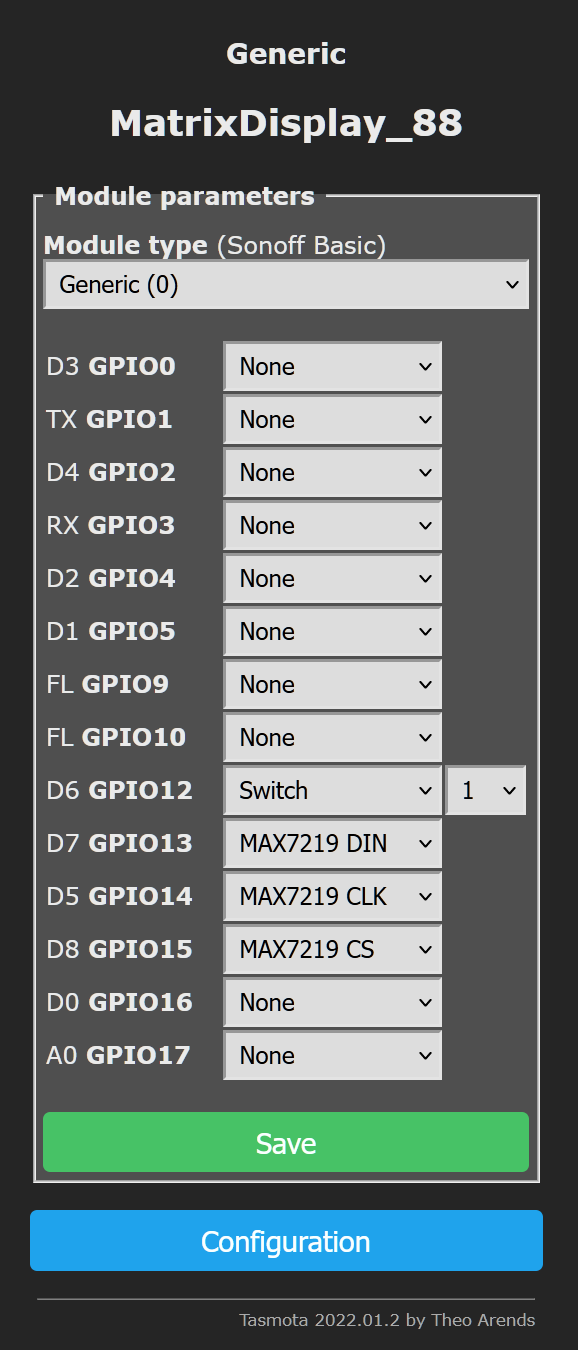
                              ad5c5888-57c4-4dad-baf9-fe0d8caff62e-grafik.png

                              liv-in-skyL R 2 Replies Last reply
                              0
                              • R Rushmed

                                @liv-in-sky Habs genauso gemacht wie bei dir damit ich einfach umflashen kann. Der Switch ist ein Bewegungsmelder.
                                ad5c5888-57c4-4dad-baf9-fe0d8caff62e-grafik.png

                                liv-in-skyL Offline
                                liv-in-skyL Offline
                                liv-in-sky
                                wrote on last edited by
                                #255

                                @rushmed

                                danke - ich teste jetzt erstmal den tm1637 - da liegt noch einer rum - meine 3 matrix diplays sind alle etwas verbaut - das dauert noch

                                nach einem gelösten Thread wäre es sinnvoll dies in der Überschrift des ersten Posts einzutragen [gelöst]-... Bitte benutzt das Voting rechts unten im Beitrag wenn er euch geholfen hat. Forum-Tools: PicPick https://picpick.app/en/download/ und ScreenToGif https://www.screentogif.com/downloads.html

                                1 Reply Last reply
                                0
                                • R Rushmed

                                  @liv-in-sky Habs genauso gemacht wie bei dir damit ich einfach umflashen kann. Der Switch ist ein Bewegungsmelder.
                                  ad5c5888-57c4-4dad-baf9-fe0d8caff62e-grafik.png

                                  R Offline
                                  R Offline
                                  Rushmed
                                  Most Active
                                  wrote on last edited by
                                  #256

                                  @liv-in-sky Gib dann mal Rückinfo obs läuft, wieviele Module du angeschlossen hast und ob die Initialisierung immer klappt.

                                  liv-in-skyL 2 Replies Last reply
                                  0
                                  • R Rushmed

                                    @liv-in-sky Gib dann mal Rückinfo obs läuft, wieviele Module du angeschlossen hast und ob die Initialisierung immer klappt.

                                    liv-in-skyL Offline
                                    liv-in-skyL Offline
                                    liv-in-sky
                                    wrote on last edited by
                                    #257

                                    @rushmed wie erwähnt - dauert ein wenig - wo stelle ich eigentlich ein, wieviele module dranhängen - bei mir 8 - teste erstmal mit dem "kleinen" - die große matrix hat ja 16 einzelmodule (4mal4er)

                                    nach einem gelösten Thread wäre es sinnvoll dies in der Überschrift des ersten Posts einzutragen [gelöst]-... Bitte benutzt das Voting rechts unten im Beitrag wenn er euch geholfen hat. Forum-Tools: PicPick https://picpick.app/en/download/ und ScreenToGif https://www.screentogif.com/downloads.html

                                    1 Reply Last reply
                                    0
                                    • R Rushmed

                                      @liv-in-sky Gib dann mal Rückinfo obs läuft, wieviele Module du angeschlossen hast und ob die Initialisierung immer klappt.

                                      liv-in-skyL Offline
                                      liv-in-skyL Offline
                                      liv-in-sky
                                      wrote on last edited by
                                      #258

                                      @rushmed hast du den tm1637 aus deiner bin entfernt ?

                                      nach einem gelösten Thread wäre es sinnvoll dies in der Überschrift des ersten Posts einzutragen [gelöst]-... Bitte benutzt das Voting rechts unten im Beitrag wenn er euch geholfen hat. Forum-Tools: PicPick https://picpick.app/en/download/ und ScreenToGif https://www.screentogif.com/downloads.html

                                      R 1 Reply Last reply
                                      0
                                      • liv-in-skyL liv-in-sky

                                        @rushmed hast du den tm1637 aus deiner bin entfernt ?

                                        R Offline
                                        R Offline
                                        Rushmed
                                        Most Active
                                        wrote on last edited by
                                        #259

                                        @liv-in-sky Nein ich habe nichts entfernt.

                                        Hier die Anleitung:

                                          Assign the pins as follows from Tasmota's GUI:
                                        
                                          DIN hardware pin --> "MAX7219 DIN"
                                          CS hardware pin --> "MAX7219 CS"
                                          CLK hardware pin --> "MAX7219 CLK"
                                        
                                        
                                          Once the GPIO configuration is saved and the ESP8266/ESP32 module restarts,
                                          set the Display Model to 19 and Display Mode to 0
                                        
                                          Depending on order of the wired 8x8 matrix modules you have got a display of size pixel_width x pixel_height.
                                          The size has to be set with the commands "DisplayWidth <pixel_width>" and "DisplayHeight <pixel_height>"
                                        
                                          After the ESP8266/ESP32 module restarts again, turn ON the display with the command "Power 1"
                                        
                                        
                                          Now, the following "Display" commands can be used:
                                        
                                          DisplayText  text 
                                            Sends the text to the display. 
                                            If the text fits into the display, it is shown in the center.
                                            Otherwise it scrolls to the left and repeats as long it is cleared or new "DisplayText" overwrites it.
                                        
                                          DisplayDimmer [0..100]
                                            Sets the intensity of the display.
                                        
                                          DisplayBlinkrate [0..3]
                                            0: not blinking
                                            1: slow, 2: medium 3: fast blinking
                                        
                                          Power [ON|OFF]
                                            Sitches the display on or off. When "off", the display buffer is not cleared and will be shown again when after "Power ON". 
                                            Other display commands are still active when off.
                                        
                                          DisplayClear
                                            Clears the display
                                        
                                          DisplayScrollDelay [0..15]   // default = 0
                                            Sets the speed of text scroll. Smaller delay = faster scrolling.
                                            The maximum scroll speed is 50ms per pixel on DisplayScrollDelay 0.
                                        
                                          DisplayWidth [8..256]
                                            Sets the pixel width of the display (8x number of modules in a row)
                                        
                                          DisplayHeight [8..256]
                                            Sets the pixel height of the display (8x number of module rows)
                                        
                                          DisplayRotate [0|2]
                                            0: normal orientation; devide 0 starts at top left
                                            2: upside down; device 0 starts at bottom right
                                        
                                          DisplayClock  [0|1|2]
                                            Displays a clock.
                                            Commands "DisplayClock 1"     // 12 hr format
                                                    "DisplayClock 2"     // 24 hr format
                                                    "DisplayClock 0"     // turn off clock; please use additional cammand: DisplayMode 0
                                        
                                          If you would like to use the UTF8 latin1 character set, it cam be added by copile option: 
                                          #define USE_UTF8_LATIN1
                                        
                                        liv-in-skyL 1 Reply Last reply
                                        0
                                        • R Rushmed

                                          @liv-in-sky Nein ich habe nichts entfernt.

                                          Hier die Anleitung:

                                            Assign the pins as follows from Tasmota's GUI:
                                          
                                            DIN hardware pin --> "MAX7219 DIN"
                                            CS hardware pin --> "MAX7219 CS"
                                            CLK hardware pin --> "MAX7219 CLK"
                                          
                                          
                                            Once the GPIO configuration is saved and the ESP8266/ESP32 module restarts,
                                            set the Display Model to 19 and Display Mode to 0
                                          
                                            Depending on order of the wired 8x8 matrix modules you have got a display of size pixel_width x pixel_height.
                                            The size has to be set with the commands "DisplayWidth <pixel_width>" and "DisplayHeight <pixel_height>"
                                          
                                            After the ESP8266/ESP32 module restarts again, turn ON the display with the command "Power 1"
                                          
                                          
                                            Now, the following "Display" commands can be used:
                                          
                                            DisplayText  text 
                                              Sends the text to the display. 
                                              If the text fits into the display, it is shown in the center.
                                              Otherwise it scrolls to the left and repeats as long it is cleared or new "DisplayText" overwrites it.
                                          
                                            DisplayDimmer [0..100]
                                              Sets the intensity of the display.
                                          
                                            DisplayBlinkrate [0..3]
                                              0: not blinking
                                              1: slow, 2: medium 3: fast blinking
                                          
                                            Power [ON|OFF]
                                              Sitches the display on or off. When "off", the display buffer is not cleared and will be shown again when after "Power ON". 
                                              Other display commands are still active when off.
                                          
                                            DisplayClear
                                              Clears the display
                                          
                                            DisplayScrollDelay [0..15]   // default = 0
                                              Sets the speed of text scroll. Smaller delay = faster scrolling.
                                              The maximum scroll speed is 50ms per pixel on DisplayScrollDelay 0.
                                          
                                            DisplayWidth [8..256]
                                              Sets the pixel width of the display (8x number of modules in a row)
                                          
                                            DisplayHeight [8..256]
                                              Sets the pixel height of the display (8x number of module rows)
                                          
                                            DisplayRotate [0|2]
                                              0: normal orientation; devide 0 starts at top left
                                              2: upside down; device 0 starts at bottom right
                                          
                                            DisplayClock  [0|1|2]
                                              Displays a clock.
                                              Commands "DisplayClock 1"     // 12 hr format
                                                      "DisplayClock 2"     // 24 hr format
                                                      "DisplayClock 0"     // turn off clock; please use additional cammand: DisplayMode 0
                                          
                                            If you would like to use the UTF8 latin1 character set, it cam be added by copile option: 
                                            #define USE_UTF8_LATIN1
                                          
                                          liv-in-skyL Offline
                                          liv-in-skyL Offline
                                          liv-in-sky
                                          wrote on last edited by
                                          #260

                                          @rushmed könntest du bitte die tm1637 noch aktivieren in deiner bin
                                          Ich bekomme es irgendwie nicht hin

                                          nach einem gelösten Thread wäre es sinnvoll dies in der Überschrift des ersten Posts einzutragen [gelöst]-... Bitte benutzt das Voting rechts unten im Beitrag wenn er euch geholfen hat. Forum-Tools: PicPick https://picpick.app/en/download/ und ScreenToGif https://www.screentogif.com/downloads.html

                                          R 1 Reply Last reply
                                          0
                                          Reply
                                          • Reply as topic
                                          Log in to reply
                                          • Oldest to Newest
                                          • Newest to Oldest
                                          • Most Votes


                                          Support us

                                          ioBroker
                                          Community Adapters
                                          Donate

                                          398

                                          Online

                                          32.6k

                                          Users

                                          82.2k

                                          Topics

                                          1.3m

                                          Posts
                                          Community
                                          Impressum | Datenschutz-Bestimmungen | Nutzungsbedingungen | Einwilligungseinstellungen
                                          ioBroker Community 2014-2025
                                          logo
                                          • Login

                                          • Don't have an account? Register

                                          • Login or register to search.
                                          • First post
                                            Last post
                                          0
                                          • Home
                                          • Recent
                                          • Tags
                                          • Unread 0
                                          • Categories
                                          • Unreplied
                                          • Popular
                                          • GitHub
                                          • Docu
                                          • Hilfe