




Probleme mit node.js 16.19.1
-
Hey,
seit ich node.js 16.19.1 drauf habe, zicken manche Adapter rum und ich habe das Gefühl, dass das System nicht sauber läuft. Welche Version von Node.js wird aktuell empfohlen?
-
Hey,
seit ich node.js 16.19.1 drauf habe, zicken manche Adapter rum und ich habe das Gefühl, dass das System nicht sauber läuft. Welche Version von Node.js wird aktuell empfohlen?
Kann ich @arteck nur zustimmen.
Paar Infos zum System und was genau da schiefläuft.
Ich hab auch die 16.19.1 und da läuft alles normal.
59 Adapter installiert. Da sollte ne Lösung zu finden sein.
Node 16 EOL ist am 11.9.23.
Klar könnte man jetzt gleich upgraden, aber das löst dein Problem nicht.
Das schleppst du vermutlich mit Node 18 dann weiter mit dir rum. -
Hey,
seit ich node.js 16.19.1 drauf habe, zicken manche Adapter rum und ich habe das Gefühl, dass das System nicht sauber läuft. Welche Version von Node.js wird aktuell empfohlen?
-
Ich habe gerade das Update auf Node.js 18 gemacht.
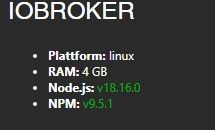
Aber weiterhin habe ich das Problem, wenn ich über den Backup-Adapter ein ioBroker Backup speichern möchte, mir alle Adapter um die Ohren fliegen. Kann es sein, dass beim Erstellen des Backups, die Adapter gestoppt und wieder gestartet werden? Wenn ja, kann man das irgendwo ausschalten?
-
Ich habe gerade das Update auf Node.js 18 gemacht.
Aber weiterhin habe ich das Problem, wenn ich über den Backup-Adapter ein ioBroker Backup speichern möchte, mir alle Adapter um die Ohren fliegen. Kann es sein, dass beim Erstellen des Backups, die Adapter gestoppt und wieder gestartet werden? Wenn ja, kann man das irgendwo ausschalten?
-
Ich habe gerade das Update auf Node.js 18 gemacht.
Aber weiterhin habe ich das Problem, wenn ich über den Backup-Adapter ein ioBroker Backup speichern möchte, mir alle Adapter um die Ohren fliegen. Kann es sein, dass beim Erstellen des Backups, die Adapter gestoppt und wieder gestartet werden? Wenn ja, kann man das irgendwo ausschalten?
@tolkin sagte in Probleme mit node.js 16.19.1:
Kann es sein, dass beim Erstellen des Backups, die Adapter gestoppt und wieder gestartet werden? Wenn ja, kann man das irgendwo ausschalten?
Eigentlich nicht. Es sei denn, du sprengst den vorhandenen Speicher.
-
iob diag@thomas-braun sagte in Probleme mit node.js 16.19.1:
iob diag======== Start marking the full check here =========
Skript v.2023-04-16 *** BASE SYSTEM *** Architecture : x86_64 Docker : false Virtualization : lxc Distributor ID: Ubuntu Description: Ubuntu 20.04.6 LTS Release: 20.04 Codename: focal NAME="Ubuntu" VERSION="20.04.6 LTS (Focal Fossa)" ID=ubuntu ID_LIKE=debian PRETTY_NAME="Ubuntu 20.04.6 LTS" VERSION_ID="20.04" HOME_URL="https://www.ubuntu.com/" SUPPORT_URL="https://help.ubuntu.com/" BUG_REPORT_URL="https://bugs.launchpad.net/ubuntu/" PRIVACY_POLICY_URL="https://www.ubuntu.com/legal/terms-and-policies/privacy-policy" VERSION_CODENAME=focal UBUNTU_CODENAME=focal Systemuptime and Load: 14:06:21 up 1 day, 1:41, 1 user, load average: 1.12, 1.44, 1.59 CPU threads: 4 *** Time and Time Zones *** Local time: Mon 2023-04-17 14:06:21 CEST Universal time: Mon 2023-04-17 12:06:21 UTC RTC time: n/a Time zone: Europe/Berlin (CEST, +0200) System clock synchronized: yes NTP service: inactive RTC in local TZ: no *** User and Groups *** root /root root *** X-Server-Setup *** X-Server: false Desktop: Terminal: tty Boot Target: graphical.target *** MEMORY *** total used free shared buff/cache available Mem: 4.1G 3.2G 809M 0.0K 54M 864M Swap: 0B 0B 0B Total: 4.1G 3.2G 809M 4096 M total memory 3231 M used memory 34 M active memory 3106 M inactive memory 809 M free memory 0 M buffer memory 54 M swap cache 0 M total swap 0 M used swap 0 M free swap *** FILESYSTEM *** Filesystem Type Size Used Avail Use% Mounted on rpool/data/subvol-301-disk-1 zfs 32G 2.8G 30G 9% / none tmpfs 492K 4.0K 488K 1% /dev tmpfs tmpfs 16G 0 16G 0% /dev/shm tmpfs tmpfs 3.1G 112K 3.1G 1% /run tmpfs tmpfs 5.0M 0 5.0M 0% /run/lock tmpfs tmpfs 3.1G 0 3.1G 0% /run/user/0 //192.168.178.10/Backup/00_Backup_ioBroker_RaspberryMatic cifs 804G 58G 746G 8% /opt/iobroker/backups Messages concerning ext4 filesystem in dmesg: Show mounted filesystems (real ones only): TARGET SOURCE FSTYPE OPTIONS / rpool/data/subvol-301-disk-1 zfs rw,relatime,xattr,posixacl |-/proc/cpuinfo lxcfs[/proc/cpuinfo] fuse.lxcfs rw,nosuid,nodev,relatime,user_id=0,group_id=0,allow_other |-/proc/diskstats lxcfs[/proc/diskstats] fuse.lxcfs rw,nosuid,nodev,relatime,user_id=0,group_id=0,allow_other |-/proc/loadavg lxcfs[/proc/loadavg] fuse.lxcfs rw,nosuid,nodev,relatime,user_id=0,group_id=0,allow_other |-/proc/meminfo lxcfs[/proc/meminfo] fuse.lxcfs rw,nosuid,nodev,relatime,user_id=0,group_id=0,allow_other |-/proc/slabinfo lxcfs[/proc/slabinfo] fuse.lxcfs rw,nosuid,nodev,relatime,user_id=0,group_id=0,allow_other |-/proc/stat lxcfs[/proc/stat] fuse.lxcfs rw,nosuid,nodev,relatime,user_id=0,group_id=0,allow_other |-/proc/swaps lxcfs[/proc/swaps] fuse.lxcfs rw,nosuid,nodev,relatime,user_id=0,group_id=0,allow_other |-/proc/uptime lxcfs[/proc/uptime] fuse.lxcfs rw,nosuid,nodev,relatime,user_id=0,group_id=0,allow_other |-/sys/devices/system/cpu lxcfs[/sys/devices/system/cpu] fuse.lxcfs rw,nosuid,nodev,relatime,user_id=0,group_id=0,allow_other `-/opt/iobroker/backups //10.14.1.10/Backup/00_Backup_ioBroker_RaspberryMatic cifs rw,relatime,vers=2.0,cache=strict,username=sascha,uid=1000,noforceuid,gid=1000,noforcegid,addr=10.14.1.10,file_mode=0777,dir_mode=0777,soft,nounix,serverino,mapposix,rsize=65536,wsize=65536,bsize=1048576,echo_interval=60,actimeo=1 Files in neuralgic directories: /var: 463M /var/ 231M /var/cache 228M /var/cache/apt 173M /var/cache/apt/archives 117M /var/lib Archived and active journals take up 112.4M in the file system. /opt/iobroker/backups: 160M /opt/iobroker/backups/ /opt/iobroker/iobroker-data: 267M /opt/iobroker/iobroker-data/ 126M /opt/iobroker/iobroker-data/backup-objects 124M /opt/iobroker/iobroker-data/files 21M /opt/iobroker/iobroker-data/files/javascript.admin 20M /opt/iobroker/iobroker-data/files/material The five largest files in iobroker-data are: 14M /opt/iobroker/iobroker-data/files/material/static/js/2.73100bd6.chunk.js.map 11M /opt/iobroker/iobroker-data/objects.jsonl 5.9M /opt/iobroker/iobroker-data/files/iot.admin/static/js/main.904d455f.js.map 5.3M /opt/iobroker/iobroker-data/states.jsonl 4.7M /opt/iobroker/iobroker-data/files/telegram.admin/rules/static/js/vendors-node_modules_iobroker_adapter-react-v5_assets_devices_parseNames_d_ts-node_modules_io-1d9f06.44fe4a3f.chunk.js.map *** NodeJS-Installation *** /usr/bin/nodejs v18.16.0 /usr/bin/node v18.16.0 /usr/bin/npm 9.5.1 /usr/bin/npx 9.5.1 nodejs: Installed: 18.16.0-deb-1nodesource1 Candidate: 18.16.0-deb-1nodesource1 Version table: *** 18.16.0-deb-1nodesource1 500 500 https://deb.nodesource.com/node_18.x focal/main amd64 Packages 100 /var/lib/dpkg/status 10.19.0~dfsg-3ubuntu1 500 500 http://archive.ubuntu.com/ubuntu focal/universe amd64 Packages Temp directories causing npm8 problem: 0 No problems detected *** ioBroker-Installation *** ioBroker Status iobroker is running on this host. Objects type: jsonl States type: jsonl MULTIHOSTSERVICE/enabled: false Core adapters versions js-controller: 4.0.24 admin: 6.3.5 javascript: 6.1.4 Adapters from github: 3 Adapter State + system.adapter.admin.0 : admin : IOBroker - enabled, port: 8081, bind: 0.0.0.0, run as: admin + system.adapter.alexa2.0 : alexa2 : IOBroker - enabled + system.adapter.backitup.0 : backitup : IOBroker - enabled + system.adapter.cloud.0 : cloud : IOBroker - enabled system.adapter.daswetter.0 : daswetter : IOBroker - enabled + system.adapter.discovery.0 : discovery : IOBroker - enabled + system.adapter.energiefluss.0 : energiefluss : IOBroker - enabled system.adapter.feiertage.0 : feiertage : IOBroker - enabled + system.adapter.history.0 : history : IOBroker - enabled + system.adapter.hm-rega.0 : hm-rega : IOBroker - enabled + system.adapter.hm-rpc.0 : hm-rpc : IOBroker - enabled, port: 0 + system.adapter.hm-rpc.1 : hm-rpc : IOBroker - enabled, port: 0 + system.adapter.hm-rpc.2 : hm-rpc : IOBroker - enabled, port: 0 system.adapter.hmip.0 : hmip : IOBroker - disabled system.adapter.influxdb.0 : influxdb : IOBroker - disabled, port: 8086 + system.adapter.info.0 : info : IOBroker - enabled + system.adapter.iot.0 : iot : IOBroker - enabled + system.adapter.javascript.0 : javascript : IOBroker - enabled system.adapter.material.0 : material : IOBroker - enabled + system.adapter.modbus.0 : modbus : IOBroker - enabled system.adapter.node-red.0 : node-red : IOBroker - disabled, port: 1880, bind: 10.14.4.34 (SSL) system.adapter.nut.0 : nut : IOBroker - disabled system.adapter.onvif.0 : onvif : IOBroker - disabled + system.adapter.ping.0 : ping : IOBroker - enabled + system.adapter.pushover.0 : pushover : IOBroker - enabled + system.adapter.pushover.1 : pushover : IOBroker - enabled + system.adapter.pushover.2 : pushover : IOBroker - enabled + system.adapter.pushover.3 : pushover : IOBroker - enabled + system.adapter.pushover.4 : pushover : IOBroker - enabled + system.adapter.pushover.5 : pushover : IOBroker - enabled + system.adapter.pushover.6 : pushover : IOBroker - enabled + system.adapter.pushover.7 : pushover : IOBroker - enabled + system.adapter.pushover.8 : pushover : IOBroker - enabled + system.adapter.shelly.0 : shelly : IOBroker - enabled, port: 1882, bind: 0.0.0.0 + system.adapter.shuttercontrol.0 : shuttercontrol : IOBroker - enabled + system.adapter.sma-em.0 : sma-em : IOBroker - enabled system.adapter.smartmeter.0 : smartmeter : IOBroker - disabled + system.adapter.sonoff.0 : sonoff : IOBroker - enabled, port: 1883, bind: 0.0.0.0 system.adapter.sourceanalytix.0 : sourceanalytix : IOBroker - disabled + system.adapter.synology.0 : synology : IOBroker - enabled, port: 5001 + system.adapter.telegram.0 : telegram : IOBroker - enabled, port: 8443, bind: 0.0.0.0 + system.adapter.text2command.0 : text2command : IOBroker - enabled + system.adapter.tibber.0 : tibber : IOBroker - enabled system.adapter.unifi.0 : unifi : IOBroker - disabled system.adapter.vis-material-webfont.0 : vis-material-webfont : IOBroker - enabled system.adapter.vis-materialdesign.0 : vis-materialdesign : IOBroker - enabled system.adapter.vis.0 : vis : IOBroker - disabled + system.adapter.web.0 : web : IOBroker - enabled, port: 8082, bind: 0.0.0.0, run as: admin + system.adapter.worx.0 : worx : IOBroker - enabled + system.adapter.yahka.0 : yahka : IOBroker - enabled system.adapter.zigbee.0 : zigbee : IOBroker - disabled, port: /dev/ttyACM0 + instance is alive Enabled adapters with bindings + system.adapter.admin.0 : admin : IOBroker - enabled, port: 8081, bind: 0.0.0.0, run as: admin + system.adapter.hm-rpc.0 : hm-rpc : IOBroker - enabled, port: 0 + system.adapter.hm-rpc.1 : hm-rpc : IOBroker - enabled, port: 0 + system.adapter.hm-rpc.2 : hm-rpc : IOBroker - enabled, port: 0 + system.adapter.shelly.0 : shelly : IOBroker - enabled, port: 1882, bind: 0.0.0.0 + system.adapter.sonoff.0 : sonoff : IOBroker - enabled, port: 1883, bind: 0.0.0.0 + system.adapter.synology.0 : synology : IOBroker - enabled, port: 5001 + system.adapter.telegram.0 : telegram : IOBroker - enabled, port: 8443, bind: 0.0.0.0 + system.adapter.web.0 : web : IOBroker - enabled, port: 8082, bind: 0.0.0.0, run as: admin ioBroker-Repositories Stable (default): http://download.iobroker.net/sources-dist.json Beta (latest) : http://download.iobroker.net/sources-dist-latest.json Github : https://github.com/ioBroker/ioBroker.admin Active repo(s): Stable (default) Installed ioBroker-Instances Used repository: Stable (default) Adapter "admin" : 6.3.5 , installed 6.3.5 Adapter "alexa2" : 3.23.2 , installed 3.23.2 Adapter "backitup" : 2.6.16 , installed 2.6.16 Adapter "cloud" : 4.3.0 , installed 4.3.0 Adapter "daswetter" : 3.1.7 , installed 3.1.7 Adapter "discovery" : 3.1.0 , installed 3.1.0 Adapter "feiertage" : 1.1.0 , installed 1.1.0 Adapter "history" : 2.2.4 , installed 2.2.4 Adapter "hm-rega" : 3.0.46 , installed 3.0.46 Adapter "hm-rpc" : 1.15.16 , installed 1.15.16 Adapter "hmip" : 1.20.0 , installed 1.20.0 Adapter "influxdb" : 3.2.0 , installed 3.2.0 Adapter "info" : 1.9.19 , installed 1.9.19 Adapter "iot" : 1.14.2 , installed 1.14.2 Adapter "javascript" : 6.1.4 , installed 6.1.4 Controller "js-controller": 4.0.24 , installed 4.0.24 Adapter "material" : 1.1.2 , installed 1.1.2 Adapter "modbus" : 5.0.11 , installed 5.0.11 Adapter "node-red" : 4.0.0 , installed 4.0.0 Adapter "nut" : 1.6.0 , installed 1.6.0 Adapter "onvif" : 1.0.4 , installed 1.0.4 Adapter "ping" : 1.5.3 , installed 1.5.3 Adapter "pushover" : 3.0.3 , installed 3.0.3 Adapter "shelly" : 6.3.1 , installed 6.3.1 Adapter "shuttercontrol": 1.4.23 , installed 1.4.23 Adapter "simple-api" : 2.7.2 , installed 2.7.2 Adapter "smartmeter" : 3.3.4 , installed 3.3.4 Adapter "socketio" : 4.2.0 , installed 4.2.0 Adapter "sonoff" : 2.5.1 , installed 2.5.1 Adapter "synology" : 2.1.13 , installed 2.1.13 Adapter "telegram" : 1.15.2 , installed 1.15.2 Adapter "text2command" : 2.3.0 , installed 2.3.0 Adapter "unifi" : 0.5.10 , installed 0.5.10 Adapter "vis" : 1.4.16 , installed 1.4.16 Adapter "web" : 4.3.0 , installed 4.3.0 Adapter "worx" : 2.1.1 , installed 2.1.1 Adapter "ws" : 1.3.0 , installed 1.3.0 Adapter "yahka" : 0.17.0 , installed 0.17.0 Adapter "zigbee" : 1.8.10 , installed 1.8.10 Objects and States Please stand by - This may take a while Objects: 133427 States: 102027 *** OS-Repositories and Updates *** Hit:1 http://archive.ubuntu.com/ubuntu focal InRelease Hit:2 https://deb.nodesource.com/node_18.x focal InRelease Hit:3 http://archive.ubuntu.com/ubuntu focal-updates InRelease Hit:4 http://archive.ubuntu.com/ubuntu focal-security InRelease Reading package lists... Pending Updates: 0 *** Listening Ports *** Active Internet connections (only servers) Proto Recv-Q Send-Q Local Address Foreign Address State User Inode PID/Program name tcp 0 0 192.168.178.5:8701 0.0.0.0:* LISTEN 1000 106979031 140969/io.hm-rpc.2 tcp 0 0 192.168.178.5:42001 0.0.0.0:* LISTEN 1000 106977975 140947/io.hm-rpc.0 tcp 0 0 192.168.178.5:42010 0.0.0.0:* LISTEN 1000 106977988 140958/io.hm-rpc.1 tcp 0 0 0.0.0.0:111 0.0.0.0:* LISTEN 0 102493028 1/systemd tcp 0 0 0.0.0.0:33281 0.0.0.0:* LISTEN 1000 106989100 141419/io.yahka.0 tcp 0 0 127.0.0.1:9000 0.0.0.0:* LISTEN 1000 106977298 140408/iobroker.js- tcp 0 0 127.0.0.1:9001 0.0.0.0:* LISTEN 1000 106977291 140408/iobroker.js- tcp 0 0 127.0.0.1:41819 0.0.0.0:* LISTEN 1000 106989166 141419/io.yahka.0 tcp 0 0 0.0.0.0:1883 0.0.0.0:* LISTEN 1000 106978264 141152/io.sonoff.0 tcp 0 0 0.0.0.0:1882 0.0.0.0:* LISTEN 1000 106988799 141126/io.shelly.0 tcp 0 0 0.0.0.0:35123 0.0.0.0:* LISTEN 1000 106989104 141419/io.yahka.0 tcp 0 0 127.0.0.1:44489 0.0.0.0:* LISTEN 1000 106989150 141419/io.yahka.0 tcp 0 0 127.0.0.1:40129 0.0.0.0:* LISTEN 1000 107015993 141419/io.yahka.0 tcp 0 0 127.0.0.53:53 0.0.0.0:* LISTEN 106 106970806 138718/systemd-reso tcp 0 0 127.0.0.1:33139 0.0.0.0:* LISTEN 1000 106988043 141419/io.yahka.0 tcp 0 0 127.0.0.1:25 0.0.0.0:* LISTEN 0 102502893 325/master tcp 0 0 127.0.0.1:33419 0.0.0.0:* LISTEN 1000 107016495 141419/io.yahka.0 tcp 0 0 0.0.0.0:44779 0.0.0.0:* LISTEN 1000 106989096 141419/io.yahka.0 tcp6 0 0 :::8082 :::* LISTEN 1000 106989105 141408/io.web.0 tcp6 0 0 :::8081 :::* LISTEN 1000 106976874 140532/io.admin.0 tcp6 0 0 :::22 :::* LISTEN 0 102500530 1/systemd tcp6 0 0 :::111 :::* LISTEN 0 102498073 1/systemd tcp6 0 0 ::1:25 :::* LISTEN 0 102502894 325/master udp 0 0 127.0.0.53:53 0.0.0.0:* 106 106970805 138718/systemd-reso udp 0 0 0.0.0.0:111 0.0.0.0:* 0 102498068 1/systemd udp 0 0 0.0.0.0:5353 0.0.0.0:* 1000 106989101 141419/io.yahka.0 udp 0 0 0.0.0.0:5353 0.0.0.0:* 1000 106989097 141419/io.yahka.0 udp 0 0 0.0.0.0:5353 0.0.0.0:* 1000 106989093 141419/io.yahka.0 udp 0 0 0.0.0.0:8560 0.0.0.0:* 1000 107028582 143316/ffmpeg udp 0 0 0.0.0.0:8561 0.0.0.0:* 1000 107028583 143316/ffmpeg udp 0 0 0.0.0.0:8562 0.0.0.0:* 1000 107028584 143316/ffmpeg udp 0 0 0.0.0.0:8563 0.0.0.0:* 1000 107028585 143316/ffmpeg udp 0 0 0.0.0.0:9522 0.0.0.0:* 1000 106989059 141379/io.sma-em.0 udp6 0 0 :::111 :::* 0 102498078 1/systemd *** Log File - Last 25 Lines *** 2023-04-17 14:00:00.334 - info: tibber.0 (141445) Tibber refresh success 2023-04-17 14:00:02.240 - info: daswetter.0 (142079) starting. Version 3.1.7 in /opt/iobroker/node_modules/iobroker.daswetter, node: v18.16.0, js-controller: 4.0.24 2023-04-17 14:00:06.258 - info: daswetter.0 (142079) still wrong data structure from server received! repaired... 2023-04-17 14:00:07.348 - info: daswetter.0 (142079) Terminated (ADAPTER_REQUESTED_TERMINATION): All data handled, adapter stopped until next scheduled moment 2023-04-17 14:00:07.852 - info: daswetter.0 (142079) cleaned everything up... 2023-04-17 14:00:07.864 - info: host.IOBroker instance system.adapter.daswetter.0 terminated with code 11 (ADAPTER_REQUESTED_TERMINATION) 2023-04-17 14:00:25.273 - warn: hm-rpc.1 (140958) State value to set for "hm-rpc.1.002E9F2990B4AE.0.CODE_ID" has value "32" greater than max "8" 2023-04-17 14:01:22.181 - info: admin.0 (140532) <== Disconnect system.user.admin from ::ffff:10.14.2.1 admin 2023-04-17 14:01:23.124 - info: admin.0 (140532) ==> Connected system.user.admin from ::ffff:10.14.2.1 2023-04-17 14:01:38.518 - info: shelly.0 (141126) [MQTT] Client Error: 192.168.178.50 (shelly1 / shelly1-11726C / SHSW-1#11726C#1) (Error: read ECONNRESET) 2023-04-17 14:01:40.413 - info: shelly.0 (141126) [MQTT] Device with client id "shelly1-11726C" connected! 2023-04-17 14:03:13.361 - info: admin.0 (140532) ==> Connected system.user.admin from ::ffff:10.14.2.1 2023-04-17 14:03:43.548 - info: shelly.0 (141126) [MQTT] Client Error: 192.168.178.50 (shelly1 / shelly1-11726C / SHSW-1#11726C#1) (Error: read ECONNRESET) 2023-04-17 14:03:45.432 - info: shelly.0 (141126) [MQTT] Device with client id "shelly1-11726C" connected! 2023-04-17 14:04:11.695 - info: admin.0 (140532) <== Disconnect system.user.admin from ::ffff:10.14.2.1 2023-04-17 14:04:15.110 - info: host.IOBroker stopInstance system.adapter.daswetter.0 (force=false, process=false) 2023-04-17 14:04:15.111 - info: host.IOBroker stopInstance canceled schedule system.adapter.daswetter.0 2023-04-17 14:04:18.288 - info: host.IOBroker instance scheduled system.adapter.daswetter.0 */15 * * * * 2023-04-17 14:04:18.329 - info: host.IOBroker instance system.adapter.daswetter.0 started with pid 142475 2023-04-17 14:04:20.496 - info: daswetter.0 (142475) starting. Version 3.1.7 in /opt/iobroker/node_modules/iobroker.daswetter, node: v18.16.0, js-controller: 4.0.24 2023-04-17 14:04:24.575 - info: daswetter.0 (142475) still wrong data structure from server received! repaired... 2023-04-17 14:04:25.772 - info: daswetter.0 (142475) Terminated (ADAPTER_REQUESTED_TERMINATION): All data handled, adapter stopped until next scheduled moment 2023-04-17 14:04:26.277 - info: daswetter.0 (142475) cleaned everything up... 2023-04-17 14:04:26.452 - info: host.IOBroker instance system.adapter.daswetter.0 terminated with code 11 (ADAPTER_REQUESTED_TERMINATION) 2023-04-17 14:05:51.808 - info: shelly.0 (141126) [MQTT] Device with client id "shelly1-11726C" connected!============ Mark until here for C&P =============
iob diag has finished.
-
@thomas-braun sagte in Probleme mit node.js 16.19.1:
iob diag======== Start marking the full check here =========
Skript v.2023-04-16 *** BASE SYSTEM *** Architecture : x86_64 Docker : false Virtualization : lxc Distributor ID: Ubuntu Description: Ubuntu 20.04.6 LTS Release: 20.04 Codename: focal NAME="Ubuntu" VERSION="20.04.6 LTS (Focal Fossa)" ID=ubuntu ID_LIKE=debian PRETTY_NAME="Ubuntu 20.04.6 LTS" VERSION_ID="20.04" HOME_URL="https://www.ubuntu.com/" SUPPORT_URL="https://help.ubuntu.com/" BUG_REPORT_URL="https://bugs.launchpad.net/ubuntu/" PRIVACY_POLICY_URL="https://www.ubuntu.com/legal/terms-and-policies/privacy-policy" VERSION_CODENAME=focal UBUNTU_CODENAME=focal Systemuptime and Load: 14:06:21 up 1 day, 1:41, 1 user, load average: 1.12, 1.44, 1.59 CPU threads: 4 *** Time and Time Zones *** Local time: Mon 2023-04-17 14:06:21 CEST Universal time: Mon 2023-04-17 12:06:21 UTC RTC time: n/a Time zone: Europe/Berlin (CEST, +0200) System clock synchronized: yes NTP service: inactive RTC in local TZ: no *** User and Groups *** root /root root *** X-Server-Setup *** X-Server: false Desktop: Terminal: tty Boot Target: graphical.target *** MEMORY *** total used free shared buff/cache available Mem: 4.1G 3.2G 809M 0.0K 54M 864M Swap: 0B 0B 0B Total: 4.1G 3.2G 809M 4096 M total memory 3231 M used memory 34 M active memory 3106 M inactive memory 809 M free memory 0 M buffer memory 54 M swap cache 0 M total swap 0 M used swap 0 M free swap *** FILESYSTEM *** Filesystem Type Size Used Avail Use% Mounted on rpool/data/subvol-301-disk-1 zfs 32G 2.8G 30G 9% / none tmpfs 492K 4.0K 488K 1% /dev tmpfs tmpfs 16G 0 16G 0% /dev/shm tmpfs tmpfs 3.1G 112K 3.1G 1% /run tmpfs tmpfs 5.0M 0 5.0M 0% /run/lock tmpfs tmpfs 3.1G 0 3.1G 0% /run/user/0 //192.168.178.10/Backup/00_Backup_ioBroker_RaspberryMatic cifs 804G 58G 746G 8% /opt/iobroker/backups Messages concerning ext4 filesystem in dmesg: Show mounted filesystems (real ones only): TARGET SOURCE FSTYPE OPTIONS / rpool/data/subvol-301-disk-1 zfs rw,relatime,xattr,posixacl |-/proc/cpuinfo lxcfs[/proc/cpuinfo] fuse.lxcfs rw,nosuid,nodev,relatime,user_id=0,group_id=0,allow_other |-/proc/diskstats lxcfs[/proc/diskstats] fuse.lxcfs rw,nosuid,nodev,relatime,user_id=0,group_id=0,allow_other |-/proc/loadavg lxcfs[/proc/loadavg] fuse.lxcfs rw,nosuid,nodev,relatime,user_id=0,group_id=0,allow_other |-/proc/meminfo lxcfs[/proc/meminfo] fuse.lxcfs rw,nosuid,nodev,relatime,user_id=0,group_id=0,allow_other |-/proc/slabinfo lxcfs[/proc/slabinfo] fuse.lxcfs rw,nosuid,nodev,relatime,user_id=0,group_id=0,allow_other |-/proc/stat lxcfs[/proc/stat] fuse.lxcfs rw,nosuid,nodev,relatime,user_id=0,group_id=0,allow_other |-/proc/swaps lxcfs[/proc/swaps] fuse.lxcfs rw,nosuid,nodev,relatime,user_id=0,group_id=0,allow_other |-/proc/uptime lxcfs[/proc/uptime] fuse.lxcfs rw,nosuid,nodev,relatime,user_id=0,group_id=0,allow_other |-/sys/devices/system/cpu lxcfs[/sys/devices/system/cpu] fuse.lxcfs rw,nosuid,nodev,relatime,user_id=0,group_id=0,allow_other `-/opt/iobroker/backups //10.14.1.10/Backup/00_Backup_ioBroker_RaspberryMatic cifs rw,relatime,vers=2.0,cache=strict,username=sascha,uid=1000,noforceuid,gid=1000,noforcegid,addr=10.14.1.10,file_mode=0777,dir_mode=0777,soft,nounix,serverino,mapposix,rsize=65536,wsize=65536,bsize=1048576,echo_interval=60,actimeo=1 Files in neuralgic directories: /var: 463M /var/ 231M /var/cache 228M /var/cache/apt 173M /var/cache/apt/archives 117M /var/lib Archived and active journals take up 112.4M in the file system. /opt/iobroker/backups: 160M /opt/iobroker/backups/ /opt/iobroker/iobroker-data: 267M /opt/iobroker/iobroker-data/ 126M /opt/iobroker/iobroker-data/backup-objects 124M /opt/iobroker/iobroker-data/files 21M /opt/iobroker/iobroker-data/files/javascript.admin 20M /opt/iobroker/iobroker-data/files/material The five largest files in iobroker-data are: 14M /opt/iobroker/iobroker-data/files/material/static/js/2.73100bd6.chunk.js.map 11M /opt/iobroker/iobroker-data/objects.jsonl 5.9M /opt/iobroker/iobroker-data/files/iot.admin/static/js/main.904d455f.js.map 5.3M /opt/iobroker/iobroker-data/states.jsonl 4.7M /opt/iobroker/iobroker-data/files/telegram.admin/rules/static/js/vendors-node_modules_iobroker_adapter-react-v5_assets_devices_parseNames_d_ts-node_modules_io-1d9f06.44fe4a3f.chunk.js.map *** NodeJS-Installation *** /usr/bin/nodejs v18.16.0 /usr/bin/node v18.16.0 /usr/bin/npm 9.5.1 /usr/bin/npx 9.5.1 nodejs: Installed: 18.16.0-deb-1nodesource1 Candidate: 18.16.0-deb-1nodesource1 Version table: *** 18.16.0-deb-1nodesource1 500 500 https://deb.nodesource.com/node_18.x focal/main amd64 Packages 100 /var/lib/dpkg/status 10.19.0~dfsg-3ubuntu1 500 500 http://archive.ubuntu.com/ubuntu focal/universe amd64 Packages Temp directories causing npm8 problem: 0 No problems detected *** ioBroker-Installation *** ioBroker Status iobroker is running on this host. Objects type: jsonl States type: jsonl MULTIHOSTSERVICE/enabled: false Core adapters versions js-controller: 4.0.24 admin: 6.3.5 javascript: 6.1.4 Adapters from github: 3 Adapter State + system.adapter.admin.0 : admin : IOBroker - enabled, port: 8081, bind: 0.0.0.0, run as: admin + system.adapter.alexa2.0 : alexa2 : IOBroker - enabled + system.adapter.backitup.0 : backitup : IOBroker - enabled + system.adapter.cloud.0 : cloud : IOBroker - enabled system.adapter.daswetter.0 : daswetter : IOBroker - enabled + system.adapter.discovery.0 : discovery : IOBroker - enabled + system.adapter.energiefluss.0 : energiefluss : IOBroker - enabled system.adapter.feiertage.0 : feiertage : IOBroker - enabled + system.adapter.history.0 : history : IOBroker - enabled + system.adapter.hm-rega.0 : hm-rega : IOBroker - enabled + system.adapter.hm-rpc.0 : hm-rpc : IOBroker - enabled, port: 0 + system.adapter.hm-rpc.1 : hm-rpc : IOBroker - enabled, port: 0 + system.adapter.hm-rpc.2 : hm-rpc : IOBroker - enabled, port: 0 system.adapter.hmip.0 : hmip : IOBroker - disabled system.adapter.influxdb.0 : influxdb : IOBroker - disabled, port: 8086 + system.adapter.info.0 : info : IOBroker - enabled + system.adapter.iot.0 : iot : IOBroker - enabled + system.adapter.javascript.0 : javascript : IOBroker - enabled system.adapter.material.0 : material : IOBroker - enabled + system.adapter.modbus.0 : modbus : IOBroker - enabled system.adapter.node-red.0 : node-red : IOBroker - disabled, port: 1880, bind: 10.14.4.34 (SSL) system.adapter.nut.0 : nut : IOBroker - disabled system.adapter.onvif.0 : onvif : IOBroker - disabled + system.adapter.ping.0 : ping : IOBroker - enabled + system.adapter.pushover.0 : pushover : IOBroker - enabled + system.adapter.pushover.1 : pushover : IOBroker - enabled + system.adapter.pushover.2 : pushover : IOBroker - enabled + system.adapter.pushover.3 : pushover : IOBroker - enabled + system.adapter.pushover.4 : pushover : IOBroker - enabled + system.adapter.pushover.5 : pushover : IOBroker - enabled + system.adapter.pushover.6 : pushover : IOBroker - enabled + system.adapter.pushover.7 : pushover : IOBroker - enabled + system.adapter.pushover.8 : pushover : IOBroker - enabled + system.adapter.shelly.0 : shelly : IOBroker - enabled, port: 1882, bind: 0.0.0.0 + system.adapter.shuttercontrol.0 : shuttercontrol : IOBroker - enabled + system.adapter.sma-em.0 : sma-em : IOBroker - enabled system.adapter.smartmeter.0 : smartmeter : IOBroker - disabled + system.adapter.sonoff.0 : sonoff : IOBroker - enabled, port: 1883, bind: 0.0.0.0 system.adapter.sourceanalytix.0 : sourceanalytix : IOBroker - disabled + system.adapter.synology.0 : synology : IOBroker - enabled, port: 5001 + system.adapter.telegram.0 : telegram : IOBroker - enabled, port: 8443, bind: 0.0.0.0 + system.adapter.text2command.0 : text2command : IOBroker - enabled + system.adapter.tibber.0 : tibber : IOBroker - enabled system.adapter.unifi.0 : unifi : IOBroker - disabled system.adapter.vis-material-webfont.0 : vis-material-webfont : IOBroker - enabled system.adapter.vis-materialdesign.0 : vis-materialdesign : IOBroker - enabled system.adapter.vis.0 : vis : IOBroker - disabled + system.adapter.web.0 : web : IOBroker - enabled, port: 8082, bind: 0.0.0.0, run as: admin + system.adapter.worx.0 : worx : IOBroker - enabled + system.adapter.yahka.0 : yahka : IOBroker - enabled system.adapter.zigbee.0 : zigbee : IOBroker - disabled, port: /dev/ttyACM0 + instance is alive Enabled adapters with bindings + system.adapter.admin.0 : admin : IOBroker - enabled, port: 8081, bind: 0.0.0.0, run as: admin + system.adapter.hm-rpc.0 : hm-rpc : IOBroker - enabled, port: 0 + system.adapter.hm-rpc.1 : hm-rpc : IOBroker - enabled, port: 0 + system.adapter.hm-rpc.2 : hm-rpc : IOBroker - enabled, port: 0 + system.adapter.shelly.0 : shelly : IOBroker - enabled, port: 1882, bind: 0.0.0.0 + system.adapter.sonoff.0 : sonoff : IOBroker - enabled, port: 1883, bind: 0.0.0.0 + system.adapter.synology.0 : synology : IOBroker - enabled, port: 5001 + system.adapter.telegram.0 : telegram : IOBroker - enabled, port: 8443, bind: 0.0.0.0 + system.adapter.web.0 : web : IOBroker - enabled, port: 8082, bind: 0.0.0.0, run as: admin ioBroker-Repositories Stable (default): http://download.iobroker.net/sources-dist.json Beta (latest) : http://download.iobroker.net/sources-dist-latest.json Github : https://github.com/ioBroker/ioBroker.admin Active repo(s): Stable (default) Installed ioBroker-Instances Used repository: Stable (default) Adapter "admin" : 6.3.5 , installed 6.3.5 Adapter "alexa2" : 3.23.2 , installed 3.23.2 Adapter "backitup" : 2.6.16 , installed 2.6.16 Adapter "cloud" : 4.3.0 , installed 4.3.0 Adapter "daswetter" : 3.1.7 , installed 3.1.7 Adapter "discovery" : 3.1.0 , installed 3.1.0 Adapter "feiertage" : 1.1.0 , installed 1.1.0 Adapter "history" : 2.2.4 , installed 2.2.4 Adapter "hm-rega" : 3.0.46 , installed 3.0.46 Adapter "hm-rpc" : 1.15.16 , installed 1.15.16 Adapter "hmip" : 1.20.0 , installed 1.20.0 Adapter "influxdb" : 3.2.0 , installed 3.2.0 Adapter "info" : 1.9.19 , installed 1.9.19 Adapter "iot" : 1.14.2 , installed 1.14.2 Adapter "javascript" : 6.1.4 , installed 6.1.4 Controller "js-controller": 4.0.24 , installed 4.0.24 Adapter "material" : 1.1.2 , installed 1.1.2 Adapter "modbus" : 5.0.11 , installed 5.0.11 Adapter "node-red" : 4.0.0 , installed 4.0.0 Adapter "nut" : 1.6.0 , installed 1.6.0 Adapter "onvif" : 1.0.4 , installed 1.0.4 Adapter "ping" : 1.5.3 , installed 1.5.3 Adapter "pushover" : 3.0.3 , installed 3.0.3 Adapter "shelly" : 6.3.1 , installed 6.3.1 Adapter "shuttercontrol": 1.4.23 , installed 1.4.23 Adapter "simple-api" : 2.7.2 , installed 2.7.2 Adapter "smartmeter" : 3.3.4 , installed 3.3.4 Adapter "socketio" : 4.2.0 , installed 4.2.0 Adapter "sonoff" : 2.5.1 , installed 2.5.1 Adapter "synology" : 2.1.13 , installed 2.1.13 Adapter "telegram" : 1.15.2 , installed 1.15.2 Adapter "text2command" : 2.3.0 , installed 2.3.0 Adapter "unifi" : 0.5.10 , installed 0.5.10 Adapter "vis" : 1.4.16 , installed 1.4.16 Adapter "web" : 4.3.0 , installed 4.3.0 Adapter "worx" : 2.1.1 , installed 2.1.1 Adapter "ws" : 1.3.0 , installed 1.3.0 Adapter "yahka" : 0.17.0 , installed 0.17.0 Adapter "zigbee" : 1.8.10 , installed 1.8.10 Objects and States Please stand by - This may take a while Objects: 133427 States: 102027 *** OS-Repositories and Updates *** Hit:1 http://archive.ubuntu.com/ubuntu focal InRelease Hit:2 https://deb.nodesource.com/node_18.x focal InRelease Hit:3 http://archive.ubuntu.com/ubuntu focal-updates InRelease Hit:4 http://archive.ubuntu.com/ubuntu focal-security InRelease Reading package lists... Pending Updates: 0 *** Listening Ports *** Active Internet connections (only servers) Proto Recv-Q Send-Q Local Address Foreign Address State User Inode PID/Program name tcp 0 0 192.168.178.5:8701 0.0.0.0:* LISTEN 1000 106979031 140969/io.hm-rpc.2 tcp 0 0 192.168.178.5:42001 0.0.0.0:* LISTEN 1000 106977975 140947/io.hm-rpc.0 tcp 0 0 192.168.178.5:42010 0.0.0.0:* LISTEN 1000 106977988 140958/io.hm-rpc.1 tcp 0 0 0.0.0.0:111 0.0.0.0:* LISTEN 0 102493028 1/systemd tcp 0 0 0.0.0.0:33281 0.0.0.0:* LISTEN 1000 106989100 141419/io.yahka.0 tcp 0 0 127.0.0.1:9000 0.0.0.0:* LISTEN 1000 106977298 140408/iobroker.js- tcp 0 0 127.0.0.1:9001 0.0.0.0:* LISTEN 1000 106977291 140408/iobroker.js- tcp 0 0 127.0.0.1:41819 0.0.0.0:* LISTEN 1000 106989166 141419/io.yahka.0 tcp 0 0 0.0.0.0:1883 0.0.0.0:* LISTEN 1000 106978264 141152/io.sonoff.0 tcp 0 0 0.0.0.0:1882 0.0.0.0:* LISTEN 1000 106988799 141126/io.shelly.0 tcp 0 0 0.0.0.0:35123 0.0.0.0:* LISTEN 1000 106989104 141419/io.yahka.0 tcp 0 0 127.0.0.1:44489 0.0.0.0:* LISTEN 1000 106989150 141419/io.yahka.0 tcp 0 0 127.0.0.1:40129 0.0.0.0:* LISTEN 1000 107015993 141419/io.yahka.0 tcp 0 0 127.0.0.53:53 0.0.0.0:* LISTEN 106 106970806 138718/systemd-reso tcp 0 0 127.0.0.1:33139 0.0.0.0:* LISTEN 1000 106988043 141419/io.yahka.0 tcp 0 0 127.0.0.1:25 0.0.0.0:* LISTEN 0 102502893 325/master tcp 0 0 127.0.0.1:33419 0.0.0.0:* LISTEN 1000 107016495 141419/io.yahka.0 tcp 0 0 0.0.0.0:44779 0.0.0.0:* LISTEN 1000 106989096 141419/io.yahka.0 tcp6 0 0 :::8082 :::* LISTEN 1000 106989105 141408/io.web.0 tcp6 0 0 :::8081 :::* LISTEN 1000 106976874 140532/io.admin.0 tcp6 0 0 :::22 :::* LISTEN 0 102500530 1/systemd tcp6 0 0 :::111 :::* LISTEN 0 102498073 1/systemd tcp6 0 0 ::1:25 :::* LISTEN 0 102502894 325/master udp 0 0 127.0.0.53:53 0.0.0.0:* 106 106970805 138718/systemd-reso udp 0 0 0.0.0.0:111 0.0.0.0:* 0 102498068 1/systemd udp 0 0 0.0.0.0:5353 0.0.0.0:* 1000 106989101 141419/io.yahka.0 udp 0 0 0.0.0.0:5353 0.0.0.0:* 1000 106989097 141419/io.yahka.0 udp 0 0 0.0.0.0:5353 0.0.0.0:* 1000 106989093 141419/io.yahka.0 udp 0 0 0.0.0.0:8560 0.0.0.0:* 1000 107028582 143316/ffmpeg udp 0 0 0.0.0.0:8561 0.0.0.0:* 1000 107028583 143316/ffmpeg udp 0 0 0.0.0.0:8562 0.0.0.0:* 1000 107028584 143316/ffmpeg udp 0 0 0.0.0.0:8563 0.0.0.0:* 1000 107028585 143316/ffmpeg udp 0 0 0.0.0.0:9522 0.0.0.0:* 1000 106989059 141379/io.sma-em.0 udp6 0 0 :::111 :::* 0 102498078 1/systemd *** Log File - Last 25 Lines *** 2023-04-17 14:00:00.334 - info: tibber.0 (141445) Tibber refresh success 2023-04-17 14:00:02.240 - info: daswetter.0 (142079) starting. Version 3.1.7 in /opt/iobroker/node_modules/iobroker.daswetter, node: v18.16.0, js-controller: 4.0.24 2023-04-17 14:00:06.258 - info: daswetter.0 (142079) still wrong data structure from server received! repaired... 2023-04-17 14:00:07.348 - info: daswetter.0 (142079) Terminated (ADAPTER_REQUESTED_TERMINATION): All data handled, adapter stopped until next scheduled moment 2023-04-17 14:00:07.852 - info: daswetter.0 (142079) cleaned everything up... 2023-04-17 14:00:07.864 - info: host.IOBroker instance system.adapter.daswetter.0 terminated with code 11 (ADAPTER_REQUESTED_TERMINATION) 2023-04-17 14:00:25.273 - warn: hm-rpc.1 (140958) State value to set for "hm-rpc.1.002E9F2990B4AE.0.CODE_ID" has value "32" greater than max "8" 2023-04-17 14:01:22.181 - info: admin.0 (140532) <== Disconnect system.user.admin from ::ffff:10.14.2.1 admin 2023-04-17 14:01:23.124 - info: admin.0 (140532) ==> Connected system.user.admin from ::ffff:10.14.2.1 2023-04-17 14:01:38.518 - info: shelly.0 (141126) [MQTT] Client Error: 192.168.178.50 (shelly1 / shelly1-11726C / SHSW-1#11726C#1) (Error: read ECONNRESET) 2023-04-17 14:01:40.413 - info: shelly.0 (141126) [MQTT] Device with client id "shelly1-11726C" connected! 2023-04-17 14:03:13.361 - info: admin.0 (140532) ==> Connected system.user.admin from ::ffff:10.14.2.1 2023-04-17 14:03:43.548 - info: shelly.0 (141126) [MQTT] Client Error: 192.168.178.50 (shelly1 / shelly1-11726C / SHSW-1#11726C#1) (Error: read ECONNRESET) 2023-04-17 14:03:45.432 - info: shelly.0 (141126) [MQTT] Device with client id "shelly1-11726C" connected! 2023-04-17 14:04:11.695 - info: admin.0 (140532) <== Disconnect system.user.admin from ::ffff:10.14.2.1 2023-04-17 14:04:15.110 - info: host.IOBroker stopInstance system.adapter.daswetter.0 (force=false, process=false) 2023-04-17 14:04:15.111 - info: host.IOBroker stopInstance canceled schedule system.adapter.daswetter.0 2023-04-17 14:04:18.288 - info: host.IOBroker instance scheduled system.adapter.daswetter.0 */15 * * * * 2023-04-17 14:04:18.329 - info: host.IOBroker instance system.adapter.daswetter.0 started with pid 142475 2023-04-17 14:04:20.496 - info: daswetter.0 (142475) starting. Version 3.1.7 in /opt/iobroker/node_modules/iobroker.daswetter, node: v18.16.0, js-controller: 4.0.24 2023-04-17 14:04:24.575 - info: daswetter.0 (142475) still wrong data structure from server received! repaired... 2023-04-17 14:04:25.772 - info: daswetter.0 (142475) Terminated (ADAPTER_REQUESTED_TERMINATION): All data handled, adapter stopped until next scheduled moment 2023-04-17 14:04:26.277 - info: daswetter.0 (142475) cleaned everything up... 2023-04-17 14:04:26.452 - info: host.IOBroker instance system.adapter.daswetter.0 terminated with code 11 (ADAPTER_REQUESTED_TERMINATION) 2023-04-17 14:05:51.808 - info: shelly.0 (141126) [MQTT] Device with client id "shelly1-11726C" connected!============ Mark until here for C&P =============
iob diag has finished.
Auch im Container haust kein root.
Und vermutlich geht dir der Speicher aus. Zumal da auch kein SWAP angelegt wurde. -
Auch im Container haust kein root.
Und vermutlich geht dir der Speicher aus. Zumal da auch kein SWAP angelegt wurde. -
Ok, stimmt. Werde im Container mit dem User arbeiten. Ich habe dem ioBroker jetzt mal 8GB RAM und 4GB SWAP zugewiesen und teste nochmal.
@tolkin sagte in Probleme mit node.js 16.19.1:
Ok, stimmt. Werde im Container mit dem User arbeiten. Ich habe dem ioBroker jetzt mal 8GB RAM und 4GB SWAP zugewiesen und teste nochmal.
Ok, es lag am Speicher. Jetzt nach dem Update und die Erweiterung des Speichers, funktionieren die Backups ;)




Hey! Du scheinst an dieser Unterhaltung interessiert zu sein, hast aber noch kein Konto.
Hast du es satt, bei jedem Besuch durch die gleichen Beiträge zu scrollen? Wenn du dich für ein Konto anmeldest, kommst du immer genau dorthin zurück, wo du zuvor warst, und kannst dich über neue Antworten benachrichtigen lassen (entweder per E-Mail oder Push-Benachrichtigung). Du kannst auch Lesezeichen speichern und Beiträge positiv bewerten, um anderen Community-Mitgliedern deine Wertschätzung zu zeigen.
Mit deinem Input könnte dieser Beitrag noch besser werden 💗
Registrieren Anmelden449
Online33.0k
Benutzer83.5k
Themen1.3m
Beiträge