




Langsame Verbindung erkannt
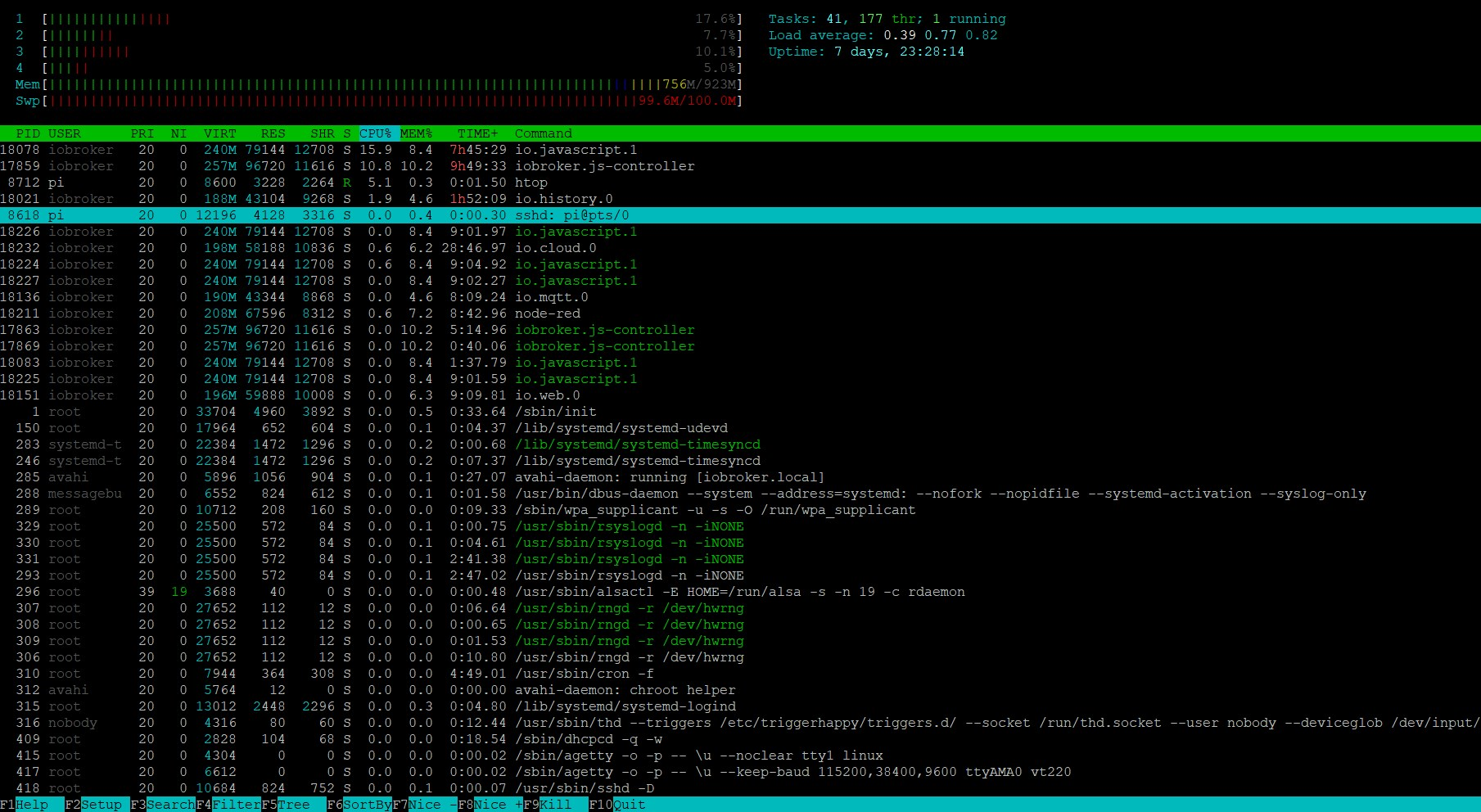
-
Skript v.2023-04-02

*** BASE SYSTEM ***
Model           : Raspberry Pi 2 Model B Rev 1.1
Architecture    : armv7l
Docker          : false
Virtualization  : none
Distributor ID: Raspbian
Description:    Raspbian GNU/Linux 10 (buster)
Release:        10
Codename:       buster

PRETTY_NAME="Raspbian GNU/Linux 10 (buster)"
NAME="Raspbian GNU/Linux"
VERSION_ID="10"
VERSION="10 (buster)"
VERSION_CODENAME=buster
ID=raspbian
ID_LIKE=debian
HOME_URL="http://www.raspbian.org/"
SUPPORT_URL="http://www.raspbian.org/RaspbianForums"
BUG_REPORT_URL="http://www.raspbian.org/RaspbianBugs"

Systemuptime and Load:
 11:41:07 up 7 days, 23:53,  1 user,  load average: 0.30, 0.40, 0.54
CPU threads: 4

*** Time and Time Zones ***
               Local time: Sun 2023-04-16 11:41:07 CEST
           Universal time: Sun 2023-04-16 09:41:07 UTC
                 RTC time: n/a
                Time zone: Europe/Berlin (CEST, +0200)
System clock synchronized: yes
              NTP service: active
          RTC in local TZ: no

*** User and Groups ***
pi
/home/pi
pi adm dialout cdrom sudo audio video plugdev games users input netdev gpio i2c spi iobroker

*** X-Server-Setup ***
X-Server:       false
Desktop:
Terminal:       tty
Boot Target:    graphical.target

*** MEMORY ***
              total        used        free      shared  buff/cache   available
Mem:           923M        758M         46M        3.0M        117M        110M
Swap:           99M         99M        0.0K
Total:         1.0G        858M         47M

          923 M total memory
          758 M used memory
          331 M active memory
          486 M inactive memory
           46 M free memory
           26 M buffer memory
           91 M swap cache
           99 M total swap
           99 M used swap
            0 M free swap

*** FILESYSTEM ***
Filesystem     Type      Size  Used Avail Use% Mounted on
/dev/root      ext4      7.1G  4.3G  2.5G  63% /
devtmpfs       devtmpfs  430M     0  430M   0% /dev
tmpfs          tmpfs     462M     0  462M   0% /dev/shm
tmpfs          tmpfs     462M   12M  450M   3% /run
tmpfs          tmpfs     5.0M  4.0K  5.0M   1% /run/lock
tmpfs          tmpfs     462M     0  462M   0% /sys/fs/cgroup
/dev/mmcblk0p1 vfat      253M   49M  204M  20% /boot
tmpfs          tmpfs      93M     0   93M   0% /run/user/1000

Messages concerning ext4 filesystem in dmesg:
[Sat Apr  8 11:47:36 2023] Kernel command line: coherent_pool=1M snd_bcm2835.enable_compat_alsa=0 snd_bcm2835.enable_hdmi=1 bcm2708_fb.fbwidth=656 bcm2708_fb.fbheight=416 bcm2708_fb.fbswap=1 vc_mem.mem_base=0x3ec00000 vc_mem.mem_size=0x40000000  console=ttyAMA0,115200 console=tty1 root=PARTUUID=6c586e13-02 rootfstype=ext4 elevator=deadline fsck.repair=yes rootwait
[Sat Apr  8 11:47:40 2023] EXT4-fs (mmcblk0p2): mounted filesystem with ordered data mode. Opts: (null)
[Sat Apr  8 11:47:40 2023] VFS: Mounted root (ext4 filesystem) readonly on device 179:2.
[Sat Apr  8 11:47:44 2023] EXT4-fs (mmcblk0p2): re-mounted. Opts: (null)
[Sun Apr  9 13:52:38 2023] [<802b0ee8>] (filemap_fault) from [<8042d260>] (ext4_filemap_fault+0x38/0x4c)
[Sun Apr  9 13:52:38 2023] [<8042d228>] (ext4_filemap_fault) from [<802e8900>] (__do_fault+0x48/0x14c)
[Tue Apr 11 14:06:14 2023] [<802b0ee8>] (filemap_fault) from [<8042d260>] (ext4_filemap_fault+0x38/0x4c)
[Tue Apr 11 14:06:14 2023] [<8042d228>] (ext4_filemap_fault) from [<802e8900>] (__do_fault+0x48/0x14c)

Show mounted filesystems (real ones only):
TARGET        SOURCE         FSTYPE OPTIONS
/             /dev/mmcblk0p2 ext4   rw,noatime
|-/sys/fs/bpf none           bpf    rw,nosuid,nodev,noexec,relatime,mode=700
`-/boot       /dev/mmcblk0p1 vfat   rw,relatime,fmask=0022,dmask=0022,codepage=437,iocharset=ascii,shortname=mixed,errors=remount-ro

Files in neuralgic directories:

/var:
764M    /var/
570M    /var/cache
564M    /var/cache/apt
505M    /var/cache/apt/archives
92M     /var/lib

/opt/iobroker/backups:
13M     /opt/iobroker/backups/

/opt/iobroker/iobroker-data:
310M    /opt/iobroker/iobroker-data/
131M    /opt/iobroker/iobroker-data/files
72M     /opt/iobroker/iobroker-data/backup-objects
66M     /opt/iobroker/iobroker-data/history
51M     /opt/iobroker/iobroker-data/files/javascript.admin

The five largest files in iobroker-data are:
11M     /opt/iobroker/iobroker-data/objects.jsonl
6.9M    /opt/iobroker/iobroker-data/files/javascript.admin/static/js/610.de0231c9.chunk.js.map
6.6M    /opt/iobroker/iobroker-data/files/modbus.admin/static/js/main.8083c40d.js.map
6.3M    /opt/iobroker/iobroker-data/files/admin.admin/custom/static/js/vendors-node_modules_iobroker_adapter-react-v5_assets_devices_parseNames_js-node_modules_iobr-99c23e.847b8ad9.chunk.js.map
6.1M    /opt/iobroker/iobroker-data/states.jsonl

*** NodeJS-Installation ***

/usr/bin/nodejs         v18.15.0
/usr/bin/node           v18.15.0
/usr/bin/npm            9.5.0
/usr/bin/npx            9.5.0

nodejs:
  Installed: 18.15.0-deb-1nodesource1
  Candidate: 18.15.0-deb-1nodesource1
  Version table:
 *** 18.15.0-deb-1nodesource1 500
        500 https://deb.nodesource.com/node_18.x buster/main armhf Packages
        100 /var/lib/dpkg/status
     10.24.0~dfsg-1~deb10u3 500
        500 http://raspbian.raspberrypi.org/raspbian buster/main armhf Packages

Temp directories causing npm8 problem: 0
No problems detected

*** ioBroker-Installation ***

ioBroker Status
iobroker is running on this host.


Objects type: jsonl
States  type: jsonl

Core adapters versions
js-controller:  4.0.24
admin:          6.3.5
javascript:     6.1.4

Adapters from github:   0

Adapter State
+ system.adapter.admin.0                  : admin                 : iobroker                                 -  enabled, port: 8081, bind: 0.0.0.0, run as: admin
+ system.adapter.cloud.0                  : cloud                 : iobroker                                 -  enabled
  system.adapter.discovery.0              : discovery             : ioBrokerWallbox                          -  enabled
+ system.adapter.email.0                  : email                 : iobroker                                 -  enabled
+ system.adapter.email.1                  : email                 : iobroker                                 -  enabled
  system.adapter.flot.0                   : flot                  : iobroker                                 -  enabled
+ system.adapter.fronius.0                : fronius               : iobroker                                 -  enabled
+ system.adapter.history.0                : history               : iobroker                                 -  enabled
+ system.adapter.info.0                   : info                  : iobroker                                 -  enabled
+ system.adapter.javascript.0             : javascript            : ioBrokerHeimspeicher                     -  enabled
+ system.adapter.javascript.1             : javascript            : iobroker                                 -  enabled
+ system.adapter.modbus.0                 : modbus                : iobroker                                 -  enabled
+ system.adapter.modbus.1                 : modbus                : iobroker                                 -  enabled
+ system.adapter.mqtt.0                   : mqtt                  : iobroker                                 -  enabled, port: 1886, bind: 0.0.0.0
  system.adapter.netatmo-crawler.0        : netatmo-crawler       : iobroker                                 -  enabled
+ system.adapter.node-red.0               : node-red              : ioBrokerHeimspeicher                     -  enabled, port: 1880, bind: 0.0.0.0
  system.adapter.node-red.2               : node-red              : ioBrokerWallbox                          -  enabled, port: 1880, bind: 0.0.0.0
+ system.adapter.node-red.3               : node-red              : iobroker                                 -  enabled, port: 1880, bind: 0.0.0.0
+ system.adapter.rpi2.1                   : rpi2                  : ioBrokerHeimspeicher                     -  enabled
+ system.adapter.sonoff.0                 : sonoff                : iobroker                                 -  enabled, port: 1883, bind: 0.0.0.0
  system.adapter.vis-history.0            : vis-history           : iobroker                                 -  enabled
  system.adapter.vis-hqwidgets.0          : vis-hqwidgets         : iobroker                                 -  enabled
  system.adapter.vis-justgage.0           : vis-justgage          : iobroker                                 -  enabled
  system.adapter.vis-timeandweather.0     : vis-timeandweather    : iobroker                                 -  enabled
  system.adapter.vis.0                    : vis                   : iobroker                                 -  enabled
+ system.adapter.vw-connect.0             : vw-connect            : iobroker                                 -  enabled
+ system.adapter.web.0                    : web                   : iobroker                                 -  enabled, port: 8082, bind: 0.0.0.0, run as: admin
  system.adapter.worx.0                   : worx                  : iobroker                                 - disabled

+ instance is alive

Enabled adapters with bindings
+ system.adapter.admin.0                  : admin                 : iobroker                                 -  enabled, port: 8081, bind: 0.0.0.0, run as: admin
+ system.adapter.mqtt.0                   : mqtt                  : iobroker                                 -  enabled, port: 1886, bind: 0.0.0.0
+ system.adapter.node-red.0               : node-red              : ioBrokerHeimspeicher                     -  enabled, port: 1880, bind: 0.0.0.0
  system.adapter.node-red.2               : node-red              : ioBrokerWallbox                          -  enabled, port: 1880, bind: 0.0.0.0
+ system.adapter.node-red.3               : node-red              : iobroker                                 -  enabled, port: 1880, bind: 0.0.0.0
+ system.adapter.sonoff.0                 : sonoff                : iobroker                                 -  enabled, port: 1883, bind: 0.0.0.0
+ system.adapter.web.0                    : web                   : iobroker                                 -  enabled, port: 8082, bind: 0.0.0.0, run as: admin

ioBroker-Repositories
stable        : http://download.iobroker.net/sources-dist.json
beta          : http://download.iobroker.net/sources-dist-latest.json

Active repo(s): stable

Installed ioBroker-Instances
Used repository: stable
 Objects database error: connect ECONNREFUSED 0.0.0.0:9001
 States database error: connect ECONNREFUSED 0.0.0.0:9000
 Objects database error: connect ECONNREFUSED 0.0.0.0:9001
 States database error: connect ECONNREFUSED 0.0.0.0:9000
 Objects database error: connect ECONNREFUSED 0.0.0.0:9001
 States database error: connect ECONNREFUSED 0.0.0.0:9000
 Objects database error: connect ECONNREFUSED 0.0.0.0:9001
 States database error: connect ECONNREFUSED 0.0.0.0:9000
 Objects database error: connect ECONNREFUSED 0.0.0.0:9001
 States database error: connect ECONNREFUSED 0.0.0.0:9000
 Objects database error: connect ECONNREFUSED 0.0.0.0:9001
 States database error: connect ECONNREFUSED 0.0.0.0:9000
 Objects database error: connect ECONNREFUSED 0.0.0.0:9001
 States database error: connect ECONNREFUSED 0.0.0.0:9000
Adapter    "admin"        : 6.3.5    , installed 6.3.5
Adapter    "cloud"        : 4.3.0    , installed 4.3.0
Adapter    "email"        : 1.1.4    , installed 1.1.4
Adapter    "flot"         : 1.11.0   , installed 1.11.0
Adapter    "fronius"      : 1.1.3    , installed 1.1.3
Adapter    "history"      : 2.2.4    , installed 2.2.4
Adapter    "info"         : 1.9.19   , installed 1.9.19
Adapter    "javascript"   : 6.1.4    , installed 6.1.4
Controller "js-controller": 4.0.24   , installed 4.0.24
Adapter    "modbus"       : 5.0.11   , installed 5.0.11
Adapter    "mqtt"         : 4.0.7    , installed 4.0.7
Adapter    "netatmo-crawler": 0.8.1  , installed 0.8.1
Adapter    "node-red"     : 4.0.0    , installed 4.0.0
Adapter    "rpi2"         : 1.3.2    , installed 1.3.2
Adapter    "simple-api"   : 2.7.2    , installed 2.7.2
Adapter    "socketio"     : 4.2.0    , installed 4.2.0
Adapter    "sonoff"       : 2.5.1    , installed 2.5.1
Adapter    "vis"          : 1.4.16   , installed 1.4.16
Adapter    "vis-history"  : 1.0.0    , installed 1.0.0
Adapter    "vis-hqwidgets": 1.3.0    , installed 1.3.0
Adapter    "vis-justgage" : 1.0.2    , installed 1.0.2
Adapter    "vis-timeandweather": 1.2.2, installed 1.2.2
Adapter    "vw-connect"   : 0.0.67   , installed 0.0.62 [Updatable]
Adapter    "web"          : 4.3.0    , installed 4.3.0
Adapter    "worx"         : 2.1.0    , installed 2.0.3  [Updatable]
Adapter    "ws"           : 1.3.0    , installed 1.3.0

Objects and States
Please stand by - This may take a while
Objects:        3101
States:         2334

*** OS-Repositories and Updates ***
Hit:1 http://raspbian.raspberrypi.org/raspbian buster InRelease
Hit:2 http://archive.raspberrypi.org/debian buster InRelease
Hit:3 https://deb.nodesource.com/node_18.x buster InRelease
Reading package lists...
Pending Updates: 6

*** Listening Ports ***
Active Internet connections (only servers)
Proto Recv-Q Send-Q Local Address           Foreign Address         State       User       Inode      PID/Program name
tcp        0      0 0.0.0.0:9000            0.0.0.0:*               LISTEN      1001       799039     9332/iobroker.js-co
tcp        2      0 0.0.0.0:9001            0.0.0.0:*               LISTEN      1001       800185     9332/iobroker.js-co
tcp        0      0 0.0.0.0:22              0.0.0.0:*               LISTEN      0          13082      418/sshd
tcp6       0      0 :::22                   :::*                    LISTEN      0          13084      418/sshd
udp        0      0 0.0.0.0:68              0.0.0.0:*                           0          12820      409/dhcpcd
udp        0      0 0.0.0.0:36526           0.0.0.0:*                           108        12803      285/avahi-daemon: r
udp        0      0 0.0.0.0:5353            0.0.0.0:*                           108        12801      285/avahi-daemon: r
udp6       0      0 :::5353                 :::*                                108        12802      285/avahi-daemon: r
udp6       0      0 :::50536                :::*                                108        12804      285/avahi-daemon: r

*** Log File - Last 25 Lines ***

2023-04-16 11:47:21.098  - info: history.0 (9636) enabled logging of node-red.3.AMIS.Wirkleistung_10sec-avg (Count=8), Alias=false
2023-04-16 11:47:21.165  - info: history.0 (9636) enabled logging of vw-connect.0.WVWZZZE1ZMP033444.status.chargingStatus.chargePower_kW (Count=9), Alias=false
2023-04-16 11:47:21.169  - info: history.0 (9636) enabled logging of node-red.3.AMIS.Wirkleistung_3min-avg (Count=10), Alias=false
2023-04-16 11:47:21.173  - info: history.0 (9636) enabled logging of modbus.1.holdingRegisters.4_Heizkreis_Soll (Count=11), Alias=false
2023-04-16 11:47:21.208  - info: history.0 (9636) enabled logging of modbus.1.holdingRegisters.718_Verdichter (Count=12), Alias=false
2023-04-16 11:47:21.211  - info: history.0 (9636) enabled logging of sonoff.0.Tasmota_Raumtemperatur.DS18B20_Temperature (Count=13), Alias=false
2023-04-16 11:47:21.245  - info: history.0 (9636) enabled logging of mqtt.0.D1_Mini_Raumtemperatur_WC.DS18B20.temperature (Count=14), Alias=false
2023-04-16 11:47:21.249  - info: history.0 (9636) enabled logging of mqtt.0.D1_Mini_Pooltemperatur.DS18B20.temperature (Count=15), Alias=false
2023-04-16 11:47:21.252  - info: history.0 (9636) enabled logging of fronius.0.inverter.1.Voltage_DC_String_1 (Count=16), Alias=false
2023-04-16 11:47:21.277  - info: history.0 (9636) enabled logging of fronius.0.inverter.1.Voltage_DC_String_2 (Count=17), Alias=false
2023-04-16 11:47:21.348  - info: history.0 (9636) enabled logging of fronius.0.inverter.1.Power_DC_String_1 (Count=18), Alias=false
2023-04-16 11:47:21.352  - info: history.0 (9636) enabled logging of fronius.0.inverter.1.Power_DC_String_2 (Count=19), Alias=false
2023-04-16 11:47:21.456  - info: history.0 (9636) enabled logging of fronius.0.inverter.1.PAC (Count=20), Alias=false
2023-04-16 11:47:21.459  - info: history.0 (9636) enabled logging of mqtt.0.Weidezaun.tasmota_C0A179.cmnd.POWER (Count=21), Alias=false
2023-04-16 11:47:21.462  - info: history.0 (9636) enabled logging of mqtt.0.Weidezaun.tasmota_C0A179.POWER (Count=22), Alias=false
2023-04-16 11:47:21.993  - info: vis.0 (9644) vis license is OK.
2023-04-16 11:47:23.531  - info: host.iobroker instance system.adapter.sonoff.0 started with pid 9908
2023-04-16 11:47:24.047  - info: host.iobroker instance system.adapter.mqtt.0 started with pid 9919
2023-04-16 11:47:30.997  - error: cloud.0 (9666) cloud.0 already running
2023-04-16 11:47:35.335  - error: host.iobroker instance system.adapter.cloud.0 terminated with code 7 (ADAPTER_ALREADY_RUNNING)
2023-04-16 11:47:35.340  - info: host.iobroker Restart adapter system.adapter.cloud.0 because enabled
2023-04-16 11:47:35.407  - info: admin.0 (9630) starting. Version 6.3.5 in /opt/iobroker/node_modules/iobroker.admin, node: v18.15.0, js-controller: 4.0.24
2023-04-16 11:47:36.005  - info: admin.0 (9630) requesting all states
2023-04-16 11:47:36.119  - error: vw-connect.0 (9667) vw-connect.0 already running
2023-04-16 11:47:36.224  - warn: vw-connect.0 (9667) Terminated (ADAPTER_ALREADY_RUNNING): Without reason
======================= SUMMARY ======================= v.2023-04-02 Operatingsystem: Raspbian GNU/Linux 10 (buster) Kernel: 5.10.103-v7+ Installation: Native Timezone: Europe/Berlin (CEST, +0200) User-ID: 1000 X-Server: false Boot Target: graphical.target Pending OS-Updates: 6 Pending iob updates: 2 Nodejs-Installation: /usr/bin/nodejs v18.15.0 /usr/bin/node v18.15.0 /usr/bin/npm 9.5.0 /usr/bin/npx 9.5.0 Recommended versions are nodejs 18.x.y and npm 9.x.y MEMORY: total used free shared buff/cache available Mem: 923M 608M 118M 2.0M 196M 258M Swap: 99M 39M 60M Total: 1.0G 648M 178M Active iob-Instances: 19 Active repo(s): stable ioBroker Core: js-controller 4.0.24 admin 6.3.5 ioBroker Status: iobroker is running on this host. Objects type: jsonl States type: jsonl Status admin and web instance: + system.adapter.admin.0 : admin : iobroker - enabled, port: 8081, bind: 0.0.0.0, run as: admin + system.adapter.web.0 : web : iobroker - enabled, port: 8082, bind: 0.0.0.0, run as: admin Objects: 3101 States: 2334 Size of iob-Database: 15M /opt/iobroker/iobroker-data/objects.jsonl 4.4M /opt/iobroker/iobroker-data/objects.json.migrated 4.4M /opt/iobroker/iobroker-data/objects.json.bak.migrated 4.0M /opt/iobroker/iobroker-data/objects.json.old 1.1M /opt/iobroker/iobroker-data/2022-02-09_23-25_objects.json.gz 6.9M /opt/iobroker/iobroker-data/states.jsonl 456K /opt/iobroker/iobroker-data/states.json.migrated 456K /opt/iobroker/iobroker-data/states.json.bak.migrated 420K /opt/iobroker/iobroker-data/states.json.old 92K /opt/iobroker/iobroker-data/2022-02-09_22-48_states.json.gz =================== END OF SUMMARY ====================Zu wenig RAM und das Dateisystem scheint auch Macken zu haben.
-
Zu wenig RAM und das Dateisystem scheint auch Macken zu haben.
@thomas-braun
O.K. danke.
Aber was kann ich dagegen tun?
Zu wenig RAM -> Andere Hardware -> Welche? Wollte eigentlich auf Raspi 4 umsteigen sobald wieder verfügbar.
Dateisystem -> neu aufsetzen? (Woran sieht man, dass da was nicht stimmt?) -
@thomas-braun
O.K. danke.
Aber was kann ich dagegen tun?
Zu wenig RAM -> Andere Hardware -> Welche? Wollte eigentlich auf Raspi 4 umsteigen sobald wieder verfügbar.
Dateisystem -> neu aufsetzen? (Woran sieht man, dass da was nicht stimmt?) -
-
@thomas-braun
Ok danke.
Kann man da was reparieren oder hilft nur neu aufsetzen?Reparieren evtl. per fsck
Muss aber von extern ausgeführt werden. -
Reparieren evtl. per fsck
Muss aber von extern ausgeführt werden. -
@thomas-braun
Von extern bedeutet außerhalb iobroker?
Ist das für einen Linux Laien machbar oder ruiniere ich es nur? Gibt es eine Anleitung?
Backup vorher ist eh selbstverständlich.@manuel001 sagte in Langsame Verbindung erkannt:
Ist das für einen Linux Laien machbar oder ruiniere ich es nur?
Kann ich nicht vorhersehen.
-
@manuel001 sagte in Langsame Verbindung erkannt:
Ist das für einen Linux Laien machbar oder ruiniere ich es nur?
Kann ich nicht vorhersehen.
@thomas-braun Wenn es eine Anleitung gibt, wäre es einen Versuch wert.
So lassen macht vermutlich auch wenig Sinn? -
@homoran sagte in Langsame Verbindung erkannt:
bei 1 GB RAM kein wunder.
was sagt iob diag?Kommt gleich.
Ich wollte eh schon länger upgraden. Aber bei der Raspi Verfügbarkeit etwas schwierig.
Und grundsätzlich sollte es ja auch mit 1GB RAM laufen, wenn nichts aus dem Ruder läuft?@manuel001 sagte in Langsame Verbindung erkannt:
Und grundsätzlich sollte es ja auch mit 1GB RAM laufen,
aber nicht mit 18 Instanzen.
-
@manuel001 sagte in Langsame Verbindung erkannt:
Und grundsätzlich sollte es ja auch mit 1GB RAM laufen,
aber nicht mit 18 Instanzen.
-
@homoran O.K.
Mit "Gesamte RAM-Auslastung: 1150 Mb / Frei: 17% = 156 Mb" habe ich mir da nicht viel gedacht.
Wie viel sollte frei bleiben?@manuel001 sagte in Langsame Verbindung erkannt:
"Gesamte RAM-Auslastung: 1150 Mb / Frei: 17% = 156 Mb"
Das ist zu wenig, insbesondere wenn da dann noch Jobs (z. B. backups) dazu kommen.
Wie viel sollte frei bleiben?
So generell kann man das nicht sagen. Aber ich würde kein System unter 4GB betreiben. Nur wenn man ein ganz abgespecktes und für einen Zweck vorgesehenes System hat geht das mit weniger RAM.
-
@manuel001 sagte in Langsame Verbindung erkannt:
"Gesamte RAM-Auslastung: 1150 Mb / Frei: 17% = 156 Mb"
Das ist zu wenig, insbesondere wenn da dann noch Jobs (z. B. backups) dazu kommen.
Wie viel sollte frei bleiben?
So generell kann man das nicht sagen. Aber ich würde kein System unter 4GB betreiben. Nur wenn man ein ganz abgespecktes und für einen Zweck vorgesehenes System hat geht das mit weniger RAM.
@thomas-braun
Dann werde ich mal schauen, dass ich irgendwo einen Raspi 4 auftreibe. Das habe ich eh schon seit 1 Jahr vor. Schön langsam sollten sie eh wieder verfügbar werden.
So lange werde ich damit leben, dass es so läuft wie es läuft. -
@homoran O.K.
Mit "Gesamte RAM-Auslastung: 1150 Mb / Frei: 17% = 156 Mb" habe ich mir da nicht viel gedacht.
Wie viel sollte frei bleiben?@manuel001 sagte in Langsame Verbindung erkannt:
Gesamte RAM-Auslastung: 1150 Mb /
wie soll das bei
@manuel001 sagte in Langsame Verbindung erkannt:
Mem: 923M
funktionieren?
wo zauberst du denn noch 225MB aus dem Hut? -
@manuel001 sagte in Langsame Verbindung erkannt:
Gesamte RAM-Auslastung: 1150 Mb /
wie soll das bei
@manuel001 sagte in Langsame Verbindung erkannt:
Mem: 923M
funktionieren?
wo zauberst du denn noch 225MB aus dem Hut? -
@manuel001 sagte in Langsame Verbindung erkannt:
@homoran
Ich hätte das 17% frei so interpretiert, dass 17% (156Mb) frei sind.ja, aber.
- 17% ist nicht viel.
- 17% von nicht vorhandenen 1150MB sind 195
- ziehst du die von den nicht vorhandenen 1150 ab erhältst du 954 MB
- das ist immer noch mehr als deine 923 vorhandenen MEM
-
@manuel001 sagte in Langsame Verbindung erkannt:
@homoran
Ich hätte das 17% frei so interpretiert, dass 17% (156Mb) frei sind.ja, aber.
- 17% ist nicht viel.
- 17% von nicht vorhandenen 1150MB sind 195
- ziehst du die von den nicht vorhandenen 1150 ab erhältst du 954 MB
- das ist immer noch mehr als deine 923 vorhandenen MEM
-
@manuel001 sagte in Langsame Verbindung erkannt:
@homoran
Also wird mehr angezeigt, als vorhanden ist?darum fragte ich
@homoran sagte in Langsame Verbindung erkannt:
@manuel001 sagte in Langsame Verbindung erkannt:
Gesamte RAM-Auslastung: 1150 Mb /
wie soll das bei
@manuel001 sagte in Langsame Verbindung erkannt:
Mem: 923M
funktionieren?
wo zauberst du denn noch 225MB aus dem Hut? -
@homoran
Naja, dann habe ich mich von der Anzeige täuschen lassen.
Die Frage ist jetzt nur was ich machen soll.
Raspi 4 sind noch immer praktisch nicht zu bekommen.
Was wird für iobroker sonst die letzten 1,5 Jahre genommen, wenn man eine möglichst stromsparende Hardware haben möchte auf der nur iobroker läuft? -
@homoran
Naja, dann habe ich mich von der Anzeige täuschen lassen.
Die Frage ist jetzt nur was ich machen soll.
Raspi 4 sind noch immer praktisch nicht zu bekommen.
Was wird für iobroker sonst die letzten 1,5 Jahre genommen, wenn man eine möglichst stromsparende Hardware haben möchte auf der nur iobroker läuft?@manuel001 wenn du wieder einen SBC haben willst wäre
https://www.reichelt.de/odroid-c4-4x-2-0-ghz-4-gb-ram-odroid-c4-p283467.html?&trstct=pos_5&nbc=1
Vielleicht etwas für dich.
Hab den C2 der ist Spitze -
@manuel001 wenn du wieder einen SBC haben willst wäre
https://www.reichelt.de/odroid-c4-4x-2-0-ghz-4-gb-ram-odroid-c4-p283467.html?&trstct=pos_5&nbc=1
Vielleicht etwas für dich.
Hab den C2 der ist Spitze

Hey! Du scheinst an dieser Unterhaltung interessiert zu sein, hast aber noch kein Konto.
Hast du es satt, bei jedem Besuch durch die gleichen Beiträge zu scrollen? Wenn du dich für ein Konto anmeldest, kommst du immer genau dorthin zurück, wo du zuvor warst, und kannst dich über neue Antworten benachrichtigen lassen (entweder per E-Mail oder Push-Benachrichtigung). Du kannst auch Lesezeichen speichern und Beiträge positiv bewerten, um anderen Community-Mitgliedern deine Wertschätzung zu zeigen.
Mit deinem Input könnte dieser Beitrag noch besser werden 💗
Registrieren Anmelden385
Online33.0k
Benutzer83.5k
Themen1.3m
Beiträge