




Fehler bei Backitup Adapter (Gelöst)
-
@thomas-braun
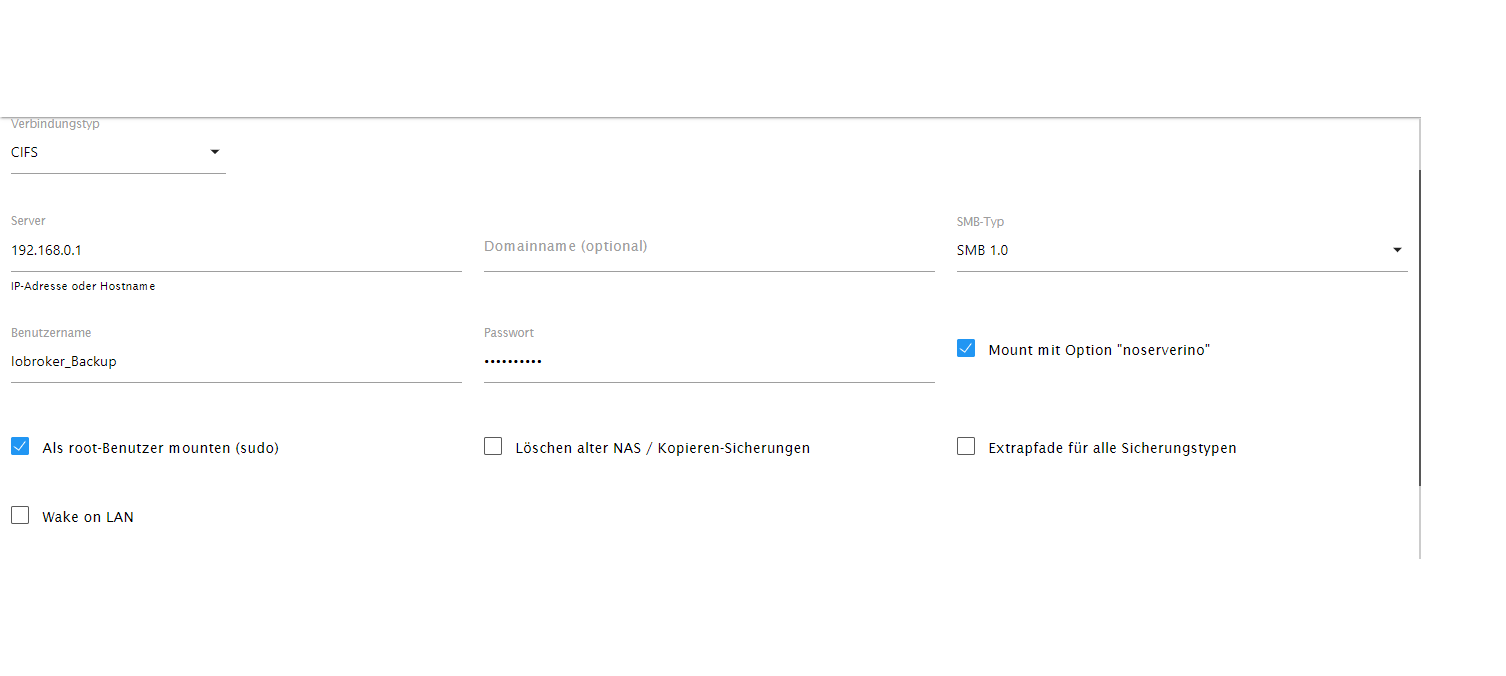
Hatte ihn wieder zurück geändert. Ging ja nicht. Trage den anderen nochmal ein.Und 'noserverino' muss auch aktiv sein.
-
Und 'noserverino' muss auch aktiv sein.
@thomas-braun
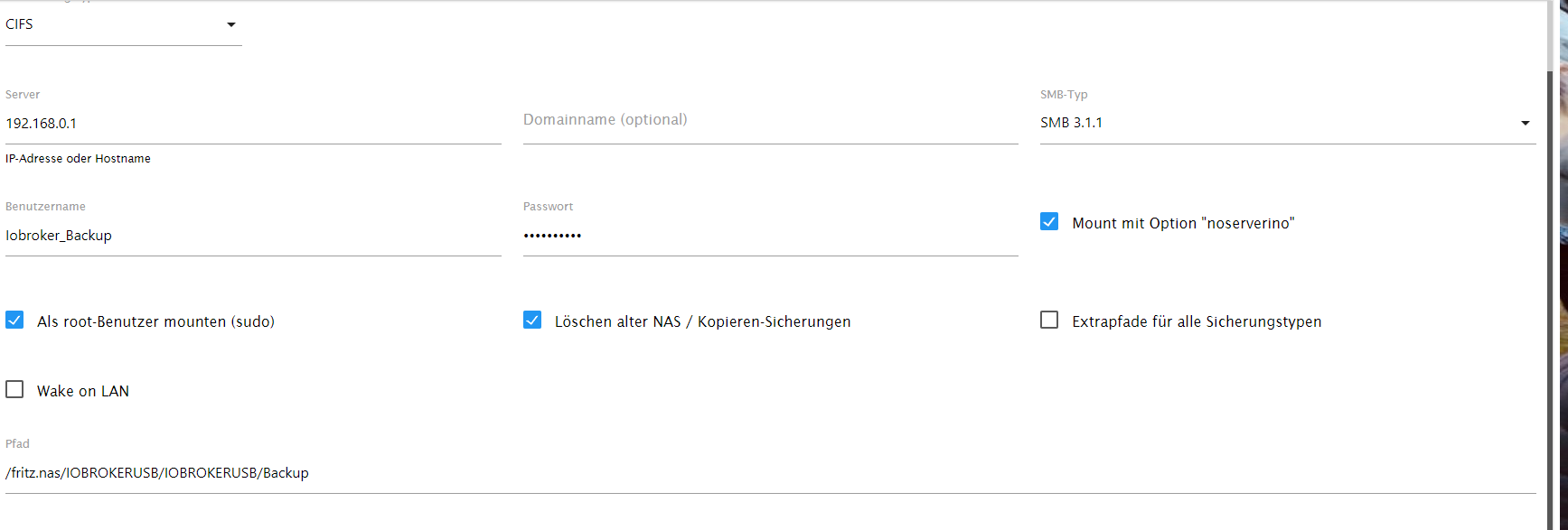
Alles geändert. Geht immer noch nicht.backitup.0 2023-04-15 13:01:44.256 error Error: Command failed: sudo mount -t cifs -o username=Iobroker_Backup,password=****,noserverino,rw,uid=iobroker,gid=iobroker,file_mode=0777,dir_mode=0777 //192.168.0.1/fritz.nas/IOBROKERUSB/IOBROKERUSB/Backup /opt/iobroker/backups mount error: cifs filesystem not supported by the system mount error(19): No such device Refer to the mount.cifs(8) manual page (e.g. man mount.cifs) and kernel log messages (dmesg) -
@thomas-braun
Alles geändert. Geht immer noch nicht.backitup.0 2023-04-15 13:01:44.256 error Error: Command failed: sudo mount -t cifs -o username=Iobroker_Backup,password=****,noserverino,rw,uid=iobroker,gid=iobroker,file_mode=0777,dir_mode=0777 //192.168.0.1/fritz.nas/IOBROKERUSB/IOBROKERUSB/Backup /opt/iobroker/backups mount error: cifs filesystem not supported by the system mount error(19): No such device Refer to the mount.cifs(8) manual page (e.g. man mount.cifs) and kernel log messages (dmesg)Einstellungen und Log nochmal zeigen.
-
Einstellungen und Log nochmal zeigen.
-
-
@thomas-braun said in Fehler bei Backitup Adapter:
iob diag
======================= SUMMARY =======================
                     v.2023-04-02


Operatingsystem:        Raspbian GNU/Linux 11 (bullseye)
Kernel:                 5.15.84-v7l+
Installation:           Native
Timezone:               Europe/Berlin (CEST, +0200)
User-ID:                1000
X-Server:               true
Boot Target:            graphical.target

Pending OS-Updates:     0
Pending iob updates:    0

Nodejs-Installation:    /usr/bin/nodejs         v16.19.1
                        /usr/bin/node           v16.19.1
                        /usr/bin/npm            8.19.3
                        /usr/bin/npx            8.19.3

Recommended versions are nodejs 18.x.y and npm 9.x.y

MEMORY:
               total        used        free      shared  buff/cache   available
Mem:            3.8G        335M        1.4G        1.0M        2.1G        3.4G
Swap:            99M          0B         99M
Total:          3.9G        335M        1.5G

Active iob-Instances:   4
Active repo(s): stable

ioBroker Core:          js-controller           4.0.24
                        admin                   6.3.5

ioBroker Status:        iobroker is running on this host.


Objects type: jsonl
States  type: jsonl

Status admin and web instance:
+ system.adapter.admin.0                  : admin                 : Iobroker                                 -  enabled, port: 8081, bind: 0.0.0.0, run as: admin

Objects:                142
States:                 104

Size of iob-Database:

7.0M    /opt/iobroker/iobroker-data/objects.jsonl
6.2M    /opt/iobroker/iobroker-data/states.jsonl


=================== END OF SUMMARY ====================
Fritzbox Version 7.29
-
@thomas-braun said in Fehler bei Backitup Adapter:
iob diag
======================= SUMMARY =======================
                     v.2023-04-02


Operatingsystem:        Raspbian GNU/Linux 11 (bullseye)
Kernel:                 5.15.84-v7l+
Installation:           Native
Timezone:               Europe/Berlin (CEST, +0200)
User-ID:                1000
X-Server:               true
Boot Target:            graphical.target

Pending OS-Updates:     0
Pending iob updates:    0

Nodejs-Installation:    /usr/bin/nodejs         v16.19.1
                        /usr/bin/node           v16.19.1
                        /usr/bin/npm            8.19.3
                        /usr/bin/npx            8.19.3

Recommended versions are nodejs 18.x.y and npm 9.x.y

MEMORY:
               total        used        free      shared  buff/cache   available
Mem:            3.8G        335M        1.4G        1.0M        2.1G        3.4G
Swap:            99M          0B         99M
Total:          3.9G        335M        1.5G

Active iob-Instances:   4
Active repo(s): stable

ioBroker Core:          js-controller           4.0.24
                        admin                   6.3.5

ioBroker Status:        iobroker is running on this host.


Objects type: jsonl
States  type: jsonl

Status admin and web instance:
+ system.adapter.admin.0                  : admin                 : Iobroker                                 -  enabled, port: 8081, bind: 0.0.0.0, run as: admin

Objects:                142
States:                 104

Size of iob-Database:

7.0M    /opt/iobroker/iobroker-data/objects.jsonl
6.2M    /opt/iobroker/iobroker-data/states.jsonl


=================== END OF SUMMARY ====================
Fritzbox Version 7.29
Da stimmt glaube ich mit dem Kernel was nicht. Da sollte eigentlich ein Kernel 6.1 kommen.
sudo apt update
apt policy raspberrypi-kernel
Und schalte den Desktop aus.
-
Da stimmt glaube ich mit dem Kernel was nicht. Da sollte eigentlich ein Kernel 6.1 kommen.
sudo apt update
apt policy raspberrypi-kernel
Und schalte den Desktop aus.
@thomas-braun ```
Hit:1 http://archive.raspberrypi.org/debian bullseye InRelease
Hit:2 http://raspbian.raspberrypi.org/raspbian bullseye InRelease
Hit:3 https://deb.nodesource.com/node_16.x bullseye InRelease
Reading package lists... Done
Building dependency tree... Done
Reading state information... Done
All packages are up to date.
lustig29@Iobroker:~ $ apt policy raspberrypi-kernel
raspberrypi-kernel:
Installed: 1:1.20230405-1
Candidate: 1:1.20230405-1
Version table:
*** 1:1.20230405-1 500
500 http://archive.raspberrypi.org/debian bullseye/main armhf Packages
100 /var/lib/dpkg/status -
@thomas-braun ```
Hit:1 http://archive.raspberrypi.org/debian bullseye InRelease
Hit:2 http://raspbian.raspberrypi.org/raspbian bullseye InRelease
Hit:3 https://deb.nodesource.com/node_16.x bullseye InRelease
Reading package lists... Done
Building dependency tree... Done
Reading state information... Done
All packages are up to date.
lustig29@Iobroker:~ $ apt policy raspberrypi-kernel
raspberrypi-kernel:
Installed: 1:1.20230405-1
Candidate: 1:1.20230405-1
Version table:
*** 1:1.20230405-1 500
500 http://archive.raspberrypi.org/debian bullseye/main armhf Packages
100 /var/lib/dpkg/status -
up 14 hours, 53 minutes -
up 14 hours, 53 minutes



Hey! Du scheinst an dieser Unterhaltung interessiert zu sein, hast aber noch kein Konto.
Hast du es satt, bei jedem Besuch durch die gleichen Beiträge zu scrollen? Wenn du dich für ein Konto anmeldest, kommst du immer genau dorthin zurück, wo du zuvor warst, und kannst dich über neue Antworten benachrichtigen lassen (entweder per E-Mail oder Push-Benachrichtigung). Du kannst auch Lesezeichen speichern und Beiträge positiv bewerten, um anderen Community-Mitgliedern deine Wertschätzung zu zeigen.
Mit deinem Input könnte dieser Beitrag noch besser werden 💗
Registrieren Anmelden457
Online33.0k
Benutzer83.5k
Themen1.3m
Beiträge