Skip to content
  • Home
  • Aktuell
  • Tags
  • 0 Ungelesen 0
  • Kategorien
  • Unreplied
  • Beliebt
  • GitHub
  • Docu
  • Hilfe
Skins
  • Light
  • Brite
  • Cerulean
  • Cosmo
  • Flatly
  • Journal
  • Litera
  • Lumen
  • Lux
  • Materia
  • Minty
  • Morph
  • Pulse
  • Sandstone
  • Simplex
  • Sketchy
  • Spacelab
  • United
  • Yeti
  • Zephyr
  • Dark
  • Cyborg
  • Darkly
  • Quartz
  • Slate
  • Solar
  • Superhero
  • Vapor

  • Standard: (Kein Skin)
  • Kein Skin
Einklappen
ioBroker Logo

Community Forum

donate donate
  1. ioBroker Community Home
  2. Deutsch
  3. Error/Bug
  4. Zigbee Adapter startet nicht, Cannot read properties

NEWS

  • Jahresrückblick 2025 – unser neuer Blogbeitrag ist online! ✨
    BluefoxB
    Bluefox
    17
    1
    3.4k

  • Neuer Blogbeitrag: Monatsrückblick - Dezember 2025 🎄
    BluefoxB
    Bluefox
    13
    1
    1.1k

  • Weihnachtsangebot 2025! 🎄
    BluefoxB
    Bluefox
    25
    1
    2.5k

Zigbee Adapter startet nicht, Cannot read properties

Geplant Angeheftet Gesperrt Verschoben Error/Bug
30 Beiträge 3 Kommentatoren 2.1k Aufrufe 2 Watching
  • Älteste zuerst
  • Neuste zuerst
  • Meiste Stimmen
Antworten
  • In einem neuen Thema antworten
Anmelden zum Antworten
Dieses Thema wurde gelöscht. Nur Nutzer mit entsprechenden Rechten können es sehen.
  • S Simono
    Systemdata Bitte Ausfüllen
    Hardwaresystem: pi4
    Arbeitsspeicher: 4GB
    Festplattenart: SD-Karte 16GB/SSD128GB
    Betriebssystem: Raspbian GNU/Linux 10 (buster)
    Node-Version: 18.15.0
    Nodejs-Version: 18.15.0
    NPM-Version: 9.5.0
    Installationsart: Skript
    Image genutzt: Ja
    Name der Imagedatei: Image All-in-One für Raspberry Pi4 – piVCCU3

    Hallo, ich bin zwar schon etwas länger dabei und habe öfter Probleme, die ich aber bisher selbst lösen konnte.
    Jetzt wollte ich vom Deconz-Adapter auf den Zigbee-Adapter (mit Conbee II Stick) wechseln, da Deconz so nach und nach meine Geräte nicht erkennt. Auch das anlernen funktioniert nicht immer Problemlos.
    Nachdem ich den Deconzadapter deinstalliert habe und auch in der Konsole alles gestoppt habe:

    pi@pi4:/opt/iobroker $ sudo systemctl stop deconz-gui
    pi@pi4:/opt/iobroker $ sudo systemctl stop deconz
    pi@pi4:/opt/iobroker $ sudo systemctl disable deconz-gui
    pi@pi4:/opt/iobroker $ sudo systemctl disable deconz
    

    Habe ich den Zigbee-Adapter Instanz hinzugefügt und auch mit "https://www.verdrahtet.info/2022/02/11/guenstiges-smarthome-2-zigbee-installation-auf-dem-iobroker/" eingerichtet.

    Wenn ich diesen dann starte bekomme ich mehrere Fehlermeldungen, hier die Log-Datei (Zigbee-Debug):

    2023-04-07 11:57:49.147  - info: host.pi4 instance system.adapter.zigbee.0 started with pid 24500
    2023-04-07 11:57:52.815  - info: zigbee.0 (24500) Plugin sentry Sentry Plugin disabled for this process because sending of statistic data is disabled for the system
    2023-04-07 11:57:53.175  - info: zigbee.0 (24500) starting. Version 1.8.10 in /opt/iobroker/node_modules/iobroker.zigbee, node: v18.15.0, js-controller: 4.0.24
    2023-04-07 11:57:53.301  - info: zigbee.0 (24500) delete old Backup files. keep only last 10
    2023-04-07 11:57:53.303  - info: zigbee.0 (24500) Starting Zigbee  npm ...
    2023-04-07 11:57:53.889  - info: zigbee.0 (24500) Installed Version: iobroker.zigbee@1.8.10
    2023-04-07 11:57:53.924  - info: zigbee.0 (24500) Coordinator firmware version: undefined
    2023-04-07 11:57:53.950  - info: zigbee.0 (24500) Unable to disable LED, unsupported function.
    2023-04-07 11:57:53.951  - info: zigbee.0 (24500)   --> transmitPower : normal
    2023-04-07 11:57:53.953  - info: zigbee.0 (24500) Unable to set transmit power, unsupported function.
    2023-04-07 11:57:53.957  - info: zigbee.0 (24500) Currently 1 devices are joined:
    2023-04-07 11:57:53.960  - info: zigbee.0 (24500) Configuring 0x84182600001060e9 Plug 01
    2023-04-07 11:57:53.965  - info: zigbee.0 (24500) 0x84182600001060e9 (addr 60434): AB3257001NJ - OSRAM Smart+ plug (Router)
    2023-04-07 11:57:53.967  - info: zigbee.0 (24500) Zigbee started
    2023-04-07 11:57:54.101  - error: zigbee.0 (24500) uncaught exception: Cannot read properties of undefined (reading 'name')
    2023-04-07 11:57:54.104  - error: zigbee.0 (24500) TypeError: Cannot read properties of undefined (reading 'name')
        at Immediate.<anonymous> (/opt/iobroker/node_modules/iobroker.zigbee/lib/statescontroller.js:416:46)
        at process.processImmediate (node:internal/timers:478:21)
    2023-04-07 11:57:54.104  - error: zigbee.0 (24500) Cannot read properties of undefined (reading 'name')
    2023-04-07 11:57:54.108  - info: zigbee.0 (24500) cleaned everything up...
    2023-04-07 11:57:54.118  - info: zigbee.0 (24500) Zigbee: disabling joining new devices.
    2023-04-07 11:57:54.135  - error: zigbee.0 (24500) uncaught exception: Cannot read properties of undefined (reading 'name')
    2023-04-07 11:57:54.137  - error: zigbee.0 (24500) TypeError: Cannot read properties of undefined (reading 'name')
        at Immediate.<anonymous> (/opt/iobroker/node_modules/iobroker.zigbee/lib/statescontroller.js:416:46)
        at process.processImmediate (node:internal/timers:478:21)
    2023-04-07 11:57:54.137  - error: zigbee.0 (24500) Cannot read properties of undefined (reading 'name')
    2023-04-07 11:57:54.346  - info: zigbee.0 (24500) terminating
    2023-04-07 11:57:54.348  - warn: zigbee.0 (24500) Terminated (UNCAUGHT_EXCEPTION): Without reason
    2023-04-07 11:57:52.815  - info: zigbee.0 (24500) Plugin sentry Sentry Plugin disabled for this process because sending of statistic data is disabled for the system
    2023-04-07 11:57:53.175  - info: zigbee.0 (24500) starting. Version 1.8.10 in /opt/iobroker/node_modules/iobroker.zigbee, node: v18.15.0, js-controller: 4.0.24
    2023-04-07 11:57:53.301  - info: zigbee.0 (24500) delete old Backup files. keep only last 10
    2023-04-07 11:57:53.303  - info: zigbee.0 (24500) Starting Zigbee  npm ...
    2023-04-07 11:57:53.889  - info: zigbee.0 (24500) Installed Version: iobroker.zigbee@1.8.10
    2023-04-07 11:57:53.924  - info: zigbee.0 (24500) Coordinator firmware version: undefined
    2023-04-07 11:57:53.950  - info: zigbee.0 (24500) Unable to disable LED, unsupported function.
    2023-04-07 11:57:53.951  - info: zigbee.0 (24500)   --> transmitPower : normal
    2023-04-07 11:57:53.953  - info: zigbee.0 (24500) Unable to set transmit power, unsupported function.
    2023-04-07 11:57:53.957  - info: zigbee.0 (24500) Currently 1 devices are joined:
    2023-04-07 11:57:53.960  - info: zigbee.0 (24500) Configuring 0x84182600001060e9 Plug 01
    2023-04-07 11:57:53.965  - info: zigbee.0 (24500) 0x84182600001060e9 (addr 60434): AB3257001NJ - OSRAM Smart+ plug (Router)
    2023-04-07 11:57:53.967  - info: zigbee.0 (24500) Zigbee started
    2023-04-07 11:57:54.101  - error: zigbee.0 (24500) uncaught exception: Cannot read properties of undefined (reading 'name')
    2023-04-07 11:57:54.104  - error: zigbee.0 (24500) TypeError: Cannot read properties of undefined (reading 'name')
        at Immediate.<anonymous> (/opt/iobroker/node_modules/iobroker.zigbee/lib/statescontroller.js:416:46)
        at process.processImmediate (node:internal/timers:478:21)
    2023-04-07 11:57:54.104  - error: zigbee.0 (24500) Cannot read properties of undefined (reading 'name')
    2023-04-07 11:57:54.108  - info: zigbee.0 (24500) cleaned everything up...
    2023-04-07 11:57:54.118  - info: zigbee.0 (24500) Zigbee: disabling joining new devices.
    2023-04-07 11:57:54.135  - error: zigbee.0 (24500) uncaught exception: Cannot read properties of undefined (reading 'name')
    2023-04-07 11:57:54.137  - error: zigbee.0 (24500) TypeError: Cannot read properties of undefined (reading 'name')
        at Immediate.<anonymous> (/opt/iobroker/node_modules/iobroker.zigbee/lib/statescontroller.js:416:46)
        at process.processImmediate (node:internal/timers:478:21)
    2023-04-07 11:57:54.137  - error: zigbee.0 (24500) Cannot read properties of undefined (reading 'name')
    2023-04-07 11:57:54.346  - info: zigbee.0 (24500) terminating
    2023-04-07 11:57:54.348  - warn: zigbee.0 (24500) Terminated (UNCAUGHT_EXCEPTION): Without reason
    2023-04-07 11:57:55.081  - error: host.pi4 instance system.adapter.zigbee.0 terminated with code 6 (UNCAUGHT_EXCEPTION)
    2023-04-07 11:57:55.088  - info: host.pi4 Restart adapter system.adapter.zigbee.0 because enabled
    2023-04-07 11:57:55.081  - error: host.pi4 instance system.adapter.zigbee.0 terminated with code 6 (UNCAUGHT_EXCEPTION)
    2023-04-07 11:57:55.088  - info: host.pi4 Restart adapter system.adapter.zigbee.0 because enabled
    2023-04-07 11:58:05.391  - info: host.pi4 "system.adapter.zigbee.0" disabled
    2023-04-07 11:58:29.110  - info: zigbee.0 (24545) Plugin sentry Sentry Plugin disabled for this process because sending of statistic data is disabled for the system
    2023-04-07 11:58:29.123  - error: zigbee.0 (24545) adapter disabled
    2023-04-07 11:58:29.131  - warn: zigbee.0 (24545) Terminated (NO_ADAPTER_CONFIG_FOUND): Without reason
    2023-04-07 11:58:29.110  - info: zigbee.0 (24545) Plugin sentry Sentry Plugin disabled for this process because sending of statistic data is disabled for the system
    

    Was mich wundert, er findet einen Osram-Plug beim ersten Startversuch, bei den nächsten Versuchen nicht mehr. Vor ein paar Jahren hatte ich den Zigbee-Adapter schonmal installiert, damals noch mit dem Stick von TI.

    Hat jemand eine Idee was da falsch läuft? Zu dem Fehler

    2023-04-07 11:57:54.137  - error: zigbee.0 (24500) TypeError: Cannot read properties of undefined (reading 'name')
    

    kann ich leider nichts brauchbares finden.

    pi@pi4:/opt/iobroker/bck $ which nodejs && nodejs -v && which node && node -v && which npm && npm -v && apt policy nodejs
    /usr/bin/nodejs
    v18.15.0
    /usr/bin/node
    v18.15.0
    /usr/bin/npm
    9.5.0
    nodejs:
      Installiert:           18.15.0-deb-1nodesource1
      Installationskandidat: 18.15.0-deb-1nodesource1
      Versionstabelle:
     *** 18.15.0-deb-1nodesource1 500
            500 https://deb.nodesource.com/node_18.x buster/main armhf Packages
            100 /var/lib/dpkg/status
         10.24.0~dfsg-1~deb10u3 500
            500 http://raspbian.raspberrypi.org/raspbian buster/main armhf Packages
    
    pi@pi4:/opt/iobroker $ iobroker repo list
    stable        : http://download.iobroker.net/sources-dist.json
    
    Active repo(s): stable
    

    Wenn ihr noch mehr Infos benötigt, sagt es einfach.

    Danke und Grüße

    Thomas BraunT Online
    Thomas BraunT Online
    Thomas Braun
    Most Active
    schrieb am zuletzt editiert von Thomas Braun
    #2

    @simono
    Soso...
    Und was steht dazu im LogFile?
    Was sagt

    iob diag
    

    dazu?

    Linux-Werkzeugkasten:
    https://forum.iobroker.net/topic/42952/der-kleine-iobroker-linux-werkzeugkasten
    NodeJS Fixer Skript:
    https://forum.iobroker.net/topic/68035/iob-node-fix-skript
    iob_diag: curl -sLf -o diag.sh https://iobroker.net/diag.sh && bash diag.sh

    S 1 Antwort Letzte Antwort
    0
    • Thomas BraunT Thomas Braun

      @simono
      Soso...
      Und was steht dazu im LogFile?
      Was sagt

      iob diag
      

      dazu?

      S Offline
      S Offline
      Simono
      schrieb am zuletzt editiert von
      #3

      @thomas-braun

      Hallo,

      hier die Zusammenfassung, oder lieber das original?

      Copy text starting here:
      
      ======================= SUMMARY =======================
                           v.2023-04-02
      
      
      Operatingsystem:        Raspbian GNU/Linux 10 (buster)
      Kernel:                 5.10.103-v7l+
      Installation:           Native
      Timezone:               Europe/Berlin (CEST, +0200)
      User-ID:                1000
      X-Server:               false
      Boot Target:            multi-user.target
      
      Pending OS-Updates:     0
      Pending iob updates:    1
      
      Nodejs-Installation:    /usr/bin/nodejs         v18.15.0
                              /usr/bin/node           v18.15.0
                              /usr/bin/npm            9.5.0
                              /usr/bin/npx            9.5.0
      
      Recommended versions are nodejs 18.x.y and npm 9.x.y
      
      MEMORY:
                    total        used        free      shared  buff/cache   available
      Mem:           3.8G        1.4G        150M        8.0M        2.3G        2.3G
      Swap:           99M          0B         99M
      Total:         3.9G        1.4G        250M
      
      Active iob-Instances:   26
      Active repo(s): stable
      
      ioBroker Core:          js-controller           4.0.24
                              admin                   6.3.5
      
      ioBroker Status:        iobroker is running on this host.
      
      
      Objects type: jsonl
      States  type: redis
      
      Status admin and web instance:
      + system.adapter.admin.0                  : admin                 : pi4                                      -  enabled, port: 8081, bind: 0.0.0.0, run as: admin
      + system.adapter.web.0                    : web                   : pi4                                      -  enabled, port: 8082, bind: 0.0.0.0, run as: admin
      
      Objects:                14105
      States:                 10544
      
      Size of iob-Database:
      
      23M     /opt/iobroker/iobroker-data/objects.jsonl
      13M     /opt/iobroker/iobroker-data/objects.json.migrated
      13M     /opt/iobroker/iobroker-data/objects.json.bak.migrated
      1.8M    /opt/iobroker/iobroker-data/2021-10-30_23-12_objects.json.gz
      3.5M    /opt/iobroker/iobroker-data/states.json
      540K    /opt/iobroker/iobroker-data/2020-01-15_14-00_states.json.gz


      =================== END OF SUMMARY ====================
      
      
      Thomas BraunT 1 Antwort Letzte Antwort
      0
      • S Simono

        @thomas-braun

        Hallo,

        hier die Zusammenfassung, oder lieber das original?

        Copy text starting here:
        
        ======================= SUMMARY =======================
                             v.2023-04-02
        
        
        Operatingsystem:        Raspbian GNU/Linux 10 (buster)
        Kernel:                 5.10.103-v7l+
        Installation:           Native
        Timezone:               Europe/Berlin (CEST, +0200)
        User-ID:                1000
        X-Server:               false
        Boot Target:            multi-user.target
        
        Pending OS-Updates:     0
        Pending iob updates:    1
        
        Nodejs-Installation:    /usr/bin/nodejs         v18.15.0
                                /usr/bin/node           v18.15.0
                                /usr/bin/npm            9.5.0
                                /usr/bin/npx            9.5.0
        
        Recommended versions are nodejs 18.x.y and npm 9.x.y
        
        MEMORY:
                      total        used        free      shared  buff/cache   available
        Mem:           3.8G        1.4G        150M        8.0M        2.3G        2.3G
        Swap:           99M          0B         99M
        Total:         3.9G        1.4G        250M
        
        Active iob-Instances:   26
        Active repo(s): stable
        
        ioBroker Core:          js-controller           4.0.24
                                admin                   6.3.5
        
        ioBroker Status:        iobroker is running on this host.
        
        
        Objects type: jsonl
        States  type: redis
        
        Status admin and web instance:
        + system.adapter.admin.0                  : admin                 : pi4                                      -  enabled, port: 8081, bind: 0.0.0.0, run as: admin
        + system.adapter.web.0                    : web                   : pi4                                      -  enabled, port: 8082, bind: 0.0.0.0, run as: admin
        
        Objects:                14105
        States:                 10544
        
        Size of iob-Database:
        
        23M     /opt/iobroker/iobroker-data/objects.jsonl
        13M     /opt/iobroker/iobroker-data/objects.json.migrated
        13M     /opt/iobroker/iobroker-data/objects.json.bak.migrated
        1.8M    /opt/iobroker/iobroker-data/2021-10-30_23-12_objects.json.gz
        3.5M    /opt/iobroker/iobroker-data/states.json
        540K    /opt/iobroker/iobroker-data/2020-01-15_14-00_states.json.gz


        =================== END OF SUMMARY ====================
        
        
        Thomas BraunT Online
        Thomas BraunT Online
        Thomas Braun
        Most Active
        schrieb am zuletzt editiert von
        #4

        @simono

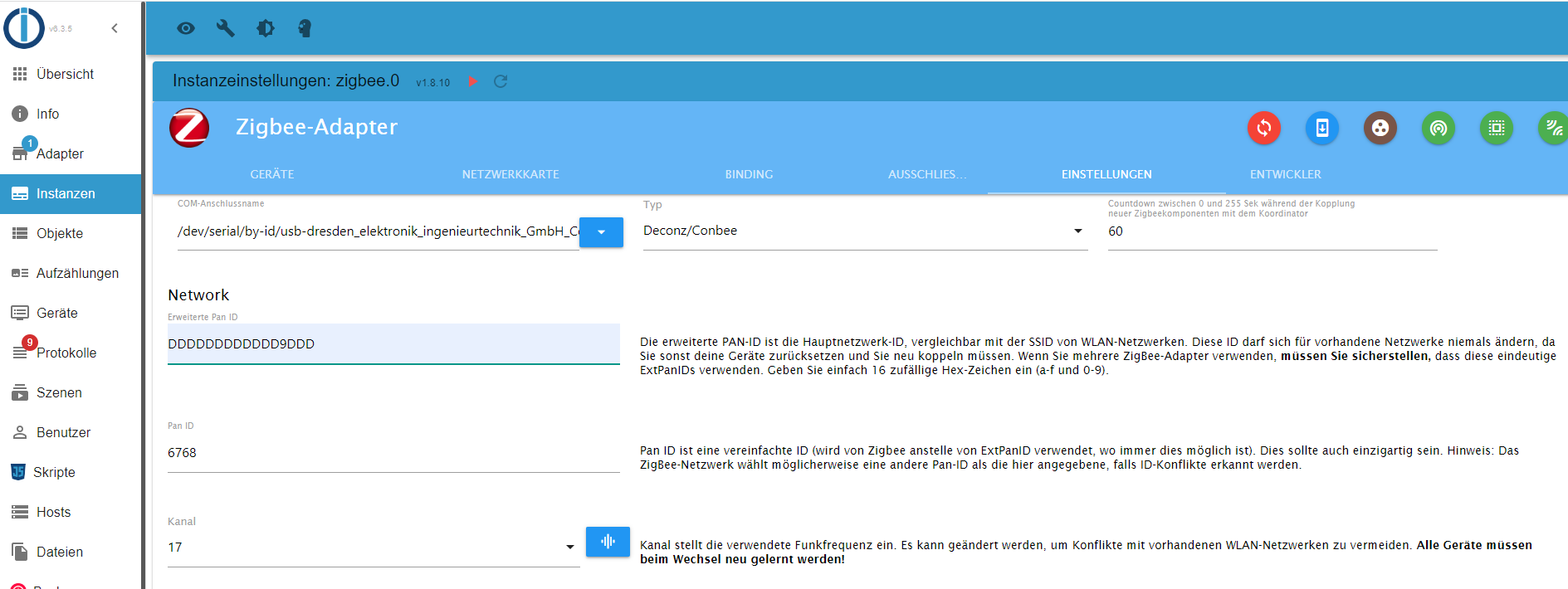
        Zeig mal die Einstellungen der Instanz.
        Grundsätzlich startet das Ganze ja.

        Den Buster solltest du auch beerdigen, der ist tot. Das Bullseye-Release ist aktuell.

        Linux-Werkzeugkasten:
        https://forum.iobroker.net/topic/42952/der-kleine-iobroker-linux-werkzeugkasten
        NodeJS Fixer Skript:
        https://forum.iobroker.net/topic/68035/iob-node-fix-skript
        iob_diag: curl -sLf -o diag.sh https://iobroker.net/diag.sh && bash diag.sh

        S 1 Antwort Letzte Antwort
        0
        • Thomas BraunT Thomas Braun

          @simono

          Zeig mal die Einstellungen der Instanz.
          Grundsätzlich startet das Ganze ja.

          Den Buster solltest du auch beerdigen, der ist tot. Das Bullseye-Release ist aktuell.

          S Offline
          S Offline
          Simono
          schrieb am zuletzt editiert von Simono
          #5

          @thomas-braun Zigbee-Einstellungen.png

          Der Rest ist Standard.

          Ro75R 1 Antwort Letzte Antwort
          0
          • S Simono

            @thomas-braun Zigbee-Einstellungen.png

            Der Rest ist Standard.

            Ro75R Offline
            Ro75R Offline
            Ro75
            schrieb am zuletzt editiert von
            #6

            @simono Warum Kanal 17?

            SERVER = Beelink U59 16GB DDR4 RAM 512GB SSD, FB 7490, FritzDect 200+301+440, ConBee II, Zigbee Aqara Sensoren + NOUS A1Z, NOUS A1T, Philips Hue ** ioBroker, REDIS, influxdb2, Grafana, PiHole, Plex-Mediaserver, paperless-ngx (Docker), MariaDB + phpmyadmin *** VIS-Runtime = Intel NUC 8GB RAM 128GB SSD + 24" Touchscreen

            S 1 Antwort Letzte Antwort
            0
            • Ro75R Ro75

              @simono Warum Kanal 17?

              S Offline
              S Offline
              Simono
              schrieb am zuletzt editiert von
              #7

              @ro75
              Habe mehrere Kanäle durchprobiert, bei Kanal 17 bin ich erstmal stehen geblieben.

              S 1 Antwort Letzte Antwort
              0
              • S Simono

                @ro75
                Habe mehrere Kanäle durchprobiert, bei Kanal 17 bin ich erstmal stehen geblieben.

                S Offline
                S Offline
                Simono
                schrieb am zuletzt editiert von
                #8

                Mit

                iob diag
                

                ist mit aufgefallen, dass er nicht auf phoscon.de zugreifen kann. Ich habe auch über den Browser keinen Zugriff drauf.

                *** OS-Repositories and Updates ***
                W: Failed to fetch http://phoscon.de/apt/deconz/dists/buster/InRelease  Could not connect to phoscon.de:80 (144.76.96.194), connection timed out
                W: Some index files failed to download. They have been ignored, or old ones used instead.
                Hit:1 http://archive.raspberrypi.org/debian buster InRelease
                Hit:2 http://raspbian.raspberrypi.org/raspbian buster InRelease
                Hit:3 https://deb.nodesource.com/node_18.x buster InRelease
                Hit:4 https://www.pivccu.de/piVCCU stable InRelease
                Err:5 http://phoscon.de/apt/deconz buster InRelease
                  Could not connect to phoscon.de:80 (144.76.96.194), connection timed out
                Reading package lists... Done
                W: Failed to fetch http://phoscon.de/apt/deconz/dists/buster/InRelease  Could not connect to phoscon.de:80 (144.76.96.194), connection timed out
                W: Some index files failed to download. They have been ignored, or old ones used instead.
                Pending Updates: 0
                
                Thomas BraunT 1 Antwort Letzte Antwort
                0
                • S Simono

                  Mit

                  iob diag
                  

                  ist mit aufgefallen, dass er nicht auf phoscon.de zugreifen kann. Ich habe auch über den Browser keinen Zugriff drauf.

                  *** OS-Repositories and Updates ***
                  W: Failed to fetch http://phoscon.de/apt/deconz/dists/buster/InRelease  Could not connect to phoscon.de:80 (144.76.96.194), connection timed out
                  W: Some index files failed to download. They have been ignored, or old ones used instead.
                  Hit:1 http://archive.raspberrypi.org/debian buster InRelease
                  Hit:2 http://raspbian.raspberrypi.org/raspbian buster InRelease
                  Hit:3 https://deb.nodesource.com/node_18.x buster InRelease
                  Hit:4 https://www.pivccu.de/piVCCU stable InRelease
                  Err:5 http://phoscon.de/apt/deconz buster InRelease
                    Could not connect to phoscon.de:80 (144.76.96.194), connection timed out
                  Reading package lists... Done
                  W: Failed to fetch http://phoscon.de/apt/deconz/dists/buster/InRelease  Could not connect to phoscon.de:80 (144.76.96.194), connection timed out
                  W: Some index files failed to download. They have been ignored, or old ones used instead.
                  Pending Updates: 0
                  
                  Thomas BraunT Online
                  Thomas BraunT Online
                  Thomas Braun
                  Most Active
                  schrieb am zuletzt editiert von
                  #9

                  @simono

                  Ja, phoscon ist im Moment down.
                  Hat aber mit dem zigbee-Adapter nichts zu tun, würde ich sagen.

                  Linux-Werkzeugkasten:
                  https://forum.iobroker.net/topic/42952/der-kleine-iobroker-linux-werkzeugkasten
                  NodeJS Fixer Skript:
                  https://forum.iobroker.net/topic/68035/iob-node-fix-skript
                  iob_diag: curl -sLf -o diag.sh https://iobroker.net/diag.sh && bash diag.sh

                  S 1 Antwort Letzte Antwort
                  0
                  • Thomas BraunT Thomas Braun

                    @simono

                    Ja, phoscon ist im Moment down.
                    Hat aber mit dem zigbee-Adapter nichts zu tun, würde ich sagen.

                    S Offline
                    S Offline
                    Simono
                    schrieb am zuletzt editiert von
                    #10

                    @thomas-braun
                    Hatte gestern noch funktioniert meine ich.
                    Bullseye gehe ich jetzt an.

                    Thomas BraunT 1 Antwort Letzte Antwort
                    0
                    • S Simono

                      @thomas-braun
                      Hatte gestern noch funktioniert meine ich.
                      Bullseye gehe ich jetzt an.

                      Thomas BraunT Online
                      Thomas BraunT Online
                      Thomas Braun
                      Most Active
                      schrieb am zuletzt editiert von
                      #11

                      @simono sagte in Zigbee Adapter startet nicht, Cannot read properties:

                      Hatte gestern noch funktioniert meine ich.

                      Ja, ist heute Vormittag aus dem Gleis gesprungen.

                      Linux-Werkzeugkasten:
                      https://forum.iobroker.net/topic/42952/der-kleine-iobroker-linux-werkzeugkasten
                      NodeJS Fixer Skript:
                      https://forum.iobroker.net/topic/68035/iob-node-fix-skript
                      iob_diag: curl -sLf -o diag.sh https://iobroker.net/diag.sh && bash diag.sh

                      S 1 Antwort Letzte Antwort
                      0
                      • Thomas BraunT Thomas Braun

                        @simono sagte in Zigbee Adapter startet nicht, Cannot read properties:

                        Hatte gestern noch funktioniert meine ich.

                        Ja, ist heute Vormittag aus dem Gleis gesprungen.

                        S Offline
                        S Offline
                        Simono
                        schrieb am zuletzt editiert von
                        #12

                        So, Bullseye ist drauf. Das Problem mit dem Zigbee-Adapter bleibt leider.

                        ======================= SUMMARY =======================
                                             v.2023-04-02
                        
                        
                        Operatingsystem:        Raspbian GNU/Linux 11 (bullseye)
                        Kernel:                 6.1.21-v8+
                        Installation:           Native
                        Timezone:               Europe/Berlin (CEST, +0200)
                        User-ID:                1000
                        X-Server:               false
                        Boot Target:            multi-user.target
                        
                        Pending OS-Updates:     0
                        Pending iob updates:    1
                        
                        Nodejs-Installation:    /usr/bin/nodejs         v18.15.0
                                                /usr/bin/node           v18.15.0
                                                /usr/bin/npm            9.5.0
                                                /usr/bin/npx            9.5.0
                        
                        Recommended versions are nodejs 18.x.y and npm 9.x.y
                        
                        MEMORY:
                                       total        used        free      shared  buff/cache   available
                        Mem:            3.8G        1.0G        2.1G        0.0K        718M        2.7G
                        Swap:            99M          0B         99M
                        Total:          3.9G        1.0G        2.2G
                        
                        Active iob-Instances:   25
                        Active repo(s): stable
                        
                        ioBroker Core:          js-controller           4.0.24
                                                admin                   6.3.5
                        
                        ioBroker Status:        iobroker is running on this host.
                        
                        
                        Objects type: jsonl
                        States  type: redis
                        
                        Status admin and web instance:
                        + system.adapter.admin.0                  : admin                 : pi4                                      -  enabled, port: 8081, bind: 0.0.0.0, run as: admin
                        + system.adapter.web.0                    : web                   : pi4                                      -  enabled, port: 8082, bind: 0.0.0.0, run as: admin
                        
                        Objects:                14105
                        States:                 10574
                        
                        Size of iob-Database:
                        
                        14M     /opt/iobroker/iobroker-data/objects.jsonl
                        13M     /opt/iobroker/iobroker-data/objects.json.migrated
                        13M     /opt/iobroker/iobroker-data/objects.json.bak.migrated
                        1.8M    /opt/iobroker/iobroker-data/2021-10-30_23-12_objects.json.gz
                        3.5M    /opt/iobroker/iobroker-data/states.json
                        540K    /opt/iobroker/iobroker-data/2020-01-15_14-00_states.json.gz


                        =================== END OF SUMMARY ====================
                        
                        S 1 Antwort Letzte Antwort
                        0
                        • S Simono

                          So, Bullseye ist drauf. Das Problem mit dem Zigbee-Adapter bleibt leider.

                          ======================= SUMMARY =======================
                                               v.2023-04-02
                          
                          
                          Operatingsystem:        Raspbian GNU/Linux 11 (bullseye)
                          Kernel:                 6.1.21-v8+
                          Installation:           Native
                          Timezone:               Europe/Berlin (CEST, +0200)
                          User-ID:                1000
                          X-Server:               false
                          Boot Target:            multi-user.target
                          
                          Pending OS-Updates:     0
                          Pending iob updates:    1
                          
                          Nodejs-Installation:    /usr/bin/nodejs         v18.15.0
                                                  /usr/bin/node           v18.15.0
                                                  /usr/bin/npm            9.5.0
                                                  /usr/bin/npx            9.5.0
                          
                          Recommended versions are nodejs 18.x.y and npm 9.x.y
                          
                          MEMORY:
                                         total        used        free      shared  buff/cache   available
                          Mem:            3.8G        1.0G        2.1G        0.0K        718M        2.7G
                          Swap:            99M          0B         99M
                          Total:          3.9G        1.0G        2.2G
                          
                          Active iob-Instances:   25
                          Active repo(s): stable
                          
                          ioBroker Core:          js-controller           4.0.24
                                                  admin                   6.3.5
                          
                          ioBroker Status:        iobroker is running on this host.
                          
                          
                          Objects type: jsonl
                          States  type: redis
                          
                          Status admin and web instance:
                          + system.adapter.admin.0                  : admin                 : pi4                                      -  enabled, port: 8081, bind: 0.0.0.0, run as: admin
                          + system.adapter.web.0                    : web                   : pi4                                      -  enabled, port: 8082, bind: 0.0.0.0, run as: admin
                          
                          Objects:                14105
                          States:                 10574
                          
                          Size of iob-Database:
                          
                          14M     /opt/iobroker/iobroker-data/objects.jsonl
                          13M     /opt/iobroker/iobroker-data/objects.json.migrated
                          13M     /opt/iobroker/iobroker-data/objects.json.bak.migrated
                          1.8M    /opt/iobroker/iobroker-data/2021-10-30_23-12_objects.json.gz
                          3.5M    /opt/iobroker/iobroker-data/states.json
                          540K    /opt/iobroker/iobroker-data/2020-01-15_14-00_states.json.gz


                          =================== END OF SUMMARY ====================
                          
                          S Offline
                          S Offline
                          Simono
                          schrieb am zuletzt editiert von
                          #13

                          So, und es geht weiter mit den Problemen, durch Bullseye habe ich mir jetzt meine PiVCCU3 zerschossen. Liegt evtl daran, dass das ein 32bit Image war und Bullseye 64bit!?
                          Gibt es dazu einen Workaround? Oder bleibt nur komplett neu zu installieren?

                          Thomas BraunT 1 Antwort Letzte Antwort
                          0
                          • S Simono

                            So, und es geht weiter mit den Problemen, durch Bullseye habe ich mir jetzt meine PiVCCU3 zerschossen. Liegt evtl daran, dass das ein 32bit Image war und Bullseye 64bit!?
                            Gibt es dazu einen Workaround? Oder bleibt nur komplett neu zu installieren?

                            Thomas BraunT Online
                            Thomas BraunT Online
                            Thomas Braun
                            Most Active
                            schrieb am zuletzt editiert von
                            #14

                            @simono sagte in Zigbee Adapter startet nicht, Cannot read properties:

                            Bullseye habe ich mir jetzt meine PiVCCU3 zerschossen. Liegt evtl daran, dass das ein 32bit Image war und Bullseye 64bit!?

                            Die Prozessor-Architekturen müssen zueinander passen. Soweit ich das weiß wird pivccu3 gegen den aktuellen Kernel gebaut.

                            Linux-Werkzeugkasten:
                            https://forum.iobroker.net/topic/42952/der-kleine-iobroker-linux-werkzeugkasten
                            NodeJS Fixer Skript:
                            https://forum.iobroker.net/topic/68035/iob-node-fix-skript
                            iob_diag: curl -sLf -o diag.sh https://iobroker.net/diag.sh && bash diag.sh

                            S 1 Antwort Letzte Antwort
                            0
                            • Thomas BraunT Thomas Braun

                              @simono sagte in Zigbee Adapter startet nicht, Cannot read properties:

                              Bullseye habe ich mir jetzt meine PiVCCU3 zerschossen. Liegt evtl daran, dass das ein 32bit Image war und Bullseye 64bit!?

                              Die Prozessor-Architekturen müssen zueinander passen. Soweit ich das weiß wird pivccu3 gegen den aktuellen Kernel gebaut.

                              S Offline
                              S Offline
                              Simono
                              schrieb am zuletzt editiert von
                              #15

                              @thomas-braun
                              Entschuldigung, bin wieder zu ungenau.
                              Habe das Homematic IP Funkmodul für Raspberry Pi HM-MOD-RPI-PCB. Und das All-in-One Image für Raspberry Pi4 – piVCCU3. Lief mit Buster bisher problemlos.

                              Thomas BraunT 1 Antwort Letzte Antwort
                              0
                              • S Simono

                                @thomas-braun
                                Entschuldigung, bin wieder zu ungenau.
                                Habe das Homematic IP Funkmodul für Raspberry Pi HM-MOD-RPI-PCB. Und das All-in-One Image für Raspberry Pi4 – piVCCU3. Lief mit Buster bisher problemlos.

                                Thomas BraunT Online
                                Thomas BraunT Online
                                Thomas Braun
                                Most Active
                                schrieb am zuletzt editiert von
                                #16

                                @simono sagte in Zigbee Adapter startet nicht, Cannot read properties:

                                Lief mit Buster bisher problemlos.

                                Läuft auch mit Bullseye problemlos.

                                Linux-Werkzeugkasten:
                                https://forum.iobroker.net/topic/42952/der-kleine-iobroker-linux-werkzeugkasten
                                NodeJS Fixer Skript:
                                https://forum.iobroker.net/topic/68035/iob-node-fix-skript
                                iob_diag: curl -sLf -o diag.sh https://iobroker.net/diag.sh && bash diag.sh

                                S 1 Antwort Letzte Antwort
                                0
                                • Thomas BraunT Thomas Braun

                                  @simono sagte in Zigbee Adapter startet nicht, Cannot read properties:

                                  Lief mit Buster bisher problemlos.

                                  Läuft auch mit Bullseye problemlos.

                                  S Offline
                                  S Offline
                                  Simono
                                  schrieb am zuletzt editiert von
                                  #17

                                  @thomas-braun

                                  Wie gesagt nach dem Update leider nichtmehr.

                                  pi@pi4:~ $ systemctl start pivccu.service
                                  ==== AUTHENTICATING FOR org.freedesktop.systemd1.manage-units ===
                                  Legitimierung ist zum Starten von »pivccu.service« notwendig.
                                  Authenticating as: ,,, (pi)
                                  Password:
                                  ==== AUTHENTICATION COMPLETE ===
                                  Job for pivccu.service failed because the service did not take the steps required by its unit configuration.
                                  See "systemctl status pivccu.service" and "journalctl -xe" for details.
                                  pi@pi4:~ $ systemctl status pivccu.service
                                  ● pivccu.service - piVCCU
                                       Loaded: loaded (/lib/systemd/system/pivccu.service; enabled; vendor preset: enabled)
                                       Active: failed (Result: protocol) since Sat 2023-04-08 13:07:07 CEST; 8s ago
                                      Process: 8422 ExecStart=/var/lib/piVCCU3/start_container.sh (code=exited, status=0/SUCCESS)
                                          CPU: 32ms
                                  
                                  Apr 08 13:07:07 pi4 systemd[1]: Starting piVCCU...
                                  Apr 08 13:07:07 pi4 start_container.sh[8425]: modprobe: FATAL: Module eq3_char_loop not found in directory /lib/modules/6.1.21-v8+
                                  Apr 08 13:07:07 pi4 systemd[1]: pivccu.service: Can't open PID file /run/pivccu3.pid (yet?) after start: Operation not permitted
                                  Apr 08 13:07:07 pi4 systemd[1]: pivccu.service: Failed with result 'protocol'.
                                  Apr 08 13:07:07 pi4 systemd[1]: Failed to start piVCCU.
                                  pi@pi4:~ $
                                  
                                  Thomas BraunT 1 Antwort Letzte Antwort
                                  0
                                  • S Simono

                                    @thomas-braun

                                    Wie gesagt nach dem Update leider nichtmehr.

                                    pi@pi4:~ $ systemctl start pivccu.service
                                    ==== AUTHENTICATING FOR org.freedesktop.systemd1.manage-units ===
                                    Legitimierung ist zum Starten von »pivccu.service« notwendig.
                                    Authenticating as: ,,, (pi)
                                    Password:
                                    ==== AUTHENTICATION COMPLETE ===
                                    Job for pivccu.service failed because the service did not take the steps required by its unit configuration.
                                    See "systemctl status pivccu.service" and "journalctl -xe" for details.
                                    pi@pi4:~ $ systemctl status pivccu.service
                                    ● pivccu.service - piVCCU
                                         Loaded: loaded (/lib/systemd/system/pivccu.service; enabled; vendor preset: enabled)
                                         Active: failed (Result: protocol) since Sat 2023-04-08 13:07:07 CEST; 8s ago
                                        Process: 8422 ExecStart=/var/lib/piVCCU3/start_container.sh (code=exited, status=0/SUCCESS)
                                            CPU: 32ms
                                    
                                    Apr 08 13:07:07 pi4 systemd[1]: Starting piVCCU...
                                    Apr 08 13:07:07 pi4 start_container.sh[8425]: modprobe: FATAL: Module eq3_char_loop not found in directory /lib/modules/6.1.21-v8+
                                    Apr 08 13:07:07 pi4 systemd[1]: pivccu.service: Can't open PID file /run/pivccu3.pid (yet?) after start: Operation not permitted
                                    Apr 08 13:07:07 pi4 systemd[1]: pivccu.service: Failed with result 'protocol'.
                                    Apr 08 13:07:07 pi4 systemd[1]: Failed to start piVCCU.
                                    pi@pi4:~ $
                                    
                                    Thomas BraunT Online
                                    Thomas BraunT Online
                                    Thomas Braun
                                    Most Active
                                    schrieb am zuletzt editiert von Thomas Braun
                                    #18

                                    @simono sagte in Zigbee Adapter startet nicht, Cannot read properties:

                                    nach dem Update

                                    Und wie hast du das gemacht?
                                    Pivccu muss ggf. neugebaut werden, wenn da kein passendes Kernelmodul bereit gestellt wird.
                                    Ich kenne piVCCU aber nicht gut genug um zu sagen wie das gemacht wird.

                                    Linux-Werkzeugkasten:
                                    https://forum.iobroker.net/topic/42952/der-kleine-iobroker-linux-werkzeugkasten
                                    NodeJS Fixer Skript:
                                    https://forum.iobroker.net/topic/68035/iob-node-fix-skript
                                    iob_diag: curl -sLf -o diag.sh https://iobroker.net/diag.sh && bash diag.sh

                                    S 1 Antwort Letzte Antwort
                                    0
                                    • Thomas BraunT Thomas Braun

                                      @simono sagte in Zigbee Adapter startet nicht, Cannot read properties:

                                      nach dem Update

                                      Und wie hast du das gemacht?
                                      Pivccu muss ggf. neugebaut werden, wenn da kein passendes Kernelmodul bereit gestellt wird.
                                      Ich kenne piVCCU aber nicht gut genug um zu sagen wie das gemacht wird.

                                      S Offline
                                      S Offline
                                      Simono
                                      schrieb am zuletzt editiert von
                                      #19

                                      @thomas-braun
                                      nach der Anleitung:
                                      https://linuxnews.de/2021/11/16/raspberry-pi-os-auf-bullseye-aktualisieren/

                                      pi@pi4:~ $ sudo pivccu-info
                                      piVCCU version: 3.67.10-78
                                      Kernel modules: Not available
                                      Raw UART dev:   Not available
                                      Rasp.Pi UART:   Assigned to GPIO pins
                                      HMRF Hardware:  unknown
                                      HMIP Hardware:  unknown
                                      State:          STOPPED
                                      pi@pi4:~ $
                                      
                                      
                                      S Thomas BraunT 2 Antworten Letzte Antwort
                                      0
                                      • S Simono

                                        @thomas-braun
                                        nach der Anleitung:
                                        https://linuxnews.de/2021/11/16/raspberry-pi-os-auf-bullseye-aktualisieren/

                                        pi@pi4:~ $ sudo pivccu-info
                                        piVCCU version: 3.67.10-78
                                        Kernel modules: Not available
                                        Raw UART dev:   Not available
                                        Rasp.Pi UART:   Assigned to GPIO pins
                                        HMRF Hardware:  unknown
                                        HMIP Hardware:  unknown
                                        State:          STOPPED
                                        pi@pi4:~ $
                                        
                                        
                                        S Offline
                                        S Offline
                                        Simono
                                        schrieb am zuletzt editiert von
                                        #20
                                        sudo apt update
                                        sudo apt install --reinstall raspberrypi-bootloader raspberrypi-kernel raspberrypi-kernel-headers
                                        

                                        habe ich auch schon versucht.

                                        1 Antwort Letzte Antwort
                                        0
                                        • S Simono

                                          @thomas-braun
                                          nach der Anleitung:
                                          https://linuxnews.de/2021/11/16/raspberry-pi-os-auf-bullseye-aktualisieren/

                                          pi@pi4:~ $ sudo pivccu-info
                                          piVCCU version: 3.67.10-78
                                          Kernel modules: Not available
                                          Raw UART dev:   Not available
                                          Rasp.Pi UART:   Assigned to GPIO pins
                                          HMRF Hardware:  unknown
                                          HMIP Hardware:  unknown
                                          State:          STOPPED
                                          pi@pi4:~ $
                                          
                                          
                                          Thomas BraunT Online
                                          Thomas BraunT Online
                                          Thomas Braun
                                          Most Active
                                          schrieb am zuletzt editiert von
                                          #21

                                          @simono

                                          Die Anleitung ist Quatsch.
                                          Nie rpi-update für sowas verwenden.

                                          Linux-Werkzeugkasten:
                                          https://forum.iobroker.net/topic/42952/der-kleine-iobroker-linux-werkzeugkasten
                                          NodeJS Fixer Skript:
                                          https://forum.iobroker.net/topic/68035/iob-node-fix-skript
                                          iob_diag: curl -sLf -o diag.sh https://iobroker.net/diag.sh && bash diag.sh

                                          S 1 Antwort Letzte Antwort
                                          0
                                          Antworten
                                          • In einem neuen Thema antworten
                                          Anmelden zum Antworten
                                          • Älteste zuerst
                                          • Neuste zuerst
                                          • Meiste Stimmen


                                          Support us

                                          ioBroker
                                          Community Adapters
                                          Donate

                                          363

                                          Online

                                          32.7k

                                          Benutzer

                                          82.4k

                                          Themen

                                          1.3m

                                          Beiträge
                                          Community
                                          Impressum | Datenschutz-Bestimmungen | Nutzungsbedingungen | Einwilligungseinstellungen
                                          ioBroker Community 2014-2025
                                          logo
                                          • Anmelden

                                          • Du hast noch kein Konto? Registrieren

                                          • Anmelden oder registrieren, um zu suchen
                                          • Erster Beitrag
                                            Letzter Beitrag
                                          0
                                          • Home
                                          • Aktuell
                                          • Tags
                                          • Ungelesen 0
                                          • Kategorien
                                          • Unreplied
                                          • Beliebt
                                          • GitHub
                                          • Docu
                                          • Hilfe