



Weiter zum Inhalt
  • Home
  • Aktuell
  • Tags
  • 0 Ungelesen 0
  • Kategorien
  • Unreplied
  • Beliebt
  • GitHub
  • Docu
  • Hilfe
Skins
  • Hell
  • Brite
  • Cerulean
  • Cosmo
  • Flatly
  • Journal
  • Litera
  • Lumen
  • Lux
  • Materia
  • Minty
  • Morph
  • Pulse
  • Sandstone
  • Simplex
  • Sketchy
  • Spacelab
  • United
  • Yeti
  • Zephyr
  • Dunkel
  • Cyborg
  • Darkly
  • Quartz
  • Slate
  • Solar
  • Superhero
  • Vapor

  • Standard: (Kein Skin)
  • Kein Skin
Einklappen
ioBroker Logo

Community Forum

donate donate
  1. ioBroker Community Home
  2. Deutsch
  3. ioBroker Allgemein
  4. Flot Diagramm - history nicht wählbar
NEWS

  • Neuer ioBroker-Blog online: Monatsrückblick März/April 2026
    BluefoxB
    Bluefox
    8
    1
    955

  • Verwendung von KI bitte immer deutlich kennzeichnen
    HomoranH
    Homoran
    10
    1
    653

  • Monatsrückblick Januar/Februar 2026 ist online!
    BluefoxB
    Bluefox
    18
    1
    1.2k

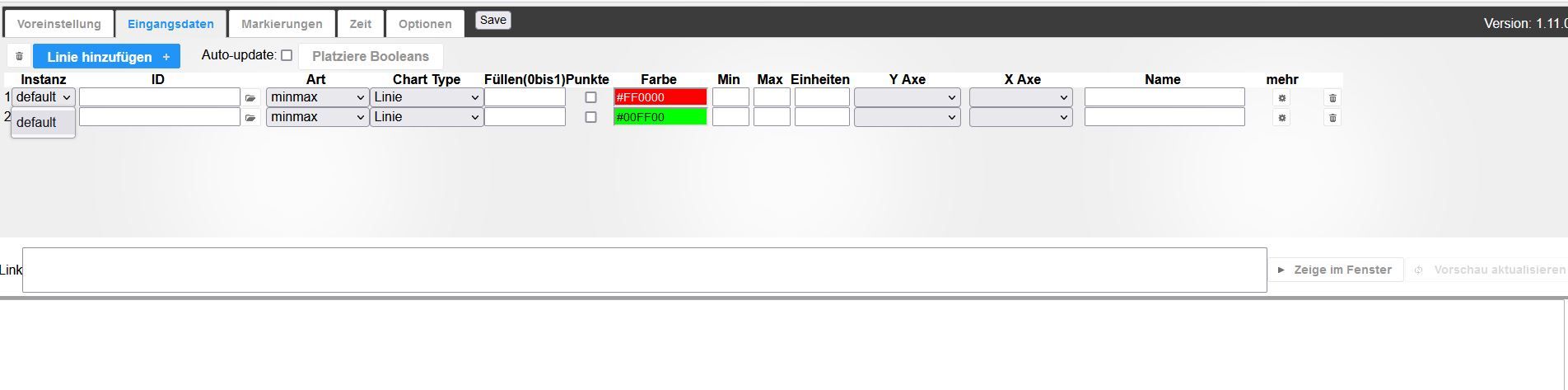
Flot Diagramm - history nicht wählbar

Geplant Angeheftet Gesperrt Verschoben ioBroker Allgemein
73 Beiträge 5 Kommentatoren 2.4k Aufrufe 4 Beobachtet
  • Älteste zuerst
  • Neuste zuerst
  • Meiste Stimmen
Antworten
  • In einem neuen Thema antworten
Anmelden zum Antworten
Dieses Thema wurde gelöscht. Nur Nutzer mit entsprechenden Rechten können es sehen.
  • M Muttileinchen 0

    @bahnuhr Seit heute.

    Thomas BraunT Online
    Thomas BraunT Online
    Thomas Braun
    Most Active
    schrieb am zuletzt editiert von Thomas Braun
    #32

    @muttileinchen-0

    Deine Systemzeit stimmt auch nicht.
    Von nodejs@18 ganz abgesehen.
    Und 92 Updates in der Pipeline.

    root shell....

    Linux-Werkzeugkasten:
    https://forum.iobroker.net/topic/42952/der-kleine-iobroker-linux-werkzeugkasten
    NodeJS Fixer Skript:
    https://forum.iobroker.net/topic/68035/iob-node-fix-skript
    iob_diag: curl -sLf -o diag.sh https://iobroker.net/diag.sh && bash diag.sh

    M 1 Antwort Letzte Antwort
    1
    • Thomas BraunT Thomas Braun

      @muttileinchen-0

      Deine Systemzeit stimmt auch nicht.
      Von nodejs@18 ganz abgesehen.
      Und 92 Updates in der Pipeline.

      root shell....

      M Offline
      M Offline
      Muttileinchen 0
      schrieb am zuletzt editiert von
      #33

      @thomas-braun
      Hallo Thomas,
      danke für Deinen Kommentar.

      Leider kann ich nicht alles deuten, daher erhelle mich bitte:

      • Systemzeit Einstellung muss ich noch finden, bekomme ich aber hin.
      • Was ist falsch an Node18?
      • 92 Updates mittlerweile behoben, null Auswirkung
      • was ist Der Hinweis mit root shell?

      Bin ein Linux noob, und ich weiß das es anstrengend ist Usern hier das 1x1 beizubringen. Habe aber nicht auf alles Antworten finden können, daher wäre es schön vollständige Antworten zu bekommen anstatt eine Aufzählung was offensichtlich "falsch" ist, ohne zu verstehen warum...

      Danke vorab.

      Thomas BraunT HomoranH 5 Antworten Letzte Antwort
      0
      • M Muttileinchen 0

        @thomas-braun
        Hallo Thomas,
        danke für Deinen Kommentar.

        Leider kann ich nicht alles deuten, daher erhelle mich bitte:

        • Systemzeit Einstellung muss ich noch finden, bekomme ich aber hin.
        • Was ist falsch an Node18?
        • 92 Updates mittlerweile behoben, null Auswirkung
        • was ist Der Hinweis mit root shell?

        Bin ein Linux noob, und ich weiß das es anstrengend ist Usern hier das 1x1 beizubringen. Habe aber nicht auf alles Antworten finden können, daher wäre es schön vollständige Antworten zu bekommen anstatt eine Aufzählung was offensichtlich "falsch" ist, ohne zu verstehen warum...

        Danke vorab.

        Thomas BraunT Online
        Thomas BraunT Online
        Thomas Braun
        Most Active
        schrieb am zuletzt editiert von
        #34

        @muttileinchen-0 sagte in Flot Diagramm - history nicht wählbar:

        Was ist falsch an Node18?

        Die vorgesehene Version ist per heute node@16

        92 Updates mittlerweile behoben, null Auswirkung

        Regelmäßig machen.

        was ist Der Hinweis mit root shell?

        Man hampelt nicht als root durch das System. Im iob auf proxmox-HowTo wird es richtig gemacht. Lies dir das an.

        Linux-Werkzeugkasten:
        https://forum.iobroker.net/topic/42952/der-kleine-iobroker-linux-werkzeugkasten
        NodeJS Fixer Skript:
        https://forum.iobroker.net/topic/68035/iob-node-fix-skript
        iob_diag: curl -sLf -o diag.sh https://iobroker.net/diag.sh && bash diag.sh

        1 Antwort Letzte Antwort
        0
        • M Muttileinchen 0

          @thomas-braun
          Hallo Thomas,
          danke für Deinen Kommentar.

          Leider kann ich nicht alles deuten, daher erhelle mich bitte:

          • Systemzeit Einstellung muss ich noch finden, bekomme ich aber hin.
          • Was ist falsch an Node18?
          • 92 Updates mittlerweile behoben, null Auswirkung
          • was ist Der Hinweis mit root shell?

          Bin ein Linux noob, und ich weiß das es anstrengend ist Usern hier das 1x1 beizubringen. Habe aber nicht auf alles Antworten finden können, daher wäre es schön vollständige Antworten zu bekommen anstatt eine Aufzählung was offensichtlich "falsch" ist, ohne zu verstehen warum...

          Danke vorab.

          HomoranH Nicht stören
          HomoranH Nicht stören
          Homoran
          Global Moderator Administrators
          schrieb am zuletzt editiert von
          #35

          @muttileinchen-0 sagte in Flot Diagramm - history nicht wählbar:

          was ist Der Hinweis mit root shell?

          ich fürchte nach der ganzen Predigerei warum man nicht als root agieren soll muss ich wohl tatsächlich dazu noch einen Thread aufmachen jnd anpinnen.

          Das wichtigste ist, dass Dinge, die der user root gemacht hat, möglicherweise durch den Systemuser iobroker nicht genutzt wrden können

          kein Support per PN! - Fragen im Forum stellen -
          Benutzt das Voting rechts unten im Beitrag wenn er euch geholfen hat.
          Das Forum freut sich über eine Spende. Benutzt dazu den Spendenbutton oben rechts. Danke!
          der Installationsfixer: curl -fsL https://iobroker.net/fix.sh | bash -

          1 Antwort Letzte Antwort
          0
          • M Muttileinchen 0

            @thomas-braun
            Hallo Thomas,
            danke für Deinen Kommentar.

            Leider kann ich nicht alles deuten, daher erhelle mich bitte:

            • Systemzeit Einstellung muss ich noch finden, bekomme ich aber hin.
            • Was ist falsch an Node18?
            • 92 Updates mittlerweile behoben, null Auswirkung
            • was ist Der Hinweis mit root shell?

            Bin ein Linux noob, und ich weiß das es anstrengend ist Usern hier das 1x1 beizubringen. Habe aber nicht auf alles Antworten finden können, daher wäre es schön vollständige Antworten zu bekommen anstatt eine Aufzählung was offensichtlich "falsch" ist, ohne zu verstehen warum...

            Danke vorab.

            HomoranH Nicht stören
            HomoranH Nicht stören
            Homoran
            Global Moderator Administrators
            schrieb am zuletzt editiert von
            #36

            @muttileinchen-0 sagte in Flot Diagramm - history nicht wählbar:

            Was ist falsch an Node18?

            ist noch nicht 100% iobroker kompatibel, npm v9 schon gar nicht

            kein Support per PN! - Fragen im Forum stellen -
            Benutzt das Voting rechts unten im Beitrag wenn er euch geholfen hat.
            Das Forum freut sich über eine Spende. Benutzt dazu den Spendenbutton oben rechts. Danke!
            der Installationsfixer: curl -fsL https://iobroker.net/fix.sh | bash -

            Thomas BraunT 1 Antwort Letzte Antwort
            0
            • M Muttileinchen 0

              @thomas-braun
              Hallo Thomas,
              danke für Deinen Kommentar.

              Leider kann ich nicht alles deuten, daher erhelle mich bitte:

              • Systemzeit Einstellung muss ich noch finden, bekomme ich aber hin.
              • Was ist falsch an Node18?
              • 92 Updates mittlerweile behoben, null Auswirkung
              • was ist Der Hinweis mit root shell?

              Bin ein Linux noob, und ich weiß das es anstrengend ist Usern hier das 1x1 beizubringen. Habe aber nicht auf alles Antworten finden können, daher wäre es schön vollständige Antworten zu bekommen anstatt eine Aufzählung was offensichtlich "falsch" ist, ohne zu verstehen warum...

              Danke vorab.

              HomoranH Nicht stören
              HomoranH Nicht stören
              Homoran
              Global Moderator Administrators
              schrieb am zuletzt editiert von
              #37

              @muttileinchen-0 sagte in Flot Diagramm - history nicht wählbar:

              92 Updates mittlerweile behoben, null Auswirkung

              in Zusammenhang mit der Nutzung des root, jetzt bitte iobroker fix durchführen.
              Wenn der Root nicht etwas zu sehr verbogen hat richtet der Fixer das Rechtegefüge wieder

              kein Support per PN! - Fragen im Forum stellen -
              Benutzt das Voting rechts unten im Beitrag wenn er euch geholfen hat.
              Das Forum freut sich über eine Spende. Benutzt dazu den Spendenbutton oben rechts. Danke!
              der Installationsfixer: curl -fsL https://iobroker.net/fix.sh | bash -

              M 1 Antwort Letzte Antwort
              0
              • HomoranH Homoran

                @muttileinchen-0 sagte in Flot Diagramm - history nicht wählbar:

                Was ist falsch an Node18?

                ist noch nicht 100% iobroker kompatibel, npm v9 schon gar nicht

                Thomas BraunT Online
                Thomas BraunT Online
                Thomas Braun
                Most Active
                schrieb am zuletzt editiert von
                #38

                @homoran

                Wobei die aktuellste nodeJS@18 npm@9 im Gepäck hat. Das passt also hier schon zusammen, ist aber insgesamt halt zu hoch versioniert.

                Linux-Werkzeugkasten:
                https://forum.iobroker.net/topic/42952/der-kleine-iobroker-linux-werkzeugkasten
                NodeJS Fixer Skript:
                https://forum.iobroker.net/topic/68035/iob-node-fix-skript
                iob_diag: curl -sLf -o diag.sh https://iobroker.net/diag.sh && bash diag.sh

                1 Antwort Letzte Antwort
                0
                • M Muttileinchen 0

                  @thomas-braun
                  Hallo Thomas,
                  danke für Deinen Kommentar.

                  Leider kann ich nicht alles deuten, daher erhelle mich bitte:

                  • Systemzeit Einstellung muss ich noch finden, bekomme ich aber hin.
                  • Was ist falsch an Node18?
                  • 92 Updates mittlerweile behoben, null Auswirkung
                  • was ist Der Hinweis mit root shell?

                  Bin ein Linux noob, und ich weiß das es anstrengend ist Usern hier das 1x1 beizubringen. Habe aber nicht auf alles Antworten finden können, daher wäre es schön vollständige Antworten zu bekommen anstatt eine Aufzählung was offensichtlich "falsch" ist, ohne zu verstehen warum...

                  Danke vorab.

                  HomoranH Nicht stören
                  HomoranH Nicht stören
                  Homoran
                  Global Moderator Administrators
                  schrieb am zuletzt editiert von
                  #39

                  @muttileinchen-0 sagte in Flot Diagramm - history nicht wählbar:

                  null Auswirkung

                  Wenn wegen falscher Laufzeitumgebung (nodejs/npm) etwas nicht korrekt installiert wurde, nutzen Änderungen daran oder Updates erst beim nächsten Install etwas

                  kein Support per PN! - Fragen im Forum stellen -
                  Benutzt das Voting rechts unten im Beitrag wenn er euch geholfen hat.
                  Das Forum freut sich über eine Spende. Benutzt dazu den Spendenbutton oben rechts. Danke!
                  der Installationsfixer: curl -fsL https://iobroker.net/fix.sh | bash -

                  M 1 Antwort Letzte Antwort
                  0
                  • HomoranH Homoran

                    @muttileinchen-0 sagte in Flot Diagramm - history nicht wählbar:

                    92 Updates mittlerweile behoben, null Auswirkung

                    in Zusammenhang mit der Nutzung des root, jetzt bitte iobroker fix durchführen.
                    Wenn der Root nicht etwas zu sehr verbogen hat richtet der Fixer das Rechtegefüge wieder

                    M Offline
                    M Offline
                    Muttileinchen 0
                    schrieb am zuletzt editiert von
                    #40

                    @homoran Mache ich.

                    Quintessenz für mich:

                    • anstatt root einen user erstellen (Anleitung suche ich noch)

                    • npm auf Version 8 reduzieren (wie nur?)

                    • iobroker fix durchführen, wobei ich das schon gemacht hatte.

                    HomoranH Thomas BraunT 2 Antworten Letzte Antwort
                    0
                    • HomoranH Homoran

                      @muttileinchen-0 sagte in Flot Diagramm - history nicht wählbar:

                      null Auswirkung

                      Wenn wegen falscher Laufzeitumgebung (nodejs/npm) etwas nicht korrekt installiert wurde, nutzen Änderungen daran oder Updates erst beim nächsten Install etwas

                      M Offline
                      M Offline
                      Muttileinchen 0
                      schrieb am zuletzt editiert von
                      #41

                      @homoran Daher hab' ich ja sowohl history als auch flot komplett neu installiert...

                      HomoranH 1 Antwort Letzte Antwort
                      0
                      • M Muttileinchen 0

                        @homoran Mache ich.

                        Quintessenz für mich:

                        • anstatt root einen user erstellen (Anleitung suche ich noch)

                        • npm auf Version 8 reduzieren (wie nur?)

                        • iobroker fix durchführen, wobei ich das schon gemacht hatte.

                        HomoranH Nicht stören
                        HomoranH Nicht stören
                        Homoran
                        Global Moderator Administrators
                        schrieb am zuletzt editiert von
                        #42

                        @muttileinchen-0 sagte in Flot Diagramm - history nicht wählbar:

                        Anleitung suche ich noch

                        https://www.iobroker.net/#de/documentation/install/proxmox.md

                        nutzt jetzt wahrscheinlich nichts mehr.

                        die Befehle für Ubuntu hab ich nicht parat

                        kein Support per PN! - Fragen im Forum stellen -
                        Benutzt das Voting rechts unten im Beitrag wenn er euch geholfen hat.
                        Das Forum freut sich über eine Spende. Benutzt dazu den Spendenbutton oben rechts. Danke!
                        der Installationsfixer: curl -fsL https://iobroker.net/fix.sh | bash -

                        1 Antwort Letzte Antwort
                        0
                        • M Muttileinchen 0

                          @homoran Daher hab' ich ja sowohl history als auch flot komplett neu installiert...

                          HomoranH Nicht stören
                          HomoranH Nicht stören
                          Homoran
                          Global Moderator Administrators
                          schrieb am zuletzt editiert von
                          #43

                          @muttileinchen-0 sagte in Flot Diagramm - history nicht wählbar:

                          @homoran Daher hab' ich ja sowohl history als auch flot komplett neu installiert...

                          aber noch immer als root und mit node18/npm9

                          kein Support per PN! - Fragen im Forum stellen -
                          Benutzt das Voting rechts unten im Beitrag wenn er euch geholfen hat.
                          Das Forum freut sich über eine Spende. Benutzt dazu den Spendenbutton oben rechts. Danke!
                          der Installationsfixer: curl -fsL https://iobroker.net/fix.sh | bash -

                          1 Antwort Letzte Antwort
                          0
                          • M Muttileinchen 0

                            @homoran Mache ich.

                            Quintessenz für mich:

                            • anstatt root einen user erstellen (Anleitung suche ich noch)

                            • npm auf Version 8 reduzieren (wie nur?)

                            • iobroker fix durchführen, wobei ich das schon gemacht hatte.

                            Thomas BraunT Online
                            Thomas BraunT Online
                            Thomas Braun
                            Most Active
                            schrieb am zuletzt editiert von Thomas Braun
                            #44

                            @muttileinchen-0 sagte in Flot Diagramm - history nicht wählbar:

                            npm auf Version 8 reduzieren (wie nur?)

                            Nein, nicht npm sondern das Paket nodejs auf Version 16 drücken. Wie das geht steht in meiner Signatur.
                            nodesource-Repo für 16 anlegen, das 18er löschen und dann per apt gezielt die v16 auf das System zwingen.

                            Jedenfalls auf einem 'richtigen' System geht das so.
                            Möglich daß es in den Müllcontainern anders geht.

                            Linux-Werkzeugkasten:
                            https://forum.iobroker.net/topic/42952/der-kleine-iobroker-linux-werkzeugkasten
                            NodeJS Fixer Skript:
                            https://forum.iobroker.net/topic/68035/iob-node-fix-skript
                            iob_diag: curl -sLf -o diag.sh https://iobroker.net/diag.sh && bash diag.sh

                            M 2 Antworten Letzte Antwort
                            0
                            • Thomas BraunT Thomas Braun

                              @muttileinchen-0 sagte in Flot Diagramm - history nicht wählbar:

                              npm auf Version 8 reduzieren (wie nur?)

                              Nein, nicht npm sondern das Paket nodejs auf Version 16 drücken. Wie das geht steht in meiner Signatur.
                              nodesource-Repo für 16 anlegen, das 18er löschen und dann per apt gezielt die v16 auf das System zwingen.

                              Jedenfalls auf einem 'richtigen' System geht das so.
                              Möglich daß es in den Müllcontainern anders geht.

                              M Offline
                              M Offline
                              Muttileinchen 0
                              schrieb am zuletzt editiert von
                              #45

                              @thomas-braun Danke. Auch auf den Müllcontainern geht das so. V16.19.1 läuft wieder. NPM nachwievor V8, das "root" thema ist dann wohl aufgrund Proxmox eine größere Sache (Neues Aufsetzen).

                              ======== Start marking the full check here =========
                              
                              Skript v.2023-01-02
                              
                              *** BASE SYSTEM ***
                              Architecture:   x86_64
                              Docker:         false
                              Virtualization: lxc
                              Distributor ID: Ubuntu
                              Description:    Ubuntu 22.04.2 LTS
                              Release:        22.04
                              Codename:       jammy
                              
                              PRETTY_NAME="Ubuntu 22.04.2 LTS"
                              NAME="Ubuntu"
                              VERSION_ID="22.04"
                              VERSION="22.04.2 LTS (Jammy Jellyfish)"
                              VERSION_CODENAME=jammy
                              ID=ubuntu
                              ID_LIKE=debian
                              HOME_URL="https://www.ubuntu.com/"
                              SUPPORT_URL="https://help.ubuntu.com/"
                              BUG_REPORT_URL="https://bugs.launchpad.net/ubuntu/"
                              PRIVACY_POLICY_URL="https://www.ubuntu.com/legal/terms-and-policies/privacy-policy"
                              UBUNTU_CODENAME=jammy
                              
                              Systemuptime and Load:
                               20:48:31 up  2:10,  2 users,  load average: 1.42, 0.73, 0.43
                              CPU threads: 2
                              
                              *** Time and Time Zones ***
                              Wed Mar  1 20:48:31 UTC 2023
                              Wed Mar  1 20:48:31 UTC 2023
                              UTC +0000
                              Etc/UTC
                              
                              *** User and Groups ***
                              root
                              /root
                              root
                              
                              *** X-Server-Setup ***
                              X-Server:       false
                              Desktop: 
                              Terminal: 
                              Boot Target:    graphical.target
                              
                              *** MEMORY ***
                                             total        used        free      shared  buff/cache   available
                              Mem:            2.0G        664M         63M        0.0K        1.3G        1.4G
                              Swap:           2.0G        3.0M        2.0G
                              Total:          4.1G        667M        2.1G
                              
                                       2048 M total memory
                                        665 M used memory
                                        431 M active memory
                                       1412 M inactive memory
                                         61 M free memory
                                          0 M buffer memory
                                       1320 M swap cache
                                       2048 M total swap
                                          3 M used swap
                                       2044 M free swap
                              
                              *** FILESYSTEM ***
                              Filesystem     Type   Size  Used Avail Use% Mounted on
                              /dev/loop0     ext4   7.8G  2.9G  4.6G  39% /
                              none           tmpfs  492K  4.0K  488K   1% /dev
                              tmpfs          tmpfs  1.9G     0  1.9G   0% /dev/shm
                              tmpfs          tmpfs  739M   96K  739M   1% /run
                              tmpfs          tmpfs  5.0M     0  5.0M   0% /run/lock
                              
                              Messages in dmesg:
                              dmesg: read kernel buffer failed: Operation not permitted
                              
                              Show mounted filesystems (real ones only):
                              TARGET SOURCE     FSTYPE OPTIONS
                              /      /dev/loop0 ext4   rw,relatime
                              
                              Files in neuralgic directories:
                              
                              /var:
                              600M    /var/
                              267M    /var/cache
                              262M    /var/cache/apt
                              235M    /var/lib
                              177M    /var/cache/apt/archives
                              
                              /opt/iobroker/backups:
                              239M    /opt/iobroker/backups/
                              
                              /opt/iobroker/iobroker-data:
                              228M    /opt/iobroker/iobroker-data/
                              171M    /opt/iobroker/iobroker-data/files
                              51M     /opt/iobroker/iobroker-data/files/javascript.admin
                              37M     /opt/iobroker/iobroker-data/backup-objects
                              32M     /opt/iobroker/iobroker-data/files/javascript.admin/static/js
                              
                              The five largest files in iobroker-data are:
                              13M     /opt/iobroker/iobroker-data/objects.jsonl
                              8.5M    /opt/iobroker/iobroker-data/files/vis.0/vis/vis-views.json
                              7.7M    /opt/iobroker/iobroker-data/files/vis.0/neu/vis-views.json
                              6.9M    /opt/iobroker/iobroker-data/files/javascript.admin/static/js/610.de0231c9.chunk.js.map
                              6.3M    /opt/iobroker/iobroker-data/files/admin.admin/custom/static/js/vendors-node_modules_iobroker_adapter-react-v5_assets_devices_parseNames_js-node_modules_iobr-99c23e.847b8ad9.chunk.js.map
                              
                              *** NodeJS-Installation ***
                              
                              /usr/bin/nodejs         v16.19.1
                              /usr/bin/node           v16.19.1
                              /usr/bin/npm            8.19.3
                              /usr/bin/npx            8.19.3
                              
                              nodejs:
                                Installed: 16.19.1-deb-1nodesource1
                                Candidate: 16.19.1-deb-1nodesource1
                                Version table:
                               *** 16.19.1-deb-1nodesource1 500
                                      500 https://deb.nodesource.com/node_16.x bullseye/main amd64 Packages
                                      100 /var/lib/dpkg/status
                                   12.22.9~dfsg-1ubuntu3 500
                                      500 http://archive.ubuntu.com/ubuntu jammy/universe amd64 Packages
                              
                              Temp directories causing npm8 problem: 0
                              
                              *** ioBroker-Installation ***
                              
                              ioBroker Status
                              iobroker is running on this host.
                              
                              
                              Objects type: jsonl
                              States  type: jsonl
                              
                              Core adapters versions
                              js-controller:  4.0.24
                              admin:          6.3.5
                              javascript:     6.1.4
                              
                              Adapters from github:   1
                              
                              Adapter State
                                system.adapter.accuweather.0            : accuweather           : IOBroker-Uli                             -  enabled
                              + system.adapter.admin.0                  : admin                 : IOBroker-Uli                             -  enabled, port: 8081, bind: 0.0.0.0, run as: admin
                              + system.adapter.backitup.0               : backitup              : IOBroker-Uli                             -  enabled
                                system.adapter.daswetter.0              : daswetter             : IOBroker-Uli                             -  enabled
                              + system.adapter.discovery.0              : discovery             : IOBroker-Uli                             -  enabled
                                system.adapter.dwd.0                    : dwd                   : IOBroker-Uli                             -  enabled
                                system.adapter.flot.0                   : flot                  : IOBroker-Uli                             -  enabled
                                system.adapter.followthesun.0           : followthesun          : IOBroker-Uli                             -  enabled
                                system.adapter.fullybrowser.0           : fullybrowser          : IOBroker-Uli                             - disabled
                                system.adapter.garmin.0                 : garmin                : IOBroker-Uli                             -  enabled
                              + system.adapter.history.0                : history               : IOBroker-Uli                             -  enabled
                                system.adapter.ical.0                   : ical                  : IOBroker-Uli                             -  enabled
                                system.adapter.ical.1                   : ical                  : IOBroker-Uli                             -  enabled
                                system.adapter.ical.2                   : ical                  : IOBroker-Uli                             -  enabled
                                system.adapter.icons-mfd-png.0          : icons-mfd-png         : IOBroker-Uli                             -  enabled
                                system.adapter.icons-mfd-svg.0          : icons-mfd-svg         : IOBroker-Uli                             -  enabled
                                system.adapter.imow.0                   : imow                  : IOBroker-Uli                             - disabled
                              + system.adapter.javascript.0             : javascript            : IOBroker-Uli                             -  enabled
                              + system.adapter.mqtt.0                   : mqtt                  : IOBroker-Uli                             -  enabled, port: 1883, bind: 0.0.0.0
                              + system.adapter.ping.0                   : ping                  : IOBroker-Uli                             -  enabled
                                system.adapter.pollenflug.0             : pollenflug            : IOBroker-Uli                             -  enabled
                              + system.adapter.shelly.0                 : shelly                : IOBroker-Uli                             -  enabled, port: 1882, bind: 0.0.0.0
                                system.adapter.sourceanalytix.0         : sourceanalytix        : IOBroker-Uli                             -  enabled
                                system.adapter.tankerkoenig.0           : tankerkoenig          : IOBroker-Uli                             -  enabled
                                system.adapter.trashschedule.0          : trashschedule         : IOBroker-Uli                             -  enabled
                                system.adapter.trashschedule.1          : trashschedule         : IOBroker-Uli                             -  enabled
                                system.adapter.vis-bars.0               : vis-bars              : IOBroker-Uli                             -  enabled
                                system.adapter.vis-history.0            : vis-history           : IOBroker-Uli                             -  enabled
                                system.adapter.vis-hqwidgets.0          : vis-hqwidgets         : IOBroker-Uli                             -  enabled
                                system.adapter.vis-icontwo.0            : vis-icontwo           : IOBroker-Uli                             -  enabled
                                system.adapter.vis-inventwo.0           : vis-inventwo          : IOBroker-Uli                             -  enabled
                                system.adapter.vis-jqui-mfd.0           : vis-jqui-mfd          : IOBroker-Uli                             -  enabled
                                system.adapter.vis-justgage.0           : vis-justgage          : IOBroker-Uli                             -  enabled
                                system.adapter.vis-metro.0              : vis-metro             : IOBroker-Uli                             -  enabled
                                system.adapter.vis-players.0            : vis-players           : IOBroker-Uli                             -  enabled
                                system.adapter.vis-rgraph.0             : vis-rgraph            : IOBroker-Uli                             -  enabled
                                system.adapter.vis-timeandweather.0     : vis-timeandweather    : IOBroker-Uli                             -  enabled
                                system.adapter.vis.0                    : vis                   : IOBroker-Uli                             -  enabled
                                system.adapter.vw-connect.0             : vw-connect            : IOBroker-Uli                             -  enabled
                                system.adapter.web.0                    : web                   : IOBroker-Uli                             -  enabled, port: 8082, bind: 0.0.0.0, run as: admin
                                system.adapter.ws.0                     : ws                    : IOBroker-Uli                             -  enabled, port: 8084, bind: 0.0.0.0, run as: admin
                              
                              + instance is alive
                              
                              Enabled adapters with bindings
                              + system.adapter.admin.0                  : admin                 : IOBroker-Uli                             -  enabled, port: 8081, bind: 0.0.0.0, run as: admin
                              + system.adapter.mqtt.0                   : mqtt                  : IOBroker-Uli                             -  enabled, port: 1883, bind: 0.0.0.0
                              + system.adapter.shelly.0                 : shelly                : IOBroker-Uli                             -  enabled, port: 1882, bind: 0.0.0.0
                                system.adapter.web.0                    : web                   : IOBroker-Uli                             -  enabled, port: 8082, bind: 0.0.0.0, run as: admin
                                system.adapter.ws.0                     : ws                    : IOBroker-Uli                             -  enabled, port: 8084, bind: 0.0.0.0, run as: admin
                              
                              ioBroker-Repositories
                              stable        : http://download.iobroker.net/sources-dist.json
                              beta          : http://download.iobroker.net/sources-dist-latest.json
                              
                              Active repo(s): stable
                              
                              Installed ioBroker-Instances
                              Used repository: stable
                              Adapter    "accuweather"  : 1.2.1    , installed 1.2.1
                              Adapter    "admin"        : 6.3.5    , installed 6.3.5
                              Adapter    "backitup"     : 2.5.12   , installed 2.5.12
                              Adapter    "daswetter"    : 3.1.7    , installed 3.1.7
                              Adapter    "discovery"    : 3.1.0    , installed 3.1.0
                              Adapter    "dwd"          : 2.8.3    , installed 2.8.3
                              Adapter    "flot"         : 1.11.0   , installed 1.11.0
                              Adapter    "followthesun" : 0.4.1    , installed 0.4.1
                              Adapter    "fullybrowser" : 2.1.2    , installed 2.1.2
                              Adapter    "garmin"       : 0.0.3    , installed 0.0.3
                              Adapter    "history"      : 2.2.4    , installed 2.2.4
                              Adapter    "ical"         : 1.13.2   , installed 1.13.2
                              Adapter    "icons-mfd-png": 1.1.0    , installed 1.1.0
                              Adapter    "icons-mfd-svg": 1.1.0    , installed 1.1.0
                              Adapter    "imow"         : 0.0.2    , installed 0.0.2
                              Adapter    "javascript"   : 6.1.4    , installed 6.1.4
                              Controller "js-controller": 4.0.24   , installed 4.0.24
                              Adapter    "mqtt"         : 4.0.7    , installed 4.0.7
                              Adapter    "mqtt-client"  : 1.6.3    , installed 1.6.3
                              Adapter    "ping"         : 1.5.3    , installed 1.5.3
                              Adapter    "pollenflug"   : 1.0.6    , installed 1.0.6
                              Adapter    "shelly"       : 6.3.1    , installed 6.3.1
                              Adapter    "simple-api"   : 2.7.2    , installed 2.7.2
                              Adapter    "socketio"     : 4.2.0    , installed 4.2.0
                              Adapter    "tankerkoenig" : 3.3.7    , installed 3.3.7
                              Adapter    "trashschedule": 2.2.0    , installed 2.2.0
                              Adapter    "vis"          : 1.4.15   , installed 1.4.15
                              Adapter    "vis-bars"     : 0.1.4    , installed 0.1.4
                              Adapter    "vis-history"  : 1.0.0    , installed 1.0.0
                              Adapter    "vis-hqwidgets": 1.3.0    , installed 1.3.0
                              Adapter    "vis-icontwo"  : 0.90.0   , installed 0.90.0
                              Adapter    "vis-inventwo" : 3.3.1    , installed 3.3.1
                              Adapter    "vis-jqui-mfd" : 1.0.12   , installed 1.0.12
                              Adapter    "vis-justgage" : 1.0.2    , installed 1.0.2
                              Adapter    "vis-metro"    : 1.2.0    , installed 1.2.0
                              Adapter    "vis-players"  : 0.1.6    , installed 0.1.6
                              Adapter    "vis-rgraph"   : 0.0.2    , installed 0.0.2
                              Adapter    "vis-timeandweather": 1.2.2, installed 1.2.2
                              Adapter    "vw-connect"   : 0.0.62   , installed 0.0.62
                              Adapter    "web"          : 4.3.0    , installed 4.3.0
                              Adapter    "ws"           : 1.3.0    , installed 1.3.0
                              
                              Objects and States
                              Please stand by - This may take a while
                              Objects:        14656
                              States:         13326
                              
                              *** OS-Repositories and Updates ***
                              Hit:1 https://deb.nodesource.com/node_16.x bullseye InRelease
                              Hit:2 http://archive.ubuntu.com/ubuntu jammy InRelease
                              Hit:3 http://archive.ubuntu.com/ubuntu jammy-updates InRelease
                              Hit:4 http://archive.ubuntu.com/ubuntu jammy-security InRelease
                              Reading package lists...
                              Pending Updates: 0
                              
                              *** Listening Ports ***
                              Active Internet connections (only servers)
                              Proto Recv-Q Send-Q Local Address           Foreign Address         State       User       Inode      PID/Program name    
                              tcp        0      0 127.0.0.53:53           0.0.0.0:*               LISTEN      106        27796      99/systemd-resolved 
                              tcp        0      0 0.0.0.0:111             0.0.0.0:*               LISTEN      0          27202      1/init              
                              tcp        0      0 127.0.0.1:9001          0.0.0.0:*               LISTEN      1000       515897     13267/iobroker.js-c 
                              tcp        0      0 127.0.0.1:9000          0.0.0.0:*               LISTEN      1000       515904     13267/iobroker.js-c 
                              tcp        0      0 127.0.0.1:25            0.0.0.0:*               LISTEN      0          32760      707/master          
                              tcp        0      0 0.0.0.0:1883            0.0.0.0:*               LISTEN      1000       519220     13359/io.mqtt.0     
                              tcp6       0      0 :::22                   :::*                    LISTEN      0          369250     1/init              
                              tcp6       0      0 :::111                  :::*                    LISTEN      0          27204      1/init              
                              tcp6       0      0 ::1:25                  :::*                    LISTEN      0          32761      707/master          
                              tcp6       0      0 :::8084                 :::*                    LISTEN      1000       524810     14104/io.ws.0       
                              tcp6       0      0 :::8082                 :::*                    LISTEN      1000       521512     13738/io.web.0      
                              tcp6       0      0 :::8081                 :::*                    LISTEN      1000       516610     13288/io.admin.0    
                              udp        0      0 0.0.0.0:5683            0.0.0.0:*                           1000       516757     13391/io.shelly.0   
                              udp        0      0 127.0.0.53:53           0.0.0.0:*                           106        27795      99/systemd-resolved 
                              udp        0      0 0.0.0.0:111             0.0.0.0:*                           0          27203      1/init              
                              udp6       0      0 :::111                  :::*                                0          27205      1/init              
                              
                              *** Log File - Last 25 Lines ***
                              
                              2023-03-01 20:48:48.715  - info: daswetter.0 (13672) starting. Version 3.1.7 in /opt/iobroker/node_modules/iobroker.daswetter, node: v16.19.1, js-controller: 4.0.24
                              2023-03-01 20:48:50.967  - info: host.IOBroker-Uli instance system.adapter.accuweather.0 started with pid 13707
                              2023-03-01 20:48:53.163  - info: accuweather.0 (13707) starting. Version 1.2.1 in /opt/iobroker/node_modules/iobroker.accuweather, node: v16.19.1, js-controller: 4.0.24
                              2023-03-01 20:48:55.028  - info: host.IOBroker-Uli instance system.adapter.web.0 started with pid 13738
                              2023-03-01 20:48:57.579  - info: web.0 (13738) Plugin sentry Sentry Plugin disabled for this process because sending of statistic data is disabled for the system
                              2023-03-01 20:48:57.833  - info: web.0 (13738) starting. Version 4.3.0 in /opt/iobroker/node_modules/iobroker.web, node: v16.19.1, js-controller: 4.0.24
                              2023-03-01 20:48:58.093  - info: web.0 (13738) http server listening on port 8082
                              2023-03-01 20:49:01.585  - info: vis.0 (13753) starting. Version 1.4.15 in /opt/iobroker/node_modules/iobroker.vis, node: v16.19.1, js-controller: 4.0.24
                              2023-03-01 20:49:01.802  - info: vis.0 (13753) vis license is OK.
                              2023-03-01 20:49:02.427  - info: daswetter.0 (13672) Terminated (ADAPTER_REQUESTED_TERMINATION): All data handled, adapter stopped until next scheduled moment
                              2023-03-01 20:49:02.986  - info: daswetter.0 (13672) cleaned everything up...
                              2023-03-01 20:49:03.024  - info: host.IOBroker-Uli instance system.adapter.vw-connect.0 started with pid 13781
                              2023-03-01 20:49:03.099  - info: host.IOBroker-Uli instance system.adapter.daswetter.0 terminated with code 11 (ADAPTER_REQUESTED_TERMINATION)
                              2023-03-01 20:49:03.824  - info: vis.0 (13753) Terminated (NO_ERROR): Without reason
                              2023-03-01 20:49:04.486  - info: host.IOBroker-Uli instance system.adapter.vis.0 terminated while should be started once
                              2023-03-01 20:49:07.301  - info: host.IOBroker-Uli instance system.adapter.ws.0 started with pid 14104
                              2023-03-01 20:49:07.304  - info: vw-connect.0 (13781) Plugin sentry Sentry Plugin disabled for this process because sending of statistic data is disabled for the system
                              2023-03-01 20:49:07.498  - info: vw-connect.0 (13781) starting. Version 0.0.62 in /opt/iobroker/node_modules/iobroker.vw-connect, node: v16.19.1, js-controller: 4.0.24
                              2023-03-01 20:49:07.529  - info: vw-connect.0 (13781) Login in with vwv2
                              2023-03-01 20:49:09.287  - info: ws.0 (14104) Plugin sentry Sentry Plugin disabled for this process because sending of statistic data is disabled for the system
                              2023-03-01 20:49:09.436  - info: ws.0 (14104) starting. Version 1.3.0 in /opt/iobroker/node_modules/iobroker.ws, node: v16.19.1, js-controller: 4.0.24
                              2023-03-01 20:49:09.572  - info: ws.0 (14104) socket.io server listening on port 8084
                              2023-03-01 20:49:09.705  - info: vw-connect.0 (13781) Login successful
                              2023-03-01 20:49:10.961  - info: host.IOBroker-Uli instance system.adapter.pollenflug.0 started with pid 14435
                              2023-03-01 20:49:11.993  - info: host.IOBroker-Uli "system.adapter.garmin.0" disabled
                              
                              
                              ============ Mark until here for C&P =============
                              
                              HomoranH 2 Antworten Letzte Antwort
                              0
                              • Thomas BraunT Thomas Braun

                                @muttileinchen-0 sagte in Flot Diagramm - history nicht wählbar:

                                npm auf Version 8 reduzieren (wie nur?)

                                Nein, nicht npm sondern das Paket nodejs auf Version 16 drücken. Wie das geht steht in meiner Signatur.
                                nodesource-Repo für 16 anlegen, das 18er löschen und dann per apt gezielt die v16 auf das System zwingen.

                                Jedenfalls auf einem 'richtigen' System geht das so.
                                Möglich daß es in den Müllcontainern anders geht.

                                M Offline
                                M Offline
                                Muttileinchen 0
                                schrieb am zuletzt editiert von
                                #46

                                @thomas-braun

                                ======================= SUMMARY =======================
                                                     v.2023-01-02
                                
                                
                                Operatingsystem:        Ubuntu 22.04.2 LTS
                                Installation:           lxc
                                Timezone:               Etc/UTC
                                User-ID:                0
                                X-Server:               false
                                Boot Target:            graphical.target
                                
                                Pending OS-Updates:     0
                                
                                Nodejs-Installation:    /usr/bin/nodejs         v16.19.1
                                                        /usr/bin/node           v16.19.1
                                                        /usr/bin/npm            8.19.3
                                                        /usr/bin/npx            8.19.3
                                
                                ioBroker Core:          js-controller           4.0.24
                                                        admin                   6.3.5
                                
                                ioBroker Status:        iobroker is running on this host.
                                
                                
                                Objects type: jsonl
                                States  type: jsonl
                                
                                Status admin:
                                + system.adapter.admin.0                  : admin                 : IOBroker-Uli                             -  enabled, port: 8081, bind: 0.0.0.0, run as: admin
                                
                                Pending iob updates:    0
                                
                                Active repo(s): stable
                                
                                Objects:                14656
                                States:                 13326
                                
                                Size of iob-Database:
                                
                                17M     /opt/iobroker/iobroker-data/objects.jsonl
                                3.8M    /opt/iobroker/iobroker-data/states.jsonl
                                
                                
                                =================== END OF SUMMARY ====================
                                
                                Thomas BraunT 1 Antwort Letzte Antwort
                                0
                                • M Muttileinchen 0

                                  @thomas-braun

                                  ======================= SUMMARY =======================
                                                       v.2023-01-02
                                  
                                  
                                  Operatingsystem:        Ubuntu 22.04.2 LTS
                                  Installation:           lxc
                                  Timezone:               Etc/UTC
                                  User-ID:                0
                                  X-Server:               false
                                  Boot Target:            graphical.target
                                  
                                  Pending OS-Updates:     0
                                  
                                  Nodejs-Installation:    /usr/bin/nodejs         v16.19.1
                                                          /usr/bin/node           v16.19.1
                                                          /usr/bin/npm            8.19.3
                                                          /usr/bin/npx            8.19.3
                                  
                                  ioBroker Core:          js-controller           4.0.24
                                                          admin                   6.3.5
                                  
                                  ioBroker Status:        iobroker is running on this host.
                                  
                                  
                                  Objects type: jsonl
                                  States  type: jsonl
                                  
                                  Status admin:
                                  + system.adapter.admin.0                  : admin                 : IOBroker-Uli                             -  enabled, port: 8081, bind: 0.0.0.0, run as: admin
                                  
                                  Pending iob updates:    0
                                  
                                  Active repo(s): stable
                                  
                                  Objects:                14656
                                  States:                 13326
                                  
                                  Size of iob-Database:
                                  
                                  17M     /opt/iobroker/iobroker-data/objects.jsonl
                                  3.8M    /opt/iobroker/iobroker-data/states.jsonl
                                  
                                  
                                  =================== END OF SUMMARY ====================
                                  
                                  Thomas BraunT Online
                                  Thomas BraunT Online
                                  Thomas Braun
                                  Most Active
                                  schrieb am zuletzt editiert von Thomas Braun
                                  #47

                                  @muttileinchen-0

                                  Zeitzone und root shell korrigieren.
                                  graphical.target auf multiuser.target ändern.

                                  Linux-Werkzeugkasten:
                                  https://forum.iobroker.net/topic/42952/der-kleine-iobroker-linux-werkzeugkasten
                                  NodeJS Fixer Skript:
                                  https://forum.iobroker.net/topic/68035/iob-node-fix-skript
                                  iob_diag: curl -sLf -o diag.sh https://iobroker.net/diag.sh && bash diag.sh

                                  1 Antwort Letzte Antwort
                                  0
                                  • M Muttileinchen 0

                                    @thomas-braun Danke. Auch auf den Müllcontainern geht das so. V16.19.1 läuft wieder. NPM nachwievor V8, das "root" thema ist dann wohl aufgrund Proxmox eine größere Sache (Neues Aufsetzen).

                                    ======== Start marking the full check here =========
                                    
                                    Skript v.2023-01-02
                                    
                                    *** BASE SYSTEM ***
                                    Architecture:   x86_64
                                    Docker:         false
                                    Virtualization: lxc
                                    Distributor ID: Ubuntu
                                    Description:    Ubuntu 22.04.2 LTS
                                    Release:        22.04
                                    Codename:       jammy
                                    
                                    PRETTY_NAME="Ubuntu 22.04.2 LTS"
                                    NAME="Ubuntu"
                                    VERSION_ID="22.04"
                                    VERSION="22.04.2 LTS (Jammy Jellyfish)"
                                    VERSION_CODENAME=jammy
                                    ID=ubuntu
                                    ID_LIKE=debian
                                    HOME_URL="https://www.ubuntu.com/"
                                    SUPPORT_URL="https://help.ubuntu.com/"
                                    BUG_REPORT_URL="https://bugs.launchpad.net/ubuntu/"
                                    PRIVACY_POLICY_URL="https://www.ubuntu.com/legal/terms-and-policies/privacy-policy"
                                    UBUNTU_CODENAME=jammy
                                    
                                    Systemuptime and Load:
                                     20:48:31 up  2:10,  2 users,  load average: 1.42, 0.73, 0.43
                                    CPU threads: 2
                                    
                                    *** Time and Time Zones ***
                                    Wed Mar  1 20:48:31 UTC 2023
                                    Wed Mar  1 20:48:31 UTC 2023
                                    UTC +0000
                                    Etc/UTC
                                    
                                    *** User and Groups ***
                                    root
                                    /root
                                    root
                                    
                                    *** X-Server-Setup ***
                                    X-Server:       false
                                    Desktop: 
                                    Terminal: 
                                    Boot Target:    graphical.target
                                    
                                    *** MEMORY ***
                                                   total        used        free      shared  buff/cache   available
                                    Mem:            2.0G        664M         63M        0.0K        1.3G        1.4G
                                    Swap:           2.0G        3.0M        2.0G
                                    Total:          4.1G        667M        2.1G
                                    
                                             2048 M total memory
                                              665 M used memory
                                              431 M active memory
                                             1412 M inactive memory
                                               61 M free memory
                                                0 M buffer memory
                                             1320 M swap cache
                                             2048 M total swap
                                                3 M used swap
                                             2044 M free swap
                                    
                                    *** FILESYSTEM ***
                                    Filesystem     Type   Size  Used Avail Use% Mounted on
                                    /dev/loop0     ext4   7.8G  2.9G  4.6G  39% /
                                    none           tmpfs  492K  4.0K  488K   1% /dev
                                    tmpfs          tmpfs  1.9G     0  1.9G   0% /dev/shm
                                    tmpfs          tmpfs  739M   96K  739M   1% /run
                                    tmpfs          tmpfs  5.0M     0  5.0M   0% /run/lock
                                    
                                    Messages in dmesg:
                                    dmesg: read kernel buffer failed: Operation not permitted
                                    
                                    Show mounted filesystems (real ones only):
                                    TARGET SOURCE     FSTYPE OPTIONS
                                    /      /dev/loop0 ext4   rw,relatime
                                    
                                    Files in neuralgic directories:
                                    
                                    /var:
                                    600M    /var/
                                    267M    /var/cache
                                    262M    /var/cache/apt
                                    235M    /var/lib
                                    177M    /var/cache/apt/archives
                                    
                                    /opt/iobroker/backups:
                                    239M    /opt/iobroker/backups/
                                    
                                    /opt/iobroker/iobroker-data:
                                    228M    /opt/iobroker/iobroker-data/
                                    171M    /opt/iobroker/iobroker-data/files
                                    51M     /opt/iobroker/iobroker-data/files/javascript.admin
                                    37M     /opt/iobroker/iobroker-data/backup-objects
                                    32M     /opt/iobroker/iobroker-data/files/javascript.admin/static/js
                                    
                                    The five largest files in iobroker-data are:
                                    13M     /opt/iobroker/iobroker-data/objects.jsonl
                                    8.5M    /opt/iobroker/iobroker-data/files/vis.0/vis/vis-views.json
                                    7.7M    /opt/iobroker/iobroker-data/files/vis.0/neu/vis-views.json
                                    6.9M    /opt/iobroker/iobroker-data/files/javascript.admin/static/js/610.de0231c9.chunk.js.map
                                    6.3M    /opt/iobroker/iobroker-data/files/admin.admin/custom/static/js/vendors-node_modules_iobroker_adapter-react-v5_assets_devices_parseNames_js-node_modules_iobr-99c23e.847b8ad9.chunk.js.map
                                    
                                    *** NodeJS-Installation ***
                                    
                                    /usr/bin/nodejs         v16.19.1
                                    /usr/bin/node           v16.19.1
                                    /usr/bin/npm            8.19.3
                                    /usr/bin/npx            8.19.3
                                    
                                    nodejs:
                                      Installed: 16.19.1-deb-1nodesource1
                                      Candidate: 16.19.1-deb-1nodesource1
                                      Version table:
                                     *** 16.19.1-deb-1nodesource1 500
                                            500 https://deb.nodesource.com/node_16.x bullseye/main amd64 Packages
                                            100 /var/lib/dpkg/status
                                         12.22.9~dfsg-1ubuntu3 500
                                            500 http://archive.ubuntu.com/ubuntu jammy/universe amd64 Packages
                                    
                                    Temp directories causing npm8 problem: 0
                                    
                                    *** ioBroker-Installation ***
                                    
                                    ioBroker Status
                                    iobroker is running on this host.
                                    
                                    
                                    Objects type: jsonl
                                    States  type: jsonl
                                    
                                    Core adapters versions
                                    js-controller:  4.0.24
                                    admin:          6.3.5
                                    javascript:     6.1.4
                                    
                                    Adapters from github:   1
                                    
                                    Adapter State
                                      system.adapter.accuweather.0            : accuweather           : IOBroker-Uli                             -  enabled
                                    + system.adapter.admin.0                  : admin                 : IOBroker-Uli                             -  enabled, port: 8081, bind: 0.0.0.0, run as: admin
                                    + system.adapter.backitup.0               : backitup              : IOBroker-Uli                             -  enabled
                                      system.adapter.daswetter.0              : daswetter             : IOBroker-Uli                             -  enabled
                                    + system.adapter.discovery.0              : discovery             : IOBroker-Uli                             -  enabled
                                      system.adapter.dwd.0                    : dwd                   : IOBroker-Uli                             -  enabled
                                      system.adapter.flot.0                   : flot                  : IOBroker-Uli                             -  enabled
                                      system.adapter.followthesun.0           : followthesun          : IOBroker-Uli                             -  enabled
                                      system.adapter.fullybrowser.0           : fullybrowser          : IOBroker-Uli                             - disabled
                                      system.adapter.garmin.0                 : garmin                : IOBroker-Uli                             -  enabled
                                    + system.adapter.history.0                : history               : IOBroker-Uli                             -  enabled
                                      system.adapter.ical.0                   : ical                  : IOBroker-Uli                             -  enabled
                                      system.adapter.ical.1                   : ical                  : IOBroker-Uli                             -  enabled
                                      system.adapter.ical.2                   : ical                  : IOBroker-Uli                             -  enabled
                                      system.adapter.icons-mfd-png.0          : icons-mfd-png         : IOBroker-Uli                             -  enabled
                                      system.adapter.icons-mfd-svg.0          : icons-mfd-svg         : IOBroker-Uli                             -  enabled
                                      system.adapter.imow.0                   : imow                  : IOBroker-Uli                             - disabled
                                    + system.adapter.javascript.0             : javascript            : IOBroker-Uli                             -  enabled
                                    + system.adapter.mqtt.0                   : mqtt                  : IOBroker-Uli                             -  enabled, port: 1883, bind: 0.0.0.0
                                    + system.adapter.ping.0                   : ping                  : IOBroker-Uli                             -  enabled
                                      system.adapter.pollenflug.0             : pollenflug            : IOBroker-Uli                             -  enabled
                                    + system.adapter.shelly.0                 : shelly                : IOBroker-Uli                             -  enabled, port: 1882, bind: 0.0.0.0
                                      system.adapter.sourceanalytix.0         : sourceanalytix        : IOBroker-Uli                             -  enabled
                                      system.adapter.tankerkoenig.0           : tankerkoenig          : IOBroker-Uli                             -  enabled
                                      system.adapter.trashschedule.0          : trashschedule         : IOBroker-Uli                             -  enabled
                                      system.adapter.trashschedule.1          : trashschedule         : IOBroker-Uli                             -  enabled
                                      system.adapter.vis-bars.0               : vis-bars              : IOBroker-Uli                             -  enabled
                                      system.adapter.vis-history.0            : vis-history           : IOBroker-Uli                             -  enabled
                                      system.adapter.vis-hqwidgets.0          : vis-hqwidgets         : IOBroker-Uli                             -  enabled
                                      system.adapter.vis-icontwo.0            : vis-icontwo           : IOBroker-Uli                             -  enabled
                                      system.adapter.vis-inventwo.0           : vis-inventwo          : IOBroker-Uli                             -  enabled
                                      system.adapter.vis-jqui-mfd.0           : vis-jqui-mfd          : IOBroker-Uli                             -  enabled
                                      system.adapter.vis-justgage.0           : vis-justgage          : IOBroker-Uli                             -  enabled
                                      system.adapter.vis-metro.0              : vis-metro             : IOBroker-Uli                             -  enabled
                                      system.adapter.vis-players.0            : vis-players           : IOBroker-Uli                             -  enabled
                                      system.adapter.vis-rgraph.0             : vis-rgraph            : IOBroker-Uli                             -  enabled
                                      system.adapter.vis-timeandweather.0     : vis-timeandweather    : IOBroker-Uli                             -  enabled
                                      system.adapter.vis.0                    : vis                   : IOBroker-Uli                             -  enabled
                                      system.adapter.vw-connect.0             : vw-connect            : IOBroker-Uli                             -  enabled
                                      system.adapter.web.0                    : web                   : IOBroker-Uli                             -  enabled, port: 8082, bind: 0.0.0.0, run as: admin
                                      system.adapter.ws.0                     : ws                    : IOBroker-Uli                             -  enabled, port: 8084, bind: 0.0.0.0, run as: admin
                                    
                                    + instance is alive
                                    
                                    Enabled adapters with bindings
                                    + system.adapter.admin.0                  : admin                 : IOBroker-Uli                             -  enabled, port: 8081, bind: 0.0.0.0, run as: admin
                                    + system.adapter.mqtt.0                   : mqtt                  : IOBroker-Uli                             -  enabled, port: 1883, bind: 0.0.0.0
                                    + system.adapter.shelly.0                 : shelly                : IOBroker-Uli                             -  enabled, port: 1882, bind: 0.0.0.0
                                      system.adapter.web.0                    : web                   : IOBroker-Uli                             -  enabled, port: 8082, bind: 0.0.0.0, run as: admin
                                      system.adapter.ws.0                     : ws                    : IOBroker-Uli                             -  enabled, port: 8084, bind: 0.0.0.0, run as: admin
                                    
                                    ioBroker-Repositories
                                    stable        : http://download.iobroker.net/sources-dist.json
                                    beta          : http://download.iobroker.net/sources-dist-latest.json
                                    
                                    Active repo(s): stable
                                    
                                    Installed ioBroker-Instances
                                    Used repository: stable
                                    Adapter    "accuweather"  : 1.2.1    , installed 1.2.1
                                    Adapter    "admin"        : 6.3.5    , installed 6.3.5
                                    Adapter    "backitup"     : 2.5.12   , installed 2.5.12
                                    Adapter    "daswetter"    : 3.1.7    , installed 3.1.7
                                    Adapter    "discovery"    : 3.1.0    , installed 3.1.0
                                    Adapter    "dwd"          : 2.8.3    , installed 2.8.3
                                    Adapter    "flot"         : 1.11.0   , installed 1.11.0
                                    Adapter    "followthesun" : 0.4.1    , installed 0.4.1
                                    Adapter    "fullybrowser" : 2.1.2    , installed 2.1.2
                                    Adapter    "garmin"       : 0.0.3    , installed 0.0.3
                                    Adapter    "history"      : 2.2.4    , installed 2.2.4
                                    Adapter    "ical"         : 1.13.2   , installed 1.13.2
                                    Adapter    "icons-mfd-png": 1.1.0    , installed 1.1.0
                                    Adapter    "icons-mfd-svg": 1.1.0    , installed 1.1.0
                                    Adapter    "imow"         : 0.0.2    , installed 0.0.2
                                    Adapter    "javascript"   : 6.1.4    , installed 6.1.4
                                    Controller "js-controller": 4.0.24   , installed 4.0.24
                                    Adapter    "mqtt"         : 4.0.7    , installed 4.0.7
                                    Adapter    "mqtt-client"  : 1.6.3    , installed 1.6.3
                                    Adapter    "ping"         : 1.5.3    , installed 1.5.3
                                    Adapter    "pollenflug"   : 1.0.6    , installed 1.0.6
                                    Adapter    "shelly"       : 6.3.1    , installed 6.3.1
                                    Adapter    "simple-api"   : 2.7.2    , installed 2.7.2
                                    Adapter    "socketio"     : 4.2.0    , installed 4.2.0
                                    Adapter    "tankerkoenig" : 3.3.7    , installed 3.3.7
                                    Adapter    "trashschedule": 2.2.0    , installed 2.2.0
                                    Adapter    "vis"          : 1.4.15   , installed 1.4.15
                                    Adapter    "vis-bars"     : 0.1.4    , installed 0.1.4
                                    Adapter    "vis-history"  : 1.0.0    , installed 1.0.0
                                    Adapter    "vis-hqwidgets": 1.3.0    , installed 1.3.0
                                    Adapter    "vis-icontwo"  : 0.90.0   , installed 0.90.0
                                    Adapter    "vis-inventwo" : 3.3.1    , installed 3.3.1
                                    Adapter    "vis-jqui-mfd" : 1.0.12   , installed 1.0.12
                                    Adapter    "vis-justgage" : 1.0.2    , installed 1.0.2
                                    Adapter    "vis-metro"    : 1.2.0    , installed 1.2.0
                                    Adapter    "vis-players"  : 0.1.6    , installed 0.1.6
                                    Adapter    "vis-rgraph"   : 0.0.2    , installed 0.0.2
                                    Adapter    "vis-timeandweather": 1.2.2, installed 1.2.2
                                    Adapter    "vw-connect"   : 0.0.62   , installed 0.0.62
                                    Adapter    "web"          : 4.3.0    , installed 4.3.0
                                    Adapter    "ws"           : 1.3.0    , installed 1.3.0
                                    
                                    Objects and States
                                    Please stand by - This may take a while
                                    Objects:        14656
                                    States:         13326
                                    
                                    *** OS-Repositories and Updates ***
                                    Hit:1 https://deb.nodesource.com/node_16.x bullseye InRelease
                                    Hit:2 http://archive.ubuntu.com/ubuntu jammy InRelease
                                    Hit:3 http://archive.ubuntu.com/ubuntu jammy-updates InRelease
                                    Hit:4 http://archive.ubuntu.com/ubuntu jammy-security InRelease
                                    Reading package lists...
                                    Pending Updates: 0
                                    
                                    *** Listening Ports ***
                                    Active Internet connections (only servers)
                                    Proto Recv-Q Send-Q Local Address           Foreign Address         State       User       Inode      PID/Program name    
                                    tcp        0      0 127.0.0.53:53           0.0.0.0:*               LISTEN      106        27796      99/systemd-resolved 
                                    tcp        0      0 0.0.0.0:111             0.0.0.0:*               LISTEN      0          27202      1/init              
                                    tcp        0      0 127.0.0.1:9001          0.0.0.0:*               LISTEN      1000       515897     13267/iobroker.js-c 
                                    tcp        0      0 127.0.0.1:9000          0.0.0.0:*               LISTEN      1000       515904     13267/iobroker.js-c 
                                    tcp        0      0 127.0.0.1:25            0.0.0.0:*               LISTEN      0          32760      707/master          
                                    tcp        0      0 0.0.0.0:1883            0.0.0.0:*               LISTEN      1000       519220     13359/io.mqtt.0     
                                    tcp6       0      0 :::22                   :::*                    LISTEN      0          369250     1/init              
                                    tcp6       0      0 :::111                  :::*                    LISTEN      0          27204      1/init              
                                    tcp6       0      0 ::1:25                  :::*                    LISTEN      0          32761      707/master          
                                    tcp6       0      0 :::8084                 :::*                    LISTEN      1000       524810     14104/io.ws.0       
                                    tcp6       0      0 :::8082                 :::*                    LISTEN      1000       521512     13738/io.web.0      
                                    tcp6       0      0 :::8081                 :::*                    LISTEN      1000       516610     13288/io.admin.0    
                                    udp        0      0 0.0.0.0:5683            0.0.0.0:*                           1000       516757     13391/io.shelly.0   
                                    udp        0      0 127.0.0.53:53           0.0.0.0:*                           106        27795      99/systemd-resolved 
                                    udp        0      0 0.0.0.0:111             0.0.0.0:*                           0          27203      1/init              
                                    udp6       0      0 :::111                  :::*                                0          27205      1/init              
                                    
                                    *** Log File - Last 25 Lines ***
                                    
                                    2023-03-01 20:48:48.715  - info: daswetter.0 (13672) starting. Version 3.1.7 in /opt/iobroker/node_modules/iobroker.daswetter, node: v16.19.1, js-controller: 4.0.24
                                    2023-03-01 20:48:50.967  - info: host.IOBroker-Uli instance system.adapter.accuweather.0 started with pid 13707
                                    2023-03-01 20:48:53.163  - info: accuweather.0 (13707) starting. Version 1.2.1 in /opt/iobroker/node_modules/iobroker.accuweather, node: v16.19.1, js-controller: 4.0.24
                                    2023-03-01 20:48:55.028  - info: host.IOBroker-Uli instance system.adapter.web.0 started with pid 13738
                                    2023-03-01 20:48:57.579  - info: web.0 (13738) Plugin sentry Sentry Plugin disabled for this process because sending of statistic data is disabled for the system
                                    2023-03-01 20:48:57.833  - info: web.0 (13738) starting. Version 4.3.0 in /opt/iobroker/node_modules/iobroker.web, node: v16.19.1, js-controller: 4.0.24
                                    2023-03-01 20:48:58.093  - info: web.0 (13738) http server listening on port 8082
                                    2023-03-01 20:49:01.585  - info: vis.0 (13753) starting. Version 1.4.15 in /opt/iobroker/node_modules/iobroker.vis, node: v16.19.1, js-controller: 4.0.24
                                    2023-03-01 20:49:01.802  - info: vis.0 (13753) vis license is OK.
                                    2023-03-01 20:49:02.427  - info: daswetter.0 (13672) Terminated (ADAPTER_REQUESTED_TERMINATION): All data handled, adapter stopped until next scheduled moment
                                    2023-03-01 20:49:02.986  - info: daswetter.0 (13672) cleaned everything up...
                                    2023-03-01 20:49:03.024  - info: host.IOBroker-Uli instance system.adapter.vw-connect.0 started with pid 13781
                                    2023-03-01 20:49:03.099  - info: host.IOBroker-Uli instance system.adapter.daswetter.0 terminated with code 11 (ADAPTER_REQUESTED_TERMINATION)
                                    2023-03-01 20:49:03.824  - info: vis.0 (13753) Terminated (NO_ERROR): Without reason
                                    2023-03-01 20:49:04.486  - info: host.IOBroker-Uli instance system.adapter.vis.0 terminated while should be started once
                                    2023-03-01 20:49:07.301  - info: host.IOBroker-Uli instance system.adapter.ws.0 started with pid 14104
                                    2023-03-01 20:49:07.304  - info: vw-connect.0 (13781) Plugin sentry Sentry Plugin disabled for this process because sending of statistic data is disabled for the system
                                    2023-03-01 20:49:07.498  - info: vw-connect.0 (13781) starting. Version 0.0.62 in /opt/iobroker/node_modules/iobroker.vw-connect, node: v16.19.1, js-controller: 4.0.24
                                    2023-03-01 20:49:07.529  - info: vw-connect.0 (13781) Login in with vwv2
                                    2023-03-01 20:49:09.287  - info: ws.0 (14104) Plugin sentry Sentry Plugin disabled for this process because sending of statistic data is disabled for the system
                                    2023-03-01 20:49:09.436  - info: ws.0 (14104) starting. Version 1.3.0 in /opt/iobroker/node_modules/iobroker.ws, node: v16.19.1, js-controller: 4.0.24
                                    2023-03-01 20:49:09.572  - info: ws.0 (14104) socket.io server listening on port 8084
                                    2023-03-01 20:49:09.705  - info: vw-connect.0 (13781) Login successful
                                    2023-03-01 20:49:10.961  - info: host.IOBroker-Uli instance system.adapter.pollenflug.0 started with pid 14435
                                    2023-03-01 20:49:11.993  - info: host.IOBroker-Uli "system.adapter.garmin.0" disabled
                                    
                                    
                                    ============ Mark until here for C&P =============
                                    
                                    HomoranH Nicht stören
                                    HomoranH Nicht stören
                                    Homoran
                                    Global Moderator Administrators
                                    schrieb am zuletzt editiert von
                                    #48

                                    @muttileinchen-0 sagte in Flot Diagramm - history nicht wählbar:

                                    NPM nachwievor V8,

                                    nöö, war vorher v9

                                    kein Support per PN! - Fragen im Forum stellen -
                                    Benutzt das Voting rechts unten im Beitrag wenn er euch geholfen hat.
                                    Das Forum freut sich über eine Spende. Benutzt dazu den Spendenbutton oben rechts. Danke!
                                    der Installationsfixer: curl -fsL https://iobroker.net/fix.sh | bash -

                                    1 Antwort Letzte Antwort
                                    1
                                    • M Muttileinchen 0

                                      @thomas-braun Danke. Auch auf den Müllcontainern geht das so. V16.19.1 läuft wieder. NPM nachwievor V8, das "root" thema ist dann wohl aufgrund Proxmox eine größere Sache (Neues Aufsetzen).

                                      ======== Start marking the full check here =========
                                      
                                      Skript v.2023-01-02
                                      
                                      *** BASE SYSTEM ***
                                      Architecture:   x86_64
                                      Docker:         false
                                      Virtualization: lxc
                                      Distributor ID: Ubuntu
                                      Description:    Ubuntu 22.04.2 LTS
                                      Release:        22.04
                                      Codename:       jammy
                                      
                                      PRETTY_NAME="Ubuntu 22.04.2 LTS"
                                      NAME="Ubuntu"
                                      VERSION_ID="22.04"
                                      VERSION="22.04.2 LTS (Jammy Jellyfish)"
                                      VERSION_CODENAME=jammy
                                      ID=ubuntu
                                      ID_LIKE=debian
                                      HOME_URL="https://www.ubuntu.com/"
                                      SUPPORT_URL="https://help.ubuntu.com/"
                                      BUG_REPORT_URL="https://bugs.launchpad.net/ubuntu/"
                                      PRIVACY_POLICY_URL="https://www.ubuntu.com/legal/terms-and-policies/privacy-policy"
                                      UBUNTU_CODENAME=jammy
                                      
                                      Systemuptime and Load:
                                       20:48:31 up  2:10,  2 users,  load average: 1.42, 0.73, 0.43
                                      CPU threads: 2
                                      
                                      *** Time and Time Zones ***
                                      Wed Mar  1 20:48:31 UTC 2023
                                      Wed Mar  1 20:48:31 UTC 2023
                                      UTC +0000
                                      Etc/UTC
                                      
                                      *** User and Groups ***
                                      root
                                      /root
                                      root
                                      
                                      *** X-Server-Setup ***
                                      X-Server:       false
                                      Desktop: 
                                      Terminal: 
                                      Boot Target:    graphical.target
                                      
                                      *** MEMORY ***
                                                     total        used        free      shared  buff/cache   available
                                      Mem:            2.0G        664M         63M        0.0K        1.3G        1.4G
                                      Swap:           2.0G        3.0M        2.0G
                                      Total:          4.1G        667M        2.1G
                                      
                                               2048 M total memory
                                                665 M used memory
                                                431 M active memory
                                               1412 M inactive memory
                                                 61 M free memory
                                                  0 M buffer memory
                                               1320 M swap cache
                                               2048 M total swap
                                                  3 M used swap
                                               2044 M free swap
                                      
                                      *** FILESYSTEM ***
                                      Filesystem     Type   Size  Used Avail Use% Mounted on
                                      /dev/loop0     ext4   7.8G  2.9G  4.6G  39% /
                                      none           tmpfs  492K  4.0K  488K   1% /dev
                                      tmpfs          tmpfs  1.9G     0  1.9G   0% /dev/shm
                                      tmpfs          tmpfs  739M   96K  739M   1% /run
                                      tmpfs          tmpfs  5.0M     0  5.0M   0% /run/lock
                                      
                                      Messages in dmesg:
                                      dmesg: read kernel buffer failed: Operation not permitted
                                      
                                      Show mounted filesystems (real ones only):
                                      TARGET SOURCE     FSTYPE OPTIONS
                                      /      /dev/loop0 ext4   rw,relatime
                                      
                                      Files in neuralgic directories:
                                      
                                      /var:
                                      600M    /var/
                                      267M    /var/cache
                                      262M    /var/cache/apt
                                      235M    /var/lib
                                      177M    /var/cache/apt/archives
                                      
                                      /opt/iobroker/backups:
                                      239M    /opt/iobroker/backups/
                                      
                                      /opt/iobroker/iobroker-data:
                                      228M    /opt/iobroker/iobroker-data/
                                      171M    /opt/iobroker/iobroker-data/files
                                      51M     /opt/iobroker/iobroker-data/files/javascript.admin
                                      37M     /opt/iobroker/iobroker-data/backup-objects
                                      32M     /opt/iobroker/iobroker-data/files/javascript.admin/static/js
                                      
                                      The five largest files in iobroker-data are:
                                      13M     /opt/iobroker/iobroker-data/objects.jsonl
                                      8.5M    /opt/iobroker/iobroker-data/files/vis.0/vis/vis-views.json
                                      7.7M    /opt/iobroker/iobroker-data/files/vis.0/neu/vis-views.json
                                      6.9M    /opt/iobroker/iobroker-data/files/javascript.admin/static/js/610.de0231c9.chunk.js.map
                                      6.3M    /opt/iobroker/iobroker-data/files/admin.admin/custom/static/js/vendors-node_modules_iobroker_adapter-react-v5_assets_devices_parseNames_js-node_modules_iobr-99c23e.847b8ad9.chunk.js.map
                                      
                                      *** NodeJS-Installation ***
                                      
                                      /usr/bin/nodejs         v16.19.1
                                      /usr/bin/node           v16.19.1
                                      /usr/bin/npm            8.19.3
                                      /usr/bin/npx            8.19.3
                                      
                                      nodejs:
                                        Installed: 16.19.1-deb-1nodesource1
                                        Candidate: 16.19.1-deb-1nodesource1
                                        Version table:
                                       *** 16.19.1-deb-1nodesource1 500
                                              500 https://deb.nodesource.com/node_16.x bullseye/main amd64 Packages
                                              100 /var/lib/dpkg/status
                                           12.22.9~dfsg-1ubuntu3 500
                                              500 http://archive.ubuntu.com/ubuntu jammy/universe amd64 Packages
                                      
                                      Temp directories causing npm8 problem: 0
                                      
                                      *** ioBroker-Installation ***
                                      
                                      ioBroker Status
                                      iobroker is running on this host.
                                      
                                      
                                      Objects type: jsonl
                                      States  type: jsonl
                                      
                                      Core adapters versions
                                      js-controller:  4.0.24
                                      admin:          6.3.5
                                      javascript:     6.1.4
                                      
                                      Adapters from github:   1
                                      
                                      Adapter State
                                        system.adapter.accuweather.0            : accuweather           : IOBroker-Uli                             -  enabled
                                      + system.adapter.admin.0                  : admin                 : IOBroker-Uli                             -  enabled, port: 8081, bind: 0.0.0.0, run as: admin
                                      + system.adapter.backitup.0               : backitup              : IOBroker-Uli                             -  enabled
                                        system.adapter.daswetter.0              : daswetter             : IOBroker-Uli                             -  enabled
                                      + system.adapter.discovery.0              : discovery             : IOBroker-Uli                             -  enabled
                                        system.adapter.dwd.0                    : dwd                   : IOBroker-Uli                             -  enabled
                                        system.adapter.flot.0                   : flot                  : IOBroker-Uli                             -  enabled
                                        system.adapter.followthesun.0           : followthesun          : IOBroker-Uli                             -  enabled
                                        system.adapter.fullybrowser.0           : fullybrowser          : IOBroker-Uli                             - disabled
                                        system.adapter.garmin.0                 : garmin                : IOBroker-Uli                             -  enabled
                                      + system.adapter.history.0                : history               : IOBroker-Uli                             -  enabled
                                        system.adapter.ical.0                   : ical                  : IOBroker-Uli                             -  enabled
                                        system.adapter.ical.1                   : ical                  : IOBroker-Uli                             -  enabled
                                        system.adapter.ical.2                   : ical                  : IOBroker-Uli                             -  enabled
                                        system.adapter.icons-mfd-png.0          : icons-mfd-png         : IOBroker-Uli                             -  enabled
                                        system.adapter.icons-mfd-svg.0          : icons-mfd-svg         : IOBroker-Uli                             -  enabled
                                        system.adapter.imow.0                   : imow                  : IOBroker-Uli                             - disabled
                                      + system.adapter.javascript.0             : javascript            : IOBroker-Uli                             -  enabled
                                      + system.adapter.mqtt.0                   : mqtt                  : IOBroker-Uli                             -  enabled, port: 1883, bind: 0.0.0.0
                                      + system.adapter.ping.0                   : ping                  : IOBroker-Uli                             -  enabled
                                        system.adapter.pollenflug.0             : pollenflug            : IOBroker-Uli                             -  enabled
                                      + system.adapter.shelly.0                 : shelly                : IOBroker-Uli                             -  enabled, port: 1882, bind: 0.0.0.0
                                        system.adapter.sourceanalytix.0         : sourceanalytix        : IOBroker-Uli                             -  enabled
                                        system.adapter.tankerkoenig.0           : tankerkoenig          : IOBroker-Uli                             -  enabled
                                        system.adapter.trashschedule.0          : trashschedule         : IOBroker-Uli                             -  enabled
                                        system.adapter.trashschedule.1          : trashschedule         : IOBroker-Uli                             -  enabled
                                        system.adapter.vis-bars.0               : vis-bars              : IOBroker-Uli                             -  enabled
                                        system.adapter.vis-history.0            : vis-history           : IOBroker-Uli                             -  enabled
                                        system.adapter.vis-hqwidgets.0          : vis-hqwidgets         : IOBroker-Uli                             -  enabled
                                        system.adapter.vis-icontwo.0            : vis-icontwo           : IOBroker-Uli                             -  enabled
                                        system.adapter.vis-inventwo.0           : vis-inventwo          : IOBroker-Uli                             -  enabled
                                        system.adapter.vis-jqui-mfd.0           : vis-jqui-mfd          : IOBroker-Uli                             -  enabled
                                        system.adapter.vis-justgage.0           : vis-justgage          : IOBroker-Uli                             -  enabled
                                        system.adapter.vis-metro.0              : vis-metro             : IOBroker-Uli                             -  enabled
                                        system.adapter.vis-players.0            : vis-players           : IOBroker-Uli                             -  enabled
                                        system.adapter.vis-rgraph.0             : vis-rgraph            : IOBroker-Uli                             -  enabled
                                        system.adapter.vis-timeandweather.0     : vis-timeandweather    : IOBroker-Uli                             -  enabled
                                        system.adapter.vis.0                    : vis                   : IOBroker-Uli                             -  enabled
                                        system.adapter.vw-connect.0             : vw-connect            : IOBroker-Uli                             -  enabled
                                        system.adapter.web.0                    : web                   : IOBroker-Uli                             -  enabled, port: 8082, bind: 0.0.0.0, run as: admin
                                        system.adapter.ws.0                     : ws                    : IOBroker-Uli                             -  enabled, port: 8084, bind: 0.0.0.0, run as: admin
                                      
                                      + instance is alive
                                      
                                      Enabled adapters with bindings
                                      + system.adapter.admin.0                  : admin                 : IOBroker-Uli                             -  enabled, port: 8081, bind: 0.0.0.0, run as: admin
                                      + system.adapter.mqtt.0                   : mqtt                  : IOBroker-Uli                             -  enabled, port: 1883, bind: 0.0.0.0
                                      + system.adapter.shelly.0                 : shelly                : IOBroker-Uli                             -  enabled, port: 1882, bind: 0.0.0.0
                                        system.adapter.web.0                    : web                   : IOBroker-Uli                             -  enabled, port: 8082, bind: 0.0.0.0, run as: admin
                                        system.adapter.ws.0                     : ws                    : IOBroker-Uli                             -  enabled, port: 8084, bind: 0.0.0.0, run as: admin
                                      
                                      ioBroker-Repositories
                                      stable        : http://download.iobroker.net/sources-dist.json
                                      beta          : http://download.iobroker.net/sources-dist-latest.json
                                      
                                      Active repo(s): stable
                                      
                                      Installed ioBroker-Instances
                                      Used repository: stable
                                      Adapter    "accuweather"  : 1.2.1    , installed 1.2.1
                                      Adapter    "admin"        : 6.3.5    , installed 6.3.5
                                      Adapter    "backitup"     : 2.5.12   , installed 2.5.12
                                      Adapter    "daswetter"    : 3.1.7    , installed 3.1.7
                                      Adapter    "discovery"    : 3.1.0    , installed 3.1.0
                                      Adapter    "dwd"          : 2.8.3    , installed 2.8.3
                                      Adapter    "flot"         : 1.11.0   , installed 1.11.0
                                      Adapter    "followthesun" : 0.4.1    , installed 0.4.1
                                      Adapter    "fullybrowser" : 2.1.2    , installed 2.1.2
                                      Adapter    "garmin"       : 0.0.3    , installed 0.0.3
                                      Adapter    "history"      : 2.2.4    , installed 2.2.4
                                      Adapter    "ical"         : 1.13.2   , installed 1.13.2
                                      Adapter    "icons-mfd-png": 1.1.0    , installed 1.1.0
                                      Adapter    "icons-mfd-svg": 1.1.0    , installed 1.1.0
                                      Adapter    "imow"         : 0.0.2    , installed 0.0.2
                                      Adapter    "javascript"   : 6.1.4    , installed 6.1.4
                                      Controller "js-controller": 4.0.24   , installed 4.0.24
                                      Adapter    "mqtt"         : 4.0.7    , installed 4.0.7
                                      Adapter    "mqtt-client"  : 1.6.3    , installed 1.6.3
                                      Adapter    "ping"         : 1.5.3    , installed 1.5.3
                                      Adapter    "pollenflug"   : 1.0.6    , installed 1.0.6
                                      Adapter    "shelly"       : 6.3.1    , installed 6.3.1
                                      Adapter    "simple-api"   : 2.7.2    , installed 2.7.2
                                      Adapter    "socketio"     : 4.2.0    , installed 4.2.0
                                      Adapter    "tankerkoenig" : 3.3.7    , installed 3.3.7
                                      Adapter    "trashschedule": 2.2.0    , installed 2.2.0
                                      Adapter    "vis"          : 1.4.15   , installed 1.4.15
                                      Adapter    "vis-bars"     : 0.1.4    , installed 0.1.4
                                      Adapter    "vis-history"  : 1.0.0    , installed 1.0.0
                                      Adapter    "vis-hqwidgets": 1.3.0    , installed 1.3.0
                                      Adapter    "vis-icontwo"  : 0.90.0   , installed 0.90.0
                                      Adapter    "vis-inventwo" : 3.3.1    , installed 3.3.1
                                      Adapter    "vis-jqui-mfd" : 1.0.12   , installed 1.0.12
                                      Adapter    "vis-justgage" : 1.0.2    , installed 1.0.2
                                      Adapter    "vis-metro"    : 1.2.0    , installed 1.2.0
                                      Adapter    "vis-players"  : 0.1.6    , installed 0.1.6
                                      Adapter    "vis-rgraph"   : 0.0.2    , installed 0.0.2
                                      Adapter    "vis-timeandweather": 1.2.2, installed 1.2.2
                                      Adapter    "vw-connect"   : 0.0.62   , installed 0.0.62
                                      Adapter    "web"          : 4.3.0    , installed 4.3.0
                                      Adapter    "ws"           : 1.3.0    , installed 1.3.0
                                      
                                      Objects and States
                                      Please stand by - This may take a while
                                      Objects:        14656
                                      States:         13326
                                      
                                      *** OS-Repositories and Updates ***
                                      Hit:1 https://deb.nodesource.com/node_16.x bullseye InRelease
                                      Hit:2 http://archive.ubuntu.com/ubuntu jammy InRelease
                                      Hit:3 http://archive.ubuntu.com/ubuntu jammy-updates InRelease
                                      Hit:4 http://archive.ubuntu.com/ubuntu jammy-security InRelease
                                      Reading package lists...
                                      Pending Updates: 0
                                      
                                      *** Listening Ports ***
                                      Active Internet connections (only servers)
                                      Proto Recv-Q Send-Q Local Address           Foreign Address         State       User       Inode      PID/Program name    
                                      tcp        0      0 127.0.0.53:53           0.0.0.0:*               LISTEN      106        27796      99/systemd-resolved 
                                      tcp        0      0 0.0.0.0:111             0.0.0.0:*               LISTEN      0          27202      1/init              
                                      tcp        0      0 127.0.0.1:9001          0.0.0.0:*               LISTEN      1000       515897     13267/iobroker.js-c 
                                      tcp        0      0 127.0.0.1:9000          0.0.0.0:*               LISTEN      1000       515904     13267/iobroker.js-c 
                                      tcp        0      0 127.0.0.1:25            0.0.0.0:*               LISTEN      0          32760      707/master          
                                      tcp        0      0 0.0.0.0:1883            0.0.0.0:*               LISTEN      1000       519220     13359/io.mqtt.0     
                                      tcp6       0      0 :::22                   :::*                    LISTEN      0          369250     1/init              
                                      tcp6       0      0 :::111                  :::*                    LISTEN      0          27204      1/init              
                                      tcp6       0      0 ::1:25                  :::*                    LISTEN      0          32761      707/master          
                                      tcp6       0      0 :::8084                 :::*                    LISTEN      1000       524810     14104/io.ws.0       
                                      tcp6       0      0 :::8082                 :::*                    LISTEN      1000       521512     13738/io.web.0      
                                      tcp6       0      0 :::8081                 :::*                    LISTEN      1000       516610     13288/io.admin.0    
                                      udp        0      0 0.0.0.0:5683            0.0.0.0:*                           1000       516757     13391/io.shelly.0   
                                      udp        0      0 127.0.0.53:53           0.0.0.0:*                           106        27795      99/systemd-resolved 
                                      udp        0      0 0.0.0.0:111             0.0.0.0:*                           0          27203      1/init              
                                      udp6       0      0 :::111                  :::*                                0          27205      1/init              
                                      
                                      *** Log File - Last 25 Lines ***
                                      
                                      2023-03-01 20:48:48.715  - info: daswetter.0 (13672) starting. Version 3.1.7 in /opt/iobroker/node_modules/iobroker.daswetter, node: v16.19.1, js-controller: 4.0.24
                                      2023-03-01 20:48:50.967  - info: host.IOBroker-Uli instance system.adapter.accuweather.0 started with pid 13707
                                      2023-03-01 20:48:53.163  - info: accuweather.0 (13707) starting. Version 1.2.1 in /opt/iobroker/node_modules/iobroker.accuweather, node: v16.19.1, js-controller: 4.0.24
                                      2023-03-01 20:48:55.028  - info: host.IOBroker-Uli instance system.adapter.web.0 started with pid 13738
                                      2023-03-01 20:48:57.579  - info: web.0 (13738) Plugin sentry Sentry Plugin disabled for this process because sending of statistic data is disabled for the system
                                      2023-03-01 20:48:57.833  - info: web.0 (13738) starting. Version 4.3.0 in /opt/iobroker/node_modules/iobroker.web, node: v16.19.1, js-controller: 4.0.24
                                      2023-03-01 20:48:58.093  - info: web.0 (13738) http server listening on port 8082
                                      2023-03-01 20:49:01.585  - info: vis.0 (13753) starting. Version 1.4.15 in /opt/iobroker/node_modules/iobroker.vis, node: v16.19.1, js-controller: 4.0.24
                                      2023-03-01 20:49:01.802  - info: vis.0 (13753) vis license is OK.
                                      2023-03-01 20:49:02.427  - info: daswetter.0 (13672) Terminated (ADAPTER_REQUESTED_TERMINATION): All data handled, adapter stopped until next scheduled moment
                                      2023-03-01 20:49:02.986  - info: daswetter.0 (13672) cleaned everything up...
                                      2023-03-01 20:49:03.024  - info: host.IOBroker-Uli instance system.adapter.vw-connect.0 started with pid 13781
                                      2023-03-01 20:49:03.099  - info: host.IOBroker-Uli instance system.adapter.daswetter.0 terminated with code 11 (ADAPTER_REQUESTED_TERMINATION)
                                      2023-03-01 20:49:03.824  - info: vis.0 (13753) Terminated (NO_ERROR): Without reason
                                      2023-03-01 20:49:04.486  - info: host.IOBroker-Uli instance system.adapter.vis.0 terminated while should be started once
                                      2023-03-01 20:49:07.301  - info: host.IOBroker-Uli instance system.adapter.ws.0 started with pid 14104
                                      2023-03-01 20:49:07.304  - info: vw-connect.0 (13781) Plugin sentry Sentry Plugin disabled for this process because sending of statistic data is disabled for the system
                                      2023-03-01 20:49:07.498  - info: vw-connect.0 (13781) starting. Version 0.0.62 in /opt/iobroker/node_modules/iobroker.vw-connect, node: v16.19.1, js-controller: 4.0.24
                                      2023-03-01 20:49:07.529  - info: vw-connect.0 (13781) Login in with vwv2
                                      2023-03-01 20:49:09.287  - info: ws.0 (14104) Plugin sentry Sentry Plugin disabled for this process because sending of statistic data is disabled for the system
                                      2023-03-01 20:49:09.436  - info: ws.0 (14104) starting. Version 1.3.0 in /opt/iobroker/node_modules/iobroker.ws, node: v16.19.1, js-controller: 4.0.24
                                      2023-03-01 20:49:09.572  - info: ws.0 (14104) socket.io server listening on port 8084
                                      2023-03-01 20:49:09.705  - info: vw-connect.0 (13781) Login successful
                                      2023-03-01 20:49:10.961  - info: host.IOBroker-Uli instance system.adapter.pollenflug.0 started with pid 14435
                                      2023-03-01 20:49:11.993  - info: host.IOBroker-Uli "system.adapter.garmin.0" disabled
                                      
                                      
                                      ============ Mark until here for C&P =============
                                      
                                      HomoranH Nicht stören
                                      HomoranH Nicht stören
                                      Homoran
                                      Global Moderator Administrators
                                      schrieb am zuletzt editiert von Homoran
                                      #49

                                      @muttileinchen-0 sagte in Flot Diagramm - history nicht wählbar:

                                      das "root" thema ist dann wohl aufgrund Proxmox eine größere Sache (

                                      wieso
                                      adduser uli
                                      adduser uli sudo
                                      adduser uli iobroker
                                      (bei Debian)

                                      ausloggen und mit uli und dem vergebenen Passwort einloggen

                                      iobroker fix ausführen und ggf, die Adapter neu installieten oder per npm rebuild im richtigen Verzeichnis ausführen

                                      kein Support per PN! - Fragen im Forum stellen -
                                      Benutzt das Voting rechts unten im Beitrag wenn er euch geholfen hat.
                                      Das Forum freut sich über eine Spende. Benutzt dazu den Spendenbutton oben rechts. Danke!
                                      der Installationsfixer: curl -fsL https://iobroker.net/fix.sh | bash -

                                      M 2 Antworten Letzte Antwort
                                      0
                                      • HomoranH Homoran

                                        @muttileinchen-0 sagte in Flot Diagramm - history nicht wählbar:

                                        das "root" thema ist dann wohl aufgrund Proxmox eine größere Sache (

                                        wieso
                                        adduser uli
                                        adduser uli sudo
                                        adduser uli iobroker
                                        (bei Debian)

                                        ausloggen und mit uli und dem vergebenen Passwort einloggen

                                        iobroker fix ausführen und ggf, die Adapter neu installieten oder per npm rebuild im richtigen Verzeichnis ausführen

                                        M Offline
                                        M Offline
                                        Muttileinchen 0
                                        schrieb am zuletzt editiert von
                                        #50

                                        @homoran Hilf' mir noch kurz was das ausloggen betrifft. ich sollte ins bett :-(

                                        Thomas BraunT HomoranH 2 Antworten Letzte Antwort
                                        0
                                        • M Muttileinchen 0

                                          @homoran Hilf' mir noch kurz was das ausloggen betrifft. ich sollte ins bett :-(

                                          Thomas BraunT Online
                                          Thomas BraunT Online
                                          Thomas Braun
                                          Most Active
                                          schrieb am zuletzt editiert von
                                          #51

                                          @muttileinchen-0

                                          Ausloggen mit exit oder Strg-D

                                          Linux-Werkzeugkasten:
                                          https://forum.iobroker.net/topic/42952/der-kleine-iobroker-linux-werkzeugkasten
                                          NodeJS Fixer Skript:
                                          https://forum.iobroker.net/topic/68035/iob-node-fix-skript
                                          iob_diag: curl -sLf -o diag.sh https://iobroker.net/diag.sh && bash diag.sh

                                          1 Antwort Letzte Antwort
                                          1

                                          Hey! Du scheinst an dieser Unterhaltung interessiert zu sein, hast aber noch kein Konto.

                                          Hast du es satt, bei jedem Besuch durch die gleichen Beiträge zu scrollen? Wenn du dich für ein Konto anmeldest, kommst du immer genau dorthin zurück, wo du zuvor warst, und kannst dich über neue Antworten benachrichtigen lassen (entweder per E-Mail oder Push-Benachrichtigung). Du kannst auch Lesezeichen speichern und Beiträge positiv bewerten, um anderen Community-Mitgliedern deine Wertschätzung zu zeigen.

                                          Mit deinem Input könnte dieser Beitrag noch besser werden 💗

                                          Registrieren Anmelden
                                          Antworten
                                          • In einem neuen Thema antworten
                                          Anmelden zum Antworten
                                          • Älteste zuerst
                                          • Neuste zuerst
                                          • Meiste Stimmen


                                          Support us

                                          ioBroker
                                          Community Adapters
                                          Donate
                                          FAQ Cloud / IOT
                                          HowTo: Node.js-Update
                                          HowTo: Backup/Restore
                                          Downloads
                                          BLOG

                                          554

                                          Online

                                          32.8k

                                          Benutzer

                                          82.9k

                                          Themen

                                          1.3m

                                          Beiträge
                                          Community
                                          Impressum | Datenschutz-Bestimmungen | Nutzungsbedingungen | Einwilligungseinstellungen
                                          ioBroker Community 2014-2025
                                          logo
                                          • Anmelden

                                          • Du hast noch kein Konto? Registrieren

                                          • Anmelden oder registrieren, um zu suchen
                                          • Erster Beitrag
                                            Letzter Beitrag
                                          0
                                          • Home
                                          • Aktuell
                                          • Tags
                                          • Ungelesen 0
                                          • Kategorien
                                          • Unreplied
                                          • Beliebt
                                          • GitHub
                                          • Docu
                                          • Hilfe