




VIS lädt Projekt nicht mehr
-
Die Quelle für nodejs18 solltest du deaktivieren.
Und die Quellen für influx sowie Grafana sind auch falsch. Korrigieren!
@Thomas-Braun
hab ich noch gemacht:uname -m && type -P nodejs node npm npx && nodejs -v && node -v && npm -v && npx -v && iob -v && whoami && groups && echo $XDG_SESSION_TYPE && pwd && sudo apt update &> /dev/null && sudo apt update && apt policy nodejs aarch64 /usr/bin/nodejs /usr/bin/node /usr/bin/npm /usr/bin/npx v16.19.0 v16.19.0 8.19.3 8.19.3 4.0.24 pi pi adm dialout cdrom sudo audio video plugdev games users input render netdev gpio i2c spi iobroker tty /home/pi Hit:1 http://deb.debian.org/debian bullseye InRelease Hit:2 http://security.debian.org/debian-security bullseye-security InRelease Hit:3 http://deb.debian.org/debian bullseye-updates InRelease Hit:4 http://archive.raspberrypi.org/debian bullseye InRelease Hit:5 https://deb.nodesource.com/node_16.x bullseye InRelease Hit:6 https://repos.influxdata.com/debian stretch InRelease Hit:7 https://packages.grafana.com/oss/deb stable InRelease Reading package lists... Done Building dependency tree... Done Reading state information... Done All packages are up to date. nodejs: Installed: 16.19.0-deb-1nodesource1 Candidate: 16.19.0-deb-1nodesource1 Version table: *** 16.19.0-deb-1nodesource1 500 500 https://deb.nodesource.com/node_16.x bullseye/main arm64 Packages 100 /var/lib/dpkg/status 12.22.12~dfsg-1~deb11u3 500 500 http://security.debian.org/debian-security bullseye-security/main arm64 Packages 12.22.5~dfsg-2~11u1 500 500 http://deb.debian.org/debian bullseye/main arm64 Packages -
@Thomas-Braun
hab ich noch gemacht:uname -m && type -P nodejs node npm npx && nodejs -v && node -v && npm -v && npx -v && iob -v && whoami && groups && echo $XDG_SESSION_TYPE && pwd && sudo apt update &> /dev/null && sudo apt update && apt policy nodejs aarch64 /usr/bin/nodejs /usr/bin/node /usr/bin/npm /usr/bin/npx v16.19.0 v16.19.0 8.19.3 8.19.3 4.0.24 pi pi adm dialout cdrom sudo audio video plugdev games users input render netdev gpio i2c spi iobroker tty /home/pi Hit:1 http://deb.debian.org/debian bullseye InRelease Hit:2 http://security.debian.org/debian-security bullseye-security InRelease Hit:3 http://deb.debian.org/debian bullseye-updates InRelease Hit:4 http://archive.raspberrypi.org/debian bullseye InRelease Hit:5 https://deb.nodesource.com/node_16.x bullseye InRelease Hit:6 https://repos.influxdata.com/debian stretch InRelease Hit:7 https://packages.grafana.com/oss/deb stable InRelease Reading package lists... Done Building dependency tree... Done Reading state information... Done All packages are up to date. nodejs: Installed: 16.19.0-deb-1nodesource1 Candidate: 16.19.0-deb-1nodesource1 Version table: *** 16.19.0-deb-1nodesource1 500 500 https://deb.nodesource.com/node_16.x bullseye/main arm64 Packages 100 /var/lib/dpkg/status 12.22.12~dfsg-1~deb11u3 500 500 http://security.debian.org/debian-security bullseye-security/main arm64 Packages 12.22.5~dfsg-2~11u1 500 500 http://deb.debian.org/debian bullseye/main arm64 Packages@mp_trixi sagte in VIS lädt Projekt nicht mehr:
Hit:6 https://repos.influxdata.com/debian stretch InRelease
Das kann doch auch nicht stimmen.
-
@mp_trixi sagte in VIS lädt Projekt nicht mehr:
Hit:6 https://repos.influxdata.com/debian stretch InRelease
Das kann doch auch nicht stimmen.
-
Am besten beide .list Files löschen und grafana und influx nochmal neu einrichten.
-
Am besten beide .list Files löschen und grafana und influx nochmal neu einrichten.
@thomas-braun
verstehe grad nicht was da nicht passen soll. Mit grafana und influxdb hatte ich bis jetzt noch keine Probleme (zumindest keine denen ich mir bewusst bin). Was ist das Problem bei den beiden?meinst du die beiden Listen?
 GNU nano 5.4                                                                          /etc/apt/sources.list
deb http://deb.debian.org/debian bullseye main contrib non-free
deb http://security.debian.org/debian-security bullseye-security main contrib non-free
deb http://deb.debian.org/debian bullseye-updates main contrib non-free
# Uncomment deb-src lines below then 'apt-get update' to enable 'apt-get source'
#deb-src http://deb.debian.org/debian bullseye main contrib non-free
#deb-src http://security.debian.org/debian-security bullseye-security main contrib non-free
#deb-src http://deb.debian.org/debian bullseye-updates main contrib non-free

#node 16
deb [signed-by=/usr/share/keyrings/nodesource.gpg] https://deb.nodesource.com/node_16.x bullseye main
deb-src [signed-by=/usr/share/keyrings/nodesource.gpg] https://deb.nodesource.com/node_16.x bullseye main
und
GNU nano 5.4 /etc/apt/sources.list.d/nodesource.list #node 18 #deb [signed-by=/usr/share/keyrings/nodesource.gpg] https://deb.nodesource.com/node_18.x bullseye main #deb-src [signed-by=/usr/share/keyrings/nodesource.gpg] https://deb.nodesource.com/node_18.x bullseye main -
@thomas-braun
verstehe grad nicht was da nicht passen soll. Mit grafana und influxdb hatte ich bis jetzt noch keine Probleme (zumindest keine denen ich mir bewusst bin). Was ist das Problem bei den beiden?meinst du die beiden Listen?
 GNU nano 5.4                                                                          /etc/apt/sources.list
deb http://deb.debian.org/debian bullseye main contrib non-free
deb http://security.debian.org/debian-security bullseye-security main contrib non-free
deb http://deb.debian.org/debian bullseye-updates main contrib non-free
# Uncomment deb-src lines below then 'apt-get update' to enable 'apt-get source'
#deb-src http://deb.debian.org/debian bullseye main contrib non-free
#deb-src http://security.debian.org/debian-security bullseye-security main contrib non-free
#deb-src http://deb.debian.org/debian bullseye-updates main contrib non-free

#node 16
deb [signed-by=/usr/share/keyrings/nodesource.gpg] https://deb.nodesource.com/node_16.x bullseye main
deb-src [signed-by=/usr/share/keyrings/nodesource.gpg] https://deb.nodesource.com/node_16.x bullseye main
und
GNU nano 5.4 /etc/apt/sources.list.d/nodesource.list #node 18 #deb [signed-by=/usr/share/keyrings/nodesource.gpg] https://deb.nodesource.com/node_18.x bullseye main #deb-src [signed-by=/usr/share/keyrings/nodesource.gpg] https://deb.nodesource.com/node_18.x bullseye mainMan trägt Fremdrepos nicht in die sources.list ein, dafür gibt es ja extra eigene Dateien, wie z.B. die nodesource.list.
Lösch die Zeilen zu node16 aus der sources.list raus und änder in der nodesource.list die 18 auf 16 ab.Die Repos zu Influx und Grafana werden/wurden gerade umgestellt.
Du hast aber da noch einen alten Stand drin, der Eintrag mit 'stretch' bei influx ist darüber hinaus auch für das falsche Release. -
@thomas-braun
verstehe grad nicht was da nicht passen soll. Mit grafana und influxdb hatte ich bis jetzt noch keine Probleme (zumindest keine denen ich mir bewusst bin). Was ist das Problem bei den beiden?meinst du die beiden Listen?
 GNU nano 5.4                                                                          /etc/apt/sources.list
deb http://deb.debian.org/debian bullseye main contrib non-free
deb http://security.debian.org/debian-security bullseye-security main contrib non-free
deb http://deb.debian.org/debian bullseye-updates main contrib non-free
# Uncomment deb-src lines below then 'apt-get update' to enable 'apt-get source'
#deb-src http://deb.debian.org/debian bullseye main contrib non-free
#deb-src http://security.debian.org/debian-security bullseye-security main contrib non-free
#deb-src http://deb.debian.org/debian bullseye-updates main contrib non-free

#node 16
deb [signed-by=/usr/share/keyrings/nodesource.gpg] https://deb.nodesource.com/node_16.x bullseye main
deb-src [signed-by=/usr/share/keyrings/nodesource.gpg] https://deb.nodesource.com/node_16.x bullseye main
und
GNU nano 5.4 /etc/apt/sources.list.d/nodesource.list #node 18 #deb [signed-by=/usr/share/keyrings/nodesource.gpg] https://deb.nodesource.com/node_18.x bullseye main #deb-src [signed-by=/usr/share/keyrings/nodesource.gpg] https://deb.nodesource.com/node_18.x bullseye main@mp_trixi
So sehen die Dateien bei mir aus.echad@chet:~ $ cat /etc/apt/sources.list.d/grafana.list deb [signed-by=/usr/share/keyrings/grafana.key] https://apt.grafana.com stable main echad@chet:~ $ cat /etc/apt/sources.list.d/influxdata.list deb [signed-by=/etc/apt/trusted.gpg.d/influxdata-archive_compat.gpg] https://repos.influxdata.com/debian stable mainIch würde die an deiner Stelle nochmal inkl. Key neu reinziehen.
Siehe auch:
https://forum.iobroker.net/topic/62040/linux-debian-grafana-repo-muss-aktualisiert-werden -
@mp_trixi
So sehen die Dateien bei mir aus.echad@chet:~ $ cat /etc/apt/sources.list.d/grafana.list deb [signed-by=/usr/share/keyrings/grafana.key] https://apt.grafana.com stable main echad@chet:~ $ cat /etc/apt/sources.list.d/influxdata.list deb [signed-by=/etc/apt/trusted.gpg.d/influxdata-archive_compat.gpg] https://repos.influxdata.com/debian stable mainIch würde die an deiner Stelle nochmal inkl. Key neu reinziehen.
Siehe auch:
https://forum.iobroker.net/topic/62040/linux-debian-grafana-repo-muss-aktualisiert-werden@thomas-braun
danke für die Deine Hilfe - bin da wirklich absoluter DAU der ausführt und nicht wirklich weiß was er tut. In den Files habe ich bisher nichts händisch gemacht (bis auf heute).Das sieht jetzt so aus:
pi@smarthome:~ $ cat /etc/apt/sources.list
deb http://deb.debian.org/debian bullseye main contrib non-free
deb http://security.debian.org/debian-security bullseye-security main contrib non-free
deb http://deb.debian.org/debian bullseye-updates main contrib non-free
# Uncomment deb-src lines below then 'apt-get update' to enable 'apt-get source'
#deb-src http://deb.debian.org/debian bullseye main contrib non-free
#deb-src http://security.debian.org/debian-security bullseye-security main contrib non-free
#deb-src http://deb.debian.org/debian bullseye-updates main contrib non-free
und
pi@smarthome:~ $ cat /etc/apt/sources.list.d/nodesource.list
#node 16
deb [signed-by=/usr/share/keyrings/nodesource.gpg] https://deb.nodesource.com/node_16.x bullseye main
deb-src [signed-by=/usr/share/keyrings/nodesource.gpg] https://deb.nodesource.com/node_16.x bullseye main
damit sieht es jetzt so aus:
pi@smarthome:~ $ uname -m && type -P nodejs node npm npx && nodejs -v && node -v && npm -v && npx -v && iob -v && whoami && groups && echo $XDG_SESSION_TYPE && pwd && sudo apt update &> /dev/null && sudo apt update && apt policy nodejs
aarch64
/usr/bin/nodejs
/usr/bin/node
/usr/bin/npm
/usr/bin/npx
v16.19.0
v16.19.0
8.19.3
8.19.3
4.0.24
pi
pi adm dialout cdrom sudo audio video plugdev games users input render netdev gpio i2c spi iobroker
tty
/home/pi
Hit:1 http://security.debian.org/debian-security bullseye-security InRelease
Hit:2 http://deb.debian.org/debian bullseye InRelease
Hit:3 http://archive.raspberrypi.org/debian bullseye InRelease
Hit:4 http://deb.debian.org/debian bullseye-updates InRelease
Hit:5 https://repos.influxdata.com/debian stretch InRelease
Hit:6 https://deb.nodesource.com/node_16.x bullseye InRelease
Hit:7 https://packages.grafana.com/oss/deb stable InRelease
Reading package lists... Done
Building dependency tree... Done
Reading state information... Done
All packages are up to date.
nodejs:
  Installed: 16.19.0-deb-1nodesource1
  Candidate: 16.19.0-deb-1nodesource1
  Version table:
 *** 16.19.0-deb-1nodesource1 500
        500 https://deb.nodesource.com/node_16.x bullseye/main arm64 Packages
        100 /var/lib/dpkg/status
     12.22.12~dfsg-1~deb11u3 500
        500 http://security.debian.org/debian-security bullseye-security/main arm64 Packages
     12.22.5~dfsg-2~11u1 500
        500 http://deb.debian.org/debian bullseye/main arm64 Packages
grafana:
pi@smarthome:~ $ cat /etc/apt/sources.list.d/grafana.list
deb https://packages.grafana.com/oss/deb stable main
influx gibt es nicht
pi@smarthome:~ $ cat /etc/apt/sources.list.d/influxdata.list
cat: /etc/apt/sources.list.d/influxdata.list: No such file or directory
Was müsste ich jetzt genau tun? grafana und influx löschen (wie?) und komplett neu installieren? Was ist dann mit den Einstellungen und Daten?
-
@mp_trixi
So sehen die Dateien bei mir aus.echad@chet:~ $ cat /etc/apt/sources.list.d/grafana.list deb [signed-by=/usr/share/keyrings/grafana.key] https://apt.grafana.com stable main echad@chet:~ $ cat /etc/apt/sources.list.d/influxdata.list deb [signed-by=/etc/apt/trusted.gpg.d/influxdata-archive_compat.gpg] https://repos.influxdata.com/debian stable mainIch würde die an deiner Stelle nochmal inkl. Key neu reinziehen.
Siehe auch:
https://forum.iobroker.net/topic/62040/linux-debian-grafana-repo-muss-aktualisiert-werdenhabe mir den Link angeschaut.
Stimmt. Beim der Anleitung zum downgrade kamen bei sudo apt update fehler zu keys. Da habe ich auch nach Hilfe gesucht und folgendes gefunden zum Beheben (das habe ich auch gemacht):
sudo apt-key adv --keyserver keyserver.ubuntu.com --recv-keys 9E439B102CF3C0C6
sudo apt-key adv --keyserver keyserver.ubuntu.com --recv-keys D8FF8E1F7DF8B07Eeiner war influx, einer grafana. Danach lief sudo apt update durch
pi@smarthome:~ $ apt-key list | grep -i grafana | wc -l
Warning: apt-key is deprecated. Manage keyring files in trusted.gpg.d instead (see apt-key(8)).
2
die Keys jetzt löschen?
pi@smarthome:~ $ apt-key list Warning: apt-key is deprecated. Manage keyring files in trusted.gpg.d instead (see apt-key(8)). /etc/apt/trusted.gpg -------------------- pub rsa4096 2015-09-28 [SC] 05CE 1508 5FC0 9D18 E99E FB22 684A 14CF 2582 E0C5 uid [ unknown] InfluxDB Packaging Service <support@influxdb.com> sub rsa4096 2015-09-28 [E] pub rsa2048 2017-01-24 [SC] 4E40 DDF6 D76E 284A 4A67 80E4 8C8C 34C5 2409 8CB6 uid [ unknown] Grafana <info@grafana.com> sub rsa2048 2017-01-24 [E] pub rsa4096 2023-01-18 [SC] [expires: 2026-01-17] 9D53 9D90 D332 8DC7 D6C8 D3B9 D8FF 8E1F 7DF8 B07E uid [ unknown] InfluxData Package Signing Key <support@influxdata.com> pub rsa3072 2023-01-06 [SC] [expires: 2025-01-05] 0E22 EB88 E39E 1227 7A77 60AE 9E43 9B10 2CF3 C0C6 uid [ unknown] Grafana Labs <engineering@grafana.com> sub rsa3072 2023-01-06 [E] [expires: 2025-01-05] -
habe mir den Link angeschaut.
Stimmt. Beim der Anleitung zum downgrade kamen bei sudo apt update fehler zu keys. Da habe ich auch nach Hilfe gesucht und folgendes gefunden zum Beheben (das habe ich auch gemacht):
sudo apt-key adv --keyserver keyserver.ubuntu.com --recv-keys 9E439B102CF3C0C6
sudo apt-key adv --keyserver keyserver.ubuntu.com --recv-keys D8FF8E1F7DF8B07Eeiner war influx, einer grafana. Danach lief sudo apt update durch
pi@smarthome:~ $ apt-key list | grep -i grafana | wc -l
Warning: apt-key is deprecated. Manage keyring files in trusted.gpg.d instead (see apt-key(8)).
2
die Keys jetzt löschen?
pi@smarthome:~ $ apt-key list Warning: apt-key is deprecated. Manage keyring files in trusted.gpg.d instead (see apt-key(8)). /etc/apt/trusted.gpg -------------------- pub rsa4096 2015-09-28 [SC] 05CE 1508 5FC0 9D18 E99E FB22 684A 14CF 2582 E0C5 uid [ unknown] InfluxDB Packaging Service <support@influxdb.com> sub rsa4096 2015-09-28 [E] pub rsa2048 2017-01-24 [SC] 4E40 DDF6 D76E 284A 4A67 80E4 8C8C 34C5 2409 8CB6 uid [ unknown] Grafana <info@grafana.com> sub rsa2048 2017-01-24 [E] pub rsa4096 2023-01-18 [SC] [expires: 2026-01-17] 9D53 9D90 D332 8DC7 D6C8 D3B9 D8FF 8E1F 7DF8 B07E uid [ unknown] InfluxData Package Signing Key <support@influxdata.com> pub rsa3072 2023-01-06 [SC] [expires: 2025-01-05] 0E22 EB88 E39E 1227 7A77 60AE 9E43 9B10 2CF3 C0C6 uid [ unknown] Grafana Labs <engineering@grafana.com> sub rsa3072 2023-01-06 [E] [expires: 2025-01-05]Ja, steht auch so im entsprechenden Thread drin.
-
@mp_trixi
So sehen die Dateien bei mir aus.echad@chet:~ $ cat /etc/apt/sources.list.d/grafana.list deb [signed-by=/usr/share/keyrings/grafana.key] https://apt.grafana.com stable main echad@chet:~ $ cat /etc/apt/sources.list.d/influxdata.list deb [signed-by=/etc/apt/trusted.gpg.d/influxdata-archive_compat.gpg] https://repos.influxdata.com/debian stable mainIch würde die an deiner Stelle nochmal inkl. Key neu reinziehen.
Siehe auch:
https://forum.iobroker.net/topic/62040/linux-debian-grafana-repo-muss-aktualisiert-werden@thomas-braun
habs für grafana nach Deiner Anleitung gemacht. Die Keys für influx analog gelöschtwie sind die folgenden zwei Befehle für influx?
sudo wget -q -O /usr/share/keyrings/grafana.key https://apt.grafana.com/gpg.key echo "deb [signed-by=/usr/share/keyrings/grafana.key] https://apt.grafana.com stable main" | sudo tee /etc/apt/sources.list.d/grafana.list -
@thomas-braun
habs für grafana nach Deiner Anleitung gemacht. Die Keys für influx analog gelöschtwie sind die folgenden zwei Befehle für influx?
sudo wget -q -O /usr/share/keyrings/grafana.key https://apt.grafana.com/gpg.key echo "deb [signed-by=/usr/share/keyrings/grafana.key] https://apt.grafana.com stable main" | sudo tee /etc/apt/sources.list.d/grafana.listInflux wird auch in dem Thread behandelt.
-
Influx wird auch in dem Thread behandelt.
@thomas-braun
danke - denke nach ein paar hops habe ich es gefunden und influxdb sollte nun auch passen. Kannst kurz drüber schauen?pi@smarthome:~ $ sudo apt update Hit:1 http://security.debian.org/debian-security bullseye-security InRelease Hit:2 http://deb.debian.org/debian bullseye InRelease Hit:3 http://deb.debian.org/debian bullseye-updates InRelease Hit:4 http://archive.raspberrypi.org/debian bullseye InRelease Get:5 https://repos.influxdata.com/debian stable InRelease [6874 B] Hit:6 https://deb.nodesource.com/node_16.x bullseye InRelease Hit:7 https://apt.grafana.com stable InRelease Get:8 https://repos.influxdata.com/debian stable/main armhf Packages [1669 B] Get:9 https://repos.influxdata.com/debian stable/main arm64 Packages [3275 B] Fetched 11.8 kB in 2s (7438 B/s) Reading package lists... Done Building dependency tree... Done Reading state information... Done All packages are up to date.pi@smarthome:~ $ uname -m && type -P nodejs node npm npx && nodejs -v && node -v && npm -v && npx -v && iob -v && whoami && groups && echo $XDG_SESSION_TYPE && pwd && sudo apt update &> /dev/null && sudo apt update && apt policy nodejs aarch64 /usr/bin/nodejs /usr/bin/node /usr/bin/npm /usr/bin/npx v16.19.0 v16.19.0 8.19.3 8.19.3 4.0.24 pi pi adm dialout cdrom sudo audio video plugdev games users input render netdev gpio i2c spi iobroker tty /home/pi Hit:1 http://security.debian.org/debian-security bullseye-security InRelease Hit:2 http://deb.debian.org/debian bullseye InRelease Hit:3 http://archive.raspberrypi.org/debian bullseye InRelease Hit:4 http://deb.debian.org/debian bullseye-updates InRelease Hit:5 https://deb.nodesource.com/node_16.x bullseye InRelease Hit:6 https://repos.influxdata.com/debian stable InRelease Hit:7 https://apt.grafana.com stable InRelease Reading package lists... Done Building dependency tree... Done Reading state information... Done All packages are up to date. nodejs: Installed: 16.19.0-deb-1nodesource1 Candidate: 16.19.0-deb-1nodesource1 Version table: *** 16.19.0-deb-1nodesource1 500 500 https://deb.nodesource.com/node_16.x bullseye/main arm64 Packages 100 /var/lib/dpkg/status 12.22.12~dfsg-1~deb11u3 500 500 http://security.debian.org/debian-security bullseye-security/main arm64 Packages 12.22.5~dfsg-2~11u1 500 500 http://deb.debian.org/debian bullseye/main arm64 Packagespi@smarthome:~ $ cat /etc/apt/sources.list.d/influxdata.list deb [signed-by=/etc/apt/trusted.gpg.d/influxdata-archive_compat.gpg] https://repos.influxdata.com/debian stable main pi@smarthome:~ $ cat /etc/apt/sources.list.d/grafana.list deb [signed-by=/usr/share/keyrings/grafana.key] https://apt.grafana.com stable mainpi@smarthome:~ $ ls -la /etc/apt/sources.list.d/ total 24 drwxr-xr-x 2 root root 4096 Jan 28 14:47 . drwxr-xr-x 8 root root 4096 Jan 28 14:27 .. -rw-r--r-- 1 root root 84 Jan 28 13:54 grafana.list -rw-r--r-- 1 root root 117 Jan 28 14:46 influxdata.list -rw-r--r-- 1 root root 218 Jan 28 13:24 nodesource.list -rw-r--r-- 1 root root 191 Apr 4 2022 raspi.list -
@thomas-braun
danke - denke nach ein paar hops habe ich es gefunden und influxdb sollte nun auch passen. Kannst kurz drüber schauen?pi@smarthome:~ $ sudo apt update Hit:1 http://security.debian.org/debian-security bullseye-security InRelease Hit:2 http://deb.debian.org/debian bullseye InRelease Hit:3 http://deb.debian.org/debian bullseye-updates InRelease Hit:4 http://archive.raspberrypi.org/debian bullseye InRelease Get:5 https://repos.influxdata.com/debian stable InRelease [6874 B] Hit:6 https://deb.nodesource.com/node_16.x bullseye InRelease Hit:7 https://apt.grafana.com stable InRelease Get:8 https://repos.influxdata.com/debian stable/main armhf Packages [1669 B] Get:9 https://repos.influxdata.com/debian stable/main arm64 Packages [3275 B] Fetched 11.8 kB in 2s (7438 B/s) Reading package lists... Done Building dependency tree... Done Reading state information... Done All packages are up to date.pi@smarthome:~ $ uname -m && type -P nodejs node npm npx && nodejs -v && node -v && npm -v && npx -v && iob -v && whoami && groups && echo $XDG_SESSION_TYPE && pwd && sudo apt update &> /dev/null && sudo apt update && apt policy nodejs aarch64 /usr/bin/nodejs /usr/bin/node /usr/bin/npm /usr/bin/npx v16.19.0 v16.19.0 8.19.3 8.19.3 4.0.24 pi pi adm dialout cdrom sudo audio video plugdev games users input render netdev gpio i2c spi iobroker tty /home/pi Hit:1 http://security.debian.org/debian-security bullseye-security InRelease Hit:2 http://deb.debian.org/debian bullseye InRelease Hit:3 http://archive.raspberrypi.org/debian bullseye InRelease Hit:4 http://deb.debian.org/debian bullseye-updates InRelease Hit:5 https://deb.nodesource.com/node_16.x bullseye InRelease Hit:6 https://repos.influxdata.com/debian stable InRelease Hit:7 https://apt.grafana.com stable InRelease Reading package lists... Done Building dependency tree... Done Reading state information... Done All packages are up to date. nodejs: Installed: 16.19.0-deb-1nodesource1 Candidate: 16.19.0-deb-1nodesource1 Version table: *** 16.19.0-deb-1nodesource1 500 500 https://deb.nodesource.com/node_16.x bullseye/main arm64 Packages 100 /var/lib/dpkg/status 12.22.12~dfsg-1~deb11u3 500 500 http://security.debian.org/debian-security bullseye-security/main arm64 Packages 12.22.5~dfsg-2~11u1 500 500 http://deb.debian.org/debian bullseye/main arm64 Packagespi@smarthome:~ $ cat /etc/apt/sources.list.d/influxdata.list deb [signed-by=/etc/apt/trusted.gpg.d/influxdata-archive_compat.gpg] https://repos.influxdata.com/debian stable main pi@smarthome:~ $ cat /etc/apt/sources.list.d/grafana.list deb [signed-by=/usr/share/keyrings/grafana.key] https://apt.grafana.com stable mainpi@smarthome:~ $ ls -la /etc/apt/sources.list.d/ total 24 drwxr-xr-x 2 root root 4096 Jan 28 14:47 . drwxr-xr-x 8 root root 4096 Jan 28 14:27 .. -rw-r--r-- 1 root root 84 Jan 28 13:54 grafana.list -rw-r--r-- 1 root root 117 Jan 28 14:46 influxdata.list -rw-r--r-- 1 root root 218 Jan 28 13:24 nodesource.list -rw-r--r-- 1 root root 191 Apr 4 2022 raspi.listnachdem mein System auf der richtigen Nodejs Version ist und die Repos passen sollten zurück zu meinem eigentlichen Problem:
habt ihr da evtl. eine Idee (s. erster Post)
-
Hallo,
ich habe gestern an meiner VIS weitergearbeitet (Einbindung eines Menu (Material Design Top Bar Widget)). Öffnet man den VIS Editor über die Admin Konsole kommt das Demo Projekt. Will ich mein Projekt öffnen, bleibt es bei Loading Values hängen. Die Console zeigt folgenden Fehler:

Version vis-google-fonts: 0.0.1
edit.html?PFH-Vis:6581 Version vis-map: 1.0.3
lib.min.js:43 Download the Vue Devtools extension for a better development experience:
https://github.com/vuejs/vue-devtools
lib.min.js:43 You are running Vue in development mode.
Make sure to turn on production mode when deploying for production.
See more tips at https://vuejs.org/guide/deployment.html
edit.html?PFH-Vis:8765 Metro version: "1.2.0"
edit.html?PFH-Vis:10097 Version vis-plumb: 1.0.0
trashschedule.js:152 Version trashschedule: 2.0.3
vis-material-advanced.js:184 Version vis-material-advanced: 1.6.0
edit.html?PFH-Vis:19283 Version vis-weather: 2.5.6
DevTools failed to load source map: Could not load content for http://192.168.1.112:8082/lib/js/socket.io.js.map: HTTP error: status code 404, net::ERR_HTTP_RESPONSE_CODE_FAILURE
DevTools failed to load source map: Could not load content for http://192.168.1.112:8082/vis/widgets/material-webfont/css/materialdesignicons.css.map: HTTP error: status code 404, net::ERR_HTTP_RESPONSE_CODE_FAILURE
conn.js:305 2023-01-28T09:15:49.819Z Connected => authenticate
:8082/vis/edit.html?PFH-Vis#BMW-Karte:1 Unchecked runtime.lastError: The message port closed before a response was received.
conn.js:326 2023-01-28T09:15:49.965Z Authenticated: true
materialdesign.js:33 Version vis-materialdesign: 0.5.9
visUtils.js:455 Uncaught TypeError: Cannot read properties of undefined (reading 'data')
    at getUsedObjectIDs (visUtils.js:455:97)
    at Object.getUsedObjectIDs (vis.js:519:22)
    at vis.js:2055:34
    at conn.js:580:25
getUsedObjectIDs @ visUtils.js:455
getUsedObjectIDs @ vis.js:519
(anonymous) @ vis.js:2055
(anonymous) @ conn.js:580
setTimeout (async)
(anonymous) @ conn.js:579
r.onack @ socket.io.js:8
r.onpacket @ socket.io.js:8
(anonymous) @ socket.io.js:8
r.emit @ socket.io.js:6
r.ondecoded @ socket.io.js:6
(anonymous) @ socket.io.js:8
r.emit @ socket.io.js:6
a.add @ socket.io.js:6
r.ondata @ socket.io.js:6
(anonymous) @ socket.io.js:8
r.emit @ socket.io.js:6
r.onPacket @ socket.io.js:6
(anonymous) @ socket.io.js:6
r.emit @ socket.io.js:6
r.onPacket @ socket.io.js:7
r.onData @ socket.io.js:7
ws.onmessage @ socket.io.js:8
instrument.ts:129 sentry initialized for vis-materialdesign
lässt sich da noch was retten?
Zur Info. Das zeigt iobroker update an:
pi@smarthome:/opt/iobroker $ iobroker update
Used repository: stable
Cannot download repository hash file from "http://download.iobroker.net/sources-dist-hash.json": timeout of 10000ms exceeded
Cannot download repository file from "http://download.iobroker.net/sources-dist.json": timeout of 10000ms exceeded
Adapter    "admin"        : 6.3.5    , installed 6.3.5
Adapter    "alexa2"       : 3.23.2   , installed 3.23.2
Adapter    "backitup"     : 2.5.10   , installed 2.5.10
Adapter    "bmw"          : 2.5.7    , installed 2.5.7
Adapter    "devices"      : 1.1.2    , installed 1.1.1  [Updatable]
Adapter    "discovery"    : 3.1.0    , installed 3.1.0
Adapter    "feiertage"    : 1.1.0    , installed 1.1.0
Adapter    "habpanel"     : 0.5.0    , installed 0.5.0
Adapter    "harmony"      : 1.2.2    , installed 1.2.2
Adapter    "heatingcontrol": 2.9.3   , installed 2.9.3
Adapter    "history"      : 2.2.4    , installed 2.2.4
Adapter    "homeconnect"  : 1.1.1    , installed 1.1.1
Adapter    "hue-extended" : 2.0.0    , installed 2.0.0
Adapter    "ical"         : 1.13.2   , installed 1.13.2
Adapter    "icons-addictive-flavour-png": 0.1.0, installed 0.1.0
Adapter    "icons-icons8" : 0.0.1    , installed 0.0.1
Adapter    "icons-material-png": 0.1.0, installed 0.1.0
Adapter    "icons-material-svg": 0.1.0, installed 0.1.0
Adapter    "icons-mfd-svg": 1.1.0    , installed 1.1.0
Adapter    "icons-open-icon-library-png": 0.1.2, installed 0.1.2
Adapter    "icons-ultimate-png": 1.0.1, installed 1.0.1
Adapter    "influxdb"     : 3.2.0    , installed 3.2.0
Adapter    "javascript"   : 6.1.4    , installed 6.1.4
Controller "js-controller": 4.0.24   , installed 4.0.24
Adapter    "logparser"    : 1.1.0    , installed 1.1.0
Adapter    "meross"       : 1.14.0   , installed 1.14.0
Adapter    "mihome-vacuum": 3.8.8    , installed 3.8.8
Adapter    "modbus"       : 5.0.11   , installed 5.0.5  [Updatable]
Adapter    "net-tools"    : 0.2.0    , installed 0.2.0
Adapter    "openweathermap": 0.3.3   , installed 0.3.3
Adapter    "powerfox2"    : 0.0.12   , installed 0.0.12
Adapter    "pvforecast"   : 2.3.0    , installed 2.3.0
Adapter    "rpi2"         : 1.3.2    , installed 1.3.2
Adapter    "schoolfree"   : 1.0.1    , installed 1.0.1
Adapter    "selverf"      : 0.6.2    , installed 0.6.2
Adapter    "shelly"       : 6.3.1    , installed 6.0.0  [Updatable]
Adapter    "simple-api"   : 2.7.2    , installed 2.7.2
Adapter    "socketio"     : 4.2.0    , installed 4.2.0
Adapter    "synology"     : 2.1.13   , installed 2.1.13
Adapter    "telegram"     : 1.15.2   , installed 1.15.2
Adapter    "trashschedule": 2.2.0    , installed 2.0.3  [Updatable]
Adapter    "vis"          : 1.4.15   , installed 1.4.15
Adapter    "vis-fancyswitch": 1.1.0  , installed 1.1.0
Adapter    "vis-google-fonts": 1.0.4 , installed 1.0.4
Adapter    "vis-hqwidgets": 1.3.0    , installed 1.3.0
Adapter    "vis-icontwo"  : 0.90.0   , installed 0.90.0
Adapter    "vis-inventwo" : 3.3.1    , installed 3.3.1
Adapter    "vis-map"      : 1.0.4    , installed 1.0.4
Adapter    "vis-material-advanced": 1.7.2, installed 1.7.2
Adapter    "vis-metro"    : 1.2.0    , installed 1.2.0
Adapter    "vis-plumb"    : 1.0.2    , installed 1.0.2
Adapter    "vis-timeandweather": 1.2.2, installed 1.2.2
Adapter    "vis-weather"  : 2.5.6    , installed 2.5.6
Adapter    "vw-connect"   : 0.0.56   , installed 0.0.56
Adapter    "web"          : 4.3.0    , installed 4.3.0
Adapter    "ws"           : 1.3.0    , installed 1.3.0
Adapter    "yahka"        : 0.13.1   , installed 0.13.1
Adapter    "zigbee"       : 1.8.10   , installed 1.8.10
Und die Info zum System:
Node.js: v18.2.0
NPM: 8.9.0
js-controller: 4.0.24 -
@mp_trixi sagte in VIS lädt Projekt nicht mehr:
Will ich mein Projekt öffnen, bleibt es bei Loading Values hängen.
Ich würde auf das bekannte Thema "Verbindungsfehler " in zusammenhang mit ws tippen !
@glasfaser
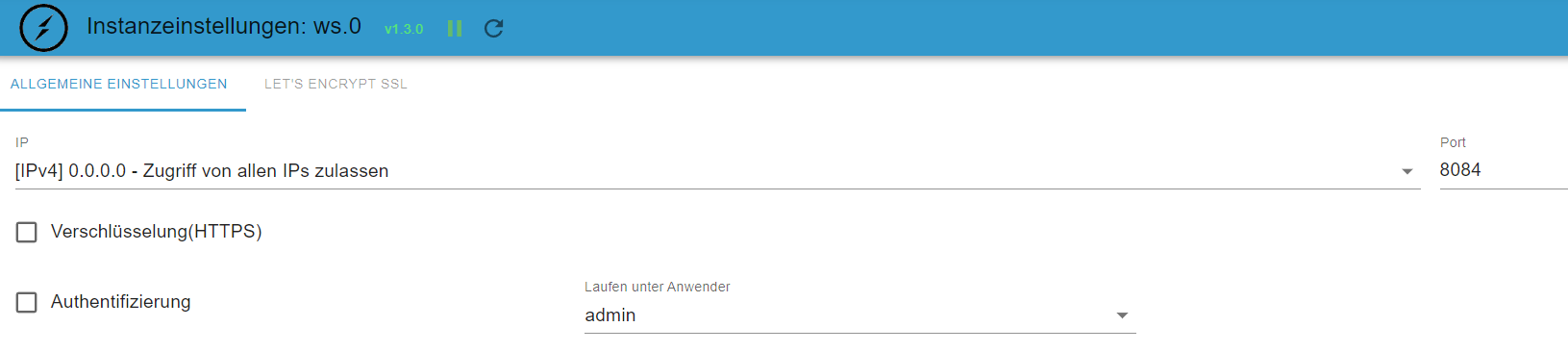
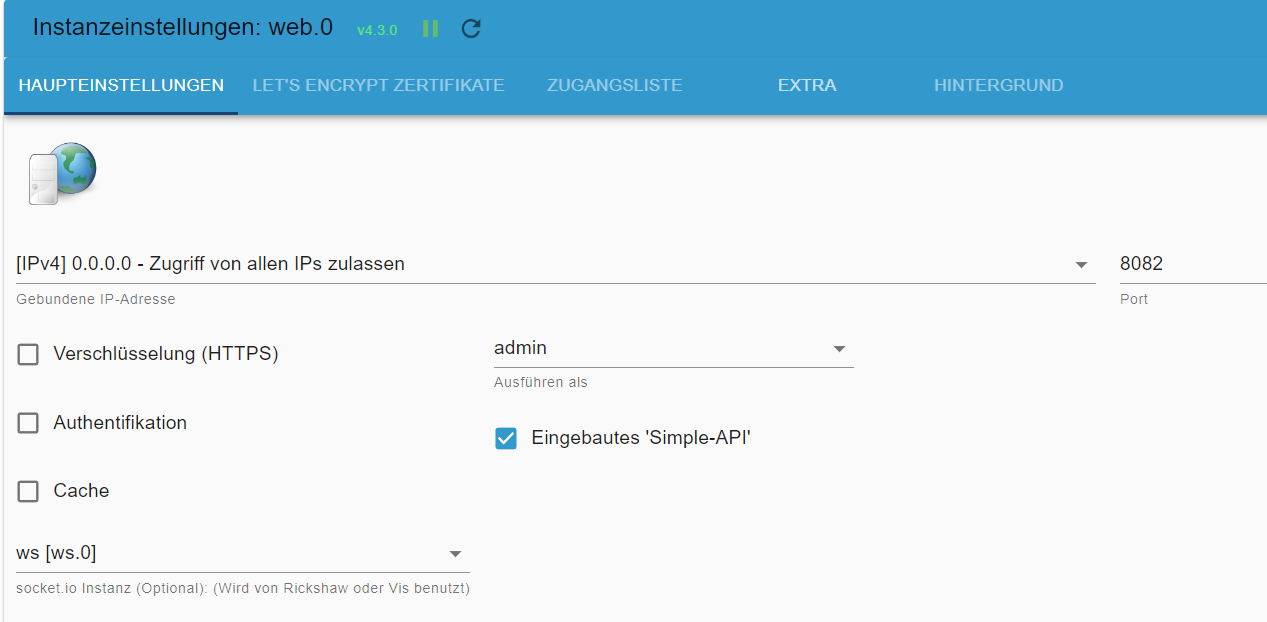
die Posts dazu habe ich gefunden (deshalb hatte ich Dich angesprochen). Hab das aber schon probiert (vlt. habe ich da noch was falsch):- habe die beiden Adapter installiert
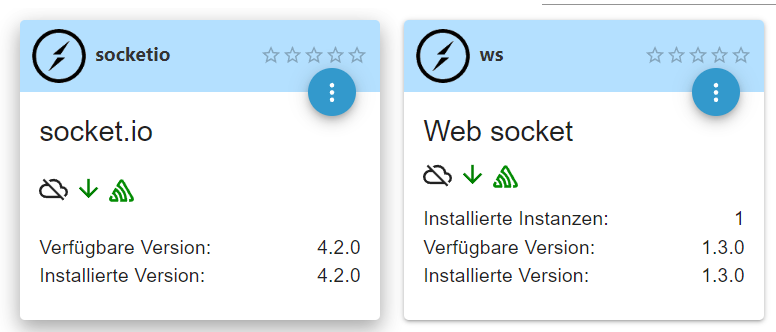
- vom socket.io gibt es keine Instanz
- die Instanz vom Web Socket ist so konfiguriert
- die Instanz vom web:
Es geht nicht. Ich hatte vor der Änderung gestern keine Probleme. Da habe in das Projekt eine Index-Seite eingefügt mit Material Design Top Bar Menu und View8. Das lädt nicht mehr (bleibt beim Loading Values wie oben beschrieben hängen). Aus dem Backup habe ich mir das json der Version von Vorgestern geholt und damit ein neues Projekt erstellt. Das lädt. Wie auch das Default.main.
Wenn die default VIS geladen wird kommt das in der Konsole:
Version vis-google-fonts: 0.0.1
edit.html:6581 Version vis-map: 1.0.3
lib.min.js:43 Download the Vue Devtools extension for a better development experience:
https://github.com/vuejs/vue-devtools
lib.min.js:43 You are running Vue in development mode.
Make sure to turn on production mode when deploying for production.
See more tips at https://vuejs.org/guide/deployment.html
edit.html:8765 Metro version: "1.2.0"
edit.html:10097 Version vis-plumb: 1.0.0
trashschedule.js:152 Version trashschedule: 2.0.3
vis-material-advanced.js:184 Version vis-material-advanced: 1.6.0
edit.html:19283 Version vis-weather: 2.5.6
socket.io.js:66 [2023-01-28T15:00:36.789Z] Try to connect
conn.js:305 2023-01-28T15:00:36.808Z Connected => authenticate
conn.js:326 2023-01-28T15:00:36.865Z Authenticated: true
materialdesign.js:33 Version vis-materialdesign: 0.5.9
edit.html:1 Unchecked runtime.lastError: The message port closed before a response was received.
instrument.ts:129 sentry initialized for vis-materialdesign
instrument.ts:129 Create inner vis object demoTemperature
instrument.ts:129 Create inner vis object demoHumidity
instrument.ts:129 "Use background": {"en": "Use background", "de": "Use background", "ru": "Use background"},
7instrument.ts:129 "ctrl - Bool": {"en": "ctrl - Bool", "de": "ctrl - Bool", "ru": "ctrl - Bool"},
instrument.ts:129 "string": {"en": "string", "de": "string", "ru": "string"},
2instrument.ts:129 "progress": {"en": "progress", "de": "progress", "ru": "progress"},
5instrument.ts:129 "view": {"en": "view", "de": "view", "ru": "view"},
2instrument.ts:129 "messages": {"en": "messages", "de": "messages", "ru": "messages"},
DevTools failed to load source map: Could not load content for http://192.168.1.112:8082/vis/widgets/material-webfont/css/materialdesignicons.css.map: HTTP error: status code 404, net::ERR_HTTP_RESPONSE_CODE_FAILURE
Also einen Fehler und die Warnung habe ich da schon. Aber es wird noch geladen.Beim "Problemprojekt" kommt das hinzu:
visUtils.js:455 Uncaught TypeError: Cannot read properties of undefined (reading 'data')
    at getUsedObjectIDs (visUtils.js:455:97)
    at Object.getUsedObjectIDs (vis.js:519:22)
    at vis.js:2055:34
    at conn.js:580:25
getUsedObjectIDs @ visUtils.js:455
getUsedObjectIDs @ vis.js:519
(anonymous) @ vis.js:2055
(anonymous) @ conn.js:580
setTimeout (async)
(anonymous) @ conn.js:579
SocketClient.findAnswer @ socket.io.js:294
socket.onmessage @ socket.io.js:202
instrument.ts:129 sentry initialized for vis-materialdesign
Da scheint der Hund begraben zu sein.
- habe die beiden Adapter installiert
-
@glasfaser
die Posts dazu habe ich gefunden (deshalb hatte ich Dich angesprochen). Hab das aber schon probiert (vlt. habe ich da noch was falsch):- habe die beiden Adapter installiert
- vom socket.io gibt es keine Instanz
- die Instanz vom Web Socket ist so konfiguriert
- die Instanz vom web:
Es geht nicht. Ich hatte vor der Änderung gestern keine Probleme. Da habe in das Projekt eine Index-Seite eingefügt mit Material Design Top Bar Menu und View8. Das lädt nicht mehr (bleibt beim Loading Values wie oben beschrieben hängen). Aus dem Backup habe ich mir das json der Version von Vorgestern geholt und damit ein neues Projekt erstellt. Das lädt. Wie auch das Default.main.
Wenn die default VIS geladen wird kommt das in der Konsole:
Version vis-google-fonts: 0.0.1
edit.html:6581 Version vis-map: 1.0.3
lib.min.js:43 Download the Vue Devtools extension for a better development experience:
https://github.com/vuejs/vue-devtools
lib.min.js:43 You are running Vue in development mode.
Make sure to turn on production mode when deploying for production.
See more tips at https://vuejs.org/guide/deployment.html
edit.html:8765 Metro version: "1.2.0"
edit.html:10097 Version vis-plumb: 1.0.0
trashschedule.js:152 Version trashschedule: 2.0.3
vis-material-advanced.js:184 Version vis-material-advanced: 1.6.0
edit.html:19283 Version vis-weather: 2.5.6
socket.io.js:66 [2023-01-28T15:00:36.789Z] Try to connect
conn.js:305 2023-01-28T15:00:36.808Z Connected => authenticate
conn.js:326 2023-01-28T15:00:36.865Z Authenticated: true
materialdesign.js:33 Version vis-materialdesign: 0.5.9
edit.html:1 Unchecked runtime.lastError: The message port closed before a response was received.
instrument.ts:129 sentry initialized for vis-materialdesign
instrument.ts:129 Create inner vis object demoTemperature
instrument.ts:129 Create inner vis object demoHumidity
instrument.ts:129 "Use background": {"en": "Use background", "de": "Use background", "ru": "Use background"},
7instrument.ts:129 "ctrl - Bool": {"en": "ctrl - Bool", "de": "ctrl - Bool", "ru": "ctrl - Bool"},
instrument.ts:129 "string": {"en": "string", "de": "string", "ru": "string"},
2instrument.ts:129 "progress": {"en": "progress", "de": "progress", "ru": "progress"},
5instrument.ts:129 "view": {"en": "view", "de": "view", "ru": "view"},
2instrument.ts:129 "messages": {"en": "messages", "de": "messages", "ru": "messages"},
DevTools failed to load source map: Could not load content for http://192.168.1.112:8082/vis/widgets/material-webfont/css/materialdesignicons.css.map: HTTP error: status code 404, net::ERR_HTTP_RESPONSE_CODE_FAILURE
Also einen Fehler und die Warnung habe ich da schon. Aber es wird noch geladen.Beim "Problemprojekt" kommt das hinzu:
visUtils.js:455 Uncaught TypeError: Cannot read properties of undefined (reading 'data')
    at getUsedObjectIDs (visUtils.js:455:97)
    at Object.getUsedObjectIDs (vis.js:519:22)
    at vis.js:2055:34
    at conn.js:580:25
getUsedObjectIDs @ visUtils.js:455
getUsedObjectIDs @ vis.js:519
(anonymous) @ vis.js:2055
(anonymous) @ conn.js:580
setTimeout (async)
(anonymous) @ conn.js:579
SocketClient.findAnswer @ socket.io.js:294
socket.onmessage @ socket.io.js:202
instrument.ts:129 sentry initialized for vis-materialdesign
Da scheint der Hund begraben zu sein.
- habe die beiden Adapter installiert
-
Was ist ist in einem neuen Projekt mit nur
. Da habe in das Projekt eine Index-Seite eingefügt mit Material Design Top Bar Menu und View8.
kommt dort auch :
Das lädt nicht mehr (bleibt beim Loading Values
@glasfaser
ich hoffe ich habe dich richtig verstanden. Ich habe vorher ein neues Projekt angelegt. Da dann in den Projektpfad per VIS-Dateimanager die aus dem Backup geholte json reinkopiert. Das war der Stand vor TopBarMenu und View8 (waren aber auch schon andere Material Design Widget drin). Das wird im Editor geladen. Da sieht die Console erstmal so aus wie beim Default, dann kommt viel anderes Zeugs (Fehler nur noch dass er Bilder nicht findet). -
@glasfaser
ich hoffe ich habe dich richtig verstanden. Ich habe vorher ein neues Projekt angelegt. Da dann in den Projektpfad per VIS-Dateimanager die aus dem Backup geholte json reinkopiert. Das war der Stand vor TopBarMenu und View8 (waren aber auch schon andere Material Design Widget drin). Das wird im Editor geladen. Da sieht die Console erstmal so aus wie beim Default, dann kommt viel anderes Zeugs (Fehler nur noch dass er Bilder nicht findet).@mp_trixi sagte in VIS lädt Projekt nicht mehr:
Da dann in den Projektpfad per VIS-Dateimanager die aus dem Backup geholte json reinkopiert.
Nein .. nicht so .
Ein neues leeres Projekt erstellen , nennen wir es Test .
und dort ein View erstellen mit den beiden Widget´s... was ist dann !?
... ich wollte erstmal von deinem bestehenden Projekt weg !!
-
@mp_trixi sagte in VIS lädt Projekt nicht mehr:
Da dann in den Projektpfad per VIS-Dateimanager die aus dem Backup geholte json reinkopiert.
Nein .. nicht so .
Ein neues leeres Projekt erstellen , nennen wir es Test .
und dort ein View erstellen mit den beiden Widget´s... was ist dann !?
... ich wollte erstmal von deinem bestehenden Projekt weg !!
@glasfaser
habs mal ganz rudimentär nachgestellt - da tuts (also eine Seite mit dem TopBarMenu und view8 Widget) mit zwei Menüeinträgen und dazu zwei blanke Views zum testen)im Prinzip könnte ich doch aus dem "kaputten" json mir view für view rauskopieren und importieren, oder?



Hey! Du scheinst an dieser Unterhaltung interessiert zu sein, hast aber noch kein Konto.
Hast du es satt, bei jedem Besuch durch die gleichen Beiträge zu scrollen? Wenn du dich für ein Konto anmeldest, kommst du immer genau dorthin zurück, wo du zuvor warst, und kannst dich über neue Antworten benachrichtigen lassen (entweder per E-Mail oder Push-Benachrichtigung). Du kannst auch Lesezeichen speichern und Beiträge positiv bewerten, um anderen Community-Mitgliedern deine Wertschätzung zu zeigen.
Mit deinem Input könnte dieser Beitrag noch besser werden 💗
Registrieren AnmeldenSupport us
217
Online33.0k
Benutzer83.6k
Themen1.3m
Beiträge