




[gelöst] Nach Restore kein CFIS möglich. "Operation not s..
-
Hallo,
ich hatte das Problem das der Raspi nach Restart nicht wieder hoch gekommen ist. Da ich zu faul war einen Monitor anzuschließen und regelmäßig Backups aufs NAS geschrieben wurden machte ich kurzer Hand eine neue Installation mit anschließendem Restore. Soweit alles gut. Dann fiel mir aber z.B. auf das die History Daten nicht gesichert wurden und noch ein paar Kleinigkeiten. Alles korrigiert und wollte dann ein neues Backup starten:Started iobroker ... [DEBUG] [mount] - noserverino option: false [DEBUG] [mount] - cifs-mount command: "sudo mount -t cifs -o username=gib,password=****,rw,file_mode=0777,dir_mode=0777,vers=2.0 //192.168.1.13/DS416j/home/ioBroker/Backup/ /opt/iobroker/backups" [DEBUG] [mount] - first mount attempt with smb option failed. try next mount attempt without smb option ... [DEBUG] [mount] - cifs-mount command: "sudo mount -t cifs -o username=gib,password=****,rw,file_mode=0777,dir_mode=0777 //192.168.1.13/DS416j/home/ioBroker/Backup/ /opt/iobroker/backups" [ERROR] [mount] - [undefined Error: Command failed: sudo mount -t cifs -o username=gib,password=****,rw,file_mode=0777,dir_mode=0777 //192.168.1.13/DS416j/home/ioBroker/Backup/ /opt/iobroker/backups mount error(95): Operation not supported Refer to the mount.cifs(8) manual page (e.g. man mount.cifs) and kernel log messages (dmesg) [ERROR] [mount] - Error: Command failed: sudo mount -t cifs -o username=gib,password=****,rw,file_mode=0777,dir_mode=0777 //192.168.1.13/DS416j/home/ioBroker/Backup/ /opt/iobroker/backups mount error(95): Operation not supported Refer to the mount.cifs(8) manual page (e.g. man mount.cifs) and kernel log messages (dmesg)Genau so hatte es eigentlich ein paar Tage funktioniert. Habe viel probiert. Cfis-tools sind installiert und ein manueller Mount bringt den selben Fehler:
pi@raspberrypi:~ $ sudo mount -t cifs -o username=gib,password=****,rw,file_mode=0777,dir_mode=0777 //192.168.1.13/DS416j/home/ioBroker/Backup/ /opt/iobroker/backups mount error(95): Operation not supported Refer to the mount.cifs(8) manual page (e.g. man mount.cifs) and kernel log messages (dmesg)Die Config in IOBroker:
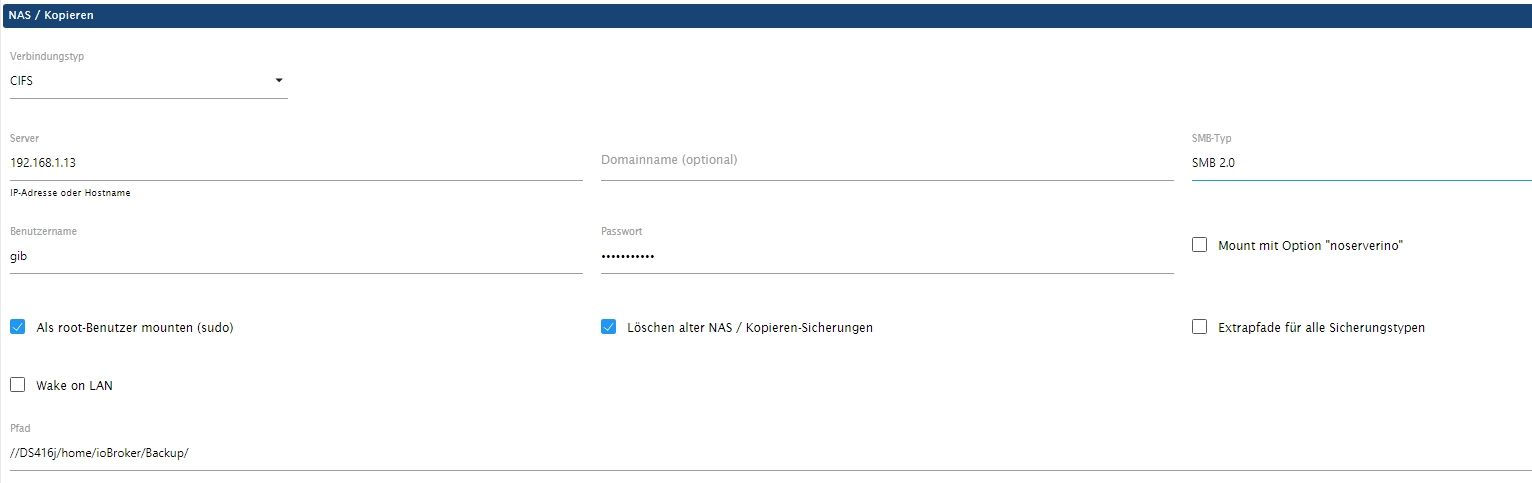
SMB 1 & 3 habe ich auch schon probiert... Noch jemand eine Idee?
VG GiB
-
Hallo,
ich hatte das Problem das der Raspi nach Restart nicht wieder hoch gekommen ist. Da ich zu faul war einen Monitor anzuschließen und regelmäßig Backups aufs NAS geschrieben wurden machte ich kurzer Hand eine neue Installation mit anschließendem Restore. Soweit alles gut. Dann fiel mir aber z.B. auf das die History Daten nicht gesichert wurden und noch ein paar Kleinigkeiten. Alles korrigiert und wollte dann ein neues Backup starten:Started iobroker ... [DEBUG] [mount] - noserverino option: false [DEBUG] [mount] - cifs-mount command: "sudo mount -t cifs -o username=gib,password=****,rw,file_mode=0777,dir_mode=0777,vers=2.0 //192.168.1.13/DS416j/home/ioBroker/Backup/ /opt/iobroker/backups" [DEBUG] [mount] - first mount attempt with smb option failed. try next mount attempt without smb option ... [DEBUG] [mount] - cifs-mount command: "sudo mount -t cifs -o username=gib,password=****,rw,file_mode=0777,dir_mode=0777 //192.168.1.13/DS416j/home/ioBroker/Backup/ /opt/iobroker/backups" [ERROR] [mount] - [undefined Error: Command failed: sudo mount -t cifs -o username=gib,password=****,rw,file_mode=0777,dir_mode=0777 //192.168.1.13/DS416j/home/ioBroker/Backup/ /opt/iobroker/backups mount error(95): Operation not supported Refer to the mount.cifs(8) manual page (e.g. man mount.cifs) and kernel log messages (dmesg) [ERROR] [mount] - Error: Command failed: sudo mount -t cifs -o username=gib,password=****,rw,file_mode=0777,dir_mode=0777 //192.168.1.13/DS416j/home/ioBroker/Backup/ /opt/iobroker/backups mount error(95): Operation not supported Refer to the mount.cifs(8) manual page (e.g. man mount.cifs) and kernel log messages (dmesg)Genau so hatte es eigentlich ein paar Tage funktioniert. Habe viel probiert. Cfis-tools sind installiert und ein manueller Mount bringt den selben Fehler:
pi@raspberrypi:~ $ sudo mount -t cifs -o username=gib,password=****,rw,file_mode=0777,dir_mode=0777 //192.168.1.13/DS416j/home/ioBroker/Backup/ /opt/iobroker/backups mount error(95): Operation not supported Refer to the mount.cifs(8) manual page (e.g. man mount.cifs) and kernel log messages (dmesg)Die Config in IOBroker:
SMB 1 & 3 habe ich auch schon probiert... Noch jemand eine Idee?
VG GiB
@gib64 sagte in Nach Restore kein CFIS möglich. "Operation not supportet":
$ sudo mount -t cifs -o username=gib,password=****,rw,file_mode=0777,dir_mode=0777 //192.168.1.13/DS416j/home/ioBroker/Backup/ /opt/iobroker/backups
probier mal manuell:
$ sudo mount -t cifs -o vers=2.0,username=gib,password=****,rw,file_mode=0777,dir_mode=0777 //192.168.1.13/DS416j/home/ioBroker/Backup/ /opt/iobroker/backups -
@gib64 sagte in Nach Restore kein CFIS möglich. "Operation not supportet":
$ sudo mount -t cifs -o username=gib,password=****,rw,file_mode=0777,dir_mode=0777 //192.168.1.13/DS416j/home/ioBroker/Backup/ /opt/iobroker/backups
probier mal manuell:
$ sudo mount -t cifs -o vers=2.0,username=gib,password=****,rw,file_mode=0777,dir_mode=0777 //192.168.1.13/DS416j/home/ioBroker/Backup/ /opt/iobroker/backups@djmarc75 Es kam zuerst der selbe Fehler. Dann habe ich SMB 3 auf dem NAS aktiviert und wollte es mal damit probieren. Hat leider auch nicht geklappt. Den Befehl mit vers=2.0 hatte ich vorher auch schon manuell mit dem selben Fehler probiert. Jetzt kommt komischer Weise:
pi@raspberrypi:~ $ sudo mount -t cifs -o vers=2.0,username=gib,password=***,rw,file_mode=0777,dir_mode=0777 //192.168.1.13/DS416j/home/ioBroker/Backup/ /opt/iobroker/backups mount error(2): No such file or directory Refer to the mount.cifs(8) manual page (e.g. man mount.cifs) and kernel log messages (dmesg) pi@raspberrypi:~ $ cd /opt/iobroker/backups pi@raspberrypi:/opt/iobroker/backups $iobroker/bakups existiert und die SMB Freigaben sind von meinem Windows Rechner nach wie vor erreichbar. IoBroker Backup hat aber noch den selben Fehler und probiert es ja auch mit vers=2.0:
Started iobroker ... [DEBUG] [mount] - noserverino option: false [DEBUG] [mount] - cifs-mount command: "sudo mount -t cifs -o username=gib,password=****,rw,file_mode=0777,dir_mode=0777,vers=2.0 //192.168.1.13/DS416j/home/ioBroker/Backup/ /opt/iobroker/backups" [DEBUG] [mount] - first mount attempt with smb option failed. try next mount attempt without smb option ... [DEBUG] [mount] - cifs-mount command: "sudo mount -t cifs -o username=gib,password=****,rw,file_mode=0777,dir_mode=0777 //192.168.1.13/DS416j/home/ioBroker/Backup/ /opt/iobroker/backups" [ERROR] [mount] - [undefined Error: Command failed: sudo mount -t cifs -o username=gib,password=****,rw,file_mode=0777,dir_mode=0777 //192.168.1.13/DS416j/home/ioBroker/Backup/ /opt/iobroker/backups mount error(95): Operation not supported Refer to the mount.cifs(8) manual page (e.g. man mount.cifs) and kernel log messages (dmesg) [ERROR] [mount] - Error: Command failed: sudo mount -t cifs -o username=gib,password=****,rw,file_mode=0777,dir_mode=0777 //192.168.1.13/DS416j/home/ioBroker/Backup/ /opt/iobroker/backups mount error(95): Operation not supported Refer to the mount.cifs(8) manual page (e.g. man mount.cifs) and kernel log messages (dmesg)Edit: Ok, ohne vers=2.0 kommt "Operation not Supportet" und mit "No such file or directory":
pi@raspberrypi:/opt/iobroker/backups $ sudo mount -t cifs -o username=gib,password=***,rw,file_mode=0777,dir_mode=0777,vers=2.0 //192.168.1.13/DS416j/home/ioBroker/Backup/ /opt/iobroker/backups mount error(2): No such file or directory Refer to the mount.cifs(8) manual page (e.g. man mount.cifs) and kernel log messages (dmesg) pi@raspberrypi:/opt/iobroker/backups $ sudo mount -t cifs -o username=gib,password=****,rw,file_mode=0777,dir_mode=0777 //192.168.1.13/DS416j/home/ioBroker/Backup/ /opt/iobroker/backups mount error(95): Operation not supported Refer to the mount.cifs(8) manual page (e.g. man mount.cifs) and kernel log messages (dmesg) -
@djmarc75 Es kam zuerst der selbe Fehler. Dann habe ich SMB 3 auf dem NAS aktiviert und wollte es mal damit probieren. Hat leider auch nicht geklappt. Den Befehl mit vers=2.0 hatte ich vorher auch schon manuell mit dem selben Fehler probiert. Jetzt kommt komischer Weise:
pi@raspberrypi:~ $ sudo mount -t cifs -o vers=2.0,username=gib,password=***,rw,file_mode=0777,dir_mode=0777 //192.168.1.13/DS416j/home/ioBroker/Backup/ /opt/iobroker/backups mount error(2): No such file or directory Refer to the mount.cifs(8) manual page (e.g. man mount.cifs) and kernel log messages (dmesg) pi@raspberrypi:~ $ cd /opt/iobroker/backups pi@raspberrypi:/opt/iobroker/backups $iobroker/bakups existiert und die SMB Freigaben sind von meinem Windows Rechner nach wie vor erreichbar. IoBroker Backup hat aber noch den selben Fehler und probiert es ja auch mit vers=2.0:
Started iobroker ... [DEBUG] [mount] - noserverino option: false [DEBUG] [mount] - cifs-mount command: "sudo mount -t cifs -o username=gib,password=****,rw,file_mode=0777,dir_mode=0777,vers=2.0 //192.168.1.13/DS416j/home/ioBroker/Backup/ /opt/iobroker/backups" [DEBUG] [mount] - first mount attempt with smb option failed. try next mount attempt without smb option ... [DEBUG] [mount] - cifs-mount command: "sudo mount -t cifs -o username=gib,password=****,rw,file_mode=0777,dir_mode=0777 //192.168.1.13/DS416j/home/ioBroker/Backup/ /opt/iobroker/backups" [ERROR] [mount] - [undefined Error: Command failed: sudo mount -t cifs -o username=gib,password=****,rw,file_mode=0777,dir_mode=0777 //192.168.1.13/DS416j/home/ioBroker/Backup/ /opt/iobroker/backups mount error(95): Operation not supported Refer to the mount.cifs(8) manual page (e.g. man mount.cifs) and kernel log messages (dmesg) [ERROR] [mount] - Error: Command failed: sudo mount -t cifs -o username=gib,password=****,rw,file_mode=0777,dir_mode=0777 //192.168.1.13/DS416j/home/ioBroker/Backup/ /opt/iobroker/backups mount error(95): Operation not supported Refer to the mount.cifs(8) manual page (e.g. man mount.cifs) and kernel log messages (dmesg)Edit: Ok, ohne vers=2.0 kommt "Operation not Supportet" und mit "No such file or directory":
pi@raspberrypi:/opt/iobroker/backups $ sudo mount -t cifs -o username=gib,password=***,rw,file_mode=0777,dir_mode=0777,vers=2.0 //192.168.1.13/DS416j/home/ioBroker/Backup/ /opt/iobroker/backups mount error(2): No such file or directory Refer to the mount.cifs(8) manual page (e.g. man mount.cifs) and kernel log messages (dmesg) pi@raspberrypi:/opt/iobroker/backups $ sudo mount -t cifs -o username=gib,password=****,rw,file_mode=0777,dir_mode=0777 //192.168.1.13/DS416j/home/ioBroker/Backup/ /opt/iobroker/backups mount error(95): Operation not supported Refer to the mount.cifs(8) manual page (e.g. man mount.cifs) and kernel log messages (dmesg)Und welche smb Version bietet der Server an?
-
Und welche smb Version bietet der Server an?
-
@thomas-braun SMB1, SMB2, SMB2 und Large MTU und SMB3
Ich habe es jetzt über NFS Mount hinbekommen aber komisch ist das schon. Normaler Weise war SMB immer problemlos...
NFS ist eh die erste Wahl.
-
2.5.102023-01-03
simatecFix Docker Restore* (simatec) Fix Link Design
simatecdependencies updated* (Grothesk242) Fix CIFS MountSchön das das auch geklärt ist ;-)
Was meinst du genau?
Der genannte Patch bezieht sich auf die Besitzer von gemounteten Dateien. Verhindert die 'utime'-Meldung bei gewissen Backuptypen. Hat mit deinem Problem nix zu tun.


Hey! Du scheinst an dieser Unterhaltung interessiert zu sein, hast aber noch kein Konto.
Hast du es satt, bei jedem Besuch durch die gleichen Beiträge zu scrollen? Wenn du dich für ein Konto anmeldest, kommst du immer genau dorthin zurück, wo du zuvor warst, und kannst dich über neue Antworten benachrichtigen lassen (entweder per E-Mail oder Push-Benachrichtigung). Du kannst auch Lesezeichen speichern und Beiträge positiv bewerten, um anderen Community-Mitgliedern deine Wertschätzung zu zeigen.
Mit deinem Input könnte dieser Beitrag noch besser werden 💗
Registrieren Anmelden254
Online33.0k
Benutzer83.5k
Themen1.3m
Beiträge