




Akku Zustand Proxmox Laptop abfragen

-
@wendy2702
Ich habe jetzt im iobroker einen Terminal Adapter installiert und folgenden Befehl eingegeben und er hat mir Akkustand und Netzteil angeschlossen angezeit./opt/iobroker$ acpi --ac-adapter --battery Battery 0: Full, 100% Adapter 0: on-line /opt/iobroker$Das komische ist, wenn ich unter Objekte bei Ping die Geräte sehe, stehen alle bei "false" und ich komme im Terminal mit Ping und der IP-Adresse nicht einmal auf die Fritzbox. Liegt es an Proxmox, weil iobroker in einem LXC Container läuft? Ich habe den mit Proxmox ja erst nur nebenbei auf einem ausrangierten Laptop installiert, da ich noch nie davor etwas mit Proxmox zu tun hatte und der Raspi noch als Hauptserver läuft. Ich wollte es halt erst testen, bevor ich komplett umziehe. Mit meinem Raspi 4 mit 4GB bin ich an die Grenzen nach der Installation auf Debian 11 Bullseye gekommen. Da musste ich wieder zurück auf Version 10.
@biker1602 OK. Das mit dem Terminal war zwar anders gemeint aber auch gut.
Wenn du einen Container verwendet hast kommt es drauf an wie der eingerichtet wurde und ob die Firewall auch aktiviert wurde. Das wären Möglichkeiten warum andere Sachen nicht erreichbar sind.
Wenn du jetzt den LinuxControl Adapter so wie in meinem Screenshots mit der IP von ioBroker Container und den Login daten konfigurierst, was kommt dann im Logfile wenn die Abfrage gemacht wird.
Das Loggen für den Adapter bitte auf Debug stellen.
-
@biker1602 OK. Das mit dem Terminal war zwar anders gemeint aber auch gut.
Wenn du einen Container verwendet hast kommt es drauf an wie der eingerichtet wurde und ob die Firewall auch aktiviert wurde. Das wären Möglichkeiten warum andere Sachen nicht erreichbar sind.
Wenn du jetzt den LinuxControl Adapter so wie in meinem Screenshots mit der IP von ioBroker Container und den Login daten konfigurierst, was kommt dann im Logfile wenn die Abfrage gemacht wird.
Das Loggen für den Adapter bitte auf Debug stellen.
@wendy2702
So ich habe in Proxmox die Firewall deaktiviert im LXC Container mit iobroker war die Firewall aus, Proxmox und iobroker neu gestartet den Adapter auf debug gestellt mit folgendem Ergebnis.2023-01-13 07:25:28.749 - info: linux-control.0 (1108) Got terminate signal TERMINATE_YOURSELF 2023-01-13 07:25:28.750 - info: linux-control.0 (1108) cleaned everything up... 2023-01-13 07:25:28.751 - info: linux-control.0 (1108) terminating 2023-01-13 07:25:28.751 - debug: linux-control.0 (1108) Plugin sentry destroyed 2023-01-13 07:25:28.751 - info: linux-control.0 (1108) Terminated (ADAPTER_REQUESTED_TERMINATION): Without reason 2023-01-13 07:25:32.873 - debug: linux-control.0 (1225) Redis Objects: Use Redis connection: 127.0.0.1:9001 2023-01-13 07:25:32.962 - debug: linux-control.0 (1225) Objects client ready ... initialize now 2023-01-13 07:25:32.964 - debug: linux-control.0 (1225) Objects create System PubSub Client 2023-01-13 07:25:32.965 - debug: linux-control.0 (1225) Objects create User PubSub Client 2023-01-13 07:25:33.173 - debug: linux-control.0 (1225) Objects client initialize lua scripts 2023-01-13 07:25:33.178 - debug: linux-control.0 (1225) Objects connected to redis: 127.0.0.1:9001 2023-01-13 07:25:33.258 - debug: linux-control.0 (1225) Redis States: Use Redis connection: 127.0.0.1:9000 2023-01-13 07:25:33.337 - debug: linux-control.0 (1225) States create System PubSub Client 2023-01-13 07:25:33.338 - debug: linux-control.0 (1225) States create User PubSub Client 2023-01-13 07:25:33.542 - debug: linux-control.0 (1225) States connected to redis: 127.0.0.1:9000 2023-01-13 07:25:33.956 - debug: linux-control.0 (1225) Plugin sentry Initialize Plugin (enabled=true) 2023-01-13 07:25:34.133 - warn: linux-control.0 (1225) Object linux-control.0.command.host is invalid: obj.common.states has an invalid type! Expected "object", received "string" 2023-01-13 07:25:34.134 - warn: linux-control.0 (1225) This object will not be created in future versions. Please report this to the developer. 2023-01-13 07:25:34.140 - info: linux-control.0 (1225) starting. Version 1.1.3 in /opt/iobroker/node_modules/iobroker.linux-control, node: v16.19.0, js-controller: 4.0.24 2023-01-13 07:25:34.177 - warn: linux-control.0 (1225) Object linux-control.0.command.host is invalid: obj.common.states has an invalid type! Expected "object", received "string" 2023-01-13 07:25:34.177 - warn: linux-control.0 (1225) This object will not be created in future versions. Please report this to the developer. 2023-01-13 07:25:34.186 - info: linux-control.0 (1225) getting data from Linux (192.168.57.210:22, Adapter start) 2023-01-13 07:25:34.203 - info: linux-control.0 (1225) [getConnection] Host 'Linux' (192.168.57.210:22) seems not to be online 2023-01-13 07:25:34.203 - debug: linux-control.0 (1225) [getConnection] Host 'Linux' (192.168.57.210:22) ping result: {"inputHost":"192.168.57.210","host":"unknown","alive":false,"output":"","time":"unknown","times":[],"min":"unknown","max":"unknown","avg":"unknown","stddev":"unknown","packetLoss":"unknown"} 2023-01-13 07:25:34.390 - debug: linux-control.0 (1225) [refreshHost] Linux (192.168.57.210:22): button 'linux-control.0.Linux.refresh' subscribedBeim Ping Adapter das gleiche alle false
Per Putty komme ich auf den ioBroker -
@wendy2702
So ich habe in Proxmox die Firewall deaktiviert im LXC Container mit iobroker war die Firewall aus, Proxmox und iobroker neu gestartet den Adapter auf debug gestellt mit folgendem Ergebnis.2023-01-13 07:25:28.749 - info: linux-control.0 (1108) Got terminate signal TERMINATE_YOURSELF 2023-01-13 07:25:28.750 - info: linux-control.0 (1108) cleaned everything up... 2023-01-13 07:25:28.751 - info: linux-control.0 (1108) terminating 2023-01-13 07:25:28.751 - debug: linux-control.0 (1108) Plugin sentry destroyed 2023-01-13 07:25:28.751 - info: linux-control.0 (1108) Terminated (ADAPTER_REQUESTED_TERMINATION): Without reason 2023-01-13 07:25:32.873 - debug: linux-control.0 (1225) Redis Objects: Use Redis connection: 127.0.0.1:9001 2023-01-13 07:25:32.962 - debug: linux-control.0 (1225) Objects client ready ... initialize now 2023-01-13 07:25:32.964 - debug: linux-control.0 (1225) Objects create System PubSub Client 2023-01-13 07:25:32.965 - debug: linux-control.0 (1225) Objects create User PubSub Client 2023-01-13 07:25:33.173 - debug: linux-control.0 (1225) Objects client initialize lua scripts 2023-01-13 07:25:33.178 - debug: linux-control.0 (1225) Objects connected to redis: 127.0.0.1:9001 2023-01-13 07:25:33.258 - debug: linux-control.0 (1225) Redis States: Use Redis connection: 127.0.0.1:9000 2023-01-13 07:25:33.337 - debug: linux-control.0 (1225) States create System PubSub Client 2023-01-13 07:25:33.338 - debug: linux-control.0 (1225) States create User PubSub Client 2023-01-13 07:25:33.542 - debug: linux-control.0 (1225) States connected to redis: 127.0.0.1:9000 2023-01-13 07:25:33.956 - debug: linux-control.0 (1225) Plugin sentry Initialize Plugin (enabled=true) 2023-01-13 07:25:34.133 - warn: linux-control.0 (1225) Object linux-control.0.command.host is invalid: obj.common.states has an invalid type! Expected "object", received "string" 2023-01-13 07:25:34.134 - warn: linux-control.0 (1225) This object will not be created in future versions. Please report this to the developer. 2023-01-13 07:25:34.140 - info: linux-control.0 (1225) starting. Version 1.1.3 in /opt/iobroker/node_modules/iobroker.linux-control, node: v16.19.0, js-controller: 4.0.24 2023-01-13 07:25:34.177 - warn: linux-control.0 (1225) Object linux-control.0.command.host is invalid: obj.common.states has an invalid type! Expected "object", received "string" 2023-01-13 07:25:34.177 - warn: linux-control.0 (1225) This object will not be created in future versions. Please report this to the developer. 2023-01-13 07:25:34.186 - info: linux-control.0 (1225) getting data from Linux (192.168.57.210:22, Adapter start) 2023-01-13 07:25:34.203 - info: linux-control.0 (1225) [getConnection] Host 'Linux' (192.168.57.210:22) seems not to be online 2023-01-13 07:25:34.203 - debug: linux-control.0 (1225) [getConnection] Host 'Linux' (192.168.57.210:22) ping result: {"inputHost":"192.168.57.210","host":"unknown","alive":false,"output":"","time":"unknown","times":[],"min":"unknown","max":"unknown","avg":"unknown","stddev":"unknown","packetLoss":"unknown"} 2023-01-13 07:25:34.390 - debug: linux-control.0 (1225) [refreshHost] Linux (192.168.57.210:22): button 'linux-control.0.Linux.refresh' subscribedBeim Ping Adapter das gleiche alle false
Per Putty komme ich auf den ioBroker@biker1602 sagte in Akkustand vom Laptop auslesen:
192.168.57.210
Welche IP ist das?
Wurden Objekte angelegt und befüllt?
Wie sieht der Container aus:
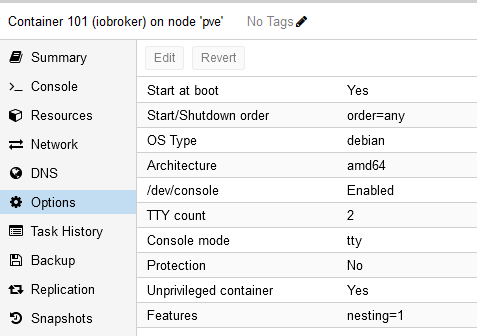
Nochmal, wenn du mit Putty auf ioBroker bist kannst du den acpi Befehl ausführen ? Wenn ja was ist davon die Ausgabe?
Wenn du mit Putty auf iobroker bist kannst du dich von da per SSH auf Proxmox anmelden:
ssh <dein user>@<deine Proxmox IP>Und noch was anderes, vielleicht einfacher: Warum nimmst du den Akku nicht einfach aus dem Rechner wenn das geht. Wäre mir sicherer als Strom aus/an. Wenn das mal nicht sauber funktioniert liegt der Server flach.
-
@biker1602 sagte in Akkustand vom Laptop auslesen:
192.168.57.210
Welche IP ist das?
Wurden Objekte angelegt und befüllt?
Wie sieht der Container aus:
Nochmal, wenn du mit Putty auf ioBroker bist kannst du den acpi Befehl ausführen ? Wenn ja was ist davon die Ausgabe?
Wenn du mit Putty auf iobroker bist kannst du dich von da per SSH auf Proxmox anmelden:
ssh <dein user>@<deine Proxmox IP>Und noch was anderes, vielleicht einfacher: Warum nimmst du den Akku nicht einfach aus dem Rechner wenn das geht. Wäre mir sicherer als Strom aus/an. Wenn das mal nicht sauber funktioniert liegt der Server flach.
@wendy2702
die 192.168.78.210 ist die IP vom Iobroker.
Wurden Objekte angelegt und befüllt? Da weiß ich leider nicht, was du meinst.So sieht der Container aus.
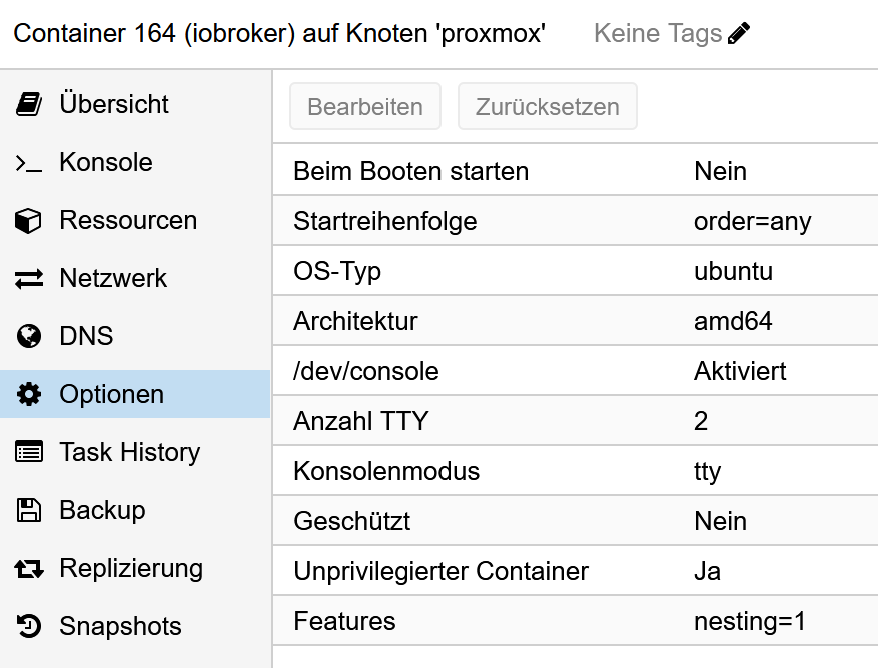
Wenn ich mich mit Putty auf den iobroker einlogge und dann auf den Proxmox möchte kommt folgende Meldung
The authenticity of host '192.168.57.3 (192.168.57.3)' can't be established.
ED25519 key fingerprint is SHA256:si4tobOJn0oRIAMljoYi/KTHtv0sMMYRwLLGvkhdUsA.
This key is not known by any other names
Are you sure you want to continue connecting (yes/no/[fingerprint])?
wenn ich bei Putty in der Konsole den Befehl eingebe, bekomme ich folgende Rückmeldung
acpi --ac-adapter --battery
Battery 0: Discharging, 75%, 03:16:38 remaining
Adapter 0: off-line
root@iobroker:~# -
@biker1602 sagte in Akkustand vom Laptop auslesen:
192.168.57.210
Welche IP ist das?
Wurden Objekte angelegt und befüllt?
Wie sieht der Container aus:
Nochmal, wenn du mit Putty auf ioBroker bist kannst du den acpi Befehl ausführen ? Wenn ja was ist davon die Ausgabe?
Wenn du mit Putty auf iobroker bist kannst du dich von da per SSH auf Proxmox anmelden:
ssh <dein user>@<deine Proxmox IP>Und noch was anderes, vielleicht einfacher: Warum nimmst du den Akku nicht einfach aus dem Rechner wenn das geht. Wäre mir sicherer als Strom aus/an. Wenn das mal nicht sauber funktioniert liegt der Server flach.
@wendy2702 said in Akkustand vom Laptop auslesen:
Wurden Objekte angelegt und befüllt?
Du meinst im Iobroker richtig?
Unter Objekte bei Proxmox wurde alles befüllt.
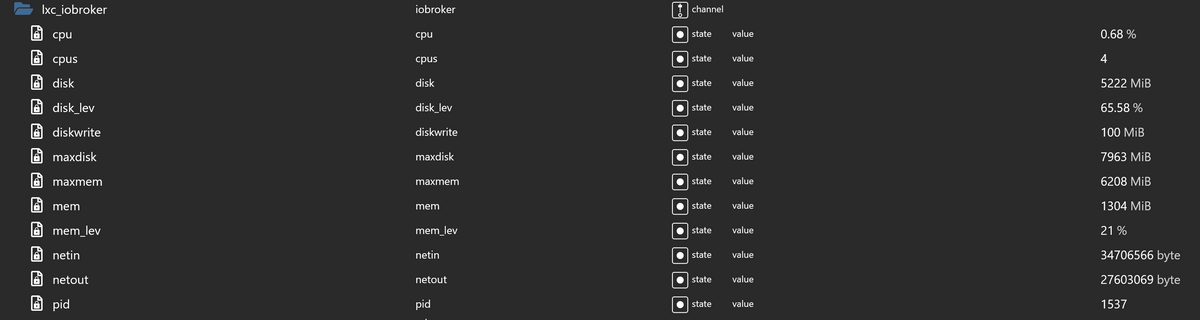
Unter Linux Objekte allerdings nicht
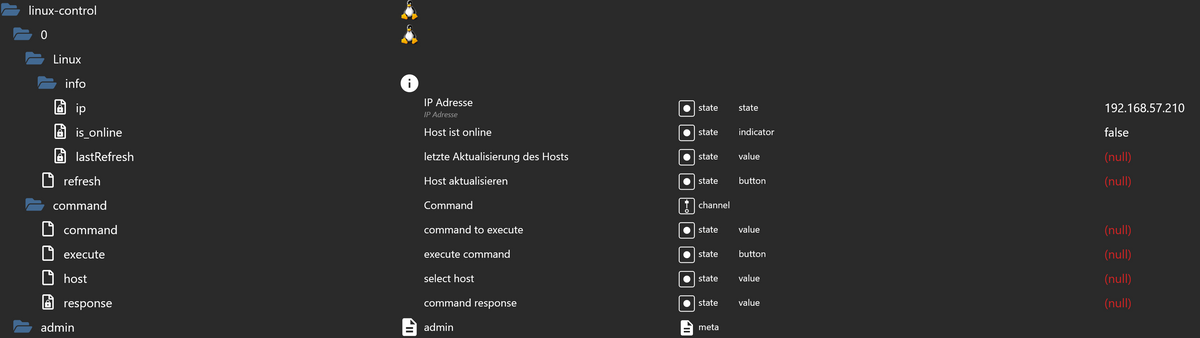
-
@wendy2702
die 192.168.78.210 ist die IP vom Iobroker.
Wurden Objekte angelegt und befüllt? Da weiß ich leider nicht, was du meinst.So sieht der Container aus.
Wenn ich mich mit Putty auf den iobroker einlogge und dann auf den Proxmox möchte kommt folgende Meldung
The authenticity of host '192.168.57.3 (192.168.57.3)' can't be established.
ED25519 key fingerprint is SHA256:si4tobOJn0oRIAMljoYi/KTHtv0sMMYRwLLGvkhdUsA.
This key is not known by any other names
Are you sure you want to continue connecting (yes/no/[fingerprint])?
wenn ich bei Putty in der Konsole den Befehl eingebe, bekomme ich folgende Rückmeldung
acpi --ac-adapter --battery
Battery 0: Discharging, 75%, 03:16:38 remaining
Adapter 0: off-line
root@iobroker:~#@biker1602 sagte in Akkustand vom Laptop auslesen:
wenn ich bei Putty in der Konsole den Befehl eingebe, bekomme ich folgende Rückmeldung
acpi --ac-adapter --battery
Battery 0: Discharging, 75%, 03:16:38 remaining
Adapter 0: off-line
root@iobroker:~#OK.
BITTE RICHTE DIR EINEN USER EIN
adduser <dein Username>
usermod -aG sudo <dein Username>
Falls Sudo nicht installiert ist:
apt install sudodann als root ausloggen und als dein User anmelden.
Da du als root gearbeitet hast kann es sein das Rechte nicht passen. Bitte mal
iob fixausführen und die vollständige ausgabe posten.
Welche IP Hat denn jetzt iobroker?
@biker1602 sagte in Akkustand vom Laptop auslesen:
die 192.168.78.210 ist die IP vom Iobroker.
oder doch
192.168.57.210 ?
Bei der Abfrage per ssh auf den Host einfach mit "yes" bestätigen.
Dann mal dort dein "acpi" Befehl eingeben und schauen was kommt.
-
@biker1602 sagte in Akkustand vom Laptop auslesen:
wenn ich bei Putty in der Konsole den Befehl eingebe, bekomme ich folgende Rückmeldung
acpi --ac-adapter --battery
Battery 0: Discharging, 75%, 03:16:38 remaining
Adapter 0: off-line
root@iobroker:~#OK.
BITTE RICHTE DIR EINEN USER EIN
adduser <dein Username>
usermod -aG sudo <dein Username>
Falls Sudo nicht installiert ist:
apt install sudodann als root ausloggen und als dein User anmelden.
Da du als root gearbeitet hast kann es sein das Rechte nicht passen. Bitte mal
iob fixausführen und die vollständige ausgabe posten.
Welche IP Hat denn jetzt iobroker?
@biker1602 sagte in Akkustand vom Laptop auslesen:
die 192.168.78.210 ist die IP vom Iobroker.
oder doch
192.168.57.210 ?
Bei der Abfrage per ssh auf den Host einfach mit "yes" bestätigen.
Dann mal dort dein "acpi" Befehl eingeben und schauen was kommt.
@wendy2702 said in Akkustand vom Laptop auslesen:
192.168.57.210 ?
Bei der Abfrage per ssh auf den Host einfach mit "yes" bestätigen.
Dann mal dort dein "acpi" Befehl eingeben und schauen was kommt.die ist richtig das andere war ein Schreibfehler von mir.
nach der Bestätigung mit yes musste ich das Passwort für Proxmox eingeben und war dann auf Proxmox drauf den Befehl "acpi --ac-adapter --battery"
eingebe, bekomme ich als Rückmeldung command not found -
@wendy2702 said in Akkustand vom Laptop auslesen:
192.168.57.210 ?
Bei der Abfrage per ssh auf den Host einfach mit "yes" bestätigen.
Dann mal dort dein "acpi" Befehl eingeben und schauen was kommt.die ist richtig das andere war ein Schreibfehler von mir.
nach der Bestätigung mit yes musste ich das Passwort für Proxmox eingeben und war dann auf Proxmox drauf den Befehl "acpi --ac-adapter --battery"
eingebe, bekomme ich als Rückmeldung command not found@biker1602 Dann ist das tool dort nicht installiert.
Was ist mit den anderen sachen die ich geschrieben hatte?
-
@biker1602 Dann ist das tool dort nicht installiert.
Was ist mit den anderen sachen die ich geschrieben hatte?
@wendy2702
So den User geändert neu eingeloggt und dann iobroker fix gestartet
danachlogin as: biker1602 biker1602@192.168.57.210's password: Welcome to Ubuntu 22.04.1 LTS (GNU/Linux 5.15.83-1-pve x86_64) * Documentation: https://help.ubuntu.com * Management: https://landscape.canonical.com * Support: https://ubuntu.com/advantage Last login: Fri Jan 13 10:14:09 2023 biker1602@iobroker:~$ acpi --ac-adapter --battery Battery 0: Discharging, 44%, 02:30:33 remaining Adapter 0: off-line biker1602@iobroker:~$im Linux Adapter den Benutzer gewechselt, aber es hat sich nichts geändert.
-
@biker1602 Dann ist das tool dort nicht installiert.
Was ist mit den anderen sachen die ich geschrieben hatte?
2023-01-13 10:21:32.976 - info: linux-control.0 (1628) Got terminate signal TERMINATE_YOURSELF 2023-01-13 10:21:32.977 - info: linux-control.0 (1628) cleaned everything up... 2023-01-13 10:21:32.978 - info: linux-control.0 (1628) terminating 2023-01-13 10:21:32.978 - debug: linux-control.0 (1628) Plugin sentry destroyed 2023-01-13 10:21:32.979 - info: linux-control.0 (1628) Terminated (ADAPTER_REQUESTED_TERMINATION): Without reason 2023-01-13 10:21:37.129 - debug: linux-control.0 (2109) Redis Objects: Use Redis connection: 127.0.0.1:9001 2023-01-13 10:21:37.222 - debug: linux-control.0 (2109) Objects client ready ... initialize now 2023-01-13 10:21:37.224 - debug: linux-control.0 (2109) Objects create System PubSub Client 2023-01-13 10:21:37.225 - debug: linux-control.0 (2109) Objects create User PubSub Client 2023-01-13 10:21:37.450 - debug: linux-control.0 (2109) Objects client initialize lua scripts 2023-01-13 10:21:37.456 - debug: linux-control.0 (2109) Objects connected to redis: 127.0.0.1:9001 2023-01-13 10:21:37.534 - debug: linux-control.0 (2109) Redis States: Use Redis connection: 127.0.0.1:9000 2023-01-13 10:21:37.612 - debug: linux-control.0 (2109) States create System PubSub Client 2023-01-13 10:21:37.613 - debug: linux-control.0 (2109) States create User PubSub Client 2023-01-13 10:21:37.806 - debug: linux-control.0 (2109) States connected to redis: 127.0.0.1:9000 2023-01-13 10:21:38.246 - debug: linux-control.0 (2109) Plugin sentry Initialize Plugin (enabled=true) 2023-01-13 10:21:38.418 - warn: linux-control.0 (2109) Object linux-control.0.command.host is invalid: obj.common.states has an invalid type! Expected "object", received "string" 2023-01-13 10:21:38.419 - warn: linux-control.0 (2109) This object will not be created in future versions. Please report this to the developer. 2023-01-13 10:21:38.424 - info: linux-control.0 (2109) starting. Version 1.1.3 in /opt/iobroker/node_modules/iobroker.linux-control, node: v16.19.0, js-controller: 4.0.24 2023-01-13 10:21:38.466 - warn: linux-control.0 (2109) Object linux-control.0.command.host is invalid: obj.common.states has an invalid type! Expected "object", received "string" 2023-01-13 10:21:38.467 - warn: linux-control.0 (2109) This object will not be created in future versions. Please report this to the developer. 2023-01-13 10:21:38.476 - info: linux-control.0 (2109) getting data from Linux (192.168.57.210:22, Adapter start) 2023-01-13 10:21:38.493 - info: linux-control.0 (2109) [getConnection] Host 'Linux' (192.168.57.210:22) seems not to be online 2023-01-13 10:21:38.494 - debug: linux-control.0 (2109) [getConnection] Host 'Linux' (192.168.57.210:22) ping result: {"inputHost":"192.168.57.210","host":"unknown","alive":false,"output":"","time":"unknown","times":[],"min":"unknown","max":"unknown","avg":"unknown","stddev":"unknown","packetLoss":"unknown"} 2023-01-13 10:21:38.674 - debug: linux-control.0 (2109) [refreshHost] Linux (192.168.57.210:22): button 'linux-control.0.Linux.refresh' subscribed 2023-01-13 10:26:38.674 - info: linux-control.0 (2109) getting data from Linux (192.168.57.210:22) 2023-01-13 10:26:38.686 - info: linux-control.0 (2109) [getConnection] Host 'Linux' (192.168.57.210:22) seems not to be online 2023-01-13 10:26:38.687 - debug: linux-control.0 (2109) [getConnection] Host 'Linux' (192.168.57.210:22) ping result: {"inputHost":"192.168.57.210","host":"unknown","alive":false,"output":"","time":"unknown","times":[],"min":"unknown","max":"unknown","avg":"unknown","stddev":"unknown","packetLoss":"unknown"} -
2023-01-13 10:21:32.976 - info: linux-control.0 (1628) Got terminate signal TERMINATE_YOURSELF 2023-01-13 10:21:32.977 - info: linux-control.0 (1628) cleaned everything up... 2023-01-13 10:21:32.978 - info: linux-control.0 (1628) terminating 2023-01-13 10:21:32.978 - debug: linux-control.0 (1628) Plugin sentry destroyed 2023-01-13 10:21:32.979 - info: linux-control.0 (1628) Terminated (ADAPTER_REQUESTED_TERMINATION): Without reason 2023-01-13 10:21:37.129 - debug: linux-control.0 (2109) Redis Objects: Use Redis connection: 127.0.0.1:9001 2023-01-13 10:21:37.222 - debug: linux-control.0 (2109) Objects client ready ... initialize now 2023-01-13 10:21:37.224 - debug: linux-control.0 (2109) Objects create System PubSub Client 2023-01-13 10:21:37.225 - debug: linux-control.0 (2109) Objects create User PubSub Client 2023-01-13 10:21:37.450 - debug: linux-control.0 (2109) Objects client initialize lua scripts 2023-01-13 10:21:37.456 - debug: linux-control.0 (2109) Objects connected to redis: 127.0.0.1:9001 2023-01-13 10:21:37.534 - debug: linux-control.0 (2109) Redis States: Use Redis connection: 127.0.0.1:9000 2023-01-13 10:21:37.612 - debug: linux-control.0 (2109) States create System PubSub Client 2023-01-13 10:21:37.613 - debug: linux-control.0 (2109) States create User PubSub Client 2023-01-13 10:21:37.806 - debug: linux-control.0 (2109) States connected to redis: 127.0.0.1:9000 2023-01-13 10:21:38.246 - debug: linux-control.0 (2109) Plugin sentry Initialize Plugin (enabled=true) 2023-01-13 10:21:38.418 - warn: linux-control.0 (2109) Object linux-control.0.command.host is invalid: obj.common.states has an invalid type! Expected "object", received "string" 2023-01-13 10:21:38.419 - warn: linux-control.0 (2109) This object will not be created in future versions. Please report this to the developer. 2023-01-13 10:21:38.424 - info: linux-control.0 (2109) starting. Version 1.1.3 in /opt/iobroker/node_modules/iobroker.linux-control, node: v16.19.0, js-controller: 4.0.24 2023-01-13 10:21:38.466 - warn: linux-control.0 (2109) Object linux-control.0.command.host is invalid: obj.common.states has an invalid type! Expected "object", received "string" 2023-01-13 10:21:38.467 - warn: linux-control.0 (2109) This object will not be created in future versions. Please report this to the developer. 2023-01-13 10:21:38.476 - info: linux-control.0 (2109) getting data from Linux (192.168.57.210:22, Adapter start) 2023-01-13 10:21:38.493 - info: linux-control.0 (2109) [getConnection] Host 'Linux' (192.168.57.210:22) seems not to be online 2023-01-13 10:21:38.494 - debug: linux-control.0 (2109) [getConnection] Host 'Linux' (192.168.57.210:22) ping result: {"inputHost":"192.168.57.210","host":"unknown","alive":false,"output":"","time":"unknown","times":[],"min":"unknown","max":"unknown","avg":"unknown","stddev":"unknown","packetLoss":"unknown"} 2023-01-13 10:21:38.674 - debug: linux-control.0 (2109) [refreshHost] Linux (192.168.57.210:22): button 'linux-control.0.Linux.refresh' subscribed 2023-01-13 10:26:38.674 - info: linux-control.0 (2109) getting data from Linux (192.168.57.210:22) 2023-01-13 10:26:38.686 - info: linux-control.0 (2109) [getConnection] Host 'Linux' (192.168.57.210:22) seems not to be online 2023-01-13 10:26:38.687 - debug: linux-control.0 (2109) [getConnection] Host 'Linux' (192.168.57.210:22) ping result: {"inputHost":"192.168.57.210","host":"unknown","alive":false,"output":"","time":"unknown","times":[],"min":"unknown","max":"unknown","avg":"unknown","stddev":"unknown","packetLoss":"unknown"} -
@wendy2702 said in Akkustand vom Laptop auslesen:
SSH auf iobroker dann mal die eigene IP pingen
login as: biker1602 biker1602@192.168.57.210's password: Welcome to Ubuntu 22.04.1 LTS (GNU/Linux 5.15.83-1-pve x86_64) * Documentation: https://help.ubuntu.com * Management: https://landscape.canonical.com * Support: https://ubuntu.com/advantage Last login: Fri Jan 13 10:24:22 2023 from 192.168.57.120 biker1602@iobroker:~$ ping 192.168.57.210 biker1602@iobroker:~$ -
@wendy2702 said in Akkustand vom Laptop auslesen:
SSH auf iobroker dann mal die eigene IP pingen
login as: biker1602 biker1602@192.168.57.210's password: Welcome to Ubuntu 22.04.1 LTS (GNU/Linux 5.15.83-1-pve x86_64) * Documentation: https://help.ubuntu.com * Management: https://landscape.canonical.com * Support: https://ubuntu.com/advantage Last login: Fri Jan 13 10:24:22 2023 from 192.168.57.120 biker1602@iobroker:~$ ping 192.168.57.210 biker1602@iobroker:~$@biker1602 Kommt was bei
sudo ping 192.168.57.210oder bei
ping 8.8.8.8Wenn beides nicht geht bitte das:
sudo apt install iputils-pingund erneut testen
-
@biker1602 Kommt was bei
sudo ping 192.168.57.210oder bei
ping 8.8.8.8Wenn beides nicht geht bitte das:
sudo apt install iputils-pingund erneut testen
@wendy2702
bei sudo ping will er das Passwort und dann fängt an zu laufenlogin as: biker1602 biker1602@192.168.57.210's password: Welcome to Ubuntu 22.04.1 LTS (GNU/Linux 5.15.83-1-pve x86_64) * Documentation: https://help.ubuntu.com * Management: https://landscape.canonical.com * Support: https://ubuntu.com/advantage Last login: Fri Jan 13 10:46:06 2023 biker1602@iobroker:~$ sudo ping 192.168.57.210 [sudo] password for biker1602:Ich habe ihn dann mal auf 10 begrenzt
biker1602@iobroker:~$ sudo ping -c 10 192.168.57.210 [sudo] password for biker1602: PING 192.168.57.210 (192.168.57.210) 56(84) bytes of data. 64 bytes from 192.168.57.210: icmp_seq=1 ttl=64 time=0.039 ms 64 bytes from 192.168.57.210: icmp_seq=2 ttl=64 time=0.046 ms 64 bytes from 192.168.57.210: icmp_seq=3 ttl=64 time=0.052 ms 64 bytes from 192.168.57.210: icmp_seq=4 ttl=64 time=0.047 ms 64 bytes from 192.168.57.210: icmp_seq=5 ttl=64 time=0.046 ms 64 bytes from 192.168.57.210: icmp_seq=6 ttl=64 time=0.065 ms 64 bytes from 192.168.57.210: icmp_seq=7 ttl=64 time=0.045 ms 64 bytes from 192.168.57.210: icmp_seq=8 ttl=64 time=0.051 ms 64 bytes from 192.168.57.210: icmp_seq=9 ttl=64 time=0.059 ms 64 bytes from 192.168.57.210: icmp_seq=10 ttl=64 time=0.068 ms --- 192.168.57.210 ping statistics --- 10 packets transmitted, 10 received, 0% packet loss, time 9194ms rtt min/avg/max/mdev = 0.039/0.051/0.068/0.008 ms biker1602@iobroker:~$ -
@wendy2702
bei sudo ping will er das Passwort und dann fängt an zu laufenlogin as: biker1602 biker1602@192.168.57.210's password: Welcome to Ubuntu 22.04.1 LTS (GNU/Linux 5.15.83-1-pve x86_64) * Documentation: https://help.ubuntu.com * Management: https://landscape.canonical.com * Support: https://ubuntu.com/advantage Last login: Fri Jan 13 10:46:06 2023 biker1602@iobroker:~$ sudo ping 192.168.57.210 [sudo] password for biker1602:Ich habe ihn dann mal auf 10 begrenzt
biker1602@iobroker:~$ sudo ping -c 10 192.168.57.210 [sudo] password for biker1602: PING 192.168.57.210 (192.168.57.210) 56(84) bytes of data. 64 bytes from 192.168.57.210: icmp_seq=1 ttl=64 time=0.039 ms 64 bytes from 192.168.57.210: icmp_seq=2 ttl=64 time=0.046 ms 64 bytes from 192.168.57.210: icmp_seq=3 ttl=64 time=0.052 ms 64 bytes from 192.168.57.210: icmp_seq=4 ttl=64 time=0.047 ms 64 bytes from 192.168.57.210: icmp_seq=5 ttl=64 time=0.046 ms 64 bytes from 192.168.57.210: icmp_seq=6 ttl=64 time=0.065 ms 64 bytes from 192.168.57.210: icmp_seq=7 ttl=64 time=0.045 ms 64 bytes from 192.168.57.210: icmp_seq=8 ttl=64 time=0.051 ms 64 bytes from 192.168.57.210: icmp_seq=9 ttl=64 time=0.059 ms 64 bytes from 192.168.57.210: icmp_seq=10 ttl=64 time=0.068 ms --- 192.168.57.210 ping statistics --- 10 packets transmitted, 10 received, 0% packet loss, time 9194ms rtt min/avg/max/mdev = 0.039/0.051/0.068/0.008 ms biker1602@iobroker:~$@biker1602 OK. Screenshot der Einstellungen vom Linux Control Adapter bitte
und die Ausgabe von
groups -
@biker1602 OK. Screenshot der Einstellungen vom Linux Control Adapter bitte
und die Ausgabe von
groups@wendy2702 said in Akkustand vom Laptop auslesen:
@biker1602 OK. Screenshot der Einstellungen vom Linux Control Adapter bitte
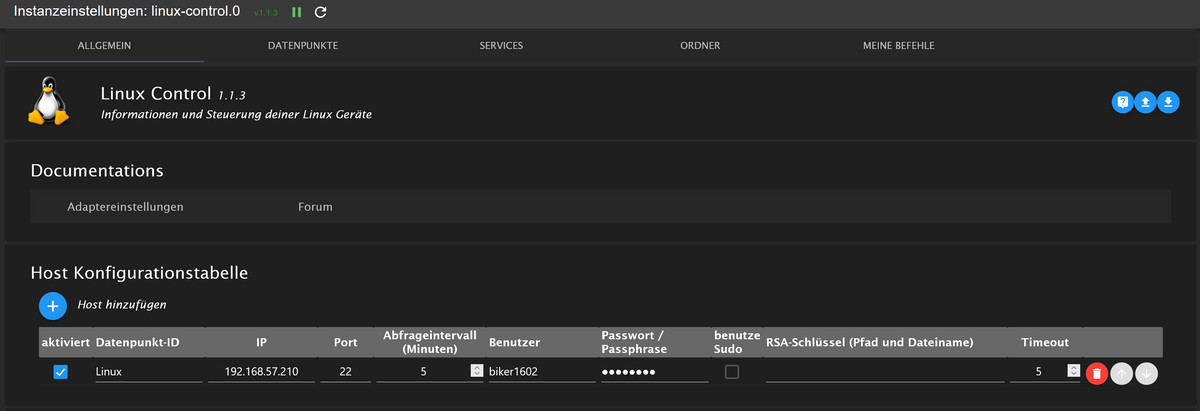
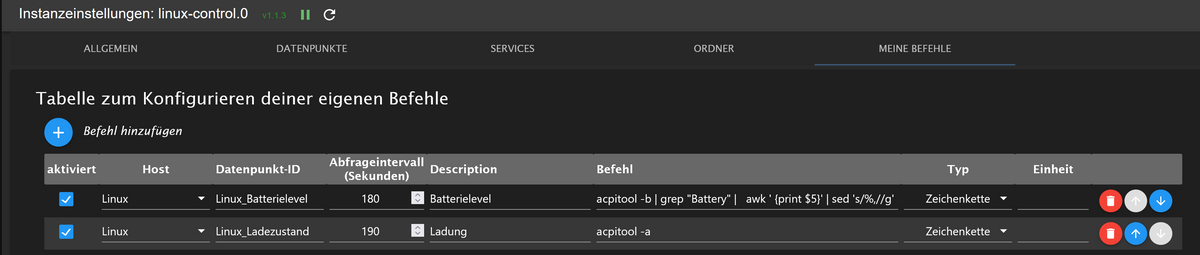

-
@wendy2702 said in Akkustand vom Laptop auslesen:
@biker1602 OK. Screenshot der Einstellungen vom Linux Control Adapter bitte
@biker1602 Setze mal den haken bei "benutze Sudo".
Speichern und neu testen
-
@biker1602 Setze mal den haken bei "benutze Sudo".
Speichern und neu testen
@wendy2702 said in Akkustand vom Laptop auslesen:
Speichern und neu testen
2023-01-13 11:05:35.409 - info: linux-control.0 (2150) getting data from Linux (192.168.57.210:22)
2023-01-13 11:05:35.418 - info: linux-control.0 (2150) [getConnection] Host 'Linux' (192.168.57.210:22) seems not to be online
2023-01-13 11:05:35.419 - debug: linux-control.0 (2150) [getConnection] Host 'Linux' (192.168.57.210:22) ping result: {"inputHost":"192.168.57.210","host":"unknown","alive":false,"output":"","time":"unknown","times":[],"min":"unknown","max":"unknown","avg":"unknown","stddev":"unknown","packetLoss":"unknown"}
2023-01-13 11:06:34.573 - info: linux-control.0 (2150) Got terminate signal TERMINATE_YOURSELF
2023-01-13 11:06:34.574 - info: linux-control.0 (2150) cleaned everything up...
2023-01-13 11:06:34.574 - info: linux-control.0 (2150) terminating
2023-01-13 11:06:34.575 - debug: linux-control.0 (2150) Plugin sentry destroyed
2023-01-13 11:06:34.575 - info: linux-control.0 (2150) Terminated (ADAPTER_REQUESTED_TERMINATION): Without reason
2023-01-13 11:06:38.724 - debug: linux-control.0 (3829) Redis Objects: Use Redis connection: 127.0.0.1:9001
2023-01-13 11:06:38.815 - debug: linux-control.0 (3829) Objects client ready ... initialize now
2023-01-13 11:06:38.817 - debug: linux-control.0 (3829) Objects create System PubSub Client
2023-01-13 11:06:38.818 - debug: linux-control.0 (3829) Objects create User PubSub Client
2023-01-13 11:06:39.028 - debug: linux-control.0 (3829) Objects client initialize lua scripts
2023-01-13 11:06:39.034 - debug: linux-control.0 (3829) Objects connected to redis: 127.0.0.1:9001
2023-01-13 11:06:39.116 - debug: linux-control.0 (3829) Redis States: Use Redis connection: 127.0.0.1:9000
2023-01-13 11:06:39.193 - debug: linux-control.0 (3829) States create System PubSub Client
2023-01-13 11:06:39.194 - debug: linux-control.0 (3829) States create User PubSub Client
2023-01-13 11:06:39.394 - debug: linux-control.0 (3829) States connected to redis: 127.0.0.1:9000
2023-01-13 11:06:39.809 - debug: linux-control.0 (3829) Plugin sentry Initialize Plugin (enabled=true)
2023-01-13 11:06:40.010 - warn: linux-control.0 (3829) Object linux-control.0.command.host is invalid: obj.common.states has an invalid type! Expected "object", received "string"
2023-01-13 11:06:40.011 - warn: linux-control.0 (3829) This object will not be created in future versions. Please report this to the developer.
2023-01-13 11:06:40.017 - info: linux-control.0 (3829) starting. Version 1.1.3 in /opt/iobroker/node_modules/iobroker.linux-control, node: v16.19.0, js-controller: 4.0.24
2023-01-13 11:06:40.061 - warn: linux-control.0 (3829) Object linux-control.0.command.host is invalid: obj.common.states has an invalid type! Expected "object", received "string"
2023-01-13 11:06:40.062 - warn: linux-control.0 (3829) This object will not be created in future versions. Please report this to the developer.
2023-01-13 11:06:40.072 - info: linux-control.0 (3829) getting data from Linux (192.168.57.210:22, Adapter start)
2023-01-13 11:06:40.088 - info: linux-control.0 (3829) [getConnection] Host 'Linux' (192.168.57.210:22) seems not to be online
2023-01-13 11:06:40.089 - debug: linux-control.0 (3829) [getConnection] Host 'Linux' (192.168.57.210:22) ping result: {"inputHost":"192.168.57.210","host":"unknown","alive":false,"output":"","time":"unknown","times":[],"min":"unknown","max":"unknown","avg":"unknown","stddev":"unknown","packetLoss":"unknown"}
2023-01-13 11:06:40.276 - debug: linux-control.0 (3829) [refreshHost] Linux (192.168.57.210:22): button 'linux-control.0.Linux.refresh' subscribed
2023-01-13 11:09:38.410 - info: linux-control.0 (3829) Got terminate signal TERMINATE_YOURSELF
2023-01-13 11:09:38.411 - info: linux-control.0 (3829) cleaned everything up...
2023-01-13 11:09:38.412 - info: linux-control.0 (3829) terminating
2023-01-13 11:09:38.412 - debug: linux-control.0 (3829) Plugin sentry destroyed
2023-01-13 11:09:38.413 - info: linux-control.0 (3829) Terminated (ADAPTER_REQUESTED_TERMINATION): Without reason
2023-01-13 11:09:42.580 - debug: linux-control.0 (4142) Redis Objects: Use Redis connection: 127.0.0.1:9001
2023-01-13 11:09:42.669 - debug: linux-control.0 (4142) Objects client ready ... initialize now
2023-01-13 11:09:42.671 - debug: linux-control.0 (4142) Objects create System PubSub Client
2023-01-13 11:09:42.672 - debug: linux-control.0 (4142) Objects create User PubSub Client
2023-01-13 11:09:42.869 - debug: linux-control.0 (4142) Objects client initialize lua scripts
2023-01-13 11:09:42.875 - debug: linux-control.0 (4142) Objects connected to redis: 127.0.0.1:9001
2023-01-13 11:09:42.954 - debug: linux-control.0 (4142) Redis States: Use Redis connection: 127.0.0.1:9000
2023-01-13 11:09:43.047 - debug: linux-control.0 (4142) States create System PubSub Client
2023-01-13 11:09:43.048 - debug: linux-control.0 (4142) States create User PubSub Client
2023-01-13 11:09:43.242 - debug: linux-control.0 (4142) States connected to redis: 127.0.0.1:9000
2023-01-13 11:09:43.652 - debug: linux-control.0 (4142) Plugin sentry Initialize Plugin (enabled=true)
2023-01-13 11:09:43.832 - warn: linux-control.0 (4142) Object linux-control.0.command.host is invalid: obj.common.states has an invalid type! Expected "object", received "string"
2023-01-13 11:09:43.833 - warn: linux-control.0 (4142) This object will not be created in future versions. Please report this to the developer.
2023-01-13 11:09:43.839 - info: linux-control.0 (4142) starting. Version 1.1.3 in /opt/iobroker/node_modules/iobroker.linux-control, node: v16.19.0, js-controller: 4.0.24
2023-01-13 11:09:43.876 - warn: linux-control.0 (4142) Object linux-control.0.command.host is invalid: obj.common.states has an invalid type! Expected "object", received "string"
2023-01-13 11:09:43.877 - warn: linux-control.0 (4142) This object will not be created in future versions. Please report this to the developer.
2023-01-13 11:09:43.886 - info: linux-control.0 (4142) getting data from Linux (192.168.57.210:22, Adapter start)
2023-01-13 11:09:43.904 - info: linux-control.0 (4142) [getConnection] Host 'Linux' (192.168.57.210:22) seems not to be online
2023-01-13 11:09:43.905 - debug: linux-control.0 (4142) [getConnection] Host 'Linux' (192.168.57.210:22) ping result: {"inputHost":"192.168.57.210","host":"unknown","alive":false,"output":"","time":"unknown","times":[],"min":"unknown","max":"unknown","avg":"unknown","stddev":"unknown","packetLoss":"unknown"}
2023-01-13 11:09:44.107 - debug: linux-control.0 (4142) [refreshHost] Linux (192.168.57.210:22): button 'linux-control.0.Linux.refresh' subscribed
Das verstehe wer will ich nicht
-
OK.
dann die Passwort abfrage für sudo deaktivieren.
sudo visudoDann diese Zeile auskommentieren: "#" davor
%sudo ALL=(ALL:ALL) ALLund diese Zeile einfügen:
%sudo ALL=(ALL) NOPASSWD:ALLMit "ctrl+x" verlassen und Speichern bestätigen.
Ausloggen, einloggen und dann mal den Ping testen ob der mit sudo davor noch immer das PW haben will.
Wenn nicht nochmal Adapter neu starten ob der Host dann Online ist
-
OK.
dann die Passwort abfrage für sudo deaktivieren.
sudo visudoDann diese Zeile auskommentieren: "#" davor
%sudo ALL=(ALL:ALL) ALLund diese Zeile einfügen:
%sudo ALL=(ALL) NOPASSWD:ALLMit "ctrl+x" verlassen und Speichern bestätigen.
Ausloggen, einloggen und dann mal den Ping testen ob der mit sudo davor noch immer das PW haben will.
Wenn nicht nochmal Adapter neu starten ob der Host dann Online ist
@wendy2702
So Passwortabfrage habe ich so deaktiviert und beim Ping mit Sudo will er auch kein Passwort mehr.
Den Adapter habe ich neu gestartet, aber alles das Gleiche.2023-01-13 11:24:42.667 - info: linux-control.0 (5510) Got terminate signal TERMINATE_YOURSELF 2023-01-13 11:24:42.668 - info: linux-control.0 (5510) cleaned everything up... 2023-01-13 11:24:42.669 - info: linux-control.0 (5510) terminating 2023-01-13 11:24:42.669 - debug: linux-control.0 (5510) Plugin sentry destroyed 2023-01-13 11:24:42.669 - info: linux-control.0 (5510) Terminated (ADAPTER_REQUESTED_TERMINATION): Without reason 2023-01-13 11:24:46.853 - debug: linux-control.0 (5727) Redis Objects: Use Redis connection: 127.0.0.1:9001 2023-01-13 11:24:46.944 - debug: linux-control.0 (5727) Objects client ready ... initialize now 2023-01-13 11:24:46.945 - debug: linux-control.0 (5727) Objects create System PubSub Client 2023-01-13 11:24:46.946 - debug: linux-control.0 (5727) Objects create User PubSub Client 2023-01-13 11:24:47.146 - debug: linux-control.0 (5727) Objects client initialize lua scripts 2023-01-13 11:24:47.152 - debug: linux-control.0 (5727) Objects connected to redis: 127.0.0.1:9001 2023-01-13 11:24:47.235 - debug: linux-control.0 (5727) Redis States: Use Redis connection: 127.0.0.1:9000 2023-01-13 11:24:47.329 - debug: linux-control.0 (5727) States create System PubSub Client 2023-01-13 11:24:47.330 - debug: linux-control.0 (5727) States create User PubSub Client 2023-01-13 11:24:47.518 - debug: linux-control.0 (5727) States connected to redis: 127.0.0.1:9000 2023-01-13 11:24:47.942 - debug: linux-control.0 (5727) Plugin sentry Initialize Plugin (enabled=true) 2023-01-13 11:24:48.116 - warn: linux-control.0 (5727) Object linux-control.0.command.host is invalid: obj.common.states has an invalid type! Expected "object", received "string" 2023-01-13 11:24:48.117 - warn: linux-control.0 (5727) This object will not be created in future versions. Please report this to the developer. 2023-01-13 11:24:48.124 - info: linux-control.0 (5727) starting. Version 1.1.3 in /opt/iobroker/node_modules/iobroker.linux-control, node: v16.19.0, js-controller: 4.0.24 2023-01-13 11:24:48.163 - warn: linux-control.0 (5727) Object linux-control.0.command.host is invalid: obj.common.states has an invalid type! Expected "object", received "string" 2023-01-13 11:24:48.164 - warn: linux-control.0 (5727) This object will not be created in future versions. Please report this to the developer. 2023-01-13 11:24:48.173 - info: linux-control.0 (5727) getting data from Linux (192.168.57.210:22, Adapter start) 2023-01-13 11:24:48.190 - info: linux-control.0 (5727) [getConnection] Host 'Linux' (192.168.57.210:22) seems not to be online 2023-01-13 11:24:48.190 - debug: linux-control.0 (5727) [getConnection] Host 'Linux' (192.168.57.210:22) ping result: {"inputHost":"192.168.57.210","host":"unknown","alive":false,"output":"","time":"unknown","times":[],"min":"unknown","max":"unknown","avg":"unknown","stddev":"unknown","packetLoss":"unknown"} 2023-01-13 11:24:48.391 - debug: linux-control.0 (5727) [refreshHost] Linux (192.168.57.210:22): button 'linux-control.0.Linux.refresh' subscribedNur nochmal eine Frage für Dumme. Der Port ist doch richtig mit der 22 oder?

Hey! Du scheinst an dieser Unterhaltung interessiert zu sein, hast aber noch kein Konto.
Hast du es satt, bei jedem Besuch durch die gleichen Beiträge zu scrollen? Wenn du dich für ein Konto anmeldest, kommst du immer genau dorthin zurück, wo du zuvor warst, und kannst dich über neue Antworten benachrichtigen lassen (entweder per E-Mail oder Push-Benachrichtigung). Du kannst auch Lesezeichen speichern und Beiträge positiv bewerten, um anderen Community-Mitgliedern deine Wertschätzung zu zeigen.
Mit deinem Input könnte dieser Beitrag noch besser werden 💗
Registrieren Anmelden237
Online33.0k
Benutzer83.5k
Themen1.3m
Beiträge