




Tuya Adapter 3.8.1+
-
@neolight Also
1.) Bitte mal Geräte mit der Cloud Resyncen bzw Adapter restarten bitte ann sollten an sich diese ganzen "unbekannte ID" wegsein. Verstehe nicht wie die auftreten können. Falls es nach neustartbzw neusync noch da sind bitte mal Debug Log vom Adapterstart mit per Emailan iobroker@fischer-ka.de senden
2.) Ich sehe im Log KEINE stelle wo du einen Wert über ioBroker geändert hast. Alle "stateChange" einträge haben "ack: true", sind als KEINE Kommandos. Falls Du "Bestätigt" im Admin oder deinem Skript auf truie setzt dann ist das Dein Fehler. Bestätigt/Ack MUSS false sein wenn Du etwas steuern willst!
Ohne Bestätigt:
2022-11-14 17:15:39.669 - debug: tuya.0 (18553) stateChange tuya.0.bf59bff966ed932e44oxlm.16 {"val":28,"ack":false,"ts":1668442539664,"q":0,"from":"system.adapter.admin.0","user":"system.user.admin","lc":1668442539664}
2022-11-14 17:15:39.669 - debug: tuya.0 (18553) bf59bff966ed932e44oxlm onChange triggered for 16 and value 28
2022-11-14 17:15:44.672 - debug: tuya.0 (18553) bf4efe0a1d03a47c8cdurh: Error from device (3): App still open on your mobile phone? Timeout waiting for status response from device id: bf4efe0a1d03a47c8cdurh
2022-11-14 17:15:44.672 - debug: tuya.0 (18553) bf4efe0a1d03a47c8cdurh: Disconnected from device
2022-11-14 17:15:44.673 - debug: tuya.0 (18553) bf59bff966ed932e44oxlm.16: set value 280 via bf4efe0a1d03a47c8cdurh (Local)
2022-11-14 17:15:44.689 - debug: tuya.0 (18553) stateChange tuya.0.bf4efe0a1d03a47c8cdurh.online {"val":false,"ack":true,"ts":1668442544682,"q":0,"from":"system.adapter.tuya.0","user":"system.user.admin","lc":1668442544682}
2022-11-14 17:15:47.467 - debug: tuya.0 (18553) Discovered encrypted device and store for later usage: 192.168.178.157:59663 - 000055aa00000000000000130000009c00000000d09766676f3369eb10b5e9f132fd802a820bcf0bc4bfe92ca4fffec74c2b319bfe18e42f9be0ad8a6374320b4983ee335ecac604492d192a46e9535d30675721c2d91fea632b8557eb918162c1fc96744dc7fe823e307927fb0a44b0dfae2c8dd04be107934a3b551ab9d369cf49cd258dc52c51ba0ead191be4b22f0f1faaebeedd5c953bb9377560ae90dfbc45dbe2efb667c10000aa55
2022-11-14 17:15:47.467 - debug: tuya.0 (18553) 01080001807d3a4a3c94: Try to initialize encrypted device with received UDP messages (#IPs: 5): version=3.1, key=66f997e37a212cb7
2022-11-14 17:15:47.469 - debug: tuya.0 (18553) 01080001807d3a4a3c94: None of the discovered devices matches :-(
2022-11-14 17:15:47.469 - debug: tuya.0 (18553) bf4efe0a1d03a47c8cdurh: Try to initialize encrypted device with received UDP messages (#IPs: 5): version=3.3, key=f6169166991becdb
2022-11-14 17:15:47.470 - debug: tuya.0 (18553) bf4efe0a1d03a47c8cdurh: Use following Schema for keyfa7hya4gfa7g9: null
2022-11-14 17:15:47.471 - debug: tuya.0 (18553) bf4efe0a1d03a47c8cdurh: Init device with data (after merge): {"data":{"virtual":false,"dpName":{},"lon":"9.8759","uuid":"1543626cc6d7743f","mac":"d81f128efb29","iconUrl":"https://images.tuyaeu.com/smart/icon/ay15327721968035jwx9/f3ee42e90b543f1c0a50279f8f450cad.png","runtimeEnv":"prod","lat":"52.2398","devId":"bf4efe0a1d03a47c8cdurh","devKey":"","dpMaxTime":1663826843726,"productId":"ysgynkrk","activeTime":1663826843,"categoryCode":"wf_zig_wg2","moduleMap":{"wifi":{"upgradeStatus":3,"cdv":"1.0.0","bv":"40.00","pv":"2.2","verSw":"1.11.0","isOnline":true,"id":93084238,"cadv":"1.0.4"},"zigbee":{"upgradeStatus":3,"cdv":"","verSw":"1.0.8","isOnline":true,"id":93084239,"cadv":""}},"devAttribute":4231,"name":"Gateway","timezoneId":"Europe/Berlin","category":"wg2","localKey":"f6169166991becdb","schema":[{"mode":"ro","code":"up_channel","name":"上行通道","id":1,"type":"raw","defaultValue":"","canTrigger":true,"executable":true,"defaultRecommend":true,"editPermission":false},{"mode":"wr","code":"down_channel","name":"下行通道","id":2,"type":"raw","defaultValue":"","canTrigger":true,"executable":true,"defaultRecommend":true,"editPermission":false}],"productKey":"keyfa7hya4gfa7g9","schemaExt":[],"version":"3.3","ip":"192.168.178.157","gwId":"bf4efe0a1d03a47c8cdurh","active":2,"ablilty":0,"encrypt":true,"ownerId":"7440879","accessType":0,"otaInfo":{"supportAuto":true,"otaUpgradeModes":[0],"otaModuleMap":{"wifi":{"upgradeStatus":3,"cdv":"1.0.0","bv":"40.00","verSw":"1.11.0"},"zigbee":{"upgradeStatus":3,"cdv":"","verSw":"1.0.8"}}},"communication":{"communicationNode":"bf4efe0a1d03a47c8cdurh","communicationModes":[{"pv":"","type":0},{"pv":"2.2","type":1}],"connectionStatus":1},"gatewayVerCAD":"1.0.4","cloudOnline":true,"baseAttribute":1024,"protocolAttribute":2,"dataPointInfo":{"dpMaxTime":1663826843726,"dpName":{},"dps":{},"dpsTime":{"1":1663826843726,"2":1663826843726}},"meta":{"zigBleSubEnable":true},"deviceTopo":{},"groudId":7440879},"errorcount":0,"localKey":"f6169166991becdb","version":"3.3","ip":"192.168.178.157","name":"Gateway","dpIdList":[1,2],"objectsInitialized":true,"noLocalConnection":false,"stop":true,"device":null,"connected":false,"pollingTimeout":null,"deepCheckNextData":0,"useRefreshToGet":true,"refreshDpList":[]}
2022-11-14 17:15:47.472 - debug: tuya.0 (18553) bf4efe0a1d03a47c8cdurh: Create device objects if not exist
2022-11-14 17:15:47.473 - debug: tuya.0 (18553) 22763158c44f3380a574: Try to initialize encrypted device with received UDP messages (#IPs: 5): version=undefined, key=649dde018b27d794
2022-11-14 17:15:47.474 - debug: tuya.0 (18553) 22763158c44f3380a574: None of the discovered devices matches :-(
2022-11-14 17:15:47.474 - debug: tuya.0 (18553) bf4c5c785a4d5d68cfn43d: Try to initialize encrypted device with received UDP messages (#IPs: 5): version=undefined, key=b89a368a6c7105db
2022-11-14 17:15:47.475 - debug: tuya.0 (18553) bf4c5c785a4d5d68cfn43d: None of the discovered devices matches :-(
2022-11-14 17:15:47.475 - debug: tuya.0 (18553) bf3f1192c3f0bd098buwmh: Try to initialize encrypted device with received UDP messages (#IPs: 5): version=undefined, key=3eb5bd5d0d8b87ed
2022-11-14 17:15:47.476 - debug: tuya.0 (18553) bf3f1192c3f0bd098buwmh: None of the discovered devices matches :-(
2022-11-14 17:15:47.476 - debug: tuya.0 (18553) bfa0cc1a0b847a9f14afht: Try to initialize encrypted device with received UDP messages (#IPs: 5): version=undefined, key=c24689b9bdd11091
2022-11-14 17:15:47.479 - debug: tuya.0 (18553) bfa0cc1a0b847a9f14afht: None of the discovered devices matches :-(
2022-11-14 17:15:47.480 - debug: tuya.0 (18553) bf5ab83b8709979f10zddp: Try to initialize encrypted device with received UDP messages (#IPs: 5): version=undefined, key=37c701ac0a446aba
2022-11-14 17:15:47.481 - debug: tuya.0 (18553) bf5ab83b8709979f10zddp: None of the discovered devices matches :-(
2022-11-14 17:15:47.481 - debug: tuya.0 (18553) 22763158dc4f22fc7072: Try to initialize encrypted device with received UDP messages (#IPs: 5): version=3.3, key=18d6ee5e5bade547
2022-11-14 17:15:47.482 - debug: tuya.0 (18553) 22763158dc4f22fc7072: None of the discovered devices matches :-(
2022-11-14 17:15:47.483 - debug: tuya.0 (18553) 82840600f4cfa2588563: Try to initialize encrypted device with received UDP messages (#IPs: 5): version=3.3, key=d3dca60eb2c71f49
2022-11-14 17:15:47.484 - debug: tuya.0 (18553) 82840600f4cfa2588563: None of the discovered devices matches :-(
2022-11-14 17:15:47.485 - debug: tuya.0 (18553) 807004668caab5eaa2bf: Try to initialize encrypted device with received UDP messages (#IPs: 5): version=3.3, key=36a8665a68414eee
2022-11-14 17:15:47.486 - debug: tuya.0 (18553) 807004668caab5eaa2bf: None of the discovered devices matches :-(
2022-11-14 17:15:47.487 - debug: tuya.0 (18553) 80700466e09806ac2e37: Try to initialize encrypted device with received UDP messages (#IPs: 5): version=3.3, key=9621496efb9d7b34
2022-11-14 17:15:47.489 - debug: tuya.0 (18553) 80700466e09806ac2e37: None of the discovered devices matches :-(
2022-11-14 17:15:47.489 - debug: tuya.0 (18553) 00153632807d3a793fa4: Try to initialize encrypted device with received UDP messages (#IPs: 5): version=undefined, key=d16564a693ffdc2b
2022-11-14 17:15:47.490 - debug: tuya.0 (18553) 00153632807d3a793fa4: None of the discovered devices matches :-(
2022-11-14 17:15:47.490 - debug: tuya.0 (18553) 00061882840d8e507c68: Try to initialize encrypted device with received UDP messages (#IPs: 5): version=3.3, key=b26adc2513ba4dd0
2022-11-14 17:15:47.493 - debug: tuya.0 (18553) 00061882840d8e507c68: None of the discovered devices matches :-(
2022-11-14 17:15:47.494 - debug: tuya.0 (18553) 042001026001947ecda7: Try to initialize encrypted device with received UDP messages (#IPs: 5): version=undefined, key=aad205564791cf1a
2022-11-14 17:15:47.494 - debug: tuya.0 (18553) 042001026001947ecda7: None of the discovered devices matches :-(
2022-11-14 17:15:47.495 - debug: tuya.0 (18553) 032003446001947bacfb: Try to initialize encrypted device with received UDP messages (#IPs: 5): version=undefined, key=3b443031668ba15b
2022-11-14 17:15:47.495 - debug: tuya.0 (18553) 032003446001947bacfb: None of the discovered devices matches :-(
2022-11-14 17:15:47.495 - debug: tuya.0 (18553) 04200102dc4f222aaf6f: Try to initialize encrypted device with received UDP messages (#IPs: 5): version=undefined, key=c203a6c5fc5a6eb2
2022-11-14 17:15:47.496 - debug: tuya.0 (18553) 04200102dc4f222aaf6f: None of the discovered devices matches :-(
2022-11-14 17:15:47.496 - debug: tuya.0 (18553) 012007362c3ae849b1a3: Try to initialize encrypted device with received UDP messages (#IPs: 5): version=undefined, key=31d59464a21498c5
2022-11-14 17:15:47.498 - debug: tuya.0 (18553) 012007362c3ae849b1a3: None of the discovered devices matches :-(
2022-11-14 17:15:47.498 - debug: tuya.0 (18553) 032003446001947bab39: Try to initialize encrypted device with received UDP messages (#IPs: 5): version=undefined, key=55fe188ce2a2caf8
2022-11-14 17:15:47.499 - debug: tuya.0 (18553) 032003446001947bab39: None of the discovered devices matches :-(
2022-11-14 17:15:47.499 - debug: tuya.0 (18553) 022001685ccf7f69850e: Try to initialize encrypted device with received UDP messages (#IPs: 5): version=undefined, key=2eab936150705ea4
2022-11-14 17:15:47.500 - debug: tuya.0 (18553) 022001685ccf7f69850e: None of the discovered devices matches :-(
2022-11-14 17:15:47.500 - debug: tuya.0 (18553) 01080001807d3a4a3a3a: Try to initialize encrypted device with received UDP messages (#IPs: 5): version=undefined, key=f5f1d6f38744a937
2022-11-14 17:15:47.501 - debug: tuya.0 (18553) 01080001807d3a4a3a3a: None of the discovered devices matches :-(
2022-11-14 17:15:47.501 - debug: tuya.0 (18553) 82141708dc4f22907925: Try to initialize encrypted device with received UDP messages (#IPs: 5): version=undefined, key=790cb5c6f61d9ef5
2022-11-14 17:15:47.502 - debug: tuya.0 (18553) 82141708dc4f22907925: None of the discovered devices matches :-(
2022-11-14 17:15:47.502 - debug: tuya.0 (18553) 82141708dc4f22ed5e3d: Try to initialize encrypted device with received UDP messages (#IPs: 5): version=3.3, key=a3f70ae1f586e3c2
2022-11-14 17:15:47.503 - debug: tuya.0 (18553) 82141708dc4f22ed5e3d: None of the discovered devices matches :-(
2022-11-14 17:15:47.503 - debug: tuya.0 (18553) 82141708dc4f2290ca9b: Try to initialize encrypted device with received UDP messages (#IPs: 5): version=undefined, key=5365a6db05544f50
2022-11-14 17:15:47.504 - debug: tuya.0 (18553) 82141708dc4f2290ca9b: None of the discovered devices matches :-(
2022-11-14 17:15:47.504 - debug: tuya.0 (18553) bf7904ded112fd70c4y3mg: Try to initialize encrypted device with received UDP messages (#IPs: 5): version=3.3, key=79c451abf60a85fe
2022-11-14 17:15:47.505 - debug: tuya.0 (18553) bf7904ded112fd70c4y3mg: None of the discovered devices matches :-(
2022-11-14 17:15:47.531 - debug: tuya.0 (18553) stateChange tuya.0.bf4efe0a1d03a47c8cdurh.online {"val":false,"ack":true,"ts":1668442547528,"q":0,"from":"system.adapter.tuya.0","user":"system.user.admin","lc":1668442544682}
2022-11-14 17:15:47.534 - debug: tuya.0 (18553) stateChange tuya.0.bf4efe0a1d03a47c8cdurh.ip {"val":"192.168.178.157","ack":true,"ts":1668442547528,"q":0,"from":"system.adapter.tuya.0","user":"system.user.admin","lc":1667050181927}
2022-11-14 17:15:47.539 - info: tuya.0 (18553) bf4efe0a1d03a47c8cdurh: Connect locally to device
2022-11-14 17:15:47.539 - info: tuya.0 (18553) bf4efe0a1d03a47c8cdurh Init with IP=192.168.178.157, Key=f6169166991becdb, Version=3.3
2022-11-14 17:15:47.572 - debug: tuya.0 (18553) bf4efe0a1d03a47c8cdurh: Connected to device
2022-11-14 17:15:47.578 - debug: tuya.0 (18553) stateChange tuya.0.bf4efe0a1d03a47c8cdurh.online {"val":true,"ack":true,"ts":1668442547576,"q":0,"from":"system.adapter.tuya.0","user":"system.user.admin","lc":1668442547576}
2022-11-14 17:15:47.587 - debug: tuya.0 (18553) bf4efe0a1d03a47c8cdurh: Error from device (0): App still open on your mobile phone? json obj data unvalid
2022-11-14 17:15:47.587 - debug: tuya.0 (18553) bf4efe0a1d03a47c8cdurh: Received data: {"1":null,"2":null,"3":null,"101":null,"102":null,"103":null}
2022-11-14 17:15:47.588 - debug: tuya.0 (18553) bf4efe0a1d03a47c8cdurh: Ignore invalid data (Counter: 1)
2022-11-14 17:15:48.574 - debug: tuya.0 (18553) bf4efe0a1d03a47c8cdurh request data via set-refresh for [1,2]
Log vom Start schicke ich gleich.
-
Ohne Bestätigt:
2022-11-14 17:15:39.669 - debug: tuya.0 (18553) stateChange tuya.0.bf59bff966ed932e44oxlm.16 {"val":28,"ack":false,"ts":1668442539664,"q":0,"from":"system.adapter.admin.0","user":"system.user.admin","lc":1668442539664}
2022-11-14 17:15:39.669 - debug: tuya.0 (18553) bf59bff966ed932e44oxlm onChange triggered for 16 and value 28
2022-11-14 17:15:44.672 - debug: tuya.0 (18553) bf4efe0a1d03a47c8cdurh: Error from device (3): App still open on your mobile phone? Timeout waiting for status response from device id: bf4efe0a1d03a47c8cdurh
2022-11-14 17:15:44.672 - debug: tuya.0 (18553) bf4efe0a1d03a47c8cdurh: Disconnected from device
2022-11-14 17:15:44.673 - debug: tuya.0 (18553) bf59bff966ed932e44oxlm.16: set value 280 via bf4efe0a1d03a47c8cdurh (Local)
2022-11-14 17:15:44.689 - debug: tuya.0 (18553) stateChange tuya.0.bf4efe0a1d03a47c8cdurh.online {"val":false,"ack":true,"ts":1668442544682,"q":0,"from":"system.adapter.tuya.0","user":"system.user.admin","lc":1668442544682}
2022-11-14 17:15:47.467 - debug: tuya.0 (18553) Discovered encrypted device and store for later usage: 192.168.178.157:59663 - 000055aa00000000000000130000009c00000000d09766676f3369eb10b5e9f132fd802a820bcf0bc4bfe92ca4fffec74c2b319bfe18e42f9be0ad8a6374320b4983ee335ecac604492d192a46e9535d30675721c2d91fea632b8557eb918162c1fc96744dc7fe823e307927fb0a44b0dfae2c8dd04be107934a3b551ab9d369cf49cd258dc52c51ba0ead191be4b22f0f1faaebeedd5c953bb9377560ae90dfbc45dbe2efb667c10000aa55
2022-11-14 17:15:47.467 - debug: tuya.0 (18553) 01080001807d3a4a3c94: Try to initialize encrypted device with received UDP messages (#IPs: 5): version=3.1, key=66f997e37a212cb7
2022-11-14 17:15:47.469 - debug: tuya.0 (18553) 01080001807d3a4a3c94: None of the discovered devices matches :-(
2022-11-14 17:15:47.469 - debug: tuya.0 (18553) bf4efe0a1d03a47c8cdurh: Try to initialize encrypted device with received UDP messages (#IPs: 5): version=3.3, key=f6169166991becdb
2022-11-14 17:15:47.470 - debug: tuya.0 (18553) bf4efe0a1d03a47c8cdurh: Use following Schema for keyfa7hya4gfa7g9: null
2022-11-14 17:15:47.471 - debug: tuya.0 (18553) bf4efe0a1d03a47c8cdurh: Init device with data (after merge): {"data":{"virtual":false,"dpName":{},"lon":"9.8759","uuid":"1543626cc6d7743f","mac":"d81f128efb29","iconUrl":"https://images.tuyaeu.com/smart/icon/ay15327721968035jwx9/f3ee42e90b543f1c0a50279f8f450cad.png","runtimeEnv":"prod","lat":"52.2398","devId":"bf4efe0a1d03a47c8cdurh","devKey":"","dpMaxTime":1663826843726,"productId":"ysgynkrk","activeTime":1663826843,"categoryCode":"wf_zig_wg2","moduleMap":{"wifi":{"upgradeStatus":3,"cdv":"1.0.0","bv":"40.00","pv":"2.2","verSw":"1.11.0","isOnline":true,"id":93084238,"cadv":"1.0.4"},"zigbee":{"upgradeStatus":3,"cdv":"","verSw":"1.0.8","isOnline":true,"id":93084239,"cadv":""}},"devAttribute":4231,"name":"Gateway","timezoneId":"Europe/Berlin","category":"wg2","localKey":"f6169166991becdb","schema":[{"mode":"ro","code":"up_channel","name":"上行通道","id":1,"type":"raw","defaultValue":"","canTrigger":true,"executable":true,"defaultRecommend":true,"editPermission":false},{"mode":"wr","code":"down_channel","name":"下行通道","id":2,"type":"raw","defaultValue":"","canTrigger":true,"executable":true,"defaultRecommend":true,"editPermission":false}],"productKey":"keyfa7hya4gfa7g9","schemaExt":[],"version":"3.3","ip":"192.168.178.157","gwId":"bf4efe0a1d03a47c8cdurh","active":2,"ablilty":0,"encrypt":true,"ownerId":"7440879","accessType":0,"otaInfo":{"supportAuto":true,"otaUpgradeModes":[0],"otaModuleMap":{"wifi":{"upgradeStatus":3,"cdv":"1.0.0","bv":"40.00","verSw":"1.11.0"},"zigbee":{"upgradeStatus":3,"cdv":"","verSw":"1.0.8"}}},"communication":{"communicationNode":"bf4efe0a1d03a47c8cdurh","communicationModes":[{"pv":"","type":0},{"pv":"2.2","type":1}],"connectionStatus":1},"gatewayVerCAD":"1.0.4","cloudOnline":true,"baseAttribute":1024,"protocolAttribute":2,"dataPointInfo":{"dpMaxTime":1663826843726,"dpName":{},"dps":{},"dpsTime":{"1":1663826843726,"2":1663826843726}},"meta":{"zigBleSubEnable":true},"deviceTopo":{},"groudId":7440879},"errorcount":0,"localKey":"f6169166991becdb","version":"3.3","ip":"192.168.178.157","name":"Gateway","dpIdList":[1,2],"objectsInitialized":true,"noLocalConnection":false,"stop":true,"device":null,"connected":false,"pollingTimeout":null,"deepCheckNextData":0,"useRefreshToGet":true,"refreshDpList":[]}
2022-11-14 17:15:47.472 - debug: tuya.0 (18553) bf4efe0a1d03a47c8cdurh: Create device objects if not exist
2022-11-14 17:15:47.473 - debug: tuya.0 (18553) 22763158c44f3380a574: Try to initialize encrypted device with received UDP messages (#IPs: 5): version=undefined, key=649dde018b27d794
2022-11-14 17:15:47.474 - debug: tuya.0 (18553) 22763158c44f3380a574: None of the discovered devices matches :-(
2022-11-14 17:15:47.474 - debug: tuya.0 (18553) bf4c5c785a4d5d68cfn43d: Try to initialize encrypted device with received UDP messages (#IPs: 5): version=undefined, key=b89a368a6c7105db
2022-11-14 17:15:47.475 - debug: tuya.0 (18553) bf4c5c785a4d5d68cfn43d: None of the discovered devices matches :-(
2022-11-14 17:15:47.475 - debug: tuya.0 (18553) bf3f1192c3f0bd098buwmh: Try to initialize encrypted device with received UDP messages (#IPs: 5): version=undefined, key=3eb5bd5d0d8b87ed
2022-11-14 17:15:47.476 - debug: tuya.0 (18553) bf3f1192c3f0bd098buwmh: None of the discovered devices matches :-(
2022-11-14 17:15:47.476 - debug: tuya.0 (18553) bfa0cc1a0b847a9f14afht: Try to initialize encrypted device with received UDP messages (#IPs: 5): version=undefined, key=c24689b9bdd11091
2022-11-14 17:15:47.479 - debug: tuya.0 (18553) bfa0cc1a0b847a9f14afht: None of the discovered devices matches :-(
2022-11-14 17:15:47.480 - debug: tuya.0 (18553) bf5ab83b8709979f10zddp: Try to initialize encrypted device with received UDP messages (#IPs: 5): version=undefined, key=37c701ac0a446aba
2022-11-14 17:15:47.481 - debug: tuya.0 (18553) bf5ab83b8709979f10zddp: None of the discovered devices matches :-(
2022-11-14 17:15:47.481 - debug: tuya.0 (18553) 22763158dc4f22fc7072: Try to initialize encrypted device with received UDP messages (#IPs: 5): version=3.3, key=18d6ee5e5bade547
2022-11-14 17:15:47.482 - debug: tuya.0 (18553) 22763158dc4f22fc7072: None of the discovered devices matches :-(
2022-11-14 17:15:47.483 - debug: tuya.0 (18553) 82840600f4cfa2588563: Try to initialize encrypted device with received UDP messages (#IPs: 5): version=3.3, key=d3dca60eb2c71f49
2022-11-14 17:15:47.484 - debug: tuya.0 (18553) 82840600f4cfa2588563: None of the discovered devices matches :-(
2022-11-14 17:15:47.485 - debug: tuya.0 (18553) 807004668caab5eaa2bf: Try to initialize encrypted device with received UDP messages (#IPs: 5): version=3.3, key=36a8665a68414eee
2022-11-14 17:15:47.486 - debug: tuya.0 (18553) 807004668caab5eaa2bf: None of the discovered devices matches :-(
2022-11-14 17:15:47.487 - debug: tuya.0 (18553) 80700466e09806ac2e37: Try to initialize encrypted device with received UDP messages (#IPs: 5): version=3.3, key=9621496efb9d7b34
2022-11-14 17:15:47.489 - debug: tuya.0 (18553) 80700466e09806ac2e37: None of the discovered devices matches :-(
2022-11-14 17:15:47.489 - debug: tuya.0 (18553) 00153632807d3a793fa4: Try to initialize encrypted device with received UDP messages (#IPs: 5): version=undefined, key=d16564a693ffdc2b
2022-11-14 17:15:47.490 - debug: tuya.0 (18553) 00153632807d3a793fa4: None of the discovered devices matches :-(
2022-11-14 17:15:47.490 - debug: tuya.0 (18553) 00061882840d8e507c68: Try to initialize encrypted device with received UDP messages (#IPs: 5): version=3.3, key=b26adc2513ba4dd0
2022-11-14 17:15:47.493 - debug: tuya.0 (18553) 00061882840d8e507c68: None of the discovered devices matches :-(
2022-11-14 17:15:47.494 - debug: tuya.0 (18553) 042001026001947ecda7: Try to initialize encrypted device with received UDP messages (#IPs: 5): version=undefined, key=aad205564791cf1a
2022-11-14 17:15:47.494 - debug: tuya.0 (18553) 042001026001947ecda7: None of the discovered devices matches :-(
2022-11-14 17:15:47.495 - debug: tuya.0 (18553) 032003446001947bacfb: Try to initialize encrypted device with received UDP messages (#IPs: 5): version=undefined, key=3b443031668ba15b
2022-11-14 17:15:47.495 - debug: tuya.0 (18553) 032003446001947bacfb: None of the discovered devices matches :-(
2022-11-14 17:15:47.495 - debug: tuya.0 (18553) 04200102dc4f222aaf6f: Try to initialize encrypted device with received UDP messages (#IPs: 5): version=undefined, key=c203a6c5fc5a6eb2
2022-11-14 17:15:47.496 - debug: tuya.0 (18553) 04200102dc4f222aaf6f: None of the discovered devices matches :-(
2022-11-14 17:15:47.496 - debug: tuya.0 (18553) 012007362c3ae849b1a3: Try to initialize encrypted device with received UDP messages (#IPs: 5): version=undefined, key=31d59464a21498c5
2022-11-14 17:15:47.498 - debug: tuya.0 (18553) 012007362c3ae849b1a3: None of the discovered devices matches :-(
2022-11-14 17:15:47.498 - debug: tuya.0 (18553) 032003446001947bab39: Try to initialize encrypted device with received UDP messages (#IPs: 5): version=undefined, key=55fe188ce2a2caf8
2022-11-14 17:15:47.499 - debug: tuya.0 (18553) 032003446001947bab39: None of the discovered devices matches :-(
2022-11-14 17:15:47.499 - debug: tuya.0 (18553) 022001685ccf7f69850e: Try to initialize encrypted device with received UDP messages (#IPs: 5): version=undefined, key=2eab936150705ea4
2022-11-14 17:15:47.500 - debug: tuya.0 (18553) 022001685ccf7f69850e: None of the discovered devices matches :-(
2022-11-14 17:15:47.500 - debug: tuya.0 (18553) 01080001807d3a4a3a3a: Try to initialize encrypted device with received UDP messages (#IPs: 5): version=undefined, key=f5f1d6f38744a937
2022-11-14 17:15:47.501 - debug: tuya.0 (18553) 01080001807d3a4a3a3a: None of the discovered devices matches :-(
2022-11-14 17:15:47.501 - debug: tuya.0 (18553) 82141708dc4f22907925: Try to initialize encrypted device with received UDP messages (#IPs: 5): version=undefined, key=790cb5c6f61d9ef5
2022-11-14 17:15:47.502 - debug: tuya.0 (18553) 82141708dc4f22907925: None of the discovered devices matches :-(
2022-11-14 17:15:47.502 - debug: tuya.0 (18553) 82141708dc4f22ed5e3d: Try to initialize encrypted device with received UDP messages (#IPs: 5): version=3.3, key=a3f70ae1f586e3c2
2022-11-14 17:15:47.503 - debug: tuya.0 (18553) 82141708dc4f22ed5e3d: None of the discovered devices matches :-(
2022-11-14 17:15:47.503 - debug: tuya.0 (18553) 82141708dc4f2290ca9b: Try to initialize encrypted device with received UDP messages (#IPs: 5): version=undefined, key=5365a6db05544f50
2022-11-14 17:15:47.504 - debug: tuya.0 (18553) 82141708dc4f2290ca9b: None of the discovered devices matches :-(
2022-11-14 17:15:47.504 - debug: tuya.0 (18553) bf7904ded112fd70c4y3mg: Try to initialize encrypted device with received UDP messages (#IPs: 5): version=3.3, key=79c451abf60a85fe
2022-11-14 17:15:47.505 - debug: tuya.0 (18553) bf7904ded112fd70c4y3mg: None of the discovered devices matches :-(
2022-11-14 17:15:47.531 - debug: tuya.0 (18553) stateChange tuya.0.bf4efe0a1d03a47c8cdurh.online {"val":false,"ack":true,"ts":1668442547528,"q":0,"from":"system.adapter.tuya.0","user":"system.user.admin","lc":1668442544682}
2022-11-14 17:15:47.534 - debug: tuya.0 (18553) stateChange tuya.0.bf4efe0a1d03a47c8cdurh.ip {"val":"192.168.178.157","ack":true,"ts":1668442547528,"q":0,"from":"system.adapter.tuya.0","user":"system.user.admin","lc":1667050181927}
2022-11-14 17:15:47.539 - info: tuya.0 (18553) bf4efe0a1d03a47c8cdurh: Connect locally to device
2022-11-14 17:15:47.539 - info: tuya.0 (18553) bf4efe0a1d03a47c8cdurh Init with IP=192.168.178.157, Key=f6169166991becdb, Version=3.3
2022-11-14 17:15:47.572 - debug: tuya.0 (18553) bf4efe0a1d03a47c8cdurh: Connected to device
2022-11-14 17:15:47.578 - debug: tuya.0 (18553) stateChange tuya.0.bf4efe0a1d03a47c8cdurh.online {"val":true,"ack":true,"ts":1668442547576,"q":0,"from":"system.adapter.tuya.0","user":"system.user.admin","lc":1668442547576}
2022-11-14 17:15:47.587 - debug: tuya.0 (18553) bf4efe0a1d03a47c8cdurh: Error from device (0): App still open on your mobile phone? json obj data unvalid
2022-11-14 17:15:47.587 - debug: tuya.0 (18553) bf4efe0a1d03a47c8cdurh: Received data: {"1":null,"2":null,"3":null,"101":null,"102":null,"103":null}
2022-11-14 17:15:47.588 - debug: tuya.0 (18553) bf4efe0a1d03a47c8cdurh: Ignore invalid data (Counter: 1)
2022-11-14 17:15:48.574 - debug: tuya.0 (18553) bf4efe0a1d03a47c8cdurh request data via set-refresh for [1,2]
Log vom Start schicke ich gleich.
@neolight sagte in Tuya Adapter 3.8.1+:
2022-11-14 17:15:44.673 - debug: tuya.0 (18553) bf59bff966ed932e44oxlm.16: set value 280 via bf4efe0a1d03a47c8cdurh (Local)
Also da siehst du das es raus ging ... Mach am besten wenn Du jetzt eh Log machst nochmal nachdem sich da alles verbunden hat und pack das mit ins Log
-
@neolight sagte in Tuya Adapter 3.8.1+:
2022-11-14 17:15:44.673 - debug: tuya.0 (18553) bf59bff966ed932e44oxlm.16: set value 280 via bf4efe0a1d03a47c8cdurh (Local)
Also da siehst du das es raus ging ... Mach am besten wenn Du jetzt eh Log machst nochmal nachdem sich da alles verbunden hat und pack das mit ins Log
-
Log vom Start hatte ich dir vorher schon geschickt.
Soll ich jetzt nochmal was machen? -
Hi,
ich hätte glaube ich eine reine Informative Frage.
Ich habe mir eine Vis gebastelt um die Tuya Lampen zu schalten was auch prima Funktioniert.
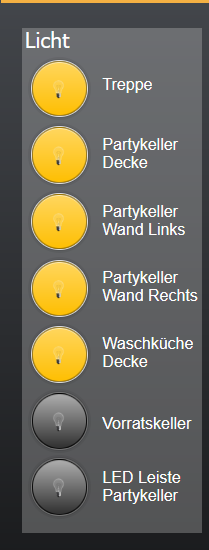
Das einzige Problem was ich habe das die Lampen Eingeschaltet angezeigt werden obwohl sie offline sind,
gibt es hierfür eine Lösung oder wie machen das andere.
Grüße
-
Hi,
ich hätte glaube ich eine reine Informative Frage.
Ich habe mir eine Vis gebastelt um die Tuya Lampen zu schalten was auch prima Funktioniert.
Das einzige Problem was ich habe das die Lampen Eingeschaltet angezeigt werden obwohl sie offline sind,
gibt es hierfür eine Lösung oder wie machen das andere.Grüße
@michaelf Naja wenn Sie offline sind dann bleibt der letzte Status stehen - wüsste nicht was man alternativ machen sollte. Auch "Offline" heisst ja erstmal nur das sie lokal nicht verbunden ist - gibt auch genug Geräte die lokal manchmal isues haben ... also ggf gar nicht offline sind ... schwierig
-
Ich habe gestern auch die neue Version des Adapters installiert. Scheint alles super zu laufen! :)
Und absoluten Mehrwert finde ich, dass sich nun auch die Farben von LEDs vernünftig über RGB-Werte einstellbar sind! Wenn man jetzt auch noch Farben statt nur weiß/warmweiß dimmern könnte, wäre das absolut perfekt
Wie einfach sich neue Geräte mit einbinden lassen, werde ich heute noch testen können, da ich heute 2 neue Tuya Wlan Steckdosen bekomme :)
Vielen Dank für das Update!!! :)
-
Ich habe gestern auch die neue Version des Adapters installiert. Scheint alles super zu laufen! :)
Und absoluten Mehrwert finde ich, dass sich nun auch die Farben von LEDs vernünftig über RGB-Werte einstellbar sind! Wenn man jetzt auch noch Farben statt nur weiß/warmweiß dimmern könnte, wäre das absolut perfektWie einfach sich neue Geräte mit einbinden lassen, werde ich heute noch testen können, da ich heute 2 neue Tuya Wlan Steckdosen bekomme :)
Vielen Dank für das Update!!! :)
-
@sit-in dann bist finaler schon auf v3.9, korrekt?! ;-) schau doch Mal in den 3.9er thread. Da wird das Farbtöne gerade diskutiert.
@apollon77
Moin,
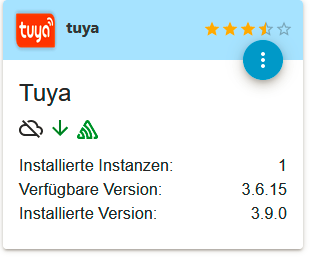
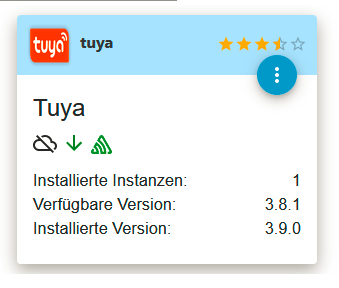
im Beta-Repository ist die Version 3.6.15
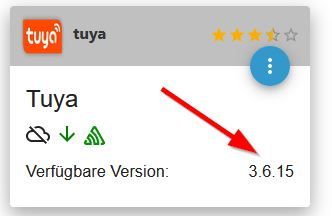
im Stable-Repository ist die Version 3.8.1:
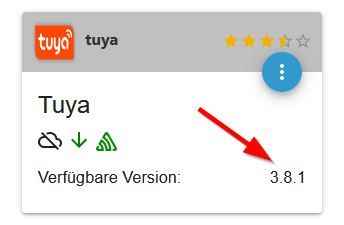
Passt da etwas nicht?
-
@apollon77
Moin,
im Beta-Repository ist die Version 3.6.15
im Stable-Repository ist die Version 3.8.1:
Passt da etwas nicht?
da stimmt etwas mit deinen repo´s nicht :-(
github:	3.9.1
latest:	3.9.1 for 0 days
stable:	3.8.1 for 8 days
Repo´s:
stable : http://download.iobroker.net/sources-dist.json beta : http://download.iobroker.net/sources-dist-latest.json live-stable : http://iobroker.live/repo/sources-dist.json live-beta : http://iobroker.live/repo/sources-dist-latest.json -
da stimmt etwas mit deinen repo´s nicht :-(
github:	3.9.1
latest:	3.9.1 for 0 days
stable:	3.8.1 for 8 days
Repo´s:
stable : http://download.iobroker.net/sources-dist.json beta : http://download.iobroker.net/sources-dist-latest.json live-stable : http://iobroker.live/repo/sources-dist.json live-beta : http://iobroker.live/repo/sources-dist-latest.json@latzi sagte in Tuya Adapter 3.8.1+:
Ich habe einen ioBroker produktiv und einen als Test laufen.
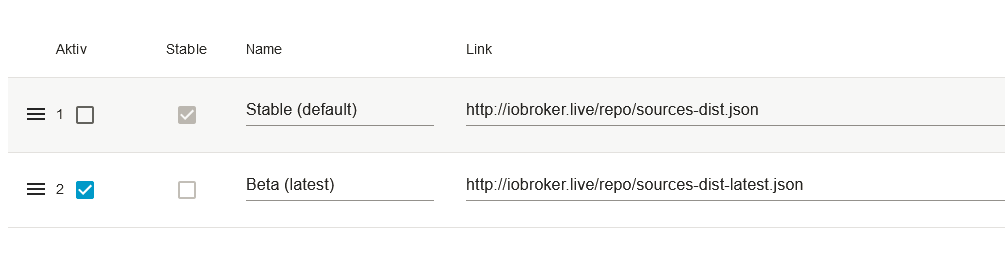
Die Einstellungen sehen in beiden gut aus:
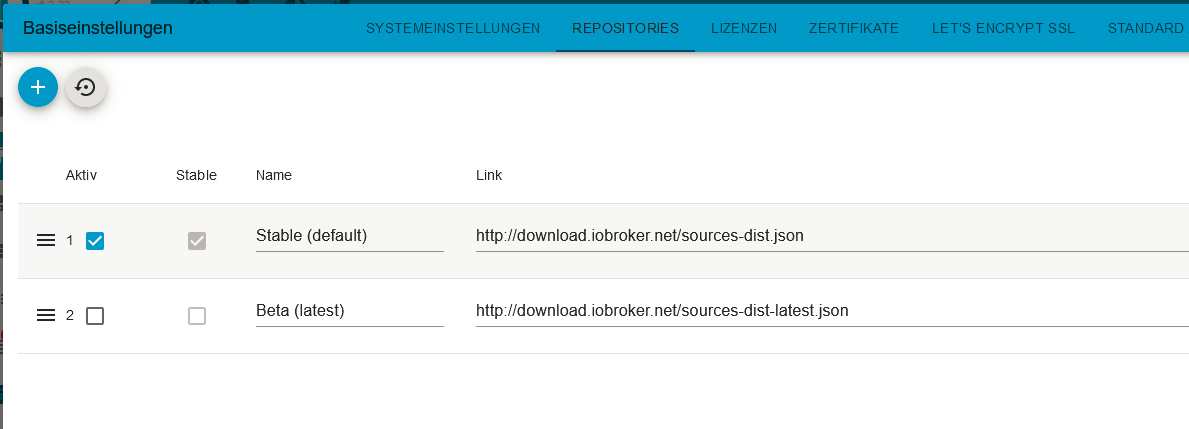
Trotzdem in beiden Systemen (produktiv und Test) im Beta 3.6.15 und im Stable 3.8.1.Woran kann das liegen?
-
@latzi sagte in Tuya Adapter 3.8.1+:
Ich habe einen ioBroker produktiv und einen als Test laufen.
Die Einstellungen sehen in beiden gut aus:
Trotzdem in beiden Systemen (produktiv und Test) im Beta 3.6.15 und im Stable 3.8.1.Woran kann das liegen?
@frank06347
seltsam, seltsam - versuch mal am Test den live-beta:live-beta : http://iobroker.live/repo/sources-dist-latest.json -
@frank06347
seltsam, seltsam - versuch mal am Test den live-beta:live-beta : http://iobroker.live/repo/sources-dist-latest.json -
iobroker update -
iobroker update@thomas-braun sagte in Tuya Adapter 3.8.1+:
iobroker update
Jetzte passt es:
pi@VMiobrokerTest:/opt/iobroker$ iobroker update
Used repository: Stable (default)
...
Adapter "tuya" : 3.8.1 , installed 3.9.0
...
pi@VMiobrokerTest:/opt/iobroker$pi@VMiobrokerTest:/opt/iobroker$ iobroker update
Used repository: Beta (latest)
...
Adapter "tuya" : 3.9.1 , installed 3.9.0 [Updatable]
...
pi@VMiobrokerTest:/opt/iobroker$Hat auch im Prod-System geklappt.
Vielen Dank! -
@apollon77
Moin,
im Beta-Repository ist die Version 3.6.15
im Stable-Repository ist die Version 3.8.1:
Passt da etwas nicht?
@frank06347 Klick mal Repo-reload (Der Reload button unter Adapter) nachdem Du das Repo auf Beta gewechselt hast
-
@thomas-braun sagte in Tuya Adapter 3.8.1+:
iobroker update
Jetzte passt es:
pi@VMiobrokerTest:/opt/iobroker$ iobroker update
Used repository: Stable (default)
...
Adapter "tuya" : 3.8.1 , installed 3.9.0
...
pi@VMiobrokerTest:/opt/iobroker$pi@VMiobrokerTest:/opt/iobroker$ iobroker update
Used repository: Beta (latest)
...
Adapter "tuya" : 3.9.1 , installed 3.9.0 [Updatable]
...
pi@VMiobrokerTest:/opt/iobroker$Hat auch im Prod-System geklappt.
Vielen Dank!@frank06347 3.9.0 WAR eine GitHub version - also du bist nicht auf dem korrekten beta Stand. Der ist 3.9.1! Bitte Updaten!
-
@sit-in dann bist finaler schon auf v3.9, korrekt?! ;-) schau doch Mal in den 3.9er thread. Da wird das Farbtöne gerade diskutiert.
@apollon77 said in Tuya Adapter 3.8.1+:
@sit-in dann bist finaler schon auf v3.9, korrekt?! ;-) schau doch Mal in den 3.9er thread. Da wird das Farbtöne gerade diskutiert.
Jap, installiert 3.9.1 :)
Okay, ich schau mal rein! -
@frank06347 3.9.0 WAR eine GitHub version - also du bist nicht auf dem korrekten beta Stand. Der ist 3.9.1! Bitte Updaten!
@apollon77
Update erfolgreich .... 3.9.1
Danke!






Hey! Du scheinst an dieser Unterhaltung interessiert zu sein, hast aber noch kein Konto.
Hast du es satt, bei jedem Besuch durch die gleichen Beiträge zu scrollen? Wenn du dich für ein Konto anmeldest, kommst du immer genau dorthin zurück, wo du zuvor warst, und kannst dich über neue Antworten benachrichtigen lassen (entweder per E-Mail oder Push-Benachrichtigung). Du kannst auch Lesezeichen speichern und Beiträge positiv bewerten, um anderen Community-Mitgliedern deine Wertschätzung zu zeigen.
Mit deinem Input könnte dieser Beitrag noch besser werden 💗
Registrieren Anmelden495
Online33.0k
Benutzer83.6k
Themen1.3m
Beiträge