Skip to content
  • Home
  • Aktuell
  • Tags
  • 0 Ungelesen 0
  • Kategorien
  • Unreplied
  • Beliebt
  • GitHub
  • Docu
  • Hilfe
Skins
  • Light
  • Brite
  • Cerulean
  • Cosmo
  • Flatly
  • Journal
  • Litera
  • Lumen
  • Lux
  • Materia
  • Minty
  • Morph
  • Pulse
  • Sandstone
  • Simplex
  • Sketchy
  • Spacelab
  • United
  • Yeti
  • Zephyr
  • Dark
  • Cyborg
  • Darkly
  • Quartz
  • Slate
  • Solar
  • Superhero
  • Vapor

  • Standard: (Kein Skin)
  • Kein Skin
Einklappen
ioBroker Logo

Community Forum

donate donate
  1. ioBroker Community Home
  2. Deutsch
  3. Off Topic
  4. neu aufsetzten

NEWS

  • Jahresrückblick 2025 – unser neuer Blogbeitrag ist online! ✨
    BluefoxB
    Bluefox
    17
    1
    2.8k

  • Neuer Blogbeitrag: Monatsrückblick - Dezember 2025 🎄
    BluefoxB
    Bluefox
    13
    1
    1.1k

  • Weihnachtsangebot 2025! 🎄
    BluefoxB
    Bluefox
    25
    1
    2.4k

neu aufsetzten

Geplant Angeheftet Gesperrt Verschoben Off Topic
53 Beiträge 3 Kommentatoren 3.8k Aufrufe 1 Watching
  • Älteste zuerst
  • Neuste zuerst
  • Meiste Stimmen
Antworten
  • In einem neuen Thema antworten
Anmelden zum Antworten
Dieses Thema wurde gelöscht. Nur Nutzer mit entsprechenden Rechten können es sehen.
  • ostseereiterO ostseereiter

    @thomas-braun

    andy@iodebian:~$ /ect/apt/sources.list.d/
    -bash: /ect/apt/sources.list.d/: Datei oder Verzeichnis nicht gefunden
    

    ich mache es anders ich alles noch mal neu aufspielen. wenn ich wieder einen freien Tag habe und dann melde ich mich gleich mit dem blanken System.
    Ist glaube besser
    LG

    Thomas BraunT Online
    Thomas BraunT Online
    Thomas Braun
    Most Active
    schrieb am zuletzt editiert von Thomas Braun
    #17

    @ostseereiter sagte in neu aufsetzten:

    /etc/apt/sources.list.d/

    Das ist nur der Pfad. Irgendwas musst du damit machen. Zum Beispiel mit 'cd' für 'change directory' dahin wechseln und dann schauen was da drin liegt:

    cd /ect/apt/sources.list.d/
    ls -lA
    

    €dit: Typo korrigiert.

    Linux-Werkzeugkasten:
    https://forum.iobroker.net/topic/42952/der-kleine-iobroker-linux-werkzeugkasten
    NodeJS Fixer Skript:
    https://forum.iobroker.net/topic/68035/iob-node-fix-skript
    iob_diag: curl -sLf -o diag.sh https://iobroker.net/diag.sh && bash diag.sh

    ostseereiterO 1 Antwort Letzte Antwort
    0
    • Thomas BraunT Thomas Braun

      @ostseereiter sagte in neu aufsetzten:

      /etc/apt/sources.list.d/

      Das ist nur der Pfad. Irgendwas musst du damit machen. Zum Beispiel mit 'cd' für 'change directory' dahin wechseln und dann schauen was da drin liegt:

      cd /ect/apt/sources.list.d/
      ls -lA
      

      €dit: Typo korrigiert.

      ostseereiterO Offline
      ostseereiterO Offline
      ostseereiter
      schrieb am zuletzt editiert von
      #18

      @thomas-braun

      
      andy@iodebian:~$ cd /ect/apt/sources.list.d/
      -bash: cd: /ect/apt/sources.list.d/: Datei oder Verzeichnis nicht gefunden


      Gruß OSR

      Plattform
      Linux x64 CPUs2 AMD G-T56N Processor 1646 MHz 8GB RAM

      Thomas BraunT 1 Antwort Letzte Antwort
      0
      • ostseereiterO ostseereiter

        @thomas-braun

        
        andy@iodebian:~$ cd /ect/apt/sources.list.d/
        -bash: cd: /ect/apt/sources.list.d/: Datei oder Verzeichnis nicht gefunden
        
        
        Thomas BraunT Online
        Thomas BraunT Online
        Thomas Braun
        Most Active
        schrieb am zuletzt editiert von
        #19

        @ostseereiter

        /etc lautet das Verzeichnis.Typo.

        Linux-Werkzeugkasten:
        https://forum.iobroker.net/topic/42952/der-kleine-iobroker-linux-werkzeugkasten
        NodeJS Fixer Skript:
        https://forum.iobroker.net/topic/68035/iob-node-fix-skript
        iob_diag: curl -sLf -o diag.sh https://iobroker.net/diag.sh && bash diag.sh

        ostseereiterO 1 Antwort Letzte Antwort
        0
        • Thomas BraunT Thomas Braun

          @ostseereiter

          /etc lautet das Verzeichnis.Typo.

          ostseereiterO Offline
          ostseereiterO Offline
          ostseereiter
          schrieb am zuletzt editiert von
          #20

          @thomas-braun
          bis /etc komme ich aber dann nicht weiter

          andy@iodebian:~$ cd /etc
          andy@iodebian:/etc$ ls -la
          insgesamt 696
          drwxr-xr-x 68 root root    4096  9. Nov 14:07 .
          drwxr-xr-x 18 root root    4096  9. Nov 10:46 ..
          -rw-r--r--  1 root root    2981  9. Nov 10:42 adduser.conf
          -rw-r--r--  1 root root      44  9. Nov 10:53 adjtime
          drwxr-xr-x  2 root root    4096  9. Nov 13:03 alternatives
          drwxr-xr-x  2 root root    4096  9. Nov 10:43 apparmor
          drwxr-xr-x  7 root root    4096  9. Nov 10:50 apparmor.d
          drwxr-xr-x  8 root root    4096  9. Nov 10:53 apt
          -rw-r--r--  1 root root    1994 27. Mär 2022  bash.bashrc
          -rw-r--r--  1 root root      45 24. Jan 2020  bash_completion
          -rw-r--r--  1 root root     367 29. Jul 2019  bindresvport.blacklist
          drwxr-xr-x  2 root root    4096  7. Aug 15:25 binfmt.d
          drwxr-xr-x  3 root root    4096  9. Nov 10:49 ca-certificates
          -rw-r--r--  1 root root    5662  9. Nov 10:49 ca-certificates.conf
          drwxr-xr-x  2 root root    4096  9. Nov 10:44 console-setup
          drwxr-xr-x  2 root root    4096  9. Nov 10:47 cron.d
          drwxr-xr-x  2 root root    4096  9. Nov 10:50 cron.daily
          drwxr-xr-x  2 root root    4096  9. Nov 10:42 cron.hourly
          drwxr-xr-x  2 root root    4096  9. Nov 10:42 cron.monthly
          -rw-r--r--  1 root root    1042 22. Feb 2021  crontab
          drwxr-xr-x  2 root root    4096  9. Nov 10:50 cron.weekly
          drwxr-xr-x  4 root root    4096  9. Nov 10:48 dbus-1
          -rw-r--r--  1 root root    2969 10. Jun 2021  debconf.conf
          -rw-r--r--  1 root root       5  3. Sep 14:10 debian_version
          drwxr-xr-x  3 root root    4096  9. Nov 10:52 default
          -rw-r--r--  1 root root     604 26. Jun 2016  deluser.conf
          drwxr-xr-x  4 root root    4096  9. Nov 10:46 dhcp
          drwxr-xr-x  2 root root    4096  9. Nov 10:52 dictionaries-common
          drwxr-xr-x  2 root root    4096  9. Nov 10:47 discover.conf.d
          -rw-r--r--  1 root root     346 14. Jan 2018  discover-modprobe.conf
          drwxr-xr-x  4 root root    4096  9. Nov 10:42 dpkg
          -rw-r--r--  1 root root     685  7. Jun 2021  e2scrub.conf
          drwxr-xr-x  3 root root    4096  9. Nov 10:49 emacs
          -rw-r--r--  1 root root       0  9. Nov 10:42 environment
          -rw-r--r--  1 root root    1816 27. Dez 2019  ethertypes
          -rw-r--r--  1 root root     851  9. Nov 10:41 fstab
          -rw-r--r--  1 root root    2584  1. Feb 2020  gai.conf
          drwxr-xr-x  2 root root    4096  9. Nov 10:49 groff
          -rw-r--r--  1 root root     704  9. Nov 11:01 group
          -rw-r--r--  1 root root     700  9. Nov 10:53 group-
          drwxr-xr-x  2 root root    4096  9. Nov 10:52 grub.d
          -rw-r-----  1 root shadow   593  9. Nov 11:01 gshadow
          -rw-r-----  1 root shadow   589  9. Nov 10:53 gshadow-
          drwxr-xr-x  3 root root    4096  9. Nov 10:41 gss
          -rw-r--r--  1 root root       9  7. Aug 2006  host.conf
          -rw-r--r--  1 root root       9  9. Nov 10:42 hostname
          -rw-r--r--  1 root root     188  9. Nov 10:42 hosts
          -rw-r--r--  1 root root     411  9. Nov 10:49 hosts.allow
          -rw-r--r--  1 root root     711  9. Nov 10:49 hosts.deny
          drwxr-xr-x  2 root root    4096  9. Nov 11:00 init.d
          drwxr-xr-x  5 root root    4096  9. Nov 10:43 initramfs-tools
          -rw-r--r--  1 root root    1748  8. Dez 2020  inputrc
          drwxr-xr-x  4 root root    4096  9. Nov 10:42 iproute2
          -rw-r--r--  1 root root      27  3. Sep 14:10 issue
          -rw-r--r--  1 root root      20  3. Sep 14:10 issue.net
          drwxr-xr-x  5 root root    4096  9. Nov 10:43 kernel
          -rw-r--r--  1 root root     144  9. Nov 10:52 kernel-img.conf
          drwxr-xr-x  2 root root    4096  9. Nov 10:49 ldap
          -rw-r--r--  1 root root   14205  9. Nov 13:03 ld.so.cache
          -rw-r--r--  1 root root      34 29. Jul 2019  ld.so.conf
          drwxr-xr-x  2 root root    4096  9. Nov 10:46 ld.so.conf.d
          -rw-r--r--  1 root root     191  6. Jan 2021  libaudit.conf
          -rw-r--r--  1 root root    2996 26. Aug 23:32 locale.alias
          -rw-r--r--  1 root root    9391  9. Nov 10:46 locale.gen
          lrwxrwxrwx  1 root root      33  9. Nov 10:46 localtime -> /usr/share/zoneinfo/Europe/Berlin
          drwxr-xr-x  3 root root    4096  9. Nov 10:42 logcheck
          -rw-r--r--  1 root root   10477  7. Feb 2020  login.defs
          -rw-r--r--  1 root root     494 30. Jan 2022  logrotate.conf
          drwxr-xr-x  2 root root    4096  9. Nov 10:42 logrotate.d
          -r--r--r--  1 root root      33  9. Nov 10:42 machine-id
          -rw-r--r--  1 root root     111 19. Nov 2020  magic
          -rw-r--r--  1 root root     111 19. Nov 2020  magic.mime
          -rw-r--r--  1 root root    3310  9. Nov 10:51 mailcap
          -rw-r--r--  1 root root     449 25. Feb 2021  mailcap.order
          -rw-r--r--  1 root root    5215 19. Feb 2021  manpath.config
          -rw-r--r--  1 root root   70481 15. Jan 2021  mime.types
          -rw-r--r--  1 root root     812  7. Jun 2021  mke2fs.conf
          drwxr-xr-x  2 root root    4096  8. Jan 2021  modprobe.d
          -rw-r--r--  1 root root     195  9. Nov 10:42 modules
          drwxr-xr-x  2 root root    4096  9. Nov 10:42 modules-load.d
          -rw-r--r--  1 root root     286  3. Sep 14:10 motd
          lrwxrwxrwx  1 root root      19  9. Nov 10:53 mtab -> ../proc/self/mounts
          -rw-r--r--  1 root root   10056 22. Nov 2021  nanorc
          -rw-r--r--  1 root root     767  1. Aug 16:26 netconfig
          drwxr-xr-x  7 root root    4096  9. Nov 10:42 network
          -rw-r--r--  1 root root      60  9. Nov 10:42 networks
          -rwxr-xr-x  1 root root     228 20. Jul 2021  nftables.conf
          -rw-r--r--  1 root root     510  9. Nov 10:49 nsswitch.conf
          drwxr-xr-x  2 root root    4096  9. Nov 10:41 opt
          lrwxrwxrwx  1 root root      21  3. Sep 14:10 os-release -> ../usr/lib/os-release
          -rw-r--r--  1 root root     552 30. Jan 2021  pam.conf
          drwxr-xr-x  2 root root    4096  9. Nov 11:00 pam.d
          -rw-r--r--  1 root root    1388  9. Nov 10:53 passwd
          -rw-r--r--  1 root root    1321  9. Nov 10:53 passwd-
          drwxr-xr-x  3 root root    4096  9. Nov 10:48 perl
          -rw-r--r--  1 root root     769 10. Apr 2021  profile
          drwxr-xr-x  2 root root    4096  9. Nov 10:49 profile.d
          -rw-r--r--  1 root root    2932  1. Apr 2013  protocols
          -rw-------  1 root root       0  9. Nov 10:42 .pwd.lock
          drwxr-xr-x  2 root root    4096  9. Nov 10:50 python3
          drwxr-xr-x  2 root root    4096  9. Nov 10:49 python3.9
          drwxr-xr-x  2 root root    4096  9. Nov 10:42 rc0.d
          drwxr-xr-x  2 root root    4096  9. Nov 10:42 rc1.d
          drwxr-xr-x  2 root root    4096  9. Nov 11:00 rc2.d
          drwxr-xr-x  2 root root    4096  9. Nov 11:00 rc3.d
          drwxr-xr-x  2 root root    4096  9. Nov 11:00 rc4.d
          drwxr-xr-x  2 root root    4096  9. Nov 11:00 rc5.d
          drwxr-xr-x  2 root root    4096  9. Nov 10:42 rc6.d
          drwxr-xr-x  2 root root    4096  9. Nov 10:44 rcS.d
          -rw-r--r--  1 root root    3281  6. Sep 2021  reportbug.conf
          -rw-r--r--  1 root root      59  9. Nov 14:07 resolv.conf
          lrwxrwxrwx  1 root root      13 17. Feb 2021  rmt -> /usr/sbin/rmt
          -rw-r--r--  1 root root     887  1. Apr 2013  rpc
          -rw-r--r--  1 root root    1974 20. Mai 23:05 rsyslog.conf
          drwxr-xr-x  2 root root    4096 20. Mai 23:05 rsyslog.d
          drwxr-xr-x  3 root root    4096  9. Nov 10:49 runit
          drwxr-xr-x  4 root root    4096  9. Nov 10:42 security
          drwxr-xr-x  2 root root    4096  9. Nov 10:42 selinux
          -rw-r--r--  1 root root   12813 27. Mär 2021  services
          -rw-r-----  1 root shadow   873  9. Nov 10:53 shadow
          -rw-r-----  1 root shadow   841  9. Nov 10:53 shadow-
          -rw-r--r--  1 root root     116  9. Nov 10:42 shells
          drwxr-xr-x  2 root root    4096  9. Nov 10:42 skel
          drwxr-xr-x  4 root root    4096  9. Nov 10:49 ssh
          drwxr-xr-x  4 root root    4096  9. Nov 10:49 ssl
          -rw-r--r--  1 root root      18  9. Nov 10:53 subgid
          -rw-r--r--  1 root root       0  9. Nov 10:42 subgid-
          -rw-r--r--  1 root root      18  9. Nov 10:53 subuid
          -rw-r--r--  1 root root       0  9. Nov 10:42 subuid-
          -rw-r--r--  1 root root    3975 27. Feb 2021  sudo.conf
          -r--r-----  1 root root     694  9. Nov 11:10 sudoers
          drwxr-xr-x  2 root root    4096  9. Nov 11:00 sudoers.d
          -rw-r--r--  1 root root    6169 27. Feb 2021  sudo_logsrvd.conf
          drwxr-xr-x  3 root root    4096  9. Nov 10:49 sv
          -rw-r--r--  1 root root    2355  6. Apr 2021  sysctl.conf
          drwxr-xr-x  2 root root    4096  9. Nov 10:42 sysctl.d
          drwxr-xr-x  5 root root    4096  9. Nov 10:49 systemd
          drwxr-xr-x  2 root root    4096  9. Nov 10:42 terminfo
          -rw-r--r--  1 root root      14  9. Nov 10:46 timezone
          drwxr-xr-x  2 root root    4096  7. Aug 15:25 tmpfiles.d
          -rw-r--r--  1 root root    1260 16. Jun 2020  ucf.conf
          drwxr-xr-x  4 root root    4096  9. Nov 10:42 udev
          drwxr-xr-x  3 root root    4096  9. Nov 10:49 ufw
          drwxr-xr-x  2 root root    4096  9. Nov 10:42 update-motd.d
          drwxr-xr-x  2 root root    4096  9. Nov 10:42 vim
          -rw-r--r--  1 root root    4942 23. Nov 2021  wgetrc
          drwxr-xr-x  4 root root    4096  9. Nov 13:03 X11
          -rw-r--r--  1 root root     642 24. Dez 2020  xattr.conf
          drwxr-xr-x  3 root root    4096  9. Nov 10:42 xdg
          andy@iodebian:/etc$


          Gruß OSR

          Plattform
          Linux x64 CPUs2 AMD G-T56N Processor 1646 MHz 8GB RAM

          Thomas BraunT 1 Antwort Letzte Antwort
          0
          • ostseereiterO ostseereiter

            @thomas-braun
            bis /etc komme ich aber dann nicht weiter

            andy@iodebian:~$ cd /etc
            andy@iodebian:/etc$ ls -la
            insgesamt 696
            drwxr-xr-x 68 root root    4096  9. Nov 14:07 .
            drwxr-xr-x 18 root root    4096  9. Nov 10:46 ..
            -rw-r--r--  1 root root    2981  9. Nov 10:42 adduser.conf
            -rw-r--r--  1 root root      44  9. Nov 10:53 adjtime
            drwxr-xr-x  2 root root    4096  9. Nov 13:03 alternatives
            drwxr-xr-x  2 root root    4096  9. Nov 10:43 apparmor
            drwxr-xr-x  7 root root    4096  9. Nov 10:50 apparmor.d
            drwxr-xr-x  8 root root    4096  9. Nov 10:53 apt
            -rw-r--r--  1 root root    1994 27. Mär 2022  bash.bashrc
            -rw-r--r--  1 root root      45 24. Jan 2020  bash_completion
            -rw-r--r--  1 root root     367 29. Jul 2019  bindresvport.blacklist
            drwxr-xr-x  2 root root    4096  7. Aug 15:25 binfmt.d
            drwxr-xr-x  3 root root    4096  9. Nov 10:49 ca-certificates
            -rw-r--r--  1 root root    5662  9. Nov 10:49 ca-certificates.conf
            drwxr-xr-x  2 root root    4096  9. Nov 10:44 console-setup
            drwxr-xr-x  2 root root    4096  9. Nov 10:47 cron.d
            drwxr-xr-x  2 root root    4096  9. Nov 10:50 cron.daily
            drwxr-xr-x  2 root root    4096  9. Nov 10:42 cron.hourly
            drwxr-xr-x  2 root root    4096  9. Nov 10:42 cron.monthly
            -rw-r--r--  1 root root    1042 22. Feb 2021  crontab
            drwxr-xr-x  2 root root    4096  9. Nov 10:50 cron.weekly
            drwxr-xr-x  4 root root    4096  9. Nov 10:48 dbus-1
            -rw-r--r--  1 root root    2969 10. Jun 2021  debconf.conf
            -rw-r--r--  1 root root       5  3. Sep 14:10 debian_version
            drwxr-xr-x  3 root root    4096  9. Nov 10:52 default
            -rw-r--r--  1 root root     604 26. Jun 2016  deluser.conf
            drwxr-xr-x  4 root root    4096  9. Nov 10:46 dhcp
            drwxr-xr-x  2 root root    4096  9. Nov 10:52 dictionaries-common
            drwxr-xr-x  2 root root    4096  9. Nov 10:47 discover.conf.d
            -rw-r--r--  1 root root     346 14. Jan 2018  discover-modprobe.conf
            drwxr-xr-x  4 root root    4096  9. Nov 10:42 dpkg
            -rw-r--r--  1 root root     685  7. Jun 2021  e2scrub.conf
            drwxr-xr-x  3 root root    4096  9. Nov 10:49 emacs
            -rw-r--r--  1 root root       0  9. Nov 10:42 environment
            -rw-r--r--  1 root root    1816 27. Dez 2019  ethertypes
            -rw-r--r--  1 root root     851  9. Nov 10:41 fstab
            -rw-r--r--  1 root root    2584  1. Feb 2020  gai.conf
            drwxr-xr-x  2 root root    4096  9. Nov 10:49 groff
            -rw-r--r--  1 root root     704  9. Nov 11:01 group
            -rw-r--r--  1 root root     700  9. Nov 10:53 group-
            drwxr-xr-x  2 root root    4096  9. Nov 10:52 grub.d
            -rw-r-----  1 root shadow   593  9. Nov 11:01 gshadow
            -rw-r-----  1 root shadow   589  9. Nov 10:53 gshadow-
            drwxr-xr-x  3 root root    4096  9. Nov 10:41 gss
            -rw-r--r--  1 root root       9  7. Aug 2006  host.conf
            -rw-r--r--  1 root root       9  9. Nov 10:42 hostname
            -rw-r--r--  1 root root     188  9. Nov 10:42 hosts
            -rw-r--r--  1 root root     411  9. Nov 10:49 hosts.allow
            -rw-r--r--  1 root root     711  9. Nov 10:49 hosts.deny
            drwxr-xr-x  2 root root    4096  9. Nov 11:00 init.d
            drwxr-xr-x  5 root root    4096  9. Nov 10:43 initramfs-tools
            -rw-r--r--  1 root root    1748  8. Dez 2020  inputrc
            drwxr-xr-x  4 root root    4096  9. Nov 10:42 iproute2
            -rw-r--r--  1 root root      27  3. Sep 14:10 issue
            -rw-r--r--  1 root root      20  3. Sep 14:10 issue.net
            drwxr-xr-x  5 root root    4096  9. Nov 10:43 kernel
            -rw-r--r--  1 root root     144  9. Nov 10:52 kernel-img.conf
            drwxr-xr-x  2 root root    4096  9. Nov 10:49 ldap
            -rw-r--r--  1 root root   14205  9. Nov 13:03 ld.so.cache
            -rw-r--r--  1 root root      34 29. Jul 2019  ld.so.conf
            drwxr-xr-x  2 root root    4096  9. Nov 10:46 ld.so.conf.d
            -rw-r--r--  1 root root     191  6. Jan 2021  libaudit.conf
            -rw-r--r--  1 root root    2996 26. Aug 23:32 locale.alias
            -rw-r--r--  1 root root    9391  9. Nov 10:46 locale.gen
            lrwxrwxrwx  1 root root      33  9. Nov 10:46 localtime -> /usr/share/zoneinfo/Europe/Berlin
            drwxr-xr-x  3 root root    4096  9. Nov 10:42 logcheck
            -rw-r--r--  1 root root   10477  7. Feb 2020  login.defs
            -rw-r--r--  1 root root     494 30. Jan 2022  logrotate.conf
            drwxr-xr-x  2 root root    4096  9. Nov 10:42 logrotate.d
            -r--r--r--  1 root root      33  9. Nov 10:42 machine-id
            -rw-r--r--  1 root root     111 19. Nov 2020  magic
            -rw-r--r--  1 root root     111 19. Nov 2020  magic.mime
            -rw-r--r--  1 root root    3310  9. Nov 10:51 mailcap
            -rw-r--r--  1 root root     449 25. Feb 2021  mailcap.order
            -rw-r--r--  1 root root    5215 19. Feb 2021  manpath.config
            -rw-r--r--  1 root root   70481 15. Jan 2021  mime.types
            -rw-r--r--  1 root root     812  7. Jun 2021  mke2fs.conf
            drwxr-xr-x  2 root root    4096  8. Jan 2021  modprobe.d
            -rw-r--r--  1 root root     195  9. Nov 10:42 modules
            drwxr-xr-x  2 root root    4096  9. Nov 10:42 modules-load.d
            -rw-r--r--  1 root root     286  3. Sep 14:10 motd
            lrwxrwxrwx  1 root root      19  9. Nov 10:53 mtab -> ../proc/self/mounts
            -rw-r--r--  1 root root   10056 22. Nov 2021  nanorc
            -rw-r--r--  1 root root     767  1. Aug 16:26 netconfig
            drwxr-xr-x  7 root root    4096  9. Nov 10:42 network
            -rw-r--r--  1 root root      60  9. Nov 10:42 networks
            -rwxr-xr-x  1 root root     228 20. Jul 2021  nftables.conf
            -rw-r--r--  1 root root     510  9. Nov 10:49 nsswitch.conf
            drwxr-xr-x  2 root root    4096  9. Nov 10:41 opt
            lrwxrwxrwx  1 root root      21  3. Sep 14:10 os-release -> ../usr/lib/os-release
            -rw-r--r--  1 root root     552 30. Jan 2021  pam.conf
            drwxr-xr-x  2 root root    4096  9. Nov 11:00 pam.d
            -rw-r--r--  1 root root    1388  9. Nov 10:53 passwd
            -rw-r--r--  1 root root    1321  9. Nov 10:53 passwd-
            drwxr-xr-x  3 root root    4096  9. Nov 10:48 perl
            -rw-r--r--  1 root root     769 10. Apr 2021  profile
            drwxr-xr-x  2 root root    4096  9. Nov 10:49 profile.d
            -rw-r--r--  1 root root    2932  1. Apr 2013  protocols
            -rw-------  1 root root       0  9. Nov 10:42 .pwd.lock
            drwxr-xr-x  2 root root    4096  9. Nov 10:50 python3
            drwxr-xr-x  2 root root    4096  9. Nov 10:49 python3.9
            drwxr-xr-x  2 root root    4096  9. Nov 10:42 rc0.d
            drwxr-xr-x  2 root root    4096  9. Nov 10:42 rc1.d
            drwxr-xr-x  2 root root    4096  9. Nov 11:00 rc2.d
            drwxr-xr-x  2 root root    4096  9. Nov 11:00 rc3.d
            drwxr-xr-x  2 root root    4096  9. Nov 11:00 rc4.d
            drwxr-xr-x  2 root root    4096  9. Nov 11:00 rc5.d
            drwxr-xr-x  2 root root    4096  9. Nov 10:42 rc6.d
            drwxr-xr-x  2 root root    4096  9. Nov 10:44 rcS.d
            -rw-r--r--  1 root root    3281  6. Sep 2021  reportbug.conf
            -rw-r--r--  1 root root      59  9. Nov 14:07 resolv.conf
            lrwxrwxrwx  1 root root      13 17. Feb 2021  rmt -> /usr/sbin/rmt
            -rw-r--r--  1 root root     887  1. Apr 2013  rpc
            -rw-r--r--  1 root root    1974 20. Mai 23:05 rsyslog.conf
            drwxr-xr-x  2 root root    4096 20. Mai 23:05 rsyslog.d
            drwxr-xr-x  3 root root    4096  9. Nov 10:49 runit
            drwxr-xr-x  4 root root    4096  9. Nov 10:42 security
            drwxr-xr-x  2 root root    4096  9. Nov 10:42 selinux
            -rw-r--r--  1 root root   12813 27. Mär 2021  services
            -rw-r-----  1 root shadow   873  9. Nov 10:53 shadow
            -rw-r-----  1 root shadow   841  9. Nov 10:53 shadow-
            -rw-r--r--  1 root root     116  9. Nov 10:42 shells
            drwxr-xr-x  2 root root    4096  9. Nov 10:42 skel
            drwxr-xr-x  4 root root    4096  9. Nov 10:49 ssh
            drwxr-xr-x  4 root root    4096  9. Nov 10:49 ssl
            -rw-r--r--  1 root root      18  9. Nov 10:53 subgid
            -rw-r--r--  1 root root       0  9. Nov 10:42 subgid-
            -rw-r--r--  1 root root      18  9. Nov 10:53 subuid
            -rw-r--r--  1 root root       0  9. Nov 10:42 subuid-
            -rw-r--r--  1 root root    3975 27. Feb 2021  sudo.conf
            -r--r-----  1 root root     694  9. Nov 11:10 sudoers
            drwxr-xr-x  2 root root    4096  9. Nov 11:00 sudoers.d
            -rw-r--r--  1 root root    6169 27. Feb 2021  sudo_logsrvd.conf
            drwxr-xr-x  3 root root    4096  9. Nov 10:49 sv
            -rw-r--r--  1 root root    2355  6. Apr 2021  sysctl.conf
            drwxr-xr-x  2 root root    4096  9. Nov 10:42 sysctl.d
            drwxr-xr-x  5 root root    4096  9. Nov 10:49 systemd
            drwxr-xr-x  2 root root    4096  9. Nov 10:42 terminfo
            -rw-r--r--  1 root root      14  9. Nov 10:46 timezone
            drwxr-xr-x  2 root root    4096  7. Aug 15:25 tmpfiles.d
            -rw-r--r--  1 root root    1260 16. Jun 2020  ucf.conf
            drwxr-xr-x  4 root root    4096  9. Nov 10:42 udev
            drwxr-xr-x  3 root root    4096  9. Nov 10:49 ufw
            drwxr-xr-x  2 root root    4096  9. Nov 10:42 update-motd.d
            drwxr-xr-x  2 root root    4096  9. Nov 10:42 vim
            -rw-r--r--  1 root root    4942 23. Nov 2021  wgetrc
            drwxr-xr-x  4 root root    4096  9. Nov 13:03 X11
            -rw-r--r--  1 root root     642 24. Dez 2020  xattr.conf
            drwxr-xr-x  3 root root    4096  9. Nov 10:42 xdg
            andy@iodebian:/etc$
            
            
            Thomas BraunT Online
            Thomas BraunT Online
            Thomas Braun
            Most Active
            schrieb am zuletzt editiert von
            #21

            @ostseereiter

            cd /etc/apt/sources.list.d/
            ls -lA
            

            Linux-Werkzeugkasten:
            https://forum.iobroker.net/topic/42952/der-kleine-iobroker-linux-werkzeugkasten
            NodeJS Fixer Skript:
            https://forum.iobroker.net/topic/68035/iob-node-fix-skript
            iob_diag: curl -sLf -o diag.sh https://iobroker.net/diag.sh && bash diag.sh

            ostseereiterO 1 Antwort Letzte Antwort
            0
            • Thomas BraunT Thomas Braun

              @ostseereiter

              cd /etc/apt/sources.list.d/
              ls -lA
              
              ostseereiterO Offline
              ostseereiterO Offline
              ostseereiter
              schrieb am zuletzt editiert von
              #22

              @thomas-braun

              andy@iodebian:/etc/apt/sources.list.d$ ls -la
              insgesamt 12
              drwxr-xr-x 2 root root 4096  9. Nov 13:05 .
              drwxr-xr-x 8 root root 4096  9. Nov 10:53 ..
              -rw-r--r-- 1 root root  100  9. Nov 11:41 influxdata.list
              -rw-r--r-- 1 root root    0  9. Nov 13:19 influxdb.list
              

              Gruß OSR

              Plattform
              Linux x64 CPUs2 AMD G-T56N Processor 1646 MHz 8GB RAM

              Thomas BraunT 1 Antwort Letzte Antwort
              0
              • ostseereiterO ostseereiter

                @thomas-braun

                andy@iodebian:/etc/apt/sources.list.d$ ls -la
                insgesamt 12
                drwxr-xr-x 2 root root 4096  9. Nov 13:05 .
                drwxr-xr-x 8 root root 4096  9. Nov 10:53 ..
                -rw-r--r-- 1 root root  100  9. Nov 11:41 influxdata.list
                -rw-r--r-- 1 root root    0  9. Nov 13:19 influxdb.list
                
                Thomas BraunT Online
                Thomas BraunT Online
                Thomas Braun
                Most Active
                schrieb am zuletzt editiert von
                #23

                @ostseereiter Lösch die mal beide.

                sudo rm influxd*
                

                Dann nochmal frisch:

                wget -q -O - https://repos.influxdata.com/influxdb.key | sudo gpg --dearmor -o /usr/share/keyrings/influxdb.gpg
                export DISTRIB_ID=$(lsb_release -si); export DISTRIB_CODENAME=$(lsb_release -sc)
                echo "deb [signed-by=/usr/share/keyrings/influxdb.gpg] https://repos.influxdata.com/${DISTRIB_ID,,} ${DISTRIB_CODENAME} stable" | sudo tee /etc/apt/sources.list.d/influxdb.list > /dev/null
                

                Linux-Werkzeugkasten:
                https://forum.iobroker.net/topic/42952/der-kleine-iobroker-linux-werkzeugkasten
                NodeJS Fixer Skript:
                https://forum.iobroker.net/topic/68035/iob-node-fix-skript
                iob_diag: curl -sLf -o diag.sh https://iobroker.net/diag.sh && bash diag.sh

                ostseereiterO 1 Antwort Letzte Antwort
                0
                • Thomas BraunT Thomas Braun

                  @ostseereiter Lösch die mal beide.

                  sudo rm influxd*
                  

                  Dann nochmal frisch:

                  wget -q -O - https://repos.influxdata.com/influxdb.key | sudo gpg --dearmor -o /usr/share/keyrings/influxdb.gpg
                  export DISTRIB_ID=$(lsb_release -si); export DISTRIB_CODENAME=$(lsb_release -sc)
                  echo "deb [signed-by=/usr/share/keyrings/influxdb.gpg] https://repos.influxdata.com/${DISTRIB_ID,,} ${DISTRIB_CODENAME} stable" | sudo tee /etc/apt/sources.list.d/influxdb.list > /dev/null
                  
                  ostseereiterO Offline
                  ostseereiterO Offline
                  ostseereiter
                  schrieb am zuletzt editiert von
                  #24

                  @thomas-braun
                  das sah schon mal gut aus

                  andy@iodebian:~$ wget -q -O - https://repos.influxdata.com/influxdb.key | sudo gpg --dearmor -o /usr/share/keyrings/influxdb.gpg
                  Datei '/usr/share/keyrings/influxdb.gpg' existiert bereits. Überschreiben (j/N)? j
                  andy@iodebian:~$ export DISTRIB_ID=$(lsb_release -si); export DISTRIB_CODENAME=$(lsb_release -sc)
                  andy@iodebian:~$ echo "deb [signed-by=/usr/share/keyrings/influxdb.gpg] https://repos.influxdata.com/${DISTRIB_ID,,} ${DISTRIB_CODENAME} stable" | sudo tee /etc/apt/sources.list.d/influxdb.list > /dev/null
                  andy@iodebian:~$


                  Gruß OSR

                  Plattform
                  Linux x64 CPUs2 AMD G-T56N Processor 1646 MHz 8GB RAM

                  Thomas BraunT 1 Antwort Letzte Antwort
                  0
                  • ostseereiterO ostseereiter

                    @thomas-braun
                    das sah schon mal gut aus

                    andy@iodebian:~$ wget -q -O - https://repos.influxdata.com/influxdb.key | sudo gpg --dearmor -o /usr/share/keyrings/influxdb.gpg
                    Datei '/usr/share/keyrings/influxdb.gpg' existiert bereits. Überschreiben (j/N)? j
                    andy@iodebian:~$ export DISTRIB_ID=$(lsb_release -si); export DISTRIB_CODENAME=$(lsb_release -sc)
                    andy@iodebian:~$ echo "deb [signed-by=/usr/share/keyrings/influxdb.gpg] https://repos.influxdata.com/${DISTRIB_ID,,} ${DISTRIB_CODENAME} stable" | sudo tee /etc/apt/sources.list.d/influxdb.list > /dev/null
                    andy@iodebian:~$
                    
                    
                    Thomas BraunT Online
                    Thomas BraunT Online
                    Thomas Braun
                    Most Active
                    schrieb am zuletzt editiert von
                    #25

                    @ostseereiter

                    Jetzt noch die Repos updaten und schauen was in der Auslage liegt:

                    sudo apt update
                    apt policy influxdb*
                    

                    Linux-Werkzeugkasten:
                    https://forum.iobroker.net/topic/42952/der-kleine-iobroker-linux-werkzeugkasten
                    NodeJS Fixer Skript:
                    https://forum.iobroker.net/topic/68035/iob-node-fix-skript
                    iob_diag: curl -sLf -o diag.sh https://iobroker.net/diag.sh && bash diag.sh

                    ostseereiterO 1 Antwort Letzte Antwort
                    0
                    • Thomas BraunT Thomas Braun

                      @ostseereiter

                      Jetzt noch die Repos updaten und schauen was in der Auslage liegt:

                      sudo apt update
                      apt policy influxdb*
                      
                      ostseereiterO Offline
                      ostseereiterO Offline
                      ostseereiter
                      schrieb am zuletzt editiert von
                      #26

                      @thomas-braun sagte in neu aufsetzten:

                      apt policy influxdb*

                      andy@iodebian:~$ apt policy influxdb*
                      influxdb2-cli:
                        Installiert:           (keine)
                        Installationskandidat: 2.5.0
                        Versionstabelle:
                           2.5.0 500
                              500 https://repos.influxdata.com/debian bullseye/stable amd64 Packages
                           2.4.0 500
                              500 https://repos.influxdata.com/debian bullseye/stable amd64 Packages
                           2.3.0 500
                              500 https://repos.influxdata.com/debian bullseye/stable amd64 Packages
                      influxdb-client:
                        Installiert:           (keine)
                        Installationskandidat: 1.6.7~rc0-1+b5
                        Versionstabelle:
                           1.6.7~rc0-1+b5 500
                              500 http://deb.debian.org/debian bullseye/main amd64 Packages
                      influxdb-dev:
                        Installiert:           (keine)
                        Installationskandidat: (keine)
                        Versionstabelle:
                      influxdb:
                        Installiert:           (keine)
                        Installationskandidat: 1.8.10-1
                        Versionstabelle:
                           1.8.10-1 500
                              500 https://repos.influxdata.com/debian bullseye/stable amd64 Packages
                           1.6.7~rc0-1+b5 500
                              500 http://deb.debian.org/debian bullseye/main amd64 Packages
                      influxdb2:
                        Installiert:           (keine)
                        Installationskandidat: 2.5.1-1
                        Versionstabelle:
                           2.5.1-1 500
                              500 https://repos.influxdata.com/debian bullseye/stable amd64 Packages
                           2.4.0-1 500
                              500 https://repos.influxdata.com/debian bullseye/stable amd64 Packages
                           2.3.0-1 500
                              500 https://repos.influxdata.com/debian bullseye/stable amd64 Packages
                           2.2.0 500
                              500 https://repos.influxdata.com/debian bullseye/stable amd64 Packages
                      andy@iodebian:~$


                      Gruß OSR

                      Plattform
                      Linux x64 CPUs2 AMD G-T56N Processor 1646 MHz 8GB RAM

                      Thomas BraunT 1 Antwort Letzte Antwort
                      0
                      • ostseereiterO ostseereiter

                        @thomas-braun sagte in neu aufsetzten:

                        apt policy influxdb*

                        andy@iodebian:~$ apt policy influxdb*
                        influxdb2-cli:
                          Installiert:           (keine)
                          Installationskandidat: 2.5.0
                          Versionstabelle:
                             2.5.0 500
                                500 https://repos.influxdata.com/debian bullseye/stable amd64 Packages
                             2.4.0 500
                                500 https://repos.influxdata.com/debian bullseye/stable amd64 Packages
                             2.3.0 500
                                500 https://repos.influxdata.com/debian bullseye/stable amd64 Packages
                        influxdb-client:
                          Installiert:           (keine)
                          Installationskandidat: 1.6.7~rc0-1+b5
                          Versionstabelle:
                             1.6.7~rc0-1+b5 500
                                500 http://deb.debian.org/debian bullseye/main amd64 Packages
                        influxdb-dev:
                          Installiert:           (keine)
                          Installationskandidat: (keine)
                          Versionstabelle:
                        influxdb:
                          Installiert:           (keine)
                          Installationskandidat: 1.8.10-1
                          Versionstabelle:
                             1.8.10-1 500
                                500 https://repos.influxdata.com/debian bullseye/stable amd64 Packages
                             1.6.7~rc0-1+b5 500
                                500 http://deb.debian.org/debian bullseye/main amd64 Packages
                        influxdb2:
                          Installiert:           (keine)
                          Installationskandidat: 2.5.1-1
                          Versionstabelle:
                             2.5.1-1 500
                                500 https://repos.influxdata.com/debian bullseye/stable amd64 Packages
                             2.4.0-1 500
                                500 https://repos.influxdata.com/debian bullseye/stable amd64 Packages
                             2.3.0-1 500
                                500 https://repos.influxdata.com/debian bullseye/stable amd64 Packages
                             2.2.0 500
                                500 https://repos.influxdata.com/debian bullseye/stable amd64 Packages
                        andy@iodebian:~$


                        Thomas BraunT Online
                        Thomas BraunT Online
                        Thomas Braun
                        Most Active
                        schrieb am zuletzt editiert von
                        #27

                        @ostseereiter

                        Und

                        sudo apt update
                        

                        sagte?

                        Linux-Werkzeugkasten:
                        https://forum.iobroker.net/topic/42952/der-kleine-iobroker-linux-werkzeugkasten
                        NodeJS Fixer Skript:
                        https://forum.iobroker.net/topic/68035/iob-node-fix-skript
                        iob_diag: curl -sLf -o diag.sh https://iobroker.net/diag.sh && bash diag.sh

                        ostseereiterO 1 Antwort Letzte Antwort
                        0
                        • Thomas BraunT Thomas Braun

                          @ostseereiter

                          Und

                          sudo apt update
                          

                          sagte?

                          ostseereiterO Offline
                          ostseereiterO Offline
                          ostseereiter
                          schrieb am zuletzt editiert von
                          #28

                          @thomas-braun sagte in neu aufsetzten:

                          sudo apt update

                          
                          andy@iodebian:~$ sudo apt update
                          OK:1 http://deb.debian.org/debian bullseye InRelease
                          OK:2 http://deb.debian.org/debian bullseye-updates InRelease
                          OK:3 http://security.debian.org/debian-security bullseye-security InRelease
                          OK:4 https://repos.influxdata.com/debian bullseye InRelease
                          Paketlisten werden gelesen… Fertig
                          Abhängigkeitsbaum wird aufgebaut… Fertig
                          Statusinformationen werden eingelesen… Fertig
                          Alle Pakete sind aktuell.


                          Gruß OSR

                          Plattform
                          Linux x64 CPUs2 AMD G-T56N Processor 1646 MHz 8GB RAM

                          Thomas BraunT 1 Antwort Letzte Antwort
                          0
                          • ostseereiterO ostseereiter

                            @thomas-braun sagte in neu aufsetzten:

                            sudo apt update

                            
                            andy@iodebian:~$ sudo apt update
                            OK:1 http://deb.debian.org/debian bullseye InRelease
                            OK:2 http://deb.debian.org/debian bullseye-updates InRelease
                            OK:3 http://security.debian.org/debian-security bullseye-security InRelease
                            OK:4 https://repos.influxdata.com/debian bullseye InRelease
                            Paketlisten werden gelesen… Fertig
                            Abhängigkeitsbaum wird aufgebaut… Fertig
                            Statusinformationen werden eingelesen… Fertig
                            Alle Pakete sind aktuell.
                            
                            
                            Thomas BraunT Online
                            Thomas BraunT Online
                            Thomas Braun
                            Most Active
                            schrieb am zuletzt editiert von
                            #29

                            @ostseereiter

                            Passt.

                            Linux-Werkzeugkasten:
                            https://forum.iobroker.net/topic/42952/der-kleine-iobroker-linux-werkzeugkasten
                            NodeJS Fixer Skript:
                            https://forum.iobroker.net/topic/68035/iob-node-fix-skript
                            iob_diag: curl -sLf -o diag.sh https://iobroker.net/diag.sh && bash diag.sh

                            ostseereiterO 1 Antwort Letzte Antwort
                            0
                            • Thomas BraunT Thomas Braun

                              @ostseereiter

                              Passt.

                              ostseereiterO Offline
                              ostseereiterO Offline
                              ostseereiter
                              schrieb am zuletzt editiert von
                              #30

                              @thomas-braun
                              Ist denn Influxdb nun installiert?

                              Gruß OSR

                              Plattform
                              Linux x64 CPUs2 AMD G-T56N Processor 1646 MHz 8GB RAM

                              Thomas BraunT 1 Antwort Letzte Antwort
                              0
                              • ostseereiterO ostseereiter

                                @thomas-braun
                                Ist denn Influxdb nun installiert?

                                Thomas BraunT Online
                                Thomas BraunT Online
                                Thomas Braun
                                Most Active
                                schrieb am zuletzt editiert von
                                #31

                                @ostseereiter

                                Hast du es denn installiert?

                                Lies die Ausgabe zu

                                apt policy influxdb*
                                

                                Welche Version willst du denn grundsätzlich verwenden? influxdb2 oder influxdb ?

                                Linux-Werkzeugkasten:
                                https://forum.iobroker.net/topic/42952/der-kleine-iobroker-linux-werkzeugkasten
                                NodeJS Fixer Skript:
                                https://forum.iobroker.net/topic/68035/iob-node-fix-skript
                                iob_diag: curl -sLf -o diag.sh https://iobroker.net/diag.sh && bash diag.sh

                                ostseereiterO 1 Antwort Letzte Antwort
                                0
                                • Thomas BraunT Thomas Braun

                                  @ostseereiter

                                  Hast du es denn installiert?

                                  Lies die Ausgabe zu

                                  apt policy influxdb*
                                  

                                  Welche Version willst du denn grundsätzlich verwenden? influxdb2 oder influxdb ?

                                  ostseereiterO Offline
                                  ostseereiterO Offline
                                  ostseereiter
                                  schrieb am zuletzt editiert von
                                  #32

                                  @thomas-braun
                                  nein ich habe och nichts installiert. welche das ist die Frage? auf mein jetzigen System läuft noch die alte denke ich mal. Aber man kann ja auch das neuste nehmen. Dann wird er wohl das Backup nicht wollen aber man könnte alles neu machen. Mit welchen Befehl installiere ich denn nun die Datenbank.Jetzt bich ich ein wenig hilflos.

                                  Gruß OSR

                                  Plattform
                                  Linux x64 CPUs2 AMD G-T56N Processor 1646 MHz 8GB RAM

                                  Thomas BraunT 1 Antwort Letzte Antwort
                                  0
                                  • ostseereiterO ostseereiter

                                    @thomas-braun
                                    nein ich habe och nichts installiert. welche das ist die Frage? auf mein jetzigen System läuft noch die alte denke ich mal. Aber man kann ja auch das neuste nehmen. Dann wird er wohl das Backup nicht wollen aber man könnte alles neu machen. Mit welchen Befehl installiere ich denn nun die Datenbank.Jetzt bich ich ein wenig hilflos.

                                    Thomas BraunT Online
                                    Thomas BraunT Online
                                    Thomas Braun
                                    Most Active
                                    schrieb am zuletzt editiert von
                                    #33

                                    @ostseereiter

                                    Wenn es denn die V2 sein soll:

                                    sudo apt install influxdb2 influxdb2-cli
                                    

                                    Linux-Werkzeugkasten:
                                    https://forum.iobroker.net/topic/42952/der-kleine-iobroker-linux-werkzeugkasten
                                    NodeJS Fixer Skript:
                                    https://forum.iobroker.net/topic/68035/iob-node-fix-skript
                                    iob_diag: curl -sLf -o diag.sh https://iobroker.net/diag.sh && bash diag.sh

                                    ostseereiterO 1 Antwort Letzte Antwort
                                    0
                                    • Thomas BraunT Thomas Braun

                                      @ostseereiter

                                      Wenn es denn die V2 sein soll:

                                      sudo apt install influxdb2 influxdb2-cli
                                      
                                      ostseereiterO Offline
                                      ostseereiterO Offline
                                      ostseereiter
                                      schrieb am zuletzt editiert von
                                      #34

                                      @thomas-braun sagte in neu aufsetzten:

                                      sudo apt install influxdb2 influxdb2-cli

                                      
                                      andy@iodebian:~$ sudo service influxdb status
                                      ● influxdb.service - InfluxDB is an open-source, distributed, time series datab>
                                           Loaded: loaded (/lib/systemd/system/influxdb.service; enabled; vendor pres>
                                           Active: active (running) since Wed 2022-11-09 16:06:09 CET; 1min 43s ago
                                             Docs: https://docs.influxdata.com/influxdb/
                                          Process: 1290 ExecStart=/usr/lib/influxdb/scripts/influxd-systemd-start.sh >
                                         Main PID: 1291 (influxd)
                                            Tasks: 8 (limit: 1700)
                                           Memory: 58.7M
                                              CPU: 1.706s
                                           CGroup: /system.slice/influxdb.service
                                                   └─1291 /usr/bin/influxd


                                      Status ist ok
                                      Nun an Grafana erst mal wieder deine Befehle eingeben für Grafana

                                      Gruß OSR

                                      Plattform
                                      Linux x64 CPUs2 AMD G-T56N Processor 1646 MHz 8GB RAM

                                      Thomas BraunT 1 Antwort Letzte Antwort
                                      0
                                      • ostseereiterO ostseereiter

                                        @thomas-braun sagte in neu aufsetzten:

                                        sudo apt install influxdb2 influxdb2-cli

                                        
                                        andy@iodebian:~$ sudo service influxdb status
                                        ● influxdb.service - InfluxDB is an open-source, distributed, time series datab>
                                             Loaded: loaded (/lib/systemd/system/influxdb.service; enabled; vendor pres>
                                             Active: active (running) since Wed 2022-11-09 16:06:09 CET; 1min 43s ago
                                               Docs: https://docs.influxdata.com/influxdb/
                                            Process: 1290 ExecStart=/usr/lib/influxdb/scripts/influxd-systemd-start.sh >
                                           Main PID: 1291 (influxd)
                                              Tasks: 8 (limit: 1700)
                                             Memory: 58.7M
                                                CPU: 1.706s
                                             CGroup: /system.slice/influxdb.service
                                                     └─1291 /usr/bin/influxd


                                        Status ist ok
                                        Nun an Grafana erst mal wieder deine Befehle eingeben für Grafana

                                        Thomas BraunT Online
                                        Thomas BraunT Online
                                        Thomas Braun
                                        Most Active
                                        schrieb am zuletzt editiert von
                                        #35

                                        @ostseereiter sagte in neu aufsetzten:

                                        Nun an Grafana erst mal wieder deine Befehle eingeben für Grafana

                                        Das sollte ja nun schnell von der Hand gehen.

                                        Linux-Werkzeugkasten:
                                        https://forum.iobroker.net/topic/42952/der-kleine-iobroker-linux-werkzeugkasten
                                        NodeJS Fixer Skript:
                                        https://forum.iobroker.net/topic/68035/iob-node-fix-skript
                                        iob_diag: curl -sLf -o diag.sh https://iobroker.net/diag.sh && bash diag.sh

                                        ostseereiterO 1 Antwort Letzte Antwort
                                        0
                                        • Thomas BraunT Thomas Braun

                                          @ostseereiter sagte in neu aufsetzten:

                                          Nun an Grafana erst mal wieder deine Befehle eingeben für Grafana

                                          Das sollte ja nun schnell von der Hand gehen.

                                          ostseereiterO Offline
                                          ostseereiterO Offline
                                          ostseereiter
                                          schrieb am zuletzt editiert von
                                          #36

                                          @thomas-braun
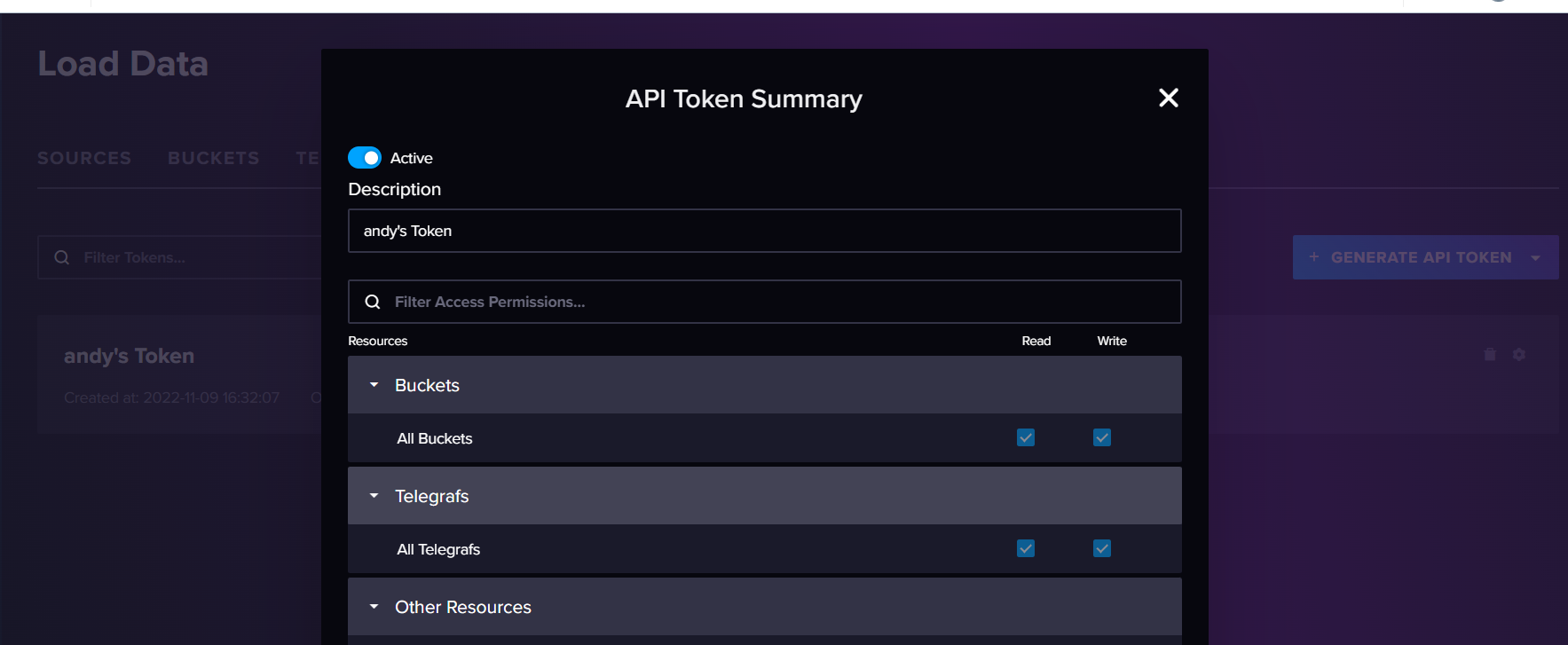
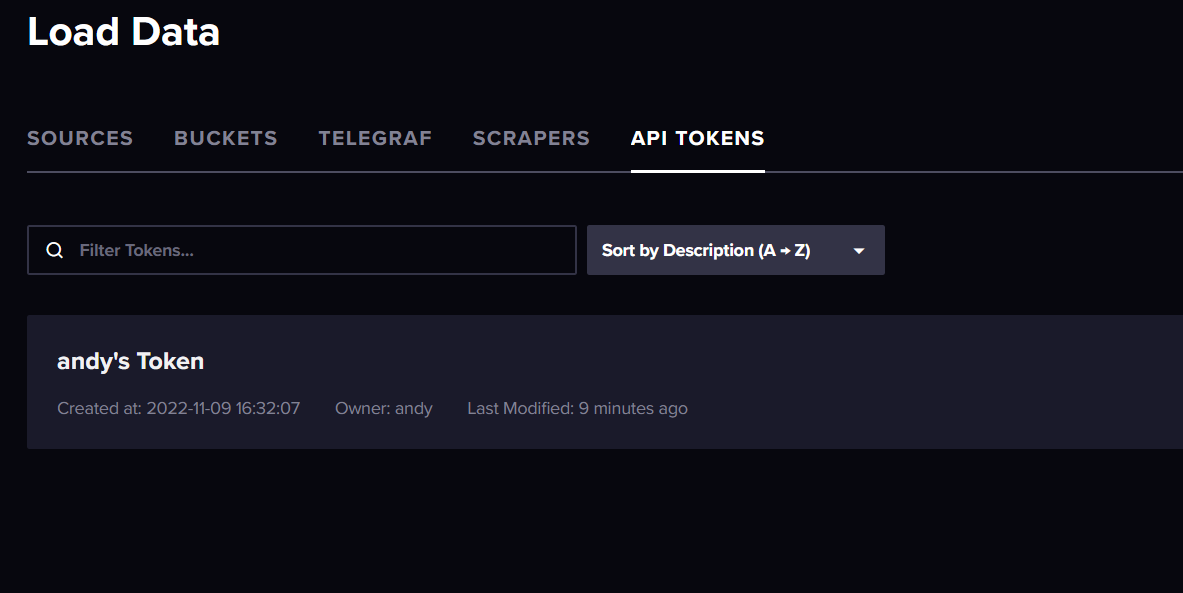
                                          ja grafana läuft influx auch aber leider zeigt mir influx keinen token zum verbinden mit Grafana.
                                          Screenshot (221).png

                                          Screenshot (222).png

                                          Gruß OSR

                                          Plattform
                                          Linux x64 CPUs2 AMD G-T56N Processor 1646 MHz 8GB RAM

                                          Thomas BraunT 1 Antwort Letzte Antwort
                                          0
                                          Antworten
                                          • In einem neuen Thema antworten
                                          Anmelden zum Antworten
                                          • Älteste zuerst
                                          • Neuste zuerst
                                          • Meiste Stimmen


                                          Support us

                                          ioBroker
                                          Community Adapters
                                          Donate

                                          547

                                          Online

                                          32.6k

                                          Benutzer

                                          82.3k

                                          Themen

                                          1.3m

                                          Beiträge
                                          Community
                                          Impressum | Datenschutz-Bestimmungen | Nutzungsbedingungen | Einwilligungseinstellungen
                                          ioBroker Community 2014-2025
                                          logo
                                          • Anmelden

                                          • Du hast noch kein Konto? Registrieren

                                          • Anmelden oder registrieren, um zu suchen
                                          • Erster Beitrag
                                            Letzter Beitrag
                                          0
                                          • Home
                                          • Aktuell
                                          • Tags
                                          • Ungelesen 0
                                          • Kategorien
                                          • Unreplied
                                          • Beliebt
                                          • GitHub
                                          • Docu
                                          • Hilfe