




Problem: "Error: libnode.so.72" mit Folgen
-
Was sagt
sudo apt update
sudo apt full-upgrade
Und warum stehst du überhaupt in / herum? Hat dein pi kein zuhause?
cd ~@thomas-braun said in Problem: "Error: libnode.so.72" mit Folgen:
Was sagt
sudo apt update sudo apt full-upgradepi@raspberrypi:/ $ sudo apt update sudo apt full-upgrade Get:1 http://security.debian.org/debian-security bullseye-security InRelease [48.4 kB] Get:2 http://deb.debian.org/debian bullseye InRelease [116 kB] Get:3 http://deb.debian.org/debian bullseye-updates InRelease [44.1 kB] Get:4 http://deb.debian.org/debian bullseye-backports InRelease [49.0 kB] Hit:5 http://archive.raspberrypi.org/debian bullseye InRelease Err:1 http://security.debian.org/debian-security bullseye-security InRelease The following signatures couldn't be verified because the public key is not available: NO_PUBKEY 112695A0E562B32A NO_PUBKEY 54404762BBB6E853 Err:2 http://deb.debian.org/debian bullseye InRelease The following signatures couldn't be verified because the public key is not available: NO_PUBKEY 648ACFD622F3D138 NO_PUBKEY 0E98404D386FA1D9 NO_PUBKEY 605C66F00D6C9793 Hit:6 https://deb.nodesource.com/node_10.x bullseye InRelease Err:3 http://deb.debian.org/debian bullseye-updates InRelease The following signatures couldn't be verified because the public key is not available: NO_PUBKEY 648ACFD622F3D138 NO_PUBKEY 0E98404D386FA1D9 Hit:7 https://deb.nodesource.com/node_16.x bullseye InRelease Err:4 http://deb.debian.org/debian bullseye-backports InRelease The following signatures couldn't be verified because the public key is not available: NO_PUBKEY 648ACFD622F3D138 NO_PUBKEY 0E98404D386FA1D9 Reading package lists... Done W: GPG error: http://security.debian.org/debian-security bullseye-security InRelease: The following signatures couldn't be verified because the public key is not available: NO_PUBKEY 112695A0E562B32A NO_PUBKEY 54404762BBB6E853 E: The repository 'http://security.debian.org/debian-security bullseye-security InRelease' is not signed. N: Updating from such a repository can't be done securely, and is therefore disabled by default. N: See apt-secure(8) manpage for repository creation and user configuration details. W: GPG error: http://deb.debian.org/debian bullseye InRelease: The following signatures couldn't be verified because the public key is not available: NO_PUBKEY 648ACFD622F3D138 NO_PUBKEY 0E98404D386FA1D9 NO_PUBKEY 605C66F00D6C9793 E: The repository 'http://deb.debian.org/debian bullseye InRelease' is not signed. N: Updating from such a repository can't be done securely, and is therefore disabled by default. N: See apt-secure(8) manpage for repository creation and user configuration details. W: GPG error: http://deb.debian.org/debian bullseye-updates InRelease: The following signatures couldn't be verified because the public key is not available: NO_PUBKEY 648ACFD622F3D138 NO_PUBKEY 0E98404D386FA1D9 E: The repository 'http://deb.debian.org/debian bullseye-updates InRelease' is not signed. N: Updating from such a repository can't be done securely, and is therefore disabled by default. N: See apt-secure(8) manpage for repository creation and user configuration details. W: GPG error: http://deb.debian.org/debian bullseye-backports InRelease: The following signatures couldn't be verified because the public key is not available: NO_PUBKEY 648ACFD622F3D138 NO_PUBKEY 0E98404D386FA1D9 E: The repository 'http://deb.debian.org/debian bullseye-backports InRelease' is not signed. N: Updating from such a repository can't be done securely, and is therefore disabled by default. N: See apt-secure(8) manpage for repository creation and user configuration details. Reading package lists... Done Building dependency tree... Done Reading state information... Done Calculating upgrade... Done The following packages were automatically installed and are no longer required: gyp libc-ares2 libfuse2 libjs-highlight.js libjs-inherits libjs-is-typedarray libjs-psl libjs-typedarray-to-buffer libssl-dev libuv1-dev node-chownr node-color-name node-err-code node-extsprintf node-fast-deep-equal node-indent-string node-ini node-is-typedarray node-json-parse-better-errors node-json-schema node-json-schema-traverse node-qs node-resolve-from node-through node-typedarray-to-buffer node-uuid Use 'sudo apt autoremove' to remove them. 0 upgraded, 0 newly installed, 0 to remove and 0 not upgraded.Werde die fehlenden Keys dann mal in den apt key manager einfügen.
Und warum stehst du überhaupt in / herum?
da bin ich jetzt überfragt^^ was ist denn hier das Stichwort mit dem ich dazu googeln kann? #noop
-
@thomas-braun said in Problem: "Error: libnode.so.72" mit Folgen:
Was sagt
sudo apt update sudo apt full-upgradepi@raspberrypi:/ $ sudo apt update sudo apt full-upgrade Get:1 http://security.debian.org/debian-security bullseye-security InRelease [48.4 kB] Get:2 http://deb.debian.org/debian bullseye InRelease [116 kB] Get:3 http://deb.debian.org/debian bullseye-updates InRelease [44.1 kB] Get:4 http://deb.debian.org/debian bullseye-backports InRelease [49.0 kB] Hit:5 http://archive.raspberrypi.org/debian bullseye InRelease Err:1 http://security.debian.org/debian-security bullseye-security InRelease The following signatures couldn't be verified because the public key is not available: NO_PUBKEY 112695A0E562B32A NO_PUBKEY 54404762BBB6E853 Err:2 http://deb.debian.org/debian bullseye InRelease The following signatures couldn't be verified because the public key is not available: NO_PUBKEY 648ACFD622F3D138 NO_PUBKEY 0E98404D386FA1D9 NO_PUBKEY 605C66F00D6C9793 Hit:6 https://deb.nodesource.com/node_10.x bullseye InRelease Err:3 http://deb.debian.org/debian bullseye-updates InRelease The following signatures couldn't be verified because the public key is not available: NO_PUBKEY 648ACFD622F3D138 NO_PUBKEY 0E98404D386FA1D9 Hit:7 https://deb.nodesource.com/node_16.x bullseye InRelease Err:4 http://deb.debian.org/debian bullseye-backports InRelease The following signatures couldn't be verified because the public key is not available: NO_PUBKEY 648ACFD622F3D138 NO_PUBKEY 0E98404D386FA1D9 Reading package lists... Done W: GPG error: http://security.debian.org/debian-security bullseye-security InRelease: The following signatures couldn't be verified because the public key is not available: NO_PUBKEY 112695A0E562B32A NO_PUBKEY 54404762BBB6E853 E: The repository 'http://security.debian.org/debian-security bullseye-security InRelease' is not signed. N: Updating from such a repository can't be done securely, and is therefore disabled by default. N: See apt-secure(8) manpage for repository creation and user configuration details. W: GPG error: http://deb.debian.org/debian bullseye InRelease: The following signatures couldn't be verified because the public key is not available: NO_PUBKEY 648ACFD622F3D138 NO_PUBKEY 0E98404D386FA1D9 NO_PUBKEY 605C66F00D6C9793 E: The repository 'http://deb.debian.org/debian bullseye InRelease' is not signed. N: Updating from such a repository can't be done securely, and is therefore disabled by default. N: See apt-secure(8) manpage for repository creation and user configuration details. W: GPG error: http://deb.debian.org/debian bullseye-updates InRelease: The following signatures couldn't be verified because the public key is not available: NO_PUBKEY 648ACFD622F3D138 NO_PUBKEY 0E98404D386FA1D9 E: The repository 'http://deb.debian.org/debian bullseye-updates InRelease' is not signed. N: Updating from such a repository can't be done securely, and is therefore disabled by default. N: See apt-secure(8) manpage for repository creation and user configuration details. W: GPG error: http://deb.debian.org/debian bullseye-backports InRelease: The following signatures couldn't be verified because the public key is not available: NO_PUBKEY 648ACFD622F3D138 NO_PUBKEY 0E98404D386FA1D9 E: The repository 'http://deb.debian.org/debian bullseye-backports InRelease' is not signed. N: Updating from such a repository can't be done securely, and is therefore disabled by default. N: See apt-secure(8) manpage for repository creation and user configuration details. Reading package lists... Done Building dependency tree... Done Reading state information... Done Calculating upgrade... Done The following packages were automatically installed and are no longer required: gyp libc-ares2 libfuse2 libjs-highlight.js libjs-inherits libjs-is-typedarray libjs-psl libjs-typedarray-to-buffer libssl-dev libuv1-dev node-chownr node-color-name node-err-code node-extsprintf node-fast-deep-equal node-indent-string node-ini node-is-typedarray node-json-parse-better-errors node-json-schema node-json-schema-traverse node-qs node-resolve-from node-through node-typedarray-to-buffer node-uuid Use 'sudo apt autoremove' to remove them. 0 upgraded, 0 newly installed, 0 to remove and 0 not upgraded.Werde die fehlenden Keys dann mal in den apt key manager einfügen.
Und warum stehst du überhaupt in / herum?
da bin ich jetzt überfragt^^ was ist denn hier das Stichwort mit dem ich dazu googeln kann? #noop
@benemuc sagte in Problem: "Error: libnode.so.72" mit Folgen:
node-
Neben den fehlenden keys...
(Wie hast du die Kiste von wo aus upgegraded???)sudo apt remove node-* sudo apt update sudo apt autoremove -
@benemuc sagte in Problem: "Error: libnode.so.72" mit Folgen:
node-
Neben den fehlenden keys...
(Wie hast du die Kiste von wo aus upgegraded???)sudo apt remove node-* sudo apt update sudo apt autoremoveNach dem Fixen der Keys lasse ich jetzt sudo apt update und sudo apt full-upgrade durchlaufen. Schaut soweit gut aus aber dauert natürlich ein Weilchen.
Wie hast du die Kiste von wo aus upgegraded???
Kann ich dir leider nicht genau sagen. Hab die Kiste vor ca. 1,5 Jahren nach irgendeiner Anleitung aufgesetzt und mich seither nicht um System-Updates gekümmert. Gestern dann eben entsprechend deinem Werkzeugkasten versucht alles auf den neuesten Stand zu bringen.
-
aktueller Stand sieht jetzt so aus:
pi@raspberrypi:~ $ sudo ln -s /usr/bin/node /usr/bin/nodejs

uname -m && test -f /opt/scripts/.docker_config/.thisisdocker && echo "Docker-Installation" || echo "Kein Docker" && o $DESKTOP_SESSION && pwd && sudo apt update &> /dev/null && sudo apt update && apt policy nodejs
ln: failed to create symbolic link '/usr/bin/nodejs': File exists
armv7l
Kein Docker
/usr/bin/nodejs
/usr/bin/node
/usr/bin/npm
v16.18.0
v16.18.0
8.19.2
4.0.21
pi
pi adm dialout cdrom sudo audio video plugdev games users input netdev lpadmin gpio i2c spi iobroker
tty

/home/pi
Hit:1 http://deb.debian.org/debian bullseye InRelease
Hit:2 http://archive.raspberrypi.org/debian bullseye InRelease
Hit:3 http://deb.debian.org/debian bullseye-updates InRelease
Hit:4 http://deb.debian.org/debian bullseye-backports InRelease
Hit:5 http://security.debian.org/debian-security bullseye-security InRelease
Hit:6 https://deb.nodesource.com/node_10.x bullseye InRelease
Hit:7 https://deb.nodesource.com/node_16.x bullseye InRelease
Reading package lists... Done
Building dependency tree... Done
Reading state information... Done
All packages are up to date.
nodejs:
  Installed: 16.18.0-deb-1nodesource1
  Candidate: 16.18.0-deb-1nodesource1
  Version table:
 *** 16.18.0-deb-1nodesource1 500
        500 https://deb.nodesource.com/node_16.x bullseye/main armhf Packages
        100 /var/lib/dpkg/status
     12.22.12~dfsg-1~deb11u1 500
        500 http://security.debian.org/debian-security bullseye-security/main armhf Packages
     12.22.5~dfsg-2~11u1 500
        500 http://deb.debian.org/debian bullseye/main armhf Packages
     10.24.1-deb-1nodesource1 500
        500 https://deb.nodesource.com/node_10.x bullseye/main armhf Packages
pi@raspberrypi:~ $ sudo ln -s /usr/bin/node /usr/bin/nodejs
ln: failed to create symbolic link '/usr/bin/nodejs': File exists
Um node- muss ich mich morgen kümmern - langsam fehlt die Konzentrtion ;) Vielen Dank aber schonmal für Deine Hilfe bis hierher! :)
-
aktueller Stand sieht jetzt so aus:
pi@raspberrypi:~ $ sudo ln -s /usr/bin/node /usr/bin/nodejs

uname -m && test -f /opt/scripts/.docker_config/.thisisdocker && echo "Docker-Installation" || echo "Kein Docker" && o $DESKTOP_SESSION && pwd && sudo apt update &> /dev/null && sudo apt update && apt policy nodejs
ln: failed to create symbolic link '/usr/bin/nodejs': File exists
armv7l
Kein Docker
/usr/bin/nodejs
/usr/bin/node
/usr/bin/npm
v16.18.0
v16.18.0
8.19.2
4.0.21
pi
pi adm dialout cdrom sudo audio video plugdev games users input netdev lpadmin gpio i2c spi iobroker
tty

/home/pi
Hit:1 http://deb.debian.org/debian bullseye InRelease
Hit:2 http://archive.raspberrypi.org/debian bullseye InRelease
Hit:3 http://deb.debian.org/debian bullseye-updates InRelease
Hit:4 http://deb.debian.org/debian bullseye-backports InRelease
Hit:5 http://security.debian.org/debian-security bullseye-security InRelease
Hit:6 https://deb.nodesource.com/node_10.x bullseye InRelease
Hit:7 https://deb.nodesource.com/node_16.x bullseye InRelease
Reading package lists... Done
Building dependency tree... Done
Reading state information... Done
All packages are up to date.
nodejs:
  Installed: 16.18.0-deb-1nodesource1
  Candidate: 16.18.0-deb-1nodesource1
  Version table:
 *** 16.18.0-deb-1nodesource1 500
        500 https://deb.nodesource.com/node_16.x bullseye/main armhf Packages
        100 /var/lib/dpkg/status
     12.22.12~dfsg-1~deb11u1 500
        500 http://security.debian.org/debian-security bullseye-security/main armhf Packages
     12.22.5~dfsg-2~11u1 500
        500 http://deb.debian.org/debian bullseye/main armhf Packages
     10.24.1-deb-1nodesource1 500
        500 https://deb.nodesource.com/node_10.x bullseye/main armhf Packages
pi@raspberrypi:~ $ sudo ln -s /usr/bin/node /usr/bin/nodejs
ln: failed to create symbolic link '/usr/bin/nodejs': File exists
Um node- muss ich mich morgen kümmern - langsam fehlt die Konzentrtion ;) Vielen Dank aber schonmal für Deine Hilfe bis hierher! :)
Ja, das schaut doch schon wesentlich anders aus. :-)
-
@thomas-braun
Eine Woche später...
Da ich den libnode.so.72 Fehler trotz aller Maßnahmen nicht beseitigt bekommen habe, hab ich zwischenzeitlich den Raspberry komplett neu aufgesetzt (raspbian, nodejs, iobroker + Backup eingespielt).Ergebnis ist, dass der libnode.so.72 Fehler zwar weg ist aber der Zigbee Adapter immer noch nicht wieder startet.
admin@raspberrypi:~ $ sudo ln -s /usr/bin/node /usr/bin/nodejs &> /dev/null

uname -m && test -f /opt/scripts/.docker_config/.thisisdocker && echo "Docker-Installation" || echo "Kein Docker" && type -P nodejs node npm && nodejs -v && node -v && npm -v && iob -v && whoami && groups && echo $XDG_SESSION_TYPE && echo $DESKTOP_SESSION && pwd && sudo apt-get update &> /dev/null && sudo apt-get update && apt-cache policy nodejs
aarch64
Kein Docker
/usr/bin/nodejs
/usr/bin/node
/usr/bin/npm
v16.18.1
v16.18.1
8.19.2
4.0.23
admin
admin adm dialout cdrom sudo audio video plugdev games users input render netdev gpio i2c spi iobroker
tty

/home/admin
Hit:1 http://deb.debian.org/debian bullseye InRelease
Hit:2 http://security.debian.org/debian-security bullseye-security InRelease
Hit:3 http://deb.debian.org/debian bullseye-updates InRelease
Hit:4 http://archive.raspberrypi.org/debian bullseye InRelease
Hit:5 http://deb.debian.org/debian bullseye-backports InRelease
Hit:6 https://deb.nodesource.com/node_16.x bullseye InRelease
Reading package lists... Done
nodejs:
  Installed: 16.18.1-deb-1nodesource1
  Candidate: 16.18.1-deb-1nodesource1
  Version table:
 *** 16.18.1-deb-1nodesource1 500
        500 https://deb.nodesource.com/node_16.x bullseye/main arm64 Packages
        100 /var/lib/dpkg/status
     12.22.12~dfsg-1~deb11u1 500
        500 http://security.debian.org/debian-security bullseye-security/main arm64 Packages
     12.22.5~dfsg-2~11u1 500
        500 http://deb.debian.org/debian bullseye/main arm64 Packages
Fehlerlog:
2022-11-08 18:19:44.554  - info: host.raspberrypi "system.adapter.zigbee.0" enabled
2022-11-08 18:19:44.724  - info: host.raspberrypi instance system.adapter.zigbee.0 started with pid 12720
2022-11-08 18:19:44.554  - info: host.raspberrypi "system.adapter.zigbee.0" enabled
2022-11-08 18:19:44.724  - info: host.raspberrypi instance system.adapter.zigbee.0 started with pid 12720
2022-11-08 18:19:49.143  - info: zigbee.0 (12720) starting. Version 1.7.6 (non-npm: ioBroker/ioBroker.zigbee#90b31ec12c45cae433f13d23614d34a633baa2ca) in /opt/iobroker/node_modules/iobroker.zigbee, node: v16.18.1, js-controller: 4.0.23
2022-11-08 18:19:49.271  - info: zigbee.0 (12720) delete old Backup files. keep only last 10
2022-11-08 18:19:49.274  - info: zigbee.0 (12720) Starting Zigbee  npm ...
2022-11-08 18:19:49.960  - info: zigbee.0 (12720) Installed Version: ioBroker/ioBroker.zigbee#90b31ec12c45cae433f13d23614d34a633baa2ca
2022-11-08 18:19:49.143  - info: zigbee.0 (12720) starting. Version 1.7.6 (non-npm: ioBroker/ioBroker.zigbee#90b31ec12c45cae433f13d23614d34a633baa2ca) in /opt/iobroker/node_modules/iobroker.zigbee, node: v16.18.1, js-controller: 4.0.23
2022-11-08 18:19:49.271  - info: zigbee.0 (12720) delete old Backup files. keep only last 10
2022-11-08 18:19:49.274  - info: zigbee.0 (12720) Starting Zigbee  npm ...
2022-11-08 18:19:49.960  - info: zigbee.0 (12720) Installed Version: ioBroker/ioBroker.zigbee#90b31ec12c45cae433f13d23614d34a633baa2ca
2022-11-08 18:20:03.854  - error: javascript.0 (10979) Error in callback: TypeError: Cannot read properties of undefined (reading 'pmap_id')
2022-11-08 18:20:03.854  - error: javascript.0 (10979)     at aktualisiere_datenpunkte (script.js.common.iRobot-Control:184:105)
2022-11-08 18:20:03.855  - error: javascript.0 (10979)     at Object.<anonymous> (script.js.common.iRobot-Control:45:13)
2022-11-08 18:20:03.855  - error: javascript.0 (10979)     at Object.callback (/opt/iobroker/node_modules/iobroker.javascript/lib/sandbox.js:1214:38)
2022-11-08 18:20:03.856  - error: javascript.0 (10979)     at Object.stateChange (/opt/iobroker/node_modules/iobroker.javascript/main.js:596:29)
2022-11-08 18:20:03.856  - error: javascript.0 (10979)     at Immediate._onImmediate (/opt/iobroker/node_modules/@iobroker/js-controller-adapter/src/lib/adapter/adapter.js:5909:56)
2022-11-08 18:20:03.857  - error: javascript.0 (10979)     at processImmediate (node:internal/timers:466:21)
(/opt/iobroker/node_modules/iobroker.javascript/lib/sandbox.js:1214:38)
2022-11-08 18:20:03.856  - error: javascript.0 (10979)     at Object.stateChange (/opt/iobroker/node_modules/iobroker.javascript/main.js:596:29)
2022-11-08 18:20:03.856  - error: javascript.0 (10979)     at Immediate._onImmediate (/opt/iobroker/node_modules/@iobroker/js-controller-adapter/src/lib/adapter/adapter.js:5909:56)
2022-11-08 18:20:03.857  - error: javascript.0 (10979)     at processImmediate (node:internal/timers:466:21)
2022-11-08 18:20:10.091  - error: zigbee.0 (12720) Starting zigbee-herdsman problem : "Failed to connect to the adapter (Error: SRSP - SYS - ping after 6000ms)"
2022-11-08 18:20:10.129  - error: zigbee.0 (12720) Failed to start Zigbee
2022-11-08 18:20:10.130  - error: zigbee.0 (12720) Error herdsman start
2022-11-08 18:20:10.091  - error: zigbee.0 (12720) Starting zigbee-herdsman problem : "Failed to connect to the adapter (Error: SRSP - SYS - ping after 6000ms)"
2022-11-08 18:20:10.129  - error: zigbee.0 (12720) Failed to start Zigbee
2022-11-08 18:20:10.130  - error: zigbee.0 (12720) Error herdsman start
2022-11-08 18:20:20.136  - info: zigbee.0 (12720) Try to reconnect. 1 attempts left
2022-11-08 18:20:20.138  - info: zigbee.0 (12720) Starting Zigbee  npm ...
2022-11-08 18:20:20.171  - info: zigbee.0 (12720) Installed Version: ioBroker/ioBroker.zigbee#90b31ec12c45cae433f13d23614d34a633baa2ca
2022-11-08 18:20:20.469  - error: zigbee.0 (12720) Starting zigbee-herdsman problem : "Error while opening serialport 'Error: Error Resource temporarily unavailable Cannot lock port'"
2022-11-08 18:20:20.470  - error: zigbee.0 (12720) Failed to start Zigbee
2022-11-08 18:20:20.471  - error: zigbee.0 (12720) Error herdsman start
2022-11-08 18:20:20.136  - info: zigbee.0 (12720) Try to reconnect. 1 attempts left
2022-11-08 18:20:20.138  - info: zigbee.0 (12720) Starting Zigbee  npm ...
2022-11-08 18:20:20.171  - info: zigbee.0 (12720) Installed Version: ioBroker/ioBroker.zigbee#90b31ec12c45cae433f13d23614d34a633baa2ca
2022-11-08 18:20:20.469  - error: zigbee.0 (12720) Starting zigbee-herdsman problem : "Error while opening serialport 'Error: Error Resource temporarily unavailable Cannot lock port'"
2022-11-08 18:20:20.470  - error: zigbee.0 (12720) Failed to start Zigbee
2022-11-08 18:20:20.471  - error: zigbee.0 (12720) Error herdsman start
Leider fange ich mit den Fehler nicht viel an - sieht für mich sehr generisch aus.
-
@thomas-braun
Eine Woche später...
Da ich den libnode.so.72 Fehler trotz aller Maßnahmen nicht beseitigt bekommen habe, hab ich zwischenzeitlich den Raspberry komplett neu aufgesetzt (raspbian, nodejs, iobroker + Backup eingespielt).Ergebnis ist, dass der libnode.so.72 Fehler zwar weg ist aber der Zigbee Adapter immer noch nicht wieder startet.
admin@raspberrypi:~ $ sudo ln -s /usr/bin/node /usr/bin/nodejs &> /dev/null

uname -m && test -f /opt/scripts/.docker_config/.thisisdocker && echo "Docker-Installation" || echo "Kein Docker" && type -P nodejs node npm && nodejs -v && node -v && npm -v && iob -v && whoami && groups && echo $XDG_SESSION_TYPE && echo $DESKTOP_SESSION && pwd && sudo apt-get update &> /dev/null && sudo apt-get update && apt-cache policy nodejs
aarch64
Kein Docker
/usr/bin/nodejs
/usr/bin/node
/usr/bin/npm
v16.18.1
v16.18.1
8.19.2
4.0.23
admin
admin adm dialout cdrom sudo audio video plugdev games users input render netdev gpio i2c spi iobroker
tty

/home/admin
Hit:1 http://deb.debian.org/debian bullseye InRelease
Hit:2 http://security.debian.org/debian-security bullseye-security InRelease
Hit:3 http://deb.debian.org/debian bullseye-updates InRelease
Hit:4 http://archive.raspberrypi.org/debian bullseye InRelease
Hit:5 http://deb.debian.org/debian bullseye-backports InRelease
Hit:6 https://deb.nodesource.com/node_16.x bullseye InRelease
Reading package lists... Done
nodejs:
  Installed: 16.18.1-deb-1nodesource1
  Candidate: 16.18.1-deb-1nodesource1
  Version table:
 *** 16.18.1-deb-1nodesource1 500
        500 https://deb.nodesource.com/node_16.x bullseye/main arm64 Packages
        100 /var/lib/dpkg/status
     12.22.12~dfsg-1~deb11u1 500
        500 http://security.debian.org/debian-security bullseye-security/main arm64 Packages
     12.22.5~dfsg-2~11u1 500
        500 http://deb.debian.org/debian bullseye/main arm64 Packages
Fehlerlog:
2022-11-08 18:19:44.554  - info: host.raspberrypi "system.adapter.zigbee.0" enabled
2022-11-08 18:19:44.724  - info: host.raspberrypi instance system.adapter.zigbee.0 started with pid 12720
2022-11-08 18:19:44.554  - info: host.raspberrypi "system.adapter.zigbee.0" enabled
2022-11-08 18:19:44.724  - info: host.raspberrypi instance system.adapter.zigbee.0 started with pid 12720
2022-11-08 18:19:49.143  - info: zigbee.0 (12720) starting. Version 1.7.6 (non-npm: ioBroker/ioBroker.zigbee#90b31ec12c45cae433f13d23614d34a633baa2ca) in /opt/iobroker/node_modules/iobroker.zigbee, node: v16.18.1, js-controller: 4.0.23
2022-11-08 18:19:49.271  - info: zigbee.0 (12720) delete old Backup files. keep only last 10
2022-11-08 18:19:49.274  - info: zigbee.0 (12720) Starting Zigbee  npm ...
2022-11-08 18:19:49.960  - info: zigbee.0 (12720) Installed Version: ioBroker/ioBroker.zigbee#90b31ec12c45cae433f13d23614d34a633baa2ca
2022-11-08 18:19:49.143  - info: zigbee.0 (12720) starting. Version 1.7.6 (non-npm: ioBroker/ioBroker.zigbee#90b31ec12c45cae433f13d23614d34a633baa2ca) in /opt/iobroker/node_modules/iobroker.zigbee, node: v16.18.1, js-controller: 4.0.23
2022-11-08 18:19:49.271  - info: zigbee.0 (12720) delete old Backup files. keep only last 10
2022-11-08 18:19:49.274  - info: zigbee.0 (12720) Starting Zigbee  npm ...
2022-11-08 18:19:49.960  - info: zigbee.0 (12720) Installed Version: ioBroker/ioBroker.zigbee#90b31ec12c45cae433f13d23614d34a633baa2ca
2022-11-08 18:20:03.854  - error: javascript.0 (10979) Error in callback: TypeError: Cannot read properties of undefined (reading 'pmap_id')
2022-11-08 18:20:03.854  - error: javascript.0 (10979)     at aktualisiere_datenpunkte (script.js.common.iRobot-Control:184:105)
2022-11-08 18:20:03.855  - error: javascript.0 (10979)     at Object.<anonymous> (script.js.common.iRobot-Control:45:13)
2022-11-08 18:20:03.855  - error: javascript.0 (10979)     at Object.callback (/opt/iobroker/node_modules/iobroker.javascript/lib/sandbox.js:1214:38)
2022-11-08 18:20:03.856  - error: javascript.0 (10979)     at Object.stateChange (/opt/iobroker/node_modules/iobroker.javascript/main.js:596:29)
2022-11-08 18:20:03.856  - error: javascript.0 (10979)     at Immediate._onImmediate (/opt/iobroker/node_modules/@iobroker/js-controller-adapter/src/lib/adapter/adapter.js:5909:56)
2022-11-08 18:20:03.857  - error: javascript.0 (10979)     at processImmediate (node:internal/timers:466:21)
(/opt/iobroker/node_modules/iobroker.javascript/lib/sandbox.js:1214:38)
2022-11-08 18:20:03.856  - error: javascript.0 (10979)     at Object.stateChange (/opt/iobroker/node_modules/iobroker.javascript/main.js:596:29)
2022-11-08 18:20:03.856  - error: javascript.0 (10979)     at Immediate._onImmediate (/opt/iobroker/node_modules/@iobroker/js-controller-adapter/src/lib/adapter/adapter.js:5909:56)
2022-11-08 18:20:03.857  - error: javascript.0 (10979)     at processImmediate (node:internal/timers:466:21)
2022-11-08 18:20:10.091  - error: zigbee.0 (12720) Starting zigbee-herdsman problem : "Failed to connect to the adapter (Error: SRSP - SYS - ping after 6000ms)"
2022-11-08 18:20:10.129  - error: zigbee.0 (12720) Failed to start Zigbee
2022-11-08 18:20:10.130  - error: zigbee.0 (12720) Error herdsman start
2022-11-08 18:20:10.091  - error: zigbee.0 (12720) Starting zigbee-herdsman problem : "Failed to connect to the adapter (Error: SRSP - SYS - ping after 6000ms)"
2022-11-08 18:20:10.129  - error: zigbee.0 (12720) Failed to start Zigbee
2022-11-08 18:20:10.130  - error: zigbee.0 (12720) Error herdsman start
2022-11-08 18:20:20.136  - info: zigbee.0 (12720) Try to reconnect. 1 attempts left
2022-11-08 18:20:20.138  - info: zigbee.0 (12720) Starting Zigbee  npm ...
2022-11-08 18:20:20.171  - info: zigbee.0 (12720) Installed Version: ioBroker/ioBroker.zigbee#90b31ec12c45cae433f13d23614d34a633baa2ca
2022-11-08 18:20:20.469  - error: zigbee.0 (12720) Starting zigbee-herdsman problem : "Error while opening serialport 'Error: Error Resource temporarily unavailable Cannot lock port'"
2022-11-08 18:20:20.470  - error: zigbee.0 (12720) Failed to start Zigbee
2022-11-08 18:20:20.471  - error: zigbee.0 (12720) Error herdsman start
2022-11-08 18:20:20.136  - info: zigbee.0 (12720) Try to reconnect. 1 attempts left
2022-11-08 18:20:20.138  - info: zigbee.0 (12720) Starting Zigbee  npm ...
2022-11-08 18:20:20.171  - info: zigbee.0 (12720) Installed Version: ioBroker/ioBroker.zigbee#90b31ec12c45cae433f13d23614d34a633baa2ca
2022-11-08 18:20:20.469  - error: zigbee.0 (12720) Starting zigbee-herdsman problem : "Error while opening serialport 'Error: Error Resource temporarily unavailable Cannot lock port'"
2022-11-08 18:20:20.470  - error: zigbee.0 (12720) Failed to start Zigbee
2022-11-08 18:20:20.471  - error: zigbee.0 (12720) Error herdsman start
Leider fange ich mit den Fehler nicht viel an - sieht für mich sehr generisch aus.
Warum eine Version aus dem github?
-
Warum eine Version aus dem github?
@thomas-braun
Ehrlich gesagt keine Ahnung - ich hab einfach mitcurl -sL https://deb.nodesource.com/setup_16.x | sudo -E bash sudo apt install nodejs sudo ln -s /usr/bin/node /usr/bin/nodejsinstalliert.
Woran siehst du, dass eine github Version installiert ist?
-
@thomas-braun
Ehrlich gesagt keine Ahnung - ich hab einfach mitcurl -sL https://deb.nodesource.com/setup_16.x | sudo -E bash sudo apt install nodejs sudo ln -s /usr/bin/node /usr/bin/nodejsinstalliert.
Woran siehst du, dass eine github Version installiert ist?
Ich meinte den zigbee-Adapter:
Version 1.7.6 (non-npm: ioBroker/ioBroker.zigbee#90b31ec12c45cae433f13d23614d34a633baa2ca)Die Meldung
"Failed to connect to the adapter (Error: SRSP - SYS - ping after 6000ms)"hat im übrigen oftmals mit der Firmware des Sticks zu tun. Was ist da installiert?
-
Ich meinte den zigbee-Adapter:
Version 1.7.6 (non-npm: ioBroker/ioBroker.zigbee#90b31ec12c45cae433f13d23614d34a633baa2ca)Die Meldung
"Failed to connect to the adapter (Error: SRSP - SYS - ping after 6000ms)"hat im übrigen oftmals mit der Firmware des Sticks zu tun. Was ist da installiert?
@thomas-braun
Ach so, ich hatte den Adapter zunächst ganz normal über den iobroker installiert. Das selbe Problem bestand damit aber auch und ich hab auf der Suche nach einer Lösung irgendwo im Forum gelesen, dass man versuchen kann, den Adapter über die Katze aus git hub zu installieren. Am Fehlerbild hat das aber nichts geändert.Was ist da installiert?
Hab den Stick auf die Conbee Version von hier vom 15 Mai 2022 aktualisiert. Geholfen hat es nicht.
Dann habe ich einen neuen Conbee II Stick gekauft und angesteckt (Pfad im Adapter natürlich geändert) - hat am Fehler aber leider auch nichts geändert. -
@thomas-braun
Ach so, ich hatte den Adapter zunächst ganz normal über den iobroker installiert. Das selbe Problem bestand damit aber auch und ich hab auf der Suche nach einer Lösung irgendwo im Forum gelesen, dass man versuchen kann, den Adapter über die Katze aus git hub zu installieren. Am Fehlerbild hat das aber nichts geändert.Was ist da installiert?
Hab den Stick auf die Conbee Version von hier vom 15 Mai 2022 aktualisiert. Geholfen hat es nicht.
Dann habe ich einen neuen Conbee II Stick gekauft und angesteckt (Pfad im Adapter natürlich geändert) - hat am Fehler aber leider auch nichts geändert.Wie sehen die Einstellungen im zigbee-Adapter aus?
-
@thomas-braun
Ach so, ich hatte den Adapter zunächst ganz normal über den iobroker installiert. Das selbe Problem bestand damit aber auch und ich hab auf der Suche nach einer Lösung irgendwo im Forum gelesen, dass man versuchen kann, den Adapter über die Katze aus git hub zu installieren. Am Fehlerbild hat das aber nichts geändert.Was ist da installiert?
Hab den Stick auf die Conbee Version von hier vom 15 Mai 2022 aktualisiert. Geholfen hat es nicht.
Dann habe ich einen neuen Conbee II Stick gekauft und angesteckt (Pfad im Adapter natürlich geändert) - hat am Fehler aber leider auch nichts geändert.@benemuc sagte in Problem: "Error: libnode.so.72" mit Folgen:
Dann habe ich einen neuen Conbee II Stick gekauft
Ich hätte ehrlich gesagt andere Hardware gekauft.
-
Wie sehen die Einstellungen im zigbee-Adapter aus?
@thomas-braun said in Problem: "Error: libnode.so.72" mit Folgen:
Wie sehen die Einstellungen im zigbee-Adapter aus?
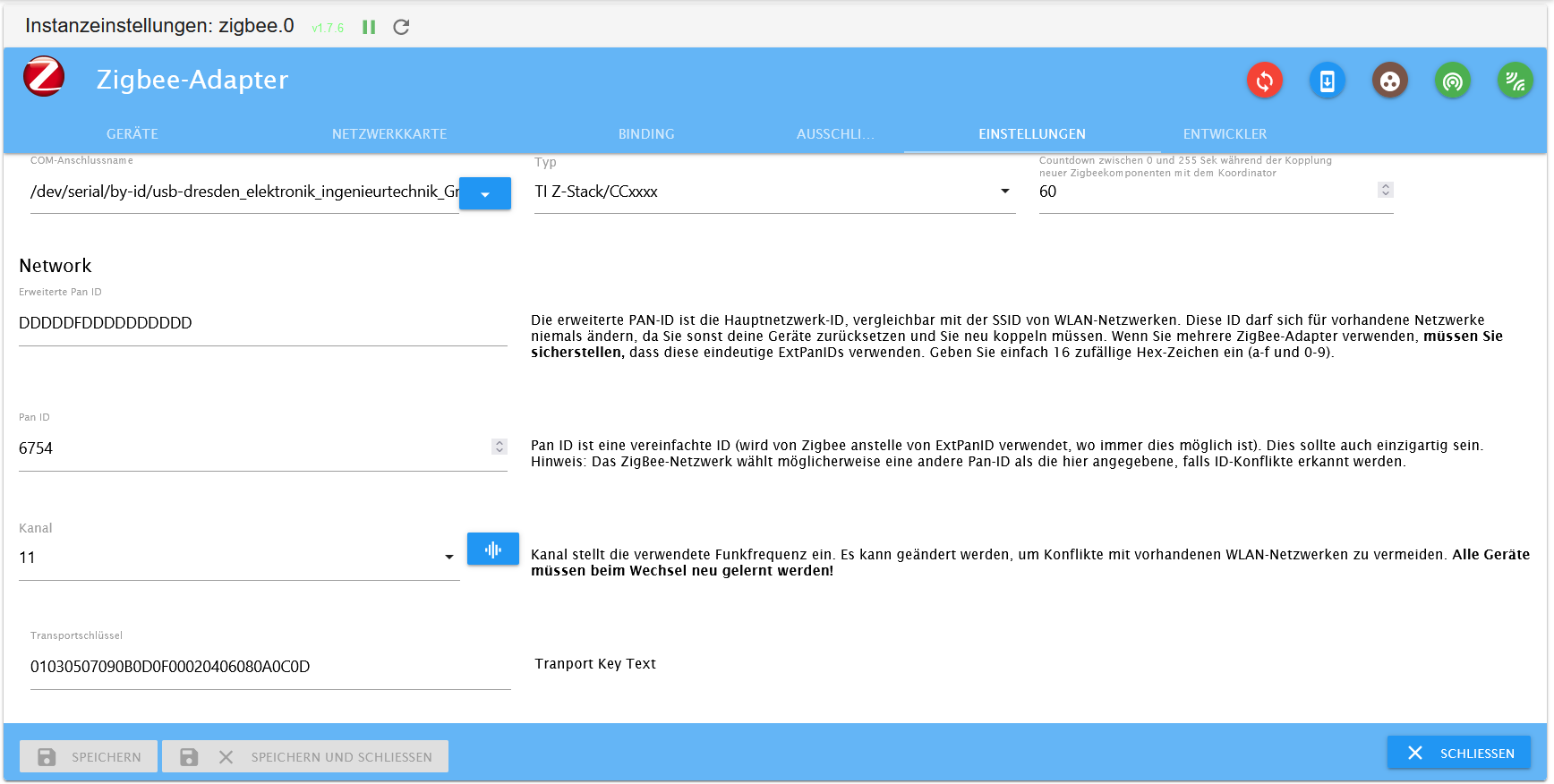
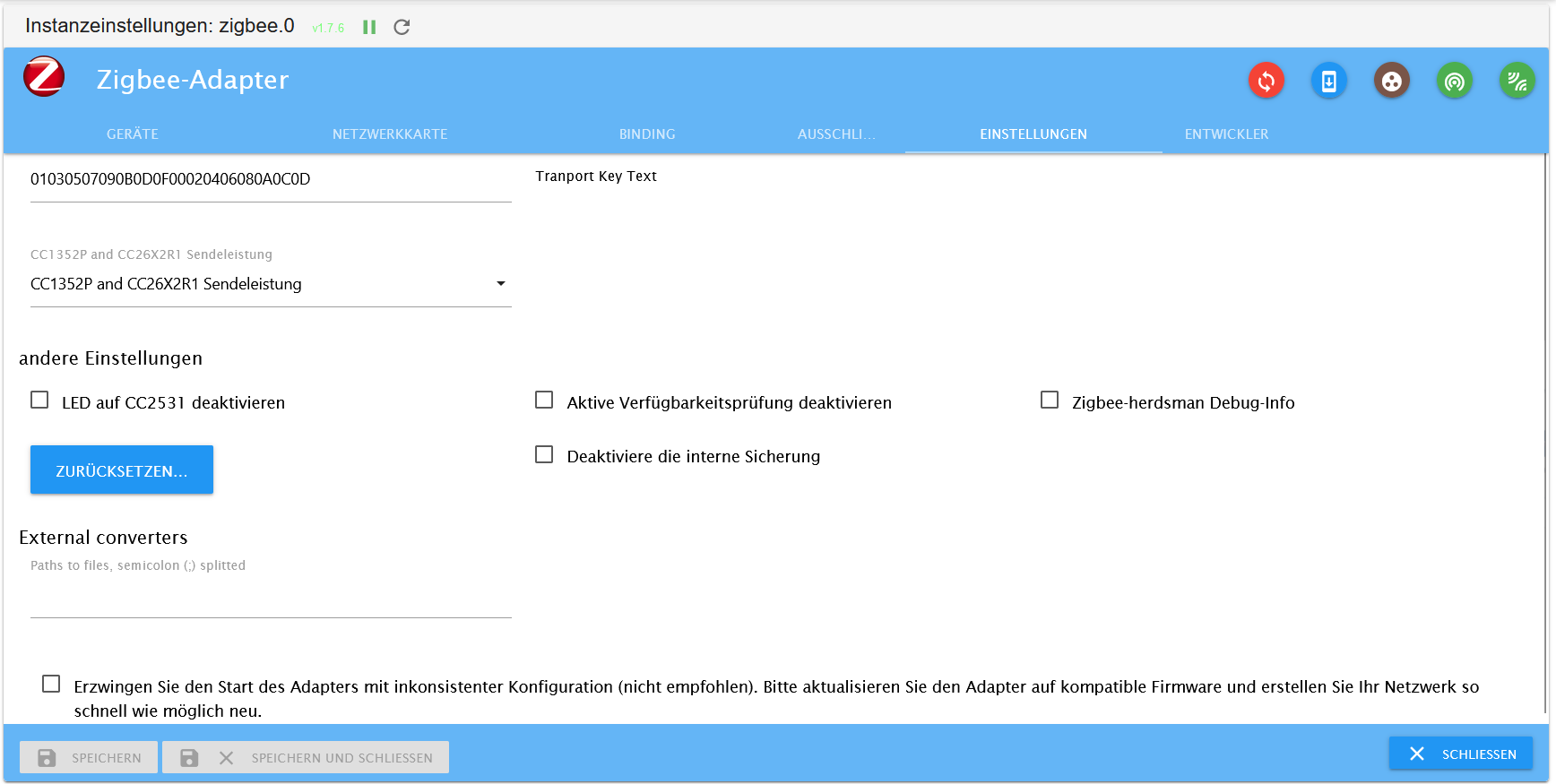
-
@thomas-braun said in Problem: "Error: libnode.so.72" mit Folgen:
Wie sehen die Einstellungen im zigbee-Adapter aus?
Den Typ musst du auf 'Deconz/Conbee' einstellen.
-
Den Typ musst du auf 'Deconz/Conbee' einstellen.
@thomas-braun
jaa mega, die Einstellung hat noch gefehlt - hab ich nach der Neuinstallation scheinbar nicht mehr angepasst. Jetzt funktioniert der Adapter endlich wieder :)
Herzlichen Dank dir! ^^

Hey! Du scheinst an dieser Unterhaltung interessiert zu sein, hast aber noch kein Konto.
Hast du es satt, bei jedem Besuch durch die gleichen Beiträge zu scrollen? Wenn du dich für ein Konto anmeldest, kommst du immer genau dorthin zurück, wo du zuvor warst, und kannst dich über neue Antworten benachrichtigen lassen (entweder per E-Mail oder Push-Benachrichtigung). Du kannst auch Lesezeichen speichern und Beiträge positiv bewerten, um anderen Community-Mitgliedern deine Wertschätzung zu zeigen.
Mit deinem Input könnte dieser Beitrag noch besser werden 💗
Registrieren AnmeldenSupport us
427
Online33.0k
Benutzer83.5k
Themen1.3m
Beiträge