




Backup von CCU nicht möglich

-
@igor123 Zeige mal die Einstellung auf deinem NAS und die Einstellungen in Backitup.
Wo hast du dein iobroker laufen? LXC oder Docker?Started ccu ... [DEBUG] [mount] - noserverino option: false [DEBUG] [mount] - cifs-mount command: "sudo mount -t cifs -o username=iobroker,password=****,rw,file_mode=0777,dir_mode=0777,vers=3.1.1 //192.168.1.9/io-backup/ccu /opt/iobroker/backups" [DEBUG] [mount] - first mount attempt with smb option failed. try next mount attempt without smb option ... [DEBUG] [mount] - cifs-mount command: "sudo mount -t cifs -o username=iobroker,password=****,rw,file_mode=0777,dir_mode=0777 //192.168.1.9/io-backup/ccu /opt/iobroker/backups" [ERROR] [mount] - [undefined Error: Command failed: sudo mount -t cifs -o username=iobroker,password=****,rw,file_mode=0777,dir_mode=0777 //192.168.1.9/io-backup/ccu /opt/iobroker/backups mount error(16): Device or resource busy Refer to the mount.cifs(8) manual page (e.g. man mount.cifs) and kernel log messages (dmesg) [ERROR] [mount] - Error: Command failed: sudo mount -t cifs -o username=iobroker,password=****,rw,file_mode=0777,dir_mode=0777 //192.168.1.9/io-backup/ccu /opt/iobroker/backups mount error(16): Device or resource busy Refer to the mount.cifs(8) manual page (e.g. man mount.cifs) and kernel log messages (dmesg)Sry, hier als Text.
Also ich denke schon dass der Pfad richtig sein sollte.
Das iobroker-Backup wird unter //192.168.1.9/io-backup/iobroker hinterlegt und der der ccu sollte unter //192.168.1.9/io-backup/ccu@simatec
Welche Einstellungen der NAS genau?
Iobroker läuft auf einen rpi 4 8gb, dort läuft auch pivccu drauf
Als NAS wird eine Synology verwendet.
So schaut zumindest die Ordnerstruktur dort aus
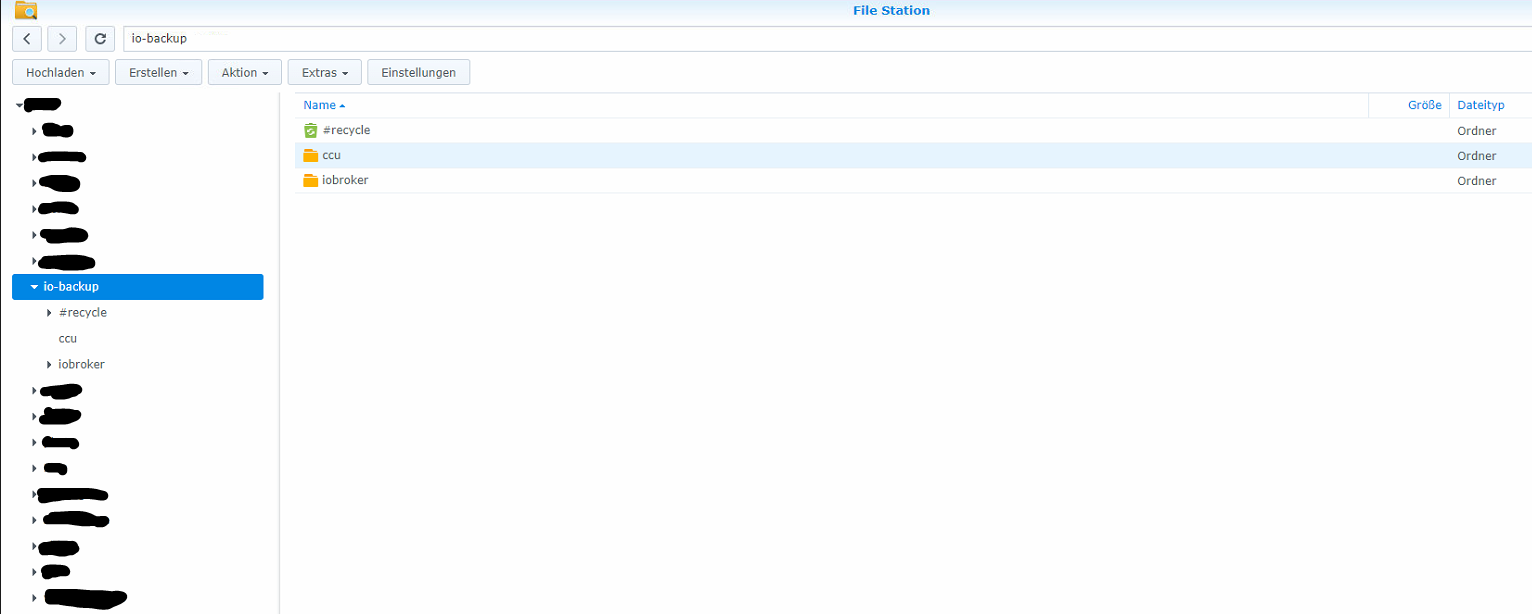
Die Berechtigungen des Ordners ccu sowie alles andere ist mit dem iobrokerordner ident.
Hier ist nur der name des ordners ein andererEDIT:
habe nun die Option "Mount mit Option "noserverino"" aktiviert und nun funkt auch das Backup für die CCU - aber was ist das überhaupt für eine option?? -
Started ccu ...
[DEBUG] [mount] - noserverino option: false
[DEBUG] [mount] - cifs-mount command: "sudo mount -t cifs -o username=iobroker,password=****,rw,file_mode=0777,dir_mode=0777,vers=3.1.1 //192.168.1.9/io-backup/ccu /opt/iobroker/backups"
[DEBUG] [mount] - first mount attempt with smb option failed. try next mount attempt without smb option ...
[DEBUG] [mount] - cifs-mount command: "sudo mount -t cifs -o username=iobroker,password=****,rw,file_mode=0777,dir_mode=0777 //192.168.1.9/io-backup/ccu /opt/iobroker/backups"
[ERROR] [mount] - [undefined Error: Command failed: sudo mount -t cifs -o username=iobroker,password=****,rw,file_mode=0777,dir_mode=0777 //192.168.1.9/io-backup/ccu /opt/iobroker/backups
mount error(16): Device or resource busy
Refer to the mount.cifs(8) manual page (e.g. man mount.cifs) and kernel log messages (dmesg)

[ERROR] [mount] - Error: Command failed: sudo mount -t cifs -o username=iobroker,password=****,rw,file_mode=0777,dir_mode=0777 //192.168.1.9/io-backup/ccu /opt/iobroker/backups
mount error(16): Device or resource busy
Refer to the mount.cifs(8) manual page (e.g. man mount.cifs) and kernel log messages (dmesg)
Sry, hier als Text.
Also ich denke schon dass der Pfad richtig sein sollte.
Das iobroker-Backup wird unter //192.168.1.9/io-backup/iobroker hinterlegt und der der ccu sollte unter //192.168.1.9/io-backup/ccu@simatec
Welche Einstellungen der NAS genau?
Iobroker läuft auf einen rpi 4 8gb, dort läuft auch pivccu drauf
Als NAS wird eine Synology verwendet.
So schaut zumindest die Ordnerstruktur dort aus
Die Berechtigungen des Ordners ccu sowie alles andere ist mit dem iobrokerordner ident.
Hier ist nur der name des ordners ein andererEDIT:
habe nun die Option "Mount mit Option "noserverino"" aktiviert und nun funkt auch das Backup für die CCU - aber was ist das überhaupt für eine option??@igor123 sagte in Backup von CCU nicht möglich:
aber was ist das überhaupt für eine option??
Noserverino bedeutet, dass keine inodes vom entfernten Dateisystem (dem NAS) übernommen werden sondern der Client eigene vergibt.
Bei der NAS-Funktion der FritzBox muss man die z. B. setzen.
Bei der Synology wäre mir das neu.Wenn die Synology NICHT eingehängt/gemountet ist, dann ist das Verzeichnis /opt/iobroker/backups leer? Sollte eigentlich der Fall sein.
Aus der man page:
serverino
Use inode numbers (unique persistent file identifiers) returned by the server instead of automatically generating temporary inode numbers on the client. Although server inode numbers make it easier to spot hardlinked files (as they will have the same inode numbers) and inode numbers may be persistent (which is userful for some sofware), the server does not guarantee that the inode numbers are unique if multiple server side mounts are exported under a single share (since inode numbers on the servers might not be unique if multiple filesystems are mounted under the same shared higher level directory). Note that not all servers support returning server inode numbers, although those that support the CIFS Unix Extensions, and Windows 2000 and later servers typically do support this (although not necessarily on every local server filesystem). Parameter has no effect if the server lacks support for returning inode numbers or equivalent. This behavior is enabled by default.
noserverino
Client generates inode numbers itself rather than using the actual ones from the server.
-
@igor123 sagte in Backup von CCU nicht möglich:
aber was ist das überhaupt für eine option??
Noserverino bedeutet, dass keine inodes vom entfernten Dateisystem (dem NAS) übernommen werden sondern der Client eigene vergibt.
Bei der NAS-Funktion der FritzBox muss man die z. B. setzen.
Bei der Synology wäre mir das neu.Wenn die Synology NICHT eingehängt/gemountet ist, dann ist das Verzeichnis /opt/iobroker/backups leer? Sollte eigentlich der Fall sein.
Aus der man page:
serverino
Use inode numbers (unique persistent file identifiers) returned by the server instead of automatically generating temporary inode numbers on the client. Although server inode numbers make it easier to spot hardlinked files (as they will have the same inode numbers) and inode numbers may be persistent (which is userful for some sofware), the server does not guarantee that the inode numbers are unique if multiple server side mounts are exported under a single share (since inode numbers on the servers might not be unique if multiple filesystems are mounted under the same shared higher level directory). Note that not all servers support returning server inode numbers, although those that support the CIFS Unix Extensions, and Windows 2000 and later servers typically do support this (although not necessarily on every local server filesystem). Parameter has no effect if the server lacks support for returning inode numbers or equivalent. This behavior is enabled by default.
noserverino
Client generates inode numbers itself rather than using the actual ones from the server.
@thomas-braun warum den das Verzeichnis /opt/iobroker/backups?
Das ist ja nicht das Verzeichnis der Synology - oder verstehe ich da was falsch?
Es ist ja komisch dass das iobroker backup sowohl mit als auch ohne der noserverino-option einwandfrei funkt.. -
@thomas-braun warum den das Verzeichnis /opt/iobroker/backups?
Das ist ja nicht das Verzeichnis der Synology - oder verstehe ich da was falsch?
Es ist ja komisch dass das iobroker backup sowohl mit als auch ohne der noserverino-option einwandfrei funkt..@igor123 sagte in Backup von CCU nicht möglich:
warum den das Verzeichnis /opt/iobroker/backups?
Weil das Dateisystem der Synology genau an der Stelle per CIFS/SMB eingehängt/gemountet wird. Das Backup des ioBrokers erfolgt dann in genau dieses Verzeichnis, das da physisch ein anderes Gerät hängt sieht der ioBroker nicht. Muss er auch nicht.
Und damit sich da nichts überlagert muss der Mountpunkt leer sein, wenn die Synology nicht eingehängt ist (Kein Backup erfolgt).
-
@igor123 sagte in Backup von CCU nicht möglich:
warum den das Verzeichnis /opt/iobroker/backups?
Weil das Dateisystem der Synology genau an der Stelle per CIFS/SMB eingehängt/gemountet wird. Das Backup des ioBrokers erfolgt dann in genau dieses Verzeichnis, das da physisch ein anderes Gerät hängt sieht der ioBroker nicht. Muss er auch nicht.
Und damit sich da nichts überlagert muss der Mountpunkt leer sein, wenn die Synology nicht eingehängt ist (Kein Backup erfolgt).
@thomas-braun
aber es stört ja nicht wenn ich die option aktiv habe, oder? -
Jein. Ist denn das Verzeichnis nun leer oder nicht?
-
Jein. Ist denn das Verzeichnis nun leer oder nicht?
@thomas-braun
Sry wie prüfe ich das? -
ls -l /opt/iobroker/backups -
ls -l /opt/iobroker/backupspi@raspberrypi:~ $ ls -l /opt/iobroker/backups insgesamt 91132 -rwxrwxrwx 1 root root 85718337 28. Feb 15:40 2022_02_28-15_40_13_backupiobroker .tar.gz -rwxrwxrwx 1 root root 1515946 25. Feb 13:23 homematic_2022_02_25-13_23_50_3.61 .7_backupiobroker.tar.sbk -rwxrwxrwx 1 root root 1515946 26. Feb 06:15 homematic_2022_02_26-06_15_22_3.61 .7_backupiobroker.tar.sbk -rwxrwxrwx 1 root root 1515946 27. Feb 10:10 homematic_2022_02_27-10_10_03_3.61 .7_backupiobroker.tar.sbk -rwxrwxrwx 1 root root 1515946 28. Feb 11:16 homematic_2022_02_28-11_16_33_3.61 .7_backupiobroker.tar.sbk -rwxrwxrwx 1 root root 1515946 25. Mär 17:11 homematic_2022_03_25-17_11_01_3.61 .7_backupiobroker.tar.sbkhier die antwort
-
Wie gesagt: Muss leer sein. Und die Backups dürften eigentlich nicht root gehören, weil der für solche Aktionen gar nicht aktiv sein sollte.
Da ist also was falsch konfiguriert.
-
@thomas-braun
Hmm das mit root lass ich mir nur so erklären, dass ich den Hacken bei "mount als root" drinne habe. Aber warum der ordner nicht leer ist.. hmm
Weiß nicht so recht wo und wie ich den Fehler suchen soll ...@igor123 Wie wird das homematic-Backup denn erstellt?
Ich würde die Dateien löschen.
-
@igor123 Wie wird das homematic-Backup denn erstellt?
Ich würde die Dateien löschen.
@thomas-braun via backitup auf die NAS.
Jedesmal wird nun dort eine Datei angelegt.
ob die jedoch fehlerhaft erstellt wird oder nicht kann ich so nicht erstellenHabe nun den Ordner geleert und die option "noserverino" entfernt sowie die option "als Root benutzer mounten" entfernt - das Backup funkt nicht:
Ohne no serverino und ohne Root-option
Started ccu ...
[DEBUG] [mount] - noserverino option: false
[DEBUG] [mount] - cifs-mount command: "mount -t cifs -o username=iobroker,password=****,rw,file_mode=0777,dir_mode=0777,vers=3.1.1 //192.168.1.9/io-backup/ccu /opt/iobroker/backups"
[DEBUG] [mount] - first mount attempt with smb option failed. try next mount attempt without smb option ...
[DEBUG] [mount] - cifs-mount command: "mount -t cifs -o username=iobroker,password=****,rw,file_mode=0777,dir_mode=0777 //192.168.1.9/io-backup/ccu /opt/iobroker/backups"
[ERROR] [mount] - [undefined Error: Command failed: mount -t cifs -o username=iobroker,password=****,rw,file_mode=0777,dir_mode=0777 //192.168.1.9/io-backup/ccu /opt/iobroker/backups
mount.cifs: permission denied: no match for /opt/iobroker/backups found in /etc/fstab

[ERROR] [mount] - Error: Command failed: mount -t cifs -o username=iobroker,password=****,rw,file_mode=0777,dir_mode=0777 //192.168.1.9/io-backup/ccu /opt/iobroker/backups
mount.cifs: permission denied: no match for /opt/iobroker/backups found in /etc/fstab
aktiviere ich die "noserverino"-Option, funkt es auch nicht:
Mit noserverino, ohne root-option
Started ccu ...
[DEBUG] [mount] - noserverino option: true
[DEBUG] [mount] - cifs-mount command: "mount -t cifs -o username=iobroker,password=****,noserverino,rw,file_mode=0777,dir_mode=0777,vers=3.1.1 //192.168.1.9/io-backup/ccu /opt/iobroker/backups"
[DEBUG] [mount] - first mount attempt with smb option failed. try next mount attempt without smb option ...
[DEBUG] [mount] - cifs-mount command: "mount -t cifs -o username=iobroker,password=****,noserverino,rw,file_mode=0777,dir_mode=0777 //192.168.1.9/io-backup/ccu /opt/iobroker/backups"
[ERROR] [mount] - [undefined Error: Command failed: mount -t cifs -o username=iobroker,password=****,noserverino,rw,file_mode=0777,dir_mode=0777 //192.168.1.9/io-backup/ccu /opt/iobroker/backups
mount.cifs: permission denied: no match for /opt/iobroker/backups found in /etc/fstab

[ERROR] [mount] - Error: Command failed: mount -t cifs -o username=iobroker,password=****,noserverino,rw,file_mode=0777,dir_mode=0777 //192.168.1.9/io-backup/ccu /opt/iobroker/backups
mount.cifs: permission denied: no match for /opt/iobroker/backups found in /etc/fstab
füge ich noch die option zum rooten als Mount hinzu, funkt alles einwandfrei:
Mit noserverino, mit root-optionStarted ccu ... [DEBUG] [mount] - mount activ... umount is started before mount!! [DEBUG] [mount] - umount successfully completed [DEBUG] [mount] - noserverino option: true [DEBUG] [mount] - cifs-mount command: "sudo mount -t cifs -o username=iobroker,password=****,noserverino,rw,file_mode=0777,dir_mode=0777,vers=3.1.1 //192.168.1.9/io-backup/ccu /opt/iobroker/backups" [DEBUG] [mount] - mount successfully completed [DEBUG] [mount] - done [DEBUG] [ccu] - CCU-Backup started ... [DEBUG] [ccu] - CCU Version: 3.61.7 [DEBUG] [ccu] - Requesting backup from CCU [DEBUG] [ccu] - CCU-Backup for is finish [DEBUG] [ccu] - done [DEBUG] [cifs] - done [DEBUG] [clean] - done [DEBUG] [whatsapp] - done [DEBUG] [historyHTML] - new history html values created [DEBUG] [historyHTML] - done [DEBUG] [historyJSON] - new history json values created [DEBUG] [historyJSON] - done [DEBUG] [umount] - mount activ, umount is started ... [DEBUG] [umount] - umount successfully completed [DEBUG] [umount] - done [EXIT] 0Ahja und hier noch die option ohne noserverino jedoch mit sudo-rechte, wo es jedoch auch nicht funkt:
ohne serverino, mit root-option
Started ccu ...
[DEBUG] [mount] - mount activ... umount is started before mount!!
[DEBUG] [mount] - umount successfully completed
[DEBUG] [mount] - noserverino option: false
[DEBUG] [mount] - cifs-mount command: "sudo mount -t cifs -o username=iobroker,password=****,rw,file_mode=0777,dir_mode=0777,vers=3.1.1 //192.168.1.9/io-backup/ccu /opt/iobroker/backups"
[DEBUG] [mount] - first mount attempt with smb option failed. try next mount attempt without smb option ...
[DEBUG] [mount] - cifs-mount command: "sudo mount -t cifs -o username=iobroker,password=****,rw,file_mode=0777,dir_mode=0777 //192.168.1.9/io-backup/ccu /opt/iobroker/backups"
[ERROR] [mount] - [undefined Error: Command failed: sudo mount -t cifs -o username=iobroker,password=****,rw,file_mode=0777,dir_mode=0777 //192.168.1.9/io-backup/ccu /opt/iobroker/backups
mount error(16): Device or resource busy
Refer to the mount.cifs(8) manual page (e.g. man mount.cifs) and kernel log messages (dmesg)

[ERROR] [mount] - Error: Command failed: sudo mount -t cifs -o username=iobroker,password=****,rw,file_mode=0777,dir_mode=0777 //192.168.1.9/io-backup/ccu /opt/iobroker/backups
mount error(16): Device or resource busy
Refer to the mount.cifs(8) manual page (e.g. man mount.cifs) and kernel log messages (dmesg)
der Ordner /opt/iobroker/backups bleibt nun leer. die CCU-Backupdatei wird dabei erfolgreich auf die NAS abgelegt.
Aber irgendwas ist da im busch, wenn man ja die option noserverino eigentlich nicht verwenden sollte und erst recht nicht die Sudo-Option... :-/ -
@thomas-braun via backitup auf die NAS.
Jedesmal wird nun dort eine Datei angelegt.
ob die jedoch fehlerhaft erstellt wird oder nicht kann ich so nicht erstellenHabe nun den Ordner geleert und die option "noserverino" entfernt sowie die option "als Root benutzer mounten" entfernt - das Backup funkt nicht:
Ohne no serverino und ohne Root-option
Started ccu ...
[DEBUG] [mount] - noserverino option: false
[DEBUG] [mount] - cifs-mount command: "mount -t cifs -o username=iobroker,password=****,rw,file_mode=0777,dir_mode=0777,vers=3.1.1 //192.168.1.9/io-backup/ccu /opt/iobroker/backups"
[DEBUG] [mount] - first mount attempt with smb option failed. try next mount attempt without smb option ...
[DEBUG] [mount] - cifs-mount command: "mount -t cifs -o username=iobroker,password=****,rw,file_mode=0777,dir_mode=0777 //192.168.1.9/io-backup/ccu /opt/iobroker/backups"
[ERROR] [mount] - [undefined Error: Command failed: mount -t cifs -o username=iobroker,password=****,rw,file_mode=0777,dir_mode=0777 //192.168.1.9/io-backup/ccu /opt/iobroker/backups
mount.cifs: permission denied: no match for /opt/iobroker/backups found in /etc/fstab

[ERROR] [mount] - Error: Command failed: mount -t cifs -o username=iobroker,password=****,rw,file_mode=0777,dir_mode=0777 //192.168.1.9/io-backup/ccu /opt/iobroker/backups
mount.cifs: permission denied: no match for /opt/iobroker/backups found in /etc/fstab
aktiviere ich die "noserverino"-Option, funkt es auch nicht:
Mit noserverino, ohne root-option
Started ccu ...
[DEBUG] [mount] - noserverino option: true
[DEBUG] [mount] - cifs-mount command: "mount -t cifs -o username=iobroker,password=****,noserverino,rw,file_mode=0777,dir_mode=0777,vers=3.1.1 //192.168.1.9/io-backup/ccu /opt/iobroker/backups"
[DEBUG] [mount] - first mount attempt with smb option failed. try next mount attempt without smb option ...
[DEBUG] [mount] - cifs-mount command: "mount -t cifs -o username=iobroker,password=****,noserverino,rw,file_mode=0777,dir_mode=0777 //192.168.1.9/io-backup/ccu /opt/iobroker/backups"
[ERROR] [mount] - [undefined Error: Command failed: mount -t cifs -o username=iobroker,password=****,noserverino,rw,file_mode=0777,dir_mode=0777 //192.168.1.9/io-backup/ccu /opt/iobroker/backups
mount.cifs: permission denied: no match for /opt/iobroker/backups found in /etc/fstab

[ERROR] [mount] - Error: Command failed: mount -t cifs -o username=iobroker,password=****,noserverino,rw,file_mode=0777,dir_mode=0777 //192.168.1.9/io-backup/ccu /opt/iobroker/backups
mount.cifs: permission denied: no match for /opt/iobroker/backups found in /etc/fstab
füge ich noch die option zum rooten als Mount hinzu, funkt alles einwandfrei:
Mit noserverino, mit root-optionStarted ccu ... [DEBUG] [mount] - mount activ... umount is started before mount!! [DEBUG] [mount] - umount successfully completed [DEBUG] [mount] - noserverino option: true [DEBUG] [mount] - cifs-mount command: "sudo mount -t cifs -o username=iobroker,password=****,noserverino,rw,file_mode=0777,dir_mode=0777,vers=3.1.1 //192.168.1.9/io-backup/ccu /opt/iobroker/backups" [DEBUG] [mount] - mount successfully completed [DEBUG] [mount] - done [DEBUG] [ccu] - CCU-Backup started ... [DEBUG] [ccu] - CCU Version: 3.61.7 [DEBUG] [ccu] - Requesting backup from CCU [DEBUG] [ccu] - CCU-Backup for is finish [DEBUG] [ccu] - done [DEBUG] [cifs] - done [DEBUG] [clean] - done [DEBUG] [whatsapp] - done [DEBUG] [historyHTML] - new history html values created [DEBUG] [historyHTML] - done [DEBUG] [historyJSON] - new history json values created [DEBUG] [historyJSON] - done [DEBUG] [umount] - mount activ, umount is started ... [DEBUG] [umount] - umount successfully completed [DEBUG] [umount] - done [EXIT] 0Ahja und hier noch die option ohne noserverino jedoch mit sudo-rechte, wo es jedoch auch nicht funkt:
ohne serverino, mit root-option
Started ccu ...
[DEBUG] [mount] - mount activ... umount is started before mount!!
[DEBUG] [mount] - umount successfully completed
[DEBUG] [mount] - noserverino option: false
[DEBUG] [mount] - cifs-mount command: "sudo mount -t cifs -o username=iobroker,password=****,rw,file_mode=0777,dir_mode=0777,vers=3.1.1 //192.168.1.9/io-backup/ccu /opt/iobroker/backups"
[DEBUG] [mount] - first mount attempt with smb option failed. try next mount attempt without smb option ...
[DEBUG] [mount] - cifs-mount command: "sudo mount -t cifs -o username=iobroker,password=****,rw,file_mode=0777,dir_mode=0777 //192.168.1.9/io-backup/ccu /opt/iobroker/backups"
[ERROR] [mount] - [undefined Error: Command failed: sudo mount -t cifs -o username=iobroker,password=****,rw,file_mode=0777,dir_mode=0777 //192.168.1.9/io-backup/ccu /opt/iobroker/backups
mount error(16): Device or resource busy
Refer to the mount.cifs(8) manual page (e.g. man mount.cifs) and kernel log messages (dmesg)

[ERROR] [mount] - Error: Command failed: sudo mount -t cifs -o username=iobroker,password=****,rw,file_mode=0777,dir_mode=0777 //192.168.1.9/io-backup/ccu /opt/iobroker/backups
mount error(16): Device or resource busy
Refer to the mount.cifs(8) manual page (e.g. man mount.cifs) and kernel log messages (dmesg)
der Ordner /opt/iobroker/backups bleibt nun leer. die CCU-Backupdatei wird dabei erfolgreich auf die NAS abgelegt.
Aber irgendwas ist da im busch, wenn man ja die option noserverino eigentlich nicht verwenden sollte und erst recht nicht die Sudo-Option... :-/Mounten als root ist schon okay. Nimm halt die Einstellungen die funktionieren.
-
@thomas-braun
Kein Thema, kann ich ja gerne machen.
Nur sagtest du dass es nicht als root sein sollte und ebenso die option noserverino ebenso nicht aktiv sein sollte. hmm@igor123 mounten muss schon der root und wenn es nur per noserverino geht, dann ist das so.
Ich vermute aber, dass die Backupdateien nicht dem Riot gehören sollten. Da ich aber keine CCU habe kann ich es auch nicht bestimmt sagen.
-
@igor123 mounten muss schon der root und wenn es nur per noserverino geht, dann ist das so.
Ich vermute aber, dass die Backupdateien nicht dem Riot gehören sollten. Da ich aber keine CCU habe kann ich es auch nicht bestimmt sagen.
@thomas-braun ahso okay
naja ich würd gerne irgendwie rausfinden warum es nur per noserverino geht - nicht dass ich da woanders einen fehler habe der sich evtl. irgendwo unbemerkt mit-zieht
bin eher der der auch gerne verstehen würde warum etwas so ist wie es ist


Hey! Du scheinst an dieser Unterhaltung interessiert zu sein, hast aber noch kein Konto.
Hast du es satt, bei jedem Besuch durch die gleichen Beiträge zu scrollen? Wenn du dich für ein Konto anmeldest, kommst du immer genau dorthin zurück, wo du zuvor warst, und kannst dich über neue Antworten benachrichtigen lassen (entweder per E-Mail oder Push-Benachrichtigung). Du kannst auch Lesezeichen speichern und Beiträge positiv bewerten, um anderen Community-Mitgliedern deine Wertschätzung zu zeigen.
Mit deinem Input könnte dieser Beitrag noch besser werden 💗
Registrieren AnmeldenSupport us
453
Online33.0k
Benutzer83.6k
Themen1.3m
Beiträge