




Hilfe: Neuling - Fehlerhafte ioBroker Installation?
-
Controller "js-controller" : 0.17.2 , installed 0.16.2 [Updateable] `
ok, dann wollen wir mal:cd /opt/iobroker sudo iobroker stop sudo npm cache clean sudo npm install iobroker.js-controller --production sudo iobroker start… und hoffen
Gruß
Rainer
-
root@raspberrypi:/opt/iobroker# sudo npm install iobroker.js-controller --production

> unix-dgram@0.2.3 install /opt/iobroker/node_modules/iobroker.js-controller/node_modules/winston-syslog/node_modules/unix-dgram
> node-gyp rebuild

make: Entering directory '/opt/iobroker/node_modules/iobroker.js-controller/node_modules/winston-syslog/node_modules/unix-dgram/build'
  CXX(target) Release/obj.target/unix_dgram/src/unix_dgram.o
  SOLINK_MODULE(target) Release/obj.target/unix_dgram.node
  COPY Release/unix_dgram.node
make: Leaving directory '/opt/iobroker/node_modules/iobroker.js-controller/node_modules/winston-syslog/node_modules/unix-dgram/build'
|
> ursa@0.9.4 install /opt/iobroker/node_modules/iobroker.js-controller/node_modules/greenlock/node_modules/rsa-compat/node_modules/ursa
> node-gyp rebuild

make: Entering directory '/opt/iobroker/node_modules/iobroker.js-controller/node_modules/greenlock/node_modules/rsa-compat/node_modules/ursa/build'
  CXX(target) Release/obj.target/ursaNative/src/ursaNative.o
  SOLINK_MODULE(target) Release/obj.target/ursaNative.node
  COPY Release/ursaNative.node
make: Leaving directory '/opt/iobroker/node_modules/iobroker.js-controller/node_modules/greenlock/node_modules/rsa-compat/node_modules/ursa/build'

> iobroker.js-controller@0.17.2 install /opt/iobroker/node_modules/iobroker.js-controller
> node iobroker.js setup first

iobroker.js-controller@0.17.2 node_modules/iobroker.js-controller
├── safe-replace@1.0.2
├── le-sni-auto@2.1.0
├── le-challenge-fs@2.0.8
├── pyconf@1.1.2
├── semver@5.3.0
├── mime@1.3.4
├── winston-daily-rotate-file@1.4.6
├── daemonize2@0.4.2
├── ncp@2.0.0
├── node.extend@1.1.6 (is@3.2.1)
├── redis@2.7.1 (double-ended-queue@2.1.0-0, redis-commands@1.3.1, redis-parser@2.6.0)
├── node-schedule@1.2.1 (long-timeout@0.1.1, sorted-array-functions@1.0.0, cron-parser@1.1.0)
├── bluebird@3.5.0
├── mkdirp@0.5.1 (minimist@0.0.8)
├── winston@2.3.1 (cycle@1.0.3, stack-trace@0.0.9, isstream@0.1.2, eyes@0.1.8, async@1.0.0, colors@1.0.3)
├── socket.io@1.7.3 (object-assign@4.1.0, socket.io-adapter@0.5.0, has-binary@0.1.7, debug@2.3.3, socket.io-parser@2.3.1, engine.io@1.8.3)
├── socket.io-client@1.7.3 (to-array@0.1.4, component-emitter@1.2.1, indexof@0.0.1, object-component@0.0.3, component-bind@1.0.0, backo2@1.0.2, has-binary@0.1.7, debug@2.3.3, socket.io-parser@2.3.1, parseuri@0.0.5, engine.io-client@1.8.3)
├── winston-syslog@1.2.6 (cycle@1.0.3, glossy@0.1.7, unix-dgram@0.2.3)
├── prompt@1.0.0 (revalidator@0.1.8, pkginfo@0.4.0, colors@1.1.2, read@1.0.7, winston@2.1.1, utile@0.3.0)
├── yargs@6.6.0 (get-caller-file@1.0.2, decamelize@1.2.0, y18n@3.2.1, camelcase@3.0.0, which-module@1.0.0, set-blocking@2.0.0, yargs-parser@4.2.1, require-main-filename@1.0.1, require-directory@2.1.1, cliui@3.2.0, os-locale@1.4.0, string-width@1.0.2, read-pkg-up@1.0.1)
├── request@2.81.0 (aws-sign2@0.6.0, tunnel-agent@0.6.0, oauth-sign@0.8.2, forever-agent@0.6.1, is-typedarray@1.0.0, caseless@0.12.0, stringstream@0.0.5, safe-buffer@5.0.1, aws4@1.6.0, isstream@0.1.2, json-stringify-safe@5.0.1, extend@3.0.0, performance-now@0.2.0, uuid@3.0.1, qs@6.4.0, combined-stream@1.0.5, mime-types@2.1.15, tough-cookie@2.3.2, form-data@2.1.4, hawk@3.1.3, http-signature@1.1.1, har-validator@4.2.1)
├── tar.gz@1.0.5 (commander@2.9.0, bluebird@2.11.0, tar@2.2.1, fstream@1.0.11, mout@0.11.1)
├── greenlock@2.1.14 (le-store-certbot@2.0.5, homedir@0.6.0, asn1js@1.2.12, le-acme-core@2.0.9, pkijs@1.3.33, certpem@1.0.1, localhost.daplie.me-certificates@1.3.0, le-challenge-sni@2.0.1, rsa-compat@1.2.7)
├── jszip@3.1.3 (es6-promise@3.0.2, lie@3.1.1, pako@1.0.5, readable-stream@2.0.6, core-js@2.3.0)
└── npm@2.15.12
root@raspberrypi:/opt/iobroker# sudo iobroker start
Starting iobroker controller daemon...
iobroker controller daemon failed to start:  2
Error: 2
root@raspberrypi:/opt/iobroker#
Jetzt kommt beim Starten "Error 2"
-
Nach reboot komm ich auf die Oberfläche von iobroker - aber keine Änderung.
-
letzte Idee:
cd /opt/iobroker
sudo iobroker stop admin
sudo iobroker upload admin
sudo iobroker start admin
Und du hast wirklich den Ordner /opt/iobroker vollständig gelöscht gehabt?
Gruß
Rainer
-
Das hatte ich in Putty eingegeben:
rm -r /opt/iobroker
-
hast du es danach kontrolliert?
läuft es nach dem upload?
Welche Versionen von nodejs, npm und welches Betriebssystem hast du eigentlich?
Sonst würde ich dir nur empfehlen eine neue Karte zu nehmen und neu installieren.
Gruß
Rainer
-
Läuft nicht, alles unverändert.
Nein, hab es nach dem Löschen nicht kontrolliert. Wusste nicht wie. Geb halt alles nach Anleitung in Putty ein.
Hab alles inkl. Links von dieser Anleitung: http://www.iobroker.net/docu/?page_id=5106&lang=de
Hab mich für diese jessie Version entschieden.
RASPBIAN JESSIE WITH PIXEL
Image with PIXEL desktop based on Debian Jessie
Version:April 2017
Release date:2017-04-10
Kernel version:4.4
Ansonsten Nagelneu: Raspi 3 + Samsung Evo+ 32GB
-
Release date:2017-04-10 `
Die kenne ich noch nicht. Ist ja flammneu. Ob es daran liegt ???Hab alles inkl. Links von dieser Anleitung: http://www.iobroker.net/docu/?page_id=5106&lang=de `
ist auch ok.Ich weiß nur nicht ob und wenn ja welche node-version bereits in dem Raspbian enthalten ist.
Wenn du es nochmal neu versuchen willst, probiere es bitte mal mit Raspbian light, oder brauchst du einen Desktop?
Der frisst natürlich auch noch Ressourcen.
Ich habe wirklich keine Ahnung, außer, dass im Moment etwas mit dem Repo nicht stimmen könnte, weil Bluefox gerade dran arbeitet.
Dazu passt aber nicht dein Ergebnis bei iobroker update.
Sorry - bin im Moment rat- und hilflos
Rainer
-
Keine Ahnung woran es liegt. Probier es heute Nacht nochmal mit der Light und meld mich wieder.
Desktop brauch ich momentan nicht, hab gedacht lueber mal mit, man weiß ja nie ;)
Trotzdem schon mal vielen Dank.
-
So, ich bin zurück - leider mit dem selben Ergebnis.
Diesmal mit:
RASPBIAN JESSIE LITE
Minimal image based on Debian Jessie
Version:April 2017
Release date:2017-04-10
Kernel version:4.4
root@raspberrypi:~# node -v v4.8.2 root@raspberrypi:~# sudo mkdir /opt/iobroker root@raspberrypi:~# sudo chmod 777 /opt/iobroker root@raspberrypi:~# cd /opt/iobroker root@raspberrypi:/opt/iobroker# sudo npm install iobroker --unsafe-perm \ > iobroker@0.9.0 install /opt/iobroker/node_modules/iobroker > node lib/setup.js npm install iobroker.js-controller --production --prefix /opt/iobroker npm install iobroker.admin --production --prefix /opt/iobroker npm install iobroker.discovery --production --prefix /opt/iobroker node-pre-gyp ERR! Tried to download(404): https://github.com/EmergingTechnologyAdvisors/node-serialport/releases/download/4.0.7/serialport-v4.0.7-node-v46-linux-arm.tar.gz node-pre-gyp ERR! Pre-built binaries not found for serialport@4.0.7 and node@4.8.2 (node-v46 ABI) (falling back to source compile with node-gyp) Write "./iobroker start" to start the ioBroker : Datei oder Verzeichnis nicht gefunden Auto-start was enabled. Write "update-rc.d -f iobroker.sh remove" to disable auto-start iobroker is started. Go to "http://ip-addr:8081" to open the admin UI. iobroker@0.9.0 node_modules/iobroker └── yargs@7.1.0 (get-caller-file@1.0.2, decamelize@1.2.0, y18n@3.2.1, camelcase@3.0.0, which-module@1.0.0, set-blocking@2.0.0, yargs-parser@5.0.0, require-main-filename@1.0.1, require-directory@2.1.1, cliui@3.2.0, string-width@1.0.2, os-locale@1.4.0, read-pkg-up@1.0.1) root@raspberrypi:/opt/iobroker# reboot -
Ich verstehe es nicht.
Die Installation läuft augenscheinlich problemlos durch, die Adapter waren zumindest in deiner letzten Installation komplett installiert. Allerdings wunderte mich, dass unmittelbar nach einer Neuinstallation der js-controller als updateable geführt wurde und nicht direkt die neueste Version installiert wurde.
Vielleicht fällt @Bluefox noch was ein.
Wenn nicht mache ich das morgen mal mit einem Pi 3 6nd der neuesten Version von Raspbian.
Gruß
Rainer
-
Controller "js-controller" : 0.17.2 , installed 0.16.2 [Updateable] `
ok, dann wollen wir mal:cd /opt/iobroker sudo iobroker stop sudo npm cache clean sudo npm install iobroker.js-controller --production sudo iobroker start… und hoffen
Gruß
Rainer `
Das hab ich jetzt auch nochmals durch - hilft aber auch nicht weiter.
Hier mal der komplette Log nach dem root Zugang und sauberer Jessi light Installation bis jetzt, vielleicht mach ich ja doch irgendwo was falsch…
login as: root root@192.168.2.164's password: The programs included with the Debian GNU/Linux system are free software; the exact distribution terms for each program are described in the individual files in /usr/share/doc/*/copyright. Debian GNU/Linux comes with ABSOLUTELY NO WARRANTY, to the extent permitted by applicable law. root@raspberrypi:~# sudo apt-get update && sudo apt-get upgrade OK http://archive.raspberrypi.org jessie InRelease OK http://mirrordirector.raspbian.org jessie InRelease OK http://archive.raspberrypi.org jessie/main armhf Packages OK http://mirrordirector.raspbian.org jessie/main armhf Packages OK http://mirrordirector.raspbian.org jessie/contrib armhf Packages OK http://archive.raspberrypi.org jessie/ui armhf Packages OK http://mirrordirector.raspbian.org jessie/non-free armhf Packages OK http://mirrordirector.raspbian.org jessie/rpi armhf Packages Ign http://archive.raspberrypi.org jessie/main Translation-de_DE Ign http://mirrordirector.raspbian.org jessie/contrib Translation-de_DE Ign http://mirrordirector.raspbian.org jessie/contrib Translation-de Ign http://archive.raspberrypi.org jessie/main Translation-de Ign http://mirrordirector.raspbian.org jessie/contrib Translation-en Ign http://mirrordirector.raspbian.org jessie/main Translation-de_DE Ign http://archive.raspberrypi.org jessie/main Translation-en Ign http://mirrordirector.raspbian.org jessie/main Translation-de Ign http://mirrordirector.raspbian.org jessie/main Translation-en Ign http://archive.raspberrypi.org jessie/ui Translation-de_DE Ign http://mirrordirector.raspbian.org jessie/non-free Translation-de_DE Ign http://archive.raspberrypi.org jessie/ui Translation-de Ign http://mirrordirector.raspbian.org jessie/non-free Translation-de Ign http://mirrordirector.raspbian.org jessie/non-free Translation-en Ign http://archive.raspberrypi.org jessie/ui Translation-en Ign http://mirrordirector.raspbian.org jessie/rpi Translation-de_DE Ign http://mirrordirector.raspbian.org jessie/rpi Translation-de Ign http://mirrordirector.raspbian.org jessie/rpi Translation-en Paketlisten werden gelesen... Fertig Paketlisten werden gelesen... Fertig Abhängigkeitsbaum wird aufgebaut. Statusinformationen werden eingelesen.... Fertig Paketaktualisierung (Upgrade) wird berechnet... Fertig 0 aktualisiert, 0 neu installiert, 0 zu entfernen und 0 nicht aktualisiert. root@raspberrypi:~# curl -sL https://deb.nodesource.com/setup_4.x | sudo -E bash - ## Installing the NodeSource Node.js v4.x LTS Argon repo... ## Populating apt-get cache... + apt-get update OK http://archive.raspberrypi.org jessie InRelease OK http://mirrordirector.raspbian.org jessie InRelease OK http://archive.raspberrypi.org jessie/main armhf Packages OK http://mirrordirector.raspbian.org jessie/main armhf Packages OK http://mirrordirector.raspbian.org jessie/contrib armhf Packages OK http://archive.raspberrypi.org jessie/ui armhf Packages OK http://mirrordirector.raspbian.org jessie/non-free armhf Packages OK http://mirrordirector.raspbian.org jessie/rpi armhf Packages Ign http://mirrordirector.raspbian.org jessie/contrib Translation-de_DE Ign http://mirrordirector.raspbian.org jessie/contrib Translation-de Ign http://mirrordirector.raspbian.org jessie/contrib Translation-en Ign http://mirrordirector.raspbian.org jessie/main Translation-de_DE Ign http://mirrordirector.raspbian.org jessie/main Translation-de Ign http://mirrordirector.raspbian.org jessie/main Translation-en Ign http://mirrordirector.raspbian.org jessie/non-free Translation-de_DE Ign http://mirrordirector.raspbian.org jessie/non-free Translation-de Ign http://mirrordirector.raspbian.org jessie/non-free Translation-en Ign http://mirrordirector.raspbian.org jessie/rpi Translation-de_DE Ign http://mirrordirector.raspbian.org jessie/rpi Translation-de Ign http://mirrordirector.raspbian.org jessie/rpi Translation-en Ign http://archive.raspberrypi.org jessie/main Translation-de_DE Ign http://archive.raspberrypi.org jessie/main Translation-de Ign http://archive.raspberrypi.org jessie/main Translation-en Ign http://archive.raspberrypi.org jessie/ui Translation-de_DE Ign http://archive.raspberrypi.org jessie/ui Translation-de Ign http://archive.raspberrypi.org jessie/ui Translation-en Paketlisten werden gelesen... Fertig ## Confirming "jessie" is supported... + curl -sLf -o /dev/null 'https://deb.nodesource.com/node_4.x/dists/jessie/Release' ## Adding the NodeSource signing key to your keyring... + curl -s https://deb.nodesource.com/gpgkey/nodesource.gpg.key | apt-key add - OK ## Creating apt sources list file for the NodeSource Node.js v4.x LTS Argon repo... + echo 'deb https://deb.nodesource.com/node_4.x jessie main' > /etc/apt/sources.list.d/nodesource.list + echo 'deb-src https://deb.nodesource.com/node_4.x jessie main' >> /etc/apt/sources.list.d/nodesource.list ## Running `apt-get update` for you... + apt-get update OK http://mirrordirector.raspbian.org jessie InRelease OK http://archive.raspberrypi.org jessie InRelease Holen: 1 https://deb.nodesource.com jessie InRelease [4.634 B] OK http://mirrordirector.raspbian.org jessie/main armhf Packages OK http://mirrordirector.raspbian.org jessie/contrib armhf Packages OK http://archive.raspberrypi.org jessie/main armhf Packages OK http://mirrordirector.raspbian.org jessie/non-free armhf Packages OK http://mirrordirector.raspbian.org jessie/rpi armhf Packages Holen: 2 https://deb.nodesource.com jessie/main Sources [763 B] OK http://archive.raspberrypi.org jessie/ui armhf Packages Holen: 3 https://deb.nodesource.com jessie/main armhf Packages [967 B] Holen: 4 https://deb.nodesource.com jessie/main Translation-de_DE [162 B] Holen: 5 https://deb.nodesource.com jessie/main Translation-de [162 B] Holen: 6 https://deb.nodesource.com jessie/main Translation-en [162 B] Holen: 7 https://deb.nodesource.com jessie/main Translation-de_DE [162 B] Holen: 8 https://deb.nodesource.com jessie/main Translation-de [162 B] Holen: 9 https://deb.nodesource.com jessie/main Translation-en [162 B] Holen: 10 https://deb.nodesource.com jessie/main Translation-de_DE [162 B] Ign http://mirrordirector.raspbian.org jessie/contrib Translation-de_DE Ign http://mirrordirector.raspbian.org jessie/contrib Translation-de Ign http://mirrordirector.raspbian.org jessie/contrib Translation-en Ign http://mirrordirector.raspbian.org jessie/main Translation-de_DE Ign http://mirrordirector.raspbian.org jessie/main Translation-de Ign http://mirrordirector.raspbian.org jessie/main Translation-en Ign http://mirrordirector.raspbian.org jessie/non-free Translation-de_DE Ign http://mirrordirector.raspbian.org jessie/non-free Translation-de Holen: 11 https://deb.nodesource.com jessie/main Translation-de [162 B] Ign http://mirrordirector.raspbian.org jessie/non-free Translation-en Holen: 12 https://deb.nodesource.com jessie/main Translation-en [162 B] Ign http://mirrordirector.raspbian.org jessie/rpi Translation-de_DE Ign http://mirrordirector.raspbian.org jessie/rpi Translation-de Ign http://mirrordirector.raspbian.org jessie/rpi Translation-en Holen: 13 https://deb.nodesource.com jessie/main Translation-de_DE [162 B] Holen: 14 https://deb.nodesource.com jessie/main Translation-de [162 B] Holen: 15 https://deb.nodesource.com jessie/main Translation-en [162 B] Ign http://archive.raspberrypi.org jessie/main Translation-de_DE Ign http://archive.raspberrypi.org jessie/main Translation-de Ign http://archive.raspberrypi.org jessie/main Translation-en Ign http://archive.raspberrypi.org jessie/ui Translation-de_DE Holen: 16 https://deb.nodesource.com jessie/main Translation-de_DE [162 B] Ign https://deb.nodesource.com jessie/main Translation-de_DE Ign http://archive.raspberrypi.org jessie/ui Translation-de Ign http://archive.raspberrypi.org jessie/ui Translation-en Holen: 17 https://deb.nodesource.com jessie/main Translation-de [162 B] Ign https://deb.nodesource.com jessie/main Translation-de Holen: 18 https://deb.nodesource.com jessie/main Translation-en [162 B] Ign https://deb.nodesource.com jessie/main Translation-en Es wurden 6.364 B in 6 s geholt (955 B/s). Paketlisten werden gelesen... Fertig ## Run `apt-get install nodejs` (as root) to install Node.js v4.x LTS Argon and npm root@raspberrypi:~# sudo apt-get insall -y build essential python nodejs E: Befehlszeilenoption »y« [aus -y] ist nicht bekannt. root@raspberrypi:~# sudo apt-get install -y build essential python nodejs Paketlisten werden gelesen... Fertig Abhängigkeitsbaum wird aufgebaut. Statusinformationen werden eingelesen.... Fertig E: Paket build kann nicht gefunden werden. E: Paket essential kann nicht gefunden werden. root@raspberrypi:~# sudo apt-get install -y build-essential python nodejs Paketlisten werden gelesen... Fertig Abhängigkeitsbaum wird aufgebaut. Statusinformationen werden eingelesen.... Fertig build-essential ist schon die neueste Version. python ist schon die neueste Version. Die folgenden zusätzlichen Pakete werden installiert: rlwrap Die folgenden NEUEN Pakete werden installiert: nodejs rlwrap 0 aktualisiert, 2 neu installiert, 0 zu entfernen und 0 nicht aktualisiert. Es müssen 7.976 kB an Archiven heruntergeladen werden. Nach dieser Operation werden 38,5 MB Plattenplatz zusätzlich benutzt. Holen: 1 https://deb.nodesource.com/node_4.x/ jessie/main nodejs armhf 4.8.2-1nodesource1~jessie1 [7.906 kB] Holen: 2 http://mirrordirector.raspbian.org/raspbian/ jessie/main rlwrap armhf 0.41-1 [70,3 kB] Es wurden 7.976 kB in 2 s geholt (2.968 kB/s). Vormals nicht ausgewähltes Paket rlwrap wird gewählt. (Lese Datenbank ... 31821 Dateien und Verzeichnisse sind derzeit installiert.) Vorbereitung zum Entpacken von .../rlwrap_0.41-1_armhf.deb ... Entpacken von rlwrap (0.41-1) ... Vormals nicht ausgewähltes Paket nodejs wird gewählt. Vorbereitung zum Entpacken von .../nodejs_4.8.2-1nodesource1~jessie1_armhf.deb ... Entpacken von nodejs (4.8.2-1nodesource1~jessie1) ... Trigger für man-db (2.7.0.2-5) werden verarbeitet ... rlwrap (0.41-1) wird eingerichtet ... update-alternatives: /usr/bin/rlwrap wird verwendet, um /usr/bin/readline-editor (readline-editor) im automatischen Modus bereitzustellen nodejs (4.8.2-1nodesource1~jessie1) wird eingerichtet ... root@raspberrypi:~# reboot Broadcast message from root@raspberrypi on pts/0 (So 2017-04-16 22:15:18 CEST): The system is going down for reboot NOW! root@raspberrypi:~# login as: root root@192.168.2.164's password: The programs included with the Debian GNU/Linux system are free software; the exact distribution terms for each program are described in the individual files in /usr/share/doc/*/copyright. Debian GNU/Linux comes with ABSOLUTELY NO WARRANTY, to the extent permitted by applicable law. Last login: Sun Apr 16 22:02:33 2017 from lenovonotebok.fritz.box root@raspberrypi:~# node -v v4.8.2 root@raspberrypi:~# sudo mkdir /opt/iobroker root@raspberrypi:~# sudo chmod 777 /opt/iobroker root@raspberrypi:~# cd /opt/iobroker root@raspberrypi:/opt/iobroker# sudo npm install iobroker --unsafe-perm \ > iobroker@0.9.0 install /opt/iobroker/node_modules/iobroker > node lib/setup.js npm install iobroker.js-controller --production --prefix /opt/iobroker npm install iobroker.admin --production --prefix /opt/iobroker npm install iobroker.discovery --production --prefix /opt/iobroker node-pre-gyp ERR! Tried to download(404): https://github.com/EmergingTechnologyAdvisors/node-serialport/releases/download/4.0.7/serialport-v4.0.7-node-v46-linux-arm.tar.gz node-pre-gyp ERR! Pre-built binaries not found for serialport@4.0.7 and node@4.8.2 (node-v46 ABI) (falling back to source compile with node-gyp) Write "./iobroker start" to start the ioBroker : Datei oder Verzeichnis nicht gefunden Auto-start was enabled. Write "update-rc.d -f iobroker.sh remove" to disable auto-start iobroker is started. Go to "http://ip-addr:8081" to open the admin UI. iobroker@0.9.0 node_modules/iobroker └── yargs@7.1.0 (get-caller-file@1.0.2, decamelize@1.2.0, y18n@3.2.1, camelcase@3.0.0, which-module@1.0.0, set-blocking@2.0.0, yargs-parser@5.0.0, require-main-filename@1.0.1, require-directory@2.1.1, cliui@3.2.0, string-width@1.0.2, os-locale@1.4.0, read-pkg-up@1.0.1) root@raspberrypi:/opt/iobroker# reboot Broadcast message from root@raspberrypi on pts/0 (So 2017-04-16 22:23:09 CEST): The system is going down for reboot NOW! root@raspberrypi:/opt/iobroker# login as: login as: root root@192.168.2.164's password: The programs included with the Debian GNU/Linux system are free software; the exact distribution terms for each program are described in the individual files in /usr/share/doc/*/copyright. Debian GNU/Linux comes with ABSOLUTELY NO WARRANTY, to the extent permitted by applicable law. Last login: Sun Apr 16 22:16:33 2017 from lenovonotebok.fritz.box root@raspberrypi:~# ^C root@raspberrypi:~# cd /opt/iobroker root@raspberrypi:/opt/iobroker# sudo iobroker stop Stopping iobroker controller daemon... iobroker controller daemon stopped. Exit code for "killall.sh": 0 root@raspberrypi:/opt/iobroker# sudo npm cache clean root@raspberrypi:/opt/iobroker# sudo npm install iobroker.js-controller --production > unix-dgram@0.2.3 install /opt/iobroker/node_modules/iobroker.js-controller/node_modules/winston-syslog/node_modules/unix-dgram > node-gyp rebuild make: Entering directory '/opt/iobroker/node_modules/iobroker.js-controller/node_modules/winston-syslog/node_modules/unix-dgram/build' CXX(target) Release/obj.target/unix_dgram/src/unix_dgram.o SOLINK_MODULE(target) Release/obj.target/unix_dgram.node COPY Release/unix_dgram.node make: Leaving directory '/opt/iobroker/node_modules/iobroker.js-controller/node_modules/winston-syslog/node_modules/unix-dgram/build' > ursa@0.9.4 install /opt/iobroker/node_modules/iobroker.js-controller/node_modules/greenlock/node_modules/rsa-compat/node_modules/ursa > node-gyp rebuild make: Entering directory '/opt/iobroker/node_modules/iobroker.js-controller/node_modules/greenlock/node_modules/rsa-compat/node_modules/ursa/build' CXX(target) Release/obj.target/ursaNative/src/ursaNative.o SOLINK_MODULE(target) Release/obj.target/ursaNative.node COPY Release/ursaNative.node make: Leaving directory '/opt/iobroker/node_modules/iobroker.js-controller/node_modules/greenlock/node_modules/rsa-compat/node_modules/ursa/build' > iobroker.js-controller@0.17.2 install /opt/iobroker/node_modules/iobroker.js-controller > node iobroker.js setup first iobroker.js-controller@0.17.2 node_modules/iobroker.js-controller ├── safe-replace@1.0.2 ├── le-sni-auto@2.1.0 ├── le-challenge-fs@2.0.8 ├── pyconf@1.1.2 ├── semver@5.3.0 ├── mime@1.3.4 ├── winston-daily-rotate-file@1.4.6 ├── daemonize2@0.4.2 ├── ncp@2.0.0 ├── node.extend@1.1.6 (is@3.2.1) ├── redis@2.7.1 (double-ended-queue@2.1.0-0, redis-commands@1.3.1, redis-parser@2.6.0) ├── node-schedule@1.2.1 (long-timeout@0.1.1, sorted-array-functions@1.0.0, cron-parser@1.1.0) ├── bluebird@3.5.0 ├── mkdirp@0.5.1 (minimist@0.0.8) ├── winston@2.3.1 (cycle@1.0.3, stack-trace@0.0.9, eyes@0.1.8, isstream@0.1.2, async@1.0.0, colors@1.0.3) ├── socket.io@1.7.3 (object-assign@4.1.0, socket.io-adapter@0.5.0, has-binary@0.1.7, debug@2.3.3, socket.io-parser@2.3.1, engine.io@1.8.3) ├── socket.io-client@1.7.3 (to-array@0.1.4, component-emitter@1.2.1, indexof@0.0.1, object-component@0.0.3, component-bind@1.0.0, backo2@1.0.2, has-binary@0.1.7, debug@2.3.3, socket.io-parser@2.3.1, parseuri@0.0.5, engine.io-client@1.8.3) ├── prompt@1.0.0 (revalidator@0.1.8, pkginfo@0.4.0, colors@1.1.2, read@1.0.7, winston@2.1.1, utile@0.3.0) ├── yargs@6.6.0 (get-caller-file@1.0.2, decamelize@1.2.0, y18n@3.2.1, camelcase@3.0.0, which-module@1.0.0, set-blocking@2.0.0, yargs-parser@4.2.1, require-main-filename@1.0.1, require-directory@2.1.1, os-locale@1.4.0, string-width@1.0.2, cliui@3.2.0, read-pkg-up@1.0.1) ├── request@2.81.0 (aws-sign2@0.6.0, tunnel-agent@0.6.0, oauth-sign@0.8.2, forever-agent@0.6.1, caseless@0.12.0, is-typedarray@1.0.0, stringstream@0.0.5, safe-buffer@5.0.1, aws4@1.6.0, isstream@0.1.2, json-stringify-safe@5.0.1, extend@3.0.0, performance-now@0.2.0, uuid@3.0.1, qs@6.4.0, combined-stream@1.0.5, mime-types@2.1.15, tough-cookie@2.3.2, form-data@2.1.4, hawk@3.1.3, http-signature@1.1.1, har-validator@4.2.1) ├── winston-syslog@1.2.6 (cycle@1.0.3, glossy@0.1.7, unix-dgram@0.2.3) ├── tar.gz@1.0.5 (commander@2.9.0, bluebird@2.11.0, tar@2.2.1, fstream@1.0.11, mout@0.11.1) ├── jszip@3.1.3 (es6-promise@3.0.2, lie@3.1.1, pako@1.0.5, readable-stream@2.0.6, core-js@2.3.0) ├── greenlock@2.1.14 (le-store-certbot@2.0.5, homedir@0.6.0, asn1js@1.2.12, le-acme-core@2.0.9, pkijs@1.3.33, certpem@1.0.1, localhost.daplie.me-certificates@1.3.0, le-challenge-sni@2.0.1, rsa-compat@1.2.7) └── npm@2.15.12 root@raspberrypi:/opt/iobroker# sudo iobroker start admin root@raspberrypi:/opt/iobroker# reboot Broadcast message from root@raspberrypi on pts/0 (So 2017-04-16 22:45:20 CEST): The system is going down for reboot NOW! root@raspberrypi:/opt/iobroker# login as: root root@192.168.2.164's password: The programs included with the Debian GNU/Linux system are free software; the exact distribution terms for each program are described in the individual files in /usr/share/doc/*/copyright. Debian GNU/Linux comes with ABSOLUTELY NO WARRANTY, to the extent permitted by applicable law. Last login: Sun Apr 16 22:25:53 2017 from lenovonotebok.fritz.box root@raspberrypi:~# -
…oder komm ich irgendwie Jessie Version unter der es bei dir läuft?
So der Akt ist die Installation ja auch nicht. Außerdem ist es Übung für mich ;)
Edit: Ein Error ist auch noch im Log: vis.0 2017-04-16 22:53:19.281 error No license found for vis. Please get one on https://iobroker.net !
-
Du kannst ein fertiges raspbian image incl. Iobroker hier herunterladen, auch mit pixel ;)
http://www.iobroker.net/?page_id=2563&lang=de
Beim notwendigen update dann bitte zuerst per Konsole den controller updaten
Da du eh als root arbeitest:
cd /opt/iobroker
iobroker stop
iobroker update
iobroker upgrade self
iobroker start
Dann den admin und dann erst alle anderen Adapter per Konsole oder Webif updaten.
Gruß
Rainer
-
Siehe da - schon sieht die Sache ganz anders aus :D
Vielen Dank.
Wie genau mach ich jetzt ein Update vom Admin und dem Rest per Console?
Edit: Der Admin ist aktuell - den Rest mach ich per Update Button.
Edit2: Eine wichtige Frage vielleicht noch. Wie mach ich jetzt am Besten eine komplette Sicherung - vielleicht auch automatisch in Intervallen (wenn das geht), am Besten auf mein NAS.
-
-
Guten Morgen,
@southparkler:Siehe da - schon sieht die Sache ganz anders aus `
Jetzt macht mich das erst recht neugierig!
Mal sehen, ob ich heute mal das neue raspbian teste.
Gruß
Rainer
-
Kann ja fast nur an der neuen Version liegen :D
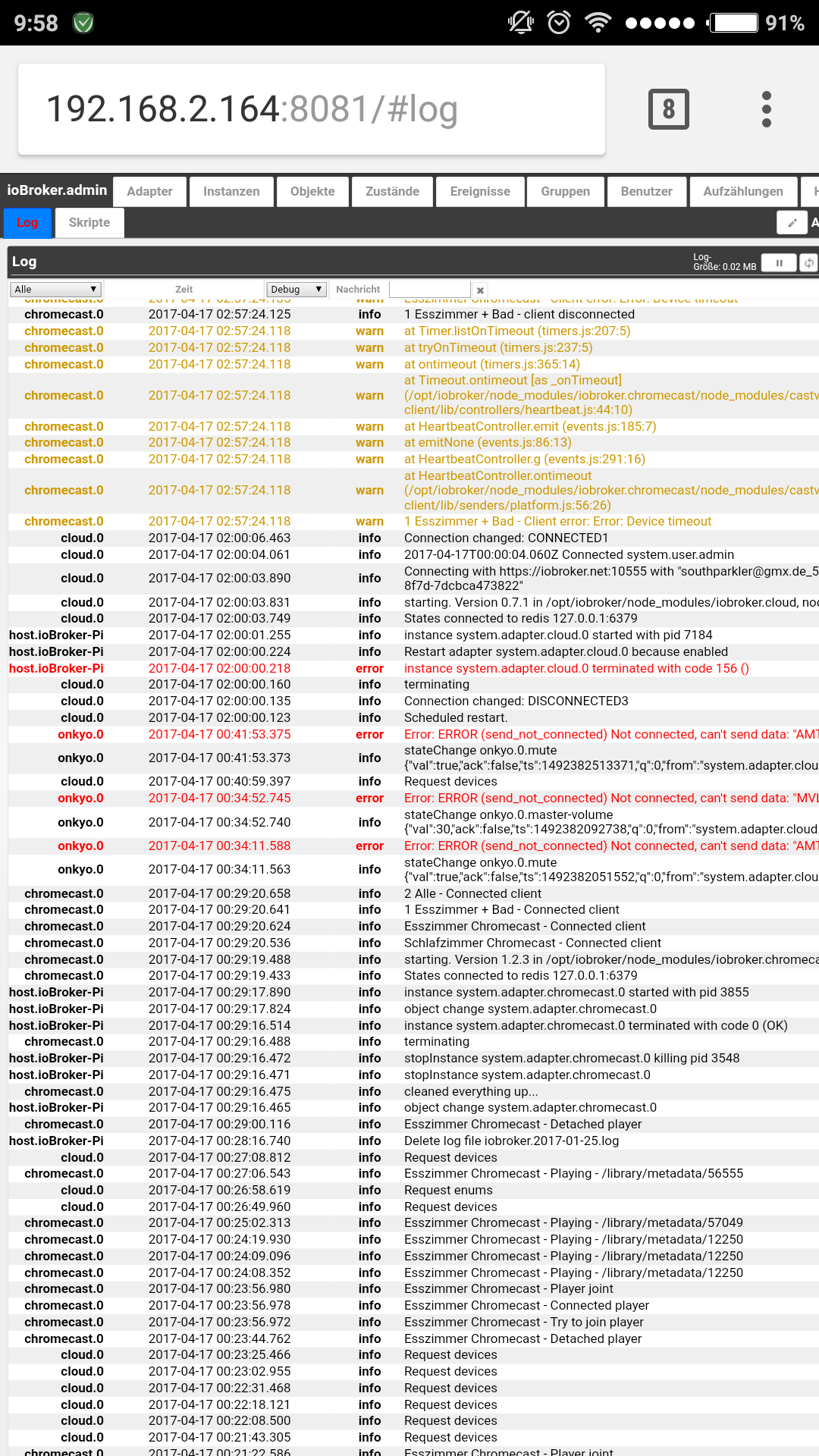
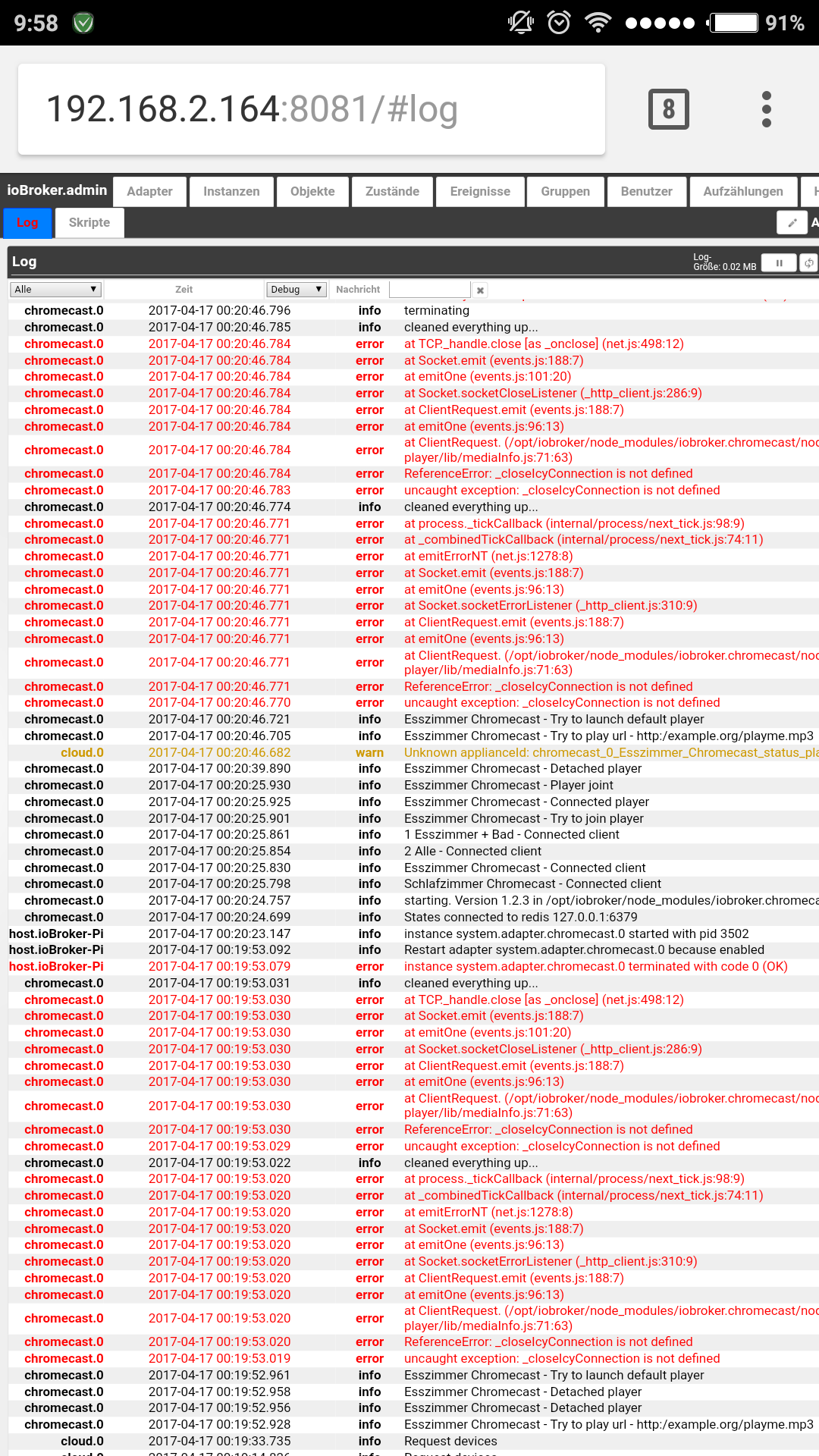
Hab jetzt Gestern noch bissle rumprobiert. Echo zeigt die eingestellten Test eigentlich richtig an und gibt auch die Bestätigung mit "Ok" zurück - leider passiert nur nichts.
-
Meine Installation läuft gerade ;-)
Hast du mit deiner "alten" = 2017-04-10 Version Fehler in der Browserkonsole (F12)?
Gruß
Rainer
-
Nein, das ist aktuell mit der Neuen.

Hey! Du scheinst an dieser Unterhaltung interessiert zu sein, hast aber noch kein Konto.
Hast du es satt, bei jedem Besuch durch die gleichen Beiträge zu scrollen? Wenn du dich für ein Konto anmeldest, kommst du immer genau dorthin zurück, wo du zuvor warst, und kannst dich über neue Antworten benachrichtigen lassen (entweder per E-Mail oder Push-Benachrichtigung). Du kannst auch Lesezeichen speichern und Beiträge positiv bewerten, um anderen Community-Mitgliedern deine Wertschätzung zu zeigen.
Mit deinem Input könnte dieser Beitrag noch besser werden 💗
Registrieren Anmelden375
Online33.0k
Benutzer83.5k
Themen1.3m
Beiträge