




io broker hängt sich auf...
-
Systemdata Bitte Ausfüllen Hardwaresystem: Pi4 Arbeitsspeicher: 4GB Festplattenart: SD-Karte Betriebssystem: Raspbian Node-Version: 14.8.1 Nodejs-Version: 14.8.1 NPM-Version: 6.14.15 Installationsart: Skript Image genutzt: Nein Ort/Name der Imagedatei: Link in den letzten Tagen hat sich ioBroker wiederholt aufgehangen.
Eben habe ich es erneut bemerkt und mal in die LogFile geschaut.Ich könnte hilfe auf der Suche nach der Ursache gebrauchen :-/
/opt/iobroker/log/iobroker.current.log:
pi@raspberrypi:/opt/iobroker/log $ tail iobroker.current.log -n 150 2022-01-11 08:00:20.002 - info: javascript.0 (16613) script.js.xxx.yyyy.Licht_Shelly: true 2022-01-11 08:00:27.813 - info: javascript.0 (16613) Stop script script.js.xxx.yyyy.Licht_Shelly 2022-01-11 08:00:27.822 - info: info.0 (16899) cleaned everything up... 2022-01-11 08:00:27.819 - info: shelly.0 (17124) Closing Adapter 2022-01-11 08:00:27.807 - info: admin.0 (16507) terminating http server on port 8081 2022-01-11 08:00:27.816 - info: javascript.0 (16613) Stop script script.js.common.dryer.Dryer_PI_Regler_Humi 2022-01-11 08:00:27.841 - info: javascript.0 (16613) Stop script script.js.Garten.Wasser.Skript_1 2022-01-11 08:00:27.805 - info: host.raspberrypi received SIGTERM 2022-01-11 08:00:27.815 - info: web.0 (16930) terminated http server on port 8082 2022-01-11 08:00:27.824 - info: lovelace.0 (16963) cleaned everything up... 2022-01-11 08:00:27.854 - info: host.raspberrypi stopInstance system.adapter.admin.0 (force=false, process=true) 2022-01-11 08:00:27.855 - info: host.raspberrypi stopInstance system.adapter.javascript.0 (force=false, process=true) 2022-01-11 08:00:27.856 - info: host.raspberrypi stopInstance system.adapter.history.0 (force=false, process=true) 2022-01-11 08:00:27.857 - info: host.raspberrypi stopInstance system.adapter.scenes.0 (force=false, process=true) 2022-01-11 08:00:27.858 - info: host.raspberrypi stopInstance system.adapter.telegram.0 (force=false, process=true) 2022-01-11 08:00:27.858 - info: host.raspberrypi stopInstance system.adapter.node-red.0 (force=false, process=false) 2022-01-11 08:00:27.859 - info: host.raspberrypi stopInstance system.adapter.sonoff.0 (force=false, process=true) 2022-01-11 08:00:27.859 - info: host.raspberrypi stopInstance system.adapter.tr-064.0 (force=false, process=false) 2022-01-11 08:00:27.861 - info: host.raspberrypi stopInstance system.adapter.ping.0 (force=false, process=true) 2022-01-11 08:00:27.862 - info: host.raspberrypi stopInstance system.adapter.discovery.0 (force=false, process=true) 2022-01-11 08:00:27.862 - info: host.raspberrypi stopInstance system.adapter.info.0 (force=false, process=true) 2022-01-11 08:00:27.863 - info: host.raspberrypi stopInstance system.adapter.web.0 (force=false, process=true) 2022-01-11 08:00:27.864 - info: host.raspberrypi stopInstance system.adapter.lovelace.0 (force=false, process=true) 2022-01-11 08:00:27.864 - info: host.raspberrypi stopInstance system.adapter.vis.0 (force=false, process=false) 2022-01-11 08:00:27.865 - info: host.raspberrypi stopInstance system.adapter.shelly.0 (force=false, process=true) 2022-01-11 08:00:27.866 - info: host.raspberrypi stopInstance system.adapter.zwave2.0 (force=false, process=false) 2022-01-11 08:00:27.866 - info: host.raspberrypi stopInstance system.adapter.tesla-motors.0 (force=false, process=false) 2022-01-11 08:00:27.866 - info: host.raspberrypi stopInstance system.adapter.ble.0 (force=false, process=true) 2022-01-11 08:00:27.878 - info: history.0 (16768) Delete old history "/opt/iobroker/iobroker-data/history/20210110/history.javascript.0.xxx.yyyy.werte.LuftfeuchteMitte.json" 2022-01-11 08:00:27.910 - info: admin.0 (16507) Got terminate signal TERMINATE_YOURSELF 2022-01-11 08:00:27.911 - info: javascript.0 (16613) Got terminate signal TERMINATE_YOURSELF 2022-01-11 08:00:27.927 - info: web.0 (16930) Got terminate signal TERMINATE_YOURSELF 2022-01-11 08:00:27.927 - info: lovelace.0 (16963) Got terminate signal TERMINATE_YOURSELF 2022-01-11 08:00:27.927 - info: info.0 (16899) Got terminate signal TERMINATE_YOURSELF 2022-01-11 08:00:27.917 - info: discovery.0 (16883) Got terminate signal TERMINATE_YOURSELF 2022-01-11 08:00:27.914 - info: sonoff.0 (16836) Got terminate signal TERMINATE_YOURSELF 2022-01-11 08:00:27.916 - info: ping.0 (16852) Got terminate signal TERMINATE_YOURSELF 2022-01-11 08:00:27.948 - info: telegram.0 (26948) Got terminate signal TERMINATE_YOURSELF 2022-01-11 08:00:27.951 - info: discovery.0 (16883) Terminated (START_IMMEDIATELY_AFTER_STOP): Without reason 2022-01-11 08:00:27.912 - info: scenes.0 (16791) Got terminate signal TERMINATE_YOURSELF 2022-01-11 08:00:27.951 - info: javascript.0 (16613) Terminated (START_IMMEDIATELY_AFTER_STOP): Without reason 2022-01-11 08:00:27.954 - info: shelly.0 (17124) Terminated (START_IMMEDIATELY_AFTER_STOP): Without reason 2022-01-11 08:00:27.954 - info: info.0 (16899) Terminated (START_IMMEDIATELY_AFTER_STOP): Without reason 2022-01-11 08:00:27.956 - info: lovelace.0 (16963) Terminated (START_IMMEDIATELY_AFTER_STOP): Without reason 2022-01-11 08:00:27.957 - info: web.0 (16930) Terminated (START_IMMEDIATELY_AFTER_STOP): Without reason 2022-01-11 08:00:27.957 - info: admin.0 (16507) Terminated (START_IMMEDIATELY_AFTER_STOP): Without reason 2022-01-11 08:00:27.960 - info: scenes.0 (16791) Terminated (START_IMMEDIATELY_AFTER_STOP): Without reason 2022-01-11 08:00:27.951 - info: ble.0 (17163) Terminated (START_IMMEDIATELY_AFTER_STOP): Without reason 2022-01-11 08:00:27.966 - info: shelly.0 (17124) Got terminate signal TERMINATE_YOURSELF 2022-01-11 08:00:27.969 - info: ble.0 (17163) Got terminate signal TERMINATE_YOURSELF 2022-01-11 08:00:27.976 - info: host.raspberrypi stopInstance system.adapter.admin.0 send kill signal 2022-01-11 08:00:27.978 - info: host.raspberrypi stopInstance system.adapter.javascript.0 send kill signal 2022-01-11 08:00:27.979 - info: host.raspberrypi stopInstance system.adapter.scenes.0 send kill signal 2022-01-11 08:00:27.979 - info: host.raspberrypi stopInstance system.adapter.telegram.0 send kill signal 2022-01-11 08:00:27.980 - info: host.raspberrypi stopInstance system.adapter.sonoff.0 send kill signal 2022-01-11 08:00:27.980 - info: host.raspberrypi stopInstance system.adapter.ping.0 send kill signal 2022-01-11 08:00:27.980 - info: host.raspberrypi stopInstance system.adapter.discovery.0 send kill signal 2022-01-11 08:00:27.980 - info: host.raspberrypi stopInstance system.adapter.info.0 send kill signal 2022-01-11 08:00:27.981 - info: host.raspberrypi stopInstance system.adapter.web.0 send kill signal 2022-01-11 08:00:27.981 - info: host.raspberrypi stopInstance system.adapter.lovelace.0 send kill signal 2022-01-11 08:00:27.981 - info: host.raspberrypi stopInstance system.adapter.shelly.0 send kill signal 2022-01-11 08:00:27.985 - info: host.raspberrypi stopInstance system.adapter.ble.0 send kill signal 2022-01-11 08:00:28.025 - error: telegram.0 (26948) Cannot send message [chatId - 929751139]: Error: ETELEGRAM: 403 Forbidden: bot was blocked by the user 2022-01-11 08:00:28.321 - info: sonoff.0 (16836) Terminated (START_IMMEDIATELY_AFTER_STOP): Without reason 2022-01-11 08:00:28.322 - info: ping.0 (16852) Terminated (START_IMMEDIATELY_AFTER_STOP): Without reason 2022-01-11 08:00:28.350 - info: telegram.0 (26948) Terminated (START_IMMEDIATELY_AFTER_STOP): Without reason 2022-01-11 08:00:27.900 - info: history.0 (16768) Delete old history "/opt/iobroker/iobroker-data/history/20210110/history.javascript.0.xxx.yyyy.werte.LuftfeuchteUnten.json" 2022-01-11 08:00:27.912 - info: history.0 (16768) Delete old history "/opt/iobroker/iobroker-data/history/20210110/history.javascript.0.xxx.yyy.werte.LuftfeuchteAbluft.json" ..... 2022-01-11 08:00:28.086 - info: history.0 (16768) Delete old history "/opt/iobroker/iobroker-data/history/20210110/history.shelly.0.SHBDUO-1#D0CC1A#1.lights.brightness.json" 2022-01-11 08:00:28.086 - info: history.0 (16768) Delete old history dir "/opt/iobroker/iobroker-data/history/20210110" 2022-01-11 08:00:28.941 - info: host.raspberrypi instance system.adapter.javascript.0 terminated with code 156 (START_IMMEDIATELY_AFTER_STOP) 2022-01-11 08:00:28.943 - info: host.raspberrypi instance system.adapter.discovery.0 terminated with code 156 (START_IMMEDIATELY_AFTER_STOP) 2022-01-11 08:00:29.075 - info: host.raspberrypi instance system.adapter.info.0 terminated with code 156 (START_IMMEDIATELY_AFTER_STOP) 2022-01-11 08:00:29.076 - info: host.raspberrypi instance system.adapter.web.0 terminated with code 156 (START_IMMEDIATELY_AFTER_STOP) 2022-01-11 08:00:29.077 - info: host.raspberrypi stopInstance system.adapter.telegram.0 killing pid 26948 2022-01-11 08:00:29.078 - info: host.raspberrypi stopInstance system.adapter.sonoff.0 killing pid 16836 2022-01-11 08:00:29.079 - info: host.raspberrypi stopInstance system.adapter.ping.0 killing pid 16852 2022-01-11 08:00:29.158 - info: host.raspberrypi instance system.adapter.lovelace.0 terminated with code 156 (START_IMMEDIATELY_AFTER_STOP) 2022-01-11 08:00:29.158 - info: host.raspberrypi instance system.adapter.scenes.0 terminated with code 156 (START_IMMEDIATELY_AFTER_STOP) 2022-01-11 08:00:29.198 - info: history.0 (16768) Terminated (START_IMMEDIATELY_AFTER_STOP): Without reason 2022-01-11 08:00:29.190 - info: host.raspberrypi instance system.adapter.shelly.0 terminated with code 156 (START_IMMEDIATELY_AFTER_STOP) 2022-01-11 08:00:29.363 - info: host.raspberrypi instance system.adapter.admin.0 terminated with code 156 (START_IMMEDIATELY_AFTER_STOP) 2022-01-11 08:00:29.364 - info: host.raspberrypi instance system.adapter.ble.0 terminated with code 156 (START_IMMEDIATELY_AFTER_STOP) 2022-01-11 08:00:29.531 - warn: host.raspberrypi instance system.adapter.sonoff.0 terminated due to SIGTERM 2022-01-11 08:00:29.531 - info: host.raspberrypi instance system.adapter.sonoff.0 terminated with code null () 2022-01-11 08:00:29.532 - warn: host.raspberrypi instance system.adapter.ping.0 terminated due to SIGTERM 2022-01-11 08:00:29.532 - info: host.raspberrypi instance system.adapter.ping.0 terminated with code null () 2022-01-11 08:00:29.561 - warn: host.raspberrypi instance system.adapter.telegram.0 terminated due to SIGTERM 2022-01-11 08:00:29.561 - info: host.raspberrypi instance system.adapter.telegram.0 terminated with code null () 2022-01-11 08:00:29.817 - info: host.raspberrypi instance system.adapter.history.0 terminated with code 156 (START_IMMEDIATELY_AFTER_STOP) 2022-01-11 08:00:29.817 - info: host.raspberrypi All instances are stopped. 2022-01-11 08:00:29.984 - info: host.raspberrypi terminated -
Systemdata Bitte Ausfüllen Hardwaresystem: Pi4 Arbeitsspeicher: 4GB Festplattenart: SD-Karte Betriebssystem: Raspbian Node-Version: 14.8.1 Nodejs-Version: 14.8.1 NPM-Version: 6.14.15 Installationsart: Skript Image genutzt: Nein Ort/Name der Imagedatei: Link in den letzten Tagen hat sich ioBroker wiederholt aufgehangen.
Eben habe ich es erneut bemerkt und mal in die LogFile geschaut.Ich könnte hilfe auf der Suche nach der Ursache gebrauchen :-/
/opt/iobroker/log/iobroker.current.log:
pi@raspberrypi:/opt/iobroker/log $ tail iobroker.current.log -n 150 2022-01-11 08:00:20.002 - info: javascript.0 (16613) script.js.xxx.yyyy.Licht_Shelly: true 2022-01-11 08:00:27.813 - info: javascript.0 (16613) Stop script script.js.xxx.yyyy.Licht_Shelly 2022-01-11 08:00:27.822 - info: info.0 (16899) cleaned everything up... 2022-01-11 08:00:27.819 - info: shelly.0 (17124) Closing Adapter 2022-01-11 08:00:27.807 - info: admin.0 (16507) terminating http server on port 8081 2022-01-11 08:00:27.816 - info: javascript.0 (16613) Stop script script.js.common.dryer.Dryer_PI_Regler_Humi 2022-01-11 08:00:27.841 - info: javascript.0 (16613) Stop script script.js.Garten.Wasser.Skript_1 2022-01-11 08:00:27.805 - info: host.raspberrypi received SIGTERM 2022-01-11 08:00:27.815 - info: web.0 (16930) terminated http server on port 8082 2022-01-11 08:00:27.824 - info: lovelace.0 (16963) cleaned everything up... 2022-01-11 08:00:27.854 - info: host.raspberrypi stopInstance system.adapter.admin.0 (force=false, process=true) 2022-01-11 08:00:27.855 - info: host.raspberrypi stopInstance system.adapter.javascript.0 (force=false, process=true) 2022-01-11 08:00:27.856 - info: host.raspberrypi stopInstance system.adapter.history.0 (force=false, process=true) 2022-01-11 08:00:27.857 - info: host.raspberrypi stopInstance system.adapter.scenes.0 (force=false, process=true) 2022-01-11 08:00:27.858 - info: host.raspberrypi stopInstance system.adapter.telegram.0 (force=false, process=true) 2022-01-11 08:00:27.858 - info: host.raspberrypi stopInstance system.adapter.node-red.0 (force=false, process=false) 2022-01-11 08:00:27.859 - info: host.raspberrypi stopInstance system.adapter.sonoff.0 (force=false, process=true) 2022-01-11 08:00:27.859 - info: host.raspberrypi stopInstance system.adapter.tr-064.0 (force=false, process=false) 2022-01-11 08:00:27.861 - info: host.raspberrypi stopInstance system.adapter.ping.0 (force=false, process=true) 2022-01-11 08:00:27.862 - info: host.raspberrypi stopInstance system.adapter.discovery.0 (force=false, process=true) 2022-01-11 08:00:27.862 - info: host.raspberrypi stopInstance system.adapter.info.0 (force=false, process=true) 2022-01-11 08:00:27.863 - info: host.raspberrypi stopInstance system.adapter.web.0 (force=false, process=true) 2022-01-11 08:00:27.864 - info: host.raspberrypi stopInstance system.adapter.lovelace.0 (force=false, process=true) 2022-01-11 08:00:27.864 - info: host.raspberrypi stopInstance system.adapter.vis.0 (force=false, process=false) 2022-01-11 08:00:27.865 - info: host.raspberrypi stopInstance system.adapter.shelly.0 (force=false, process=true) 2022-01-11 08:00:27.866 - info: host.raspberrypi stopInstance system.adapter.zwave2.0 (force=false, process=false) 2022-01-11 08:00:27.866 - info: host.raspberrypi stopInstance system.adapter.tesla-motors.0 (force=false, process=false) 2022-01-11 08:00:27.866 - info: host.raspberrypi stopInstance system.adapter.ble.0 (force=false, process=true) 2022-01-11 08:00:27.878 - info: history.0 (16768) Delete old history "/opt/iobroker/iobroker-data/history/20210110/history.javascript.0.xxx.yyyy.werte.LuftfeuchteMitte.json" 2022-01-11 08:00:27.910 - info: admin.0 (16507) Got terminate signal TERMINATE_YOURSELF 2022-01-11 08:00:27.911 - info: javascript.0 (16613) Got terminate signal TERMINATE_YOURSELF 2022-01-11 08:00:27.927 - info: web.0 (16930) Got terminate signal TERMINATE_YOURSELF 2022-01-11 08:00:27.927 - info: lovelace.0 (16963) Got terminate signal TERMINATE_YOURSELF 2022-01-11 08:00:27.927 - info: info.0 (16899) Got terminate signal TERMINATE_YOURSELF 2022-01-11 08:00:27.917 - info: discovery.0 (16883) Got terminate signal TERMINATE_YOURSELF 2022-01-11 08:00:27.914 - info: sonoff.0 (16836) Got terminate signal TERMINATE_YOURSELF 2022-01-11 08:00:27.916 - info: ping.0 (16852) Got terminate signal TERMINATE_YOURSELF 2022-01-11 08:00:27.948 - info: telegram.0 (26948) Got terminate signal TERMINATE_YOURSELF 2022-01-11 08:00:27.951 - info: discovery.0 (16883) Terminated (START_IMMEDIATELY_AFTER_STOP): Without reason 2022-01-11 08:00:27.912 - info: scenes.0 (16791) Got terminate signal TERMINATE_YOURSELF 2022-01-11 08:00:27.951 - info: javascript.0 (16613) Terminated (START_IMMEDIATELY_AFTER_STOP): Without reason 2022-01-11 08:00:27.954 - info: shelly.0 (17124) Terminated (START_IMMEDIATELY_AFTER_STOP): Without reason 2022-01-11 08:00:27.954 - info: info.0 (16899) Terminated (START_IMMEDIATELY_AFTER_STOP): Without reason 2022-01-11 08:00:27.956 - info: lovelace.0 (16963) Terminated (START_IMMEDIATELY_AFTER_STOP): Without reason 2022-01-11 08:00:27.957 - info: web.0 (16930) Terminated (START_IMMEDIATELY_AFTER_STOP): Without reason 2022-01-11 08:00:27.957 - info: admin.0 (16507) Terminated (START_IMMEDIATELY_AFTER_STOP): Without reason 2022-01-11 08:00:27.960 - info: scenes.0 (16791) Terminated (START_IMMEDIATELY_AFTER_STOP): Without reason 2022-01-11 08:00:27.951 - info: ble.0 (17163) Terminated (START_IMMEDIATELY_AFTER_STOP): Without reason 2022-01-11 08:00:27.966 - info: shelly.0 (17124) Got terminate signal TERMINATE_YOURSELF 2022-01-11 08:00:27.969 - info: ble.0 (17163) Got terminate signal TERMINATE_YOURSELF 2022-01-11 08:00:27.976 - info: host.raspberrypi stopInstance system.adapter.admin.0 send kill signal 2022-01-11 08:00:27.978 - info: host.raspberrypi stopInstance system.adapter.javascript.0 send kill signal 2022-01-11 08:00:27.979 - info: host.raspberrypi stopInstance system.adapter.scenes.0 send kill signal 2022-01-11 08:00:27.979 - info: host.raspberrypi stopInstance system.adapter.telegram.0 send kill signal 2022-01-11 08:00:27.980 - info: host.raspberrypi stopInstance system.adapter.sonoff.0 send kill signal 2022-01-11 08:00:27.980 - info: host.raspberrypi stopInstance system.adapter.ping.0 send kill signal 2022-01-11 08:00:27.980 - info: host.raspberrypi stopInstance system.adapter.discovery.0 send kill signal 2022-01-11 08:00:27.980 - info: host.raspberrypi stopInstance system.adapter.info.0 send kill signal 2022-01-11 08:00:27.981 - info: host.raspberrypi stopInstance system.adapter.web.0 send kill signal 2022-01-11 08:00:27.981 - info: host.raspberrypi stopInstance system.adapter.lovelace.0 send kill signal 2022-01-11 08:00:27.981 - info: host.raspberrypi stopInstance system.adapter.shelly.0 send kill signal 2022-01-11 08:00:27.985 - info: host.raspberrypi stopInstance system.adapter.ble.0 send kill signal 2022-01-11 08:00:28.025 - error: telegram.0 (26948) Cannot send message [chatId - 929751139]: Error: ETELEGRAM: 403 Forbidden: bot was blocked by the user 2022-01-11 08:00:28.321 - info: sonoff.0 (16836) Terminated (START_IMMEDIATELY_AFTER_STOP): Without reason 2022-01-11 08:00:28.322 - info: ping.0 (16852) Terminated (START_IMMEDIATELY_AFTER_STOP): Without reason 2022-01-11 08:00:28.350 - info: telegram.0 (26948) Terminated (START_IMMEDIATELY_AFTER_STOP): Without reason 2022-01-11 08:00:27.900 - info: history.0 (16768) Delete old history "/opt/iobroker/iobroker-data/history/20210110/history.javascript.0.xxx.yyyy.werte.LuftfeuchteUnten.json" 2022-01-11 08:00:27.912 - info: history.0 (16768) Delete old history "/opt/iobroker/iobroker-data/history/20210110/history.javascript.0.xxx.yyy.werte.LuftfeuchteAbluft.json" ..... 2022-01-11 08:00:28.086 - info: history.0 (16768) Delete old history "/opt/iobroker/iobroker-data/history/20210110/history.shelly.0.SHBDUO-1#D0CC1A#1.lights.brightness.json" 2022-01-11 08:00:28.086 - info: history.0 (16768) Delete old history dir "/opt/iobroker/iobroker-data/history/20210110" 2022-01-11 08:00:28.941 - info: host.raspberrypi instance system.adapter.javascript.0 terminated with code 156 (START_IMMEDIATELY_AFTER_STOP) 2022-01-11 08:00:28.943 - info: host.raspberrypi instance system.adapter.discovery.0 terminated with code 156 (START_IMMEDIATELY_AFTER_STOP) 2022-01-11 08:00:29.075 - info: host.raspberrypi instance system.adapter.info.0 terminated with code 156 (START_IMMEDIATELY_AFTER_STOP) 2022-01-11 08:00:29.076 - info: host.raspberrypi instance system.adapter.web.0 terminated with code 156 (START_IMMEDIATELY_AFTER_STOP) 2022-01-11 08:00:29.077 - info: host.raspberrypi stopInstance system.adapter.telegram.0 killing pid 26948 2022-01-11 08:00:29.078 - info: host.raspberrypi stopInstance system.adapter.sonoff.0 killing pid 16836 2022-01-11 08:00:29.079 - info: host.raspberrypi stopInstance system.adapter.ping.0 killing pid 16852 2022-01-11 08:00:29.158 - info: host.raspberrypi instance system.adapter.lovelace.0 terminated with code 156 (START_IMMEDIATELY_AFTER_STOP) 2022-01-11 08:00:29.158 - info: host.raspberrypi instance system.adapter.scenes.0 terminated with code 156 (START_IMMEDIATELY_AFTER_STOP) 2022-01-11 08:00:29.198 - info: history.0 (16768) Terminated (START_IMMEDIATELY_AFTER_STOP): Without reason 2022-01-11 08:00:29.190 - info: host.raspberrypi instance system.adapter.shelly.0 terminated with code 156 (START_IMMEDIATELY_AFTER_STOP) 2022-01-11 08:00:29.363 - info: host.raspberrypi instance system.adapter.admin.0 terminated with code 156 (START_IMMEDIATELY_AFTER_STOP) 2022-01-11 08:00:29.364 - info: host.raspberrypi instance system.adapter.ble.0 terminated with code 156 (START_IMMEDIATELY_AFTER_STOP) 2022-01-11 08:00:29.531 - warn: host.raspberrypi instance system.adapter.sonoff.0 terminated due to SIGTERM 2022-01-11 08:00:29.531 - info: host.raspberrypi instance system.adapter.sonoff.0 terminated with code null () 2022-01-11 08:00:29.532 - warn: host.raspberrypi instance system.adapter.ping.0 terminated due to SIGTERM 2022-01-11 08:00:29.532 - info: host.raspberrypi instance system.adapter.ping.0 terminated with code null () 2022-01-11 08:00:29.561 - warn: host.raspberrypi instance system.adapter.telegram.0 terminated due to SIGTERM 2022-01-11 08:00:29.561 - info: host.raspberrypi instance system.adapter.telegram.0 terminated with code null () 2022-01-11 08:00:29.817 - info: host.raspberrypi instance system.adapter.history.0 terminated with code 156 (START_IMMEDIATELY_AFTER_STOP) 2022-01-11 08:00:29.817 - info: host.raspberrypi All instances are stopped. 2022-01-11 08:00:29.984 - info: host.raspberrypi terminated@peterfrosta sagte in io broker hängt sich auf...:
Ich könnte hilfe auf der Suche nach der Ursache gebrauchen
@peterfrosta sagte in io broker hängt sich auf...:
in den letzten Tagen hat sich ioBroker wiederholt aufgehangen.
immer genau um 08:00 Uhr?
-
Systemdata Bitte Ausfüllen Hardwaresystem: Pi4 Arbeitsspeicher: 4GB Festplattenart: SD-Karte Betriebssystem: Raspbian Node-Version: 14.8.1 Nodejs-Version: 14.8.1 NPM-Version: 6.14.15 Installationsart: Skript Image genutzt: Nein Ort/Name der Imagedatei: Link in den letzten Tagen hat sich ioBroker wiederholt aufgehangen.
Eben habe ich es erneut bemerkt und mal in die LogFile geschaut.Ich könnte hilfe auf der Suche nach der Ursache gebrauchen :-/
/opt/iobroker/log/iobroker.current.log:
pi@raspberrypi:/opt/iobroker/log $ tail iobroker.current.log -n 150 2022-01-11 08:00:20.002 - info: javascript.0 (16613) script.js.xxx.yyyy.Licht_Shelly: true 2022-01-11 08:00:27.813 - info: javascript.0 (16613) Stop script script.js.xxx.yyyy.Licht_Shelly 2022-01-11 08:00:27.822 - info: info.0 (16899) cleaned everything up... 2022-01-11 08:00:27.819 - info: shelly.0 (17124) Closing Adapter 2022-01-11 08:00:27.807 - info: admin.0 (16507) terminating http server on port 8081 2022-01-11 08:00:27.816 - info: javascript.0 (16613) Stop script script.js.common.dryer.Dryer_PI_Regler_Humi 2022-01-11 08:00:27.841 - info: javascript.0 (16613) Stop script script.js.Garten.Wasser.Skript_1 2022-01-11 08:00:27.805 - info: host.raspberrypi received SIGTERM 2022-01-11 08:00:27.815 - info: web.0 (16930) terminated http server on port 8082 2022-01-11 08:00:27.824 - info: lovelace.0 (16963) cleaned everything up... 2022-01-11 08:00:27.854 - info: host.raspberrypi stopInstance system.adapter.admin.0 (force=false, process=true) 2022-01-11 08:00:27.855 - info: host.raspberrypi stopInstance system.adapter.javascript.0 (force=false, process=true) 2022-01-11 08:00:27.856 - info: host.raspberrypi stopInstance system.adapter.history.0 (force=false, process=true) 2022-01-11 08:00:27.857 - info: host.raspberrypi stopInstance system.adapter.scenes.0 (force=false, process=true) 2022-01-11 08:00:27.858 - info: host.raspberrypi stopInstance system.adapter.telegram.0 (force=false, process=true) 2022-01-11 08:00:27.858 - info: host.raspberrypi stopInstance system.adapter.node-red.0 (force=false, process=false) 2022-01-11 08:00:27.859 - info: host.raspberrypi stopInstance system.adapter.sonoff.0 (force=false, process=true) 2022-01-11 08:00:27.859 - info: host.raspberrypi stopInstance system.adapter.tr-064.0 (force=false, process=false) 2022-01-11 08:00:27.861 - info: host.raspberrypi stopInstance system.adapter.ping.0 (force=false, process=true) 2022-01-11 08:00:27.862 - info: host.raspberrypi stopInstance system.adapter.discovery.0 (force=false, process=true) 2022-01-11 08:00:27.862 - info: host.raspberrypi stopInstance system.adapter.info.0 (force=false, process=true) 2022-01-11 08:00:27.863 - info: host.raspberrypi stopInstance system.adapter.web.0 (force=false, process=true) 2022-01-11 08:00:27.864 - info: host.raspberrypi stopInstance system.adapter.lovelace.0 (force=false, process=true) 2022-01-11 08:00:27.864 - info: host.raspberrypi stopInstance system.adapter.vis.0 (force=false, process=false) 2022-01-11 08:00:27.865 - info: host.raspberrypi stopInstance system.adapter.shelly.0 (force=false, process=true) 2022-01-11 08:00:27.866 - info: host.raspberrypi stopInstance system.adapter.zwave2.0 (force=false, process=false) 2022-01-11 08:00:27.866 - info: host.raspberrypi stopInstance system.adapter.tesla-motors.0 (force=false, process=false) 2022-01-11 08:00:27.866 - info: host.raspberrypi stopInstance system.adapter.ble.0 (force=false, process=true) 2022-01-11 08:00:27.878 - info: history.0 (16768) Delete old history "/opt/iobroker/iobroker-data/history/20210110/history.javascript.0.xxx.yyyy.werte.LuftfeuchteMitte.json" 2022-01-11 08:00:27.910 - info: admin.0 (16507) Got terminate signal TERMINATE_YOURSELF 2022-01-11 08:00:27.911 - info: javascript.0 (16613) Got terminate signal TERMINATE_YOURSELF 2022-01-11 08:00:27.927 - info: web.0 (16930) Got terminate signal TERMINATE_YOURSELF 2022-01-11 08:00:27.927 - info: lovelace.0 (16963) Got terminate signal TERMINATE_YOURSELF 2022-01-11 08:00:27.927 - info: info.0 (16899) Got terminate signal TERMINATE_YOURSELF 2022-01-11 08:00:27.917 - info: discovery.0 (16883) Got terminate signal TERMINATE_YOURSELF 2022-01-11 08:00:27.914 - info: sonoff.0 (16836) Got terminate signal TERMINATE_YOURSELF 2022-01-11 08:00:27.916 - info: ping.0 (16852) Got terminate signal TERMINATE_YOURSELF 2022-01-11 08:00:27.948 - info: telegram.0 (26948) Got terminate signal TERMINATE_YOURSELF 2022-01-11 08:00:27.951 - info: discovery.0 (16883) Terminated (START_IMMEDIATELY_AFTER_STOP): Without reason 2022-01-11 08:00:27.912 - info: scenes.0 (16791) Got terminate signal TERMINATE_YOURSELF 2022-01-11 08:00:27.951 - info: javascript.0 (16613) Terminated (START_IMMEDIATELY_AFTER_STOP): Without reason 2022-01-11 08:00:27.954 - info: shelly.0 (17124) Terminated (START_IMMEDIATELY_AFTER_STOP): Without reason 2022-01-11 08:00:27.954 - info: info.0 (16899) Terminated (START_IMMEDIATELY_AFTER_STOP): Without reason 2022-01-11 08:00:27.956 - info: lovelace.0 (16963) Terminated (START_IMMEDIATELY_AFTER_STOP): Without reason 2022-01-11 08:00:27.957 - info: web.0 (16930) Terminated (START_IMMEDIATELY_AFTER_STOP): Without reason 2022-01-11 08:00:27.957 - info: admin.0 (16507) Terminated (START_IMMEDIATELY_AFTER_STOP): Without reason 2022-01-11 08:00:27.960 - info: scenes.0 (16791) Terminated (START_IMMEDIATELY_AFTER_STOP): Without reason 2022-01-11 08:00:27.951 - info: ble.0 (17163) Terminated (START_IMMEDIATELY_AFTER_STOP): Without reason 2022-01-11 08:00:27.966 - info: shelly.0 (17124) Got terminate signal TERMINATE_YOURSELF 2022-01-11 08:00:27.969 - info: ble.0 (17163) Got terminate signal TERMINATE_YOURSELF 2022-01-11 08:00:27.976 - info: host.raspberrypi stopInstance system.adapter.admin.0 send kill signal 2022-01-11 08:00:27.978 - info: host.raspberrypi stopInstance system.adapter.javascript.0 send kill signal 2022-01-11 08:00:27.979 - info: host.raspberrypi stopInstance system.adapter.scenes.0 send kill signal 2022-01-11 08:00:27.979 - info: host.raspberrypi stopInstance system.adapter.telegram.0 send kill signal 2022-01-11 08:00:27.980 - info: host.raspberrypi stopInstance system.adapter.sonoff.0 send kill signal 2022-01-11 08:00:27.980 - info: host.raspberrypi stopInstance system.adapter.ping.0 send kill signal 2022-01-11 08:00:27.980 - info: host.raspberrypi stopInstance system.adapter.discovery.0 send kill signal 2022-01-11 08:00:27.980 - info: host.raspberrypi stopInstance system.adapter.info.0 send kill signal 2022-01-11 08:00:27.981 - info: host.raspberrypi stopInstance system.adapter.web.0 send kill signal 2022-01-11 08:00:27.981 - info: host.raspberrypi stopInstance system.adapter.lovelace.0 send kill signal 2022-01-11 08:00:27.981 - info: host.raspberrypi stopInstance system.adapter.shelly.0 send kill signal 2022-01-11 08:00:27.985 - info: host.raspberrypi stopInstance system.adapter.ble.0 send kill signal 2022-01-11 08:00:28.025 - error: telegram.0 (26948) Cannot send message [chatId - 929751139]: Error: ETELEGRAM: 403 Forbidden: bot was blocked by the user 2022-01-11 08:00:28.321 - info: sonoff.0 (16836) Terminated (START_IMMEDIATELY_AFTER_STOP): Without reason 2022-01-11 08:00:28.322 - info: ping.0 (16852) Terminated (START_IMMEDIATELY_AFTER_STOP): Without reason 2022-01-11 08:00:28.350 - info: telegram.0 (26948) Terminated (START_IMMEDIATELY_AFTER_STOP): Without reason 2022-01-11 08:00:27.900 - info: history.0 (16768) Delete old history "/opt/iobroker/iobroker-data/history/20210110/history.javascript.0.xxx.yyyy.werte.LuftfeuchteUnten.json" 2022-01-11 08:00:27.912 - info: history.0 (16768) Delete old history "/opt/iobroker/iobroker-data/history/20210110/history.javascript.0.xxx.yyy.werte.LuftfeuchteAbluft.json" ..... 2022-01-11 08:00:28.086 - info: history.0 (16768) Delete old history "/opt/iobroker/iobroker-data/history/20210110/history.shelly.0.SHBDUO-1#D0CC1A#1.lights.brightness.json" 2022-01-11 08:00:28.086 - info: history.0 (16768) Delete old history dir "/opt/iobroker/iobroker-data/history/20210110" 2022-01-11 08:00:28.941 - info: host.raspberrypi instance system.adapter.javascript.0 terminated with code 156 (START_IMMEDIATELY_AFTER_STOP) 2022-01-11 08:00:28.943 - info: host.raspberrypi instance system.adapter.discovery.0 terminated with code 156 (START_IMMEDIATELY_AFTER_STOP) 2022-01-11 08:00:29.075 - info: host.raspberrypi instance system.adapter.info.0 terminated with code 156 (START_IMMEDIATELY_AFTER_STOP) 2022-01-11 08:00:29.076 - info: host.raspberrypi instance system.adapter.web.0 terminated with code 156 (START_IMMEDIATELY_AFTER_STOP) 2022-01-11 08:00:29.077 - info: host.raspberrypi stopInstance system.adapter.telegram.0 killing pid 26948 2022-01-11 08:00:29.078 - info: host.raspberrypi stopInstance system.adapter.sonoff.0 killing pid 16836 2022-01-11 08:00:29.079 - info: host.raspberrypi stopInstance system.adapter.ping.0 killing pid 16852 2022-01-11 08:00:29.158 - info: host.raspberrypi instance system.adapter.lovelace.0 terminated with code 156 (START_IMMEDIATELY_AFTER_STOP) 2022-01-11 08:00:29.158 - info: host.raspberrypi instance system.adapter.scenes.0 terminated with code 156 (START_IMMEDIATELY_AFTER_STOP) 2022-01-11 08:00:29.198 - info: history.0 (16768) Terminated (START_IMMEDIATELY_AFTER_STOP): Without reason 2022-01-11 08:00:29.190 - info: host.raspberrypi instance system.adapter.shelly.0 terminated with code 156 (START_IMMEDIATELY_AFTER_STOP) 2022-01-11 08:00:29.363 - info: host.raspberrypi instance system.adapter.admin.0 terminated with code 156 (START_IMMEDIATELY_AFTER_STOP) 2022-01-11 08:00:29.364 - info: host.raspberrypi instance system.adapter.ble.0 terminated with code 156 (START_IMMEDIATELY_AFTER_STOP) 2022-01-11 08:00:29.531 - warn: host.raspberrypi instance system.adapter.sonoff.0 terminated due to SIGTERM 2022-01-11 08:00:29.531 - info: host.raspberrypi instance system.adapter.sonoff.0 terminated with code null () 2022-01-11 08:00:29.532 - warn: host.raspberrypi instance system.adapter.ping.0 terminated due to SIGTERM 2022-01-11 08:00:29.532 - info: host.raspberrypi instance system.adapter.ping.0 terminated with code null () 2022-01-11 08:00:29.561 - warn: host.raspberrypi instance system.adapter.telegram.0 terminated due to SIGTERM 2022-01-11 08:00:29.561 - info: host.raspberrypi instance system.adapter.telegram.0 terminated with code null () 2022-01-11 08:00:29.817 - info: host.raspberrypi instance system.adapter.history.0 terminated with code 156 (START_IMMEDIATELY_AFTER_STOP) 2022-01-11 08:00:29.817 - info: host.raspberrypi All instances are stopped. 2022-01-11 08:00:29.984 - info: host.raspberrypi terminated@peterfrosta sagte in io broker hängt sich auf...:
2022-01-11 08:00:20.002 - info: javascript.0 (16613) script.js.xxx.yyyy.Licht_Shelly: true
2022-01-11 08:00:27.813 - info: javascript.0 (16613) Stop script script.js.xxx.yyyy.Licht_Shellyschaltest du deine Scripte immer an und aus!?
Was ist vor 8:00 Uhr im Log .
Zeige mal , weitere Info´s
iobroker update - i
iobroker list instances
iobroker status
iobroker version
sudo ln -s /usr/bin/node /usr/bin/nodejs
which nodejs node npm && nodejs -v && node -v && npm -v && sudo apt update && sudo apt update && apt policy nodejs
Ausgabe in Code-Tags </>
-
wo. so schnell hatte ich garnicht mit euch gerechnet...
ich weiß leider nicht ob immer um 8 Uhr.
Leider feuern die Scripte einige Statusmeldungen in die logs.@arteck said in io broker hängt sich auf...:
das sieht nach backup aus
was ein riecher...
# Crontab entry for raspiBackup.sh
#
# (C) 2017-2019 framp at linux-tips-and-tricks dot de
#
# Create a backup once a week on Sunday morning at 5 am (default)
#
00 08 * * * root /usr/local/bin/raspiBackup.sh
Das ist aber erst kürzlich (vermehrt) aufgetretten.
Das Backup passiert so schon seit ueber einem Jahr. -
wo. so schnell hatte ich garnicht mit euch gerechnet...
ich weiß leider nicht ob immer um 8 Uhr.
Leider feuern die Scripte einige Statusmeldungen in die logs.@arteck said in io broker hängt sich auf...:
das sieht nach backup aus
was ein riecher...
# Crontab entry for raspiBackup.sh
#
# (C) 2017-2019 framp at linux-tips-and-tricks dot de
#
# Create a backup once a week on Sunday morning at 5 am (default)
#
00 08 * * * root /usr/local/bin/raspiBackup.sh
Das ist aber erst kürzlich (vermehrt) aufgetretten.
Das Backup passiert so schon seit ueber einem Jahr.Das würde ich z. B. nicht über ein skript sondern über den dafür vorgesehenen Adapter machen. Der wird auch immer an neue Gegebenheiten angepasst.
-
@peterfrosta sagte in io broker hängt sich auf...:
2022-01-11 08:00:20.002 - info: javascript.0 (16613) script.js.xxx.yyyy.Licht_Shelly: true
2022-01-11 08:00:27.813 - info: javascript.0 (16613) Stop script script.js.xxx.yyyy.Licht_Shellyschaltest du deine Scripte immer an und aus!?
Was ist vor 8:00 Uhr im Log .
Zeige mal , weitere Info´s
iobroker update - i
iobroker list instances
iobroker status
iobroker version
sudo ln -s /usr/bin/node /usr/bin/nodejs
which nodejs node npm && nodejs -v && node -v && npm -v && sudo apt update && sudo apt update && apt policy nodejs
Ausgabe in Code-Tags </>
pi@raspberrypi:/opt/iobroker/log $ iobroker update - i Used repository: - failed to download new sources, use cached sources update done Adapter "admin" : 5.2.3 , installed 5.1.23 [Updateable] Adapter "ble" : 0.12.0 , installed 0.12.0 Adapter "devices" : 1.0.9 , installed 1.0.9 Adapter "discovery" : 2.7.3 , installed 2.7.3 Adapter "flot" : 1.10.7 , installed 1.10.7 Adapter "habpanel" : 0.4.3 , installed 0.4.3 Adapter "history" : 1.9.14 , installed 1.9.14 Adapter "info" : 1.9.8 , installed 1.9.8 Adapter "javascript" : 5.2.13 , installed 5.2.13 Controller "js-controller" : 3.3.22 , installed 3.3.18 [Updateable] Adapter "lovelace" : 2.0.6 , installed 2.0.6 Adapter "node-red" : 2.4.1 , installed 2.4.1 Adapter "ping" : 1.5.0 , installed 1.5.0 Adapter "scenes" : 2.3.8 , installed 2.3.8 Adapter "shelly" : 4.0.7 , installed 4.0.7 Adapter "simple-api" : 2.6.1 , installed 2.6.1 Adapter "socketio" : 3.1.4 , installed 3.1.4 Adapter "sonoff" : 2.4.5 , installed 2.4.5 Adapter "telegram" : 1.10.0 , installed 1.10.0 Adapter "tesla-motors" : 0.5.2 , installed 0.5.2 Adapter "tr-064" : 4.2.14 , installed 4.2.14 Adapter "vis" : 1.4.5 , installed 1.4.5 Adapter "web" : 3.4.9 , installed 3.4.9 Adapter "zwave2" : 2.4.1 , installed 2.4.1 pi@raspberrypi:/opt/iobroker/log $ pi@raspberrypi:/opt/iobroker/log $ iobroker list instances + system.adapter.admin.0 : admin : raspberrypi - enabled, port: 8081, bind: 0.0.0.0, run as: admin + system.adapter.ble.0 : ble : raspberrypi - enabled system.adapter.devices.0 : devices : raspberrypi - enabled + system.adapter.discovery.0 : discovery : raspberrypi - enabled system.adapter.flot.0 : flot : raspberrypi - enabled + system.adapter.history.0 : history : raspberrypi - enabled + system.adapter.info.0 : info : raspberrypi - enabled + system.adapter.javascript.0 : javascript : raspberrypi - enabled + system.adapter.lovelace.0 : lovelace : raspberrypi - enabled, port: 8091, bind: 0.0.0.0, run as: admin system.adapter.node-red.0 : node-red : raspberrypi - disabled, port: 1880, bind: 0.0.0.0 + system.adapter.ping.0 : ping : raspberrypi - enabled + system.adapter.scenes.0 : scenes : raspberrypi - enabled + system.adapter.shelly.0 : shelly : raspberrypi - enabled, port: 1882, bind: 0.0.0.0 + system.adapter.sonoff.0 : sonoff : raspberrypi - enabled, port: 1883, bind: 0.0.0.0 + system.adapter.telegram.0 : telegram : raspberrypi - enabled, port: 8443, bind: 0.0.0.0 system.adapter.tesla-motors.0 : tesla-motors : raspberrypi - disabled system.adapter.tr-064.0 : tr-064 : raspberrypi - disabled system.adapter.vis.0 : vis : raspberrypi - enabled + system.adapter.web.0 : web : raspberrypi - enabled, port: 8082, bind: 0.0.0.0, run as: admin system.adapter.zwave2.0 : zwave2 : raspberrypi - disabled + instance is alive pi@raspberrypi:/opt/iobroker/log $ pi@raspberrypi:/opt/iobroker/log $ iobroker status iobroker is running on this host. Objects type: file States type: file pi@raspberrypi:/opt/iobroker/log $ pi@raspberrypi:/opt/iobroker/log $ iobroker version 3.3.18 pi@raspberrypi:/opt/iobroker/log $ pi@raspberrypi:/opt/iobroker/log $ sudo ln -s /usr/bin/node /usr/bin/nodejs ln: die symbolische Verknüpfung '/usr/bin/nodejs' konnte nicht angelegt werden: Die Datei existiert bereits pi@raspberrypi:/opt/iobroker/log $ pi@raspberrypi:/opt/iobroker/log $ which nodejs node npm && nodejs -v && node -v && npm -v && sudo apt update && sudo apt update && apt policy nodejs /usr/bin/nodejs /usr/bin/node /usr/bin/npm v14.18.1 v14.18.1 6.14.15 Holen:1 http://archive.raspberrypi.org/debian buster InRelease [32,6 kB] Holen:2 http://raspbian.raspberrypi.org/raspbian buster InRelease [15,0 kB] Holen:3 https://deb.nodesource.com/node_14.x buster InRelease [4.584 B] OK:4 https://download.docker.com/linux/raspbian buster InRelease Holen:5 http://archive.raspberrypi.org/debian buster/main armhf Packages [393 kB] Holen:6 http://raspbian.raspberrypi.org/raspbian buster/main armhf Packages [13,0 MB] Holen:7 https://deb.nodesource.com/node_14.x buster/main armhf Packages [780 B] Es wurden 13,5 MB in 55 s geholt (244 kB/s). Paketlisten werden gelesen... Fertig Abhängigkeitsbaum wird aufgebaut. Statusinformationen werden eingelesen.... Fertig Aktualisierung für 15 Pakete verfügbar. Führen Sie »apt list --upgradable« aus, um sie anzuzeigen. OK:1 http://raspbian.raspberrypi.org/raspbian buster InRelease OK:2 https://download.docker.com/linux/raspbian buster InRelease OK:3 http://archive.raspberrypi.org/debian buster InRelease OK:4 https://deb.nodesource.com/node_14.x buster InRelease Paketlisten werden gelesen... Fertig Abhängigkeitsbaum wird aufgebaut. Statusinformationen werden eingelesen.... Fertig Aktualisierung für 15 Pakete verfügbar. Führen Sie »apt list --upgradable« aus, um sie anzuzeigen. nodejs: Installiert: 14.18.1-deb-1nodesource1 Installationskandidat: 14.18.3-deb-1nodesource1 Versionstabelle: 14.18.3-deb-1nodesource1 500 500 https://deb.nodesource.com/node_14.x buster/main armhf Packages *** 14.18.1-deb-1nodesource1 100 100 /var/lib/dpkg/status 10.24.0~dfsg-1~deb10u1 500 500 http://raspbian.raspberrypi.org/raspbian buster/main armhf Packages -
Das würde ich z. B. nicht über ein skript sondern über den dafür vorgesehenen Adapter machen. Der wird auch immer an neue Gegebenheiten angepasst.
@thomas-braun
mir ist kein Adapter bekannt, der das ganze Image backuped -
@thomas-braun
mir ist kein Adapter bekannt, der das ganze Image backupedBrauchts auch (meist) nicht.
Vermutlich geht dir durch die Aktion nämlich der Speicher aus. Und Prozesse werden vom oom-reaper gekillt.
-
Brauchts auch (meist) nicht.
Vermutlich geht dir durch die Aktion nämlich der Speicher aus. Und Prozesse werden vom oom-reaper gekillt.
@thomas-braun
Brauchen und wollen ^^
Ist halt zum wieder herstellen sehr bewequemDas Pi mit Iobroker an einem anderen Standort verfährt genaus so. Eigentlich machen das alle meine Pis so.. die meisten jedoch nur einmal die Woche
-
@thomas-braun
Brauchen und wollen ^^
Ist halt zum wieder herstellen sehr bewequemDas Pi mit Iobroker an einem anderen Standort verfährt genaus so. Eigentlich machen das alle meine Pis so.. die meisten jedoch nur einmal die Woche
@peterfrosta sagte in io broker hängt sich auf...:
Das Pi mir der Iobroker an einem anderen Standort verwert
????
-
@peterfrosta sagte in io broker hängt sich auf...:
Das Pi mir der Iobroker an einem anderen Standort verwert
????
@homoran said in io broker hängt sich auf...:
@peterfrosta sagte in io broker hängt sich auf...:
Das Pi mir der Iobroker an einem anderen Standort verwert
????
war mit irgendeiner Tastenkombination zufrueh abgesendet worden
-
Brauchts auch (meist) nicht.
Vermutlich geht dir durch die Aktion nämlich der Speicher aus. Und Prozesse werden vom oom-reaper gekillt.
@thomas-braun said in io broker hängt sich auf...:
Brauchts auch (meist) nicht.
Vermutlich geht dir durch die Aktion nämlich der Speicher aus. Und Prozesse werden vom oom-reaper gekillt.
hm.. auf dem Pi läuft parallel noch PiHole drauf
-
@thomas-braun
Brauchen und wollen ^^
Ist halt zum wieder herstellen sehr bewequemDas Pi mit Iobroker an einem anderen Standort verfährt genaus so. Eigentlich machen das alle meine Pis so.. die meisten jedoch nur einmal die Woche
@peterfrosta sagte in io broker hängt sich auf...:
Ist halt zum wieder herstellen sehr bewequem
Knallt dir hier offenbar auf die Füße.
Wollen kann man halt viel, ob es sinnvoll (und technisch stabil machbar) ist ist dann aber die Frage, die sich aber noch vor dem Wollen stellt. -
@homoran said in io broker hängt sich auf...:
@peterfrosta sagte in io broker hängt sich auf...:
Das Pi mir der Iobroker an einem anderen Standort verwert
????
war mit irgendeiner Tastenkombination zufrueh abgesendet worden
@peterfrosta Ah - editiert!
Aber bloss weil es alle (Pi bei dir) machen, ist es deswegen doch nicht richtig.
Ich weiss nicht was du da willst und brauchst, aber je mehr das ist, desto mehr Ressourcen braucht es - bis hin zum Absturz.Ich kann auch nicht glauben, dass deine Installation heute noch so ist, wie "schon immer".
Da wird einiges gewachsen sein und somit noch mehr Ressourcen brauchen. und die sind auch bei 4GB endlich -
@peterfrosta Ah - editiert!
Aber bloss weil es alle (Pi bei dir) machen, ist es deswegen doch nicht richtig.
Ich weiss nicht was du da willst und brauchst, aber je mehr das ist, desto mehr Ressourcen braucht es - bis hin zum Absturz.Ich kann auch nicht glauben, dass deine Installation heute noch so ist, wie "schon immer".
Da wird einiges gewachsen sein und somit noch mehr Ressourcen brauchen. und die sind auch bei 4GB endlichich vergaß!
vor dem Backup wird ioBroker gestoppt und soll auch wieder gestartet werden.
Dann ist das vllt garkein ioBroker Problem?!
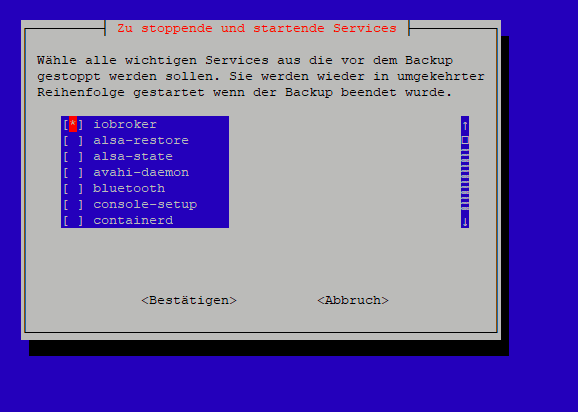
ich müsste in Erfahrung bringen, warum ioBroker nicht wieder startet.
-
@peterfrosta sagte in io broker hängt sich auf...:
Ist halt zum wieder herstellen sehr bewequem
Knallt dir hier offenbar auf die Füße.
Wollen kann man halt viel, ob es sinnvoll (und technisch stabil machbar) ist ist dann aber die Frage, die sich aber noch vor dem Wollen stellt.@thomas-braun
naja... sein Linuxsystem mit DD bzw einem weit verbreitetem Script zu sichern ist jetzt auch nichts technisch ungewöhnliches oder sinnloses oder Gebastel. Fehler oder Änderungen können sich bei allem ergeben. -
@peterfrosta Ah - editiert!
Aber bloss weil es alle (Pi bei dir) machen, ist es deswegen doch nicht richtig.
Ich weiss nicht was du da willst und brauchst, aber je mehr das ist, desto mehr Ressourcen braucht es - bis hin zum Absturz.Ich kann auch nicht glauben, dass deine Installation heute noch so ist, wie "schon immer".
Da wird einiges gewachsen sein und somit noch mehr Ressourcen brauchen. und die sind auch bei 4GB endlich@homoran said in io broker hängt sich auf...:
Ich weiss nicht was du da willst und brauchst, aber je mehr das ist, desto mehr Ressourcen braucht es - bis hin zum Absturz.
iobroker wird ja vor dem Backup gestoppt. Die Info fehlte. Mir ja anfangs auch.
@homoran said in io broker hängt sich auf...:
Ich kann auch nicht glauben, dass deine Installation heute noch so ist, wie "schon immer".
Da wird einiges gewachsen sein und somit noch mehr Ressourcen brauchen. und die sind auch bei 4GB endlichdoch doch.. ausser PiHole, iobroker und RaspiBackup passiert da "nichts" drauf.
Hatte die Tage nur an neuen Scripten gebastelt.



Hey! Du scheinst an dieser Unterhaltung interessiert zu sein, hast aber noch kein Konto.
Hast du es satt, bei jedem Besuch durch die gleichen Beiträge zu scrollen? Wenn du dich für ein Konto anmeldest, kommst du immer genau dorthin zurück, wo du zuvor warst, und kannst dich über neue Antworten benachrichtigen lassen (entweder per E-Mail oder Push-Benachrichtigung). Du kannst auch Lesezeichen speichern und Beiträge positiv bewerten, um anderen Community-Mitgliedern deine Wertschätzung zu zeigen.
Mit deinem Input könnte dieser Beitrag noch besser werden 💗
Registrieren AnmeldenSupport us
444
Online33.0k
Benutzer83.6k
Themen1.3m
Beiträge