Skip to content
  • Home
  • Aktuell
  • Tags
  • 0 Ungelesen 0
  • Kategorien
  • Unreplied
  • Beliebt
  • GitHub
  • Docu
  • Hilfe
Skins
  • Light
  • Brite
  • Cerulean
  • Cosmo
  • Flatly
  • Journal
  • Litera
  • Lumen
  • Lux
  • Materia
  • Minty
  • Morph
  • Pulse
  • Sandstone
  • Simplex
  • Sketchy
  • Spacelab
  • United
  • Yeti
  • Zephyr
  • Dark
  • Cyborg
  • Darkly
  • Quartz
  • Slate
  • Solar
  • Superhero
  • Vapor

  • Standard: (Kein Skin)
  • Kein Skin
Einklappen
ioBroker Logo

Community Forum

donate donate
  1. ioBroker Community Home
  2. Deutsch
  3. ioBroker Allgemein
  4. mihome-vacuum.0 läd keine Map!

NEWS

  • Jahresrückblick 2025 – unser neuer Blogbeitrag ist online! ✨
    BluefoxB
    Bluefox
    17
    1
    4.1k

  • Neuer Blogbeitrag: Monatsrückblick - Dezember 2025 🎄
    BluefoxB
    Bluefox
    13
    1
    1.2k

  • Weihnachtsangebot 2025! 🎄
    BluefoxB
    Bluefox
    25
    1
    2.6k

mihome-vacuum.0 läd keine Map!

Geplant Angeheftet Gesperrt Verschoben ioBroker Allgemein
roborock s5map
59 Beiträge 7 Kommentatoren 4.6k Aufrufe 5 Watching
  • Älteste zuerst
  • Neuste zuerst
  • Meiste Stimmen
Antworten
  • In einem neuen Thema antworten
Anmelden zum Antworten
Dieses Thema wurde gelöscht. Nur Nutzer mit entsprechenden Rechten können es sehen.
  • schmelloS schmello

    Hallo zusammen

    Habe Erfolgreich meinen Roborock S5 über den mihome-vacuum.0 eingerichtet.
    Steuern kann ich diesen doch leder wird die Karte nicht geladen.
    Roborock hat originale Firmare drauf.

    Ist es möglich eine Live Map ohne Root zu erstellen?
    Ich habe auch schon die Option enable Map from xiaomi cloud angekreuzt. Da ich davon ausgegangen bin das die Aktuelle Karte aus der App geladen wird. Doch auch dort wird nichts geladen.
    Kann mit jemand sagen wo mein Problem liegt?

    Thomas BraunT Online
    Thomas BraunT Online
    Thomas Braun
    Most Active
    schrieb am zuletzt editiert von
    #2

    @schmello
    Bitte log-Einträge vom Adapter-Start posten.

    Vermutlich aber das Problem mit 'canvas'.

    Linux-Werkzeugkasten:
    https://forum.iobroker.net/topic/42952/der-kleine-iobroker-linux-werkzeugkasten
    NodeJS Fixer Skript:
    https://forum.iobroker.net/topic/68035/iob-node-fix-skript
    iob_diag: curl -sLf -o diag.sh https://iobroker.net/diag.sh && bash diag.sh

    1 Antwort Letzte Antwort
    0
    • schmelloS Offline
      schmelloS Offline
      schmello
      schrieb am zuletzt editiert von
      #3

      Es ist echt verrückt... Nachdem man hier einen Beitrag geschrieben hat wird auf wundersamme weise die Map geladen.
      (Nach mehreren Neustart :-)
      Hier trotzdem mal der Auszug aus dem Log.
      Nun wurden auch, wie ich im Log sehe Räume angelegt. Wie finde ich heraus welcher Raum welcher ist?
      Ist es denn so das ich eine Live Aufzeichnung über IoBroker nur hin bekomme wenn ich den Roborock gerootet habe?
      Wäre das dann die Option Aktiviere Valetudo?
      Leider ist in Objekte bei Map URL nur ein Interner Pfad. Ich habe gehofft einen Link zu bekommen damit ich die Karte in Mediola einbinden kann. Gibt es da eine Möglichkeit?

      mihome-vacuum.0	2020-08-31 09:58:46.086	info	(748) room: room1 mapped with index 1
      mihome-vacuum.0	2020-08-31 09:58:46.085	info	(748) room: room18 mapped with index 1
      mihome-vacuum.0	2020-08-31 09:58:46.076	info	(748) room: room19 mapped with index 1
      mihome-vacuum.0	2020-08-31 09:58:46.069	info	(748) room: room23 mapped with index 1
      mihome-vacuum.0	2020-08-31 09:58:46.064	info	(748) room: room20 mapped with index 1
      mihome-vacuum.0	2020-08-31 09:58:46.055	info	(748) room: room17 mapped with index 1
      mihome-vacuum.0	2020-08-31 09:58:46.052	info	(748) room: room22 mapped with index 1
      mihome-vacuum.0	2020-08-31 09:58:46.051	info	(748) room: room21 mapped with index 1
      mihome-vacuum.0	2020-08-31 09:58:45.844	info	(748) room: room16 mapped with index 1
      mihome-vacuum.0	2020-08-31 09:58:18.476	info	(748) create states for water box filter
      mihome-vacuum.0	2020-08-31 09:58:18.475	info	(748) create states for water box
      mihome-vacuum.0	2020-08-31 09:58:04.943	warn	(748) Could not receive Mappointer, giving up
      mihome-vacuum.0	2020-08-31 09:57:59.682	info	(748) create state for carpet_mode
      mihome-vacuum.0	2020-08-31 09:57:58.670	info	(748) Connected
      mihome-vacuum.0	2020-08-31 09:57:58.373	info	(748) connecting, this can take up to 10 minutes ...
      mihome-vacuum.0	2020-08-31 09:57:38.387	info	(748) connecting, this can take up to 10 minutes ...
      mihome-vacuum.0	2020-08-31 09:57:18.372	info	(748) connecting, this can take up to 10 minutes ...
      mihome-vacuum.0	2020-08-31 09:56:58.373	info	(748) connecting, this can take up to 10 minutes ...
      mihome-vacuum.0	2020-08-31 09:56:38.371	info	(748) connecting, this can take up to 10 minutes ...
      mihome-vacuum.0	2020-08-31 09:56:18.368	info	(748) connecting, this can take up to 10 minutes ...
      mihome-vacuum.0	2020-08-31 09:55:58.368	info	(748) connecting, this can take up to 10 minutes ...
      mihome-vacuum.0	2020-08-31 09:55:38.371	info	(748) connecting, this can take up to 10 minutes ...
      mihome-vacuum.0	2020-08-31 09:55:18.368	info	(748) connecting, this can take up to 10 minutes ...
      mihome-vacuum.0	2020-08-31 09:54:58.367	info	(748) connecting, this can take up to 10 minutes ...
      mihome-vacuum.0	2020-08-31 09:54:38.367	info	(748) connecting, this can take up to 10 minutes ...
      mihome-vacuum.0	2020-08-31 09:54:18.366	info	(748) connecting, this can take up to 10 minutes ...
      mihome-vacuum.0	2020-08-31 09:53:59.601	info	(748) connecting, this can take up to 10 minutes ...
      mihome-vacuum.0	2020-08-31 09:53:38.466	info	(748) connecting, this can take up to 10 minutes ...
      mihome-vacuum.0	2020-08-31 09:53:18.364	info	(748) connecting, this can take up to 10 minutes ...
      mihome-vacuum.0	2020-08-31 09:52:58.414	info	(748) connecting, this can take up to 10 minutes ...
      mihome-vacuum.0	2020-08-31 09:52:38.359	info	(748) connecting, this can take up to 10 minutes ...
      mihome-vacuum.0	2020-08-31 09:52:18.402	info	(748) connecting, this can take up to 10 minutes ...
      mihome-vacuum.0	2020-08-31 09:51:58.400	info	(748) connecting, this can take up to 10 minutes ...
      mihome-vacuum.0	2020-08-31 09:51:38.357	info	(748) connecting, this can take up to 10 minutes ...
      mihome-vacuum.0	2020-08-31 09:51:18.410	info	(748) connecting, this can take up to 10 minutes ...
      mihome-vacuum.0	2020-08-31 09:50:58.353	info	(748) connecting, this can take up to 10 minutes ...
      mihome-vacuum.0	2020-08-31 09:50:38.352	info	(748) connecting, this can take up to 10 minutes ...
      mihome-vacuum.0	2020-08-31 09:50:18.400	info	(748) connecting, this can take up to 10 minutes ...
      mihome-vacuum.0	2020-08-31 09:49:58.360	info	(748) connecting, this can take up to 10 minutes ...
      mihome-vacuum.0	2020-08-31 09:49:38.418	info	(748) connecting, this can take up to 10 minutes ...
      mihome-vacuum.0	2020-08-31 09:49:18.349	info	(748) connecting, this can take up to 10 minutes ...
      mihome-vacuum.0	2020-08-31 09:48:58.357	info	(748) connecting, this can take up to 10 minutes ...
      mihome-vacuum.0	2020-08-31 09:48:38.348	info	(748) connecting, this can take up to 10 minutes ...
      mihome-vacuum.0	2020-08-31 09:48:18.346	info	(748) connecting, this can take up to 10 minutes ...
      mihome-vacuum.0	2020-08-31 09:47:58.348	info	(748) connecting, this can take up to 10 minutes ...
      mihome-vacuum.0	2020-08-31 09:47:39.106	info	(748) connecting, this can take up to 10 minutes ...
      mihome-vacuum.0	2020-08-31 09:47:18.933	info	(748) connecting, this can take up to 10 minutes ...
      mihome-vacuum.0	2020-08-31 09:46:58.341	info	(748) connecting, this can take up to 10 minutes ...
      mihome-vacuum.0	2020-08-31 09:46:38.341	info	(748) connecting, this can take up to 10 minutes ...
      mihome-vacuum.0	2020-08-31 09:46:18.340	info	(748) connecting, this can take up to 10 minutes ...
      mihome-vacuum.0	2020-08-31 09:45:58.339	info	(748) connecting, this can take up to 10 minutes ...
      mihome-vacuum.0	2020-08-31 09:45:38.337	info	(748) connecting, this can take up to 10 minutes ...
      mihome-vacuum.0	2020-08-31 09:45:19.787	info	(748) set nächster Timer: Nicht verfügbar
      mihome-vacuum.0	2020-08-31 09:45:18.746	info	(748) connecting, this can take up to 10 minutes ...
      mihome-vacuum.0	2020-08-31 09:45:18.726	info	(748) New generation or new fw(3.5.7,002008) detected, create new states goto and zoneclean
      mihome-vacuum.0	2020-08-31 09:45:18.719	info	(748) extend state mop for State control.fan_power
      mihome-vacuum.0	2020-08-31 09:45:18.716	info	(748) change states from State control.fan_power
      mihome-vacuum.0	2020-08-31 09:45:18.219	info	(748) Cloud control disabled
      mihome-vacuum.0	2020-08-31 09:45:18.217	info	(748) Expert mode disabled, states deleted
      mihome-vacuum.0	2020-08-31 09:45:15.444	info	(748) starting. Version 2.1.1 in /opt/iobroker/node_modules/iobroker.mihome-vacuum, node: v12.18.3, js-controller: 3.1.6
      mqtt.0	2020-08-31 09:44:48.863	info	(223) send2Server system.adapter.mihome-vacuum.0.sigKill[system/adapter/mihome-vacuum/0/sigKill]
      host.IObroker	2020-08-31 09:44:48.859	info	instance system.adapter.mihome-vacuum.0 started with pid 748
      host.IObroker	2020-08-31 09:44:47.576	info	instance system.adapter.mihome-vacuum.0 terminated with code 11 (ADAPTER_REQUESTED_TERMINATION)
      host.IObroker	2020-08-31 09:44:46.387	info	stopInstance system.adapter.mihome-vacuum.0 killing pid 733
      mihome-vacuum.0	2020-08-31 09:44:45.398	info	(733) Terminated (ADAPTER_REQUESTED_TERMINATION): Without reason
      mihome-vacuum.0	2020-08-31 09:44:45.395	info	(733) terminating
      host.IObroker	2020-08-31 09:44:45.288	info	stopInstance system.adapter.mihome-vacuum.0 send kill signal
      mihome-vacuum.0	2020-08-31 09:44:45.389	info	(733) Got terminate signal TERMINATE_YOURSELF
      mqtt.0	2020-08-31 09:44:45.389	info	(223) send2Server system.adapter.mihome-vacuum.0.sigKill[system/adapter/mihome-vacuum/0/sigKill]
      host.IObroker	2020-08-31 09:44:45.279	info	stopInstance system.adapter.mihome-vacuum.0 (force=false, process=true)
      
      K 1 Antwort Letzte Antwort
      0
      • schmelloS schmello

        Es ist echt verrückt... Nachdem man hier einen Beitrag geschrieben hat wird auf wundersamme weise die Map geladen.
        (Nach mehreren Neustart :-)
        Hier trotzdem mal der Auszug aus dem Log.
        Nun wurden auch, wie ich im Log sehe Räume angelegt. Wie finde ich heraus welcher Raum welcher ist?
        Ist es denn so das ich eine Live Aufzeichnung über IoBroker nur hin bekomme wenn ich den Roborock gerootet habe?
        Wäre das dann die Option Aktiviere Valetudo?
        Leider ist in Objekte bei Map URL nur ein Interner Pfad. Ich habe gehofft einen Link zu bekommen damit ich die Karte in Mediola einbinden kann. Gibt es da eine Möglichkeit?

        mihome-vacuum.0	2020-08-31 09:58:46.086	info	(748) room: room1 mapped with index 1
        mihome-vacuum.0	2020-08-31 09:58:46.085	info	(748) room: room18 mapped with index 1
        mihome-vacuum.0	2020-08-31 09:58:46.076	info	(748) room: room19 mapped with index 1
        mihome-vacuum.0	2020-08-31 09:58:46.069	info	(748) room: room23 mapped with index 1
        mihome-vacuum.0	2020-08-31 09:58:46.064	info	(748) room: room20 mapped with index 1
        mihome-vacuum.0	2020-08-31 09:58:46.055	info	(748) room: room17 mapped with index 1
        mihome-vacuum.0	2020-08-31 09:58:46.052	info	(748) room: room22 mapped with index 1
        mihome-vacuum.0	2020-08-31 09:58:46.051	info	(748) room: room21 mapped with index 1
        mihome-vacuum.0	2020-08-31 09:58:45.844	info	(748) room: room16 mapped with index 1
        mihome-vacuum.0	2020-08-31 09:58:18.476	info	(748) create states for water box filter
        mihome-vacuum.0	2020-08-31 09:58:18.475	info	(748) create states for water box
        mihome-vacuum.0	2020-08-31 09:58:04.943	warn	(748) Could not receive Mappointer, giving up
        mihome-vacuum.0	2020-08-31 09:57:59.682	info	(748) create state for carpet_mode
        mihome-vacuum.0	2020-08-31 09:57:58.670	info	(748) Connected
        mihome-vacuum.0	2020-08-31 09:57:58.373	info	(748) connecting, this can take up to 10 minutes ...
        mihome-vacuum.0	2020-08-31 09:57:38.387	info	(748) connecting, this can take up to 10 minutes ...
        mihome-vacuum.0	2020-08-31 09:57:18.372	info	(748) connecting, this can take up to 10 minutes ...
        mihome-vacuum.0	2020-08-31 09:56:58.373	info	(748) connecting, this can take up to 10 minutes ...
        mihome-vacuum.0	2020-08-31 09:56:38.371	info	(748) connecting, this can take up to 10 minutes ...
        mihome-vacuum.0	2020-08-31 09:56:18.368	info	(748) connecting, this can take up to 10 minutes ...
        mihome-vacuum.0	2020-08-31 09:55:58.368	info	(748) connecting, this can take up to 10 minutes ...
        mihome-vacuum.0	2020-08-31 09:55:38.371	info	(748) connecting, this can take up to 10 minutes ...
        mihome-vacuum.0	2020-08-31 09:55:18.368	info	(748) connecting, this can take up to 10 minutes ...
        mihome-vacuum.0	2020-08-31 09:54:58.367	info	(748) connecting, this can take up to 10 minutes ...
        mihome-vacuum.0	2020-08-31 09:54:38.367	info	(748) connecting, this can take up to 10 minutes ...
        mihome-vacuum.0	2020-08-31 09:54:18.366	info	(748) connecting, this can take up to 10 minutes ...
        mihome-vacuum.0	2020-08-31 09:53:59.601	info	(748) connecting, this can take up to 10 minutes ...
        mihome-vacuum.0	2020-08-31 09:53:38.466	info	(748) connecting, this can take up to 10 minutes ...
        mihome-vacuum.0	2020-08-31 09:53:18.364	info	(748) connecting, this can take up to 10 minutes ...
        mihome-vacuum.0	2020-08-31 09:52:58.414	info	(748) connecting, this can take up to 10 minutes ...
        mihome-vacuum.0	2020-08-31 09:52:38.359	info	(748) connecting, this can take up to 10 minutes ...
        mihome-vacuum.0	2020-08-31 09:52:18.402	info	(748) connecting, this can take up to 10 minutes ...
        mihome-vacuum.0	2020-08-31 09:51:58.400	info	(748) connecting, this can take up to 10 minutes ...
        mihome-vacuum.0	2020-08-31 09:51:38.357	info	(748) connecting, this can take up to 10 minutes ...
        mihome-vacuum.0	2020-08-31 09:51:18.410	info	(748) connecting, this can take up to 10 minutes ...
        mihome-vacuum.0	2020-08-31 09:50:58.353	info	(748) connecting, this can take up to 10 minutes ...
        mihome-vacuum.0	2020-08-31 09:50:38.352	info	(748) connecting, this can take up to 10 minutes ...
        mihome-vacuum.0	2020-08-31 09:50:18.400	info	(748) connecting, this can take up to 10 minutes ...
        mihome-vacuum.0	2020-08-31 09:49:58.360	info	(748) connecting, this can take up to 10 minutes ...
        mihome-vacuum.0	2020-08-31 09:49:38.418	info	(748) connecting, this can take up to 10 minutes ...
        mihome-vacuum.0	2020-08-31 09:49:18.349	info	(748) connecting, this can take up to 10 minutes ...
        mihome-vacuum.0	2020-08-31 09:48:58.357	info	(748) connecting, this can take up to 10 minutes ...
        mihome-vacuum.0	2020-08-31 09:48:38.348	info	(748) connecting, this can take up to 10 minutes ...
        mihome-vacuum.0	2020-08-31 09:48:18.346	info	(748) connecting, this can take up to 10 minutes ...
        mihome-vacuum.0	2020-08-31 09:47:58.348	info	(748) connecting, this can take up to 10 minutes ...
        mihome-vacuum.0	2020-08-31 09:47:39.106	info	(748) connecting, this can take up to 10 minutes ...
        mihome-vacuum.0	2020-08-31 09:47:18.933	info	(748) connecting, this can take up to 10 minutes ...
        mihome-vacuum.0	2020-08-31 09:46:58.341	info	(748) connecting, this can take up to 10 minutes ...
        mihome-vacuum.0	2020-08-31 09:46:38.341	info	(748) connecting, this can take up to 10 minutes ...
        mihome-vacuum.0	2020-08-31 09:46:18.340	info	(748) connecting, this can take up to 10 minutes ...
        mihome-vacuum.0	2020-08-31 09:45:58.339	info	(748) connecting, this can take up to 10 minutes ...
        mihome-vacuum.0	2020-08-31 09:45:38.337	info	(748) connecting, this can take up to 10 minutes ...
        mihome-vacuum.0	2020-08-31 09:45:19.787	info	(748) set nächster Timer: Nicht verfügbar
        mihome-vacuum.0	2020-08-31 09:45:18.746	info	(748) connecting, this can take up to 10 minutes ...
        mihome-vacuum.0	2020-08-31 09:45:18.726	info	(748) New generation or new fw(3.5.7,002008) detected, create new states goto and zoneclean
        mihome-vacuum.0	2020-08-31 09:45:18.719	info	(748) extend state mop for State control.fan_power
        mihome-vacuum.0	2020-08-31 09:45:18.716	info	(748) change states from State control.fan_power
        mihome-vacuum.0	2020-08-31 09:45:18.219	info	(748) Cloud control disabled
        mihome-vacuum.0	2020-08-31 09:45:18.217	info	(748) Expert mode disabled, states deleted
        mihome-vacuum.0	2020-08-31 09:45:15.444	info	(748) starting. Version 2.1.1 in /opt/iobroker/node_modules/iobroker.mihome-vacuum, node: v12.18.3, js-controller: 3.1.6
        mqtt.0	2020-08-31 09:44:48.863	info	(223) send2Server system.adapter.mihome-vacuum.0.sigKill[system/adapter/mihome-vacuum/0/sigKill]
        host.IObroker	2020-08-31 09:44:48.859	info	instance system.adapter.mihome-vacuum.0 started with pid 748
        host.IObroker	2020-08-31 09:44:47.576	info	instance system.adapter.mihome-vacuum.0 terminated with code 11 (ADAPTER_REQUESTED_TERMINATION)
        host.IObroker	2020-08-31 09:44:46.387	info	stopInstance system.adapter.mihome-vacuum.0 killing pid 733
        mihome-vacuum.0	2020-08-31 09:44:45.398	info	(733) Terminated (ADAPTER_REQUESTED_TERMINATION): Without reason
        mihome-vacuum.0	2020-08-31 09:44:45.395	info	(733) terminating
        host.IObroker	2020-08-31 09:44:45.288	info	stopInstance system.adapter.mihome-vacuum.0 send kill signal
        mihome-vacuum.0	2020-08-31 09:44:45.389	info	(733) Got terminate signal TERMINATE_YOURSELF
        mqtt.0	2020-08-31 09:44:45.389	info	(223) send2Server system.adapter.mihome-vacuum.0.sigKill[system/adapter/mihome-vacuum/0/sigKill]
        host.IObroker	2020-08-31 09:44:45.279	info	stopInstance system.adapter.mihome-vacuum.0 (force=false, process=true)
        
        K Offline
        K Offline
        Kuddel
        schrieb am zuletzt editiert von Kuddel
        #4

        Ich hab auch das Problem, dass die Map nicht mehr geladen wird. Die letzte Aktualisierung des MAP-DPs ist vom 26.11.20.

        Hier ein Auzug vom Log nach dem Start:

        mihome-vacuum.0	2021-02-16 10:14:08.371	debug	(58753) system.adapter.admin.0: logging true
        mihome-vacuum.0	2021-02-16 10:14:07.840	debug	(58753) Receive <<< {"result":[{"msg_ver":8,"msg_seq":1076,"state":8,"battery":41,"clean_time":4272,"clean_area":46610000,"error_code":0,"map_present":1,"in_cleaning":0,"fan_power":90,"dnd_enabled":0
        mihome-vacuum.0	2021-02-16 10:14:07.833	debug	(58753) sendMsg[1] >>> {"id":36,"method":"get_status"}
        mihome-vacuum.0	2021-02-16 10:14:03.016	debug	(58753) system.adapter.admin.0: logging false
        mihome-vacuum.0	2021-02-16 10:13:50.641	debug	(58753) TypeError: mapCreator.CanvasMap is not a function
        mihome-vacuum.0	2021-02-16 10:13:49.129	debug	(58753) update_Map got new time:1613466790
        mihome-vacuum.0	2021-02-16 10:13:49.129	debug	(58753) update_Map got new expires:1613468628
        mihome-vacuum.0	2021-02-16 10:13:49.129	debug	(58753) update_Map got new url:https://cnbj2.fds.api.xiaomi.com/robomap/roboroommap/64715686/3?Expires=1613468628000&GalaxyAccessKeyId=5271733786445&Signature=sESYbHBq99ceBWCcWjTzH2BrVc0=
        mihome-vacuum.0	2021-02-16 10:13:47.837	debug	(58753) Receive <<< {"result":[{"msg_ver":8,"msg_seq":1073,"state":8,"battery":40,"clean_time":4272,"clean_area":46610000,"error_code":0,"map_present":1,"in_cleaning":0,"fan_power":90,"dnd_enabled":0
        mihome-vacuum.0	2021-02-16 10:13:47.832	debug	(58753) sendMsg[1] >>> {"id":35,"method":"get_status"}
        mihome-vacuum.0	2021-02-16 10:13:29.846	debug	(58753) Mappointer_updated
        mihome-vacuum.0	2021-02-16 10:13:29.845	debug	(58753) Receive <<< {"result":["roboroommap%2F64715686%2F1"],"id":34}
        mihome-vacuum.0	2021-02-16 10:13:29.840	debug	(58753) sendMsg[1] >>> {"id":34,"method":"get_map_v1"}
        mihome-vacuum.0	2021-02-16 10:13:28.347	debug	(58753) Receive <<< {"result":[1451302,21450860000,565,[1613462402,1613209788,1613205650,1613201875,1613030403,1612857603,1612425901,1612254040,1611993550,1611834030,1611650701,1611216301,1611043501,
        mihome-vacuum.0	2021-02-16 10:13:28.340	debug	(58753) sendMsg[1] >>> {"id":33,"method":"get_clean_summary"}
        mihome-vacuum.0	2021-02-16 10:13:27.845	debug	(58753) Receive <<< {"result":[{"main_brush_work_time":444774,"side_brush_work_time":212762,"filter_work_time":251298,"sensor_dirty_time":24683}],"id":32}
        mihome-vacuum.0	2021-02-16 10:13:27.840	debug	(58753) sendMsg[1] >>> {"id":32,"method":"get_consumable"}
        mihome-vacuum.0	2021-02-16 10:13:27.839	debug	(58753) Receive <<< {"result":[{"msg_ver":8,"msg_seq":1070,"state":8,"battery":39,"clean_time":4272,"clean_area":46610000,"error_code":0,"map_present":1,"in_cleaning":0,"fan_power":90,"dnd_enabled":0
        mihome-vacuum.0	2021-02-16 10:13:27.832	debug	(58753) sendMsg[1] >>> {"id":31,"method":"get_status"}
        mihome-vacuum.0	2021-02-16 10:13:12.747	debug	(58753) CLEAN_LOGGING[{"Datum":"16.2","Start":"09:00","Saugzeit":"71 min","Fläche":"46.61 m²","Error":0,"Ende":true},{"Datum":"13.2","Start":"10:49","Saugzeit":"0 min","Fläche":"0 m²","Error":0,"Ende
        mihome-vacuum.0	2021-02-16 10:13:12.552	debug	(58753) Receive <<< {"result":[[1609833903,1609839264,4094,48272500,0,1]],"id":30}
        mihome-vacuum.0	2021-02-16 10:13:12.547	debug	(58753) sendMsg[1] >>> {"id":30,"method":"get_clean_record","params":[1609833903]}
        mihome-vacuum.0	2021-02-16 10:13:12.352	debug	(58753) Receive <<< {"result":[[1610195966,1610201046,516,3845000,0,0]],"id":29}
        mihome-vacuum.0	2021-02-16 10:13:12.347	debug	(58753) sendMsg[1] >>> {"id":29,"method":"get_clean_record","params":[1610195966]}
        mihome-vacuum.0	2021-02-16 10:13:12.151	debug	(58753) Receive <<< {"result":[[1610281561,1610283319,1758,31387500,0,1]],"id":28}
        mihome-vacuum.0	2021-02-16 10:13:12.146	debug	(58753) sendMsg[1] >>> {"id":28,"method":"get_clean_record","params":[1610281561]}
        mihome-vacuum.0	2021-02-16 10:13:11.951	debug	(58753) Receive <<< {"result":[[1610438400,1610445040,4601,47202500,0,1]],"id":27}
        mihome-vacuum.0	2021-02-16 10:13:11.945	debug	(58753) sendMsg[1] >>> {"id":27,"method":"get_clean_record","params":[1610438400]}
        mihome-vacuum.0	2021-02-16 10:13:11.751	debug	(58753) Receive <<< {"result":[[1610692228,1610711461,1140,13847500,0,0]],"id":26}
        mihome-vacuum.0	2021-02-16 10:13:11.744	debug	(58753) sendMsg[1] >>> {"id":26,"method":"get_clean_record","params":[1610692228]}
        mihome-vacuum.0	2021-02-16 10:13:11.549	debug	(58753) Receive <<< {"result":[[1610783512,1610786773,3219,52720000,0,1]],"id":25}
        mihome-vacuum.0	2021-02-16 10:13:11.544	debug	(58753) sendMsg[1] >>> {"id":25,"method":"get_clean_record","params":[1610783512]}
        mihome-vacuum.0	2021-02-16 10:13:11.348	debug	(58753) Receive <<< {"result":[[1610787336,1610795240,3129,42020000,0,0]],"id":24}
        mihome-vacuum.0	2021-02-16 10:13:11.342	debug	(58753) sendMsg[1] >>> {"id":24,"method":"get_clean_record","params":[1610787336]}
        mihome-vacuum.0	2021-02-16 10:13:11.147	debug	(58753) Receive <<< {"result":[[1611043501,1611048178,4441,48260000,0,1]],"id":23}
        mihome-vacuum.0	2021-02-16 10:13:11.142	debug	(58753) sendMsg[1] >>> {"id":23,"method":"get_clean_record","params":[1611043501]}
        mihome-vacuum.0	2021-02-16 10:13:10.947	debug	(58753) Receive <<< {"result":[[1611216301,1611221222,4177,47605000,0,1]],"id":22}
        mihome-vacuum.0	2021-02-16 10:13:10.942	debug	(58753) sendMsg[1] >>> {"id":22,"method":"get_clean_record","params":[1611216301]}
        mihome-vacuum.0	2021-02-16 10:13:10.747	debug	(58753) Receive <<< {"result":[[1611650701,1611656055,3105,21567500,0,0]],"id":21}
        mihome-vacuum.0	2021-02-16 10:13:10.742	debug	(58753) sendMsg[1] >>> {"id":21,"method":"get_clean_record","params":[1611650701]}
        mihome-vacuum.0	2021-02-16 10:13:10.548	debug	(58753) Receive <<< {"result":[[1611834030,1611837453,3088,38962500,0,1]],"id":20}
        mihome-vacuum.0	2021-02-16 10:13:10.542	debug	(58753) sendMsg[1] >>> {"id":20,"method":"get_clean_record","params":[1611834030]}
        mihome-vacuum.0	2021-02-16 10:13:10.347	debug	(58753) Receive <<< {"result":[[1611993550,1611998261,4485,53715000,0,1]],"id":19}
        mihome-vacuum.0	2021-02-16 10:13:10.342	debug	(58753) sendMsg[1] >>> {"id":19,"method":"get_clean_record","params":[1611993550]}
        mihome-vacuum.0	2021-02-16 10:13:10.148	debug	(58753) Receive <<< {"result":[[1612254040,1612257455,3386,46265000,0,1]],"id":18}
        mihome-vacuum.0	2021-02-16 10:13:10.142	debug	(58753) sendMsg[1] >>> {"id":18,"method":"get_clean_record","params":[1612254040]}
        mihome-vacuum.0	2021-02-16 10:13:10.136	debug	(58753) update_Map need new mapurl
        mihome-vacuum.0	2021-02-16 10:13:10.136	debug	(58753) update_Map Mimap enabled
        mihome-vacuum.0	2021-02-16 10:13:10.136	debug	(58753) Mappointer_updated
        mihome-vacuum.0	2021-02-16 10:13:10.135	debug	(58753) Receive <<< {"result":["roboroommap%2F64715686%2F3"],"id":17}
        mihome-vacuum.0	2021-02-16 10:13:10.130	debug	(58753) 1. Mappointer_nomap___retry
        mihome-vacuum.0	2021-02-16 10:13:10.130	debug	(58753) sendMsg[1] >>> {"id":17,"method":"get_map_v1"}
        mihome-vacuum.0	2021-02-16 10:13:09.946	debug	(58753) Receive <<< {"result":[[1612425901,1612429768,3716,46165000,0,1]],"id":16}
        mihome-vacuum.0	2021-02-16 10:13:09.941	debug	(58753) sendMsg[1] >>> {"id":16,"method":"get_clean_record","params":[1612425901]}
        mihome-vacuum.0	2021-02-16 10:13:09.828	debug	(58753) Xiaomi Cloud: Login successful
        mihome-vacuum.0	2021-02-16 10:13:09.746	debug	(58753) Receive <<< {"result":[[1612857603,1612861205,3528,46935000,0,1]],"id":15}
        mihome-vacuum.0	2021-02-16 10:13:09.740	debug	(58753) sendMsg[1] >>> {"id":15,"method":"get_clean_record","params":[1612857603]}
        mihome-vacuum.0	2021-02-16 10:13:09.630	debug	(58753) Receive <<< {"result":["retry"],"id":14}
        mihome-vacuum.0	2021-02-16 10:13:09.624	debug	(58753) 0. Mappointer_nomap___retry
        mihome-vacuum.0	2021-02-16 10:13:09.624	debug	(58753) sendMsg[1] >>> {"id":14,"method":"get_map_v1"}
        mihome-vacuum.0	2021-02-16 10:13:09.545	debug	(58753) Receive <<< {"result":[[1613030403,1613035840,4171,39915000,0,1]],"id":13}
        mihome-vacuum.0	2021-02-16 10:13:09.540	debug	(58753) sendMsg[1] >>> {"id":13,"method":"get_clean_record","params":[1613030403]}
        mihome-vacuum.0	2021-02-16 10:13:09.345	debug	(58753) Receive <<< {"result":[[1613201875,1613205169,3294,52887500,0,1]],"id":12}
        mihome-vacuum.0	2021-02-16 10:13:09.339	debug	(58753) sendMsg[1] >>> {"id":12,"method":"get_clean_record","params":[1613201875]}
        mihome-vacuum.0	2021-02-16 10:13:09.131	debug	(58753) Receive <<< {"result":[[1613205650,1613209540,2316,30117500,0,1]],"id":11}
        mihome-vacuum.0	2021-02-16 10:13:09.124	debug	(58753) sendMsg[1] >>> {"id":11,"method":"get_clean_record","params":[1613205650]}
        mihome-vacuum.0	2021-02-16 10:13:09.124	debug	(58753) Receive <<< {"result":["retry"],"id":10}
        mihome-vacuum.0	2021-02-16 10:13:09.115	debug	(58753) sendMsg[1] >>> {"id":10,"method":"get_map_v1"}
        mihome-vacuum.0	2021-02-16 10:13:08.929	debug	(58753) Receive <<< {"result":[[1613209788,1613209815,0,0,0,0]],"id":9}
        mihome-vacuum.0	2021-02-16 10:13:08.924	debug	(58753) sendMsg[1] >>> {"id":9,"method":"get_clean_record","params":[1613209788]}
        mihome-vacuum.0	2021-02-16 10:13:08.921	debug	(58753) Receive <<< {"result":"unknown_method","id":8}
        mihome-vacuum.0	2021-02-16 10:13:08.921	info	(58753) create state for carpet_mode
        mihome-vacuum.0	2021-02-16 10:13:08.921	debug	(58753) Receive <<< {"result":[{"enable":0,"current_integral":450,"current_high":500,"current_low":400,"stall_time":10}],"id":7}
        mihome-vacuum.0	2021-02-16 10:13:08.915	debug	(58753) sendMsg[1] >>> {"id":8,"method":"get_room_mapping"}
        mihome-vacuum.0	2021-02-16 10:13:08.915	debug	(58753) sendMsg[1] >>> {"id":7,"method":"get_carpet_mode"}
        mihome-vacuum.0	2021-02-16 10:13:08.730	debug	(58753) Receive <<< {"result":[[1613462402,1613466674,4272,46610000,0,1]],"id":6}
        mihome-vacuum.0	2021-02-16 10:13:08.724	debug	(58753) sendMsg[1] >>> {"id":6,"method":"get_clean_record","params":[1613462402]}
        mihome-vacuum.0	2021-02-16 10:13:08.723	debug	(58753) Receive <<< {"result":[1451302,21450860000,565,[1613462402,1613209788,1613205650,1613201875,1613030403,1612857603,1612425901,1612254040,1611993550,1611834030,1611650701,1611216301,1611043501,
        mihome-vacuum.0	2021-02-16 10:13:08.716	debug	(58753) sendMsg[1] >>> {"id":5,"method":"get_clean_summary"}
        mihome-vacuum.0	2021-02-16 10:13:08.520	debug	(58753) Receive <<< {"result":[{"main_brush_work_time":444774,"side_brush_work_time":212762,"filter_work_time":251298,"sensor_dirty_time":24683}],"id":4}
        mihome-vacuum.0	2021-02-16 10:13:08.514	debug	(58753) sendMsg[1] >>> {"id":4,"method":"get_consumable"}
        mihome-vacuum.0	2021-02-16 10:13:08.340	info	(58753) set nächster Timer: Nicht verfügbar
        mihome-vacuum.0	2021-02-16 10:13:08.319	debug	(58753) Receive <<< {"result":[50],"id":3}
        mihome-vacuum.0	2021-02-16 10:13:08.314	debug	(58753) sendMsg[1] >>> {"id":3,"method":"get_sound_volume"}
        mihome-vacuum.0	2021-02-16 10:13:08.119	debug	(58753) Receive <<< {"partner_id":"","id":2,"code":0,"message":"ok","result":{"hw_ver":"Linux","fw_ver":"3.5.8_004018","ap":{"ssid":"Westfalenstadion","bssid":"0E:EC:DA:17:95:84","rssi":-49},"netif":
        mihome-vacuum.0	2021-02-16 10:13:08.115	debug	(58753) Next WiFi check: 16.02 10:14
        mihome-vacuum.0	2021-02-16 10:13:08.115	debug	(58753) sendMsg[1] >>> {"id":2,"method":"miIO.info"}
        mihome-vacuum.0	2021-02-16 10:13:07.914	info	(58753) Connected
        mihome-vacuum.0	2021-02-16 10:13:07.902	debug	(58753) sendTo "getStatus" to system.adapter.mihome-vacuum.0 from system.adapter.mihome-vacuum.0
        mihome-vacuum.0	2021-02-16 10:13:07.901	debug	(58753) Receive <<< {"result":[{"msg_ver":8,"msg_seq":1068,"state":8,"battery":39,"clean_time":4272,"clean_area":46610000,"error_code":0,"map_present":1,"in_cleaning":0,"fan_power":90,"dnd_enabled":0
        mihome-vacuum.0	2021-02-16 10:13:07.896	debug	(58753) sendMsg[1] >>> {"id":1,"method":"get_status"}
        mihome-vacuum.0	2021-02-16 10:13:07.876	debug	(58753) No suitable Lua script, fallback to keys!: function(doc) { if (doc.type === 'state') emit(doc._id, doc) }
        mihome-vacuum.0	2021-02-16 10:13:07.866	debug	(58753) sendTo "getStatus" to system.adapter.mihome-vacuum.0 from system.adapter.mihome-vacuum.0
        mihome-vacuum.0	2021-02-16 10:13:07.866	info	(58753) connecting, this can take up to 10 minutes ...
        mihome-vacuum.0	2021-02-16 10:13:07.866	debug	(58753) Receive <<< Helo <<< 213100200000000003db7ba6602b8ca3ffffffffffffffffffffffffffffffff
        mihome-vacuum.0	2021-02-16 10:13:07.863	info	(58753) New generation or new fw(3.5.8,004018) detected, create new states goto and zoneclean
        mihome-vacuum.0	2021-02-16 10:13:07.833	debug	(58753) server started on 0.0.0.0:53421
        mihome-vacuum.0	2021-02-16 10:13:07.829	info	(58753) Cloud control disabled
        mihome-vacuum.0	2021-02-16 10:13:07.828	info	(58753) Expert mode enabled, states created
        mihome-vacuum.0	2021-02-16 10:13:07.824	debug	(58753) Xiaomi Cloud: Logging in
        mihome-vacuum.0	2021-02-16 10:13:07.823	debug	(58753) load Map creator... false
        mihome-vacuum.0	2021-02-16 10:13:07.765	info	(58753) starting. Version 2.1.1 in /opt/iobroker/node_modules/iobroker.mihome-vacuum, node: v12.20.0, js-controller: 3.1.6
        mihome-vacuum.0	2021-02-16 10:13:06.968	debug	(58753) statesDB connected
        mihome-vacuum.0	2021-02-16 10:13:06.967	debug	(58753) States connected to redis: 127.0.0.1:9000
        mihome-vacuum.0	2021-02-16 10:13:06.962	debug	(58753) States create System PubSub Client
        mihome-vacuum.0	2021-02-16 10:13:06.961	debug	(58753) States create User PubSub Client
        mihome-vacuum.0	2021-02-16 10:13:06.955	debug	(58753) Redis States: Use Redis connection: 127.0.0.1:9000
        mihome-vacuum.0	2021-02-16 10:13:06.955	debug	(58753) objectDB connected
        mihome-vacuum.0	2021-02-16 10:13:06.953	debug	(58753) Objects connected to redis: 127.0.0.1:9001
        mihome-vacuum.0	2021-02-16 10:13:06.944	debug	(58753) Objects client initialize lua scripts
        mihome-vacuum.0	2021-02-16 10:13:06.943	debug	(58753) Objects create User PubSub Client
        mihome-vacuum.0	2021-02-16 10:13:06.943	debug	(58753) Objects create System PubSub Client
        mihome-vacuum.0	2021-02-16 10:13:06.930	debug	(58753) Objects client ready ... initialize now
        mihome-vacuum.0	2021-02-16 10:13:06.904	debug	(58753) Redis Objects: Use Redis connection: 127.0.0.1:9001
        

        Adapter-Version: 2.1.1

        In meiner Test-Umgebung habe ich die aktuelle Version von Github installiert. Leider wurde die Map dort auch nicht geladen

        Gerät: Xiaomi Vacuum V1

        EDIT: fehler gefunden. Die Ursache war bei mir das Node Update von 10 auf 12

        https://forum.iobroker.net/topic/30137/test-adapter-mihome-vacuum-v2-0-x/1365?page=69

        1 Antwort Letzte Antwort
        0
        • A Offline
          A Offline
          AKuehnemann73
          schrieb am zuletzt editiert von
          #5

          Hallo zusammen,

          Ich krame den Post mal wieder hervor. Bei mir lädt der Adapter auch keine Map! Habe schon alles mögliche probiert. Roborock S7 mit neuster Firmware, Node 14, aktuellster Js Controller. Hat vielleicht einer eine Idee worin das Problem liegt?

          Gruß Andreas

          bahnuhrB 1 Antwort Letzte Antwort
          0
          • A AKuehnemann73

            Hallo zusammen,

            Ich krame den Post mal wieder hervor. Bei mir lädt der Adapter auch keine Map! Habe schon alles mögliche probiert. Roborock S7 mit neuster Firmware, Node 14, aktuellster Js Controller. Hat vielleicht einer eine Idee worin das Problem liegt?

            Gruß Andreas

            bahnuhrB Offline
            bahnuhrB Offline
            bahnuhr
            Forum Testing Most Active
            schrieb am zuletzt editiert von
            #6

            @akuehnemann73

            Ist bei mir auch so.
            Seit gestern wird die map nicht mehr geladen.

            Auch Roborock S7 mit neuester FW und node 14.

            mfg
            Dieter


            Wenn ich helfen konnte, dann Daumen hoch (Pfeil nach oben)!
            Danke.
            gute Forenbeiträge: https://forum.iobroker.net/topic/51555/hinweise-f%C3%BCr-gute-forenbeitr%C3%A4ge
            ScreenToGif :https://www.screentogif.com/downloads.html

            Thomas BraunT 1 Antwort Letzte Antwort
            0
            • bahnuhrB bahnuhr

              @akuehnemann73

              Ist bei mir auch so.
              Seit gestern wird die map nicht mehr geladen.

              Auch Roborock S7 mit neuester FW und node 14.

              mfg
              Dieter

              Thomas BraunT Online
              Thomas BraunT Online
              Thomas Braun
              Most Active
              schrieb am zuletzt editiert von
              #7

              @bahnuhr Meldungen im Log? Adapter (und damit canvas) mal neugebaut?

              Linux-Werkzeugkasten:
              https://forum.iobroker.net/topic/42952/der-kleine-iobroker-linux-werkzeugkasten
              NodeJS Fixer Skript:
              https://forum.iobroker.net/topic/68035/iob-node-fix-skript
              iob_diag: curl -sLf -o diag.sh https://iobroker.net/diag.sh && bash diag.sh

              1 Antwort Letzte Antwort
              0
              • bahnuhrB Offline
                bahnuhrB Offline
                bahnuhr
                Forum Testing Most Active
                schrieb am zuletzt editiert von
                #8

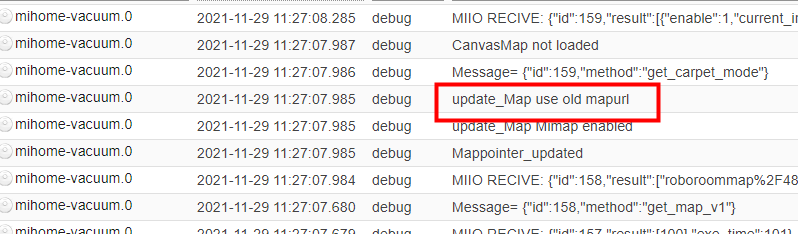
                hab mal auf debug geschaltet.

                Im log ist eigentlich nur dies ersichtlich / komisch:
                8f06c37b-9223-4bfb-8d1e-8c83957835f0-image.png


                Wenn ich helfen konnte, dann Daumen hoch (Pfeil nach oben)!
                Danke.
                gute Forenbeiträge: https://forum.iobroker.net/topic/51555/hinweise-f%C3%BCr-gute-forenbeitr%C3%A4ge
                ScreenToGif :https://www.screentogif.com/downloads.html

                1 Antwort Letzte Antwort
                0
                • bahnuhrB Offline
                  bahnuhrB Offline
                  bahnuhr
                  Forum Testing Most Active
                  schrieb am zuletzt editiert von
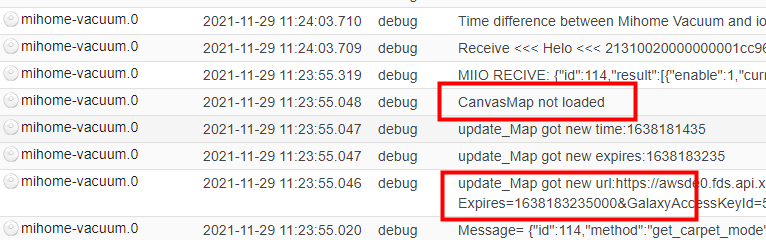
                  #9

                  und sowas:

                  1a143b7f-d738-4ffa-a4e5-f4c46bbd7df8-image.png


                  Wenn ich helfen konnte, dann Daumen hoch (Pfeil nach oben)!
                  Danke.
                  gute Forenbeiträge: https://forum.iobroker.net/topic/51555/hinweise-f%C3%BCr-gute-forenbeitr%C3%A4ge
                  ScreenToGif :https://www.screentogif.com/downloads.html

                  1 Antwort Letzte Antwort
                  0
                  • bahnuhrB Offline
                    bahnuhrB Offline
                    bahnuhr
                    Forum Testing Most Active
                    schrieb am zuletzt editiert von
                    #10

                    soll man so was:

                    cd /opt/iobroker
                    npm install canvas
                    

                    mal durchführen.

                    Habe ich aus einem anderen thread wo @Thomas-Braun dies geschrieben hatte.
                    https://forum.iobroker.net/topic/34945/too-many-symbolic-links-encountered-access-canvas/6


                    Wenn ich helfen konnte, dann Daumen hoch (Pfeil nach oben)!
                    Danke.
                    gute Forenbeiträge: https://forum.iobroker.net/topic/51555/hinweise-f%C3%BCr-gute-forenbeitr%C3%A4ge
                    ScreenToGif :https://www.screentogif.com/downloads.html

                    Thomas BraunT 1 Antwort Letzte Antwort
                    0
                    • bahnuhrB bahnuhr

                      soll man so was:

                      cd /opt/iobroker
                      npm install canvas
                      

                      mal durchführen.

                      Habe ich aus einem anderen thread wo @Thomas-Braun dies geschrieben hatte.
                      https://forum.iobroker.net/topic/34945/too-many-symbolic-links-encountered-access-canvas/6

                      Thomas BraunT Online
                      Thomas BraunT Online
                      Thomas Braun
                      Most Active
                      schrieb am zuletzt editiert von
                      #11

                      @bahnuhr

                      Ich würde das eher in den Unterordner des Adapters setzen.
                      Schau mal per

                      cd /opt/iobroker 
                      npm list canvas
                      

                      nach wo das liegt.

                      Linux-Werkzeugkasten:
                      https://forum.iobroker.net/topic/42952/der-kleine-iobroker-linux-werkzeugkasten
                      NodeJS Fixer Skript:
                      https://forum.iobroker.net/topic/68035/iob-node-fix-skript
                      iob_diag: curl -sLf -o diag.sh https://iobroker.net/diag.sh && bash diag.sh

                      bahnuhrB 1 Antwort Letzte Antwort
                      0
                      • Thomas BraunT Thomas Braun

                        @bahnuhr

                        Ich würde das eher in den Unterordner des Adapters setzen.
                        Schau mal per

                        cd /opt/iobroker 
                        npm list canvas
                        

                        nach wo das liegt.

                        bahnuhrB Offline
                        bahnuhrB Offline
                        bahnuhr
                        Forum Testing Most Active
                        schrieb am zuletzt editiert von
                        #12

                        @thomas-braun sagte in mihome-vacuum.0 läd keine Map!:

                        nach wo das liegt.

                        927354be-deb1-4c2c-98e2-afea5d25240e-image.png


                        Wenn ich helfen konnte, dann Daumen hoch (Pfeil nach oben)!
                        Danke.
                        gute Forenbeiträge: https://forum.iobroker.net/topic/51555/hinweise-f%C3%BCr-gute-forenbeitr%C3%A4ge
                        ScreenToGif :https://www.screentogif.com/downloads.html

                        Thomas BraunT 1 Antwort Letzte Antwort
                        0
                        • bahnuhrB bahnuhr

                          @thomas-braun sagte in mihome-vacuum.0 läd keine Map!:

                          nach wo das liegt.

                          927354be-deb1-4c2c-98e2-afea5d25240e-image.png

                          Thomas BraunT Online
                          Thomas BraunT Online
                          Thomas Braun
                          Most Active
                          schrieb am zuletzt editiert von
                          #13

                          @bahnuhr

                          Dann würde ich das im Ordner des Adapters dann mal neubauen. Wenn es überhaupt daran liegt.

                          Linux-Werkzeugkasten:
                          https://forum.iobroker.net/topic/42952/der-kleine-iobroker-linux-werkzeugkasten
                          NodeJS Fixer Skript:
                          https://forum.iobroker.net/topic/68035/iob-node-fix-skript
                          iob_diag: curl -sLf -o diag.sh https://iobroker.net/diag.sh && bash diag.sh

                          bahnuhrB 1 Antwort Letzte Antwort
                          0
                          • Thomas BraunT Thomas Braun

                            @bahnuhr

                            Dann würde ich das im Ordner des Adapters dann mal neubauen. Wenn es überhaupt daran liegt.

                            bahnuhrB Offline
                            bahnuhrB Offline
                            bahnuhr
                            Forum Testing Most Active
                            schrieb am zuletzt editiert von
                            #14

                            @thomas-braun sagte in mihome-vacuum.0 läd keine Map!:

                            Dann würde ich das im Ordner des Adapters dann mal neubauen

                            und wie ?

                            @thomas-braun sagte in mihome-vacuum.0 läd keine Map!:

                            Wenn es überhaupt daran liegt.

                            Wie ist das gemeint?

                            Nach meinem Screenshot müsste es dort doch liegen.


                            Wenn ich helfen konnte, dann Daumen hoch (Pfeil nach oben)!
                            Danke.
                            gute Forenbeiträge: https://forum.iobroker.net/topic/51555/hinweise-f%C3%BCr-gute-forenbeitr%C3%A4ge
                            ScreenToGif :https://www.screentogif.com/downloads.html

                            Thomas BraunT 1 Antwort Letzte Antwort
                            0
                            • bahnuhrB bahnuhr

                              @thomas-braun sagte in mihome-vacuum.0 läd keine Map!:

                              Dann würde ich das im Ordner des Adapters dann mal neubauen

                              und wie ?

                              @thomas-braun sagte in mihome-vacuum.0 läd keine Map!:

                              Wenn es überhaupt daran liegt.

                              Wie ist das gemeint?

                              Nach meinem Screenshot müsste es dort doch liegen.

                              Thomas BraunT Online
                              Thomas BraunT Online
                              Thomas Braun
                              Most Active
                              schrieb am zuletzt editiert von
                              #15

                              @bahnuhr sagte in mihome-vacuum.0 läd keine Map!:

                              Wie ist das gemeint?

                              Damit meine ich, dass es vermutlich eher nicht an einer recompilation liegt. Dann sähen die Meldungen im Log glaube ich anders aus.

                              Mit dem Pfad bin ich jetzt gerade überfragt, kann aber auch in meinem System nicht nachschauen.
                              Versuch vielleicht mal

                              cd /opt/iobroker/node_modules/iobroker.mihome-vacuum
                              npm install canvas
                              

                              Oder jemand anderes kommt mit einer gesicherten Idee um's Eck.

                              Linux-Werkzeugkasten:
                              https://forum.iobroker.net/topic/42952/der-kleine-iobroker-linux-werkzeugkasten
                              NodeJS Fixer Skript:
                              https://forum.iobroker.net/topic/68035/iob-node-fix-skript
                              iob_diag: curl -sLf -o diag.sh https://iobroker.net/diag.sh && bash diag.sh

                              A 1 Antwort Letzte Antwort
                              0
                              • Thomas BraunT Thomas Braun

                                @bahnuhr sagte in mihome-vacuum.0 läd keine Map!:

                                Wie ist das gemeint?

                                Damit meine ich, dass es vermutlich eher nicht an einer recompilation liegt. Dann sähen die Meldungen im Log glaube ich anders aus.

                                Mit dem Pfad bin ich jetzt gerade überfragt, kann aber auch in meinem System nicht nachschauen.
                                Versuch vielleicht mal

                                cd /opt/iobroker/node_modules/iobroker.mihome-vacuum
                                npm install canvas
                                

                                Oder jemand anderes kommt mit einer gesicherten Idee um's Eck.

                                A Offline
                                A Offline
                                AKuehnemann73
                                schrieb am zuletzt editiert von
                                #16

                                @thomas-braun
                                andreas@iobroker:/opt/iobroker$ npm list canvas
                                iobroker.inst@2.0.3 /opt/iobroker
                                ├─┬ iobroker.iot@1.8.24
                                │ ├── canvas@2.8.0
                                │ └─┬ jsdom@17.0.0
                                │ └── canvas@2.8.0 deduped
                                └─┬ iobroker.mihome-vacuum@3.3.1
                                └── canvas@2.8.0 deduped
                                das kommt bei mir wenn ich npm list canvas eingebe.
                                Was bedeutet das "deduped"?

                                Im Log des Adapters tauchen auch keine Fehler auf,
                                und "actual map" lädt er auch, nur map 64 und mapUrl stehen bei mir auf "null"

                                Thomas BraunT 1 Antwort Letzte Antwort
                                0
                                • A AKuehnemann73

                                  @thomas-braun
                                  andreas@iobroker:/opt/iobroker$ npm list canvas
                                  iobroker.inst@2.0.3 /opt/iobroker
                                  ├─┬ iobroker.iot@1.8.24
                                  │ ├── canvas@2.8.0
                                  │ └─┬ jsdom@17.0.0
                                  │ └── canvas@2.8.0 deduped
                                  └─┬ iobroker.mihome-vacuum@3.3.1
                                  └── canvas@2.8.0 deduped
                                  das kommt bei mir wenn ich npm list canvas eingebe.
                                  Was bedeutet das "deduped"?

                                  Im Log des Adapters tauchen auch keine Fehler auf,
                                  und "actual map" lädt er auch, nur map 64 und mapUrl stehen bei mir auf "null"

                                  Thomas BraunT Online
                                  Thomas BraunT Online
                                  Thomas Braun
                                  Most Active
                                  schrieb am zuletzt editiert von
                                  #17

                                  @akuehnemann73 sagte in mihome-vacuum.0 läd keine Map!:

                                  Was bedeutet das "deduped"?

                                  Das bedeutet, dass es ein Duplikat von der Installation unter iobroker.iot ist und darauf verwiesen wird.

                                  Linux-Werkzeugkasten:
                                  https://forum.iobroker.net/topic/42952/der-kleine-iobroker-linux-werkzeugkasten
                                  NodeJS Fixer Skript:
                                  https://forum.iobroker.net/topic/68035/iob-node-fix-skript
                                  iob_diag: curl -sLf -o diag.sh https://iobroker.net/diag.sh && bash diag.sh

                                  A 1 Antwort Letzte Antwort
                                  0
                                  • Thomas BraunT Thomas Braun

                                    @akuehnemann73 sagte in mihome-vacuum.0 läd keine Map!:

                                    Was bedeutet das "deduped"?

                                    Das bedeutet, dass es ein Duplikat von der Installation unter iobroker.iot ist und darauf verwiesen wird.

                                    A Offline
                                    A Offline
                                    AKuehnemann73
                                    schrieb am zuletzt editiert von
                                    #18

                                    @thomas-braun

                                    ok schon mal danke dafür.
                                    Das stellt aber ja wohl kein Problem dann da, oder?

                                    Vielleicht noch eine Idee warum dann trotzdem map 64 und mapURL auf "null" steht?

                                    Thomas BraunT 1 Antwort Letzte Antwort
                                    0
                                    • A AKuehnemann73

                                      @thomas-braun

                                      ok schon mal danke dafür.
                                      Das stellt aber ja wohl kein Problem dann da, oder?

                                      Vielleicht noch eine Idee warum dann trotzdem map 64 und mapURL auf "null" steht?

                                      Thomas BraunT Online
                                      Thomas BraunT Online
                                      Thomas Braun
                                      Most Active
                                      schrieb am zuletzt editiert von
                                      #19

                                      @akuehnemann73 sagte in mihome-vacuum.0 läd keine Map!:

                                      Das stellt aber ja wohl kein Problem dann da, oder?

                                      Nein, im Gegenteil.

                                      Vielleicht noch eine Idee warum dann trotzdem map 64 und mapURL auf "null" steht?

                                      Nein, ich kann aber auch nicht viel dazu sagen, da ich zwar einen V1 Sauger von xiaomi habe, aber keine Visualisierung für die Karte.

                                      Linux-Werkzeugkasten:
                                      https://forum.iobroker.net/topic/42952/der-kleine-iobroker-linux-werkzeugkasten
                                      NodeJS Fixer Skript:
                                      https://forum.iobroker.net/topic/68035/iob-node-fix-skript
                                      iob_diag: curl -sLf -o diag.sh https://iobroker.net/diag.sh && bash diag.sh

                                      A 1 Antwort Letzte Antwort
                                      0
                                      • Thomas BraunT Thomas Braun

                                        @akuehnemann73 sagte in mihome-vacuum.0 läd keine Map!:

                                        Das stellt aber ja wohl kein Problem dann da, oder?

                                        Nein, im Gegenteil.

                                        Vielleicht noch eine Idee warum dann trotzdem map 64 und mapURL auf "null" steht?

                                        Nein, ich kann aber auch nicht viel dazu sagen, da ich zwar einen V1 Sauger von xiaomi habe, aber keine Visualisierung für die Karte.

                                        A Offline
                                        A Offline
                                        AKuehnemann73
                                        schrieb am zuletzt editiert von
                                        #20

                                        @thomas-braun

                                        ok und wie kann ich das beheben?
                                        Vielleicht eine Idee?

                                        Thomas BraunT 1 Antwort Letzte Antwort
                                        0
                                        • A AKuehnemann73

                                          @thomas-braun

                                          ok und wie kann ich das beheben?
                                          Vielleicht eine Idee?

                                          Thomas BraunT Online
                                          Thomas BraunT Online
                                          Thomas Braun
                                          Most Active
                                          schrieb am zuletzt editiert von
                                          #21

                                          @akuehnemann73
                                          Nein. Gibt es denn im LogFile keine Meldungen?

                                          Linux-Werkzeugkasten:
                                          https://forum.iobroker.net/topic/42952/der-kleine-iobroker-linux-werkzeugkasten
                                          NodeJS Fixer Skript:
                                          https://forum.iobroker.net/topic/68035/iob-node-fix-skript
                                          iob_diag: curl -sLf -o diag.sh https://iobroker.net/diag.sh && bash diag.sh

                                          1 Antwort Letzte Antwort
                                          0
                                          Antworten
                                          • In einem neuen Thema antworten
                                          Anmelden zum Antworten
                                          • Älteste zuerst
                                          • Neuste zuerst
                                          • Meiste Stimmen


                                          Support us

                                          ioBroker
                                          Community Adapters
                                          Donate
                                          FAQ Cloud / IOT
                                          HowTo: Node.js-Update
                                          HowTo: Backup/Restore
                                          Downloads
                                          BLOG

                                          283

                                          Online

                                          32.7k

                                          Benutzer

                                          82.4k

                                          Themen

                                          1.3m

                                          Beiträge
                                          Community
                                          Impressum | Datenschutz-Bestimmungen | Nutzungsbedingungen | Einwilligungseinstellungen
                                          ioBroker Community 2014-2025
                                          logo
                                          • Anmelden

                                          • Du hast noch kein Konto? Registrieren

                                          • Anmelden oder registrieren, um zu suchen
                                          • Erster Beitrag
                                            Letzter Beitrag
                                          0
                                          • Home
                                          • Aktuell
                                          • Tags
                                          • Ungelesen 0
                                          • Kategorien
                                          • Unreplied
                                          • Beliebt
                                          • GitHub
                                          • Docu
                                          • Hilfe